This week on Lock and Code, we speak with Josh Saxe about artificial intelligence, machine learning, security, and where the three intersect.
In November of last year, the AI research and development lab OpenAI revealed its latest, most advanced language project: A tool called ChatGPT.
ChatGPT is so much more than “just” a chatbot. As users have shown with repeated testing and prodding, ChatGPT seems to “understand” things. It can give you recipes that account for whatever dietary restrictions you have. It can deliver basic essays about moments in history. It can — and has been — used to cheat by university students who are giving a new meaning to plagiarism, stealing work that is not theirs. It can write song lyrics about X topic as though composed by Y artist. It can even have fun with language.
For example, when ChatGPT was asked to “ Write a Biblical verse in the style of the King James Bible explaining how to remove a peanut butter sandwich from a VCR,” ChatGPT responded in part:
“ And it came to pass that a man was troubled by a peanut butter sandwich, for it had been placed within his VCR, and he knew not how to remove it. And he cried out to the Lord, saying ‘ Oh Lord, how can I remove this sandwich from my VCR, for it is stuck fast and will not budge. ’ ”
Is this fun? Yes. Is it interesting? Absolutely. But what we’re primarily interested about in today’s episode of Lock and Code, with host David Ruiz, is where artificial intelligence and machine learning — ChatGPT included — can be applied to cybersecurity, because as some users have already discovered, ChatGPT can be used to some success to analyze lines of code for flaws.
It is a capability that has likely further energized the multibillion-dollar endeavor to apply AI to cybersecurity.
Today, on Lock and Code, we speak to Joshua Saxony about what machine learning is “good” at, what problems it can make worse, whether we have defenses to those problems, and what place machine learning and artificial intelligence have in the future of cybersecurity. According to Saxony, there are some areas where, under certain conditions, machine learning will never be able to compete.
“If you’re, say, gonna deploy a set of security products on a new computer network that’s never used your security products before, and you want to detect, for example, insider threats — like insiders moving files around in ways that look suspicious — if you don’t have any known examples of people at the company doing that, and also examples of people not doing that, and if you don’t have thousands of known examples of people at the company doing that, that are current and likely to reoccur in the future, machine learning is just never going to count with just manually writing down some huristics around what we think bad looks like.”
Saxony continued:
“Because basically in this case, the machine learning is competing with the common sense model of the world and expert knowledge of a security analyst, and there’s no way machine learning is gonna compete with the human brain in this context.”
Samsung has received record-breaking pre-orders for the Galaxy S23 series in its homeland South Korea. According to local sources, the company received 1.09 million pre-orders for the new Galaxy flagships in the country. The devices broke pre-order records in India as well.
Samsung unveiled the Galaxy S23 lineup on February 1. While pre-orders began immediately after launch in most markets, the company kept fans on its home turf waiting until February 7. The pre-order period in South Korea ran until this Monday, February 13. During those seven days, as many as 1.09 million people in the country ordered the new Galaxy smartphones. The previous record was 1.01 million set by last year’s Galaxy S22 series over eight days.
Unsurprisingly, the Ultra model is the crowd favorite once again. The Galaxy S23 Ultra has accounted for about 60 percent of overall pre-orders (650,000 units). The base Galaxy S23 accounted for 23 percent of pre-orders, while the Galaxy S23+ captured the remaining 17 percent share. This has been the trend in recent years. The Plus model has been the worst-selling device in the lineup. Perhaps that is why Samsung is mulling canceling it altogether next year, launching only two Galaxy S24 models.
Samsung’s pre-order promotions may have also helped drive Galaxy S23 Ultra sales. The company offered a 44mm Galaxy Watch 5 Bluetooth model for free to anyone who pre-ordered the 1TB storage variant of the phone, which is priced at KRW 1,962,400 (approx. USD 1,530) in South Korea. All buyers also got the SmartThings Station for free, along with a discount coupon for the Galaxy Buds 2 Pro. This is on top of the free storage upgrade that Samsung is offering in most markets.
The Galaxy S23 series broke the pre-order record in India as well
Samsung’s latest flagships aren’t only popular in its home country. The word of mouth is very strong and is helping drive sales globally. The phones received record-breaking pre-orders in India as well. While we don’t have the total numbers, the Galaxy S23 trio reportedly received 1,40,000 pre-orders in the country within the first 24 hours. That’s twice as much as the Galaxy S22 series last year.
This overwhelmingly positive response from the public may help Samsung achieve its Galaxy S23 sales target this year. The company is looking to sell at least 26 million units of the three models combined, about ten percent more than the Galaxy S22 series. It’s an ambitious target considering the current market situation. Time will tell whether the Korean firm manages to sell that many Galaxy S23 phones by the end of 2023.
After the whole LastPass fiasco, many users are wary of entrusting their sensitive information to online password managers. But the era of password-protected vaults may soon be a thing of the past, as leading tech companies, including 1Password, are pushing for a new form of authentication technology that is more secure than passwords called passkeys. The company recently announced plans to support passkeys in the summer of 2023, allowing users to log in to accounts without using a master password.
This move follows the acquisition of ID authentication start-up Passage and the company’s announcement last year that users would soon be able to log in to apps and websites through its platform using passkeys. While 1Password already supports biometric authentication, CPO Steve Won believes that “For passkeys to be the way forward, it’s not enough for them to replace some of your passwords. They have to be able to replace all passwords – including the one you use to unlock 1Password.”
What are Passkeys?
Developed by the FIDO alliance, Passkeys, rather than relying on traditional passwords, which can be vulnerable to theft or compromise, uses public key cryptography and unique digital keys stored on your device to allow users to log in using their device’s authentication, such as a fingerprint or face ID scan. This eliminates the risk of phishing attempts, as malicious actors would not have access to the site-stored counterpart to the device-stored keys.
The company’s shift towards passkeys follows in the footsteps of other companies, such as Dashlane, which has already incorporated this technology into its service. Further, Google has also released the Credential Manager API to make it easier for app developers to support multiple login methods, including passwords and passkeys.
1Password will roll out the passkeys feature later this summer, but according to CPO Won, “The migration to passwordless won’t happen overnight, so we’re going to make it optional to start when we hit this summer. We have to meet people where they are. However, our goal is to go passkey-only as soon as possible.”
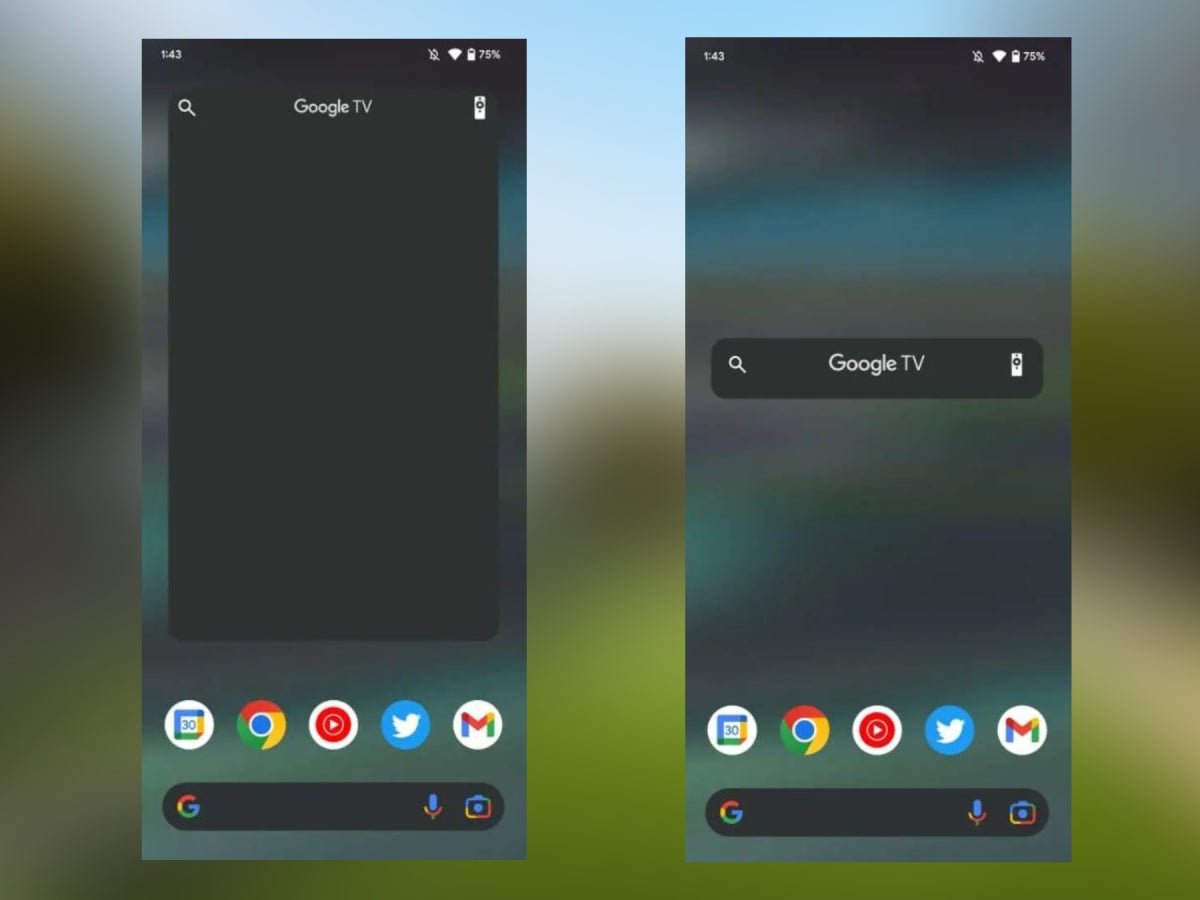
The latest version of the Google TV Android app has gotten a widget. Great! But it feels kind of limited. Seems like Google has jumped the gun and released it a bit earlier than expected. Or at least that’s what this report from 9to5Google points to.
If you are not familiar with it, Google TV is a service that combines all of your streaming subscriptions into one place. Its dedicated app is one of the things you’ll need in order to take advantage of the free service, but you’ll also need a Chromecast or a TV that comes with Google TV. You can get a remote too, if you feel like it — one that Google has made — but the app already has a feature for that.
So why would Google TV need a widget? Well, to be honest, from what we’ve seen, this more so confirms that a widget is being worked on. Right now, the widget can be placed only on Pixel 7 Pro phones, which are running the latest version of the Android 13 QPR2.
If you are among those individuals, you can download the Google TV app and it will provide you with the unique opportunity of placing a 4×5 widget on your screen. And after you’ve done that, it will shrink down to a smaller horizontal bar. Yay?
Some screenshots of the upcoming widgets taken by 9to5Google.
Right now, the Google TV widget will allow you to do the following:
Click the magnifying glass to open your keyboard (yes, it is confusing)
Tap on the remote to open the Google TV virtual remote
Touch the Google TV logo in the middle to open the app
It doesn’t take a degree in rocket science to see how this may not be working exactly as the Big G intended. Especially when you take into consideration the amount of screen real estate that the widget expects you to sacrifice, only to display a tiny strip with three functions. And yes, this is our way of confirming that it wont let you resize it.This, however, can get you hyped to actually receive a properly working Google TV widget. Maybe it will follow in Hulu’s steps and display a list of content that you may be interested in, or it may simply be a functional duplicate of the remote, saving you the effort of not having to open the app itself. That’d be neat, right?
Android is home to numerous widgets and many of them are owned, maintained and regularly updated by Google itself. That, however, doesn’t seem to attract users too much. Let’s hope that when the Google TV widget is truly complete, it will offer more of a reason for users to use it.
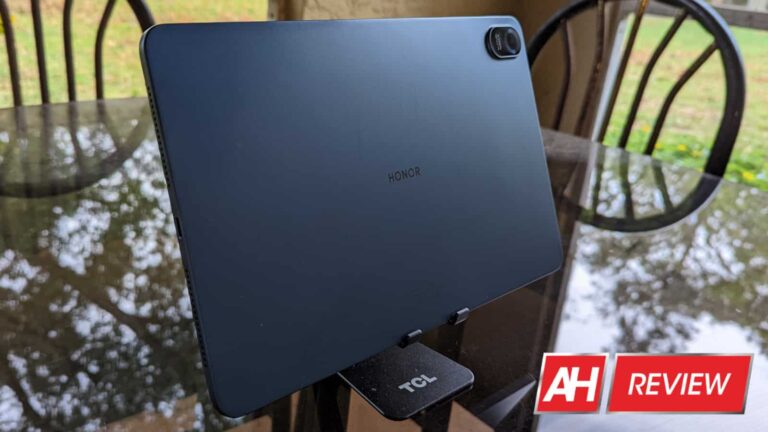
The tablet market is not where it used to be. These devices were snuffed out by the phablet market a few years back, and now it’s struggling. However, companies like Honor still want to prove that tablets are still relevant. We were given the opportunity to review the new Honor Pad 8. Should this tablet be your next business companion? Let’s find out.
Build and design
Starting off with this tablet’s design, there’s not much that stands out. It’s a pretty straightforward slab with a singular camera housed in a slight camera bump. It has a solid metal body that feels nice to the touch. Picking up this tablet, it doesn’t feel like you’re grabbing a cheap device at all.
We have two speakers on each side of the tablet with the USB-C port in between one pair. There’s no headphones jack for this device, unfortunately, so it’s either the speakers or your Bluetooth headphones.
There is one strange decision that the company made regarding the volume rocker. Though this is a device best used in landscape mode, the volume rocker is set up to operate as though you’re using it in portrait mode. So, when you flip it to landscape mode, the volume button works opposite of how you’d expect them to work.
Display
The Honor Pad 8 comes with a nice 12-inch 2000 x 1200 LCD panel. There aren’t any bells or whistles with this display, but it’s still a great panel to look at. We’ve become accustomed to looking down on LCD displays compared to OLED displays, but times have changed.
This display has great punchy colors, exceptional contrast, and amazing viewing angles. This is definitely an upper-tier LCD display. If you want to adjust the color temperature of the display, you can do so from the settings.
This display’s about 16% sharper than a traditional 1080P display, but you’ll notice some pixels if you really look closely at the screen. Regardless, the screen is still pretty sharp for its size.
Speakers
The Honor Pad 8 comes with a fantastic set of quad-speaker. They’re set up to have two speakers on each side of you while in landscape mode.
As for the audio quality, these speakers have a lot of depth to their sound. There’s decent bass in the sound with enough attention to the mids and treble to create an all-around great listening experience.
While listening to classical music, it’s an extremely well-balanced experience, but they really shine while listening to more modern music.
If you want to choose between different sound profiles, you can do so in the settings. Digging into the sound settings, you can choose different EQ presets based on different listening scenarios. You can pick a preset for music, games, movies, or vocals. There’s also a standard mode and an auto mode. The auto mode chooses a preset based on what you’re doing.
Performance
This tablet doesn’t exactly have the latest and greatest silicon under the hood, but it’s tough to notice in real-world usage. It uses the Qualcomm Snapdragon 680 4G SoC. However, the instances of stutter within the interface were extremely rare. Gliding through the interface is buttery smooth, and the fluid animations only make it better.
On the gaming front, the Honor Pad 8 was able to easily handle any game that I threw at it. It, of course, handled the simple 2D titles like Simon’s Cat’s “Crunch Time” and simple 3D games like Final Fantasy VII with no hassle.
But, those aren’t going to broil a GPU. Kicking things up a notch, I went and installed Genshin Impact on the tablet. It played respectably smooth with only slight jitters every once in a while. It was more than playable. You should have no trouble making this your primary gaming mobile device.
Camera
The camera is the only area where this tablet truly fails. Being a tablet, you shouldn’t really expect it to have stellar camera performance. However, in the case of the Honor Pad 8, it’s really bad.
You’re given a 5MP camera on both the front and the back. This low resolution, coupled with the large size of the screen, makes taking photos with this tablet a rather poor experience.
Not only are the images extremely grainy and blurry (even in good lighting conditions), but once you turn the lights down a little, the quality degrades quickly.
In bright lighting conditions, you’ll have better luck but not much. Also, to make things worse, the colors and dynamic range are just not there. The story is the same for the front-facing camera.
While the camera quality is bad, it’s a feature that you’re not likely to use on a tablet. If you’re in a pinch, it will get the job done, but it’s understandable that the company chose this to compromise.
Battery
The battery life for this tablet is amazing. It’s rocking a 7,250mAh battery. I was able to go through heavy work days with hours of writing and some light gaming, and I ended the day with more than 30% left. You’re good to bring this tablet out with you for a workday and not worry about needing a charger.
When it comes to charging, you get up to 22W charging. It’s not the fastest out there, and it will charge the battery in a few hours, so you’ll want to plan your charges.
Software
The latest version of the software I’m using is Honor’s Magic UI 6.1 running on Android 12. This is a heavily-modified Android skin. Thus, you’re not going to see any Material You influence at all. This means that there’s also no Dynamic Color, unfortunately. The camera and microphone indicators are there, however.
Honor took the software in its own direction, and it work for the most part. One issue is that some parts of the software remind me of the software on older Samsung devices. The settings menu even resembles TouchWiz from back in the day (yikes!).
Overall, the software is great to navigate. However, since it’s so departed from stock Android, it doesn’t seem likely that it will get the tablet optimizations we see with Android 12L and 13. The software is still the phone version of Android but stretched out. You still have the benefit of using tablet-optimized first-party Google apps like YouTube Music and Google Calendar.
Other little gripes
There are a few little things that I had an issue with. They’re not gigantic, but they’re still worth noting.
Firstly, this tablet uses facial recognition to unlock it along with a passcode. The facial unlocking isn’t the best. There are times when I need to move the tablet when the lighting conditions aren’t absolutely great. I think that the low resolution of the front-facing camera contributes to this difficulty.
Lastly, if you want to add widgets, they’ll be a bit hard to find at first. There isn’t really a widgets section in the home screen settings. Rather, it’s referred to as “Cards” (Cards are Honor’s first-party apps’ widgets).
You’ll have to scroll all the way down in the cards section and tap on the “Classic Widgets” button. The button itself is really out of the way. You’ll then see all of the standard widgets for your other apps. Honor put so much emphasis on its first-party product that it neglected such a basic feature. It’s a little frustrating.
Should you buy the Honor Pad 8?
In a word, yes! This is a fantastic tablet for its price, and it punches far above its weight class. The performance, speakers, and display are great, and the software is not too shabby.
The only downside is the camera, but the majority of people won’t even use it. This makes it easy to give that aspect a pass.
If you’re looking for a great device for both work and play, then I highly recommend that you pick up the Honor Pad 8.
Google has become an inevitable thing in our day-to-day life. Especially, mobile apps are being developed every day to make life better with technology.
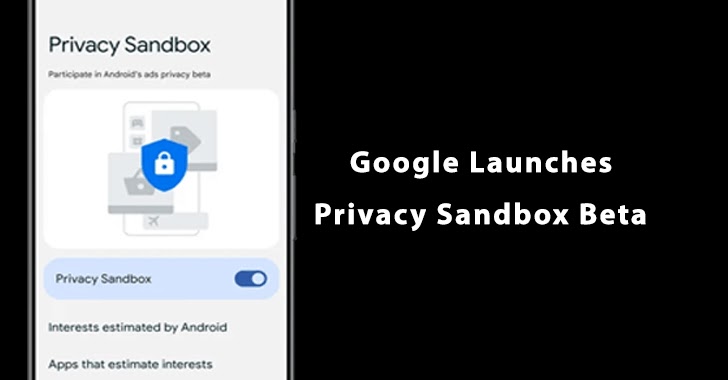
Now the company officially announced that they are rolling out Privacy Sandbox Beta for a few percent of Android 13 devices.
Privacy sandbox may help users to limit the sharing of data with third parties and to operate without cross-site and cross-app identifiers.
“The Privacy Sandbox on Android builds on our existing efforts on the web, providing a clear path forward to improve user privacy without putting access to free content and services at risk,” reads the company statement.
Privacy Sandbox Beta
The new Feature is to be available for a few Android 13 years, if your user got selected, then you will get a notification.
With Privacy Sandbox settings you can control Beta participation, it may ask to select topics of interest.
By selecting the topics of interest, your displays will get narrowed and you will get only the relevant ads displayed.
If you are not interested to continue with Privacy Sandbox you turn it off or back on in Settings.
App developers who want to participate in Beta can integrate the APIs to show the relevant ads.
“Our goal with the Privacy Sandbox is to enhance user privacy while providing businesses with the tools to succeed online.”
Privacy Sandbox For Web
On the web, Privacy Sandbox helps with third-party cookies and other forms of tracking like fingerprinting by restricting the information accessed by the website.
“Building on our web efforts, we’re developing solutions for digital advertising that limit user data sharing and don’t rely on cross-app identifiers.”
The ultimate goal of Privacy Sandbox is to enhance user privacy and for businesses to deliver ads to interested users.
“Evolving digital advertising to enhance user privacy, by moving away from reliance on cross-app tracking, is vital for the future of a thriving mobile ecosystem. We’ll continue to work closely with developers, marketers, and regulators on this journey.”
This Valentine’s Day, we ask the inevitable password question: is it okay to share passwords with your partner?
To share or not to share? When it comes to love and romance, that is the password question, isn’t it?
This Valentine’s Day, we attempt to lift the lid on this steamy cybersecurity subject to see if two people in a romantic relationship are both on board on the matter of exchanging passwords with each other. Some might generally see this as something someone would logically and naturally, do—even at the early stage of dating. But the bigger question is: Is it wise?
Why couples share their passwords
They say it’s all about trust.
At least that was one of the reasons Comparitech found when it asked 1,000 survey respondents why they share their social media passwords with their partners. Others admitted to sharing out of convenience, transparency, and even as proof of devotion. We can throw in practicality here, too, because if couples share their different streaming accounts with each other, for example, they can save money. But the top reason was they “have nothing to hide”.
Password sharing among couples is really very common. Pew Research said a majority of Americans have shared their smartphone password or passcode (75 percent), email account (62 percent), and social media accounts (42 percent).
Perhaps one reason one would agree to share their passwords is so we’re ready for worst-case scenario situations.
“For the same reason everyone should have wills, if something happens to your significant other — i.e., they die or are in a coma — and you can’t access their phone, it’s a huge issue,” said a woman named Benita, who was interviewed by The Cut on this subject. “My husband and I talked about this specifically because it was a problem for his mom when his dad died. She didn’t even know the cable password or Wi-Fi info, and it was hard for her. My husband and I also have each other’s fingerprints saved on our phones. That said, I have never gone into his phone. But I can, and that’s what matters.”
Why couples don’t share their passwords
They say it’s all about privacy.
But, surprisingly, this is not the top answer, per the same survey results. In fact, the top result was a bit funny and anticlimactic, really (sorry): no one asked for each other’s passwords.
Some respondents also viewed password sharing with their partner as “too controlling”. Apart from not feeling comfortable with the idea, some also don’t believe it’s a validating factor for their relationship and have the hindsight to protect their accounts in the event of a relationship fallout.
“It’s no secret that password-sharing is a way for consumers to get around the cost of paying for multiple services,” Hari Ravichandran, founder and CEO of digital safety provider Aura, told NPR. “What consumers aren’t considering is that these behaviors make them vulnerable to digital crime when people outside your household—even ones you trust—have your passwords on their devices.”
And then there’s the issue of when you break up with your significant password-sharing other…
What to do if your ex has your password
1. Change your password/pin code.
The most logical thing to do when an ex has your password is to change it. If your ex knows your phone pin code, change that, too, or use a different Lock Screen method like a pattern. And while we’re on the subject…
2. Never reuse your password.
Sharing the one password that unlocks every online account you have with your partner—or anyone, for that matter—is like lovingly presenting someone with a big red button that sets everything on fire. And that might happen if you don’t start making unique passwords for every single one of your online accounts.
3. Enable two-factor authentication (2FA)
In the event that you can’t change your password, you can still keep your account out of your ex’s reach by setting up a second verification layer: 2FA—provided you haven’t set this up yet. Make sure that you’re using the strongest 2FA option for that account.
4 Lie.
Some accounts use security questions as a form of verification. If you’ve been with someone who has grown to know you too well, another way to lock them out of your account is to lie about your real answers to those security questions. Just keep a record of those lies hidden somewhere accessible yet safe so you don’t end up locked out yourself.
5. Reset and reclaim your computing and smart devices
Couples share a lot of things, including computers (desktop, laptop) and IoT (internet of things) devices. Before you reclaim your devices, make sure you do a factory reset on all of them to flush out all the things, including access your ex may still have to it. For computers, wipe your browsing and search histories, bookmarks, and saved credentials and card details.
Too risky or so worth it?
Password sharing in a romantic relationship is seen by some as a litmus test for couples or a right of passage in a modern, digitally-driven world. So before you and your better half go for it, make sure you and your partner know the cons of doing this as much as the pros. Forget what other people think and say—it’s not about them, anyway. At the end of the day, the decision falls on only the both of you.
The Cut’s Liz Krieger said it best. Think of sharing passwords with your partner as “less as a litmus test and more like a Rorschach test”, otherwise known as ‘the inkblot test’.
“[W]e see in it what we want, what our past has taught us to see, and ultimately, what we hope to be true”.
We don’t just report on threats—we remove them
Cybersecurity risks should never spread beyond a headline. Keep threats off your devices by downloading Malwarebytes today.
Meizu is making a comeback. The company has just announced that its new flagship lineup, the Meizu 20 series, will include the Snapdragon 8 Gen 2 SoC. The devices are expected to launch next month.
The Meizu 20 flagship series is coming soon with the Snapdragon 8 Gen 2 SoC
Meizu confirmed this via Weibo, and we’re presuming that two phones are coming. The company will likely announce the Meizu 20 and Meizu 20 Pro during the event. Those two phones were rumored in the last couple of months.
Now, the company not only confirmed that Qualcomm’s most powerful chip will be in play, but some extra info as well. Meizu will take advantage of LPDDR5X RAM and UFS 4.0 flash storage. In other words, the company won’t be cutting corners.
This is what the Meizu 20 Pro will look like
That being said, a well-known tipster also showed us the device ahead of time. Digital Chat Station shared an image of the Meizu 20 Pro, which you can see below this paragraph.
As you can see, the device will feature flat sides. It will probably include a glass backplate, at least this model. Its cameras protrude straight from the backplate, and are placed neatly one below the other in the top-left corner. There are three cameras here, and an LED flash below them.
The device will include a flat display, and a centered display camera hole. You will also notice that all of its physical keys sit on the right-hand side of the phone.
It has been almost a year and a half since Meizu announced a single phone
The last phones Meizu announce were the Meizu 18 and 18s. Those two devices arrived in September 2021. So, it has been almost a year and a half at this point, since Meizu announced a single phone.
The Meizu 20 Pro does look interesting, and the shared specs do look promising. Meizu was once an up-and-coming company, with great promise, but something went wrong along the way. Now it has a new owner, and it remains to be seen if it can leave a significant footprint in the smartphone market.
It cost Google around $100 billion in market cap after its brand-new AI (artificial intelligence) chatbot Bard made a factual error during its first demo. The company was blamed for rushing to catch up to Microsoft’s ChatGPT-powered Bing and not focusing on improving the service. Turns out Bing’s demo was full of mistakes too. It made more mistakes than Bard, and those are now coming to the fore.
Microsoft’s Bing AI demo was full of mistakes
Independent AI researcher Dmitri Brereton recently detailed some egregious mistakes that Bing made during its demo. Most notably, Microsoft’s search engine got it all wrong when summarizing Gap Inc.’s Q3 2022 financial report. The San Francisco-based clothing brand reported a gross margin of 37.4% during the quarter, with an adjusted gross margin of 38.7% excluding impairment charges. But Bing inaccurately reported a gross margin of 37.4% including the adjustment and impairment charges.
Even if you excuse Bing for this mix-up, it then started to make up numbers on its own. It said that Gap reported an operating margin of 5.9% in Q3 2022, adjusted for impairment charges and restructuring costs. This number doesn’t appear anywhere on the official document from the clothing brand. The correct figure is 4.6%, or 3.9% adjusted but excluding the impairment charge. Bing got the diluted earnings per share wrong too. It reported a value of $0.42 adjusted for impairment charges. Gap’s document says diluted earnings per share of $0.77 (adjusted excluding impairment charges is $0.71).
Bing’s errors don’t end there. It said Gap is “expecting net sales growth in the low double digits” for the fiscal year 2022, and is estimating “an operating margin of about 7%, and diluted earnings per share of $1.60 to $1.75”. The problem is, the company didn’t say anything about its outlook for operating margin or diluted earnings per share. Additionally, it said “net sales could be down mid-single digits year-over-year in the fourth quarter of fiscal 2022,” not the full year. Quite clearly, the ChatGPT-powered Bing failed to comprehend Gap’s report and failed terribly.
Bing was also asked to compare Gap’s financial report to that of Lululemon for the same period. It made several mistakes there as well. Lululemon’s gross margin was 55.9% but Bing reported 58.7%. Its operating margin was 19%, not 20.7%. Its diluted earnings per share were $2.00, not $1.65. Bing inaccurately reported cash and cash equivalents for Gap as $1.4 billion (should be $679 million). Last but not least, the inventory value for Gap should be $3.04 billion, not $1.9 billion.
Bing even got some basic things wrong
During its demo, Bing also failed to differentiate between a corded and cordless vacuum and provided inaccurate and made-up details about bars in Mexico City. But these mistakes have continued after the on-stage demo. Now that the new Bing is available to the public, people are finding that it is as terrible at providing some basic information too. It argues that 2022 is yet to come. “Avatar: The Way of Water is not released yet. It is scheduled to be released on December 16, 2022, which is in the future. Today is February 12, 2023, which is before December 16, 2022,” Bing said when enquired if the movie has been released.
Bing also hallucinated about the Super Bowl and kicked Croatia out of the European Union. Overall, Microsoft’s new ChatGPT-powered search engine is doing terribly badly in some basic tasks that you’d expect AI to excel at. Hopefully, the Windows giant will get things correct soon with Google coming at it fast. Industry experts see a two-horse race between Google and Microsoft in this AI revolution over the next decade. It remains to be seen who comes out on top. Both have started pretty badly but should pick up pieces soon and… game on.
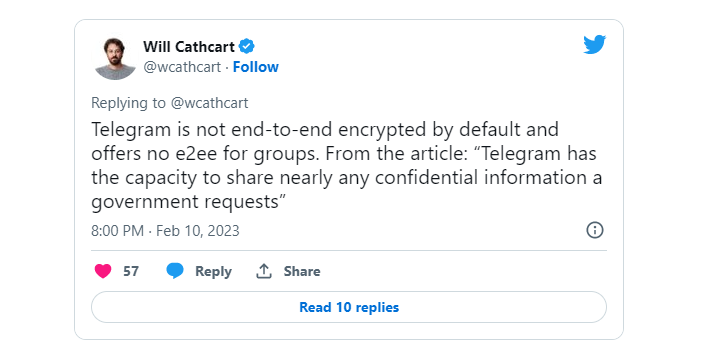
Well, the chat app wars are raging, and the latest strike comes from Will Cathcart, Head of WhatsApp at Meta. In a rapid-fire style series of tweets, Cathcart mounts some serious attacks, calling Telegram “Russian spyware,” and urging people not to use it.
This war is a long-standing one, and it dates way back in time, but the latest point of discussion seems to be end-to-end encryption. Cathcart referred to an article by Wired and his own critique of Telegram’s implementation of end-to-end encryption (E2EE), pointing out that it has not been verified independently. Additionally, Cathcart noted other weaknesses in the E2EE implementation, such as the fact that it is not enabled by default and is not available for group chats.
“Telegram lacks real transparency most technology companies have adopted. “In many cases, it’s impossible to tell what’s really happening…whether spyware or Kremlin informants have been used to break in.”
You can jump to Twitter and “enjoy” the whole show (with or without popcorn), but it’s safe to say that there are always two sides to every story. WhatsApp has been criticized for backing up chats to Google Drive and effectively giving government agencies the means to warrant out any information through Google.
Cathcart rounds up his attack with some “friendly” advice for people who don’t want to use WhatsApp for some reason. “Don’t use Telegram!” WhatsApp’s head doesn’t list any alternatives, but experts in the industry think that Signal is the most secure option at the moment.