The first injection redirected users to a spammy sports website, whereas the second one boosted the authority of a spammy casino website in search engines.
Cybersecurity researchers at Sucuri have shared their research on how WordPress vulnerabilities can jeopardize the system’s security and that usually already discovered flaws are used to compromise WordPress sites with multiple infections.
Researchers noted that outdated websites are highly likely to be exploited by multiple attackers, or the same hacker can target them using multiple channels. The latter scenario was recently identified by Sucuri’s researchers, who detected a database injection featuring two different malware embedded together to achieve two entirely different goals. Both the malware could be found scattered over a WordPress database.
The first injection redirected users to a spammy sports website, whereas the second one boosted the authority of a spammy casino website in search engines. As per Sucuri, nearly 270 websites were impacted by the first injection, and the second impacted 82 websites.
One of the compromised WordPress websites (Image credit: Sucuri)
The first injection’s domain performs the redirecting process. The browser is instructed to wait for 60 seconds, after which a redirect is made to the domain “hxxp://redirect4xyz.” The user is redirected again, and they arrive on this spam domain: hxxp://pontiarmadacom when the first redirecting process is complete. This spammed site has iframes that disseminate malware to clueless users.
The second injection’s domain, “hxxp://nomortogelkuxyz,” is a gambling casino site that uses a common methodology to boost its authority in search engines. This attacker used a black hat SEO tactic and placed an invisible link throughout the compromised sites to improve its domain authority and appear genuine.
It is worth noting that, according to Sucuri’s blog post, both injections use the ‘.xyz’ domain extension, which attackers commonly use in such campaigns. These domains are available at cheaper rates for the first year, which explains why it is used extensively.
However, the presence of two different infections on the same website shows how attackers can disseminate various malware on the same site and how different bad actors can exploit a single flaw to infect the site.
Threat actors can easily monetize the same outdated sites with different malware to get full access. The problem lies in vulnerable WordPress plugins/themes, which allow multiple threat actors to exploit and distribute malware.
To mitigate the threat, keep your WordPress site plugin themes and software up-to-date by enabling auto-updates so that vulnerabilities are patched on time. Moreover, a web application firewall can block attacks caused due to vulnerabilities and add another layer of protection for a vulnerable site.
Additionally, the admin user count should be low, and securer passwords should be created for all accounts. Lastly, it is essential to enable two-factor authentication (2FA) to secure the WordPress admin accounts from unauthorized access.
Content creators on YouTube can now access a plethora of various songs through Creator Music. The feature is a part of the YouTube Partner Program and allows creators to select and purchase song licenses for their videos without worrying about copyright violations.
The licensing problem of commercial music has always been a source of annoyance for content creators on YouTube. These creators often find their ad revenue is given away to song license holders. YouTube wants to solve this issue with Creator Music as a straightforward method for purchasing song rights and preventing copyright infringement.
The Creator Music has been around since last September. While many YouTube content creators rely on third-party marketplaces to purchase songs, Creator Music provides an in-house marketplace. It also includes songs with a revenue-sharing option to benefit both the creators and rights holders.
YouTube Creator Music encourages content creators to purchase songs rights
If you’re a member of the YouTube Partner Program, you can now browse through available songs. On the related dashboard, you can also search for your favorite songs and choose them based on criteria like moods, genres, and collections. There is also a feature for searching songs based on rights costs, which is handy for those on a tight budget.
Creators have two ways to pay for the song. First is the conventional method that proceeds to a checkout option and downloads the song. A second way is a revenue-sharing option, meaning the creator should split his ad revenue with the song rights holder. Of course, this option might not be available for all songs.
YouTube already offers the Audio Library of free tracks, and the good news is Creator Music isn’t going to replace it. To access the free songs on the Creator Music dashboard, you can set the price filter to $0.
Besides benefits like preventing copyright infringements and managing video production costs, Creator Music allows YouTube to compete better with TikTok, especially for Shorts. The competition between YouTube and TikTok can benefit the music industry and help novice artists to get recognition.
Google Fiber is beginning to push its 5 Gig service out to customers today. The service plan, which costs $125 a month, promises download and upload speeds of 5Gbps each. Making this the perfect plan for anyone with a huge demand for high amounts of internet usage and bandwidth.
Think multi-person households where everyone has at least one to two devices that are constantly connected to the internet. Which, isn’t that uncommon these days with all the different gaming consoles, gaming PCs, streaming TV boxes and more that can be under one roof. And that’s without factoring in a plethora of smart home appliances. The Google Fiber 5 Gig service was initially announced back in October of 2022. So there’s been a bit of a wait for those who will have the option to check out this plan.
That brings us to the downside of the roll out. It’s limited. Though this shouldn’t be too surprising as Google Fiber itself is limited and has been from the beginning.
Google Fiber 5 Gig services are rolling out to four cities across the US
While Google Fiber itself is available in more than four cities, the 5 Gig service plan will be limited to four. Those include both Salt Lake City and Provo in Utah, as well as West Des Moines, and finally Kansas City. Customers in those locations can sign up for the 5 Gig service plans today.
For anyone not in those four cities, Google does confirm that it will expand the 5 Gig to other cities in the future. It doesn’t way when though. Nor does it mention which cities it will come to next. That being said, if you live in a city that currently has Google Fiber, keep an eye out for the new plan.
Google will surely notify its current customers when things become available.
When Musk sat upon the blue-cushioned, faux-gold Twitter throne, he vowed to offer amnesty to users who’ve been suspended in the past, seemingly regardless of reason. He’s already restored the accounts of numerous infamous personas, even such ones that have been known to start a bit of an online riot. This act was a display of confidence in Twitter’s new regulation and to take things further, the social platform now has a public appeal process too. Any user with a locked, blocked, suspended or banned Twitter account can initiate the flow through this online form.
This is an effective realization of the company’s own announcement of the process, which happened earlier this week. While it’s good that they were quick to make that promise a reality, we can’t help but wonder what that may lead to, and would it include repeated instances of users getting banned?
Well, supposedly not. The Twitter Safety account shared that the plan is to take “less severe” actions against rule breakers from here on out. For example, offenders may have their reach limited or they may even get outright asked to delete certain tweets that don’t comply with the currently established rules.
That isn’t to say that we won’t see Twitter users getting banned, though. That esteemed status is reserved only for those who truly test the limits of Twitter’s policy, or become repeat offenders, despite becoming witness to the warning signs.
One must, however, ask: how does the appeals process work? Well, given that we don’t have a banned Twitter account lying around, we can’t really say. There’s basically no info about it as of now either. The company expects a high volume of requests to test their “new criteria” though, so maybe after some users emerge on the other side, they can let everyone know how it went.
Let’s just get one thing out of the way from the start so there’s no illusions. The SteelSeries Arctis Nova Pro Wireless isn’t perfect, and we think our review reflects that. That being said, this is probably about as perfect as a gaming headset can be. For now. Let me put it another way. The Arctis Nova Pro Wireless is a shining example of how good a gaming headset can be when your primary objective is excellent sound quality.
But it’s not just the sound quality that makes this headset stand out from virtually every competitor. The headset comes with many of the features available on other high-end options. Plus a few rare and/or unique features that you won’t find anywhere else. No matter how hard you try. SteelSeries really did nail this one. And for us, at least, a lot of that is owed to the design as much as the other excellent features.
But like I said. The Arctis Nova Pro Wireless isn’t perfect. It’s expensive, and I’ve run into the occasional hiccup during my time with it. I still love it though, and it quickly and easily has become my favorite gaming headset to use for everything. So let’s get into why.
The Arctis Nova Pro Wireless is the battery life king
One of the biggest issues with wireless headsets has always been battery life. Even now, wireless headsets still struggle with it. With the Arctis Nova Pro Wireless this is a non-issue. SteelSeries has kept the same battery design as its older Arctis Pro.
With removable batteries that can be swapped out when one gets low enough to need a charge. This ensures you’re always keeping one battery charged up at all times so it’s ready to go. Then when you need to swap the one in the headset out for the charged one, you simply slide the dead battery into the side of the game DAC and repeat the cycle.
What I really liked about this is that I never had to actually charge the headset. There’s always a powered-up battery good to go which means I just have to turn the headset on and use it. I never worry about battery life anymore. The batteries on the Arctis Nova Pro Wireless are also hot-swappable. You have about 5-8 seconds from the time you take the battery out of the headset to pop in the new one before it disconnects.
Which is extremely useful for when you’re in voice chat. In my time with the headset so far, I’ve had to hot swap the battery about 10 times. And each time it became more apparent how useful it is to have a feature like this. More or less, this gives the Arctis Nova Pro Wireless what feels like a nearly infinite uptime. As long as you always have one battery charging/charged up. This is also quite possibly the best thing about this headset. Though, it’s hard to say because there are so many other good features here.
Use it with all your platforms
Does it annoy you when you have to disconnect your wireless headset dongle from one platform and move it to another? While having a single headset for all your gaming platforms is great, this is one problem I’ve ran into for years.
The Arctis Nova Pro Wireless solves this problem as well. And it’s all thanks to the game DAC. It lets you keep two devices plugged in at once. There are two USB ports on the back so you can keep one plugged into your PC and another plugged into your console, in my case the PS5. Then anytime you want to use the headset with one or the other, all you have to do is use the game DAC to change the audio input to the device you’re playing on.
It can even simultaneously connect to mobile via Bluetooth while you’re connected to PC or console wireless audio using the game DAC. I will typically use this feature when I play on PS5 but want to be in a voice chat on Discord. For example, during the Call of Duty: Modern Warfare II Beta last month. I was playing on PS5 with friends who were on PC, and we all hopped into Discord. Then I connected the headset to my phone and hopped into the call through the Discord mobile app.
I also tend to play Final Fantasy XIV on PS5 but many of my friends are on PC. Which always left me with choosing what audio to hear. I could either listen to Discord or the game. Sometimes both, if I wanted to slip one of the headset earcups off. But that became uncomfortable pretty quickly. With the simultaneous connection, you don’t have to choose. And trust me, it’s amazing.
The best-looking headset SteelSeries has ever made
SteelSeries headsets have always offered pretty good sound quality. But I have never been a fan of the ski goggle headband design the company used to use on all of its headsets. It just felt like it didn’t provide enough support and the ears were never extendable. The only way you could adjust the length to account for larger heads was by shortening the ski goggle strap. Honestly, to me this was a bad design that was way less efficient.
Now, though, SteelSeries has switched things up and is changing the design on all of its headset models. Starting with the Arctis Nova Pro Wireless and a couple of others. Thankfully, gone is the ski goggle headband. In its place is a stretchy strap that provides a little tension support. The strap tension can also be adjusted using little snaps on the inside of the band.
Another detail that’s changed is the metal band itself. The band is now uncovered (meaning no ski goggle strap running across the top of it) and has some soft-touch plastic on the underside to help with the structural build. Additionally, the earcups also now extend, and the band has a slight angular look to it starting from the earcups, flattening out as it gets towards the middle.
I’m also really loving the gunmetal color, and because the mic is retractable and fits into the left earcup, the headset can easily be used as a Bluetooth headset on-the-go. To round things out, you have all the necessary buttons and dials on-ear. Power, mute, and volume on the left, and Bluetooth on the right. The power button also serves as your ANC button with a quick click. And both earcups have removable covers for accessing the battery and a USB-C port for software updates.
Some of the better active noise cancellation on a gaming headset
While I don’t think the active noise cancellation on the Arctis Nova Pro Wireless is the best of any gaming headset, it’s certainly up there. In fact, for the most part it does what it sets out to do. And I can tell you that even in cases where I was playing games on a laptop in a noisy cafe, I rarely heard anything other than my game. This was without having to increase the volume to extremely high levels mind you.
Should you want to hear things around you, you can by turning on the transparency mode. Though in most cases I’m not looking to hear the outside world while I game, sometimes I’m playing while also trying to have a conversation with a friend sitting near me. It’ll also be useful if you wear these out and about and need to talk to other people without taking the headset off.
The headset has four mics to help with ANC with two positioned on the outside of the ear and two on the inside. And there’s an additional fifth mic on the actual microphone you use for chat. That way your friends only hear your voice and nothing else.
Overall the active noise cancellation works pretty well. It’s not going to hold a candle to the Sony XM4. But I’m willing to bet most people’s experiences would be close to mine and the headset would be capable of blocking out most if not all sound.
Endless sound customization options with SteelSeries Sonar and GG software
The headset sounds great without doing much to it, but if you want to really fine tune things you can using the SteelSeries GG software suite. One of the better audio features of the headset is the Sonar software that’s built in. And in conjunction with the GG software you can adjust all kinds of things to personalize the sound. You can set up different game profiles, and adjust sub bass, bass, low mids, mid range, upper mids, and highs to get things perfect.
Or you can go the easy right and select from a dropdown of pre-set custom game profiles like Apex, Valorant, CoD: Warzone, Rainbow Six Siege and more. There’s also a toggle for spatial sound which I highly recommend turning on as this makes the game audio that much more immersive. Another really cool feature is the ‘Smart Audio’ toggle. When enabled, this automatically keeps the audio in a range that prevents it from being too loud or inaudible. And it has an associated slider that lets you increase or decrease the effect. These are also just the settings for the Game tab.
You’ll find a bunch of tweaks you can do with the Chat and Microphone segments too. And there’s a “test sound” button at the top of each tab so you can see how things sound before committing.
For the most part, the software works well. But I have had times where the audio cuts out when using it. The software did also have a tendency to lock up from time to time and block me off from using certain features. A quick reset of the software usually fixed this. In the end the Sonar and SteelSeries GG suite definitely enhance the headset. But you do really have to sit down and spend a little time tweaking things to make the most of it.
Should you buy the SteelSeries Arctis Nova Pro Wireless?
Not everyone is going to want to spend this kind of money on a gaming headset. And I totally get that. I do however think it’s worth the investment. That being said, not everyone is going to need all these features. Some players won’t need something wireless. Some won’t need the ability to swap batteries and don’t mind plugging the headset in when it needs a charge. But if you do want a high-end gaming headset with lots of bells and whistles, I say this is the only one to consider.
Its ease of use, excellent audio quality, stylish design, and hot-swappable batteries are a feature combination you just won’t find on other peripherals. So, should you buy this headset? It depends. Here’s who I think it’s perfect for.
You should buy this headset if:
You want a high-end gaming headset with tons of features
You want long battery life
You play games on multiple platforms
You should avoid it if:
You don’t want to spend a ton of money
You prefer wired headsets
You like wireless headsets but just want something simple
Overall this is an excellent gaming headset and truly the cream of the crop. If you want the best, this is it. If having the best doesn’t matter to you, there are plenty of good options at lower price points with decent features and sound.
The data breach of the LastPass password manager keeps haunting its parent company, GoTo, and its customers.
Software and remote collaboration firm GoTo, which owns LastPass, has confirmed that during the security breach that occurred in November 2022, hackers stole some customers’ encrypted data and LastPass password vaults.
Detailed Analysis
LastPass, LastPass, previously called LogMeIn, has shared new findings about the security breach that hit the company on November 30, 2022. GoTo has previously confirmed that unusual activity was noticed in its cloud storage service and development environment.
It now claims that some of its enterprise products may be impacted by the hack. This includes exposure of encrypted customer backups, which are emergency recovery data copies, for Central, Pro, join.me, Hamachi, and RemotelyAnywhere.
Moreover, GoTo stated that this was possible because an encryption key used to secure the data for some customers was stolen in the November 2022 data breach.
How Did The Breach Occur?
The November data breach was directly caused by another breach in August, wherein an unauthorized entity gained access to customer data stored on a third-party cloud storage service shared by GoTo and LastPass.
Using the information stolen in August, attackers accessed another LastPass database in November and captured customer data. In that breach, GoTo had become the victim of a security breach in which unknown cybercriminals targeted their shared cloud-storage service.
Stolen Data Details
Earlier, the company stated that stolen data included names, billing addresses, emails, IP addresses, and phone numbers and that unencrypted credit card data wasn’t accessed.
However, now it revealed that the encrypted data of customers was exposed and product-related data including account usernames, a portion of MFA (multi-factor authentication) settings, salted/hashed passwords, and some product settings and licensing data was exposed.
According to Paddy Srinivasan, GoTo’s CEO, Rescue and GoToMyPC’s encrypted databases weren’t compromised and only a small subset of their customers’ MFA settings was impacted.
Moreover, Srinivasan claims in their blog post that there’s no evidence that any other GoTo products were impacted by the theft. GoTo didn’t reveal how many customers were affected, but the company is notifying impacted customers.
The ransomware group behind the massive attack on ESXi Virtual Machines has come up with a new variant that can no longer be decrypted with the existing recovery script
In what seems to be a typical arms race where one side responds to counter the progress the other side has made, the ransomware group behind the massive attack on ESXi Virtual Machines (VMs) has come up with a new variant that can no longer be decrypted with the recovery script released by the Cybersecurity & Infrastructure Security Agency (CISA).
New encryption routine
Victims have reported a new variant of the encryptor that no longer leaves large chunks of data unencrypted. This makes recovery next to impossible. The recovery script released by CISA for organizations that have fallen victim to ESXiArgs ransomware reportedly no longer works for this new variant. CISA compiled the ESXiArgs-Recover tool based on publicly available resources, including a tutorial by Enes Sonmez and Ahmet Aykac. The decryption tool uses the large and therefore mostly non-encrypted flat files, where the virtual machine’s disk data is stored, to recover the VMs.
Where the old encryption routine skipped large chunks of data based on the size of the file, the new encryption routine only skips small (1MB) pieces and then encrypts the next 1MB. This ensures that all files larger than 128 MB are encrypted for 50%. Files under 128MB are fully encrypted which was also the case in the old variant.
Ransom note
Victims can tell the variants apart by looking at the ransom note. The new variant no longer mentions the Bitcoin address in the ransom note, but tells victims to contact the threat actor on TOX, an encrypted messaging service. It is likely that this change was triggered by the fear of tracking payments through the blockchain which might eventually lead to the threat actor.
Attack vector
As we mentioned in our initial report about this attack wave:
Some victims have stated that they had SLP disabled, which was a workaround suggested by VMware for the two year old vulnerability that is the prime, but not the only, suspect in this case.
The Galaxy S23 Ultra launched with much-improved camera performance compared to its predecessor. In this article, we’ll compare it with one of the best camera smartphones out there. We’ll compare the Samsung Galaxy S23 Ultra vs Vivo X90 Pro. The Vivo X90 Pro originally launched in November last year, but its global model arrived quite recently. So, these are basically two brand new handsets.
They do focus a lot on the camera department, but that’s not all they have to offer, not at all. They’re actually really good in basically all aspects, but also quite different at the same time. We’ll first list their specifications, and will then move to compare them across a number of other categories. Having said that, let’s get this comparison underway, shall we?
Specs
Samsung Galaxy S23 Ultra
Vivo X90 Pro
Screen size
6.8-inch QHD+ Dynamic AMOLED 2X display (curved, 120Hz adaptive refresh rate, LTPO, down to 1Hz, 1,750 nits peak brightness)
The Samsung Galaxy S23 Ultra is made out of metal and glass, while the global VIvo X90 Pro model combines metal and vegan leather. Both devices are quite large, but they have an entirely different in-hand feel, and look different as well. The Galaxy S23 Ultra has flat top and bottom sides, with curved sides, but less curved than on the Galaxy S22 Ultra. The Vivo X90 Pro has a rather familiar design, in which the frame is thinner on the side as both the front and bottom sides curve into it. Its corners are rounded, unlike the ones on the Galaxy S23 Ultra.
Both smartphones have a centered display camera hole, and curved displays. The display on the Vivo X90 Pro is considerably more curved than the panel on the Galaxy S23 Ultra, though. The bezels are quite thin on both phones. If we flip the two phones around, you’ll notice the differences in their rear camera design. The Galaxy S23 Ultra has four cameras, each of which protrudes from the backplate on its own. The Vivo X90 Pro has three cameras, all of which sit inside a huge circular camera island.
The Galaxy S23 Ultra also has an S Pen silo with a stylus in the bottom-left corner. Both phones include physical buttons only on the right-hand side. They are almost equally tall, while the Galaxy S23 Ultra is noticeably wider. The thickness is quite similar as well, while the Galaxy S23 Ultra is noticeably heavier, it’s about 20 grams heavier. It weighs 234 grams compared to 214.9 grams of the Vivo X90 Pro. Both phones feel immensely premium in the hand, though, but the Vivo X90 Pro is less slippery, mainly due to its vegan leather backplate.
Samsung Galaxy S23 Ultra vs Vivo X90 Pro: Display
A 6.8-inch QHD+ (3088 x 1440) Dynamic AMOLED 2X display sits on the front side of the Galaxy S23 Ultra. That panel is curved, and it has a 120Hz refresh rate. HDR10+ content is supported, and the panel does get quite bright at 1,750 nist of peak brightness. The Gorilla Glass Victus 2 protects this display, while the screen-to-body ratio is quite high (slightly lower than on the Vivo X90 Pro).
The Vivo X90 Pro features a 6.78-inch 2800 x 1260 AMOLED display. This display is also curved, and more curved than the Galaxy S23 Ultra panel. It has a 120Hz refresh rate, and that refresh rate is adaptive, as is on the Galaxy S23 Ultra. HDR10+ content is supported, while this panel can project up to 1 billion colors. It gets up to 1,300 nits of peak brightness, and we’re looking at a 20:9 display aspect ratio here.
Both sets of displays are excellent, even though the Galaxy S23 Ultra does look better on paper. Truth be said, if you’re not nitpicking, you’ll be more than happy with both panels. They’re both very sharp, offer excellent optimizations, and are extremely smooth. The colors are vivid, and the blacks are deep. The viewing angles are also really good, though the Vivo X90 Pro’s display does have reflections on the side due to the curved. One major advantage of the Galaxy S23 Ultra’s panel is its brightness. If you spend a lot of time in direct sunlight, that is something you should consider.
Samsung Galaxy S23 Ultra vs Vivo X90 Pro: Performance
The Snapdragon 8 Gen 2 for Galaxy SoC fuels the Galaxy S23 Ultra. That is basically the Snapdragon 8 Gen 2, but with some tweaks, including higher clock speed. Samsung also included 12GB of LPDDR5X RAM inside the Galaxy S23 Ultra, along with UFS 4.0 flash storage. The Vivo X90 Pro is fueled by the MediaTek Dimensity 9200 SoC, and it comes with 12GB of LPDDR5X RAM. UFS 4.0 flash storage is also included.
Now, on paper, the Snapdragon 8 Gen 2 is the more powerful SoC, even though the MediaTek Dimensity 9200 is a premium, top-of-the-line chip as well. You won’t really notice the difference in sheer power during usage, though, and that goes for games as well. Both phones simply glide through everything you throw at them, and that goes for the most demanding games you can find in the Play Store. They’ll both get warm, but the performance won’t be affected in any way. Getting them to lag is a chore indeed.
One thing where the Snapdragon 8 Gen 2 does have an advantage is power consumption, but that’s something we’ll talk about in the next chapter. As far as performance is concerned, both of these phones are outstanding.
Samsung Galaxy S23 Ultra vs Vivo X90 Pro: Battery
The Galaxy S23 Ultra comes with a 5,000mAh battery, while the Vivo X90 Pro has a 4,870mAh battery. The Snapdragon 8 Gen 2 is better with power consumption than the MediaTek Dimensity 9200. The Vivo X90 Pro doesn’t have bad battery life, quite the contrary, but it cannot match up to the Galaxy S23 Ultra.
The Galaxy S23 Ultra battery life is… well, crazy. Getting to the 9-hour screen-on-time on the phone is entirely possible, we even managed to cross the 10-hour screen-on-time mark on several occasions. The Vivo X90 Pro, on the other hand, can go across the 6-hour screen-on-time mark with some juice left in the tank. We’re still testing the Vivo X90 Pro, so you’ll find out more in our full review. We can already see that the difference in durability is quite considerable.
When charging is concerned, the opposite applies. The Vivo X90 Pro simply crushes the Galaxy S23 Ultra. It offers 120W wired, 50W wireless, and also 5W reverse wired charging. On top of that, the charger is included in the box, which is not something we can say for the Galaxy S23 Ultra. Samsung’s flagship offers 45W wired, 15W wireless, and 4.5W reverse wireless charging.
Samsung Galaxy S23 Ultra vs Vivo X90 Pro: Cameras
First and foremost, let me just say that both of these phones offer outstanding camera performance. They offer different results, but outstanding nonetheless. The Galaxy S23 Ultra includes a 200-megapixel main camera, along with a 12-megapixel ultrawide unit, a 10-megapixel telephoto camera (3x optical zoom), and a 10-megapixel periscope telephoto unit (100x Space Zoom). The Vivo X90 Pro is equipped with a 50.3-megapixel 1-inch main camera sensor, a 12-megapixel ultrawide camera, and a 50-megapixel telephoto unit (2x optical zoom).
The shots from the Vivo X90 Pro will look closer to something you’d get from a DSLR, in terms of style. You get that creamy bokeh effect. Because of that, you’ll also need to learn how to handle this camera, as it does take a bit of getting used to, simply due to the size of that sensor. The Galaxy S23 Ultra balances images brilliantly, and offers a ton of detail. Both phones handle dynamic range with grace, and offer outstanding low light performance too. ZEISS’ T* coating on the Vivo X90 Pro handles light reflections like a champ, while the Galaxy S23 Ultra does great in HDR situations.
Ultrawide cameras on both phones are quite good, and follow the main cameras in terms of style. The Galaxy S23 Ultra’s unit does offer a wider field of view, which proved to be more useful most of the time. When it comes to telephoto/periscope shots, the Galaxy S23 Ultra is the clear winner. The Vivo X90 Pro is quite limited in that regard, as it doesn’t have the periscope camera from the VIvo X90 Pro+ (launched in China only). The Galaxy S23 Ultra does have a slight edge in video recording, mainly due to outstanding stabilization, but both are quite good in that regard.
Audio
There is a pair of stereo speakers on each of these two devices. Those speakers are really good on both phones, but the Galaxy S23 Ultra does have a slight advantage when it comes to bass and depth. It’s not something many people will notice, though. Both sets of speakers also get quite loud, and Samsung’s are tuned by AKG.
What you will not find on either phone is a 3.5mm headphone jack. You’ll have to utilize a Type-C port if you want to establish a wired audio connection. If not, there’s always Bluetooth 5.3 support which is available on both of these phones.
Smartwatches can do a great many things these days compared to the devices from more than five years ago, and with so many options out there now finding the best ones to consider is a little more challenging than before.
We’ve put together a list of the top 10 best smartwatches that are worth your time so there’s less work for you to do.
While not every smartwatch can be on this list and some consumers may not find one that works for them, these are still some of the best smartwatches on the market for various reasons.
If you’re looking for a new smartwatch, consider any of the ones in the list below as they might be perfect for you.
Best Smartwatches – Summary
Below you’ll find a short summary on the list of top 10 best smartwatches we’ve picked for this month.
As there’s still plenty of time to reach all those fitness goals. The summary includes the cost of each tracker, and where to buy if you’re short on time.
Below the summary you’ll find a slightly longer description of each item along with the where to buy links.
Here we’ll discuss a little bit more detail about each watch in the list, and showcase any trailers for them if applicable.
We’ll also have buy links below the information about each watch so you have quick access to where you can pick them up if you’re looking to buy.
Samsung Galaxy Watch 4 Classic
The Samsung Galaxy Watch 4 Classic is the latest and greatest from Samsung. And the more traditionally-styled option of the brand’s two new watches in the Galaxy Watch 4 series. It’s also the better option of the two thanks to a couple of features the standard Galaxy Watch 4 model doesn’t have. Namely the rotating bezel.
The Galaxy Watch 4 Classic comes in both Bluetooth/Wi-Fi, and LTE models. And Samsung offers various watch case color options as well as a wide range of different straps to choose from.
Wear OS 3 with a top layer of One UI Watch 3 powers the Galaxy Watch 4 Classic’s software and user experience. Which means you get the best of both worlds thanks to Google’s bigger collection of apps, as well as Samsung’s better performance and battery life.
The watch officially starts at a price of $349.99. Although, most retailers are offering special promotional pricing on both models right now during the pre-order phase.
You don’t need to spend hundreds of dollars to get one of the best smartwatches out there. The Amazfit GTS is a great smartwatch with loads of features and it only costs $130. Which is less than some fitness trackers.
This also doesn’t run Wear OS or Tizen, and it comes with a surprisingly long battery life of up to 14 days. Now keep in mind that battery life will certainly vary by user depending on how you use the watch, as using the GPS continuously can bring the battery life way down. But no matter what you should get a solid week out of it without the GPS. Or close to it give or take a day.
When it comes to features, the Amazfit GTS packs in standard things like smartphone notifications, fitness tracking for running, walking, cycling, and more, and it has a 5ATM water resistant rating so you don’t have to worry about it getting wet.
There are also multiple color options and strap choices to fit your personal style.
Every smartwatch on this list is great for a number of reasons, but the best smartwatch overall is definitely the Galaxy Watch Active 2.
It has a sleek understated design with stylish design options including multiple colors, different straps, and a nice metal body with buttons that don’t protrude out too much.
When it comes to functionality the Galaxy Watch Active 2 has advanced sleep tracking features to help you get a better night’s rest, which is important for taking on the following day.
It automatically tracks various types of workouts shortly after you start doing them. So you won’t usually have to worry about starting them manually. If you’re going for a walk, just start going for a walk and it’ll detect it.
The same goes for runs, cycling and and a variety of other workout types. It also supports Samsung Pay, heart rate tracking, built-in GPS, deep Spotify integration, and a whole lot more.
There’s an LTE model too. Though that one will cost a bit more than the standard model. If you’re looking for the best all-around smartwatch, definitely consider this one.
The Fitbit Sense 2 is one of two new smartwatches that Fitbit launched earlier this year, and is currently the company’s top-tier option in terms of features and price.
The Sense 2 has many things going for it, such as ECG monitoring with the pairing of an ECG app, as well as an Sp02 sensor, but one of its standout features is the stress management. All too often people pay less attention than they should to how stress is impacting their life.
The Fitbit Sense 2 can help by giving you metrics to go over. To which you can try and adjust different things in your day to day life that can help lower your stress.
Here’s how it works. You use the EDA-scan app on the watch, which was designed to detect electrodermal activity. This activity may indicate your personal response to stress, and from there you can track stress trends over time in the Fitbit app.
The app also gives you a stress score, and if you’re a Fitbit Premium member you can see even further granular breakdowns of your stress data. Of course beyond the stress management it also has heart rate tracking, Fitbit Pay, Active Zone Minutes, activity tracking, sleep tracking and more.
It even has support for Google Assistant and Alexa, and has customizable watch faces. It also now has a physical button on the side instead of the capacitive one from the original Sense that was not as well liked.
If you like the Wear OS ecosystem but want something that is going to last you up to multiple days on a single charge, then you want or should at least consider the Gen 5E from Fossil.
Like the original Gen 5 collection, the Gen 5E comes with a lot of great features, and one of those is the new multi-day battery modes that can be created so you can stretch the life of the watch out before needing to put it back on the charger.
While this is a a feature of the software update that the Gen 5 also got, the Gen 5E has two things going for it that probably make this a better option. It comes in a new smaller 42mm size that the Gen 5 does not com in, and it comes with a smaller price tag too at $249.
That drop in price though does remove a few things that are on the regular Gen 5. Such as the altimeter, the ambient light sensor, and the compass.
However, this watch does do everything else that the regular Gen 5 can do. It even has the capability to remote start your Toyota vehicle with the Toyota Remote Connect app. Which is pretty cool.
Smartwatches come in a few different forms and the Fenix 7 series from Garmin is the best form for any outdoorsy type that wants a smartwatch that offers loads of multisport features.
Now, this isn’t an inexpensive smartwatch. On the contrary it’s rather expensive. And the price can get pretty high up there depending on the model you choose. Such as the Fenix 7X Solar.
But the base model starts at around $699, and offers smartphone notifications, a heart rate sensor for tracking your heart rate, built-in GPS (with GPS being Garmin’s specialty), a Pulse Ox sensor, and a rugged design to make sure it lasts throughout all of your insane excursions.
With all the features, you’d think that battery life would be an issue. But it’s not. It has multiple modes depending on how you want to use it. In smartwatch mode for example it can last up to 18 days. It can last even longer in if you’re using the Fenix 7X Solar with a battery life of up to 37 days
But let’s say you want to save battery life because you know you’ll be gone a while. Battery saver mode can kick battery life out further.
Granted you will lose some of the smarter features, but the point is longevity here. Garmin even built in safety and tracking features that can alert people to your position. If you engage in multisport and are outdoors often, you may want to consider this over anything else.
The Skagen Jorn Hybrid HR is the perfect smartwatch for anyone that doesn’t want a full-blown smartwatch hanging out on their wrist. While you won’t get access to a touchscreen or a bevy of apps, what you do get is a nice-looking timepiece that does what watches are intended to do. Tell time. It also gets smartphone alerts, tracks your steps, tells you what the weather is and more.
One of the best features though is its battery life. This watch can last for more than two weeks on a single charge. That will obviously vary based on how you use it, but that’s a longer battery life than most other smartwatches. And that means you won’t have to toss it on the charger every night.
It also tracks your heart rate and you can see calendar updates too. Plus it has mechanical watch hands so the whole thing looks more traditional. Which is a big part of its appeal.
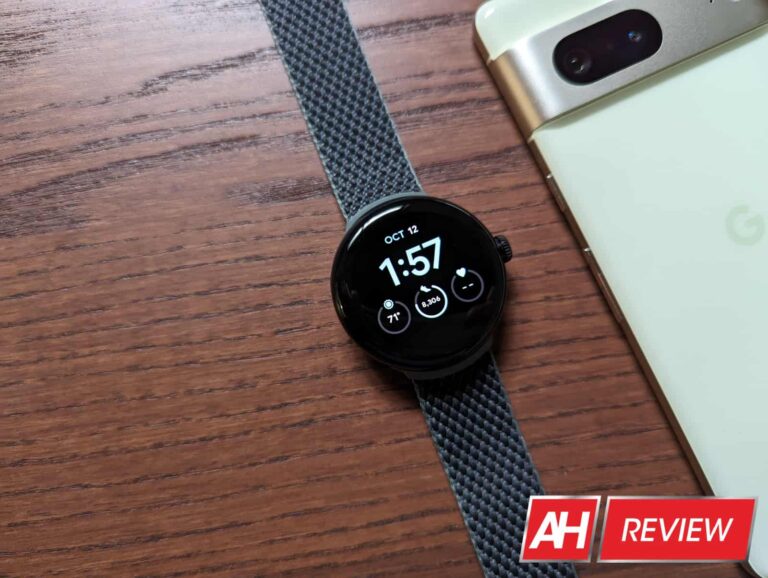
The Pixel Watch has finally made its debut and is definitely one of the best smartwatches you can currently buy. It’s also an excellent option for people who use a Pixel phone as their main device. Coming with Wear OS 3.5, it’s the only Wear OS device to come with Fitbit’s leading fitness tracking app installed. Which gives it a leg up on activity tracking.
It can also track your heart rate, sleep, stress, and more. Other features include receiving smartphone alerts, the ability to respond to texts and calls, listen to music, and much more.
The Garmin Instinct is in many respects, like a multitude of other Garmin smartwatches out there but it has its differences.
For one, it’s well under the price you pay for the most basic version of the Fenix 6. Beyond that, it has a solar charging capability which means if you live in a more sunny location, is likely perfect for you. Provided you’re outside enough to take advantage of it.
Aside from the solar charging, it also has a feature called the body battery energy monitor, which as the name suggests can help you track your body’s energy reserves so you know when to get up and go and when to take a breather.
It also has numerous different sports apps and tracks various sports and exercise activities, a pulse-ox sensor, built-in GPS and route tracking, smart notifications, a calendar, and a whole lot more. It even comes in more than a few fun color options. All of that definitely makes this one of the best smartwatches on this list.
Samsung’s Galaxy Watch 5 and Galaxy Watch 5 Pro are the company’s latest smartwatches, and definitely worthy of being on the list for best smartwatches. They provide everything you get from the Galaxy Watch 4 series, but with a few updates. Such as the sapphire crystal glass, and in the case of the Pro model, longer battery life thanks to the larger capacity battery.
The Pro model can also provide GPX routes if you need them. Though you’ll need an accompanying app for that. Additionally, the Pro model comes with what we believe is definitely the best band Samsung has ever put out for a watch. The magnetic D-Buckle Sport Band.
The Galaxy Watch 5 Pro can be a bit pricey, so if you want all the same features and don’t really need the longer battery life or the GPX routes, the Galaxy Watch 5 is the way to go.
Michael Bennet — Colorado senator, also a democrat and a member of Senate Intelligence Committee — wrote a letter to Google and Apple this Thursday, pleading for them to ban TikTok due to concerns over national security.
The New York Times reports that the letter has been addressed to the chief executives of the companies — so, Tim Cook for Apple and Sundar Pichai for Google — and in it, Michael Bennet basically states that it’s not okay for the Chinese government to have access to this much data or the ability to curate media for a third of US population.
The senator elaborated further, stating that he sees the current situation as irresponsible. From his point of view, this is an opportunity for Big Tech to step in on the debate and show where they stand.
Cats are always cute, but you can stumble upon much darker things on TikTok too.
TikTok spokesperson Brooke Oberwetter commented on Michael Bennet’s letter, expressing concern over its subjectivity and how it may be misleading. She stated that the report “totally ignored” the company’s plan — called Project Texas — to assure all of its users in data transparency and security integrity.
TikTok maintains the stance that data is in no way, shape or form, being transferred to the Chinese government. The company submitted a plan back in August, detailing how it intends to prevent China’s access to US data. The social platform is even willing to let the US government oversee its operations in an attempt to prove its claim.
From a political stance, this is yet another sign of a democrat joining in on a typically republican-led battle. This entire ordeal harkens back to 2020 and Trump’s own efforts to get TikTok banned, along with WeChat — another popular Chinese app.
Google and Apple have yet to respond to the senator’s letter, but they may have to. After all, this ordeal marks a point at which over 24 states have chimed in to support the movement to have TikTok banned
Without going too much into detail, the entire thing revolves around a Chinese law loophole, which basically allows the Chinese government to get their hands on data in secret. With the discussion being on the rise, it will be interesting to see if the company manages to prove that it has prevention plans for such a scenario.