Samsung has announced a donation worth $3 million to aid the victims of the devastating earthquake in Turkey. The earthquake earlier this week flattened thousands of buildings and killed tens of thousands of people across Turkey, Syria, and surrounding regions. Google, Apple, Amazon, and many other companies have also donated relief items for the victims.
Samsung’s aid for this natural disaster will include $1.5 million in cash that the company will donate to the Turkey Disaster and Risk Management Agency. The remaining $1.5 million donation will come in various forms. The Korean firm will supply portable ultrasound diagnostic devices that can be used to diagnose injured people at disaster sites.
It will also provide essential home appliances for sites where the Turkish government is temporarily lodging people affected by the earthquake. Thousands of people have become homeless after the disaster flattened their homes.
Additionally, Samsung will give free educational tablets to children and affected families. The company will also deploy repair service vehicles in affected areas so families can get their damaged appliances repaired for free. All of this will be worth $1.5 million, the Korean firm says.
Apart from the $3 million monetary and non-monetary help from Samsung, the company’s employees are also voluntarily conducting fundraising activities to support victims of the earthquake in Turkey. The tech behemoth hasn’t detailed how much its employees have raised.
Samsung comes to aid relief efforts in Turkey after the devastating earthquake
Samsung is one of the leading tech companies globally. The South Korean behemoth is the world’s largest smartphone vendor. Being a global company, it often comes to the aid of victims of these kinds of natural disasters around the world.
The firm has donated millions of dollars to disaster relief efforts over the past decade. These include 60 million Yuan (approx. $8.8 million) for the Sichuan earthquake relief in China in 2013. Samsung also helped victims of the Philippine typhoon in the same year, the Nepal earthquake in 2015, the Mexico earthquake in 2017, the Australian bushfires in 2020, and more such natural disasters.
Last year, Samsung also donated $6 million to humanitarian efforts in Ukraine following the Russian invasion. The total fund included $1 million worth of consumer electronics products.
Of course, Samsung isn’t the only company helping disaster victims. Many other companies do. They send monetary relief as well as various other relief items for the victims in collaboration with government agencies, NGOs (non-government organizations), and other agencies that actively take part in relief efforts.
Google announced a bunch of new features for its services, as well as the first Android 14 preview, all in just a few days. Google Translate is one of the apps that got some love from the Mountain View company, so if you’re using it on a regular basis, you’ll notice some significant changes.
In a time when AI has become more prevalent in our day to day lives, companies are trying to power some of their products with artificial intelligence. The most recent Google Translate update introduces a bunch of AI-powered features that further enhance the app’s functionality.
For starters, thanks to the AI-related features added, Translate will now provide users with more contextual translation options with descriptions and multiple examples in the translated language. This will work with several languages, including English, French, German, Japanese, and Spanish, but don’t expect these improvements to be available for a few more weeks.
The most obvious change revealed this week is the new design that Google Translate is getting. The Translate app on Android has just received a brand-new design, while the iOS version will be getting its own fresh look in just a few weeks. The redesign Translate experience includes larger canvas, voice input, as well as Lens camera translation.
Another important part of the update is related to gestures. To make the app more accessible, Google has added new gestures such as the ability to select a language with fewer taps, holding the language button to pick a recently used language with a swipe, and swiping down on the home screen text area to bring up recent translations.
Finally, the update expands the number of languages by an additional 33, which are also available on-device in the Translate app. The new languages include Basque, Corsican, Hawaiian, Hmong, Kurdish, Latin, Luxembourgish, Sundanese, Yiddish and Zulu, among others.
British sports clothing retailer JD Sports has reported a data breach that has affected more than 10 million customers.
The retailer said on January 30 that the data breach occurred after a malicious party gained unauthorized access to a system containing customer data relating to orders placed between November 2018 and October 2020. This included orders from other JD Sports group companies including JD, Blacks, Size?, Scotts, Millets and MilletSport.
JD Sports told the London Stock Exchange the data accessed was “limited” as the retailer “does not believe passwords were accessed” and does not save payment information. Information accessed during the breach may include names, email addresses, the last four digits of payment cards, delivery addresses, phone numbers, billing addresses and order details.
The company said it was “proactively contacting” those affected by the breach and urged all customers to remain vigilant for phishing attacks and fraud attempts following the breach.
Chief financial officer at JD Sports, Neil Greenhalgh, said: “We want to apologize to those customers who may have been affected by this incident…We are continuing with a full review of our cyber security in partnership with external specialists following this incident. Protecting the data of our customers is an absolute priority for JD.”
The sports fashion retailer said that it will be working with the relevant authorities including the UK Information Commissioner’s Office (ICO) to investigate the incident.
Realme 10 Pro is available globally starting December 8, 2022. We at AndroidHeadlines have reviewed a lot of Realme devices in the past. The new Realme 10 Pro compares quite well to the Realme 9 5G that we reviewed back in August of this year.
The new Realme 10 Pro starts at $319 for the base 8GB RAM with 128GB storage but looks like you can get it for a bit cheaper right out of the gate from some vendors. This means that the new device should be quite tempting for folks wanting to upgrade their smartphone for the holiday season.
Realme 10 Pro Unboxing
The unboxing experience is pretty much the same as always. There is the familiar yellow and black theme retail box. Inside is the insert with paperwork, a smoke-gray TPU case, and a SIM tool. Underneath is the smartphone followed by a 33W fast-charging brick and a USB-C cable.
A couple of things to note here – smoke-gray TPU case is likely to not get discolored easily (something Xiaomi should pay attention to). Also, there’s already a film screen protector on the device from the factory. This allows you to start using the smartphone as soon as it is out of the box.
Realme 10 Pro: Hardware Impressions
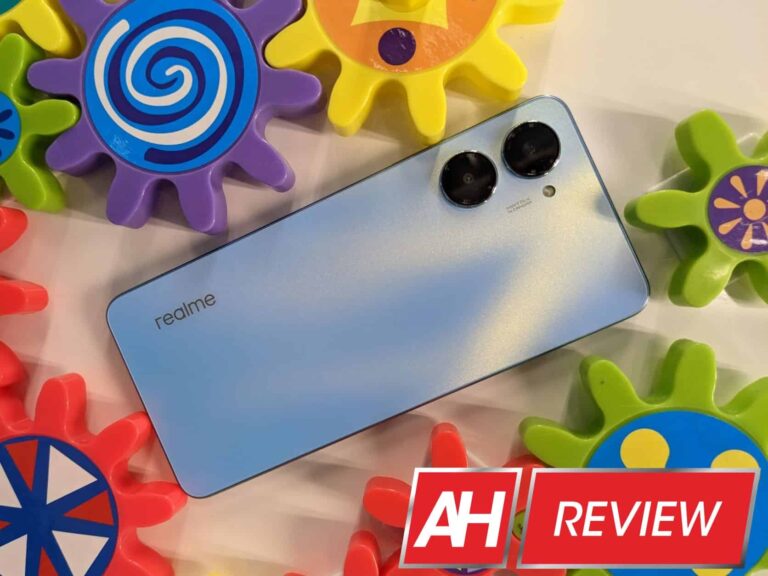
The Nebula Blue review unit of the Realme 10 Pro looks absolutely gorgeous. I like the uninterrupted matte back cover with the two camera lenses sticking out. Definitely gives the smartphone a unique look in my view.
Aside from looking great, the Realme 10 Pro has a stellar feature – a headphone jack! On the bottom rail, you have the headphone jack along with cutouts for the microphone, bottom speaker grille, and USB-C charging port. On the left-hand side rail, you can see the dual-SIM/microSD card tray slot. The top rail has a tiny circular hole for the second microphone. And finally, on the right-hand side rail, there is a power button/fingerprint sensor and a volume rocker.
The flat edges all around give it a modern look reminiscent of the newer iPhones and Redmi Note 11 series devices. The other thing that is flat on this smartphone is the front display, which is a good choice. The bezels surrounding the display are absolutely minimal barring a slightly chunky bottom chin. Keep in mind that the bottom chin on budget offerings from Xiaomi or Motorola are way thicker in contrast to the Realme 10 Pro.
Another neat feature is the top earpiece speaker grille which is embedded in the top part of the frame. This shows that Realme spent a reasonable amount of engineering effort. They could have just cobbled together something from prior generations considering that this is primarily a budget smartphone.
Display on the Realme 10 Pro is massive with a 120Hz refresh rate
With the newer hardware design, we get a larger 6.72-inch display on the Realme 10 Pro. The flat display has a 120Hz refresh rate and great color accuracy. Brightness levels are good enough for outdoor visibility. Sometimes actual performance is what matters and not specs and this is the case with the Realme 10 Pro display. It is bright and vivid without having any glaring color aberrations or oversaturation.
The only knock against the display is that it is not AMOLED. Having said that it is still one of the best IPS LCD displays in the category and is way better than comparable smartphones from Xiaomi. And it is definitely better in terms of brightness levels compared to the Realme 9 5G that we reviewed a few months ago.
In terms of resolution, the IPS LCD display has 2410 x 1080 pixels with a 392 ppi pixel density. With tiny side and top bezels and a slightly big bottom chin, the Realme 10 Pro ekes out an 89.8% screen-to-body ratio which is quite good for the price range. My prediction is that most users will love the large display for media consumption from browsing, to gaming to watching videos.
Performance is more than adequate for daily tasks including gaming
Realme 10 Pro uses a Snapdragon 695 5G processor (6nm TSMC process). The octa-core (2×2.2 GHz Kryo 660 Gold & 6×1.7 GHz Kryo 660 Silver) processor also has the Adreno 619 GPU.
Geekbench scores are quite good and comparable to other smartphones running on the same processor. Keep in mind that a Pixel 5 running on Snapdragon 765 has inferior scores to the Realme 10 Pro. So from a daily use perspective, the Realme 10 Pro has plenty of processing power for all of your daily tasks including gaming.
Speaking of gaming, the Realme 10 Pro does not have a dedicated gaming mode. However, you can go into the Battery > More settings > Performance Mode > High performance mode. This will let you crank up the system performance while gaming, although it may drain the battery a bit more than usual. My review unit has 8GB base RAM with an option to add an additional 8GB RAM via the Dynamic RAM function in the About device settings menu.
Realme 10 Pro is available in three variants – 6GB/128GB and 8GB/128GB or 8GB/256GB. Since base storage is now 128GB I would get the higher RAM version versus the higher storage version as this phone still has a micro SD card slot available.
Software on the Realme 10 Pro is Android 13
Our review unit of the Realme 10 Pro has a custom realme UI 4.0 based on Android 13. Besides the Pixel series, these are some of the first smartphones running Android 13 out of the box, which is nice. However, you will be hard-pressed to find any noticeable difference from realme UI 3.0 which was based on Android 12.
It should be noted here that we did like realme UI 3.0 which was fast and fluid and pretty close to what you get on stock Android. The newer version of the software has a few new features but for the most part, behaves like the prior version and that is not a bad thing.
Media controls, notifications, and quick control settings are the biggest visual changes. Also, the most useful feature from a software perspective is ‘Special features’ section in settings. I think Split screen, flexible windows, and Smart Sidebar are all things you can use regularly to improve your productivity.
As usual, there is a full suite of Google apps and no duplicate apps (someone tell this to Samsung please). Bloatware is minimal, and you can uninstall every single pre-installed app. There are still a few quirks – no Google Discover yet when you swipe left from the home screen. And the dreaded ‘Hot Games’ and ‘Hot Apps’ folders are installed so you will need to do a bit of work to hide them away.
Overall though, the software experience is smooth right from the get-go. And thankfully the UI does not bother you with ads that you get on budget devices from Xiaomi or POCO.
Battery life is excellent although charging speeds could be better
There is a massive 5,000 mAh battery onboard the Realme 10 Pro. Also the 6nm process Snapdragon 695 is very power efficient and so for moderate users, 2-day battery life is quite feasible on the Realme 10 Pro. I can definitely see heavy users needing a charger late in the evening though if you decide to game for an hour or two during the day.
As far as charging goes, there is a 33W charging brick in the box. Charging speeds are decent, you get about 60% charge in 30 minutes. It does take about an hour and 10 minutes to get to full charge though. My guess is most folks will charge the phone overnight but if you do need a top-up in the day keep in mind that the charging speeds aren’t blazing fast.
Audio performance is excellent
Somehow Realme managed to fit a set of stereo speakers on the Realme 10 Pro. As usual, the main one is at the bottom side of the frame, while the second speaker is up top which is also the earpiece for calls. For the most part, the speakers sound loud and clear but the bottom speaker does most of the heavy lifting.
In terms of sound quality, I would have liked to see a bit more bass. Overall though the speakers are quite good for the price and the main redeeming feature is the excellent headphone jack. Every time I review a device with a headphone jack, I think that the entire TWS earbuds industry is a pure money grab inspired by Apple.
I would like to point out that the ‘Real Sound Technology’ setting in the Sound & Vibration menu works great with or without the headphones and does help with the overall audio performance. Audio output via Bluetooth is quite good, for the review I used a pair of Realme TWS earbuds. But I still recommend using wired earbuds over wireless ones.
Realme 10 Pro Camera performance is very good
For starters, Realme 10 Pro has just one usable camera on its back because the second camera is basically a 2MP depth sensor. However, the main camera is a massive 108MP 1/1.67″ sensor that is arguably one of the best in this price range. The main camera has an f/1.8 aperture, 0.64µm pixels, and on the front, there is a 16MP. f/2.5 selfie camera.
Daylight photos are great, low light pictures are acceptable
In broad daylight, Realme 10 Pro produces pictures with a high level of detail, colors that are not too saturated, and acceptable levels of contrast with a wide dynamic range. The software doesn’t show a tendency to over-sharpen the photos which is nice. Lastly, it manages to render pictures with good levels of detail and a low amount of noise even in shadows. This holds true for outdoor and indoor photos during daytime.
Low light pictures are good in general but they do lack detail and sharpness isn’t that great in auto Night mode. But manual night mode tends to provide much better results even though color reproduction looks like it can be a bit artificial. Take a look at some sample pictures in our Flickr gallery and decide for yourself.
There is an option for 3X zoom, however, that is just digital zoom but since this is a large 108MP sensor you can get some really nice photos especially in daylight with a still subject. It is interesting that in Night Mode you only get 2X zoom instead of 3X in daytime.
Selfies are okay for the most part if you are going to share them on social media. Overall detail and sharpness aren’t that great and to get the best results you need good daylight. Portrait mode is also not that great on the Realme 10 Pro especially if there is a bit of depth to the subject.
Connectivity wise there are no real showstoppers
I was able to get T-Mobile 5G signal for data connection right out of the box on the Realme 10 Pro here in Southern California. Calls went through without any issues as well. Texts and MMS service also did not require any tweaking of APN settings. So even though this is not a USA-specific device, I had no issues using it during my review period.
All other connectivity options – Wi-Fi, Bluetooth pairing with the car or headphones, and NFC for Google Pay worked seamlessly. In addition, there’s Screencast and Nearby Share available for viewing media or sharing files. The ability to control smart devices is built right into the quick settings toggle down which is very convenient.
Realme 10 Pro Verdict
I really like the new design language for the Realme 10 Pro in contrast to last year’s 9 series of smartphones. For around $300 you are getting a smartphone with good performance, fluid software, excellent battery life, and a big bold 120Hz display. You also get loud dual speakers and a headphone jack. Couple these features with a fast fingerprint sensor, NFC, 5G connectivity, and 33W fast charging and there’s not much you need in comparison to phones that cost double the price.
Yes, there is no wide-angle camera on the rear, nor 4K video recording capability on the Realme 10 Pro. But the main camera produces some of the best pictures for still photography aside from Google’s excellent Pixel series.
If you are in a geographic location where this phone is available and you can live with an IPS LCD display, then you should definitely give the Realme 10 Pro a close look.
The Ali’s Justice (Edalat-e Ali) hacker group has claimed responsibility for hacking the live transmission of an Iranian state-run TV and radio station to disrupt and deface the speech of Iranian president Ebrahim Raisi during the Revolution Day ceremonies.
On February 11th, 2023, the President of Iran, Ebrahim Raisi, was delivering a speech at Azadi Square in Tehran, where a massive crowd had gathered to mark the country’s 44th anniversary. It was an opportunity for the government to show its popularity, but its efforts were sabotaged by the hacktivist collective Ali’s Justice (Edalat-e Ali).
The hackers disrupted the State TV broadcast and instead aired the slogan “Death to Khamenei” and urged people to withdraw their money from government banks. Furthermore, they encouraged the citizens to participate in antigovernment protests, due to be held on February 16th, 2023.
Watch as hackers from the Edalat-e Ali group interrupt the live transmission.
The cyberattack was also confirmed by Germany-based Iranian journalist Bamdad Esmaili on his Twitter account. On the other hand, the Edalat-e Ali group used its Telegram channel to announce the hack. In a statement seen by Hackread.com, the group claimed responsibility for hacking TV and radio transmissions.
“We the Adalat Ali group hacked the Islamic Republic of Iran’s TV and Radio transmission. First of all, the Adalat Ali group offers its condolences to the entire freedom-loving nation on the decade of dawn and the impure arrival of Khomeini the executioner to Iran.”
Edalat-e Ali
Who are Edalat-e Ali Hackers?
It is worth noting that Edalat-e Ali is a prominent group of hacktivists who have been working against the Iranian government for the past few years. Some of their recent hacks have involved the interruption of Iran State-Run TV’s live transmission in October 2022.
In August 2021, the same group breached the computer system and security cameras at a prison facility in northern Tehran, resulting in the leaking of live footage of the grim conditions and grave human rights abuses taking place inside.
Iran, Protests, Hackers and Hacktivists
Iran has been rattled by cyberattacks since September 2022, when Anonymous hacktivists launched Operation OpIran to support Iranians protesting against the death of 22-year-old Kurdish-Iranian Masha Amini.
Amini died while under detention by Tehran’s morality police, called the Guidance Patrol. She was arrested for wearing her hijab improperly.
Amini’s death sparked clashes between authorities and protestors, resulting in arrests and deaths. The latest hack from the Edalat-e Ali group was also part of its support for the protestors in Iran.
Nevertheless, the Iranian government vows to tackle protesters, while hacktivists from different parts of the world aim at the country’s critical infrastructure.
The emails make use of the classic “apply some pressure” tactics so beloved of scammers everywhere. A missive that makes you shrug won’t get you clicking bogus links, but mails that say you’ve done something wrong, violated a rule, or at imminent risk of financial peril, are more likely to work.
The scam
The mail reads as follows:
Recently, we discovered a breach of our Facebook Community Standards on your page. Your page has been disabled for violating Facebook Terms. If you believe the decision is incorrect, you can request a review and file an appeal at the link below.
The Better Business Bureau says that some of these emails claim you need to take action within 24 hours or your account will be deleted permanently. This is the pressure hook at work.
This will be more than enough to encourage folks to click the link to a bogus Facebook page. From there, site visitors will be asked for a range of personal details including but not limited to:
Login email
Name
Phone number
Passwords are confirmed once the submit button is clicked. At this point, the phish recipient has likely lost control of their account, unless they have additional security in place such as two-factor authentication (2FA).
What to do
While messages like this can be worrying, it’s worth taking a deep breath and examining the facts regardless of what the email is claiming. In this case, the mail campaign states that your Faceboook account has been disabled. Well, this is an easy one to disprove.
Just open Facebook and check, instead of clicking on the links in the email.
If your account has been disabled you won’t be allowed to login, instead you’ll be directed to a message telling you what’s happened. If you feel that your account should not have been disabled, then this can be contested by sending Facebook a message.
One way or another, you’ll definitely know at a glance if the message in the email is genuine or not, because your account either will or will not be functional.
As the Better Business Bureau mentions, other potential tell-tale signs of a scam—such as misspellings, senders who aren’t using a Facebook address, and links to sites that aren’t Facebook—can be useful here, but nothing says “my account is fine, actually” like actually opening it up to check.
Avoiding “urgent” phishing scams
Here’s some other things you can do to keep yourself safe from phishing attempts:
Don’t take emails at face value, especially if they are about logins, suspensions, disabled accounts, or anything urgent.
Ignore links, navigate to sites directly and log in the way you usually do.
Use a password manager, it won’t enter your credentails into a fake site.
Use hardware keys or FIDO2 devices for two-factor authentication—thye won’t authenticate you to a fake site.
A recent report revealed that the forthcoming Mac Pro might not support GPU PCI-E cards nor include user-upgradeable RAM.
In 2019, Apple announced a new Mac Pro design with an extensive modular and upgradeable design that had several macOS enthusiasts salivating.
Besides accepting Xeon processors of up to 24 cores, users can upgrade the computer with up to 64 PCI Express lanes and 1.5TB of high-performance memory. There are also APX Modules that can be configured with six different GPUs alongside eight PCIe expansion slots.
The best thing about the Mac Pro is you can upgrade the entire component after purchase. But the future iteration of the desktop could change that.
Earlier in the month, Bloomberg’s Mark Gurman revealed that the next Mac Pro model would not feature user-upgradeable RAM, and the reason is not far-fetched. Unlike the current Intel-based model, the memory will now be tied directly to the M2 Ultra’s motherboard.
Now Gurman is doubling down on his previous report.
Next Mac Pro to Lack User Upgradeable GPUs
Earlier today, Gurman reported another possible limitation of having an Apple Silicon chip on the Mac Pro. According to the Bloomberg journalist, the forthcoming Mac Pro model may lack user-upgradeable GPUs alongside the non-upgradeable RAM.
Since the current Apple Silicon Macs don’t have external GPU support, users are stuck with whatever configuration they purchase from Apple. That said, Gurman believes the new Mac Pro’s GPU will be powerful — with up to 76 cores.
The next Mac Pro may lack user upgradeable GPUs in addition to non-upgradeable RAM. Right now Apple Silicon Macs don’t support external GPUs and you have to use whatever configuration you buy on Apple’s website. But the Mac Pro GPU will be powerful with up to 76 cores.
“That will leave storage as the main user-upgradeable component in the new Mac Pro, which will have the same design as the current, Intel model,” says Gurman. “The big difference between a Mac Pro and a Mac Studio — in addition to M1 Ultra to M2 Ultra — should be performance from more cooling.”
In July 2022, Mark Guman predicted that Apple would announce an M2 Mac Pro at the end of the year. He further claimed that the computer would not be available until 2023.
Although the announcement never happened, several tech journalists still expect Apple to unveil an M2 Mac Pro this year.
Google Messages is the company’s SMS messaging platform, and it’s been gaining certain features over the years. One feature is the ability to use emojis as a reaction. Now, Google Messages let you react using any emoji.
Google Messages brought emoji reactions back in 2020, but there’s been a pretty annoying issue. There were only seven emojis available (Thumbs up, Thumbs down, Laughing face, Heart eyes, Mad face, Crying face, Shocked face). They cover the basics, yes, but it’s nothing compared to the massive number of emojis out there. It was also a bit annoying that the company kept this restriction for more than two years.
But, Google Messages now let you use any emoji
Fortunately, Google has decided to lift that ceiling. Users on Reddit (via Android Police) spotted this new change recently. If you want to react to a message with an emoji, you’d just need to tap and hold the message that you want to react to. You’d see a bar of seven emojis pop up.
After the update, you’ll still see the bar pop up, but there would be another icon on the far right. When you tap on that “emoji+” icon, you’ll see the standard emoji picker pop up. It’s the same UI that you’d see if you’re typing one into the text field. This means that’d be the same emoji picker that comes with your device’s default keyboard.
For the Gboard, you’ll see the large vertically-scrolling feed of emojis that you can choose from. Above the feed, there’s the search bar to search for that one. On the bottom, you’ll see the 10 categories to quickly transport you to the type that you want.
This should be great news if you love to react to all of your messages using emojis. Just know that this could still be rolling out, so there’s a chance that you won’t see this just yet. You can check the app in the Google Play store to see if there’s an update available. If not, then you’ll just want to wait a couple of days.
ChatGPT has created a sudden fervor for conversational AI in the tech industry, and everyone wants to be the master of it. Alibaba is the latest company to enter this race. The Chinese tech giant is reportedly conducting internal testing of its ChatGPT competitor. It hasn’t officially announced a launch date for the solution, which doesn’t yet have a name, at least not known to the public.
A spokesperson for Alibaba told the popular Chinese publication South China Morning Post, which Alibaba acquired for a reported fee of $266 million in December 2015, that the company is internally testing its conversational AI chatbot in Damo Academy. It is an Alibaba-owned research institute located at Nanhu Science Centre in Hangzhou city. Established in 2017, the 228,100 sq. meter site is dedicated to research programs in cutting-edge technologies, including AI.
According to South China Morning Post, Damo Academy introduced a natural language processing model with 27 billion “parameters” in April 2021. These parameters are a measurement of an AI chatbot’s capabilities. ChatGPT is built on top of OpenAI’s GPT-3 (Generative Pre-trained Transformer 3) family of large language models that was launched in 2020 with 175 billion parameters. So Alibaba’s solution is a lot less capable as things stand.
However, the company is still developing its conversational AI. By the time it arrives in the market, the company may improve it a lot. Damo Academy has already announced a new “M6” AI model known labeling it as the world’s first “10-trillion-parameter” pre-training model. It’s unclear whether this model is ready for prime time yet. We should hear more about Alibaba’s ChatGPT competitor in the coming months as the company progresses with its development.
Alibaba is just one of many tech companies developing a ChatGPT competitor
OpenAI launched ChatGPT on November 30 last year. In two months, the service raked in more than 100 million users globally. More than the popularity of the conversational AI chatbot, it’s its capabilities that have put established tech companies on their toes. Many see it as the future of search. Google, being the world’s largest search company, quickly got working and launched Bard a few days back. The service is currently in closed beta but will be available to the public in the coming weeks.
Chinese search giant Baidu has also announced its ChatGPT competitor. Called the Ernie Bot, the company plans to launch the service next month. Other Chinese firms working on AI chatbots include Tencent Holdings, JD.com, and NetEase. Google’s Bard made a costly mistake (a factual error) during its first demo, costing the company $100 billion in market value. It appears there’s still plenty of work to do for the search giant. It will be interesting to see how this market shapes up over the next few months.
After announcing its plan to prevent its customers from sharing their accounts with friends and family, Netflix started to trial new changes to password sharing in several countries from Latin America, including Chile, Costa Rica, Peru, Argentina, El Salvador, Guatemala, Honduras, and the Dominican Republic.Earlier this week, Netflix announced that the changes to account sharing revealed last year will be rolled out in more countries. Detailed at the beginning of this month, these changes are now introduced in four countries before being rolled out globally in March.
Starting today, changes to account sharing are rolling out in Canada, New Zealand, Portugal and Spain. If you live in any of these countries and share your account with one or more people, you’ll have to pay extra. But first, customers in these four countries will be asked to set their primary location, which will allow them and anyone who lives in the household to use the Netflix account.
Next, Netflix customers who’d like to provide access to their account to someone else will be able to do so from the Manage Access and Devices page. Another important change involves the ability to transfer a profile to a new account, which is paid for, thus keeping personalized recommendations, viewing history, My List, and saved games.
Don’t worry, even after setting your primary location, you will still be able to watch Netflix on your personal device or log into a new TV when you’re not at home.
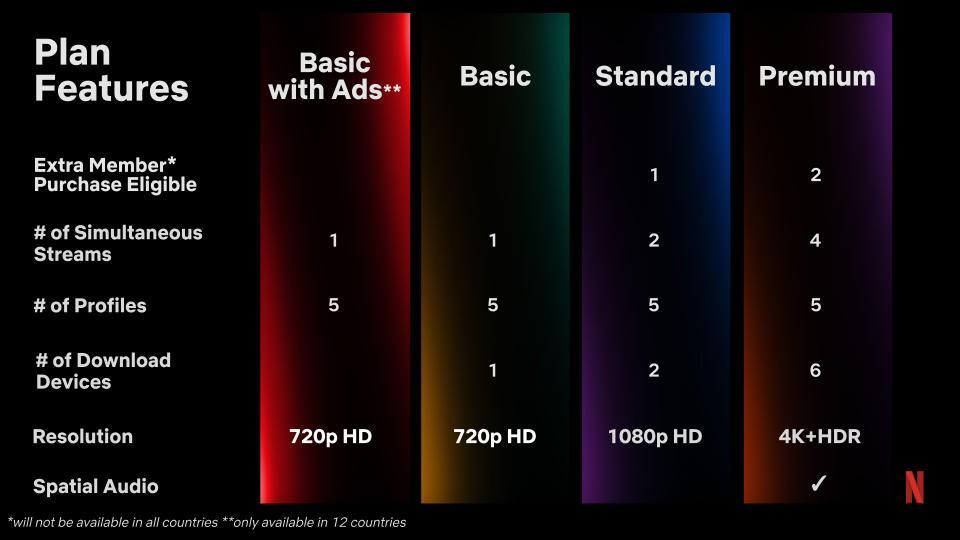
The most important part of these changes is the option to buy an extra member. To continue to share your account with others, you will have to pay for each extra member who uses your account. Netflix customers subscribed to either Standard or Premium plan and live in one of the four countries mentioned can add an extra member sub account for up to two people they don’t live with.
Each sub account comes with a profile, personalized recommendations, login and password of their own. As far as the price goes, a sub account costs CAD$7.99 a month in Canada, NZD$7.99 in New Zealand, 3.99€ in Portugal, and 5.99€ in Spain.