“Misinformation” and “disinformation” have been part of our vocabulary for years now, but there’s an app that takes things to the next level and publishes fake AI-generated stories! It’s available only in the US and it has over 50 million monthly users, so you (or someone you know) might’ve stumbled upon it at a point in time – or even use it regularly.It’s no secret that local news outlets across America have shuttered in recent years – and that’s where the NewsBreak app comes into play to fill the void.
Billing itself as “the go-to source for all things local”, Newsbreak says it has over 50 million monthly users. It publishes licensed content from major media outlets, including Reuters, Fox, AP, and CNN as well as some information obtained by scraping the internet for local news or press releases which it rewrites with the help of AI.
Now, a Reuters report highlights that NewsBreak did a big no-no last Christmas Eve, when the news app published a false story about a shooting in Bridgeton, New Jersey. The local police department debunked the article, stating that no such incident had occurred. NewsBreak removed the article four days later, citing inaccurate information from a content source.
The report goes on with claims by former employees, who revealed that most of NewsBreak’s engineering work is done in China. This has raised concerns about data privacy and the influence of Chinese-based staff on American user data. NewsBreak insists it complies with US data laws and maintains that its data is stored on US servers.
NewsBreak’s use of AI has led to legal issues, including a $1.75 million settlement with Patch Media for copyright infringement. Another lawsuit with Emmerich Newspapers is ongoing. Despite these challenges, the company claims to address issues promptly and continues to evolve its operations.
NewsBreak generates revenue through ads targeted at its predominantly female, suburban or rural user base. The company continues to face scrutiny over its ties to China and its use of AI in news aggregation.
CISA warned users of a severe vulnerability in Linux under active attack. While the vulnerability has already received a fix, it remains a threat to unpatched systems, allowing the attackers to exploit the flaw.
Linux Vulnerability Found Under Active Attack Despite Patch
According to the latest advisory from CISA, a new Linux vulnerability has been under active attack, threatening users globally. CISA added this vulnerability to its Known Exploited Vulnerabilities (KEV) Catalog, confirming the active exploitation and the threat severity.
Identified as CVE-2024-1086, the vulnerability is a use-after-free flaw in the netfilter: nf_tables component. Exploiting it allows an adversary with local access to gain elevated privileges (such as root access) on the target Linux system. As stated in the NVD vulnerability description,
A use-after-free vulnerability in the Linux kernel’s netfilter: nf_tables component can be exploited to achieve local privilege escalation. The nft_verdict_init() function allows positive values as drop error within the hook verdict, and hence the nf_hook_slow() function can cause a double free vulnerability when NF_DROP is issued with a drop error which resembles NF_ACCEPT.
Linux developers patched this vulnerability in a January 2024 commit (commit f342de4e2f33e0e39165d8639387aa6c19dff660).
While CISA’s advisory doesn’t explain much about the exploit, the researcher with the alias “notselwyn” elaborated on it in a detailed post. The researcher also presented a PoC exploit (shared on GitHub), demonstrating the local privilege escalation.
Though the vulnerability swiftly received a fix, the threat became severe due to unpatched systems. As highlighted by Jonathan Wright, Red Hat Enterprise Linux (RHEL) developers didn’t push the fix in time, marking the vulnerability with a moderate severity level, which left many Linux systems vulnerable.
Understandably, unpatched systems are always lucrative for threat actors, often resulting in massive exploitation waves. While the exploitation for CVE-2024-1086 seemed minimal, it still triggered severe active attacks.
Deploy Patches By June 20th
Given the severity of the matter, CISA added this vulnerability to its KEV Catalog, instructing the organizations to patch their systems by June 20, 2024. In cases where applying a patch isn’t possible, CISA advised users to blocklist nf_tables, restrict access to user namespaces, and load the Linux Kernel Runtime Guard (LKRG) module.
Alongside this vulnerability, CISA added the recently highlighted Checkpoint VPN vulnerability, CVE-2024-24919, to its KEV Catalog.
On iOS and iPadOS, location services are typically turned on when you first set up your device. However, there may be reasons why you don’t want your device to be located, perhaps because you don’t want to be found but need to keep the device with you.
There are a few options to hide your location from prying eyes.
Please note: I will only mention iOS from here on, but the instructions are almost the same for iPadOS.
Turn off location services by app
Some apps will not work properly without location services, but it’s certainly worth checking which ones are actually using them.
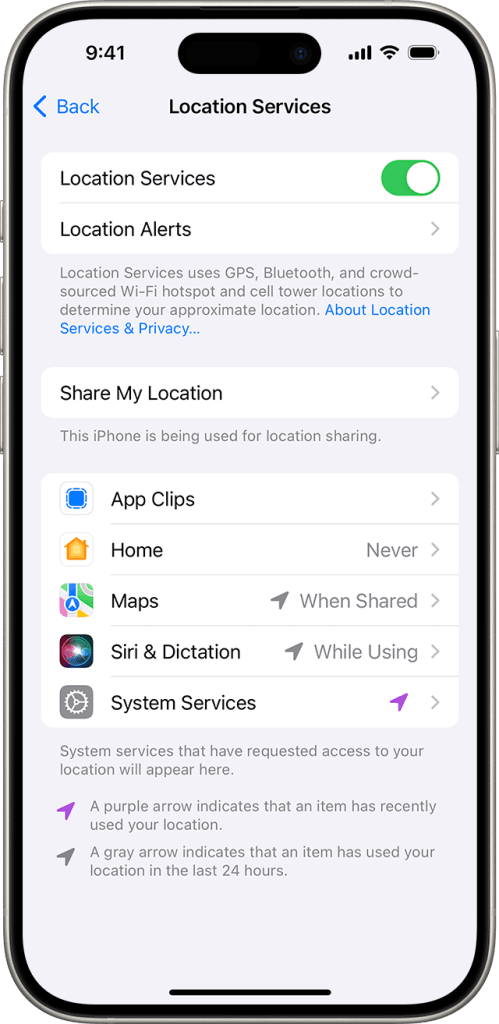
Go to Settings > Privacy & Security > Location Services.
If Location Services is on, you will see a list of apps with permissions.
Scroll down to select an app.
Now you can tap the app and select an option of Never, Ask Next Time Or When I Share, While Using the App, or Always.
From here, apps should provide an explanation of how they will use your location information. Some apps might offer only two options.
Turn location services off entirely
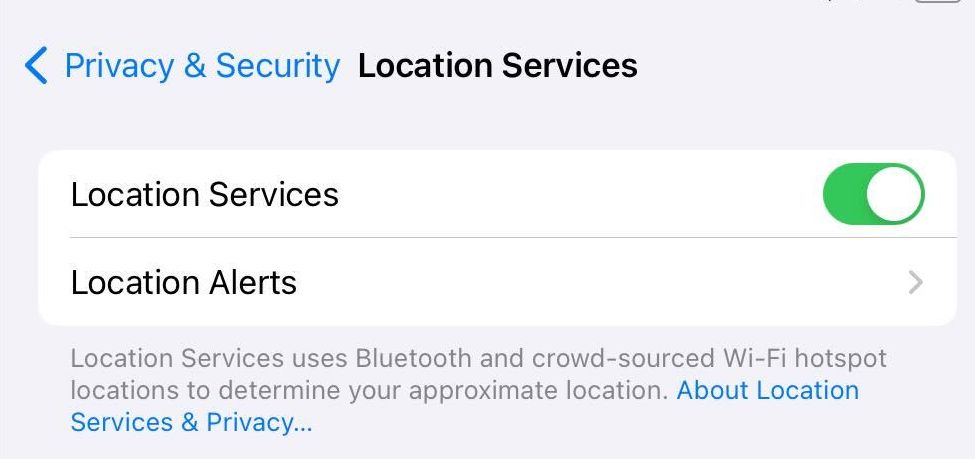
You can turn Location Services on or off at Settings > Privacy & Security > Location Services. Move the slider control to the left to turn Location Services off.
Note that turning Location Services of will also disable the Find My feature for the device.
Turn off Find My iPhone
Find My iPhone allows a user to track their devices. It allows you to locate the device from another device, make it play a sound if you are close, and even remotely erase your device if you suspect it has fallen in the wrong hands.
To disable Find My iPhone:
Go to Settings
Select your account name.
Choose Find My
Turn the feature off. You will need to enter your iCloud password.
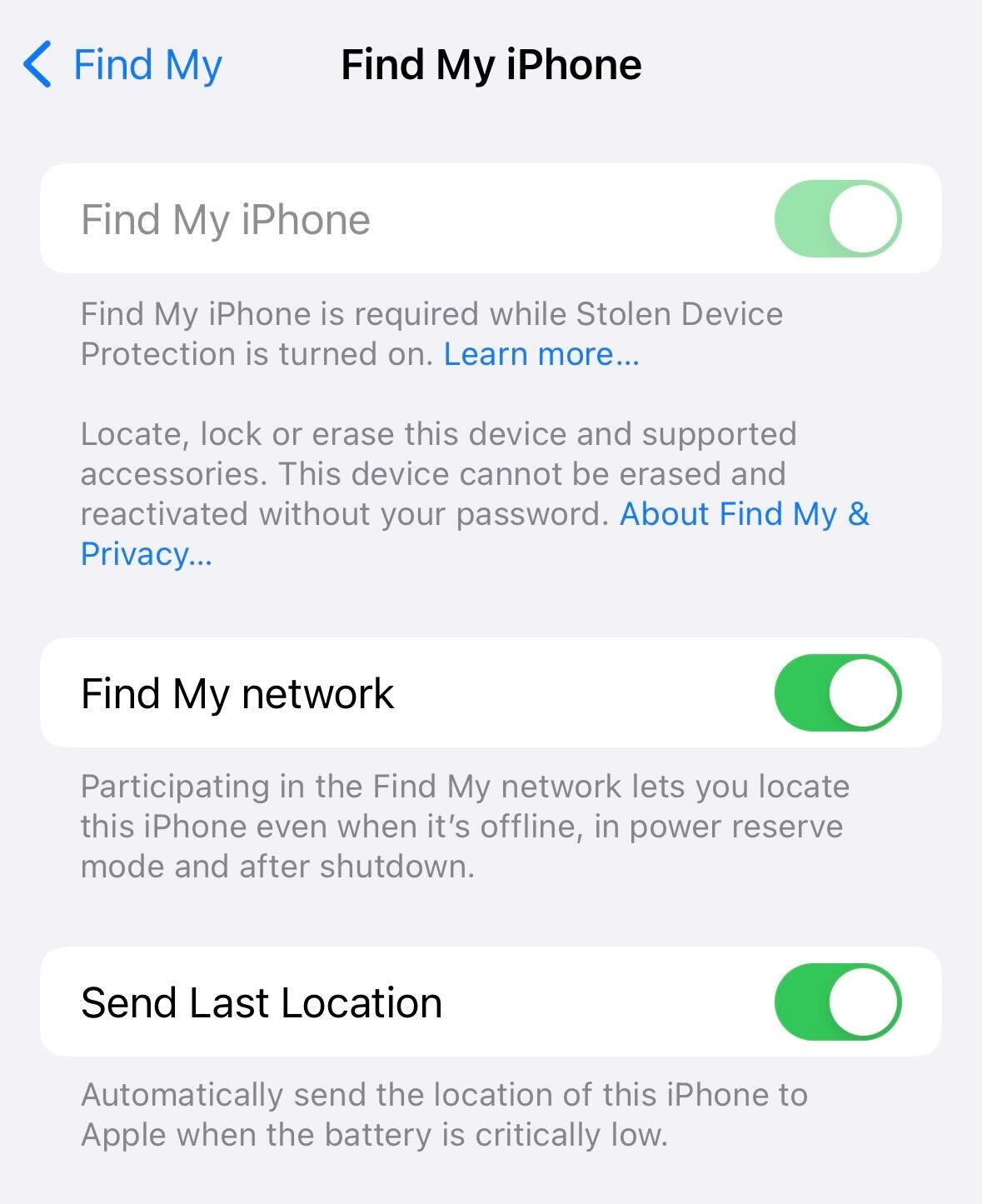
An iPhone can still be tracked in some cases, even if it is in Airplane Mode. The only way tracking is not possible is to turn the iPhone off completely. And even then, since iOS 15, iPhone models 11 and up will transmit their location even when powered off if the Find My Network is enabled in your settings.
To turn off Find My network:
Go to Settings
Select your account name.
Choose Find My
Turn Find My network off.
We don’t just report on phone security—we provide it
The Ulefone Armor 25T Pro received quite a considerable discount at launch, and it’s still discounted. That will not last for long, so this is your last call to grab the phone for that price if you’re interested.
The Ulefone Armor 25T Pro is still discounted, but you don’t have a lot of time
The discount ends tomorrow, June 7. It is currently priced at only $289.99 over at Ulefone’s official AliExpress store. The purchase link can be found here, and below the article as well.
In case you’re not familiar with the device, the Ulefone Armor 25T Pro is the company’s new budget rugged phone. It is not only rugged, but it has a large battery and a thermal imaging camera. Those are its main selling points, basically.
The device comes with a ThermoVue sensor for thermal imaging. It can provide images of 160 x 120 pixels and a frame rate of up to 25Hz. It detects temperatures of all objects above absolute zero (-273°C).
A large battery is included, as is an infrared camera
There is also a 64-megapixel infrared night vision camera on the back. A 6,500mAh battery sits on the inside of the phone, while the device supports 30W wired charging. Yes, the charger is in the box. It also supports 30W wireless charging, by the way.
The Ulefone Armor 25T Pro is also IP68/IP69K and MIL-STD-810H certified. It is not only water and dust-resistant, but it can take a hit too, in case you drop it or something like that.
The MediaTek Dimenstiy 6300 SoC fuels the device. This is a 6nm processor, by the way. The phone supports 5G connectivity too. It offers 6GB of RAM and 256GB of storage. RAM can be expanded via virtual RAM, while the phone’s storage can also go up by an additional 2TB (microSD card).
The phone also has a 120Hz display
A 6.78-inch fullHD+ (2460 x 1080) IPS LCD display is placed on the phone too. It offers a 120Hz refresh rate, and it’s protected by the Gorilla Glass Victus.
There is plenty to like here, especially at the phone’s current price tag. If you’re interested, the purchase link is included below.
Google‘s AI-powered note-taking tool NotebookLM is now available globally. The tool, which the company calls a research and writing assistant, also adds support for Google Slides and websites as sources. It is getting more powerful as well, thanks to Gemini 1.5 Pro, the latest version of Google’s LLM (large language model) that powers the paid version of the Gemini AI chatbot.
NotebookLM gets more powerful with Gemini 1.5 Pro support
Google launched NotebookLM to help researchers, students, and everyone else organize their notes and learn more about a specific topic. You can upload Google Docs, PDFs, and text files and the AI tool will instantly become an expert in that material. You can then ask it anything about those topics, beyond what your files contain. It’s a handy free tool to use when exploring something new.
Since its launch in August 2023, Google has upgraded NotebookLM with various new capabilities. It can now have a spirited discussion between two AI speakers on any given topic, like a podcast. The latest update makes the tool smarter and more useful. You can now ask NotebookLM to summarize a Google Slides presentation or give it a web URL to explain its content in detail.
With Gemini 1.5 Pro’s native multimodal capabilities, it can answer questions about images, charts, and diagrams in your sources. Its responses also include citations to images and supporting passages in your sources, so you can double-check the AI-generated content. Additionally, NotebookLM can convert files into useful formats like FAQs, Briefing Docs, or Study Guides for a high-level understanding.
Google has also increased the number of sources users can upload to a notebook or project. It’s a ten-fold increase from 5 to 50. Each source can be 500,000 words long—that’s a lot of information to learn about any topic from scratch. Note that NotebookLM is a closed system. It cannot search the web for additional information. It will take your file and teach you more about it from its knowledge.
The AI tool is now available globally in more than 100 languages
All of these additions make NotebookLM more useful for researchers and students. Fittingly, Google has expanded the AI tool’s availability to over 200 countries and territories around the world. The platform’s UI is available in 107 languages, while it can read and identify documents or websites in 38 languages. Google may add support for more languages in the coming months. You can access NotebookLM here.
Over a year ago, OpenAI launched the ChatGPT app for iPhone, and it’s been steadily churning out updates to enhance user experience ever since. The newest update is no different – it now lets you use the app in the background.
Talking to ChatGPT while using other apps
The ChatGPT iPhone app now allows you to chat with ChatGPT while using other apps. This update brings ChatGPT one step closer to being your go-to digital assistant on your phone.By default, this new multitasking feature of ChatGPT is turned off, so you will have to activate it manually. Here’s how:
Make sure your ChatGPT app is updated to the latest version.
Open the app’s settings by tapping your name at the bottom of the sidebar.
Scroll down and switch on Background Conversations.
ChatGPT adds “Background Conversations” in its latest update.
It allows you to keep the conversation going even if you are using other apps or your screen is off.
Once you’ve turned on background conversations, you can start a voice chat with ChatGPT, leave the app, and continue talking. This makes it function a lot like an assistant, similar to Siri.Speaking of Siri, we’re just days away from Apple announcing an official partnership with OpenAI to bring ChatGPT-style intelligence to iOS 18 and possibly debuting a new and improved Siri.
No matter what Apple unveils next week regarding a partnership with OpenAI, the ongoing improvements to the ChatGPT app, making it more useful on iPhone, are a positive development, especially for the company.
As OpenAI leases its AI to Apple, powering Siri with ChatGPT, there must be some exclusive perks for the latter if the company wants iOS users to stick with it and even subscribe. Otherwise, it wouldn’t make much sense – why bother downloading and using ChatGPT if Siri has all of its best features?
If Siri with ChatGPT integration becomes the go-to option for Apple users, it could draw people away from the standalone ChatGPT app, especially for less creative tasks. Therefore, it’s either that ChatGPT will offer exclusive perks and also OpenAI could benefit from Apple’s extensive user base to improve ChatGPT further, or Apple made such an appealing deal with OpenAI that the AI company couldn’t resist what the tech giant brings to the table.
With Apple set to unveil the revamped Siri in just a few days, we’ll soon find out what all the buzz is about.
ShinyHunters hacking group has claimed to have breached Ticketmaster, stealing the personal data of 560 million users. The 1.3 TB of stolen data also includes payment details. Learn more about this major cybersecurity incident and its implications.
Update: 12:41 PM Monday, June 3, 2024 (GMT) – Live Nation Entertainment confirms its subsidiary Ticketmaster suffered a data breach after hackers put the data of 560 million users up for sale. Read the latest development here.
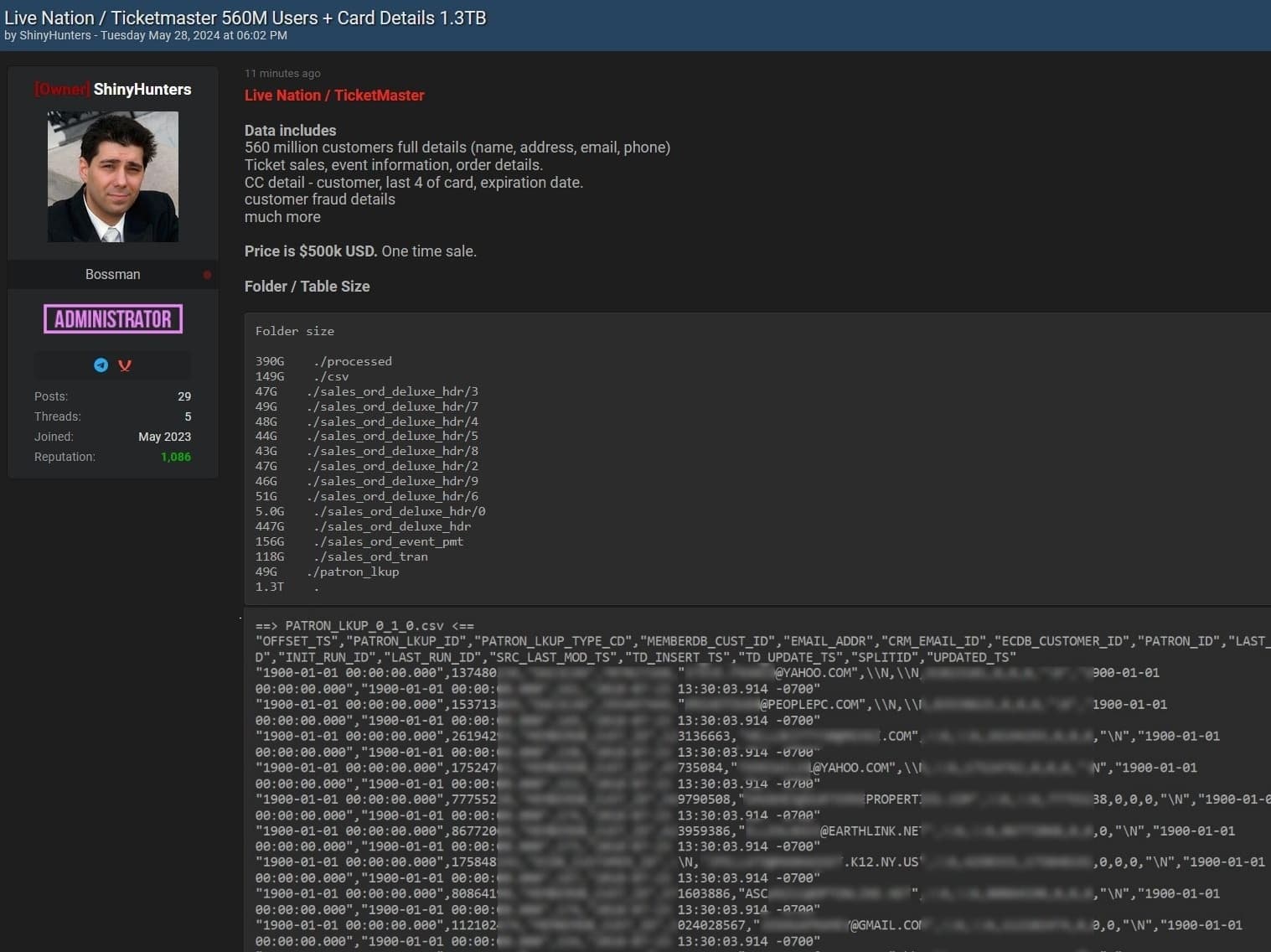
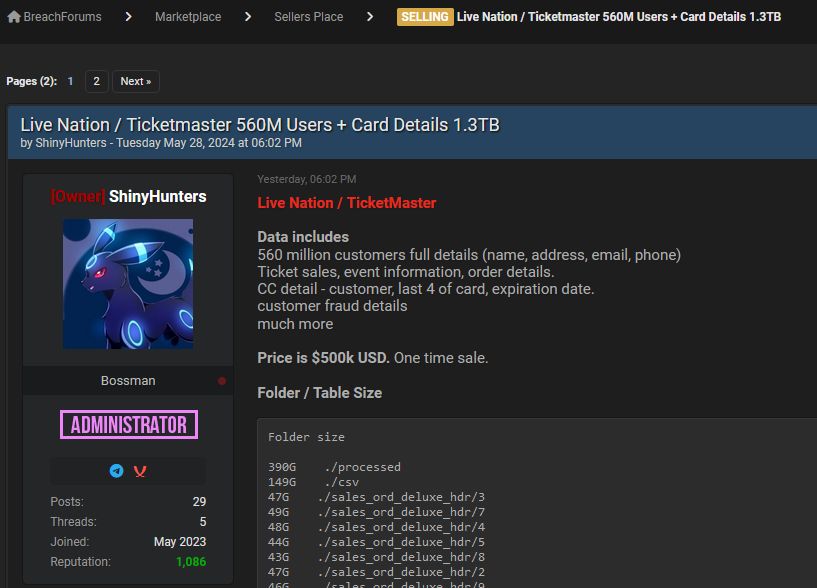
The notorious hacker group ShinyHunters has claimed to have breached the security of Ticketmaster-Live Nation, compromising the personal data of a whopping 560 million users. This massive 1.3 terabytes of data, is now being offered for sale on Breach Forums for a one-time sale for $500,000.
The Breach: Details and Implications
ShinyHunters has allegedly accessed a treasure trove of sensitive user information, including full names, addresses, email addresses, phone numbers, ticket sales and event details, order information, and partial payment card data. Specifically, the compromised payment data includes customer names, the last four digits of card numbers, expiration dates, and even customer fraud details.
ShinyHunters on Breach Forums claiming Ticketmaster data breach (Screenshot: Hackread.com)
The data breach, if confirmed, could have severe implications for the affected users, leading to potential identity theft, financial fraud, and further cyber attacks. The hacker group’s bold move to put this data on sale goes on to show the growing menace of cybercrime and the increasing sophistication of these cyber adversaries.
ShinyHunters’ Sophistication and Recent Activities
ShinyHunters is no stranger to the hacking and cybercrime world. The group is known for its high-profile data breaches and is also the owner and administrator of Breach Forums, a notorious platform for cybercrime activities.
Despite the FBI’s recent efforts to shut down the forum, ShinyHunters managed to reclaim the seized domain, showcasing their technical prowess and resilience against law enforcement actions. This, as reported by Hackread.com, not only resulted in the return of Breach Forums to the dark web but also saw its revival on the clearnet, using the original domain.
Communication and Response
In an exclusive communication with Hackread.com, ShinyHunters revealed that they have attempted to contact Ticketmaster regarding the breach but have yet to receive a response. Hackread.com has reached out to Ticketmaster for a comment, and the article will be updated with any responses or official statements from the company.
Oded Vanunu, Chief Technologist and Head of Products Vulnerability Research at Check Point commented on the issue stating, “The proof provided by the seller on the infamous BreachForum website appears legitimate, although it is yet to be validated. If the information is genuine, this is a huge cache of personal data on more than 560 million worldwide customers.”
“With this, cybercriminals can commit identity theft and financial fraud, launch phishing attacks or take over online accounts. They may also use the data for blackmail, extortion, medical identity theft or credential stuffing which could lead to significant financial losses for customers, damage to credit scores, and an erosion of trust,” Vanunu warned.
“Despite the best efforts by international law enforcement to seize control of BreachForum, the platform continues to re-emerge and aid those looking to buy and sell illicit information. Its bounce-back serves as a reminder of how resilient cybercriminals are, and why we as an industry need to keep pace with them in order to stop the extraction and trading of sensitive data,” he added.
A Troubled Cybersecurity Past
This isn’t Ticketmaster’s first encounter with cybersecurity issues. On January 26, 2023, the company admitted that ticket sales for Taylor Swift’s concerts were disrupted by a bot-driven attack, highlighting vulnerabilities in their ticketing system.
Furthermore, back in January 2021, Ticketmaster was found guilty of hacking into a rival company, Songkick, to obtain confidential information. This criminal activity led to a $10 million settlement paid to the victim company.
That’s not all. Last week, on Thursday, May 23, 2024, the US Justice Department (DoJ) sued Live Nation-Ticketmaster for monopolizing markets across the live concert industry. The lawsuit highlights a pattern of cybersecurity and ethical challenges faced by Ticketmaster over the years.
Users are advised to monitor their financial accounts closely, change passwords, and remain alert about potential phishing attempts. Companies like Ticketmaster must prioritize transparency and swift communication with their users to mitigate the damage and restore trust.
Stay tuned to Hackread.com for the latest updates on this developing story.
Earlier this week, a cybercriminal group posted an alleged database up for sale online which, it says, contains customer and card details of 560 million Live Nation/Ticketmaster users.
The data was offered for sale on one forum under the name “Shiny Hunters”. ShinyHunters is the online handle for a group of notorious cybercriminals associated with numerous data breaches, including the recent AT&T breach.
Post on BreachForums by ShinyHunters
The post says:
“Live Nation / Ticketmaster
Data includes
560 million customer full details (name, address, email, phone)
Ticket sales, event information, order details
CC detail – customer last 4 of card, expiration date
Customer fraud details
Much more
Price is $500k USD. One time sale.”
The same data set was offered for sale in an almost identical post on another forum by someone using the handle SpidermanData. This could be the same person or a member of the ShinyHunters group.
According to news outlet ABC, the Australian Department of Home Affairs said it is aware of a cyber incident impacting Ticketmaster customers and is “working with Ticketmaster to understand the incident.”
Some researchers expressed their doubts about the validity of the data set:
🚨🚨Thoughts on the alleged Ticketmaster Data Breach 🚨🚨
TLDR: Alert not Alarmed
The Ticketmaster data breach claim has provided BreachForums with the quick attention they need to boost their user numbers and reputation.
While others judged it looks legitimate based on conversations with involved individuals, and studying samples of the data set:
Today we spoke with multiple individuals privy to and involved in the alleged TicketMaster breach.
Sometime in April an unidentified Threat Group was able to get access to TicketMaster AWS instances by pivoting from a Managed Service Provider. The TicketMaster breach was not…
Whether or not the data is real remains to be seen. However, there’s no doubt that scammers will use this opportunity to make a quick profit.
Ticketmaster users will need to be on their guard. Read our tips below for some helpful advice on what to do in the event of a data breach.
You can also check what personal information of yours has already been exposed online with our Digital Footprint portal. Just enter your email address (it’s best to submit the one you most frequently use) to our free Digital Footprint scan and we’ll give you a report.
All parties involved have refrained from any further comments. We’ll keep you posted.
Protecting yourself after a data breach
There are some actions you can take if you are, or suspect you may have been, the victim of a data breach.
Check the vendor’s advice. Every breach is different, so check with the vendor to find out what’s happened, and follow any specific advice they offer.
Change your password. You can make a stolen password useless to thieves by changing it. Choose a strong password that you don’t use for anything else. Better yet, let a password manager choose one for you.
Enable two-factor authentication (2FA). If you can, use a FIDO2-compliant hardware key, laptop or phone as your second factor. Some forms of two-factor authentication (2FA) can be phished just as easily as a password. 2FA that relies on a FIDO2 device can’t be phished.
Watch out for fake vendors. The thieves may contact you posing as the vendor. Check the vendor website to see if they are contacting victims, and verify the identity of anyone who contacts you using a different communication channel.
Take your time. Phishing attacks often impersonate people or brands you know, and use themes that require urgent attention, such as missed deliveries, account suspensions, and security alerts.
Consider not storing your card details. It’s definitely more convenient to get sites to remember your card details for you, but we highly recommend not storing that information on websites.
Set up identity monitoring.Identity monitoring alerts you if your personal information is found being traded illegally online, and helps you recover after.
We don’t just report on threats – we help safeguard your entire digital identity
Cybersecurity risks should never spread beyond a headline. Protect your—and your family’s—personal information by using identity protection.
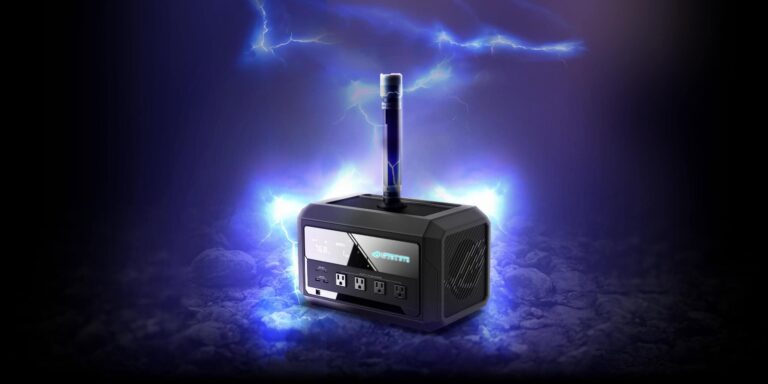
ASUS just launched its first-ever ROG-branded portable gaming UPS, the ROG Mjolnir. Marvel fans, if the name rings a bell with you, yes! It looks exactly like the iconic weapon wielded by a certain Norse god of thunder. Everyone else, the new power station is shaped like Thor’s hammer. Unfortunately, this unique piece of tech isn’t expected to hit the market before 2025.
ASUS launches the ROG Mjolnir portable gaming UPS at Computex 2024
Computex 2024 is in full swing in Taipei, Taiwan. The mega computer expo has already given us a solid idea of where the PC industry is headed, with AI becoming integral to all future developments. Amidst all this, ASUS is here with a product that looks like a joke but is real. The ROG Mjolnir, which the company teased at the beginning of April saying that it isn’t an April Fool’s joke, is now official.
IT’S REAL GAMERS! Can you guess what feature we’re gonna add to complete your gaming experience?
It is a massive power station featuring a 768Wh LiFePO4 (lithium iron phosphate) battery. The UPS can run a 700W PC or an RTX 4080 gaming system for about an hour or a 1200W system for 30 minutes. You can expect a much longer backup if you use it to power a regular PC for your office work or web browsing. ASUS claims a superfast switchover time of 10ms when your main power is cut.
The company has equipped the ROG Mjolnir with an LCD screen showing real-time information about its power draw and remaining battery life. The power station features four AC outlet plugs that can deliver a maximum power of 1200W. It also has two USB-C PD ports with 100W PD charging support. Additionally, you get two USB-A Quick Charge ports with up to 16W power output.
This isn’t it, though. The ROG Mjolnir’s handle is a magnetic, detachable torchlight. This is a well-thought-out addition from ASUS—a torchlight is a handy tool when there’s a power cut. The torchlight charges wirelessly when attached to the top surface of the UPS. It boasts Qi 2.0 wireless charging capabilities and is MagSafe compliant, so you can charge your compatible Android phone or iPhone too.
The UPS supports solar charging when outdoors
ASUS made the ROG Mjolnir primarily for gamers. The product has a rugged design that we see on the rest of the ROG lineup. However, you can easily take it outdoors without worrying about its charging. The UPS supports solar charging if you can’t find an AC source. Its charging speed and long-term battery health info are unavailable. ASUS also has yet to reveal its pricing and availability details. Reports say the power station is slated for an early 2025 release.
We all know Microsoft as a tech behemoth that’s not shy about buying out other companies to get ahead. However, this practice has landed it in legal trouble with several governmental bodies due to antitrust concerns. Microsoft had a deal with Inflection AI, and the FTC launched a probe into it to see if it dodged antitrust laws.
When a larger company wants to acquire the talent and resources from another company, it typically acquires it. However, it appears that Microsoft took another approach to getting Inflection AI’s talent. Back in March, Microsoft hired nearly every employee in the company. Along with that, the Redmond company also paid Inflection AI $650 million to acquire the license to its technology. It’s a classic multi-trillion-dollar corporation move.
The FTC launches a probe into the deal Microsoft made with Inflection AI
As you may know, the U.S. FTC keeps an eye on big businesses to make sure that they’re not making it harder for competition to flourish. As such, when a company spends more than $119 million to buy a company, it’s required to report it to the FTC.
The thing is that Microsoft didn’t acquire Inflection AI (technically). It just hired most of its employees and paid it $650 million to license its technology; it’s different… kinda. Let’s face facts, on its surface, it seems that Microsoft pulled this move to acquire the company’s talent and tech without actually buying it. We can guess that, if Microsoft bought Inflection AI, it would have been to the tune of $650 million, the same amount it paid to acquire the license.
Since it’s not an official acquisition, Microsoft didn’t technically need to report it to the FTC and deal with a possible block. If the FTC feels that a deal impacts competition in a market, it will sue to block the deal.
Buying a company without buying it
Now, The FTC is looking into this move that Microsoft pulled to see if the company did this to avoid a possible lawsuit. It launched a probe into this deal. If Microsoft assumes control over the company in the deal, then it could be found in violation of antitrust laws. Hiring the majority of a company’s employees and licensing its tech is essentially buying a company without buying it. The only difference is the ink on the contracts.
Microsoft claims that, while it hired all of its employees, Inflection AI still remains an independent company. It issued a statement to Engadget: “Our agreements with Inflection gave us the opportunity to recruit individuals at Inflection AI and build a team capable of accelerating Microsoft Copilot, while enabling Inflection to continue pursuing its independent business and ambition as an AI studio. We take our legal obligations to report transactions under the HSR Act seriously and are confident that we have complied with those obligations.”
So, we’re going to have to wait to see how this turns out. Not only is Microsoft a mega-corporation, but it already has OpenAI’s technology under its belt. How much is the company going to throw its weight around to push ahead in this AI race?