Samsung has started updating the US version of the Galaxy S20 FE to the April security patch. The first-gen Fan Edition (FE) phone is currently receiving the update on carrier-locked units. Factory-unlocked variants should join the party soon. The latest security update has been already pushed to the phone in several international markets.
April update is live for the US version of the Galaxy S20 FE
Launched in late 2020, the Galaxy S20 FE marked the beginning of a new smartphone lineup for Samsung. The FE lineup offers flagship-grade features in a more affordable package. The device has received regular updates since its launch. It arrived with Android 10 and received feature updates up to Android 13. That’s the maximum Samsung promised, so it will no longer get feature updates—no Android 14 or One UI 6.1.
The Galaxy S20 FE is still getting monthly security patches, though. It should pick up new SMR (Security Maintenance Release) at least until September this year. After that, Samsung may end software update support for the phone or drop it to quarterly updates and push a few more security patches. There are still several months to go before we know whether the FE phone will get updates for a fifth year.
In the meantime, it is starting to pick up the latest SMR (Security Maintenance Release) in the US. The carrier-locked variants of the Galaxy S20 FE are getting the April update with the firmware build number G781USQSFHXD1. As expected, the update doesn’t bring any new features or improvements. It is all about this month’s security fixes. “The security of your device has been improved,” the official changelog states.
The April 2024 SMR for Galaxy devices patches more than 40 vulnerabilities. As usual, these include several Android OS patches from Google. The Android maker fixed one critical Android bug this month, along with dozens more high-severity vulnerabilities. Samsung also patched a handful of Galaxy-specific security flaws. These issues don’t exist on Android devices from other brands.
Galaxy S20 flagships may not get the new SMR
Samsung’s April 2024 security update may not reach the Galaxy S20 flagships. Those devices arrived in early 2020 and turned four earlier this year. The company has dropped them to quarterly updates. They picked up the March release, so the next security patch may arrive in June. We will let you know when a new update rolls out to the Galaxy S20 series. You can always check for updates from the Settings app.
Nintendo will not attend the Gamescom 2024 event scheduled to begin on August 21 in Cologne, Germany this year. The company has informed some media outlets that its decision to skip the largest gaming event comes after “careful consideration.”
Gamescom is Europe’s biggest annual gaming expo. It is set to begin on August 21 and end on August 25 this year. Many game developers globally use this event as a platform to exhibit their upcoming games or gaming hardware.
A Nintendo spokesperson informed a German gaming news outlet that the Kyoto-based company won’t participate in the Gamescom 2024 event. Talking about Nintendo’s plan to skip the event with the German news outlet Games Wirtschaft, a company representative said that every year the company evaluates whether or not it should attend the Gamescom event.
And, this time around, after considering all the perspectives, the gaming giant has decided not to attend the Gamescom 2024 event. The company representative also mentioned that players can try out Nintendo Switch games at other gaming events throughout the year.
Nintendo’s decision to skip the Gamescom 2024 event makes sense
The news comes as a surprise since Nintendo has always participated in Europe’s biggest gaming event. However, the decision of Nintendo not to attend the Gamescom 2024 event somewhat makes sense. Notably, the first reason for this could be declining first-party support for games on the Nintendo Switch.
In short, that means there won’t be any official announcement regarding the same before or during the Gamescom 2024 event. Moreover, this could also mean that the company might not announce the Nintendo Switch 2 at the Summer Game Fest, a new global digital gaming event that will begin on June 7, 2024.
All that said, Nintendo’s decision to skip Gamescom 2024 could see a decline in the number of attendees for the event. Not to forget, many tournaments and competitions took place at a large show stage set by Nintendo at Gamescom 2023. It also set up multiple gaming stations, photos, and selfie booths for the attendees. But it seems by skipping the event, Nintendo is focusing more on its Nintendo Switch 2.
Recently, there’s been a lot of noise about folks having trouble with their 2FA (two-factor authentication) compromised by hackers. They’re claiming they did everything right in terms of security but still ended up locked out of their accounts quicker than you can say “cybersecurity crisis.”
Now, you might be scratching your head and wondering, “Well, what in the cyber world can I do to keep my Gmail fortress safe and sound?” Let’s explore.
First things first: What is 2FA?
Sometimes the protection needs protection (Image Credit–Google)
2FA, which stands for two-factor authentication, is an extra layer of security for your online accounts. Google actually calls it 2-step verification, but it is practically the same thing. It is like having a double lock on your door. Here is how it works:
You enter your username and password as usual.
Then, you provide a second piece of information to prove it is really you trying to log in.
This second factor can be a few different things:
A code sent to your phone: This is a common method. You’ll receive a text message or a notification on your phone with a unique code that you need to enter to log in.
A code from an authentication app: There are apps that generate these codes for you, even if you don’t have internet access on your phone.
Your fingerprint or face: Some websites and apps allow you to use your fingerprint or face scan as the second factor.
Even if someone steals your password, they wouldn’t be able to get into your account without that second piece of information. This makes it much harder for hackers to break into your accounts. But still, as reality shows, it can happen.
How do hackers hack the 2FA?
It’s probably not necessary for the room to be dark, but still…
While 2FA adds an extra layer of security, it is not foolproof. Hackers can exploit weaknesses in specific systems and that is exactly what they are up to.
As mentioned earlier, hackers aren’t directly hacking the 2FA system itself. Instead, it is more likely that folks who find themselves locked out of their Google accounts, with both passwords and 2FA details altered, have been hit by a session cookie hijack attack.
In simpler terms, cyber crooks use sneaky tactics like phishing emails to trick users into installing malware. This malware quietly swipes session cookies, giving hackers access to accounts without needing to crack the 2FA code.
Session cookies are like shortcuts for users, helping them log in faster and pick up where they left off. But here is the catch: if a bad actor gets their hands on these cookies after a successful login, they can just play them back and skip the 2FA step. To the website, it looks like the user is already authenticated and logged in.
Here are some common 2FA bypassing techniques:
Social engineering: This is where a hacker tricks you into giving them your information or clicking on a malicious link. For example, they might send you a phishing email that looks like it is from your bank, asking you to log in to your account. Once you click the link and enter your credentials, the hacker has stolen your login information, including any 2FA codes sent to your phone.
Exploiting weaknesses in 2FA systems: For instance, if the 2FA codes are sent over SMS, a hacker might try to intercept those codes by SIM swapping, where they convince your phone carrier to transfer your number to a SIM card they control.
Malware: Hackers might infect your device with malware that steals your 2FA codes. This malware could be disguised as a legitimate app or come from clicking on a malicious link.
Alright, so now you might be thinking, “Thanks for the heads up, but how do I keep myself safe?” Let’s dive into that.
Tips to make it harder for hackers to get to your account
Get it? Those tips are so sharp, they could write a novel on cybersecurity
Remember, always watch where you are clicking and think twice before opening email attachments, even if they seem legit. Spread the word to your pals, and don’t forget to school your older or younger family members on these cyber-smarts. Now, here are some handy tips to keep you safe:
Keep it unique: Don’t recycle passwords across different accounts. Whip up complex passwords with a mix of uppercase and lowercase letters, numbers, and symbols.
Use passkeys: Consider using passkeys instead of passwords. They are a newer, more secure sign-in method that doesn’t require you to memorize a string of characters.
Double down on 2FA: Whenever you see the option, slap on that extra layer of security with 2FA. Opt for methods like authentication apps over SMS verification for extra oomph.
Enable Security Checkup: Google’s got your back with its nifty Security Checkup tool. It will help you review your security settings and spot and squash any security weak spots in your account.
Stay alert: If you are hit with unexpected requests for 2FA codes, it could be a red flag that someone is trying to sneak into your account.
Use a security key for your critical accounts: A security key is usually a physical device, like a USB. This key is tied to your accounts and only unlocks them when plugged in and activated. It offers top-notch protection against phishing and has built-in safeguards against hacking if it’s lost or stolen.
Manage your passwords: Tame the password jungle with a password manager. It’ll whip up and store strong, unique passwords for all your accounts, so you only need to remember one master key. But remember, only install apps from trusted sources and take a moment to check out the reviews before hitting that download button. Scams can be hiding out in the app stores too.
Lock down your socials: Review your privacy settings on social media and tighten them up to keep your info under wrap.
Stay updated: Keep your operating system, web browser, and apps updated with the latest security patches.
Keep an eye out: Regularly check in on your accounts for any fishy business – unauthorized logins or sketchy changes should set off the alarm bell.
Multi-device login verification: Put up an extra roadblock for would-be intruders by enabling multi-device login verification. Anytime there is a new login attempt from an unfamiliar device, you will get a heads-up.
Disable unused accounts: Close or disable any accounts you are not using to minimize potential attack targets.
Stay in the know: Keep your finger on the pulse of common security threats and best practices. There is a wealth of resources out there to keep you in the loop.
What if my Gmail account has already been hacked?
If you suspect your Gmail account has already been hacked, don’t panic! Here are the steps you should take to regain control and secure your account:
Act quickly: The sooner you take action, the less damage the hacker can do. Plus, Google says that if you have lost access to your accounts, you have seven days to get it back.
Report the hack: If you believe your account was compromised, report the incident to Google using its account recovery process. This will help Google investigate the issue and potentially recover any lost data.
Change your password: Go to your Google Account settings (you can usually access it from your profile picture in Gmail) and navigate to the security section. There, you will find the option to change your password. Choose a strong, unique password that you don’t use for any other accounts.
Review recent activity: Check your Gmail account activity for any unauthorized emails sent, logins from unrecognized devices, or changes to your account settings. You can find this information in your Google Account security settings under “Recent security events.”
Secure other accounts: Hackers often target multiple accounts linked to the same email address. Change the passwords for any other accounts that use the same email and password combination.
Scan for malware: If you are concerned the hacker might have accessed your computer or smartphone through malware, run a scan with a reputable antivirus program to detect and remove any malicious software.
By taking these precautions, you increase your chances of regaining control of your Gmail account or reducing the impact of a hack. Plus, you will make it tougher for hackers to come knocking at your digital door in the future.
Sadly, scams lurk around every corner, and they are getting trickier to spot, thanks to advancements in technology like artificial intelligence (deep fakes, anyone?). The key to staying safe? Staying informed.
A new variant of the Xorist ransomware, dubbed L00KUPRU, has been discovered in the wild, posing a threat to unsuspecting users.
The L00KUPRU ransomware is known to encrypt user files, appending the .L00KUPRU extension to the affected files.
The attackers behind this malware have employed a sophisticated approach, dropping a ransom note as a text file titled “HOW TO DECRYPT FILES.txt.”
This note demands payment in Bitcoin cryptocurrency and displays a pop-up window on the victim’s desktop, providing the attackers’ contact details and the BTC wallet address for the ransom payment.
Free Live Webinar for DIFR/SOC Teams: Securing the Top 3 SME Cyber Attack Vectors - Register Here.
Broadcom has published an article detailing its findings on the L00KUPRU ransomware.
The post includes technical details on the malware’s behavior, such as using encryption algorithms and command-and-control servers.
Variant Details
A leading cybersecurity firm has identified several variants of the L00KUPRU ransomware, including:
Adaptive-based: ACM.Ps-RgPst!g1
File-based: Ransom.CryptoTorLocker, WS.Malware.1
Machine Learning-based: Heur.AdvML.B
These variants have been designed to evade detection and infiltrate systems, posing a significant threat to individuals and organizations.
The discovery of the L00KUPRU ransomware is a stark reminder of the ever-evolving landscape of cybersecurity threats.
Experts urge users to remain vigilant, keep their systems and software up-to-date, and implement robust backup strategies to mitigate the impact of such attacks.
Collaboration between security researchers, law enforcement, and the public is crucial in combating the rise of sophisticated ransomware variants like L00KUPRU.
Looking to Safeguard Your Company from Advanced Cyber Threats? Deploy TrustNet to Your Radar ASAP
We’re all familiar with TikTok, but the company has a few more apps that it is distributing. One app that is making waves is the new TikTok Notes app. Aside from that, the company recently launched TikTok Lite. Well, the EU demands that TikTok provide a risk assessment for TikTok Lite. If not, then the ByteDance-owned company could be in some hot water.
In case you don’t know, TikTok Lite is a stripped-down version of the core app. It’s designed for people who don’t have as much storage on their phones and who have limited internet connection speeds.
The latest version of the full TikTok app for Android is nearly a gigabyte in size. That’s not much of an issue for a device with 128GB or 256GB. However, there are people out there who are confined to devices with less than 64GB of storage. Also, there are people in parts of the world that have historically bad internet connections. So, TikTok Lite allows you to watch TikTok videos without eating up too much data or taking up too much space.
The EU wants TikTok to give a risk assessment of TikTok Lite
The company recently launched TikTok Lite in the French and Spanish markets. However, the EU has its eyes on the app. According to the report, this move by the EU comes as part of the Digital Services Act (DSA), and it was spearheaded by Thierry Breton.
The company is going to need to basically explain how dangerous this app is to children, and it has 24 hours to do so. The DSA Target’s companies that could potentially expose children to harmful or destructive content. We all know that TikTok isn’t exactly a saint in that regard.
One thing that the EU pointed out was the Task and Reward Lite program. This program will reward users for doing specific tasks on the platform. “This concerns the potential impact of the new ‘Task and Reward Lite’ programme on the protection of minors, as well as on the mental health of users, in particular in relation to the potential stimulation of addictive behavior,” Breton said.
After TikTok delivers its risk assessment to the EU, the union will assess the company’s response and consider further steps. So, there’s no telling what will happen at this point. However, the DSA could possibly fine TikTok for up to 6% of its annual turnover if it is in violation of the act.
Telegram is undoubtedly one of the most popular instant messaging applications in the world. The app is available for almost every popular computing platform in the world – Android, iOS, Windows, macOS, and Linux. Telegram’s user base is reportedly around 900 million active users at the moment. Now, Telegram is projected to achieve one billion monthly active users within a year, as per the app’s founder, Pavel Durov.
Telegram is spreading like a “forest fire”, suggests the founder
In an interview with the US journalist Tucker Carlson, Durov said that Telegram is spreading like a “forest fire”. He believes that the platform will have more than one billion monthly active users within a year. In comparison, one of Telegram’s main rivals, WhatsApp, has over two billion monthly active users. Telegram is also trailing behind the likes of Instagram, TikTok, Facebook, and WeChat.
For the uninitiated, Telegram Messenger aka Telegram is a cloud-based, cross-platform, encrypted instant messaging platform. The app was originally launched for iOS and Android devices in 2013. The platform was a rapid success as it gained 35 million monthly active users in less than a year after launch. Similar to most of the competitors, it also lets users share messages, files, media, and more. The users can also hold private and group voice or video calls on the platform.
Notably, the company recently released the Telegram Premium version, which offers several additional features at $4.99 per month. Premium users can also convert to the Telegram Business edition, which offers more customizable features.
On the future of Telegram
During the interview with Carlson, Durov said he remains committed to maintaining Telegram as a “neutral platform”. It will continue to steer clear of geopolitical entanglements in the social media landscape. The messaging platform is also eyeing a listing in the US market once it achieves profitability, suggests The Financial Times. The potential listing could be a major event, just like the recent Reddit IPO.
To maintain its ever-growing user base, Telegram continues to add more and more features to its portfolio. Most recently, the platform added the ability to create custom stickers. Now, it’s planning to launch more than 16 new features in the coming weeks.
Detecting source code vulnerabilities aims to protect software systems from attacks by identifying inherent vulnerabilities.
Prior studies often oversimplify the problem into binary classification tasks, which poses challenges for deep learning models to effectively learn diverse vulnerability characteristics.
To address this, the following cybersecurity analysts introduced FGVulDet, a fine-grained vulnerability detector that employs multiple classifiers to discern various vulnerability types:-
Shangqing Liu from Nanyang Technological University
Wei Ma from Nanyang Technological University
Jian Wang from Nanyang Technological University
Xiaofei Xie from Singapore Management University
Ruitao Feng from Singapore Management University
Yang Liu from Nanyang Technological University
FGVulDet Vulnerability Detector
Each classifier learns type-specific semantics, and researchers propose a novel data augmentation technique to enhance diversity in the training dataset.
Inspired by graph neural networks, FGVulDet utilizes an edge-aware GGNN to capture program semantics from a large-scale GitHub dataset encompassing five vulnerability types.
Five Vulnerability Types
Previous works have simplified the identification of source code vulnerability into a binary classification problem where all defect-prone functions are labeled as 1.
This approach lacks accuracy because it does not consider types of particular vulnerabilities.
However, in contrast to this, the researchers’ approach focuses on fine-grained vulnerability identification and aims to learn prediction functions for distinct vulnerability types within a dataset.
Each function is categorized based on its vulnerability type to predict its vulnerability status.
Their framework has three core parts:-
Data Collection
Vulnerability-preserving Data Augmentation
Edge-aware GGNN
On the other hand, researchers train multiple binary classifiers for different vulnerability types and aggregate their predictions through voting during the prediction phase.
This task is difficult as obtaining high-quality datasets covering a broad range of vulnerabilities requires specialist knowledge.
The framework of FGVulDet (Source – Arxiv)
GGNN is a very famous source code modeling approach that is limited to node representations without considering the edge information.
In this case, it’s aimed at proposing an edge-sensitive GGNN that can effectively use edge semantics in vulnerability detection.
Each type of vulnerability has its own binary classifier, which is trained by using datasets of both vulnerable and non-vulnerable functions.
The final prediction is made through majority voting across all the classifiers.
Since the researchers’ dataset includes common vulnerabilities so, it can be extended for detecting others as well.
On the other hand, FGVulDet employs multiple classifiers and a novel data augmentation technique for effective fine-grained vulnerability detection.
Looking to Safeguard Your Company from Advanced Cyber Threats? Deploy TrustNet to Your Radar ASAP.
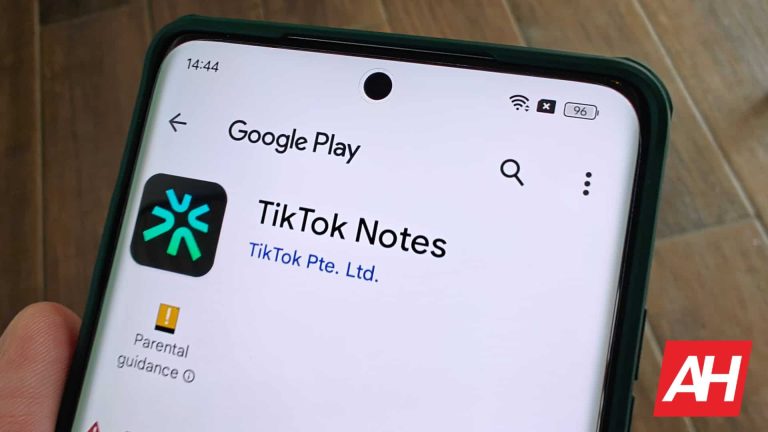
Instagram took inspiration from Twitter to make Threads; well, TikTok took inspiration from Instagram to make its new platform. TikTok just launched Notes, its Instagram-inspired social media platform that prioritizes sharing images.
This is a bit ironic. TikTok swooped in and basically defined an entire genre of vertically scrolling videos. Thus, Instagram made a hard pivot toward video content. Now, we got the news that TikTok wants to take a step backward and bring forth a photo-sharing app.
TikTok launches Notes, its Instagram-style photo-sharing app
Right now, we don’t have too much information about how this app is going to work. It’s currently only available to select users on Android and iOS. Also, it is only in the Canadian market for the time being. So, this appears to be a limited test to see how people like it. In any case, we expect it to hit other markets soon.
When you get the app, you will be able to sign in using your TikTok account. As for the interface, it looks like you will receive content via a two-column grid. This will contrast it from the one column that you get with Instagram. Whether that’s better or worse remains to be seen.
You will see the images with the captions under them. The captions can be fairly large before getting cut off. One caption reads “Dive into the heart of the city that never sleeps and create memories that will…” before getting cut off. Under the caption, you will see the account name and profile picture with the “like” count at the far right of the image.
How the app works
Like any social media platform, you will have the option to comment and otherwise interact with the posts. When you tap on a post, it will fill the top half of the screen. The bottom half of the screen will show the title and caption of the post along with the comments. At the bottom of the screen, you will see the comment text field, “Likes”, and the view comments button.
Much like Instagram, you are able to make photo carousels in TikTok Notes. It allows you to post several photos at once that the viewer will be able to flip through. While making your carousel, you have the option to choose an image for the cover image.
The post editing screen is pretty straightforward. You have the option to edit the photos within the app, choose who can see the post, and save the post draft for later.
As TikTok Notes makes it to more people, we’re going to learn more about this app’s functionality. So, stay tuned for this app to reach your area as time goes on.
Google just updated its Terms of Service regarding ownership of AI outputs. The company confirmed that they will not claim ownership of the content generated by their artificial intelligence models. This means you could even use them commercially if you want.
One of the most controversial points about the use of AI is the copyright of the content. There are multiple discussions around both the use of content obtained from the Internet and who owns the output created by AI. While there seems to be a lot of debate ahead, Google is helping to clarify the situation regarding the use of services based on its LLMs.
Ownership of content generated by Google AI tools is yours
As spotted by 9to5Google, a new clause in Google’s updated Terms of Service notes that they “won’t claim ownership over generated AI content.” They even offer the generation of a poem through the company’s AI tools as an example. According to the update, you could publish the poem commercially without prior authorization from Google.
The updated Terms of Service also include things you should avoid doing. The list mentions actions that can cause damage to the company, its services, or its users:
– introducing malware – spamming, hacking, or bypassing our systems or protective measures – jailbreaking, adversarial prompting, or prompt injection, except as part of our safety and bug testing programs – providing services that appear to originate from us when they do not – using our services (including the content they provide) to violate anyone’s legal rights, such as intellectual property or privacy rights – reverse engineering our services or underlying technology, such as our machine learning models, to extract trade secrets or other proprietary information, except as allowed by applicable law – using automated means to access content from any of our services in violation of the machine-readable instructions on our web pages (for example, robots.txt files that disallow crawling, training, or other activities) – hiding or misrepresenting who you are in order to violate these terms – providing services that encourage others to violate these terms
Google also warns about practices to avoid regarding the use of content generated through its AI tools to commit fraud: – phishing – creating fake accounts or content, including fake reviews – misleading others into thinking that generative AI content was created by a human – providing services that appear to originate from you (or someone else) when they actually originate from us
The new Terms of Service will come into effect next month
The latest Terms of Service with the new Google AI output ownership policies will come into effect as of May 22, 2024. The company also adapted its ToS to the specific laws of France and Australia. Lastly, this update does not include changes to their Privacy Policy.
Security researchers at Cado Security Labs have uncovered a new variant of the Cerber ransomware targeting Linux systems.
This strain of the notorious malware has been observed exploiting a recent vulnerability in the Atlassian Confluence application to gain a foothold on targeted servers.
The primary attack vector for this Cerber variant is the exploitation of CVE-2023-22518, a vulnerability in the Atlassian Confluence application that allows an attacker to reset the application and create a new administrative account, as reported by Cado Security Labs.
This flaw, disclosed and patched earlier this year, has become a prime target for threat actors seeking to compromise Confluence servers.
Technical Details
The Cerber Linux ransomware is a highly obfuscated C++ payload, compiled as a 64-bit Executable and Linkable Format (ELF) binary and packed with the UPX packer.
This technique is employed to prevent traditional malware scanning and analysis.
Once the attacker gains access to the Confluence server through the CVE-2023-22518 exploit, they use the newly created administrative account to upload and install a malicious web shell plugin, Effluence.
Free Live Webinar for DIFR/SOC Teams: Securing the Top 3 SME Cyber Attack Vectors - Register Here.
This web shell provides a user interface for executing arbitrary commands on the compromised host.
Recreation of installing a web shell on a Confluence instance
The primary Cerber payload is then downloaded and executed through the web shell.
This payload is a stager responsible for setting up the environment and fetching additional components, including a log checker and the final encryptor payload.
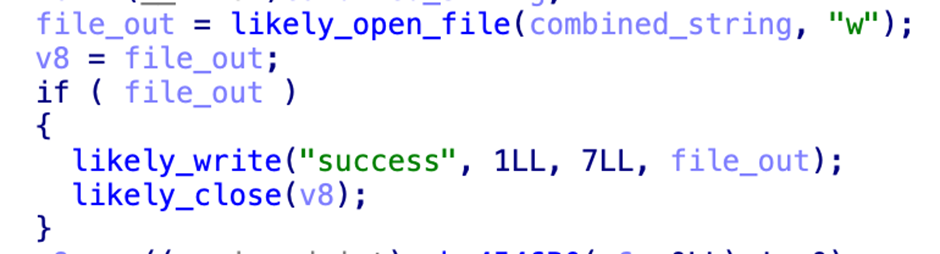
The log checker payload, known as “agttydck,” is a simple C++ program that attempts to write a “success” message to a file.
This is likely a check for the appropriate permissions and sandbox detection.
A cleaned-up routine that writes out the success phrase
The final encryptor payload, “agttydcb,” is the core of the ransomware.
It systematically encrypts files across the file system, overwriting the original content with the encrypted data and appending the “.L0CK3D” extension.
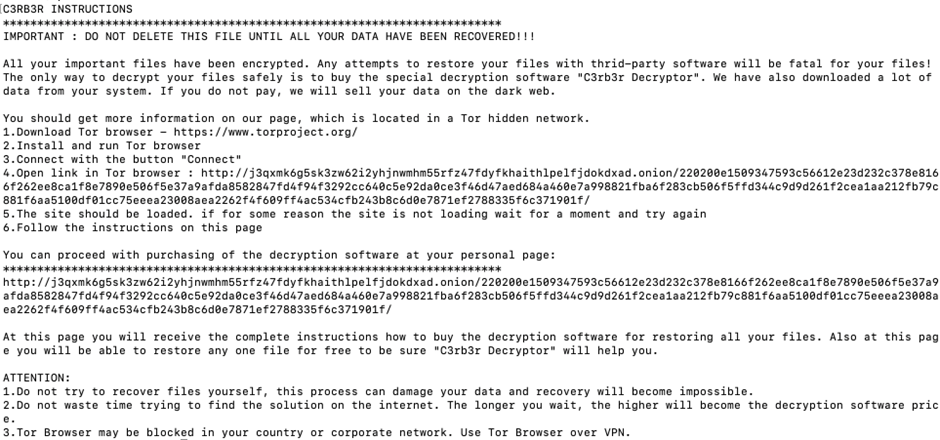
A ransom note is also left in each directory, demanding payment for the decryption of the files.
The ransom note left by Cerber
The Cerber Linux ransomware exploited the Atlassian Confluence vulnerability, highlighting the importance of timely patching and vigilance in securing critical enterprise applications.
As threat actors continue to target vulnerabilities in popular software, organizations must remain proactive in their security measures to protect against such sophisticated attacks.
Looking to Safeguard Your Company from Advanced Cyber Threats? Deploy TrustNet to Your Radar ASAP








.webp)