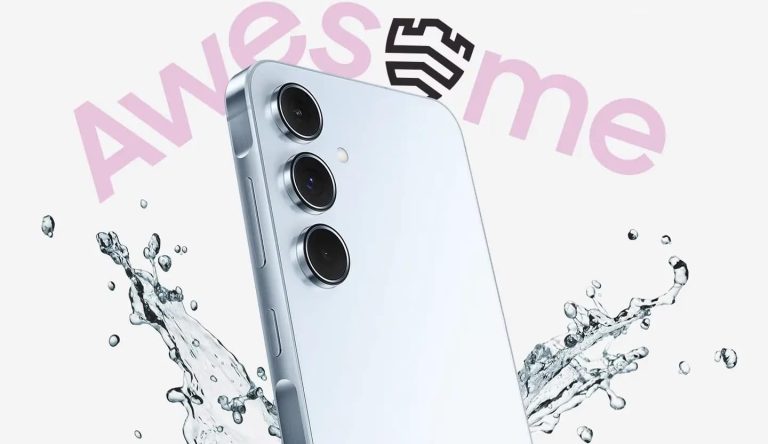
The Galaxy A55 is Samsung’s latest premium mid-range smartphone. It combines premium features and affordability. You won’t get a flagship experience like the Galaxy S series, but the Galaxy A55 is a decent all-around package with plenty of value for your money. The cameras are fairly capable, while the display is great too. Samsung has improved its Exynos processors in recent years, with an AMD GPU coming to the mid-range segment starting with this phone.
Slimmer display bezels would have made the phone look more premium, but there aren’t many complaints about its overall build quality. The Galaxy A55 gives you a metallic frame, glass front and back, and strong protection against dust and water. In this article, we will discuss everything you need to know about Samsung’s most powerful A series phone of 2024, so you can determine whether it is best suited for your needs and preferences.
What are this phone’s specs?
Samsung has equipped the Galaxy A55 with a 6.6-inch Super AMOLED display with Full HD+ resolution (1080 × 2340 pixels). This makes for a pixel density of 390 ppi, which ensures fairly sharp images on the screen. The display is HDR10+ certified and boasts up to 120Hz refresh rate, making it ideal for content consumption and gaming. It offers 1,000 nits of brightness in HBM (High Brightness Mode). This isn’t the brightest display you will find in this segment, but it is still very bright. Vision Booster enhances visibility under direct sunlight by optimizing color and contrast.
The Galaxy A55’s display has received Eye Care Certification from the Swiss testing company SGS. So, it will be easy on your eyes with reduced harmful effects of blue light. The punch-hole cutout for the selfie camera also isn’t too big. If anything, we have complaints about the display bezels. If the bezels were slimmer and symmetric, the Galaxy A55’s screen would have been top-notch both in terms of look and functionality. The chunky bezels mean you only get roughly an 86% screen-to-body ratio, significantly lower than some competing phones.

Does it have good build quality?
After using a plastic frame on previous-gen models, Samsung upgraded the Galaxy A55 to an aluminum frame. Not only does this make the phone stronger, but also gives it a more premium look and feel. The so-called Key Island design with a bumper around the power and volume buttons adds to its aesthetics. Both buttons are on the right side, a standard Samsung practice. The firm has slapped Corning’s Gorilla Glass panels on the front and back of the device, including a Victus+ sheet over the screen. This is something you don’t see on many phones in this segment.
The Galaxy A55 also boasts an IP67 rating for dust and water resistance, which isn’t common in mid-range phones. It can withstand extremely dusty environments without any damage. The phone can also survive submersion in up to 1 meter of freshwater for up to 30 minutes and is safe against low-pressure water jets. While this doesn’t mean you should go around dipping your phone in water, you don’t have to worry if you accidentally spill some water on it or expose it to light rain. The Galaxy A55 is built to prevail in such situations.
What cameras does it have?
The Galaxy A55 sports three cameras on the back. There is a 50MP main camera with an f/1.8 aperture, PDAF (Phase-detection Autofocus), and OIS (Optical Image Stabilization). It is a 1/1.56-inch sensor with 1.0µm pixels. The main shooter is flanked by a 12MP ultrawide camera with an f/2.2 aperture, 1.12µm pixels, and a 123˚ field-of-view. The third camera is a 5MP macro shooter featuring an f/2.4 aperture. On the front, you get a 32MP selfie camera with an f/2.2 aperture. It has a 26mm focal length and a 1/2.74-inch optical format size with 0.8µm pixels.
This is a decent overall camera setup. Samsung lets you capture 4K videos with the front and main rear cameras. You get features like Super HDR for crisper videos across various lighting conditions. The phone optimizes the color and contrast of images to give you accurate color tones. OIS and VDIS (Video Digital Image Stabilization) help make videos stable when you are in motion. When it gets dark, Nightography ensures bright and sharp images with low noise. The Galaxy A55 also offers a dedicated Portrait Mode for the selfie camera.
What’s the processor?
Samsung’s Exynos processors may not have a good reputation, but the company has upped its game significantly this year. It hasn’t completely turned things around, but the improvements are noticeable. The Korean firm has improved both flagship and mid-range Exynos processors. The Galaxy A55’s Exynos 1480 is a fairly capable 4nm chip with four Cortex-A78 CPU cores clocked at 2.75GHz and four Cortex-A55 cores at 2.0GHz. The chip also boasts an improved GPU and NPU, with Samsung offering the AMD-powered Xclipse 530 GPU.
Additionally, the Galaxy A55 has a 70% larger cooling system compared to the previous model. The phone is available in 8GB and 12GB RAM variants, with up to 256GB storage options. It supports microSD cards of up to 1TB capacity. Samsung offers a shared slot for the storage card and a second SIM. The device supports eSIM though, so you can still use two numbers while putting in a microSD card.
How large is the battery?
Like most competing phones, the Galaxy A55 packs a 5,000mAh battery that can comfortably power the phone for the whole day. It charges at 25W speed via a USB Type-C port. This may not sound fast, but a full charge (0-100%) shouldn’t take significantly longer than an hour. As expected, Samsung doesn’t offer a charging brick in the retail box, so you will have to purchase it separately. The box includes a USB cable, though. This phone also lacks wireless charging, which isn’t surprising in this segment.
How secure is this phone?
Samsung’s best A series phone has an optical under-display fingerprint scanner. It works like a charm and is secured by the company’s award-winning security platform Samsung Knx Vault. The EAL5+ certified platform securely stores your encrypted device data by isolating and separating it from the main OS. This ensures maximum security of your data.
The Galaxy A55 doesn’t have a 3.5mm headphone jack. However, you get stereo speakers here. The phone also boasts Wi-Fi 6, Bluetooth 5.3, and NFC (not available in some regions). It supports all major positioning systems, including GPS, GALILEO, GLONASS, BDS, and QZSS. The device also offers USB Type-C 2.0 with USB On-The-Go (OTG) support. It employs virtual proximity sensing and features accelerometer, gyro, and compass sensors.

How many years of updates will it get?
Samsung ships the Galaxy A55 with Android 14 and One UI 6.1. The phone is eligible for five years of updates, including four major Android OS upgrades. So, it will get feature updates up to Android 18 and security patches till early 2029. The security updates will come every month for a few years but the frequency may drop later. Hardly any other phone in this segment gets this level of software support.
Speaking of OS and features, the Galaxy A55 offers an excellent software experience. Samsung’s One UI is a pretty heavy Android skin, so it doesn’t feel like stock Android. It has its own identity. One UI is quite feature-rich and easy to use. The Galaxy A55 also supports Samsung’s Good Lock customization tools, which add a whole new level of customization to the phone. The software experience is certainly one of its strengths.
How much does the Samsung Galaxy A55 cost?
Samsung has released the Galaxy A55 widely, and its pricing structure varies according to the market. In Europe, the prices start at €479 for the 8GB+128GB model. The higher storage variant (8GB+256GB) is priced at €529. However, the company is currently offering a free storage upgrade in several European countries, so you will get the higher storage variant at the price of the lower one. The 12GB+256GB model isn’t available in most European markets.
A free storage upgrade isn’t available in the UK, though. You will have to shell out £439 for the base model and £489 for the 8GB+256GB variant. The promotion is also not available in India where the phone starts at ₹39,999. If you double the storage, the price goes up to ₹42,999. Samsung is also selling the 12GB+256GB model in the country, priced at ₹45,999. You may get a discount on the MSRP with some bank offers or trade-ins. In some markets, the company offers freebies like a pair of Galaxy Buds FE.
Unfortunately, Samsung hasn’t brought the Galaxy A55 to the US and Canada. The company said it has no plans to sell the premium mid-range phone stateside. Since the phone would cost around $500 (even more for the higher storage variants), it wants potential buyers to grab the Galaxy S23 FE or a discounted Galaxy S23. These phones are currently selling at $599 and $699, respectively. However, you can bring the prices down with some offers.
Where can I buy the Samsung Galaxy A55?
Samsung usually sells its phones across various online and offline retail channels. It is no different with the Galaxy A55. The mid-range device is available through its official website (Samsung.com) in most markets. Additionally, it can be purchased through Amazon, Flipkart, and other third-party retailers. We have provided a few links below.
What carriers does it work on?
The Samsung Galaxy A55 is a 5G-ready smartphone. It works on all carrier networks in markets where the company sells the device. The device supports dual SIM with dual standby on 5G networks. That said, since the phone isn’t officially available in the US, you may run into carrier issues when using it stateside. It may not be a good idea to import the phone. You can slightly increase your budget and get the Galaxy S23 FE instead.
What colors does the Samsung Galaxy A55 come in?
Samsung offers the Galaxy A55 in four different colors, namely Awesome Iceblue, Awesome Lilac, Awesome Navy, and Awesome Lemon. However, some aren’t available in select countries. For example, only Iceblue and Navy variants are available in India. Color options also vary according to the storage variant. For the base model, you can only pick up the phone in Awesome Iceblue. This isn’t the case in the UK, though. In short, there are four colors of the Galaxy A55 but some options may be missing in your region or for the configuration you choose.

What new upgrades does the Galaxy A55 have over the Galaxy A54?
The Galaxy A54 is Samsung’s previous premium mid-range smartphone. It is an excellent phone too, and the new model builds on it. The company has upgraded from a plastic frame to an aluminum frame. It also replaced the Gorilla Glass 5 with Gorilla Glass Victus+ on the front. Additionally, the new phone has a slightly bigger display, measuring 6.6 inches instead of 6.4 inches. The chipset is also newer and more powerful, with an AMD GPU in the mix. 12GB RAM is also a first for the lineup.
What are the main highlights of the Samsung Galaxy A55?
The Galaxy A55 has a lot going for it. It is a well-rounded premium mid-range phone. One of its biggest strengths is the build quality. An aluminum frame sandwiched by glass, all with an IP67 rating for dust and water resistance. We can’t say this for many phones costing $500 or less. Ignoring the bezels, the display is a strength too. It is well-equipped to give you a wonderful viewing experience. Stereo speakers add to your content consumption experience.
The cameras are tried and tested, with Samsung improving the software algorithm with each new generation. You get plenty of camera features to play with, including Super HDR, Nightography, Portrait Mode, and more. 4K video recording support for the front and rear cameras is another positive thing about the Galaxy A55. The Exynos 1480 may not be the best chip in this segment, but 12GB RAM, improved GPU and NPU, and a larger cooling system complement it perfectly.
Samsung’s One UI offers a great software experience on the Galaxy A55. Five years of updates further sweeten the deal. It ensures you get new features and functional improvements from Android 14 to Android 18. Additionally, the device will receive regular security patches till early 2029. Samsung’s software update commitment and delivery are unmatched by its rivals.
What cases are available for the Samsung Galaxy A55?
If you are considering purchasing the Galaxy A55, you don’t have to worry about finding a good protective case for it. The market is filled with numerous options. Along with official Samsung covers, plenty of third-party case manufacturers offer covers for the phone. Brands like Ringke, Nillkin, Spigen, UAG (Under Armor Gear), and others make cases for the Galaxy A55. We have listed a few below. You can find more on Amazon or the websites of respective manufacturers.
Should I buy the Samsung Galaxy A55?
There is no straightforward answer to this question. You have to decide whether the Galaxy A55 fits perfectly into your requirements and budget. If you want Samsung’s software experience with long update support, solid build quality, and good cameras, this phone is hard to ignore. But, if superfast charging, slim bezels, and flagship-grade performance (some phones in this segment boast better processors) are your needs, then you might want to explore alternatives.

[ad_2]
Source link