Aembit, the Workload Identity and Access Management (IAM) Company, has been named one of the Top 10 Finalists for the RSA Conference™ 2024 Innovation Sandbox contest for its platform that manages and secures access between critical software resources, like applications and services.
Aembit will present its technology to a panel of renowned industry judges and a live in-person audience on May 6 at RSA Conference 2024 at the Moscone Center in San Francisco.
Since 2005, the RSAC Innovation Sandbox contest has served as a platform for the most promising young cybersecurity companies to showcase their groundbreaking technologies and compete for the title of “Most Innovative Startup.”
The competition is widely recognized as a catapult for success as the Top 10 Finalists have collectively celebrated more than 80 acquisitions and received $13.5 billion in investments over the last 18 years. Aembit will have three minutes to pitch the panel of judges before a question-and-answer round.
“The submissions for this year’s RSA Conference Innovation Sandbox contest were both dynamic and inspiring. Along with the rest of our entrepreneurial audience, I am excited to see these ideas come to life on stage,” said Linda Gray Martin, senior vice president of the RSA Conference. “The evolution of global cyber threats is constant and there’s no better place to look for solutions and to help solve these challenges than in our community.”
With the rapid expansion of automated software, cloud services, and APIs, enterprises are being met with an exploding number of workloads across their IT environments. Reflect on the now-outdated practice of jotting down user credentials on sticky notes.
Similarly, the current method of securing interactions between workloads typically involves the use of static, long-lived credentials, which are prone to theft and often embedded directly within code.
This approach not only introduces security vulnerabilities but also complicates management and impedes prompt response during security incidents and compliance audits. Aembit shifts the model so enterprises can focus on managing access, instead of managing secrets.
“Aembit automates and secures the entire workload-to-workload access workflow, from discovery to enforcement, to audit – at scale,” said David Goldschlag, co-founder and CEO of Aembit.
“Instead of building another dashboard showing you problems due to secrets and keys, we proactively fix the root cause of these challenges by systematically improving the way workloads are authorized access to your most sensitive resources, without code changes. You can think of us as Okta (or Azure AD) but between workloads instead of between users and services. The RSA Conference presents the ideal platform for us to demonstrate the significance and impact of our solution to the global security community.”
The RSAC Innovation Sandbox contest kicks off at 10:50 a.m. PT on May 6, and winners will be announced at approximately 1:30 p.m. the same day. The panel of renowned expert judges includes Asheem Chandna, partner at Greylock; Dorit Dor, chief technology officer at Check Point Software Technologies; Niloofar Howe, senior operating partner at Energy Impact Partners; Paul Kocher, independent researcher; and Nasrin Rezai, SVP & CISO at Verizon. Hugh Thompson, RSAC executive chairman and program committee chair of the RSA Conference, will return to host the contest.
For more information regarding RSA Conference 2024, taking place at the Moscone Center in San Francisco from May 6 to 9, users can visit rsaconference.com/usa. To learn more about the Aembit Workload IAM Platform, watch this demo video.
About Aembit
Aembit is the Workload Identity and Access Management platform that secures access between workloads across clouds, SaaS, and data centers. With Aembit’s identity control plane, DevSecOps can fully automate secretless, policy-based, and zero-trust workload access.
About RSA Conference
RSA Conference™ is the premier series of global events and year-round learning for the cybersecurity community. RSAC is where the security industry converges to discuss current and future concerns and have access to the experts, unbiased content, and ideas that help enable individuals and companies to advance their cybersecurity posture and build stronger and smarter teams.
Both in-person and online, RSAC brings the cybersecurity industry together and empowers the collective “we” to stand against cyber threats around the world. RSAC is the ultimate marketplace for the latest technologies and hands-on educational opportunities that help industry professionals discover how to make their companies more secure while showcasing the most enterprising, influential, and thought-provoking thinkers and leaders in cybersecurity today.
Samsung foldables could soon include Fan Edition (FE) siblings, a new leak suggests. Blurred and partially obfuscated labels hint Samsung could be developing multiple variants of its foldable Android smartphone lineup.
The Samsung Galaxy Z Fold 6 is undoubtedly a premium foldable smartphone. However, Samsung is already rumored to be working on an even more luxurious, premium, and consequentially pricey version. A new rumor claims Samsung might offer slightly affordable variants of the Galaxy Z Fold smartphone, presumably under the FE branding.
Samsung Galaxy Z Fold FE and Flip FE versions in the works?
A new leak on X (formerly Twitter) from a username “kro” claims Samsung is developing the Galaxy Z Flip FE and the Galaxy Z Fold FE. The tipster claims the specifications of these Samsung FE foldable devices are final.
“I’m developing both the Flip FE and the Fold FE, but it seems only one will be released. I already have the spec sheets, but I’m contemplating whether to share them with subscribers first.”
The Samsung Galaxy Z Flip FE reportedly packs 8GB of RAM and 256GB of internal storage. The Samsung Galaxy Z Fold FE would ship with 12GB or 16GB of RAM, a couple of blurred images reveal. Buyers would have the option to choose between 256GB and 512GB of internal storage.
Needless to mention, these aren’t impressive specifications for a foldable smartphone, especially considering what the competition is planning. Moreover, the leak also suggests an unknown Exynos 2xxx SoC (System on a Chip) would power the Samsung Galaxy Z Fold FE.
Samsung has remained loyal to the Qualcomm Snapdragon chipsets for its premium Android smartphones. Hence, it is highly unlikely that the company may opt for an Exynos chipset, even if it wants to keep the costs down.
Samsung may host its next Samsung Unpacked event in the third quarter of this year, presumably in July. As is the norm, the company would launch multiple smart devices, wearables, and smartphones in a variety of form factors.
The Samsung Galaxy Z Fold and Z Flip Android smartphones are already in their sixth generation. However, the company has yet to offer a Fan Edition (FE) of these foldable devices. Currently, the company reserves the FE branding for a few of the top-end candy-bar Samsung Galaxy devices.
Galaxy Z Fold6 – THREE VARIANTS!!!
Galaxy Z Fold series is to expand from one variant, to three, those being the FE, base, and Ultra variants.
It is hard to say where the Ultra will all be available in the world, but it is to bring a lot that we have been wanting for a while!… pic.twitter.com/ooCh6YkGYE
Although the rumor isn’t from the most reliable of sources, Samsung does need to increase its sales. The company experienced a slight dip in sales last year. Hence, the company may offer one or more aggressively-priced FE of foldable smartphones from the premium Galaxy Z Fold series. These smartphones would undoubtedly offer a decent boost to sales.
As always, you’ll want to take this information with a grain of salt. The source is a little shaky, so we’ll keep you updated on any further developments.
Circle to Search, the AI-powered feature that debuted on the Galaxy S24 series, will soon support instant language translations for content on your device’s screen. This elevates the functionality of a feature that was already quite useful and shows a little more of what AI implementation can offer.
Currently, Circle to Search allows you to run searches related to items you see on your device screen. These searches return results focused on giving you more useful information about the item. For example, if you highlight a well-known monument, you’ll receive its location and more background. Maybe you highlight a pair of shoes. You will receive suggestions on where you can buy it.
However, now the tool will help you on those occasions when some text appears in a language unknown to you. There are multiple social apps that include a translation function for posts in another language, but this is not always possible. In the case of websites, you have to manually enable translation from the browser options. But, from now on, you can simply circle the text to get a translation into your language instantly.
Circle to Search’s new language translation feature will be even more useful for text in images. Before, for those cases, you could take a screenshot, crop it, share it with Google Lens, and choose the ‘Translate’ option. Now, the process will be much simpler, since the translation will appear on your screen after you highlight the text without having to go to another app.
Circle to Search’s language translation tool will be easy to use
The new feature will be quite easy to use. You just have to invoke Circle to Search as you are used to and highlight an element on the screen. After that, if there is text in another language, you will notice that there is a new ‘Translate’ button. By tapping on it, you will get instant translation on the screen without further complications.
Circle to Search is rolling out in-line translation support!@Google announced last week that Circle to Search will add a new button that lets you instantly translate text onscreen, and this has now started to roll out to some users.
According to Mishaal Rahman, the option may be available for some users who have the latest Google app beta update. Of course, you will also need a device compatible with Circle to Search. Currently, supported models include the Pixel 6 series or newer, Galaxy S23 series, Galaxy S24 series, Galaxy Z Flip 5, and Galaxy Z Fold 5.
Thanks to the EU’s Digital Markets Act (DMA), iPhone users in the 27 member EU states are allowed to sideload apps from third-party app stores, use a non-Webkit browser, choose their own financial app for contactless payments, pay for in-app purchases using a third-party financial firm, and more. EU competition chief Margrethe Vestager is not totally thrilled with how Apple and Alphabet have responded to some of the DMA’s rules.
EU Competition chief Vestager suggested that the EU might force Apple to make the Photos app removable
Vestager said that the EU would continue to investigate when she added the following, “Under Article 6(3) of the DMA, gatekeepers have an obligation to enable easy uninstallation of apps and easy change of default settings. They must also display a choice screen. Apple’s compliance model does not seem to meet the objectives of this obligation. In particular, we are concerned that the current design of the web browser choice screen deprives end-users of the ability to make a fully informed decision.”
She continued. “Example: they do not enhance user engagement with all available options. Apple also failed to make several apps un-installable (one of them would be Photos) and prevents end-users from changing their default status (for example Cloud), as required by the DMA.” Vestager’s comments about Apple’s Photos app surprised many since iPhone users can easily download a third-party photos app such as Google Photos.
Daring Fireball’s John Gruber believes that there could be a time when Apple simply stops selling its devices in the EU. There is actually a mathematical basis for his suggestion. Failing to comply with the DMA could result in a fine as high as 10% of Apple’s annual revenues worldwide which would amount to a penalty of more than $38 billion that Apple might be forced to write. On the other hand, sales in the EU make up only 7% of Apple’s worldwide annual revenue.
Victoria’s VR AI Builder enables anyone to design their own virtual realities, games, and applications with no programming knowledge required. This capability empowers users to create and monetize their own virtual spaces. Use cases include games, digital shops, interactive showrooms, virtual offices, online schools or even whole new VR worlds.
The integration of OpenAI into Victoria’s VR AI Builder will unlock a host of new possibilities for content creation. It will enable users to create a rich variety of custom content including in-game items and virtual accessories. From creating characters to constructing entire metaverses, the Victoria VR builder powered by OpenAI will unleash a wave of innovation and provide greater personalization within virtual worlds.
OpenAI prompts will allow users to easily create bespoke items and content with no coding required. As a result, rich metaverses and digital spaces can be created on demand. The integration of OpenAI, scheduled for late 2024, will be followed by other AI integrations, providing creators with broad scope for constructing original VR content.
In addition to OpenAI, Victoria’s VR AI Builder will integrate AI technologies such as DALL-E, Midjourney, and Stable Diffusion. Creators can leverage these powerful tools to elevate their ideas and apps. This will expedite the creation process, allowing VR-powered digital worlds to be rapidly manifested.
The rollout of AI capabilities within Victoria VR will support the creation of 3D assets as well as entire 3D environments. Through integrating OpenAI, Victoria VR will empower users to create immersive virtual worlds whose only limits are their imagination. It will support mini-games and metaverse applications created using Victoria’s VR AI Builder.
By providing simple prompts, users can instruct the AI to create shops, malls, and entire worlds, rendered in detail and to their exact specifications. This will spark a stream of VR custom content, transforming users into creators and unleashing unique applications. Content is rendered as NFTs that the creator controls, supporting full asset ownership.
Victoria VR features a virtual reality metaverse defined by ultra-realistic graphics and gameplay. Available on the Apple Vision Pro, Oculus Quest 3 and others, Victoria VR combines the power of virtual reality with the unique benefits provided by web3 technology.
The complexity of VR development currently places it beyond the reach of most people. It requires advanced coding and design skills to add textures, create models, and apply animation. The Victoria VR builder will eliminate the barriers to virtual reality development, paving the way for new metaverse experiences powered by the $VR tokens.
About Victoria VR
Victoria VR is a realistic Virtual Reality metaverse with VR AI Builder that allows anyone to create and trade VR content as NFTs. Powered by Unreal Engine, Victoria VR leverages the latest virtual reality technology. Its metaverse promises immersive entertainment, discovery and learning in a world full of VR experiences and opportunities. Victoria VR is the first web3 metaverse to be available within the Apple Vision Pro. Learn more: Victoriavr.com.
Google Photos might be one of Google’s most-used and best apps. And that’s saying a lot, considering Gmail has over 1.8 billion active users. Google Photos is a way to back up your photos, but over the years, it has become so much more than just a photo backup tool.
In this article, we will be going over everything there is to know about Google Photos, which is actually much more than just an app these days.
What is Google Photos?
Google Photos is a photo-sharing and storage service that Google announced at Google I/O 2015. It was originally part of Google+ but Google eventually spun Google Photos out of Google+, which was probably a good idea, seeing as Google+ is no longer around.
Google Photos quickly became a popular favorite for photo storage since Google was offering everyone free unlimited storage for their photos. That was unheard of at the time, and even though Google is no longer offering that for everyone, it’s still pretty unheard of. Amazon’s Photos does include unlimited photo storage, but video storage is capped at 5GB. At the same time, Google Photos had unlimited storage for photos and videos.
Today, many things have changed for Google Photos. However, it’s still one of the best photo storage options on the market. And it’s available on both iOS and Android.
Getting Started with Google Photos
Google Photos is a great tool for storing all of your memories. Whether you have photos of your kids when they were toddlers, or your loved ones before they passed, Google Photos will keep them intact for you, and bring them up as memories from time to time. To get started with Google Photos, you’ll of course, want to download the Google Photos app on your iPhone or Android device. Or you can head to the Google Photos website.
When you first open the app or the website, it’ll ask you to log in. You’ll log in with your Google account, and from there, you’ll be asked about backing up your photos. There are two options for backing up your photos: you can back them up in the original quality or in Storage Saver. Both will use up your Google One storage, but obviously, “Storage Saver” will save on your storage. Surprisingly, this option does not compress your images and video all that much. Photos are compressed to 16MP, and where most phones will pixel bin their higher-resolution photos down to 12MP anyway, that’s not a big deal. Video will be compressed to High Definition, which is actually 1080p. Google also mentions that this option will still provide good quality prints up to 24″ x 16″.
After you’ve set up the app and have your photos backed up, we’d recommend adding the Google Photos Widget to your home screen. On Android, you can set it in a variety of different shapes and sizes, and also choose what photos or albums are used in that widget. So if you have an album of your kids, you could use that and have it automatically switching out photos every few hours.
Getting more storage
Google provides every account with 15GB of storage. This storage is used for your Gmail, Docs, and Photos, as well as a few other things like device backups and Google Recorder recordings. It originally was 5GB for each of Gmail, Drive,, and Photos, but Google has decided to merge it all together, so you can have 7GB of photos, 2GB of Docs, and 1GB of Gmail and still have some storage left over.
However, if you need some additional storage, it’s pretty cheap. Google One offers three plans that most people would sign up for. They do have some even more expensive plans, but I don’t think many would need those. For $2 per month, you can get 100GB of storage. This also includes some advanced Google Photos editing features, which we’ll get to later. Google’s VPN is also included in these paid plans. At $3 per month, you can get 200GB of storage. If that’s not enough, for $10 per month, you can jump up to 2TB.
These plans are all available as annual plans too, which drops them down to $19.99, $29.99 and $99.99 respectively. Google also typically offers discounts for the first three months. At the time of writing this, the 100GB plan was going for $0.49 for the first three months, which is not bad at all.
Now, if you need a ton of storage (and we do mean a ton), Google offers plans up to 30TB! So if 2TB isn’t enough, Google has a 5TB plan at $24.99 per month, 10TB at $49.99 per month, 20TB at $99.99 per month and 30TB at $149.99 per month. However, only the 5TB plan is offered as an annual plan, and it is $249.99 for the year.
How to get unlimited Google Photos storage
You can still get unlimited Google Photos storage, but the choices are getting pretty tough. You could get unlimited storage on the Pixel 3 until January 31, 2022. Now, you’re only real choice is through T-Mobile.
T-Mobile offers an exclusive Google One Plan that will get you 500GB of storage for $5 per month, or the regular 2TB plan for $9.99 per month. T-Mobile does also offer a 2TB + Unlimited Photos and Videos plan that gives you unlimited storage for your photos and videos and will not count against your 2TB of storage. Google does say that you are limited to only backing up 100GB of photos and videos every 30 days. But that is still a lot of content. This plan costs $19.99 per month and is billed through T-Mobile.
What features do Google Photos have?
Google Photos has quite a few features, both editing features and organization features that make the app and service the best among its competition. One of my favorite features are the auto-updating albums.
Auto-updating Albums
Creating albums is cool and all, and a standard feature with any gallery app or photo storage service. However, what sets Google Photos apart is the auto-update of albums. So, Google is able to identify both people and pets. With that being said, you can create an album and have it add photos of specific people and/or pets. For instance, I have a photo album with all of the pictures I’ve taken of my dog since I got her four years ago. That album now has over 8,000 photos, and I didn’t have to lift a finger to do that other than creating the album in the first place. That’s pretty neat.
Something that I feel is missing from this is the ability to add a location for an album. Say you go to Las Vegas every year, you could make an album for Las Vegas, and have everything taken there every year in that album automatically.
Of course, you can still create albums and manually add photos, but having both options is really nice.
Creating Animations, Collages and Movies
Google Photos does also offer the ability to create an animation, collage and even a movie pretty easily from within the app. Just tap on Library and then Utilities to get there. Google will sometimes create these for you, but you also have the ability to do this yourself.
Magic Eraser and Photo Unblur
Using AI, Google has introduced Magic Eraser and Photo Unblur. Now these two features are only part of a recent Google Pixel purchase, or a Google One plan.
Magic Eraser will allow you to erase people, pets and objects from your photo. It’s not perfect, and sometimes you can see that something isn’t quite right with the photo. But most of the time it works as intended.
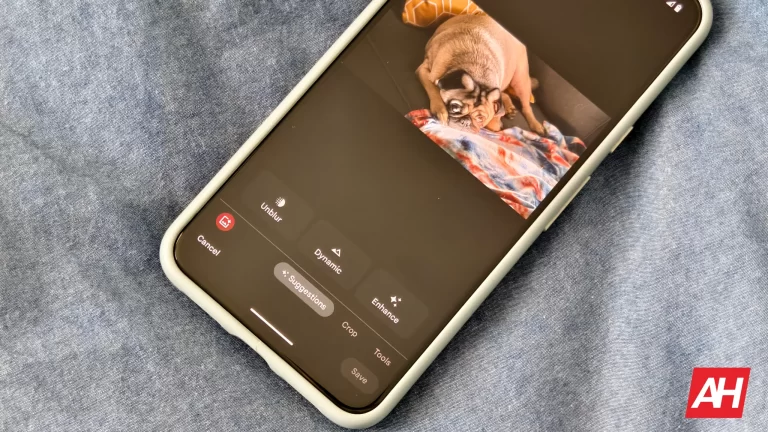
Photo Unblur works as you might expect as well. Ever taken a blurry photo? Well, Google and its AI magic is able to unblur the photo. Even photos that were taken many, many years ago. There’s no limit to what kind of photos this works on. I used it on a digital photo from over 15 years ago, and it was pretty impressive how well it was able to make this pretty blurry photo a lot more sharp.
Video editing
While the service is indeed called “Google Photos”, it is not only for photos. But also for videos. Google also has a pretty decent video editor. You can use Video Boost on the Pixel 8 Pro, which will enhance the quality of your photos. The video editor isn’t going to replace something like Capcut, Adobe Premiere Pro, or Rush or something like that. But for some simple editing, it can get the job done. Google also lets you export specific frames, which can be very useful.
Google Photos can identify people and pets
As mentioned before, Google Photos is able to identify people and pets, allowing you to group those photos together in Google Photos. You are able to add names for different people, so you can now search for them by name, and find every photo with them in it. This works extremely well, and you can even find them in a tiny photo or screenshot from something like Google Messages or WhatsApp.
Speaking of Google Messages or WhatsApp, Google’s search engine inside Photos can also find every WhatsApp screenshot by searching “WhatsApp”. So you can quickly find those receipts when you need to post them on social media. This works for other apps, too, actually, and even places if they are in the photo. Like a specific restaurant.
This is the power of Google’s AI and Search put to good use.
Sharing photos and videos in Google Photos
Sharing photos and videos can sometimes be pretty tough, especially if you’re sharing multiple photos or videos. As they can take up a good amount of space. But Google let’s you share, essentially, a link that goes to the album or individual photo you are sharing. That’s going to save space in your email, instead of sending them as an attachment.
Additionally, you can create a shared photo album. Tap on the sharing icon at the top of the screen (it’ll look like two people), then tap on “Create shared album,” and from there, you can choose who you want to share with; now, both (or more) people can add photos to that photo album. This can be very useful if you want to a birthday party, and multiple people take loads of photos. Now you can add them all together in a single photo album to share with everyone.
One final cool sharing feature that Google Photos has is, sharing with a partner. Say you want to share all of your photos with your spouse, Google makes that easy. Just tap on “Share with Partner,” and from there, you are able to choose the start date of photos being shared and also which photos are shared. The options for which photos are still kind of limited, basically all photos or photos containing selected people. Then, you’ll choose the partner you want to share with.
Hide sensitive photos and videos with Google Photo’s Locked Folder
Back in 2021, Google introduced a new Locked Folder for Google Photos. This allows you to keep certain media locked away behind a pin, passcode, or fingerprint. This is a good place to store photos like those of your passport or ID card and maybe some nudes, too.
Basically, anything you don’t want to be backed up to the cloud but do want to be stored in Google Photos, you should add it here. But this does mean that if you switch to a new phone, and don’t copy all of your data over, those photos will be gone. Since they are not backed up.
Clear up your phone’s storage with Google Photos
Google Photos is easily able to back up your photos and then delete them from your phone. That’s going to save you a good amount of space on your phone, as photos and videos can be a pretty big part of what’s using all of your storage.
To do this, tap on your profile icon at the top of the app, and then tap on “Free up Space”. This next page will sow you how much it can free up, and verify with you that the items are already backed up in Google Photos, and that you’ll be able to view them anytime in Google Photos.
Now, if you need to free up some space in Google Photos, you can also do that here. Tap on your photo in the corner, then tap on “Manage storage”. On this page, it’ll tell you how long you can go before you run out of photo storage. That’s based on what you’ve used so far. It also gives you a few options to review and delete, freeing up space. These are “Large photos and videos,” “other apps,” “screenshots,” and “blurry photos.” You can almost always free up space by deleting all of the blurry photos, to be quite honest.
Creating photo books with Google Photos
Google Photos lets you create photo books, print out photos, and so much more. As I’ve mentioned before, it is a full-fledged photo app, and it’s really incredible.
To print a photo, find the photo you want to print. Then swipe on that photo and tap on “Order Photo”. You can choose the size you want to print the photo in, and even have it arranged to be picked up at a local CVS, Walgreens, or similar place. You can also create a Canvas Print or a photo book. The photo books are really cool. I’ve made a couple for my Mom over the years, and I’m always impressed at how well they come out, considering these are all pictures from phones.
Google Photos is much more than a gallery app
While Google Photos may have started out as a glorified Gallery app that could store your photos in the cloud, it’s now much more than that. Google Photos can store your photos, edit them, and even create some pretty cool collages, photo books and so much more. Even if you don’t have Google One and the extra storage, Google Photos is worth getting and using.
Google announced back in February that its Gemini conversational AI would be powering several apps for Google One AI Premium subscribers. Now, it’s starting to look like Android users will finally get AI-powered reply suggestions in their Gmail app.
Code-digging site PiunikaWeb recently got an exclusive tip that the “reply suggestions from Gemini” feature is hiding out in the Gmail app. A little behind-the-scenes tinkering by developer AssembleDebug got the feature up and running.The new AI tool seems to be hitting its stride. In some cases, Gemini even asks for feedback on its suggestions to help it learn and get better. It’s a simple process: just tap the reply you want, and it’ll pop into your composition window. You can adjust the wording or send it as-is.
For those not familiar, Gemini is Google’s conversational AI, formerly named Bard. Think of it as a brainier version of the autocomplete you’re used to. It helps with simple tasks, drafting whole emails, or – as we’re now seeing – suggesting quick replies to keep your inbox moving.
The aforementioned Google One AI Premium plan includes access to Gemini Advanced, which includes the latest Ultra 1.0 AI model — for $19.99 a month. Additionally, this new Google One tier gives you 2TB of storage, as well as other Google One benefits currently found in the Premium tier.
When the Google One AI Premium plan first launched, all users that signed up were eligible for a two-month free trial of the plan. This means that the time to decide whether the plan is worth keeping or not is quickly approaching. This addition to Gmail for subscribers comes right at the tail end of the trial period, but hopefully with enough time for users to try it out before making a decision.
While Gemini was already working its magic with email drafts, it looks like Google’s doubling down on bringing the AI into more places. If all goes smoothly, we should hopefully see the feature become available to users within the next few weeks.
New Sophos report reveals a problematic trend: ransomware attackers are increasingly targeting backups, crippling organizations’ ability to recover data and significantly raising ransom demands. Learn how to protect your backups and minimize the impact of a ransomware attack.
Ransomware attacks have become a reality for businesses of all scales worldwide, but a new report from cybersecurity firm Sophos reveals an even more disturbing trend: attackers are increasingly targeting backups.
Backup, as we know it, is one thing that keeps victim businesses from paying ransom to ransomware groups. However, the new tactic of targeting backup data cripples an organization’s ability to recover data without paying the ransom, seriously increasing the pressure to meet the demands of cybercriminals.
As observed before, companies such as Accenture and Bykea have thwarted ransomware attacks by leveraging backups and dismissing ransom demands. However, there have also been examples where the backup itself was encrypted.
The Sophos report (PDF), titled “The impact of compromised backups on ransomware outcomes,” is based on a survey of nearly 3,000 IT professionals whose organizations fell victim to ransomware attacks in the past year. The findings reveal a concerning reality, emphasizing the role of strong backup security in fighting cyber extortion.
Near-Universal Backup Targeting:
The report exposes the pervasiveness of backup targeting by attackers. A staggering 94% of surveyed organizations reported that attackers attempted to compromise their backups during the attack.
This attempt rate goes even higher in specific sectors, with government and media organizations experiencing a near-perfect 99% rate of attempted backup compromise.
Compromised Backups, Soaring Costs:
The effects of losing access to backups are harsh. The report found that organizations unable to recover data from backups due to the attack were forced to pay significantly higher ransoms.
On average, these organizations paid more than double the ransom amount compared to those with secure backups. This results in an average ransom demand of $2.3 million for those with compromised backups, compared to $1 million for those with secure backups.
Importance of Backup Security:
The Sophos report also emphasizes the role secure backups play in mitigating ransomware damage. Having a reliable, isolated backup system that’s not vulnerable to the initial attack allows organizations to restore data quickly and minimize downtime.
This not only reduces financial losses from operational disruptions but also weakens the attacker’s leverage, potentially leading to lower ransom demands or even complete avoidance of payment.
Commenting on this, Chad Graham, Manager of the Cyber Incident Response Team (CIRT) at Critical Start emphasised that regularly backing up data ensures business continuity and protects against cyber threats like ransomware.
“Performing backups for computer information systems is a crucial cyber risk mitigation strategy because it ensures the continuity of business operations and data integrity in the event of a cyberattack, system failure, or data corruption. Having offline backups is particularly important, as they are immune to online threats like ransomware attacks, which can encrypt or destroy online data,” Chad advised.
He further explained that “Despite its simplicity and effectiveness, the practice of regularly creating and updating backups is often overlooked, leading to significant vulnerabilities in an organization’s cybersecurity posture. This oversight can result in catastrophic data loss and operational downtime, emphasizing the necessity of incorporating backup strategies into comprehensive cybersecurity plans.”
Investing in Cybersecurity Solutions:
The report shows the importance of investing in security solutions against ransomware attacks that prioritize backup security. This includes implementing strong access controls, and offline backups that are physically isolated from the network.
Get access to over 250,000 audiobooks using a premium subscription in Canada, Ireland, and more
With this expansion, the number of audiobook titles that are accessible to premium subscribers is around 250,000 compared with about 200,000 at the end of 2023. This wide range provides a lot of alternatives for listeners, hence it is different from Spotify’s numerous songs and podcasts library.
People who go beyond the time permitted can purchase extra time through increments of 10 hours at Spotify. In these new markets, additional listening time costs CAD $14.99, IRE €12.99, or NZD 19.99 according to TechCrunch.
Last month Spotify released an exclusive audio book-only subscription plan in America that goes for $10/month. This plan offers listeners a similar 15 hours of audiobook listening duration as Spotify Premium but at a slightly lower price. Depending on individual listening behavior, such plans offer better value than the like of audible.com.
Spotify’s Audiobook library saves way more money than Audible’s
Compared to Spotify’s new credit plan, Audible plans sound bleak, where one gets one audiobook credit every month for $15. Also, audiobook unused minutes do not carry over into the next month.
“By offering access to a myriad of books and other digital media forms on tape, we want our product to become more useful for you,” says Spotify. The company has built a lot of trust as a comprehensive platform for audio content.
Spotify continues expanding its audiobook services. It promises consumers more alternatives and variations in choices while enjoying their music either through podcasts or even audiobooks since they have remained loyal to quality provision and innovation among their worldwide audience.
Nowadays, AI is the biggest buzz phrase in the tech world. However, just seven years ago, the biggest buzz phrase was net neutrality. Back in 2017, the established net neutrality rules (established in 2015) were taken away, and many users were furious. Well, the FCC will vote to restore net neutrality later this month.
One of the biggest debates in the tech world was whether eliminating net neutrality would allow internet service providers to commit heinous acts. These acts could include throttling specific websites. This is one of the driving forces behind the hate toward this ruling. However, it does not seem like companies have been doing this.
Rather, it appears that the internet has remained pretty much the same even though the ruling came nearly a decade ago. In any case, the subject of net neutrality has been on the minds of some officials since last year.
The FCC will vote on net neutrality later this month
Back in October last year, FCC chair Jessica Rosenworcel brought forth a proposal to bring net neutrality back. It took a long five months to get to this point. We all know that the government works at a snail’s pace, but the reason for this delay was the fact that the commission had trouble gaining a third Democrat to secure the votes. The Democrat in question is Anna Gomez. With Gomez in this seat, the vote is able to move forward.
At this point, we’re not quite sure which way this vote will go. What we do know is that we expect the vote to take place on April 25th. That’s a few weeks away, but the tech community isn’t quite on the edge of its seat like it was back in 2017.
If the vote falls in favor of returning net neutrality, then the new rules will take place 60 days after the vote is finalized. When that happens, internet service providers will need to adjust their businesses accordingly.