A new elevation of privilege vulnerability has been discovered in the Xbox Gaming services that allow a threat actor to elevate their privileges to that of a SYSTEM.
This particular vulnerability has been assigned CVE-2024-28916, and its severity has been given as 8.8 (High).
When this was reported to Microsoft, the researcher got a response stating “no security boundary is being broken here”.
However, Microsoft has patched this vulnerability after it has been clarified that the vulnerability allows a non-admin user to gain SYSTEM privileges.
According to the reports shared with Cyber Security News, the GamingService is not a default service but if it is installed on any system, it can be utilized by a low privileged user to escalate their privileges to SYSTEM.
When the Gaming Services service’s directory change occurs, it will attempt to open the C:\XboxGames\GameSave\Content\MicrosoftGame.Config file by using the attempting user’s privilege.
If the file is present, the Gaming Service will move the whole C:\XboxGames\GameSave folder via MoveFileW API call.
However, if this attempt is failed due to access denied error, the Gaming Service will elevate its permission to that of SYSTEM and perform the move operation.
To add an interesting note, the C:\XboxGames folder can be modified by any authenticated users group.
Suppose any user does not have the privilege to modify this folder. In that case, they can still exploit this by changing the directory location to any user controlled directory and perform this operation by the following actions:
Deleting the C:\XboxGames folder,
Creating a new folder under the same name,
Drop arbitrary DLL files inside the C:\XboxGames\GameSave folder
Add “deny delete” ACL to the folder that will result in operation being failed attempting to escalate the privilege.
Patch And Bypass
After reviewing this vulnerability, Microsoft patched it by adding a few mitigations and checks before moving the folder. The checks involve
checking the destination folder in reparse point and
lockdown implementation on both source and destination directory by creating a temporary file (.tmp_ + digit) with FILE_FLAG_DELETE_ON_CLOSE flag which is also prevented from deletion.
The researcher stated that this patch was flawed as the check for junction was being done before locking the directory.
I get that MSRC often flip-flops on what is and what is not a security boundary for some things (e.g. admin to kernel). But when a non-admin user can reproducibly get SYSTEM privileges and MSRC says that “no security boundary is being broken here”, it really makes you wonder. 🤔 pic.twitter.com/QoJ5cXdnE2
This could allow a user to trick the service that the new installation directory is safe and attempt to redirect it to the C:\Windows\System32\Spool\Drivers\x64 directory.
The time window can be extended by creating multiple temporary files as the service specifies CREATE_ALWAYS, and the creation will fail to create the file if it exists.
This will continue to increase the temporary file digits until a file is successfully created.
A proof of concept for this vulnerability has been published which abuses the spooler service to load arbitrary DLL as SYSTEM.
Stay updated on Cybersecurity news, Whitepapers, and Infographics. Follow us on LinkedIn & Twitter.
A new phishing campaign targets users with emails containing a button to “verify payment information.” Clicking the button triggers the download of a malicious JAR file (disguised as an invoice) that leverages a PowerShell command to download two additional JARs.
The JARs deploy the STRRAT and VCURMS RATs, granting attackers remote access and keylogging capabilities and credential theft from browsers, applications, Discord, Steam, etc. In contrast, VCURMS can also download further modules to expand its information-stealing functionality.
The attackers use AWS or Github to store the malware, obfuscate the initial JAR file, and employ commercial protection to bypass detection.
Finding the attack in ANY.RUN’s Threat Intelligence Lookup
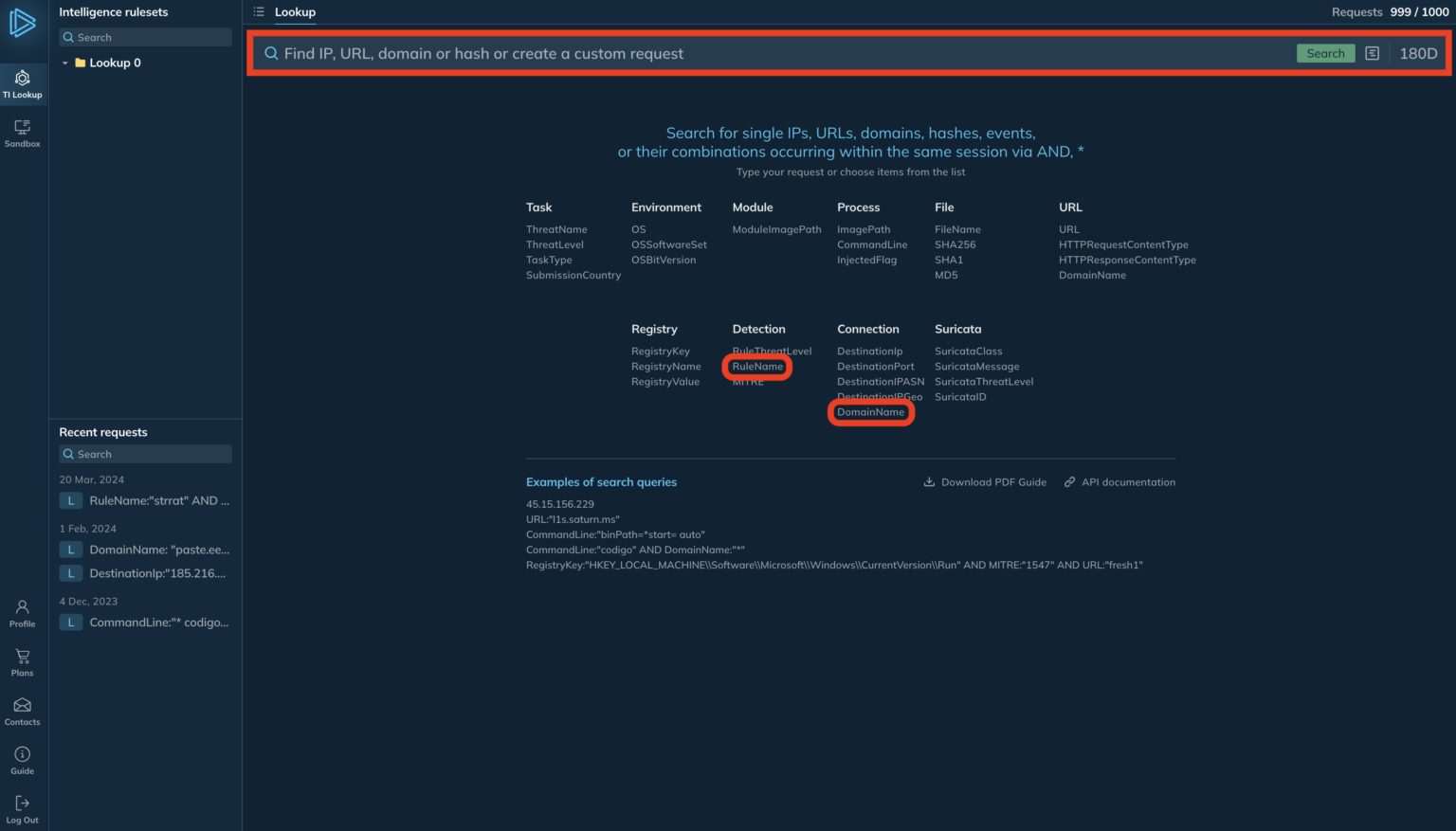
By crafting a query that combines specific rule names and domain names (e.g., “RuleName:”strrat” AND DomainName:”github.com””), analysts can identify relevant sandbox sessions where the suspicious behavior (STRRAT) was observed interacting with a particular domain (github.com).
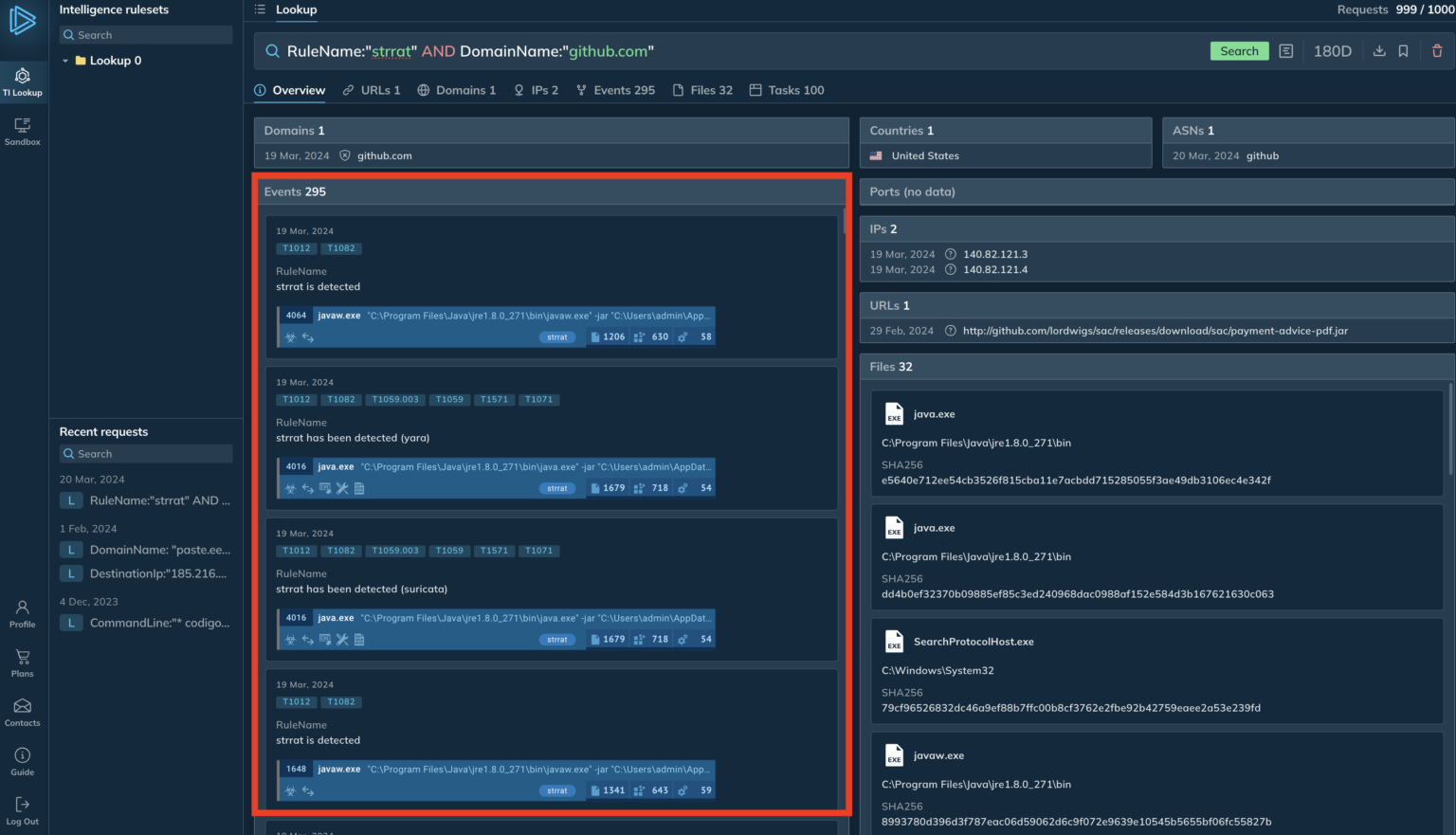
A query to find IOCs and events connected to STRRAT malware
The lookup presents two key results: a table with interactive analysis sessions (left side) that can be used to examine malware behavior in a safe environment and a list of malicious executables (right side) downloadable for further analysis or to check logs for potential compromises.
DocumentAre you from SOC and DFIR Teams?
Get a demo of Threat Intelligence Lookup for your security team.
.
To learn more about the sample’s habits and extract more IOCs, let’s play back a recording of an online research session. To keep up with this research session, you may just browse to it.
Analyzing the attack in ANY.RUN’s Sandbox
ANY.RUN is a cloud-based sandbox environment for analyzing suspicious files. It utilizes YARA and Suricata rules to detect malware within 40 seconds of uploading.
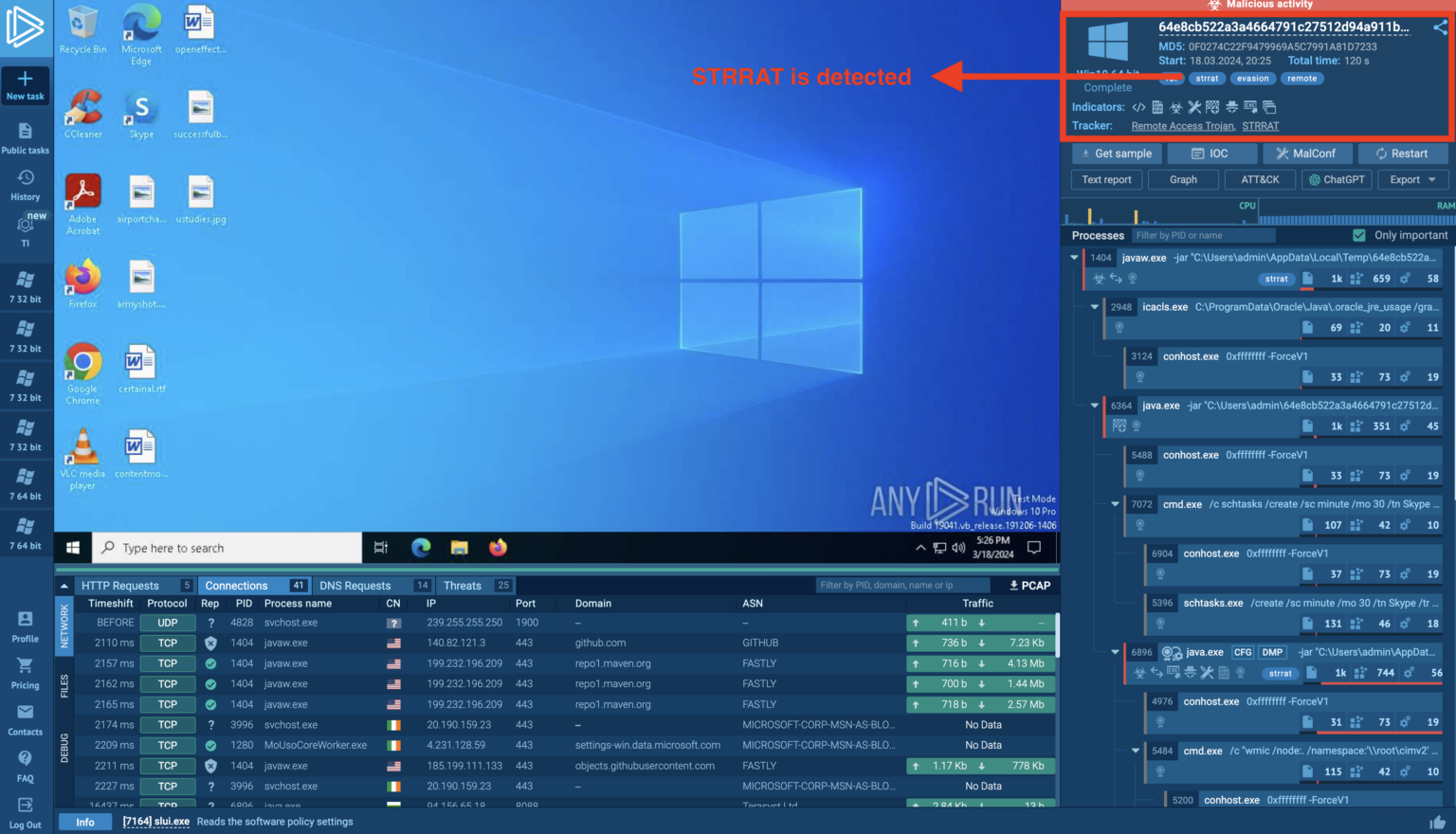
Main view in the ANY.RUN interactive sandbox. Note the tags in the upper-right corner.
Analysts can then directly interact with the sandboxed environment to observe malware behavior and collect indicators of compromise (IOCs), empowering security teams to collaboratively investigate threats and efficiently respond to emerging and persistent attacks.
The analysis begins by examining the tags in theANY.RUN sandbox, which revealed the presence of STRRAT malware.
The Connections tab is used to identify a connection from javaw.exe to GitHub, potentially linking the sample to a more extensive campaign.
Indicator of Compromise
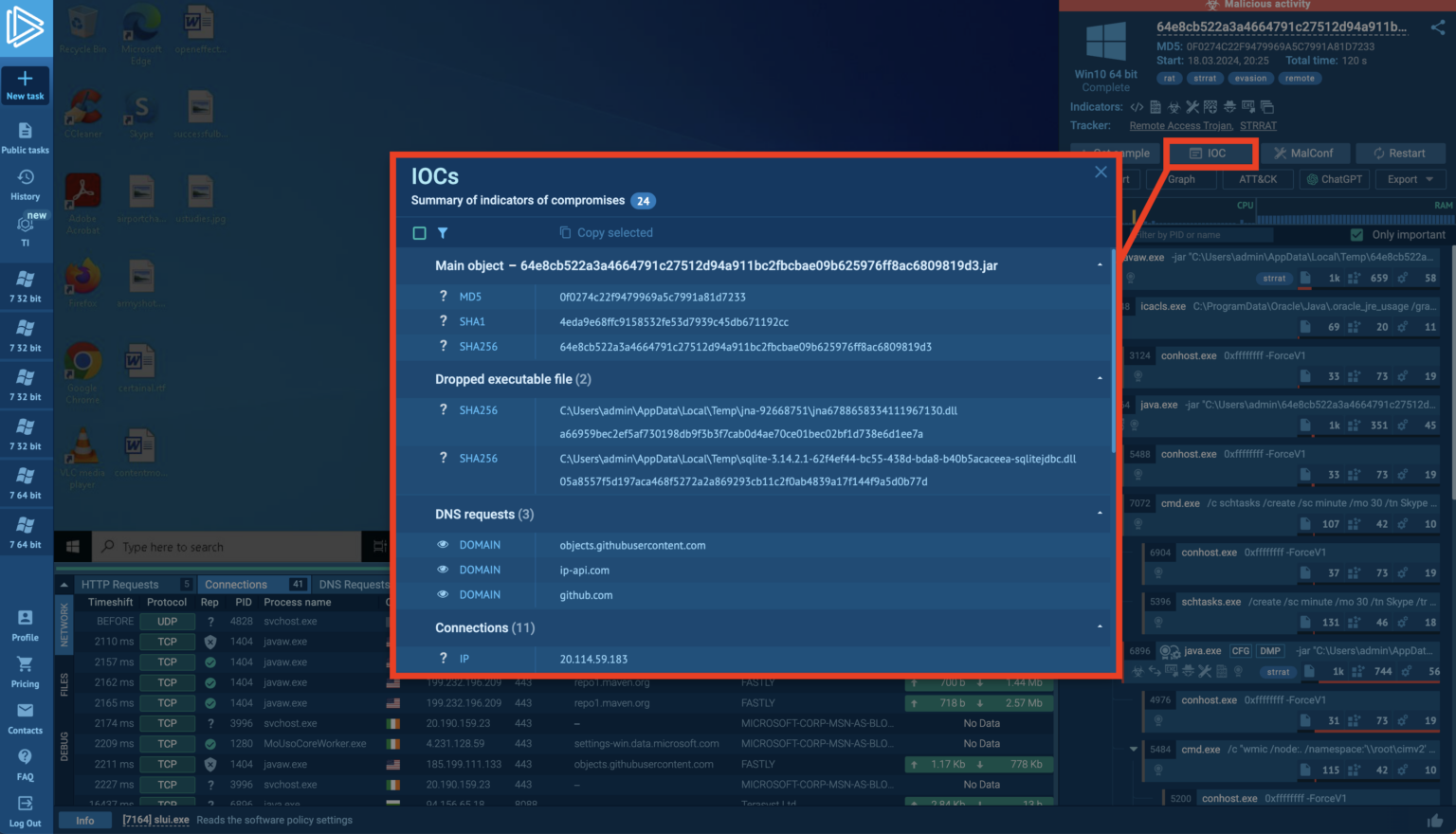
To collect IOCs, the user utilizes the dedicated IOC button within ANY.RUN, providing valuable information for security teams to update their systems and continue their investigation.
The session highlights ANY.RUN’s capability to extract malware configuration, automatically decrypt embedded strings, and reveal details like persistence mechanisms and Command & Control (C2) server locations saves analysts significant time and effort compared to manual reverse engineering.
Get a personalized demo of ANY.RUN for your team to see how it can benefit and contribute to your organization’s security – Schedule a call today.
Researchers have unveiled a new class of microarchitectural side-channel attacks that pose a severe threat to the security of Apple CPUs.
The attack, GoFetch, exploits the Data Memory-dependent Prefetchers (DMPs) in modern processors to extract secret cryptographic keys from constant-time cryptographic implementations.
Understanding the GoFetch Attack
The GoFetch attack is based on a new understanding of how DMPs behave.
Researchers have found that DMPs can be activated by any program and attempt to dereference any data brought into the cache that resembles a pointer.
This behavior places a significant amount of program data at risk and challenges the previously believed restrictions reported by prior work.
Alert Fatigue that helps no one as security teams need to triage 100s of vulnerabilities.:
The problem of vulnerability fatigue today
Difference between CVSS-specific vulnerability vs risk-based vulnerability
Evaluating vulnerabilities based on the business impact/risk
Automation to reduce alert fatigue and enhance security posture significantly
AcuRisQ, which helps you to quantify risk accurately:
The cornerstone defense against side-channel attacks has been to ensure that security-critical programs do not use secret-dependent data as addresses.
However, the GoFetch attack demonstrates that attackers can bypass these defenses by exploiting the DMP to perform end-to-end key extraction on popular constant-time implementations of classical and post-quantum cryptography.
Reverse Engineering Apple and Intel DMPs
Researchers have reverse-engineered the DMP found on Apple CPUs and discovered new activation criteria.
They have also confirmed the existence of a similar DMP on Intel’s latest 13th generation (Raptor Lake) architecture, albeit with more restrictive activation criteria.
The researchers developed a new type of victim-agnostic chosen-input attack and associated attack primitives that do not require the attacker and victim to share memory.
They used these techniques to mount a proof-of-concept attack on constant-time swap operations.
Binni Shah recently tweeted about a new side-channel attack that exploits data memory-dependent prefetchers.
This attack leverages the timing behavior of memory access patterns to leak sensitive information from a victim process.
Disclosure and Industry Response
The findings were disclosed to Apple, OpenSSL, Go Crypto, and the CRYSTALS team.
Apple is investigating the proof of concept, while OpenSSL reported that local side-channel attacks fall outside their threat model.
The Go Crypto team considers the attack low severity, and the CRYSTALS team suggested pinning to the Icestorm cores without DMP as a short-term solution, with hardware fixes needed in the long term.
Implications for Processor Design
The GoFetch attack has shaken the foundations of modern processor design, calling into question the security of data memory-dependent prefetchers.
The discovery highlights the need to reevaluate current defenses and develop new strategies to protect against such microarchitectural side-channel attacks.
Memory access patterns and subsequent prefetches
The above figure compares memory access patterns and subsequent prefetches, illustrating the activation pattern reported by Augury and the new findings that show DMP activations even when the training array contains non-pointer values.
The GoFetch attack is a stark reminder of the evolving landscape of cybersecurity threats and the continuous arms race between attackers and defenders.
As processors become more complex, the potential for such vulnerabilities increases, necessitating vigilant research and proactive defense mechanisms to secure our digital infrastructure.
Stay updated on Cybersecurity news, Whitepapers, and Infographics. Follow us on LinkedIn & Twitter.
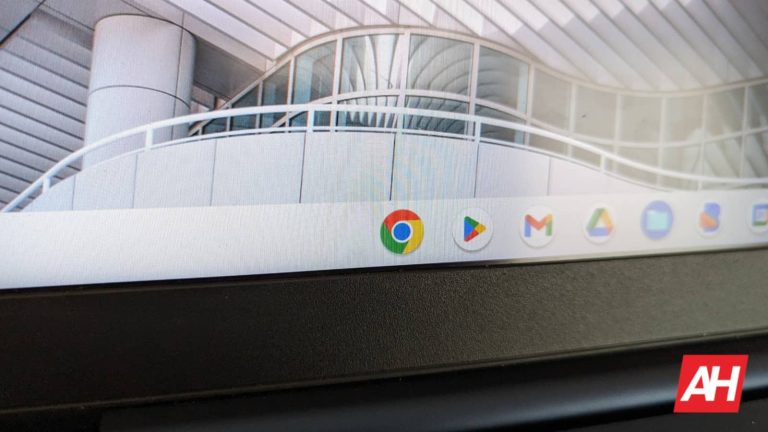
Pixel Tablet and Pixel Fold users get a new Android 15 developer preview upgrade that lets them return to the old taskbar, introduced with Android 12L. Google implemented this feature for users who preferred a stable taskbar over the recent transient one.
Android 15 DP2 introduces an option to bring back the old taskbar from Android 12L
The persistent taskbar initially released with Android 12L was noteworthy for its ability to increase productivity on large-screen devices such as tablets. However, once Pixel Tablet and Pixel Fold debuted, the company revamped this feature by placing lesser emphasis on it thus opting for a transient design that came into view just for a short time after swiping up.
The transient nature of the taskbar did make sense to an average user. However, those used to multitasking could only feel limited by it. Each time people wanted to open another application they had to swipe back down from their current app to access their favorite apps, obstructing seamless multi-tasking processes.
This feature addition aims at satisfying the different tastes of users by giving them options from both taskbar styles. Following their workflow needs, users can now move back and forth between perpetual or momentary taskbars. Android 15 will upgrade the UX/UI in Pixel Tablet and Pixel Fold.
Here’s how to revive the old taskbar in Android 15 developer preview
In Android 15 DP2, Google has introduced a toggle that allows users to choose between the new transient taskbar and the old persistent one, in response to user feedback. AndroidAuthority observed a pop-up menu with an option reading “always show taskbar,” if a user long-presses on a space after swiping upwards from the bar. Turning it on means changing the look of your Android 15’s taskbar and you won’t have to rely on gestures all the time.
All in all, this demonstrates Google’s commitment to integrating this change into Android 15 DP2 for people to feel more confident in customizing their platform and such consistent effort enables each individual to achieve ultimate success while working with any Android device including this Toggle Task Bar.
The latest ChromeOS update lets users have more control over their privacy by managing permissions and app-level location control. Users can expect enhanced transparency and control over their data with the updated privacy controls. This feature is part of a larger security update announced by the tech giant on Thursday.
ChromeOS’ new update empowers users with enhanced privacy and location controls
Privacy controls get a boost with this week’s update, and the ability to adjust app-level permissions for the camera, microphone, and other geolocation services is now available. However, some features will be exclusive to enterprise users while some privacy and location settings have implications for all users.
Google unveiled the latest enhancements following the recently updated camera and microphone toggle at the system level. With this release, it is now possible to determine separately which apps or services should utilize the geo-location details of an individual user thus granting finer control over information.
Users can apply the feature through the Security & Privacy settings, where they can disable Google Location Services or customize app permissions according to their choice. For example, one may allow or disallow camera or microphone access depending on the use case for specific applications.
Control exactly what information the apps can access
The company’s blog post talked about Instagram as an example case and described how you could manage app-level permissions for this tool. For instance, turning on camera permission means that it allows the application to do so whenever needed. This kind of authority extends to other applications and features thereby enabling people to decide how much of their information is getting out.
This latest update aims at improving productivity and transparency by giving users more control over their privacy settings. It ensures users’ safety as they reserve the power to choose whichever app can access personal data. ChromeOS’ new version brings us closer than before to securing our information while establishing limits on third-party apps’ behavior towards our private stuff.
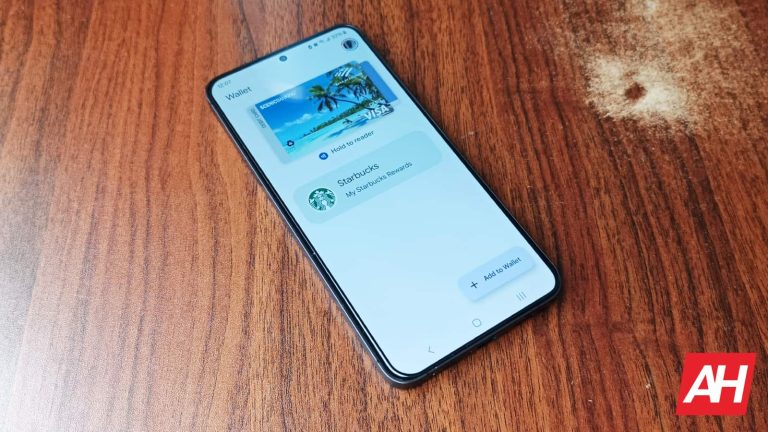
Google Wallet is gradually asking users to unlock their Android devices for every transaction. Previously, micropayments could be executed without needing a fingerprint scan or passcode entry for authorization.
Several users have realized that the tap-to-pay feature of Google Wallet doesn’t allow them to make a quick payment. Instead, it is now forcing users for a pattern or fingerprint to unlock their smartphones and authorize the payment.
Smaller payments are no longer convenient on Android smartphones with Google Wallet
Credit cards with a tap-to-pay feature allow users to merely place their cards on a PoS (Point of Sale) device to execute a payment. However, such transactions never exceed a particular threshold. Higher denomination transactions require users to authorize payments using a PIN.
Google Wallet has mimicked this behavior since its launch. The monetary value that is defined as “smaller payments” isn’t the same everywhere. It’s €25 in Belgium, €30 in France, 100 PLN in Poland, or €50 in Germany. Other countries, and even banks, have their limits. Moreover, buyers can make a limited number of purchases using a “locked” device or card before they are asked to authorize payments.
A few major banks in America allowed Google Wallet users to make payments below $50 without unlocking their smartphones. However, this is no longer the case. Late last month, Google updated a support page for the app.
“Coming soon, your credit and debit card won’t be charged for retail payments unless you’ve recently used a verification method, like your fingerprint or PIN. Some users may already need to verify to make a payment. If you’re asked to verify it’s you, complete verification steps on your device to make a payment.”
Device unlock is now mandatory for all payments with Google Wallet
Moving forward, every transaction, irrespective of the amount, will need users to unlock their Android smartphones. In other words, even a 1$ transaction for a can of Coke will demand a PIN or fingerprint before it allows the payment to go through.
Incidentally, Apple has always been way more cautious with tap-to-pay transactions. On an iPhone, users have to authenticate every payment session, irrespective of the amount.
Google appears to have adopted the same strategy. The company has essentially added a layer of security for every tap-to-pay transaction.
Several users have welcomed the change after realizing how it boosts security and protects them from fraud or theft. However, this has invariably caused some inconvenience. Needless to mention, credit cards with tap-to-pay are now faster than Google Wallet in some cases involving micro-payments. To address this, Google could have allowed users to set custom limits for micropayments without authorization.
Google Wallet users can speed up the transaction by keeping their Android smartphones unlocked. This is because the app does not ask users to re-authenticate at the time of payment. This also allows users to quickly scan a QR code if it is presented at checkout or billing.
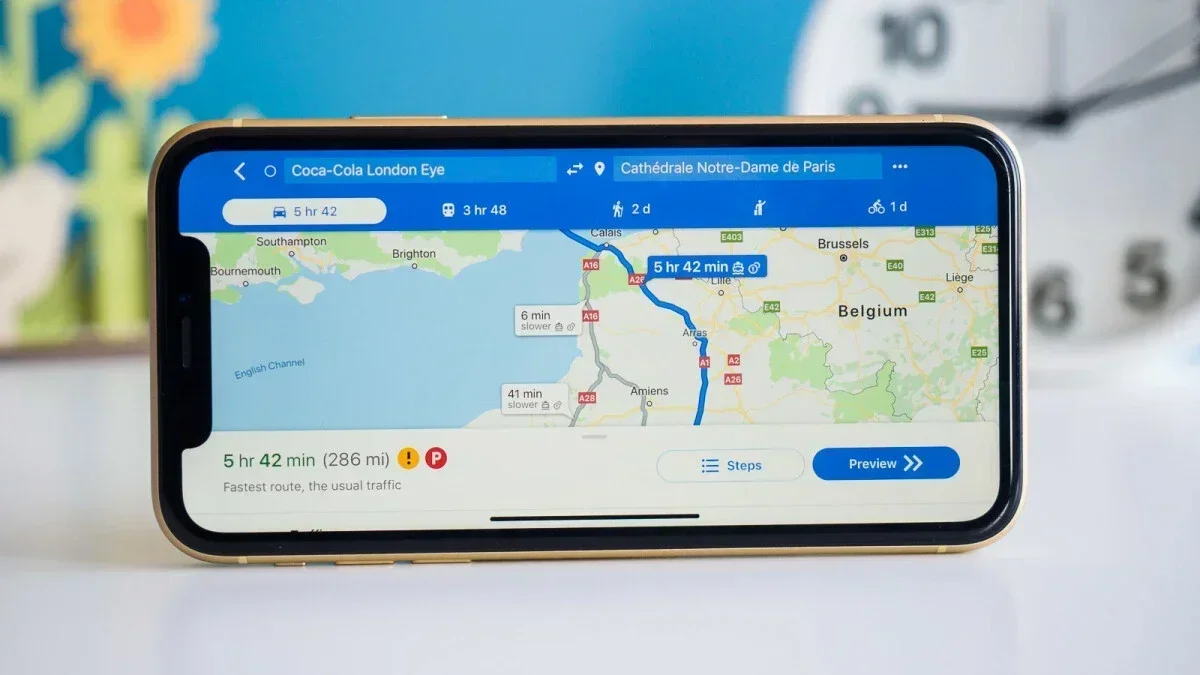
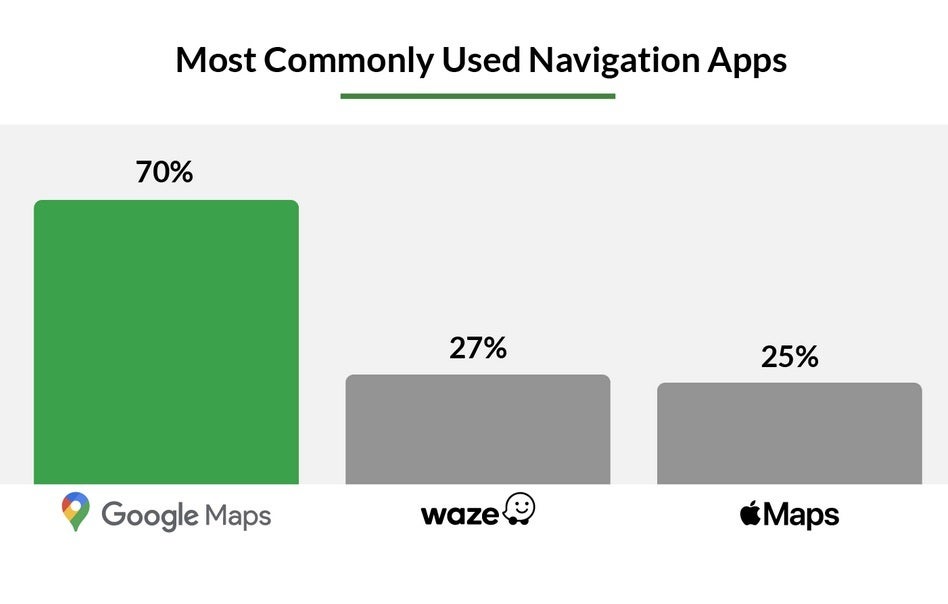
Nothing will ruin your day more than getting a speeding ticket. And getting caught in a speed trap will make you feel even worse. According to MarketWatch (via Android Police), Google Maps is the navigation app most favored by those looking to avoid getting snared in a speed trap. Over 1,000 American drivers with an average age of 41 were surveyed by the financial news website (50% were male, 50% were female) and data from Speedtrap.org was added to the mix. The result? A whopping 70% of drivers surveyed favor Google Maps.
After Google Maps, Waze is the second most preferred navigation app used by drivers in the survey. Waze, also owned by Google, takes a crowdsourced approach to obtaining information. Not that far behind Waze is Apple Maps as the native iOS navigation app is the favorite of 25% of the drivers participating in the survey. Overall, 34% of drivers asked say that they have been warned about a speed trap by a navigation app.
Drivers surveyed prefer Google Maps by a huge margin over Waze and Apple Maps
What exactly defines a speedtrap? Good question. MarketWatch defines a speed trap as an area where a speed limit is set lower “than a road’s safest average rate of travel.” These roads are monitored and tracked by police looking to strictly enforce the speed limit in order to collect revenue. 30% of Americans have been caught in a speed trap. The three states with the most speed traps are Delaware, Maryland and Tennessee. North Dakota, South Dakota and Nebraska are the three states with the fewest speed traps.
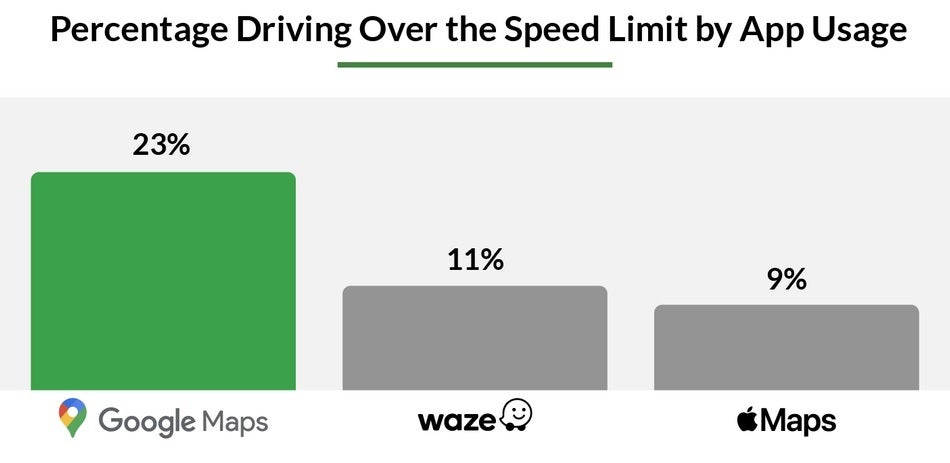
Google Maps users are more likely to drive with a lead foot
While 70% use Google Maps to warn them of speed traps, it is Waze that is considered the best at handling this task with drivers saying that it is 30% more effective than Google Maps and 20% better than Apple Maps. Interestingly, Google Maps users are more likely to drive over the speed limit with 23% of them admitting to driving with a lead foot. Waze and Apple Maps users were next with 11% and 9% of their users respectively saying that they drive over the speed limit.
If you need to install these apps on your phones, here are the links:
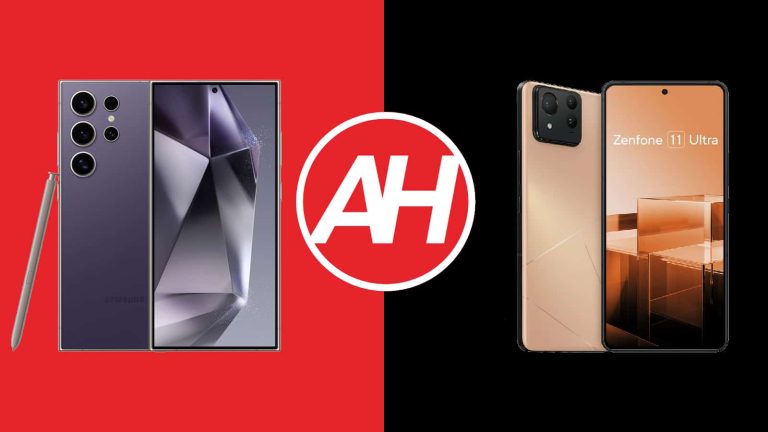
The ASUS ZenFone 11 Ultra launched quite recently, and we’re here to compare it to one of the most popular Android smartphones on the planet. We’ll compare the Samsung Galaxy S24 Ultra vs ASUS ZenFone 11 Ultra. Two ‘Ultra’ phones go at it, the most powerful smartphones from their respective companies. These two phones are both large, and powerful, but also quite different, so comparing them should be interesting.
As per usual, we’ll first list the specifications of both devices and will then get around to comparing them across a number of categories. We’ll compare their designs, displays, performance, battery life, cameras, and audio performance. There’s plenty to talk about here, so let’s get to it!
Specs
Samsung Galaxy S24 Ultra vs ASUS ZenFone 11 Ultra, respectively
Samsung Galaxy S24 Ultra vs ASUS ZenFone 11 Ultra: Design
The moment you look at these two phones, you’ll realize that there are quite a few visual differences. The Galaxy S24 Ultra has sharp corners, while the ZenFone 11 Ultra does not. The top and bottom sides of the Galaxy S24 Ultra are flat, while its sides are not. The ZenFone 11 Ultra has a flat frame all around, though. Both phones have flat displays, with a centered display camera hole.
The physical buttons sit on the right-hand side on both devices. When you flip the two phones around, you’ll notice even more differences. The Galaxy S24 Ultra has four cameras on the back and five circular cutouts. Each of those cutouts is a separate entity on the back. The ZenFone 11 Ultra has three cameras, but all are part of a camera island that sits in the top-left corner. The phone’s LED flash is also placed there.
Both smartphones are made out of metal and glass, by the way. The Galaxy S24 Ultra also includes an S Pen stylus, which is tucked away on the inside, and accessible from the bottom. The two phones are very similar in terms of height, while the ZenFone 11 Ultra is the narrower of the two, but both are quite wide. They’re also very similar in terms of thickness. The Galaxy S24 Ultra is slightly heavier at 232 grams compared to 224 grams of the ZenFone 11 Ultra.
You’ll be glad to hear that both smartphones do come with an IP68 certification for water and dust resistance. They both feel very premium in the hand, and the build quality is good. You’ll quickly realize that both devices are very slippery, though. Using a case is always a good idea, and especially when phones are made out of metal and glass.
Samsung Galaxy S24 Ultra vs ASUS ZenFone 11 Ultra: Display
The Galaxy S24 Ultra features a 6.8-inch QHD+ (3120 x 1440) Dynamic LTPO AMOLED 2X display. This panel is flat, and it offers an adaptive refresh rate of up to 120Hz (1-120Hz). The display supports HDR10+ content, and its peak brightness is 2,600 nits. The display aspect ratio here is 19.5:9, and the screen-to-body ratio is around 88%. The Gorilla Armor from Corning protects this display.
ASUS ZenFone 11 Ultra
The ASUS ZenFone 11 Ultra, on the flip side, has a 6.78-inch fullHD+ (2400 x 1080) LTPO AMOLED display. This panel is flat, and it also offers an adaptive refresh rate, and it goes up to 144Hz. That refresh rate is only accessible for some games, the ones that support it. The display will usually run at 120Hz. HDR10 content is supported, while the maximum brightness is 2,500 nits. The display aspect ratio is 20:9, while the screen-to-body ratio is around 88%. The Gorilla Glass Victus 2 protects this panel.
Both of these displays are great. They’re vivid, sharp, and have great viewing angles. The blacks are deep, and the touch response is good. They’re similar in terms of brightness as well. The Galaxy S24 Ultra does have two advantages, though. It offers a higher resolution, which is not something many people will notice, but it’s there if you care. More importantly, however, it includes Gorilla Armor, which helps with reflections a lot. It’s the best protection of the display that also doubles as an anti-reflective layer. Don’t get me wrong, the ZenFone 11 Ultra’s display is not super reflective or anything like that, but once you try out Gorilla Armor, your perspective changes.
Samsung Galaxy S24 Ultra vs ASUS ZenFone 11 Ultra: Performance
The Snapdragon 8 Gen 3 for Galaxy fuels the Samsung Galaxy S24 Ultra. In addition to that chip, Samsung also included 12GB of LPDDR5X RAM and UFS 4.0 flash storage. The ASUS ZenFone 11 Ultra is fueled by the Snapdragon 8 Gen 3 SoC, while it has up to 16GB of LPDDR5X RAM, and it also uses UFS 4.0 flash storage. Neither of the two devices supports storage expansion, by the way.
The performance on both ends is very, very good. The software on the ZenFone 11 Ultra is much closer to stock Android, but the Galaxy S24 Ultra has a ton of added software features that many of you could find useful. ASUS does add plenty of those too, on top of stock Android. Both devices offer great performance, and you can throw whatever you want on them, pretty much. They’re fast when it comes to multitasking, browsing, processing images, consuming multimedia, and basically everything else.
What about gaming? Well, they can handle any game you can find in the Google Play Store, even Genshin Impact. Both of them did great with it. The ZenFone 11 Ultra did heat a lot in benchmarks (3D Mark’s extreme stress test), though, which was a bit odd, but it performed well when we actually tested it in-game. It also didn’t heat up all that much when you put pressure on it with general use, so… there’s seemingly nothing to worry about. Both devices did great in the performance department, at least for us.
Samsung Galaxy S24 Ultra vs ASUS ZenFone 11 Ultra: Battery
Samsung’s flagship comes with a 5,000mAh battery. The ZenFone 11 Ultra includes a 5,500mAh battery on the inside. The Galaxy S24 Ultra is still one of the best-performing flagship smartphones that we’ve tested, in terms of battery life. The ZenFone 11 Ultra does have a larger battery pack, but in our experience, it does not offer better battery life. Don’t get me wrong, both devices are great in that regard, but the Galaxy S24 Ultra did last longer in our testing.
We were able to cross 8-9 hours of screen-on-time with the Galaxy S24 Ultra, while the ZenFone 11 Ultra was closer to 7-7.5 hours of screen-on-time. There were off days for both smartphones, and our usage was different on some days, which resulted in different numbers. Still, the Galaxy S24 Ultra had the upper hand, but both of these smartphones have great battery life, pretty much. They’re also quite consistent too. Your mileage could vary, though, of course.
The Galaxy S24 Ultra supports 45W wired, 15W wireless, and 4.5W reverse wireless charging. The ZenFone 11 Ultra supports 65W wired, 15W wireless, and 10W reverse wired charging. Neither smartphone includes a charger in the box, but the ZenFone 11 Ultra does charge faster with the compatible charger. Both support PD3.0 charging, by the way.
Samsung Galaxy S24 Ultra vs ASUS ZenFone 11 Ultra: Cameras
The Samsung Galaxy S24 Ultra features a 200-megapixel main camera, a 12-megapixel ultrawide camera (120-degree FoV), a 10-megapixel telephoto camera (3x optical zoom), and a 50-megapixel periscope telephoto unit (5x optical zoom). The ASUS ZenFone 11 Ultra, on the other hand, has a 50-megapixel main camera, a 13-megapixel ultrawide unit (120-degree FoV), and a 32-megapixel telephoto camera (3x optical zoom).
Samsung Galaxy S24 Ultra
The performance of these camera setups is different, of course. The thing is, both smartphones do tend to process images quite a bit, and both have a tendency to go a bit overboard with sharpening in some scenes. The ASUS ZenFone 11 Ultra is way worse in that regard, however, as Samsung toned down on the sharpening quite a bit. The Galaxy S24 Ultra leans more towards warmer tones than the ASUS ZenFone 11 Ultra.
We preferred the Galaxy S24 Ultra’s output in low light, and that goes for pretty much all of its cameras. In good lighting, the results are a lot more similar in terms of quality, but the Galaxy S24 Ultra does win in low light, at least in our opinion. Still, the ASUS ZenFone 11 Ultra has a capable camera setup, that’s hard to deny. It could use more optimization, though, plus the Galaxy S24 Ultra has a lot more camera features.
Audio
There is a set of stereo speakers on both of these smartphones. The ones on the Galaxy S24 Ultra are noticeably louder, though. Don’t get me wrong, the ASUS ZenFone 11 Ultra has good speakers, but in direct comparison, the Galaxy S24 Ultra speakers pack more punch. Both sets are well-balanced, though.
There is no headphone jack on the Galaxy S24 Ultra, but the ASUS ZenFone 11 Ultra does include it. If you prefer wireless connectivity, the Galaxy S24 Ultra offers Bluetooth 5.3, while the ASUS ZenFone 11 Ultra comes with Bluetooth 5.4.
Fitbit smartwatch users in Europe will lose access to third-party apps starting this summer. In an update to its support pages, Google-owned Fitbit has announced that it will remove support for installing third-party apps and watch faces starting in June 2024. This is due to new regulatory requirements in the European Economic Area (EEA).
Fitbit said that users will still have access to apps and watch faces developed by Fitbit and Google. However, the ability to discover and install new third-party offerings through the Fitbit App Gallery will be removed. It remains unclear whether existing downloads will continue to work after this date.
“You can download and install third-party apps until June 2024. After that date, you will continue to have access to a diverse gallery of apps and clocks developed by Fitbit and Google,” Google wrote on the updated support page.
Google will remove Fitbit’s third-party apps and watch faces in Europe
The removal of third-party app support will impact a wide range of Fitbit’s smartwatch portfolio, from older models like the Ionic and Versa lines to the current flagship Sense 2. However, basic models like the Charge 5 and Inspire 3 appear safe from this change for now. Similarly, Google’s own Pixel Watch is unlikely to be affected.
The move isn’t entirely surprising, as Fitbit users have seen a reduction in features and functionality over the past few years. Google has removed popular features like Fitbit Adventures, Open Groups, and Challenges. Support for using the Spotify and Deezer apps has also been removed.
These changes come after Google’s recent decision to update the brand from Fitbit by Google to something shorter. Its new name, Google Fitbit, is much more on brand with how Google usually names its products and services.
The exact regulations were not specified. However, this is the latest blow to the smartwatch experience on Fitbit devices in Europe. Fitbit users in the EU will have a limited window to use third-party apps and watch faces. You can check out this Google page for affected Fitbit smartwatches.
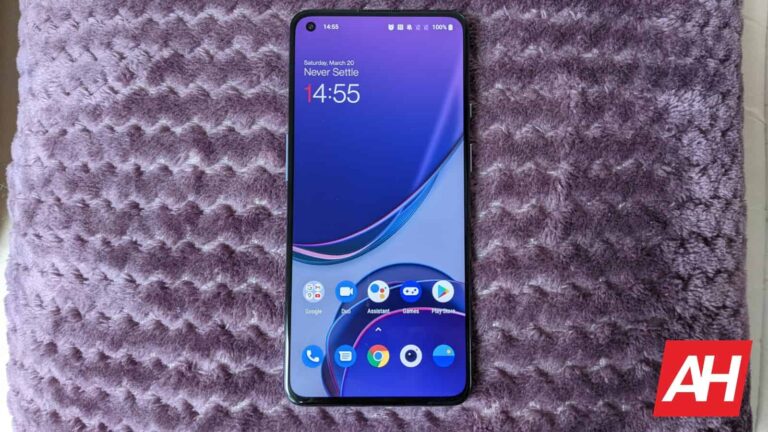
After three years of receiving continuous updates, the OnePlus 9 series has reached its last stop. As Android Authority reports, the company has released an Oxygen OS 14 update to the T-Mobile variants of the OnePlus 9, 9 Pro, and 8T. The unlocked versions of the phones have received their last Android update before.
OnePlus has pledged to release three major Android updates and four years of security updates to its devices. Launched in October 2020 and March 2021, the OnePlus 8T and OnePlus 9 series are now at the end of their Android update cycle. But they’ll still receive security patches for a few more months.
The OnePlus 9 series and OnePlus 8T were launched with Android 11. The Oxygen OS 14 update is the last major platform update for the devices. The carrier models of OnePlus devices were supported only by T-Mobile in the United States market. Meanwhile, users could also opt for unlocked versions.
OnePlus 9 series and OnePlus 8T no longer receive any Android update from the manufacturer
OnePlus customers can now enjoy the Android 14 experience on their devices. However, the company’s short Android lifespan support might make customers hesitant to opt for a newer device like the OnePlus 12.
The OnePlus 9, 9 Pro, and 8T received only three years of Android support. But the brand’s latest flagships are pleased to offer four years of platform updates and five years of security patches. While this might seem like a good leap, it still falls short compared to rival brands, including Google and Samsung. The OnePlus 12R is also set to receive the same three years of Android updates despite being launched in February 2024.
Google and Samsung’s latest flagships, like the Pixel 8 Pro and Galaxy S24 series, claim to guarantee seven years of Android updates besides regular security patches. Extending Android lifespan support helps customers enjoy their devices for more years. It also ensures a cutting-edge experience in the long run.
.webp)