Apple worked three to bring the Apple Watch to Android

0
[ad_1]

In November 2023, a report surfaced that Apple considered making the Apple Watch compatible with Android phones. The company has now officially confirmed it. The iPhone maker says it worked on adding Android support for three years before dropping the project because of technical limitations. The revelation came as part of its response to the Department of Justice’s antitrust lawsuit.

Apple tried adding Android support to its watches

The DOJ has filed an expansive antitrust lawsuit against Apple, accusing the company of using its products and services to run a monopoly in the smartphone market. Unsurprisingly, the Apple Watch is part of this discussion. “Having copied the idea of a smartwatch from third-party developers, Apple now prevents those developers from innovating and limits the Apple Watch to the iPhone to prevent a negative impact on iPhone sales,” the lawsuit states.

The Justice Department cited a 2019 email from Apple’s Vice President of Product Marketing for Apple Watch in which they acknowledged that the watch “may help prevent iPhone customers from switching” to Android phones. The 88-page lawsuit further states that Apple doesn’t want to make its watches compatible with Android because this would “remove an iPhone differentiator.”

In response, Apple said that it considered adding Android support to the Apple Watch. The company investigated the scenario for three years and determined that it wasn’t doable because of technical limitations. It eventually scrapped the idea, limiting the Apple Watch to the iPhone. Interestingly, the November report from Bloomberg said Apple dropped the project, called Project Fennel due to “business considerations.”

Either way, Apple did try bringing its watches to Android phones at some point. However, the DOJ might argue that it dropped the idea and that the Apple Watch is still an iPhone differentiator. It likely sees this as an anti-competitive business practice as anyone with an Apple Watch will probably buy an iPhone, and vice versa. If the watches supported Android, consumers would get more freedom when buying phones.

Apple says the lawsuit threatens its principles

The DOJ’s lawsuit targets many Apple products and services, including CarPlay, digital keys, and more. Apple says the lawsuit threatens “the principles that set Apple products apart in fiercely competitive markets.” The company fears that it could hinder its “ability to create the kind of technology people expect from Apple” and “set a dangerous precedent.” The iPhone maker labeled the lawsuit “wrong on the facts and the law.”


[ad_2]
Source link

What could go wrong for the 71 million AT&T users whose data leaked (and how to take precautions)

0
[ad_1]

Leaking or hacking of birthdates and social security numbers (SSNs) is dangerous because these pieces of information are critical to verifying a person’s identity. With access to someone’s birthdate and SSN, malicious actors can commit identity theft. When that happens, threat actors can apply for credit, drain your bank accounts, or obtain services in the victim’s name, leading to financial loss, damaged credit ratings, and more.

So, the next time you’re in a bar, down a couple of beers, please don’t say “Hey, I was an AT&T client back in 2021” and, ten seconds later, “I have a whole Bitcoin, bro, how cool is that!?” to a bunch of complete strangers.

In fact, don’t tell anybody anything regarding your finances. Bob’s your uncle.

SIM swap, eSIM swap


Let’s not get paranoid, but the more technology we incorporate in our lives, the more options for evildoers to steal from us. Now, since we like having and using mobile networks, Internet access, electricity, and all the other goodies of modern life, we’ll have to sort things out and take precautions.

Every good defense strategy begins by understanding your enemy’s attack strategy. In other words, we’ll have to understand what’s going on in order to take measures.

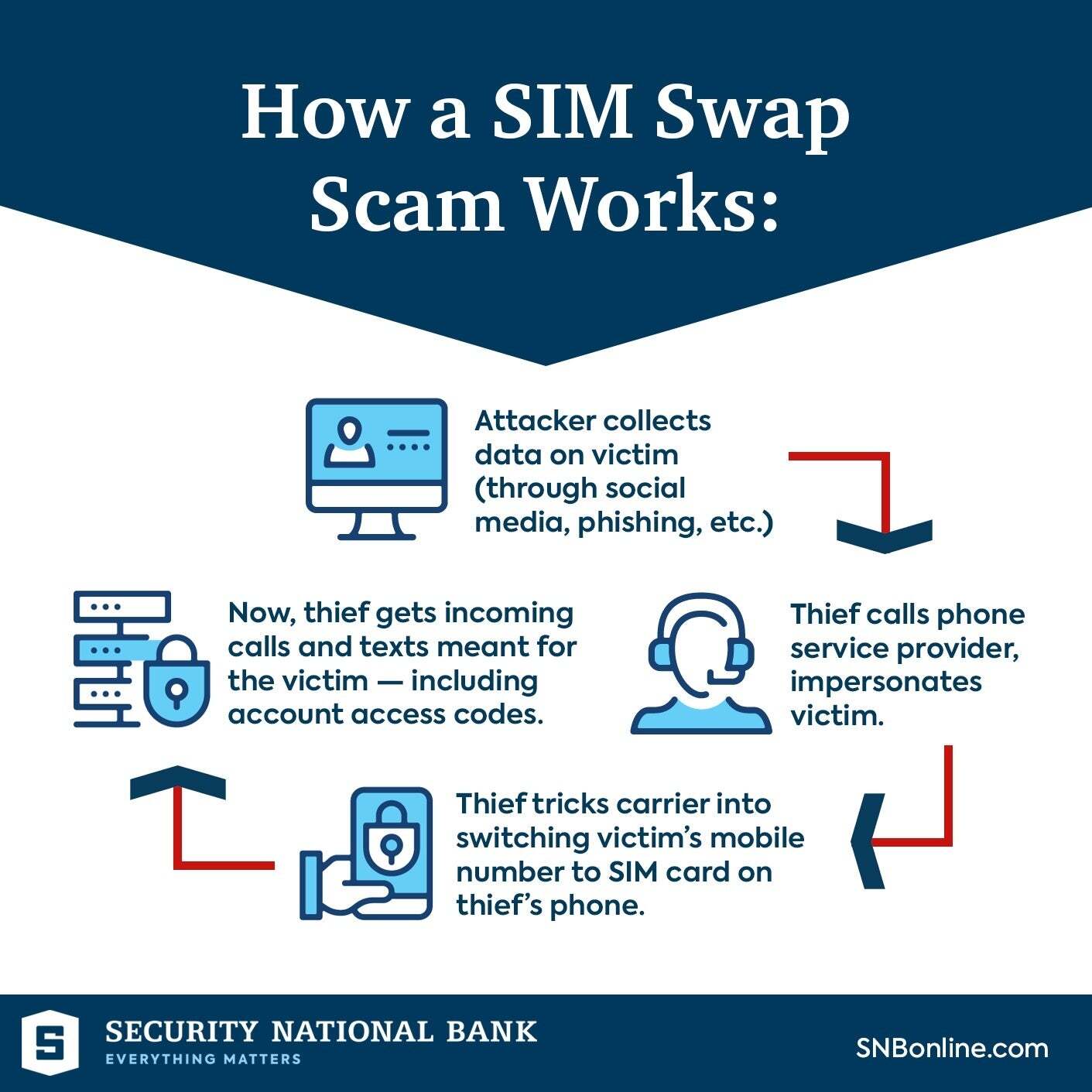
By pretending to be you via identity theft, wrongdoers might engage in what’s known as SIM swap.

SIM swap fraud is a type of identity theft where criminals deceive a carrier into transferring a victim’s phone number to a SIM card in the fraudster’s possession. By doing so, the attacker gains control over the victim’s phone calls, text messages and potentially access to secure services that rely on phone-based authentication, such as two-factor authentication (2FA) for banking or social media accounts.

This allows the criminal to bypass security measures and access personal information – in essence, all calls and messages go to the criminal who can pretend to be the victim, and then proceed with the bank account emptying.

On a side note: I wonder how many of those impersonations are aided by AI and its magical capabilities. Sigh…

So, what’s an eSIM fraud? In essence, it’s the same thing as SIM swap, only easier.

That’s due to the fact that eSIM (or embedded SIM), is a digital version of a traditional SIM card that allows you to activate a cellular plan without having to use a physical SIM card. It’s more convenient for bad actors, as they don’t have to take a walk to a carrier’s office. It’s all digital now.

The eSIM is built directly into your device, like a smartphone, smartwatch, or tablet. It’s a small chip that’s already installed in your device and you don’t need to insert or replace it. To activate it, you usually scan a QR code provided by your mobile carrier. This process links your device to your mobile account without the physical swapping of SIM cards.

Overall, eSIM technology offers convenience, flexibility and efficiency, making it easier to manage your mobile services directly from your device.

“Since the fall of 2023, analysts from F.A.C.C.T.’s Fraud Protection have recorded more than a hundred attempts to access the personal accounts of clients in online services at just one financial organization”, says cybersecurity firm F.A.C.C.T.

SIM swap frauds are on the rise in 2024


Sadly, there are plenty of examples solely in 2024 regarding the SIM/eSIM swap fraud phenomenon.

Just last week, a whole family of five got their Cricket Wireless account taken over and money was stolen from the family’s financial apps.

However, Mike, his wife and their family from the Chicago suburbs were locked out of their Amazon, social media, investment, and cryptocurrency accounts. The hackers managed to make unauthorized changes to the phone’s content, adding apps and altering contact information. Additionally, the family lost $1,200 in cryptocurrency, $2,000 in Apple Cash and Gift Cards and narrowly prevented unauthorized bank transfers.

In February, a T-Mobile subscriber received an email from his carrier. In it, it was stated that a SIM change on his number had been completed. The problem is that he had never requested such an operation… He discovered that the eSIM on his iPhone was no longer active.

T-Mobile informed the user of the situation: a person had entered a T-Mobile store, not far from the victim’s residence, impersonating them to obtain a new SIM card. It was used on the criminal’s device. During a call with T-Mobile, the victim received fraud alerts from his bank, blocking attempts to buy luxury items from department stores.

The criminal had changed the security settings on the victim’s banking app, nearly succeeding in purchasing items worth over $10,000.

To regain control, the victim had to personally visit a T-Mobile store, where an employee replaced the SIM without alerting the thief via text.

Often, such SIM swap frauds are enacted by carrier employees. For example, a former manager at a telecommunications company in New Jersey pleaded guilty to conspiracy charges for accepting money to perform unauthorized SIM swaps that enabled an accomplice to hack customer accounts. For carrying the unauthorized number porting, the criminal received $1,000 in Bitcoin per SIM swap, plus an unspecified percentage of the profits earned from the illicit access to the victims’ devices.

Now’s the time to vent and announce my complete and utter support for harsh penalties for such acts.

In January, Sharon Hussey lost $17,000 despite using two-factor authentication (2FA) due to a SIM swap scam. She was alerted to a fraudulent phone purchase and changes to her bank account’s contact info, neither of which she initiated. Her inability to receive 2FA codes, after a thief swapped her SIM card to a new phone, led to her phone service being cut and the theft of $17,000 from her Bank of America account.

The scam involved the thief convincing a Verizon store to activate a new phone with Hussey’s number, gaining control over her 2FA-protected accounts. The situation was exacerbated because Hussey’s reliance on 2FA inadvertently gave the thief easier access to her accounts. After initially refusing, Bank of America eventually refunded the stolen $17,000, highlighting the dangers of SIM swaps, especially for users dependent on 2FA for security.

2FA (Two-Factor Authentication) limitations


Two-Factor Authentication (2FA) offers a significant boost in security by requiring a second form of identification, making unauthorized account access much more difficult even if a password is compromised.

However, 2FA is not without its drawbacks. Some users find the extra login step inconvenient and reliance on devices for authentication can be problematic if the device is lost or unavailable. SMS-based 2FA is susceptible to SIM swapping and interception, which can undermine its security benefits. The technical implementation of 2FA poses challenges for organizations, necessitating further infrastructure and user education.

Two-Factor Authentication (2FA) Pros:

  • Enhanced security: By requiring a second form of identification, 2FA makes it significantly harder for unauthorized users to access your accounts, even if they know your password.
  • Reduced fraud risk: 2FA can drastically reduce the likelihood of identity theft and fraud since attackers need more than just stolen login credentials to gain access.
  • Flexible options: 2FA offers various methods for the second factor, including text messages, authenticator apps and hardware tokens, allowing users to choose what suits them best.

Two-Factor Authentication (2FA) Cons:
  • Vulnerability: SMS-based 2FA can be vulnerable to SIM swapping attacks or interception, potentially allowing attackers to bypass this security measure.
  • Inconvenience: Some users find 2FA methods, especially SMS or app notifications, inconvenient or time-consuming, as it adds an extra step to the login process.
  • Dependence on devices: 2FA methods that use phones or tokens can be problematic if the device is lost, damaged, or not immediately accessible.

What the FCC says


In response to the growing threat of SIM swapping and port-out fraud, the Federal Communications Commission (FCC) has rolled out new measures starting July to enhance consumer protection. These changes require mobile service providers to verify identity thoroughly before a phone number can be moved to a new device or carrier. Additionally, the rules will make it possible for users to be immediately notified of any attempts to change their SIM card or port their number.

How to protect yourself from SIM swap scam


Protecting yourself from SIM swap fraud is a complex matter. It’s a form of art, if you like. It involves a combination of vigilance, awareness and taking proactive security measures:
  • Control your social media posting: Don’t post every aspect of your life online. Just don’t. Be cautious about sharing personal information on social media. Scammers often gather personal details to convincingly impersonate victims.
  • Use strong, unique passwords: You’ve heard this before, but… For all accounts, especially your email and mobile carrier account, use strong, unique passwords and change them regularly.
  • Enable Multi-Factor Authentication (MFA): Use MFA options that do not rely on SMS, such as authenticator apps or hardware tokens, for an added layer of security.
  • Secure your mobile account: Contact your mobile carrier to set up additional security measures, such as a unique PIN or password that must be provided to make changes to your account.
  • Keep an eye on your accounts: This is typically neglected. Regularly check your bank and other sensitive accounts for unauthorized activity. Early detection of fraud can limit damage. Having said that, be cautious of where you check your accounts. You never know who’s looking.
  • Don’t fall for phishing scams: Be cautious of unsolicited calls, emails, or messages attempting to extract personal information or urging you to perform security-related actions.
  • Contact carrier immediately: If your phone suddenly loses service, or you can’t make calls (or send texts), contact your carrier immediately to check for potential SIM swap fraud.
  • Double check: You may recieve texts from someone that’s pretending to be your carrier’s representative. That’s why it’s crucial to double check every incoming communication through another line of communication. If a carrier is messaging you about changes, don’t do anything and call them (don’t text!) to confirm if that is true. If your phone is hijacked, incoming coms might be from the malicious actors.

There is no such thing as a 100% secure system (or phone). But, hey, let’s not make it easy for the scammers out there! Let’s take precautions.


[ad_2]
Source link
Researched Hacked DHCP to Escalate Privileges in Windows

0
[ad_1]

Security researchers have uncovered a sophisticated method of exploiting the Dynamic Host Configuration Protocol (DHCP) administrators group to escalate privileges within Windows domains.

This technique, dubbed “DHCP Coerce,” leverages legitimate privileges to compromise entire networks potentially.

The vulnerability centers around the DHCP (Dynamic Host Configuration Protocol) service, which is essential for network administration. It automates the assignment of IP addresses, simplifying the management of network connections.

However, this convenience comes with a downside. Attackers can exploit the DHCP Administrators group by leveraging specific configurations and permissions, enabling them to escalate their privileges within a Windows domain.

The exploitation process involves several technical steps, including manipulating DHCP settings and using malicious scripts.

By gaining elevated privileges, attackers can potentially take over the entire domain, accessing and manipulating data at will.

This vulnerability is particularly concerning because it can be exploited remotely without physical access to the network.

However, this research demonstrates that even well-intentioned access controls can be manipulated maliciously.

The exploitation process involves several technical steps, including manipulating DHCP settings and using malicious scripts.

By gaining elevated privileges, attackers can potentially take over the entire domain, accessing and manipulating data at will.

This vulnerability is particularly concerning because it can be exploited remotely without physical access to the network.

The DHCP Administrators Group

The DHCP administrators group is an Active Directory (AD) group that manages DHCP servers.

Members are supposed to have limited permissions and be restricted to querying and modifying DHCP service configurations.

Document

Free Webinar : Mitigating Vulnerability & 0-day Threats

Alert Fatigue that helps no one as security teams need to triage 100s of vulnerabilities.:

  • The problem of vulnerability fatigue today
  • Difference between CVSS-specific vulnerability vs risk-based vulnerability
  • Evaluating vulnerabilities based on the business impact/risk
  • Automation to reduce alert fatigue and enhance security posture significantly

AcuRisQ, that helps you to quantify risk accurately:

Despite these limitations, the group’s privileges can be abused to execute code on DHCP servers.

This leads to a domain takeover when the DHCP server is installed on a Domain Controller (DC).

Akamai researchers have identified a novel privilege escalation method that explicitly targets Active Directory (AD) environments.

This technique exploits the DHCP administrators group to elevate privileges and gain unauthorized access to valuable resources.

Abusing DHCP Options

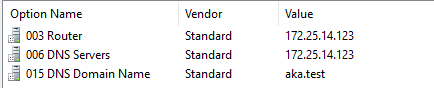
DHCP options are configurations advertised to network clients, such as IP addresses, subnet masks, and DNS server information.

The researchers demonstrated that attackers can manipulate these options to inject malicious configurations.

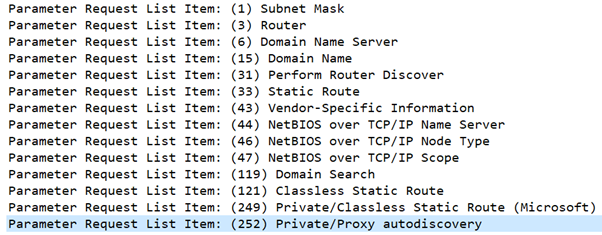
Examples of DHCP options configured on a DHCP server

One such option is “Proxy autodiscovery,” which can be used to configure a web proxy and compromise client credentials.

DHCP options configured on a DHCP server

The DHCP Coerce Technique

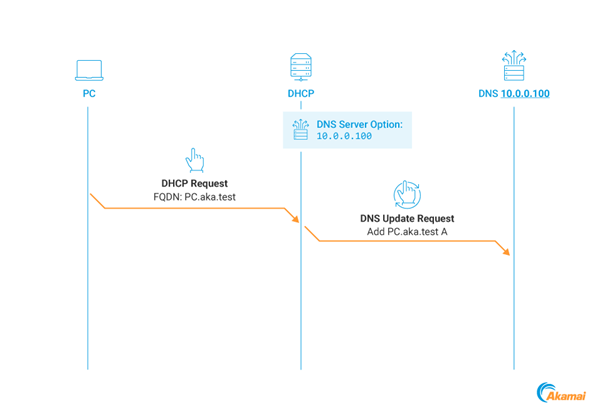
The DHCP Coerce technique manipulates the DNS Server option to redirect DHCP DNS Dynamic Updates to an attacker-controlled address.

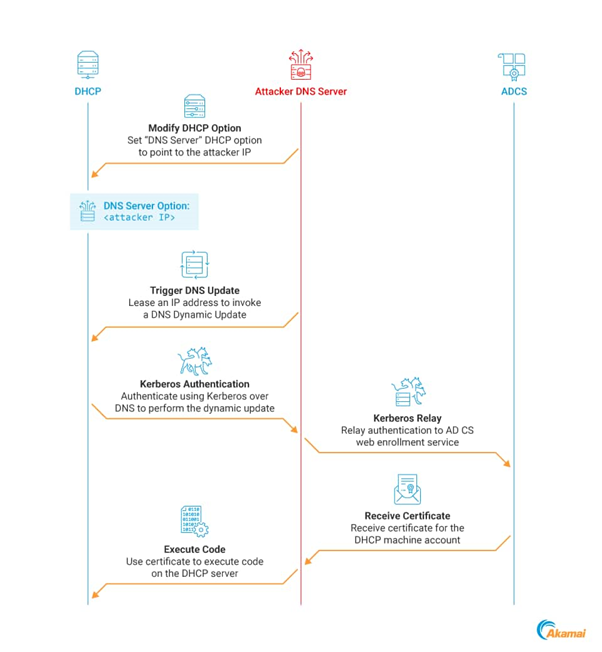
This coerces the DHCP server to authenticate using Kerberos, which can then be relayed to compromise the server.

DNS Server option effect on the DHCP DNS dynamic update process

Kerberos Relay Attack

By coercing a Kerberos authentication and relaying it, attackers can impersonate the DHCP server machine account and gain full control over the server.

DHCP Coerce full attack chain

This is particularly concerning when DHCP servers are installed on DCs, which is the case in 57% of the networks the researchers observe.

Mitigating the Threat

The researchers have provided detailed mitigation and detection steps to counter this technique.

These include identifying risky DHCP configurations, mitigating relay attacks against AD Certificate Services (AD CS), practicing DHCP administrator’s group hygiene, using network segmentation, and identifying DNS anomalies.

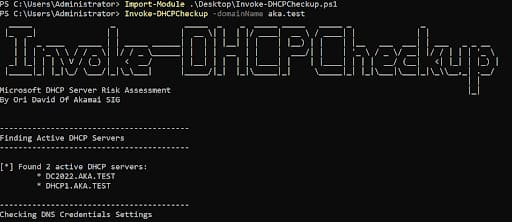
 Identifying a DHCP server installed on a DC using Invoke-DHCPCheckup
 Identifying a DHCP server installed on a DC using Invoke-DHCPCheckup

The discovery of the DHCP Coerce technique highlights the importance of vigilance in network security.

DHCP Configuration Security

  • Audit Logs: Check for unusual DHCP server log activities.
  • Scope Limitation: Carefully configure DHCP scopes to prevent unauthorized access.
  • Snooping: Use DHCP snooping on switches to block fake DHCP messages.

AD CS Relay Attack Mitigation

  • LDAP Security: Enable LDAP signing and switch to LDAPS for secure communication.
  • Authentication Protection: Use Extended Protection for Authentication to guard against MitM attacks.
  • Kerberos Armoring: Implement FAST for added Kerberos protocol security.

DHCP Administrators Group Management

  • Membership Audits: Regularly review group membership for unauthorized access.
  • Least Privilege: Restrict group membership to essential personnel only.
  • RBAC: Apply Role-based Access Control for precise access management.

Network Segmentation

  • VLANs: Implement VLANs for logical network segmentation.
  • Firewall Rules: Enforce strict rules between segments to control traffic and prevent attacks.
  • Data Separation: Store sensitive data in secure, segmented network zones.

DNS Anomaly Detection

  • Logging: Enable DNS query logging to spot unusual patterns.
  • DNSSEC: Implement DNS Security Extensions to validate DNS response authenticity.
  • Threat Intelligence: Use feeds to block known malicious domains and IPs.

Implementing these strategies can significantly bolster your network’s defense against DHCP abuse, AD CS relay attacks, and DNS anomalies. Regular updates and reviews of security protocols are essential for maintaining effective protection.

Stay updated on Cybersecurity news, Whitepapers, and Infographics. Follow us on LinkedIn & Twitter.


[ad_2]
Source link

Pixel Fold gets useful OnePlus Open feature in Android 15 DP2

0
[ad_1]

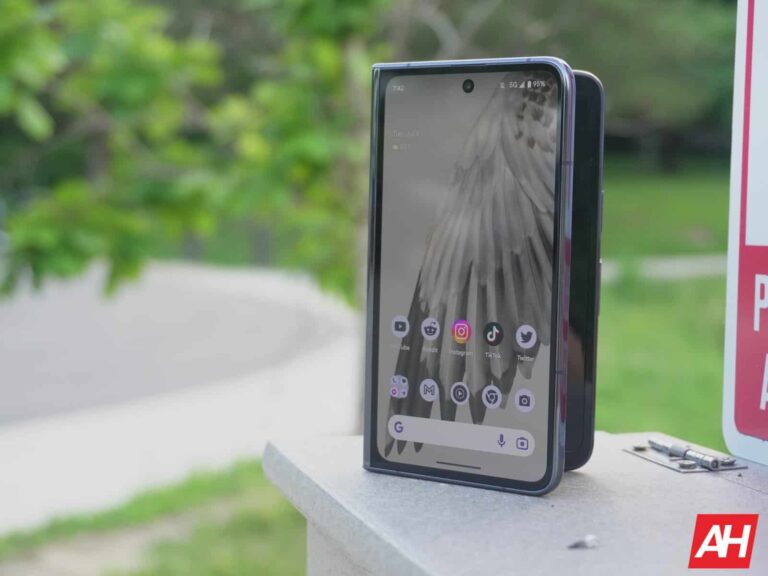
Google has started rolling out Android 15 Developer Preview 2 to Pixel smartphones recently. Some features were reported on straight away, others are trickling in as we speak. One such feature concerns the company’s only foldable phone. The Pixel Fold got a really useful OnePlus Open feature as part of Android 15 DP2.

Google’s Pixel Fold received a very useful OnePlus Open feature as part of Android 15 DP2

We’re talking about a screen lock feature when you’re switching screens (from main to cover). So, on the OnePlus Open and OPPO Find N3 (OPPO had that feature on previous devices too), you have some options when switching to the cover screen.

You can, for example, set the phone to automatically power on the cover display, and allow you to carry on where you left off when you fold the device. Alternatively, you can set it to require a swipe up when you do that, just in case you don’t want to use the phone any longer, and you fold it to leave it to the side.

Well, the Pixel Fold’s feature is basically a copy of that. It works the same way, but it doesn’t allow you to choose which apps will utilize the feature. Both OnePlus and OPPO devices do allow you to do that. They’re offering more choices.

‘Swipe up to continue’ option has landed

In any case, on the Pixel Fold, if you have Android 15 DP2 installed, you can navigate to Settings -> Display -> Continue using apps on fold, in order to take advantage of the feature.

In Android 15 DP1, there were three options. You were able to choose between ‘Always’, ‘Only games, videos and more’, and ‘Never’. The ‘Always’ setting means that the cover display will turn on when you fold the device, every time.

‘Only games, videos and more’ means that it will include for apps that stock your screen going idle, such as games. ‘Never’ means that the display will lock when you fold the device.

Well, in Android 15 DP2, the second option got replaced with ‘Swipe up to continue’, which is a great choice by Google. This option enables that swipe up motion if you plan on using the cover display when you fold the device. If you don’t do that, the screen will automatically lock itself after a couple of seconds.

Swipe up to continue Android Police


[ad_2]
Source link

The DOJ blames Apple for the Amazon Fire Phone failing

0
[ad_1]

The United States Department of Justice (DOJ) appears to be on a mission against Apple. In an expansive antitrust lawsuit filed on Thursday morning, it accused the company of operating an illegal monopoly in the smartphone market. The lawsuit targets various Apple products and services, even making seemingly misleading claims against some of them. It also blames Apple for the failures of Amazon Fire Phone and Microsoft Windows Phone.

The DOJ says Apple caused the Amazon Fire Phone to fail, at least partially

The DOJ’s lawsuit against Apple, also signed by 16 state and district attorneys general, alleges that the company employed unfair and anticompetitive business practices to strengthen its smartphone market dominance. Among other things, it names CarPlay as one of the products that Apple uses to drive out competition and stifle innovation. The lawsuit says the new version of CarPlay can take over your car, which is a misleading statement.

However, there are some more ridiculous claims buried in the 88-page lawsuit. According to the DOJ, “many prominent, well-financed companies” tried and failed to enter the smartphone market because of Apple’s “entry barriers,” which include “strong network and scale effects and high switching costs and frictions.” Amazon, which launched its Fire Phone in 2014 could not profitably challenge the iPhone maker and exited the following year.

Microsoft also discontinued its mobile business in 2017 after failing to compete against Apple. HTC, which sold its smartphone business to Google in September 2017, and LG, which exited the smartphone market in 2021, are the other two examples cited by the DOJ in its official complaint. Barriers are so high that despite controlling the development of the Android OS, Google is a distant third to Apple and Samsung in the US smartphone market.

Blaming Apple for the Amazon Fire Phone failing is absurd, to say the least. It failed mostly of its own accord. Notably, Amazon used a forked version of Android, did not offer the Google Play Store, and sold the phone exclusively through AT&T. Microsoft’s Windows Phone failed because of a poor app ecosystem. HTC and LG also exited the smartphone industry after failing to fight in the competitive Android market.

Apple will challenge the DOJ’s claims

Apple says the Justice Department’s antitrust lawsuit is “wrong on the facts and the law.” Sure enough, it can’t be blamed for the mistakes of other companies. Many companies have entered the smartphone market and succeeded over the past decade. Some of them also carved out a market for themselves in the US, including OnePlus. The Cupertino-based iPhone maker plans to “vigorously” defend itself against the lawsuit.


[ad_2]
Source link

Fitbit to revamp sleep stats page with a modern, user-friendly interface

0
[ad_1]
When the Material You revamp of the Fitbit app dropped last September, most pages got a modern facelift—though not all. Now, we’re getting a sneak peek at a revamped Fitbit Sleep stats page.

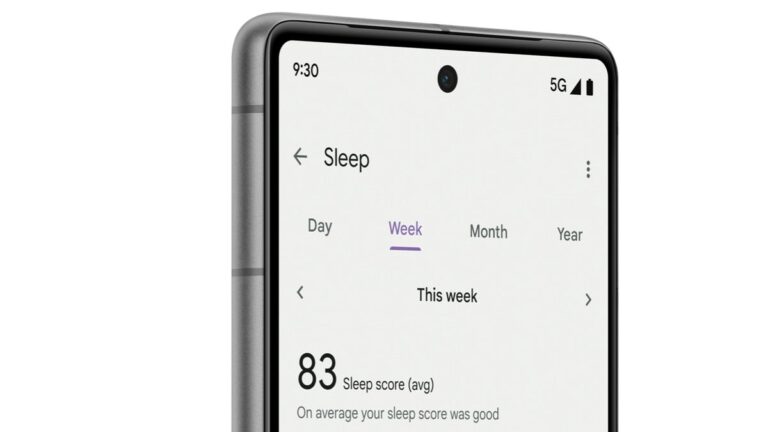
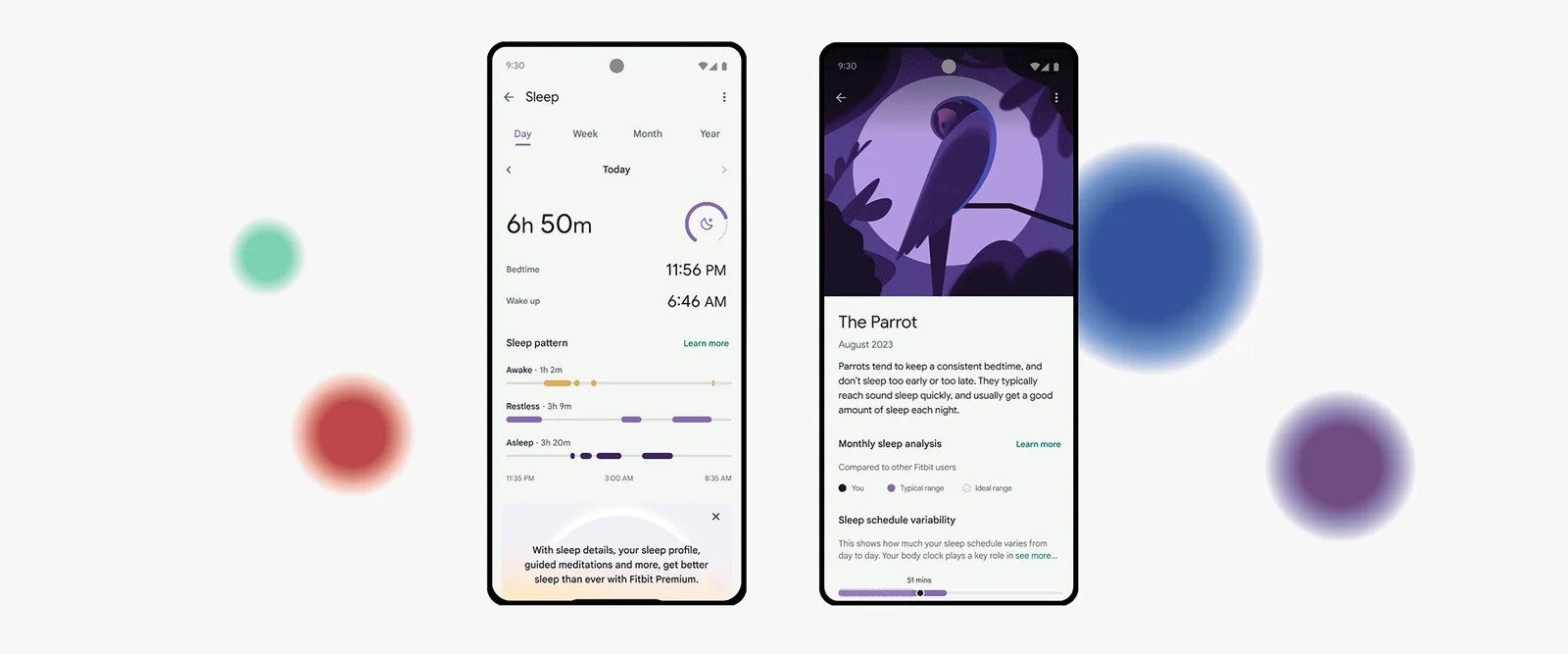
Fitbit has finally unveiled a fresh design for its sleep page within the app, offering a more detailed look at users’ sleep data (via 9to5Google). The updated design creates a sleeker and more user-friendly interface for tracking your Z’s.


The redesigned Sleep stats page introduces tabs for Day, Week, Month, and Year, providing users with a comprehensive overview of their sleep patterns over different timeframes. Moreover, at the top of the page, you will see your sleep stats from the previous night, including duration, bedtime, and wake-up time. Plus, handy bar graphs visualize key indicators like sleep patterns, Awake, Restless, and Asleep stats.


So, if you are curious about your sleep quality, Fitbit has got your back. A dip in your heart rate at various points during the night, for instance, can clue you in on whether your sleep was restful. This indicates that you’re getting deep enough shut-eye for your body and brain to tackle essential tasks like muscle repair, tissue growth, and other vital processes that support brain function and overall health.

[ad_2]
Source link

New Loop DoS Attack Can Cause Indefinite System Crash

0
[ad_1]

A new attack strategy has been devised that triggers an indefinite denial state on target servers. Named “Loop DoS,” the attack hasn’t been detected in the wild yet, but it threatens over 300,000 online systems.

Loop DoS – A New DoS Attack Threatening Over 300K Systems

Researchers from the CISPA Helmholtz-Center for Information Security have developed a new attack strategy, “Loop DoS,” that causes system crashes.

As the name implies, the attack triggers a denial of service (DoS) state that goes indefinitely in a loop, going beyond the attackers’ control. Simply put, an adversary may achieve this by spoofing the IP address of a victim server, which causes the corresponding server in the communication to generate an error as the output. In response, the first server also gives an error, thus triggering an automated generation of error messages with no end.

Specifically, the attack becomes possible due to a vulnerability in the UDP application protocol implementations. Identified as CVE-2024-2169, this vulnerability affects the application layer messages, impacting how networks communicate over UDP. An attacker may inject IP-spoofed error messages between the communication, triggering an indefinite error loop. Giving the example of DNS resolvers, the researchers describe,

Imagine two DNS resolvers with such error reflection behavior. If an error as input creates an error as output for two systems, upon receiving an attack trigger, these two systems will keep sending error messages back and forth — indefinitely.
An attacker could now cause a loop among these two faulty DNS servers by injecting a single, IP-spoofed DNS error message. Once injected, the vulnerable servers continuously send DNS error messages back and forth, putting stress on both servers and any network link connecting them.

The researchers have shared the details about Loop DoS in their advisory.

All Existing UDP Protocols Found Vulnerable

As observed, all existing software implementations of UDP application protocols DNS, NTP, TFTP, Echo (RFC862), Chargen (RFC864), and QOTD (RFC865) are vulnerable to Loop DoS attacks. Consequently, over 300,000 Internet hosts and their networks are prone to attacks. That includes systems from top vendors like Microsoft, MikroTik, Broadcom, Cisco, Honeywell, and more.

While the attack is easy to exploit, it hasn’t yet been carried out in the wild. Nonetheless, the threat persists if this vulnerability remains unaddressed. Exploiting it merely requires an attacker to spoof the IP address of a vulnerable host, though it’s a mandatory requirement to trigger the loop. The researchers also explained that such an attack is only possible between two systems and may not be extended to more systems to create a ring.

Regarding possible attack prevention, the researchers propose updating or shutting down the vulnerable systems to prevent the attack and restricting ephemeral source ports to the servers on vulnerable protocols. Likewise, for countering an ongoing attack, the researchers advise rate-limiting networks that would break the indefinite loop and assign low QoS priority to abused protocols.

Let us know your thoughts in the comments.


[ad_2]
Source link

WhatsApp now allows pinning multiple messages per chat

0
[ad_1]

WhatsApp has rolled out a new feature for its mobile app that allows users to find important conversations quickly. The latest functionality lets users pin multiple messages in a chat. It is an enhanced version of the same feature introduced in December last year. However, at that time, users were allowed to pin only a single chat. The new WhatsApp chat feature is available for both Android and iOS platforms.

WhatsApp users can now pin as many as three messages per chat

Now, WhatsApp allows users to pin up to three messages in a chat to access them easily. Apart from the individual chats, the pinning multiple chats feature is also available in the group conversations. Users can pin all kinds of messages including text, photos, voice notes, and polls. The latest feature is being rolled out gradually, so not everyone will receive it right away.

Whatsapp pin multiple chats

These chats can be pinned as a banner on top of a conversation from 24 hours to as many as 30 days. The most recently pinned chat appears as the first banner in an individual or a group conversation. The users can touch the banner to see the next pinned message. It’s worth adding that admins can choose whether all members or only admins can access this functionality in group chats.

Here’s how to pin a message in WhatsApp chat

It’s fairly easy to pin a message in the WhatsApp individual or group chats. On Android, users can tap and hold the message they want to pin. Then, they can select the Pin option by tapping the three vertical dots in the top right corner. After selecting the option, all you have to do is choose the pin duration and press the Pin button.

The iPhone users can tap and hold the message that they want to pin and select More options from the contextual menu. It’s worth mentioning that currently there’s no way to keep a message pinned forever.

More WhatsApp features are rolling out soon

WhatsApp has been gradually enhancing the user experience on its platform by introducing new features from time to time. Just last month, the Meta-owned company added the ability for four new text formatting options to improve the chat experience. In a soon future update, it could let users share longer videos on Status.

Also, there are reports that the WhatsApp transcription feature is heading to Android soon. It has already been available on iOS since May last year.


[ad_2]
Source link

Galaxy Ring will soon support Samsung Food to become your AI nutritionist

0
[ad_1]

After the era of health or fitness bands, we are now gradually shifting to the world of smart rings. The recently launched Galaxy Ring is a prime example of it. It can do almost all the tasks just like your fitness band such as a health monitor, sleep monitor, etc. Samsung has a huge plan to improve it in the future further. As a part of one of those plans, the brand has approved a new plan to integrate Galaxy Ring into Samsung Food.

Galaxy Ring and Samsung Food to become your new AI nutritionist

Samsung Food is a global platform that recommends dietary ideas to its users. The firm is now planning to integrate some of its products such as Galaxy Ring to further improve the reliability of the services. First reported by ChonSun Biz, Samsung has approved a plan that focuses on adding the support of Samsung electronic products such as refrigerators and the Galaxy Ring to the Samsung Food services.

They are yet to reveal more details about the plan. Considering the brand has a top-notch research and innovation department, we may not be shocked if the actual implementation of the plan begins in a few days. We will have to wait until the brand sheds more light on the information. They may also integrate this into the One UI to create a complete ecosystem for Samsung users.

Why was this integration of Galaxy Ring and Samsung Food needed?

According to a Samsung official, Samsung Food will be able to create more personalized food menus using the data from Galaxy Ring and other smart home appliances. For example, if you have kept some ready-to-eat food inside the AI-powered Samsung refrigerator, the platform will analyze the food and then the health data from your Galaxy Ring to suggest the best food menu or option possible.

If we take it further, the AI will now send the data to your Samsung Oven which will solve the hassle of users manually operating it. The AI will decide the temperature, time, and heating intensity itself. In short, they are creating a whole ecosystem based on Samsung Food services. They, no doubt, want to dominate the FoodTech industry. This new industry itself is very fascinating given that it combines the tech with our dietary plans.


[ad_2]
Source link

Exploit Released For Critical Fortinet RCE Flaw: Patch Soon!

0
[ad_1]

FortiClientEMS (Enterprise Management Server), the security solution used for scalable and centralized management, was discovered with an SQL injection vulnerability that could allow an unauthenticated threat actor to execute unauthorized code or command on vulnerable servers through specially crafted requests. 

This vulnerability exists due to improper neutralization of special elements used in an SQL command. The vulnerability was assigned with CVE-2023-48788 and the severity was given as 9.8 (Critical). 

However, Fortiguard has acted swiftly upon this vulnerability and has released patches to fix it.

Moreover, this vulnerability was found to be exploited by threat actors in the wild. In addition, a proof-of-concept for this vulnerability has also been released.

Proof Of Concept Analysis – CVE-2023-48788

According to the reports shared with Cyber Security News, this vulnerability exists due to the multiple components on the FortiClient EMS, such as FmcDaemon.exe. FCTDas.exe and one or more endpoint clients.

Document

Free Webinar : Mitigating Vulnerability & 0-day Threats

Alert Fatigue that helps no one as security teams need to triage 100s of vulnerabilities.:

  • The problem of vulnerability fatigue today
  • Difference between CVSS-specific vulnerability vs risk-based vulnerability
  • Evaluating vulnerabilities based on the business impact/risk
  • Automation to reduce alert fatigue and enhance security posture significantly

AcuRisQ, that helps you to quantify risk accurately:

To provide a brief insight, the FmcDaemon.exe is the main service used for communicating with enrolled clients which listens to port 8013 by default for all incoming connections.

The FCTDas.exe is the Data Access Server that is used for translating requests from various other server components into SQL requests which also interacts with Microsoft SQL Server database.  

Furthermore, the endpoint clients can communicate with the FmcDaemon on the server via port 8013 (tcp).

However, the vulnerable component was discovered by scanning the installation folder for common SQL strings which revealed that FCTDas.exe establishes connections to the local database over tcp/1433 and also listens for incoming connections over localhost port tcp/65432.

FTCDas.exe connections (Source: Horizon3)

Finding the Vulnerability Trigger

After enabling debug logging to gather communications information between the FcmDaemon.exe and an endpoint.

It was also discovered that many of the message-handling functions were making use of a functionality from policyhelper.dll. 

However, the SQL injection was discovered by simply updating the FCTUID in the FcmDaemon message which triggered a simple sleep payload that delayed a 10 second response from the server.

SQL Query in DAS logs (Source: Horizon3)

For escalating this into a Remote code execution, the built-in xp_cmdshell functionality of Microsoft SQL Server was utilized which was enabled via few other SQL statements.

Moreover, Horizon3 researchers have published a proof-of-concept that only triggers the SQL injection vulnerability to confirm its existence.

Xp_cmdshell logs (Source: Horizon3)

For FortiClientEMS, there are several log files under the directory C:\Program Files (x86)\Fortinet\FortiClientEMS\logs that can be used for further analysis of malicious activity.

As an alternative, the MS SQL logs can also be examined for additional evidence of exploitation through xp_cmdshell.

Additionally, the NodeZero threat actor was also found to be using different techniques to gain execution over vulnerable FortiClientEMS servers using this vulnerability.

NodeZero Attack technique (Source: Horizon3)

Stay updated on Cybersecurity news, Whitepapers, and Infographics. Follow us on LinkedIn & Twitter.


[ad_2]
Source link