Yesterday, the United States Department of Justice (DOJ) filed an expansive antitrust lawsuit against Apple. It accused the company of engaging in anticompetitive business practices to gain an illegal monopoly in the smartphone market. According to the DOJ, Apple strategically positioned many products and services to drive out competition. Among those is its infotainment system, CarPlay.
DOJ says CarPlay allowed Apple to drive out competition
The 88-page official complaint, filed by the DOJ and 16 state and district attorneys general, says infotainment systems have become must-have capabilities in cars. Apple’s CarPlay is one of the leading names in this industry. It enables a car’s built-in display to serve as a display for the iPhone, allowing drivers to use their iPhones to control maps and entertainment in their cars.
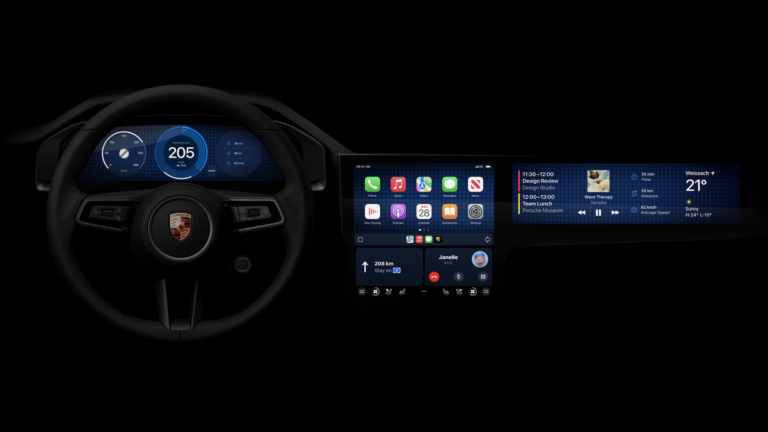
The DOJ alleges that Apple applies the same restriction system as the iPhone to CarPlay. “Apple further locks in the power of the iPhone by preventing the development of other disintermediating technologies that interoperate with the phone but reside off the device,” the complaint states. The DOJ is particularly concerned about the next version of CarPlay, which can “take over” your car.
“Apple has told automakers that the next generation of Apple CarPlay will take over all of the screens, sensors, and gauges in a car, forcing users to experience driving as an iPhone-centric experience if they want to use any of the features provided by CarPlay,” the lawsuit says. “Here too, Apple leverages its iPhone user base to exert more power over its trading partners, including American carmakers, in future innovation.”
This may sound scary but not entirely true. While CarPlay will gain the ability to interact with system displays, sensors, and gauges, carmakers don’t necessarily have to allow a complete takeover. They still need to sell the car with a basic software interface to control the system. After all, the car must function properly without CarPlay or even a phone. When connected, Apple’s software will be laid over the system software.
DOJ may be concerned about the planned deeper integration
The DOJ’s view on the next version of Apple CarPlay may be misleading, but it may have genuine concerns about the planned deeper integration. It likely believes that Apple is trying to give you an in-car infotainment experience based on the iPhone, not the car itself. No matter which car you drive, you will get the same infotainment experience. The DOJ may see this as an anticompetitive move that can stifle innovation.
The Justice Department also targeted Apple’s business practices around digital keys. The company requires developers to add digital keys developed for their own apps to Apple Wallet. The DOJ says this increases a user’s dependence on Apple and the iPhone whenever they use their car. It also “decreases the incentives of automakers to innovate because automakers are forced to share data with Apple.”
This may be a long battle between the American lawmakers and Apple. The company has already labeled the lawsuit “wrong on the facts and the law.” The Cupertino-base technology giant says it is prepared to defend vigorously. Time will tell whether it can disprove all accusations from the DOJ. If the latter wins its CarPlay argument, expect some changes in the car infotainment industry.
UPDATE: The Huawei Watch GT 3 started receiving Harmony OS 4.0 update, so we had to update the review with that information. The update is rolling out globally, by the way. You can find more information about the update at the very end of the review.
I’ve been able to use quite a few ‘Watch GT’ smartwatches from Huawei up until now. The improvements the company is making are easily noticeable, and this is the best iteration in the series yet, without a doubt. The Huawei Watch GT 3 is the first watch in the series to ship with Huawei’s new HarmonyOS operating system. That OS does improve the Huawei Watch GT 3 compared to its predecessor, even though the UI will look familiar, as you’ll see in the review.
The Huawei Watch GT 3 is essentially a hybrid between a sporty watch and a classy watch. Huawei did include tons of fitness features in here, but you can easily throw a leather strap on it, and wear it in combination with a suit or something like that. That’s actually the quality its predecessor had as well, though this thing takes it to a new level. That being said, let’s get started, we’ll touch on the design first.
The Huawei Watch GT 3 design is a great combination between sporty & classy
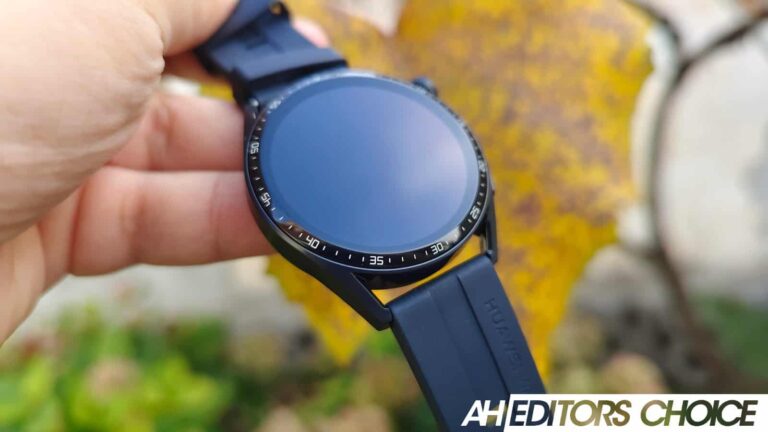
If you’ve owned the Huawei Watch GT 2, or any of its siblings, you’ll feel right at home here. This watch is really comfortable to wear, and the design is excellent. It’s made out of metal, and it comes in three different variants. Active, Classic, and Elite editions are available. We’ve been using the ‘Active’ model, which is black-colored and comes with a black silicone strap. The Classic variant is silver-colored and comes with a brown leather strap. The Elite model combines a silver body with a strap made out of metal, which is also silver-colored.
That being said, the silicone strap that comes on this thing is comfortable to wear. The watch itself includes a round display, and it is made in a way that allows you to use basically any other strap on it, as long as it’s the right size. The size of the strap here is 22mm, as this is a 46mm variant of the watch. Do note that a 42mm version is also available, and the strap size may be different on that model.
This is the first “GT” watch to include a rotating crown
Now, when you take a look at this watch, you’ll notice that it has two buttons on the right side. The one on the top is a rotating crown, actually, which doubles as a physical button. That button calls up the menu of the watch and confirms actions you’re taking in the menus. The bottom button is customizable, you can set it to launch whatever you want, from a music player to a fitness-related task. The buttons are clicky, and well-positioned, though I still managed to accidentally press the top one, which is almost impossible to avoid. The good thing is that Huawei didn’t position it in the middle of the right side of the watch.
At the bottom of the watch, you’ll find a heart rate sensor, and yet, the company also included a speaker on this thing. In fact, there’s also a microphone included, in case you’d like to talk by using the watch. We’ll talk more about the sound later on. All in all, this watch feels really sturdy, it’s really well-built, and comfortable, so not many people will find complaints in that department.
The display is big, bright & responsive
The display on the Huawei Watch GT 3 is big, bright, and beautiful. Seriously, this is one of the best displays I’ve seen on a smartwatch, without a doubt. The colors are punchy, the viewing angles are excellent, and it gets more than bright enough. Auto brightness is also available, and it does a good job, at least in my experience, I never felt the need to disable it, and manually tweak brightness.
This 46mm variant includes a 1.43-inch AMOLED display, which is flat. That is a large display, and yet the watch is not too large at all. It fits my wrist perfectly, and it’s average in terms of size, for a man. The touch sensitivity of the display has been greatly improved compared to the previous iterations of the watch. I always felt like the software was a bit behind my swipes and whatnot, but that’s not the case here. It’s really responsive, and a joy to use, to be quite honest.
The watch offers really smooth performance
Performance, in the sense of smoothness of operation, is excellent. The Huawei Watch GT 3 doesn’t lag, in fact, it doesn’t even stutter. Everything you do on it feels smooth, from launching different apps, listening to music, fitness-oriented use, to general navigation around the OS. Speaking of which, Huawei included Harmony OS 2 on this watch, and it works great. The experience is similar to what you’d get with the Huawei Watch 3, but the battery life is considerably better. That’s something we’ll talk more about later.
There are some bugs in the software, though
Not everything is perfect on the software side of things, though, it never is. I did notice a couple of bugs during my usage. The most annoying one was with the rotating crown, though it popped up only a couple of times. The crown stopped working at times, though navigating back to the main screen and shutting off the display fixed things immediately. The second issue I’ve had is with the music player. When I pause music, the watch sometimes forgets what I was listening to on my phone (after a short time), and it reverts back to music on the watch. Needless to say, that was quite annoying. It didn’t always happen, so I’m guessing it’s a bug of sorts.
Huawei AppGallery
One thing to note is that you’ll need to download the Huawei AppGallery to your phone in order to get the app you need to connect this watch. The app is called Huawei Health, and even though it’s available in the Play Store, that version is obsolete, you’ll need the one from the AppGallery. This essentially means you’ll need to sideload the AppGallery APK, as it’s not available in the Play Store.
Huawei ironed out some notification-related problems
Earlier variants of the Huawei Watch GT had significant notification issues. I would get double or triple notifications for no apparent reason. You’ll be glad to know that Huawei mostly fixed the issue. It showed me a double notification only twice in the couple of weeks I’ve been using it, in earlier iterations, it was a constant pain. I’m glad that’s no longer such a big problem. Now that we sorted out the issues, let’s talk about the good stuff.
The UI on the watch is functional, and the UI for notifications is as well. You still can’t respond to notifications, you can only swipe them away, but that’s the way it is. Some people may actually prefer that, I kind of do, as I can easily read what is said, and then remove it while keeping it unread on my phone so that I can answer later on, and not forget it. I didn’t have any issues with notification syncing, all that was fast and reliable.
All is good in the connectivity department unless you switch phones often
When it comes to the general connectivity of the watch, everything was mostly fine. The watch stayed connected with my phone without issue, it only lost connection when I put too much space between the two devices. It reconnected immediately after I was in range. Where I did encounter a problem was when I was switching from one phone to the next. That is something I do quite often in this line of work, though that won’t be an issue for the vast majority of people. I had to reset the watch every time when switching, as it simply didn’t want to connect to a new device after I disconnected it from the current one. I don’t know why, but there you go. It’s not like I haven’t tried plenty of times, on several occasions, and I was even logged into Huawei Health on the other phone before doing it, as instructed. If you don’t change phones often, this is a non-issue for you. It is worth noting that it works with both Android and iOS.
The Huawei Watch GT 3 is packed with health & fitness features
The Huawei Watch GT 3 is packed with health-related features, and that includes fitness stuff as well. The watch includes plenty of sensors: an accelerometer, gyroscope, geomagnetic sensor, optical heart rate sensor, air pressure sensor, and temperature sensor. This watch can also monitor SpO2, and it’s quite accurate when it comes to heart rate measuring. Now, many of you are probably wondering if the GPS is any good. What I’ll say is that it’s noticeably more accurate than it was before. I didn’t experience any issues with it. Do note that I’m not really a fitness buff, so the only stuff I tested it for is walking, light running, and bicycle rides. Everything seemed good.
There are over 100 workout modes included
The watch can automatically start fitness workouts, for specific types of activities. There are over 100 workout modes that you can delve into here. I only tried a few, though. The watch did take its time to prompt me and ask if I wanted it to track a workout. That was especially true when it comes to walking, but it did a good job measuring everything. It wasn’t the most accurate smartwatch I’ve used for that, but do note this is not a fitness-only smartwatch. It offers a lot more features and flexibility than such watches do. Overall, it did a really good job when it comes to fitness tracking. The watch also has a 5ATM waterproof rating by the way. For those of you who are wondering about sleep tracking, well, it’s not the most accurate I’ve used, but it’s up there. It does a good job overall.
It shames the competition when it comes to battery life
One aspect that most smartwatches don’t deliver is great battery life. I simply hate charging my smartwatch every day, or every other day. That’s why I really enjoyed the Watch GT 3. Much like its predecessors, it didn’t disappoint in regards to battery life. Huawei says that you can get around two weeks with typical use, and a week with heavy use. I didn’t quite manage to get to that point. It was more like 10-11 days on typical use for me, I never really heavily used it. I did actively use it, which resulted in about a week of use. I never purposely fired up all it has to offer and went for it, as I don’t think anyone will do that. Compared to 1-2 days of use the most popular smartwatches offer, this is excellent.
Wireless charging is supported, finally
The Huawei Watch GT 3 does support wireless charging, much like the Watch 3. This is a great solution, as POGO pins should become a thing of the past. A charger is included in the package, a charging cradle, that is, and it works really well. It can replenish the battery fairly quickly. That is not something you’ll need considering how great the battery life is, though. You can simply leave it to charge overnight or something. Still, it’s a nice feature to have, in case you need a quick top-off.
The Huawei Watch GT 3 has a speaker and a microphone
As mentioned earlier in the review, you can make calls using the watch, as long as it’s connected to your phone. This watch does not come with a SIM card slot, but it does have both a loudspeaker and a microphone. That loudspeaker is as good as it gets for its size, so don’t expect miracles. People I’ve called noticed the difference in quality when I spoke through that microphone. They said that the quality is still fine, though. If you want to feel like you’re in Star Trek and use this thing to make calls, that is possible, as long as there’s not a lot of noise around you.
That loudspeaker can also be used to notify you when you receive a message when a phone call is incoming, and so on, of course. You can set that in the settings, or completely disable it for that purpose, it’s up to you. I personally like to use vibration only on my smartwatches, so I used the loudspeaker only for the purpose of this review.
This smartwatch is not difficult to recommend
So, is the Huawei Watch GT 3 worth it? Well, I’d say it is. This is not the most affordable smartwatch in the market. Still, for those of you who hate poor battery life on a smartwatch, this is a great alternative. I’d rather use this than something from Samsung or Apple, mainly due to the battery life difference. Don’t get me wrong, the Huawei Watch GT 3 has a lot to offer in general. It works really well, and has tons of fitness functions. The GPS and heart rate monitoring are accurate, and it has a big and bright display. There’s a lot to like here.
Updated March 19, 2024:
Huawei has started pushing out Harmony OS 4 to the Huawei Watch GT 3 smartwatch. The update is rolling out to global variants of the watch. The version in question is 4.0.0.111, and the update size is about 138 MB. This update brings along new customization options, and the usage of the UI should be smoother than ever. You can now also see app names on the app grid. Huawei also added teh mistouch prevention feature for workouts. An alarm feature has been added that organizes alarms by their set timers. You can now also customize workout data and the layout of widgets for specific types of workouts. These are only some changes, there’s more to unpack on the inside. So, if you do have a watch, do check if the update is available, it should be. If it’s not, it will be soon enough.
Tenable Research has identified a critical vulnerability within the AWS Managed Workflows for Apache Airflow (MWAA) service, which they have named “FlowFixation.”
This vulnerability could have permitted attackers to execute a one-click takeover of a user’s web management panel for their Airflow instance.
The discovery underscores the ongoing issue of misconfigured shared-parent domains, a problem that poses a significant threat to customers of major cloud service providers (CSPs).
Each MWAA instance is attached to a web panel for managing workflows, connections, DAGS and more
Alert Fatigue that helps no one as security teams need to triage 100s of vulnerabilities.:
The problem of vulnerability fatigue today
Difference between CVSS-specific vulnerability vs risk-based vulnerability
Evaluating vulnerabilities based on the business impact/risk
Automation to reduce alert fatigue and enhance security posture significantly
AcuRisQ, which helps you to quantify risk accurately:
Discovery of FlowFixation
The FlowFixation vulnerability was found to be particularly dangerous as it allowed for a session hijack in the AWS Managed Workflows for Apache Airflow.
Amazon Managed Workflows for Apache Airflow console
This could have led to remote code execution (RCE) on the underlying instance and potentially enabled attackers to move laterally to other services within the victim’s cloud environment.
Implications for Cloud Security
The investigation by Tenable Research extended beyond AWS, revealing that numerous shared-parent service domains across other major CSPs, including Azure and Google Cloud Platform (GCP), were also misconfigured.
This widespread issue places cloud customers at considerable risk, highlighting the need for more stringent guardrails and better configuration management practices.
Addressing the Vulnerability
Upon discovery, Tenable Research responsibly disclosed the vulnerability to AWS, which has since been resolved.
However, the incident serves as a wake-up call for organizations relying on cloud services to take a proactive stance on security.
Users must ensure that their cloud configurations are secure and regularly audit their settings to prevent such vulnerabilities from being exploited.
The FlowFixation vulnerability serves as a reminder of the potential risks associated with cloud services.
While CSPs are responsible for the security of the cloud itself, customers must also play their part in securing their data and applications.
As cloud adoption grows, providers and customers must collaborate to strengthen their defenses against increasingly sophisticated cyber threats.
Stay updated on Cybersecurity news, Whitepapers, and Infographics. Follow us on LinkedIn & Twitter.
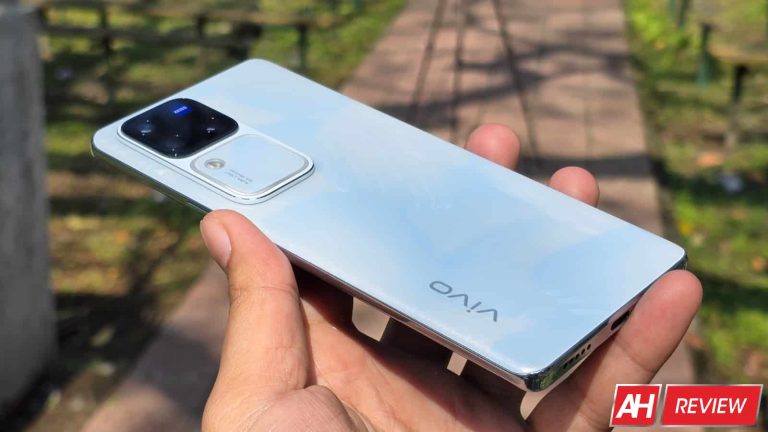
The Vivo V30 Pro is the latest premium mid-range smartphone from Vivo. The phone was launched on February 28. At 7.45mm, it is incredibly slim — Vivo’s slimmest phone with a 5,000mAh battery — and looks stylish. The handset also has a premium feel to it thanks to the curved front and back. The company offers the device in four colors, each with a unique aesthetic element. We have the Bloom White variant with a 3D Petal pattern and sandblasted finish on the back.
The phone isn’t only about a good design. The Vivo V30 Pro also packs solid specs. It has four 50MP cameras, including a dedicated portrait camera (2x zoom) on the back. Vivo has teamed up with ZEISS to optimize colors and picture quality. The phone also features a decently powerful MediaTek processor, up to 12GB RAM and 512GB storage, a big and bright display, a 5,000mAh battery, 80W fast wired charging, and more. In this review, we put the Vivo V30 Pro through its paces to determine whether it delivers reliable and sustained performance.
Table of contents
Vivo V30 Pro Review: Hardware & Design
The Vivo V30 Pro is a stylish phone in a slim and lightweight package measuring 164.36 × 75.1 × 7.45mm in dimensions and weighing 188 grams. The phone has a curved glass panel on the front and back, making it a little slippery in hand. The front panel is a sheet of Schott Alpha glass, while the back glass is aesthetically different across the four color variants. The Bloom White variant that Vivo sent us has a 3D Petal pattern. Waving Aqua has a Rippling Magnetic Particle design, Lush Green has a color-changing panel, and Noble Black has Fluorite AG Glass.
The phone’s frame is made of plastic and comes with a glossy finish. Vivo says the V30 Pro features a cushioning structure on the underside of its corners for better protection during hard falls. The frame has recessed top and bottom edges. The top edge has “PROFESSIONAL PORTRAIT” inscribed, which tells you how much Vivo is betting on the dedicated portrait camera. There is a microphone hole at the top, while one more sits at the bottom. The bottom edge also has room for the SIM tray, USB Type-C port, and a speaker grille with circular multiple cutouts.
As usual, Vivo has placed the power and volume keys on the right side of the phone (the left edge is free of any holes, ports, or buttons). They sit at a nice height and are easily reachable during one-handed usage unless your hands are smaller than average. Both buttons are made of plastic but are decently clicky. I won’t call them the most comfortable and premium-feeling buttons on a $500 smartphone but they aren’t bad. The Vivo V30 Pro certainly doesn’t feel cheap in hand.
The rear camera array is bulky but beautiful
The Vivo V30 Pro’s rear camera array is a vertical rectangular slab in the top left corner. It is a relatively thick slab divided into two rounded squares of equal size. The top half houses the three 50MP rear cameras and the ZEISS logo. The bottom half has a dual-LED flash and the Aura Light strip along the border. You will also find the test “AURA LIGHT” and “OIS Portrait” within this square, making it the second instance of Vivo printing “Portrait” on the phone’s body.
While we will go into detail about the camera performance and the purpose of the Aura Light square later (you can directly jump to the Camera section from the table of contents above), the rear camera layout of the Vivo V30 Pro is built nicely. It is aesthetically pleasing thanks to the symmetry added by the Aura Light square. The bump makes the phone wobble a bit when tapping on the upper-left portion of the screen (kept screen up on a flat surface), but it is a non-issue.
Slimmer bezels would have added to its look
The Vivo V30 Pro is an attractive device, no doubt about that. It has a well-built dual-curved body with a glass back. The earpiece is hidden nicely under the frame. However, Vivo could have upped the aesthetic game a little by making the bezels slimmer. The top and bottom bezels, in particular, feel a bit thick. A curved display means the side bezels are already less noticeable. If Vivo made the bezels symmetric, it would have elevated the overall look of the phone.
An extremely slippery build means a case is necessary
The overall build quality of the Vivo V30 Pro is solid. The phone feels premium in hand and has good aesthetics. However, it is extremely slippery. So much so that you would find it challenging to pick the phone up from a table. It slips away as you try to get a good grip. This gets worse if your hands are sweaty. I would recommend using a case (provided in the box in some regions) not only to protect the phone but also to add some grip to its body. Besides that, it doesn’t have any complaints in terms of design, unless you aren’t a fan of dual-curved smartphones.
We would have liked stronger protection against dust and water, though. The phone has an IP54 rating, which isn’t the best in this segment. Some cheaper phones from Samsung and other brands offer a higher IP rating. It may not be a dealbreaker but you should be wary about exposing the Vivo V30 Pro to water. The device should handle some sprinkles, spills, and light rain, but submerging it under water may not be a great idea. We hope an IP65 or higher rating will soon be common in smartphones costing above $500.
Vivo V30 Pro Review: Display
The Vivo V30 Pro sports a 6.78-inch curved AMOLED display with a 1.5K resolution (2800×1260 pixels), making for a 453ppi pixel density. The company rates the screen brightness at 2,800 nits of peak brightness, which is pretty much the extreme level it can go when displaying HDR content. On normal usage, the brightness of the display will reach a maximum of 1,200 nits. In our testing, we recorded 875 nits of brightness when manually sliding the controller. In automatic mode, the brightness went up to 1,199 nits. The minimum brightness we recorded was 1.9 nits.
In simpler terms, the Vivo V30 Pro’s screen gets adequately bright depending on the lighting conditions. It is very much legible under direct sunlight. Colors may not look accurate but that is expected. When indoors, the phone dynamically adjusts the screen brightness to make it easy on your eyes. Thanks to 2160Hz PWM (pulse-width modulation) dimming, the display gets dim enough at night or in dark areas to make for comfortable viewing. The screen retains colors well even at low brightness.
Vibrant screen colors for immersive content consumption
Speaking of screen colors, the Vivo V30 Pro supports 10-bit color depth (one billion colors) with a 100% DCI-P3 color gamut, 105% NTSC color saturation, and an 8000000:1 contrast ratio. The colors are bright and vibrant, making for an immersive viewing experience when watching high-quality content. Vivo offers three built-in color profiles (Standard, Pro, and Bright) with manual controls over the color temperature. This gives you the flexibility to adjust screen colors according to your preference. Having customization options is always a bonus.
The Vivo V30 Pro boasts a Widevine L1 DRM certification, letting you enjoy Full HD streaming across all major streaming apps. The phone also boasts HDR10+ support, which enhances the viewing experience already made enjoyable by vibrant screen colors. Moreover, the down-firing speaker is adequately loud (more on this later), further making for immersive video streaming. The phone is well-suited for media consumption and gaming, which we will discuss in detail in the Performance section below.
The display is smooth and highly responsive
Before we dive into the Vivo V30 Pro’s gaming performance, let us discuss the responsiveness of the display. The screen boasts a 120Hz refresh rate and a 300Hz touch sampling rate. By default, the phone is set to automatically switch the refresh rate between 120Hz and 60Hz depending on the usage scenario, but you can select either option from the Settings app. The display feels smooth and highly responsive even during intensive usage like gaming. We didn’t notice any touch lag while playing graphic-intense games.
While IP54 dust and water resistance may not be the best in this segment, the Vivo V30 Pro does boast Wet-Hand Touch technology. It ensures accurate reading of touch input when your hands are wet. This tech comes in handy during long gaming sessions when your fingers can get sweaty. You will not lose control because of sweaty fingers. It also helps when you have to pick up an urgent call and your hands are stained with water. The under-display fingerprint scanner works fairly accurately with wet fingers.
Vivo V30 Pro Review: Performance
The Vivo V30 Pro is powered by MediaTek’s Dimensity 8200 chipset. It is a 4nm premium mid-range processor featuring one Cortex-A78 prime CPU core clocked at 3.1GHz, three Cortex-A78 performance cores at 3.0GHz, and four Cortex-A55 efficient cores at 2.0GHz. For graphics, the chipset integrates ARM’s Mali-G610 MC6 GPU operating at a 950MHz frequency. The review unit Vivo sent us comes with 12GB of LPDDR5 RAM and 512GB of UFS 3.1 storage, though the phone is also available in other configurations.
Vivo used this chip in last year’s V27 Pro (Review), so it isn’t a new solution. However, the V30 Pro still delivered a reliable performance. We won’t call it the buttery-smooth performance we usually get from flagships. There were a few instances of the phone stuttering when playing graphic-intense games like Genshin Impact, COD Mobile, and BGMI, particularly when we pushed it to the limit by setting graphics and frame rates as high as possible. However, in everyday usage, the Vivo V30 Pro excelled.
The device handles everyday tasks comfortably
Apart from some gaming hiccups, the Vio V30 Pro hardly ever disappointed us with its performance. It is decently fast at opening apps and does well to keep apps active in the background. Vivo claims the device can retain up to 48 active background apps. System animations are fairly smooth, so switching between apps feels a breeze. There may be a few better-performing phones in this segment, but the Vivo V30 Pro is no slouch either. To get a better idea of its capabilities, we ran a few benchmark tests on the phone. Below are the results.
Benchmarks
To start with, we ran the Geekbench test. The Dimensity 8200 isn’t an elite mid-range chip anymore and that showed up in this benchmark run. The Vivo V30 Pro scored 1,229 in the single-core CPU test on Geekbench v6 and 3,970 in the multi-core test. It scored 4,393 in the GPU test on the same benchmarking platform. These scores aren’t anything special. In fact, considering the performance we are getting out of the device, we expected better scores. Here’s how it stacks up against some other phones.
The Vivo V30 Pro was then pushed to its limit in a 3D Mark Wildlife Extreme Stress Test. It is an intense, 20-minute test that simulates prolonged heavy use to determine how the phone holds up. Once again, the device didn’t achieve impressive figures, though performance stability was solid at 99.4%. Its best loop score was 1,820 and its lowest loop score was 1,810.
The third test is something we have put together here at Android Headlines. In this test, we use Capcut to export a 1-minute video and note the time a device takes to complete the export. We use the same video every time, so this gives us a fair idea of how a device performs. The Vivo V30 Pro performed in the expected range, taking about 31 seconds to do the job. The graph below compares its performance with other phones in its segment.
The phone heats a little during heavy usage
As companies strive to give you more for less, they sometimes overlook certain aspects of the performance. We have noticed phones getting uncomfortably hot within minutes of heavy usage. To give you better insight, we run thermal tests on devices we review. The Vivo V30 Pro also went through these tests. Firstly, we checked its body temperature immediately after completing the 20-minute-long 3D Mark Wildlife Extreme Stress Test. The screen brightness was turned up.
On the screen side, our heat gun recorded a maximum temperature of 120.2 degrees Fahrenheit/49 degrees Celcius. On the back, the highest temperature was 123.6 degrees Fahrenheit/50.8 degrees Celcius. These figures are relatively high. Most phones don’t go beyond 110 degrees Fahrenheit. This means the Vivo V30 Pro can heat a little during heavy usage. Vivo says the phone has a massive cooling area of 35,141 mm² and a large vapor chamber measuring 3,002 mm². However, that doesn’t seem to be helping much.
The Vivo V30 Pro also took longer than expected to cool down. We had to wait ten minutes after the benchmark run for the temperature to drop below 100 degrees Fahrenheit/37 degrees Celcius. After this cooldown period, we went on to play Genshin Impact with the highest graphics for about an hour. The phone lagged or stuttered at times, which we have already talked about. However, it didn’t get as hot as during the benchmark test. We recorded the highest temperature of 107 degrees Fahrenheit/41.6 degrees Celcius after the gaming session.
Finally, we checked the Vivo V30 Pro’s body temperature during camera use. We recorded a 4K video at 60fps for 5 minutes and found that the phone reached a temperature of 104.7 degrees Fahrenheit/40.4 degrees Celcius. After 10 minutes of continuous video recording, the temperature was 112 degrees Fahrenheit/44.4 degrees Celcius. The overall thermal performance of the Vivo V30 Pro was below par.
Vivo V30 Pro Review: Audio
The Vivo V30 Pro features a single speaker, which is disappointing. Most of its competitors offer dual stereo speakers. Thankfully, the speaker is fairly loud, with decent overall audio quality. Well, that may be subjective, but I don’t have many complaints. Like on other phones, we used the same five audio tracks to test the speaker’s output across five different parameters—loudness and distortion, bass, treble, vocals, and overall balance.
The speaker already sounds quite loud at 100% volume. If you press the volume up key one more time, it enables Audio Booster mode to further increase the loudness. This happens without much distortion, i.e., affecting the audio quality. However, the phone leaves a little to be desired with its bass quality. The treble and vocals are decent, giving you a reliable overall audio performance. If Vivo offered better bass, we would call it an excellent speaker.
Vivo V30 Pro Review: Battery life and charging
Despite a slim profile, the Vivo V30 Pro packs a 5,000mAh battery. Combined with a decently efficient chipset, the phone delivers commendable endurance. It took us through the day even with relatively heavy use. We charged the phone in the morning and actively used it for the next 12 hours. We played graphic-intense games for over an hour, surfed the internet, watched YouTube for an hour, clicked more than 100 photos and videos, made a few video calls, and ran a couple of benchmarks, and were still left with 30% battery.
To compare its battery life with some competing phones, we performed a YouTube test on the Vivo V30 Pro. In this test, we charge the device to 100% and play a specific YouTube video till it runs out of battery. The video is played in 1080p resolution with full sound and brightness (in this case, 100% sound, not 150%). The device lasted 18 hours and 5 minutes before the battery dropped to 0. This is an impressive number. Only flagships or gaming phones have topped it so far.
Excellent charging speed with the in-box charger
The Vivo V30 Pro supports 80W fast wired charging (no wireless charging) with the company supplying an 80W charger in the box. The charging speed is impressive. Starting at 0, we got a 13% charge in just five minutes. It reached 27% in 10 minutes and 41% in 15 minutes. By 19 minutes, we had more than 50% battery, which reached 79% by 30 minutes. The battery indicator showed 100% after 40 minutes of charging. However, the “fully charged” notification didn’t show up for another five minutes, after which charging stopped.
We got this speed with fast charging turned on. The device was turned off (the battery was drained completely) but it turned back on automatically when plugged in. Vivo also offers a smart charging feature that intelligently adjusts the charging speed depending on your charging habit. If you keep your phone plugged in for long or charge it overnight, this feature will slow down the charging speed. We recommend disabling fast charging and enabling this optimization toggle to protect the battery’s health.
Vivo V30 Pro Review: Camera
Vivo’s V-series has always focused on photography, and it’s no different with the V30 Pro. In fact, this phone doubles down on camera performance with four 50MP cameras and a ZEISS partnership. The primary rear camera uses a Sony IMX920 sensor and boasts Vivo’s Camera-Bionic Spectrum, a technology that enhances color accuracy and clarity in images across all lighting conditions. It also boasts OIS (Optical Image Stabilization) and PDAF (phase-detection autofocus). The camera has a 23mm focal length and an f/1.9 aperture.
The 50MP ultrawide camera uses Samsung’s ISOCELL JN1 sensor and has a focal length of 15mm and an f/2.0. The same sensor also sits on the front as the selfie camera but with a 20mm focal length. The 50MP portrait camera on the back, which is essentially a 2x zoom camera with a focal length of 50mm, uses the Sony IMX816 sensor. It offers PDAF but you don’t get OIS. The rear camera housing also includes an LED flash unit and an Aura Light ring for bright and color-accurate portrait shots even at night.
Daylight camera performance is excellent
The Vivo V30 Pro captures excellent photos in daylight conditions. By default, you get 12.5MP photos (this is true for all four cameras) with a great amount of detail and a wide dynamic range. The colors are fairly accurate, though you get a lot of control over colors. The stock camera app offers three color modes. Each produces a unique color profile with varying levels of saturation and styles. The ZEISS Natural mode appears to produce the most true-to-life colors. It is all down to one’s individual preference, though.
While you can manually capture 50MP shots, you may not want to do that. I find 50MP photos worse than 12.5MP ones. They are ruined by overexposure. I captured dozens of scenes in both modes and 50MP photos were always overexposed. This may be something Vivo can fix or improve with a software update. But the V30 Pro already gives you amazing photos with default settings. Switching to 50MP would only increase the file size without adding much to the image quality.
The portrait camera excels too
With so much emphasis on the portrait camera, it would be anticlimactic if the Vivo V30 Pro’s portrait performance wasn’t up to the mark. Thankfully, that isn’t the case. This phone gives you arguably the best portrait shots at 2x zoom of any phone in this segment. There is no loss of detail compared to the main camera. Faces look sharp and with excellent color accuracy. Subject separation and background blur aren’t perfect, but decent.
Vivo offers four bokeh styles inspired by ZEISS camera lenses: Biotar, Sonnar, Planar, and Distagon. You also get Cinematic Style Bokeh and cine-flare portrait modes. Non-portrait shots with the 2x zoom camera also come out excellent. Interestingly, the Vivo V30 Pro digitally zooms in with the main camera if you switch to 2x in the Photo mode. The portrait camera comes into play only when you switch to the Portrait mode in the camera app.
2x zoom camera samples:
The same is true for other magnification levels, so this is something you want to be wary of when capturing zoom shots. We recommend zooming in with the Portrait camera for better shots at 3x or 4x zoom. The images come out fine with decent detail and clarity. Zoomed-in photos don’t have the same level of sharpness, though. If you go beyond 4x zoom, you will lose quality drastically.
4x zoom camera samples:
The ultrawide camera could have been better
Despite a 50MP camera, the Vivo V30 Pro doesn’t give you excellent ultrawide shots, certainly not as excellent as the main and portrait cameras. While the colors are good, the details aren’t adequate. The phone also appears to be oversharpening some scenes, producing unwanted artifacts. Macro shots captured with the ultrawide lens are surprisingly better, though.
Impressive selfies during the day
While the ultrawide camera disappointed me, the Vivo V30 Pro impressed me with its selfie camera. The phone captured amazing selfies during the day. The selfies had great detail, accurate colors, and reliable skin tones and textures. Even selfie portraits came out brilliant, except for issues with edge detection in certain scenes. The selfie camera does feel part of the same setup as the two rear cameras.
Reliable low-light camera performance
The Vivo V30 Pro’s cameras perform equally well at night. The main and portrait cameras on the back offer great detail and clarity in images. The phone contains light sources well, while shadows are developed nicely without much noise. You may get sharper images if you manually enable Night mode and capture shots with steady hands. The ultrawide camera doesn’t struggle any worse than it does during the day. Images come out fine, though not as good as the other two cameras.
The selfie camera also does a brilliant job of producing well-lit photos with excellent color accuracy and detail. The overall low-light camera output of the Vivo V30 Pro was on par with what we expected after seeing the daylight camera performance. I don’t have many complaints about the phone’s cameras. The 50MP mode needs some optimization, while Vivo could also make the ultrawide output better. Otherwise, you get reliable cameras with tons of customization options for the output quality.
Video stabilization is so-so
This phone can record 4K videos with all four cameras, something we cannot say about most phones in this segment. The videos offer good detail and sharpness with negligible noise. The main camera gives you the best videos, though the other cameras aren’t bad. However, the stabilization is just about so-so, even for the main camera which supports OIS. Vivo seemingly focused too much on improving the photo quality and overlooked the video side of things. This still shouldn’t be a dealbreaker to anyone.
Vivo V30 Pro Review: Software
The Vivo V30 Pro ships with Android 14-based Funtouch OS 14. If you are familiar with Funtouch OS, the new version doesn’t change many things. The overall experience remains the same, with Vivo offering tons of customization options for wallpapers, lock screen, AOD (Always-on Display), system fonts, system animations, and other UI elements. You can pick from various styles for your lock screen clock, AOD, fingerprint icon, face recognition, home screen transition effect, and more.
The Recent Apps menu offers an option to quickly switch between a single and a two-row tile layout. The app drawer shows expandable recommendations at the top, though you can disable it. The Vivo V30 Pro comes with a few pre-loaded bloatware, including some games. You can uninstall most of those. Funtouch OS also offers a smart sidebar for quick access to your favorite or most-used apps. There is also an Ultra Game Mode that enhances your gaming experience with extra controls over calls and notifications.
The Quick Settings panel has two large pills at the top, followed by standard circular buttons. A brightness slider is available in both compact and expanded views. In the expanded view, you also get buttons to switch the user, go to Settings, open global search, and launch the power menu. Speaking of which, a long press of the power button can be set to either launch Google Assistant or enter the power menu. If you select the former, the latter is available through the combination of power and volume-up buttons.
Let down by only two major Android OS updates
Unfortunately, despite other brands offering longer update support, Vivo’s V series remains at 2+1 years of support. You will get two major Android OS updates and three years of security patches. The Vivo V30 Pro will receive feature updates until Android 16. Security patches will stop coming in early 2027. Some competing phones, even those priced half of the Vivo V30 pro, enjoy much better update support. It is about time Vivo considers at least three Android OS updates and four years of security patches for the V series.
Vivo V30 Pro Review: Should you buy it?
The Vivo V30 Pro is primarily a phone for camera and photography enthusiasts, though it is no slouch in other areas. It gives you excellent cameras and a decent overall package. You get an amazing display, a big battery with fast charging, a sleek and curved design, good battery life, and a highly customizable software experience. The everyday performance of the phone is also in the expected lines, though it isn’t quite suited for long hours of intense gaming. Depending on your needs, you may find something better in this segment.
You should buy the Vivo V30 Pro if you:
…want an excellent display …value cameras more than gaming performance …want a bundled fast charger in the box …like a dual-curved design
You should not buy the Vivo V30 Pro if you:
…want stereo speakers …want strong protection against dust and water …are looking for a phone with great videography capabilities
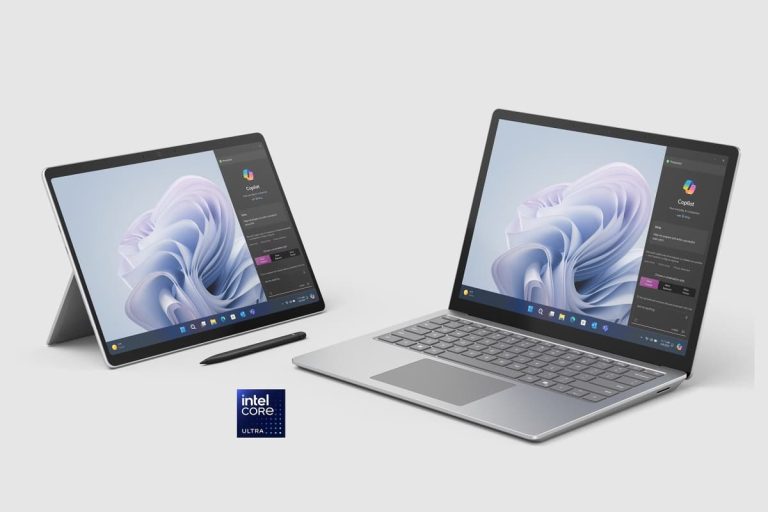
Microsoft has added two new devices to its lineup of Surface products. The latest notebooks in the lineup include the Microsoft Surface Pro 10 and Surface Laptop 6 for Business. These are the Redmond-based tech giant’s first products in its upcoming AI PC lineup. The new Surface laptops have Intel’s latest Core Ultra series processors.
New Surface AI PCs have Microsoft’s new Copilot key and a Neural Processing Unit
The Microsoft Surface Pro 10 and Surface Laptop 6 for Business are equipped with the brand’s new Copilot key. Both notebooks are loaded with a dedicated Neural Processing Unit (NPU). The co-processor will enhance their existing and upcoming AI-powered features in Windows 11. Notably, Microsoft has mentioned that the latest Surface devices are aimed at businesses as they will not be sold directly to consumers.
The lightweight Microsoft Surface Pro 10 and Surface Laptop 6 for Business have ultra-slim bezels. Furthermore, they feature an improved Surface Pro keyboard. It now has a new bold keyset offering a larger font and enhanced backlighting feature, apart from a dedicated key to launch the AI-powered Copilot feature.
The Surface Pro 10 for Business has a greatly improved front camera. It is the first camera with an ultrawide field of view on a Windows PC, touts Microsoft. The front camera now offers a 114-degree field of view and video recording support in 1,440p resolution.
Latest Surface notebooks offer up to Core Ultra 7 processor, 64GB RAM, and 1TB SSDs
The Surface Pro 10 and Surface Laptop 6 will compete against the Apple’s MacBook Pro devices. They come in two processor variants – one with the Intel Core Ultra 5 and another with Ultra 7. Notably, both offer up to 64GB of LPDDR5x RAM and up to 1TB of removable solid-state drive. Furthermore, they have hardware TPM 2.0 chips to provide enterprise-grade security and BitLocker support.
As for the display, the Pro 10 has a 13-inch PixelSense Flow screen with a resolution of 2,880 x 1,920. The notebook offers a refresh rate of up to 120Hz, Anti-reflective coating, Gorilla Glass 5 protection, and Dolby Vision IQ support. While earlier rumors suggested that the laptop would have an OLED screen, it will ship with an LCD instead.
The Surface Laptop 6 comes in two screen variants – 13.5-inch and 15-inch
The Microsoft Surface Laptop 6 will be available in two screen size variants. The smaller model has a 13.5-inch PixelSense screen with a resolution of 2,256 x 1,504 pixels. The larger variant will offer a 15-inch display panel featuring a resolution of 2,496 x 1,664 pixels. Both models have Dolby Vision IQ support, anti-reflective coating, Gorilla Glass 5, and a peak brightness of 400 nits.
As for the other specs, the new devices have Thunderbolt 4 ports and a DisplayPort 2.1 with an 8K monitor support. They also have Surface Connect ports and 3.5mm headphone jacks. Last but not least, the latest Surface notebooks will offer up to 19 hours of battery life, claims Microsoft. Both support fast charging with a minimum 45W power supply through Surface Connect or USB-C ports.
Coming to the pricing, the Pro 10 and Laptop 6 will be up for grabs at a starting price of $1,199. They will start shipping to business consumers starting April 9. The company could launch consumer variants of the new Surface models at its special Surface AI event on May 20.
Staying ahead of security measures and exploiting new vulnerabilities requires hackers to change their tactics.
By doing so, they manage to bypass better defenses, maximize success rates, and keep on with their illegal activities.
The adaptation of techniques by hackers enables them to continue compromising systems by targeting emerging technologies and adjusting to changes in the digital landscape, which ensures the persistence of their relevance and effectiveness.
Cybersecurity researchers at Cisco Talos recently discovered that TinyTurla evolved their TTPs to stealthily attack enterprise organizations.
TinyTurla Evolved Their TTPs
Cisco Talo in coordination with CERT.NGO has uncovered new details on the entire kill chain used by the Russian espionage group Turla in an ongoing campaign deploying their TinyTurla-NG (TTNG) implant.
Alert Fatigue that helps no one as security teams need to triage 100s of vulnerabilities.:
The problem of vulnerability fatigue today
Difference between CVSS-specific vulnerability vs risk-based vulnerability
Evaluating vulnerabilities based on the business impact/risk
Automation to reduce alert fatigue and enhance security posture significantly
AcuRisQ, that helps you to quantify risk accurately:
The analysis reveals Turla compromised multiple systems within a European NGO’s network, establishing persistence, disabling anti-virus protections, and using Chisel for data exfiltration and lateral movement to other accessible hosts after the initial breach.
The updated findings provide insights into the tactics, techniques, and procedures employed by this threat actor to steal sensitive information and propagate through infected enterprises.
Turla, a threat group, employs advanced tactics. It configures anti-virus exclusions before deploying the TinyTurla-NG backdoor.
Post-deployment establishes persistence via malicious service. Turla adds exclusions in anti-virus software like Microsoft Defender at locations hosting implants.
Batch file contents (Source – Cisco Talos)
It uses batch files creating “sdm” service masquerading as “System Device Manager” for TinyTurla-NG persistence, mirroring 2021 TinyTurla technique. The dual batch file usage seems unnecessarily convoluted for evasion.
Chisel uses asymmetric encryption in an attacker-controlled system to set up a reverse proxy tunnel.
Attackers leverage this initial chisel connection to pivot laterally via WinRM remote sessions, likely facilitated by proxy chains and evil-winrm.
Turla tactics, tools and procedures flow (Source – Cisco Talos)
On newly compromised systems, they repeat the cycle – configuring Microsoft Defender exclusions, dropping malware components, and establishing persistence. This adheres to Turla’s methodical cyber kill chain playbook.
Cyber kill chain (Source – Cisco Talos)
Traffic analysis showed Chisel beaconed its C2 server hourly. Though systems were compromised in October 2023 and Chisel deployed by December 2023, Turla operators primarily exfiltrated data over the Chisel C2 channel much later on January 12, 2024.
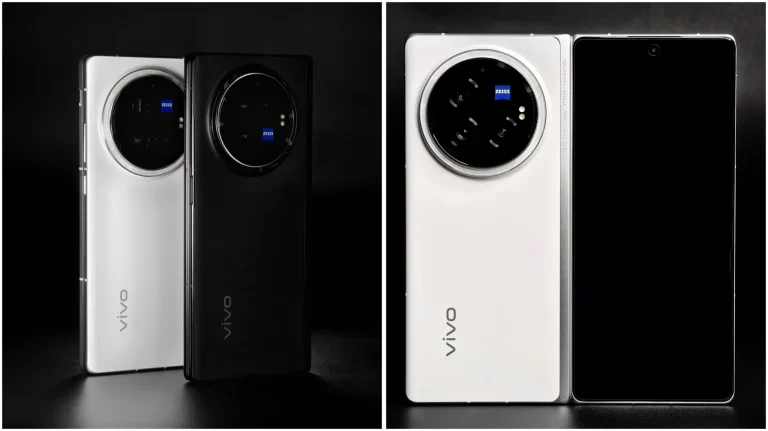
The Vivo X Fold 3 weight has been revealed, and it will shock you. The information comes from Ice Universe, one of the best-known tipsters from China. He claims that the phone will weigh only 219 grams, while he also shared some additional images of the device, which you can check out below the article.
Needless to say, this is outstanding considering that the Vivo X Fold 3 will be a large book-style foldable. The HONOR Magic V2 is currently the lightest book-style foldable, to our knowledge, and it weighs 231 grams (its lightest model).
Vivo plans to shave off 12 additional grams of off that weight with the Vivo X Fold 3. Now, granted, the HONOR V Purse weighs only 214 grams, but that device has one screen, and it’s outward-folding, so it doesn’t really count.
The HONOR Magic V2 felt really light to us when we were using it. The fact that the device is truly thin when folded had a lot to do with the overall feel. It was the first foldable smartphone that made us feel like we were using a regular phone.
Let’s hope that the phone will also be very thin when folded
If the Vivo X Fold 3 manages to achieve something similar, while keeping the device as light as Ice Universe reports, it’ll have a really interesting phone on its hands. If it ends up being notably thicker, the weight difference may not be all that noticeable.
The Vivo X Fold 3 series will launch on March 26. The Vivo X Fold 3 will arrive alongside the Vivo X Fold 3 Pro. The ‘Pro’ model will be more powerful, of course, but not by much, it seems. We still don’t have all the details in terms of the differences between them, but it seems like they’ll both be flagship-grade phones.
The Vivo X Fold 3 Pro will be very expensive
The Vivo X Fold 3 Pro price tag got tipped yesterday, and the phone will be immensely expensive. Foldable devices are usually considerably cheaper than this in China, so the price is a bit shocking.
It’s reported that the phone will arrive with 16GB of RAM in 512GB and 1TB storage flavors. Those two models are tipped to cost CNY13,999 ($1,945) and CNY14,999 ($2,083). Both phones are expected to include the Snapdragon 8 Gen 3 SoC, great 120Hz displays, and more.
Attackers are taking advantage of vulnerabilities in JetBrains Teamcity to distribute ransomware, coinminers, and backdoor payloads.
Two critical vulnerabilities in the TeamCity On-Premises platform, identified as CVE-2024-27198 and CVE-2024-27199 by JetBrains, were published on March 4, 2024.
These flaws enable attackers to bypass authentication safeguards and take over compromised servers.
The confidentiality, integrity, and availability of sensitive data and vital systems are all at risk due to this criminal conduct, which also puts impacted businesses’ finances and operations at risk.
All TeamCity On-Premises versions up to 2023.11.3 are affected by the issues; version 2023.11.4 was released to fix them.
Rapid7’s Principal Security Researcher, Stephen Fewer, found the two vulnerabilities, which were then reported by Rapid7’s vulnerability disclosure policy.
There are currently publicly available proof-of-concept (POC) exploits for these vulnerabilities, which increases the likelihood that they will be widely used.
A directory traversal vulnerability (CWE-22) in the TeamCity web component, identified as CVE-2024-27199, has a high CVSS score of 7.3 and has a possibility for bypassing authentication.
An attacker can use this vulnerability to change a small number of TeamCity system settings and disclose confidential information.
With a Critical CVSS score of 9.8, CVE-2024-27198 is an authentication bypass vulnerability in the TeamCity web component that also includes an alternate path issue (CWE-288).
An unauthorized attacker could use this vulnerability to remote code execution (RCE).
CVE-2024-27198 has also been added to the list of known exploited vulnerabilities maintained by the US Cybersecurity and Infrastructure Security Agency (CISA).
Trend Micro reported that threat actors can carry out a range of malicious operations by using CVE-2024-27198, including:
Dropping the Jasmin ransomware
Deploying the XMRig cryptocurrency miner
Deploying Cobalt Strike beacons
Deploying the SparkRAT backdoor
Executing domain discovery and persistence commands
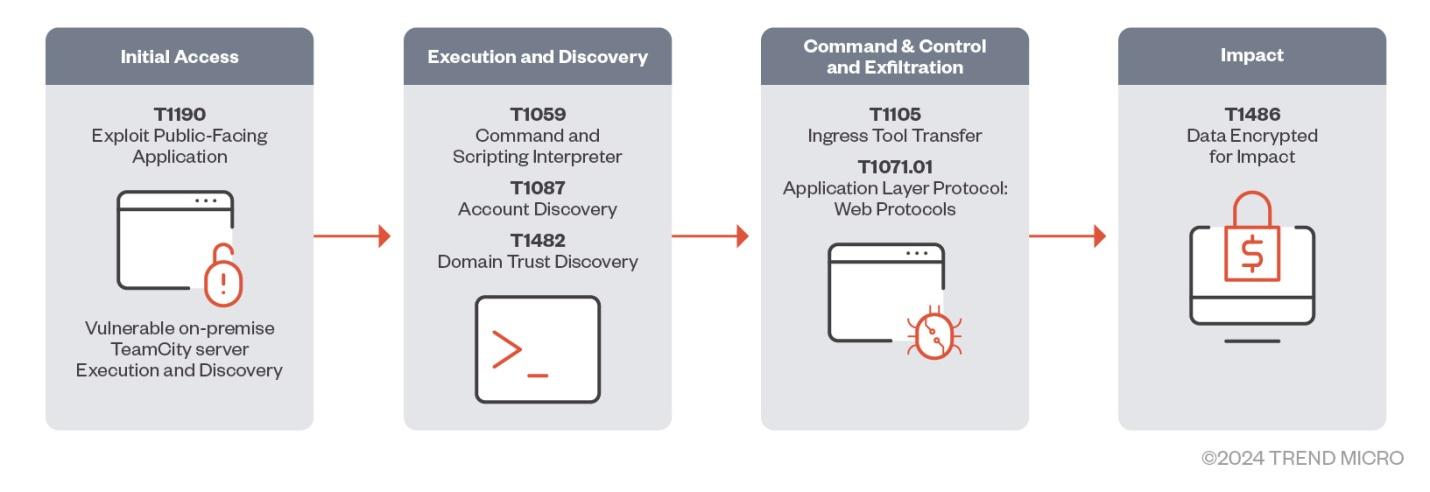
Attack Flow
“Threat actors might exploit CVE-2024-27198 or CVE-2024-27199 to bypass authentication on vulnerable On-Premise TeamCity servers and perform follow-on commands”, Trend Micro researchers shared with Cyber Security News.
“They are then able to perform RCE and TeamCity-related processes, such as spawning a command and scripting interpreter (including PowerShell) to download additional malware or perform discovery commands”.
The malware that the attackers install can communicate with the system’s command-and-control (C&C) server and execute extra commands, like deploying Cobalt Strike beacons and remote access trojans (RATs). Finally, as a final payload, ransomware can be installed to encrypt files and demand ransom payments from victims.
During the post-exploitation stage, one of the threat actors that researchers discovered was taking advantage of these vulnerabilities and distributed a variant of the open-source Jasmin ransomware.
In addition to renaming files, the ransomware can leave a ransom note.
Ransom note dropped by the Jasmin ransomware
Experts also saw threat actors infecting susceptible TeamCity servers with a variant of the open-source cryptocurrency-mining malware called XMRig.
In addition, researchers discovered that threat actors were using vulnerable TeamCity servers with the Golang-based SparkRAT backdoor and a variant of the open-source XMRig cryptocurrency mining malware.
Customers of TeamCity are encouraged to update their software as soon as possible if these vulnerabilities impact their servers.
Hence, it is essential to take immediate action to reduce these vulnerabilities and stop ransomware extortion and other infections from causing more harm.
Stay updated on Cybersecurity news, Whitepapers, and Infographics. Follow us on LinkedIn & Twitter.
Have you ever received a scanned PDF and wished you could edit it as convenient as a regular MS Word file? We’ve all been there. That’s where Optical Character Recognition (OCR) comes in –the technology that converts scanned files into an editable and searchable PDF.
With the rise of digital documents, the need for powerful PDF editors with OCR is stronger than ever. You need a reliable solution that lets you easily convert scanned documents and edit them without losing the original layout. Well, read on. Today, you’ll learn one of the best apps to OCR PDF – Wondershare PDFelement.
Part 1. PDFelement: Your All-in-One OCR PDF Editor and AI Assistant
Wondershare PDFelement is an all-in-one PDF editor with OCR. It’s like Adobe Acrobat but simpler and more versatile. Powered by AI, it offers a user-friendly interface for editing PDFs across devices. With PDFelement, you can also sign PDFs, convert files, and more. Perfect for organizing, securing, and sharing PDFs, it’s a top choice for individuals and businesses.
Whether you’re an individual or a business, this comprehensive tool has your PDF editing and management needs covered. Below, yo can see more of what this app can offer.
– Effortlessly Edit Scanned PDFs and Images
One of PDFelement’s biggest strengths is its OCR PDF feature. Whether you use OCR on the entire file or selected areas of the scanned document, PDFelement can do it fast. It also can:
– Preserve Document Layout
PDFelement recognizes text in your PDFs and keeps everything in its original layout. These include headers, images, footnotes, captions, and page numbers.
– Edit Scanned PDFs
Edit scanned PDF documents like regular Word files using OCR. Add new text, and it automatically matches the fonts, keeping everything consistent.
– Convert Images to Editable Formats
Convert scanned PDFs and images to other file formats like Word, Excel, or PowerPoint. You can easily edit and work with your information in familiar programs.
– Batch OCR for Efficiency
Convert many scanned PDFs at once with PDFelement. Easy editing and searching in one go.
Become a PDF Editing Pro With AI Assistant
PDFelement goes beyond editing PDF files. It boasts an intelligent AI Assistant that unlocks a whole new level of efficiency. Here are some ways you can use its AI feature:
– Summarize PDF
Quickly grasp the essence of any PDF with PDFelement’s summarize feature. Generate abstracts and extract keywords in a few minutes.
– Translate PDF
Translate full documents into 100+ languages with ease. Instantly compare the original and translated PDFs for a smooth workflow.
– Explain PDF
PDFelement AI helps you understand even the most complex PDFs. It clarifies technical jargon and makes challenging concepts easier to grasp.
The possibilities are endless! Customize your AI prompts to fit your specific needs, whether you’re a student working on a research paper or a professional fine-tuning a proposal. PDFelement empowers you to work smarter, not harder, with your PDFs.
Part 2. How To OCR a PDF Using PDFelement?
PDFelement can accurately recognize 20+ languages, such as English, Japanese, Russian, and more. Follow the steps below to search and edit PDFs using OCR:
Step 1: Download PDFelement on your desktop and launch once installed.
Step 2: Upload the scanned PDF or image-based document. Then, browse and select the scanned PDF you want to perform OCR on.
– For PDF: Click the “Open PDF” button on the main page.
– For image-based PDF: Click the “+” icon in the upper-left side navigation pane, then select “From File.”
– Batch Process: Select “Batch PDFs” in the “Quick Tools” section if you have several files.
Step 3: There are two ways to start the OCR on PDF:
– Method 1 (Information Bar)
Once your scanned PDF opens, an information bar might appear at the top, showing the document needs OCR. Click the “Perform OCR” button on the information bar.
– Method 2 (Top Menu)
If the information bar doesn’t appear, go to the “Tools” tab in the upper navigation menu. Select “OCR” to use on the entire page.
Step 4: A pop-up window will appear for OCR configuration. Here’s what you can adjust:
– Scan Option: The option selects the “Scan to editable text” option by default. – Language: Choose the language of the text in your PDF from the menu. – Page Range: Specify the pages you want to perform OCR (entire document by default).
Step 5: Once you’ve reviewed the settings or left them at default, click “Apply” to start the OCR process.
Step 6: After OCR, your PDF text will become editable. You can now edit the text, format it, or use other PDFelement features on the content.
Step 7: Go to “File”> “Save” or “Save As” to create a new version with your changes. You can also convert the PDF to another format, such as Word or PPT. Look for the “Convert” tab in the top menu.
Part 3. What Can You Do After OCR PDF Conversion?
Complete control over your editable and non-editable PDFs – that’s the power of PDFelement. Once you’ve used OCR PDF with this app, you can still do more tasks, such as:
– Add Text
After performing OCR, you can add new text boxes anywhere in the document. Change the font style, size, and color to match the existing content or create a standout call to action.
– Change File Format
Adjust paragraph spacing, line spacing, and indentation to ensure your new text integrates best.
– Add Link
Turn text or images into clickable links that jump to specific sections within your PDF.
– Security
Protect your work with custom watermarks. Add text, logos, or images as watermarks to deter unauthorized copying.
– Insert Background
Add a subtle background color or image to enhance your document’s visual appeal. Upload from your file or use the built-in template.
These are only some of the things that you can do with PDFelement. Finishing PDF tasks just got simpler and faster with PDFelement.
Part 4. An Intuitive Interface Designed for You
PDFelement has a clean and modern design that’s easy to use. The icons and menus are clear, so you can find what you need quickly. Plus, this PDF editor with OCR is intuitive, which means things naturally flow as you work on your documents.
Top Ratings Reinforce User Experience
The high ratings from several trusted review sites reflect the user-friendly experience. Here’s what others have to say about PDFelement:
– Capterra rates it 4.4 out of 5, highlighting its cross-platform solution for comprehensive PDF management. Users also praise it as a cost-effective alternative to Adobe, perfect for office and professional use. – G2 echoes this sentiment, giving it a solid 4.5 out of 5, emphasizing affordability, rich functionality, and ease of use.
Part 5. Standing Out From the Crowd: Why Choose PDFelement?
Here’s how PDFelement compares to other PDF editors with OCR.
Part 6. System Requirements and Pricing Plans
You can install PDFelement with the following tech specs for Windows.
– Operating System: Windows 11 and below – Processor: A computer with a processor Intel Pentium 4, equivalent, or later – Memory: 512 MB RAM or 1 GB (recommended) – Hard Disk Space: 1.5 GB of free space for application files – Internet Connection: Required for product registration, activation, online help, and updates.
See the PDFelement site for Mac and iOS tech specs.
Pricing Plans
PDFelement offers different subscription plans for Individuals, Team & Business, Education, and Bundles. It also has both one-time purchases and yearly subscriptions (as of March 14, 2024).
Conclusion
PDFelement OCR PDF feature makes scanned documents editable and searchable. It keeps the original format, so you don’t have to worry about fixing them later. The bottom line is that this app lets you manage your PDFs easily and streamline your tasks. Users love its efficiency.
Plus, unlike expensive alternatives, PDFelement is affordable. You don’t have to sacrifice usability or quality for a great price. If this sounds like what you need for an OCR PDF editor, check out the pricing plans to find the best one to start.
The purpose of a system is what it does. Not what it says it’s doing.
Reuters has compiled a new report titled “Content creators worry about miseducation in a world without TikTok”, presenting several TikTokers’ worries about a potential TikTok ban.
As you probably know, the government thinks TikTok is a national intelligence hazard. The goal is ByteDance to sell its interests in the viral short video app, or face a ban in the US. If everything goes to plan (if the bill passes and Joe Biden signs it), ByteDance will have a 165-day deadline to divest from TikTok. Should it not pass the control of TikTok to an American-based company, US app stores (like Apple’s, Google’s, and Samsung’s) would be prohibited from offering TikTok in the country.
The report tells the story of an unnamed public school teacher in a small rural Southern town, who got her students watching the grammar lessons she assigned them via TikTok. Here’s what she says:
In a day, I had one thousand followers, in a week I had ten thousand, and in six weeks I had one hundred thousand followers. Within six months, I had a million and a half. When you talk about the ban, you are talking about taking access to high quality educational videos away from people who have used it to enhance their education.
Now, she has 5.8 million followers on TikTok, but her educational content now faces a threat.
Plastic surgeon Dr. Youn, who has 8.4 million followers on TikTok, says that “There’s a huge segment of TikTok where you get your news, so it’s about being educated.”
Another TikToker with 1M+ followers says that “TikTok is a wealth of knowledge”. This account is educating kids in their formative age with topics such as “body positivity” and “trans identity”.
None of this is a concern for University of Southern California professor Karen North, who warns her students that personal data is in danger on TikTok: “My concern with TikTok is less about what information is provided or manipulated or whether it’s skewed toward one message or another,” North, the founder and former director of USC Annenberg’s Digital Social Media program told Reuters.
“It’s more toward what kind of personal information are people voluntarily giving up to an entity that does not have the same standards for privacy that we (the United States) do. That’s the big issue with TikTok,” she added.
I can feel my editor’s growing panic behind me, so I’m trying my best not to turn this into a rant, and inject my personal opinion on TikTok’s effect on the population, and especially on kids, so it’s best to stop right now. Some food for thought: if the government gets its way, who’s next after TikTok? Or, for example, if it’s sold to a US-based company, does that mean that all of a sudden, there are no more issues with TikTok and other social media platforms? Not to mention the “freedom of speech” angle…










.webp)
.webp)
.webp)