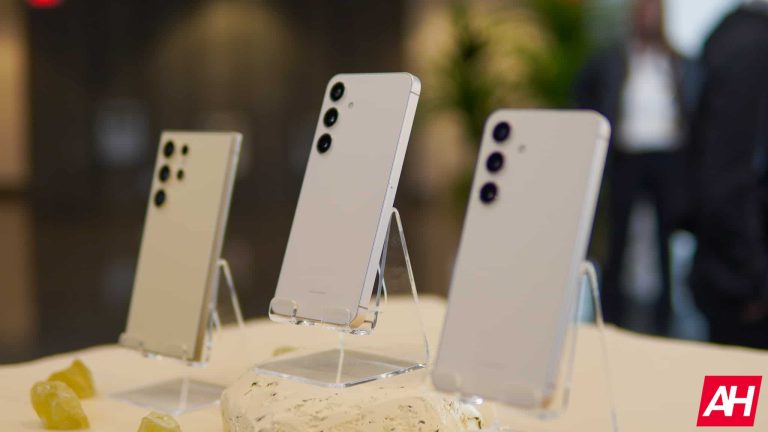
The Galaxy S25 CAD renders are being prepared by the company, it seems
When it comes to smartphone designs, CAD-based renders are what we usually see first. That’s especially true when it comes to high-profile devices. @OnLeaks usually partners up with a publication and shares those renders with the world.
We’ve already seen the Pixel 9 and Pixel 9 Pro renders, for example, and the devices are not expected to launch until October. Considering that the Galaxy S25 series renders are being prepared, we may see those quite early too.
The Galaxy S25 series is not expected to arrive until January next year. Well, if Samsung intends to keep true to its release cycle. The Galaxy S24 CAD renders appeared in September last year almost 4 months ahead of launch.
It’s likely that @OnLeaks will show us the Galaxy S25 CAD renders first
Well, we have a feeling that the Galaxy S25 CAD-based renders could arrive even sooner than that. It remains to be seen, of course. Chances are they’ll once again come from @OnLeaks, though.
We do not have much info about the Galaxy S25 series thus far. An interesting rumor did surface quite recently, though. It claimed that (at least) the vanilla Galaxy S25 will feature a new design. In addition to that, it’s tipped to include a larger display too.
If that phone ends up changing things up in the design department, chances are that the other two will as well. The Galaxy S23 and Galaxy S23+ looked identical, aside from the size difference. The same goes for the Galaxy S24 and Galaxy S24+.
If we had to guess, we’d say that the same will happen with the Galaxy S25 series, but they both could have different designs. It remains to be seen.
Samsung has secured a patent for yet another rollable display tech, as we’re waiting for first devices with rollable display to arrive. Foldable smartphones have been around for quite some time now, but phones with rollable displays, not exactly.
Samsung has patented yet another rollable display
We’ll talk more about that in a minute let’s first focus on this display. If you check out the images below, you’ll get to see some of the sketches included in the patent. This patent has been submitted with the United States Patent and Trademark Office (USPTO).
At the moment, we’re not sure for what it is, though. It could be for a smartphone, tablet, or TV. This is not the first rollable display patent Samsung submitted, not at all. Samsung also submitted a cylindrical roller design with the WIPO a while back, and it’s also worthing on a dual-folding display tech.
Samsung was the first company to release a foldable smartphone. That South Korean tech giant had a number of other firsts in the smartphone industry, and we wouldn’t be surprised if it delivered the first rollable smartphone.
LG was expected to release the first rollable smartphone, but that didn’t happen
It will be interesting to see who will be the first to cross the finish line. Having new form factors on the market is always exciting. They’d provide competition for both regular phones and foldable smartphones alike.
Foldable devices are actually excellent nowadays, so the competition would be fierce. Devices like the OnePlus Open and HONOR Magic V2 really managed to push the ante when it comes to foldable smartphone designs.
A new evasive Azorult campaign that uses HTML smuggling to deliver a malicious JSON payload from an external website.
The JSON file is then loaded using reflective code loading, a fileless technique that bypasses disk-based detection and also employs an AMSI bypass to avoid being flagged by antivirus software.
A sophisticated campaign targets the healthcare industry and steals sensitive information, including login credentials, crypto wallet data, and browser information.
Google Sites Exploited For HTML Smuggling Attacks
Adversaries launched an attack using HTML smuggling within fake Google Docs pages on Google Sites, which tricked victims into downloading a malicious payload disguised as a legitimate Google Doc, Netskope said.
Unlike typical HTML smuggling where the payload resides in Javascript, this instance embedded the base64-encoded payload within a separate JSON file hosted on a different domain.
Upon visiting the website, the victim’s browser unknowingly downloads the JSON and extracts the malicious payload.
An attacker’s website bypasses scanners with a CAPTCHA and delivers HTML that downloads a disguised LNK shortcut.
The LNK triggers a Powershell script to download a base64 encoded payload, decodes it, creates a scheduled task to execute the script, and then deletes it.
The downloaded Javascript copies itself checks for a specific file for self-deletion and fetches two more Powershell scripts to execute.
Attackers leverage reflective code loading to evade detection. They use two Powershell scripts, agent1.ps1 and agent3.ps1. Agent1.ps1 disables AMSI scanning.
Agent3.ps1 downloads an Azorult loader and shellcode in memory allocates memory for them, and uses CreateThread to execute them within the same process.
The downloaded loader then retrieves another Powershell script, sd2.ps1, which decrypts and executes the Azorult binary stored within itself.
Azorult, a.NET infostealer, targets sensitive user data, and after in-memory execution, it steals credentials, browser data, and crypto wallet information, leveraging Curve25519 cryptography to encrypt stolen data for stealthy exfiltration to the C2 server via HTTP.
It first captures a full-screen screenshot, and then it pilfers browser data (logins, cookies, browsing history) from Chrome and Firefox by copying specific files, and then it hunts for popular crypto wallet extensions on Chrome, Edge, and Firefox and exfiltrates their data if found.
Sensitive Documents
Target File Extension
File Name Keywords
Unwanted File extension
Azorult scans the desktop for sensitive files based on extensions and keywords and it bypasses specific file types while searching. Upon finding a target file, it reads its content and stores it in memory.
The data is compressed and encrypted using a pre-shared secret before transmission, and the WebRequest class is leveraged to send the encrypted data along with the public key over HTTPS to the attacker’s command and control server.
Stay updated on Cybersecurity news, Whitepapers, and Infographics. Follow us on LinkedIn & Twitter.
In the intricate realm of oil trading, liquidity stands as a crucial determinant of market stability and trader success. The term ‘liquidity’ refers to the ease with which an asset can be bought or sold in the market without affecting its price. For oil traders, navigating thin markets—where liquidity is limited—presents a unique set of challenges. This article delves into the multifaceted nature of oil market liquidity, exploring its key components and the impact of various factors that contribute to thin markets.
Understanding Liquidity in Oil Markets
Liquidity Dynamics
Oil market liquidity is influenced by a myriad of factors. Market participants, comprising producers, consumers, speculators, and hedgers, play a pivotal role. The volume and frequency of trading activities, along with market depth reflected in bid-ask spreads, further define liquidity levels. Understanding these dynamics is essential for traders aiming to navigate the labyrinth of oil market liquidity.
The Impact of Geopolitical Factors on Oil Market Liquidity
OPEC Decisions and Ripple Effects
The Organization of the Petroleum Exporting Countries (OPEC) wields significant influence over oil prices. Decisions made by OPEC, such as production cuts or increases, can send shockwaves through the market, impacting liquidity. Traders must be attuned to these geopolitical dynamics to anticipate and adapt to market shifts.
Political Instability in Oil-Producing Regions
Regions with substantial oil reserves often face political instability. Conflicts, sanctions, or regime changes can disrupt production and transportation, creating uncertainties that erode market liquidity. Traders need to factor in geopolitical risks when navigating thin markets.
Global Economic and Trade Tensions
Oil markets are closely linked to global economic conditions and trade dynamics. Trade tensions, economic downturns, or recoveries can influence demand and supply, affecting liquidity. Successful navigation of thin markets requires vigilance regarding the broader economic and geopolitical landscape.
Technological Advancements and Liquidity in Oil Trading
Algorithmic and High-Frequency Trading
Technology has revolutionized oil trading through algorithmic and high-frequency trading. These systems enable rapid execution of trades and enhanced market participation, contributing to liquidity. Traders leveraging technology gain a competitive edge in navigating thin markets.
Electronic Trading Platforms
Electronic trading platforms have become integral to oil trading. These platforms connect a diverse range of market participants, fostering liquidity by increasing accessibility. The ease of electronic trading mitigates some challenges associated with thin markets, offering a streamlined and efficient trading experience.
Big Data Analytics
Big data analytics provide traders with valuable insights into market trends and potential price movements. By harnessing vast datasets, traders can make informed decisions, enhancing their ability to navigate thin markets. Analyzing market sentiment and historical data becomes crucial in managing risks associated with low liquidity.
Regulatory Changes and Their Influence on Oil Market Liquidity
Impact of Financial Regulations
Regulatory measures can significantly impact oil market liquidity. Financial regulations aimed at ensuring market integrity and preventing manipulation may impose constraints on traders. Understanding and adapting to these regulations is essential for navigating thin markets effectively.
Compliance Challenges
Complying with regulatory requirements poses challenges for market participants. Meeting reporting standards, adhering to position limits, and navigating compliance hurdles can affect trading strategies. Traders must stay informed about evolving regulatory landscapes to mitigate compliance-related risks.
Regulatory Responses to Market Manipulation
Regulators actively respond to instances of market manipulation to maintain fair and transparent markets. Enforcement actions and changes in regulatory frameworks can influence trader behavior and market dynamics, impacting liquidity in the process.
Strategies for Navigating Thin Markets in Oil Trading
Risk Management Approaches
In thin markets, effective risk management is paramount. Diversification of trading instruments helps spread risk, reducing vulnerability to adverse price movements. Traders should employ hedging strategies to mitigate the impact of volatility, safeguarding their positions in the face of limited liquidity.
Importance of Market Intelligence
Staying ahead in thin markets requires a deep understanding of market intelligence. Traders need to analyze market data, track emerging trends, and assess geopolitical and economic factors. Proactive decision-making based on comprehensive market intelligence is key to navigating the challenges of low liquidity.
Case Studies: Navigating Thin Markets Successfully
Lessons Learned from Past Experiences
Examining historical instances where traders successfully navigated thin markets provides valuable insights. Case studies offer lessons on adaptability, strategic decision-making, and the resilience required to thrive in challenging market conditions.
Adaptive Strategies in Response to Market Conditions
Traders who have navigated thin markets effectively often employ adaptive strategies. Flexibility in adjusting trading approaches based on market conditions, combined with a proactive stance, is crucial. Case studies shed light on these strategies and their applicability in different scenarios.
Conclusion
Concluding our exploration of oil trading’s intricate dynamics, the intricate dance of navigating thin markets necessitates a comprehensive understanding of influential factors such as technological advancements, geopolitical considerations, regulatory landscapes, and effective risk management strategies. Successful traders in this demanding environment showcase not only technical prowess but also adaptability and resilience. As the oil trading industry undergoes continuous evolution, a proactive stance and unwavering vigilance become imperative for those aspiring to thrive in thin markets. Amidst this dynamic landscape, the Oil-Pro-Profit.com emerges as a compelling concept, encapsulating a transformative perspective that promises to reshape the contours of oil trading, urging market participants to embrace a holistic approach to these ever-evolving challenges.
Someone made a big no-no last week, when a ByteDance researcher was mistakenly added to a group chat for American artificial intelligence safety experts.
Oh, the irony.
ByteDance, as you know, is TikTok’s parent company. TikTok is the topic of the day, since the Energy and Commerce Committee cast a unanimous 50-0 vote (highly unusual) in favor of the TikTok/ByteDance measure. Then, by a stunningly huge margin, the House passed the bill on to the Senate.
The goal is ByteDance to sell its interests in the viral short video app, or face a ban in the US. If everything goes to plan (if the bill passes and Joe Biden signs it), ByteDance will have a 165-day deadline to divest from TikTok. Should it not pass the control of TikTok to an American-based company, US app stores (like Apple’s, Google’s, and Samsung’s) would be prohibited from offering TikTok in the country.Now, there’s a hilarious turn of events, if you find such things funny – Reuters reports that an analyst from TikTok’s parent company ByteDance was added to a chat group of American AI safety specialists.
The ByteDance researcher was included in a Slack channel meant for dialogue among participants of NIST’s (National Institute of Standards and Technology) U.S. Artificial Intelligence Safety Institute Consortium, a source reported.
NIST clarified via email that this addition was made by a consortium member who thought the individual was volunteering. However, once it was discovered that the person worked for ByteDance, NIST quickly revoked their access due to a breach of the consortium’s ethics regarding false representation.
The individual, listed on LinkedIn as residing in California, hasn’t responded to inquiries, and ByteDance has remained silent on requests for comments.
The involvement of a ByteDance representative sparked concerns within the consortium, especially given TikTok’s contentious position in U.S. discussions about potential risks of Chinese surveillance and influence.
Tor Project’s Anti-Censorship Team has made a groundbreaking announcement that promises to bolster the fight against internet censorship.
On the World Day Against Cyber Censorship occasion, the team proudly introduced WebTunnel, a revolutionary new type of Tor bridge.
This innovative technology is now available in the stable version of the Tor Browser, marking a significant advancement in censorship circumvention technology developed and maintained by The Tor Project.
The Importance of Bridges in the Fight for Internet Freedom
Developing various types of bridges is crucial for enhancing Tor’s resilience against censorship efforts.
Alert Fatigue that helps no one as security teams need to triage 100s of vulnerabilities.:
The problem of vulnerability fatigue today
Difference between CVSS-specific vulnerability vs risk-based vulnerability
Evaluating vulnerabilities based on the business impact/risk
Automation to reduce alert fatigue and enhance security posture significantly
AcuRisQ, that helps you to quantify risk accurately:
This is particularly pertinent as the world navigates through the 2024 global election megacycle, a period where the role of censorship circumvention technology becomes increasingly critical in safeguarding Internet Freedom.
For those who have ever contemplated becoming a Tor bridge operator to aid others in connecting to Tor, the introduction of WebTunnel presents an opportune moment to get involved.
Detailed requirements and instructions for running a WebTunnel bridge can be found on the Tor Community portal.
Understanding WebTunnel: The Technology Behind the Innovation
WebTunnel is a censorship-resistant pluggable transport designed to mimic encrypted web traffic (HTTPS), drawing inspiration from HTTP.
It operates by encapsulating the payload connection within a WebSocket-like HTTPS connection, making it appear to network observers as ordinary HTTPS (WebSocket) traffic.
This ingenious design allows WebTunnel to blend seamlessly with regular web traffic, enabling it to coexist with a website on the same network endpoint.
Consequently, when someone attempts to access the website at the shared network address, they will encounter the website’s content without indicating the hidden bridge (WebTunnel).
Comparing WebTunnel to Obfs4 Bridges
WebTunnel offers an effective alternative to obfs4 bridges for most Tor Browser users.
Unlike obfs4 and other fully encrypted traffic, which aim to be entirely distinct and unrecognizable, WebTunnel’s strategy of emulating well-known web traffic renders it more effective in environments with protocol-allower lists and a deny-by-default network policy.
In essence, WebTunnel traffic, by resembling HTTPS traffic—a permitted protocol—successfully bypasses censorship mechanisms that would otherwise reject unrecognized traffic.
How to Use a WebTunnel Bridge
Step 1: Acquiring a WebTunnel Bridge
Currently, WebTunnel bridges are exclusively distributed via the Tor Project Bridges website.
Plans include expanding distribution methods to include platforms like Telegram and Moat.
Users can obtain a WebTunnel bridge by visiting bridges, selecting “webtunnel” from the “Advanced Options” dropdown menu, solving a captcha, and copying the provided line.
Step 2: Setting Up Tor Browser
It is essential to note that WebTunnel bridges are incompatible with older versions of Tor Browser (12.5.x).
Users must download and install the latest version of Tor Browser for Desktop or Android.
After installation, users can add the bridge lines obtained in Step 1 through the Connection preferences window or by selecting the option to configure a bridge on Android devices.
Following these steps should enable a successful connection via WebTunnel.
The launch of WebTunnel by the Tor Project represents a significant leap forward in the ongoing battle against internet censorship.
As the global community continues to confront challenges to internet freedom, innovations like WebTunnel underscore the importance of continued vigilance and innovation in pursuing an open and accessible internet for all.
Stay updated on Cybersecurity news, Whitepapers, and Infographics. Follow us on LinkedIn & Twitter.
In decentralized ecosystems, smart contracts stand as self-executing agreements, automating processes and reducing reliance on intermediaries for heightened efficiency. Beyond mere automation, these contracts foster trust and transparency in decentralized environments. Chainlink, positioned as a catalyst, refines smart contract functionality, addressing limitations and reshaping the landscape. This article explores how Chainlink’s impact unlocks unprecedented possibilities. Amid this evolution, individuals are encouraged to explore solutions like innovault.io aligning with decentralization principles in the digital financial landscape, ensuring a cost-effective and efficient approach to transactions.
Understanding the Limitations of Smart Contracts
Oracles and External Data Dependency
Smart contracts, while powerful, face challenges when dealing with real-world data. Chainlink recognized the need to bridge this gap by introducing decentralized oracles, ensuring secure and reliable external data input.
Security Concerns and Vulnerabilities
The execution of smart contracts is not without risks. Chainlink actively addresses security concerns by providing a robust framework that minimizes vulnerabilities and safeguards against malicious attacks.
Real-world Applicability Challenges
Chainlink tackles the practicality issues faced by smart contracts. Through its technology, smart contracts become more adaptable to real-world scenarios, opening avenues for broader applications.
Chainlink’s Decentralized Oracle Technology
Introduction to Chainlink Oracles
Chainlink’s oracles act as decentralized information sources, providing smart contracts with accurate and tamper-proof data. This decentralized approach enhances reliability and reduces dependence on centralized sources.
Decentralized Data Sourcing and Verification
The decentralized nature of Chainlink’s oracles ensures that data is sourced from multiple, independent nodes. This not only enhances reliability but also establishes a consensus mechanism for data verification.
Interoperability with Various Blockchain Networks
Chainlink’s versatility shines through its ability to seamlessly integrate with different blockchain networks. This interoperability expands the reach of smart contracts, fostering a more interconnected and collaborative decentralized ecosystem.
Enhancing Security in Smart Contracts
Mitigating Risks Through Decentralized Oracle Networks
Chainlink’s decentralized oracle networks significantly reduce the single points of failure in smart contract execution. This mitigation strategy enhances the overall security of decentralized applications.
Chainlink’s Approach to Preventing Manipulation and Attacks
Chainlink employs cryptographic techniques and consensus mechanisms to thwart manipulation attempts. This proactive approach ensures the integrity of the data feeding into smart contracts, safeguarding against potential attacks.
Ensuring Trustworthiness in Smart Contract Execution
By fostering a trustless environment, Chainlink’s technology ensures that smart contracts execute as intended, reducing the need for implicit trust in centralized authorities. This reliability is crucial for the widespread adoption of decentralized applications.
Expanding Smart Contract Use Cases
Enabling Complex and Dynamic Contracts
Chainlink’s contribution extends beyond basic transactions. It enables the creation of complex and dynamic smart contracts, capable of executing intricate tasks with real-world relevance.
Facilitating Cross-Platform Integration
The seamless integration of Chainlink with various blockchain networks breaks down silos, allowing smart contracts to interact across platforms. This cross-platform functionality enhances the versatility and utility of smart contracts.
Real-world Applications and Industry Adoption
The practical applications of Chainlink’s technology are witnessed across industries. From supply chain management to healthcare, smart contracts powered by Chainlink find application in solving real-world challenges.
Chainlink’s Impact on DeFi and Beyond
Revolutionizing Decentralized Finance (DeFi)
Chainlink plays a pivotal role in the DeFi space, providing the decentralized infrastructure needed for secure and reliable financial transactions. This facilitates the growth and evolution of decentralized finance ecosystems.
Enabling New Possibilities in Decentralized Applications (DApps)
Decentralized applications powered by Chainlink extend beyond basic functionalities. The technology opens new possibilities for DApps, allowing for more sophisticated and feature-rich decentralized applications.
Integration with NFTs and the Creative Economy
The integration of Chainlink with non-fungible tokens (NFTs) enhances the authenticity and uniqueness of digital assets. This, in turn, fuels the creative economy by providing a secure and decentralized marketplace for digital content.
Future Trends and Developments
Chainlink’s Ongoing Research and Development
The evolution of Chainlink is a continuous process. Ongoing research and development initiatives ensure that the technology remains at the forefront of addressing emerging challenges and opportunities.
Potential Integrations and Collaborations
The future holds promising collaborations and integrations as Chainlink expands its ecosystem. Collaborative efforts with other projects and technologies are anticipated to further enhance the capabilities of smart contracts.
The Evolutionary Path of Smart Contracts with Chainlink
As Chainlink continues to evolve, the path of smart contracts undergoes a transformation. The technology paves the way for a more sophisticated, secure, and widely adopted decentralized future.
Conclusion
In conclusion, Chainlink’s undeniable impact on smart contracts is reflected in its concerted efforts to address key limitations and enhance security, paving the way for a new era of decentralized applications. As we reflect on the journey so far, it becomes evident that the story of Chainlink doesn’t conclude here. The anticipated developments and advancements in the decentralized ecosystem, driven by Chainlink’s innovations, foreshadow a future where smart contracts will play an even more integral role across various industries. Chainlink, far beyond being a mere technology provider, emerges as a catalyst in shaping the future of blockchain technology. Its influence extends to steering the blockchain landscape towards increased decentralization, heightened security, and a broader real-world applicability that goes beyond the conventional boundaries of technology provision.
In a stark warning issued by the White House, it has been revealed that cyberattacks are increasingly targeting water and wastewater systems across the United States.
These critical infrastructures are essential for providing clean and safe drinking water to communities, yet they are now at the forefront of a silent cyber war.
Cyber Threats from Iran and China
The letter from the White House, dated March 18, 2024, outlines two significant cyber threats that have been compromising the nation’s water systems.
Alert Fatigue that helps no one as security teams need to triage 100s of vulnerabilities.:
The problem of vulnerability fatigue today
Difference between CVSS-specific vulnerability vs risk-based vulnerability
Evaluating vulnerabilities based on the business impact/risk
Automation to reduce alert fatigue and enhance security posture significantly
AcuRisQ, that helps you to quantify risk accurately:
The first threat comes from actors affiliated with the Iranian Government’s Islamic Revolutionary Guard Corps (IRGC), who have been exploiting weaknesses in operational technology.
Specifically, they have targeted water facilities that failed to change default manufacturer passwords.
The White House refers to the Cybersecurity and Infrastructure Security Agency’s (CISA) advisory for more details on these attacks.
The second threat is the People’s Republic of China (PRC) state-sponsored cyber group, Volt Typhoon.
This group has been infiltrating information technology systems of multiple critical infrastructures, including those of drinking water.
Unlike typical cyber espionage, Volt Typhoon’s activities suggest a pre-positioning strategy to disrupt essential operations in the event of geopolitical tensions or military conflicts.
The Vulnerability of Water Systems
The letter emphasizes the attractiveness of drinking water and wastewater systems as cyberattack targets.
Despite being a lifeline critical infrastructure sector, these systems often lack the necessary resources and technical capacity to implement robust cybersecurity measures.
The U.S. Environmental Protection Agency (EPA), as the lead Federal agency under Presidential Policy Directive 21, is tasked with ensuring the resilience of the nation’s water sector to all threats and hazards.
The White House is seeking the support of state governments to ensure that water systems within their jurisdictions conduct comprehensive assessments of their cybersecurity practices.
The goal is to identify vulnerabilities, implement controls to mitigate risks and develop robust incident response plans.
The letter points out that even basic cybersecurity precautions, such as changing default passwords and updating software, can significantly reduce the risk of a cyberattack.
Resources and Assistance
The EPA and CISA offer guidance, tools, training, resources, and technical assistance to help water systems enhance their cybersecurity.
Additionally, private sector associations like the American Water Works Association, the National Rural Water Association, and the Water Information Sharing and Analysis Center provide support.
State Homeland Security advisors are also highlighted as valuable resources connected to Federal cybersecurity efforts.
Upcoming Convening and Task Force
The White House plans to invite state Environmental, Health, and Homeland Security Secretaries to a meeting to discuss improvements needed to protect the water sector from cyber threats.
This convening will address current Federal and state efforts, identify priority gaps, and emphasize the urgency of immediate action.
Furthermore, the EPA will establish a Water Sector Cybersecurity Task Force in collaboration with the Water Sector and Water Government Coordinating Councils.
This task force will focus on identifying critical vulnerabilities, challenges in adopting best practices, and strategies to reduce the risk of cyberattacks on water systems nationwide.
The White House and EPA hope that the initiatives outlined in the letter and future collaborative efforts will fortify water systems against cyber threats.
The administration appreciates the gravity of the situation and calls for a concerted effort to safeguard mission-critical water utility operations.
Stay updated on Cybersecurity news, Whitepapers, and Infographics. Follow us on LinkedIn & Twitter.
The Andariel threat group has been discovered to be using MeshAgent when attacking Korean companies.
The group has previously attacked Korean Asset management solutions for installing malware, such as AndarLoader and ModeLoader.
However, MeshAgent is used alongside other remote management tools due to the diverse remote control features it offers. The Andariel group has been distributing its malware during the lateral movement phase.
Mesh installation logs (Source: AhnLab)
According to reports shared with Cyber Security News, the threat group uses AndarLoader, ModeLoader, MeshAgent, Mimikatz, and other malware attacks, including Backdoors, just like the Kimsuky threat group.
In a previous report, the Andariel group utilized the Innorix agent (data transfer solution).
AndarLoader
This malware is similar to a previously used Andardoor backdoor which was capable of executing commands from the C2 server.
However, AndarLoader is a downloader rather than a backdoor which downloads executables such as .NET assembly and runs it in memory.
As for the obfuscation, the AndarLoader uses the KoiVM tool instead of using the traditional Dotfuscator tool.
However, there are still several strings that are identical to the past AndarLoader. In addition, the present AndarLoader also uses sslClient string when connecting to the C2 server.
MeshAgent
Mesh Control panel (Source: AhnLab)
MeshAgent is capable of collecting basic essential information for remote management and offers several features such as power management, account management, chat or message pop-up, file upload, download, and command execution alongside remote desktop features such as RDP and VNC.
As a matter of fact, this is the first case of the Andariel group using the MeshAgent for their operations.
The MeshAgent has been found to be downloaded from an external source with the name “fav.ico.”
ModeLoader
ModLoader malware (Source: AhnLab)
This is a javascript malware which is downloaded externally through the Mshta process and executed instead of being generated and executed.
The Mshta process is specifically targeted by these threat actors in order to download the ModeLoader.
The ModeLoader provides a simple feature of connecting with the C2 server regularly and receives Base64-encoded commands and executes them.
Additionally, it also sends feedback about the executed commands to the C2 server.
Other Malware Attack cases
Once they take control of the affected system, the threat actors use Mimikatz to extract credentials from the compromised system.
To circumvent the latest security configuration of not storing plain passwords, the threat actors use the UseLogonCredential registry key to extract the credentials.
Furthermore, the traces of these malicious activities are erased by deleting security event logs of the infected systems using the command “wevtutil cl security.”
Moreover, a keylogger was also found, which was provided by the malware.
Some phones are meant to just be phones; portable digital companions. However, some phones are designed and destined to serve a singular purpose. The Tecno Pova line of phones is an example of the latter. These phones are designed to bring the gaming phone down to a lower price point. Well, I was given the opportunity to review the Tecno Pova 6 Pro 5G, which is the latest in this line of phones.
Going into this review, I was a bit skeptical. I reviewed the Pova 5 Pro (Review) last year. It was a triumph in several ways, but a disappointment in one key area, gaming. Tecno managed to squeeze every gaming phone trope into this phone: badass design, LED lights, game launcher, large cooling chamber, and an overall gamer aesthetic. However, with the phone’s poor gaming performance, it felt like Tecno just dressed up a mundane mid-range phone to look powerful.
Because of this, I hesitated to call it a gaming phone. It’d be like calling a sedan a sports car because someone put on a spoiler and stripe down the middle. Well, did Tecno deliver a hot rod this time around, or is it just another fancy paint job? Let’s find out.
Tecno Pova 6 Pro Review: Design
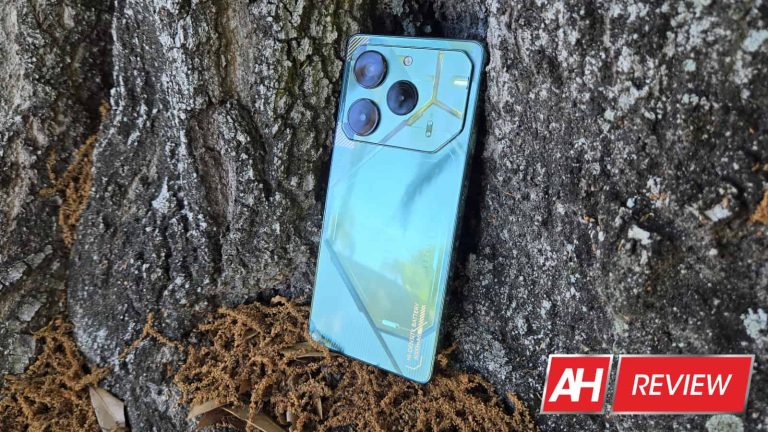
One thing I appreciate about Tecno and other companies like it is the fact that it’s not afraid to give their phones a bold and outlandish design. Well, the design of the Pova 6 Pro is nothing if not bold and outlandish. Honestly, I had trouble finding the words to properly describe it. Tecno gave the Pova 6 Pro a design that’s futuristic but very pretty at the same time.
True to the design philosophy of the Camon 20 Pro/Premier and the Pova 5, the back of the phone is adorned with an array of angled lines and shapes. Even the shape of the camera cutout matches this aesthetic. In between the lines, there’s a mish-mash of different textures and designs. The remarkable thing about the design is that it’s wildly inconsistent; there are different shapes, lines, textures, and text strewn about the phone. However, they all mesh together somehow. It creates a pleasantly eclectic aesthetic that I’m all for.
There’s just so much going on, but it keeps from being too much. The colorway I’m reviewing is the Comet Green color, and it looks gorgeous. You don’t see too many phones on the market with an overall green color scheme, but this phone wears it well. What makes the phone look even better are the subtle gold accents on the back. They stand out, but they do so in an elegant manner.
Dotted throughout the back of the phone, Tecno actually placed text showing off some of the specs of the phone, which I thought was a weird addition. If you look closely at the phone, you’ll see the main camera resolution, “Ultra Charge”, “NFC”, “06”, and “HI-DENSITY BATTERY 6000mAh”. You don’t have to look closely for that last one, as it’s laid out in gold.
LED lights
Being a gaming phone, the Pova 6 Pro needs to have some sort of extraneous lights on the hardware. I’d be lying if I said that this phone didn’t look like it took a few notes from Nothing. The in-laid LED lights on the back of the phone remind me of the Nothing Phone (1). Even the Pova 5 had LED lights.
Just like with the Pova 5, you’ll see the lights during several different scenarios. You’ll see the lights when gaming, charging the phone, taking photos, and starting the phone.
However, this time around, Tecno made some changes to its lights, and the company took a step backward in my opinion. The lights on the back of the Pova 5 Pro covered most of the back. On the other hand, the lights on the Pova 6 Pro only reside in the camera package. There’s a Y-shaped section that lights up along with a circle of lights around one of the camera sensors. It looks incredibly underwhelming compared to the lights on the Pova 5, and that’s saying a lot because the lights on the Pova 5 weren’t all that impressive, to begin with.
Not only are the lights on the Pova 6 smaller, but they’re not colorful like the lights in last year’s phone. They only shine in white, which is far less impressive compared to the lights on the Pova 5, which were full RGB.
Honestly, I think that the phone looks better with the lights off. They’re situated in one location and they’re only one color. The lights are a far cry from what they were in the Pova 5 Pro. I wouldn’t say that the lights subtract anything from the design. I just say that they don’t really add anything to the experience. The design is perfectly fine without them.
Tecno Pova 6 Pro Review: Build quality
I admire companies like Tecno. It’s able to bring some premium features down to an affordable price point. However, most companies that do this wind up running into the same obstacle, build quality. Phones can look, sound, and perform great… but they rarely feel great.
There’s no escaping the fact that this is an affordable phone. The moment I picked it up, it became obvious that I was holding a solid hunk of plastic. I could feel the plastic frame of the phone and, based on the warping of the reflections on the back of the phone, it’s clear that the back is made from plastic. In fact, just pressing my finger on it causes the back plastic to bend, which is not a good feeling.
Along with the plasticy feeling, there’s a notable lack of heft that you’ll instantly feel. This is only made worse by the thickness of the phone. The Pova 6 Pro is a decently thick phone, so the lack of heft doesn’t make the phone feel light; it makes it feel hollow. It’s lacking that feeling of density that you feel with premium phones.
This is not to say that the phone was cheaply put together. The buttons on it are nice and clicky and I didn’t hear any creaks or other sounds when applying some force to it. This phone should be fine as long as you don’t reenact a JerryRigEverything durability test. However, you’d want to be careful not to leave it where it can be sat on or stepped on.
This is the kind of thing you should expect from a phone under $300, so I’m not disappointed. Though, I will say that with how plasticy it feels, it takes away from the experience just a bit. Picking it up gives me the feeling that I’m holding a phone that’s not worth my time. If you’re used to using other phones from Tecno or comparable brands, then this might not be that much of a letdown. Just know that this phone will not feel anywhere near as premium as it looks.
Tecno Pova 6 Pro Review: Display
This is a new iteration in the Tecno Pova series, so there are going to be areas where this phone improves over the Pova 5 Pro. The display is one of the biggest upgrades over last year’s model. The Pova 5 Pro sported a nice-looking LCD panel that ran at 120Hz. I have to tip my hat to Tecno because it was a rather beautiful display. It’s definitely one of the best LCD displays that I reviewed, but it fell short of the types of displays I had grown accustomed to from Tecno.
I was used to the displays on the Tecno Camon 20 Pro, Camon 20 Premier, and Infinix Note 30 Pro (both Tecno and Infinix are owned by Transsion, and the phones mentioned are using extremely similar displays if not the same panels.). The displays on these phones are bright and absolutely breathtaking in their color reproduction and calibration. The Pova 5 Pro’s display fell behind in color saturation (which was a given) and brightness.
The Tecno Pova 6 Pro’s display is an upgrade over the Pova 5’s in every way. Honestly, I was blown away when I powered on this phone.
Brightness
We’re at a point where affordable phones are coming out with incredibly bright displays. This is why I was surprised when I saw the screen brightness of the Pova 5 Pro. Looking at it in direct sunlight reminded me of the bygone days when you had to cover your screen in the sun just to see it.
I expected more of the same with the Pova 6 Pro, but it looks like Tecno decided to increase the brightness by a large margin. It’s not the brightest display on the market, but it’s more than bright enough to be seen in bright daylight. I’m able to comfortably see everything on the screen in just about any lighting condition.
There’s also a high-brightness mode that will further increase the brightness of the screen when you’re in a particularly bright environment. One thing I noticed, however, was that the screen didn’t really get that much brighter. What I think the phone does is increase the contrast of the screen so that it’s easier to see when you’re in brighter light.
One issue regarding the brightness doesn’t have to do with the hardware. I think that the auto-brightness feature could use some tweaks. It’s pretty slow to adjust the brightness to match the lighting conditions. I’d see the brightness slowly increase or decrease to reach the desired level, and this process would take about 10 seconds at times.
Also, when I’d bring it into darker environments, the phone would drop its brightness down to 0%. I get that the phone wants to conserve battery and make for a comfortable viewing experience, but 0% brightness is just a bit too far.
Colors
This time around, Tecno went for an AMOLED display rather than an LCD, so there’s a clear difference in color saturation. The colors produced by this display are beautiful. As with all AMOLED displays, the colors are saturated, but it goes further than that. Tecno calibrates its displays to reach the sweet spot between saturated and oversaturated.
Out of the box, the colors already look rather punchy. I’d say that they’re meant to give you some generally nice-looking colors so that you can enjoy your content. However, if you’re looking for even more extreme colors, then you’re able to push the brightness even further in the display settings. There’s a “Bright color” mode that will boost the saturation even more.
I think that the heightened color saturation pushes them right to the edge of being oversaturated, but it doesn’t go overboard. I’ve used this term before in my other reviews, but I call these colors “Responsibly saturated.” They’re punchy and juicy, but they keep from being too much.
Overall
My feelings toward the Pova 5 Pro were a bit lukewarm, and one reason was because of the display. It just didn’t hold a candle to the displays from the likes of the Camon 20 phones and Infinix Note 30 Pro. With the Pova 6 Pro, I can’t take my eyes off of the display. It strikes such an amazing balance with its color production. The Pova 6 Pro is the first phone ever that I prefer using the out-of-the-box color saturation settings with. The saturation is so perfect intrinsically that I don’t need to boost them.
This, coupled with the increased brightness has completely redefined the kind of display experience you can get with this phone. It’s one of those situations when I have to remind myself that this is a -$300 phone. Logically, superior technologies trickle down over the years; several years ago, only phones over $800 would have high-performing OLED panels. Now, the technology is more accessible.
So, it makes sense that this phone’s display is very nice. However, it still blows my mind every time I unlock the screen.
Tecno Pova 6 Pro Review: Performance
The story of this phone’s performance is a confusing one, and I’ll tell you why a bit later in the review. For now, let’s just focus on the day-to-day performance. I was a little confused as to why Tecno chose the processor that it did for this phone. The Pova 6 Pro is using the MediaTek Dimensity 6080. This is the same processor that was in the Pova 5 Pro. That phone was able to perform rather well.
This time around, I’m actually seeing more stutters and dropped frames throughout the software than I saw last year, and I think this might be because of the fact that it’s running Android 14. It doesn’t create an overall laggy experience, but I noticed more stutters and dropped frames than I’d like to see. Summoning the notification shade would take a full second at times, loading apps would be slow, the refresh rate would drop, Etc. This is something that you’d expect with weaker hardware; the Dimensity 6080 is in a pretty gray area between high-end and low-end chips.
I wouldn’t say that this phone is snappy, but I have seen much worse. The thing about it is that it’s not slow to the point where it slows me down. The phone drops frames, but the software never locks up when I’m trying to use it. So, I’m still able to use it at full speed, even under a heavy load. So, this makes it a little difficult to describe this phone’s performance. There’s also another reason that makes it even more difficult. However, before I get into that reason, let’s look at some numbers.
By the benchmarks
Now, I know full and well that benchmark scores don’t paint a full picture of how a phone performs. So, I’m not basing my opinion of the phone on the numbers. However, benchmark scores can be a good way to help know what kind of hardware you’re dealing with.
Starting off with the Geekbench scores, the Tecno Pova 6 Pro scored a single-core score of 777 and a multi-core score of 2,097. These scores are pretty low on the spectrum of phones, even scoring below other mid-range phones. This doesn’t automatically mean that it’s a poor performer, but it helps justify the dropped frames and slowdown in the software.
Moving over to the graphical side of things, I ran this phone through the Extreme Wildlife test in 3D Mark. This will run a short real-time animated animation with extremely high-resolution graphics and see how the phone performs. And how did it perform? Well… The Best Loop Score was 373 and the Lowest Loop Score was 396. For reference, the closest phone I can compare it to is the Tecno Phantom V Flip (Dimensity 8060). That phone scored a Best Loop Score of 1,324 and a Lowest Loop Score of 1,299. While running the animation, the Pova 6’s frame rate was between 1FPS and 3FPS.
Tecno Pova 6 Pro Review: Gaming
So, with benchmark scores that low, this phone should be absolutely terrible when it comes to gaming, right? THIS is why it’s so hard for me to describe how this phone performs! Without mincing words, the Tecno Pova 5 Pro was not a gaming phone. It ran lower-quality and medium-quality games smoothly, but most other phones can do that. When stacked with games like Genshin Impact and Star Rail, the gameplay turned into a slideshow at higher graphic settings. Turning the graphics lower made for a smoother experience, but it was still sluggish.
Well, guess what, Tecno fitted the Pova 5 Pro with the same processor as last year. This was the reason why I was a bit bummed when I got the phone. When I installed and loaded up Genshin and Star Rail, I expected the same performance as last year.
Then… Tecno surprised me.
I don’t know what the heck Tecno did with the software to make this happen, but the gaming performance on this phone is like night and day. I started Genshin Impact, cranked the graphics up to their highest settings, set the max frame rate to FPS, and just played. At that point, I was going to count every stutter or instance of slowdown. But something miraculous happened; I forgot what I was doing. The gameplay was smooth! It was so smooth that I forgot what I was doing and I just played. There weren’t any major performance drops that took me out of the gameplay. It took me a few minutes to remember that I was looking for slowdown.
Don’t get me wrong, it didn’t reach 60FPS. In fact, it stayed at a pretty consistent 25FPS, which is still perfectly playable. What impressed me was that it was consistent. It didn’t stutter or lock up. It just played. Remember, this is with the highest graphic settings on; motion blur and all. I don’t want to oversell it; it’s not spectacular, it’s decent. However, it’s miles better than the Pova 5 Pro.
What makes this more impressive is the fact that the High Boost gaming optimizer has three settings: Power Saving, Equilibrium, and performance. Performance will push the chip to its maximum. Well, I got this gameplay in the Equilibrium mode. In Performance mode, the performance isn’t a lot better, but the frame rate would run about 15FPS – 20FPS faster.
Honkai Star Rail
Another game that can melt a GPU is Star Rail. This game’s performance is a pretty mixed bag. The core gameplay drags the frame rate to an average of about 20FPS, which isn’t great, and that drops to about 16FPS on average during battles. This is with the graphics turned up to their highest setting. So, on average, the performance is noticeably worse with that game.
It’s a mixed bag because the gameplay is decently playable, but everything else is extremely slow. The title screen with the train animation is extremely laggy, and things slow down significantly when it plays the animation that brings you into the game. Also, navigating the interface leads to some significant slowdown. But, when I’m actually playing the game, things are much more fluid.
Overall
So, as I said, describing this phone’s performance is a challenge. The general performance isn’t anything to write home about. I got my fair share of stutter and slowdown while using the phone. Just navigating the software, I saw more slowdown than I wanted to see.
However, the gaming performance is far better than I expected. I won’t put it up there with more expensive phones; the hardware still shows its mid-range nature, but this is only when I crank the games’ graphics up to their highest settings. Even when I played some of the prettiest games on the Google Play Store, the Pova 6 Pro was a champ.
So, this phone is the opposite of the Tecno Pova 5 Pro. That phone could navigate the software smoothly, but it wasn’t the best when it came to gaming. In the case of the Pova 6 Pro it’s much better when it comes to gaming while showing more slowdown in general use.
Tecno Pova 6 Pro Review: Heat performance
The Tecno 6 Pro is a cool phone, and I mean that in more than one way. It’s able to keep very cool during gaming sessions. After playing these graphically intensive games for about 20 minutes, I didn’t feel the phone get too hot to hold. The back of the phone was the coolest while the front was the warmest.
I’d say that things got a little toasty when playing games where I needed to use the digital joystick. My finger is on the glass right above the processor, so it’s logical that this gets a bit hot. However, it never got uncomfortable playing with this phone.
Tecno Pova 6 Pro Review: Battery and charging
This phone comes with a large 6,000mAh battery, and that’s extremely rare for a phone that’s under $300. With such a large battery, longevity is really good. I tested the battery in two ways. Firstly, I did a more standardized test. For it, I charged the battery to 100%, played a looping video at full brightness, and ran it until the phone died. It took 19 hours and 1 minute to reach 0% battery, and that’s not bad. However, it’s a little disappointing compared to other phones that I tested. For example, I ran the Galaxy S24+ through this same test, and it lasted 20 hours. The Galaxy S24+’s battery is 16% smaller than the battery in the Pova 6 Pro.
However, that was only the standardized test. In day-to-day usage, I was able to get more than a day and a half of battery life. This involved moderate usage with some gameplay, camera tests, video-watching, and general usage. I’d gotten comfortable starting the day off with a full battery and reaching the end of the day and saying “Nah, I don’t need to charge it.” Obviously, your mileage will vary. If you’re using this phone as more of a portable gaming console, then you’ll run out of battery sooner.
Charging
All of the Tecno phones I’ve reviewed so far have come with pretty fast charging, and the Pova 6 Pro is no exception. This phone comes with a peak charging speed of 70W. I was able to charge the battery fully in just under an hour. That might not sound too impressive compared to other phones on the market, but you have to remember that this is a larger 6,000mAh battery.
Tecno Pova 6 Pro Review: Speakers
I genuinely like Tecno’s phones. Neither of the ones I reviewed in the past have disappointed me to the point where I didn’t enjoy the experience. They have solid performance, beautiful designs, great software, jaw-dropping displays, and more. But, the one area where they consistently let me down is the speaker quality. I’m not going to lie, the speakers on all Tecno phones I’ve reviewed are mediocre.
I wouldn’t say that they’re offensively bad; they’re just so “meh.” It’s like they’re just there to perform the basic task of supplying sound and that’s it. I can’t really blame the company for this. With the exception of the Phantom V Flip (Review), all of the Tecno phones I reviewed cost under $300, and they already provide so much in other departments. So, these phones can’t excel in EVERY department, otherwise they’d cost so much more. Tecno had to make some compromises, and one of them had to be the speaker quality.
How are the speakers in the Pova 6 Pro? Well, they’re the same as the speakers in the other Tecno phones I reviewed. Also, what makes it worse is the fact that this phone is missing something that the other phones have. Other Tecno phones have the DTS audio technology built into the software. This is a suite of tools that you can use to customize the sound. You’re able to boost different aspects of the audio like the bass or treble, choose audio presets, and have access to a customizable EQ. For some reason, it’s not present for the Pova 6 Pro, which I think is a major bummer.
Audio tests
Aside from just listening to the speakers in my day-to-day usage, I also listened to some test tracks with this phone’s speakers. There are six tracks in total, and they all focus on one aspect of audio: volume, distortion, bass, treble, balance, vocals, and immersion. I’m going to go over how the speakers performed with these test tracks.
Loudness
When it comes to the loudness, I have no complaints. I think that these speakers are about as loud as most other phones on the market regardless of price. Realistically, you’re not going to use a phone’s speakers as a replacement for a Bluetooth speaker, so you most likely won’t use these speakers to fill your whole room with sound. However, if you need to, they’re powerful enough to do so.
Distortion
I think that these speakers do a pretty good job of cutting down on distortion. I’m able to play media at full volume and not really hear distortion. So, if you’re gaming with the volume all the way up or you want to listen to music at full volume, the audio will be really clear.
Bass
The thing that I don’t like about the speakers in Tecno phones is the lack of depth. They usually sound so neutral that the low-end audio just doesn’t project. This makes the sound come off as flat. Well, when I played the bass test track, the Pova 6 Pro just didn’t deliver the goods.
Just like with other Tecno phones, these speakers sounded flat and lifeless. The bass track featured some really bass-heavy instruments like double bass, bassoons, contrabassoons, and tubas. I could hear the sound of these instruments clearly; I heard the raspy rattle sound of the contrabassoons. However, I just didn’t hear any of that depth that goes on along with them. This makes the sound much less immersive.
Treble
If depth is what you listen for in the bass, then what you listen for in the treble is clarity. I’m more satisfied with the treble than I am with the bass. I enjoy listening to higher-pitched sounds on these speakers, as they project clearly. One thing I say about Tecno speakers is that they’re great for ASMR content. It’s like the company hit a sweet spot with the tuning for its speakers because I don’t think that other phones that I’ve reviewed produce treble as satisfying.
Balance
Balance is an important characteristic of speakers. You want to be able to hear both the treble and bass especially if you’re listening to music. I think that the overall balance is good. While that’s the case, I did find that the treble overpowers the bass a bit. I can hear the bass, but that lack of depth just holds it back. So, the higher tones project more.
Vocals
The vocals are an area that people sometimes overlook. I have to say that I’m not impressed with the vocal performance of this phone’s speakers. Listening to different songs, I found that the vocals mostly blend in with the music.
Immersion
Given the rather flat profile of the sound, there’s basically no immersion. There are some phone speakers that almost make it feel like the sound is surrounding you. You know that it’s coming from a singular point, but it has a way of surrounding the ears. However, in the case of the Pova 6 Pro, I didn’t get any of that immersion.
Overall
The speakers on the Pova 6 Pro aren’t great. They’re flat and pretty dry overall. They get the job done, but you’re not going to want to use them if you’re a person who cares about quality speakers. Being under $300, I’d say that the cut in quality wasn’t unjustified.
Tecno Pova 6 Pro Review: Camera
When it comes to camera quality, Tecno has had a pretty decent track record… with the exception of the Camon 20 Pro (Review). So, I expected some pretty decent performance across the board, and that’s what I pretty much got. I feel that modern mid-range cameras are about as good as flagship cameras from a few years ago. They’re more than capable of taking pleasing pictures with some nice details and color reproduction.
In the case of the Pova 6 Pro, I think this tracks. I was generally happy with the results that I got with this phone’s camera.
Exposure/contrast
Overall, I didn’t find any glaring issues with the exposure. I will say that the camera tended to overexpose some areas. A bit of overexposure isn’t a bad thing, but I spotted blown-out highlights a little more than I would have liked to see. Thankfully, instances of overexposure weren’t too common. I was able to capture a bunch of well-exposed images.
As for the contrast, I didn’t have any major issues with it either. I found that the contrast was nice, but there were a few times when I felt that it crushed the shadows a bit. It’s not drastic, however.
Colors
The colors are an area where I think that Tecno could have pushed things just a bit further. In the images I captured, I was able to get the juiciest colors from green leaves and blue skies. I think these show the most saturation. However, overall, the images felt a bit washed out. It’s like someone took the pictures of the scene, plopped them into Photoshop, and cranked the saturation down a few stops.
There’s also a slight lack of warmth in the images. I took some of my images during golden hour, and it looks like I took them in the afternoon hours. This adds up to an image that’s on the bland side. It’s not bad, I just feel like the phone could deliver just a bit more color.
Overall
I think that Tecno did a good job with this phone’s camera. Images come out with a nice amount of detail, good contrast, and decent exposure. My only complaint is the fact that the images are lacking some color and warmth. The Pova 6 definitely isn’t a contender for “Camera Phone of The Year.” However, it’s still a reliable camera that produces some nice results.
Tecno Pova 6 Pro Review: Software
If you’re used to using phones in the West, then the software powering the Pova 6 Pro might be a bit jarring for you. This phone is running on Tecno’s HiOS Android skin running on top of Android 14. I’ve gotten pretty used to this software by using Tecno’s phones.
One of the best things about this software is how customizable it is. You’re able to customize things like the icon size, page turn effect, icon grid, text color, ETC. Also, there are 17 different gestures you can do to quickly perform actions. There are nine gestures you can do on the home screen to perform different actions like starting apps, summoning the notification panel, starting the system search, ETC. This is in addition to the eight gestures that you can perform while the screen is off. All you have to do is draw a certain shape on your screen when it’s off and it will either activate a toggle or start an app.
The software is a refreshing take on Android if you’re used to Stock Android. Another feature I like is the ability to enlarge folders. It adds another level to your organization.
I only have one gripe. The notification shade is actually split into two sections. If you swipe down on the left side of the top of the screen, you’ll summon the notifications. However, if you swipe down on the right side, you’ll see your Quick Settings. Also, you can swipe sideways between both when either is summoned. This is something that you’d get used to, but I wish that the software would give you the option to have a more traditional notification shade with both notifications and Quick Settings on the same screen.
Overall, however, I don’t have any major issues with the software. It’s one of my favorite Android skins out there, and I feel at home when I use it.
Tecno Pova 6 Pro Review: Final verdict
Sometimes, it takes a few iterations to get a formula correct. Because of this, in the pursuit of excellence, a company will launch one or several devices that just fall short of being acceptable. In this case, that device would be the Pova 5 Pro. This was a phone that fell to the back of my mind quickly after reviewing it. It just fell short in several ways. The phone didn’t feel like a true gaming phone. It just felt like a mid-range phone with a gimmick.
This year, I think that Tecno achieved the formula that it was working toward. I can honestly say that this phone feels more like a true affordable gaming phone than last year’s iteration. That’s pretty ironic because the Pova 5 was much more adorned in gamer phone flair. It had a more robust array of lights, and they were colorful. However, the gaming performance wasn’t anything special. The Pova 6 Pro isn’t as decked out as last year’s phone, but it’s much more of a gaming phone.
I enjoyed using the Pova 6 Pro much more than the Pova 5 Pro. It improved upon that phone in several ways. And, the areas where it didn’t improve, the phone was either unchanged or it was something that didn’t significantly affect the experience. The display is much better, the gaming performance is miles ahead, the camera is really good, and the design is outrageous.
The only real bummer is the lack of the DTS Sound. I’m not sure why the company didn’t include this suite of controls.
The Pova 6 Pro was able to completely surpass my expectations and deliver an actual gaming phone experience. I feel much more comfortable calling this phone a gaming phone than I did the Pova 5 Pro. I highly recommend that you give this phone a try.


.webp)
.webp)
.webp)
.webp)
.webp)
.webp)
.webp)
.webp)
.webp)







.webp)
.webp)
.webp)