A new Aiohttp vulnerability has been discovered, which the threat actor ShadowSyndicate exploits.
Aiohttp is an asynchronous HTTP client/server framework that has extensive capabilities and flexibility to make aiohttp perform various asynchronous tasks.
The ShadowSyndicate threat actor operates as a Ransomware-as-a-Service affiliate and has been active since July 2022.
The threat actor was responsible for several ransomware activities, including the Quantum, Nokoyawa, and ALPHV ransomware activities.
However, this vulnerability has been assigned CVE-2024-23334, and its severity has been given as 7.5 (High).
More than 43,000 internet-exposed instances have been identified worldwide using aiohttp framework.
Additionally, the aiohttp maintainers have provided a patch to fix this vulnerability.
Technical Analysis – CVE-2024-23334
Aiohttp framework is specifically designed to offer asynchronous HTTP client and server capabilities, which initially require the setting up of static routes for serving files in order to specify the root directory containing the static files.
Further, the framework has the option to allow follow_symlinks, which can be used to make the server follow symbolic links outside of the static root directory.
Document
Mitigating Vulnerability & 0-day Threats
Alert Fatigue that helps no one as security teams need to triage 100s of vulnerabilities.:
The problem of vulnerability fatigue today
Difference between CVSS-specific vulnerability vs risk-based vulnerability
Evaluating vulnerabilities based on the business impact/risk
Automation to reduce alert fatigue and enhance security posture significantly
AcuRisQ, that helps you to quantify risk accurately:
If the follow_symlinks is set to True, the path to be followed is not validated, giving rise to unauthorized arbitrary file reading vulnerability.
According to the reports shared with Cyber Security News, this CVE-2024-23334 is associated with directory traversal which could allow an unauthenticated remote threat actor to access sensitive information from arbitrary files on the vulnerable server.
This is done by traversing through the /static directory with the enabled follow_symlink option.
Moreover, the exposed instances have been highly found in the United States (6.93k), Germany (3.48k), Spain (2.48k), the United Kingdom (1.82k), Italy (1.81k), France (1.26k), Russia (1.25k) and China (1.16k).
Countries with vulnerable aiohttp servers (Source: Cyble)
In addition to this, a proof-of-concept for this vulnerability has also been released alongside a comprehensive YouTube video that demonstrates the exploitation technique.
According to the exploit code, the researcher has set up a server that contains the ‘follow_symlink’ option enabled.
This allows the researcher to perform a directory traversal and read an arbitrary file on the D:\ volume of the server.
Users of this aiohttp framework are recommended to upgrade to the latest version in order to prevent this vulnerability from getting exploited by threat actors.
Indicators of Compromise
Indicators
Indicator Type
Description
81[.]19[.]136[.]251
IP
IP observed attempting to exploit CVE-2024-23334
157[.]230[.]143[.]100
IP
IP observed attempting to exploit CVE-2024-23334
170[.]64[.]174[.]95
IP
IP observed attempting to exploit CVE-2024-23334
103[.]151[.]172[.]28
IP
IP observed attempting to exploit CVE-2024-23334
143[.]244[.]188[.]172
IP
IP observed attempting to exploit CVE-2024-23334
Stay updated on Cybersecurity news, Whitepapers, and Infographics. Follow us on LinkedIn & Twitter.
TikTok has seen immense growth since its international release in 2017. The platform has undergone several changes throughout the year, and as the US App Store ban looms, it seems TikTok’s parent company is looking to add a highly requested feature.
Memorialized accounts are coming soon
First discovered by the data miner AssembleDebug on X, TikTok is seemingly adding a “Memorialized Account” feature. As the name suggests, the upcoming update aims to eternalize the accounts of deceased users to ensure they remain unchanged after their passing.
Spotted string in version 33.9.2 include:
“This account is memorialized. We don’t allow anyone to manage a memorialized account. However, if you think we made a mistake, report it to us.” “Memorialized account.” “This account has been memorialized. Memorialized accounts are a place to remember and celebrate someone’s life after they’ve passed away.” “Remembering.”
A memorialized account will be unmanageable according to the discovered code. Thanks to this, no one can post clips or comment on TikToks through it. Not only will this stop those with access to a deceased user’s account from posting with it, but utilizing a deceased person’s account, whether from accessing it through underhanded or legitimate means, will also be impossible. Deleting a TikTok account instead of memorializing it will likely be possible as an alternative.
TikTok’s parent company ByteDance, which may split from TikTok in the US, might introduce the memorialized account feature as early as version 33.9.2. Since the latest app version is 33.8.0 at the time of writing, users can expect to see the new feature implemented soon.
TikTok won’t be the first to do it
The concept of memorialized accounts isn’t new. Meta introduced the feature for Facebook and Instagram, and Microsoft did the same with LinkedIn. For all three platforms, someone must request to have an account memorialized while submitting proof of the original user’s passing. The submitted evidence can range from death certificates to news articles and official letters.
Something Instagram and LinkedIn have in common is that access to a memorialized account is completely locked. While the profile is visible, both by searching for it on the platform and by directly going to the profile, there’s an indication that the original user has passed.
Interestingly, memorializing an account on Facebook doesn’t mean it’s completely unmanageable. According to the Facebook memorialization form, “the only person who can manage a memorialized account is a legacy contact selected by the account holder.” TikTok likely won’t have this feature, as the code clearly states it doesn’t allow anyone to manage a memorialized account.
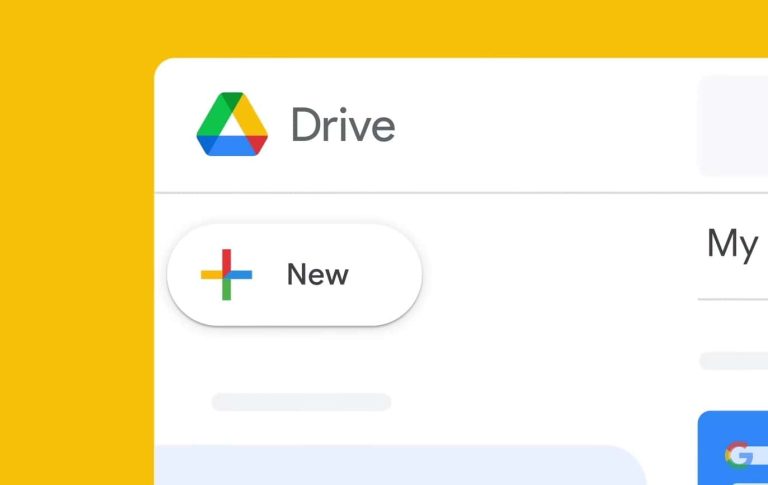
If you love using the dark mode on the bigger screen of your PC or computer and were frustrated because Google Drive didn’t have the support for it, don’t worry. Google has finally acknowledged the absence of Dark Mode in Drive for web and it’s now bringing the feature. There are a lot of web apps on Google apart from Drive, such as Google Docs, Gmail, etc., and not each one of them has support for a dark mode which is kind of annoying for people who use their system in the dark mode.
Dark Mode is finally here on the Google Drive for Web
Almost all the Google apps for both Android and iOS have the support of Dark Mode, but that’s not the case with Drive for Web. It had the dark mode missing for a long time. But, no more, as Google has finally listened to the users and they have added Dark Mode support to it. The tech behemoth has gradually started rolling out the support and if you haven’t gotten it yet, worry not, you will get it in the coming days.
Well, for those who have support for Dark Mode in their Google Drive. They can trigger it by going to Settings, which you can access after clicking on the gear icon present in the top right corner. Afterward, you will have to go to General the Appearance tab. Here you will get an option to trigger it on or off. Moreover, for the first time when the feature arrives, users will get an option to directly turn on the dark mode on the home screen itself. You may get a prompt saying “New! Dark Mode” and if you click on it, the dark mode will be turned on automatically.
As of right now, it does not support the system-based theming option. This means it won’t be able to switch to the dark mode or light mode based on the system. You will have to trigger it on or off every time you change the theme of the system. The background will go completely dark once you turn on the dark mode. The menus, tabs, files, etc will appear grey when compared to the background.
Cybercriminals have repurposed Scalable Vector Graphics (SVG) files to deliver malware, a technique that has evolved significantly with the advent of the AutoSmuggle tool.
Introduced in May 2022, AutoSmuggle facilitates embedding malicious files within HTML or SVG content, making it easier for attackers to bypass security measures.
Early and Notable Malware Deliveries via SVG
The misuse of SVG files for malware distribution dates back to 2015, with ransomware being one of the first to be delivered through this vector.
In January 2017, SVG files were used to download the Ursnif malware via URLs. A significant leap occurred in 2022 when SVGs delivered malware like QakBot through embedded .zip archives, showcasing a shift from external downloads to HTML smuggling techniques.
Credits: CoFense
AutoSmuggle’s Role in Malware Campaigns
AutoSmuggle’s release on GitHub in 2022 marked a turning point. The tool embeds executable files or archives into SVG/HTML files, which are then decrypted and executed upon opening by the victim.
This method cleverly evades Secure Email Gateways (SEGs) that would typically detect and quarantine direct email attachments.
Two notable AutoSmuggle campaigns began in December 2023 and January 2024, delivering XWorm RAT and Agent Tesla Keylogger, respectively.
Methods of Malware Delivery via SVG
According to CoFense report, SVG files can deliver malware in two primary ways:
JavaScript Direct Download: The original SVG files contained embedded URLs that, when opened, triggered the download of a malicious payload. Later versions displayed an image to distract the victim while the download occurred.
HTML Style Embedded Object: More recent SVG files contain the malicious payload within, eliminating the need for external resources. These files often rely on the victim’s curiosity to interact with the delivered file.
Campaign Analysis: Agent Tesla and XWorm RAT
The Agent Tesla Keylogger campaign was characterized by emails with attached SVG files that led to an embedded .zip archive containing a JavaScript file, which then initiated a series of downloads culminating in the execution of the keylogger.
AgentTesla , Credits: CoFense
The XWorm RAT campaign differed in its approach, with three distinct infection chains involving PDFs, embedded links, and direct SVG attachments, ultimately leading to the delivery of XWorm RAT via various scripting files.
Divergence from AutoSmuggle in Campaigns
Upon analysis, the SVG files used in these campaigns showed slight modifications from the standard AutoSmuggle-generated files.
For instance, the Agent Tesla campaign SVGs included redirecting to a legitimate-looking Maersk webpage, enhancing the deception.
The XWorm RAT campaign SVGs, on the other hand, displayed a blank page instead of an image, a less sophisticated approach compared to the Agent Tesla campaign.
The use of SVG files in malware delivery, particularly with tools like AutoSmuggle, represents an evolving threat landscape where attackers continuously adapt to circumvent security defenses.
Understanding these techniques is crucial for developing more effective countermeasures against such sophisticated cyber threats.
Are you from SOC and DFIR Teams? – Analyse Malware Incidents & get live Access with ANY.RUN -> Start Now for Free.
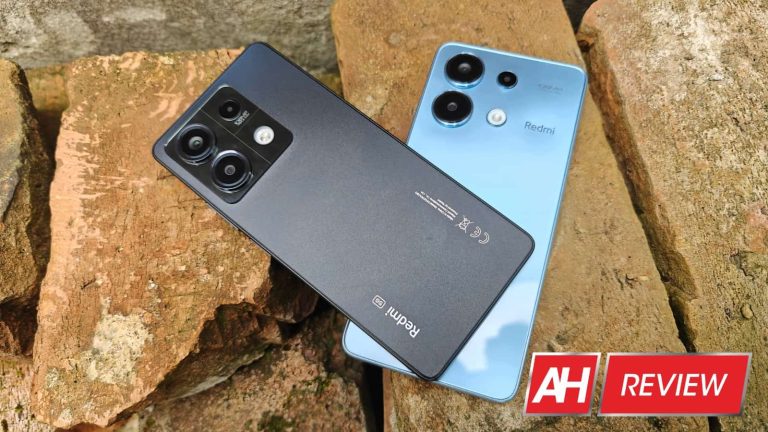
Xiaomi announced, believe it or not, five Redmi Note 13 smartphones. We managed to get our hands on all of them and will separate the review process across two reviews. In this article, we’ll talk about the Redmi Note 13 4G and Redmi Note 13 5G. Some of you may think that they’re exact same smartphones with the difference of one supporting 5G. That’s not the case at all. In the first 30 minutes of use, we realized how different these two phones are, which should make this review interesting, that’s for sure.
They sure do look similar, and Xiaomi apparently wants you to think they’re very similar based on their names. Well, that’s not really the case. Before we even get into it, I’ll just say that the 5G model is a much better smartphone, and we’ll get into details down below. I was actually quite surprised when I realized how different these two phones are. There is a price difference between them, though, so let’s see what’s what.
At first glance, these two devices do look very similar, but it’s not a problem to differentiate them. First and foremost, the Redmi Note 13 4G is ever so slightly taller, wider, and thicker, despite the fact they have the same display size. That’s because the 5G variant has thinner bezels all around. Those bezels are not uniform, but they’re noticeably thinner than the ones on the 4G model (which also does not have uniform bezels, by the way).
The 5G model is a bit lighter
The 5G variant is also about 14 grams lighter, and you can feel that. Maybe not everyone will, but when you swap the two phones in your hand, it is noticeable, even though it’s not a big deal, both are quite light considering what we’re dealing with these days. There is also one major difference between the two, the 4G variant has a glossy plastic backplate, while the 5G variant has a matte plastic backplate. Is this important? Well, if you’ll use the phone without a case, yes, very much so. The Redmi Note 13 4G managed to get extremely smudgy really fast. It also feels semi-greasy when you hold it, even though my hands are not sweaty at all. Holding the Redmi Note 13 5G is a much more pleasant experience, to say the least.
Glossy back aside, both are rather easy to use despite their size. The weight distribution and the fact that they’re not heavy has a lot to do with it. Both phones have physical buttons on the right-hand side only. The 4G model has a SIM tray at the bottom, while the 5G model’s sits on the left-hand side. Both phones have an IR blaster at the top, and a Type-C USB port at the bottom. Do note that the 4G model includes an optical in-display fingerprint scanner, while the 5G variant has a side-facing one. More on that later. These two phones are IP54 certified for dust and splash resistance.
Both phones have three cameras on the back
Both devices include three cameras on the back, and the camera islands do look quite similar. The camera sensors are not entirely the same, however, and the 5G model has horizontal and vertical lines inside that camera island so that it’s easier to recognize. You’ll also find ‘5G’ branding on its back, which is something the 4G variant does not have. The sides on both smartphones are flat with chamfered edges for comfort. That’s basically it as far as the design is concerned. The Redmi Note 13 5G is definitely our preference in terms of the design, between these two. Not only because of the matte backplate but its thinner bezels and the fact that it’s lighter overall.
Accessories
You will find a protective case in both retail boxes with these phones. The cases are not the same, but they’re similar. They’re made from the same material. We’re looking at regular rubber cases here, but they do offer plenty of protection. They’re not thick either. The case for the Redmi Note 13 5G is a bit thinner, and it has a thinner ‘lip’ on the front. Both do offer plenty of screen protection. The case for the 4G model does offer better camera protection, as it covers everything except the camera holes themselves. These are solid cases, not see-through ones, and the colors vary from one model to the next.
Xiaomi Redmi Note 13 4G & 5G Review: Display
Based on looking at some specifications, some of you may presume that these two models have the same displays. They do not. Both smartphones include 6.67-inch displays, and they’re both flat. That’s true. Both of them also have a centered display camera hole, but even that hole is different. The one on the 4G model has a silver ring around it, which is quite distracting. We’ve seen the same thing on the ASUS ZenFone 9 and ZenFone 10. We’re not sure why is this a thing, but it is. The hole punch on the Redmi Note 13 5G does not have that silver ring around it, which is what we prefer.
There is a screen protector pre-installed on both devices
Both displays do come with a plastic screen protector pre-installed. The resolution on both displays is 2400 x 1080, and both displays have a 20:9 aspect ratio. You’re also getting a 120Hz refresh rate on both panels, but neither of them is an LTPO panel. The Redmi Note 13 5G has better protection with the Gorilla Glass 5, though, compared to the Gorilla Glass 3 on the Redmi Note 13 4G. It’s a good thing Xiaomi included a screen protector, as the Gorilla Glass 3 is prone to micro-scratches. The spec sheets state that the Redmi Note 13 4G’s display is brighter, at 1,800 nits of max brightness. The one on the Redmi Note 13 5G goes up to 1,000 nits maximum.
The Redmi Note 4G’s panel does get a bit brighter
Is the difference in brightness visible? Well, yes, it is. The Redmi Note 13 4G’s panel does get brighter when needed. In fact, if you do spend a lot of time in direct sunlight, that one may be the better one to go with. Other than that, both displays are quite good. The viewing angles are excellent, they’re both more than sharp enough, and a 120Hz refresh rate does make everything look nice and smooth while scrolling and so on. Both panels are also vivid, and even though I can see the difference between them and higher-end panels, that’s not something that will bother people who are aiming for these two phones. The point is, these are good displays, with good touch response. At these price points, there’s really not much to complain about. I just wish that the Redmi Note 13 5G’s panel was a bit brighter, that’s all.
Xiaomi Redmi Note 13 4G & 5G Review: Performance
The performance is where the Redmi Note 13 5G stands apart. It comes with a much more powerful processor, which not only does better in single-core and multi-core aspects, but its GPU also performs a lot better. The Redmi Note 13 4G is fueled by the Snapdragon 685 SoC from Qualcomm, a 6nm processor. The Redmi Note 13 5G includes the MediaTek Dimensity 6080 SoC. That is a 6nm processor as well, but it’s considerably more powerful.
In addition to those chips, these two phones include LPDDR4X RAM and UFS 2.2 flash storage. Neither is the latest and greatest, but keep in mind their price tags. The Redmi Note 13 4G comes in 6GB and 8GB RAM variants. The former includes 128GB of storage, while for the latter you can choose between 128GB and 256GB of storage. The 5G variant is also available in 6GB and 8GB RAM models, the former comes with 128GB of storage, while the latter includes 256GB of storage.
The 5G variant does offer better performance, in our experience
These are not the most powerful specs around, but the 5G model does offer better performance. I noticed the difference in both general usage and gaming. Benchmarking tools only confirm that, nothing else. Neither phone has outstanding performance, just to be clear. However, I did notice a lot less stutters on the 5G model. You will see skipped frames/stutters on both devices, though, depending on how hard you push them. Even when you’re not pushing them hard, those stutters will happen. Don’t get me wrong, they both work fine, especially the 5G model, but don’t expect outstanding performance here. Those of you who are coming from more powerful phones will definitely notice the performance dip.
In terms of games, you can play a wide range of them, but more demanding titles will work at lower FPS rates, and will not work at their most powerful settings. That is to be expected. Neither of these two phones is made for gaming, though, so if you stick to games that are not that graphically intensive, you’ll be fine. The good news is that neither phone gets too hot while gaming. I did not play a lot of games, that’s true, but from what I’ve seen, they do keep the temperature in check.
The Redmi Note 13 4G has an in-display fingerprint scanner, but it didn’t exactly perform well
The Redmi Note 13 4G has an in-display optical fingerprint scanner. The 5G model, on the other hand, includes a side-facing fingerprint scanner. The one on the 5G model performed considerably better across the board. It was not only faster but more precise too. Don’t expect the same performance as on top-tier phones, though. I’ve noticed the difference between this and something you’d find on the ASUS ZenFone 10 or the OPPO Find N3, for example. I also want to note that I disabled the one on the Redmi Note 13 4G after a short while, it was really not up to par, and was more of annoyance than anything else.
Benchmarks
We reached for two benchmarking tools to run on these two smartphones, Geekbench 6 and one specific test from 3D Mark. That test is the 3D Mark Wildlife Extreme Stress Test, which really pushes phones it runs on. Geekbench 6 will give you a better idea of what these two phones are capable of based on their hardware alone. The 3D Mark test will simulate really demanding usage on both devices and run 20 cycles of usage in order to get a better grasp of what they’re capable of. You can check out the results below.
Genshin Impact thermals (after 1 hour of gameplay)
Video export test
Xiaomi Redmi Note 13 4G & 5G Review: Battery
Both the 4G and 5G variants of the Redmi Note 13 have a 5,000mAh battery on the inside. I actually tried to mimic a rather similar usage on both smartphones in order to get a grasp of the battery life. In other words, for a couple of days, I used them both at the same time, and both with active SIM cards. I’ve watched 15 minutes of YouTube on one phone, then the other. I’ve used Chrome for 15 minutes on one, and then on the other. Took pictures for that amount of time on one, and then the other, and so on. You get the idea.
What I’ve found out is that they have very similar battery life, actually. Yes, both of these phones can last a full day without a problem. The battery life is not outstanding, but it’s more than good enough. I was able to the 7-hour screen-on-time mark when I used them separately, and they kept up with the other when used at the same time. Gaming did have a more significant impact on battery life, though, considerably more than anything else I was doing, including image processing, video processing, and multimedia consumption. Your results may be considerably different than mine, of course. Also, do note that both phones were used mostly while on Wi-Fi.
It’ll take you over an hour to fully charge them
What about charging? Well, that part is identical here. They both do include a charger in the box, and support 33W wired charging. The charging is not particularly fast, but it’s not that slow either. It’s actually a good offering compared to other phones in this price range. I was able to reach a full charge (from 0%) in around an hour and 10 minutes, or 70 minutes, if you will. To be more exact, one phone charged up in 71 minutes, while the 5G model took 73 minutes. I do believe that it could easily be the other way around if I test it again, though. In any case, you can count on around 70 minutes for a full charge. In terms of a 50% charge, that’ll take you about half an hour.
Xiaomi Redmi Note 13 4G & 5G Review: Camera
Xiaomi included rather similar camera setups on these two devices, but they’re not the same. The fact their processors are also different also impacts the end results. I did notice differences when it comes to camera performance and experience in general, quite a noticeable difference actually. Xiaomi used the same sensor for the main camera. Both devices include a 108-megapixel camera from Samsung. It’s the ISOCELL (S5K)HM6 sensor. This is a 1/1.67-inch sensor, and it has a pixel size of 0.64um. It has an f/1.8 aperture 24mm lens on it. The 5G model is almost identical, save for one thing, its lens. It has an f/1.7 aperture lens.
They have different ultrawide cameras
The ultrawide cameras are different. They’re both 8-megapixel units, but they’re not the same. The Redmi Note 13 4G has an ISOCELL S5K4H7 sensor. That is a 1/4-inch sensor with a 1.12um pixel size. There is an f/2.2 aperture lens on top of it. This is a fixed-focus camera. The 5G model includes an 8-megapixel unit from OmniVision. it’s the ov08d10 sensor, which is a 1/4.4-inch sensor with a 1.0um pixel size. There is an f/2.2 aperture 16mm lens on it, and this is also a camera with fixed focus.
The third camera on the back of both smartphones is a 2-megapixel unit. It’s different, though. The 4G model has a macro camera with a 1.75um pixel size and an f/2.4 aperture lens. This is also a fixed-focus camera. The 5G model utilizes that same sensor (SmartSens sc202cs) as a macro camera. They’re the same sensors used differently. essentially. Both phones have a rather standard 16-megapixel unit on the front.
The Redmi Note 13 5G launches the camera app faster
One thing I’ve noticed is that the 5G model launched the camera faster. It was also able to take shots quicker when the light was not around. That’s probably due to the SoC used in the phone, but it’s worth noting. In regards to the camera quality, well, let’s talk about the main camera first. Both phones end up providing 12-megapixel shots after pixel binning, and the results during the day are good. The colors are good for the most part, though can be considered a bit muted, as they’re really trying to be as natrual as possible. The processing in general is good, but the 4G model does rely on sharpening a bit more in some scenes, which is odd. The dynamic range won’t blow you away, but it’s generally not bad. You will notice that some images are a bit softer than they should be, though.
It would be best if you’d stuck to using the main camera
If you end up using the ultrawide camera a lot, you will notice the dip in details. The main camera is definitely the better choice. Photos from the ultrawide unit do end up looking softer, and the details are nowhere near as good. There’s also some visible noise in those shots. The colors are matched pretty well with the main camera, however. That goes for both phones. In regards to the macro camera on the 4G model, it’s good for what it is. A 2-megapixel macro camera is not a good choice in my opinion, ever. But given the good lighting, you can pull out a usable shot. The 5G model is supposed to use this as a depth camera, but it works the same way the unit on the 4G model does. As a macro camera, and the results are very similar.
Low-light photos look better on the 5G model
What about low-light shots? Well, first of all, they don’t look as good on the 4G model as they do on the 5G. The difference is not big, but let me explain. Low-light photos do look good in general. The thing is, the highlights do look a bit better on the 5G model, plus there seems to be a bit less noise there. Other than that, they do look quite similar when it comes to the main camera.
Both smartphones do a very good job, especially considering their price tags. They handle light sources well, and there’s even some details in the shots. You will notice more noise in the shots than you would on considerably more expensive phones, but that is to be expected. Do note that both phones process photos as low light automatically. The night mode is there, but there’s absolutely no reason for you to use it.
Ultrawide shots in low light are a completely different story. Their ultrawide cameras didn’t exactly shine in good lighting, and the same is the case in low light. The photos look… well, not good. They’re passable, but not good. There’s a lot of softness included in them, and plenty of noise. The exposure is good, though, for the most part. The light sources are often blown out, which does affect the general impression quite a bit.
Main camera samples Redmi Note 13 4G:
Main camera samples Redmi Note 13 5G:
Ultrawide camera samples Redmi Note 13 4G:
Ultrawide camera samples Redmi Note 13 5G:
Xiaomi Redmi Note 13 4G & 5G Review: Software
Just to be clear, I’ve tested these phones on MIUI 14 (on top of Android 13). The latest updates that were available at the time I started the review process. HyperOS has started rolling out to both phones at this point, but the updates were not available for me. Even if they were, however, I would have kept the software where it is. Once I start the review process I don’t like to update the software, as the software that I updated to when the phones arrived is considered final software. In any case, I may do an update in regards to HyperOS down the line, if necessary.
Xiaomi doesn’t play well with third-party launchers… if you’re using navigation gestures
The first thing I’ve noticed was during the setup process itself. It was shorter than on other Android phones I’ve used in the recent past. Xiaomi tends to skip a part of the initial setup process and allows you to change things once you’re already using the phone. That may change with HyperOS, though, but it’s something to note. Also, on-screen buttons are on by default, and you have to change that to navigation gestures yourself, if that’s your prefered method of using your devices. Do note that Xiaomi doesn’t play well with third-party launchers when the navigation gestures are on, it’s even worse in that regard than other phones. If you use navigation gestures, and install a third-party launcher, you won’t be able to use your phone, basically. Swipe up to go home doesn’t work at all, for example. So… keep that in mind.
It’s quite different than stock Android
In general, however, MIUI 14 is exactly what you’ve seen on other phones. It’s a mix of stock Android, iOS, and Xiaomi’s very own style. It’s not for everyone, but many people got used to it and they love it. HyperOS won’t really bring all that much different from the design standpoint, even though some elements will look more polished. One thing that’ll go away are the status bar icons, partially. You will be able to see only a new notification icon from the last notification that arrived, that’s it. In MIUI 14, however, you can see plenty of them, as long as there is space left.
The MIUI 14 is very colorful, and has a ton of options
MIUI 14 is very colorful, and the notification shade is separated from quick toggles. There are some options to customize this in the settings, however, in case you don’t like it the way it is. Apps are also all placed on home screens by default, but you can activate the app drawer if you want. You’ll find plenty of s such customization options in MIUI 14, that’s for sure. The overview menu aka task switcher is split into two columns, and from there, you can activate mini app windows, split screen mode, and so on. You can also lock apps, in case you want to force them to work in the background.
Plenty of Google apps come pre-installed here, though you can remove many of them as well, in case you won’t use them. Meet is removable, as is Google TV, Home, and more. More popular apps such as Gmail are non-removable. There are also some Xiaomi apps included here, and some bloatware too, such as Jewels Blast game, FitBit, and so on. The point is, the vast majority of apps that come pre-installed here are removable, not counting in Xiaomi’s and Google’s system apps. You can clean up the app list really good.
Both phones offer AOD, a Wallpaper Carousel, and more features
Both smartphones offer the Always-On Display (AOD) function, a Wallpaper Carousel, and various other features such as One-handed mode, Floating windows, Memory extension, Second space, and so on. The notifications were mostly coming on time, but for some apps, I had to lock them in the background in order to function properly. Once I did that, everything ran fine. The animations are good, and overall MIUI 14 performed really well on both phones.
Xiaomi Redmi Note 13 4G & 5G Review: Audio
What’s interesting here is that the 4G model has a stereo speaker setup, while the Redmi Note 13 5G has a single bottom-firing speaker. That speaker is actually quite good, so it’s not much of a difference, but it’s still a single speaker, which you will notice. The 4G variant’s second speaker is basically the earpiece. Both the Redmi Note 13 4G and 5G speakers offer good loudness. They’re not exactly remarkable in any way, but the loudness is okay.
The sound quality, on the other hand, is mediocre, that’s the best way to describe it. The high-end sounded… very odd too us, based on our own audio samples that we use for testing speakers. Low and mid-range were okay, but nothing to write home about. Vocals in general were good, but the bass was more or less non-existent, and that goes for both smartphones. You can’t really expect miracles at these price tags, so… both speakers are good considering how much you’re paying for the whole package.
Xiaomi Redmi Note 13 4G & 5G: Should you buy it?
Xiaomi’s Redmi smartphones have always been a great choice for people on a budget. If they’re within your budget, and you’re not looking to spend too much on a phone, these two devices are solid choices. The 5G model is the better phone of the two, though. I’m not saying that just because it supports 5G connectivity. The camera performance is slightly better, the performance in general is better, and I even liked the case it comes with the phone a bit more. So, if you have the option to get the 5G model over the 4G one, go for it. Both of them are worth the money, though, I’d say.
You should buy the Xiaomi Redmi Note 13 4G if you:
…want to save a bit of cash compared to the 4G model …don’t care about a fingerprint scanner …want a solid display for the money …have very limited budget …don’t care about cameras all that much
You should buy the Xiaomi Redmi Note 13 5G if you:
…can spare the extra cash compared to the 4G model, as it’s worth it …want a passable camera at this price point …require better performance than the 4G variant offers …want a comfortable and yet not too heavy smartphone …need a solid display
You shouldn’t buy the Xiaomi Redmi Note 13 4G & 5G if you:
…can set aside more money for a better Redmi Note 13 model (Pro or Pro+) …plan on using your cameras a lot in various use cases …want a blazing-fast performance and charging
AT&T may have suffered a massive data breach affecting over one-third of its customers. A threat actor leaked the personal information of over 73 million people allegedly stolen from the AT&T database. The carrier has denied the breach saying the leaked data did not originate from its systems.
AT&T denies data breach affecting over 73 million users
The data breach in question happened in August 2021 or before. Well-known threat actor, ShinyHunters, offered to sell a database containing the personal information of over 70 million AT&T users. The hacker auctioned the database at a starting price of $200,000, though they were willing to sell it immediately for $1 million. The leaked information included the names, addresses, phone numbers, Social Security numbers, and dates of birth.
Since ShinyHunters has a history of compromising major websites and databases to steal critical information—they have breached Microsoft’s GitHub account, BigBasket, Pixlr, Mathway, and many more platforms—it appeared to be a genuine claim. However, AT&T denied suffering a breach. The carrier said the information did not come from it and chose not to speculate on whether a third-party partner could have suffered the breach.
“I don’t care if they don’t admit [it]. I’m just selling,” ShinyHunters said in response, adding that they are open to negotiating with AT&T. While we haven’t heard much about the breach since then, the stolen data has just been leaked. Another threat actor, known as MajorNelson, shared the entire database for free on a hacking forum. They explicitly confirmed that it is the same database that ShinyHunters attempted to sell about three years ago.
According to MajorNelson, the leak contains personally identifiable information such as decrypted Social Security numbers and dates of birth for 73,481,539 AT&T lines. Multiple sources have verified the information to be correct. More importantly, they could associate the data with AT&T customers or people with online AT&T accounts. This doesn’t necessarily confirm a breach of AT&T’s database but certainly points in this direction.
AT&T still says the leaked information didn’t originate from its systems
AT&T had about 202 million customers at the end of 2021. So, this breach affects over 36% of its users. However, the company is adamant that it hasn’t suffered a data breach. It issued a similar statement it used in 2021 to Bleeping Computer. The firm says it still sees “no evidence of a breach” in its systems. It believes that this data did not originate from its systems or databases.
While it is still a mystery where the data came from, the leak is legitimate. It contains the personal information of tens of millions of people, many of whom certainly have or had an AT&T account. Threat actors could use the leaked data for SIM-swapping attacks and other scams. Be wary when receiving calls from unknown numbers or responding to emails and text messages. Avoid clicking on suspicious links.
The Patch Tuesday update bundle for March 2024 carries some important security fixes for various Microsoft products. Nonetheless, no specific zero days were reported for this month’s fix.
Microsoft March 2024 Patch Tuesday Overview
With March updates, the Redmond giant addressed dozens of security vulnerabilities affecting different products. But interestingly, the updates do not include any zero-day fixes this time. So, while these updates do not demand an immediate rush from users, they are still important to secure eligible devices from potential threats.
The most noteworthy security fixes with the March 2024 Patch Tuesday bundle arrive for two critical vulnerabilities in Microsoft Hyper-V. These include,
CVE-2024-21407 (CVSS 8.1): A critical severity remote code execution vulnerability allowing attacks from an authenticated attacker. An adversary could exploit the flaw by sending maliciously crafted file operation requests to the guest VM that could allow code execution. Exploiting the flaw requires the attacker to first prepare the target environment by gathering specific information.
CVE-2024-21408 (CVSS 5.5): A denial-of-service vulnerability affecting Windows Hyper-V. While this vulnerability received a low CVSS score, it still achieved a critical severity rating given its impact.
Except for these two vulnerabilities, all other security issues received important severity ratings. These vulnerabilities affected different Microsoft products, including Windows Kernel, Print Spooler, Microsoft Edge, Windows Installer, and Microsoft Defender. From these, some noteworthy vulnerabilities include,
CVE-2024-26199 (CVSS 7.8): A privilege escalation vulnerability affecting Microsoft Office that could let an authenticated adversary gain SYSTEM privileges on the target system.
CVE-2024-26198 (CVSS 8.8): A remote code execution flaw in Microsoft Exchange Server. An unauthenticated attacker could exploit the flaw by placing a maliciously crafted file in an online directory or local network location, and tricking the victim user into opening the file which would load the malicious DLL.
While these updates would automatically reach all eligible systems, users must still check their devices manually for updates to ensure that they are promptly receiving the security fixes.
COTI V2 is thrilled to announce a massive 40 million token Airdrop Campaign
Web3 infrastructure leader COTI is excited to announce a significant community rewards initiative, with the platform airdropping up to 40 million COTI V2 tokens, currently worth approximately $10 million, to its Native and ERC-20 $COTI holders. The need for COTI V2 as a confidentiality layer on Ethereum has resulted in a large, vocal community of supporters, and the platform is thrilled to reward that critical support.
The COTI V2 Airdrop Campaign will begin on Monday, March 25th, 2024. The planned distribution of the COTI V2 tokens will take place in Q4 2024, shortly after the COTI V2 TGE. All Treasury participants will automatically be included in the airdrop of 40 million tokens, whether they are holding Native or ERC-20 $COTI.
Note, that this airdrop is in addition to all APY rewards for token holders. Users simply need to have a deposit in the Treasury to participate, but those who have made deposits before February 28th 2024 will receive an additional bonus as a show of the COTI team’s gratitude for their early support.
The Airdrop rewards will be determined for each member through a combination of each deposit’s current APY, the other deposit settings including multiplier and locking period, and the amount of time and activity spent in the Treasury itself.
COTI V2 Ecosystem and Treasury
COTI has quickly become a major Web3 infrastructure developer, building the lightest and fastest confidentiality layer for the Ethereum ecosystem. The key to this data protection breakthrough is a cryptographic protocol that is derived from Garbled Circuits, allowing for the privacy of on-chain data. This layer is secured by Ethereum’s L1, which creates the most comprehensive data privacy solution that maintains full compliance.
This breakthrough is nothing less than the key to unlocking brand new use cases for the Web3 economy, allowing confidentiality while utilizing all the data integrity and trustless benefits of blockchain. Web3 companies will soon build applications for decentralized identification, DeFi, private auctions, data broker analysis (while protecting data privacy), and even Artificial Intelligence applications.
QUOTE ABOUT THE AIRDROP HERE
The COTI Treasury was launched in 2022 to provide a reward structure for those wishing to deposit $COTI and earn APY in the form of $COTI and $gCOTI. As an indication of the COTI community’s overwhelming support, members have deposited over 500 million $COTI into the Treasury.
In addition, to support, depositors have also been drawn to the Treasury by the strength of its rewards, allowing a member to customize their desired potential APY by setting the amount to deposit, a multiplier, a lock period, and an APY boost. The team plans to extend rewards even further by offering longer lock periods of 180, 270, and 360 days starting 25 March.
This campaign is also notable because, for the first time, the community’s $COTI ERC-20 token holders without VIPER wallets can also participate in Treasury rewards, both APY and the Airdrop Campaign.
For those who don’t have a deposit in the Treasury yet, there is still time to visit Treasury.coti.io, connect a VIPER or Metamask Wallet, and set up a deposit by selecting the amount, multiplier, lock period, and APY boost (tutorial). Those with deposits already set up in the Treasury do not need to take further action, but do have the option to extend the locking period of their deposit to earn additional rewards.
The COTI V2 Airdrop Campaign is another successful step in COTI’s roadmap toward a thriving community of developers and users who are passionate about building an ever-improving Web3 ecosystem.
With COTI’s compliant confidentiality layer, entire new industries within Web3 can be unlocked, which will continue COTI, Ethereum, and the rest of Web3 toward mass adoption across the globe. The airdrop is a very heartfelt thank you to the community that joins in COTI’s vision, rewarding both new and long-standing members for their continued support.
About COTI
COTI is the fastest and lightest confidentiality layer on Ethereum. Powered by the breakthrough cryptographic protocol Garbled Circuits and secured by Ethereum, COTI introduces the most advanced and compliant solution for data protection on the public blockchain.
Paving the way for the next wave of Web3 innovation and adoption, COTI unlocks a whole new world of use cases, including confidential transactions, Artificial Intelligence, DeFi, decentralized identification, and more.
HONOR has announced three new devices in China, two smartphones, and a laptop. The Porsche Design HONOR Magic6 RSR is official, as is the HONOR Magic6 Ultimate. The HONOR MagicBook Pro 16 was also announced by the company.
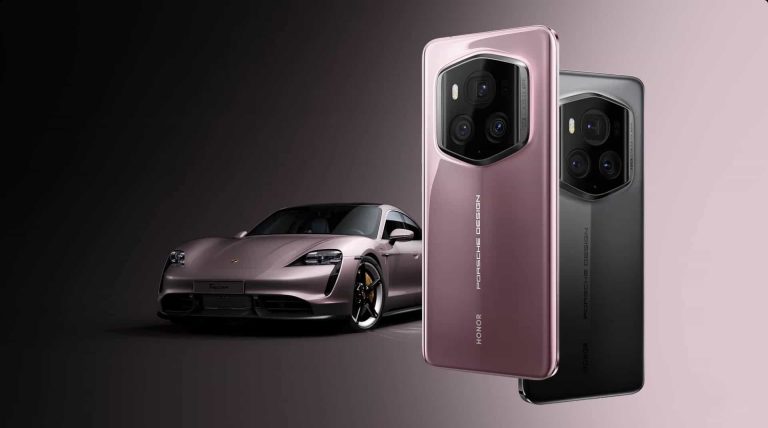
First and foremost, the Porsche Design HONOR Magic6 RSR and Magic6 Ultimate are not the same devices as everyone though they’d be. They have different backplates. The Porsche Design variant comes with a hexagonal camera on the back, while the ‘Ultimate’ variant has a square-ish camera island on the back.
The Porsche Design HONOR Magic6 RSR is coming to global markets
The Porsche Design HONOR Magic6 RSR will launch globally, while the ‘Ultimate’ model will be sold in China only. These two devices do share the vast majority of their internals with the regular HONOR Magic6 Pro.
Both phones have a very interesting design, different than the regular Magic6 Pro. On the HONOR Magic6 Ultimate, you’ll notice a centered camera island on the back, but with a rather different shape. Its top-right and bottom-left corners are more curved than the rest. The glass on top of the cameras is also curved towards the edges. The backplate HONOR opted for here is made out of vegan leather, and it also has some additional design elements. You’ll notice that vertical line that protrudes on the back, which will hopefully help with the grip too.
The Porsche Design model has a hexagonal camera island on the back, which is also centered. It has a different vertical line than the ‘Ultimate’ model, its is more centered. The backplate is also different, HONOR didn’t use vegan leather here, but glass instead.
There is a very interesting-looking camera island included on the back
If we flip the two phones around, you’ll notice that there’s a curved display included. A pill-shaped camera cutout sits at the top of the display, and it’s centered. The front side of the phone looks basically the same as the HONOR Magic6 Pro. The internals of the two phones are very, very similar, almost identical.
There is a 6.8-inch Dual-Layer OLED Tandem Display included on the front. That panel has an adaptive refresh rate of up to 120Hz and a resolution of 2800 x 1280 pixels. The maximum brightness it can reach, technically, is 5,000 nits. This display is also Dolby Vision certified. It also has a very high 4,320Hz PWM dimming.
These handsets are IP68 certified for water and dust resistance, and the display is protected by anti-scratch NanoCrystal Shield. The Snapdragon 8 Gen 3 SoC fuels these phones, while the devices has 24GB of RAM and 1TB of storage.
A silicon-carbon battery is in use here, while blazing fast wired & wireless charging is also on offer
A 5,600mAh silicon-carbon battery sits on the inside here, while the phones support 80W wired charging. 66W wireless charging is also supported thanks to HONOR SuperCharge tech.
A 50-megapixel Super Dynamic Falcon Camera H9800 (f/1.4-f/2.0 adjustable aperture, OIS, SMA Actuator, 1/1.3-inch sensor) sits on the back. It is backed by a 180-megapixel periscope telephoto camera (f/2.6 aperture, 2.5x optical zoom, 100x digital zoom), and a 50-megapixel ultrawide unit (f/2.0 aperture, 122-degree FoV).
On the front, you’ll find a 50-megapixel ultrawide camera and a 3D ToF sensor. The phones do have advanced facial scanning, which should work perfectly even in pitch-black conditions. It did work great on the HONOR Magic6 Pro, and this is basically the same thing in a different package. Well, different packages.
Android 14 comes out of the box, with HONOR’s custom UI
Android 14 comes pre-installed here, along with MagicOS 8.0. Bluetooth 5.3 is also supported, and the phones have a set of stereo speakers. There are also two nano SIM card slots included here.
The Porsche Design HONOR Magic6 RSR and Magic6 Ultimate devices measure 162.5 x 75.8 x 8.9mm, while the Porsche Design model weighs 237 grams. The ‘Ultimate’ may be a little bit heavier, we’re still not sure. The Porsche Design variant comes in Agate Gray and Frozen Berry colors. The HONOR Magic6 Ultimate, on the other hand, comes in Ink Rock Black and Sky Purple colors.
HONOR also announced a new laptop
In addition to these two phones, HONOR also announced the MagicBook Pro 16 laptop. This laptop comes with Windows pre-installed, and it’s an “AI-powered laptop”, says the company.
It comes with the NVIDIA GeForce RTX 4060 Laptop GPU. The Intel Core Ultra 7 processor (155H) is also a part of the package. The device also has six speakers, and supports spatial audio.
That’s basically all the information that we have about it thus far.
Pricing
The Porsche Design HONOR Magic6 RSR pricing starts at CNY9,999 ($1,389) in China. The HONOR Magic6 Ultimate can be purchased for CNY6,999 ($972), while the HONOR MagicBook Pro 16 costs CNY6,199 ($861). The Porsche Design model goes on sale today in China, while it will become available globally at some point in Q2 2024.
Fitbit by Google, the wearables division under Google since 2021, seems to now be called just Google Fitbit. 9To5Google noticed the change across Google’s branding, including on fitbit.com. The logo that came before ‘Fitbit by Google’ has also been removed. This change comes amidst a massive revamp of the Fitbit store. It indicates Google is taking a more direct approach to marketing its wearables.
The rebranding comes after other changes
Google acquired the fitness tracking company Fitbit in 2021, approximately three years after first planning to. This move was made to help the tech giant make its way into the fitness wearables market. The new division was called Fitbit by Google until this recent change. It’s new name, Google Fitbit, is much more on brand with how Google usually names its products and services. Popular examples include Google Assistant, Google Play, Google TV, Google Wallet, and Google Maps.
‘Fitbit by Google’ also had a logo made of dots of varying sizes. This logo came before the name, and has also been removed from the rebranded name. Concerns were raised after Google saw lots of restructuring within its hardware departments back in January. These changes were followed by the departure of James Park and Eric Friedman, the co-founders of Fitbit.
“We remain very committed to serving our Fitbit users well, innovating in the health space with personal AI, and building on the momentum with Pixel Watch, the redesigned Fitbit app, Fitbit Premium service, and the Fitbit tracker line. This work will continue to be a key part of our new org model,” said Courtenay Mencini of Google while addressing the concerns.
What is Google Fitbit?
Google Fitbit encompasses the offerings of Fitbit, in addition to products and services offered by Google. These products include smartwatches, smart scales, trackers, and related accessories. The trackers are the main focal point of Fitbit, and what most people gravitate towards when making a purchase.
These fitness trackers help people monitor heart rate, sleep, calories burnt, steps taken, and more. They’re the perfect lifestyle partner for people who are conscious of their health, or need 24/7 monitoring for medical reasons. The smartwatches go a step further. They combine the capabilities of the trackers with the convenience of a smartwatch. These products also help monitor stress, and can be used for guided meditation, breathing exercises, and similar activities.
The rebranding of Google Fitbit indicates the company isn’t content with just letting things be. There will probably be improvements to be seen across the entire Fitbit lineup pretty soon.

.webp)