These would be great numbers for Huawei, but a far cry from what was reported in November last year. A report surfaced claiming that Huawei plans to ship out 100 million smartphones in 2024.
Huawei is allegedly planning to sell around 60 million smartphones in 2024
So, if Huawei does end up selling 60 million smartphones in 2024, that would basically double its sales numbers from 2023. Needless to say, that would be great news for Huawei, especially considering the US ban and everything.
Revegnus did note that Huawei cannot trade with SK Hynix and Samsung due to US sanctions. That means that both of those companies will lose business. The more phones Huawei sells, the more business they’ll lose, basically, as that income would go their way if not for the ban.
The company revived its Kirin chips last year
As many of you know, with the Huawei Mate 60 series last year, Huawei reverted back to its chips. It launched the Kirin 9000S processor, in collaboration with SMIC. That is a 7nm chip, and it enables 5G connectivity in Huawei phones once again.
Huawei is allegedly getting ready to release a couple of more processors this year. The big new iteration is expected with the Huawei Mate 70 later this year. The Huawei P70 series will allegedly include a new version of the Kirin 9000S.
The SEC’s high-stakes investigation into Twitter’s acquisition by Elon Musk is reportedly facing significant hurdles from the billionaire’s side. The agency has accused Musk of employing questionable tactics to impede the investigation, adding a layer of intrigue to the unfolding saga.
Following his acquisition of Twitter in October 2022, Elon Musk has been under the microscope of various US agencies. The SEC, in particular, launched a probe into the platform takeover, citing Musk’s delayed disclosure of his Twitter stake as a critical concern. The agency later escalated the matter by suing Musk and demanding his testimony in a hearing.
Elon Musk still refuses to testify before the SEC over his Twitter acquisition
In February, a judge ordered Musk to testify in the SEC’s probe. As per the court order, both sides have one week to decide the place of testimony. Otherwise, the court will decide for them. While the testimony was scheduled for last month, Musk still refuses to appear and answer to the SEC regarding his Twitter takeover, which also happened with a massive help from Jack Dorsey.
The agency alleges that Musk is trying to “misrepresent” the investigation and “continues to distort the true scope of this investigation – his only hope for establishing that the SEC is not seeking relevant evidence.”
Musk’s legal team previously claimed the subpoena was issued by a staff member appointed by the SEC’s Director of Enforcement. They also claimed the whole investigation is an “unbounded investigation into an allegedly days-late SEC filing.”
Elon Musk’s biography book helped the SEC with its investigation
The SEC has reportedly attempted to arrange a testimony session with Elon Musk since April 2023. However, the billionaire’s actions have consistently hindered progress, leading to delays in the investigation. The agency asserts that Musk’s complaints about the investigation’s duration are unfounded, as it was his delay tactics that prolonged the process.
Besides the late disclosure of Twitter’s stake, the SEC also accused Musk of securities fraud, violating Section 10(b) of the Securities Exchange Act. Much of the new evidence against Musk is allegedly coming from his biography book written by Walter Isaacson. As the SEC’s filing reads, “This book provides important new information relevant to the SEC’s investigation.”
INTERPOL’s latest assessment on global financial fraud uncovers the sophisticated evolution of cybercrime, fueled by advancements in technology such as Artificial Intelligence (AI), cryptocurrencies, and the proliferation of phishing- and ransomware-as-a-service models.
These developments have made fraud schemes more intricate and accessible to criminals without advanced technical know-how, posing a significant threat to global financial security.
The Rise of Tech-Enabled Fraud
The INTERPOL Global Financial Fraud Assessment points to a worrying trend the use of AI and large language models by organized crime groups to target victims worldwide has become increasingly prevalent.
Combined with the use of cryptocurrencies and the emergence of ‘as-a-service’ business models for phishing and ransomware, this has led to a surge in professional and sophisticated fraud campaigns.
Alert Fatigue that helps no one as security teams need to triage 100s of vulnerabilities.:
The problem of vulnerability fatigue today
Difference between CVSS-specific vulnerability vs risk-based vulnerability
Evaluating vulnerabilities based on the business impact/risk
Automation to reduce alert fatigue and enhance security posture significantly
AcuRisQ, that helps you to quantify risk accurately:
These campaigns are executed at relatively low costs, making them a preferred method for criminals to defraud individuals and companies on a massive scale.
INTERPOL’s Warning
Jürgen Stock, INTERPOL Secretary General, issued a stark warning during the Financial Fraud Summit in London, emphasizing the epidemic growth of financial fraud.
“We are facing an epidemic in the growth of financial fraud, leading to individuals, often vulnerable people, and companies being defrauded on a massive and global scale,” Stock stated.
He highlighted the urgent need for global cooperation to combat this menace, stressing the importance of closing gaps in international law enforcement and fostering excellent reporting and capacity building to tackle financial crime effectively.
INTERPOL recently released a tweet highlighting the findings of their Global Financial Fraud Assessment report.
NEW: INTERPOL Global Financial Fraud Assessment – increased use of technology enabling organized crime groups to better target victims globally.
Report also highlights increase in human trafficking victims being used to carry out ‘pig-butchering’ scams.https://t.co/NF0zcAKWiW
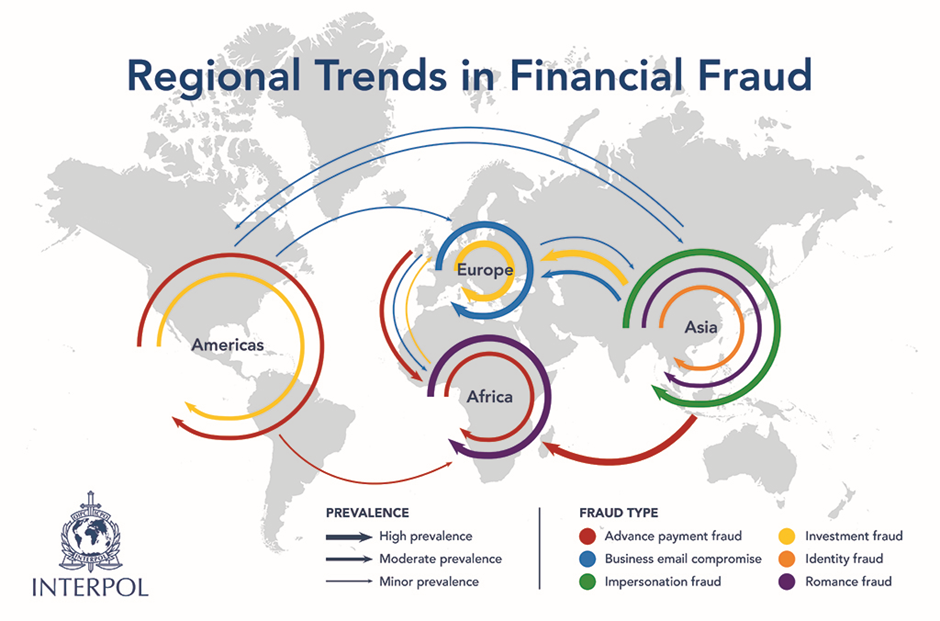
In Africa, Business Email Compromise (BEC) and ‘pig butchering’ scams are rising, with West and Southern Africa emerging as hotspots.
Criminal groups such as the Black Axe and Supreme Eiye are exploiting online platforms to perpetrate various forms of financial fraud, including romance and investment scams, leveraging their extensive online fraud skills.
Americas: The Hub of Impersonation and Romance Frauds
The Americas are witnessing a surge in impersonation, romance, and tech support frauds.
INTERPOL’s Operation Turquesa V unveiled the grim reality of human trafficking-fueled fraud, with victims being coerced into committing financial crimes, including investment frauds and pig butchering schemes.
Asia: The Birthplace of Pig Butchering Scams
Originating in Asia in 2019, pig butchering scams have flourished, especially during the COVID-19 pandemic.
Criminal organizations in Asia have adopted business-like structures to carry out these scams.
There has also been a rise in telecommunication fraud, where victims are deceived by perpetrators impersonating officials.
Europe: The Epicenter of Online Investment Frauds
Europe has seen a significant increase in online investment fraud and phishing schemes. Criminals target mobile phone apps and employ sophisticated methods to maximize profits.
Pig butchering scams, primarily operated out of Southeast Asia, are also gaining ground in Europe.
INTERPOL’s Call to Action
To combat the escalating threat of financial fraud, INTERPOL emphasizes the need for multi-stakeholder, Public-Private Partnerships to trace and recover funds lost to these crimes.
Since the launch of the Global Rapid Intervention of Payments (I-GRIP) stop-payment mechanism in 2022, INTERPOL has assisted member countries in intercepting over USD 500 million in criminal proceeds, showcasing the potential of international cooperation in fighting cyber-enabled fraud.
As the digital landscape continues to evolve, the fight against financial fraud demands a concerted effort from law enforcement, governments, and the private sector worldwide.
The stakes have never been higher, with billions at risk and the integrity of the global financial system hanging in the balance.
With Perimeter81 malware protection, you can block malware, including Trojans, ransomware, spyware, rootkits, worms, and zero-day exploits. All are incredibly harmful and can wreak havoc on your network.
Stay updated on Cybersecurity news, Whitepapers, and Infographics. Follow us on LinkedIn & Twitter.
March 13, 2024 – Malwarebytes Premium for Windows detected and blocked 100% of the malware samples used in AVLab’s January evaluation.
March 13, 2024 – Microsoft patched 61 vulnerabilities in the March 2024 Patch Tuesday round, including two critical flaws in Hyper-V.
March 13, 2024 – A hoax telling people to copy and paste a copyright notice on Facebook has been making the rounds since 2012. Can we make it go away? Please!
March 12, 2024 – February 2024 is likely to be remembered as one of the most turbulent months in ransomware history.
March 11, 2024 – Information newly made available under California law has shed light on data broker practices, including exactly what categories of information they trade in.
With our weekly GBHackers news summary, explore and learn about the most recent developments in the cybersecurity field.
This practice will allow you to remain up-to-date on the newest developments, weaknesses, groundbreaking progress, hacking incidents, potential dangers, and fresh narratives within the relevant field or industry.
Doing so will help you avoid missing out on important news and information.
Within our summary report, you will discover new cyber threats and ways to deal with them. This entails reporting the latest malicious techniques that may damage your trusted devices.
Staying current about these critical cybersecurity issues allows for timely safeguarding measures and preventive actions.
Moreover, this ongoing awareness ensures that you have a comprehensive understanding of the cybersecurity landscape and can secure your systems properly against a continually changing set of risks.
ANY.RUN now integrates with OpenCTI, a cyber threat intelligence platform that allows automatic enrichment of OpenCTI observations with malware data directly from ANY.RUN analysis.
Users can access indicators like TTPs, hashes, IPs, and domains without manual data source checks.
The data from interactive analysis sessions within the ANY.RUN sandbox can further enrich the observations that centralize threat analysis information from various sources for efficient investigation.
CloudGrappler is an innovative open-source tool designed to detect the presence of notorious threat actors in cloud environments.
This tool is a beacon of hope for security teams struggling to keep pace with the sophisticated tactics of groups like LUCR-3, also known as Scattered Spider.
CloudGrappler leverages the power of CloudGrep, a tool developed by Cado Security, to offer high-fidelity, single-event detections of activities associated with well-known threat actors in popular cloud platforms such as AWS and Azure.
Cybersecurity experts have identified a new tool promoted in the internet’s darker corners.
Dubbed the “FUD APK Crypter,” this software claims to offer the ability to encrypt and obfuscate payloads created by Android Remote Administration Tools (RATs), making them fully undetectable (FUD) by security systems.
Organizations have many tools when investigating cyber threats, but two stand out: Threat Intelligence Platforms (TIPs) and sandboxes.
Each solution provides distinct advantages, yet combining their capabilities can lead to a more practical approach to detecting, analyzing, and responding to threats that can save resources and improve operations.
Microsoft Copilot for security was a generative AI solution that can help security and IT professionals handle their security operations much more efficiently.
This was claimed to be the industry’s first generative AI solution for strengthening an organization’s security expertise.
However, Microsoft has announced that Microsoft Copilot for security will be available worldwide by April 1, 2024.
A federal jury in Washington, D.C., has convicted Roman Sterlingov, a dual Russian-Swedish national, for operating the notorious darknet cryptocurrency mixer, Bitcoin Fog.
This service, which has operated since 2011, facilitated the laundering of approximately $400 million in cryptocurrency, marking a significant victory against cybercrime.
The Massachusetts Institute of Technology’s (MITRE) Aviation Risk Identification and Assessment (ARIA) software program is a powerful tool to enhance aviation safety and efficiency.
Developed by the MITRE Corporation, a non-profit organization that operates federally funded research and development centers, ARIA is a software program that provides a comprehensive approach to aviation risk identification and assessment.
A new threat actor, Magnet Goblin, emerged by rapidly exploiting recently disclosed vulnerabilities (CVE-2023-46805 & CVE-2023-21887) in Ivanti Connect Secure VPN, which allowed them to deploy custom Linux backdoors on vulnerable systems.
Magnet Goblin has a history of targeting platforms like Magento, Qlik Sense, and potentially Apache ActiveMQ, using similar tactics to gain financial advantage.
Their strategy involves quickly adopting newly discovered vulnerabilities to establish backdoors on compromised systems. These backdoors enable them to steal data or gain unauthorized access by exploiting one-day vulnerabilities for potential financial gain.
The Andariel threat group was observed conducting persistent attacks against domestic businesses, specifically installing MeshAgent for remote screen control while performing the attack.
MeshAgent collects basic system information for remote management and performs activities such as power and account management, chat or message pop-ups, file upload/download, and command execution.
It also has remote desktop support. In particular, the web supports remote desktop protocols like RDP and VNC.
Threat actors use pentesting tools to identify vulnerabilities and weaknesses in target systems or networks.
These tools provide a simulated environment for testing potential attack vectors that allow threat actors to exploit security gaps and gain unauthorized access.
By using pentesting tools, threat actors can assess the effectiveness of their methods and refine their strategies to maximize the impact of their attacks.
The “State of the UAE—Cybersecurity Report 2024,” a collaborative effort by the UAE Cyber Security Council and CPX Holding, has released the United Arab Emirates (UAE) cybersecurity landscape.
The report presents a detailed examination of the cyber threats that the nation faces, highlighting the critical need for advanced cybersecurity measures.
The report has uncovered over 155,000 vulnerable assets within the UAE, with 40 percent of critical vulnerabilities left unaddressed for over five years.
Threat actors use malicious PyPI packages to infiltrate systems and execute attacks like data exfiltration, ransomware deployment, or system compromise.
All these packages can easily bypass security measures by masquerading as legitimate Python libraries.
This allows it to infect the unsuspecting users’ environments and potentially cause widespread damage.
An infostealer disguised as the Adobe Reader installation has been observed. The file is disseminated in PDF format and prompts users to download and run it.
According to AhnLab Security Intelligence Center (ASEC), the fake PDF file is written in Portuguese and instructs users to download and install Adobe Reader.
It urges users to download and install malware by informing them that Adobe Reader is needed to open the file.
Threat actors target a niche group of internet users, security researchers, penetration testers, and even cybercriminals.
The weapon of choice is malicious software known as CyberGate Remote Access Trojan (RAT), which has been lurking in the cyber realm for several years.
The latest twist in its deployment involves a cunning disguise, where the RAT is being distributed under the guise of a URL to a seemingly harmless Dork converter tool.
An Ex-Google engineer has been arrested for stealing trade secrets, particularly those related to artificial intelligence (AI) technology.
Linwei Ding, also known as Leon Ding, is a 38-year-old software engineer who lives in Newark, California. A federal grand jury has indicted him on four counts of theft of trade secrets.
The indictment, returned on March 5 and unsealed on March 8, alleges that Ding transferred sensitive Google trade secrets to his account while secretly working with companies based in the People’s Republic of China (PRC) active in the AI industry.
In a sophisticated cyberattack campaign, malicious actors impersonating Colombian government agencies target individuals across Latin America.
The attackers are distributing emails containing PDF attachments, falsely accusing recipients of traffic violations or other legal infractions.
These deceptive communications are designed to coerce victims into downloading an archive that harbors a VBS script, initiating a multi-stage infection process.
The Italian Data Protection Authority (DPA) has initiated a thorough investigation into OpenAI, the American tech giant, following its recent announcement of a cutting-edge AI model named ‘Sora.’
This new model can generate dynamic, realistic, and imaginative scenes from simple text prompts.
Amidst growing concerns over data privacy, the DPA is examining the potential impact ‘Sora’ could have on handling personal data within the European Union, with a specific focus on Italian users.
The RA World ransomware, previously known as the RA Group, has been a significant threat to organizations worldwide since its emergence in April 2023.
Focusing on the healthcare and financial sectors, ransomware has predominantly targeted entities in the United States while also affecting organizations in Germany, India, and Taiwan.
Several French government websites faced disruptions due to a severe Distributed Denial of Service (DDoS) attack, marking a concerning escalation in cyber threats against state infrastructure.
The attack commenced in the early hours of Sunday, rapidly escalating in intensity.
Cloudflare’s Radar service detected the onslaught, which saw a brief lull before resurging to sustain a significant level of disruption for approximately six hours.
The cybersecurity landscape has been shaken by the discovery that a single piece of malware, known as RedLine, has stolen over 170 million passwords in the past six months.
This alarming statistic has placed RedLine at the forefront of cyber threats, accounting for nearly half of all stolen credentials analyzed during this period.
Google has announced an upgrade to its Safe Browsing technology, which will provide Chrome users with real-time protection against phishing, malware, and other malicious sites.
This enhancement is set to revolutionize how users navigate the web, ensuring safety without compromising privacy.
For over 15 years, Google Safe Browsing has been a bulwark against online threats, safeguarding users across more than 5 billion devices worldwide.
Hackers target these platforms due to their hosting of valuable resources and data.
Hackers intrude on these platforms to steal data, deploy malicious software, or launch other cyber attacks, usually for financial gain or sinister motives.
Cybersecurity analysts at FortiGuard Labs uncovered that hackers actively abuse Amazon and GitHub to deploy Java-based malware.
Cybercriminals use free apps to exploit the many people who use them freely.
The broader user base serves as a larger attack surface that ensures the effective distribution of malware.
In addition, this could happen if third-party plugins or features have been integrated into freemium apps, which the attackers can exploit to gain unauthorized access.
Recent developments within the cybersecurity landscape have included the emergence of KrustyLoader, a sophisticated Rust-based backdoor that has caught the attention of multiple industry experts.
This malware boasts Windows and Linux variants and has been implicated in targeted attacks, with significant implications for cybersecurity defenses across platforms.
In the wake of the LockBit ransomware group’s takedown, a shift has occurred within the cybercriminal underworld, leading to a sharp rise in activities by the Akira ransomware collective.
This group, known for its sophisticated attacks, particularly against healthcare entities in the US, has seen an influx of talent from the remnants of the notorious Conti group, specifically from its post-Ryuk faction.
The cybersecurity landscape has witnessed a significant evolution in ransomware attacks in recent months, with perpetrators deploying increasingly diverse data-exfiltration tools.
Symantec’s latest findings reveal that attackers have utilized at least a dozen tools for data exfiltration in the past three months alone.
This trend underscores a strategic shift towards leveraging malware and dual-use tools—legitimate software repurposed for malicious intent—to siphon data from victim organizations.
Enterprises across the United States and Europe are on high alert as a new ransomware strain, dubbed “DoNex,” has been actively compromising companies and claiming victims.
This emergent threat has cybersecurity experts working overtime to understand the attack’s full scope and develop countermeasures.
The DoNex ransomware group has made its presence known by listing several companies as victims on their dark web portal, accessible via the Onion network.
Evasive Panda, dubbed BRONZE HIGHLAND and Daggerfly, is a Chinese-speaking APT group that has been operating since at least 2012. It has been spotted conducting cyber espionage targeting individuals in mainland China, Hong Kong, Macao, and Nigeria.
Southeast and East Asian governments, notably those in China, Macao, Myanmar, the Philippines, Taiwan, and Vietnam, were the targets of attacks. The targets included other Chinese and Hong Kong groups.
Since 2020, Evasive Panda has been capable of using adversary-in-the-middle attacks to spread its backdoors by obtaining updates from legitimate software.
A new vulnerability, CVE-2023-5528, has been discovered with Kubernetes. This vulnerability is associated with a command injection vulnerability that leads to remote code execution with SYSTEM-level privileges on the compromised Windows node. The severity of this vulnerability has been given as 7.2 (High).
Several prerequisites are required for a threat actor to exploit this vulnerability, including applying malicious YAML files to the cluster, access to create a persistent volume that can be utilized during the command injection process, and some level of user privilege on the affected Kubernetes cluster.
After identifying this one, two additional vulnerabilities with the exact underlying cause were identified: an insecure function call and inadequate user input sanitization.
The operators of DarkGate successfully leveraged a patched Windows Defender SmartScreen vulnerability, identified as CVE-2024-21412, as a zero-day attack to disseminate the complex and ever-evolving DarkGate malware.
The vulnerability tracked as CVE-2024-21412, with a CVSS base score of 8.1, is a Microsoft Defender SmartScreen vulnerability revolving around internet shortcuts.
It enables an unauthorized attacker to bypass SmartScreen security measures by deceiving a target into clicking on a specially crafted file.
Threat actors can exploit ChatGPT’s ecosystem for several illicit purposes, such as crafting prompts to generate malicious code, phishing lures, and disinformation content.
Even threat actors can exploit ChatGPT’s exceptional capabilities to craft and launch many sophisticated and stealthy cyberattacks.
Besides this, they can also exploit the vulnerabilities in ChatGPT extensions or plugins to gain unauthorized access to user data or external systems.
Threat actors have been observed hosting phishing documents on legitimate digital document publishing (DDP) sites as part of continuous session harvesting and credential attempts.
Since DDP sites are unlikely to be blocked by web filters, have a good reputation, and could give visitors the impression that they are trustworthy, hosting phishing lures on these sites increases the chance of a successful phishing attack.
“Digital Document Publishing sites” are online platforms that let users upload and share PDF files in a browser-based flipbook format.
Fortinet has disclosed a critical vulnerability in its FortiOS and FortiProxy captive portal systems. The vulnerability could allow attackers to execute arbitrary code through specially crafted HTTP requests.
This revelation underscores the ongoing challenges in safeguarding digital infrastructures against sophisticated threats.
Organizations using SAP products are urged to prioritize patching vulnerabilities outlined in the latest SAP Security Notes, released on 12 March 2024, SAP Security Patch Day.
SAP Security Notes are official communications from SAP that detail newly identified vulnerabilities within their software products.
The Stanford University data breach involved a ransomware attack by the Akira ransomware gang.
The breach occurred between May 12, 2023, and September 27, 2023, with the university discovering the attack on September 27, 2023.
The compromised information varied but could include dates of birth, Social Security numbers, government IDs, passport numbers, driver’s licenses, and potentially biometric data, health/medical information, email addresses with passwords, usernames with passwords, security questions and answers, digital signatures, and credit card information with security codes.
Researchers at HiddenLayer have unveiled a series of vulnerabilities within Google’s Gemini AI that could allow attackers to manipulate user queries and control the output of large language models (LLMs).
This revelation has raised concerns over the security and integrity of AI-driven content generation and its implications for misinformation spread and data privacy.
The Gemini suite, Google’s latest foray into the realm of LLMs, comprises three different model sizes: Nano, Pro, and Ultra.
There are advantages to using standalone AI chatbots over cloud-based alternatives such as OpenAI; however, there are also some security risks.
Research shows NextChat, a popular standalone chatbot with over 7500 exposed instances, is vulnerable to a critical SSRF vulnerability (CVE-2023-49785) that allows attackers to access internal systems and data potentially.
The vulnerability was reported to the vendor in November 2023, but since no patch was available after 90 days, technical details were publicly released.
Over 200,000 websites have been left vulnerable to Cross-Site Scripting (XSS) attacks due to a flaw in the Ultimate Member plugin for WordPress.
This vulnerability, discovered by a researcher known as stealthcopter, underscores the ongoing risks in the digital ecosystem and highlights the critical role of cybersecurity firms like Wordfence in safeguarding the web.
BianLian attackers exploited a TeamCity vulnerability (CVE-2024-27198 or CVE-2023-42793) to gain initial access and move laterally within the network.
They deployed a PowerShell backdoor disguised as legitimate tools that use two-layer obfuscation with encryption and string substitution to communicate with a Command and Control (C2) server.
Researchers at Guidepoint Security linked this backdoor to the BianLian group based on its functionalities, SSL communication, and communication with a server identified as running BianLian’s GO backdoor.
A recent surge in attacks from a new malware campaign exploits a known vulnerability in the WordPress plugin Popup Builder, infecting over 3,300 websites with XSS attacks.
A recent Balada Injector campaign discovered in January exploited a cross-site scripting (XSS) vulnerability tracked as CVE-2023-6000, with a CVSS base score of 8.8.
According to Sucuri, they have noticed an increase in attacks over the last three weeks from an ongoing malware campaign aiming to take advantage of the same Popup Builder vulnerability in versions 4.2.3 and before.
QNAP has disclosed a series of vulnerabilities within its operating systems and applications that could potentially allow attackers to compromise system security and execute malicious commands.
These vulnerabilities, identified as CVE-2024-21899, CVE-2024-21900, and CVE-2024-21901, pose significant risks to users of affected QNAP devices.
The company has promptly responded by releasing updates to mitigate these vulnerabilities.
Henry Onyedikachi Echefu, a 32-year-old Nigerian national, has admitted to his role in a sophisticated business email compromise (BEC) scheme and money laundering activities.
This case highlights the global nature of cybercrime and the importance of international cooperation in bringing perpetrators to justice.
Henry Onyedikachi Echefu, originally from Nigeria and residing in South Africa during his criminal activities, has recently faced the consequences of his actions in a United States courtroom.
On March 17, 2024, Qualcomm announced yet another flagship chipset – Snapdragon 8s Gen 3. This chipset is a bit confusing, as it comes just five months after the Snapdragon 8 Gen 3 debuted and slots in right below that chipset. So, it’s not the most premium flagship chipset.
With the Snapdragon 8s Gen 3, Qualcomm is focusing more on artificial intelligence features that OEMs would be able to use, including high-speed on-device Generative AI. The clock speeds of each core in the CPU have also been reduced, as well as a few other features being omitted here, compared to the Snapdragon 8 Gen 3. So here’s everything you need to know about the Snapdragon 8s Gen 3 and why you might want your next phone to have this chipset.
Qualcomm Snapdragon 8s Gen 3 specs
The Snapdragon 8s Gen 3 has a lot of the same specs as the Snapdragon 8 Gen 3, but there are still quite a few differences. So in the table below, you’ll see the two chipsets compared. Giving you a good look at which chipset is better.
Qualcomm Fast Connect 7800 WiFi 7, Integrated Bluetooth
Qualcomm Fast Connect 7800 WiFi 7, Integrated Bluetooth
Charging
Quick Charge 5
Quick Charge 5
Camera Support
Up to 200MP Photo Capture Up to 108MP single camera @30fps Up to 64+36MP Dual cameras @30fps Up to 36MP triple cameras @30fps
Up to 200MP Photo Capture Up to 108MP single camera @30fps Up to 64+36MP Dual cameras @30fps Up to 36MP triple cameras @30fps
Video Capture
8K @ 60fps 4K @ 120fps 720p @ 960fps
4K UHD @ 60fps 1080p @ 240fps
Artificial Intelligence
Qualcomm AI Engine Fused AI Accelerator architecture Hexagon scalar, vector and tensor accelerators Hexagon Direct Link Upgraded Micro Tile Inferencing Support for mix precision Support for all precisions
Qualcomm AI Engine Fused AI Accelerator architecture Hexagon scalar, vector and tensor accelerators Hexagon Direct Link Support for mix precision Support for all precisions
First Available
Q4 2023
Q2 2024
Snapdragon X70 5G Modem
For some reason, Qualcomm has decided to use a slightly older 5G Modem in the Snapdragon 8s Gen 3. We’re looking at the Snapdragon X70, which was announced back in March of 2022 and used in the Snapdragon 8 Gen 2. It is actually a tiny bit different, though, as the downlink is slower (about half) than what was included in the Snapdragon 8 Gen 2. So it appears that Qualcomm is nerfing it a bit. Still, 5Gbps downlink is likely more than plenty for most people.
Perhaps a little more puzzling here is the fact that it only supports the 3GPP Release 17 and not Release 18. That won’t affect many in day-to-day usage, but you still want your phone to have the most recent 5G release.
Cameras are also nerfed in Snapdragon 8s Gen 3
Along with using an older modem, Qualcomm has also nerfed camera support on the Snapdragon 8s Gen 3. The big one is, no 8K video support. That’s not a huge deal, as most phones don’t even take advantage of 8K video, other than Samsung’s flagship phones. And to be honest, 8K video is still overkill and doesn’t look that great.
Additionally, 4K video capture is now limited to 4K60 on the Snapdragon 8s Gen 3, though slow-motion has received a bit of a mixed update here. The Snapdragon 8 Gen 3 does slow-motion at 720p at 960fps. However, the Snapdragon 8s Gen 3 will do slow-motion at 1080p at 240fps. The new Night Vision video capture with RAW AI Noise Reduction has been removed on the Snapdragon 8s Gen 3, as well.
This all really shows you how Qualcomm is stripping out some features, lowering clock speeds, and using an older modem to help make this a cheaper chipset. But is that worth the lower price? We’ll have to see when phones with the Snapdragon 8s Gen 3 launch, in the coming months.
Snapdragon 8s Gen 3 brings on-device Generative AI to the masses
One of the new features that Qualcomm is really pushing with the Snapdragon 8s Gen 3 is on-device Generative AI. With this new processor, you’ll be able to create original content from spoken, written, or image prompts in mere moments with an on-device Gen AI assistant at your command.
Additionally, Photo Expansion will allow you to generate content beyond a photo’s frame, blending beautifully with your original capture. There’s also support for multi-modal AI models across many different use cases.
The new Snapdragon 8s Gen 3 does support a lot of the popular Gen AI models right now, with over 30 large language models (LLMs) being supported, as well as Large Vision Models (LVMs). This includes Baichuan-7B, Llama 2, and Gemini Nano.
Snapdragon Elite Gaming is on-board
Qualcomm has been branding a lot of its features as of late, including Snapdragon Elite Gaming, which is going to provide you with some hyper-realistic mobile gaming on the Snapdragon 8s Gen 3. This includes real-time hardware-accelerated Ray Tracing, which takes realism to new heights and keeps you fully engaged with authentic lighting, shadows, and reflections.
The Snapdragon 8s Gen 3 also does support Quad HD+ displays at up to 144Hz refresh rate. Giving you razor-sharp resolution and smooth graphics.
When will Snapdragon 8s Gen 3 phones launch?
As usual, Qualcomm is not saying anything specific about phones with the Snapdragon 8s Gen 3 launching, but we do have a handful of names of companies releasing phones with this chipset “in the coming months”.
According to Qualcomm, HONOR, iQOO, realm, Redmi, and Xiaomi will be launching phones with this new chipset very soon. They have not mentioned what specific devices we are getting from these companies with Snapdragon 8s Gen 3.
However, HONOR has been teasing the Magic6 Ultimate as of late, which might be their Snapdragon 8s Gen 3 phone, but we’re betting on them sticking with the Snapdragon 8 Gen 3 for that one.
Five months after announcing the Snapdragon 8 Gen 3 in Maui at Snapdragon Summit, Qualcomm is back with a new processor. This is the Snapdragon 8s Gen 3.
This processor is a bit of a puzzling one; according to Qualcomm, it notches in right below the Snapdragon 8 Gen 3 and focuses more on AI. But that’s not stopping adoption; Qualcomm says that significant OEMs, including HONOR, iQOO, realm, Redmi, and Xiaomi, will be launching devices with the Snapdragon 8s Gen 3 in “the coming months.”
Snapdragon 8s Gen 3 supports High-Speed on-device Generative AI
In 2024, we’ve heard an awful lot about AI. It’s infused in just about every product announcement these days, and that continues with the Snapdragon 8s Gen 3. This new chipset is able to provide high-speed on-device generative AI with up to 10 billion parameters.
It also includes an always-sensing ISP, hyper-realistic mobile gaming, breakthrough connectivity, and lossless high-definition sound. It also supports a number of AI models, including Baichuan-7B, Llama 2, and Gemini Nano.
How does Snapdragon 8s Gen 3 compare to Snapdragon 8 Gen 3?
On the surface, it’s an underclocked with a slightly different architecture versus the Snapdragon 8 Gen 3. The Snapdragon 8 Gen 3 includes one Prime core that goes up to 3.4GHz, five performance cores at up to 3.2GHz, and two efficiency cores up to 2.3GHz. The Snapdragon 8s Gen 3 uses one Prime core up to 3GHz, four performance cores up to 2.8GHz, and three efficiency cores up to 2GHz. That should lead to better battery life here.
The Snapdragon 8s Gen 3 also uses the older Snapdragon X70 5G Modem, which means that it only supports 3GPP Release 17 and not Release 18 as the Snapdragon 8 Gen 3 does. That also means the theoretical downlink has been cut in half to only 5Gbps.
On the video side of things, Snapdragon 8s Gen 3 does not offer 8K video support at all. At the same time, 4K video is limited to 60fps. Night Vision video capture with RAW AI Noise Reduction in 4K 60 fps is also missing on the Snapdragon 8s Gen 3.
Basically, this is a bit of a downgrade from the Snapdragon 8 Gen 3, which should make the component cheaper for OEMs to buy and put in their phones. We’ll have to wait for the first Snapdragon 8s Gen 3 phones to see if that cost savings is passed onto the consumer or not.
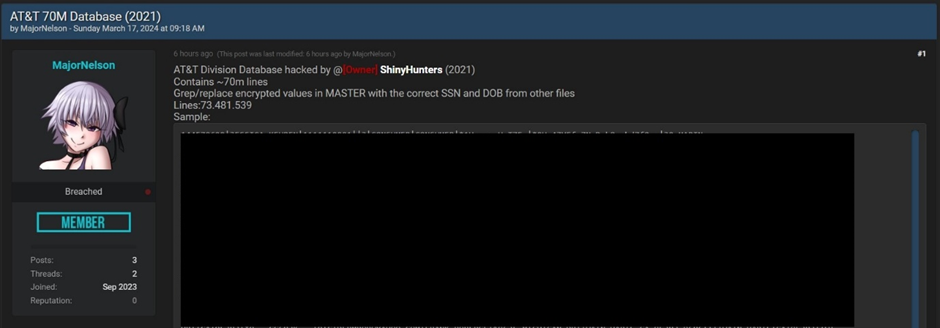
Cybersecurity researchers at vx-underground have reported that over 70 million records from an unspecified division of telecommunications giant AT&T have been leaked online.
The breach, one of the largest in recent times, has raised serious concerns about data security and privacy.
The Breach Exposed
The leaked data, posted on the hacker forum Breached, contains 73,481,539 records.
Document
Mitigating Vulnerability & 0-day Threats
Alert Fatigue that helps no one as security teams need to triage 100s of vulnerabilities.:
The problem of vulnerability fatigue today
Difference between CVSS-specific vulnerability vs risk-based vulnerability
Evaluating vulnerabilities based on the business impact/risk
Automation to reduce alert fatigue and enhance security posture significantly
AcuRisQ, that helps you to quantify risk accurately:
Vx-underground researchers have confirmed the authenticity of the data.
Today 70,000,000+ records from an unspecified division of AT&T were leaked onto Breached. No information is available to indicate whether it is a 3rd party compromise, or which ‘division’ this data is from.
Regardless, upon review we can confirm the stolen data is legitimate.
However, it remains uncertain whether the information was directly stolen from AT&T or through a third-party organization associated with the company.
Hacker Group Behind the Leak
The individual responsible for the data sale uses the online alias, Major Nelson. They claim the data was acquired from an unnamed AT&T division by the notorious hacker group @ShinyHunters in 2021.
AT&T Database
ShinyHunters is infamous for its cyberattacks on several significant organizations, including Tokopedia, Homechef, Chatbooks.com, Microsoft, and Minted.
Security Affairs has reported that threat actors have leaked over 70 million records, which they allegedly stole from AT&T.
Data For Sale
In August 2021, ShinyHunters reportedly demanded $1 million for the entire database or $200,000 for partial access.
The RestorePrivacy website verified the authenticity of the data by analyzing a sample and finding it legitimate.
The leaked data includes sensitive customer information such as Name, Phone number, Physical address, Email address, Social security number, Date of birth, Sample Data Leak
AT&T’s Response
Despite the claims and the evidence presented by researchers and the hacker group, AT&T has denied any breach of their systems.
The telecommunications giant said in a statement, “Based on our investigation Thursday, the information that appeared in an internet chat room does not appear to have come from our systems.”
Implications for Customers
The alleged data breach threatens the affected customers, with the potential for identity theft, financial fraud, and other malicious activities.
The data in question could be used by cybercriminals to orchestrate targeted phishing attacks or to sell to other bad actors on the dark web.
As the situation unfolds, AT&T customers are advised to remain vigilant and monitor their accounts for suspicious activity.
It is also recommended that passwords be changed and credit monitoring services be considered to safeguard against potential identity theft.
With Perimeter81 malware protection, you can block malware, including Trojans, ransomware, spyware, rootkits, worms, and zero-day exploits. All are incredibly harmful and can wreak havoc on your network.
Stay updated on Cybersecurity news, Whitepapers, and Infographics. Follow us on LinkedIn & Twitter.
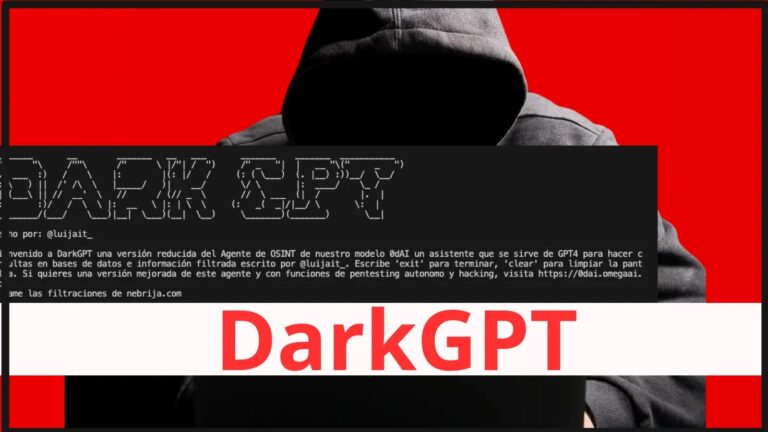
DarkGPT, your next-level OSINT (Open Source Intelligence) assistant. In this digital era, the ability to sift through vast amounts of data is invaluable, and DarkGPT, leveraging the power of GPT-4-200K, is designed to query leaked databases with precision.
A Spanish pentester with a “luijait” alias on Github recently unveiled an AI OSINT tool dubbed “DarkGPT” that helps detect leaked databases.
This resource article will guide you through the installation, setup, and usage of DarkGPT, ensuring you can integrate this powerful tool into your OSINT workflows.
Various tools powered by ChatGPT, such as OSINVGPT, PentestGPT, WormGPT, BurpGPT and HackerGPT, have already been created for the cyber security community, and DarkGPT is now adding to this legacy.
Alert Fatigue that helps no one as security teams need to triage 100s of vulnerabilities.:
The problem of vulnerability fatigue today
Difference between CVSS-specific vulnerability vs risk-based vulnerability
Evaluating vulnerabilities based on the business impact/risk
Automation to reduce alert fatigue and enhance security posture significantly
AcuRisQ, that helps you to quantify risk accurately:
DarkGPTInstallation:
Before diving into the world of DarkGPT, ensure that your system is equipped with Python, as the tool has been tested with Python 3.8 and higher versions. The installation process begins with cloning the DarkGPT repository from GitHub. Open your terminal and execute the following command:
git clone https://github.com/luijait/DarkGPT.git
cd DarkGPT
This will download the necessary files to your local machine and navigate you into the project directory.
Configuration:
To tailor DarkGPT to your needs, you’ll need to configure some environment variables. Start by duplicating the .env.example file and renaming it to .env. This file should be edited to include your personal API keys and usernames:
DEHASHED_API_KEY="your_dehashed_api_key_here"
DEHASHED_USERNAME="your_dehashed_username"
OPENAI_API_KEY="API_KEY from openai.com"
These credentials are crucial as they allow DarkGPT to interact with the respective APIs and databases securely.
Installation of Dependencies:
DarkGPT relies on several Python packages to function correctly. Install these dependencies by running the following command in your project directory:
pip install -r requirements.txt
This command will ensure all necessary libraries are installed, setting the stage for DarkGPT’s optimal performance.
DarkGPT Usage
With DarkGPT installed and configured, you’re ready to harness its capabilities. The tool can be invoked through the command line, where you can input your queries and receive insights from leaked databases. The intuitive interface of DarkGPT makes it user-friendly, even for those new to OSINT tools.
DarkGPT stands out with its robust features, including:
Integration with GPT-4-200K for advanced data processing.
Secure querying of leaked databases for comprehensive OSINT gathering.
Easy-to-use command-line interface for efficient operations.
Customizable environment settings to fit your specific intelligence needs.
DarkGPT is a potent addition to any OSINT professional’s toolkit. By following this course, you’ve equipped yourself with the knowledge to install, configure, and effectively use DarkGPT.
Integrating this AI assistant into your processes will unlock new possibilities for data analysis and intelligence gathering. Remember to use DarkGPT(GitHub) responsibly and in compliance with legal and ethical standards.
Stay updated on Cybersecurity news, Whitepapers, and Infographics. Follow us on LinkedIn & Twitter.
The Protecting Americans from Foreign Adversary Controlled Applications Act bill passed the House last week with approval from both sides of the aisle. The vote count was 352-65 in favor of the bill which now heads to the Senate where it faces a tougher time getting through. President Joe Biden already said that should the bill end up on his desk, he will sign it. The proposed legislation will ban apps that require U.S. users to submit a user profile and are under the control of U.S. adversaries such as Russia, China, North Korea, or Iran.
U.S. Intelligence has no proof that TikTok has worked with the Communist Chinese government
As far as TikTok is concerned, the bill would ban the platform in the States unless its owner, Chinese firm ByteDance, divests its holdings in the U.S. unit. The fear is that ByteDance is close to the Communist Chinese government and the personal data it collects on U.S. subscribers to TikTok is sent to a server in Beijing. Despite all of the concerns about TikTok, The Intercept reports that U.S. Intelligence has not been able to procure any evidence that TikTok deals with the Chinese government.
TikTok CEO Shou Zi Chew
TikTok itself says that it has never shared user data with the Chinese government and would refuse to do so even if asked. TikTok CEO Shou Chew, who testified to Congress almost exactly one year ago, said this past week that as far as TikTok is concerned, “there’s no CCP (Communist Chinese Party) ownership.” Even though U.S. intelligence is fine with going along with lawmakers concerns about TikTok, agencies like the FBI and CIA have yet to find a definitive connection between TikTok and Beijing.
Consider a comment made by CIA Director William Burns to CNN back in 2022. Burns said that it was “troubling to see what the Chinese government could do to manipulate TikTok.” Note that Burns said that he was concerned about what the Chinese government could do with TikTok, not what the government has done.
Also in 2022, FBI Director Christopher Wray made a very similar comment when he said that TikTok’s “parent company is controlled by the Chinese government, and it gives them the potential to leverage the app in ways that I think should concern us.” Like the comment made by Burns, Wray talks about the potential for the Chinese government to use TikTok against the U.S. and doesn’t make it sound as though the FBI has any evidence that such a thing has happened.
Wray said this at another point in 2022, “I would say we do have national security concerns, at least from the FBI’s end, about TikTok. They include the possibility that the Chinese government could use it to control data collection on millions of users or control the recommendation algorithm which could be used for foreign influence operations if they so chose.” The word possibility tells us that the Chinese government has yet to use TikTok to obtain data about Americans.
Many countries, including the U.S., use social media to influence and manipulate citizens in other countries
The potential for the CCP to influence U.S. voters in November weighs on some U.S. government officials. On Tuesday, Director of National Intelligence Avril Haines, the highest-ranking intelligence official in the U.S. government, testified to the House Intelligence Committee and was asked if China would use TikTok to try and influence the 2024 U.S. presidential elections. Haines said, “We cannot rule out that the CCP could use it.”
But the truth is that many countries, including the U.S., use social media in an attempt to influence the outcome of foreign elections. Last Monday, in its annual Intelligence Community threat assessment, the report said, “TikTok accounts run by a [People’s Republic of China] propaganda arm reportedly targeted candidates from both political parties during the U.S. midterm election cycle in 2022.”
Reuters reported this week that when Donald Trump was president, he signed an order authorizing the CIA to use social media to influence and manipulate the public opinion of Chinese citizens. And the U.S. does this sort of thing with other countries and terrorist groups.
None of this matters when TikTok and China are involved as you can tell by the final vote of the proposed legislation in the House. As we said earlier, getting through the Senate is going to be a harder task.









%20(1600%20x%20800%20px)%20(1).gif)