If you’ve been around the Android scene long enough, you’ll remember a time when Dead Zebra’s Android Minis (some of them rare) that would go on sale was a big deal within the enthusiast community. These little figurines depict the Android robot and generally come in all kinds of fun and unique designs. Some of these would gain immense amounts of popularity among collectors either due to their rarity or just because they were a cool design. Sometimes both.
If you happen to be all about these little figures then you’ll want to take note of Dead Zebra’s next major sale. The company is “moving the warehouse” and it needs to get rid of stock to help fundraise the transition it says. To that end, it’s planning to put up for sale loads of rare and previously unreleased Android Minis. All of this will take place on March 20 but you’ll be able to take a headcount of what’s going to be put up for sale prior to the release date. “A preview of the items will go up prior to the sale start” Dead Zebra says.
Some of the Android Minis going up for sale were previously unavailable to the public
Some of the little figures will be of stock that was never made available to the public before. That should tickle your fancy if you like seeking out these kinds of super rare collectibles. As mentioned above, Dead Zebra plans to show a preview of what items will be available. As of right now though the previews aren’t live.
In addition to previously unavailable items, some of the figures will simply be archived stock of extremely rare figures. Basically, ones that had been sold before but there weren’t that many in circulation. Dead Zebra says these are all going to be production samples. Production samples are small batches of figures that were set aside during a new run for quality control purposes. But now Dead Zebra is looking to unload them so it can put those funds toward the move and “further projects.”
The figures will be sold on a daily sliding scale
Keep in mind this is geared towards collectors. So if the prices seem like they start high, it’s intentional. Dead Zebra will begin by selling everything on the first and second days for $100 each. But as each pair of days goes by, the sliding scale will shift those prices downwards. Days three and four will see everything drop to $75 each. Then to $50 each on days five and six, and all the way down to $12 each. There are some things to keep in mind here, though.
Things won’t be $12 each until days nine and ten. The more important detail is that many of these figures will have very low stock. And they’re likely to run out incredibly fast. Dead Zebra says that most of the samples listed will have an average of about 20 in stock. That already isn’t a ton. Some, however, will only have a stock of 2 or 3. And those will most assuredly be gone immediately. The point is, if you fancy yourself some new rare Android Minis, don’t wait till the prices are lower. Because you’ll likely miss out.
Just recently, we reported about a new bill passed in the US House of Representatives that might end the game for TikTok. It passed with bipartisan support i.e., both the government and opposition co-operated on this decision which isn’t a usual thing. The representatives recommended TikTok parent Bytedance to either sell the company or face a complete ban. But, there’s more to the story before a full ban, it’s about the decision from the US Senate.
TikTok advertisers might go ahead with Reels and Shorts if TikTok becomes a thing of the past in the US
Advertisers who have long relied on TikTok to target the young audience might want to explore other platforms. Per Reuters, advertisers might move ahead with TikTok rivals which, are mainly YouTube Shorts or Meta’s Reels. However, the final decision remains in the hands of the Senate so the shift isn’t happening before that comes into action.
Reuters report cited ad experts who acknowledge Reels and Shorts as “TikTok’s biggest competitors.” More importantly, TikTok doesn’t have a very good history with these suits, and it has faced a ban in India, as well, which is one of the biggest market shares of Meta and even Google.
No doubt, Meta’s Reels and YouTube Shorts are worthy contenders
Meta’s Reels on Instagram and YouTube Shorts give TikTok tough competition as they gain popularity. Let’s not delve into the business prospect for now, but advertisers could benefit from these platforms.
TikTok is the most popular in this arena, especially among young users. But if it gets banned, people might take no chance than switching to other apps. This could first come from the content creators who have a massive following, and one content creator could also take along their audience which would pave the way for advertisers’ entry. A report from last year compared engagement rates: YouTube Shorts averages 3.80%, Reels hits 4.36%, and TikTok leads with 5.53%.
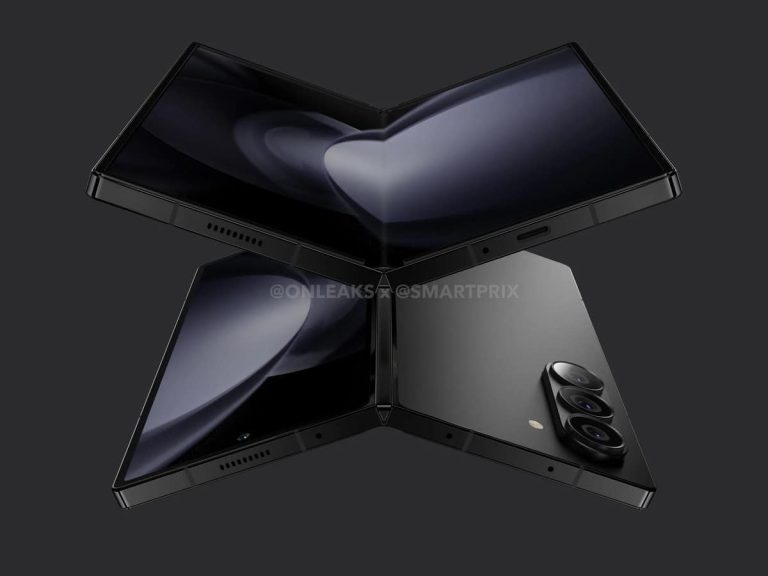
A budget Galaxy Z Fold 6 model has been mentioned again, and could be coming in July
That information has been relayed by Revegnus, a tipster. The source is saying that Samsung is preparing its first budget Galaxy Z Fold smartphone. Its name in particular was not mentioned, though.
It is said that Samsung is developing two different Galaxy Z Fold 6 models. One will offer S Pen support, while the other will not. We’re not sure what other differences will there be between them, however.
Not offering S Pen support could make a tiny price difference, but in order to make a real difference, Samsung will have to cut some corners. We still don’t have any specifics regarding that.
The ‘Ultra’ variant was also briefly mentioned a while back, but that model is likely not coming
The question is, will this phone arrive at the same time as the Galaxy Z Fold 6? Well, it would make sense, wouldn’t it. If that ends up being the case, we’ll get to see three foldable smartphones launched during Samsung’s second Unpacked event of the year.
In addition to those foldables, Samsung is also expected to fully announce its Galaxy Ring. That will become the first smart ring that Samsung ends up announcing. The company did show it off during MWC, but only its design and minor tidbits, no specifics.
All in all, it seems like the company’s second Unpacked event will be quite interesting. It’s rumored to happen on July 10 this year, sooner than ever before. It’ll allegedly take place in Paris, France.
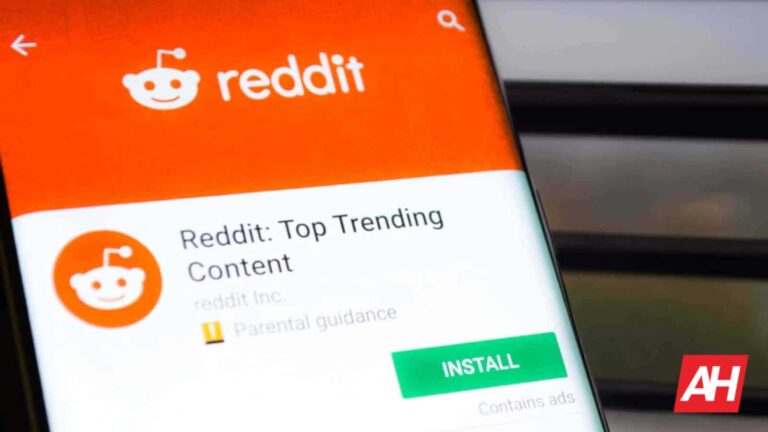
At this point, there’s no escaping ads. The amount of revenue that they produce for major companies is indisputable. While it’s preparing its initial public offering (IPO), the company just made an announcement regarding advertisers. Reddit just introduced its free-form ads. This will make ads on the platform appear more like regular posts.
Most people probably shuttered when they read that last part. When scrolling through Reddit, folks want to make sure to differentiate between ads and regular posts. Let’s face facts back, people avoid advertisements most of the time.
However, Reddit says that free-form ads have already shown some promising data
It stated that it wants advertisers to interact with potential customers in the same way that Redditors interact with others on this site. This is something that the company believes will drive engagement for advertisers. Advertisers will be able to make ad posts using several types of media just like a regular post. In fact, the announcement says that free-form ads are actually inspired by the megathread.
In its announcement post, Reddit stated that this ad format is actually seeing results. It said that companies like Kraft Heinz, Leica, and Just Eat Takeaway have seen an increase in their clickthrough rate (CTR). On average, they saw a 28% increase as well as more community engagement. So, this gave Reddit the go-ahead to push it to more advertisers- the numbers don’t lie.
The thinking behind this
So, it’s obvious that Reddit wants corporate companies to interact with users without being so… corporate. Honestly, that’s the main goal of any company advertising. The key word is relatability. Brands strive to resonate with the demographic they’re trying to sell to. This is one reason why we had the Milk ad showing a streamer playing Fortnite breaking their refrigerator with the pickaxe, collecting a milk bottle, and breaking out into a Fortnite dance (this is a real ad by the way…).
Free-form ads will allow advertisers to communicate with users in a more organic way. Rather than feeling like a company is pushing a product on you, it wants you to feel like you’re just interacting with another peer.
However, this could have its downside. Not too many people like the feeling of clicking on an ad thinking that it’s a regular post. So, with free-form ads, we expect this to happen much more often across the app and website. It will probably cause many users to be angry. We will just have to see how this goes.
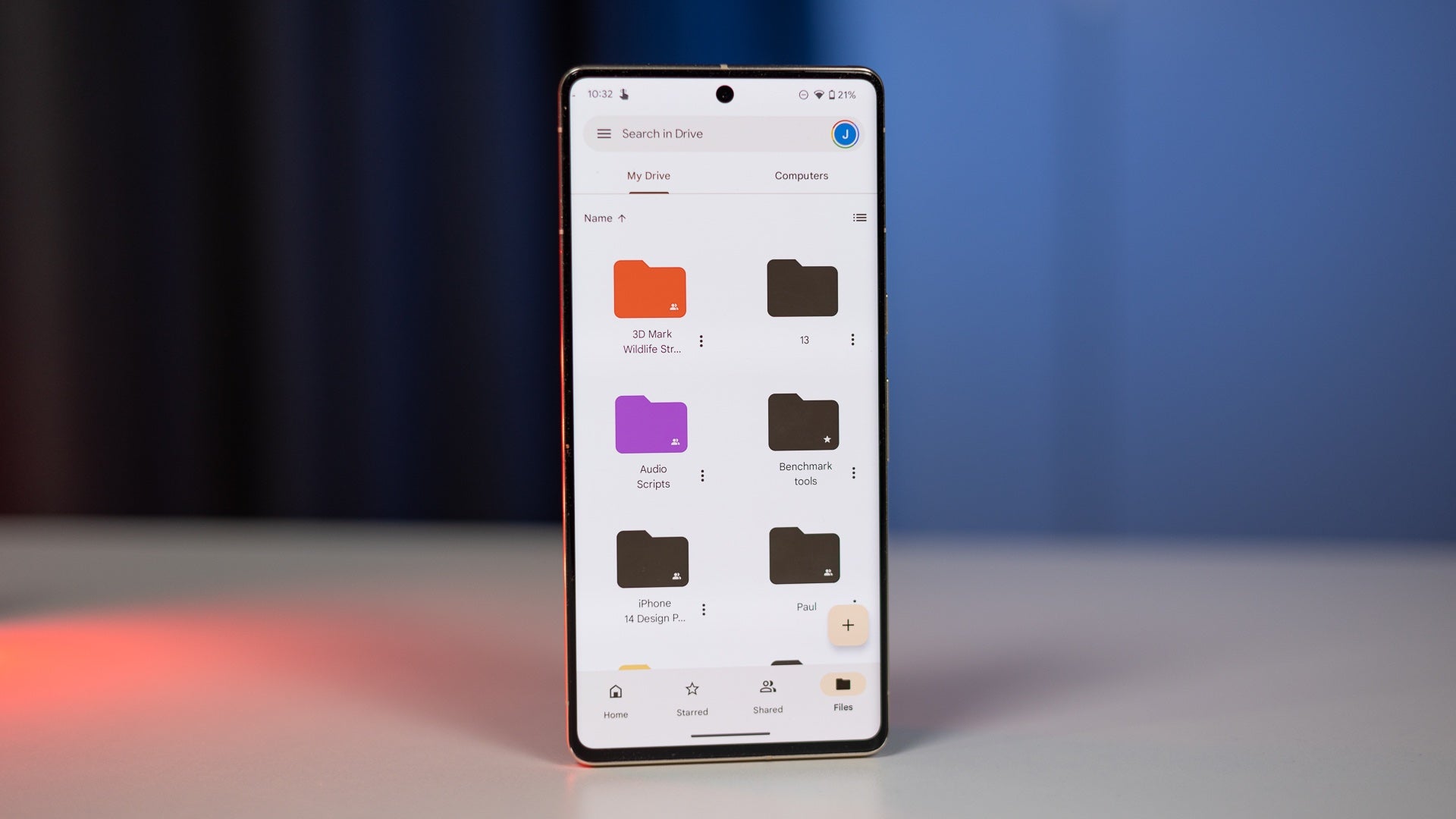
Google introduced a feature last year that provided a new way for Google Drive users to organize their files and easily find them later based on some pre-defined filters. However, while helpful, this feature was also very limited, as it was only available on iOS and the filter criteria were very narrow. This might be changing soon, though, as Google Drive is now testing more expansive search categories in its Android app.Google is expanding file organization options within Google Drive with a new “Categories” feature, as @AsembleDebug from The SP Android discovered while looking through the Google Drive app’s code. Unlike the existing “labels” feature, whose creation is currently limited to Workspace admins, “Categories” promises broader usability and better ways to keep your Drive tidy. This is also the case with the iOS implementation, which is limited to the pre-established categories (file type, owners, and last modified status).
How will “Categories” work?
The Categories feature will let you assign files to one or more of 12 predefined categories, such as:
Auto
Banking
Expenses
Home
IDs
Insurance
Medical
Pets
School
Taxes
Travel
Work
Files can be categorized by tapping the three-dot menu next to a file and selecting “Manage Categories.” This makes it easy to tag important documents with the appropriate labels.
The beauty of using categories, unlike just adding files to a folder, is that you can apply more than one to the same file. For example, you can double-categorize the PDF version of a bill as “Expenses” and “Travel,” which would enhance file discovery when needed. Imagine having all your bills, expenses, and banking statements neatly arranged in a single location, accessible right from the Drive home screen. It makes finding what you need far more convenient than traditional folder structures.
While initially discovered in the Android app and still under development, the feature appears to be designed to synchronize across Android, iOS, and web versions of Drive. This makes it a truly universal organizational tool. Importantly, this isn’t just for Workspace users, meaning anyone with a Google account will be able to benefit from it.
Following the February 21 attack on Change Healthcare, scores of people in the US have been living with the brutal, real-world effects of ransomware.
Described by the American Hospital Association (AHA) President and CEO Rick Pollack as “the most significant and consequential incident of its kind against the US health care system in history,” the attack has stopped billions of dollars in payments flowing between doctors, hospitals, pharmacies and insurers. It has also created skyrocketing pharmacy bills, pushed some healthcare providers to the edge of insolvency, and led some small practices offering chemotherapy to warn that they are just weeks from turning patients away.
There are thousands of “big game” ransomware attacks like this every year—large scale cyberattacks that can bring entire organisations to a halt. They are always damaging and they always cause pain, but when they hit the healthcare system, the consequences—particularly the risk to life—are often more immediately obvious and shocking.
From time to time individual ransomware gangs will grandstand and say they don’t or won’t hit hospitals, but the truth is that healthcare has always been a major target.
Only three weeks ago, the Cybersecurity and Infrastructure Security Agency (CISA) issued a warning that ALPHV, the ransomware group behind the attack on Change Healthcare, was singling out targets in that sector, saying that “since mid-December 2023, of the nearly 70 leaked victims, the healthcare sector has been the most commonly victimized.”
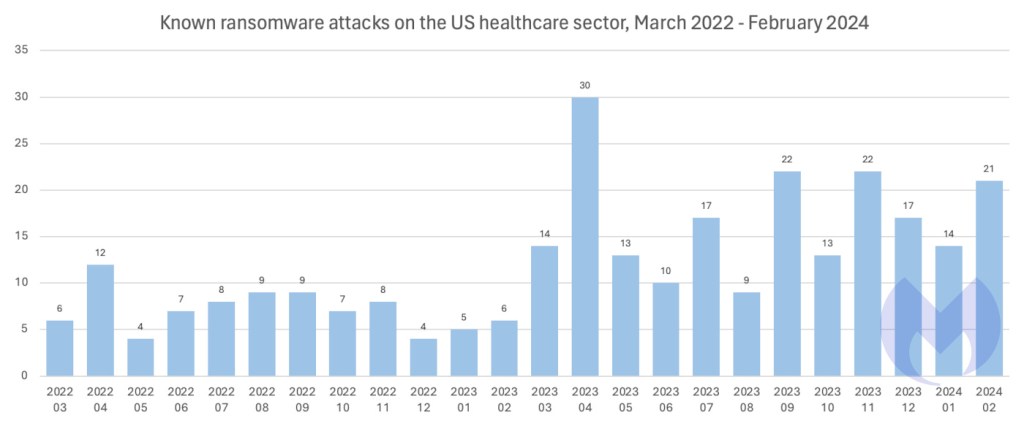
ALPHV is just one gang among many targeting the sector. In the last 12 months, known ransomware attacks on US targets have increased an enormous 101% year-on-year, but attacks on healthcare have outpaced even that, increasing 137%.
70% of all known attacks on healthcare happen in the US.
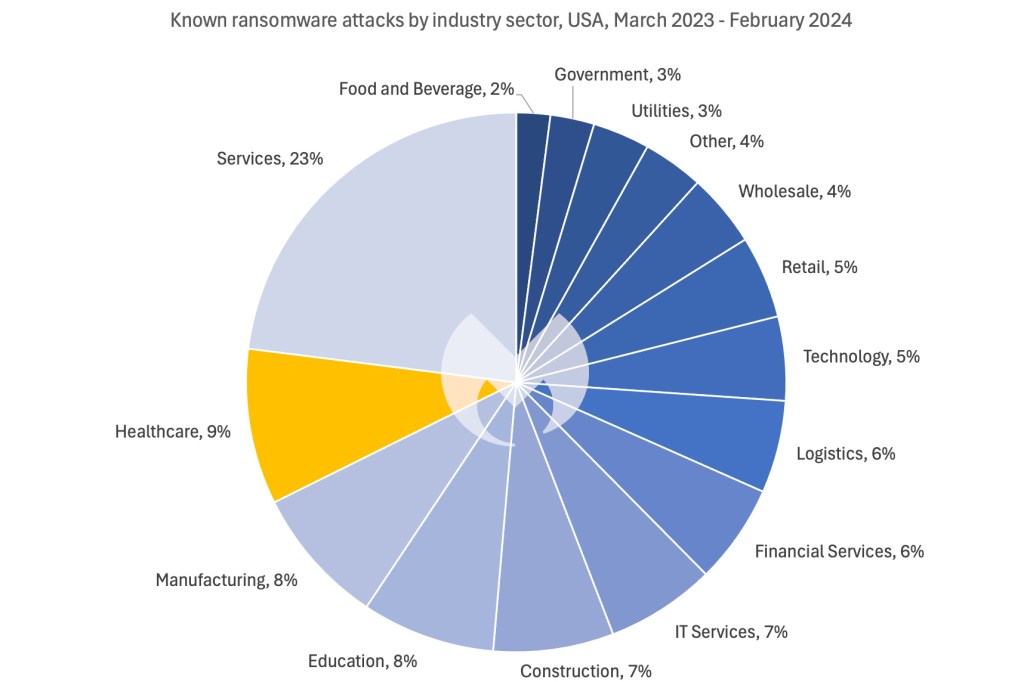
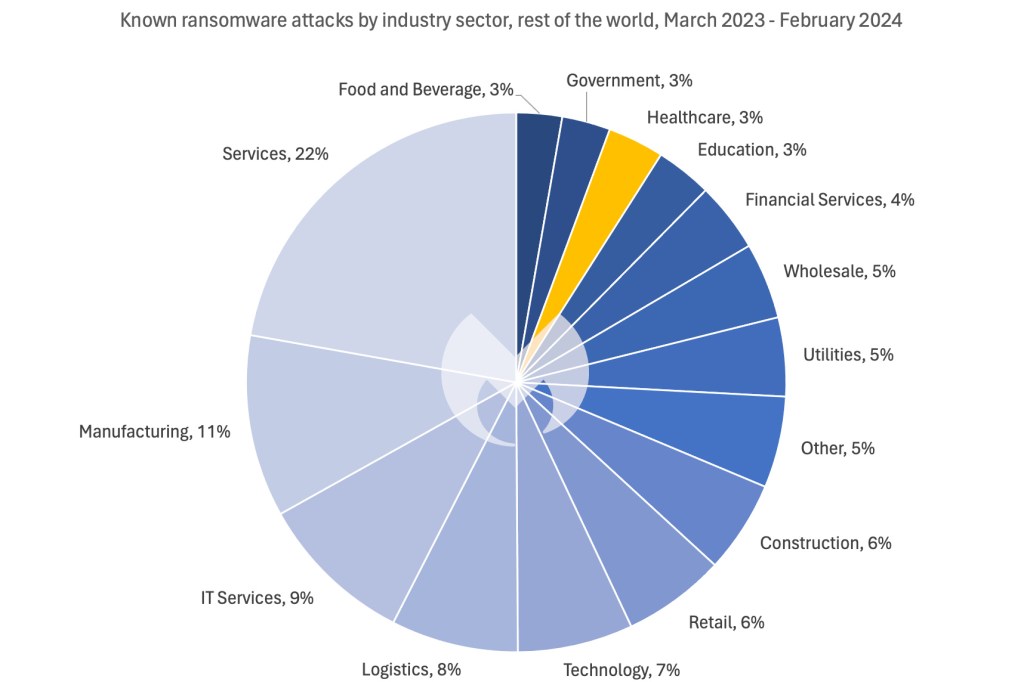
This relentless assault has made healthcare the second most attacked sector in the US, where it accounts for 9% of known attacks. In the same period, healthcare accounted for just 3% of known attacks in the rest of the world.
The stark difference between the US and everywhere else may reflect the enormous size of the US healthcare market, or it could be the result of deliberate targeting.
ScreenshotScreenshot
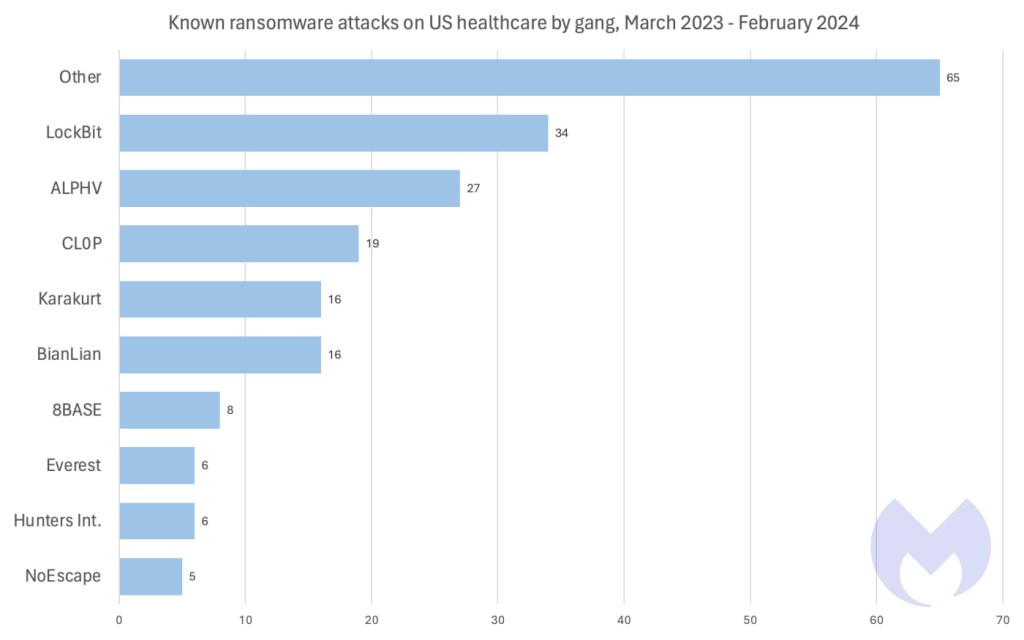
Given its unmatched global footprint, it’s no suprise that LockBit was responsible for more attacks on US healthcare than any other ransomware group in the last year. LockBit is the most widely used ransomware in the world, and tops the list of most active groups across a wide variety of different countries and industry sectors. What is most striking about attacks on US healthcare though is the number of different gangs involved.
In the last year, 36 different ransomware groups are known to have attacked US healthcare targets, and, unusually, the combined contribution of gangs making just a few attacks each vastly outweighs the efforts of big gangs like LockBit and ALPHV.
It’s easy to see why so many ransomare gangs might be drawn to the sector: US healthcare companies are custodians of people’s most private data, guardians of their health, and part of a marketplace worth trillions of dollars. In other words, healthcare isn’t just another industry sector, either for the people who use it, or the people who prey on it. It is a special case, and there is an argument for saying that attacks on organisations like Change Healthcare should be treated like an attack on critical infrastructure.
The last attack on US critical infrastructure, against Colonial Pipeline in 2021, was met with an immediate and ferocious response. Within a month, the FBI had recovered the vast majority of the ransom. The gang behind it, DarkSide, lost control of its infrastructure to US law enforcement (and possibly US military) before going dark, and was quickly hounded out of existence by the FBI after it attempted to remerge and rebrand as BlackMatter.
Knowing that, perhaps it’s not a surprise that the attack on Change Healthcare was one of the ALPHV gang’s last acts before it disappeared in a sloppily exectuted exit scam.
Prevent intrusions. Stop threats early before they can even infiltrate or infect your endpoints. Use endpoint security software that can prevent exploits and malware used to deliver ransomware.
Detect intrusions. Make it harder for intruders to operate inside your organization by segmenting networks and assigning access rights prudently. Use EDR or MDR to detect unusual activity before an attack occurs.
Stop malicious encryption. Deploy Endpoint Detection and Response software like ThreatDown EDR that uses multiple different detection techniques to identify ransomware, and ransomware rollback to restore damaged system files.
Create offsite, offline backups. Keep backups offsite and offline, beyond the reach of attackers. Test them regularly to make sure you can restore essential business functions swiftly.
Don’t get attacked twice. Once you’ve isolated the outbreak and stopped the first attack, you must remove every trace of the attackers, their malware, their tools, and their methods of entry, to avoid being attacked again.
Our business solutions remove all remnants of ransomware and prevent you from getting reinfected. Want to learn more about how we can help protect your business? Get a free trial below.
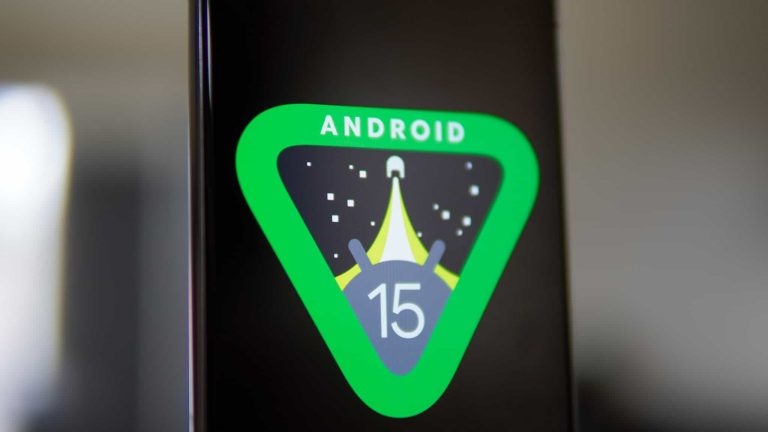
A little while back, we got the news that Google is working on an app archiving feature for Android 15. App archiving is not new, as the concept has been around for more than half a decade. You’ll be familiar with this if you knew about the Nextbit Robin that came out back in 2015.
When an app is archived, its data is uploaded to the cloud and deleted from your device. The app icon remains on your device, however. When you want to use that app again, you simply have to tap on the app icon and redownload the data. You will be able to pick up where you left off.
This is a method of saving space on a device without deleting important data. Android has an app archiving feature, but it is handled through the Google Play Store. So, your experience isn’t as intuitive as Apple’s App Offload feature which is handled through iOS. Also, if you happen to have downloaded an app from a third-party app store, you will not be able to archive them.
Here’s a video of the app archiving feature and Android 15
Since we are talking about an unreleased version of Android, you are going to want to take this news with a grain of salt. Google is still working on the feature, so it could either look differently, perform differently, or be canceled altogether between now and the official launch of Android 15. You’re going to want to keep that in mind.
In the video, we see Rahman archiving the Uber app. The overall process of archiving an app is very simple and straightforward. What you will do is go to the info screen of the app you want to archive. Depending on the device you’re using, the screen will look different. In the video, we see how it will look on stock Android.
In the top row of options, we see the Archive app option. This will then start uploading the app data to the cloud. After that point, the app’s icon will be grayed out. To restore the app, you simply have to tap on the grayed-out icon or the Restore function on the info screen.
The difference between archiving apps and uninstalling
If you’re struggling to see the difference between archiving and uninstalling apps, here’s a quick rundown. When you uninstall an app, you remove everything from your device completely. This means that, if you have to reinstall it, you have to repeat the setup and login process from scratch. Also, you’ll lose all of your progress if it’s not saved to the cloud.
However, app archiving is different. When you restore an archived app that you were signed in to, you will still be signed in to that account when you restore it. So, you don’t have to worry about losing data, losing progress, or being signed out of accounts. When you restore an archived app, you pick up right where you left off.
Ring Protect is a subscription service offered by Ring, which is an Amazon-owned company, for its doorbells, cameras, and security alarms. By subscribing to Ring Protect, you can unlock several features for your devices that are not available for non-subscribers. Some of the features that Ring Protect offers are more video history, the ability to download videos, and the option to share videos and photos with friends and family.
If you’re someone who is concerned about the security of your home, then subscribing to Ring Protect can be a great option for you. With the additional video history feature, you can access and view recorded video footage from the past 60 days, which can be very helpful in case of a break-in or theft. This feature can also be useful in case you want to keep an eye on your kids, pets, or any other activity that takes place in and around your home.
Another significant feature offered by Ring Protect is the ability to download videos. With this feature, you can easily download any video that you want to save or share, and you can do it without any restrictions. Additionally, you can also share videos and photos with your friends and family members, which can be a great way to keep them in the loop about what’s happening in your life.
However, it’s important to note that subscribing to Ring Protect comes with a cost. The cost varies depending on the plan you choose, and it can range from $5 to $20 per month. So, before you subscribe, it’s essential to consider whether the additional features that Ring Protect offers are worth the cost.
What is Ring Protect?
Ring Protect Plan is an optional subscription plan that will give you access to paid features for different Ring devices. That includes video doorbells, security cameras, and security alarms. With a Ring Protect Plan, you are able to save, review and share video recordings from your Ring devices to your Ring account. Without a plan, you can still view real-time video for Ring Doorbells and cameras and answer doorbell notifications as they happen. But you won’t get video recordings of those events.
So, while Ring Protect is not needed, it is a beneficial subscription to have.
How much does Ring Protect cost?
You can get started with Ring Protect for just $4.99 per month or $49.99 per year. That is for the Basic Plan, and it’s really only meant for those with a single camera or doorbell. So, if you’re just getting started with Ring, this is a good option.
Ring also has Plus and Pro plans available. Plus, it will cover all of your home security cameras and doorbells for $10/month or $100/year. At the same time, Pro does that and includes professional monitoring with the Ring Alarm for $20/month or $200/year.
For most people, Ring Protect Basic is going to be perfect. But if you use more than just a doorbell, you’ll have to upgrade to the “Plus” plan. It’s rather unfortunate that they don’t offer something in the middle for someone who has a doorbell and a camera; that’s around $5 or $6 per month. But that’s how it is.
What plans are available?
The Ring Protect plans are pretty self-explanatory, but in the table below, we’ll show you how the three stack up.
It’s worth mentioning that the Plus and Pro plans are only available in the US.
Basic $4.99/month $49.99/year
Plus $10/month $100/year
Pro $20/month $200/year
Video History up to 180 days
✓
✓
✓
Video saving and sharing
✓
✓
✓
Snapshot Capture
✓
✓
✓
Person Alerts
✓
✓
✓
Rich Notifications
✓
✓
✓
Persistent Visitor
✓
✓
✓
Alexa Greetings
✓
✓
✓
10% off Select products on Ring.com and Amazon.com
✓
✓
✓
Download up to 50 videos at once on Ring.com
✓
✓
✓
Extended Warranties for all Devices
✓
✓
24/7 Professional Monitoring
✓
Alarm Cellular Backup
✓
Alexa Guard Plus
✓
In-app SOS button for Ring Alarm or Ring Alarm Pro
✓
Duress code for Ring Alarm or Ring Alarm Pro
✓
24/7 Backup Internet with Optional Data
✓
Digital Security by eero Secure
✓
Ring Edge with Local Video Storage
✓
Save up to $100 per year or more on your Home Insurance
✓
Should I buy Ring Protect on a monthly or yearly plan?
Ring does offer the Protect plans in both monthly and yearly plans. As usual, the yearly plan is a bit cheaper. You’re basically paying for 10 months and getting two for free. So, the Plus plan equates to about $8.33 per month, versus the $10 per month if you were to pay monthly. So that’s a good thing to keep in mind.
However, if you are unsure whether you want to keep the Ring Protect plan, going monthly at first might be a good option. But remember that you do get a free trial when you activate a new product. That free trial lasts about 30 days.
Is there a free trial?
Ring does offer a free trial for Protect. Whenever you register a new device, you will get a free 30-day trial, which starts immediately. You can’t choose to activate it later on; it starts the minute you activate the device.
The only exception here is if you are already a subscriber of Ring Protect at the same location as the new device.
The trial does allow you to use all of the Ring Protect features, including saving 10% on Ring.com and Amazon.com. The Amazon discount is valid in the US only, while Ring.com’s discount is valid in the US, Canada, the UK, Europe, Australia, and New Zealand.
If you bought a bundle from Costco, you may have a longer Ring Protect trial. The trial is the same, the only difference is the length may differ. You’ll need to check on the bundle you bought at Costco to get all of the details.
Can I cancel Ring Protect at any time?
Yes, you can cancel your Ring Protect plan at any time, though you will need to do it through the Ring website.
Whether you cancel on a yearly or monthly plan, you’ll get a refund. Unlike some other subscriptions, Ring Protect will cancel the day you cancel it. So you will get a prorated refund to the credit or debit card Ring has on file. That’s actually really nice to have in case you forgot to cancel Ring Protect and got charged for a yearly plan. You can get it all back, which is really awesome.
Is Ring Protect worth the price?
If you’re heavily invested in the Ring ecosystem, then it’s definitely worth it. If you have just one device, it may not be entirely worth it, even at $3.99 per month.
While it’s pretty annoying that Ring doesn’t let you download any recorded videos without paying for its subscription. At least it’s not super expensive. And you likely won’t need to download those videos all that often. So that’s a good thing.
If you own a Ring Video Doorbell 4, a Ring Spotlight Cam, and the Ring Alarm, then subscribing to the Pro plan would be a wise decision. This is because you will benefit from professional monitoring, which is a valuable service. Compared to competitors like SimpliSafe and ADT, who usually charge at least $20 per month for this service, Ring’s Pro plan offers a lot more than just monitoring.
So it’s worth it, but the ultimate decision comes down to you and how you use Ring products in your home.
Following the February 21 attack on Change Healthcare, scores of people in the US have been living with the brutal, real-world effects of ransomware.
Described by the American Hospital Association (AHA) President and CEO Rick Pollack as “the most significant and consequential incident of its kind against the US health care system in history,” the attack has stopped billions of dollars in payments flowing between doctors, hospitals, pharmacies and insurers. It has also created skyrocketing pharmacy bills, pushed some healthcare providers to the edge of insolvency, and led some small practices offering chemotherapy to warn that they are just weeks from turning patients away.
There are thousands of “big game” ransomware attacks like this every year—large scale cyberattacks that can bring entire organisations to a halt. They are always damaging and they always cause pain, but when they hit the healthcare system, the consequences—particularly the risk to life—are often more immediately obvious and shocking.
From time to time individual ransomware gangs will grandstand and say they don’t or won’t hit hospitals, but the truth is that healthcare has always been a major target.
Only three weeks ago, the Cybersecurity and Infrastructure Security Agency (CISA) issued a warning that ALPHV, the ransomware group behind the attack on Change Healthcare, was singling out targets in that sector, saying that “since mid-December 2023, of the nearly 70 leaked victims, the healthcare sector has been the most commonly victimized.”
ALPHV is just one gang among many targeting the sector. In the last 12 months, known ransomware attacks on US targets have increased an enormous 101% year-on-year, but attacks on healthcare have outpaced even that, increasing 137%.
70% of all known attacks on healthcare happen in the US.
This relentless assault has made healthcare the second most attacked sector in the US, where it accounts for 9% of known attacks. In the same period, healthcare accounted for just 3% of known attacks in the rest of the world.
The stark difference between the US and everywhere else may reflect the enormous size of the US healthcare market, or it could be the result of deliberate targeting.
ScreenshotScreenshot
Given its unmatched global footprint, it’s no suprise that LockBit was responsible for more attacks on US healthcare than any other ransomware group in the last year. LockBit is the most widely used ransomware in the world, and tops the list of most active groups across a wide variety of different countries and industry sectors. What is most striking about attacks on US healthcare though is the number of different gangs involved.
In the last year, 36 different ransomware groups are known to have attacked US healthcare targets, and, unusually, the combined contribution of gangs making just a few attacks each vastly outweighs the efforts of big gangs like LockBit and ALPHV.
It’s easy to see why so many ransomare gangs might be drawn to the sector: US healthcare companies are custodians of people’s most private data, guardians of their health, and part of a marketplace worth trillions of dollars. In other words, healthcare isn’t just another industry sector, either for the people who use it, or the people who prey on it. It is a special case, and there is an argument for saying that attacks on organisations like Change Healthcare should be treated like an attack on critical infrastructure.
The last attack on US critical infrastructure, against Colonial Pipeline in 2021, was met with an immediate and ferocious response. Within a month, the FBI had recovered the vast majority of the ransom. The gang behind it, DarkSide, lost control of its infrastructure to US law enforcement (and possibly US military) before going dark, and was quickly hounded out of existence by the FBI after it attempted to remerge and rebrand as BlackMatter.
Knowing that, perhaps it’s not a surprise that the attack on Change Healthcare was one of the ALPHV gang’s last acts before it disappeared in a sloppily exectuted exit scam.
Prevent intrusions. Stop threats early before they can even infiltrate or infect your endpoints. Use endpoint security software that can prevent exploits and malware used to deliver ransomware.
Detect intrusions. Make it harder for intruders to operate inside your organization by segmenting networks and assigning access rights prudently. Use EDR or MDR to detect unusual activity before an attack occurs.
Stop malicious encryption. Deploy Endpoint Detection and Response software like ThreatDown EDR that uses multiple different detection techniques to identify ransomware, and ransomware rollback to restore damaged system files.
Create offsite, offline backups. Keep backups offsite and offline, beyond the reach of attackers. Test them regularly to make sure you can restore essential business functions swiftly.
Don’t get attacked twice. Once you’ve isolated the outbreak and stopped the first attack, you must remove every trace of the attackers, their malware, their tools, and their methods of entry, to avoid being attacked again.
Our business solutions remove all remnants of ransomware and prevent you from getting reinfected. Want to learn more about how we can help protect your business? Get a free trial below.
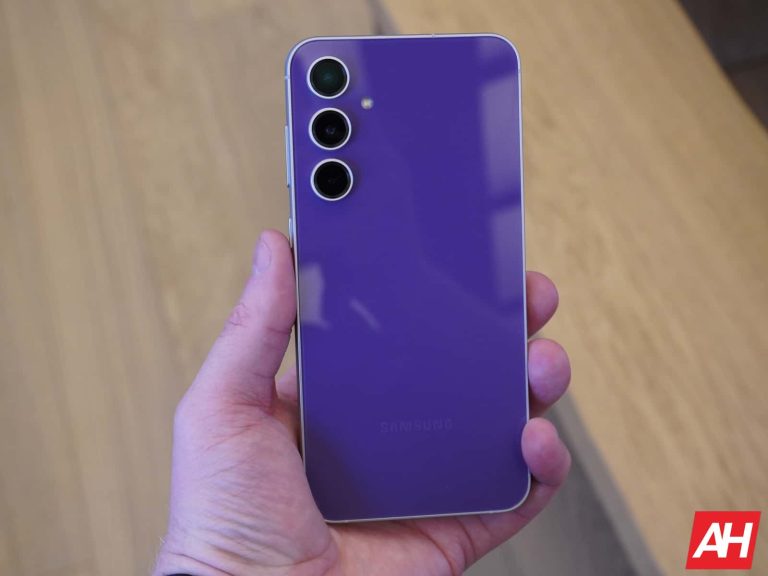
Samsung continues to push the March 2024 update to eligible Galaxy devices globally. It has just added the Galaxy S20 FE 5G to the mix. The company has also begun a global rollout for a bunch of other devices that initially picked up the update in the US, including the Galaxy S23 FE and Galaxy S21 series.
Galaxy S20 FE 5G gets Samsung’s March 2024 update
Samsung has released the March update for the Galaxy S20 FE 5G in Latin America. According to SamMobile, which first reported this rollout, the update is available in Brazil with the firmware build number G781BXXS9HXB4. It should soon expand its coverage to other regions, including the US. The 4G model, which didn’t arrive in the US, may or may not get this month’s SMR (Security Maintenance Release).
The new SMR patches 46 security vulnerabilities in Galaxy devices, including two critical ones. The update doesn’t bring anything more to the Galaxy S20 FE 5G. This phone isn’t eligible for Android 14, so no more feature updates for it. This also means it will miss out on One UI 6.1. Introduced with the Galaxy S24 series, the new One UI version will bring some AI features, UI changes, camera improvements, editing tools, and more.
While feature updates have ended, the Galaxy S20 FE 5G will get security updates until the end of this year. Samsung will then stop offering official support for the phone. You should consider upgrading to a newer device to stay protected against the latest security vulnerabilities. The Galaxy S23 FE is the newest model in the lineup. It will get updates up to Android 17 and security patches until the end of 2028.
This update is rolling out globally for some devices
Alongside the Galaxy S20 FE 5G, Samsung’s March update is available for the Galaxy Z Fold 4, Galaxy Z Flip 4, Galaxy Z Fold 3, Galaxy Z Flip 3, Galaxy S23 FE, and Galaxy S21 series in international markets. These devices have already received the new SMR in the US. The company has now begun a global rollout, so everyone should get it in the next few weeks. You can check for updates from the Settings app.
The build numbers will vary according to the device’s model and region. However, it’s the same changelog for all. Samsung is only pushing the security fixes mentioned above. Thankfully, all of these devices are eligible for the One UI 6.1 update. It may not arrive anytime soon, though. The Galaxy S23 series, Galaxy Z Fold 5, Galaxy Z Flip 5, and Galaxy S22 series should be at the top of Samsung’s priority list. Stay tuned for more information.