The Andariel threat group has been discovered to be using MeshAgent when attacking Korean companies.
The group has previously attacked Korean Asset management solutions for installing malware, such as AndarLoader and ModeLoader.
However, MeshAgent is used alongside other remote management tools due to the diverse remote control features it offers. The Andariel group has been distributing its malware during the lateral movement phase.
Mesh installation logs (Source: AhnLab)
According to reports shared with Cyber Security News, the threat group uses AndarLoader, ModeLoader, MeshAgent, Mimikatz, and other malware attacks, including Backdoors, just like the Kimsuky threat group.
In a previous report, the Andariel group utilized the Innorix agent (data transfer solution).
AndarLoader
This malware is similar to a previously used Andardoor backdoor which was capable of executing commands from the C2 server.
However, AndarLoader is a downloader rather than a backdoor which downloads executables such as .NET assembly and runs it in memory.
As for the obfuscation, the AndarLoader uses the KoiVM tool instead of using the traditional Dotfuscator tool.
However, there are still several strings that are identical to the past AndarLoader. In addition, the present AndarLoader also uses sslClient string when connecting to the C2 server.
MeshAgent
Mesh Control panel (Source: AhnLab)
MeshAgent is capable of collecting basic essential information for remote management and offers several features such as power management, account management, chat or message pop-up, file upload, download, and command execution alongside remote desktop features such as RDP and VNC.
As a matter of fact, this is the first case of the Andariel group using the MeshAgent for their operations.
The MeshAgent has been found to be downloaded from an external source with the name “fav.ico.”
ModeLoader
ModLoader malware (Source: AhnLab)
This is a javascript malware which is downloaded externally through the Mshta process and executed instead of being generated and executed.
The Mshta process is specifically targeted by these threat actors in order to download the ModeLoader.
The ModeLoader provides a simple feature of connecting with the C2 server regularly and receives Base64-encoded commands and executes them.
Additionally, it also sends feedback about the executed commands to the C2 server.
Other Malware Attack cases
Once they take control of the affected system, the threat actors use Mimikatz to extract credentials from the compromised system.
To circumvent the latest security configuration of not storing plain passwords, the threat actors use the UseLogonCredential registry key to extract the credentials.
Furthermore, the traces of these malicious activities are erased by deleting security event logs of the infected systems using the command “wevtutil cl security.”
Moreover, a keylogger was also found, which was provided by the malware.
Some phones are meant to just be phones; portable digital companions. However, some phones are designed and destined to serve a singular purpose. The Tecno Pova line of phones is an example of the latter. These phones are designed to bring the gaming phone down to a lower price point. Well, I was given the opportunity to review the Tecno Pova 6 Pro 5G, which is the latest in this line of phones.
Going into this review, I was a bit skeptical. I reviewed the Pova 5 Pro (Review) last year. It was a triumph in several ways, but a disappointment in one key area, gaming. Tecno managed to squeeze every gaming phone trope into this phone: badass design, LED lights, game launcher, large cooling chamber, and an overall gamer aesthetic. However, with the phone’s poor gaming performance, it felt like Tecno just dressed up a mundane mid-range phone to look powerful.
Because of this, I hesitated to call it a gaming phone. It’d be like calling a sedan a sports car because someone put on a spoiler and stripe down the middle. Well, did Tecno deliver a hot rod this time around, or is it just another fancy paint job? Let’s find out.
Tecno Pova 6 Pro Review: Design
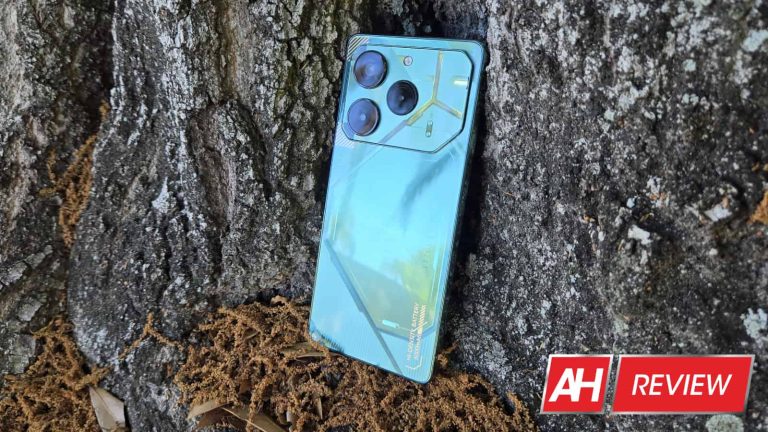
One thing I appreciate about Tecno and other companies like it is the fact that it’s not afraid to give their phones a bold and outlandish design. Well, the design of the Pova 6 Pro is nothing if not bold and outlandish. Honestly, I had trouble finding the words to properly describe it. Tecno gave the Pova 6 Pro a design that’s futuristic but very pretty at the same time.
True to the design philosophy of the Camon 20 Pro/Premier and the Pova 5, the back of the phone is adorned with an array of angled lines and shapes. Even the shape of the camera cutout matches this aesthetic. In between the lines, there’s a mish-mash of different textures and designs. The remarkable thing about the design is that it’s wildly inconsistent; there are different shapes, lines, textures, and text strewn about the phone. However, they all mesh together somehow. It creates a pleasantly eclectic aesthetic that I’m all for.
There’s just so much going on, but it keeps from being too much. The colorway I’m reviewing is the Comet Green color, and it looks gorgeous. You don’t see too many phones on the market with an overall green color scheme, but this phone wears it well. What makes the phone look even better are the subtle gold accents on the back. They stand out, but they do so in an elegant manner.
Dotted throughout the back of the phone, Tecno actually placed text showing off some of the specs of the phone, which I thought was a weird addition. If you look closely at the phone, you’ll see the main camera resolution, “Ultra Charge”, “NFC”, “06”, and “HI-DENSITY BATTERY 6000mAh”. You don’t have to look closely for that last one, as it’s laid out in gold.
LED lights
Being a gaming phone, the Pova 6 Pro needs to have some sort of extraneous lights on the hardware. I’d be lying if I said that this phone didn’t look like it took a few notes from Nothing. The in-laid LED lights on the back of the phone remind me of the Nothing Phone (1). Even the Pova 5 had LED lights.
Just like with the Pova 5, you’ll see the lights during several different scenarios. You’ll see the lights when gaming, charging the phone, taking photos, and starting the phone.
However, this time around, Tecno made some changes to its lights, and the company took a step backward in my opinion. The lights on the back of the Pova 5 Pro covered most of the back. On the other hand, the lights on the Pova 6 Pro only reside in the camera package. There’s a Y-shaped section that lights up along with a circle of lights around one of the camera sensors. It looks incredibly underwhelming compared to the lights on the Pova 5, and that’s saying a lot because the lights on the Pova 5 weren’t all that impressive, to begin with.
Not only are the lights on the Pova 6 smaller, but they’re not colorful like the lights in last year’s phone. They only shine in white, which is far less impressive compared to the lights on the Pova 5, which were full RGB.
Honestly, I think that the phone looks better with the lights off. They’re situated in one location and they’re only one color. The lights are a far cry from what they were in the Pova 5 Pro. I wouldn’t say that the lights subtract anything from the design. I just say that they don’t really add anything to the experience. The design is perfectly fine without them.
Tecno Pova 6 Pro Review: Build quality
I admire companies like Tecno. It’s able to bring some premium features down to an affordable price point. However, most companies that do this wind up running into the same obstacle, build quality. Phones can look, sound, and perform great… but they rarely feel great.
There’s no escaping the fact that this is an affordable phone. The moment I picked it up, it became obvious that I was holding a solid hunk of plastic. I could feel the plastic frame of the phone and, based on the warping of the reflections on the back of the phone, it’s clear that the back is made from plastic. In fact, just pressing my finger on it causes the back plastic to bend, which is not a good feeling.
Along with the plasticy feeling, there’s a notable lack of heft that you’ll instantly feel. This is only made worse by the thickness of the phone. The Pova 6 Pro is a decently thick phone, so the lack of heft doesn’t make the phone feel light; it makes it feel hollow. It’s lacking that feeling of density that you feel with premium phones.
This is not to say that the phone was cheaply put together. The buttons on it are nice and clicky and I didn’t hear any creaks or other sounds when applying some force to it. This phone should be fine as long as you don’t reenact a JerryRigEverything durability test. However, you’d want to be careful not to leave it where it can be sat on or stepped on.
This is the kind of thing you should expect from a phone under $300, so I’m not disappointed. Though, I will say that with how plasticy it feels, it takes away from the experience just a bit. Picking it up gives me the feeling that I’m holding a phone that’s not worth my time. If you’re used to using other phones from Tecno or comparable brands, then this might not be that much of a letdown. Just know that this phone will not feel anywhere near as premium as it looks.
Tecno Pova 6 Pro Review: Display
This is a new iteration in the Tecno Pova series, so there are going to be areas where this phone improves over the Pova 5 Pro. The display is one of the biggest upgrades over last year’s model. The Pova 5 Pro sported a nice-looking LCD panel that ran at 120Hz. I have to tip my hat to Tecno because it was a rather beautiful display. It’s definitely one of the best LCD displays that I reviewed, but it fell short of the types of displays I had grown accustomed to from Tecno.
I was used to the displays on the Tecno Camon 20 Pro, Camon 20 Premier, and Infinix Note 30 Pro (both Tecno and Infinix are owned by Transsion, and the phones mentioned are using extremely similar displays if not the same panels.). The displays on these phones are bright and absolutely breathtaking in their color reproduction and calibration. The Pova 5 Pro’s display fell behind in color saturation (which was a given) and brightness.
The Tecno Pova 6 Pro’s display is an upgrade over the Pova 5’s in every way. Honestly, I was blown away when I powered on this phone.
Brightness
We’re at a point where affordable phones are coming out with incredibly bright displays. This is why I was surprised when I saw the screen brightness of the Pova 5 Pro. Looking at it in direct sunlight reminded me of the bygone days when you had to cover your screen in the sun just to see it.
I expected more of the same with the Pova 6 Pro, but it looks like Tecno decided to increase the brightness by a large margin. It’s not the brightest display on the market, but it’s more than bright enough to be seen in bright daylight. I’m able to comfortably see everything on the screen in just about any lighting condition.
There’s also a high-brightness mode that will further increase the brightness of the screen when you’re in a particularly bright environment. One thing I noticed, however, was that the screen didn’t really get that much brighter. What I think the phone does is increase the contrast of the screen so that it’s easier to see when you’re in brighter light.
One issue regarding the brightness doesn’t have to do with the hardware. I think that the auto-brightness feature could use some tweaks. It’s pretty slow to adjust the brightness to match the lighting conditions. I’d see the brightness slowly increase or decrease to reach the desired level, and this process would take about 10 seconds at times.
Also, when I’d bring it into darker environments, the phone would drop its brightness down to 0%. I get that the phone wants to conserve battery and make for a comfortable viewing experience, but 0% brightness is just a bit too far.
Colors
This time around, Tecno went for an AMOLED display rather than an LCD, so there’s a clear difference in color saturation. The colors produced by this display are beautiful. As with all AMOLED displays, the colors are saturated, but it goes further than that. Tecno calibrates its displays to reach the sweet spot between saturated and oversaturated.
Out of the box, the colors already look rather punchy. I’d say that they’re meant to give you some generally nice-looking colors so that you can enjoy your content. However, if you’re looking for even more extreme colors, then you’re able to push the brightness even further in the display settings. There’s a “Bright color” mode that will boost the saturation even more.
I think that the heightened color saturation pushes them right to the edge of being oversaturated, but it doesn’t go overboard. I’ve used this term before in my other reviews, but I call these colors “Responsibly saturated.” They’re punchy and juicy, but they keep from being too much.
Overall
My feelings toward the Pova 5 Pro were a bit lukewarm, and one reason was because of the display. It just didn’t hold a candle to the displays from the likes of the Camon 20 phones and Infinix Note 30 Pro. With the Pova 6 Pro, I can’t take my eyes off of the display. It strikes such an amazing balance with its color production. The Pova 6 Pro is the first phone ever that I prefer using the out-of-the-box color saturation settings with. The saturation is so perfect intrinsically that I don’t need to boost them.
This, coupled with the increased brightness has completely redefined the kind of display experience you can get with this phone. It’s one of those situations when I have to remind myself that this is a -$300 phone. Logically, superior technologies trickle down over the years; several years ago, only phones over $800 would have high-performing OLED panels. Now, the technology is more accessible.
So, it makes sense that this phone’s display is very nice. However, it still blows my mind every time I unlock the screen.
Tecno Pova 6 Pro Review: Performance
The story of this phone’s performance is a confusing one, and I’ll tell you why a bit later in the review. For now, let’s just focus on the day-to-day performance. I was a little confused as to why Tecno chose the processor that it did for this phone. The Pova 6 Pro is using the MediaTek Dimensity 6080. This is the same processor that was in the Pova 5 Pro. That phone was able to perform rather well.
This time around, I’m actually seeing more stutters and dropped frames throughout the software than I saw last year, and I think this might be because of the fact that it’s running Android 14. It doesn’t create an overall laggy experience, but I noticed more stutters and dropped frames than I’d like to see. Summoning the notification shade would take a full second at times, loading apps would be slow, the refresh rate would drop, Etc. This is something that you’d expect with weaker hardware; the Dimensity 6080 is in a pretty gray area between high-end and low-end chips.
I wouldn’t say that this phone is snappy, but I have seen much worse. The thing about it is that it’s not slow to the point where it slows me down. The phone drops frames, but the software never locks up when I’m trying to use it. So, I’m still able to use it at full speed, even under a heavy load. So, this makes it a little difficult to describe this phone’s performance. There’s also another reason that makes it even more difficult. However, before I get into that reason, let’s look at some numbers.
By the benchmarks
Now, I know full and well that benchmark scores don’t paint a full picture of how a phone performs. So, I’m not basing my opinion of the phone on the numbers. However, benchmark scores can be a good way to help know what kind of hardware you’re dealing with.
Starting off with the Geekbench scores, the Tecno Pova 6 Pro scored a single-core score of 777 and a multi-core score of 2,097. These scores are pretty low on the spectrum of phones, even scoring below other mid-range phones. This doesn’t automatically mean that it’s a poor performer, but it helps justify the dropped frames and slowdown in the software.
Moving over to the graphical side of things, I ran this phone through the Extreme Wildlife test in 3D Mark. This will run a short real-time animated animation with extremely high-resolution graphics and see how the phone performs. And how did it perform? Well… The Best Loop Score was 373 and the Lowest Loop Score was 396. For reference, the closest phone I can compare it to is the Tecno Phantom V Flip (Dimensity 8060). That phone scored a Best Loop Score of 1,324 and a Lowest Loop Score of 1,299. While running the animation, the Pova 6’s frame rate was between 1FPS and 3FPS.
Tecno Pova 6 Pro Review: Gaming
So, with benchmark scores that low, this phone should be absolutely terrible when it comes to gaming, right? THIS is why it’s so hard for me to describe how this phone performs! Without mincing words, the Tecno Pova 5 Pro was not a gaming phone. It ran lower-quality and medium-quality games smoothly, but most other phones can do that. When stacked with games like Genshin Impact and Star Rail, the gameplay turned into a slideshow at higher graphic settings. Turning the graphics lower made for a smoother experience, but it was still sluggish.
Well, guess what, Tecno fitted the Pova 5 Pro with the same processor as last year. This was the reason why I was a bit bummed when I got the phone. When I installed and loaded up Genshin and Star Rail, I expected the same performance as last year.
Then… Tecno surprised me.
I don’t know what the heck Tecno did with the software to make this happen, but the gaming performance on this phone is like night and day. I started Genshin Impact, cranked the graphics up to their highest settings, set the max frame rate to FPS, and just played. At that point, I was going to count every stutter or instance of slowdown. But something miraculous happened; I forgot what I was doing. The gameplay was smooth! It was so smooth that I forgot what I was doing and I just played. There weren’t any major performance drops that took me out of the gameplay. It took me a few minutes to remember that I was looking for slowdown.
Don’t get me wrong, it didn’t reach 60FPS. In fact, it stayed at a pretty consistent 25FPS, which is still perfectly playable. What impressed me was that it was consistent. It didn’t stutter or lock up. It just played. Remember, this is with the highest graphic settings on; motion blur and all. I don’t want to oversell it; it’s not spectacular, it’s decent. However, it’s miles better than the Pova 5 Pro.
What makes this more impressive is the fact that the High Boost gaming optimizer has three settings: Power Saving, Equilibrium, and performance. Performance will push the chip to its maximum. Well, I got this gameplay in the Equilibrium mode. In Performance mode, the performance isn’t a lot better, but the frame rate would run about 15FPS – 20FPS faster.
Honkai Star Rail
Another game that can melt a GPU is Star Rail. This game’s performance is a pretty mixed bag. The core gameplay drags the frame rate to an average of about 20FPS, which isn’t great, and that drops to about 16FPS on average during battles. This is with the graphics turned up to their highest setting. So, on average, the performance is noticeably worse with that game.
It’s a mixed bag because the gameplay is decently playable, but everything else is extremely slow. The title screen with the train animation is extremely laggy, and things slow down significantly when it plays the animation that brings you into the game. Also, navigating the interface leads to some significant slowdown. But, when I’m actually playing the game, things are much more fluid.
Overall
So, as I said, describing this phone’s performance is a challenge. The general performance isn’t anything to write home about. I got my fair share of stutter and slowdown while using the phone. Just navigating the software, I saw more slowdown than I wanted to see.
However, the gaming performance is far better than I expected. I won’t put it up there with more expensive phones; the hardware still shows its mid-range nature, but this is only when I crank the games’ graphics up to their highest settings. Even when I played some of the prettiest games on the Google Play Store, the Pova 6 Pro was a champ.
So, this phone is the opposite of the Tecno Pova 5 Pro. That phone could navigate the software smoothly, but it wasn’t the best when it came to gaming. In the case of the Pova 6 Pro it’s much better when it comes to gaming while showing more slowdown in general use.
Tecno Pova 6 Pro Review: Heat performance
The Tecno 6 Pro is a cool phone, and I mean that in more than one way. It’s able to keep very cool during gaming sessions. After playing these graphically intensive games for about 20 minutes, I didn’t feel the phone get too hot to hold. The back of the phone was the coolest while the front was the warmest.
I’d say that things got a little toasty when playing games where I needed to use the digital joystick. My finger is on the glass right above the processor, so it’s logical that this gets a bit hot. However, it never got uncomfortable playing with this phone.
Tecno Pova 6 Pro Review: Battery and charging
This phone comes with a large 6,000mAh battery, and that’s extremely rare for a phone that’s under $300. With such a large battery, longevity is really good. I tested the battery in two ways. Firstly, I did a more standardized test. For it, I charged the battery to 100%, played a looping video at full brightness, and ran it until the phone died. It took 19 hours and 1 minute to reach 0% battery, and that’s not bad. However, it’s a little disappointing compared to other phones that I tested. For example, I ran the Galaxy S24+ through this same test, and it lasted 20 hours. The Galaxy S24+’s battery is 16% smaller than the battery in the Pova 6 Pro.
However, that was only the standardized test. In day-to-day usage, I was able to get more than a day and a half of battery life. This involved moderate usage with some gameplay, camera tests, video-watching, and general usage. I’d gotten comfortable starting the day off with a full battery and reaching the end of the day and saying “Nah, I don’t need to charge it.” Obviously, your mileage will vary. If you’re using this phone as more of a portable gaming console, then you’ll run out of battery sooner.
Charging
All of the Tecno phones I’ve reviewed so far have come with pretty fast charging, and the Pova 6 Pro is no exception. This phone comes with a peak charging speed of 70W. I was able to charge the battery fully in just under an hour. That might not sound too impressive compared to other phones on the market, but you have to remember that this is a larger 6,000mAh battery.
Tecno Pova 6 Pro Review: Speakers
I genuinely like Tecno’s phones. Neither of the ones I reviewed in the past have disappointed me to the point where I didn’t enjoy the experience. They have solid performance, beautiful designs, great software, jaw-dropping displays, and more. But, the one area where they consistently let me down is the speaker quality. I’m not going to lie, the speakers on all Tecno phones I’ve reviewed are mediocre.
I wouldn’t say that they’re offensively bad; they’re just so “meh.” It’s like they’re just there to perform the basic task of supplying sound and that’s it. I can’t really blame the company for this. With the exception of the Phantom V Flip (Review), all of the Tecno phones I reviewed cost under $300, and they already provide so much in other departments. So, these phones can’t excel in EVERY department, otherwise they’d cost so much more. Tecno had to make some compromises, and one of them had to be the speaker quality.
How are the speakers in the Pova 6 Pro? Well, they’re the same as the speakers in the other Tecno phones I reviewed. Also, what makes it worse is the fact that this phone is missing something that the other phones have. Other Tecno phones have the DTS audio technology built into the software. This is a suite of tools that you can use to customize the sound. You’re able to boost different aspects of the audio like the bass or treble, choose audio presets, and have access to a customizable EQ. For some reason, it’s not present for the Pova 6 Pro, which I think is a major bummer.
Audio tests
Aside from just listening to the speakers in my day-to-day usage, I also listened to some test tracks with this phone’s speakers. There are six tracks in total, and they all focus on one aspect of audio: volume, distortion, bass, treble, balance, vocals, and immersion. I’m going to go over how the speakers performed with these test tracks.
Loudness
When it comes to the loudness, I have no complaints. I think that these speakers are about as loud as most other phones on the market regardless of price. Realistically, you’re not going to use a phone’s speakers as a replacement for a Bluetooth speaker, so you most likely won’t use these speakers to fill your whole room with sound. However, if you need to, they’re powerful enough to do so.
Distortion
I think that these speakers do a pretty good job of cutting down on distortion. I’m able to play media at full volume and not really hear distortion. So, if you’re gaming with the volume all the way up or you want to listen to music at full volume, the audio will be really clear.
Bass
The thing that I don’t like about the speakers in Tecno phones is the lack of depth. They usually sound so neutral that the low-end audio just doesn’t project. This makes the sound come off as flat. Well, when I played the bass test track, the Pova 6 Pro just didn’t deliver the goods.
Just like with other Tecno phones, these speakers sounded flat and lifeless. The bass track featured some really bass-heavy instruments like double bass, bassoons, contrabassoons, and tubas. I could hear the sound of these instruments clearly; I heard the raspy rattle sound of the contrabassoons. However, I just didn’t hear any of that depth that goes on along with them. This makes the sound much less immersive.
Treble
If depth is what you listen for in the bass, then what you listen for in the treble is clarity. I’m more satisfied with the treble than I am with the bass. I enjoy listening to higher-pitched sounds on these speakers, as they project clearly. One thing I say about Tecno speakers is that they’re great for ASMR content. It’s like the company hit a sweet spot with the tuning for its speakers because I don’t think that other phones that I’ve reviewed produce treble as satisfying.
Balance
Balance is an important characteristic of speakers. You want to be able to hear both the treble and bass especially if you’re listening to music. I think that the overall balance is good. While that’s the case, I did find that the treble overpowers the bass a bit. I can hear the bass, but that lack of depth just holds it back. So, the higher tones project more.
Vocals
The vocals are an area that people sometimes overlook. I have to say that I’m not impressed with the vocal performance of this phone’s speakers. Listening to different songs, I found that the vocals mostly blend in with the music.
Immersion
Given the rather flat profile of the sound, there’s basically no immersion. There are some phone speakers that almost make it feel like the sound is surrounding you. You know that it’s coming from a singular point, but it has a way of surrounding the ears. However, in the case of the Pova 6 Pro, I didn’t get any of that immersion.
Overall
The speakers on the Pova 6 Pro aren’t great. They’re flat and pretty dry overall. They get the job done, but you’re not going to want to use them if you’re a person who cares about quality speakers. Being under $300, I’d say that the cut in quality wasn’t unjustified.
Tecno Pova 6 Pro Review: Camera
When it comes to camera quality, Tecno has had a pretty decent track record… with the exception of the Camon 20 Pro (Review). So, I expected some pretty decent performance across the board, and that’s what I pretty much got. I feel that modern mid-range cameras are about as good as flagship cameras from a few years ago. They’re more than capable of taking pleasing pictures with some nice details and color reproduction.
In the case of the Pova 6 Pro, I think this tracks. I was generally happy with the results that I got with this phone’s camera.
Exposure/contrast
Overall, I didn’t find any glaring issues with the exposure. I will say that the camera tended to overexpose some areas. A bit of overexposure isn’t a bad thing, but I spotted blown-out highlights a little more than I would have liked to see. Thankfully, instances of overexposure weren’t too common. I was able to capture a bunch of well-exposed images.
As for the contrast, I didn’t have any major issues with it either. I found that the contrast was nice, but there were a few times when I felt that it crushed the shadows a bit. It’s not drastic, however.
Colors
The colors are an area where I think that Tecno could have pushed things just a bit further. In the images I captured, I was able to get the juiciest colors from green leaves and blue skies. I think these show the most saturation. However, overall, the images felt a bit washed out. It’s like someone took the pictures of the scene, plopped them into Photoshop, and cranked the saturation down a few stops.
There’s also a slight lack of warmth in the images. I took some of my images during golden hour, and it looks like I took them in the afternoon hours. This adds up to an image that’s on the bland side. It’s not bad, I just feel like the phone could deliver just a bit more color.
Overall
I think that Tecno did a good job with this phone’s camera. Images come out with a nice amount of detail, good contrast, and decent exposure. My only complaint is the fact that the images are lacking some color and warmth. The Pova 6 definitely isn’t a contender for “Camera Phone of The Year.” However, it’s still a reliable camera that produces some nice results.
Tecno Pova 6 Pro Review: Software
If you’re used to using phones in the West, then the software powering the Pova 6 Pro might be a bit jarring for you. This phone is running on Tecno’s HiOS Android skin running on top of Android 14. I’ve gotten pretty used to this software by using Tecno’s phones.
One of the best things about this software is how customizable it is. You’re able to customize things like the icon size, page turn effect, icon grid, text color, ETC. Also, there are 17 different gestures you can do to quickly perform actions. There are nine gestures you can do on the home screen to perform different actions like starting apps, summoning the notification panel, starting the system search, ETC. This is in addition to the eight gestures that you can perform while the screen is off. All you have to do is draw a certain shape on your screen when it’s off and it will either activate a toggle or start an app.
The software is a refreshing take on Android if you’re used to Stock Android. Another feature I like is the ability to enlarge folders. It adds another level to your organization.
I only have one gripe. The notification shade is actually split into two sections. If you swipe down on the left side of the top of the screen, you’ll summon the notifications. However, if you swipe down on the right side, you’ll see your Quick Settings. Also, you can swipe sideways between both when either is summoned. This is something that you’d get used to, but I wish that the software would give you the option to have a more traditional notification shade with both notifications and Quick Settings on the same screen.
Overall, however, I don’t have any major issues with the software. It’s one of my favorite Android skins out there, and I feel at home when I use it.
Tecno Pova 6 Pro Review: Final verdict
Sometimes, it takes a few iterations to get a formula correct. Because of this, in the pursuit of excellence, a company will launch one or several devices that just fall short of being acceptable. In this case, that device would be the Pova 5 Pro. This was a phone that fell to the back of my mind quickly after reviewing it. It just fell short in several ways. The phone didn’t feel like a true gaming phone. It just felt like a mid-range phone with a gimmick.
This year, I think that Tecno achieved the formula that it was working toward. I can honestly say that this phone feels more like a true affordable gaming phone than last year’s iteration. That’s pretty ironic because the Pova 5 was much more adorned in gamer phone flair. It had a more robust array of lights, and they were colorful. However, the gaming performance wasn’t anything special. The Pova 6 Pro isn’t as decked out as last year’s phone, but it’s much more of a gaming phone.
I enjoyed using the Pova 6 Pro much more than the Pova 5 Pro. It improved upon that phone in several ways. And, the areas where it didn’t improve, the phone was either unchanged or it was something that didn’t significantly affect the experience. The display is much better, the gaming performance is miles ahead, the camera is really good, and the design is outrageous.
The only real bummer is the lack of the DTS Sound. I’m not sure why the company didn’t include this suite of controls.
The Pova 6 Pro was able to completely surpass my expectations and deliver an actual gaming phone experience. I feel much more comfortable calling this phone a gaming phone than I did the Pova 5 Pro. I highly recommend that you give this phone a try.
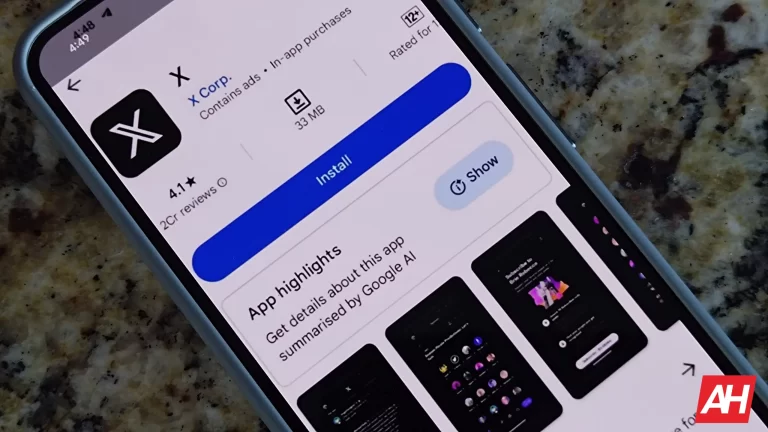
AI-powered app highlights, something many have been looking forward to, have now finally come to the Google Play Store. Google has been expanding its use of AI across all its devices and products. Gemini, the company’s controversial flagship AI model, has been making waves since its public release. The new Google Pixel phones also make use of nifty AI features and tools, which were one of the phones’ major selling points.
AI app highlights will streamline the user experience
What AI highlights will do is provide summaries of an application on the Play Store. Users have traditionally turned to reviews under an app to help them make a decision. The new Play Store version – v40.2 – comes with the AI app highlights feature. The release notes state “Watch the highlights of apps/games in places on the Google Play Store.”
This isn’t the first thing AI has been used for on the Google Play Store. The FAQ section for apps has been handled by AI for some time now. Like the highlights feature, the FAQ section would show users the most frequently asked questions and their answers. These answers were generated by AI. Similarly, AI will comb through an app’s description, and perhaps the reviews, and highlight the most important features users can expect.
This is becoming standard across the industry
Using AI to generate summaries and save time is becoming a standard practice across the industry. For example, Amazon implemented AI-generated review summaries last year. The AI reads through a product’s reviews and outputs a helpful little summary of how the product has been received. These summaries mention the aspects people have praised, as well as the not-so-great bits of said product.
Samsung also recently filed a patent for an AI document summarization tool. This tool will generate summaries for users and save them the trouble of having to read the entire document. What’s particularly interesting about this application is that these summaries will be customized for each user. Online tools have also popped up a dime a dozen for summarizing PDF files and other text documents.
Going forward, it’s quite possible this technology could expand to summarizing almost everything. Videos, podcasts, and entire books could start seeing AI-generated summaries. Google is almost assuredly going to continue playing with AI; seeing where it can fit and make something just a tiny bit better. AI app highlights on Google Play Store may seem revolutionary today, but it’s probably just the beginning of something much greater.
When you open up the YouTube app, you’re able to see the past notifications you got by tapping on the bell icon right next to the search icon. This is a great way of seeing the latest releases from people you’re subscribed to. Well, this is a feature that YouTube Music lacked over the years, but the company is going to change that. According to a new report, YouTube Music is going to get an Activity feed.
This is something that YouTube Music has been lacking. If you’re a person who likes to keep up with all of the latest releases from your favorite artists, then you’ll love this feature. Once you get the feature, you’ll see a bell icon at the top of your UI. It’ll be right next to the search icon.
As you can guess, when you tap on the bell icon, you will see a feed of your most recent notifications. It will show you the latest releases from people you subscribed to on YouTube. The feed will be chronological, so the most recent additions will be at the top.
Right now, this feature is not available for everyone. It’s currently rolling out, so if you are excited about the Activity feed, you are going to have to be a bit patient. However, if you want to check to see if you have it, simply go to the Google Play store and find the YouTube Music app. There, look for the green Update button. If you don’t see the update button, then you’re just going to want to wait for this feature to hit your phone.
Along with the Activity feed, YouTube Music is testing a grid-style UI
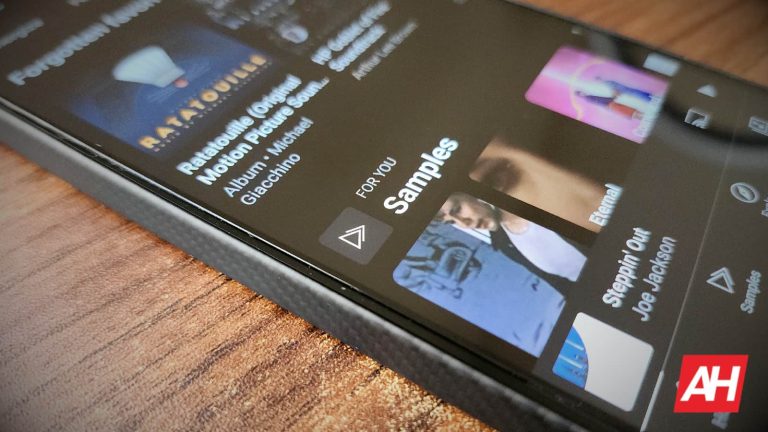
This is something that we’ve heard about for a few months now. We got word that YouTube was testing a 3×3 icon grid in the Listen Again section. The Listen Again section showcases music you just recently listened to. When you see the section, it will show you the songs, radios, playlists, or albums that you just listen to. Also, it will be in a neat 3×3 grid.
Again, we are not sure when this is going to roll out to everyone. If you don’t see it just yet, then you’ll just need to be patient.
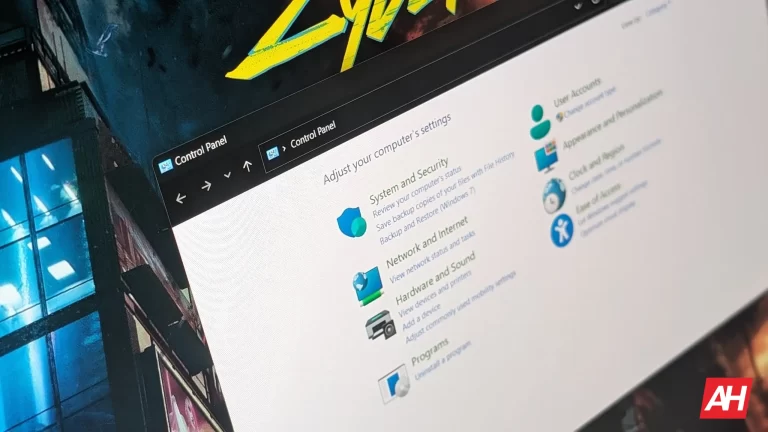
The Control Panel has been a part of Windows since Windows 1.0. However, as Windows 11 has reached more than half a billion devices, Microsoft is aiming to fine-tune the features in Windows 11 to achieve a more streamlined Windows experience.
Notably, Microsoft has been steadily migrating features from its traditional Control Panel to the modern Settings app for a while. With the upcoming Windows 11 24H2 update, users can expect to see further integration of Control Panel functionalities into the Settings interface. The changes aim to enhance accessibility and convenience across various system settings.
Control Panel’s “Lid, power, and sleep button controls” are available in Settings in Windows 11 24H2
The forthcoming big update promises significant enhancements, particularly in the Power & Battery settings. Laptop users will reportedly gain greater control over power management with options to adjust “Lid, power, and sleep button controls” directly from the Settings app.
This means users can easily configure their device’s behavior upon closing the lid or pressing the power button. Users will be able to choose between sleep, hibernate, shut down, or no action. However, desktop users will see a slightly different interface, lacking the lid-related settings and hibernate option.
Additionally, Microsoft is focusing on refining the Display section within Settings, introducing Color Management options which previously you’d have to access from the Control Panel. This transition aims to provide users with a more intuitive and centralized approach to managing color profiles. It further streamlines the customization of display settings. However, Windows Latest notes that this transition is still under development and it may still open the legacy tool for now.
The “Delete this Storage pool” option appears in the Settings app
Another notable change noted in preview builds of Windows 11 24H2 is the inclusion of an option to “Delete this Storage pool” within the Settings app’s Storage Pool panel. Previously, users had to navigate through the Control Panel to access this functionality, but now it’s conveniently integrated into the Settings interface, simplifying storage management tasks.
The changes described above are currently limited to the Windows 11 24H2 preview builds and will likely arrive in the stable builds later this year. While these changes may seem incremental, they collectively contribute to the gradual phasing out of the Control Panel. It signals Microsoft’s vision of a more cohesive user interface.
You wake up, scarf down breakfast, dress up, and sit down for your weekly business meeting. However, you forgot to freshen up. This is something that many people deal with, and it’s the reason why Google Meet introduced Portrait Touch-up last year for mobile devices. Well, the company is now providing for its users who take their meetings on the big screen. Google Meet Portrait Touch-up is coming to desktop.
This feature officially launched for IOS and Android last year. Basically, this feature would be your stylist and makeup specialist. This feature would touch up your face artificially to make you look a little bit more presentable for your meeting. Depending on the severity of the meeting, you may want to look your best.
Google Meet Portrait Touch-up is coming to desktop
It appears that this feature is popular enough to warrant a port over to desktop. During a meeting, you’ll want to go to your Appearance section. There, you will see the option to enable and disable the portrait touch-up mode. As described, this will lightly touch up your face to make you look just a bit more presentable for the meeting. It will lighten bags under your eyes and smooth out your skin a little bit.
When you access the menu, you will see two options. The Subtle will only lightly touch up your face. This one will be more subtle. However, the Smooth option will touch up your face a bit more aggressively. So, it’s your choice as to how you want to appear.
Credits: Google Workspace Blog
Since this is a Google Workspace feature, it will not be available for all users. The rollout started on March 15th, so it will hit most people within the next 10 days. However, there are people who may have to wait until as late as April 15th to receive the feature.
As for the accounts, this is available for users who have a Business Standard, Business Plus, Enterprise Essentials, Enterprise Starter, Enterprise Standard, Enterprise Plus, Education Plus, Teaching & Learning Upgrade, Google One, or Google Workspace account.
Two esports players were hacked during a live-streamed game, causing the Apex Legends Global Series tournament to be postponed.
On Sunday night, EA and Respawn’s shooter game Apex Legends was disrupted by a hacking incident, causing the Apex Legends Global Series tournament to be postponed. The players were competing in the popular shooter game having a $5 million prize pool.
The incident occurred during a live-streamed game, where Apex pro player Noyan “Genburten” Ozkose reported his game being hacked and hijacked to deploy cheats. The player complained about the activation of cheats like wallhacks, which provided the compromised account with an unfair advantage over legitimate players.
During the livestream, Genburten yelled he was “getting hacked” when a cheat program’s settings menu appeared. Genburten’s screen also displayed an aimbot, gun recoil reducer, and autofire feature, with a box indicating “vote Putin.”
Soon after hacking, the perpetrators displayed the following message:
“Apex hacking global series, by Destroyer2009 &R4andom.”
Apparently, the hackers used a cheat program to deploy “wall hacks” or visibility hacks, allowing them to see all other players.
In another Apex Legends match, a player named ImperialHal faced a similar incident. On their X account, the player noted getting an “aimbot,” which is a common cheating technique allowing players to hit any player without actually aiming at them.
This led to the tournament organizers suspending and postponing the North American tournament, causing concern among players.
“Due to the competitive integrity of this series being compromised, we have made the decision to postpone the finals at this time. We will share more information soon,” Apex Legends Esports posted on their official X account.
The cause of the incident remains unclear, as Electronic Arts, publisher of Apex Legends, and Genburten and ImperialHal have not provided any more details. It was speculated that it could have been an RCE exploit or remote code execution attack. However, Easy Anti-Cheat, the game’s anti-cheat solution, maintains that its software remains secure with no known vulnerabilities.
“We are confident that there is no RCE vulnerability within EAC being exploited,” Easy Anti-Cheat confirmed.
A video showing this incident was posted on X and shared on multiple YouTube channels. The video shows Genburten seeing other players highlighted on the map, even behind walls, and through in-game obstacles before a window appears with a menu for cheats called “TSM HALAL HOOK.”
Respawn Entertainment, the developer behind Apex Legends, is currently investigating the situation. The exploitation during a major tournament raises doubts about current measures and the future of competitive gaming. Respawn’s investigation is needed to restore trust and ensure tournament integrity.
This is not the first time that a gaming tournament has gone through cybersecurity-related issues. In January 2022, cybercriminals managed to carry out successful DDoS attacks on a Minecraft event that crippled the internet of Andorra, a country based in Europe.
The Pixel 8a is anything but official yet that isn’t stopping small details about the device from trickling out, like the higher refresh rate and other display improvements coming to Google’s more affordable Pixel phone.
The Pixel ‘A’ series of devices has always been about shaving off some of the price tag by either lessening some of the specs or removing some features. Or both. Google isn’t necessarily straying from that approach entirely with the upcoming Pixel 8a. However, it does seem to be including improvements that will make the phone even more of a bargain.
A new report from Android Authority says the Pixel 8a will come with both a higher refresh rate and a higher peak brightness. From a user standpoint, these are both huge improvements. The higher refresh rate will make using everything on the phone appear more smooth. The higher peak brightness will make it easier to use the phone in direct sunlight and in rooms that are more brightly lit. The Pixel 8a is also said to be coming with a higher price tag, as well as a new battery feature. The phone also seemingly went through FCC certification on March 18. Potentially signifying its imminent arrival.
The Pixel 8a display comes with a refresh rate of 120Hz
According to the report the display refresh rate is being bumped up to 120Hz. Compared to the Pixel 7a which came with a 90Hz display, this is a decent if not almost strange move. Another thing to take into account is that the peak brightness is being bumped up to 1400 nits compared to the 1000 nits on the Pixel 7a.
These are both the same as what Google offers on its standard Pixel 8 model. Considering this, there might be less of a reason for people to choose the standard Pixel 8 over the ‘A’ series model. After all, the Pixel 8a will come with a display that is likely just as nice. Not to mention many of the other same features. And at a significantly lower price. Given these factors, it might be tough for Google to convince people to spend more to get the Pixel 8. There are a few details about the camera as well. Although it might not be what people are hoping for. The Pixel 8a will seemingly not change the camera. It will reportedly keep using what the Pixel 7a has.
You can mirror the phone’s display with a USB-C cable
Google is bringing over another feature from the Pixel 8 and Pixel 8 Pro. The DisplayPort output option. With a USB-C to USB-C or USB-C to HDMI cable, you can plug your Pixel 8 series phone into an external monitor to mirror it. This will be debuting on the Pixel 8a as well. What isn’t clear, however, is whether or not the feature will be available out of the box. It’s compatible with the Pixel 8 and Pixel 8 Pro. But to currently use it, your phone has to be on the latest Android 14 QPR3 beta. This might be a fully rolled-out feature by the time the Pixel 8a arrives. However, Google only just enabled this last week.
So there’s a chance it might not be available on the ‘A’ model unless it’s running this same beta software. Interestingly, it appears the Pixel 8a will come with a Tensor G3 chip and it’ll be available in more countries. The report states that so far there are electronic warranty labels for a handful of countries. This includes Czech Republic, Estonia, Finland, Hungary, Lithuania, Latvia, Poland, Romania, Slovakia, and Slovenia. These are all new regions where Google didn’t sell past Pixel devices. So it’s slowly starting to expand where consumers can buy them officially.
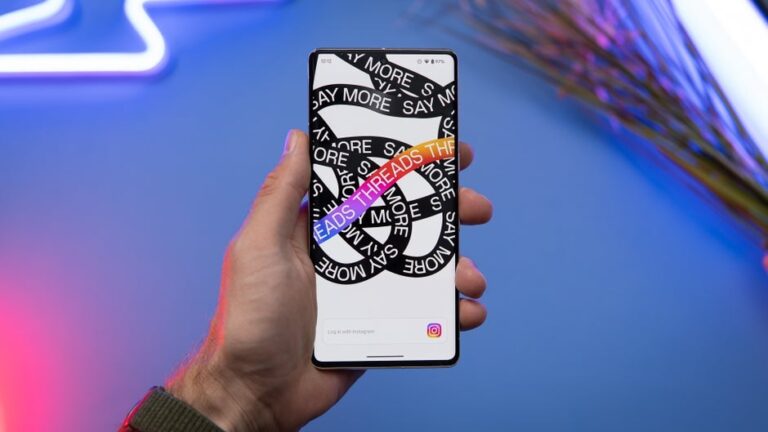
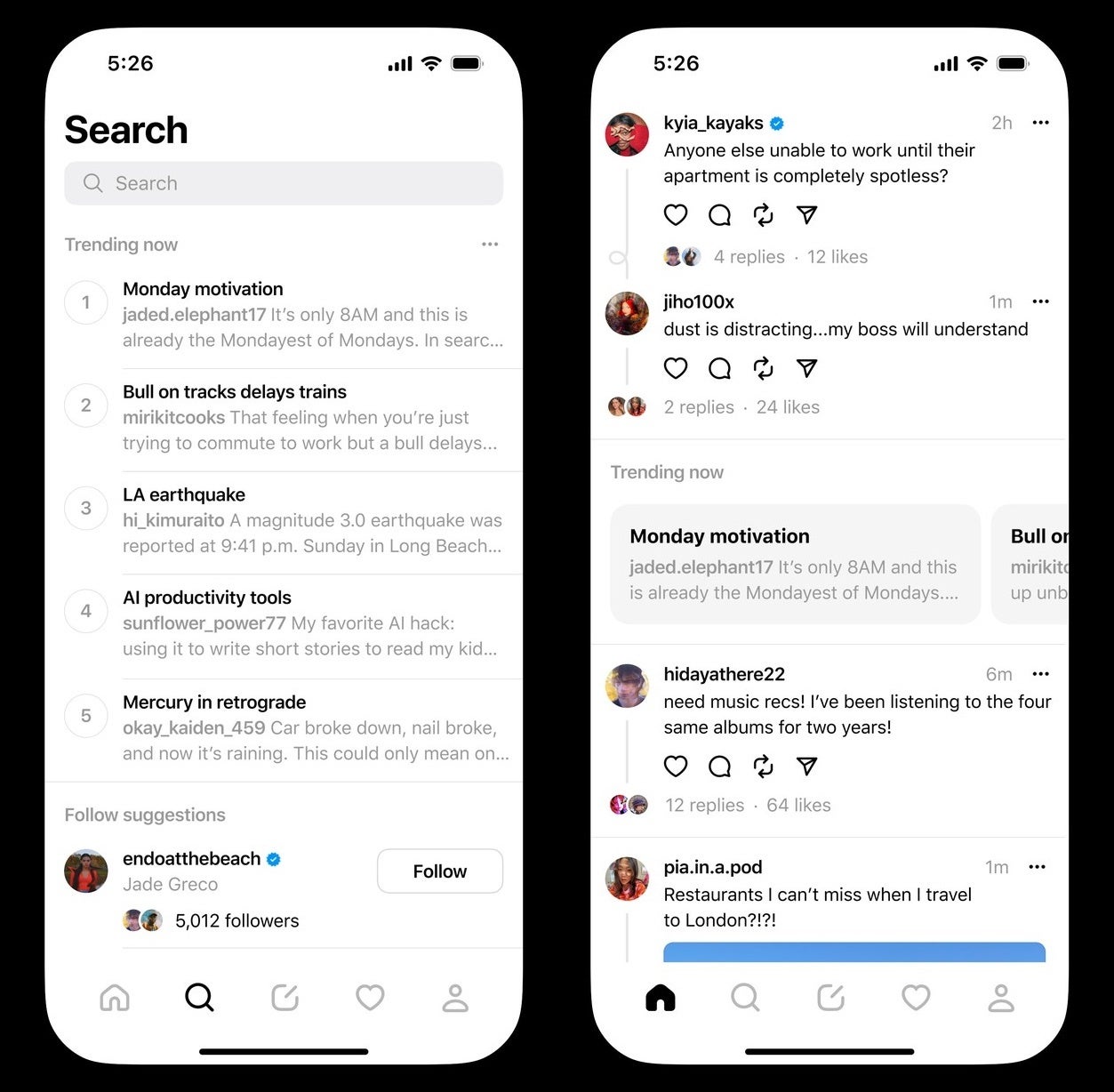
Meta’s Threads app is rolling out a new “Trending Now” feature to all U.S. users that provides real-time insight into the most popular topics being discussed. This launch follows a 5-week test with a small subset of users and will be rolled out in more countries and languages soon.
Mark Zuckerberg quickly made the announcement via his Threads account. Joining him in an announcement of their own was the official Threads account and Instagram boss Adam Mosseri.
Source: Threads
The “Trending Now” feature leverages artificial intelligence (AI) to determine the most popular topics based on what users are actively talking about. You’ll find these trends both integrated into your For You feed and on the dedicated Threads search page.
Currently, Threads is limiting the display to five trending topics at a time, likely to maintain a focused list and avoid some of the pitfalls that have affected similar features on other platforms. According to reporting by Engadget, Meta has also stated in the past that in order to maintain a safe environment on Threads, the company will use “content specialists” to ensure trending topics comply with their safety guidelines.
The addition of trends is a significant step for Threads. Previously, users mainly discovered content through their own personal feeds or through the recently introduced “Tags” feature. The “Trending Now” feature helps break out of that bubble by offering ways to connect with others around broader topics.
It also opens a window for users interested in keeping up with news and current events within the platform, even though Meta has expressed a preference to minimize overt news content on Threads. This decision, though, has been met with mixed reactions from both users and industry experts.
Many consider the inclusion of breaking news a significant feature to have on an app that intends to compete with the likes of X (formerly Twitter) and other social media platforms. It remains to be seen if the introduction of trending topics and their use will shift the platform’s focus towards news coverage.
Don’t you wish that you could tune in to a listening session that your friend is having from across town? Well, Spotify introduced the Jam feature a while back. This feature allows people to listen to the same playlist across devices. Well, Spotify just announced that Jam is making it to desktop users.
Spotify introduced this feature for the Android and iOS apps in September of last year. If you want to host a Jam, you can simply choose a specific song or playlist, tap on the Start a Jam option, and the session will be open for people to join. In order to join, a user would need to either follow the link that you sent or scan the QR code on your device. Then, the music will sync between your device and the other person’s device.
Now, the Spotify Jam feature is making it to the desktop
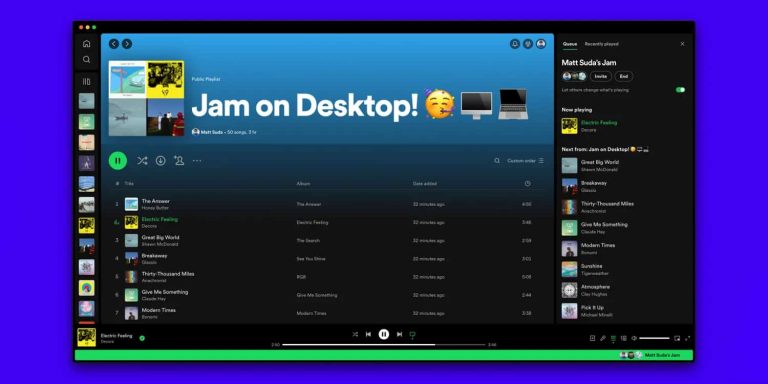
On Thursday, Spotify announced that Jam is making it to the desktop application for Windows 10, Windows 11, and macOS. Just like on phones, you’ll be able to start a Jam from a song or a playlist. The process of starting a Jam isn’t very different from how it is on phones. Simply open the app, find the song or playlist you want to stream, right-click it, and select the Start a Jam button. Just like on the mobile app, you’ll have the option to either share a link or scan a QR code.
There is another change coming as well
In the blog post where Spotify announced this news, the company also let us know that it’s changing up the UI a bit. The company introduced its new queue experience. This new experience sees the queue being moved all the way to the right side of the screen. This will give the listener a bit more flexibility, as they’re able to interact with the rest of the app while the queue remains on the side.