In a sophisticated cyberattack campaign, malicious actors impersonating Colombian government agencies target individuals across Latin America.
The attackers are distributing emails containing PDF attachments, falsely accusing recipients of traffic violations or other legal infractions.
These deceptive communications are designed to coerce victims into downloading an archive that harbors a VBS script, initiating a multi-stage infection process.
Upon execution, the obfuscated VBS script triggers a PowerShell script, retrieving the final malware payload from legitimate online storage services through a two-step request process.
🚨 An ongoing campaign targeting #LATAM: Attackers are forcing users to initiate infections 🚨
The #attackers impersonate Colombian government agencies (e.g., COLOMBIANA DE MUNICIPIOS) by sending PDFs, accusing the recipients of traffic violations or other legal issues.
According to the ANY.RUN report was shared with GBHackers on Security; initially, the script acquires the payload’s address from resources such as textbin.net. It then proceeds to download and execute the payload from the provided address, which could be hosted on various platforms including cdn.discordapp(.)com, pasteio(.)com, hidrive.ionos.com, and wtools.io.
The attackers’ execution chain follows a sequence from PDF to ZIP, then to VBS and PowerShell, and finally to the executable file (EXE).
The culminating payload is identified as one of several known remote access trojans (RATs), specifically AsyncRAT, njRAT, or Remcos.
These malicious programs are notorious for their ability to provide unauthorized remote access to the infected systems, posing significant risks to the victims’ privacy and data security.
Here are some notable samples of this campaign: 1, 2, 3, 4.
sample 1
This campaign has been meticulously documented, with over 50 operation samples being analyzed.
Cybersecurity professionals and researchers are encouraged to consult the TI Lookup tool for detailed information on these samples, aiding in identifying and mitigating threats related to this campaign.
Document
Integrate ANY.RUN in Your Company for Effective Malware Analysis
Are you from SOC, Threat Research, or DFIR departments? If so, you can join an online community of 400,000 independent security researchers:
Real-time Detection
Interactive Malware Analysis
Easy to Learn by New Security Team members
Get detailed reports with maximum data
Set Up Virtual Machine in Linux & all Windows OS Versions
Interact with Malware Safely
If you want to test all these features now with completely free access to the sandbox:
The technique demonstrated by the attackers in this campaign is not exclusive to Latin American targets and may be adapted for use against various targets in other regions.
The cybersecurity community is urged to remain vigilant and employ robust security measures to protect against such sophisticated threats.
Are you from SOC and DFIR Teams? – Analyse Malware Incidents & get live Access with ANY.RUN -> Start Now for Free.
A new vulnerability, CVE-2023-5528, has been discovered with Kubernetes. This vulnerability is associated with a command injection vulnerability that leads to remote code execution with SYSTEM-level privileges on the compromised Windows node. The severity for this vulnerability has been given as 7.2 (High).
Several prerequisites are required for a threat actor to exploit this vulnerability, including applying malicious YAML files to the cluster, access to create a persistent volume that can be utilized during the command injection process, and some level of user privilege on the affected Kubernetes cluster.
Two additional vulnerabilities with the same underlying cause were identified subsequent to the identification of this one: an insecure function call and inadequate user input sanitization.
Alert Fatigue that helps no one as security teams need to triage 100s of vulnerabilities.:
The problem of vulnerability fatigue today
Difference between CVSS-specific vulnerability vs risk-based vulnerability
Evaluating vulnerabilities based on the business impact/risk
Automation to reduce alert fatigue and enhance security posture significantly
AcuRisQ, that helps you to quantify risk accurately:
Technical Analysis
According to the Akamai report shared with Cyber Security News, this vulnerability is linked with another previously disclosed vulnerability, CVE-2023-3676, related to another command injection vulnerability.
Both of these vulnerabilities were present on the Kubernetes cluster due to insecure function calls and a lack of user input sanitization.
Further analysis revealed that these command injections existed because of the lack of sanitization on the subPath parameter in YAML files, which uses the Kubelet service to execute commands with SYSTEM-level privileges.
In addition, there was an insecure function MountSensitive() with a cmd line call to “exec.command”.
Vulnerable cmd line code (Source: Akamai)
This function makes a symlink between the location of the volume on the node and the location inside the pod.
However, since it uses a Windows command prompt, the cmd terminal concatenation can be utilized to execute additional commands alongside the original parameter.
Local Volume And Persistent Volume
The exploitation involves the use of local volume type and persistent volume.
Local volumes are used to allow users to mount disk partitions inside a path, whereas persistent volumes are storage resources that a cluster admin can create to provide a storage space that will last even after the lifetime of the pod.
Once a persistentVolume is created, users can ask for storage space using a persistentVolumeClaim function.
It is worth denoting that Kubernetes uses YAML files for almost all of the functions inside the Kubernetes.
Hence, in this case, the local.path parameter inside a YAML file can be supplied with malicious commands executed during the mounting process.
This vulnerability can be exploited on default installations of Kubernetes (earlier than version 1.28.4), and was tested against both on-prem deployments and Azure Kubernetes Service.
Patch Analysis And Mitigation Steps
Kubernetes has acted swiftly upon this vulnerability and has deleted the cmd line function. They have replaced it with a native Go function that only performs the symlink operation.
This vulnerability affects the Kubernetes version earlier than 1.28.4. It is recommended that organizations upgrade their Kubernetes to the latest version to prevent the exploitation of this vulnerability.
The below command can be executed to check if your Kubernetes has been affected.
root@controller:~/$ kubectl get nodes -o wide –show-labels | grep “os=windows”
ANY.RUN now integrates with OpenCTI, a cyber threat intelligence platform that allows automatic enrichment of OpenCTI observations with malware data directly from ANY.RUN analysis.
Users can access indicators like TTPs, hashes, IPs, and domains without manual data source checks.
The data from interactive analysis sessions within the ANY.RUN sandbox can further enrich the observations that centralize threat analysis information from various sources for efficient investigation.
Document
Integrate ANY.RUN in Your Company for Effective Malware Analysis
Are you from SOC, Threat Research, or DFIR departments? If so, you can join an online community of 400,000 independent security researchers:
Real-time Detection
Interactive Malware Analysis
Easy to Learn by New Security Team members
Get detailed reports with maximum data
Set Up Virtual Machine in Linux & all Windows OS Versions
Interact with Malware Safely
If you want to test all these features now with completely free access to the sandbox:
OpenCTI observations with data from ANY.RUN sandbox
OpenCTI, a Threat Intelligence Platform (TIP), ingests threat data from various sources (feeds, sandboxes) using connectors and stores this data as “observations” (indicators like IPs and hashes).
Specifically, OpenCTI offers connectors for:
MITRE ATT&CK: facilitates mapping collected data to known attack techniques.
ANY.RUN Sandbox: allows adding details from sandbox analysis (malware family, maliciousness scores) to observations.
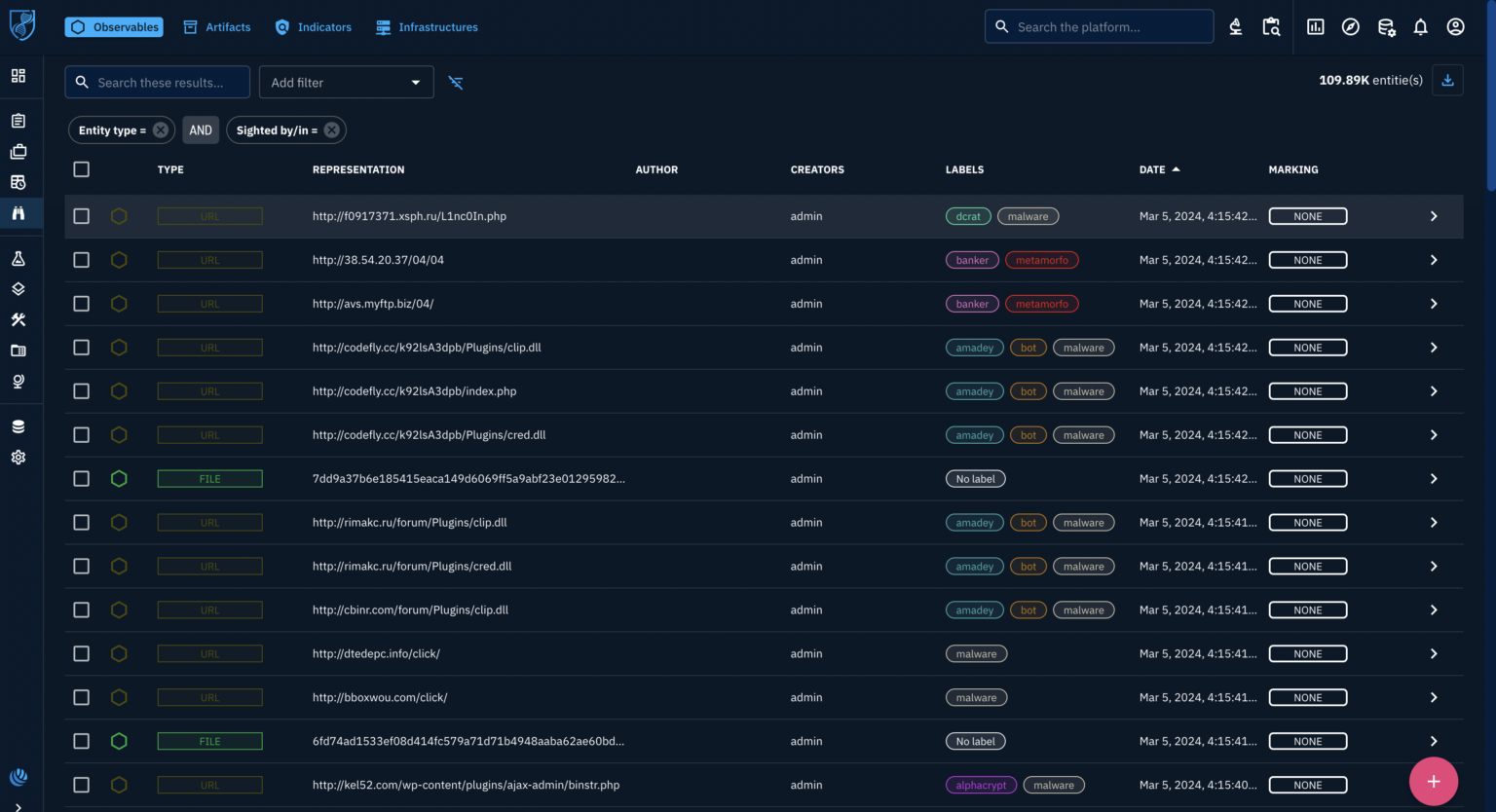
OpenCTI interface
ANY.RUN is a cloud-based malware sandbox service that analyzes suspicious files in a safe virtual environment, offers real-time detection using pre-defined rules and allows interactive analysis for in-depth investigation.
During this analysis, Its enrichment connector for OpenCTI streamlines threat analysis by automatically investigating suspicious files and when enriching an observation (potential threat evidence) in OpenCTI, it can leverage the connector to submit the file to ANY.RUN’s cloud sandbox.
It creates a safe virtual environment to analyze the file’s behavior and then extracts Indicators of Compromise (IOCs) like URLs, domains, and network activity from the analysis.
Details, including extracted IOCs and behavioral observations, are then fed back and attached to the corresponding observation within OpenCTI. This effectively transforms the observation into a full-fledged OpenCTI indicator, providing valuable context for further investigation.
Then, with the enriched information readily available, can seamlessly integrate it with the SIEM or SOAR systems, triggering automated incident response procedures and enabling security teams to address potential threats swiftly.
Analyze suspicious files in OpenCTI with ANY.RUN.
OpenCTI users can utilize the ANY.RUN enrichment connector to analyze suspicious observables (indicators) like URLs. By selecting an observable and clicking the enrichment button, they can choose the ANY.RUN connector.
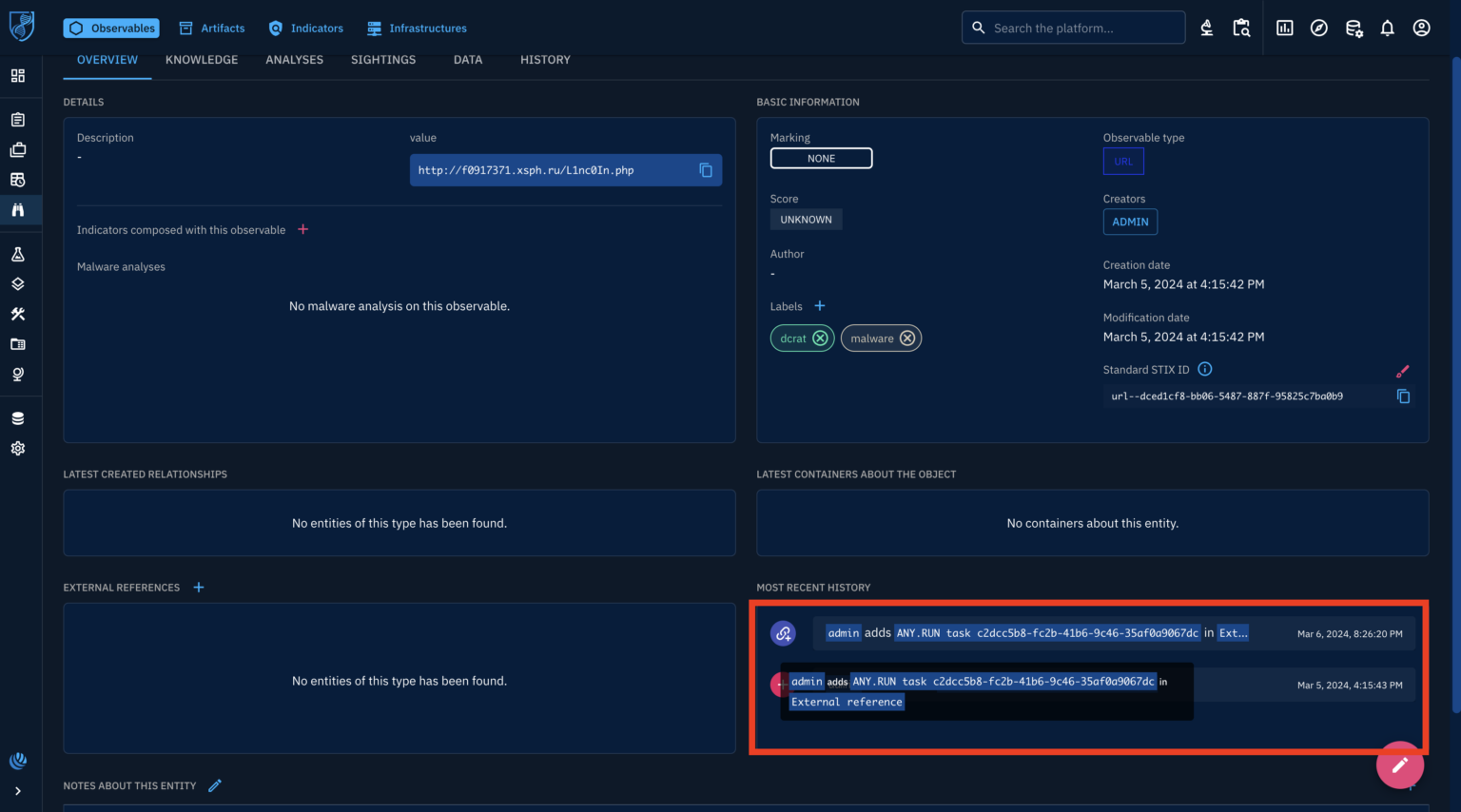
This triggers an automated analysis in the background. Once completed, the observable details are enriched with findings that include creating relationships between the perceptible and identified Tactics, Techniques, and Procedures (TTPs) used by the potential malware.
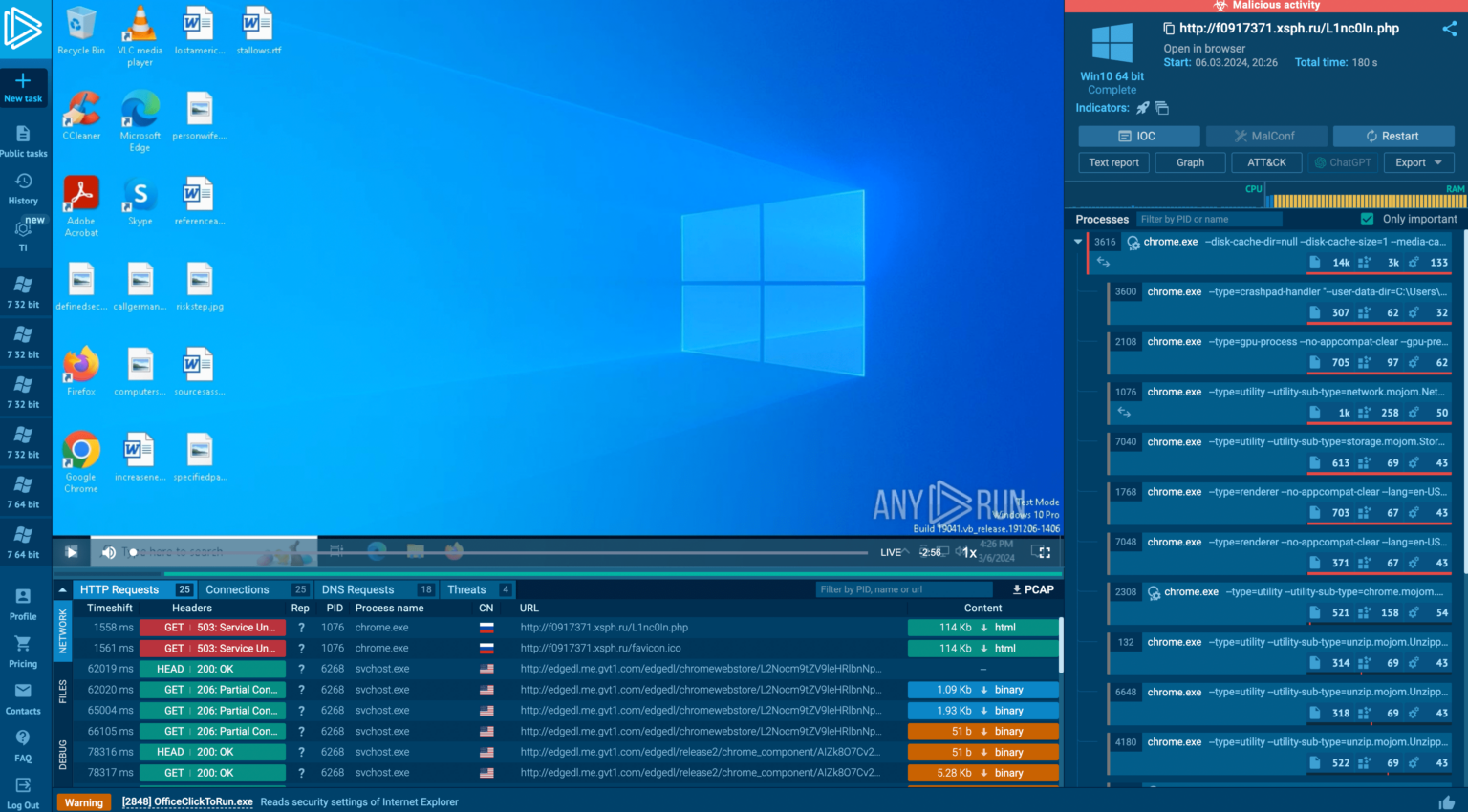
An external reference links to the specific ANY.RUN sandbox analysis report for further manual investigation.
What is ANY.RUN?
ANY.RUNis a cloud-based malware lab that does most of the work for security teams. 400,000 professionals use ANY.RUN platform every day to look into events and speed up threat research on Linux and Windows cloud VMs.
Advantages of ANY.RUN
Real-time Detection: ANY.RUN can find malware and instantly identify many malware families using YARA and Suricata rules within about 40 seconds of posting a file.
Interactive Malware Analysis: ANY.RUN differs from many automated options because it lets you connect with the virtual machine from your browser. This live feature helps stop zero-day vulnerabilities and advanced malware that can get past signature-based protection.
Value for money: ANY.RUN’s cloud-based nature makes it a cost-effective option for businesses since your DevOps team doesn’t have to do any setup or support work.
Best for onboarding new security team members: ANY. RUN’s easy-to-use interface allows even new SOC researchers to quickly learn to examine malware and identify signs of compromise (IOCs).
Are you from SOC and DFIR Teams? – Analyse Malware Incidents & get live Access with ANY.RUN -> Start Now for Free
5G first became available in 2020, and now, four years later, it’s available virtually everywhere in the United States. Verizon first built out its 5G network with mmWave before turning on Sub-6 and then adding C-Band. So depending on where you are located, you might see 5G, or 5G UW in your status bar. Verizon’s 5G network is pretty incredible; we’ve seen speeds topping 2Gbps in our own testing.
As we noted in our “What is 5G” post, there are a few layers to 5G, which includes a low-band network, which is what is nationwide. And then there is mmWave, which is the ultra high-band network that offers the crazy gigabit speeds that you’ve seen in YouTube videos. Combining those two together will give users great speed and excellent coverage.
We all know that Verizon has 5G; if you’ve watched TV or YouTube in the past year, you’ve seen countless commercials about it. But how much does it cost you? Where is it available? And is it worth upgrading to a 5G phone right now? We’ll aim to answer those questions and much more here. This is everything you need to know.
Does my area have 5G?
Most likely.
Verizon’s 5G network covers around 230 million customers in over 2,700 cities, which covers the majority of the US. But let’s keep in mind that Verizon does have 5G and then 5G Ultra Wideband (which is their mmWave network). The latter doesn’t cover as many Americans, and you won’t find out indoors either. So do keep that in mind here.
As always, you can check out Verizon’s coverage map by clicking here.
As you can see in the map above, there are a small number of 5G Ultra Wideband networks across the country, mostly consisting of larger cities like Seattle, New York City, Albuquerque, Detroit, Denver, and a number of others.
5G vs 5G Ultra Wideband
As we have covered before, there is a difference in the two flavors of 5G that Verizon offers. 5G is essentially using the same spectrum as the current 4G LTE network. This is why if you have 5G in your area, you are likely seeing speeds similar to 4G LTE. That’s not unique to Verizon either; it’s the same case for AT&T and T-Mobile.
However, with 5G Ultra Wideband, you’re going to see much faster speeds. We’ve done some testing and have gotten over 2Gbps on Verizon on the UWB network. It uses mmWave, which is an ultra high-band spectrum, offering crazy speeds but pretty terrible coverage. The way coverage works is that the lower band spectrum offers better coverage but slower speeds, and the higher band has better speed but less coverage. This is why most carriers combine these two for 5G.
Additionally, if you are inside, you won’t get access to 5G Ultra Wideband. That is because the coverage is pretty weak and can’t penetrate through buildings. Heck, if there’s a tree in the way, you will get knocked off of the 5G UWB network or if the wind is too strong. Which is pretty funny since many people seem to think it can cause cancer. But that’s a rant for another time.
In the future, Verizon will be combining the 5G and 5G UWB networks, so you will get these gigabit speeds indoors, virtually anywhere. But that will take a few years, likely around 2025.
5G Ultra Wideband is available in these cities
As mentioned, 5G Ultra Wideband is available in a number of cities already; here’s the full list:
Akron, OH
Albuquerque, NM
Anaheim, CA
Ann Arbor, MI
Arlington, TX
Athens, GA
Atlanta, GA
Baltimore, MD
Boise, ID
Boston, MA
Charlotte, NC
Chicago, IL
Cincinnati, OH
Cleveland, OH
Colorado Springs, CO
Columbia, SC
Columbus, OH
Dallas, TX
Dayton, OH
Denver, CO
Des Moines, IA
Detroit, MI
Durham, NC
El Paso, TX
Fort Wayne, IN
Fremont, CA
Fresno, CA
Grand Rapids, MI
Greensboro, NC
Hampton Roads, VA
Harrisburg, PA
Hartford, CT
Hoboken, NJ
Houston, TX
San Antonio, TX
Indianapolis, IN
Jacksonville, FL
Jersey City, NJ
Kansas City, MO
Knoxville, TN
Las Vegas, NV
Little Rock, AR
Los Angeles, CA
Louisville, KY
Memphis, TN
Miami, FL
Milwaukee, WI
Minneapolis, MN
Nashville, TN
New Orleans, LA
New York, NY
Norfolk, VA
Oklahoma City, OK
Omaha, NE
Orlando, FL (Sept 9)
Panama City, FL
Philadelphia, PA
Phoenix, AZ
Providence, RI
Raleigh, NC
Richmond, VA
Riverside, CA
Sacramento, CA
Salt Lake City, UT
San Diego, CA
San Francisco, CA
San Jose, CA
Sarasota, FL
Scranton, PA
Sioux Falls, SD
Spokane, WA
St. Louis, MO
St. Paul, MN
St. Petersburg, FL
Syracuse, NY
Tacoma, WA
Tampa, FL
Tucson, AZ,
Washington D.C.
C-Band is coming
Verizon announced at CES 2022 that it would be launching its C-Band network in over 1,700 cities, covering 100 million Americans by the end of January 2022. Verizon has not yet released a list of which cities will be getting C-Band.
C-Band is basically the mid-tier of 5G. It’s going to give you much faster speeds than 4G LTE offered, but not quite the same speeds as the mmWave network that is available in many downtown areas and at many arenas/stadiums.
C-Band launched on January 19, 2022, and Verizon has continued to build C-Band out nationwide.
Can I use 5G as my home internet?
We would recommend against using 5G as your ISP provider unless you get Verizon 5G Home. That is because the faster speeds are virtually impossible to get indoors, as we have already outlined. Which means you won’t be getting great speeds.
Verizon 5G Home Products
However, there is Verizon 5G Home. Verizon’s home internet service runs on a fixed 5G network. It costs $50 per month for existing Verizon Wireless customers and $70 for those that are not. This makes this very competitive with other ISPs out there like Cox, Comcast, AT&T, and even Verizon Fiber.
These are the cities where Verizon 5G Home is available right now:
Birmingham, AL
Phoenix, AZ
Tucson, AZ
Fremont, CA
Los Angeles, CA
Orange County, CA
Riverside, CA
Sacramento, CA
San Diego, CA
San Francisco, CA
San Jose, CA
Denver, CO
Hartford, CT
Jacksonville, FL
Miami, FL
Orlando, FL
Pensacola, FL
Sarasota, FL
Tampa, FL
Atlanta, GA
Des Moines, IA
Chicago, IL
Fort Wayne, IN
Indianapolis, IN
Louisville, KY
New Orleans, LA
Detroit, MI
Minneapolis, MN
Saint Paul, MN
Kansas City, MO
St Louis, MO
Charlotte, NC
Greensboro, NC
Raleigh, NC
Omaha, NE
Las Vegas, NV
Niagara Falls, NY
Cincinatti, OH
Cleveland, OH
Columbus, OH
Dayton, OH
Scranton, PA
Memphis, TN
Arlington, TX
Dallas, TX
Houston, TX
San Antonio, TX
Salt Lake City, UT
Seattle, WA
Tacoma, WA
Milwaukee, WI
How fast can 5G be on Verizon?
Speeds on Verizon’s 5G network can vary drastically. On its nationwide 5G network, using Sub-6, you’ll get around 100Mbps to 300Mbps, depending on the area. Which doesn’t sound all that impressive, nor is it what Verizon and other carriers have been promising with 5G.
The speeds come from the mmWave network. We have done speed tests where we have gotten 1.8Gbps up to about 2.5Gbps. Now yes, that is pretty insane on a smartphone and probably overkill for most people, but it is going to be incredible to download games or seasons on Netflix, etc. Once mmWave is rolled out everywhere with Sub-6, you should consistently get over a gigabit of speed, even while indoors. But that will take a few years.
Why do I need 5G speeds?
Most people see 5G speed tests and wonder, “Why do I need that much speed on a phone?” Well, the question you should be asking is “Why not?”. 5G is mostly about speed but more about latency. And with carriers expanding beyond smartphones, the latency is going to be important for things like VR and autonomous driving. As they will be able to stream virtual reality, or give directions to your self-driving car instantly.
Don’t forget that we asked these same questions with 4G LTE and said that 3G was “fast enough”. Well, we now know that is definitely not true. Seeing as 3G topped out at around 5Mbps (or around 42Mbps if you were on T-Mobile with HSPA+). Imagine trying to watch YouTube at 5Mbps these days. Yeah, it wouldn’t be fun.
As the internet evolves, we need faster speeds, and that’s why 5G matters. While getting a gigabit of speed is a bit insane right now, it won’t be in the next 5-10 years as things evolve and take advantage of this speed. The biggest use-case for it right now is, of course, downloading Netflix movies and TV shows in seconds. And we do mean seconds.
Let’s just hope that carriers don’t go back to data caps and keep unlimited data. Otherwise, you’ll blow through that cap in no time.
What phones support 5G on Verizon?
Pretty much every phone that Verizon sells right now is 5G capable and will support both 5G and 5G Ultra Wideband. So any phone you buy from Verizon will work on its 5G network, and there’s nothing to worry about there.
The issues come with unlocked phones. A good number of unlocked phones do not support mmWave or Verizon’s 5G Ultra Wideband network. And that’s because Verizon is virtually the only carrier using mmWave right now (that will change in the coming months and years, though). So if you buy an unlocked 5G phone to use on Verizon, make sure that it has UWB, or you won’t get lightning-fast speeds from Verizon’s 5G Ultra Wideband network.
It will still work on Verizon’s network, you just won’t get those crazy insane speeds that everyone posts about. The Google Pixel 5 supports UWB, as well as the Galaxy S21 series and a number of other phones, which you can buy elsewhere.
Should I upgrade to get 5G now?
Our recommendation is no. Verizon’s nationwide 5G network is not that much faster than its 4G LTE network, and in some areas it is actually slower. And since you can only really use the 5G Ultra Wideband network while outside, it doesn’t make a lot of sense to upgrade solely for 5G.
Having said that, if you are upgrading, you might as well get a 5G phone. Especially if you are planning to keep it for a few years. But don’t let 5G be the sole reason why you upgrade to a new phone. It’s just not worth it right now. That will of course change in the future, as Verizon continues to build out its 5G network.
What Verizon plans support 5G?
All of Verizon’s plans include 5G connectivity. However, the entry-level plan – Start Unlimited – does not include 5G Ultra Wideband. But you can access it for $10 more per month. And at that point, you might as well upgrade to the Play More or Do More Unlimited plan, which is $10 more and includes 5G Ultra Wideband connectivity at no extra charge.
You’ll also note that the Just Kids plan doesn’t have 5G UWB connectivity at all. This is because it is a smaller plan, hence the $35 price tag, if you get four lines. Since speeds are capped at 5Mbps.
Verizon 5G Unlimited Plans
The best plan for 5G on Verizon is going to be the Play More or Get More Unlimited plan. Unless you’d rather have Verizon Cloud Storage included and plan to add Connected devices like smartwatches and tablets to your account. Play More and Get More Unlimited plans to get the Disney+ bundle included (that’s Disney+, Hulu, and ESPN+) and Discovery+ for 12 months. The Get More Unlimited plan includes Apple Music, 50% off unlimited connected device plans, and 600GB of Verizon Cloud Storage.
It’s also important to note here that you will need to “upgrade” your plan if you upgrade from a 4G LTE phone to a 5G phone. Even though the plan is essentially the same in terms of perks and price, it only adds 5G to your plan. It’s strange that you have to physically upgrade your plan on Verizon’s website when you upgrade your phone, but it’s pretty simple. So, if you upgrade to a 5G phone and wonder why you’re not getting 5G on Verizon, that is most likely why.
Update: Verizon has retired the plans above. While they are still available for those on those plans, there is a new set of plans as outlined below.
All of Verizon’s myPlan offerings include 5G. However, Unlimited Welcome only offers regular 5G (basically, Sub-6). While the Unlimited Plus and Unlimited Ultimate plans will offer you 5G Ultra Wideband, which includes C-Band and mmWave. So important to keep that all in mind.
Is Verizon 5G worth it in 2024?
It actually is. If you live in a big city or frequent areas that are pretty dense, getting a 5G phone and a 5G plan from Verizon will make a huge difference. Verizon’s C-Band is available in a lot of major cities, and you can easily get over 500Mbps download with C-Band, making it worthwhile. mmWave is mostly used in stadiums, downtown areas, malls, and such, where there are large crowds of people, so it’s not as ubiquitous, but it does offer some insanely fast speeds.
If you’re someone who lives out in the boonies or in the middle of nowhere, then you are probably fine sticking with 4G LTE or, at the very least, upgrading to the Unlimited Welcome plan, which has Sub-6 5G.
Since the dawn of the generative AI age, one question has loomed over many people, and that question is “How the heck are these multimillion-dollar companies going to monetize their AI?” Well, the answer is simple: subscription services. Major AI companies such as Google and OpenAI have subscription services to access the most capable versions of their AI products. That’s not to account for all of the smaller AI services that you will find in app form. Well, Microsoft is the latest player in the game, and it just introduced Copilot Pro.
If you are in the OpenAI camp, then you will want to use the $19.99/month ChatGPT Plus subscription. This gives you priority access to the GPT-4 Turbo model as well as access to installable GPTs. As for Google, its subscription service will give you access to Gemini Advanced. This costs the same as ChatGPT Plus, and it gives you access to the Gemini Ultra model, more Google Drive space, and other features. So, you are not starved for options with AI services.
Microsoft unveils Copilot Pro
Undoubtedly, there are millions of people who have adopted Copilot as their main AI tool. Microsoft has been doing a lot of work shoving it down everyone’s throats. Well, there are people out there who want more from their Copilot experience. This is what Copilot Pro is for.
Starting off, as it comes in at $20/month, so it’s the same price as the competition. That’s definitely good on Microsoft’s part.
What do you get with Copilot Pro? You gain access to the GPT-4 Turbo model. Shortly after Microsoft invested $10 billion in OpenAI, we got the news that Copilot users had access to the GPT-4 model. Well, GPT-4 Turbo is a much more powerful and advanced version of GPT-4. So, using it, you will have access to an extremely intelligent AI.
Along with that, you just will gain features such as the ability to summarize large bodies of text in Microsoft Word, the ability to craft emails in Outlook, the ability to create entire PowerPoint presentations using text prompts, a higher image generator limit, and more. What’s neat about this is the fact that you will be able to use these features with the free version of Microsoft 365. So, you don’t have to pay a separate subscription price to access AI features on a service that you already paid monthly for.
The OnePlus Ace 3V aka OnePlus Nord 4 is right around the corner, and it just surfaced in real-life images. The phone surfaced in three images, showing us its back side for the first time.
A twin of the upcoming OnePlus Nord 4 appears in real-life images
You can check out the images in the gallery below this paragraph. All three images show us a purple-colored OnePlus Ace 3V, and all of them show us the back side of the device.
As a reminder, the front side of the phone surfaced quite recently, along with the phone’s specs, and a benchmark listing. The OnePlus Ace 3V will be its name in China, while it will most probably be called the OnePlus Nord 4 globally. Well, unless OnePlus opts to skip the number ‘4’, as it’s considered unlucky in China. The OnePlus Nord 4 or Nord 5 will be its name.
In any case, as you can see in the provided images, the device’s camera island will sit in the top-left corner on its back. Two of those three cutouts are cameras for sure, while the bottom one could be too, we’re not sure. There is an LED flash around that cutout, but a small camera could be placed in the middle. We’ll have to wait and see. The camera island does protrude on the back.
It will have flat sides, and thin bezels
The sides of the phone seem to be flat, while the back side is mostly flat, but it curves towards the frame on the very edges. All the physical buttons sit on the right-hand side of the device.
An image that surfaced the other day confirmed that the phone will have very thin bezels. In addition to that, we do know that a display camera hole will be included, and it will be centered.
You’ll also notice an alert slider on the left
An alert slider will also be a part of the package. It will sit in the upper portion of the phone’s left side. We’ve seen that the other day and one of the images in the gallery above shows it too.
The device will be fueled by the Snapdragon 7+ Gen 3, and it will ship with Android 14. A 1.5K display sits on the front, and that’s a 120Hz panel. A 50-megapixel main camera will be backed by a 16-megapixel selfie camera. We still don’t have the info on other rear-facing cameras, or cameras, depending on how many there will be.
A 5,500mAh battery was also mentioned, as was 100W wired charging. The phone will include an in-display fingerprint scanner too.
It should be common knowledge by now that Microsoft is trying to push Edge onto any human being that has a pulse. If you’re using any other web browser on a Windows system, you’re more than likely to have seen the company pushing you to use Microsoft Edge as the default browser. It appears that the company is not stopping, as Microsoft is, yet again, showing a popup to Chrome users on Windows.
Microsoft has been in the headlines quite a bit recently. On Friday, the company unveiled Copilot Pro. This is the paid subscription service that gives copilot users a bevy of AI tools along with an extremely powerful AI model.
Also, Microsoft pointed fingers at Google’s dominance over the AI market during an EU probe. In a report submitted to EU regulators, Microsoft spoke about how Google’s business structure and voice assistant are a reason why the company has such a strong presence in the AI market.
Microsoft is showing Chrome uses a popup to switch to Edge again
This popup for Chrome users actually has a fair amount of people worried. According to several reports on Reddit, users were actually worried that they had been afflicted with some sort of malware. When a random popup appears pushing a user to a certain service, it’s usually indicative of some unwanted software on a computer. It prompted users to contact Microsoft to see if this was legitimate or if they needed to scan their computers. Microsoft confirmed that this was indeed from the company.
So, users uttered a sigh of relief before facepalming and cursing Microsoft. We all know that Microsoft wants to push people to use Edge, but it’s a little annoying having popups appearing out of nowhere pushing you to adapt to a completely different browser.
The popup will appear on the right side of the screen for users. Obviously, it’s pushing users over to Edge because of the AI features. Users will see the text “Chat with GPT-4 for free on Chrome! Get hundreds of daily chat turns with BingAI.” Under that, the popup lists some bullet-pointed items. The first one is “Try Bing as default search – easy to switch back.” The second says “Install Bing service to improve chat experience.” Under that, you get the option to accept or decline it.
Fortunately, this is only a one-time thing. Microsoft confirms that the popup will only appear once on your computer. So, if you’ve already shooed away the popup, it will be gone until the next time Microsoft decides to push it again.
To beta testers out there, WhatsApp Beta has now been leaked with a new feature that gives Android users more authentication options to work with. This means that the app can unlock in several different ways other than just biometric detection such as fingerprint, face recognition, or using your device code.
WhatsApp planning to add more authentication features to Android devices
WhatsApp previously allowed only for biometric authentication thereby barring users who preferred other methods or had no biometrics capabilities on their devices. The intention of expanding the authentication options is to cater to various types of devices among different users according to WhatsApp.
The addition of extra secure identification systems is an important development in preserving user confidentiality and saving private information. By having numerous authentication alternatives, this not only improved flexibility but also made it harder for unauthorized people to access one’s account thus strengthening the overall security.
Furthermore, the new feature will help people with problems related to damaged or malfunctioning biometric sensors. WhatsApp has taken into consideration alternative ways of authentication like the device passcode so that individuals facing similar difficulties are still able to log into their accounts safely.
However, with the recent version, the updated one can cause app crashes for some users as depicted by WAbetainfo’s post X. Therefore, it is inadvisable to install this version. It may not fully support all kinds of devices just yet. Instead of this, they should just wait for the next mainstream update that might be coming up and will provide a solution to crashes.
Credits: WABetaInfo
Availability details for the new authentication features
WhatsApp recently introduced an improved app lock feature that offers better security and flexibility in application authentication. Currently, beta testers who have installed the latest updates from the Google Play Store can access this feature.
Once enabled, biometric authentication like face ID touch ID, or PIN should be there to get inside the app using the app lock feature. If you are afraid of unauthorized entry into your private posts and details, then this upgrade is a positive thing for you.
The minimum download speed required for internet service to be called “broadband,” by the Federal Communications Commission (FCC), has been quadrupled in a sudden but notable move. This is the first time since 2015 that the FCC’s internet speed regulations have changed. The new standards aim at 100Mbps for downloads and 20Mbps for uploads.
FCC internet speed regulations require the ‘Broadband’ label to be exclusive to 100Mbps Download speeds
This comes after the FCC’s annual evaluation of high-speed internet, which emphasized the need for better national connectivity. The report, however, indicates insufficient broadband deployment, particularly in rural areas and Tribal lands where millions of Americans lack access to quality high-speed internet.
Moreover, about twenty-four million people in America still lack fixed terrestrial broadband services as identified by TheVerge (via the official FCC report) with many rural and tribal populations making up a significant percentage of such numbers. Additionally, around nine percent of all Americans lack adequate 5G cellular speeds including higher percentages in more remote areas without tribal government.
Looking into the future, the Federal Communications Commission has envisaged achieving 1Gbps download speeds and upload speeds of 500Mbps as its long-term aim. This ambitious target provides a common goal for stakeholders suggesting possible amendments to come in the future regarding broadband standards.
FCC aims to improve the quality of internet in the US by dialing up the thresholds
To bring about improvements in services, the decision to increase broadband speed requirements aims at forcing Internet Service Providers (ISPs) to take action. The Federal Communications Commission cannot force speed upgrades but it can bar the ISPs from branding their offerings as “broadband” if they don’t exceed the new thresholds
Also, this act affirms the FCC’s commitment to high-quality internet service for all Americans, following the Biden administration’s attempt. Nevertheless, its effectiveness will depend on whether ISPs find it viable to follow these policies as they push to provide a more dependable and faster connection to their customers. Faster internet doesn’t necessarily mean a reliable connection, and one often comes at the expense of the other.
ASUS announced a new flagship smartphone in March 2024, the ZenFone 11 Ultra. This handset is completely different from its predecessor, at least as far as the design and size are concerned. In this article, we’ll compare those two smartphones, the ASUS ZenFone 10 vs ASUS ZenFone 11 Ultra. It doesn’t seem like ASUS plans to announce a smaller flagship this year, so the ZenFone 11 Ultra will be your alternative to the ZenFone 10 if you’d like to upgrade to the Snapdragon 8 Gen 3.
As per usual, we’ll first take a look at their specifications, and will then move to various other categories. We’ll check out their designs, displays, performance, battery life, cameras, and audio performance. There is plenty to talk about here, considering how different the two phones are, so let’s get to it.
Specs
ASUS ZenFone 10 vs ASUS ZenFone 11 Ultra, respectively
These two smartphones are not only different when it comes to size itself, but design as well. That goes for the overall look, and even the materials used. The ZenFone 10 is made out of metal and soft-touch plastic on the back. The ASUS ZenFone 11 Ultra utilizes a metal and glass build. The ZenFone 10 is a lot grippier than the ZenFone 11 Ultra, in addition to being a lot smaller. When we say a lot, we mean that.
The ZenFone 10 measures 146.5 x 68.1 x 9.4mm compared to 163.8 x 76.8 x 8.9mm of the ZenFone 11 Ultra. It is a bit thicker than its sibling, but it’s a lot shorter and a lot narrower. The ZenFone 11 Ultra is a true behemoth of a phone. It’s also 52 grams heavier than the ZenFone 10. That will be a huge change if you upgrade from the ZenFone 10 to the ZenFone 11 Ultra, that’s for sure.
You will also notice that the ZenFone 10 has thicker bezels than the ZenFone 11 Ultra. Both phones have flat displays, but their display camera holes sit in different places. The ZenFone 10’s display camera hole sits in the top-left corner. The one on the ZenFone 11 Ultra is centered at the top. When we flip the two phones around, you’ll notice even more differences, as they have entirely different camera setups.
The ZenFone 10 has two separate, circular camera islands on the back. They’re vertically-aligned, and placed in the top-left corner. The ZenFone 11 Ultra has a single camera island, and it also sits in the top-left corner. Despite the fact it has one extra camera in there, it takes up less space than the ZenFone 10’s setup. Both smartphones are IP68 certified for water and dust resistance. The in-hand feel could not be more different, though. The ZenFone 11 Ultra is definitely not a phone for one-hand use in any way, shape, or form, unlike the ZenFone 10.
ASUS ZenFone 10 vs ASUS ZenFone 11 Ultra: Display
The ASUS ZenFone 10 features a 5.92-inch fullHD+ (2400 x 1080) Super AMOLED display. That panel is flat, and it has a 144Hz refresh rate at its maximum. Do note that such a refresh rate will be available only in some games, in regular use, you’ll go up to 120Hz. The display does support HDR10+ content and goes up to 1,100 nits of brightness at its peak. The panel is protected by the Gorilla Glass Victus, and it has a 20:9 aspect ratio. The screen-to-body ratio is around 84%.
ASUS ZenFone 10
The ASUS ZenFone 11 Ultra, on the flip side, includes a 6.78-inch fullHD+ (2400 x 1080) LTPO AMOLED display. Its refresh rate also goes up to 120Hz during regular use, and up to 144Hz with some games. HDR10 content is supported, while the maximum brightness here is 2,500 nits. The display is flat, as is the one on the ZenFone 10. The display aspect ratio is 20:9, and the screen-to-body ratio is around 88%. The Gorilla Glass Victus 2 sits on top of the ZenFone 11 Ultra’s panel.
Both of these two panels are great in terms of being vivid, having great viewing angles, and being more than sharp enough. The scrolling is immensely smooth thanks to a high refresh rate, and the touch response is good. Both displays are on par in a number of ways, but the one on the ‘Ultra’ model does have one notable advantage. It comes with a considerably higher brightness, which you will notice when you’re using your phone outdoors especially.
ASUS ZenFone 10 vs ASUS ZenFone 11 Ultra: Performance
Qualcomm’s Snapdragon 8 Gen 2 SoC fuels the ZenFone 10. That is the company’s flagship processor for last year. It is still very powerful, though. The phone comes with up to 16GB of LPDDR5X RAM and UFS 4.0 flash storage. The ASUS ZenFone 11 Ultra is fueled by the Snapdragon 8 Gen 3, the latest and greatest chip from Qualcomm. The device utilizes up to 16GB of LPDDR5X RAM, and it also uses UFS 4.0 flash storage.
Both smartphones performed great during regular use. They were snappy, multitasking was a breeze, and so was everything else you can think of. The ZenFone 11 Ultra didn’t really shine in some performance benchmarks, in terms of stability (3D Mark), but that doesn’t really mean anything. The phone offered outstanding performance, we didn’t really notice any lag or anything of the sort. The fact that it has rather light software (stock Android + useful additions by ASUS), only helps things. The same goes for the ZenFone 10, actually.
In terms of gaming, both phones deliver. Even when you run truly demanding games, such as Genshin Impact, both smartphones do their part really well. They both do get quite warm after a 1-hour gaming session of Genshin Impact, but we did not notice any hit on their performance or anything of the sort.
ASUS ZenFone 10 vs ASUS ZenFone 11 Ultra: Battery
The ASUS ZenFone 10 utilizes a 4,300mAh battery, and it offers outstanding battery life despite being a small phone. The ZenFone 11 Ultra comes with a 5,500mAh battery on the inside. Now, the ZenFone 11 Ultra didn’t really do a great job in our battery rundown test, but it provided really good battery life regardless. We were able to get over a day of use on a single charge with regular use.
The ZenFone 11 Ultra didn’t really match the ZenFone 10 in terms of battery life, though. That may be surprising for some of you, but the ZenFone 10 did offer outstanding battery life for us. Getting over 9 hours of screen-on-time is not that hard to achieve on this phone. We were even able to clock around 10 hours of screen-on-time on a couple of occasions. It’s easily the best battery life smartphone when it comes to more compact devices, that’s for sure. It can even trade blows with the best out there.
What about charging? Well, the ZenFone 10 supports 30W wired, 15W wireless, and 5W reverse wired charging. The ZenFone 11 Ultra supports 65W wired, 15W wireless, and 10W reverse wired charging. Do note that both phones support PD3.0 and PPS charging standards. Quick Charge 4.0 is supported by the ZenFone 10, and Quick Charge 5.0 by the ZenFone 11 Ultra. One thing to note is that the ZenFone 11 Ultra does not ship with a charger, unlike the ZenFone 10.
ASUS ZenFone 10 vs ASUS ZenFone 11 Ultra: Cameras
The ZenFone 10 has two cameras on the back. It has a 50-megapixel main camera, and a 13-megapixel ultrawide unit (120-degree FoV). The ZenFone 11 Ultra comes with three cameras on its back. A 50-megapixel main camera is backed by a 13-megapixel ultrawide unit (120-degree FoV), and a 32-megapixel telephoto camera (3x optical zoom). If you’ve been missing the telephoto camera on the ZenFone 10, you’ll be right at home with the ‘Ultra’ model.
ASUS ZenFone 11 Ultra
Both main cameras support gimbal OIS and the stabilization is outstanding. Neither one of these two phones has outstanding camera performance when it comes to photos, though. Don’t get me wrong, they’re good, but they’re not great. When it comes to daylight shots, the detail levels could be slightly better on both phones, while some scenes do look quite processed. We also noticed excess sharpening, which is especially noticeable in some scenes. Both phones do like to tune up the saturation (the ZenFone 10 a bit more, though), so just keep that in mind. The HDR performance is very good, as is the white balance. They’re good overall, but just note that the processing is quite strong.
Images in low light do look good. The noise is kept at a minimum, and both phones tend to brighten up low-light scenes and are able to grab enough details from the shadows. They are both good in such situations, but not great. Their ultrawide cameras do follow the color science of the main cameras really well, but they’re a step below the main shooters. The telephoto camera on the ZenFone 11 Ultra does a good job, but it’s not outstanding by any means.
Audio
You’ll find a set of stereo speakers on both the ZenFone 10 and ZenFone 11 Ultra. The ones on the ZenFone 11 Ultra are slightly louder, but the difference is negligible. Both sets of speakers do a good job, though they’re not among the best around.
What may surprise you is that both smartphones come with an audio jack. If you want to connect your wired headphones, there you go. The ZenFone 10 also includes Bluetooth 5.3, while the ‘Ultra’ model supports Bluetooth 5.4 for wireless connections.