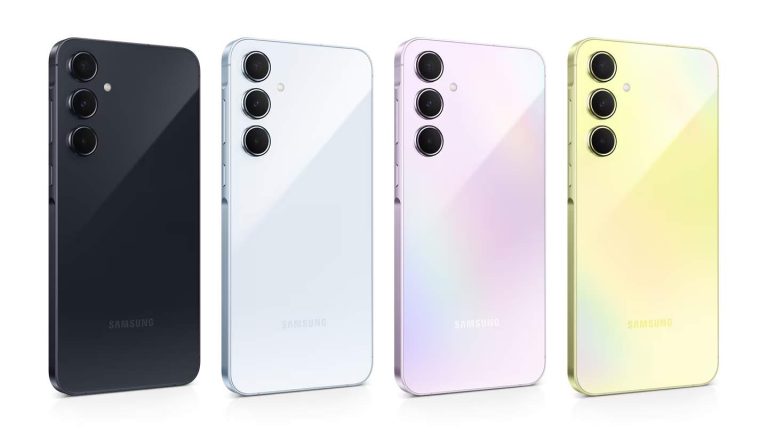
Samsung‘s newly launched premium mid-range smartphone, the Galaxy A55, may not arrive in the US. The company reportedly hasn’t planned a US release for the phone. It could change its mind later but there aren’t any such signs. The Galaxy A35, which debuted alongside the A55 yesterday, is coming stateside.
Samsung prioritizes Galaxy S23 FE over Galaxy A55 in the US
The Galaxy A55 sits below Samsung’s Galaxy S series flagships on the price ladder. It is a value smartphone with good cameras, a decent chipset, flagship build quality, a premium display, long update support, and more on a budget. Last year’s Galaxy A54, for example, debuted with a price tag of $450, a good value for what it offered.
Samsung sweetened the deal this year by adding an aluminum frame to the Galaxy A55. At a sub-$500 price, the phone would have been an appealing proposition. However, according to a CNET report, the new mid-range device won’t step into the US. The company “will not be carrying the Galaxy A55 5G at this time,” a Samsung representative told the publication.
The Korean behemoth reportedly plans to position a discounted Galaxy S23 and Galaxy S23 FE as its offerings below the Galaxy S24, which starts at $800. This doesn’t seem like a bad move. The FE model launched with a $600 price tag. If Samsung offers a discount on it, the Galaxy A55 won’t be missed. The Galaxy S23 FE is a substantially better package than the A-series phone.
That said, Samsung can bring the Galaxy A55 to the US anytime if it feels there is a market for the phone. The Galaxy A35, on the other hand, is confirmed to be available stateside from the beginning. “We can confirm that Galaxy A35 5G will be coming to the US market and look forward to sharing more details in the coming weeks,” the Samsung representative said.
A release date for the Galaxy A35 is not yet available
Samsung has yet to reveal a release date for the Galaxy A35 in the US. It hasn’t even announced its release in most markets outside Europe. The company may share the details closer to the market debut of the device. As far as the entry price is concerned, the Galaxy A35 may start at around $400. It uses the Galaxy A54’s Exynos 1380 chipset and the Galaxy A55’s 50MP main camera. The device misses out on an aluminum frame. Stay tuned for its US release.
What is Android TV? In simple terms, it’s Android for your TV. It first launched in 2014 as a sort of replacement for Google TV. Even though Google TV has now been reborn as an extension and possibly replacement for Android TV.
TV operating systems have gone through a significant transition over the last few years. There are still a number of companies using proprietary software, including Samsung and LG. However, a number of TV manufacturers are now opting to employ the help of a third-party operating system.
Android TV is one of those options. One that’s provided by Google. Which is now beginning to transition into Google TV.
Is Android TV the same as Android mobile?
This is an app-based platform. In that sense, it is very similar to the version of Android running on your smartphone.
Android TV users can download and install apps directly from the Google Play Store just like they do on their smartphones. Although not all mobile apps are available for the TV the reason is the user experience.
Android TV 13
At Google I/O in 2022, Android TV 13 was announced. It is not a huge upgrade to Android TV, with really only one user-facing feature being added. Basically, it is improving picture-in-picture, a feature it has had for years. Now it will work better with other apps. Specifically with video chatting apps like Zoom and Google Meet. So you can keep the video going in the corner while you’re watching TV.
Google is also using new APIs that will help apps work better with actual TV hardware. There’s an “AudioManager” API that will allow apps to better anticipate where audio is heading and what playback modes are available. There’s also the “MediaSession” API which allows for Android TV apps to better react to HDMI state changes to pause content or save power.
For accessibility, Android TV 13 is bringing new keyboard layouts for the InputDevice API. This is an API that allows for physical keyboards to better work with Android TV apps. That should be helpful for game developers, specifically. There is also a new system-wide selection that enables audio descriptions across all apps too.
Android TV 14 has not yet launched. Android TV does not follow the same update schedule as mobile Android, seeing as TVs don’t see as many changes, and manufacturers are much slower to update TVs versus phones. However, Google TV has launched with Android 14 already, giving us more reason to think that Android TV itself might be going away in the future.
What is Google TV?
In late 2020, Google debuted the new Chromecast with Google TV, which was the first time that we saw Google TV launch on a device in almost a decade. Google TV was Google’s original entry into the living room space around 2010. Then it was rebranded as Android TV.
Now, Google TV is back, and it is essentially an interface that lives on top of Android TV. In short, it makes it easier to find content to watch on the big screen, with great recommendations across the board for the apps that you have installed.
Google TV still runs on Android TV and is starting to roll out to more devices. But as of right now, it’s only available on the new Chromecast. Sony and other manufacturers have already stated that they will be bringing Google TV on their new TVs and updating their older TVs with it, too.
Are all Android apps available on Android TV?
TVs are not typically designed with touch controls in mind. Unlike your smartphone, there are no swipes, taps, or gestures in use. Instead, TVs mostly rely on the use of a remote control.
Android mobile apps are built from the ground up with touch controls in mind. If those apps were made available on a TV as-is, users would find it difficult to navigate the app. In some cases, impossible.
Due to this, TV apps have to be optimized by developers before becoming available on a platform like Android TV. Optimization ensures all the things you can do with the smartphone version, you can also do with a remote control.
Not all developers have optimized their apps for the TV and therefore not all Android apps are available. The number of optimized apps has grown considerably over the years, but there’s still quite a few missing.
How do I use Android TV
Like your smartphone, it all begins with the home screen. Often referred to as the ‘leanback launcher,’ this is where you’ll find the apps you use most often. As well as recommendations and titles you’ve been watching lately, or typically watch. This appears more filled out when you have a live TV service connected to your Android TV. Like YouTube TV, Pluto TV, Sling TV, etc.
In more recent versions of the platform, apps have been replaced by what Google now refers to as “Channels.”
Technically, nothing has changed as channels are still apps. The difference is simply how they are now displayed. Each app now has its own channel and this allows the user to see more of the app’s content.
One way to understand the difference is to think of the channel design as an app equivalent of an electronic program guide. A way to see what’s currently available to watch. Instead of clicking to launch an app, you can click directly on a TV show or movie and start watching.
The downside of channels is that fewer apps are visible on the home screen at a given time. This might mean the user has to scroll more often to see what else is on – again, like an electronic program guide.
The good news is this is a fairly customizable platform and users do have the option of telling the operating system what apps they prefer or use most often. In other words, you can fairly easily set the home screen to only show your favorite apps and nothing else.
App channel customization
What are the benefits of Android TV?
One of the clearest benefits of Google’s TV platform is the app support. While we just mentioned how there’s a lot of apps still missing, Android TV uses the Google Play Store. This is a great source for apps and every major app that gets released, is also released to the Google Play Store.
This means 1000s of apps are already available and ready to download.
Android TV Google Play Store
Smart home users highly invested in Google Assistant will also find Android TV slots into the ecosystem nicely. Google Assistant is compatible with Android TV and newer versions of the platform actually come with Google Assistant built-in.
This won’t interfere with your existing Google Assistant devices, but instead will provide an additional way you can launch the Assistant.
Google Assistant on Android TV
Using the Assistant on your TV not only provides feedback to questions asked or the ability to control other smart home products, but also allows you to search the TV to find content to watch. As well as adjust some aspects, such as the volume.
What are the problems with Android TV?
As already mentioned, one of the biggest downsides of Android TV is that not all Android apps are optimized for the platform. This includes some fairly major ones. The landscape is always improving but you may want to check if your favorite apps are supported before purchasing an Android TV device.
What might be another downside for some is the ecosystem in general. For example, if you are heavily invested in Amazon and its Alexa ecosystem, then this might not be the best option for you.
A third criticism of the platform is that there are no first-party products available. Google has yet to release its own Android TV device and therefore you will have to buy a product from a third-party. This can result in other issues such as manufacturer support and updates.
How can I get Android TV?
After being officially unveiled during Google I/O 2014, the first consumer-ready device was launched as the Nexus Player. The Nexus Player is no longer available to buy but the platform and number of devices have grown substantially since then.
There are three main ways to get Android TV and will briefly go over the options now.
Through your provider
One of the newer ways to get Android TV is through an operator/provider. For a long time, operators have provided customers with a set-top box. Recently, operators have been upgrading that experience by switching their set-top box over to an Android TV set-top box.
These newer devices might not necessarily look like Android TV as they can be highly customized by the operator, but underneath it’s Android TV.
This is still a fairly new industry switch, but you can expect to see more operators in different parts of the world releasing new devices powered by Google’s TV solution.
Some of the most recent examples in the U.S. include AT&T and its AT&T TV set-top box or Sling TV and its AirTV devices.
Through your actual TV
One of the easiest ways to get Android TV is actually through your TV. Over the last few years, many TV manufacturers have chosen to use Google’s solution to power their latest products.
The benefit of this approach is that there’s no need for any additional hardware. The TV itself runs on the operating system and the setup is minimal.
Some of the TV brands now offering TVs powered by Android TV include Sony, Sharp, Hisense, Philips, and Skyworth.
Through a separate device
The third way is to simply buy a separate streaming device. This way is not that different to the operator method as the most common option is a set-top box. The difference is the set-top box won’t be customized by the operator. Instead, it will run a more generic-looking version of the software.
This also means you won’t have to worry about remaining subscribed to the operator’s service to retain access to the set-top box.
While set-top boxes are a common product, they are not the only option. Over the last few years, Google has been hard at work to bring the platform to new form factors and devices.
This means you can actually get Android TV included in a wide range of devices, like a projector or even a soundbar.
What’s the most popular Android TV devices?
NVIDIA SHIELD TV
Arguably, the most popular device is the NVIDIA SHIELD TV. This is a set-top box that can be easily attached to your TV and requires no additional purchase to use.
Nvidia Shield TV
One of the benefits of NVIDIA’s solution is that it comes with an emphasis on gaming. This is a high-performance set-top box and one that’s very well supported in terms of software and security updates.
The NVIDIA SHIELD TV is available to buy from various retailers including Amazon. The NVIDIA SHIELD TV costs anywhere between $150 and $200 in the U.S.
Find our more about the NVIDIA SHIELD TV by reading our full review.
Xiaomi Mi Box S
The Xiaomi Mi Box S is not as powerful or as feature-rich as the NVIDIA SHIELD TV, but its major selling point is the price. This makes the Mi Box S one of the easiest and cheapest ways to get started with Android TV.
Xiaomi MI Box S
The Xiaomi Mi Box S is available from a number of retailers including Amazon. The Xiaomi Mi Box S costs $69.99 in the U.S.
Find our more about the Xiaomi Mi Box S by reading our full review.
Official vs unofficial Android TV
It is important to note the difference between official and unofficial Android TV as this could impact on the experience.
There are some boxes that are referred to as an ‘Android TV box.’ This is because they do run on Android and they are a box that connects to your TV. However, this is not actually Android TV.
While these boxes do run on Android, they are not using the licensed version of the platform. This also typically means they are not designed to work with apps that have been optimized for the platform.
Official Android TV is a licensed product. Any device using the official version will likely make it clear on the box or in the product description. You can also check what official devices are available by heading over to the official platform website.
Is Android TV the best choice for me?
There are a number of factors that might influence your decision. Arguably, one of the most important is your existing setup. After all, this is a smart TV platform, and making sure it plays nicely with your other smart home devices will ensure the best experience possible. While Android TV is an excellent choice for anyone looking to switch to a streaming device, it’s not the only choice.
Amazon offers a number of devices that run on Fire TV OS making it a better option for those more invested in Alexa. Fire TV devices available from Amazon include TVs, dedicated set-top boxes, and TV sticks.
Then there’s Roku OS. Like Google and Amazon’s solutions, Roku OS is another TV-optimized platform that provides access to many of the same apps and services.
Roku OS is also available to buy as a TV, set-top box, or TV stick.
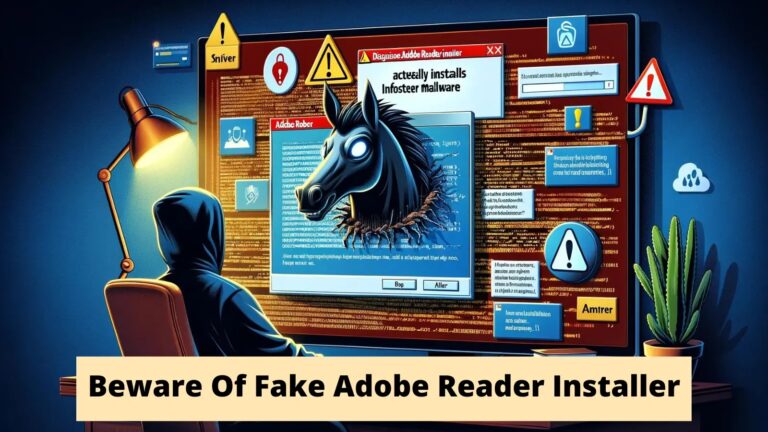
An infostealer disguised as the Adobe Reader installation has been observed. The file is disseminated in PDF format and prompts users to download and run it.
The fake PDF file, according to AhnLab Security Intelligence Center (ASEC), is written in Portuguese and instructs users to download and install Adobe Reader.
It urges users to download and install malware by informing them that Adobe Reader is needed to open the file.
The Flow Of The Attack
Researchers say the message prompts users to install and download Adobe Reader.
When users click the gray area as seen below, malware is downloaded, and they are redirected to the following message, hxxps://raw.githubusercontent[.]com/fefifojs/reader/main/Reader_Install_Setup.exe
Fake PDF File
“The downloaded file takes the form of the Adobe Reader icon, and its name is set as Reader_Install_Setup.exe.
By taking the disguise of the Adobe Reader installer, it prompts the user to run it”, ASEC researchers shared with Cyber Security News.
Reader_Install_Setup.exe
The downloaded file’s execution procedure has three stages: file creation, DLL Hijacking & UAC Bypass, and Information Leak.
Attack Phases
Following the file creation phase, Reader_Install_Setup.exe uses the following command to launch msdt.exe, a Windows system file, and produces two malicious files.
Running sdiagnhost.exe as administrator is the function of the msdt.exe process that is now running.
Therefore, when the sdiagnhost.exe process loads BluetoothDiagnosticUtil.dll, the malicious DLL file is loaded.
Following the above process, the threat actor can bypass user account control (UAC) by using DLL hijacking.
During the information leak phase, it generates files, including chrome.exe, and conceals them in the generated path.
Chrome.exe collects system and browser information and sends it to the C2 server.
The created chrome.exe is a malicious file associated with the actual Google Chrome browser, and it impersonates the actual browser executable file by using the same icon.
Consequently, users who acquire files from unauthorized sources should exercise extreme caution when dealing with files that ask them to run malware.
With Perimeter81 malware protection, you can block malware, including Trojans, ransomware, spyware, rootkits, worms, and zero-day exploits. All are incredibly harmful and can wreak havoc on your network.
Stay updated on Cybersecurity news, Whitepapers, and Infographics. Follow us on LinkedIn & Twitter.
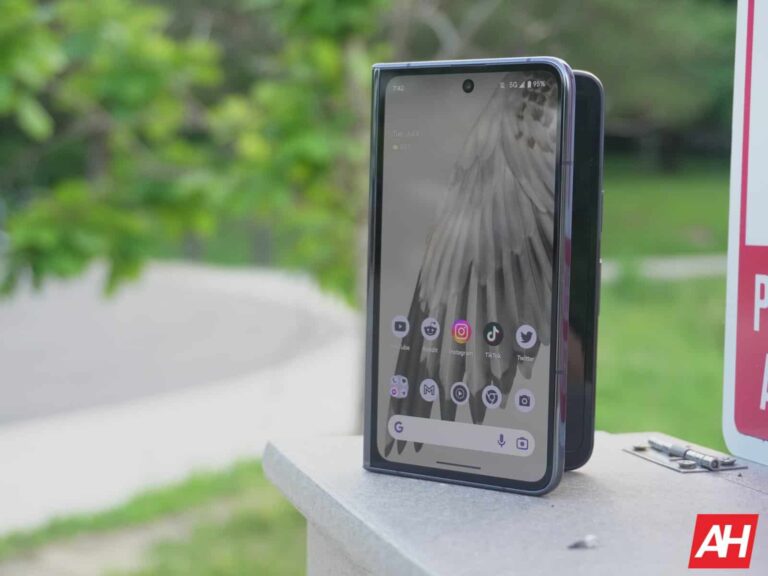
Google’s upcoming Pixel Fold 2 has leaked quite a few times and this has included everything from rumored display sizes to the potential design of the phone via CAD renders. Although none of those details have been confirmed, it still leaves customers with something to talk about and paints a picture of what to expect when the device officially arrives.
The latest rumor about the device suggests that leaks thus far have gotten the display size of the Pixel Fold 2 all wrong. No definitive size has been confirmed. But rumors from previous leaks had suggested the inside display could be up to 7.9-inches. This was partly based on the fact the inside display size of the original Pixel Fold was 7.6 inches. The cover display, meanwhile, was 5.8 inches. According to leaker Ross Young on X, the inside display on the Pixel Fold 2 will be 8.02 inches in size while the cover display will be 6.29 inches. These are admittedly small differences compared to the first model. But they are larger and will make a difference for the user with slightly more screen real estate.
The Pixel Fold 2’s panel production will start for the new display sizes very soon
Display sizes aren’t the only piece of information that Young offered up. He also notes that production of the panels for these displays will be starting soon. According to Young production begins in April. This timing could make sense if you consider when Google is likely to announce and launch the phone. With the Pixel Fold, Google announced the phone at Google I/O in May of 2023. This preceded the June 27 launch which was nearly two months later.
If the production timing is accurate, then that means it won’t take more than two months to manufacture the displays for these phones. Then again that’s assuming that launch timing follows the original phone. There’s still no guarantee that Google plans to launch the device within the same timeframe. However, there’s also nothing to suggest it won’t.
Outside of the display sizes, Young speaks partly to other, smaller details about the phone screens. One user in the comments asks what the pixels per inch and aspect ratios of the displays are. Specifics aren’t mentioned like they are with display sizes. Young does state that the main display (the inside display) is “close to square.” Young also notes that the cover display is pretty wide just like on the Pixel Fold. You can read more about the Pixel Fold 2 and all of its potential specs and details in our main preview post.
The leaks on the Pixel Fold 2 don’t have the display sizes right. 8.02″ for the foldable display and 6.29″ for the cover display. Panel production starts in April! It is coming.
“We are teaching machines how to think.” That’s a quote from the recent video posted by Joe Toscano, a former Google consultant. In a recent video posted on Fox Business, Toscano talked about how Google went “too big too soon” with AI, and this is a sentiment that we all share.
Now, Google is dealing with a bit of a mess with its AI products, and it’s been that way ever since the launch of Bard. While Gemini and other Google AI products are useful and functional, there is a deeper issue.
A former Google consultant says that the company went “too big too soon” with AI
In the two-and-a-half-minute-long video, Toscano stated that a lot of historical inaccuracies produced by chatbots are a product of Google and other companies just feeding the models information without really explaining what’s correct and what’s not correct. So, this is one reason why they are liable to give you inaccurate details. It’s “likely that [Google] fed it a bunch of data and, in the modern machine learning environment we’re in, they expect that the machine will learn on their own and that the outcome will be, more or less, bulletproof.”
Toscana also explained why Google is struggling with Gemini. He explained the major issue of the company playing corporate catch-up. Google Bard was not launched as a product, it was launched as a response. When ChatGPT launched, it threatened Google immensely. So, the company had to rush to get something to the market in order to keep the investors happy.
Google, like other companies, is trying to build a be-all-end-all artificially intelligent system that is as smart as a human being. However, the circumstances just aren’t conducive for that in Google’s case. Google is a major profit-driven corporate company that needs to justify every cent it’s spending on AI development. So, aside from developing AI, the company also has to worry about profits and investors. So, it has to keep up with the times and keep launching new AI products to compete with companies such as OpenAI, xAI, Anthropic, Etc.
Corporate catch-up
Because of this, Google has had to rush products onto the market without proper testing. The most recent example is the Gemini image generating people with historically and accurate skin tones, ethnicities, and genders. Another example is how half-assed Gemini is as an assistant.
It seems that all of Google’s AI products are just being thrown onto the market, and this creates a bad track record. In the video, Toscano states that this is what happens when companies play corporate catch-up. Companies don’t properly test their products because their profits and stock prices are at stake. They put it on the market and hope that it sticks.
If ChatGPT did not launch when it did, and Google had the time to properly flesh out its AI products, then things would be different. However, it has to compete with ever-evolving competition. For example, OpenAI is testing Sora. Well, we can bet that Google is also testing its own video creator. However, since it’s already behind the times, we can bet that it won’t be as polished.
This is why Apple’s AI might be better
News and rumors are already ramping up about Apple’s upcoming AI product. While Apple is new to the game in terms of AI, we can comfortably assume that, when Apple does release it, it’ll be much more refined and better integrated than Google’s ecosystem of AI products.
The thing about Apple is that the company doesn’t typically launch products until they pretty much work perfectly. Apple may be able to integrate its AI flawlessly with iOS, iPadOS, and macOS. We can trust that it’s going to take the proper time to refine its experience because it’s not at risk of losing ad revenue like Google is, and the vast majority of its income comes from hardware. So, it’s not much reason to rush this product to the market.
Cybersecurity researchers at Fortinet’s FortiGuard Labs have discovered a new threat called Vcurms malware targeting popular browsers and apps for login and data theft. They urge security updates and caution with emails.
Fortinet’s FortiGuard Labs recently uncovered a new cybersecurity threat: a malware known dubbed “Vcurms.” The attackers behind Vcurms malware have employed sophisticated tactics, using email as their command and control center and leveraging public services such as AWS and GitHub to store the malicious software. Additionally, they have employed a commercial protector to evade detection, indicating a concerted effort to maximize the malware’s impact.
Targeting Java Platforms
This campaign primarily targets platforms with Java installed, posing a risk to any organization utilizing such systems. The severity of the threat cannot be understated, as successful infiltration grants attackers full control over compromised systems.
Tactics and Techniques: Spreading Vcurms
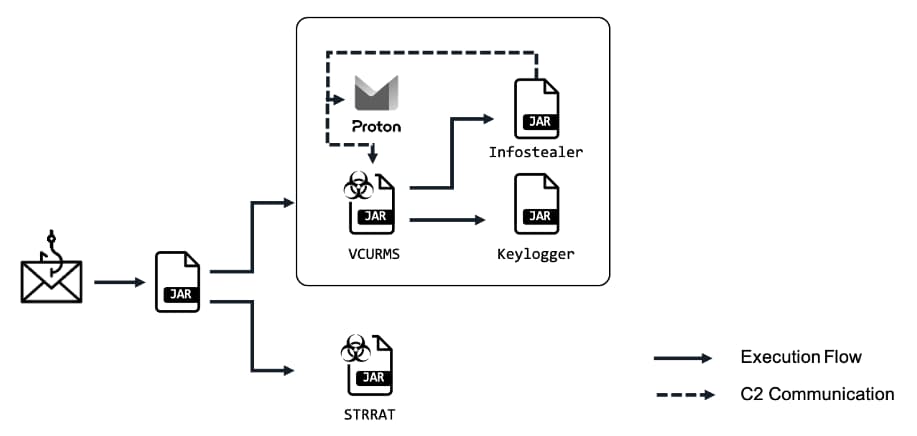
The modus operandi of the attackers involves luring users to download a malicious Java downloader, which serves as a vector for spreading Vcurms and STRRAT, a trojan previously found to be posing as fake ransomware infection to steal data. These malicious emails typically masquerade as legitimate requests, urging recipients to verify payment information and download harmful files hosted on AWS.
Phishing Traits
Once downloaded, the malware exhibits classic phishing traits, employing spoofed names and obfuscated strings to disguise its nefarious nature. Notably, it utilizes a class named “DownloadAndExecuteJarFiles.class” to facilitate the downloading and execution of additional JAR files, further expanding the attacker’s foothold.
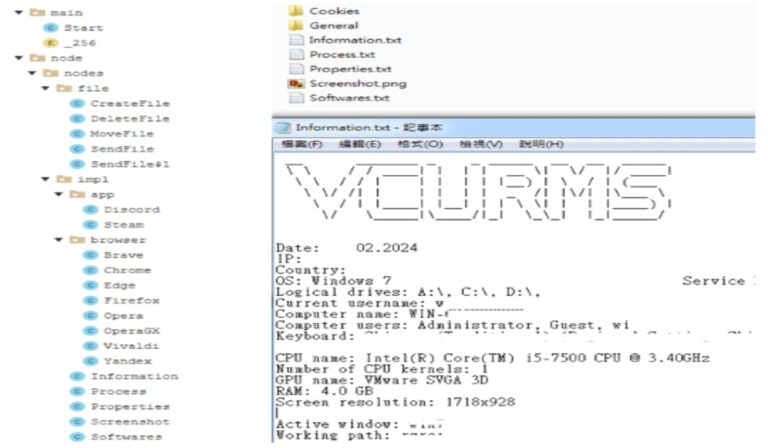
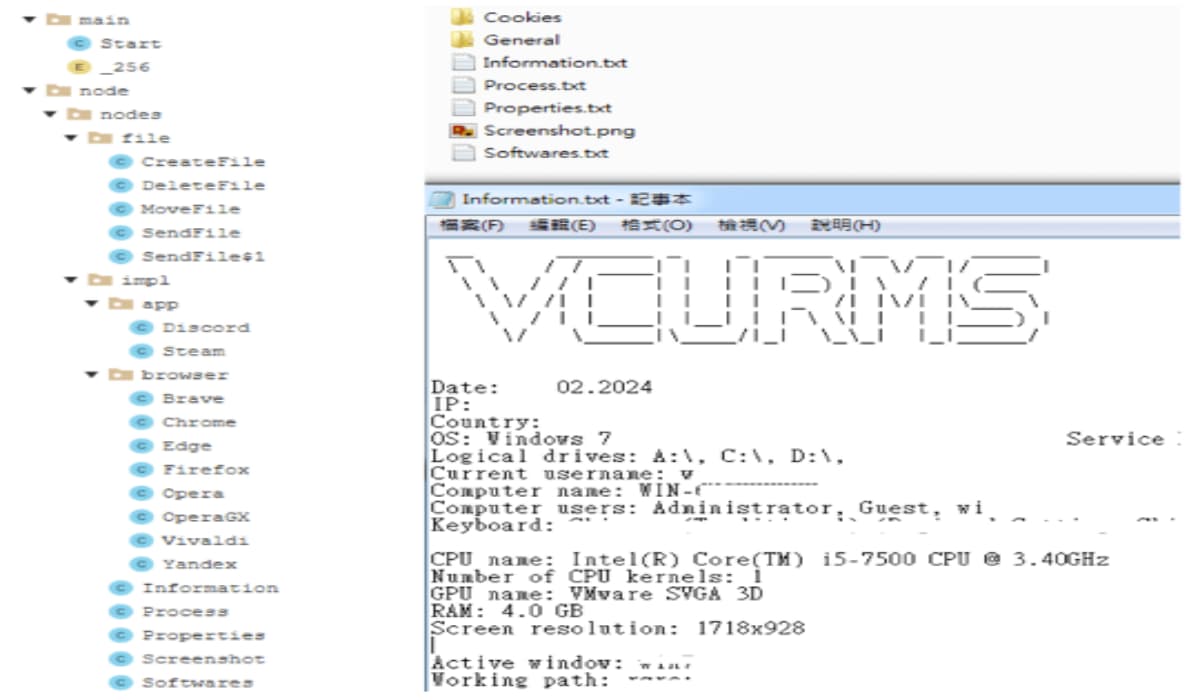
The Remote Access Trojan (RAT) component of Vcurms communicates with its command and control center via email, demonstrating a concerning level of sophistication. It establishes persistence by replicating itself into the Startup folder and employs various techniques to identify and monitor victims, including keylogging and password recovery functionalities.
Targeting Popular Browsers and Apps
Furthermore, the malware employs advanced obfuscation techniques, such as the Branchlock obfuscator, to evade detection and analysis. Despite these challenges, cybersecurity researchers continue to develop methods for deobfuscating and understanding the inner workings of Vcurms.
Vcurms also exhibits notable similarities with the Rude Stealer malware but distinguishes itself through its unique transmission methods and targeted data acquisition. It prioritizes stealing sensitive information from popular browsers like Chrome, Brave, Edge, Vialdi, Opera, OperaGX, Firefox, etc. and applications, including Discord and Steam.
In response to this threat, FortiGuard Labs in their blog post, recommend proactive measures, including the deployment of updated security solutions and network segmentation. Additionally, maintaining vital password practices and exercising caution when handling email attachments are crucial steps in mitigating the risk of Vcurms infection.
Commenting on this, Jason Soroko, Senior Vice President of Product at Sectigo, emphasizes the importance of authentication methods in combating malware attacks.
“Malware writers are benefiting from the cloud and that shouldn’t surprise anyone. RAT malware typically harvests whatever it can, and the new VCURMS and STRRAT remote access trojans seem to have one or more keyloggers,“ Jason warned. “This technique has been around for quite some time and is yet another example of why stronger authentication methods than simply a username and password are necessary.“
Apple today introduced the Web Distribution of iOS apps, set to become available with a software update later this spring. It will enable authorized developers to distribute their iOS apps directly to EU users from their own websites. This move is significant as it allows developers to bypass the traditional route of distributing apps through the App Store or other third-party stores. An advantage of this is the possibility of avoiding the fees that some third-party app stores require. However, it comes with tight restrictions and requirements set by Apple. The company says these are implemented to ensure user safety and privacy.
Apple will still have significant control over the app distribution
“Apple will provide access to APIs that facilitate the distribution of developers’ apps from the web, integrate with system functionality, back up and restore users’ apps, and more,” notes the company. Additionally, developers must ensure that apps offered through Web Distribution meet Notarization requirements to protect platform integrity. Apple will only allow developers to use an Apple Store Connect registered domain to host their app.
Users will also need to approve the developer to install apps in their iPhone settings before installing an app. Then a system sheet will display information provided by developers to Apple for review, such as app name, developer name, description, screenshots, and age rating.
To be eligible for Web Distribution, developers must be enrolled in the Apple Developer Program as an organization incorporated, domiciled, or registered in the EU. Additionally, developers must be members of “good standing” in the Apple Developer Program for two continuous years or more and have an app with more than one million first annual installs on iOS in the EU in the prior calendar year. Developers must agree to various commitments, including being responsive to communications from Apple, publishing transparent data collection policies, and following applicable laws.
Web Distribution of apps will also include Apple’s “Core Technology Fee”
There are also financial considerations for developers using Web Distribution. Apple will charge a Core Technology Fee (CTF) for apps distributed through Web Distribution, the same as the third-party marketplaces in EU. Membership in the Apple Developer Program includes one million first annual installs per year for free, and developers will pay a CTF of €0.50 for each first annual install over one million in the past 12 months. Additionally, developers are responsible for collecting, reporting, and remitting any required taxes for transactions that occur using Web Distribution.
Nonetheless, for developers willing to host their apps directly and comply with Apple’s requirements, Web Distribution provides an alternative pathway to reach iPhone users in the EU starting this spring.
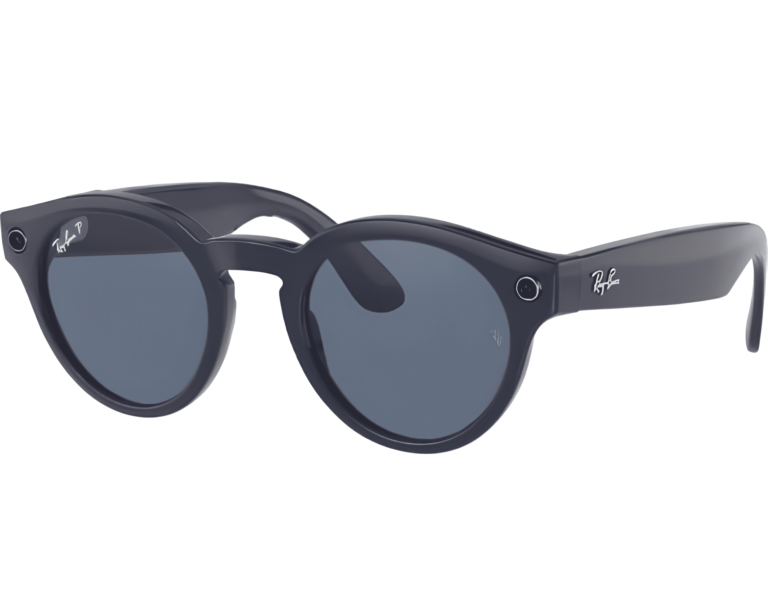
Meta sunglasses made by Ray-Ban have now integrated AI-powered vision to allow identification and information on surrounding landmarks. The option was unveiled recently as a highlighting feature in the latest beta version. The update went official by Meta CTO Andrew Bosworth on a Threads post, suggesting its potential use cases as a tour guide for travelers.
Meta Ray-Bans get smart and now ID Landmarks in front of your eyes
The new feature can recognize landmarks through AI systems from various places. Bosworth demonstrated this by using sample images that AI accurately guessed to be the Golden Gate Bridge and painted Ladies of San Francisco. Descriptions displayed as text below the pictures, help users understand more about the landmarks.
He also showcased these features in other videos taken in Montana, where glasses explain via audio what different landmarks look like, such as Big Sky Mountain or Roosevelt Arch. Not only does it give you the latest weather updates, but it also explains weather phenomena like snow formation, with an easy-to-understand guide.
At the Connect event last year, Meta previewed this feature as part of its “multimodal” portfolio, allowing users to interact with their environment through real-time information. Engadget affirms the new landmark ID is an extension of the previous feature that now allows Meta´s smart glasses to access real-time info.
Environment awareness on Meta Ray-Bans is mostly similar to Google Lens
Meta’s landmark identification is an additional functionality on top of its present Google Lens-esque tool that allows users to search and ask questions about what they see in their environment. PhoneArena suggests that the Lens-like capability is free for users during the beta phase, but it’s only exclusive to members in the early access program.
Meta sunglasses have undergone yet another transformation with the addition of a landmark identification feature making them even better tools for experiencing augmented reality through glasses. Enhanced capabilities for travel and exploration make it a versatile tool.
February was a particularly busy month for search-based malvertising with the number of incidents we documented almost doubling. We saw similar payloads being dropped but also a few new ones that were particularly good at evading detection.
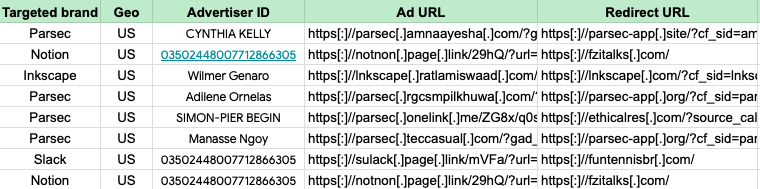
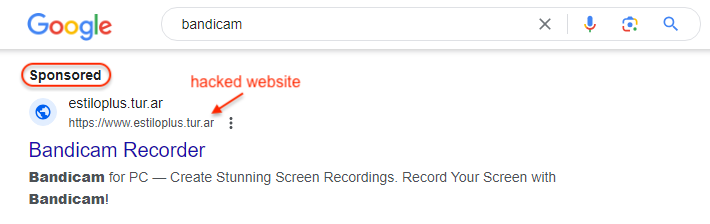
One malware family we have been tracking on this blog is FakeBat. It is very unique in that the threat actor uses MSI installers packaged with heavily obfuscated PowerShell code. For weeks, the malvertiser helping to distribute this malware was abusing the same URL shortener services which may have made the attack somewhat predictable. We saw them experimenting with new redirectors and in particular leveraging legitimate websites to bypass security checks.
Another interesting aspect is the diversity of the latest campaigns. For a while, we saw the same software brands (Parsec, Freecad) being impersonated over and over again. With this latest wave of FakeBat malvertising, we are seeing many different brands being targeted.
All the incidents described in this blog have been reported to Google.
New redirection chain
During the past several weeks, FakeBat malvertising campaigns used two kinds of ad URLs. As observed in other malvertising campaigns, they were abusing URL/analytics shorteners which are ideal for cloaking. That practice enables a threat actor to use a ‘good’ or ‘bad’ destination URL based on their own defined parameters (time of day, IP address, user-agent, etc.).
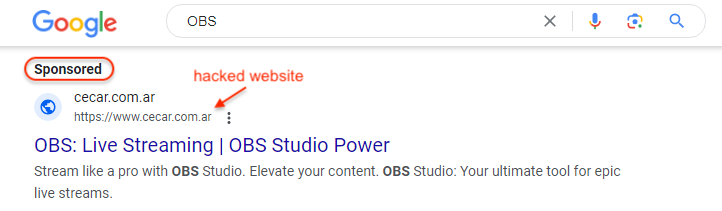
The other type of redirect was using subdomains from expired and sitting .com domains reassigned for malicious purposes. This is a common trick to give the illusion of credibility. However, in the most recent malvertising campaigns we see the threat actor abusing legitimate websites that appear to have been compromised.
It’s worth noting that the few examples we found were all Argentinian-based (.ar TLD):
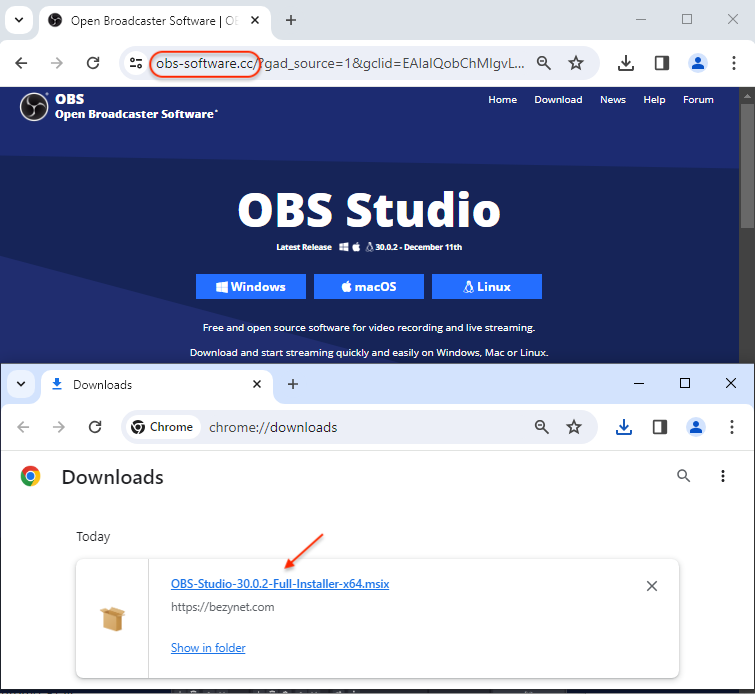
Victims click on the ad which sends a request to those hacked sites. Because the request contains the Google referer, the threat actor is able to serve a conditional redirect to their own malicious site:
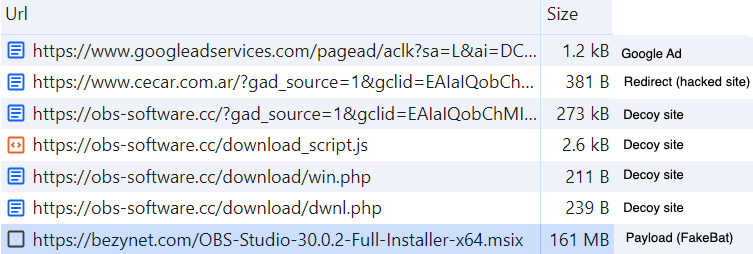
The full infection chain can be summarized in the web traffic image seen below:
Several active brand impersonations
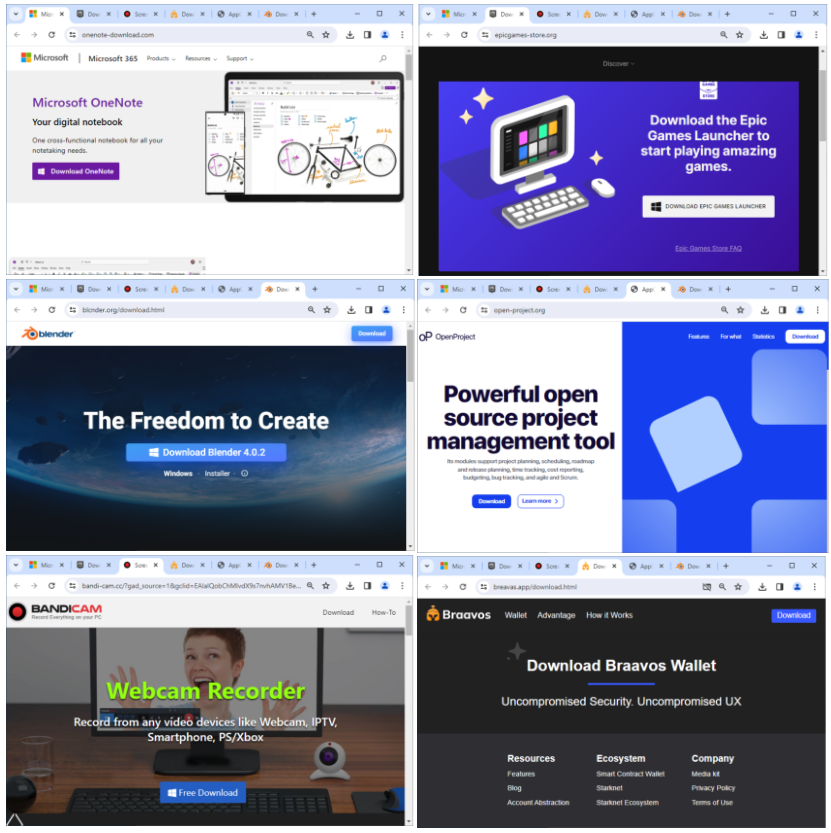
There are currently several campaigns running including OneNote, Epic Games, Ginger and even the Braavos smart wallet application.
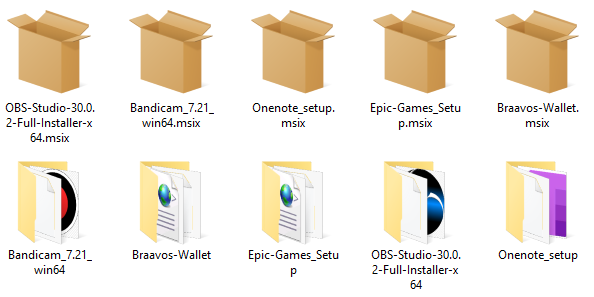
Each downloaded file is an MSIX installer signed with a valid digital certificate (Consoneai Ltd).
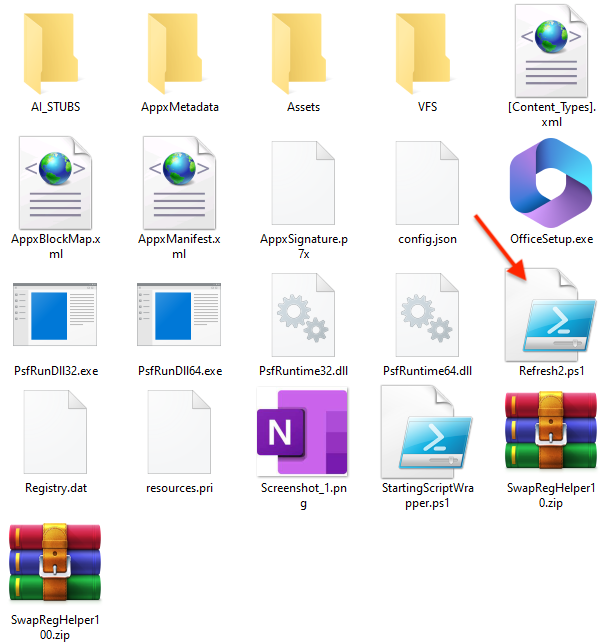
Once extracted, each installer contains more or less the same files with a particular PowerShell script:
When the installer is ran, this PowerShell script will execute and connect to the attacker’s command and control server. Victims of interest will be cataloged for further use.
Conclusion
FakeBat continues to be a threat to businesses via malicious ads for popular software downloads. The malware distributors are able to bypass Google’s security checks and redirect victims to deceiving websites.
It is as important to defend against the supporting infrastructure as the malware payloads. However, that is not always easy since legitimate websites may be used to defeat domain blocklists. As always, blocking ads at the source via system policies such as ThreatDown DNS Filter, remains one the most effective ways to stop malvertising attacks in their tracks.
Over the years, companies have been working on bridging the gap between mobile gaming and PC gaming. For instance, Microsoft announced integration with the Amazon Android App Store in Windows 11. However, that is going away. Well, during Google’s annual Google for Games Developer Summit, the company announced native PC games.
Right now, we are going to hear about more interesting changes coming to Android and other Google services because the company is hosting its annual Developer Summit. During this event, Google announced its plans for the future of Android gaming.
Google announced native PC games
This seems like a bit of an odd announcement, seeing as you can already access Android games via Google Play Games on Windows. Back in 2022, Google started testing this. So, if you download the launcher, you will be able to play certain Android games natively on your Windows computer. However, it appears Google wants to push this even further.
The company announced during the Google for Games Developer Summit that it will be launching several native PC games. So, rather than depending on a launcher, these games will be downloaded directly to your computer. As for the games that will be available for this change, Google mentioned Llineage2M, Genshin Impact, Odin: Rising, and Dragonair: Silent Gods.
It appears that the company is testing the waters with a limited number of games rather than launching the entire initiative. So, we are just going to have to see how the player base responds to this. In any case, if you are curious about trying Google Play for PC, you can go to the official website.
You will have to make sure that you are signed in to your Google account on the computer you want to install the games on. This acts as a launcher, so you will need the application to run the games. It is free to download and free to use. Also, these games have mouse and keyboard support along with controller support, so it will feel just as though you’re playing games meant for PC.