A former Google employee and Chinese national was charged with stealing trade secrets, the U.S. Justice Department said today. The defendant worked as a software engineer at Google, mostly working on machine learning and artificial intelligence technology. The former employee, 38-year-old Linwei Ding, allegedly stole over 500 files related to proprietary AI technology from Google. Ding was working for two companies based in China at the time, according to prosecutors. The stolen documents are about “the hardware infrastructure and software platform that allow Google’s supercomputing data centers to train large AI models through machine learning,” per the filings.
“The Justice Department will not tolerate the theft of artificial intelligence and other advanced technologies that could put our national security at risk,” said Merrick Garland, the U.S. Attorney General, in a statement reported by NPR. “We will fiercely protect sensitive technologies developed in America from falling into the hands of those who should not have them.”
How the former Google employee was stealing trade secrets
Ding started working at Google in 2019, and allegedly began stealing trade secrets in 2022. He is said to have uploaded confidential Google files to a personal Google Cloud account. Then, Ding allegedly accepted an offer from the China-based Beijing Rongshu Lianzhi Technology company to become its CTO. In 2023, Ding is claimed to have created his own company, known as Zhisuan. The former employee failed to notify Google that he was working for either of the two companies.
Google first noticed that Ding was attempting to steal files in December 2023. Then, the company investigated, and Ding eventually resigned from Google and bought a one-way flight to China. After, the Federal Bureau of Investigation started looking into the matter.
“Today’s charges are the latest illustration of the lengths affiliates of companies based in the People’s Republic of China are willing to go to steal American innovation,” FBI Director Christopher Wray said. “The theft of innovative technology and trade secrets from American companies can cost jobs and have devastating economic and national security consequences.”
Google thanked the FBI for getting involved
Google thanked the FBI for stepping in. It also told NPR that there are “strict safeguards to prevent theft of our confidential commercial information and trade secrets” in place at the company.
“After an investigation, we found that this employee stole numerous documents, and we quickly referred the case to law enforcement,” Google spokesperson Jose Castaneda said in a statement to NPR. “We are grateful to the FBI for helping protect our information and will continue cooperating with them closely.”
Now, the proceedings will continue. Ding is up against four counts of stealing trade secrets. Each count comes with a penalty of up to 10 years in prison. Additionally, Ding could also be fined $250,000 for each count.
Company Open Sources FHE Libraries to Build Privacy-Preserving Blockchain and AI Applications for the First Time.
An investment has been secured to bring Fully Homomorphic Encryption (FHE) to the fore, giving developers the ability to address data privacy challenges across blockchain and AI use cases.
Zama, an open-source cryptography company building state-of-the-art FHE solutions to protect privacy in blockchain and AI, today announced a $73M Series A round led by Multicoin Capital and Protocol Labs, with participation from Metaplanet, Blockchange Ventures, VSquared, and Stake Capital, as well as blockchain pioneers Juan Benet (founder of Filecoin), Anatoly Yakovenko (co-founder of Solana), and Gavin Wood (co-founder of Ethereum and co-creator of Polkadot).
The funds will be used to hire talented engineers, software developers, and researchers in cryptography, maintain its open-source libraries, and collaborate with strategic partners to develop a new class of Fully Homomorphic Encryption (FHE) applications.
As demand for robust data protection grows internationally, businesses and organizations need a way to protect consumer data without compromising its utility. FHE provides a novel encryption technique that makes it possible to compute over encrypted data for the first time, revolutionizing what’s possible with data privacy for organizations, governments and consumers alike.
Over four years, Zama has built a suite of open source cryptographic libraries and solutions that make FHE readily available to developers to build privacy-preserving applications.
“We envision a world where data privacy isn’t an afterthought, but rather guaranteed by design. With the support of our investors, our talented team, and over 3,000 developers in our community, we can make FHE and privacy synonymous and ubiquitous,” said Rand Hindi, CEO of Zama.
“This funding gives us the resources to add to the best and brightest cryptography minds we already have on the team, while also continuing to advance the state of the art of what’s possible in data privacy. Our investors, Multicoin and Protocol Labs in particular, lend valuable experience as we bring FHE to market in the blockchain sector.”
Zama has been at the vanguard of FHE innovation since its inception in 2020. To date, the company has secured multi-million dollar deals in the blockchain and AI space, and has successfully released four cutting-edge FHE solutions.
The company’s most recent solution, fhEVM, is the first confidential smart contract protocol for EVM blockchains. Using FHE, the fhEVM enables on-chain state and transaction data to remain end-to-end encrypted during processing, addressing the core data privacy challenges in the blockchain.
“FHE is the most important foundational cryptographic primitive for the next decade of computing. Zama’s technology is the key to build multiplayer, privacy-preserving applications,” said Kyle Samani, Managing Partner of Multicoin Capital. “Zama’s groundbreaking work on open source FHE tooling is only the beginning. We are proud to help them build the next generation of crypto-enabled, privacy-first applications.”
In addition to addressing data privacy challenges in the blockchain industry, Zama is also building bespoke solutions in the artificial intelligence, healthcare, financial services, and governmental security industries.
“The potential for FHE in both blockchain confidentiality and AI privacy is massive,” says Pascal Paillier, CTO of Zama. “Being able to share our tools with people who are passionate about the same mission is an incredible privilege, something that has only been possible thanks to continuous support, resources and knowledge provided by our investors and community.”
Zama’s team is made up of over 75 individuals from 22 different nationalities, drawn from the fields of cryptography, machine learning, and blockchain technology. Half of the team hold PhDs in their respective fields and are passionate about ensuring data privacy.
Zama is an open source cryptography company building state-of-the-art FHE solutions to protect privacy in blockchain and AI. Their technology enables a broad range of use cases, from confidential smart contracts to encrypted machine learning and privacy-preserving cloud applications. Zama was founded by Dr Pascal Paillier and Dr Rand Hindi, and has the largest research team in homomorphic encryption.To learn more about Zama, please visit https://www.zama.ai/.
About Multicoin Capital
Multicoin Capital is a thesis-driven investment firm that invests in cryptocurrencies, tokens, and blockchain companies. Crypto networks and companies will create trillions of dollars of value over the next decade. But investing in tokens is fundamentally different than investing in companies. New tools, heuristics, and security measures are needed to responsibly invest in this ecosystem. We leverage our deep understanding of blockchain technology and crypto markets to deliver exceptional returns. For more information, visit: .
About Protocol Labs
Protocol Labs is an open-source research, development, and deployment laboratory. Our projects include IPFS, Filecoin, libp2p, and many more. We aim to make human existence orders of magnitude better through technology. We were founded in 2014 by Juan Benet as a fully distributed company. Our team of more than 100 members works remotely and in the open to improve the internet — humanity’s most important technology — as we explore new advances in computing and related fields. To learn more about Protocol Labs, please visit
Days after the launch of the Galaxy F15 5G, Samsung debuted another affordable Android smartphone. The company silently launched the Galaxy M14 in India. It is an entry-level offering without 5G connectivity. The device may arrive in some neighboring countries but may not go global.
Samsung launched the Galaxy M14 without any fanfare
In March 2023, Samsung launched the Galaxy M14 5G as an entry-level 5G smartphone. A year later, the company introduced a 4G version without much fanfare, though cellular connectivity isn’t the only change. The new phone is a lot different from its 5G-enabled namesake. For starters, it measures 168×78×9mm in dimension and weighs 194 grams. The 2023 model is 166.8×77.2×9.4mm and 206 grams.
The latter is thicker and heavier because it packs a 6,000mAh battery. Samsung is offering a 5,000mAh unit on the Galaxy M14 while maintaining 25W fast charging. The new phone’s taller and wider profile, meanwhile, allowed for a 6.7-inch display instead of a 6.6-inch one. It is still an IPS LCD panel with Full HD+ resolution (1080×2400 pixels), a 90Hz refresh rate, and a waterdrop-shaped notch.
The notch houses a 13MP selfie camera, unchanged from the 5G model. The rear camera setup is also unchanged. You get a 50MP primary shooter, 2MP depth camera, and 2MP macro camera. The phone can record 1080p videos with its front and rear cameras. The Galaxy M14 is powered by Qualcomm’s Snapdragon 680 processor with up to 6GB RAM and 128GB storage. The phone supports a microSD card.
Samsung’s Galaxy F15 5G received a lot of media attention earlier this week. This is likely because it is an affordable 5G phone guaranteed to receive a segment-first four major Android OS updates and five years of security patches. Sadly, the Galaxy M14 doesn’t get the same support. It will only receive two generations of Android upgrades and four years of security updates.
Worse yet, the Galaxy M14 runs Android 13 out of the box. So, it will not receive updates beyond Android 15, which should arrive in a year or so. Samsung might argue that it’s an entry-level product, but we would have still liked it to ship the device with Android 14. Other known specs include a side-mounted fingerprint scanner, dual-SIM support, GPS, Wi-Fi 5, Bluetooth 5.2, and a 3.5mm headphone jack.
Price and availability
Samsung is selling the Galaxy M14 in India through Amazon. The device is available in Arctic Blue and Sapphire Blue colors. The 4GB+64GB variant costs ₹8,499 (approx. $102), while the 6GB+128GB variant is priced at ₹11,499 (approx. $138). There is no word yet on its availability in other markets.
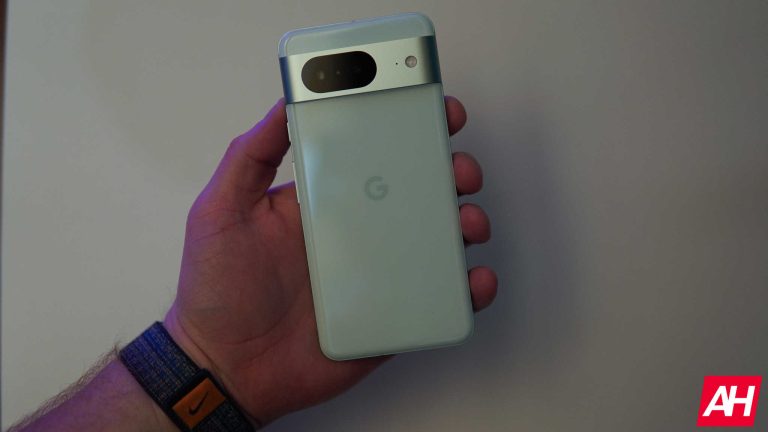
Google originally launched the base Pixel 8 without the impressive generative AI features that we saw with the Pro model. Well, the company has since launched Gemini Nano on several devices. However, during the Q&A session, Google stated that Gemini Nano will not be making it to the base Pixel 8 due to “hardware limitations.”
Gemini Nano is the compact and efficient AI model that can fit onto a phone’s chip. It’s currently powering the AI on the Pixel 8 Pro (Review), and the Samsung Galaxy S24 phones. Also, Gemini Nano will be coming to the MediaTek Dimensity 9300 and the Dimensity 8300. So, it’s definitely making the rounds
But, Gemini Nano will not be coming to the base Pixel 8
The Android developers YouTube channel just held another episode of The Android Show where it talked about Gemini Nano, MWC, Android 15, and more. The whole show lasted for 58 minutes, and it was chock full of a bunch of information.
During the show, there was a Q&A session where six Developers answered questions brought up by the community. One question that was brought up was whether Gemini Nano was going to be coming to the Pixel 8 (Review). One of the hosts said that Gemini now will not be coming to the Google Pixel 8 due to “hardware limitations.”
This, as you can guess, left many people scratching their heads. Hardware limitations? The Pixel 8 and Pixel 8 Pro are both running the same SoC, the Google Tensor G3. Other than that, pretty much everything else about them is the same internally. The only main difference between the models is the fact that the base Pixel 8 has 8GB of RAM while the Pixel 8 Pro has 12GB of RAM.
The difference in RAM could possibly be a factor… until you take into account the fact that the Galaxy S24 has 8GB of RAM, and it has Gemini Nano.
So, either there are actual hardware limitations that we don’t know about or Google is intentionally withholding Gemini Nano from the base Pixel 8 in order to push sales to the Pro model. Hopefully, the latter is not the case.
Anyway, Gemini Nana is not coming to the base Pixel 8. However, we’re fairly sure that it will be on the base Pixel 9. It’s highly unlikely that Google will withhold Gemini Nano from a phone that’s running an SoC processor more powerful than what the Pixel 8 Pro has.
A major update overhauls the Wikipedia app for Android. The application widgets left unchanged for years and years have now got a fresh look, as touted by 9to5Google. With its modern design, the new widgets of the app can make the user experience even better. Here’s a brief on all the observed modifications.
Outdated Wikipedia widgets are finally modernized
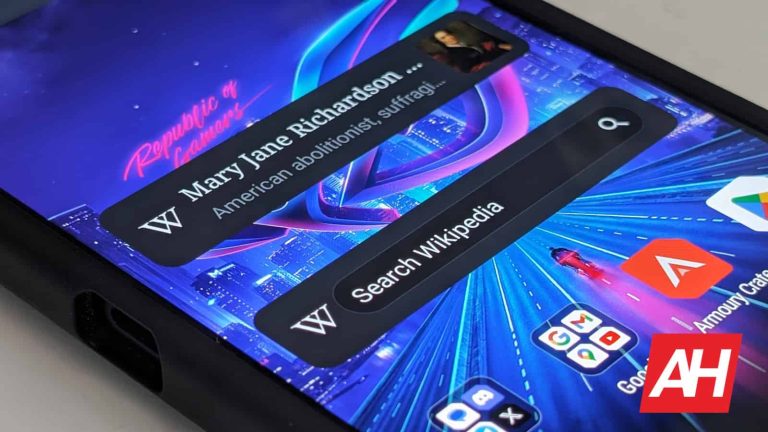
An improved “Wikipedia search” widget has been introduced via the update. Characterized by a stylish logo on its left side, the widget’s pill-shaped search bar now positions itself on the right edge. This widget comes in 2×1 size; however, it can go up to 5×1 as well. Users have an option to make it compact (almost 1×1) at will, but this can cause little visual bugs.
Simply clicking on this widget via your keyboard will enable a search. Another good thing about this update is the “Wikipedia featured page” widget that shows the title, small description, and picture of a featured article. The height of the widget is adjustable by users, but it doesn’t expand horizontally.
Another noticeable improvement is the provision of light and dark themes for widgets, unlike the previous version, which only provided a light theme. These updates are included in version 2.7.50475-r-2024-03-06, currently being rolled out through the Play Store. Wikipedia also provides a Beta version to those interested in the trial run before the public release.
Wikipedia on Android gets even better with the bottom bar
The app design is still changing with updates like the Material You bottom bar and pill-shaped indicators. The latest Wiki version adds a bit of freshness because it deviates slightly from Google’s app design. The application does not possess Dynamic Color theming, but it has round sheets for link previews and offers a Themed icon to make it look harmonious.
In addition, Wikipedia for Android features a tab switcher UI for article navigation, which brings back memories of Chrome’s classic layout. Web browser enthusiasts will appreciate this nostalgic touch. These upgrades will enhance navigation and accessibility on Android devices to create an interactive and modern environment.
The U.S. Food and Drug Administration (USFDA) has, for the first time, approved an Over-The-Counter (OTC) glucometer to monitor blood sugar levels. The integrated Continuous Glucose Monitor (iCGM) can be paired with an Apple iPhone. There are, however, some conditions and limitations, especially for diabetic patients.
Apple iPhone users who wish to monitor their blood sugar levels will now be able to purchase an FDA-approved device. Users won’t need to ask their doctors for a prescription to use this device. However, this freedom does have some caveats.
FDA Approves Dexcom’s Stelo Glucose Biosensor System As An OTC Glucometer
The USFDA has given its green signal to use Stelo, a Glucose Biosensor System from Dexcom, as an iCGM glucometer. The wearable sensor pairs with an iPhone over a Bluetooth connection.
The Dexcom Stelo Glucose Biosensor System is an integrated CGM (iCGM). This means it needs an active connection to the paired Apple iPhone in order to log its readings, which take place every 15 minutes. The device relies on a patch that must be stuck on the user’s arm.
Users can get readings for about 15 days from a single sensor before it needs to be replaced. Needless to add, users will need to download an app from the Apple App Store and pair the sensor. The official update from the FDA does mention that “other smart devices” could also be used with Stelo, but doesn’t elaborate on the same.
The creators of the Stelo glucometer system initially planned to sync their sensors with an Apple Watch. This may be possible in the near future. But, for now, only Apple iPhone users will be able to log their blood glucose levels using Stelo.
What Is Stelo And Will It Help Diabetic Patients Monitor Their Blood Glucose Levels?
The Stelo package includes a wearable sensor and smartphone app to continuously monitor glucose levels. Hence, anyone who owns an iPhone can slap on the sensor from Dexcom, pair it up with the app on their smartphone, and start logging readings.
However, the FDA has categorically noted that the Stelo iCGM is not for diabetic patients. In other words, Stelo is not meant for individuals with diabetes who are treating their condition with oral medications.
The FDA has approved Dexcom’s Stelo Glucose Biosensor System for adults, “who want to better understand how diet and exercise may impact blood sugar levels.” “This system is not for individuals with problematic hypoglycemia (low blood sugar) as the system is not designed to alert the user to this potentially dangerous condition.”
There are several smartwatches and wearable devices that currently claim to offer non-invasive blood sugar measurement. However, the FDA has warned against relying on them for medical advice citing lack of reliability. Dexcom’s Stelo essentially falls in this category, as far as diabetic patients are concerned.
The Samsung Galaxy Z Fold 6 and Galaxy Z Flip 6 colors have been revealed by a well-known source. The information comes from Ross Young, a display analyst who is rarely wrong with the information he shares.
The Samsung Galaxy Z Fold 6 & Flip 6 colors get revealed early
That being said, the Galaxy Z Fold 6 seems to be coming in three colors, while the Galaxy Z Flip 6 will launch in four color options. The Galaxy Z Fold 6 is coming in Dark Blue, Light Pink, and Silver colors. The Galaxy Z Flip 6 will launch in Light Blue, Light Green, Silver, and Yellow colors.
Samsung will, of course, have fancy names for these color options. These are basically the colors we’ll be getting, though. Both smartphones are expected to launch later this year. Some reports even state they’re coming in the first half of July, which is sooner than expected. The 2024 Olympic Games seem to have something to do with it, though.
The Galaxy Z Fold 6 will have a wider cover display this time around. It will be wider even when unfolded because of it, while also a bit shorter than usual. Let’s hope that the company will also be able to tone down the crease on the main panel.
The Galaxy Z Flip 6 won’t be much different than its predecessor
The Galaxy Z Flip 6 won’t change much compared to its predecessor. Well, at least based on everything we’ve seen thus far. Samsung is sticking to its design language. Same as for the Galaxy Z Fold 6, we’re hoping that the crease will be less of an issue this time around.
Both smartphones will come with improvements under the hood, though, of course. The Snapdragon 8 Gen 3 for Galaxy is expected to fuel both smartphones. The camera situation is still unclear, but we’ll hopefully see some improvements in that regard too.
Most chatbots give you the ability to regenerate your responses to better suit them to your needs. However, there are times when 90% of your response is perfect, but there’s just one section that’s not sticking. Well, a new update to Gemini will give you much more control over your responses.
In case you don’t know, Gemini Advanced is the most powerful version of Gemini on the market. It has enhanced reasoning capabilities compared to the regular version of Gemini. So, if you’re looking to get the most out of your Gemini experience, you should look into using Advanced. In order to use it, you’ll need to sign up for the Google One AI Premium plan which costs $19.99/month.
A new Gemini update will give you more control over your responses
When you get a response from Gemini, you’re able to type what changes you want it to make in the text field. However, we spend a lot of our time regenerating the responses over and over again to get the perfect one. However, if the majority of your response is perfect, what’s the use of regenerating the entire response?
This is where this new Gemini update comes in. According to a new changelog posted by Google, Gemini will give you more control over your responses. Rather than regenerating the entire response, you’ll be able to regenerate sections of the text. This will make it easier to finetune your response without risking rewording parts that you don’t want reworded.
In order to use this feature, go to Gemini and go to a response. Highlight the text in it that you want to be changed. When you do that, you’ll see the little pencil icon appear. When you click on it, you’ll see a little dropdown menu appear with four options.
You’ll have the option to regenerate it, make it longer, make it shorter, or remove it. After a few seconds, you’ll see that text replaced within the response. This functionality is only available on the web version of Gemini, so you won’t be able to use it on the app. Hopefully, you will be able to in the near future.
Vulnerabilities in VMware software expose it to remote execution of code by threat actors due to critical defects.
These are found in different parts of the virtualization platform, management interfaces, and other related tools, making the flaw latent.
This can enable them to gain higher access levels, thereby running malicious codes from afar on computers affected through successful exploitation.
Multiple vulnerabilities were privately reported to VMware recently in VMware ESXi, Workstation, and Fusion.
As a result, VMware patched the critical flaws in ESXi, Workstation, and Fusion after private disclosure. Combining multiple important vulnerabilities escalates severity.
DocumentIntegrate ANY.RUN in your company for Effective Malware Analysis
Malware analysis can be fast and simple. Just let us show you the way to:
Interact with malware safely
Set up virtual machine in Linux and all Windows OS versions
Work in a team
Get detailed reports with maximum data
If you want to test all these features now with completely free access to the sandbox: ..
Vulnerabilities
Here below, we have mentioned all the vulnerabilities:-
CVE-2024-22252 (CVSSv3 base score of 9.3): Use-after-free vulnerability in XHCI USB controller
CVE-2024-22253 (CVSSv3 base score of 9.3): Use-after-free vulnerability in UHCI USB controller
CVE-2024-22254 (CVSSv3 base score of 7.9): ESXi Out-of-bounds write vulnerability
CVE-2024-22255 (CVSSv3 base score of 7.1): Information disclosure vulnerability in UHCI USB controller
Products Impacted
Here below, we have mentioned all the products that are impacted:-
VMware ESXi
VMware Workstation Pro / Player (Workstation)
VMware Fusion Pro / Fusion (Fusion)
VMware Cloud Foundation (Cloud Foundation)
The vulnerability (CVE-2024-22252) allows code execution from VM in VMware products.
While the VMware XHCI USB flaw (CVE-2024-22253) is critical for Workstation/Fusion, but important for ESXi.
UHCI USB bug also impacts VMware products as well and enables code execution. Out-of-bounds write flaw (CVE-2024-22254) in ESXi risks VMX sandbox escape.
Memory leak possible via UHCI USB flaw (CVE-2024-22255) across VMware lineup.
Broadcom released critical patches for severe vulnerabilities in ESXi 6.7, 6.5, and VCF 3.x. Additional patches are available for ESXi 8.0 U1.
If not updating to ESXi 8.0 Update 2b, use 8.0 Update 1d for security fixes.
With Perimeter81 malware protection, you can block malware, including Trojans, ransomware, spyware, rootkits, worms, and zero-day exploits. All are incredibly harmful and can wreak havoc on your network.
Stay updated on Cybersecurity news, Whitepapers, and Infographics. Follow us on LinkedIn & Twitter.
Update: The Samsung Galaxy Tab S8 is no longer the latest flagship tablet series from the company, with the Galaxy Tab S9 series being announced in August 2023. It is, however, still being updated for a few more years. Samsung did promise four years of OS updates and five years of security updates. So that’s 2026 for Android updates and 2027 for security updates.
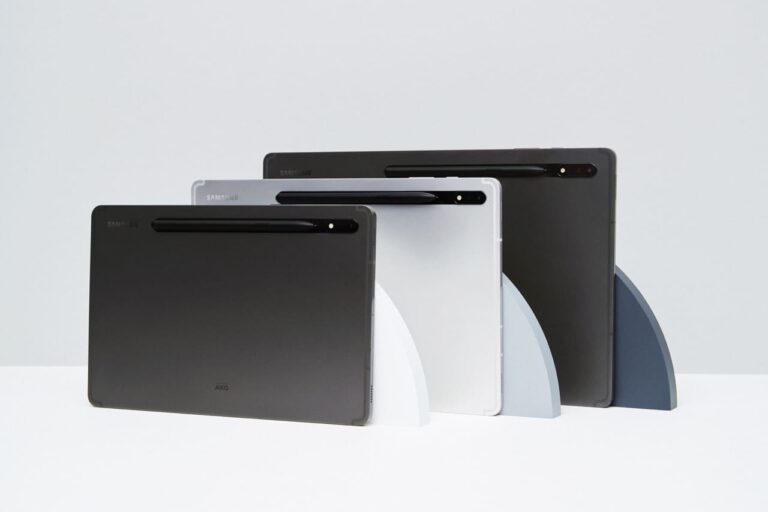
Samsung announced the Galaxy Tab S8 series at its Unpacked event on February 9, 2022. The series consists of the Galaxy Tab S8, Galaxy Tab S8+, and Galaxy Tab S8 Ultra.
These are the latest flagship tablets from Samsung, and the first time that Samsung has done an “Ultra” tablet. It has been doing Ultra models for its smartphones for a few years now. Where the term “Ultra” means the best of the best. And now that is coming to its tablet range.
The Galaxy Tab S8 series doesn’t boast a huge design change, however, the Ultra model does have a notch on-board. That’s due to the secondary front-facing camera. And of course, because Apple added a notch to its laptop.
So here’s everything you need to know about the Galaxy Tab S8 series and whether you should buy one.
How much does the Galaxy Tab S8 series cost?
The Galaxy Tab S8 will start at $699. The Galaxy Tab S8+ will be $899 and the Galaxy Tab S8 Ultra will be $1,099.
There will be two variants of the Galaxy Tab S8 and S8+. With three for the Galaxy Tab S8 Ultra. Consisting of different storage and RAM variants. With up to 16GB of RAM and 512GB of storage on the Galaxy Tab S8 Ultra, which is pretty impressive – and actually puts it in line with the latest iPad Pro, which has 16GB of RAM.
What offers are available at launch?
Those that pre-order the Galaxy Tab S8 between February 9 and February 24, will get a keyboard cover. The Galaxy Tab S8 and Tab S8+ will get the Book Cover Keyboard Slim. While those that pre-order the Galaxy Tab S8 Ultra will get the Book Cover Keyboard – this is new for the Galaxy Tab S8 series.
Carriers will also likely offer some unique promotions for the Galaxy Tab S8 series. We will update this post once those are announced.
Where can I buy the Galaxy Tab S8 series?
You’ll be able to buy the Galaxy Tab S8 series from Amazon, Samsung.com, Best Buy, as well as carriers like T-Mobile, AT&T and Verizon. Basically all of the usual retailers and carriers will sell the Galaxy Tab S8 series of tablets.
Samsung.com and Best Buy will be the only places that you can get the WiFi, Unlocked and carrier-locked 5G models. Samsung will also offer more variants and colors than the carriers and other retailers. So if you want a specific color and RAM/Storage combination, it’s a better bet to go to Samsung.com for your new tablet.
What carriers support it?
All three US carriers will support the Galaxy Tab S8. There is a 5G model, which will work on all three carriers. But, it’s currently unclear which carriers will sell the 5G model. But it’s safe to assume that it’ll be available from AT&T, T-Mobile and Verizon.
Which carriers will be selling it?
As of right now, Samsung has not announced which carriers will be selling the Galaxy Tab S8 series, but we fully expect all three US carriers to sell it. That includes AT&T, T-Mobile and Verizon.
What colors is the Galaxy Tab S8 available in?
The Galaxy Tab S8 series is available in three colors. Graphite, silver, and pink gold for the Galaxy Tab S8 and Tab S8+. The Galaxy Tab S8 Ultra will be available in graphite only.
A bit surprising that the colors are so few for the Galaxy Tab S8 series, and doesn’t really match with the Galaxy S22 series. This is odd compared to recent years where Samsung has launched their phones and tablets in the same colors. As well as their earbuds.
What are the specs of the Samsung Galaxy Tab S8 series?
Galaxy Tab S8
Galaxy Tab S8+
Galaxy Tab S8 Ultra
Display
11-inch WQXGA LCD (2560 x 1600)
12.4-inch WQXGA+ Super AMOLED (2800 x 1752)
14-inch WQXGA+ Super AMOLED (2960 x 1848)
Processor
4nm Octa-Core SoC
4nm Octa-Core SoC
4nm Octa-Core SoC
RAM
8GB
8GB
8BG/12GB/16GB
Storage
128/256GB
128/256GB
128/256/512GB
Battery Capacity
8000mAh
10090mAh
11200mAh
Charging Speeds
Fast Charging
Fast Charging
Fast Charging
Software
Android 12
Android 12
Android 12
Rear Cameras
13MP wide 6MP ultrawide
13MP wide 6MP ultrawide
13MP wide 6MP ultrawide
Front Camera
12MP ultrawide
12MP ultrawide
12MP ultrawide 12MP FF
Dimensions
9.99 x 6.51 x 0.25″
11.22 x 7.27 x 0.22″
12.85 x 8.21 x 0.22″
Weight
1.1lb
1.27lb
1.6lb
Price
$699
$899
$1099
Colors
Graphite Silver Pink Gold
Graphite Silver Pink Gold
Graphite
Available
February 9
February 9
February 9
What new features are coming?
So what’s new with the Galaxy Tab S8 series this year? Samsung has added some new features to the tablets this year, making it an even better tablet and closer to a laptop replacement.
Intelligent auto-framing
You’ve probably heard of this feature before, as Apple added this to all of their iPads last year – except the cheap iPad. Basically, the camera will move around to intelligently auto-frame you while using video calling. This is a lot like what the Facebook Portal does and even the Echo Show 10 from Amazon. It’s really useful if you use your tablet for a lot of video calling.
This works on all three models, but it works even better on the Galaxy Tab S8 Ultra. As it does have two cameras on the front. There’s a 12-megapixel ultrawide, and a 12-megapixel wide lens on-board here. So it’s better for group video calling.
Three-window Multi-tasking
Samsung has always been the king of multi-tasking on its smartphones and tablets. Now on the Galaxy Tab S8 series, you can have three apps running on the screen at the same time. This is especially useful on the larger Galaxy Tab S8 Ultra which has a 14.6-inch display.
This makes multi-tasking a whole lot easier. You can have Gmail open, browsing Twitter, and even watching YouTube all at the same time. Of course, Instagram isn’t going to work well here, but that’s because Instagram is stubborn.
Work as a second monitor on Windows 11
Samsung has added another feature from Apple, with the Galaxy Tab S8. That is allowing you to use your tablet as a second display for your Windows 11 computer. This is something Apple has had for years, and works quite well. This will make it easier to travel with a dual-monitor setup, without traveling with an actual monitor.
There’s many more features added to the Galaxy Tab S8 series this year, and it does run on Android 12 and One UI 4.1
What cases and accessories are available for the Galaxy Tab S8?
There aren’t as many cases and accessories available for the Galaxy Tab S8 as there are for say the Galaxy S22 series. But there’s still some good accessories that you can pick up for your new tablet. Which are outlined below.
Samsung Book Cover Keyboard
The Samsung Book Cover Keyboard is a really nice case that you can get for the Galaxy Tab S8, which also has a nice keyboard. Making the Galaxy Tab S8 series into a really good laptop replacement. It also has a flap to keep the S Pen in place while it is charging on the back of the tablet.
Samsung Book Cover Keyboard Slim
This is pretty much the same as the Book Cover Keyboard, but slimmer. It’s really good for the Galaxy Tab S8 and S8+, which are the smaller tablets. And it has a keyboard included, so you can really use DeX to its full potential.
Which Galaxy Tab S8 should I buy?
Yes, the Galaxy Tab S8+ is likely the best option out of the three here. As the Galaxy Tab S8 Ultra is fairly large, and will be too heavy for most people. The Tab S8+ is a smaller model, that is still AMOLED 120Hz. So you’re still getting a really great display on this one.
All three models are pretty expensive, but then again these are flagship tablets, with virtually the same specs as the Galaxy S22 series. Which is pretty impressive.