At the ongoing MWC 2024, OnePlus introduced its latest smartwatch dubbed the OnePlus Watch 2. The device has arrived as the longest-lasting Wear OS-powered smartwatch to this day. The wearable is powered by the Wear OS 4, which has a new hybrid interface that strikingly extends its battery life. Soon after the unveiling of the OnePlus Watch 2, Google posted a blog post detailing how the hybrid interface works.
Wear OS 4 boasts a new hybrid interface, which strikingly extends the battery life
The latest Wear OS 4 version flaunts a new hybrid interface, which blends advanced features with remarkable battery life. The new feature improves two key areas of the Wear OS including the power and performance. The hybrid interface on the Wear OS 4 smartwatches enables intelligent switching between the main processor and co-processor, for stellar battery life.
Notably, the dual-chipset architecture switches to the application processor when handling complex tasks. The main processor is suspended when not required, such as processing health sensor data, to preserve the battery life. During this period, the co-processor is enabled to handle the more routine tasks like processing notifications and phone calls.
Google even mentions that smartwatch makers can even offload the fitness tracking features to the co-processor as well. Essentially, the low-power co-processor can be configured to handle tasks like reading/dismissing notifications, quick replies, controlling the camera, showing health sensor data, rendering watch faces, and processing audio.
Furthermore, Google explained that with the OnePlus Watch 2, the dual chipset architecture works with the hybrid interface. It allowed the wearable to offer a battery life of up to 100 hours (four days and four hours) with regular use. Notably, in our review, the OnePlus Watch 2 offered an even higher battery life of almost five days.
Wear OS 4’s hybrid interface will enhance smartwatches besides the OnePlus Watch 2
It’s worth noting that the new hybrid interface of the Wear OS isn’t limited to the OnePlus Watch 2. Any smartwatch manufacturer can implement the new interface on their device, as long as it has both the main processor and co-processor. It’s up to the OEMs to adapt the new interface of Wear OS and adapt it to their own UI. We’re eagerly waiting for how manufacturers other than OnePlus implement this interface to offer their long-lasting smartwatches.
As for the OnePlus Watch 2, it is available to pre-order on the OnePlus website. The wearable’s open sales will kick off on March 4. Priced at just $299, the smartwatch is being offered in Black Stell and Radiant Steel variants.
In today’s dynamic financial landscape, Bitcoin’s rise to prominence has cast a long shadow over the cryptocurrency market. This article aims to delve beyond Bitcoin’s captivating narrative to explore the rich diversity and untapped potential of other cryptocurrencies and blockchain technologies. To navigate these complexities and the evolving regulatory landscape, engaging with instant-max.io, an Investment Education Firm, can be beneficial. While Bitcoin remains a significant force, it is essential to recognize the broader spectrum of digital assets, the innovative applications they bring to industries beyond finance, the complexities of cryptocurrency investments, and the exciting future that awaits within this ever-evolving digital frontier.
Understanding Bitcoin’s Origin
Satoshi Nakamoto’s Whitepaper
The cryptocurrency revolution began with Satoshi Nakamoto’s groundbreaking whitepaper titled “Bitcoin: A Peer-to-Peer Electronic Cash System.” This document, published in 2008, introduced the world to the concept of decentralized digital currency. Satoshi’s vision was to create a trustless, censorship-resistant, and borderless form of money that could empower individuals and bypass traditional financial institutions.
Bitcoin’s Early Days and Adoption
Bitcoin’s journey started as an open-source project, with early adopters mining and trading it. Its value was virtually negligible in the beginning, and it was primarily used as a means of experimentation. However, its decentralized nature and promise of financial sovereignty gradually attracted a growing community of supporters.
The first notable milestone was the purchase of two pizzas for 10,000 Bitcoins in 2010 – a transaction that has since become legendary. As Bitcoin’s adoption expanded, it gained attention from investors and institutions, ultimately leading to its status as a store of value, digital gold, and a hedge against traditional financial systems.
Bitcoin’s Role in Shaping the Crypto Market
Bitcoin’s success served as a catalyst for the broader cryptocurrency market. It introduced the world to blockchain technology, the underlying framework that powers all cryptocurrencies. The blockchain’s ability to create transparent and immutable digital ledgers opened doors to a multitude of applications beyond just digital money.
Beyond Bitcoin: A Diverse Cryptocurrency Ecosystem
Altcoins and Their Genesis
While Bitcoin was the first cryptocurrency, it was by no means the last. Altcoins, which are any cryptocurrencies other than Bitcoin, began to emerge as developers sought to address limitations and explore new use cases. Notable examples include Litecoin, created in 2011, as a faster and more lightweight version of Bitcoin, and Ripple (now XRP), designed for faster and cheaper cross-border payments.
The Role of Ethereum in Smart Contracts
One of the most significant innovations to emerge from the cryptocurrency space is Ethereum. Launched in 2015 by Vitalik Buterin, Ethereum introduced the concept of “smart contracts.” These self-executing contracts run on the blockchain and enable programmable and automated agreements, disrupting industries far beyond finance.
Niche Cryptocurrencies and Use Cases
The cryptocurrency landscape has diversified even further with niche cryptocurrencies tailored for specific purposes. Examples include Chainlink (LINK) for decentralized oracles, Polkadot (DOT) for interoperability, and Cardano (ADA) for a more secure and scalable blockchain infrastructure.
Investing in cryptocurrencies is a complex undertaking, and prices can be influenced by various factors. These include market sentiment, adoption trends, technological developments, regulatory news, and macroeconomic conditions. Cryptocurrency markets are highly volatile, and investors should be aware of the risks.
Volatility vs. Long-term Potential
While cryptocurrencies are known for their price volatility, many proponents argue that they offer substantial long-term potential. Historical price trends show that despite periods of extreme volatility, the overall trajectory of cryptocurrencies like Bitcoin has been upward, making them attractive assets for those with a long-term perspective.
Investment Strategies and Risk Management
Investors in the cryptocurrency market should approach it with caution and a well-thought-out strategy. Diversification, risk management, and staying informed about market developments are essential for navigating this evolving landscape successfully.
Real-World Applications of Cryptocurrencies
Cryptocurrency in Financial Services
Cryptocurrencies have made significant inroads in traditional financial services, with companies and institutions exploring their potential in areas such as remittances, cross-border payments, and as a store of value. The integration of cryptocurrencies into the traditional financial system is an ongoing trend.
Blockchain Technology Beyond Finance
Blockchain technology has transcended the world of finance, finding applications in supply chain management, healthcare, voting systems, and more. Its ability to create trust and transparency is being leveraged across various industries to improve processes and enhance security.
Social Impact and Cryptocurrency Adoption
Cryptocurrencies have the potential to bring financial inclusion to underserved populations and empower individuals in economically disadvantaged regions. Initiatives like microloans, remittances, and charitable donations through cryptocurrencies are helping to create positive social impact.
Regulatory Challenges and the Future of Cryptocurrencies
Cryptocurrency Regulations Worldwide
The regulatory environment for cryptocurrencies varies significantly from one country to another. Governments and regulators are still grappling with how to classify and regulate these digital assets. Clarity in regulation is crucial for the broader adoption and stability of cryptocurrencies.
Potential Impact on the Market
Regulatory decisions and developments can have a profound impact on the cryptocurrency market. News of bans, restrictions, or endorsements from governments can cause significant price fluctuations. Investors must stay informed and adapt their strategies accordingly.
The Road Ahead for Cryptocurrency Regulation
The future of cryptocurrency regulation remains uncertain but is likely to evolve as the industry matures. Collaboration between governments, industry participants, and advocacy groups will be essential in shaping a regulatory framework that balances innovation and consumer protection.
Conclusion
In conclusion, the cryptocurrency landscape extends far beyond Bitcoin’s dominance, encompassing a diverse array of digital assets, innovative technologies, and real-world applications. As the market continues to evolve, it presents both opportunities and challenges for investors, businesses, and regulators alike. Staying informed, conducting thorough research, and adopting a cautious yet forward-thinking approach are essential to navigate this dynamic and transformative space. The future of cryptocurrencies promises continued growth, innovation, and potential positive impact on various industries and society as a whole.
Samsung may be on track to achieve its ambitious sales target for the Galaxy S24 series. The new flagships broke pre-order records in several markets and continue to sell like hotcakes globally. Sales in the US are also at a record high in eight years, signaling a turn of fortune for the Korean firm.
Galaxy S24 is selling like hotcakes in the US and everywhere else
According to the Korean media, Samsung aims to sell more than 35 million units of the Galaxy S24 trio this year. The figure marks a double-digit growth over the Galaxy S23 series. The company laid a strong foundation during pre-order days as it posted record numbers in markets like India, South Korea, and Europe.
The demand has been so high that Samsung revised its sales target for the first quarter. The firm originally planned to sell 12 million units in the first three months but has now set a target of 13 million units. It appears the Korean giant will comfortably hit the figure. Sales in its home country, South Korea, have already exceeded one million units, in just 28 days. The Galaxy S23 series took around seven weeks to reach that figure.
Local reports say the Galaxy S24 fell short of the record set by the Galaxy Note 10 by three days. In the S-series, the previous shortest time taken to reach one million sales was 37 days by the Galaxy S7 in 2017. As expected, the Ultra model is the crowd-puller. It accounted for 55% of all Galaxy S24 sales in the first four weeks in South Korea. The base model should be the next best-selling model in the lineup.
While Samsung hasn’t revealed Galaxy S24 sales figures for the first month for other markets, tipster Ice Universe claims sales in the US have surpassed 3.2 million units. It is a new record in eight years, since the Galaxy S7 series. The US smartphone market is heavily dominated by Apple, so any growth is a big achievement for other vendors.
Global Galaxy S24 sales in the first month may surpass ten million units
Overall, the global sales of the Galaxy S24, Galaxy S24+, and Galaxy S24 Ultra in the first month are expected to top ten million units. Samsung may have set the tone for a bounceback after conceding the smartphone crown to Apple in 2023. With flagship sales appearing sorted, the company needs to repeat the feat with its foldables and mid-range phones. It will soon launch the Galaxy A55 and Galaxy A35, followed by the Galaxy Z Fold 6 and Galaxy Z Flip 6.
Game studios and the companies that make stuff for games have come up with all sorts of ways to enhance the experience and make the games more immersive, but this new scent release device from GameScent AI is perhaps the strangest one to ever hit the market. Have you ever wanted to smell your games? Well, if you answered yes to that question, then now you can! GameScent AI has announced a product of the same name (called GameScent), a scent release device that uses AI to disperse the smells of your in-game content in real time. It’s essentially an atomizer that poofs out smells as you play.
As funny as this product sounds, it also seems like it could have the potential to enhance gameplay. That is if you desire your games to have a more vivid feel based on smell. If you think about it, this could be the type of device to really put immersion in games over the edge if you have other equipment to pair with it. Something like the Nanoleaf 4D kit to mirror the colors on-screen while you play, and a haptic vest or suit that reacts to in-game moments as the GameScent disperses smells like fresh rain after a storm or gunfire if you’re playing a shooter.
Breathe deep the smell of a blazing hail of bullets in the latest Call of Duty, because why settle for boring old candles or regular scent throws? Fancy the smell of the forest as you travel the lands between with the upcoming Elden Ring DLC? Well, get ready, because GameScent will make it happen.
The GameScent scent release device will have 6 different scents at launch
Before you scoff at this device, imagine the real possibilities for this to add some immersion to the games you play. Sure, it seems a little goofy. It’s extremely niche and we can’t imagine the GameScent will be sweeping the nation and filling game rooms across the globe. But that doesn’t mean it isn’t a cool experience that adds to your games in some way.
There will be six different scents that come with it in the box at launch. But GameScent AI also says there will be DLC scents available in the store that you can purchase. The scents that come with the device include Gunfire, Forest, Storm, Racing Cars, Explosion, and Clean Air. As for DLC scents, there’s Blood, Ocean, Sports Arena, and Fresh Cut Grass “coming soon” according to the company’s website. The box also says there will be scents for Human Exertion (which we imagine is supposed to be sweat), Napalm, and Golf Course.
Scents are said to be easy to swap in and out and they appear to be as they come in tiny cartridges you slot into the atomizer. Scents also trigger 1-2 seconds after a recognized in-game moment according to the company’s marketing. GameScent is compatible with both PC and consoles, you just have to plug in an HDMI cable to the monitor.
The device is available for sale already at both Amazon and Best Buy. The retail price for it is $180, but it’s currently available at a promotional launch price of $150. Don’t just play your games, smell them.
Google launched the YouTube Create app last year in order to provide content creators with an easy way to record, edit, and add effects to their videos right from their mobile devices. The app initially launched in beta and was limited to only a few countries, including the United States.
However, today YouTube announced via its blog that the app is now expanding to thirteen more countries, joining the existing eight. This update now makes the app available to download via the Play Store in the United States, France, Singapore, Germany, South Korea, India, the United Kingdom, and Indonesia, plus the new countries, which are Argentina, Australia, Brazil, Canada, Finland, Hong Kong, Ireland, the Netherlands, New Zealand, Spain, Taiwan, Thailand, and Turkey.
Images Credit: YouTube Blog
Traditionally, creating engaging videos for YouTube could be a time-consuming process, often requiring multiple apps and software. However, with the. YouTube Create app, YouTube aims to streamline the video creation process without much fuss.
YouTube Create is intended to be a one-stop shop for all your video editing needs, be it short form or long form video. It allows you to record videos directly from your phone, add music and other audio effects, and edit your footage with a variety of semi-professional tools. You can even add captions to your videos, making them more accessible to a wider audience.
One of the standout features of YouTube Create is its built-in audio cleanup tool. This tool can help remove unwanted background noise from your recordings, making your videos sound more professional.
YouTube Create is a great tool for anyone who wants to create videos for YouTube. The app is easy to use, even for those with no prior video editing experience. If you’re an Android user looking for a way to make your YouTube video creation process easier, YouTube Create is definitely worth checking out.
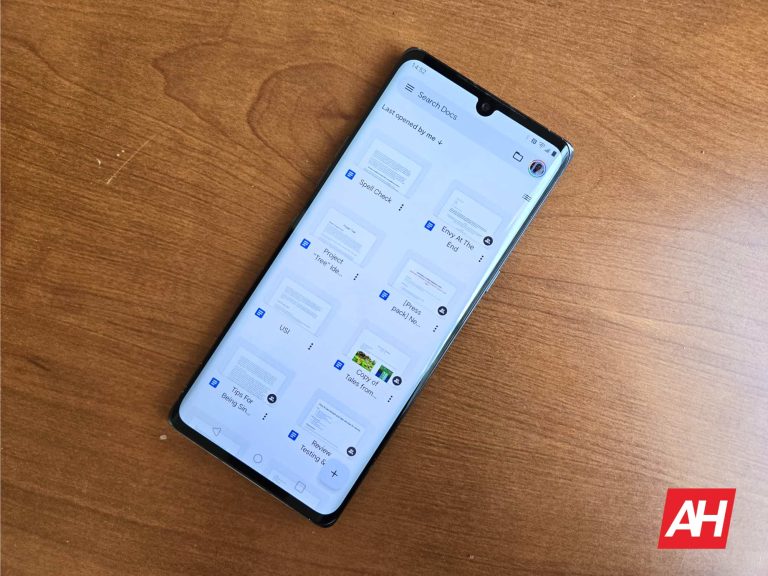
Google Docs is an extremely useful and popular tool for writing down everything from quick notes to business proposals to entire novels. Google has been adding some new features to it like the generative AI feature called Help me write. Now, Google is bringing the ability to add handwritten annotations to Docs. This will allow you to better annotate your documents and provide feedback for other collaborators.
Help me write is a generative AI tool that’s powered by Google Gemini to generate any type of text based on your request. If you want to type a story or a proposal for you, you can simply request it. Also, just like with any generative AI tool, you can provide additional suggestions to refine the generated text. This feature is free to use for Google users, and it’s quickly accessible on the left side of your document.
Google is adding handwritten annotations to Docs
Sometimes, nothing’s better than good old-fashioned handwriting. If you are collaborating with a team of people, and you want to give feedback on certain sections, it’s easier to circle a sentence or draw an arrow than to highlight and type. This is something that Google acknowledges, and the company has just come up with a good solution.
Google is rolling out the ability to make handwritten annotations on Docs. This is only for people using the Android app. If you have a stylus, you can easily use this feature.
How to use the feature
Open the Google Docs app and look for the Annotate button on the top toolbar. It will be on the right side next to the Font button. When you do that, you’ll enter Annotate mode. You’ll see a little toolbar emerge from the right side of the screen. This will have certain tools to help you with adding your annotations.
There’s a pen tool that you can use for basic writing. You can adjust the color and the thickness of the point. Next, there’s a highlight tool that will let you easily highlight text. Under that, there is an erase button and a hide annotation button under that. To exit annotation mode, simply tap on the annotate button again.
While you can only use this feature on Android, iOS users can still view a document with markups, delete annotations, and show/hide annotations.
Availability
When this feature rolls out, it will be available for all Google Workspace customers, Google Workspace individual subscribers, and users of personal Google accounts.
As for the rollout, there are two rollout schedules. Rapid rollout domains will start to see the feature hitting their devices over the next 14 days. People in the Scheduled rollout domain will start seeing the feature hit their devices within 15 days starting on March 11th.
Just after Reddit signed a massive deal to sell user data to train AI, it seems Tumblr might be about to do the same thing. A report from 404media alleges that an inside source has all but confirmed the deal. 404media has also reviewed leaked internal communications between Tumblr’s parent company Automattic, and the aforementioned AI companies. The report claims that users can choose to opt out of sharing their data.
An internal source has shared details about the impending deal
A source with inside knowledge shared the details with 404media, including internal communications. According to 404media, the reports make it clear that the deal is “imminent”. Automattic, also the owner of WordPress, has publicly stated that it will also share data from that site. The public statement does not mention which companies Automattic would be sharing data with.
In the documentation there was also talks of a mistake that happened recently. Apparently, Tumblr accidentally scraped a lot of user data that was supposed to be private or on deleted posts. This data scrape collected user data from 2014 to 2023, and will be given to OpenAI and Midjourney. Cyle Gage, product manager at Tumblr, writes, “the way the data was queried for the initial data dump to Midjourney/OpenAI means we compiled a list of all Tumblr’s public post content between 2014 and 2023”. It is only data from now on that users can choose to not share with the AI companies. Whether the accidentally scraped private data was shared as well remains unknown.
What Tumblr selling data could mean for AI
Tumblr is a social networking site centered around microblogging. Though this can take a lot of forms, it is almost all visual. OpenAI has an image generation AI model named DALL-E. Midjourney’s entire business model revolves around its image generation AI. To these companies, massive dumps of data detailing casual interaction is priceless. Tumblr and WordPress provide them with exactly that.
With data from Tumblr, both companies will see a massive boost in image generation capabilities. Furthermore, the specific data Tumblr provides is quite unique, especially in this volume. Memes, captioned images, and unique art styles not found anywhere else. Tumblr has been blocking AI crawlers for a long time now, as mentioned in Automattic’s statement. With this deal, the company can not only capitalize on their data, but perhaps also raise Tumblr’s worth. Yahoo bought the company for $1 billion in 2013, but Automattic acquired it for only $3 million in 2019.
In late January 2024, the ThreatDown Managed Detection and Response (MDR) team found and stopped a three-month long malware campaign against a Managed Service Provider (MSP) based in Europe. In line with our observations of attackers increasingly relying on legitimate software in their attackers, the attacker employed various Living Off the Land (LOTL) techniques to avoid detection.
MSPs are a prime target of cyberattacks for two main reasons. One, they provide services to multiple clients, giving attackers access to a broader network of targets through a single breach. Two, MSPs often operate on tight security budgets, making them more vulnerable to attacks.
Almost immediately after onboarding the MSP in mid-January, the ThreatDown MDR team found extensive evidence of an ongoing malware campaign. The attackers, who targeted the MSP’s network from October 2023 to January 2024, silently monitored and manipulated the network for months, leveraging legitimate remote access tools like AnyDesk and TeamViewer and attempting to install malware like Remcos RAT and AsyncRAT.
Let’s dive into the details of this incident and how ThreatDown MDR neutralized the threat.
Initial discovery and evidence of compromise
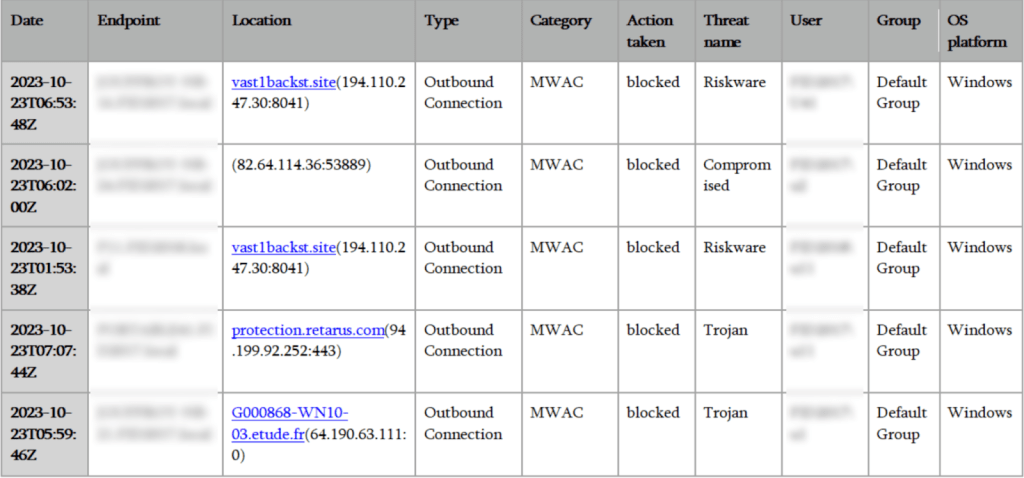
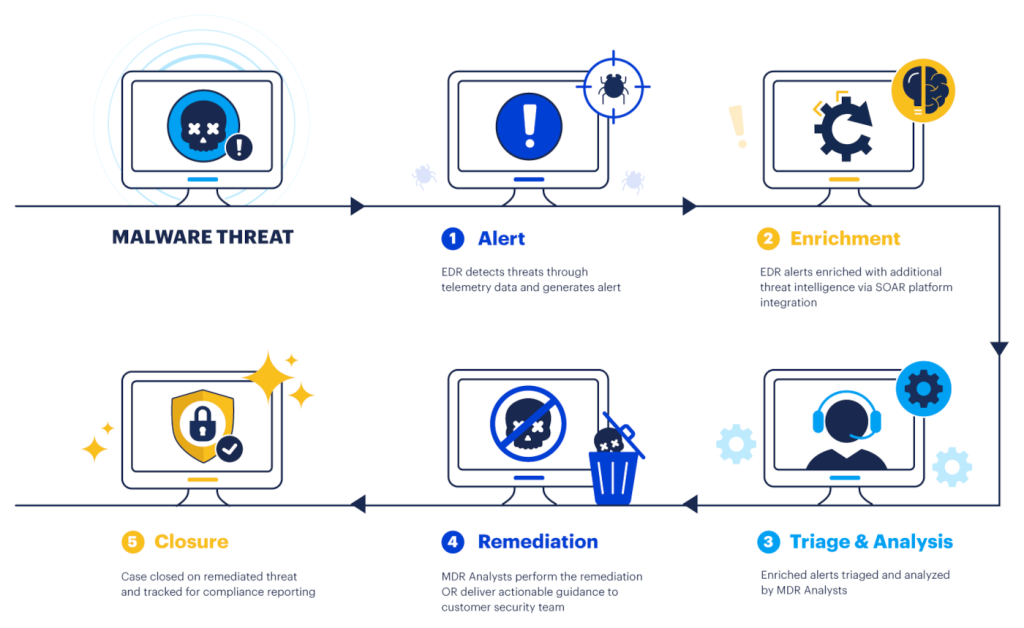
In late October 2023, ThreatDown Endpoint Detection and Response (EDR) flagged multiple suspicious outbound connections on the MSP’s network. These were attempts to communicate with known malicious external sites and IPs, involving several endpoints within the network.
This activity was immediately blocked by ThreatDown, marking the first documented evidence of a security breach. The nature of these attempts—targeting sites associated with RDP-based attacks and other malicious activities—indicated a possible compromise.
List of malicious sites automatically blocked by ThreatDown MDR.
Expanding presence and evasion
Following the initial detections in October, the attacker quietly expanded their presence within the network. On December 8th, network scanning activity was detected from an endpoint, indicative of the attacker’s efforts to map out the network for further exploitation. This activity went beyond mere exploration, suggesting a systematic approach to identify additional targets or vulnerabilities within the MSP’s digital environment.
Escalation and discovery of malware
The situation escalated in January 2024 with the discovery of malware on several endpoints, linked to unauthorized remote access tools like ScreenConnect and AnyDesk.
This pointed towards a more aggressive phase of the attack, with the attackers deploying malware to maintain and expand their access. An attempt to uninstall McAfee via PowerShell, observed on an endpoint, further underscored the attackers’ intentions to weaken the network’s defenses.
Detection of malware leveraging RMM tools.
Ongoing surveillance and response
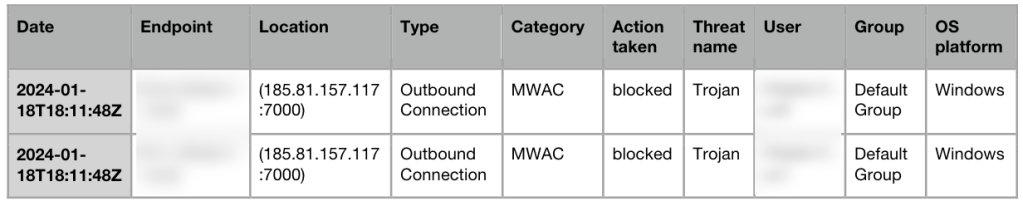
The implementation of ThreatDown MDR services on January 18th, 2024, was a strategic move by the MSP to gain deeper insights into the attackers’ movements. By this time, the attackers had already established a significant presence within the network, as evidenced by the attempted communications with a known AsyncRAT botnet C2 server and the discovery of additional remote management and monitoring (RMM) tools on the network.
Connections to AsyncRAT were detected and automatically blocked by ThreatDown MDR
Fortunately, the ThreatDown MDR team caught the attack in action and made several immediate recommendations for the MSP, including:
Isolating the compromised endpoints to halt the infection spread and re-imaging them for a clean slate.
Changing all administrative and local passwords three times to fortify security.
Restoring all infected endpoints from secure backups, eliminating the use of local administrator accounts, and implementing application and DNS filtering to control software usage and web access.
Threat hunting with ThreatDown MDR
How ThreatDown MDR works
MSPs continue to be a prime target in cyber attacks—and as we’ve seen in this case study, attackers are in it for the long-haul, able to remain undetected for several months after compromising a network.
The attacker’s use of legitimate tools such as TeamViewer, ScreenConnect, and PowerShell, in their months-long attack on the MSP underscores a key theme we’ve been writing about on the blog recently: attackers are increasingly relying on LOTL techniques in their attacks to avoid detection.
In this example, if the attack had been allowed to continue, the MSP could have suffered a ransomware attack, data breach, or both. Fortunately, however, by hunting down LOTL techniques for the MSP based on suspicious activity and past indicators of compromise (IOCs), the ThreatDown MDR team successfully stopped the threat.
Protecting your MSP from stealthy LOTL threats takes an elite team of security professionals scouring your systems 24×7 for IOCs and suspicious activity observed on endpoints. Learn more about ThreatDown today.
Samsung plans to add a new mid-range model to its Android tablet lineup soon. Evidence suggests the company will re-release the Galaxy Tab S6 Lite, likely with a newer processor and software. Ideally, the device should be called the Galaxy Tab S6 Lite (2024), though there are rumors that it might be called the Galaxy Tab S9 FE. Amid this uncertainty, the refreshed tablet is making its way through certification processes globally.
Galaxy Tab S6 Lite (2024) certified by the FCC, BIS, and UL
Over the past few days, the Galaxy Tab S6 Lite (2024) has popped up on the official websites of several certification agencies around the world. The folks at 91Mobiles spotted the device on the FCC (USA), UL (Denmark), and BIS (India) databases. This comes shortly after the Global Certification Forum certified the tablet. We have also previously seen the device on benchmarking platform Geekbench.
Unfortunately, none of these listings feature its name. We only have the model numbers SM-P620 and SM-P625, which correspond to the Wi-Fi and cellular (4G) versions of the tablet, respectively. Rumors suggest there will also be a 5G version with the model number SM-P627. Based on this data, the upcoming Samsung tablet is likely to be called the Galaxy Tab S6 Lite (2024).
If you recall, the original Galaxy Tab S6 Lite (2020) had model numbers SM-P610 and SM-P615. Samsung launched a refreshed version in 2022 with identifiers SM-P613 and SM-P619. It arrived with a newer chipset and Android 12 out of the box (the original model had Android 10). Everything else remained unchanged. We might see Samsung do something similar with the Galaxy Tab S6 Lite (2024).
That said, certifications show the new tablet has Bluetooth 5.3. That’s an upgrade from Bluetooth 5.0 on the 2020 and 2022 versions of the Galaxy Tab S6 Lite. Unfortunately, Samsung appears to have still limited the device to Wi-Fi 5. No Wi-Fi 6 here, let alone Wi-Fi 6E or 7. Its batter capacity and charging speed may also remain unchanged at 7,040mAh and 15W, respectively.
Android 14 out of the box
The Galaxy Tab S6 Lite (2024) is expected to run Android 14 out of the box, with One UI 6.1 on top. We have seen the device with Samsung’s Exynos 1280 processor paired with 4GB of RAM. The FCC has also confirmed S Pen support and hinted at an unchanged 10.4-inch LCD panel. It shouldn’t be long before the Korean behemoth officially takes wraps off the Galaxy Tab S6 Lite (2024) or Galaxy Tab S9 FE, whatever it is called.
AI technology is all the rage, and companies are all capitalizing on it. This is extremely true for Google, as the company is looking to make Gemini a household name. One step to doing this is through the dedicated app. In case you’re wondering how to use the Gemini app, here’s a useful guide explaining everything you need to know.
We’ll go over everything from signing up to use Gemini to actually cracking into the app. This piece will also include information about Gemini Advanced, which is the most powerful version of Gemini that’s out there. If you want to know more about what this chatbot is and how it can boost your experience, then check out Everything You Need To Know About Gemini Advanced. Without further ado, let’s dive into this guide.
Signing up for Gemini
If you’ve been using Google Bard, then you already have access to Google Gemini. All you have to do is go to the official Gemini site and you’ll be able to start chatting right away. You’ll see some popups letting you know about the name change. Don’t worry, all of the conversations you had in Bard will transfer over to Gemini. The only thing that’s changed is the name.
If you’ve never used Bard or Gemini, you’ll still want to go to the official Gemini website linked above. You’ll see an introduction screen. If you’re not logged into your Google account, you’ll see the Sign in button. If you are logged in, then you’ll see the Chat with Gemini button. Make sure you’re logged in with a Google account that you’re logged into on your phone.
Do your reading
After signing in and clicking the Chat with Gemini button, you’ll see a page with the terms of service you have to accept in order to use Gemini. If you have the time, and you care about what’s going on with your data, you’ll want to take the time to read the terms. You’ll have to come to terms with the fact that your conversations will be collected by Google and used to train the model.
If you want to know more about how your data is used, we’ll go through that later on in the guide. However, if you want to skip to that section, you can jump right there.
Logging into the app
Once you’re logged into your account, then you’ll be able to start using the app. Use the link below to get the Gemini Android app.
Once you get the app, you’ll be able to start typing. You’ll automatically be logged in with the main Google account on your phone. If you want to use a different account, it’s simple to switch. Tap on your account profile picture at the top right corner. You’ll see a popup appear. Right next to the picture of your account, you’ll see a downward-facing arrow. Tap on it to expand to show you the other accounts on your phone. Then, tap on the account you want to use.
When you switch accounts, you may see the app close. If that happens, you’ll just want to restart it. When you do that, you’ll see it logged into the account you want.
Tour of the Gemini app
The interface of the Gemini app is pretty similar to other AI chatbot apps; it’s extremely simple. All of the magic happens in the text field.
The home screen
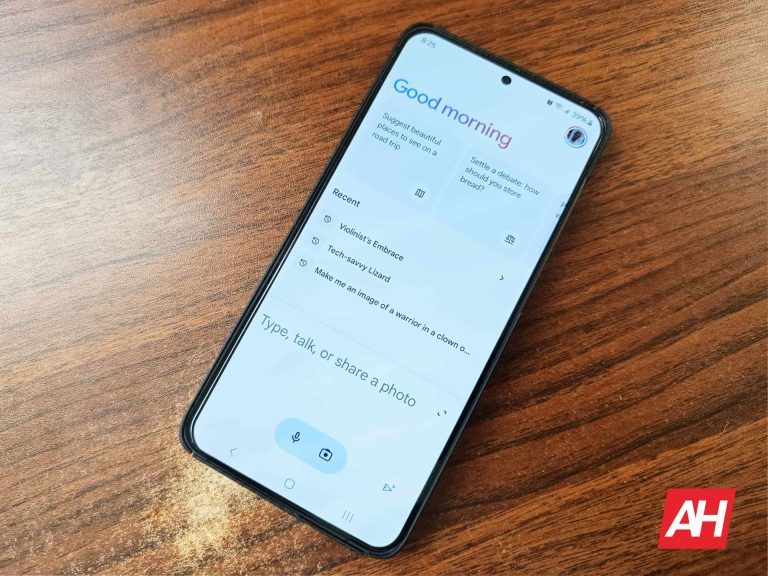
When you open the app, you’ll see your home screen. At the very top of the screen is your profile picture. Tapping on this will open the popup window with additional options. We’ll get to that in a second. Next, you’ll see a greeting.
Under the greeting, you’ll see a horizontally scrolling carousel of suggestions of things to ask Gemini. These are just to get the juices flowing. If you don’t want to see the suggestions, swipe all the way to the end of the carousel and tap on the Hide suggestions button. When you do that, you’ll see them disappear, and you’ll also see a little button appear right under your profile picture. If you tap on that icon, the suggestions will come back.
If you’ve used Gemini or Bard before, then you’ll see a list of your most recent conversations. However, if you’re new to both chatbots, then it will be empty.
Options panel
The Options panel pops up when you tap on your profile picture. At the top, you’ll see the account switch that allows you to change the account you’re using. The Manage your Google Account button will take you to the Google Accounts page.
Under that, you’ll see the Gemini Apps Activity button. This is where you’ll be able to manage how your data is handled by the app. The Extensions button will let you enable and disable the available extensions. Next, the Updates button will bring the app’s changelog that shows you the latest updates that landed. The PrivacyHub button will show you an extended document with information about how Gemini uses your data.
Under those options, you’ll see your settings button. This will take you to your core app settings.
Using the Gemini app
Using the Gemini app is rather simple. There are different ways for you to interact with Gemini through the app.
Text/speech input
At the bottom of the screen is where all of the action happens. There’s a panel that houses the text field where you’ll type your query. Tap on it and type in your query. When you do that, you’ll enter a new conversation. Within the text field, you’ll see a little pill-shaped button with two icons inside. You’ll see a microphone icon and a camera icon.
Tap on the microphone to speak into your phone and have Gemini listen to you. You’ll do this if you can’t use the keyboard. If it’s your first time using the app, you’ll see a popup asking you to give it permission to access your microphone.
Image input
If you tap on the camera icon, you’ll upload an image for Gemini to ascertain. Just like when pressing the microphone icon, you’ll see a popup appear if this is your first time using the app. This will give the app permission to access your camera.
Tapping on the camera will bring up a simple viewfinder UI. It will allow you to take a picture of whatever you want to ask Gemini about. Tap on the big button at the bottom of the screen. This will take a picture of the object and paste it into the text field. Above the shutter button, you’ll see the different camera sensors you can use to take the picture.
If you want to upload an image instead, tap on the camera icon and tap on the picture icon to the left of the shutter button. This will bring up the photo picker. Just tap on the picture you want to upload, and it will paste it into the text field.
At that point, you can ask Gemini questions about the image. Just type your question or query and press the Send button.
How Gemini uses your data
A major part of generative AI is the collection of your data and conversations to help train the models and make the AI better. However, you have the right to know what data is being used and where it’s going. So, we’re going to go over that in this section.
What data is collected
Gemini collects your conversations, location, feedback, and usage information. The company stated that it will collect additional information if you use Gemini as an assistant.
Apps Activity
Firstly, you can set the app to not save your conversations. To do this, go to your options panel and tap on the Gemini Apps Activity button. On the resulting page, the first thing you’ll see is the Saving Activity section. Here is where you’ll set Gemini to not save your activity. Tap on the Turn off button, and you’ll see two options. The first option will set it so that your future conversations won’t be saved. The second option will do that and delete all of your current conversations.
The next section will set when Gemini will automatically delete your data. Tap on the arrow, and it will take you to a new page. Here, you’ll be able to have Gemini delete your data older than 3 months, 18 months, and 36 months. If you don’t want it to delete your data, select the Don’t auto-delete activity option.
Next, you’ll see a scrolling list of all of your saved conversations. You can look through it and check out the prompts you fed into Gemini. This will also include conversations you had with Bard. The list is separated by date, and each item has the time they were prompted, so you’ll know when you prompted each one.
If you tap on the Details button under each item, you’ll see that entire conversation, along with the time and date it was prompted. Lastly, on the right of each item, you’ll see an “Χ” allowing you to delete it. There’s also the option to delete an entire day’s worth of prompts.
Deleting the data
Above the list, there’s a Delete button. This will give you some options for deleting your history. You can choose to delete conversations from the last hour and the last day. There’s also the option to delete conversations from a custom date range. If you want to delete everything, there’s an All time option that will clear everything.
One thing to know is that, when you set Gemini to not save your conversations, Google will save your conversations for up to 72 hours. After that, they will be deleted. Also, those conversations don’t show up on your activity feed.