The Xiaomi 14 Ultra wallpapers are now available to download
There are four wallpapers included in this pack. These wallpapers were pulled from HyperOS 1.0.24.2.20.UNACNXM, which is the leaked software, actually, but the wallpapers themselves are available on the device.
These wallpapers are abstract, needless to say. You can check them out in the gallery below. Do note that the images in the gallery have been compressed, however. If you’d like to grab them in a higher resolution, tap the download link below the article. Do note that the wallpapers are not available in the resolution of the Xiaomi 14 Ultra’s display for some reason, which leads us to believe they’ve been compressed before being offered by GSMChina. They all come in 2048 x 922 resolution instead of 3200 x 1440.
This is basically the same wallpaper but comes in considerably different colors
This is basically the same wallpaper but in different shades. Black, Gray, Blue, and white variants are available, as you can see. Xiaomi uses circles and oval shapes to create an interesting design.
Some of you may see similarities to some wallpapers from iOS, and it’s not difficult to see why. That’s not a bad thing, though, as people seem to like such designs these days, so the more the merrier.
You can download these wallpapers to basically any phone, and then adjust them when you set them, in case your phone’s display aspect ratio is different.
The Xiaomi 14 Ultra is a truly powerful smartphone, and has a huge focus on the camera department, as expected. Four 50-megapixel cameras are used, and the main one includes variable aperture, Leica’s optics are used, as is Qualcomm’s most powerful chip, and much more.
While, in some ways, AI is perceived as a threat, it has many advantages. One of those is defending against cybersecurity threats. In fact, artificial intelligence is revolutionizing security for Android phones. We store a large portion of our sensitive information on our devices, so protection is a priority.
The threats are varied, including theft, loss, malware, and hacking attempts. Mobile security needs to include several measures to be effective. They include mobile device management, two-factor authentication, and encryption. More than one approach is required to keep your data safe, but AI can make the process easier and more effective.
Let’s find out how artificial intelligence integration is changing Android security.
The Role of AI in Smartphone Security: Predictive Analysis
AI provides real-time protection and proactive threat mitigation. It’s used to identify future threats to your Android phone. The ability to process large amounts of data in very little time has changed cybersecurity for Android devices. Now, AI can use previous data on threats and look at cybersecurity and hacking trends to identify potential issues and cyberattacks. Through predictive analysis, it looks ahead to see what kinds of threats could arise in the future.
Developers then take that information to improve their app security. If they know what’s coming, they can build an app that already prevents issues. That’s true for device software, too. User privacy and security are a focus for Google in the upcoming Android 15 update. You’ll get the benefits of the new FileIntegrityManager API. It features custom cryptographic signatures to protect files.
AI integration takes security to the next level. Identifying unusual patterns of activity is key to threat detection. Deep learning behavioral analysis now has an accuracy similar to that of humans. One day, it could have the capability to surpass that.
It works using an algorithm that compares activity to your normal patterns. If an unusual location, access method, or other aspect is flagged, then you’ll be alerted. Plus, the attempt could be blocked. AI flags the issue before unauthorized access occurs, which prevents data breaches. This level of speed and the proactive approach means your smartphone has real-time protection with a proactive detection approach.
AI-Powered Malware Detection and Prevention
Identifying patterns isn’t just for preventing unauthorized access. There are also algorithms that can keep your device safe from malware. An attack could attempt to track your location or send messages from your phone without your permission. In these cases, advanced detection can help.
Analyzing large amounts of data and identifying patterns allows sophisticated detection. AI can spot unusual network activity and malicious code and analyze device interactions and app behavior. Once AI-driven malware detection has identified a potential threat, actions can be taken to remove malicious code or apps before any harm is done. Together with security software, it alerts you to the threat so that you can take action.
Enhanced User Authentication and Privacy Protection: Biometrics
We can use AI to enhance the security settings on our Android phones so that only we can access our devices and certain applications. Thanks to AI, we’ve been using biometric authentication to protect our devices for a while. Fingerprint, facial, and voice recognition are three vital security tools for keeping our Android smartphones secure.
As AI becomes more sophisticated, these identification measures provide even tighter levels of security. By relying on unique biometric characteristics, you have the peace of mind that only you can access your smartphone. It means that your messages, emails, banking apps, and other sensitive information stay private.
Embracing AI for Android Security
AI can process large amounts of data in no time at all. That can be used to your advantage when it comes to security, especially in identifying threats to your Android device. Most importantly, these security methods will develop and become even better. Thanks to continuous data accumulation, you’ll stay one step ahead of the threats, and your privacy will be protected.
We’re only just beginning to explore AI and find ways for it to help us in keeping our Android devices secure. As the revolution continues, we’ll experience more benefits as long as we embrace these solutions. When we take advantage of what AI can offer, our Android devices become more secure. Plus, our sensitive data stays protected from all kinds of cybersecurity threats.
Our smart devices simplify our lives in so many ways by helping us with everyday tasks, work, and entertainment. Since typing is something we all do regularly, it’s great to see tech companies working on making it quicker and simpler, too.
As per information from reliable leaker Mishaal Rahman (via Android Central), Google is introducing a new feature called Scan Text to Gboard. When you use the feature, your camera will open, taking up a bit more than half of your display. A button will appear at the bottom center, along with a tagline that says, “Take a photo of words to scan.”
Afterward, Gboard highlights all the text it identifies on the page. You can then insert the content captured from the photo into messages, notes, and other places. The feature also provides a quick preview of what it copied beside the insert button.
Gboard is rolling out a new “Scan Text” mode that lets you take a photo of text to insert into a text field. Have heard from several people that this is now rolling out, but it may not have reached everyone yet. Let me know if you see this! pic.twitter.com/7fcs5vEpGT
The new Scan Text feature on Gboard seems similar to Google Lens, but for some users, it might be quicker and more convenient. Google Lens is a handy smartphone app that uses your camera for tasks like text recognition and object searches. However, it’s important to know that Gboard’s new feature doesn’t save the photo to your device. It just captures it temporarily for copying and pasting before discarding it.
The Cybersecurity and Infrastructure Security Agency (CISA), the Environmental Protection Agency (EPA), and the Federal Bureau of Investigation (FBI) have collaborated to develop a highly significant cybersecurity guide that is specifically intended for Water and Wastewater Systems (WWS) entities.
This comprehensive guide is aimed at strengthening the defense mechanisms of WWS entities and safeguarding the crucial water resources that they manage.
This initiative is of utmost importance as these systems are critical infrastructure that provides essential services to the community, and any security breach can have a significant impact on public health and safety.
Water systems are at a high risk of cyberattacks due to their outdated operational technology (OT) and information technology (IT) systems.
These systems are vulnerable to both data breaches and disruptions, which can have a severe impact on their operations.
The lack of regular updates and security measures makes them an easy target for malicious attacks, putting the safety and quality of the water supply at risk.
By providing valuable information and guidelines, the fact sheet serves as an effective tool to enhance the security of computer systems and networks and to enhance their capacity to withstand and respond to cyberattacks.
If you’re looking for resources to enhance the cybersecurity of your water and wastewater systems, then you may want to check out the defenses shared by the Cybersecurity and Infrastructure Security Agency (CISA) and the Environmental Protection Agency (EPA).
The Cybersecurity and Infrastructure Security Agency (CISA) and the Federal Bureau of Investigation (FBI) have jointly issued a comprehensive incident response guide that outlines the necessary steps to be taken in the event of a cyber attack targeting water management systems.
The guide provides detailed instructions on how to identify, respond to, and recover from such attacks to minimize the damage and ensure the continuity of critical operations.
Taking Action
Reduce Exposure to the Public-Facing Internet
Conduct Regular Cybersecurity Assessments
Change Default Passwords Immediately
Conduct an Inventory of Operational Technology/Information Technology Assets
Develop and Exercise Cybersecurity Incident Response and Recovery Plans
Backup OT/IT Systems
Reduce Exposure to Vulnerabilities
Conduct Cyber Security Awareness Training
If you are part of a water or wastewater systems organization and require additional support in implementing the measures mentioned in this fact sheet, you can reach out to the Environmental Protection Agency (EPA) or your regional Cybersecurity and Infrastructure Security Agency (CISA) cybersecurity advisor.
They will be able to guide and assist you in securing your systems against potential cyber threats.
You can block malware, including Trojans, ransomware, spyware, rootkits, worms, and zero-day exploits, with Perimeter81 malware protection. All are extremely harmful, can wreak havoc, and damage your network.
Stay updated on Cybersecurity news, Whitepapers, and Infographics. Follow us on LinkedIn & Twitter.
In the dynamic landscape of office productivity, Microsoft Office has long been the reigning champion. However, with the advent of new technologies and the ever-growing demand for flexibility and innovation, alternative office suites have emerged as formidable contenders. One such challenger is “Truly Office,” among several others, offering users a fresh perspective on document creation, collaboration, and productivity. In this article, we will explore six Microsoft Office alternatives, delving into their features, benefits, and potential impact on the future of office productivity.
LibreOffice:
LibreOffice is a powerful, open-source office suite that provides a free and accessible alternative to Microsoft Office. It includes applications such as Writer (word processing), Calc (spreadsheet), Impress (presentation), and more. One of the primary benefits of LibreOffice is its cost-effectiveness, as it is free to use and can be installed on multiple platforms, including Windows, macOS, and Linux.
Key Features:
– Compatibility with Microsoft Office file formats. – Rich set of features for document creation, editing, and formatting. – Support for a wide range of languages. – Active community support and regular updates. – Extensions and templates for enhanced functionality.
Truly Office:
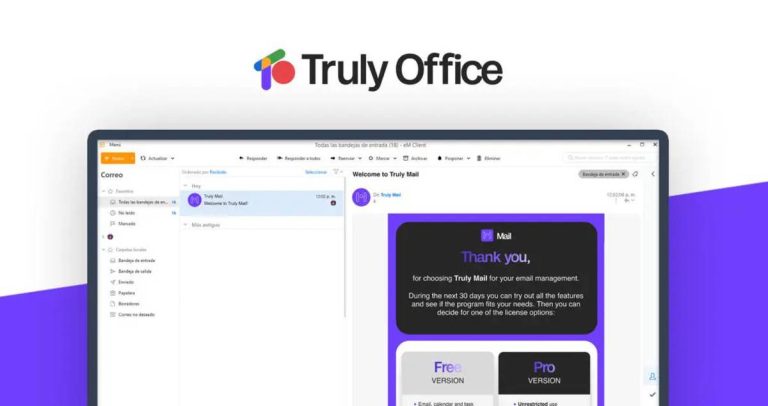
Another in the list of alternatives is “Microsoft Office Alternative” “Truly Office” which aims to redefine the user experience. With a focus on simplicity and user-friendly design, Truly Office offers a suite of applications for word processing, spreadsheet management, and presentations. Its commitment to providing a seamless transition for users familiar with Microsoft Office makes it a promising contender in the competitive office productivity market.
Key Features:
– Intuitive user interface for ease of use. – Compatibility with Microsoft Office file formats. – Cloud-based collaboration and storage options. – Regular updates and customer support. – Cross-platform availability.
Google Workspace:
Formerly known as G Suite, Google Workspace has gained immense popularity for its cloud-based collaboration tools. It comprises applications like Google Docs, Sheets, Slides, and Drive, allowing users to create, edit, and store documents online. The real-time collaboration feature is a standout, enabling multiple users to work on the same document simultaneously.
Key Features:
– Seamless cloud integration for easy access from any device. – Real-time collaboration and commenting. – Advanced sharing and permission controls. – Automatic saving and version history. – Integration with other Google services like Gmail and Calendar.
WPS Office:
WPS Office is a comprehensive office suite that offers a familiar interface, making the transition from Microsoft Office smooth for users. It includes Writer, Presentation, and Spreadsheets, providing essential tools for document creation and editing. One notable advantage of WPS Office is its compatibility with Microsoft Office file formats, ensuring smooth interoperability.
Key Features:
– Tabbed interface for efficient multitasking. – PDF editing capabilities. – Cloud support for document storage and sharing. – Template gallery for quick document creation. – Cross-platform compatibility (Windows, macOS, Linux, Android, iOS).
SoftMaker Office:
SoftMaker Office is a robust office suite that emphasizes speed and efficiency. It includes TextMaker (word processor), PlanMaker (spreadsheet), and Presentations (presentation software). The suite stands out for its fast performance and compatibility with Microsoft Office formats, making it a suitable choice for users with a focus on productivity.
Key Features:
– High compatibility with Microsoft Office file formats. – Focus on speed and resource efficiency. – Comprehensive set of formatting and editing tools. – Customizable user interface. – Integrated spell-check and grammar tools.
OnlyOffice:
OnlyOffice is an integrated office suite that combines document editing, project management, and collaboration in a single platform. It offers a cloud-based solution as well as an on-premises version for organizations with specific security requirements. OnlyOffice stands out for its versatility, catering to a range of user needs beyond traditional document editing.
Key Features:
– Document, spreadsheet, and presentation editors. – Project management and CRM tools. – Integration with third-party services, including cloud storage. – Team collaboration features like comments and mentions. – Multi-platform support and mobile apps.
As we navigate the ever-evolving landscape of office productivity, the abundance of alternatives to Microsoft Office provides users with diverse choices. Each alternative discussed in this article brings its unique set of features and benefits, catering to different user preferences and requirements.
Whether it’s the open-source flexibility of LibreOffice, the collaborative power of Google Workspace, the seamless compatibility of WPS Office, the speed-focused approach of SoftMaker Office, the integrated platform of OnlyOffice, or the promising user experience of Truly Office, the future of office productivity appears dynamic and full of possibilities. Users can now explore these alternatives and choose the one that aligns best with their workflow, ultimately shaping the way we work and collaborate in the digital age.
Now, someone on X/Twitter claims that Gmail, of all things, is shutting down (via Android Central).
There’s a viral post that shows a message relaying that Google will sunset Gmail later in 2024:“As of August 1, 2024, Gmail will officially be sunsetted, marking the end of its service. This means Gmail will no longer support sending, receiving, or storing emails”, the message reads.
Google has a long history of killing and rebranding apps, services, and hardware: 293 in total so far. There’s a dedicated “killedbygoogle.com” website that has them listed. The monochrome virtual obituary exudes a sense of solemnity and humbleness, offering a respectful backdrop for remembering loved ones.
But, back to the Gmail story: of course, it’s not real.
Here’s the answer for the Gmail team:
However, there’s a grain of truth in the satirical post that claims Google is sunsetting Gmail. Google is killing Basic HTML view on Gmail this year, per an email from 2023. A support page informs users as much and even includes a transition guide for some.
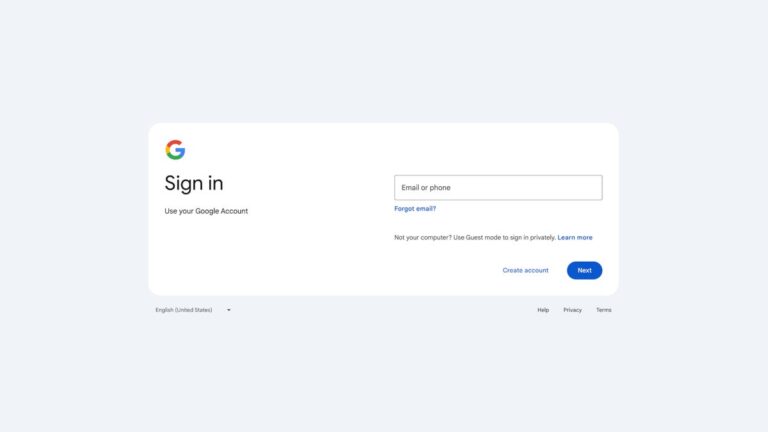
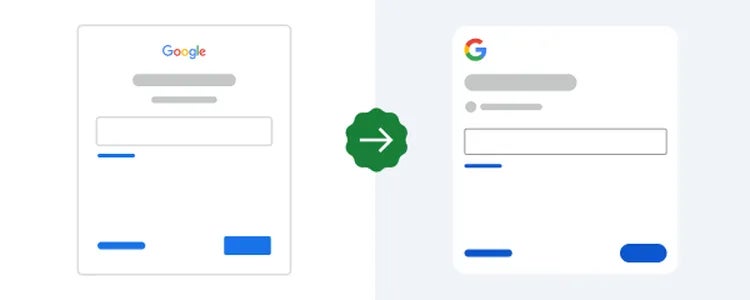
Google has updated the user interface for signing in to or signing up for Google Accounts, the search giant announced this week. The new Google sign-in page on web and mobile features a new design that comes in line with the Material Design language specific to the company’s other products.
According to Google, no changes have been implemented apart from those in visual appearance, so there are no functionality impacts or other changes of that nature.
The visual changes aren’t as big as one might expect, but that’s a good thing considering how easy is to confuse someone who has been using the same UI for years.
Old design vs. New design
These changes to the sign-in user interface should appear automatically for everyone, there’s no need to do anything to quicken its arrival. In fact, Google says that it will take up to 15 days for the new user interface to be visible to everyone.
Considering that the roll-out started on February 21, it means that all Google Workspace customers and users with personal Google Accounts should get the new user interface by March 4 at the latest.
The oil and gas sector faces a significant cybersecurity threat with the emergence of a new and sophisticated Malware-as-a-Service (MaaS) infostealer known as Rhadamanthys Stealer.
This advanced phishing campaign has successfully reached its intended targets within the industry, raising concerns about the potential impact on critical infrastructure and sensitive data.
DocumentLive Account Takeover Attack Simulation
Live attack simulation Webinar demonstrates various ways in which account takeover can happen and practices to protect your websites and APIs against ATO attacks.
Rhadamanthys Stealer
Rhadamanthys Stealer is a C++ information stealer that first appeared in August 2022. It is designed to target email, FTP, and online banking service account credentials.
The malware has evolved rapidly, with recent versions adding new stealing capabilities and enhanced evasion techniques.
The stealer can modify clipboard data to divert cryptocurrency payments to attackers and recover deleted Google Account cookies.
The deployment of Rhadamanthys Stealer came shortly after law enforcement took down the LockBit ransomware group, one of the most active Ransomware-as-a-Service (RaaS) operations.
This timing suggests a possible connection or opportunistic pivot by cybercriminals in response to the crackdown on LockBit.
In early 2023, various vendors specializing in threat intelligence and anti-virus software identified the emergence of the MaaS Rhadamanthys Stealer. Presently, there has been a resurgence of this malware in the MaaS model.
Multiple Threat Intelligence and Anti-virus vendors have noted the rise of the MaaS Rhadamanthys Stealer. Rhadamanthys is noted as trafficking itself through malicious Google ads targeting AnyDesk, Zoom, Bluestacks, Notepad++, OBS, and more.
The campaign begins with a phishing email that employs various tactics to bypass secure email gateways and deliver the malware.
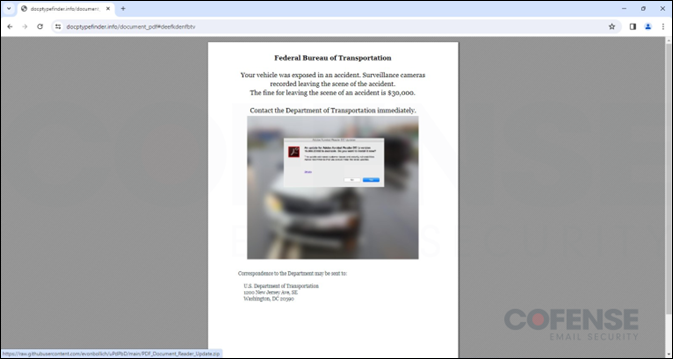
These emails contain a clickable PDF file hosted on a recently registered domain, which, when accessed, initiates the malware infection process, said Cofense researchers.
Phishing Email Targeting Oil and Gas Sector to Deliver Rhadamanthys Stealer (Source: Cofense)
The phishing emails are part of a more significant trend of infostealer incidents that have escalated in early 2023, with incidents involving stealers more than doubling compared to the previous year.
The Rhadamanthys Stealer is distributed via the MaaS model and has been gaining popularity on the dark web.
Impact on the Oil and Gas Industry
The oil and gas industry is a critical sector increasingly reliant on digital technologies, making it a lucrative target for cybercriminals.
Recently registered domain hosting a clickable PDF file
The successful infiltration of Rhadamanthys Stealer into this sector could lead to the theft of sensitive information, financial loss, and potential disruption of operations.
Sophisticated malware campaigns pose a significant threat to the industry. Organizations must remain vigilant and adopt robust cybersecurity measures to mitigate the risks, according to the Cofense report.
This includes implementing advanced threat detection and prevention systems, regularly updating software and security patches, and conducting employee awareness and training programs to prevent social engineering attacks.
Additionally, organizations should monitor their network traffic, implement access controls, and perform regular vulnerability assessments to identify and address any potential security gaps.
The emergence of Rhadamanthys Stealer as a new threat to the oil and gas industry underscores the need for continuous monitoring and improvement of cybersecurity defenses.
Companies in the sector should be aware of the methods used by cybercriminals, such as phishing campaigns, and ensure that employees are trained to recognize and respond to such threats.
You can block malware, including Trojans, ransomware, spyware, rootkits, worms, and zero-day exploits, with Perimeter81 malware protection. All are extremely harmful, can wreak havoc, and damage your network.
Stay updated on Cybersecurity news, Whitepapers, and Infographics. Follow us on LinkedIn & Twitter.
A new OnePlus 11 update has started rolling out, and it contains mostly fixes. There are a couple of improvements thrown into the mix too, though. This update is marked as OxygenOS 14.0.0.501, and it’s rolling out everywhere, basically.
New OnePlus 11 update brings a bunch of fixes to the table
The update is rolling out in India, Europe, and the US, it’s a global rollout. Do note that it’s a staged rollout, though. Just because it started rolling out doesn’t mean you’ll get it straight away.
The first one mentioned the improved experience of viewing weather details. We’re not sure what exactly this means, but OnePlus probably removed some bugs and improved the experience in general. The other ‘improvement’ is more general, as it mentions system stability and performance improvements.
What about fixes? Well, this update fixes an issue that caused some apps to crash. No specific apps were mentioned by the company, though. It also fixes an issue where NFC cards did not work in some scenarios. Once again, no details were given.
A nasty problem with photos in albums was present, but not anymore
The last fix on the list has to do with photos. At times, photos did not appear at all when you opened your albums within the default photos app. Needless to say, that’s quite a problem, and it’s nice to see that OnePlus fixed it.
It’s always nice to see updates like these. They don’t really deliver all that much new functionality, but they’re trying to improve user experience, which is great. The OnePlus 11 is no longer the latest and greatest from the company, but it still works like a charm, at least for us.
That info has been reiterated by Chun, a tipster. That means that it will be a lot thinner than the Galaxy Z Fold 5, though still noticeably thicker than the HONOR Magic V2. In any case, let’s get down to other details.
The Galaxy Z Fold 6 specs leak hints at titanium build, wider body & more
The tipster also suggests that there will be no S Pen slot included, as expected. The Galaxy Z Fold 6 will be a bit wider, which means it will have a wider cover display. That’s something many people have been waiting for. It’s also something we’ve heard several times thus far.
The Galaxy Z Fold 6 will have “S24 Ultra style sharp edges”, says the tipster. The Snapdragon 8 Gen 3 for Galaxy will fuel the device, while a 4,600mAh battery is tipped.
This device will include three cameras on the back, which is also expected. Samsung will allegedly improve the UDC camera on the main display. So, we’re still getting an under-display camera.
What does come as a bit of a surprise is the use of titanium. Chun claims that the phone will feature a “titanium build”. We don’t know how much titanium will be used, or where, but keep that in mind.
The phone is also said to be “much lighter”
In addition to being a lot thinner, the Galaxy Z Fold 5 will be considerably lighter too. The tipster also says that the phone is coming in three color options, but he did not reveal what those colors are.
Yogesh Brar, another tipster, suggests that the phone will include 50, 10, and 12-megapixel cameras on the back. Those are allegedly main, telephoto, and ultrawide units. A 6.4-inch cover display was also mentioned by him.
The Samsung Galaxy Z Fold 6 will become official later this year. It’s expected to launch in August, as its predecessor arrived in August 2023. The Galaxy Z Flip 6 will also launch alongside it, and quite possibly the Galaxy Ring too.