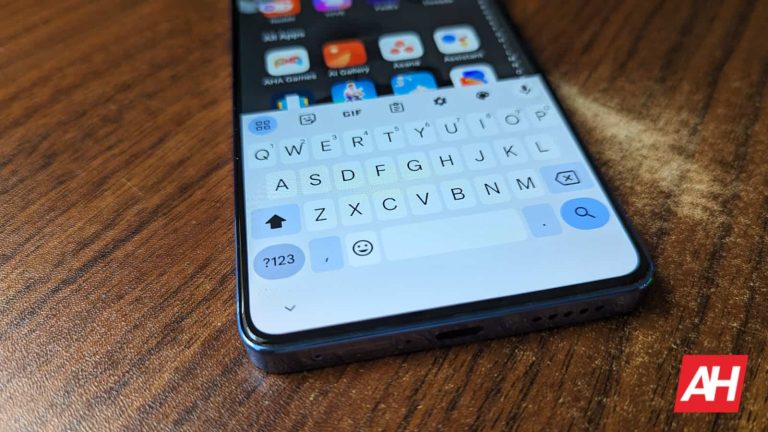
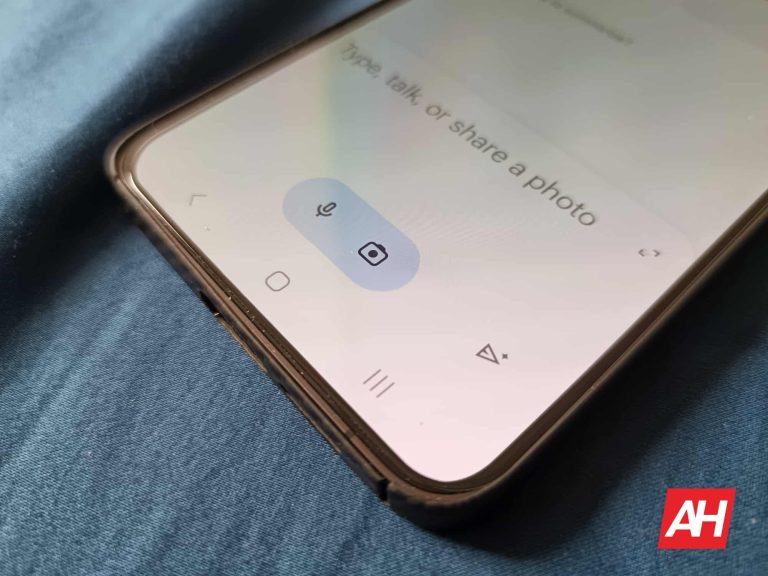
Last year, Google unveiled a new proofreading feature for Gboard. This would, of course, look through all of your text and offer fixes so that you don’t come off sounding like an idiot. Well, the company is issuing an update to the feature that’ll make it a bit better. According to a new report, Gboard now proofreads selected text.
The proofreading feature for Gboard is very nice. However, it was a bit too broad in its scope. Sometimes, you don’t want to proofread an entire body of text; sometimes, you just want to proofread a sentence or paragraph. However, Proofread with Gboard only dealt with full bodies of text. So, that will make things more tedious if you have a large body of text.
Proofread with Gboard now works with selected text
When you want to go into your text with a fine tooth comb and fix up a sentence here and there, it’s a lot easier after the update that just arrived on Gboard. As spotted by AssembleDebug, in the new beta of the Gboard app (version 13.9), you’ll be able to use the Gboard proofing function only on the text that is selected. All you have to do is select the text and then tap on the Proofread button. Gboard will then analyze the text you selected and give you suggestions.
In order to use Proofread with Gboard, you’ll need to have either a Pixel 8 or Pixel 8 Pro. Unfortunately, it is exclusive to those devices. If you have one of the devices, and you don’t see it, then make sure that your Gboard app is fully updated. Search for Gboard on the Google Play Store, and see if there is an update button on the store page.
Looking to buy a Pixel 8?
Speaking of the Pixel 8 (Review), this is still one of the best phones you can buy on the market. If you’re looking for a great deal, an unlocked Pixel 8 with 128GB of storage is now only $549 thanks to a current deal. This phone comes with the latest Google Tensor G3 chip, a great display, a top-of-the-line camera, and seven years of software updates.
We’re here to compare two of the latest ‘Plus’ smartphones from the two largest smartphone manufacturers in the world. We’ll compare the Samsung Galaxy S24+ vs Apple iPhone 15 Plus. The Galaxy S24+ is technically one of three flagship smartphones Samsung announced last month. The iPhone 15 Plus is a part of Apple’s latest series of smartphones, but it’s not exactly a flagship.
Despite that, however, their price tags are not all that different. Both of these phones are fairly large, by the way. We’ll first list their specifications, and will then compare them across a number of other categories. We’ll compare their designs, displays, performance, battery life, cameras, and audio performance. Let’s see how these two devices stack up, shall we?
Specs
Samsung Galaxy S24+ vs Apple iPhone 15 Plus, respectively
– Screen size: 6.7-inch Dynamic AMOLED 2X (flat, 120Hz, 2,600 nits max brightness) 6.7-inch Super Retina XDR display (60Hz, HDR, 2,000 nits) – Display resolution: 3120 x 1440 2796 x 1290 – SoC: Qualcomm Snapdragon 8 Gen 3 for Galaxy / Samsung Exynos 2400 Apple A16 Bionic – RAM: 12GB (LPDDR5X) 6GB – Storage: 256GB/512GB (UFS 4.0) 128GB/256GB/512GB – Rear cameras: 50MP (wide, f/1.8 aperture, OIS, Dual Pixel PDAF), 12MP (ultrawide, 120-degree FoV, f/2.2 aperture, 1.4um pixel size), 10MP (telephoto, f/2.4 aperture, OIS, PDAF, 3x optical zoom) 48MP (f/1.6 aperture, sensor-shift OIS), 12MP (ultrawide, f/2.4 aperture) – Front cameras: 12MP (wide, f/2.2 aperture, Dual Pixel PDAF, 22mm lens) 12MP (f/1.9 aperture) + TrueDepth – Battery: 4,900mAh 4,383mAh – Charging: 45W wired, 15W wireless, 4.5W reverse wireless (charger not included) 20W wired, 15W wireless (charger not included) – Dimensions: 158.5 x 75.9 x 7.7mm 160.9 x 77.8 x 7.8mm – Weight: 196/197 grams 201 grams – Connectivity: 5G, LTE, NFC, Wi-Fi, USB Type-C, Bluetooth 5.3 – Security: In-display fingerprint scanner Advanced facial scanning – OS: Android 14 with One UI 6.1 iOS 17 – Price: $999.99+ $899+ – Buy: Galaxy S24 series (Samsung) Apple
Samsung Galaxy S24+ vs Apple iPhone 15 Plus: Design
From the design standpoint, they’re both similar and different. Both phones are made out of aluminum and glass, and they’re both also quite flat. They not only include flat displays, but flat backplates, and flat frames all around. Frames on both phones are slightly rounded towards the edges, for comfort’s sake. The in-hand feel is not all that different between them, even though the iPhone 15 Plus is slightly wider. The weight is similar, and so are the shapes overall.
Both of these devices are very slippery, so keep that in mind, as chances are you’ll want to get a case for them. The Galaxy S24+ includes a centered display camera hole on the front. Its bezels are very thin all around, while they’re also uniform. The iPhone 15 Plus, on the other hand, has a pill-shaped cutout at the top of the display, and also rather thin bezels, which are uniform. The bezels on the Galaxy S24+ are thinner, though.
You’ll find three cameras on the back of the Galaxy S24+. Those cameras are vertically aligned, and they sit in the top-left corner. The iPhone 15 Plus, on the flip side, has two cameras in the top-left corner, and they have a diagonal layout. Both smartphones do offer an IP68 certification for water and dust resistance. They also have a similar curve on their edges, which is another similarity in terms of the general shape. They both do feel nice in the hand, though these are large phones, so do take note of that.
Samsung Galaxy S24+ vs Apple iPhone 15 Plus: Display
The Galaxy S24+ features a 6.7-inch QHD+ (3120 x 1440) Dynamic LTPO AMOLED 2X display. That panel is flat, and it has a refresh rate of up to 120Hz. This panel supports HDR10+ content, and the brightness goes up to 2,600 nits maximum. The display aspect ratio is 19.5:9, while the display itself is protected by the Gorilla Glass Victus 2 by Corning. The screen-to-body ratio here is around 91.6%.
The Apple iPhone 15 Plus, on the flip side, has a 6.7-inch Super Retina XDR OLED display. This panel is also flat, and it has a resolution of 2796 x 1290. This display can show HDR10 content and also has Dolby Vision support. The refresh rate is 60Hz. The maximum brightness is 2,000 nits, and the display aspect ratio here is 19.5:9. The iPhone 15 Plus’ display is protected by the Ceramic Shield glass.
Both of these panels are quite bright, while they’re also vivid and have good viewing angles. The blacks are also quite deep, and the touch response is good on both of them. The thing is, the Galaxy S24+ has a 120Hz display, and it’s also an LTPO panel. The iPhone 15 Plus is stuck at 60Hz, which is something you’ll notice if you’ve used 120Hz panels, that’s for sure. If you don’t care about the refresh rate, however, both of these displays will serve you really well.
Samsung Galaxy S24+ vs Apple iPhone 15 Plus: Performance
The Galaxy S24+ is fueled by the Snapdragon 8 Gen 3 SoC or Samsung Exynos 2400 chip, depending on the market. These are the most powerful chips from their respective manufacturers. The phone has 12GB of LPDDR5X RAM, and utilizes UFS 4.0 flash storage. The iPhone 15 Plus, on the flip side, is fueled by the Apple A16 Bionic processor. That was Apple’s most powerful chip, but it’s not anymore. The phone has 6GB of RAM and utilizes NVMe flash storage.
They have fairly different performance-related hardware, but both smartphones do offer great performance. They’re on the same level when it comes to regular, everyday tasks. They both open apps really fast, and the multitasking is also on par between them. That goes for basically anything you can think of… and it even goes for gaming.
Both of these processors are really good in the gaming department. They can run the most demanding games without a problem. Both phones do heat up when you run something like Genshin Impact on them, but neither gets too hot. Also, you won’t really notice any impact on their performance even after a more intense gaming session, which is always good to hear. You really shouldn’t worry about the performance aspect here. Just note that we’ve used the Snapdragon variant of the Galaxy S24+, not the Exynos model.
Samsung Galaxy S24+ vs Apple iPhone 15 Plus: Battery
Samsung’s handset packs in a 4,900mAh battery on the inside. The iPhone 15 Plus has a 4,383mAh unit. Apple’s iPhones usually have smaller battery packs than their Android counterparts, so take note of that. In regards to battery life, both of these smartphones are outstanding in that area. The iPhone 15 Plus probably has the best battery life out of all the new iPhone models, while the Galaxy S24+ is not far behind that level.
We’ve managed to get over 8 hours of screen-on-time from the Galaxy S24+. The iPhone 15 Plus is capable of upping that to over 9 hours of screen-on-time. Do note that gaming will lower those numbers, and your mileage may also vary, of course. Still, we do use our phones rather intensively during the day, so these two phones can really take some serious usage. Another thing you should note is that both were connected to Wi-Fi most of the time. 5G was used periodically.
Samsung’s handset supports 45W wired charging, 15W wireless charging, and 4.5W reverse wireless charging. The iPhone 15 Plus, on the flip side, has support for 20W wired, 15W MagSafe and Qi2 wireless charging, 7.5W Qi wireless charging, and also 4.5W reverse wired charging. Neither of these two phones happens to ship with a charger, however, so you’ll have to get your own.
Samsung Galaxy S24+ vs Apple iPhone 15 Plus: Cameras
The Samsung Galaxy S24+ has one more camera on the back than the iPhone 15 Plus. It includes a 50-megapixel main camera, a 12-megapixel ultrawide unit (120-degree FoV), and a 10-megapixel telephoto unit (3x optical zoom). The iPhone 15 Plus comes with a 48-megapixel main camera, and a 12-megapixel ultrawide unit (120-degree FoV).
Samsung Galaxy S24+
Having said that, both of these smartphones do offer good performance, but they’re below their more powerful siblings. The images from both smartphones are very detailed during the day, with pleasant colors, and dynamic range. Samsung toned down on the saturation aspect with the Galaxy S24+, compared to its predecessors. The Galaxy S24+ also tends to handle heavy HDR situations better than the iPhone 15 Plus, well, at least in most cases. The iPhone 15 Plus tends to blow out the highlights in some cases.
Both phones have very capable ultrawide cameras which do a good job of keeping the color profiles of the main cameras. The telephoto shots are an easy win for the Galaxy S24+, as the iPhone 15 Plus doesn’t have a telephoto camera at all. In low light, both phones do a good job, though the images tend to look noticeably different. The Galaxy S24+ does tend to brighten up the scene a bit more.
Audio
Yes, both phones do include a set of stereo speakers. Those speakers are good on both sides, though the ones on the Galaxy S24+ are louder. The difference is not huge, but it’s noticeable when you crank up the volume. The distortion is almost non-existent on both devices, though.
Neither phone has an audio jack, but they do offer Type-C ports. You can use those ports to connect your headphones via a wire. If you prefer wireless audio, they both feature Bluetooth 5.3 support.
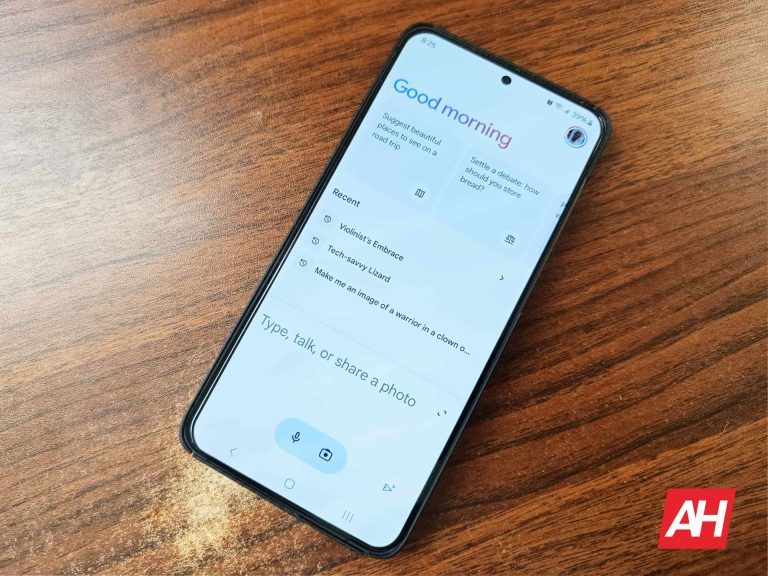
Google came under heavy fire this week over the company’s Gemini chatbot, which has been creating ethnically diverse images even when it would not make sense to do so. This led users on social media to call Gemini “absurdly woke,” and conservative media outlets to blast Google and its artificial intelligence assistant. For those unfamiliar, Gemini is Google’s AI-based chatbot, and it was previously known as Bard. The company has its eyes on Gemini replacing Google Assistant and wants to compete with ChatGPT. Part of that effort recently included Google adding an image generator to Gemini.
But the image generator’s propensity to create ethnically diverse images in response to unrelated prompts attracted some unwanted attention. To be clear, there is no issue with Gemini creating diverse images from abstract prompts. However, Gemini continued to generate images that were diverse even when they did not make sense given the original prompt. For example, viral prompts asked Gemini to generate images of a Nazi soldier from World War II, and the resulting images were ethnically-diverse. In this kind of situation, it would be historically reasonable to expect Gemini to create images that include white people predominantly.
Google acknowledged its error in a statement posted to X on Wednesday. “We’re working to improve these kinds of depictions immediately. Gemini’s AI image generation does generate a wide range of people,” the company said. “And that’s generally a good thing because people around the world use it. But it’s missing the mark here.”
Why does Google’s Gemini image generator create a lot of diverse people?
As Google explains in its statement, it’s important that AI image generators create diverse images. Most image generation prompts do not include conditions that would dictate what races and ethnicities should be depicted in the images. For example, if someone asks Gemini to simply create a person, a depiction of any race or ethnicity would make sense. The problem is that Gemini currently lacks the contextual knowledge to generate people of ethnicities that make sense based on a given prompt.
In part, the outrage was because Google is actively creating diverse images, causing right-wing figures and media to attack Google as being “woke.” For example, one prompt asked Gemini to “generate a picture of a US senator from the 1800s.” Gemini replied, “sure, here are some images featuring diverse U.S. senators from the 1800s.”
While Google admits the Gemini image generator is “missing the mark,” the company is trying to overcome racial and ethnic bias in artificial intelligence. Since AI models are trained by human source materials, artificial intelligence can have the same biases as humans. By actively generating people of diversity, Google is trying to make sure centuries of forward progress aren’t walked back by AI.
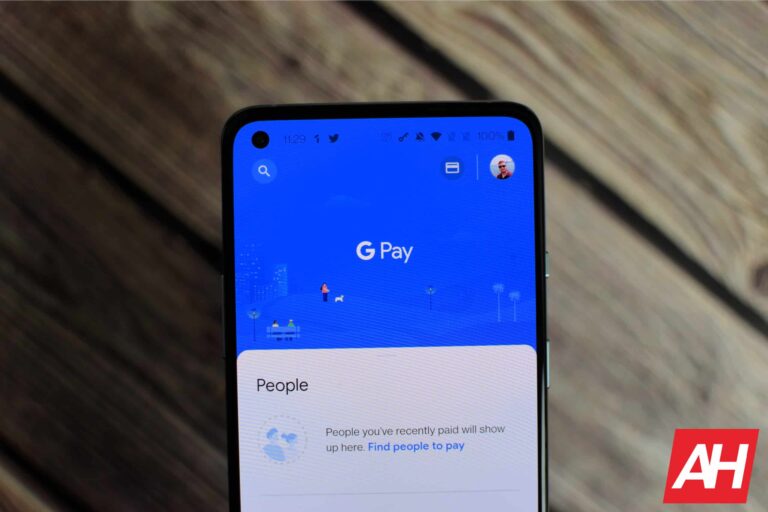
Digital wallet users were taken by surprise by Google’s announcement today that it is shutting down the Google Pay app and shifting its focus on mobile payments in the United States to Google Wallet. The move brings the US in line with most other global markets that already use Wallet as their primary payment service.
According to Google’s latest blog post, users will no longer be able to access Google Pay or use the popular peer-to-peer payment feature after June 4, 2024. While the app will no longer function after June, some access to the service will remain. Users will still be able to view and transfer funds to their bank account for example. They will be able to this from the GPay website even after the shutdown date.
Instead of GPay, the company aims to provide a more streamlined experience within Google Wallet. Currently, the primary app for tap-and-pay using credit and debit cards, Wallet will take on additional roles previously held by its predecessor. This includes housing loyalty programs, tickets, passes, and other documents alongside payment cards. The app will also become the new home for any special deals or offers that were previously accessible through Google Pay searches.
Google simplifies mobile payments with Google Pay being sunset in the US
The move comes as Google Wallet usage in the United States has surged ahead of Google Pay by five to one. Rather than confuse consumers with parallel apps, it makes sense to unify the functionality into a single payment solution. International markets have already made the switch, with only India, Singapore, and the U.S. so far maintaining separate Google Pay apps.
“Google Wallet continues to be the primary place for people to securely store payment cards used for tap and pay in stores, alongside other digital items like transit cards, driver’s licenses, state IDs, and more,” Google wrote in the blog. “You can continue to access the most popular features — tapping to pay in stores and managing payment methods — right from Google Wallet, which is used five times more than the Google Pay app in the U.S.”
As mobile transactions continue to grow in importance, Google is streamlining the experience for U.S. users. By consolidating features into an updated Google Wallet app, the company aims to create a one-stop shop for all payment and digital document needs. While some features, such as peer-to-peer transfers, are disappearing from the app, the company has not yet shared plans to implement similar functionality elsewhere. Nevertheless, a single-app approach ends the branding confusion between Wallet and Pay services.
Right now, you’re able to download music through the dedicated YouTube Music app. This allows you to access your favorite tunes while offline. The desktop version has been missing this functionality for understandable reasons. However, that may change. According to a new report, there are hints pointing to YouTube Music for desktop getting a download feature in the near future.
Right now, we’re going off of early information so, at any point, anything could change. You want to take this news cautiously. If anything happens to change, we will keep you updated and let you know.
YouTube Music could bring a download feature to the desktop web app
Most of the time, you’re using your phone to listen to YouTube Music. It’s much more important for the mobile version to have a download feature. However, there are times when the Wi-Fi shuts off, and you still want to listen to your music or podcast via your computer. Well, YouTube has been working on a way to remedy this. A few years ago, YouTube started testing a feature that would let YouTube premium subscribers download videos using the desktop web app. Well, now, it seems that the company is still looking to do this only with you to music.
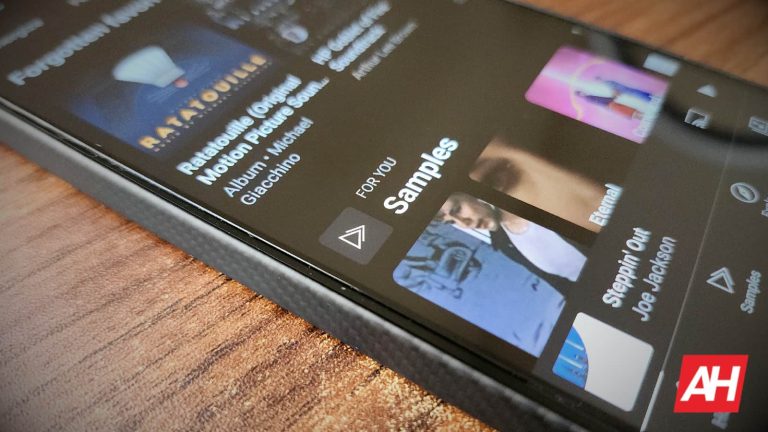
A user on Reddit stumbled upon a page within YouTube Music that has a Downloads tab. The Downloads tab sits right between the Library and Uploads tabs. Below that, we see the text “Music and podcasts you download will appear here.” Also, on the right side of the screen, we see the Download settings button. However, we don’t have any idea of what settings will be available. The settings might include download quality and auto-download Settings. However, that’s just speculation.
You can’t access this page when you are connected to the internet, so you’ll have to turn your Wi-Fi off before trying to access it. Even then, there’s no guarantee that you will be able to.
For the time being, it appears that YouTube is either testing this functionality, or this page was made available by accident. In any case, we’ll hopefully be seeing more of this feature. Only time will tell.
Google has a long history of killing and rebranding services, and their payment offerings are no exception. In a move to simplify the company’s product lineup, Google has announced that it will be sunsetting the dedicated Google Pay app in the US early this summer.
Google launched the dedicated Google Pay app back in 2018, replacing Android Pay and reinventing itself as a unified payment service where you could see your recent purchases, find nearby stores, access rewards, complete peer-to-peer payments, and store a variety of payment and loyalty cards. This app was later split into Google Pay (for rewards and peer-to-peer transactions) and Google Wallet (for storing payment cards and passes).
Now, Google appears to be reversing course by once again combining them — to an extent. The Google Pay (GPay) app will be shutting down in the United States effective June 4, 2024. This change reinforces the repositioning of Google Wallet as the primary payment option for US users. while Google Pay will still be available in limited markets like India, where Google Wallet remains unavailable.
What This Means for You
Google wants to make this transition as smooth as possible , therefore it has begun to advise its Google Pay users that they can still view and transfer any remaining app balance to their bank accounts up until the shutdown date. After that date, users will still have a chance to access their funds by using the web version of Google Pay.
Google Wallet will remain users’ main option for mobile payments in the US. Store credit/debit cards for tap-to-pay, managing loyalty programs, passes, tickets, digital car keys, and government IDs (where supported) will continue to be managed through the Google Wallet app which can be downloaded from Google Play.
Peer-to-Peer payments, however, appear to be a feature that will no longer be supported at all after June 4th. Unlike the other features previously mentioned, Google doesn’t make any mention of a transition plan for it, nor has it announced plans to bring this functionality to Google Wallet.
Google says that the Google Wallet app is used give times more often than the Google Pay app in the U.S. Considering this stat, it makes sense that the company has made this decision to streamline payment services. Additionally, having Google Pay as a separate app was a source of confusion for many users that weren’t sure why two different (yet similar) apps existed for payments. Hopefully, this change can alleviate that problem.
Navigation apps don’t only help you get to where you’re going, but they also help you get to where you’re going safely. This is why it’s important to use new safety features whenever they land. According to a new report, Google Maps competitor Waze will show new alerts that will help speed demons out there slow down.
It’s always a hassle when you’re driving down the road at a comfortable speed only to be rocked by hitting a surprise speed bump. Also, no one likes to have to slam on the brakes when they see a sharp bend in the road. These aren’t only hassles, but there are massive safety hazards. So, Waze is coming out with a feature to help you avoid disaster.
Waze is coming out with new alerts for you speed demons out there
Recently, users have been reporting seeing a new alert within the app letting them know whenever there’s a speed bump or a sharp bend in the road. Looking at the screenshot below, we see Waze introducing this update. It says that it will alert you of “Speed bumps, sharp curves, and more.” It then says, “You might get alerts to pay attention to the road like before sharp curves.”
Right now, we don’t know how widespread this feature is, as not a lot of people reported on it. For all we know, Waze could be testing this on a limited selection of users. If that’s the case, then we should definitely plan on seeing more reports pop up over time.
Based on reports, if there’s a speed bump or sharp turn coming, drivers will see an icon pop up at the bottom right of the screen. It will be a yellow triangle with a “+” sign in the middle. In the second screenshot, it appears that the driver is about to enter a roundabout. So, this could also be another scenario where Waze will give you a new alert.
So, it appears that Waze is looking for more ways to keep people safe, which is always commendable. Overtime, we’ll hopefully see this feature roll out to more people.
Apple Shortcuts security vulnerability (CVE-2024-23204) allows attackers to access targeted devices and steal sensitive data – update your devices now!
Cybersecurity firm Bitdefender has discovered a 7.5/10 severity rating vulnerability in Apple Shortcuts, allowing attackers to access sensitive data without prompting users.According to Bitdefender’s blog post published on 22 February 2024, this vulnerability tracked as CVE-2024-23204, allows attackers to create a Shortcuts file bypassing Apple’s security framework for macOS and iOS.
Apple Shortcuts is a popular macOS and iOS automation app that simplifies tasks by allowing users to create personalized workflows using visual programming to automate tasks like app control, media management, messaging, location-based actions, and more. Users can create workflows for file management, health tracking, web automation, education, and smart home integration, thereby improving productivity and user experience.
The vulnerability was found in the shortcut sharing/expanding mechanism in Apple’s Shortcuts community. The community allows users to discover and expedite automation workflows and export/share shortcuts.
CVE-2024-23204 on the other hand, lets users unknowingly import shortcuts that could exploit the Transparency, Consent, and Control (TCC) security framework in macOS and iOS. This framework helps ensure user privacy and security by requiring explicit permission before accessing sensitive data or functionalities.
During the attack, as noted by researchers in their blog post, the ‘Expand URL’ function in Shortcuts lets attackers transmit base64-encoded photo data to a malicious website. This involves selecting sensitive data, importing it, converting it using the base64 encode option, and forwarding it to the server. A Flask program captures the transmitted data, allowing the attacker to store it for exploitation. The issue is fixed in macOS Sonoma 14.3, watchOS 10.3, iOS 17.3, and iPadOS 17.3.
Still, it highlights the need for continuous security vigilance in Apple’s Shortcuts application, given its potential for privacy breaches. Users are advised to use the latest software. Users are advised to update macOS, iPadOS, and watchOS devices, remain cautious when executing shortcuts from untrusted sources, and regularly check for Apple security updates and patches.
Watch the vulnerability in action!
The rising number of flaws identified in Apple apps and devices recently has effectively busted the myth of Apple products being the most reliable in safeguarding user data. Last year Apple patched a record number of vulnerabilities.
In July 2023, Apple issued a critical security alert for iPhone, iPad, and Mac users, urging them to update their devices soon due to a software vulnerability in its Safari WebKit browser engine.
In October 2023, researchers from Georgia Tech, the University of Michigan, and Ruhr University Bochum discovered an iLeakage vulnerability in Apple devices, affecting Macs and iPhones since 2020. The attack exploited a side-channel vulnerability in CPUs, allowing Safari to divulge sensitive data, including passwords and Gmail content.
In December 2023, a Bluetooth vulnerability, CVE-2023-45866, let attackers control Android, Linux, macOS, and iOS devices without user confirmation to install malicious apps, run commands, and perform unauthorized actions.
The same month, Apple released security updates to address two zero-day vulnerabilities, CVE-2023-42916 and CVE-2023-42917, which allowed hackers to execute code and access sensitive data on compromised devices through malicious web pages.
Google is finding more and more ways to inject Gemini into its ecosystem of products. Well, it looks like the company is going to integrate it into its oldest product. Reports state that Google is making it easier to switch to Gemini in the Google Search app in iOS
In case you don’t know, you can access Google Gemini from the dedicated Gemini app on Android. This gives you access to all of the generative AI features that you would get with Gemini on the web. However, if you get the Gemini app, it will replace the Google Assistant on your phone. This is one reason why it has a 3.2-star rating on the Google Play Store. However, it’s possible to change your default assistant back to the Google Assistant.
Google app is getting the ability to switch to Gemini in iOS
This feature was first spotted by @rustybrick on X. In the post, we see a video of a person toggling between Google and Gemini in the Google app for iOS. At the very top of the UI, you will see a toggle with the Google logo next to the Gemini logo. When you tap on that toggle, you will see it flip like a switch. Then, you will see the entire UI change to what you see in the Gemini app for Android. So, you will see the Gemini logo up top with the suggested queries and the text field below.
So, you will get an experience that is one-to-one with the app. What’s neat is that this feature brings the power of Gemini to iPhones and iPads. Apple is still working on its generative AI products, so this keeps Apple users from being left in the dust. There’s an official ChatGPT app on iOS, but if you’re craving Google’s generative AI chatbot, then you’ll be able to access it. Just make sure that your Google app is fully up-to-date.
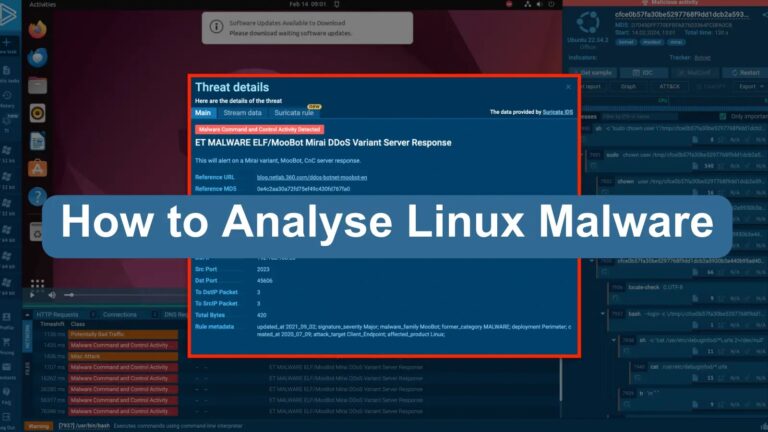
Linux, traditionally viewed as a more secure operating system than Windows, has experienced a notable increase in malware attacks. In 2022, Linux malware incidents surged by 50%, significantly increasing and highlighting the critical need for robust analysis and defense mechanisms.
This article explores the importance of Linux malware analysis and presents detailed case studies using ANY.RUN’s advanced malware analysis platform.
ANY.RUN is a cloud-based environment for analyzing Windows malware and Linux-based samples. Malware analysts, SOC, DFIR teams can safely examine threats, simulate different scenarios, and gain insights into malware behavior to improve cybersecurity strategies.
ANY.RUNalso allows researchers to understand malware behavior, collect IOCs, and easily map malicious actions to TTPs—all in our interactive sandbox.
Despite Linux’s reputation for enhanced security, its widespread deployment, especially in server environments, has made it an attractive target for cybercriminals.
The prevalence of DDoS botnets on Linux systems underscores the operating system’s vulnerability to sophisticated attacks.
The escalation of Linux malware presents a pressing challenge for cybersecurity professionals, necessitating comprehensive analysis to understand malware behavior and implement effective countermeasures.
DocumentAnalyse Shopisticated Malware with ANY.RUN
More than 300,000 analysts use ANY.RUN is a malware analysis sandbox worldwide. Join the community to conduct in-depth investigations into the top threats and collect detailed reports on their behavior..
Importance of Linux Malware Analysis
Analyzing malware samples is pivotal for cybersecurity defenses. Analysts can use detailed examination to identify malware’s operational characteristics, understand its impact on infected systems, and gather indicators of compromise (IOCs).
To protect against Linux-based threats, these tips are essential for setting up Web Application Firewalls (WAF), Security Information and Event Management (SIEM) systems, and Security Orchestration, Automation, and Response (SOAR) platforms.
Case Studies in Malware Analysis with ANY.RUN
ANY.RUN’s interactive malware analysis platform provides a powerful tool for dissecting and understanding Linux malware. The following case studies illustrate the platform’s capabilities in identifying and analyzing different types of Linux malware.
Analyzing Mirai: The Botnet Menace on Linux
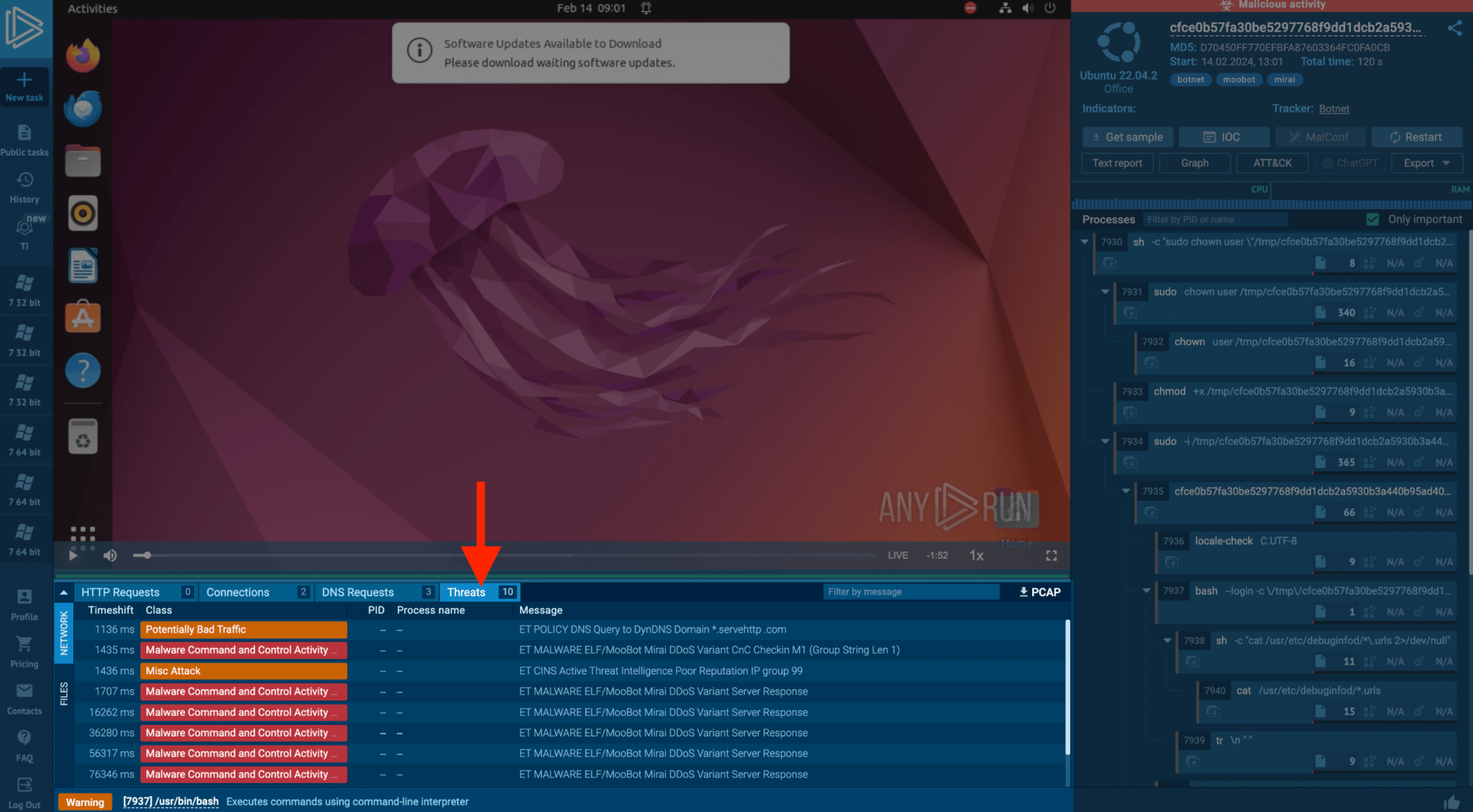
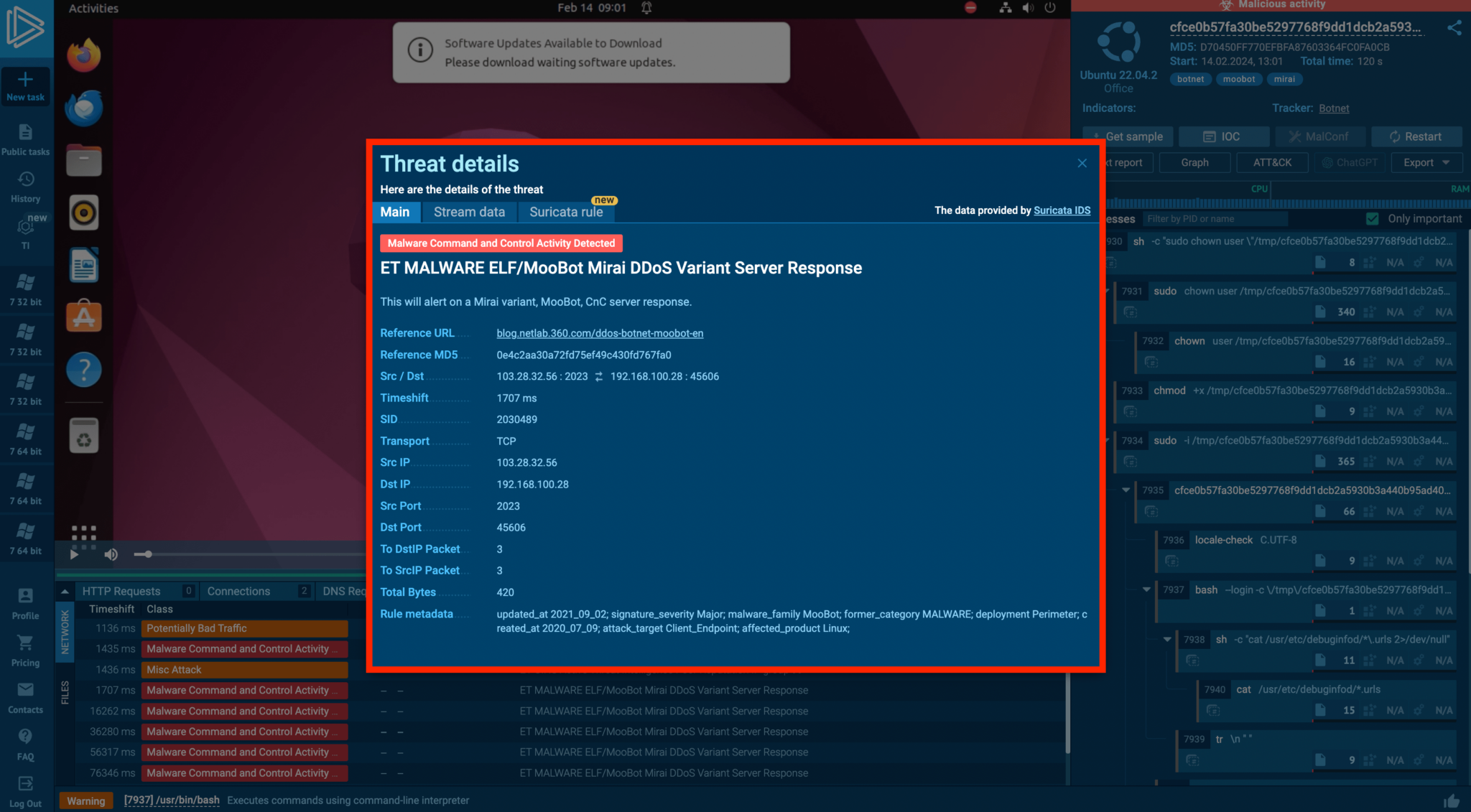
Mirai malware transforms network-connected Linux devices into bots for Distributed Denial of Service (DDoS) attacks. ANY.RUN’s analysis reveals Mirai’s network activities and the triggered Suricata rules, offering insights into the botnet’s behavior and facilitating the collection of IOCs for defensive measures.
If we go to the threats tab in the example, we can see how the botnet is acting in an ANY.RUN task.
Uncovering Linux Miners: Resource Exploitation
Crypto-mining malware exploits system resources to mine cryptocurrency, significantly impairing performance.
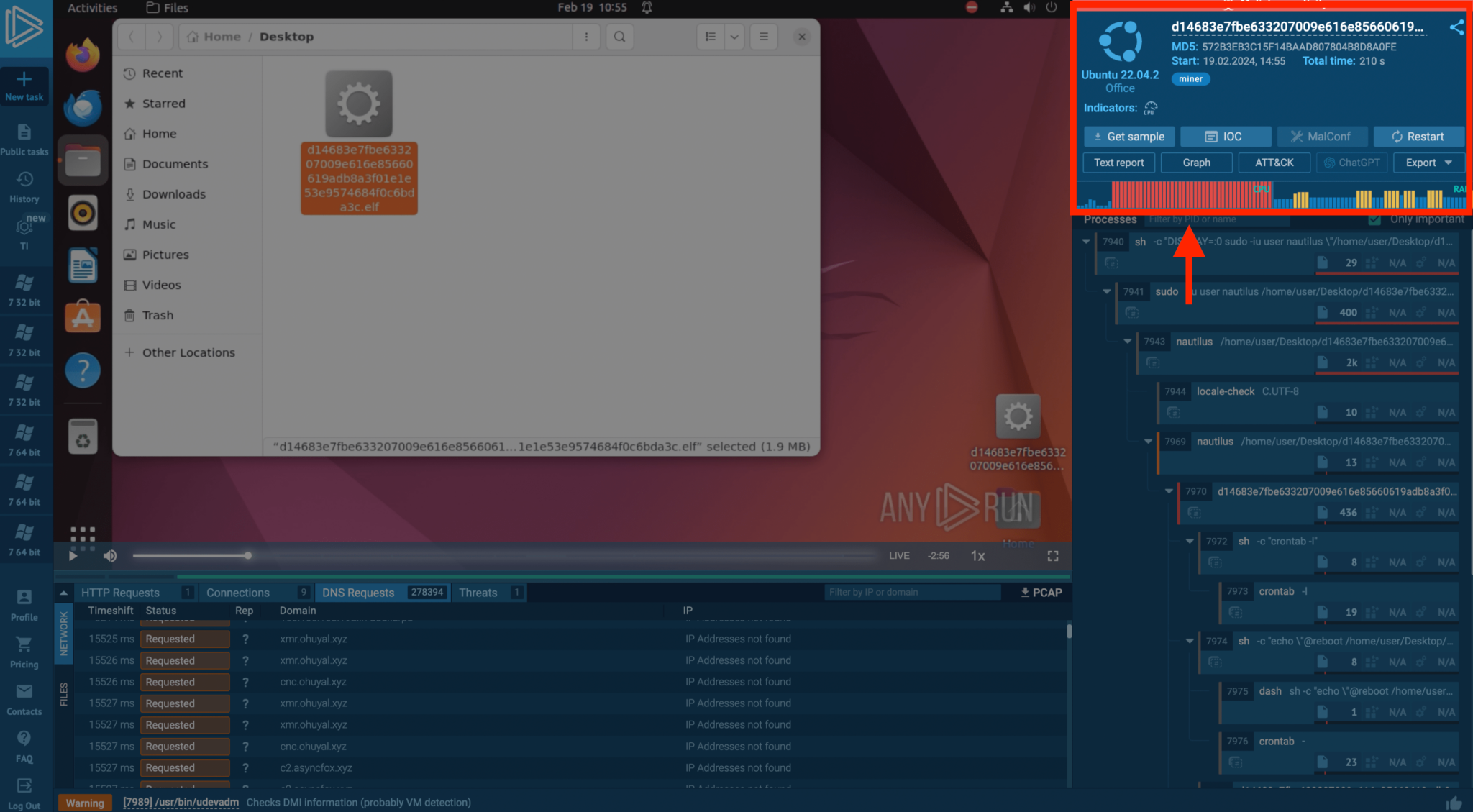
ANY.RUN detected a Linux miner through abnormal network activity and resource consumption, with the CPU and RAM usage spiking post-launch. The analysis also highlighted the miner’s extensive DNS requests, providing a comprehensive view of its network behavior and system data checks.
DDoS Attacks on Linux: Operational Tactics
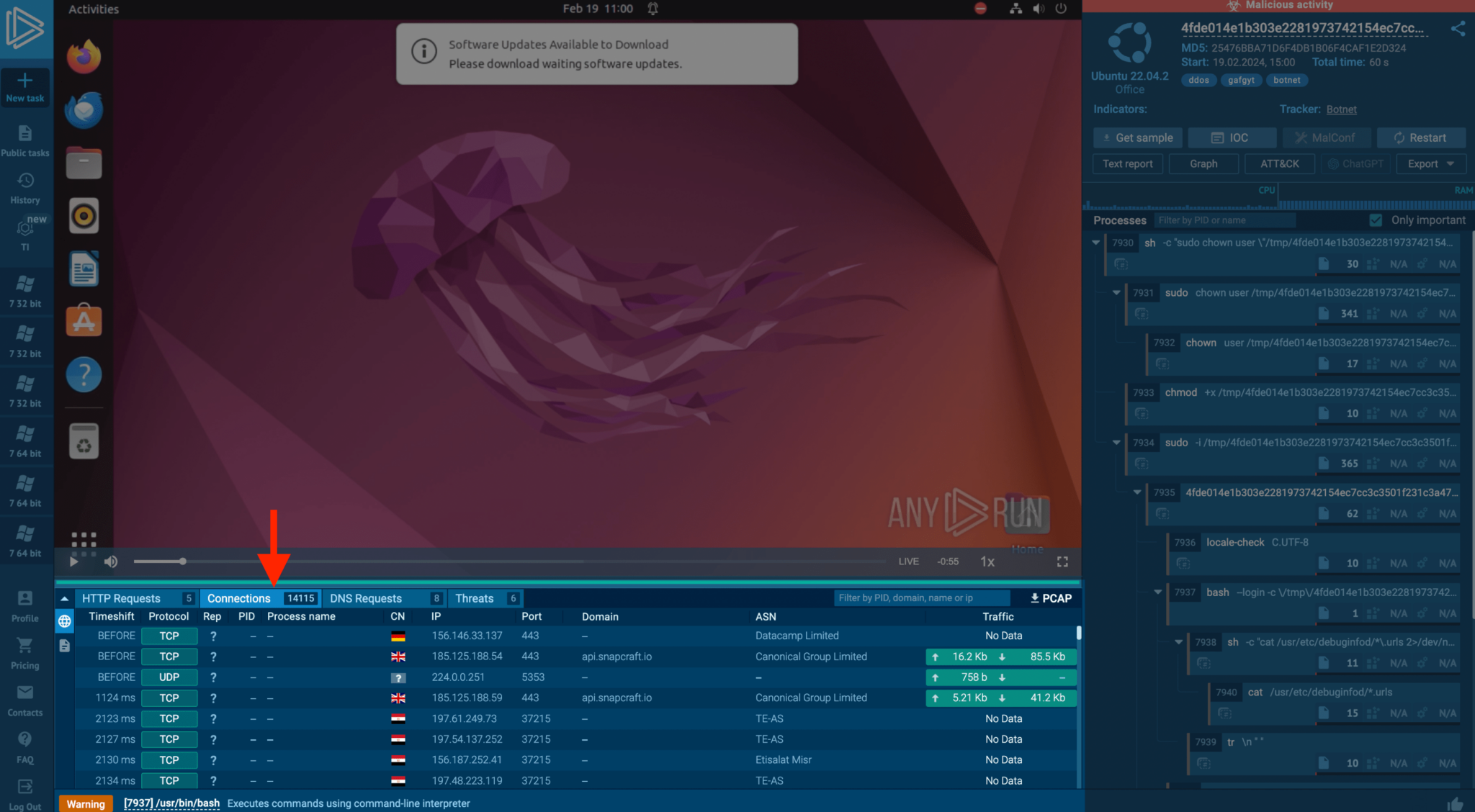
Through this example, ANY.RUN observed a compromised Linux system executing a DDoS attack, attempting to establish over 15,000 connections in a minute.
Identifying such attacks is vital to prevent reputational and regulatory repercussions, especially when targeting critical infrastructure.
The malware carries out a DDoS attack
The escalation of Linux malware poses a significant threat to digital security. Cybersecurity professionals can improve their defensive strategies, gather priceless IOCs, and gain a deeper understanding of malware behavior through thorough analysis, as ANY.RUN’s case studies show.
As the landscape of cyber threats continues to evolve, the role of advanced malware analysis platforms like ANY.RUN becomes increasingly crucial in safeguarding Linux systems against emerging threats.
As the digital world continues to evolve, the threat of Linux malware grows larger, making the insights and tools provided by ANY.RUN is more essential than ever.
For further information on ANY.RUN’s analysis of crypto-malware and how their platform can assist in combating this threat, you can get access to ANY.RUN sandbox platform for free.
If you’re from the SOC and DFIR teams to investigate incidents and streamline threat analysis. Try all features of ANY.RUN at zero cost for 14 days with a free trial.