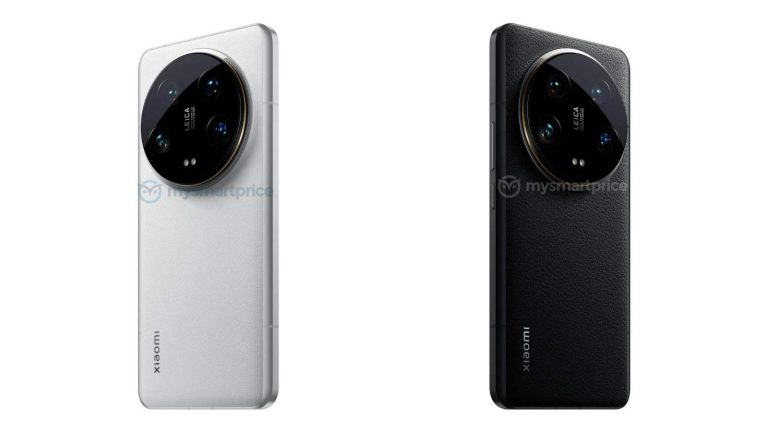
The Xiaomi 14 Ultra design has just been revealed, as we’re waiting for the phone’s launch event. Xiaomi will announce its new flagship on February 25 at MWC 2024 in Barcelona. There’s a chance it may launch a couple of days earlier in China, though.
The Xiaomi 14 Ultra design has been revealed as we’re waiting for the phone’s launch event
Having said that, folks over at MySmartPrice have just shared a bunch of images of the phone. This is our first actual look at the phone. You’ll find those images below the article, spread across two galleries. The first is showing off the black model, while the second contains images of the white model.
The camera island on the back does look very similar to what we’ve seen on the Xiaomi 13 Ultra. You’ll notice there are four camera sensors included there, and even their placement is similar.
That camera island is centered in the upper portion of the phone’s back, and it does protrude on the back quite a bit. What we won’t get this time around is a gradual increase of the phone’s thickness on the back.
The Xiaomi 14 Ultra has a similar camera island, but a different backplate compared to its predecessor
The Xiaomi 13 Ultar’s backplate had a slope on the back, which increased towards the camera island. The backplate on the Xiaomi 14 Ultra seems to be flat, for the most part. It does curve towards the edges.
It seems like Xiaomi will utilize vegan leather on the back of the Xiaomi 14 Ultra. That goes for both black and white models. The phone is said to arrive in both vegan leather and glass versions, though, which is a bit confusing, as only black and white models are rumored, and both of those have vegan leather on the back. We’ll see.
All the physical buttons are located on the right-hand side of the phone. We expect a curved display to be used here, at least based on the images that are showing us left and right sides of the phone. We don’t get to see the phone from the front, though.
The device is tipped to offer 16GB of LPDDR5X RAM and up to 1TB of internal storage. The Snapdragon 8 Gen 3 will fuel the device, and an LTPO AMOLED display with a 120Hz refresh rate will be used on the front.
Mark Zuckerberg compares Apple Vision Pro to Meta Quest 3
As you know, Meta also makes mixed-reality headsets, and they have been up in the market for over three generations. So, he knows this stuff better than most people in the industry.
Mark Zuckerberg took to Instagram to share his thoughts about Vision Pro and compared it to Meta Quest 3. In his final words about Apple Vision Pro versus Meta Quest 3, he asserts, “I don’t just think that Quest is the better value, I think Quest is the better product, period.”
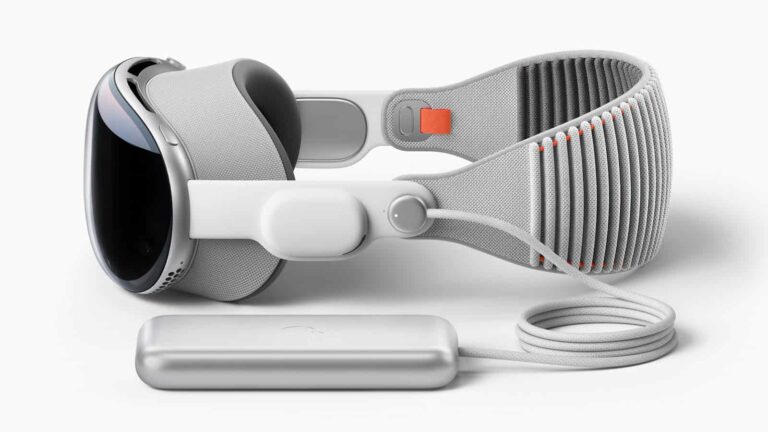
Zuckerberg uses Meta Quest 3 to record himself as he speaks about the Vision Pro. He points out that Apple had to make sacrifices to fit a cool display into something you wear on your head. He mentions the Quest 3 is lighter than before, making it more comfy to wear for longer. According to Zuckerberg, it’s more convenient to move around wearing Quest 3 than Apple Vision Pro because the latter houses a bulky battery pack.
Vision Pro’s display is “really nice”
He says the Quest has better games and stuff than Apple, which is true for now. But he admits the Vision Pro is better for watching movies. And remember, the Quest 3 is way cheaper, according to Zuckerberg, like seven times less expensive.
His thoughts somewhere align with those of Elon Musk, who wasn’t surprised by the Vision Pro. But believes there’s room for improvement in the coming generations. Meanwhile, Bloomberg’s Mark Gurman believes it will take Apple at least “four” generations to bring the final product. He also mentioned that the current release is just a “prototype” of the final product.
Unit 42 researchers discovered a new vulnerability in QNAP devices on 7 November 2023, which was confirmed by the vendor on 19 December 2023, and a security advisory was released subsequently to provide guidance and recommendations.
Palo Alto Networks Unit 42’s Advanced Threat Prevention (ATP) and telemetry systems identified a new zero-day vulnerability in QNAP QTS and QuTS hero firmware from the vendor QNAP. The vulnerability is tracked as CVE-2023-50358 and affects QNAP Network Attached Storage (NAS) devices.
For your information, QNAP, a company specializing in NAS devices, is known for its QNAP Turbo NAS System (QTS) operating system, which is often embedded in the firmware of QNAP NAS devices.
In its report published on 13 February 2024, authors Chao Lei, Jeff Luo, and Zhibin Zhang explained that CVE-2023-50358 is a command injection vulnerability found in the quick.cgi component of QNAP QTS firmware that is accessible without authentication. The vulnerability occurs when the HTTP request parameter todo=set_timeinfo is set, and the parameter SPECIFIC_SERVER is saved into a configuration file /tmp/quick/quick_tmp.conf with the entry name NTP Address.
The component then starts time synchronization using the ntpdate utility, and the command-line execution is ensured by reading the NTP Address in quick_tmp.conf and system(). Untrusted data from the SPECIFIC_SERVER parameter helps build a command line, which is executed in the shell, leading to arbitrary command execution.
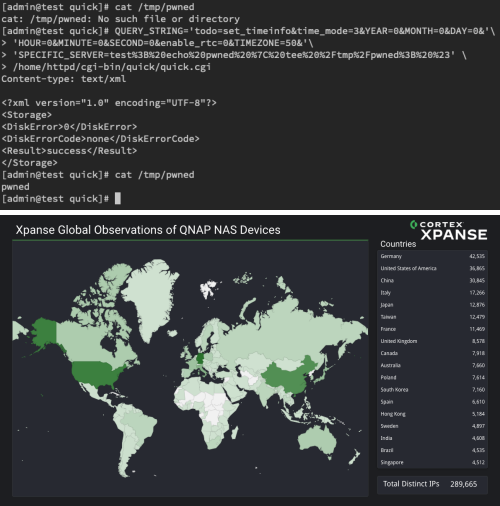
It is worth noting that this vulnerability affects 289,665 separate IP addresses. The top five countries affected by the vulnerability are Germany, the United States, China, Italy, and Japan.
Proof of command-line execution and heatmap shows the most impacted countries. (Screenshot: Unit 42)
According to Unit 42 researchers threat actors constantly search for vulnerabilities in network-connected hosts, such as NAS devices because these can be exploited quickly. This is why ensuring foolproof security of these devices is necessary.
IoT devices are vulnerable to remote code execution vulnerabilities due to their low attack complexity and critical impact. To protect against these threats, QNAP recommends updating to the latest version of QTS or QuTScloud hero- QTS 5.1.5 or QuTS hero h5.1.5.
List of Affected Devices
QTS 5.1.x
QTS 5.0.1
QTS 5.0.0
QTS 4.5.x
QTS 4.3.6
QTS 4.3.4
QTS 4.3.x
QTS 4.2.x
QuTS hero h5.1.x
QuTS hero h5.0.1
QuTS hero h5.0.0
QuTS hero h4.x
QNAP has released a security advisory, advising affected organizations to follow mitigation instructions or apply firmware updates.
“Multiple vulnerabilities have been reported to affect several QNAP operating system versions. If exploited, the OS command injection vulnerabilities could allow users to execute commands via a network.”
In its advisory, the vendor noted fixing two vulnerabilities, CVE-2023-47218 and CVE-2023-50358 and explained how to implement the fixes.
“If you do not want to install a fully fixed version for your device, you can still mitigate the vulnerabilities by installing a partially fixed version. However, note that the vulnerabilities still exist during the installation process of a partially fixed version. The vulnerabilities only disappear after installation is complete.”
The very first OPPO Find X8 series details have already surfaced. The OPPO Find X7 series is still new, basically, so this does come as a surprise, kind of. The information comes from ‘Smart Pikachu’ tipster, also known as ‘Wisdom’.
He’s hinting at two smartphones in his post. We’re presuming that he means the OPPO Find X8 and OPPO Find X8 Ultra. Presuming OPPO will stick to that naming scheme, of course. The company switched from the ‘Pro’ branding to ‘Ultra’ branding with the Find X7 series.
The very first OPPO Find X8 series details have already surfaced
In any case, the OPPO Find X8 Ultra is tipped to use the Snapdragon 8 Gen 4 processor. That is to be expected. That phone will also feature an ultrasonic fingerprint scanner.
The other device he mentioned is likely the vanilla Find X8. That smartphone is said to utilize the MediaTek Dimensity 9400 chip. In addition to that, an optical fingerprint scanner is mentioned.
Do note that neither of these two chips is official yet. Both of them are expected to arrive towards the end of the year, likely in Q4 2024. The OPPO Find X7 series arrived last month, so it’s possible we’ll see the Find X8 series in January 2025.
That’s a long way from now, to say the least. So this information does come very early. We could have guessed these specs, though, so chances are they’re accurate.
We’ll likely have to wait until H2 to get more concrete info
We don’t really expect to see much more information about either device in the near future. In fact, we will probably have to wait until H2 in order to get more concrete information.
The OPPO Find X7 Ultra has proved to be an outstanding smartphone. Unfortunately, though, it launched in China only. OPPO did not have plans to launch it globally last month, but let’s hope things will change. That handset deserves to get more exposure, way more.
ZLoader is a banking Trojan malware that steals sensitive financial information from infected systems. Threat actors exploit this malware to conduct a multitude of illicit activities.
This malware is often distributed through phishing emails or malicious websites, allowing the threat actors to secretly compromise users’ banking information.
Cybersecurity researchers at ANY.RUN recently discovered that ZLoader is now attacking the 64-bit version of Windows systems.
ANY.RUNis a developer of a cloud malware sandbox that handles the heavy lifting of malware analysis for SOC and DFIR teams, as well as Threat Intelligence Feeds and Threat Intelligence Lookup. Every day, 300,000 professionals use our platform to investigate incidents and streamline threat analysis.
Technical Analysis
ZLoader returns with upgraded powers, as the new ZLoader malware campaign was spotted and found to be reviving after control network takedown in April 2022.
Microsoft’s Digital Crimes Unit seized the 65 domains to hit the ZLoader hard. But Zscaler ThreatLabz warns of a new version since September 2023, packing major loader module upgrades.
Apart from this, versions 2.1.6.0 and 2.1.7.0 use junk code and string obfuscation to evade the analysis, which shows the need for specific filenames to sneak past automated detection.
Using the RC4 encryption and a fixed key, all these versions cloak the campaign and command-and-control server data.
A revamped domain generation algorithm offers backup communication if main servers fall. ZLoader persists post-setbacks, hinting at threatening ransomware attacks, providing the group’s strength post-takedown.
ZLoader (aka Terdot, DELoader, Silent Night) grew from Zeus in 2015. This malware started as a banking trojan and now spreads ransomware.
It originated from a 2011 leaked code and gained momentum with COVID-19 attacks until server takedown in 2020.
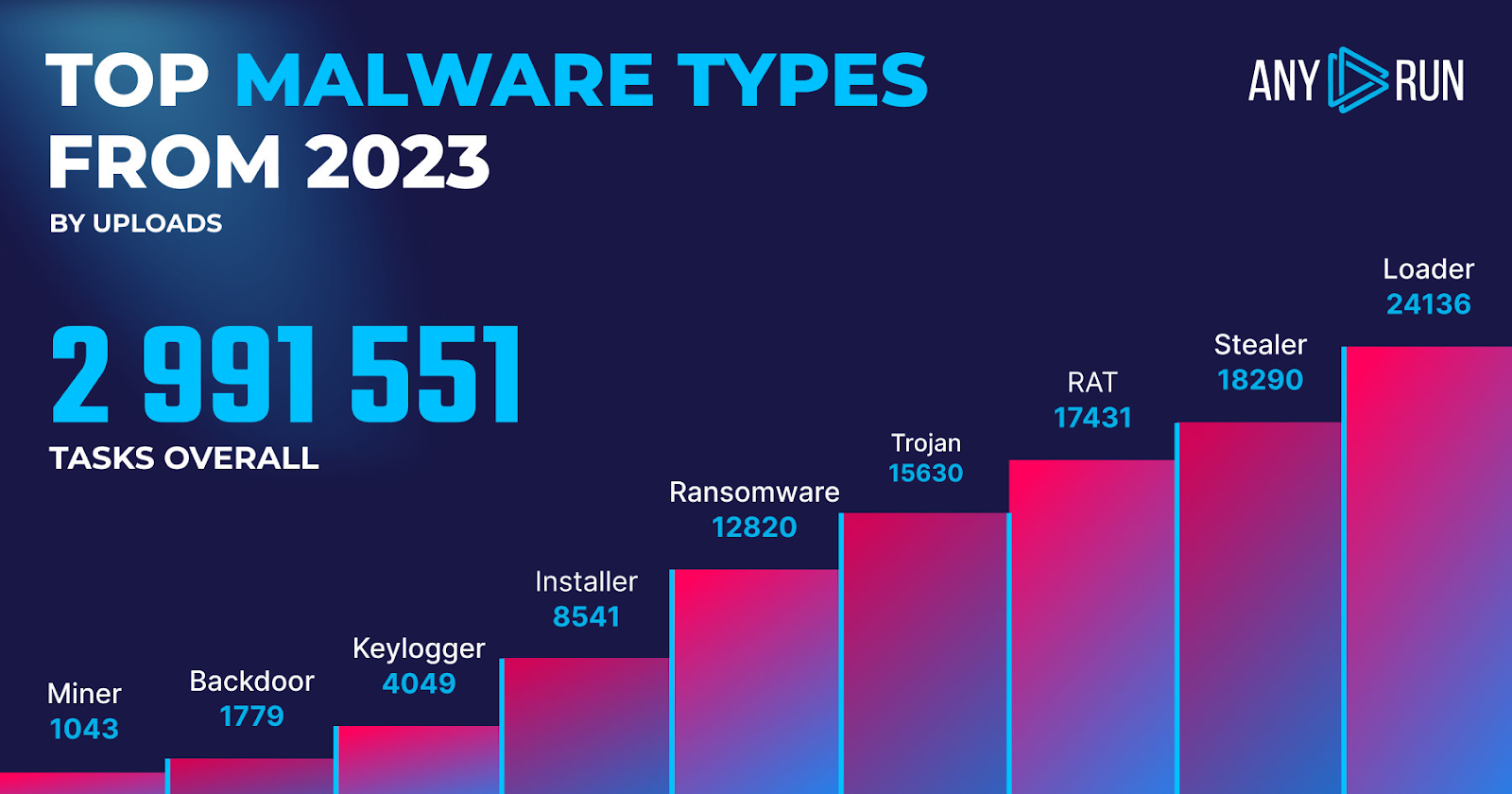
Top malware types
ZLoader delivers extra malware to infected systems. The loaders are essential to attacks, as they dominated with 24,136 detections in 2023.
To prevent the latest ZLoader version, firms must refresh security with IOCs like file hashes, C2 IPs, and URLs. ANY.RUN eases IOC extraction for pros that strengthen the endpoints, SIEM, and SOAR against ZLoader.
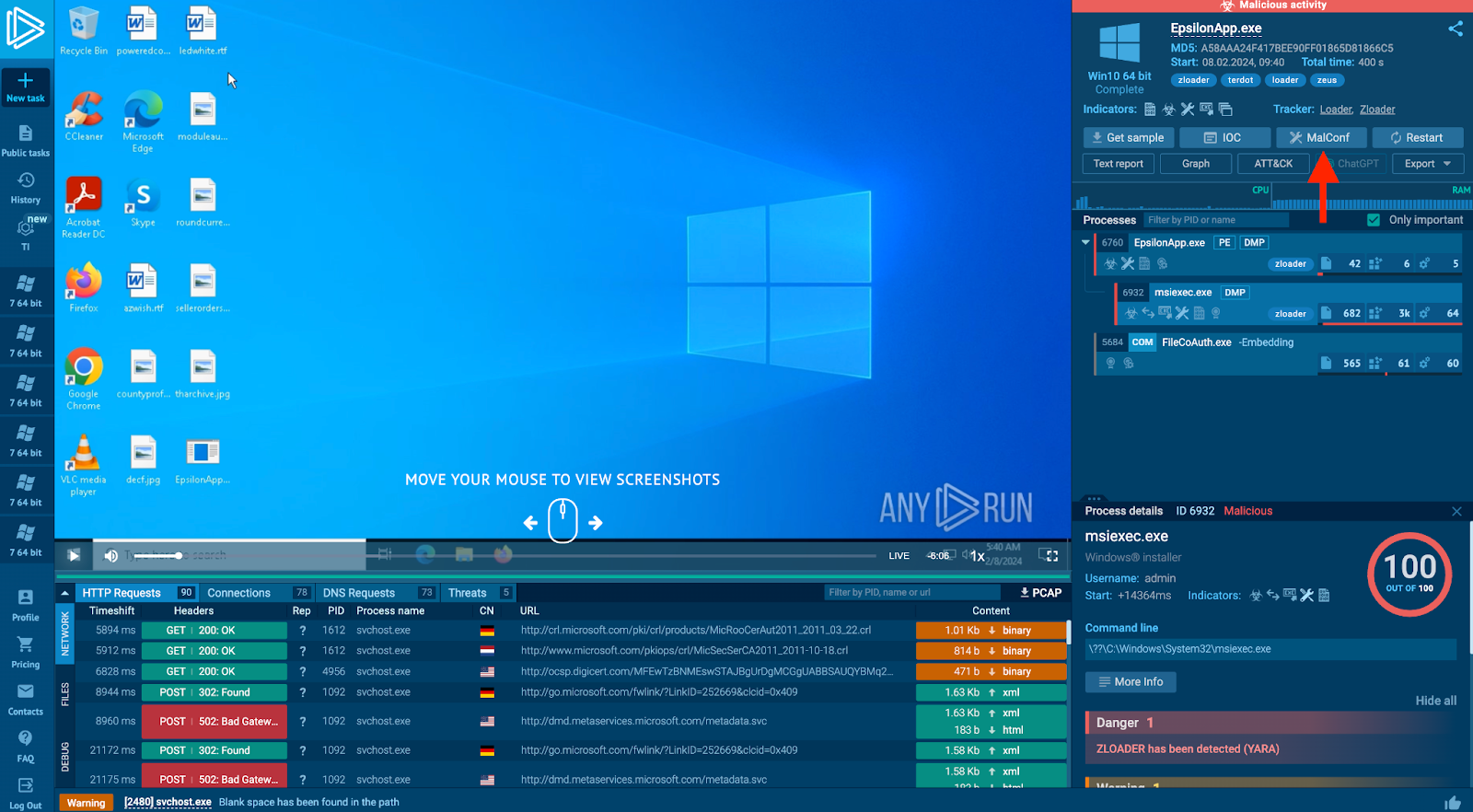
This ANY.RUN sandbox taskas an example to illustrate how to pull IOCs from the new ZLoader variant.
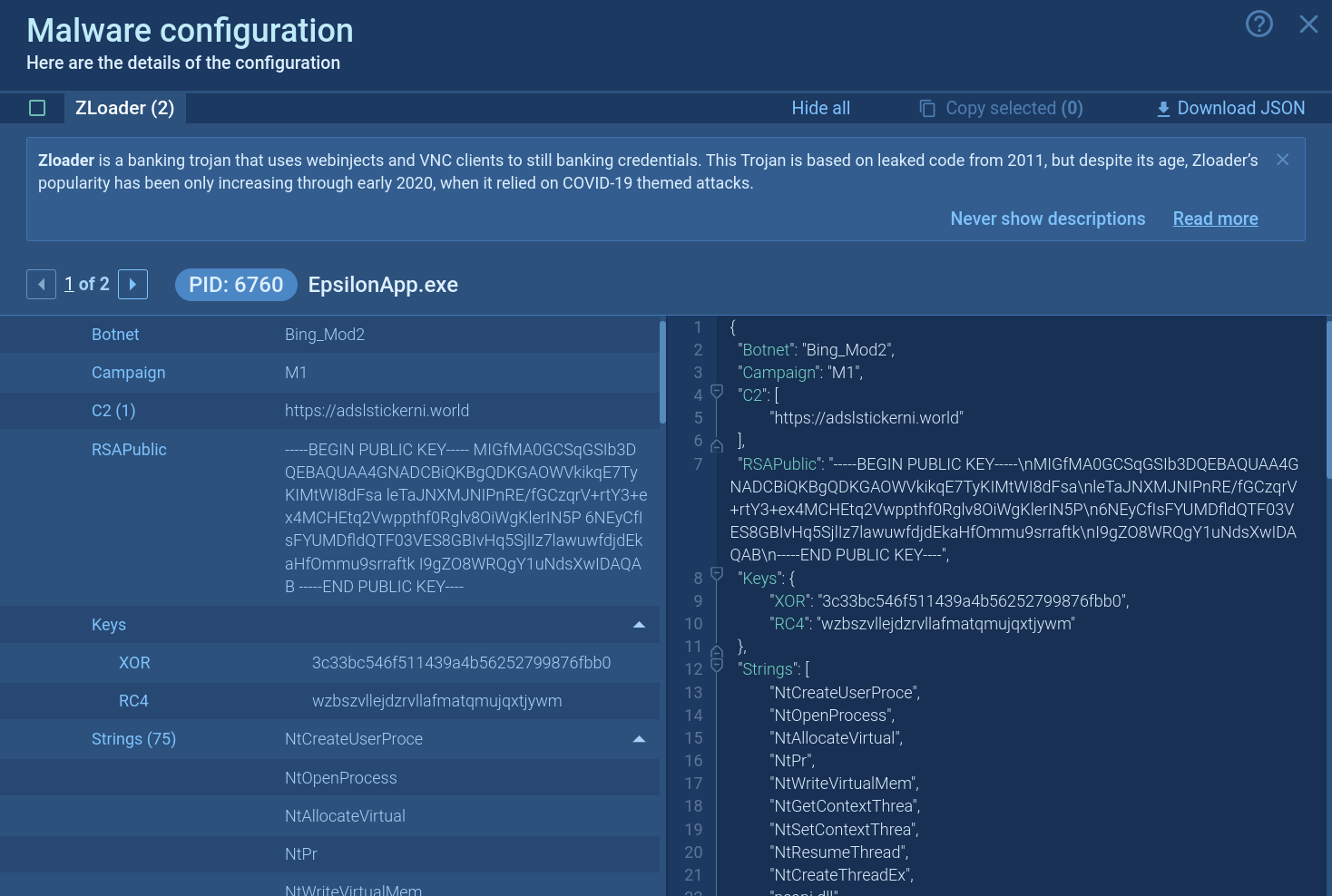
Malware configuration
Besides this, the ANY.RUN allows the extraction of compromise indicators from malware, like C2 addresses, even when not connected to the control server.
ZLoader’s configuration file
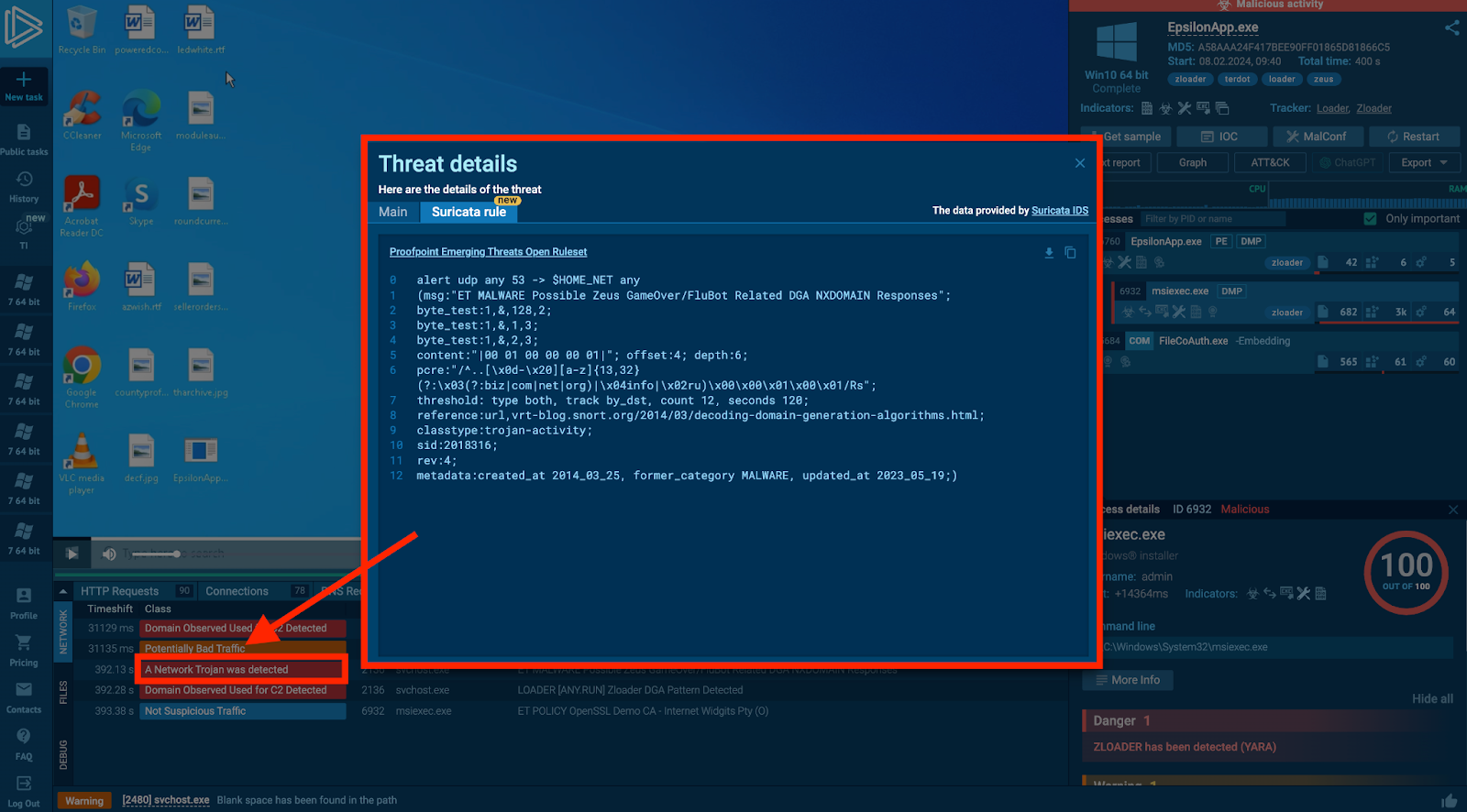
Moreover, directly from the task, it also provides direct access to Suricata rules that could be utilized according to the need.
Triggered Suricata rules
Recommendations
To secure against the new ZLoader variant, companies should update their security systems with Indicators of Compromise, such as file hashes, C2 IP addresses, and URLs.
Here below, we have mentioned all the recommendations:
Use Robust Antivirus Software
Make sure to update the software
Exercise caution with emails
Enable Two-Factor Authentication (2FA)
Educate users
Take regular backups
Implement network segmentation
Regularly monitor account activity
Develop and regularly update an incident response plan
ANY.RUN interactive malware sandboxstreamlines the IOC extraction process for security professionals. They can then use gathered indicators in endpoint security, SIEM, and SOAR systems to safeguard their infrastructure against ZLoader.
Samsung may have yet to unveil the Galaxy A55 and Galaxy A35 but it has already published the repairability scores for the duo. According to the official scores, the two upcoming mid-range smartphones will be easier to repair than their respective predecessors. The phones benefit from design improvements and better support.
Samsung reveals its repairability scores for the Galaxy A55 & Galaxy A35
The Galaxy A55 and Galaxy A35 are expected to go official in a month or two. The duo will lead Samsung’s A-series mid-range smartphone lineup for 2024. Early last month, we exclusively leaked their official renders, revealing key design details, including a metallic frame for the former. Subsequent leaks and certifications have uncovered more information about the devices, though an official launch date is still missing.
Meanwhile, Samsung has published the official repairability scores for the Galaxy A55 and Galaxy A35. Spotted by GalaxyClub, the scores are listed on the company’s official website for France. Based on the criteria of local environmental legislation in the country, the devices scored 8.5 and 8.4 repairability points out of 10, respectively. They scored slightly better than their respective predecessors, i.e., the Galaxy A54 (8.4) and Galaxy A34 (8.3).
While the new models don’t bring massive repairability improvements, Samsung has taken another step in the right direction. The official documents reveal that both devices benefit from new European regulations that require companies to provide replacement parts for longer. The Galaxy A55 and Galaxy A35 also see some internal restructuring for easier disassembly and repair, helping boost their repairability scores.
Additionally, Samsung says you will require fewer or less complex tools to disassemble the Galaxy A55. The Galaxy A35, on the other hand, has some replacement parts priced more favorably compared to replacing the entire device. Curiously, the latter handset isn’t as easy to disassemble as the Galaxy A34, at least disassembling some parts. However, improvements in other areas helped it score higher than its predecessor, albeit marginally.
The new mid-range phones may debut soon
Over the past few weeks, Samsung has picked up numerous regulatory certifications for the Galaxy A55 and Galaxy A35. These developments indicate a nearing launch. While we don’t have a date yet, the wait shouldn’t be much longer now. Rumors say the new phones will arrive a few weeks later than the 2023 models, which debuted in mid-March. If true, the Galaxy A55 and Galaxy A35 may debut at the end of March or in early April.
In 2016, gasoline prices were $1.872 per gallon. Barely 6 years later, the price per gallon of gasoline skyrocketed to $5.032 before retreating toward current levels of $3.257 per gallon in January 2024. Effectively, gas prices have almost doubled in eight years, a statistic not shared with wages and salaries across the board. Indeed, inflationary pressures have eaten into the personal discretionary income of consumers worldwide. The financial pinch has resulted in sharp and unprecedented reductions in real GDP growth (nominal GDP has risen dramatically), with little relief in sight.
According to the Economic Policy Institute, which measures key numbers on nominal wages, the actual year-on-year growth for private-based employees is 4.5%. That pales compared to the 100% + increase in energy costs over time. More worrying is the declining year-over-year change in the private sector’s normal average hourly earnings between 2020 and 2024 – the years where inflationary pressures have been most pronounced. The inflationary pressures picked up sharply after 2020, during the Biden administration’s years (largely due to massive economic stimulus pressures on the economy and the unfolding pandemic-induced supply reductions).
Equally worrying is the reduced share that workers have in corporate income. This is hovering near its lowest levels in decades, around 75% (share of corporate sector income received by workers over recent business cycles). Viewed in perspective, this information shows an increased need for real wage increases or concomitant savings through inventive channels. For consumers seeking relief from rising prices at grocery stores, at the pump, property rentals, or homeownership, etc., several out-of-the-box solutions are present, notably:
– Fuel prices can be offset through savings initiatives provided by smart technology. For example, a gas savings app presents as a viable solution for reducing expenditures on rising fuel costs. It’s possible to download and install trusted apps offering real ways to earn money on purchases. Users can enjoy a streamlined process of earning cash back on everyday essentials like gas, groceries, and dining.
This method of earning cash back offers a practical approach to managing daily expenses. With the potential to earn up to 25¢ per gallon on gas and significant percentages back on groceries and dining, users can effectively reduce their overall spending in these categories. The service connects users with a vast network of over 100,000 participating locations, ensuring that opportunities for cash back are readily accessible in various locations. The process is designed for ease of use: individuals can simply select offers, pay as they normally would, and receive cash back without the hassle of tracking points or rewards.
Moreover, this cash back approach supports not only the users but also the local businesses involved, fostering a mutually beneficial relationship. Additionally, the service’s commitment to sustainability initiatives adds an element of social responsibility to everyday transactions, enhancing the overall appeal of using this service for regular purchases.
– When it comes to grocery shopping, particularly in times of rising prices, there are several strategies to reduce costs while still enjoying healthy, fresh meals. Embracing grocery pickup services from local stores or online platforms can be a smart move, as it helps stick to a predetermined shopping list and avoid impulse buys, thus keeping your budget in check. Another effective approach is to consider buying in bulk, especially for non-perishable items, after calculating the potential savings using unit price calculators.
Additionally, sourcing locally through community forums or farmer’s markets supports local producers and results in fresher and more affordable purchases. The smart use of apps can also guide you in finding the best deals, sales, and coupons in local stores, making the process of finding budget-friendly options easier. For those looking to take it a step further, growing your own herbs and vegetables can be rewarding and cost-effective, with numerous apps available to guide even the novice gardener.
Strategic meal planning, including incorporating more plant-based meals, can also play a significant role in managing food expenses effectively. By combining these methods, shoppers can navigate the challenges of maintaining a healthy diet amidst fluctuating grocery prices, ensuring that both palate and pocket are satisfied.
In the context of high-interest rates, achieving savings on housing and rental costs basically necessitates a holistic approach, blending various innovative strategies under the umbrella of smart financial planning and resourcefulness. One key method is optimizing living arrangements, such as through house hacking, where purchasing a property with the intent to rent out parts of it can substantially offset mortgage costs. Likewise, sharing a rental with roommates or considering subletting can effectively reduce individual expenses.
For homeowners, refinancing the mortgage to capture lower rates, or investing in energy efficiency improvements can lead to significant long-term savings. Additionally, exploring rent negotiation tactics or even relocating to more affordable areas can make a notable difference in monthly expenses. Leveraging government programs for assistance and tax benefits is another avenue worth exploring.
These diverse and interconnected strategies, when applied thoughtfully, can collectively contribute to considerable financial relief in housing and rental expenditures during periods of high-interest rates.
Viewed in perspective, these ideas provide broad-based solutions for working within the framework of the economy – as is – and extracting maximum benefit without placing undue hardship on your existing resources. Work with a budget, use technology effectively and implement tactics and strategies to keep more of your hard-earned money in your pocket.
Hunter-Killer is a sophisticated type of malware primarily designed to actively seek out and neutralize other malware present on a system.
It operates by identifying and removing competing threats that potentially pose a serious risk to the security and privacy of affected systems.
Cybersecurity researchers at Picus Security recently discovered a 333% surge in Hunter-Killer malware that neutralizes network security controls.
DocumentLive Account Takeover Attack Simulation
Live attack simulation Webinar demonstrates various ways in which account takeover can happen and practices to protect your websites and APIs against ATO attacks.
Hunter-Killer Malware
Constantly evolving adversary tactics demand endless attention from security experts. Prioritizing threats amidst the multitude poses tough challenges, and covering every risk is virtually impossible.
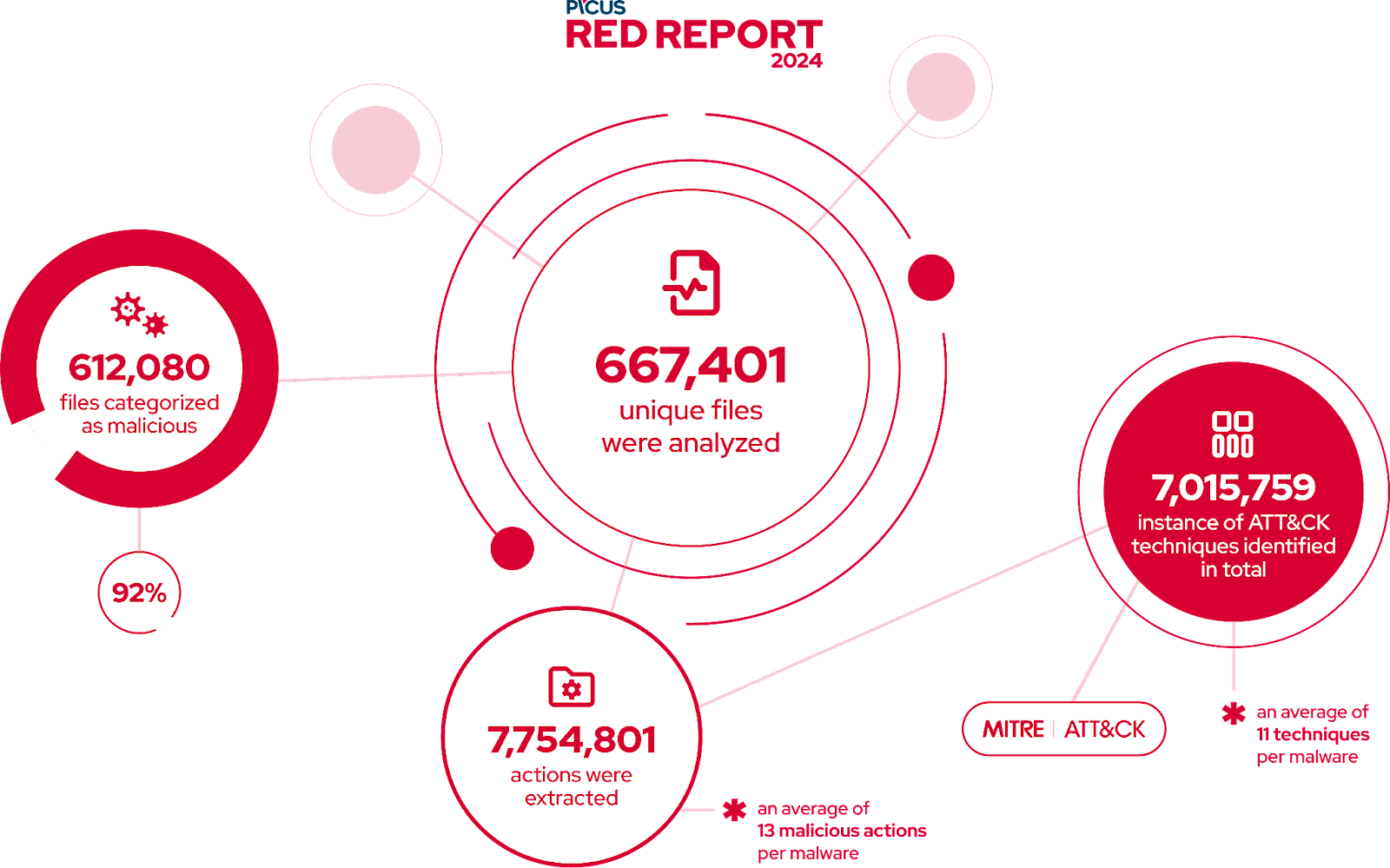
Analyzing more than 600,000 malware samples, it has unveiled the top ten attack techniques with mitigation suggestions.
In the fourth-year report, the Picus Labs team studies malware behavior, mapping actions to the MITRE ATT&CK Framework from the aggregated samples.
The Picus Red Report Research Summary (Source – Picus)
Red Report uncovered a rise in ‘Hunter-killer’ malware, which mirrors the silent submarines. Evasive and adept at neutralizing controls, it marks a significant trend in this year’s top ATT&CK techniques.
Malware targeting the defenses has surged significantly by 333% from 2022 to 2023. Besides this, 70% now use stealth tactics, making detection tougher for defenders or security researchers.
Moreover, T1027 Obfuscated Files or Info rose by 150%, showcasing adversaries’ effectiveness in hiding malicious activities and preventing digital forensics and incident response.
The T1071 App Layer Protocol surged 176%, aiding data theft and employed by ransomware groups in advanced double extortion tactics.
Recommendations
Here below, we have mentioned all the recommendations provided by the security analysts:-
Leverage Behavioral Analysis and Machine Learning for Detection
Enhance Defenses Against Evasion and Defense Impairment
Prioritize Credential Protection and Lateral Movement Mitigation
Integrate Prioritized Threat Intelligence and Counter-Espionage
Enhance Cyber Resilience through Asset Visibility and Attack Surface Reduction
Embrace Security Validation to Assure Defense Effectiveness
Update and Practice Ransomware Response and Recovery Procedures
Stay updated on Cybersecurity news, Whitepapers, and Infographics. Follow us on LinkedIn & Twitter.
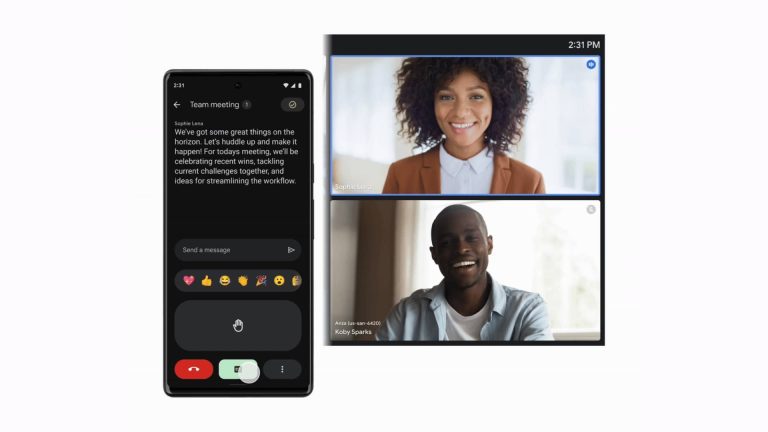
Google Meet’s Companion Mode is rolling out on mobile. Introduced for the web in June 2021, the feature is now available for your Android smartphone or iPhone. It gives access to virtual tools for in-person participants in hybrid meetings.
Google Meet brings Companion Mode to mobile
Google introduced Companion Mode to make hybrid meetings on Meet more equitable. It provides a second-screen experience for in-person attendees, so they can access the same virtual tools available to people attending the meeting remotely.
Usually, companies use enterprise meeting room hardware such as Google Meet Hardware for hybrid meetings. This setup includes a large display, cameras, and audio solution for the entire room. This means in-person attendees don’t have an individual screen in front of them, limiting their access to tools like live captions, subtitles, zoom, reactions, messages, and hand-raising gestures.
With Companion Mode for Google Meet, everyone has access to these interactive features and controls. In-person attendees can use a secondary device to access these tools, while still leveraging the best of in-room audio and video conferencing capabilities of enterprise hardware. They don’t have to join the meeting remotely to use additional meeting tools.
Initially limited to laptop or desktop devices, Google Meet’s Companion Mode is now rolling out to Android and iOS mobile devices. “Using Companion Mode from your mobile device is a quick, light-weight way to participate in meetings without opening a laptop,” Google said in a blog post. “This can be particularly useful in meeting spaces where room for a laptop is limited.”
The feature will be available by default to all Meet users
According to Google, there is no admin control for Meet’s Companion Mode. So, it will be available to all eligible users as soon as the company completes the rollout—rolling out to all Google Workspace customers, Google Workspace Individual customers, and users with personal Google accounts. Once available, you will find a new “Use Companion mode” button on the pre-join screen.
Google will automatically mute your audio and the microphone to avoid audio feedback. The company recommends using meeting room hardware for audio and video. The rollout began on Monday and is expected to be completed in a month or so, with users on Rapid Released domains getting it first. On Android, you must update Google Meet to version 229 or newer and Gmail to version 2024.01.28 or newer. Users with an iPhone require Meet version 225.0 or newer and Gmail version 6.0.231231 or newer to use Companion Mode.
Security researchers at McAfee have discovered a new and more dangerous variant of the XLoader Android malware. It can automatically launch on infected Android devices without user interaction. This technique allows the malware to execute malicious activities as soon as it is installed.
Android XLoader gets more dangerous with the auto-execute technique
XLoader, aka MoqHao, is a well-known Android malware family that has been around since at least 2015. Operated by the Roaming Mantis threat actor group, this malware strain has been previously used to target Android users in France, Germany, Japan, South Korea, Taiwan, the UK, and the US.
McAfee’s Mobile Research Team recently discovered that MoqHao has begun distributing a new variant of the malware using an auto-execution technique first identified in July 2022. The distribution method is the same—attackers send text messages containing a shortened link to download the malicious app to potential victims.
If an unsuspecting user clicks on the link and proceeds to install the app, disguised as Google Chrome, they immediately fall prey to the attack. Unlike previous variants, which required users to open the app before the malware became active, the new XLoader variant can launch automatically after installation.
This technique allows the malware to execute malicious activities in the background without user interaction. Since the app is disguised as Google Chrome, it further helps avoid detection. It tricks users into granting permission to always run the app in the background and access files, messages, and more. The malware even asks users to set itself as the default messaging app, claiming that it will help prevent spam.
Attackers have curated this pop-up message in English, Korean, French, Japanese, German, and Hindi. This is an indication of their current targets. Once the initialization process is complete, the malware will create a notification channel to display phishing messages. It checks the device’s carrier and automatically adjusts the phishing messages. “MoqHaogets thephishing message and the phishing URL from Pinterest profiles,” McAfee reports.
The malware can execute a wide array of commands
If the Pinterest trick fails, XLoader uses hardcoded phishing messages displaying a problem with the user’s bank account. It urges the user to take immediate action. The attacker can also execute a wide array of commands remotely. McAfee reported 20 commands that the malware can receive from its command and control (C2) server via the WebSocket protocol.
Some of the most dangerous commands include sending all photos to the control server, sending all messages to the control server, sending new messages to contacts, exporting saved contacts, collecting IMEI, SIM number, Android ID, serial number, and other device identifiers, sending HTTP requests to download more malware, and more.
According to McAfee, Android devices with Google Play Services, which haveGoogle Play Protect enabled by default, are protected against this malware. However, it is always a safe practice to only download apps from known sources such as the Google Play Store. Google is also reportedly working on a way to prevent this type of auto-execution in a future Android version, possibly Android 15.