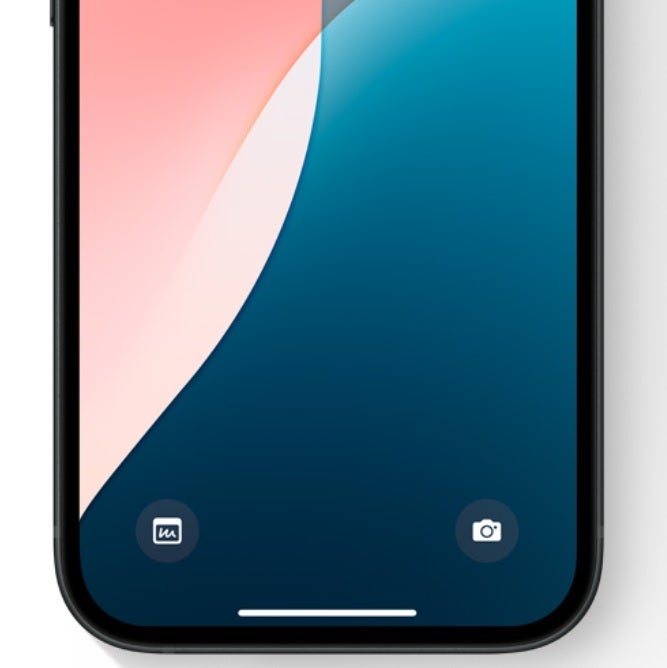
A new leak suggests that the iPhone SE 4 will look very similar to the iPhone 16. The latter is expected to arrive in September, while the next-gen cheapest iPhone is expected in 2025.
Apple wants to change things for its most affordable smartphone lineup. Previous models, like the iPhone SE 3, relied on the company’s old design language. That is, notably large bezels on the top and bottom and integration of the classic Touch ID sensor. Previous reports suggested that the iPhone SE 4 would recycle the design of the iPhone 14. So, there would no longer be giant bezels or Touch ID.
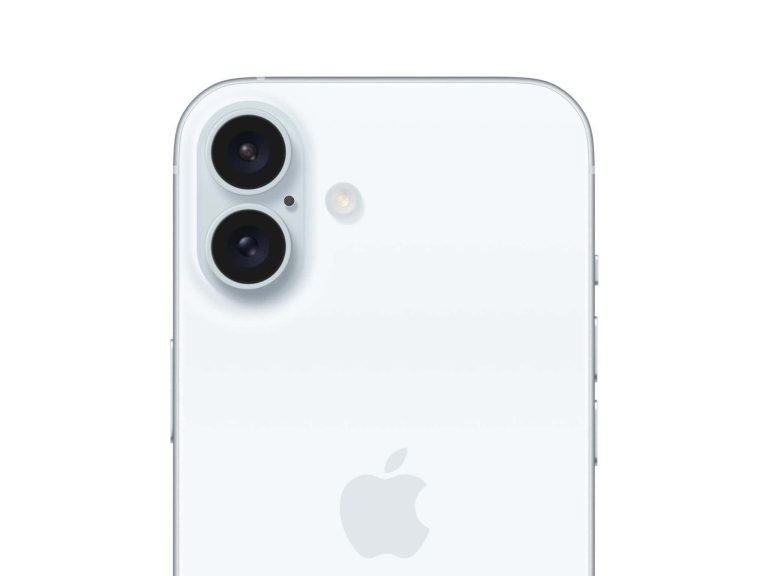
The iPhone SE 4 might inherit the rear cover design of the vanilla iPhone 16
Now, a post by Fixed Focus Digital on Weibo claims that the Mountain View giant would implement exactly the same design and manufacturing as the vanilla iPhone 16 in the rear cover of the iPhone SE 4. If the leak is real, it would imply some interesting things.
The iPhone 16 is expected to have vertically arranged rear camera sensors, unlike the iPhone 14. Additionally, it would be the first iPhone SE with a dual-camera system. The arrangement of the iPhone 16’s cameras is rumored to not only be an aesthetic change but would also enable Spatial Video capture. So, there is a possibility that the next SE will support this feature.
An iPhone SE 4 capable of capturing Spatial Video would be a smart move for Apple. The feature could greatly enhance content creation for the Apple Vision Pro. Even for the cheaper Vision headset that the company is reportedly developing. Considering that the base iPhone SE 4 could cost $429, the barrier to entry to creating Spatial Video content would be significantly reduced.
Overall, the next iPhone SE might combine the front design of the iPhone 14 with the rear look of the iPhone 16. The more modern look and powerful capabilities could make it an instant success.
Yesterday we showed you how to set up your iPhone running iOS 18 so that you can arrange to open any app on the Lock Screen. For example, if you use Shazam often, you can save time by having that app’s icon replace either the camera or flashlight icon on the Lock Screen. When you hear a song and must know the title and the artist, pressing the icon will quickly open Shazam. You can replace one of the icons, replace both icons, or keep the current setup.
Those with an eligible iPhone model can now install iOS 18 Developer Beta 3 or iOS 18 Public Beta 1 and play around with the customizable Home Screen icons. Let’s face it, iPhone users probably thought that they would never get the opportunity to change the color or placement of Home Screen app icons unless they switched to an Android handset. The grid of app icons that the iPhone has been known for has been around since the original generation model was released in 2007.
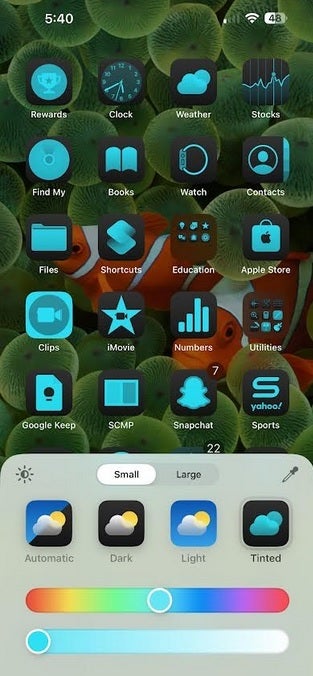
Change the color of your Home Screen app icons. | Image credit-PhoneArena
If you have installed either iOS 18 beta, long press on the Home Screen until you are in “jiggle mode.” Tap the “Edit” button in the top left corner and you will have two choices: Add Widget, or Customize. Tap on the latter and you’ll be presented with four options at the bottom of the screen:
Automatic-During daylight hours Home Screen app icons are in Light Mode. When the sun goes down, the app icons go into Dark Mode.
Dark-Home Screen app icons go into Dark Mode. On some icons black and white are reversed in this mode.
Light-Home Screen apps are in Light Mode. When you want to return to the default appearance, this is the icon you press.
Tinted-When you want to change the colors of your Home Screen app icons, tap on this button.
Tap on the Tinted icon and two sliders appear on the bottom of the screen. The top one changes the color of your app icons and the slider underneath the first one changes the intensity of the color. There are two buttons above the four Automatic, Dark, Light, and Tinted icons. One says Small and the other says Large. By default, Small is selected. Change it to Large and the Home Screen app icons get slightly larger while the name of each app is removed from the bottom of each icon.
To install
If you ever want to return to the default settings, go to Settings > General > Transfer or Reset iPhone. Tap Reset, tap Reset Home Screen Layout, then tap Reset Home Screen. Folders you’ve created will be removed and apps you’ve downloaded will appear on your iPhone in alphabetical order after the apps that came with the iPhone are listed.
I installed the iOS 18 Public Beta yesterday on my iPhone 15 Pro Max and while there is a noticeable drop off in battery life, it isn’t the end of the world. The phone is running smoothly with some issues when I tried to change my app icons back from a custom color to the original default color scheme. To install the iOS 18 Public Beta on your iPhone go to Settings > General > Software Update. At the top of the screen tap on Beta Updates and choose iOS 18 Public Beta. Go back a page and you should see the invitation to install the beta. Follow the directions but make sure you’ve backed up your data first.
Beware “crowdstrike-hotfix.zip”! This fake file spreads Remcos malware, targeting LatAm CrowdStrike users. Don’t download it! Learn how to stay safe from phishing scams.
On July 19, 2024, a botched CrowdStrike Falcon® sensor update for Windows operating systems resulted in the biggest IT outage worldwide in recent history. Despite being the result of a technical issue, this incident has opened the door for real threat actors to exploit the situation, leading to a wave of malicious activities, particularly targeting CrowdStrike’s Latin American (LATAM) customers.
CrowdStrike Intelligence has reported the distribution of a deceptive ZIP archive, named crowdstrike-hotfix.zip, containing a HijackLoader payload designed to deploy the RemCos RAT (remote access tool).
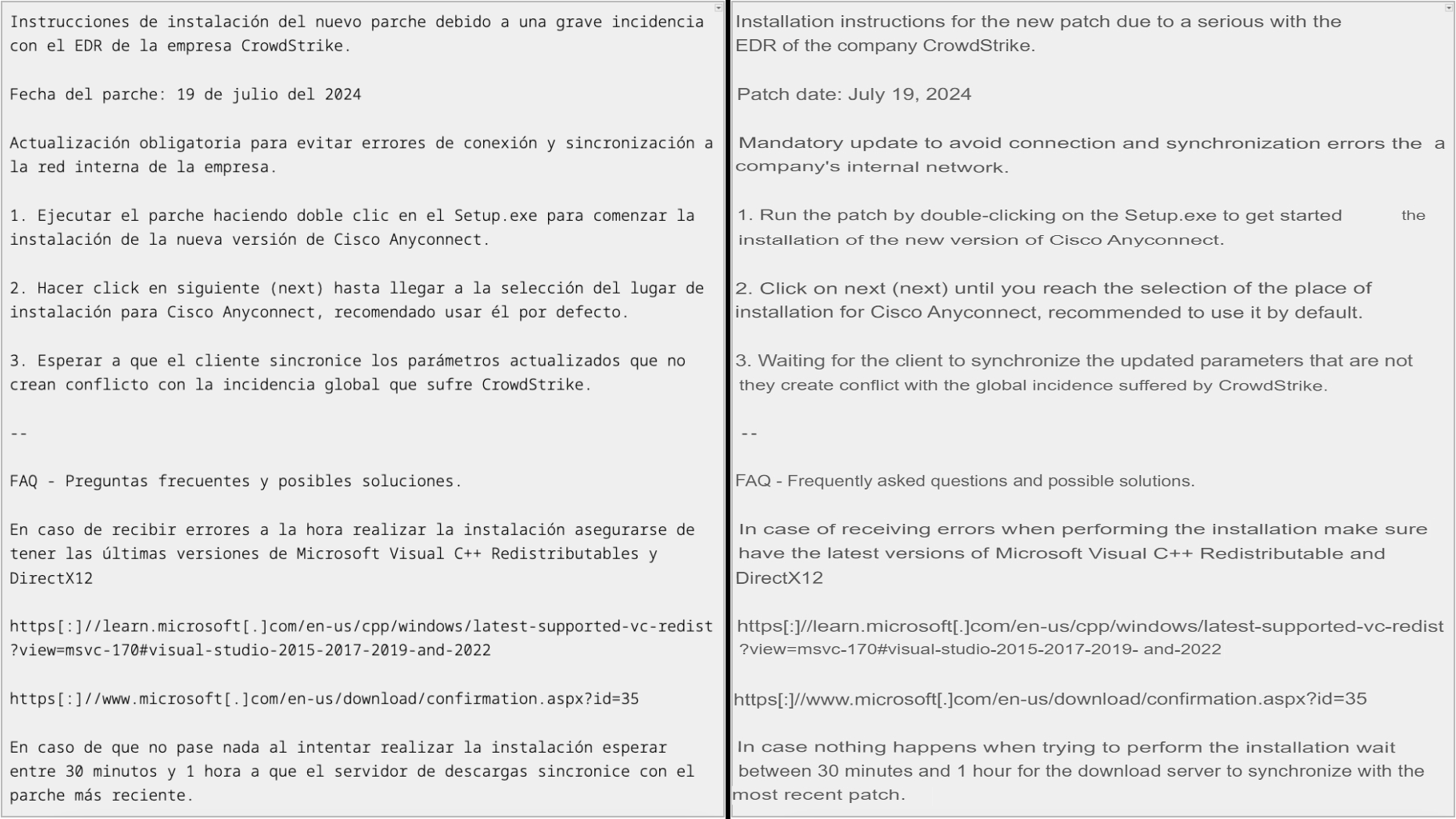
The ZIP file, with Spanish filenames and instructions, suggests a targeted attack on LATAM users. The file was first uploaded by a Mexico-based submitter who uploaded it to an online malware-scanning service.
Instructions sent by scammers in Spanish language (Left) – AI Translation of the screenshot to English (Right)
The attack sequence begins with the execution of Setup.exe, which uses DLL search-order hijacking to load HijackLoader. Advertised as a private crypting service known as ASMCrypt, HijackLoader is adept at evading detection. It executes the final RemCos payload, which connects to a command-and-control server at 213.5.130.58:433, allowing the attacker to gain control over the infected systems.
The U.S. Cyber Defense Agency, the U.K.’s National Cyber Security Centre, and Australia’s National Anti-Scam Centre have all issued warnings to be cautious of scams. Both advisories are available here and here.
These scams often involve phishing emails, fake support calls, and fraudulent offers of remediation services. The best practice is to contact businesses directly through their official channels rather than responding to unsolicited communications.
CrowdStrike has established a “Remediation and Guidance Hub” to assist those affected, while Microsoft has provided updated support guides. Both organizations stress the importance of verifying communications and not rushing into actions prompted by unsolicited messages.
To combat these threats, it is crucial to follow a few key practices: remain alert to potential phishing attempts, verify the authenticity of communications, avoid downloading files from untrusted sources, and report any suspected scams to the appropriate authorities.
Now Google has shared 22 reasons to buy the Pixel 9 Pro ahead of its launch. The company will release the Pixel 9 series on August 13. The design of the Pixel 9 Pro and Pixel 9 Pro Fold has already been revealed. In the latest revelation, Google has shared a short video that gives you reasons to say goodbye to your current phone and get a new Pixel.
Here are 22 reasons to buy the Pixel 9 Pro, Pixel 9 Pro XL, or the Pixel 9 Pro Fold
It’s interesting the way Google lays this out even before the phones have made their official debut next month. But if you think about it, it makes sense because Google wants to drive hype for its upcoming devices. And a good way to do that is by listing off a bunch of benefits these new devices will give you without actually listing off features. This way, it keeps things under wraps that it wants to be a surprise. At the same time, it gets to hopefully make people more excited about what the new devices will offer.
To achieve this goal, Google’s video shows the outline of one of its new phones. It then displays 22 different “reasons” (features, rather), to buy a Pixel 9 Pro. They include wishing your photo had more scenery, as well as forgetting the movies and forgetting the shows your friends have recommended. Phone calls where you can barely hear the other person, concert videos that look too far away, your toddler looking elsewhere but the camera, scrubbing videos for answers, Gatekeeping, so many emails yet so little time, and screening calls yourself are also all good reasons to buy the Pixel 9 Pro Google says.
The screening calls yourself reason in particular is one that’s actually already available. And it’s probably one of the best uses for AI that Google has implemented into its phones. Because it saves you from having to answer calls from spam callers or someone you just may not want to speak to right now.
Other reasons according to Google include half the family looking at the camera, not capturing the right moment, spending hours on hold, the sky not being right, and the same old memes. There’s also lost in translation, and forgetting what restaurant your friend liked. Additionally, Google mentions awkward photo requests to strangers, mom never being in the pic, photobombers, blurry photos, and writer’s block.
A focus on AI features
Although Google didn’t mention the AI features directly by the names, it’s not difficult to recognize them from the descriptions. For instance, the ‘Not capturing the right moment’ suggests the availability of Best Take, or ‘The sky not being right’ and ‘Photobombers’ may suggest the presence of Magic Eraser. The devices should also support the Unblur feature in Google Photos. ‘Wishing your photo had more scenery’ suggests that Google may offer an image generation capability with the upcoming Pixel phones.
Aside from photography, other aspects such as calling may also benefit from Google AI. For instance, ‘Spending hours on hold’ suggests Hold for Me, and ‘Phone calls where you can barely hear the other person’ suggests Clear Calling.
The ‘So many emails. So little time’ suggests the summarization feature powered by Gemini. There will be more Gemini-powered productivity features such as Help me Write, Ask this video, and more. Lastly, there could be a screenshot feature that lets the phone scan the saved screenshots for certain details like the ‘restaurant your friend liked’ and assist you with the information, which sounds similar to the Windows Recall feature.
Samsung has made an announcement that will result in a big change to its upcoming devices. No longer will the manufacturer pre-install its own Samsung Messages app on Galaxy devices in certain markets. Instead, it and will replace it with the Google Messages app. Samsung started this process back in 2022 with the flagship Galaxy S22 series because its own messaging app did not support Rich Communication Services (RCS) as well as Google Messages.
It’s not too late to pre-order the Samsung Galaxy Z Fold 6 and Samsung Galaxy Z Flip 6!
RCS is the platform that brings certain features such as read receipts, high-quality images and videos, typing indicators, end-to-end encryption, and more to Android users. Apple is adding RCS support to the iPhone in iOS 18 which will allow Android and iPhone users to enjoy most of these features when engaged in a cross-platform chat. However, the version of RCS that Apple is supporting does not include end-to-end encryption.
Even though Samsung made Google Messages the default app for SMS and RCS messaging on Galaxy devices, it was still pre-installing Samsung Messages on its own products. The first phones to follow the new policy after the announcement will be the Samsung Galaxy Z Fold 6 and the Galaxy Z Flip 6 which are still in their pre-order stage until next Wednesday, July 24th.
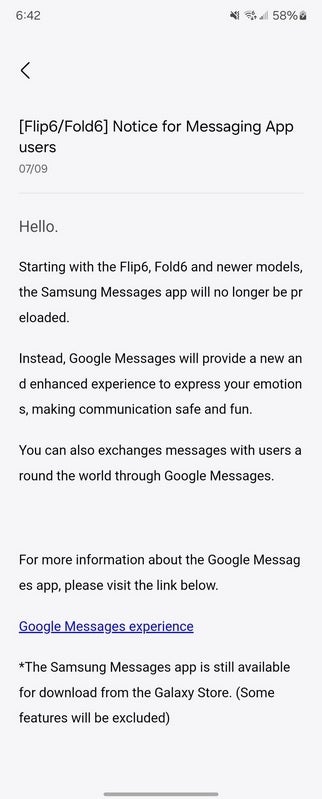
Samsung announces that it will preload Google Messages instead of Samsung Messages on Galaxy devices. | Image credit-Max Weinbach
Posted on the Samsung Members app and shared by Max Weinbach on “X,” Samsung’s message notes that with the latest foldable models, the Samsung Messages app will no longer be preloaded on Galaxy devices. The app, as noted, will be replaced by Google Messages and the Samsung Messages app will still be available from the Galaxy Store although some features will be excluded.
Starting with Flip6, Fold6, and newer models, the Samsung Messages app will no longer be preloaded. Instead, Google Messages will provide a new and enhanced experience to express your emotions, making communication safe and fun. You can also exchange messages with users around the world.”-Samsung
The new policy does not appear to be in place worldwide. While U.S. variants of the Galaxy Z Fold 6 and Galaxy Z Flip 6 have Google Messages preloaded instead of Samsung Messages, Android expert Mishaal Rahman said on “X” that Google Messages is replacing Samsung Messages on U.S. carrier and unlocked Galaxy devices only. Rahman made a point of saying that Samsung Messages is still pre-installed on Canadian and European builds of the new foldable models.
For those with older Galaxy devices or not in the U.S., you can install Google Messages from the Google Play Store by tapping on this link.
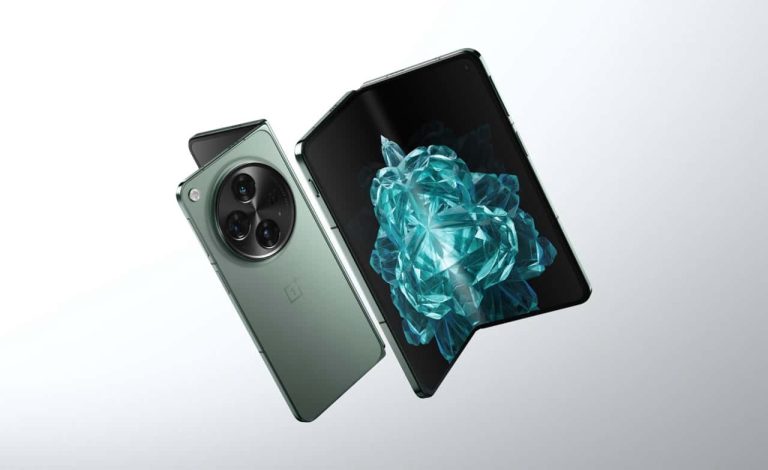
The OnePlus Open 2 foldable Android smartphone is rumored to pack a massive 6,000mAh battery. With a tablet-like screen when unfolded, this flagship device would be powered by Qualcomm Snapdragon 8 Gen 4 chipset.
OnePlus Open 2 foldable getting a massive battery upgrade?
The second iteration of the OnePlus foldable Android smartphone has started appearing in leaks and rumors. According to reliable tipster Digital Chat Station, the upcoming dual-screen flagship phone is getting a massive upgrade in terms of battery.
As the name suggests, the OnePlus Open 2 would be the second-generation foldable smartphone from OnePlus. The first generation of the smartphone is a flagship device with impressive specifications, but it packs a rather diminutive battery.
The OnePlus Open has a 4,805mAh battery, which is smaller than most single-screen smartphones. For example, the OnePlus 12 has a 5,400mAh battery.
Despite the seemingly smaller battery, the first-generation foldable Android smartphone from OnePlus performed quite well in our review. If the latest rumor is true, the second-generation OnePlus foldable is packing a massive 6,000mAh battery. This would translate to impressive battery endurance for a dual-screen smartphone.
Previous leaks have claimed the upcoming OnePlus foldable smartphone would pack the Qualcomm Snapdragon 8 Gen 4 chipset. The latest rumor reiterates the same specification.
When will the OnePlus Open 2 launch?
Oppo rebranded its Oppo Find N3 as the OnePlus Open and launched in multiple markets outside China. Similarly, the Oppo Find N5 could be rebranded for the international markets as the OnePlus Open 2.
As for the launch of the second-generation foldable Android smartphone, OnePlus may have hit several roadblocks. Recent reports suggest that OnePlus has had to delay the device’s launch.
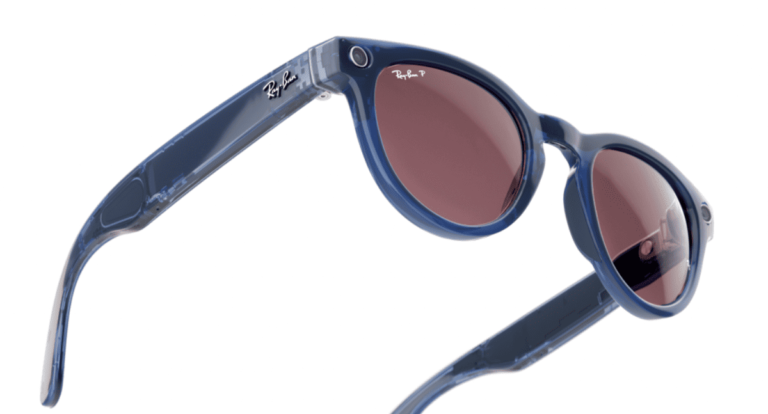
Sales of Ray-Ban Meta AI-powered smart glasses have increased in recent months. The segment appears to be growing at a sufficient pace to attract the attention of big tech companies. One of those companies would be Google, which would seek a deal with Ray-Ban to manufacture smart glasses with Gemini. However, Meta seems to have the upper hand.
Meta, driven by the success of Ray-Ban smart glasses with its Meta AI assistant, wants to buy 5% of EssilorLuxottica, Ray-Ban’s parent company. According to recent reports, negotiations between both companies are at an advanced stage. However, Google might be trying to “get in the way.”
Google might be trying to “hijack” the Ray-Ban and Meta deal for smart glasses
Google reportedly wants to bet heavily on the smart glasses segment. These devices seek to offer a smart assistant and AR navigation experience in a compact and comfortable format. The company is also working with Samsung on an XR headset that will arrive this year, as the South Korean giant confirmed this month.
Currently, Google seems to be looking for the ideal partner to launch Gemini-powered smart glasses, and the Ray-Ban brand seems like a strong candidate. EssilorLuxottica already has experience in the segment after working with Meta. Also, the company worked with Google in the past, manufacturing Google Glass.
While Google’s previous attempt in the segment didn’t go well, the industry has changed a lot. It’s been almost a decade since the Google Glass launch. Now, sales of this type of product are increasing, so they seem more accepted by people. Also, integrating the glasses with the Gemini assistant would give them a strong additional appeal.
Google stealing the Ray-Ban deal from Meta is “extremely unlikely”
That said, according to The Verge, it is “extremely unlikely” that Google can stop the deal between Meta and EssilorLuxottica. After all, the negotiations seem to be in a very advanced state. Still, the source claims that the Mountain View giant has recently approached EssilorLuxottica to talk about possible Gemini-powered glasses.
So, it’s quite likely that Google will have to find another partner. It will be interesting to see who the company chooses to make its smart glasses a reality, or even think about the (distant) possibility that Google “steals” the Ray-Ban brand from Meta for its glasses.
Feeling a little out of the loop? Don’t worry, we’ve got you covered! We are back with another episode of “News You Probably Missed and Shouldn’t Have!” our weekly rundown of the tech headlines you might have missed. From the latest launches and announcements to big fails, we compiled a comprehensive weekly roundup to bring you back up to speed. So, buckle up, grab a cup of coffee, and get ready to catch up on the headlines that have been making waves.
Google Maps gets a major UI update on Android
Google Maps for Android is getting a makeover! Say goodbye to those pesky full-screen menus that always seemed to block your view of where you were going. Now, you can swipe up from the bottom to see them in fresh new sheets, like magic! Searching for directions is still the same old full-screen affair, but once entered, you get a newer UI. The update makes Google Maps less cluttered and more user-friendly. Let’s just hope they don’t accidentally hide the “directions” button altogether!
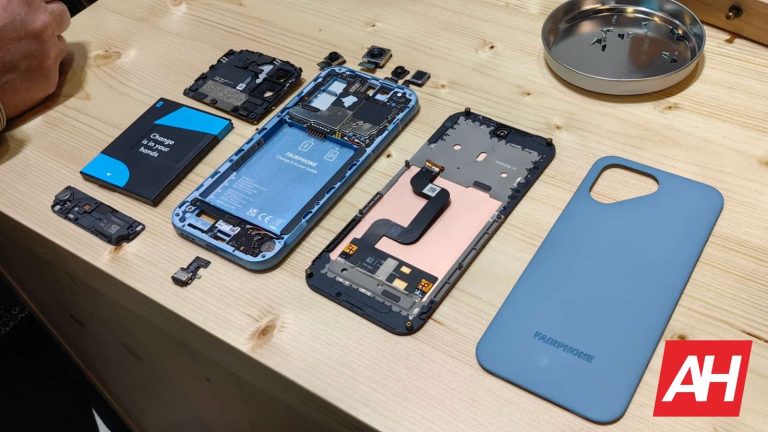
Fairphone announces Android 14 for Fairphone 5
Is your Fairphone 5 feeling a bit behind the times? Well, fret no more! It’s getting a software update that’s like a makeover for your phone. No more fumbling around in the dark with a not-so-dark dark mode. Now you can customize your phone by swapping buttons on the navigation bar, like rearranging the furniture in your house but with way less effort. And for those of us who are forgetful, our phones can now flash like a disco ball to remind us of notifications. Watch out for the Android 14 update in the coming weeks and let the good times roll (or should we say, flash)!
Google Photos readies an updated built-in video player
Google Photos is working on a feature that lets you be the DJ of your videos! You can finally speed up those boring vacation montages of your uncle staring at pigeons, or slow down that epic squirrel chase to make it look like a dramatic action movie. Just imagine chipmunks with tiny mustaches and sunglasses in slow motion – hilarious! But be warned, with great power comes great responsibility. Too much fast-forwarding might make your grandma dizzy, and slow-mo everything could turn a five-minute video into an overnight movie marathon. Use this power wisely!
Google Messages brings back screen effects
Texting just got way more dramatic on Google Messages with the return of Screen Effects. Now you can send a “Congrats” and watch a confetti explosion. Feeling beachy? Text “Going to the beach” and witness a digital tsunami of pool floats and beach umbrellas. But beware, this feature can backfire. Text “Boo” with too few o’s and you might get a virtual shrug instead of a tomato barrage. And if you laugh too hard with just three “hahaha”s, well, you’ll be left disappointed. So unleash your inner drama queen responsibly, and remember, four “hahahaha”s are the minimum for a dancing tube man!
Samsung stops pre-loading its Messages app on Galaxy devices
Samsung is breaking up with its own messaging app! In the US, new Galaxy phones like the Z Flip 6 are ditching the pre-installed Samsung Messages app and going steady with Google Messages instead. Looks like Google’s RCS texts finally won Samsung’s heart (or maybe the Korean company just got tired of maintaining two apps). Fear not, Samsung fans! You can still download the old app if you miss it dearly. But for everyone else, get ready for a future filled with… uh… Google Messages?
YouTube Music now lets you mark podcasts as played
YouTube Music finally listened to users’ pleas (begging, really) and added a “Mark as played” feature for podcasts. It’s like they graduated Podcast 101 this week! Previously, your only option was to pretend to listen to the whole thing while fast-forwarding like a maniac. Now you can just tap a button and, voila, podcast progress gets a thumbs up. If you accidentally mark a podcast as played, fear not. There is also a “Mark as unplayed” button to undo the accident. Beware, not every accident can be undone.
Android Auto prepares to tune with your car’s built-in radio
Looks like Android Auto is finally moving out of its phone-based music bubble and getting ready to jam with the car’s built-in radio. No more switching between apps to change stations – Android Auto might soon be your one-stop shop for all things audio in your car. This is great news for drivers who want a smoother music experience. Imagine cruising down the highway, seamlessly switching between your Spotify playlist and the latest hits on the radio, all controlled from the same interface.
Samsung prepares satellite connectivity for Galaxy phones
Looks like the Galaxy S25 is about to phone home… literally! Samsung might be joining the space race, equipping the S25 with satellite connectivity for emergencies. Imagine getting lost in the wilderness, phone signal kaput. But fear not, with the S25, you can send an SOS text that blasts off to a satellite and beams your message for help. Just be careful not to accidentally text your grocery list to aliens.
T-Mobile outruns the competition in the 5G speed test
T-Mobile is on a winning streak, crushing Verizon and AT&T in network tests like a boss! Download speeds are so fast on T-Mobile, it’s almost unfair. Imagine downloading a movie in the time it takes to say “network congestion.” The carrier might not be perfect (because let’s be real, no carrier is) but according to users, they’re at least the most likable of the bunch. Although, with speeds this fast, who needs friends anyway? You’ll be too busy streaming cat videos (or whatever it is you cool kids do these days) to care.
As the smartphone market grows, Samsung is still at the top
Hold onto your hats, smartphone fans! The global market grew a healthy 6.5% in Q2 2024, according to IDC. Looks like the future is still bright (and probably filled with apps). Samsung is still the world’s biggest smartphone vendor, capturing nearly 19 percent of the market. It sold 54 million smartphones between April and June this year. Apple, Xiaomi, Vivo, and OPPO, made up the top five brands. These companies left only 32 percent of the market for other players. Imagine the hustle between Google, Tecno, HMD, Sony, Motorola, Infinix, Lava, etc.
Grand Theft Auto VI fans beware of Fake GTA VI Beta download ads! Don’t get scammed by fake GTA VI beta versions advertised on social media. Learn how to spot these phishing attempts and protect yourself from malware.
Grand Theft Auto (GTA) is a household name in gaming, and Rockstar Games, the developer behind GTA, has announced the release of Grand Theft Auto VI in Autumn 2025 for PS5 and Xbox Series, which has got fans all excited.
However, this presents threat actors with the perfect opportunity to exploit fans, with Bitdefender researchers detecting suspicious Facebook ads and promoting fake beta versions for free download on PC.
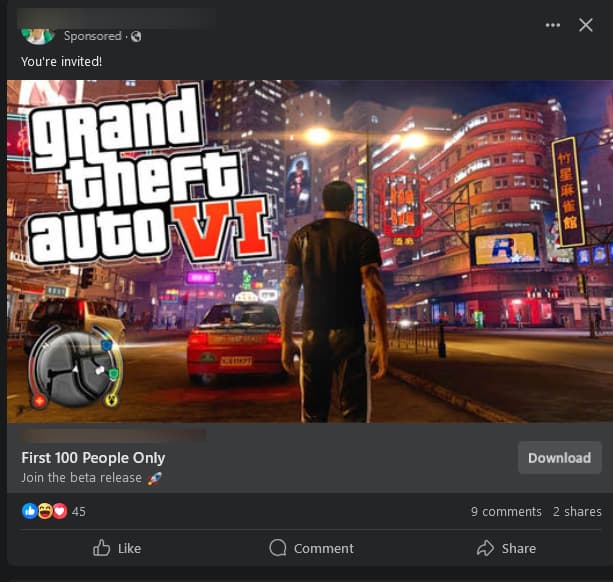
Social media users, particularly those following GTA content, might encounter sponsored ads promising early access to a non-existent GTA VI beta. These ads often showcase tempting features, early release dates, and even include convincing-looking gameplay footage (likely stolen from 2022’s Rockstar data breach and other sources)
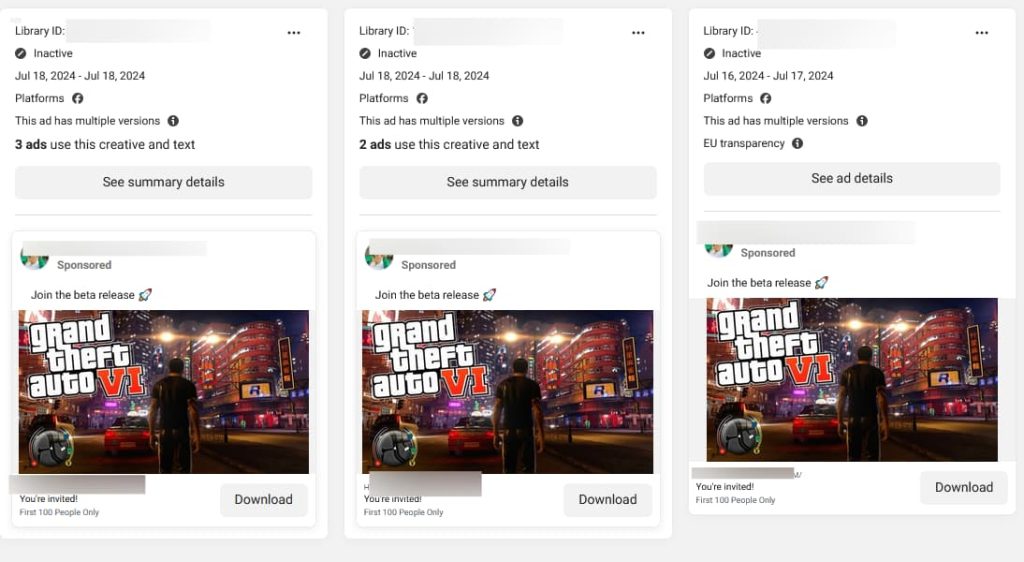
According to Bitdefender‘s report, between July 16 and 18, researchers came across a Facebook page promoting free access to the GTA beta version for the first 100 people through sponsored ads. This page was running three different ads all using the same message and visuals, targeting people aged 18-65.
The malicious domain used in the ad was created on June 27, 2024, and was also hosting another Ethereum scam. Users in Europe, including France, Poland, Romania, Germany, Spain, Hungary, Italy, Greece, the Netherlands, and Sweden were the primary targets.
Security researcher Andrei Mogage’s analysis revealed that the MSI file downloaded through the Facebook ad impersonated a legitimate GTA VI installer and mimicked the installation process. The file shared similarities with FakeBat loader malware that deployed malicious payloads and PowerShell scripts to download next-stage malware like info-stealers and RATs.
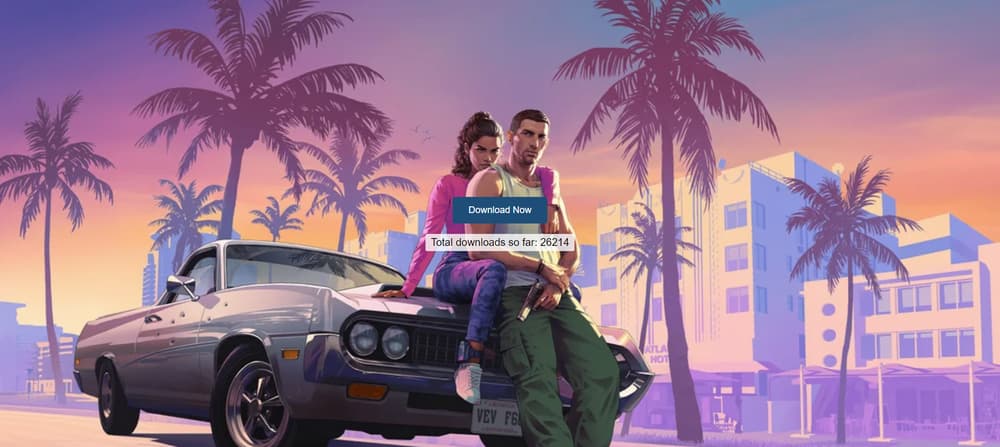
Clicking the ad leads to a website mimicking a legitimate download page. Here, a user might be prompted to download an ‘exclusive beta client’ or complete a survey to gain access. These downloads aren’t beta versions; they’re malware in disguise. It is worth noting that Rockstar Games has not announced a beta program for GTA VI.
The three malicious samples available for download from the ads were “broken” and could not execute payloads or exfiltrate data. As of July 19, none of these malicious ads remain active.
Malicious GTA 6 Facebook ads (Bitdefender)
Malicious GTA 6 Facebook ad (Bitdefender)
Clicking download leads to a malicious domain running ETH scam and also drops a malicious MSI file (Bitdefender)
Facebook’s history of approving malicious ads
While the reported malicious ads may be removed, there could be hundreds of such malicious ads currently running on social media, especially Facebook, which is known for approving malicious ads.
In February 2024, Savvy Seahorse, a DNS threat actor, was found using Facebook ads to promote and lure unsuspecting victims into its investment scams. In November 2023, Facebook displayed AI-generated “provocative” ads that spread NodeStealer malware.
Back in April 2021, Facebook approved an advertisement that displayed and distributed a Facebook Messenger phishing link. In April 2021, Facebook also displayed an ad that mimicked the Clubhouse app but, in reality, was malware.
But that’s not all. The severity of malicious Facebook ads is highlighted by a December 2020 report, which revealed that hackers phished more than 615,000 login credentials using Facebook ads.
Nevertheless, you can easily spot fakes in the gaming industry as these often make unrealistic promises, and poor grammar, and create urgency to download games. To stay safe, ignore sponsored social media ads, and download games from official sources like the developer’s website or trusted retailers.
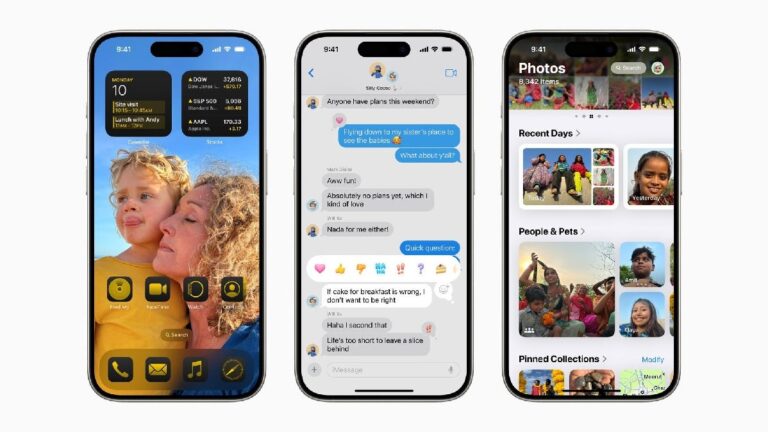
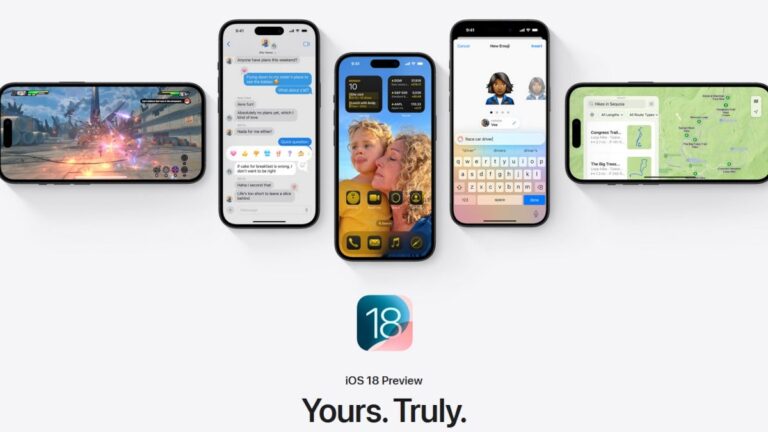
Forgetting about Apple Intelligence for a minute, there are plenty of non-AI features coming to iPhone users this year thanks to iOS 18. You can lock an app and require Face ID or your Passcode to open it. Or, you can hide an app so no one sees it on your home screen. With iOS 18, you’ll be allowed to. customize the app icons on your home screen by moving them around or by selecting a color theme. When sending a message, you can schedule the time that it will be sent with “Send Later,” and there is finally support for RCS messages.
There are plenty more new features in iOS 18 including one that will allow you to open any app from the Lock Screen. This is possible because Apple will allow you to customize the Lock Screen shortcuts that currently open the flashlight on the left side and the camera on the right side. Actually, with iOS 18, you’ll be able to launch any app without unlocking your iPhone. That’s pretty cool, eh?
You can wait until September when the stable version of iOS 18 is released, or you can roll the dice, install the iOS 18 Public Beta, hope that features you need aren’t impacted, and enjoy the new features. We suggest the Public Beta over the Developer Beta because the Public Beta is released after the Developer Beta has been dropped and Apple has had the time to patch any major issues.
You can have any of your apps open on your iPhone even with the device locked. | Image credit-Apple
Once you install the iOS 18 beta, long press on the Lock Screen. You’ll see two “-” buttons, one next to the icon on the lower left and one next to the icon on the lower right. Press the button next to the icon you want to replace and then tap the “+” button. Select Open App and select the app you want to open from your Lock Screen. Tap on Done. And that is all there is to it.
To install the iOS 18 Public Beta on your iPhone, go to Settings > General > Software Update. Tap on Beta Updates, select iOS 18 Public Beta, hit the back button in the upper left corner, and you’ll see your invitation to update to the beta. Follow the directions to install it.