Tesla owners have received a stern reminder about the importance of keeping their eyes on the road after videos surfaced of drivers wearing Apple‘s virtual reality (VR) headset while driving.
US Secretary for Transport Pete Buttigieg took to X (formerly Twitter) to emphasize that all current vehicles, including those equipped with advanced driver assistance systems, require the driver’s full engagement at all times. Despite warnings from officials and manufacturers, some individuals are using the Apple headset while operating vehicles in autonomous mode, prompting concerns about safety and legal compliance.
The incidents in question involve videos circulating online depicting an individual seated in a Tesla Cybertruck, wearing an Apple Vision Pro headset while driving the car. Secretary Buttigieg reposted the video, underscoring the necessity for drivers to remain in control of the vehicles regardless of their autonomous capabilities. However, in a twist, one driver admitted that his video was a prank, suggesting that he wore the headset for a brief period while driving. This raises questions about the potential consequences of such actions and the need for greater awareness regarding responsible vehicle operation.
Wearing Apple Vision Pro while driving obstructs your vision both with its function and technical limitation
Both Tesla and Apple have been approached for comment regarding these incidents. While Tesla’s stance emphasizes the driver’s responsibility to maintain control of the vehicle, even with autonomous features enabled, Apple’s user guide explicitly warns against using the headset while driving. The intersection of emerging technologies like VR with conventional transportation raises complex safety and regulatory challenges that both companies must address.
Apple’s VR headset, known as the Apple Vision Pro, recently debuted in the US with a price tag of $3,499 (£2,749). Apple’s CEO Tim Cook says that this “spatial computing” focused device will soon launch in the Chinese market as well.
While Apple has touted its capabilities for various immersive experiences, including gaming and productivity, users should stay away from certain scenarios like using it while driving or even walking on the road.
YouTube TV is seemingly always working on improving picture quality, though they are kind of hamstrung by the channels they carry and what they are broadcasting. But YouTube TV has said over on Reddit that they are rolling out changes to improve picture quality, as well as adding a new “1080p Enhanced” option across many of the channels on offer.
The tricky thing here is that not every channel broadcasts in 1080p. For example, ESPN and FS1 both broadcast in 720p as their max resolution. So you won’t see 1080p Enhanced for every channel that you have on YouTube TV.
YouTube TV noted that this is rolling out to 4K-compatible streaming devices and will be the “highest video quality” available outside of 4K Plus.
The updates are rolling out to YouTube TV right now; there’s no word on how long this is going to take to roll out. Google typically does a pretty slow rollout of features of its products. I just checked on a couple of 4K-compatible devices, and I do not see a 1080p Enhanced option for YouTube TV just yet.
YouTube Premium subscribers got 1080p Enhanced late last year
While 1080p Enhanced is going to be new to YouTube TV subscribers, it won’t be for YouTube Premium subscribers, as Google started rolling that out last November. It was exclusive to Premium subscribers and involves an “enhanced bitrate” resolution on Android and TVs. It launched first on the iPhone earlier in 2023 and later on the web in the middle of 2023.
This is a good move for YouTube, as it allows them to improve picture quality without forcing users to use 4K. Not everyone has the internet speed, not to mention the added bandwidth that YouTube would need to swallow for that to happen. While 1080p Enhanced will use more bandwidth than regular 1080p, the change is pretty small compared to 4K vs 1080p.
Today, Malwarebytes released its 2024 State of Malware report, detailing six cyberthreats that resource-constrained IT teams should pay attention to in 2024. Top of the list is “Big Game” ransomware, the most serious cyberthreat to businesses all around the world.
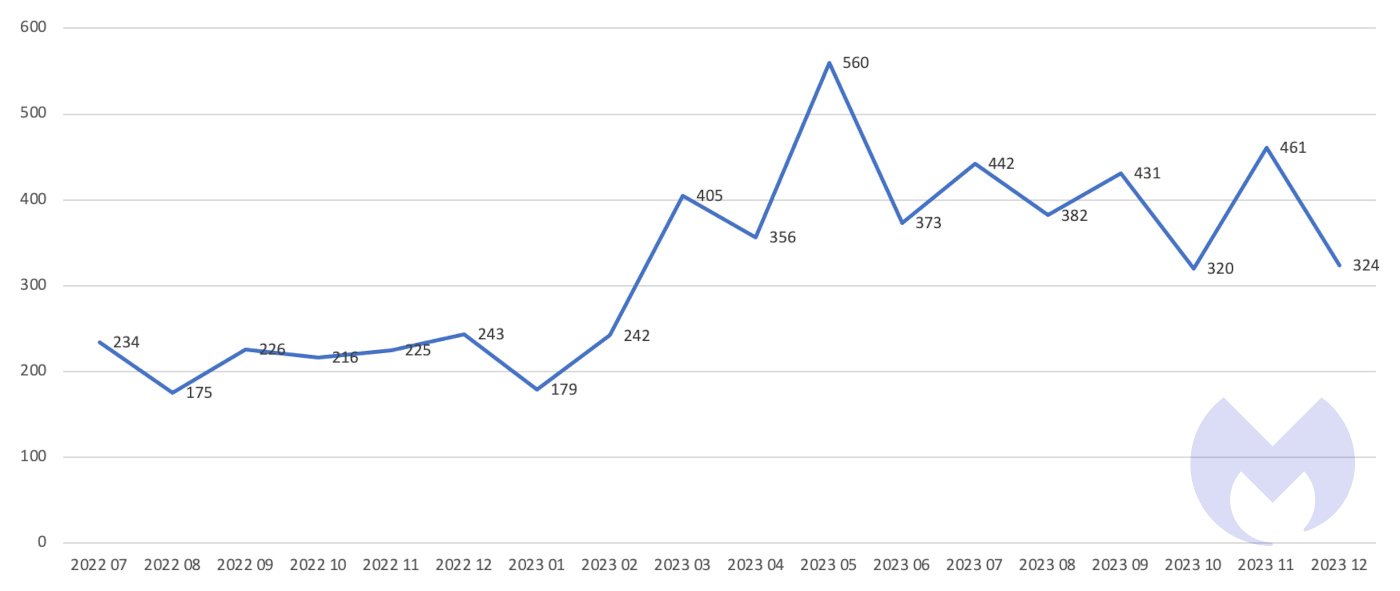
Big game attacks extort vast ransoms from organizations by holding their data hostage—either with encryption, the threat of damaging data leaks, or both. The report reveals that, awash with money, the number of known Big Game attacks surged by 68% in 2023, thanks to Ransomware-as-a-Service groups like LockBit and ALPHV.
Known ransomware attacks July 2022 – December 2023
Big Game ransomware is just one part of a thriving and highly organized cybercrime business—a multi-billion-dollar mirror to the legitimate economy it feeds off. Its ecosystem supports entire supply chains, dotted about with specialized organizations like access brokers and malicious software vendors. It has brand names, PR stunts, HR departments, incentive schemes, and “employees of the month.”
And like broader, law-abiding “Business” at large, cybercrime has settled on a collection of tools that work. Its activity is built around evergreen techniques like phishing, software exploits, and password guessing, along with mature malicious technologies like info stealers, trojans, and ransomware.
For years, the latest iterations of these ideas have only offered marginal improvements on their predecessors. As a result, innovation in cybercrime has increasingly shifted towards tactics—advancements that focus more on how attacks can succeed and less on what malware can do. The 2024 State of Malware report also details how ransomware gangs use Living of the Land (LotL) techniques to hide in plain sight, and how one gang, CL0P, turned to automated zero-day attacks to break ransomware’s scalability barrier.
The report also explains how cybercriminals turned to a tactic called “malvertising” in 2023, using search ads and disposable websites that mimic legitimate brands to distribute malware as an alternative to malicious emails and document macros.
And as Macs continued to buck the trend in declining PC sales, some criminals began to add Mac malware, like Atomic Stealer, to their Windows distribution channels.
As we enter 2024, malware is as dangerous as ever, but when it is used, it is just one link in an attack chain of multiple different threats. IT and security teams now face active adversaries, zero-day exploits, compromised accounts, social engineering, and a range of other threats that don’t meet the traditional definition of malware. Against this backdrop, security budgets are shrinking while resource-constrained IT and security teams firefight ever more complex environments.
When it comes to security, “more of the same” will not work in 2024, so this year’s report also outlines what effective cyberdefense in the year ahead will require.
To learn more about the most serious threats facing IT teams in 2024, and how to combat them, download the 2024 State of Malware report.
Samsung may have a new watch and tablet on the horizon. The company is reportedly readying the Galaxy Watch FE and the Galaxy Tab S9 Lite. These might be the same devices previously rumored to be the 2024 refreshes of the Galaxy Watch 4 and Galaxy Tab S6 Lite.
Samsung gearing up to launch a Galaxy Watch FE
A few days back, a rumor surfaced that Samsung is working on refreshed versions of the Galaxy Watch 4 and Galaxy Tab S6 Lite. The word came from Roland Quandt, a reliable tipster with an excellent track record of Samsung leaks. He said the devices are coming soon as the Galaxy Watch 4 (2024) and Galaxy Tab S6 Lite (2024).
The tipster didn’t share additional info. It was unclear how the new devices would differ from their original versions. If we are to look into the past, Samsung could re-release them with a newer SoC and the latest version of Wear OS/Android OS. The Galaxy Tab S6 Lite, which originally debuted in 2020, got a 2022 refresh with similar changes.
Meanwhile, another noted industry insider @TheGalox_ claims Samsung is preparing to launch the Galaxy Watch FE and the Galaxy Tab S9 Lite. The former is a fusion of the Galaxy Watch 5 and the Galaxy Watch 4 aimed at the mid-range segment. The latter, meanwhile, is the successor to the Galaxy Tab S6 Lite.
From what it looks like, these are the same two devices that Roland Quandt referred to as the Galaxy Watch 4 (2024) and Galaxy Tab S6 Lite (2024), respectively. Samsung could be looking to offer flagship-grade specs at a lower price point. It might take the existing products, upgrade a few things—chipset, software, and more—and release them as new devices with affordable prices. Unfortunately, we are short on details at the moment.
The new devices might arrive in a few months
The rumors passed along X don’t make it clear when these devices will go official. Samsung has several other products in the pipeline, scheduled to debut within the next few months. These include the Galaxy Watch 7 series and the sixth-gen foldables—Galaxy Z Fold 6 and Galaxy Z Flip 6. The company might launch these devices in July or August 2024.
It remains to be seen whether the Galaxy Watch FE/Galaxy Watch 4 (2024)—the FE branding might be less confusing to buyers—and the Galaxy Tab S9 Lite/Galaxy Tab S6 Lite (2024) arrive alongside these products or separately. There are also rumors about an affordable foldable smartphone from Samsung. We will keep you posted with the latest information about all of these products.
Apple‘s $3,500 ‘spatial computing‘ platform, the Apple Vision Pro, comes with a laminated glass exterior that covers the front. Notably, this glass has a plastic layer on the outer surface of the device, unlike cars where the plastic layer rests inside. This laminated glass is the lens cover for most of the cameras, through which you view the world. Any scratch in front of the lenses will mean a significant hit in your vision while wearing the Apple Vision Pro.
The front glass (or plastic) of the Apple Vision Pro is susceptible to scratches with simple day-to-day uses
The Vision Pro has gone through a durability test from famous YouTube creator Zack Nelson from JerryRigEverything. He notes that the front glass starts scratching significantly at level 3 on the Mohs scale of hardness. If you aren’t familiar, most smartphones today “scratches at level 6 with deeper grooves at level 7.”
Surprisingly, the weirdly expensive Apple Vision Pro is a significant downgrade on this front. The only recent product category susceptible to this level of scratches is the foldable phone category. Those folding devices have to have a soft plastic screen in order to fold but a plastic material on the solid exterior of the Vision Pro looks a bit confusing at first.
However, it turns out that Apple was on to something while choosing plastic for the exterior. Notably, the Vision Pro is heavy ( nearly 600 – 650 grams) and an accidental drop from even waist height means significant impact.
While susceptible to scratches, the laminated glass is really hard to break. AppleTrack dared to drop the Apple Vision Pro intentionally, to test out its resilience. Surprisingly, the exterior glass-plastic layer survived until the test height increased up to 12 feet (the ceiling of the room). While dropped on a flat surface, this device is likely to survive in most cases.
So how do you protect the laminated glass from getting scratched?
Always carry and store the Vision Pro with the protective cover for the front which comes in the box. The front glass (or plastic) catches a lot of fingerprints. Well, be careful when cleaning the fingerprints, as the plastic surface will do very differently than the ‘Ceramic Shield’ on your iPhone does.
Apple recommends you use its microfiber-based polishing cloth for this purpose for a reason. The same goes for the lenses through which you see the incredible micro OLED displays. Apple notes “Wipe the optical displays with a clean, dry microfiber cloth – like your included Apple Vision Pro polishing cloth”
Apple Vision Pro survived a 12 feet drop (Credit: AppleTrack)
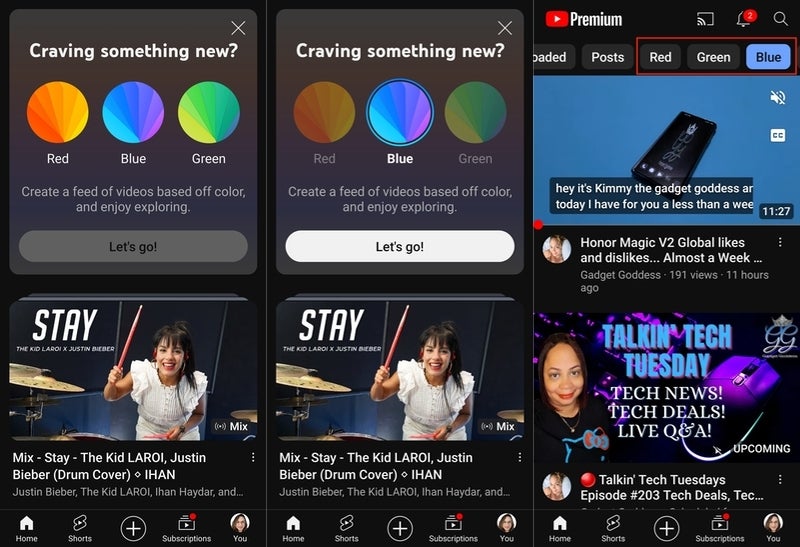
YouTube is currently experimenting with a brand new feature that allows users to filter their home feed based on the thumbnail’s primary colors. Although still in the experimental phase, there are concerns surrounding the purpose and potential impact of this feature.
This filter organizes videos by analyzing the dominant color in their thumbnails, providing users with a personalized visual experience. However, as spotted by 9to5Google, it doesn’t necessary analyze the mood or theme of the content.
I was offered the option for the filter myself, and once applied, I personally didn’t see any benefits or improvements to having my recommendations sorted by thumbnail color when it comes to consuming content. That said, I do see a slight benefit to this as a content creator if I was looking for thumbnail ideas and inspiration based on a primary color.
YouTube recommendations sorted by the color blue
Although use of the filter is not mandatory, there could still be lingering concerns as to the purpose or usefulness of it. Color preference plays a significant role in shaping our purchasing decisions, making it a valuable source of data for advertisers. This experiment has the potential to assist YouTube in understanding users’ color preferences, which could be valuable for advertisers looking to target specific groups more effectively.Based on the available color options (red, green, blue) and the experimental nature of this feature, it appears that it is still in the development phase. It remains uncertain if Google plans to broaden the range of colors available or if this will at some point become a permanent filter within the app.
However, if it does, it could potentially become a valuable tool for advertisers and content creators on YouTube. If this test is successful, I could see those that found it helpful requesting a broader selection of colors to further customize their experience.
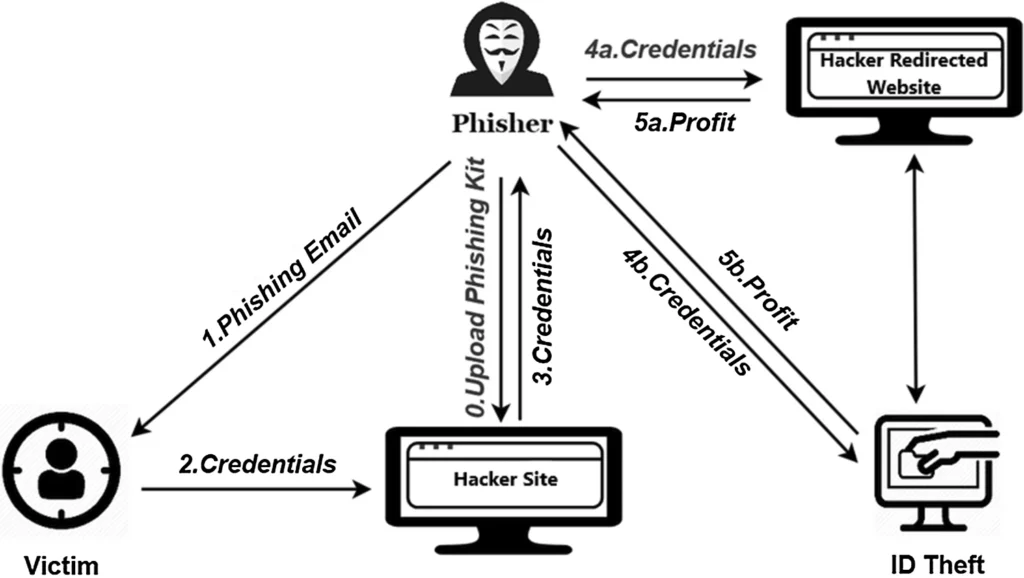
Cybercriminals use email phishing as one form of cybercrime to deceive victims into disclosing personal information like passwords, credit card details, or Social Security numbers.
To accomplish this, they send emails that seem to be from reliable sources, like banks, credit card companies, or even close friends or relatives.
According to the Trustifi ThreatScan Report 2023, an in-depth analysis of 1.3 million emails exposes the staggering number of threats evading conventional gateway solutions. Download Free Report.
Frequently, the emails include a link that, when clicked, directs the recipient to a fake webpage that mimics the official website.
Criminals can steal the information the victim enters on fictitious websites.
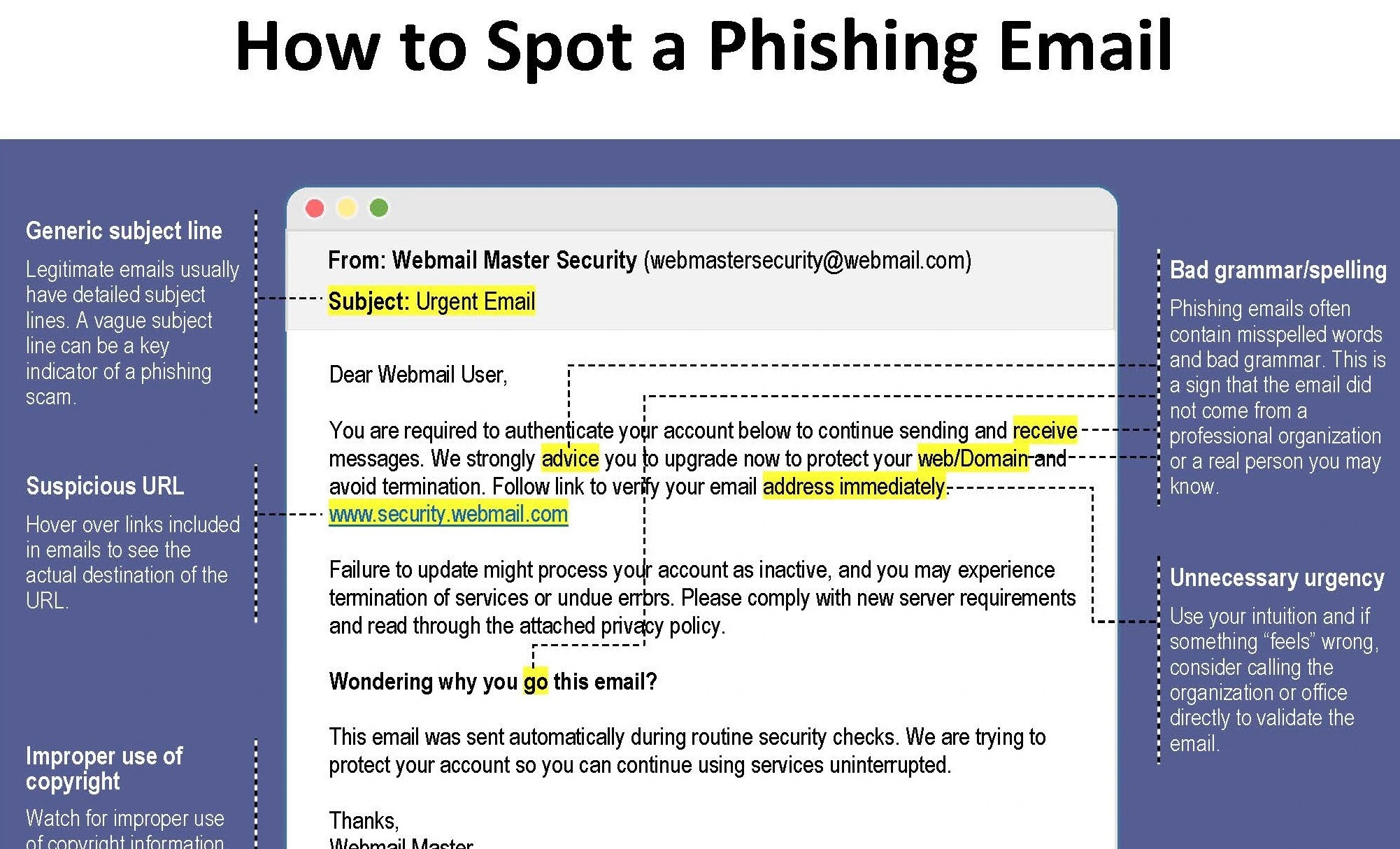
Because targeted phishing emails can be very convincing, it is critical to watch out for the following warning signs:
Unsolicited emails: It is likely a phishing email if you receive one from a company you do not do business with.
Generic salutations: “Dear Customer” or “Dear User” are common salutations in spearphishing emails.
Sensation of urgency: Phishing emails frequently instill a sense of urgency by stating things like “your account is about to be suspended” or “you need to update your information immediately.”
Typographical mistakes and misspelled words: Spelling and grammar are frequent features of phishing emails.
Untrustworthy links: If you are unsure if a link in an email is safe, avoid hovering over it and clicking on it. To confirm the link, if you are unsure, contact the sender directly.
2024: The Present Status of Email Phishing
According to statistics, 81% of organizations have seen an increase in phishing emails since 2020, with an estimated 3.4 billion emails sent every day.
Data breaches and other financial losses cost individuals and companies billions of dollars annually.
Depending on the location, it impacts people and organizations globally with varying frequency and approaches.
Increasingly skilled phishing attackers use social engineering, deep fakes, and tailored strategies to circumvent traditional security measures.
In this case, automatically disabling access to compromised accounts with Trustifi’s AI-based account takeover protection helps to prevent sensitive data exposure.
DocumentRun Free ThreatScan on Your Mailbox
Trustifi’s Advanced threat protection prevents the widest spectrum of sophisticated attacks before they reach a user’s mailbox. Try Trustifi Free Threat Scan with Sophisticated AI-Powered Email Protection .
AI-Generated Phishing Emails
AI-generated phishing emails are a sophisticated and evolving cybersecurity threat. These emails use artificial intelligence to craft messages that are highly personalized and convincing, often mimicking the style and tone of legitimate correspondence from trusted sources such as banks, service providers, or even colleagues and friends. The primary goal is to deceive recipients into divulging sensitive information, clicking on malicious links, or downloading infected attachments.
The use of AI in phishing campaigns allows for several advancements in the effectiveness of these attacks:
Personalization: AI can analyze large amounts of data on individuals and organizations to tailor phishing emails with details that make the messages seem legitimate and relevant to the recipient.
Language and Style Mimicking: By analyzing communication patterns from legitimate sources, AI can generate text that closely mimics the writing style of a trusted individual or organization, making the phishing attempt harder to detect.
Automated and Scalable Attacks: AI can automate the creation and distribution of phishing emails, enabling attackers to launch large-scale campaigns with minimal effort.
Evasion Techniques: AI algorithms can be designed to evade spam filters and security measures by continually adapting the content and delivery methods of phishing emails.
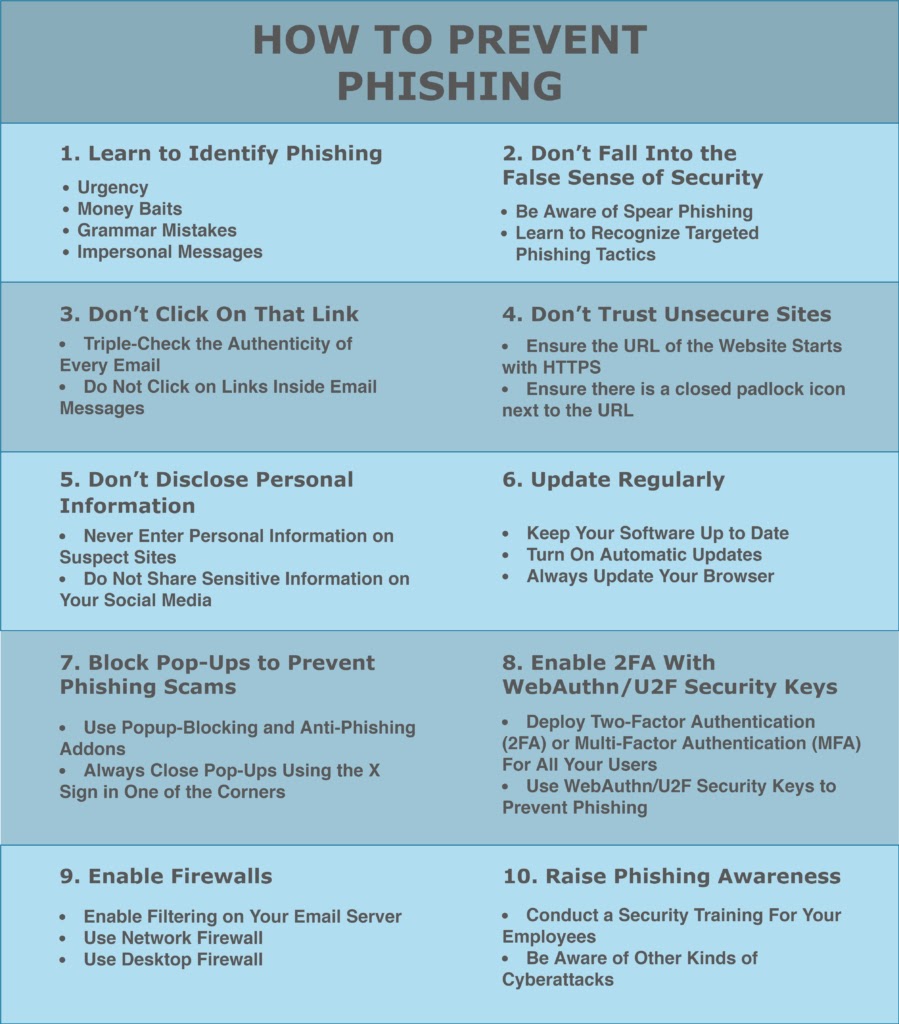
To protect against AI-generated phishing emails, it’s essential to employ a combination of advanced cybersecurity technologies, such as AI-based threat detection systems, and user education to recognize and respond to phishing attempts. Strategies include scrutinizing the sender’s email address for slight abnormalities, avoiding clicking on links or downloading attachments from unsolicited emails, and verifying the legitimacy of requests for sensitive information through alternative communication channels.
The battle against email phishing utilizes several critical AI techniques, all of which are vital in identifying and foiling these malicious attempts:
Natural Language Processing (NLP):
It enables AI to decipher and evaluate email content’s semantic meaning. AI systems that have been trained on enormous email datasets are able to recognize questionable terms, expressions, and sentence patterns that are frequently employed in phishing scams.
NLP also assists in sentiment and tone analysis, identifying deceptive language or urgency frequently employed in phishing emails.
Machine Learning (ML):
Allows AI to gradually increase the accuracy of its detections by learning from data. Artificial intelligence (ML) algorithms examine past attempts at phishing and authentic emails, spotting trends and characteristics that set them apart.
The models get better at identifying fresh phishing techniques and adjusting to changing threats as more data is added.
Deep Learning:
In order to detect irregularities and possible forgeries used in phishing attempts, deep learning models can examine not only the content of emails but also visual components like logos and formatting.
Anomaly Detection:
AI can analyze sender information, header data, and metadata in addition to the content of emails.
Artificial intelligence (AI) can detect unusual departures from standard operating procedures, such as emails that appear to be sent from strange places or have inconsistent sender addresses, which may be signs of spoofing attempts.
Implementing AI-powered email security solutions can secure your business from today’s most dangerous email threats, such as Email Tracking, Blocking, Modifying, Phishing, Account takeover, Business Email Compromise, Malware, & Ransomware – Request Free Demo.
Trustifi AI-Powered Protection To Combat Phishing Emails
Trustifi is a leading cyber security firm that provides top-notch email encryption, data loss prevention, and hosting solutions on a software-as-a-service platform.
Trustifi is a leading provider in the email security market, offering highly effective solutions to protect clients’ emails from cyber attacks. Our products are designed to be user-friendly and easy to deploy, ensuring maximum security for your email communications.
Trustifi offers a comprehensive email security solution that includes both inbound and outbound protection. Our system is equipped with multiple layers of security to ensure the safety of your emails. Additionally, we provide advanced features that are based on internal metrics, third-party integrations, and artificial intelligence. With Trustifi, you can enjoy all these benefits from a single vendor.
Cybercriminals continue to use email phishing as an attack, and their strategies are always changing.
In the struggle against these malicious emails, artificial intelligence (AI) based email security solutions is becoming a more potent tool. To counteract email phishing, AI can be applied as follows:
Rest easy knowing emails are automatically delivered securely and in compliance with easily-enabled Data Classification and Data Loss Prevention standards. Implementation takes minutes with automatic Office 365, Exchange on-premise, and Google Workspace interfaces.
Trustifi’s Powerful multi-layered screening protects your company from targeted attacks. Analyze, identify, and categorize sophisticated Phishing, Malicious, SPAM, and Gray emails.
Cloud-based email access is safe and convenient. Set controls and permissions to track and record user activity. Sharing data, cases, and inquiries with particular receivers is easy with sophisticated authentication and real-time monitoring.
AI Engines detect and inform users when monitoring volume, context, devices, geo-location, kind of sent emails, and more have hacked their mailboxes.
To Prevent businesses from sophisticated phishing Attacks, Trusitifi’s AI-powered email security solutionStops 99% of phishing attacks missed by other email security solutions.
E-mail Content and Context Analysis:
AI can examine email text and spot questionable terms, expressions, and sentence patterns frequently employed in phishing scams.
The email’s context, which includes the sender’s address, the recipient’s relationship to the sender, and the message’s general tone, may also be considered.
Compared to conventional rule-based filters, AI models can more accurately identify phishing emails due to this multi-layered analysis.
Looking for Spoofing and Anomalies:
AI can examine email headers and metadata to identify discrepancies that might point to spoofing attempts.
For instance, it can detect suspicious discrepancies by comparing the sender’s domain name to the email address.
Additionally, AI can recognize fresh phishing attempts that imitate previous strategies by learning from past attack patterns.
Customizing Your Safety Against Phishing:
AI can tailor phishing protection based on users’ unique email habits and behavior.
This increases the overall efficacy of email security by assisting in identifying emails that may appear normal to one user but suspicious to another.
In order to continuously protect users, AI can also adjust to new phishing techniques as they appear.
Automating Defense Against Threat:
The quarantining of questionable emails, which keeps them out of users’ inboxes, can be automated by AI.
This lowers the possibility that users will click on phishing links or attachments and speeds up an organization’s response to such attacks.
With time, machine learning algorithms can continuously learn and enhance their detection and blocking of phishing emails.
Enhancing User Consciousness:
Users can be taught about phishing techniques and assisted in spotting shady emails with the use of artificial intelligence.
Training simulations, real-time warnings within the email client, and personalized email alerts can all help achieve this.
AI can contribute significantly to human defense against phishing attacks by increasing user awareness.
Specific Examples of AI Integration in Email Security:
Phishing detection with NLP:
Scenario: Searching email content for questionable wording, such as threats, urgency, or attempts at impersonation.
Example: An email with grammatical errors purporting to be from your bank, and requesting quick action is identified by an AI model. It indicates that it might be a phishing attempt.
Trusitifi catches over 90% of sophisticated phishing attacks that traditional email security platforms miss.
Anomaly Detection with Behavioral AI:
Scenario: Tracking the ways in which specific users send emails and spotting changes from their usual conduct.
Example: The AI marks email correspondence from an employee that sends a sudden surge of correspondence to odd recipients as possibly suspicious activity, requiring additional examination.
Malware Detection with Sandboxing:
Scenario: Applying artificial intelligence to analyze attachments in a virtual setting before their arrival on users’ devices.
Example: AI opens unseen attachments in emails in a sandbox and looks for malware by analyzing the attachment’s behavior. Before it reaches the user, malicious content is blocked.
Spam Filtering with Advanced AI:
Scenario: To more accurately identify spam, AI goes beyond conventional keyword-based filtering and looks at user behavior, email content, and sender reputation.
Example: By filtering out spam emails proactively, an AI model recognizes emails that look like legitimate marketing messages but do not have the sender’s usual content or personalization.
Data Leak Prevention with AI-Powered Content Analysis:
Scenario: Recognizing private information in emails, such as social security or credit card numbers, and putting the proper security measures in place.
Example: AI recognizes and encodes sensitive data in emails before sending them to prevent unwanted access in the event of a breach.
Prevention
When it comes to analyzing intricate email features, AI outperforms conventional rule-based filters. It goes beyond just keywords and looks at things like sentiment, sentence structure, and contextual details like the relationship between the sender and the recipient.
Because of its multiple layers, this approach minimizes false positives and negatives and improves the accuracy of phishing attempt detection.
It offers personalized security that goes beyond simple filtering by examining email usage patterns and behavior patterns to spot anomalies unique to each user.
By automatically improving their detection capabilities, they provide a dynamic and constantly-improving defense system as they examine more data and come across fresh phishing attempts.
Ideal for large businesses and email service providers, as traditional approaches find it difficult to handle heavy traffic volumes.
Phishing data, including fresh attack strategies and patterns, and automatically modify their detection systems to provide proactive defense against new threats and zero-day exploits.
Save time, money, and mitigate risks, all while increasing your organization’s overall email security posture using Trustifis’Email Managed and Detection Response tool.
If you’re in need of additional security for your current email setup or a comprehensive suite solution, Trustifi’s expertise and user-friendly approach will surpass your expectations. Let’s explore a tailored email security plan that aligns perfectly with your requirements.
Conclusion
Artificial intelligence (AI) has emerged as a potent weapon on the defensive in the ongoing battle against email phishing.
Even the most sophisticated phishing attempts are difficult for traditional filters to detect; AI goes deeper, examining complex email features, sentiment, and context.
With its dynamic shield against ever-evolving threats, this cutting-edge technology provides personalized security, adjusts to individual behavior, and learns continuously. There are, nevertheless, restrictions.
Attackers may take advantage of blind spots, biases may skew detection, and false positives and negatives may happen.
Openness, moral reflection, and continuous development are necessary to overcome these constraints.
Ultimately, AI is not a silver bullet. Training and human awareness are still vital.
Yet we can tip the odds considerably in favor of a safer and more secure email experience if we use AI wisely and effectively.
You can try AI-powered Protection for Business Email Security from Trusitifi to stop sophisticated attacks before they reach a user’s inbox. Request a Free Demo.
Released today, the Malwarebytes State of Malware 2024 report takes a deep dive into the latest developments in the world of cybercrime.
As home users, many of the threats we cover will only affect you second hand, such as disruptions after a company suffers a ransomware attack, or when your private information is sold online after a data breach. Sadly, there’s not a lot you can do to prevent incidents like these yourself, other than stay on top of the news and protect yourself against identity theft.
But other threats you can do something about. So in this article we’ll focus on what threats affect you directly and how you can protect yourself.
Privacy
In the last year, the UK’s Online Safety Act attempted to challenge the status quo for social media and messaging companies. The act was widely interpreted as a demand that companies scan users’ messages for illegal material, and is a first warning about the directions in which privacy may continue to be threatened in the name of greater good.
It also acts as a reminder to be careful about what you share, even if you are under the impression that you are using the internet securely. We have seen news of ChatGPT leaking user’s information and law enforcement asking for backdoors in encryption routines.
Passwords
Google and Microsoft made good on their promise to back passkeys, an encryption-based alternative to passwords that can’t be stolen, guessed, cracked, or phished.
We’d like to see more companies embrace new methods of authentication and wave passwords goodbye: Too many breaches have shown us that user education only works for those that were already doing the right things. Keeping track of the hundreds of passwords an average user has, along with the relative complexity of using a password manager have convinced us it’s time for a better alternative.
Malvertising
If the last year has taught us something, it’s that scammers and malware peddlers can afford to buy sponsored search results and outbid the brand owner so that their links come out on top. Cybercriminals create Google Search ads mimicking popular brands, which lead to highly realistic, replica web pages where users are scammed or tricked into downloading malware.
Despite efforts on the side of search providers like Google, the cybercriminals remained one step ahead, able to consistently bypass ad verification checks all year. The type of malware that’s used varies with each campaign but infostealers (which gather information from your computer, such as usernames and passwords) were the most common type.
Banking Trojans
Banking trojans are one of the most serious threats facing Android devices. Banking trojans come disguised as regular apps like QR code scanners, fitness trackers, or even copies of popular apps like Instagram.
The malicious app asks the user for permissions that allow it to monitor what happens in other apps and will then create overlay screens for legitimate apps. This allows them to capture login credentials and even multi-factor authentication (MFA) tokens.
Mac malware
The days of “my Mac is safe” and “Macs don’t get malware” are definitely over. There are many signs that criminals are taking note of the platform’s increasing popularity by enabling attacks to target both Windows and Mac users at the same time.
The OnePlus 13 is tipped to arrive with a brand-new design. OnePlus flagships have sported a specific look for a while now. The OnePlus 11 and OnePlus 12 in particular are extremely similar, and the OnePlus 10 Pro is not far either, save for the different shape of its camera island.
The OnePlus 13 is tipped to arrive with a brand new design
Well, according to Digital Chat Station, things will change later this year. OnePlus is seemingly planning for a brand-new design for the OnePlus 13. This will represent a design revamp of sorts, for the company. The tipster also mentioned the Snapdragon 8 Gen 4 SoC will be used, as expected.
We still don’t know what that (design change) entails, exactly, as the tipster did not go into details. Does that mean that OnePlus will ditch curved displays and a glass+metal sandwich design with curved from and back sides? Well, it’s possible.
On the flip side, it doesn’t necessarily mean that. This could only mean we’ll see a drastically different camera on the back, along with some other details. Well, he did mention that the camera won’t be around anymore, so that’ll change for sure.
In regards to other changes, your guess is as good as ours. The way the tipster presented it, however, we’re in for quite a change. Many would say it’s about time, though on the flip side, many consumers seem to like what OnePlus is offering.
Will OnePlus adopt flat sides too, like many other OEMs?
Many major smartphone OEMs switched to flat sides and flat displays. That includes both Apple and Samsung, while Google will follow suit with the Google Pixel 9 series, at least based on a recent leak.
Will OnePlus do the same? Well, it’s possible. It remains to be seen what OnePlus is cooking, but knowing the company, it’ll want to differentiate one way or the other. So at least some details on the OnePlus 13 will be unique.
Right now, we live in the age of foldable screen devices. The Galaxy Z Fold 5 (review) is one of the highest-selling foldable devices on the market. However, the tech industry is poised to “roll” over to a new age, as rollable phones are getting closer to launching. Not looking to sit back, Lenovo filed a patent for a rollable screen laptop.
Now, please note that this is just a patent; it just shows that Lenovo wants to reserve the technology behind this idea in the case that it wants to pursue building a device like this. It’s not an objective indicator that the company is actively developing a rollable screen laptop. So, you will want to take this news cautiously. We could see a rollable screen laptop from Lenovo, or we could not.
Lenovo patents a laptop with a rollable screen
When using a desktop computer, you have several options for your screen size. If you find that your screen is too small, you can simply buy a wider one. Also, you can buy a secondary display to go along with your main one. However, you have very limited options with laptops. You can’t really buy a new display for your laptop. Sure, you can buy a secondary display, but that’s more cumbersome.
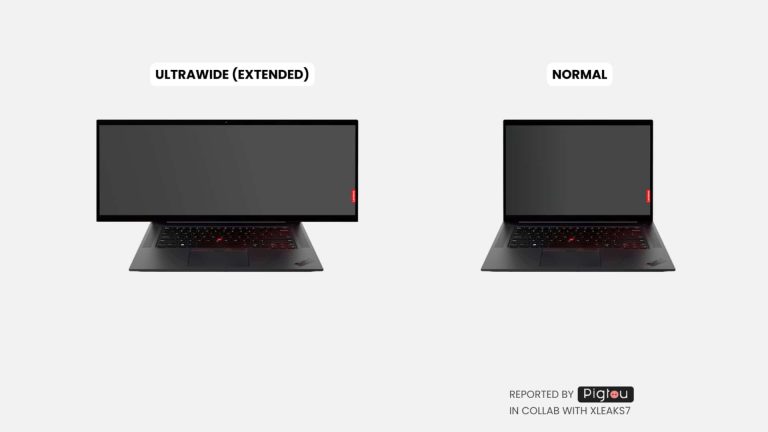
So, it appears that Lenovo might want to give you the ability to extend your laptop’s display to match your needs. According to a new report from Pigtou, Lenovo just filed a patent for a laptop with a screen that can expand to make for a wider display. So, when the display is in its standard mode, the two sides of the screen will be rolled up. Then, once you trigger it, it’ll expand and unravel. That’s pretty straightforward.
We’ve seen a concept for a laptop with a rollable screen from Lenovo before, however, that laptop would expand upward. That’s perfect if you want to have more scrolling space or if you want more room when writing a document.
The laptop in this Lenovo patent will expand horizontally. This will give you more real estate when running applications side by side. Also, it could be great for gaming.
Don’t hold your breath
Obviously, since this is patent information we’re talking about, we have no dates to share whatsoever. Again, there’s no telling if the Lenovo is even working on this. It seems likely that it would, however. Companies have been putting a lot of work into rollable screens lately. According to the report, the world may even see its first rollable screen device as early as 2025.
Foldable screens have had several years of production put into them before the first Galaxy Z Fold hit the market. It’s much the same thing with rollable screen devices. We all still remember the fantastic rollable LG phone prototype. That phone looked amazing, and that was back in 2021. We’re certain that rollable screen technology has moved forward leaps and bounds since then.