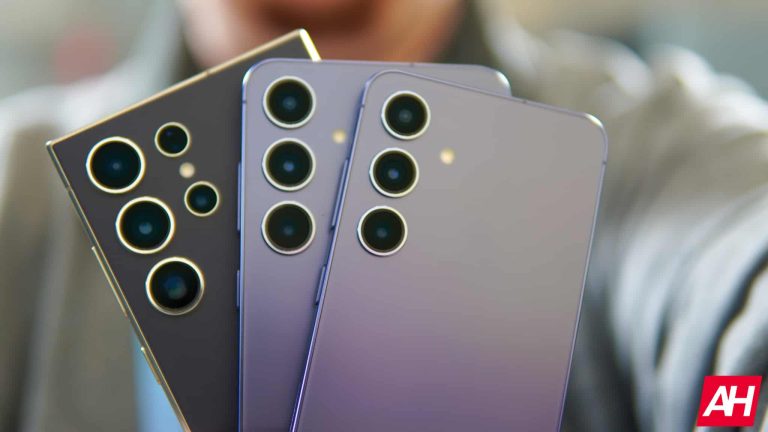
Samsung‘s Galaxy S24 phones are better than their predecessors in several areas, but durability may not be among them. In a drop test on the Allstate Protection Plans YouTube channel, the new flagships performed worse than the Galaxy S23 lineup. The devices were unusable after just one drop on the screen from six feet (1.8 meters) high.
The Galaxy S24 series may not be as strong as the Galaxy S23
Allstate Protection Plans is a YouTube channel best known for performing breakability tests on newly released smartphones. The tests involve dropping the devices from head height (six feet) onto concrete multiple times until they are unusable. The phones are first dropped on their back, followed by a face-down drop.
All three Galaxy S24 models suffered major damage on the first drop. The base model “cracked across the top and bottom of its back panel”, while the Plus completely shattered. The latter suffered the most severe damage in the top right corner. Its 10MP 3x zoom camera and 12MP ultrawide camera lenses were shattered, so much so that the cameras no longer worked. The two phones were still functional, though.
The Galaxy S24 Ultra also suffered similar damage on the back, with its lower left corner taking the worst hit. The device worked fine when turned on, which was expected. However, the second drop with the screen facing down rendered all Galaxy S24 phones unusable. The devices had their screens shattered after striking onto a sidewalk from a six-foot-high freefall.
Compared to the Galaxy S23 series, the new Samsung flagships turned out to be less durable. The 2023 lineup exhibited better strength in a similar breakability from Allstate Protection Plans, particularly the Ultra model. This is concerning because the new phone is upgraded to a titanium frame and a flat display with Corning’s Gorilla Armor protection, which is said to be stronger than other Gorilla Glasses.
That said, this test doesn’t necessarily reflect a real-life scenario. More importantly, it isn’t an absolute conclusion that last year’s Galaxy S23 Ultra is stronger than the newly released Galaxy S24 Ultra. Case in point, a similar drop test by a different YouTube channel recently suggested a stronger build for the new phone when dropped from a waist height.
Using a case is a good idea
As careful as you might be, and as strong as your phone might be, accidents happen. In a survey by Allstate Protection Plans, 78% of smartphone users reported dropping their phone while using it one-handed. Damaged screens, which are the most common form of smartphone damage, cost Americans $8.3 billion last year. So, using a case is always a good idea. You can check out these best Galaxy S24 cases.
What exactly are Android foldables? To put it in as simple a form as possible, it’s an Android smartphone that can fold. Whether that’s a regular-sized phone that unfolds into a tablet-sized device or a regular-sized phone that folds in half. There will also be many more types of foldables coming out in the next few years. But as of right now, we only really have book-style foldable and flip-style foldable. In this article, we’re going to go more in-depth about what exactly Android Foldables are.
What operating system do foldables run on?
Currently, almost every foldable runs on Android (the only real exception are laptops that are foldables, those typically run on Windows). However, like with other smartphones, these do have different skins on board. For instance, Samsung’s smartphones run on One UI, which is put on top of Android. And that’s where all of the features really come in, for that specific form factor.
Android is a popular choice for foldable devices for one big reason. It’s open. Allowing smartphone makers to use Android almost anyway they like. Google does have a few requirements, but for the most part, smartphone makers are free to do whatever they want. With smartphone makers able to use their own skins on top of Android, to add features and such for their foldables, it makes it much easier than having to build an entire operating system from scratch. Not to mention Android is hugely popular. With over 90% market share worldwide.
What smartphone makers are producing foldables?
Most smartphone makers are working on foldables as we speak, but only a couple have some that are available to purchase. However, they are not going to be easy to get a hold of, many are out of stock quite often. These include Samsung, Motorola, Google, OPPO, OnePlus, HONOR, Huawei, and more.
Foldables are still fairly expensive, and that’s because the tech is still brand new; even though we’ve been seeing foldable for the past five years, it’s still pretty new. Right now, the cheapest foldable comes from Motorola, surprisingly. The Motorola Razr (2023), which launched last fall, is currently the cheapest, with a regular price of $499.
Other smartphone makers have announced that they are working on foldable smartphones. But currently, there are only a couple that haven’t really produced any sort of foldable device yet. Those include Apple and ASUS. One you’d expect, the other you might not even realize makes phones.
Foldables are in their fifth-generation, depending on the manufacturer, but they are still pretty early. The parts haven’t changed a whole lot, other than the hinge. But we expect that to continue to change in the coming years.
What are the benefits of a foldable smartphone?
There are many benefits to both styles of foldable smartphones. And as this part of the market progresses, we’ll likely see even more different form factors available. But let’s break down the benefits by form factor.
Clamshell benefits
The main benefit of having a clamshell smartphone is the ability to have a larger smartphone in a smaller footprint. This is especially important for women. As their clothes don’t generally have pockets in the front and when they do, they are pretty small and not that wide. That is why the Galaxy Z Flip 5 and the Motorola Razr Plus are so popular right now, compared to the likes of the Galaxy Z Fold 5.
Now this isn’t quite a benefit, but it is something that brings back some nostalgia. Being able to flip the phone close and hang up on someone. Like we could with flip phones in the 2000s and early 2010s.
Most clamshell phones also have small displays on the front, that can show you the time as well as your notifications. So you can see what notifications you have, without needing to flip the phone open, which can be very helpful and conserve some battery life.
Smartphone to Tablet size benefits
There’s more benefits for a foldable smartphone that can unfold into a tablet-sized device, than a clamshell. And it’s all in that sentence. Imagine having a phone in your pocket, that you can then unfold when you need a larger display. To read a book, or use Google Maps and there are other use-cases too, but those can be infinitely more useful on a larger tablet like display, versus a small smartphone display. Especially since tablet displays are wider.
Samsung Galaxy Fold – Smartphone to Tablet size Foldable
On top of that, you could get one device that replaces two devices. And this is likely going to be how tablets exist in the future. As foldables that are actually smartphones.
Right now, this does mean that your smartphone is going to be about twice as thick and heavy as normal. Due to the fact that it is essentially two phones, with a hinge. However, some OEMs have been able to bring the weight down drastically, including the OnePlus Open and the HONOR Magic V2. Both of which are incredibly thin and lightweight for being foldable.
Does Android support foldables?
In short, yes. Google added support for foldables with Android 9 Pie in 2018. Google added even more support for foldables in Android 10, which includes better support for multi-window and multiple apps being used at the same time. It also better supports changing from the outside screen to a larger inner screen on a foldable, like the Galaxy Z Fold. Where the screen is not only a different size, but also a different aspect ratio and resolution. So it’s not as simple as just redrawing the app on the second display, which would also take more time and resources, instead of it being instant when you open the phone.
Google has support for App Continuity, starting with Android 10. What this means is that if you have an app open on the main display, then open your foldable smartphone, the app will open on that screen, where you left off. Samsung has already done this with the Galaxy Fold, ahead of Android 10.
On top of all of this, Google is also adding support for more screen aspect ratios since foldables could use anything from 1:1 to 21:9 and everything in between. Which would result in a much different experience, compared to the usual 16:9 or even 16:10.
Finally, Google has also added Multi-Resume in Android 10 and later. Essentially what this does is allow all apps that are currently being used in multi-window to be resumed at the same time. Prior to Android 10, only the ‘active’ app would resume when the phone is turned back on or opened.
Since initially adding support for foldable back in 2018, Google has continued to evolve Android to support foldable just the same as regular phones. Currently, in Android 14, there are a slew of features that help foldables and apps take better advantage of the larger screens. For example, on the Pixel Fold, you can now choose on a per-app basis, what aspect ratio you want. That means you can force Instagram to fill the screen on a foldable. Typically one of the biggest offenders of different aspect ratios.
What are the most popular Android foldables available?
There are now a ton of great foldables available. However, for those of us in the US, we’re limited to just four brands: OnePlus, Google, Samsung and Motorola. Samsung, of course, has the most experience with Foldables, having been making both flip and fold-style foldables for five generations now, and making a lot of the parts used in foldables – like the folding displays. But here are three of the most popular foldables on the market today.
OnePlus Open
The OnePlus Open landed on the scene in October of 2023, and really shocked everyone. It wasn’t just a great foldable, it was probably the best phone that OnePlus had ever made. They really hit it out of the park with the Open. One of the reasons is the software. OnePlus debuted Open Canvas, which essentially gives you more screen real estate than you actually have. So you can move apps on and off screen with ease, which just makes so much sense with foldables.
In typical OnePlus fashion, the Open also launched with the best specs available. This included the Snapdragon 8 Gen 3 processor, 16GB of RAM and 512GB of storage. It boasts a 7.82-inch inner display and a 6.31-inch outer display. What makes these displays so great is that they are super bright, at 2800 nits each. But the outer display is also 18:9. Giving you a normal smartphone aspect ratio here, that is going to make using it much better than some others on the market.
Motorola Razr+
The Motorola Razr+ popped onto the scene in May 2023, and quickly became a pretty impressive foldable from Motorola. The first few Razr foldables were pretty mid, but the Razr+ did a few things that really made it stand out. For instance, the whole front-side of the phone is now a screen. Making it insanely usable without having to open the phone.
It does sport the usual 6.7-inch FHD+ 165Hz display, with a 144Hz display on the outside. There’s the Snapdragon 8 Gen 2 inside, which is pretty impressive for this phone, which helps to offer some pretty good battery life too.
Samsung Galaxy Z Fold 5
The Galaxy Z Fold is really the OG of foldable, and now Samsung is on its fifth generation of the Fold. The Galaxy Z Fold 5 brought in a few more changes this time around, including a smaller hinge. Which helps the phone to fold completely flat – something competitors have been able to do for quite some time already. This also helped reduce the weight.
The specs are basically what you’d expect, with a 7.6-inch inner display and a 6.2-inch outer display. However, the outer display is very tall and almost looks like a TV remote. Which makes the inner display more like a square. The Snapdragon 8 Gen 3 for Galaxy is inside, along with 12GB of RAM and 256GB of storage to boot.
Foldables vs ‘Dual Screen’ smartphones
While some companies are doing true foldable smartphones, there are others that are simply doing “Dual Screen” smartphones. These include LG and Microsoft. And both companies are doing it a bit differently.
The definition of a folding phone, however, is having a single screen that can fold in half. Without any sort of bezel along the hinge. If there is a bezel in the middle of the screen, then it’s a dual screen smartphone.
Foldables vs Dual Screen Smartphones
LG has made three dual screen smartphones so far. The LG V50 ThinQ 5G, V60 ThinQ 5G and G8X ThinQ. It’s not a bad idea. Essentially what LG is doing here is giving you a flip case that has a screen attached to it. And when you attach it to your phone, you get a second display. Which can take multi-tasking to another level. However, the big downside here is that the phone is then much larger, thicker and heavier. But the good news is, that you can remove the case whenever you want. So there’s good and bad here.
Microsoft’s dual-display smartphone, the Surface Duo, is a bit different. In fact, Microsoft is not even calling it a smartphone, just a “dual display device”. It has two 5.6-inch displays that are connected by a hinge, and when you unfold it it becomes an 8.6-inch display. Now, obviously, 5.6 inches plus 5.6 inches does not equal an 8.3-inch display. This is because when it’s unfolded, it is more like a square aspect ratio instead of a rectangle. One of the main use cases for this is using one display as a software keyboard and the other as a monitor. Making it a very tiny but usable laptop. The Microsoft Surface Duo isn’t slated to come out until the end of 2020 though.
Is an Android foldable right for me?
Android foldables are still in their infancy. Many of these are still first-generation devices that smartphone makers and Google itself, are looking to work the kinks out of first. This is part of the reason why they are so expensive. Smartphone makers don’t want these devices to be available to the masses.
However, if you are an early adopter and want to live on the bleeding edge, then an Android foldable is probably a good choice for you. For most people, a clamshell will be the better bet.
Foldables will continue to get better and better in the coming years. So if you can hold out on getting one, we’d recommend doing so. As these are going to progress pretty quickly, and it wouldn’t be surprising to see successors coming less than a year after the predecessor is announced.
Google’s AI chatbot, Bard, is currently undergoing a major transformation. We have heard for some time now of the plans to rebrand it as “Gemini,” which signifies its seamless integration with the newest “Gemini” AI model. However, now it is also being reported that, in addition to a range of new features, there are also plans to launch a companion Android app.
As reported by 9to5Google, based on findings by Android Dev and expert Dylan Roussel, Bard plans to undergo this reported rebranding to “Gemini” as early as February 7th. This information comes from a leaked changelog, reportedly scheduled to release on that date. In this changelog, Google explains its intent to give all Gemini users access to the company’s top-notch AI models. The expanded access is in line with the name “Gemini,” which represents a broader set of capabilities.
Google added a new changelog for Bard, and — oh boy — it’s a big one!
The availability in Canada is awesome! That said I don’t really understand the limitations with the app. That’s disappointing as someone who lives in Europe.
In addition, Google is unveiling a new paid tier called “Gemini Advanced” to accompany their rebrand. This tier is based on the highly advanced “Gemini Ultra” model. The upgraded tier offers enhanced multi-modal capabilities, improved coding support, and advanced file and data analysis capabilities. The changelog also reveals that Gemini Advanced will be available in over 150 countries and territories, which is in line with Google’s recent multi-language support for Bard.
A new Gemini Android app
But the changes in Bard, soon to be Gemini, won’t be limited to just the front-facing website. This same changelog also reveals that the new Gemini will also be available in the form of an app, in addition to its native integration with existing Google apps such as Gmail, Maps, etc.
The new Gemini app will be available on Android through the Google Play Store and on iOS as part of the existing Google app. It will first launch on select devices, most likely Tensor-powered Pixels and the Galaxy S24 Ultra, initially in English in the U.S., but soon expanding to other languages and countries.
Lastly, Bard/Gemini on the web will finally be available in Canada in both English and French, a region that was not supported by Bard in the past. The Gemini app will also be available soon, though first only in English.
This rebranding and feature expansion represent a major milestone for Google’s AI chatbot. It is clear that Google’s goal is to make Gemini a tool that is both accessible and powerful for users worldwide.
There can only be one; right now, Google has two powerful generative AI products, and they are Bard and Gemini. Ever since Gemini hit the scene, people wondered what Google was going to do with Bard. Well, according to the company itself, Google is going to replace Bard with Gemini next week. Also, there’s a new app in the cards.
This news shouldn’t come as a surprise, as we had seen a few leaks pointing to Gemini replacing Bard. A few strings of code were discovered pointing to Gemini eventually taking over Bard. These strings were found in different places, which means that this is going to be a sweeping change.
While it may seem odd that Google is replacing a chatbot that most of the internet knows about, there’s not much point in having two AI tools coexisting on the same platform that perform the same tasks. Google Bard is powered by Gemini Pro, so there’s really no difference in functionality between them. Gemini Ultra has not launched yet. So, there’s not much point in keeping two separate products.
Gemini could replace Bard next week
Google Gemini was introduced back in December 2023, and it’s been swiftly taking over. The company quickly implemented Gemini Nano into the Pixel 8 Pro, and it’s now powering Galaxy AI on the Galaxy S24 phones. Gemini Pro is powering Bard, and Gemini Ultra is soon to hit the market as Google’s most powerful AI model. So, someone at Google must have flipped the switch to start the transition from Bard to Gemini.
According to a report from Dylan Russel, Google released a new page saying that “Bard is now Gemini.” This must have been an accidental upload, as the page is currently unavailable. Anyway, Russel was able to capture a screenshot of the page. It announces the transition from Bard over to Gemini. It also states that Bard Advanced, the paid Google AI tool we’ve been hearing about, is now called Gemini Advanced.
While it got a name change, it’s still powered by the same model, which is dubbed Gemini Ultra 1.0. When it launches on February 7th, it will be available in over 150 countries also, it will only be available in English.
Google still didn’t clue us in on the price of Gemini Advanced. That’s one of the most important bits of information we’ve been waiting for.
There’s also an app coming
Aside from changing Bard to Gemini, Google is also unveiling a new app so that you can better access Gemini. Right now, you’re able to access Google Bard from the mobile version of Chrome. However, it’s about time Google unveiled an actual app. ChatGPT has its own app interface, and you can also access Snapchat My AI from its dedicated app.
Right now, we don’t know too much about the app, but it seems that it will act pretty similar to the Google Assistant app. In fact, 9To5Google discovered that the Google Assistant app available on the Play Store has been renamed to Gemini. So, if that’s true, it seems likely that Gemini will be one step closer to replacing Google Assistant as the default voice assistant on Android. In fact, a screenshot shows a screen letting you assign Gemini as the default voice assistant on your phone.
So, before too long, we might see Google sunsetting two AI products in order to streamline everything and bring on the new age of Gemini.
The last bit of news is that Gemini is going to make it to Canada on February 7th. Canada has been left out of the club with the country being passed over for Bard.
Last year, Samsung landed into a controversy after the Galaxy S23 Ultra was found to be faking Moon shots. The phone captured non-existent details on a blurry photo of the Moon shown on a monitor. The firm explained this as AI enhancement of images. Now, amid talks about the Galaxy S24’s AI-powered Generative Edit feature, a company executive said that every photo is fake. “There is no such thing as a real picture,” Samsung EVP Patrick Chomet said.
Samsung executive says there are no real pictures in the age of AI
Smartphone cameras have gotten better with each new generation. However, the camera hardware isn’t the real deal. It is the software processing that helps achieve photographic perfection. Phones use various technologies to enhance the details in images and improve the quality of the output. Multi-frame capture techniques reduce noise in photos while improving the brightness, white balance, dynamic range, and other parameters.
Mobile devices also boast scene AI-powered recognition technologies. They can recognize scenes in the frame and adjust everything from colors and contrast to skin tones and textures to give you the best results. In a sense, the photos you get aren’t a true representation of what you see. Advanced software algorithms and AI play a big part in enhancing the quality and making images look more attractive than what the camera hardware captures.
Patrick Chomet talked about the use of AI-powered camera tools in a recent interview with TechRadar. He started with last year’s controversy, referring to a video from YouTuber Marques Brownlee, aka MKBHD. “There was a very nice video by Marques Brownlee last year on the moon picture. Everyone was like, ‘Is it fake? Is it not fake?’ There was a debate around what constitutes a real picture. And actually, there is no such thing as a real picture.”
Chomet, who is Samsung’s Head of Customer Experience, added that “as soon as you have sensors to capture something, you reproduce [what you’re seeing], and it doesn’t mean anything.” He reiterated that there is no real picture. “You can try to define a real picture by saying, ‘I took that picture’, but if you used AI to optimize the zoom, the autofocus, the scene – is it real? Or is it all filters? There is no real picture, full stop.”
Galaxy S24’s Generative Edit is a way to create a new reality
The Samsung executive also talked about Generative Edit. It is a suite of AI tools that allow Galaxy users to artificially enhance images by erasing imperfections or recomposing a scene by adding non-existent details. So, not only do you have real-time optimization of the scene, but also the ability to further refine the output later. Chomet says all of this is necessary in today’s world where people have created a new reality on social media.
“When people go on Instagram, they add a bunch of funky black and white stuff – they create a new reality. Their intention isn’t to recreate reality, it’s to make something new. So [Generative Edit] isn’t a totally new idea. Generative AI tools will accelerate that intention exponentially in the next few years,” he said. “There is a big customer need to distinguish between the real and the new,” the Samsung SVP added.
To that end, Samsung’s Generative Edit feature automatically adds a watermark to the images you edit or generate using AI. It also edits the metadata of the image. Chomet said the company is “working with regulatory bodies to ensure people understand the difference” and is “very aligned with European regulations on AI.” The Samsung official noted that governments are right to express concerns about the potential dangers of AI.
“The industry needs to be responsible and it needs to be regulated,” he said, adding that Samsung is actively helping regulators with that. “Our new technology is amazing and powerful – but like anything, it can be used in good and bad ways. So, it’s appropriate to think deeply about the bad ways.” Samsung plans to roll out the new AI features to over 100 million Galaxy devices this year.
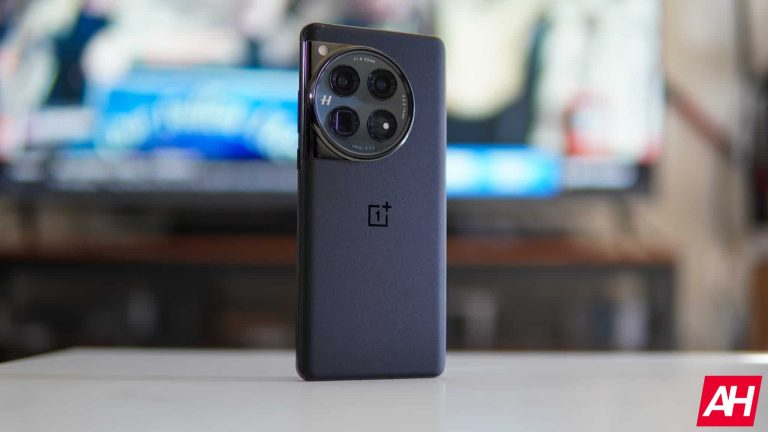
Eleven generations and many years on, OnePlus has become one of the most well-known brands in smartphones these days. With its phones often being big hits among the fans and OnePlus enthusiasts. And there’s generally a good reason why. The devices it puts out tend to have great specs, they’re stylish, and they usually come in at a (mostly) affordable price point. That is to say, they’re usually at least a couple hundred less than mainstream flagships with bigger names and price tags to match. Then you have OnePlus’s ‘R’ line. A semi-stripped-down version of its flagship phones. These often drop a feature or three so the company can drop the price a bit more.
Making them even more affordable than usual. That brings us to the OnePlus 12R. The company’s latest device. This is my first OnePlus phone that I’ve personally reviewed as I normally review gaming devices like the ROG Phone series, and those coming from RedMagic and other brands. I wasn’t sure what to expect when I settled in for using this as my main device for the next few weeks. However, after that time has passed I am quite pleasantly surprised with what OnePlus has put together here. That being said, let’s dig into the phone a bit more and see how it stacks up with other similar devices.
Later on in the review, I’ll be comparing this to devices of similar specs and features. Including the ROG Phone 7 Ultimate because it uses the same chipset, the ROG Phone 8 Pro Edition, the RedMagic 9 Pro, and of course, the OnePlus 12 which we reviewed a few weeks ago. So let’s take a closer look at this phone and see if it’s worth your hard-earned money.
OnePlus 12R Review: Hardware and build quality
OnePlus to me has always had a great combination of hardware and design. And that’s always been accompanied by a top-notch build quality. Once upon a time, you might only see this kind of build quality in flagships that cost many hundreds more. But OnePlus from the get-go has generally offered a really premium-feeling phone. Even when its flagship devices were a fledgling offering in the market. I think that’s what’s most impressive. OnePlus can offer such a great-looking device that feels well-made and only costs as much as this phone does.
Let’s not forget, the OnePlus 12R has a base cost of $499, which comes with 8GB of RAM and 128GB of internal storage. Then you have the model I’m reviewing which comes with 16GB of RAM and 256GB of storage. This model goes for $599. Between the two, all the rest of the specs are the same. So no matter which phone you go with, you aren’t losing out on anything other than how much RAM the phone has and how much storage you have for apps, games, video, photos, and anything else.
When pulling this device out of the box my first impressions were that the phone is incredibly thin and incredibly light. It was a huge change from carrying around the ROG Phone 8 Pro Edition. The ROG Phone 8 Pro Edition was still thin (especially compared to last year’s model) but it was noticeably heavier and just didn’t feel as light in the hand. There was more heft to it. I don’t consider that a bad thing. I just find it interesting how different the two phones feel when they’re roughly the same size. Aside from the weight and thickness, the details that stand out more than anything else are the camera bump and the color/finish of the phone.
I’m not super excited about the camera bump. It’s halfway between pleasing and mildly annoying for me. While I can appreciate the design details, I am not fond of the way the camera bump feels when you hold the phone in landscape mode. Particularly when gaming. The camera bump looks nice thanks to the circular shape and the notches that go all the way around the perimeter. It’s also not exceedingly tall like it is on some phones. The ROG Phone 8 Pro Edition for instance has a pretty tall camera bump. Taller still is the camera bump on the Pixel 8 and Pixel 8 Pro.
However, this is kind of a double-edged sword for me. The camera bump design is nice. But it has a very strict hard edge that just doesn’t feel pleasing if your hands or fingers run across it. Let alone rest against it for an hour or more non-stop. This is more or less unavoidable because your fingers just happen to sit right where it is when you hold the phone horizontally. However, I suspect this is more due to the notches around the edge than anything. Perhaps I’m being nitpicky here with this. But OnePlus is very openly positioning the 12R with some powerful gaming performance. And it just feels like this particular detail wasn’t thought of when it came to thinking about the design.
That being said, this is not a gaming-first phone. And even though I’m not a huge fan of the camera bump, the phone build quality overall is pretty premium. So putting my personal gripe aside, OnePlus nailed the build quality with the 12R. There’s no question about it.
Design
In terms of other small design details, things are pretty standard with one change. The power and volume rocker are on the right side like normal. But the alert slider has been moved to the left. A decision that OnePlus says was so it could reposition the antennas to improve the performance of the device when held in landscape mode. Which is typically how people hold the phone when playing games. In fact OnePlus made this design change specifically to improve gaming performance.
On the bottom, you’ll find the USB-C charging port, the SIM card tray, and one of the speakers in the dual stereo speaker system. On the top, you have the IR blaster, the microphone hole, and the other speaker. It also features a 6.78-inch AMOLED display with curved edges, with slightly curved sides of the frame while the top and bottom parts of the frame are flat. It’s a comfortable design to hold in the hand and very pleasing to the eye when you look at it. I do wish the finish on the phone was matte though instead of glossy. As the phone just becomes a fingerprint magnet and it’s harder to photograph.
The glossiness also somehow makes it feel more in need of a wipedown than is probably necessary. This is another minor gripe but matte finishes on phones always look better in my opinion. And I wish OnePlus had gone with one here. Despite this, the Cool Blue color is fantastic and one of my favorites.
OnePlus 12R Review: Display
OnePlus seemed to really go all out with the display on this device. That shouldn’t be surprising. Similar to ASUS with its ROG Phone 8 and ROG Phone 8 Pro, the display on the OnePlus 12R is no different than the OnePlus 12. Most notably, I want to highlight the brightness. It has a peak brightness of 4,500 nits. This is incredibly bright and absolutely wild to me how OnePlus was able to put this in a phone. Let alone decide it was something necessary.
Is 4,500 nits of peak brightness overkill? I’m not so sure that it is honestly. Just for comparison, the ROG Phone 8 Pro has a peak brightness of 2,500 nits. I almost never had the display at peak brightness. And even then it looked and felt more than bright enough for almost any situation. The OnePlus 12R goes well above and beyond that. Now I haven’t been able to test the display in any obscenely bright situations like outdoors on a sunny day. It’s mostly overcast and gray skies all the time here in Oregon this time of year. But this is the same display that’s on the OnePlus 12. And in that review, we took the phone to San Diego where it was pretty darn bright outside during the daytime.
The results are, in short, that you can see the display and what’s on it without issue even in super bright environments. Aside from the brightness, the visual clarity of the OnePlus 12R display is nothing short of amazing. It has a resolution of 2,780 x 1,264 and it has a 120Hz refresh rate. OnePlus also upgraded the color levels on the display so anything with lots of colors looks really good. For me, this mostly translated to games like Genshin Impact and Honkai Star Rail looking more vivid than ever thanks to the boost in color levels. But it should also help with better-looking visuals in movies and photos too.
One thing worth noting is that this display has a dynamic refresh rate. What that means is that it adjusts to your usage. For example, OnePlus says that the display reacts to how fast your finger scrolls up and down the display and the refresh rate will change accordingly. The phone can tell when you’re slow-scrolling or fast-scrolling and adjust based on the needs of the activity. This is to help the reduction in battery drain and make the overall battery life better. Now as someone who plays mobile games a lot and quite enjoys them, I care more about the refresh rate during gaming than other activities.
I can happily say that the refresh rate during gaming is perfectly fine. I didn’t notice any issues when gaming. That being said, it’s still nice to have the option to completely control what refresh rate you want for the display at all times. This might turn some people off if they’re looking for that feature specifically. But I didn’t feel it was 100% necessary. And everything felt and looked smooth regardless of the activity.
The OnePlus 12R also employs a curved display just like the OnePlus 12. This helps the content you’re viewing on the display sort of blend in all the way to the edge. It’s nice, but I don’t feel the visual improvement is drastic enough to warrant going with a curved display over a flat display. Flat displays, like the ones on the Galaxy S24 series and the ROG Phone 8 series, for example, are more my preference. It just feels like there’s less of a chance of accidental touches and I think the flat displays work better with the gesture navigation.
Curved displays can also be more prone to scuffs or scratches if you aren’t careful. However, the display does look nice and the content you view on it will look nice too.
OnePlus 12R Review: Performance
When it comes to performance, the OnePlus 12R really does a good job. There are multiple factors to take into account. Like the top-notch specs (even if they are from last year’s flagships), the smart use of performance efficiency, and the large vapor chamber helping to keep the phone cool. In all my time using the OnePlus 12R during this review period, I never questioned the phone’s capability to perform at a high level. This is what’s so impressive to me. For a phone that costs $500 to $600, the performance is stellar.
This is thanks in part to the Snapdragon 8 Gen 2 mobile platform. This is the flagship mobile platform from 2023 and found in phones like the ROG Phone 7 Ultimate.
Keeping it cool
In addition to the Snapdragon 8 Gen 2, the OnePlus 12R comes with a pretty large vapor chamber to help dissipate the heat. Just from my time during normal use, which included quite a few long gaming sessions, the phone never gets too warm to hold. It gets warm, don’t get me wrong. But never too warm to where I had to put the phone down or stop playing games.
For a phone this thin, you’d expect it to get a lot warmer under heavy loads like high-intensity gaming sessions in games with demanding graphics. But that hasn’t been the case for me. I still think the ROG Phone 8 Pro Edition cooling system is better. But this shouldn’t be surprising. It was designed with gaming as a central focus and cooling is always a high priority when it comes to gaming. Then again, this should really just make OnePlus’s achievement with the cooling more impressive.
The ‘Cryo Velocity cooling system” as OnePlus calls it is actually made up of two vapor chambers. One small and one large. Both work together to deliver stellar performance. But each has its own slightly unique job too. It all starts with the smaller vapor chamber. This absorbs heat directly from the source and then evenly distributes it across the entirety of the small chamber. The large vapor chamber then absorbs the heat from the small chamber. The heat then rapidly dissipates as it cools down into liquid. The end result is a phone that stays cooler longer to deliver optimal performance.
So game away. Scroll away. Record more video. Whatever activity you do a lot of that taxes the phone components heavily, it doesn’t matter. The OnePlus 12R will stay cooler longer than most. By comparison, the vapor chamber in the OnePlus 12R is 76% larger than the one in the OnePlus 11R. A big step up that makes a big difference.
Benchmarks
Benchmarks aren’t everything and they shouldn’t be viewed as the end-all-be-all of how well a phone will perform. But they do still serve a purpose and we’ve employed a few tests to show how that performance can be visualized. Like with other phones we’ve recently reviewed, we’ve run the OnePlus 12R through benchmark tests from Geekbench and 3D Mark, in addition to our own test we call the CapCut test to show what you can expect from the phone performance-wise on a daily basis. Keep in mind that experiences can vary based on how you use the phone.
But that’s also why we’ve tried to use the benchmarks in conjunction with normal use and heavy use (such as gaming) to give a more accurate or true-to-life experience. With that said, here’s what you’re looking at. With Geekbench 6, the OnePlus 12R scored admirably for a device with last year’s chip. Coming in with a single-core score of 1,554 and a multi-core score of 4,483. That being said, the ROG Phone 7 Ultimate in comparison scored 2,051 and 5,764 respectively, and it runs on the same chipset. For the GPU test, the OnePlus 12R scored 8,481. This is once again below the ROG Phone 7 Ultimate but still great. Especially since performance feels perfectly fine when in use.
Now worth noting is that the single-core and multi-core scores for the CPU are both higher on the OnePlus 12R than they are on the OnePlus 12. While the OnePlus 12 GPU score is considerably higher at 13,766. But this isn’t surprising given it comes with a Snapdragon 8 Gen 3 mobile platform.
As for the 3D Mark test, we once again used the Wildlife Extreme Stress Test here. The OnePlus 12R’s best loop was 3,463 while its worst loop was 2,458, with a stability of 67.5%.
Finally, there’s the CapCut test. We used the same conditions we do for other phones on this which is to export a 1-minute video from CapCut and see how long it takes the device to do this with the video being 720p and 30 frames per second. The OnePlus 12R was able to finish this task in 10.1 seconds. This is compared to 5.2 seconds on the RedMagic 9 Pro, 6.6 seconds on the ROG Phone 8 Pro Edition, 9.31 seconds on the OnePlus 12, and 12.9 seconds on the ROG Phone 7 Ultimate.
OnePlus 12R Review: Battery life and charging
Battery life is without a doubt a strong point of OnePlus devices these past few years at the very least. That hasn’t really changed with the OnePlus 12R or the Oneplus 12. Both phones are capable of lasting longer than you might expect of any phone with the specs and hardware they possess. And I was mostly pleased with how well the battery performed on the OnePlus 12R. I say mostly because it had a significant drop compared to the OnePlus 12.
This is surprising considering the OnePlus 12 has a 5,400mAh battery while the ‘R’ model has a 5,500 mAh battery. Yet the R model didn’t last as long during our battery life rundown test. The ROG Phone 8 Pro Edition even has the same exact size battery capacity of 5,500 mAh and it lasted considerably longer too.
Now to test the battery life we use the same test for every device. We load up a 24-hour video and we let it play on the phone from 100% until it gets to 1%. We do this with the phone display at full brightness as well. Once the phone hits 1% we mark the time and that’s our testing for how long the battery life will last. Now there are some other things to consider here. Video streaming isn’t the only thing people are going to do, so don’t expect this timing for everything. Your battery life results with this device will obviously change depending on what you do with the phone.
Gaming for instance can drain the battery significantly faster than watching video or streaming music. Especially if it’s a game like Genshin Impact or Honkai Star Rail. However, more people are likely to use their phones to watch videos than play games. So we felt this was a good baseline to use. All told, the OnePlus 12R lasted 12 hours (lol), 14 minutes, and 17 seconds before it hit 1%. This isn’t bad at all since this is continuous use. So if you’re using it more normally, where the phone screen is going to be off for a considerable amount of time during your day, you could easily take this phone well beyond a day before needing a charge.
The phone charges lightning-fast, but it wasn’t as fast as I was expecting
Herein lies the other beautiful part about OnePlus phones. They tend to charge up very fast. This is partly due to the charger. With the OnePlus 12R, OnePlus packed in a 100W charger. So it charges up super quickly. That being said, the OnePlus 12R didn’t charge as fast as I was expecting for supporting 100W charging. We did use the 100W charger that comes in the box too. And yet, it seemed to make only a minor difference. Here’s what I mean.
The OnePlus 12R charged from 1% to 100% in 38 minutes and 23 seconds. That’s just over 6 minutes slower than the OnePlus 12, and only marginally better than the ROG Phone 8 Pro Edition which charged up from 1% to 100% in 40 minutes and 22 seconds. The ROG Phone 8 Pro Edition also has the same size battery at 5,500mAh and charges at a max of 65W.
However, there are some other things to consider for both the OnePlus 12R’s battery life and charging speeds compared to the ROG Phone 8 Pro Edition. The OnePlus 12R has a higher-resolution display with a higher peak brightness. So of course it’s going to drain faster than the ROG Phone 8 Pro Edition and it’s not too surprising that it doesn’t charge that much faster. Still, the higher wattage on the charger, compared with the OnePlus 12’s charging speed of just a couple minutes over half an hour led me to believe the OnePlus 12R would be about the same. All-in-all, charging speeds were pretty good with this device.
Let’s say you forget to charge the phone overnight and you wake up to the battery at 1%. In under 40 minutes, you can have a full battery. That means the phone should be fully charged before you finish your morning routine, which would generally include getting out of bed, a shower, getting dressed, and eating breakfast before you walk out the door. Not too shabby.
OnePlus 12R Review: Software
This is my first time using a OnePlus device as a daily driver so I don’t have much of a frame of reference when it comes to the comparison of past OnePlus device software experiences. But I have to say, it’s quite nice on the OnePlus 12R. There are a lot of little touches that just really make the experience very enjoyable. And it’s clear that OnePlus put a lot of effort into making this a user-friendly device as much as it could. Like the OnePlus 12, the OnePlus 12R is running on Android 14 with OxygenOS 14.
So far, there are a few things that this phone offers that I really have grown to appreciate. My favorite little touch is the Edge Lighting. This isn’t something I have experienced on any other phone I’ve ever had. It’s a simple thing, but it makes all the difference.
The Edge Lighting is a feature that can be found in the “wallpapers & style” section of settings. What it does is light up both the left and right edges of the display for just a brief second or two whenever a notification comes in. This, to me, is such a nice addition to ease of use for phone alerts. It helps that it looks cool too. You can change the Edge Lighting colors as well, with options for Blue, Red, and a light Gold color. The colors aren’t customizable. Which is a shame. So you’re stuck with just these three.
Nevertheless, it’s still great. I wish the ROG Phone 8 Pro Edition had this feature. It’s just slick. Not to mention it more easily draws the eye to the phone screen when you get a message or an email. If you’re like me and you have your phone sitting next to you most days, then your peripheral vision should more easily pick up that an alert is coming in for something. The screen then pops on shortly after showing you what the notification is and you can decide whether or not you need to check it right then or leave it for later.
In addition to the Edge Lighting, the OnePlus 12R also has a really neat feature called the Shelf. This is essentially a drag-down panel for widgets with various information for things like weather, time, calories burned, and music streaming services like Spotify. You can add widgets for the IR blaster and notes too.
Another cool feature, if you like gaming, is the Live Lock feature. You can set your game as the app to be “live-locked” so that when you switch to another app for any other reason, the game stays awake as if it were always in the foreground. It’s not entirely necessary. But quite nice if you take a quick break from your game and then go back to it 10 minutes later. In some cases, with other phones, the game would simply shut down after this time and it would relaunch after you went back to it.
The OnePlus 12R also has its own game menu overlay. Just drag down from the top corner of the phone and it pops up. This will let you swap between different performance modes. Such as Pro Gamer Mode which prioritizes frame rate and diverts most resources to the game. You won’t need to use this for every game. But I found it useful for more demanding games like Genshin Impact. This panel also has quick share buttons for socials if you like to share screenshots or game clips.
OnePlus also does quick settings a little differently than most other OEMs. Everything is still there. But it doesn’t make all of the icons small or all of them big. It’s prioritizing WiFi and Bluetooth as big buttons while the other stuff is all smaller circular buttons. This is another minor detail. But it was worth mentioning because it’s not something I’ve encountered before and it’s a nice touch. All-in-all, the software experience is excellent. I didn’t think I was going to care for the UI or any of the little touches OnePlus put in. But to my pleasant surprise, it’s quite good.
OnePlus 12R Review: Camera
As my first experience with a OnePlus phone camera, I wasn’t quite sure what to expect. Would I like the camera? Or would the pictures come out looking less than desirable compared to other recent phones I’ve used? I was surprised at how well most images turned out. Though I have to admit, it was a little underwhelming for certain types of photos. Mostly anything where you try to use the phone’s zoom imaging. In this one particular area, the OnePlus 12R doesn’t perform as well as I was hoping.
Then again I had to remind myself that this was a $600 phone and for that price, removing the images where I would zoom in beyond 3x zoom, the pictures came out great. Now it’s important to note here that this isn’t using the same camera as the OnePlus 12. The OnePlus 12 uses a Sony LYT-808 image sensor. Whereas the OnePlus 12R uses a Sony IMX890 sensor. In short, the OnePlus 12 has the better camera. But you still get pretty good images with the R model. I think almost more important than anything else is that the camera on the OnePlus 12R launches pretty rapidly.
And this results in you being able to snap photos that you want with less fear that you might miss that perfect shot. Not only that, but it zooms in and processes images faster as well. So if you’re trying to capture something far away or grab multiple pictures, it’ll do all this fast enough that you should be able to get the images you were hoping for. In my experience, as I said, zoomed-in images aren’t the best if you zoom in too far. But other types of images, like those in portrait mode, as well as your standard images with the main “photo” mode came out great. They’re not oversaturated and have a surprising amount of light even on an overcast day with plenty of clouds.
You get good detail with closeups and colors seem to come out looking better than you’d expect for something at this price range. I think overall the camera is pretty darn good. And better than a lot of phones would be around the same price, and even better than some that would cost hundreds more. I still think I prefer the quality of images on the ROG Phone 8 Pro Edition and the Pixel 8. But both of those phones cost well over what you’ll pay here. And if you’re just looking for a really great phone that has great picture quality, you can’t go wrong here.
Should you buy the OnePlus 12R?
There are a few questions you need to ask yourself. What are you looking for in a phone, what can you do without, and what are you looking to spend? I think the OnePlus 12R strikes a very good balance of delivering top-notch performance in multiple areas while shedding the weight of features that don’t dilute the overall experience so that the price can come down. This is hard to do. Yet, OnePlus has nailed it. The OnePlus 12R features a great camera, excellent gaming performance, and a cooling system that helps keep the phone running smoothly all day.
That’s not an easy achievement. I feel confident in saying that the OnePlus 12R is the absolute best phone you can buy in this price range. If around $500-$600 is your budget, you will not find a better phone. That’s not because there aren’t other options out there that are good at this price. It’s because the OnePlus 12R simply outpaces the competition at every turn.
You should buy the OnePlus 12R if:
You want a great camera
You want something affordable
Top-notch performance for mobile gaming is an important factor for you
A new variant of Mispadu stealer has been identified by researchers, which specifically targets victims in Mexico. This variant of Mispadu stealer utilizes the Windows SmartScreen vulnerability CVE-2023-36025, to download and execute malicious payloads on the system.
Mispadu stealer is written in Delphi and was first identified in November 2019, targeting users in Brazil and Mexico. On further analysis, it was discovered that this stealer was distributed even before the publication of the CVE, which does not have the bypass for the patch.
DocumentRun Free ThreatScan on Your Mailbox
Trustifi’s Advanced threat protection prevents the widest spectrum of sophisticated attacks before they reach a user’s mailbox. Try Trustifi Free Threat Scan with Sophisticated AI-Powered Email Protection .
Mispadu Malware Exploits Windows SmartScreen
According to the reports shared with Cyber Security News, the Windows SmartScreen feature is designed to pop up a warning to users to protect them against visiting harmful websites. However, the feature can be bypassed by a specially crafted URL file.
Windows SmartScreen Feature (Source: Unit 42)
This URL file or a hyperlink will contain a link to the attackers’ network share for downloading a binary from a harmful website, which bypasses the Windows SmartScreen warning by abusing a parameter that refers to a network share instead of a URL.
Attack Vector Analysis
Once the malware is downloaded and executed on the victim system, it initially gathers information about the time zone and UTC for checking if the system belongs to a specific timezone by calculating the GMT. Upon analysis, the malware only executes in certain regions of Western Europe and within most parts of the Americas.
The malware uses the AES encryption algorithm for several decryptions through the bcrypt.dll library. Additionally, it identifies the %TEMP% directory for storing certain files that will be used during the malware execution.
For establishing C2 communication, the malware performs either an HTTP or HTTPS GET request, depending upon the version of Microsoft Windows running on the system.
Once the C2 communication is established, the malware uses SQLite to gather history databases from Microsoft Edge and Google Chrome browsers and stores them in the %TEMP% directory. After this, the malware extracts the URLs on certain conditions and checks them against a targeted list.
All the targeted URLs will have the (.) changed to (,), grouped, and hashed to prevent brute-forcing the algorithm. All this information is then sent to the C2 and could be used for further cybercriminal activities.
Unit 42 which provides detailed information about the source code, malware analysis, and other information.
Follow us on LinkedIn for the latest cybersecurity news, whitepapers, infographics, and more. Stay informed and up-to-date with the latest trends in cybersecurity.
HMD has been all over the news lately. The company has no intention of releasing new Nokia phones, phones under the Nokia brand. However, HMD Global will continue releasing phones, that are HMD-branded. Well, 9 HMD devices got spotted online, and the company revealed the launch date of the first models.
9 HMD devices got spotted, as we’re waiting for the first ones to arrive
Folks over at GSMChina spotted 9 HMD phones in the IMEI database. Unfortunately, no specifications are given, or anything of the sort. All we can see here are the model numbers. They are HMD TA-1584, HMD TA-1588, HMD TA-1589, HMD TA-1592, HMD TA-1594, HMD TA-1595, HMD TA-1602, HMD TA-1605 and HMD TA-1631.
That’s basically everything we know about them thus far. HMD also confirmed that it will host a press event on February 25. The company will announce its very first HMD-branded smartphones during that event.
That press event will take place in Barcelona, as part of the Mobile World Congress. That is something the image above confirms too. The event will start at 12:30 CET (Barcelona time).
Some of the company’s upcoming devices are on display… officially
In any case, some of those devices have already been shown by the company itself. They’re on display over at HMD’s official website, even though we don’t know their names or anything about them.
At least one of the models is reminiscent of the old Nokia Lumia devices, as you can see in the images provided below. HMD’s phones will be quite colorful, based on what we can see here.
We’re still not sure if the company plans to announce high-end devices during the launch event. HMD could stick to budget smartphones only, it remains to be seen. One thing is for sure, though, more than one phone will launch on February 25. We could possibly see some wearables too.
TikTok might be famous for both entertaining and controversial reasons. It’s also banned in several countries, which once contributed to solid revenue for the China-owned social media platform. Despite geopolitical challenges, it remains the fastest-growing social media app in the US. So, with more people using and posting there, the platform becomes a rich source of information. And now, Google Search is now extracting info from TikTok videos to enhance its search results.
Google search results now rely on information from TikTok videos
First reported by SearchEngineLand, Google Search is putting TikTok info in more noticeable spots in search results. Before, TikTok videos were there, but not in important spots. Now, TikTok videos and details are showing up in special sections on Google, like Featured Snippets and the Search Generative Experience (SGE). For those unaware, SGE is an artificial intelligence-powered search by Google.
On the same note, Google’s competitor Bing which has gone through some major improvements recently also promoted TikTok video results. It may be dependent on regions as some regions such as India have banned TikTok completely since June 2020.
The report mentions that even they are not sure if this is due to a recent update or has been there before. However, we also believe it could be Google Search’s latest addition. Generally, Google doesn’t announce these tiny updates. I also noticed something similar in Google News when it began mentioning the author’s name beneath an article. This was around September last year.
There are a couple of reasons why Google did this
There might be a few reasons for Google’s decision, and one of them could be a study by Adobe Express, which found that more than 2 in 5 Americans use TikTok as a search engine. Another survey found that over 51% of Gen Z women prefer TikTok over Google for searching. So, Google might be trying to take advantage of this trend. However, whether TikTok is a reliable search engine is still a topic of debate.
Learn how a multinational company’s Hong Kong branch faced a deepfake scam, causing substantial financial losses, and explore efforts to counter the rising sophistication of deepfake technology.
A multinational company’s Hong Kong branch faced a substantial financial setback due to an advanced deepfake scam. During a video call, an employee was deceived by digitally manipulated versions of the company’s CFO and others, resulting in the unauthorized transfer of funds to the scammers.
The scam recalls the August 2022 incident in which scammers created a Deepfake AI hologram of Patrick Hillmann, Binance’s Chief Communications Officer. The hologram was manipulated to deceive users into participating in online meetings and to target crypto projects of Binance clients.
Reports indicate that the employee was tricked into paying out HK$200 million (approximately US$25.6 million) after participating in a deepfake video call impersonating the company’s CFO. The worker was persuaded after seeing multiple staff members attending that call. However, all were deepfake recreations.
The worker initially became suspicious after receiving a message from the UK-based CFO and avoided it believing it was a phishing email. However, after a video call, the worker realized that the other attendees resembled his colleagues, despite initial doubts, as they appeared and sounded familiar.
What happened is that the scammers used publicly available footage to create convincing versions of the meeting’s participants, according to Hong Kong police senior superintendent Baron Chan Shun-ching’s briefing on Friday.
In the digitally altered video, the CFO issued fraudulent instructions to transfer funds to unauthorized accounts. The employee, a finance worker at the company, followed the instructions, leading to a significant financial loss because the scammers had immaculately replicated the CFO’s appearance and voice.
The worker transferred $25 million to five bank accounts in 15 transactions. The scam was discovered after the employee shared the information with the company’s head office. It is worth noting that the incident lasted a week.
However, this isn’t the first of its kind incident involving deepfake technology. Fraudsters have been relying on this technology to cheat people out of money.
Bitdefender’s latest research reveals a rise in YouTube stream-jacking campaigns using deepfake videos for cryptocurrency theft. Despite McAfee’s MockingBird tool detecting 90% of deepfake content, scammers continue to use malicious techniques for crypto scams, sometimes bypassing facial recognition systems, highlighting ongoing challenges in combating these deceptive practices.
Authorities are investigating the incident in Hong Kong, which is the first such scam involving a large sum of lost money. It has raised concerns about the scammers’ increasing sophistication and potential for financial fraud. Experts urge increased awareness and training for employees to effectively identify and resist these scams.
Hong Kong police confirmed that eight stolen identity cards were used for 90 loan applications and 54 bank account registrations between July and September 2023 using AI deepfakes to trick facial recognition programs on at least 20 occasions. The authorities have so far arrested six individuals in connection with deepfake scams.