A new Samsung Galaxy phone has hit the market, and you know what that means; it’s time for Zack Nelson from JerryRigEverything to try it and break it. The recently announced Galaxy S24 Ultra went through the classic durability test by the popular YouTuber. However, this test actually made him change one of his most famous catchphrases.
If you’re interested in picking up a Galaxy S24 Ultra (Review), this phone starts at $1,299 for the 256GB variant. It uses the powerful Snapdragon 8 Gen 3 SoC and comes with 12GB of RAM. The Galaxy S24 Ultra is the smartest and most feature-pack Galaxy phone today, with a ton of powerful AI features that can be performed on-device.
Along with that, it has one of the most powerful camera packages on the market. If you’re looking to get the best Galaxy experience possible, then this is the phone to get. Right now, Samsung is still offering a free storage upgrade. So, you can get the 512GB variant for the same price as the 256GB variant.
The Galaxy S24 Ultra goes through a durability test
Most of the people reading this already know about ZacK Nelson’s popular durability tests. In case you don’t know, he tested the durability of phones by holding their screens up to a lighter, scratching their displays with Mohs hardness pics, scraping their frames and backs with a razor, and eventually bending them to see if they snap in half.
Samsung’s phones have a good track record of surviving these tests with little to no damage. The Galaxy S24 Ultra was no exception, as it survived the bend test with flying colors. In fact, it surpassed all the tests with no issues.
However, it’s the scratch test that really stands out
He has a set of Mohs hardness pics. These are tools with sharp points made from materials of different levels of hardness. They’re used to test how hard materials are. For instance, glass usually scratches when you scratch it with a level six pick.
Well, as per his catchphrase, most phones scratch “at a level six with deeper grooves at a level seven.” However, the Galaxy S24 Ultra uses a different type of glass called Gorilla Glass Armor. It’s lauded to be much more scratch-resistant than Gorilla Glass Invictus. This seems to be the case, as nothing really appears when he scratched at a level six. However, scratches appeared at level seven with deeper grooves at level eight.
So, if more phones start using this new glass from Corning, phone screens will become much harder to scratch.
Small businesses are faced with unique challenges in terms of data security. You don’t have the vast resources that large corporations can leverage for comprehensive cybersecurity—however, your data is no less valuable or at risk.
Smaller businesses often become prime targets for cyberattacks precisely because attackers expect less robust defences. You must understand not only the risks but also the proactive measures you can take to protect your company’s digital assets, which include everything from proprietary business information to sensitive customer data.
Embracing a proactive approach involves more than installing antivirus software—it includes managing who has access to your data, verifying identities, encrypting sensitive information, and employing secure data storage solutions. Beyond these technical measures, cultivating employee awareness through training can significantly bolster your security posture.
Understanding Data Security and Small Business Vulnerabilities
As a small business owner, you face an ever-evolving landscape of cyber threats that can compromise your sensitive data. Your awareness and preparedness against these threats are crucial for safeguarding your business’s future. Let’s take a minute to get a quick lay of the land.
The Landscape of Cyber Threats and Attacks
Hackers are continually developing sophisticated methods to breach networks, with ransomware being a prevalent form of attack specifically designed to encrypt your data and hold it for ransom. Furthermore, small businesses are often seen as low-hanging fruit because they may lack the necessary defences, making them more susceptible to data breaches.
Some of the most common forms of attacks include:
Phishing: Cybercriminals use deceptive emails as bait to steal sensitive information.
Malware: Malicious software designed to damage or disable computers.
Man-in-the-Middle Attacks: Unauthorized interception of data during transfer.
SQL Injections: Code injection techniques used to attack data-driven applications.
Significance of Data Security for Small Businesses
A data breach can result in significant financial losses and erode customer trust. Small businesses, in particular, need robust security protocols because they might not have the resilience necessary to recover from a cyberattack as larger corporations do.
Employee Training: Human error is a significant vulnerability. Train your employees to recognize and respond to cyber threats.
Data Encryption: Protect your data in transit and at rest from unauthorized access.
Regular Updates: Keep your systems updated to patch vulnerabilities.
Access Control: Limit access to sensitive data to only those who require it for their role.
Legal Obligations and Regulatory Compliance
As a small business owner, you’re required to navigate a complex landscape of laws and regulations designed to protect data. Your legal obligations include adhering to various compliance standards and understanding the penalties for non-compliance.
Navigating Through Compliance and Regulations
Adapting to compliance and regulations can be a daunting task, especially when you’re trying to grow your business. Depending on your industry, there might be specific regulations you need to follow. These regulations are in place to ensure that not only is customer data handled with care but that it’s also used ethically and within legal bounds.
To maintain compliance, your business should consistently:
Conduct risk assessments
Keep detailed records of data processing activities
Implement and review security measures
Also, consider consulting legal counsel specialized in data protection laws to guide you through the compliance process. This helps mitigate the risk of costly penalties associated with non-compliance.
General Data Protection Regulation
The General Data Protection Regulation (GDPR) is a stringent regulation that governs data protection and privacy in the European Union (EU). Even if your business is based outside the EU, if you deal with the data of EU citizens, you must comply with GDPR.
Under GDPR, you need to ensure that personal data is:
Processed lawfully, fairly, and transparently
Collected for specified, explicit, and legitimate purposes
Adequate, relevant, and limited to what is necessary
Developing a Robust Security Framework
To effectively counter cyber threats, small businesses must adopt a meticulous approach centered on a robust security framework. Let’s hone in on a couple of key points necessary for achieving this goal.
Creating a Comprehensive Security Plan
A comprehensive security plan forms the backbone of your business’s defence mechanisms. This plan integrates all aspects of security, from traditional network safeguards to modern cloud security strategies. Data strategy and data governance are critical components of this plan, ensuring your sensitive information is handled securely and in line with regulatory requirements.
Effective Implementation of Access Controls
Access controls are crucial in the restriction of sensitive data to authorized personnel only. Implement measures like multi-factor authentication and set strict user permissions. Ensure you periodically review these permissions to keep them in line with your employees’ roles and responsibilities.
Prioritizing Encryption and Network Security
Encrypt sensitive data both at rest and in transit to fortify it against unauthorized access. Coupled with robust encryption, your network security should include firewalls and endpoint security to help monitor incoming and outgoing traffic and prevent malicious activities on your network.
Cultivating a Security-First Culture
In the world of small business, establishing a security-first culture is vital. To protect sensitive information, you need to embed best practices into the fabric of your company, beginning with two critical components: employee training and robust password protocols.
Employee Training and Awareness
Employees are the first line of defence in safeguarding your business’s sensitive data. Regular employee training is crucial—it transforms your team into informed custodians of the company’s digital well-being.
Start by instituting comprehensive appropriate use policies that spell out the do’s and don’ts for handling information. This should be complemented by in-depth training sessions that articulate the privacy policies your business adheres to, and the ramifications of data breaches. These sessions must be engaging and ongoing to ensure the information stays current and top-of-mind.
Establishing Strong Password Protocols
Strong passwords are non-negotiable and form the cornerstone of a security-first approach. Require passwords to be complex, including a mix of upper and lower case letters, numbers, and symbols, and ensure they are changed regularly.
Implement multi-factor authentication for an added layer of security, as strong passwords alone are no longer sufficient to deter sophisticated cyber-attacks.
Password Protocol Checklist:
Minimum 12 characters in length
Change passwords every 90 days
The use of password managers encouraged
By prioritizing these security measures, you’re not just protecting your interests—you’re also preserving the trust of your clients by demonstrating that their data is in safe hands.
Embracing Technological Solutions and Outsourcing
Small businesses often operate with limited budgets, yet face many of the same data security risks as larger corporations. Exploring cloud-based platforms and consulting experts can provide robust security solutions that are both affordable and reliable.
Leveraging Cloud-based Platforms and IT Security Solutions
Cloud-based platforms offer small business owners scalable and flexible data storage and security options. Services such as data encryption and ransomware protection help to ensure that sensitive information is shielded from unauthorized access.
Making use of cloud-based anti-virus software and two-factor authentication can add extra layers of defence without overwhelming your resources. These tools are designed to automate updates and patches, thereby reducing the burden on your internal staff to stay current with the latest security threats.
Outsource Consultants
While in-house solutions might seem cost-effective, outsourcing to reputable SAP consulting services can provide access to higher levels of expertise and technology, often at a fraction of the cost of maintaining such resources full-time.
Specialists can analyze your specific needs and customize solutions, ensuring that your investment in software like SAP products is maximized. Consulting experts can also train your team to efficiently use these platforms, ensuring you stay ahead of potential security risks while focusing on your core business functions.
Response and Recovery Strategies
In the wake of a security incident, your ability to respond and recover is crucial. A well-structured approach not only restores operations swiftly but also minimizes damage and reinforces customer trust.
Incident Response and Management
An effective incident response plan is your first line of defense against security breaches. Once an intrusion is detected, you must act promptly to contain and eradicate the threat. Critical steps should include:
Eradicating the cause of the incident.
Identifying the incident’s nature and scope.
Containing the threat to prevent further damage.
Recovering any affected systems to resume normal operations.
Learning from the incident to improve your security measures.
Your incident response team should be well-trained and have clear roles and responsibilities to manage the crisis efficiently.
Backup and Redundancy Essentials
To protect your business in a worst-case scenario, data backups and redundancy are essential. Your strategy should ensure multiple, secure copies of your data exist and are available for restoration. Key considerations:
Maintaining effective security systems is also integral to mitigating risks, ensuring your proactive measures deter a significant portion of threats before they require a response.
Conclusion
As a small business, you carry the responsibility of protecting sensitive information from increasingly sophisticated cyber threats. Implementing a data-centric approach to security is seen as highly effective as well.
Remember, investing in cybersecurity is not just about protecting your assets – it’s about maintaining trust with your customers—and trust is a significant currency in the digital marketplace.
Stay proactive rather than reactive—regularly update your practices, educate your employees about security protocols, and stay informed about the latest threats and defences. Your vigilance in data security is integral to your long-term success and reputation.
Over the past nearly two decades, smartphones have been getting better at sharing content between other devices. Be that as it may, they can stand to get better at that. One area where they can improve is in sharing audio. Auracast aims to fix that, and Android 15 might make this feature even better.
What is Auracast?
Auracast is a new technology established by Bluetooth SIG (Special Interest Group) that revolutionized the way that Bluetooth devices communicate with one another. With traditional Bluetooth, your device is only able to transfer audio to one device at a time. You do this when you pair the devices. However, with Auracast, you’ll be able to broadcast audio to more than one device at a time.
Say, you want to share music between you and some friends. Well, you’ll use your phone to transmit the audio to all of your headphones at once, making you the DJ of your own portable radio station.
That sounds amazing, and it’s technically a reality now. However, adoption hasn’t been all that speedy. Auracast was introduced back in 2020… though, the world was a little distracted at that point. In any case, the technology has been around for some time, and some phones are already compatible with it. However, accessories that support the technology aren’t too abundant.
Android 15 could make using Auracast much better
Again, let’s say you’re with your friends, and you want to share some music. Well, You can transmit your audio to the other devices in the room, but it’d be nice to have a single and unified way to view and manage all of the devices. This is what Google is planning on doing. According to an APK deep dive, it looks like Android 15 could bring an Auracast hub that will let you keep an eye on all of the devices you’re broadcasting to.
Hidden within the settings app in Android 14 QPR Beta 3, Android engineer Mishaal Rahman found some strings of code that all point to audio sharing:
<string name=”audio_sharing_switch_title”>Share audio</string> <string name=”audio_sharing_title”>Audio sharing</string> <string name=”audio_streams_category_title”>Connect to a LE audio stream</string> <string name=”audio_streams_empty”>No nearby audio streams were found.</string> <string name=”audio_streams_pref_title”>Nearby audio streams</string> <string name=”audio_streams_qr_code_summary”>Connect to an audio stream using QR code</string> <string name=”audio_streams_title”>Audio streams</string>
The strings point to a dedicated page that will allow you to toggle the feature on and off. Also, they point to a QR code scanning function to connect to audio streams, the option to change which device you’re listening with, and a hub that lists all of the nearby audio streams. Below, are screenshots of three different pages showing these functions.
So, this feature possibly coming to Android 15 could make listening to music as a group so much better. You will be able to scan a QR code on the broadcaster’s phone and listen in on what they’re streaming. The broadcaster will be able to see and manage which devices it’s streaming to, it seems. All in all, it seems like a very easy and straightforward way to broadcast music to multiple devices.
It’s already here, actually
Technically, there are phones on the market that support Auracast. According to the report, all of Google’s Tensor-powered Pixel devices support the version of Bluetooth that facilitates Auracast. However, in order for this to become a standard, two things need to happen. Firstly, Google needs to advertise this to the masses so that people know it exists. Secondly, accessory makers need to make their devices compatible with Auracast. Either Google advertises this feature and makes it the next big thing in tech, or Apple will invent the technology five years from now.
When Google took wraps off its Pixel 8 series, it announced its plans to work on Assistant with Bard. Several reports kept spinning as time passed suggesting whether the tech behemoth would rebrand it. More recently it’s been suggested that Google could finally name it Gemini. It shouldn’t be surprising as Gemini had been making waves on the internet for quite a while. After all, 2023 had been all about changes and new stuff in the artificial intelligence (AI) space.
Google could rename Assistant with Bard to Gemini
The latest Google v15.4.31.29 update, first reported by 9to5Google, has replaced the earlier called ‘Bard’ instances with ‘Gemini.’ Google’s AI models, collectively named Gemini, underpin the AI features across its mobile devices and web services. While this term aligns with the technology’s foundation, opting for ‘Gemini’ over the familiar ‘Bard’ introduces a potential risk.
For better clarity, Gemini is Google’s foundational generative AI model. It powers various AI tools, including those you see on Search, YouTube, Gmail, and more. According to Google’s CEO Sundar Pichai, it’s their “most capable AI model yet.”
So, according to the APK teardown reveals plenty of stuff. Before, it was called ‘Assistant with Bard,’ then just ‘Bard.’ Now, they mention ‘Gemini’ instead. It seems that Gemini/Bard/Assistant with Bard will still exist as a separate thing, and users can pick between Gemini and the regular Google Assistant. This change might be undone, but if it stays, it’s an unusual move for Google.
We’ll have to wait until Google comes up with something official
There’s no right answer to that until an official word from the company. So, the arrival of “Gemini” or its official name with the next Pixel feature drop remains uncertain. Speculations suggest a potential March release, but only time will tell. We await the company’s confirmation for the accurate details.
With businesses continuing to generate a vast amount of data, from financial records to client information, understanding the best methods to store and protect these digital files becomes imperative.
Efficient data storage and security practices are critical for ensuring that sensitive information remains confidential and intact.
Your approach to data storage and digital file management will impact everything from operational efficiency to regulatory compliance. Putting robust file security protocols can prevent data breaches, which preserves customer trust and protects your company’s reputation.
It’s essential to establish a system where access to important files is controlled and monitored, reducing the risk of both internal and external threats. Let’s take a closer look at the best practices, benefits, and methods of secure file storage.
Establishing Secure Digital Storage Practices
As you approach the safeguarding of digital files, remember that the choice of storage solutions, access controls, and encryption methods are vital to preventing unauthorized access and data breaches.
There are a couple of key features that you should be on the lookout for — but also keep in mind that the right storage solution will depend chiefly on the specifics of your business and your needs.
Choosing the Right Storage Solutions
When selecting storage solutions for your sensitive documents, consider a blend of cloud storage and physical hard drives. Cloud services offer scalability and remote access, with options like Google Drive leading the market.
However, it’s crucial to ensure that the chosen service provides robust data security measures. On the other hand, hard drives should be used in a secure location with environmental controls to protect against physical damage.
Implementing Access Controls
Good practice dictates that you limit access to sensitive information. Implement strong access control measures, starting with unique passwords that are changed regularly.
See to it that employees have access only to the data necessary for their roles — this principle of least privilege can significantly reduce the risk of a data breach. Use features like user access logs, real-time monitoring, and multi-factor authentication to enhance security.
Data Encryption and Protection
Securing your data with strong encryption is non-negotiable. Whether data is at rest or in transit, encryption acts as a robust lock that shields sensitive documents from unauthorized users.
Make sure that any data storage service you employ uses advanced encryption standards. Additionally, implementing a consistent backup strategy will protect against data loss, keeping your company’s files recoverable in an emergency.
Optimizing File Organization and Management
To maintain an efficient digital workspace, it is crucial to cultivate robust file organization strategies and a reliable management system. This not only enhances productivity but also strengthens data security.
Effective PDF Management
Managing PDF files effectively is an integral part of a digitized workplace. Utilizing a comprehensive PDF editor enables you to directly modify PDF content, ensuring that your records remain current and accurate.
Consistent categorization and naming of PDF files streamline retrieval, while the option to annotate allows for clearer communication within your team.
Document Control and Versioning
A systematic approach to document control is essential for ensuring the integrity of company records. Implement version control within your document management system to track changes over time, avoiding the confusion of multiple file versions.
This records management practice provides a clear audit trail, demonstrating which team member made edits, what changes were made, and when they occurred.
Establish a convention for file names that includes version numbers, which will make it easier to navigate through your digital filing system and locate the most recent version of a document.
Protecting Against Data Loss and Theft
In the digital era, safeguarding your company’s data from loss and theft is a multifaceted challenge that requires a dynamic and comprehensive strategy.
This involves deploying a variety of critical tactics, including the implementation of robust backup strategies, vigilance against identity fraud, and comprehensive measures to thwart data leakage and theft. Each of these components plays a crucial role in creating a secure data environment
Implementing Data Backup Strategies
To effectively guard against the potentially catastrophic consequences of data loss, implementing a thorough and regular backup regimen is essential for any business. This approach should encompass several key components::
Local backups: Establish a routine for creating physical copies of important files. Use external hard drives, network-attached storage (NAS) systems, or even dedicated backup servers. Place these storage devices in a secure, environmentally controlled location to protect them from physical damage or environmental hazards. Regularly update these backups and test them to ensure data integrity.
Offsite Backups: Employ cloud-based services for offsite backups, offering another layer of security against local disasters such as fires or floods. Choose cloud providers known for their strong security measures and reliability. Ensure that these backups are encrypted and periodically test the recovery process to verify the speed and efficiency of data restoration.
Backup Policies and Monitoring: Develop clear and concise policies regarding the frequency and methods of backups. These policies should detail what data needs to be backed up, how often, and who oversees this process. Implement a monitoring system to routinely check the health and status of your backups.
Diverse Backup Strategies: Incorporate a mix of incremental and full backups. Incremental backups save time and resources by only backing up data that has changed since the last backup. Full backups, while more resource-intensive, provide a complete snapshot of your data at a specific point in time.
Establish clear policies on the frequency and method of backups. Ensure routine monitoring of backup processes to verify their integrity and functionality.
Protecting Against Identity Fraud
With the prevalence of the digital in today’s time, identity theft has become a significant threat. It’s important to stay aware of this risk, as well as emerging new attack methods such as synthetic identity fraud. To combat this, it’s imperative to:
Educate and Train: Regularly educate yourself and your employees about the latest trends in identity fraud. Conduct training sessions to recognize signs of fraudulent activities, such as unusual account behaviour or discrepancies in personal information.
Stringent Verification Policies: Implement and enforce rigorous identity verification processes. This could involve multi-layered verification techniques, including new advances in the field like biometric verification, in addition to traditional methods like passwords and security questions.
Continuous Monitoring: Maintain continuous monitoring of all activities within your systems. This involves real-time surveillance of transactional data, access logs, and user activities. Quickly identifying and responding to suspicious activities can prevent potential fraud.
Preventing Data Leakage and Theft
Data leakage and breaches pose significant risks. Develop a layered security approach involving both technological solutions and employee training to recognize and act on potential threats. To secure your documents from unauthorized access and theft:
Use comprehensive encryption methods for sensitive information. By Implementing state-of-the-art encryption methods for all sensitive information, you can ensure that data, whether at rest or in transit, is inaccessible to unauthorized users. Use industry-standard encryption protocols like AES (Advanced Encryption Standard) for stored data and SSL/TLS (Secure Sockets Layer/Transport Layer Security) for data in transit.
Implement strict access control measures. This involves setting strong, unique passwords, implementing role-based access control systems, and regularly updating access rights based on employees’ current roles and responsibilities
Regularly update systems to address security vulnerabilities. Implement a systematic process for applying security patches and software updates to protect against known exploits. Regularly conduct security audits and vulnerability assessments to identify and mitigate potential weaknesses in your IT infrastructure
Ensuring Legal Compliance and Record Keeping
When managing your company’s digital files, it’s imperative to adhere strictly to legal and regulatory standards and to implement an archiving system that ensures future accessibility. This not only safeguards your sensitive documents but also maintains their integrity for legal and ownership verification.
Adhering to Legal and Regulatory Standards
For your contracts and sensitive documents, compliance with legal regulations is not optional. You must understand and apply the specific legal requirements that pertain to your industry and the type of records you handle. For instance:
Contracts: Store in a secure and encrypted format, allowing access only to authorized personnel.
Sensitive Documents: Implement policies that comply with privacy laws, such as GDPR or HIPAA, depending on your location and the nature of your business.
Archiving for Future Accessibility
Archiving is essential for records management and ensures that your documents remain accessible over time. Small businesses, in particular, need to establish archiving processes that allow for easy retrieval and clear documentation of records. Here are the steps you could follow:
Identification: Determine which documents require archiving.
Categorization: Organize documents in a way that supports your business operations.
Legal Records: Sorted by case number or client name.
Ownership: Grouped by asset or property type.
Selection of Archiving Solutions:
On-premise servers or cloud-based solutions can be used, each with its own benefits for storage and accessibility.
For long-term archiving and accessibility, consider exploring digital systems that cater to your firm’s needs.
Conclusion
Your organization’s documents, including financial reports, customer data, and intellectual property, are the lifeblood of your business—treat their security with the utmost priority.
By incorporating these methods into your company’s policies, you’ll enhance the integrity and confidentiality of your digital files, reducing potential risks and loss. It’s not merely about compliance—it’s about building a resilient foundation for your business’s continued success and growth.
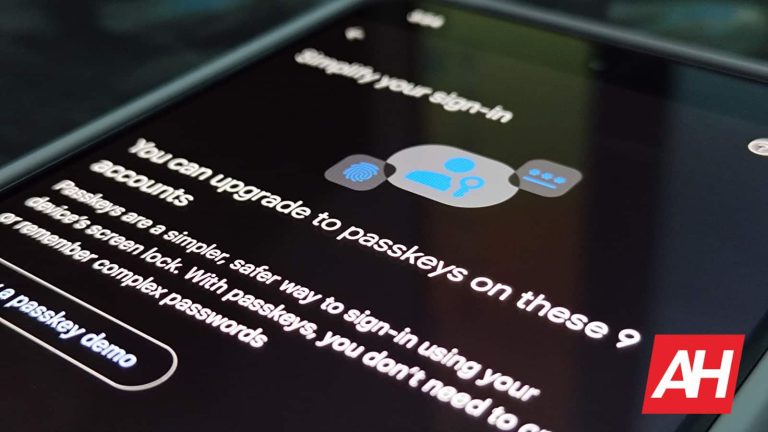
Google has announced the expansion of its passkey upgrades feature that you can currently find on Pixel phones, and is working with new partners to bring the added security to more accounts.
Passkey upgrades is a feature that Google added to Pixel phones as part of its December Pixel feature drop in 2023. At that time it also introduced new AI camera features coming to the Pixel 8 series phones. If you’re unfamiliar with passkeys, that’s not surprising. Passkeys have yet to gain wide adoption but they are available on a handful of apps and websites. If you have accounts with companies like eBay, Best Buy, or Adobe for example, you’ll be able to set up and use passkeys instead of passwords. Apple also supports passkeys for its accounts on iOS.
Google is trying to spread the good word about passkeys because they’re more secure than traditional passwords. They also provide more resistance against phishing attacks and you don’t have to remember anything. “using a passkey is as simple as unlocking your device with your face or fingerprint, or your PIN/pattern/password,” Google says.
Google expands passkey upgrades to include new partners on Pixel devices
If you have a Pixel phone, and you’ve never used or set up passkeys before, it’s really rather easy. Especially now with the passkey upgrades. Google made it dead simple by having the password manager guide you through the process. That being said, it’s not as simple as an alert just popping up and telling you “hey, you’ve got accounts that can be upgraded to passkeys.” You’ll still need to get to the right location in settings to change things over.
In settings, scroll to passwords and accounts, then tap on the little cog wheel button to the right of the “Google” account which should be at the very top. From there, tap on Google Password Manager and you’ll see a message about upgrading passkeys at the top of this page with a “simplify your sign-in” message. This little card will tell you how many of your accounts that are stored on the phone will support paskey upgrades. And after tapping on that card password manager walks you through a few steps for each account.
Google is working to get more accounts and companies to adopt passkeys. For the time being, you can use them with 10 different accounts. This includes Best Buy, DocuSign, eBay, Uber, Yahoo Japan, Kayak, Adobe, PayPal, TikTok, and Money Forward. These accounts are partners for Google’s password manager to help guide you through passkey upgrades feature. But passkeys are still supported on a number of other websites outside of it, such as Dashlane, GoDaddy, and NVIDIA. Passkeys are also the default for Google accounts.
The passkey upgrades will spread to other platforms
Google doesn’t say when, but it does confirm that the passkey upgrades feature of Google Password Manager will expand to other platforms. It simply says “in the future” though. So there’s currently no telling how long it will take or what platforms are included.
All the fun and exciting AI features that Samsung unveiled during Unpacked seemed to have overshadowed Google’s generative AI features. This is because the latter only announced a few on-device generative AI features that make use of the Gemini Nano model. Well, that’s gradually changing. Gboard Smart Reply is now compatible with two more messaging apps.
In case you don’t know, the Google Pixel 8 Pro (Review) was the first phone released with on-device generative AI, and the Samsung Galaxy S24 series followed soon after. Whereas Samsung’s AI offerings were more robust, Google’s seem to be lacking a bit.
The Pixel 8 Pro’s AI features include Recorder Summarize. This is a feature that will transcribe a full audio recording and give you an AI-generated summary of what was discussed in the recording. Next, Magic Compose in Google Messages brings generative AI into the app, which assists people with the messages they want to type up.
The last feature is called Gboard Smart Reply. This is a feature that uses generative AI to suggest the next message you should send in a conversation. It uses conversational awareness to ascertain what the conversation is about and gives you a suggestion of what you should type next.
Gboard smart reply is making it to two more apps
While Gboard can be used with any messaging app, the smart Reply feature was only compatible with WhatsApp at the beginning. It’s unfortunate, but it does make sense. WhatsApp is probably the biggest messaging platform on the planet. However, if you’re not part of the WhatsApp user base, then you were out of luck.
Not long after Google officially launched Gboard Smart Reply, we got word that two more apps have been added to the list. These two editions are actually a bit surprising, seeing as there is a plethora of much larger applications that have yet to gain compatibility. These two apps are Line and KakaoTalk.
In case you don’t know what these applications are, Line is a telemedicine service that lets you book appointments, talk with doctors over video calls, and pay for constellations. KakaoTalk is a popular Korean messaging service. It has an impressive 53 million monthly active user base.
We’re not quite sure when Smart Reply is going to make it to more apps. So, you’ll have to stay tuned for more news on this topic.
With the digital age in full swing, your personal information is more vulnerable than ever. Identity theft has evolved far beyond the days of stolen mail and dumpster diving. Today’s identity thieves employ sophisticated techniques, including account takeovers and government benefit fraud, making it essential for you to stay vigilant to protect your data.
Tactics like home title theft and Internet of Things (IoT) scams can catch even the most cautious individuals off guard. Staying informed about the different forms of identity theft helps you recognize potential red flags and prevent unauthorized access to your personal information.
To safeguard yourself from becoming a victim, it’s crucial to implement robust protection strategies. Keeping your Social Security number (SSN) private, regularly monitoring your credit, and using strong, unique passwords are some of the practical steps you can take to minimize your risk of identity theft.
Understanding Identity Theft
Identity theft is not just a passing concern—it’s an evolving threat where scammers continuously refine their strategies to capture your personal information. Staying informed about the methods these perpetrators use to protect your identity effectively is a crucial first step to achieving security.
The Evolution of Identity Theft Tactics
Scammers have become more sophisticated, now leveraging technology such as smartphones and the dark web to access your data.
Previously, stealing mail or dumpster diving was enough to gain access to someone’s personal information, but now identity thieves use advanced phishing techniques to trick you into disclosing sensitive information like your social security number and then sell your identity on the dark web.
Methods Used in Identity Theft
The methods by which identity thieves acquire personal information are varied and complex. Below are some common techniques used:
Phishing: Using fake emails, websites, or something as simple as QR codes to trick you into providing personal details.
Physical Theft: Stealing wallets, purses, or mail to obtain credit cards, social security cards, or other personal identifiers.
Social Media Scavenging: Searching your social media profiles for information like birthdays, addresses, or answers to security questions.
Cyber tactics are particularly harmful. Scammers use ransomware to lock your access to personal files unless you pay a ransom, often requiring your credit card information. Another point to consider is that identity theft via smartphones is increasing as well, often through malicious apps or unsecured Wi-Fi networks.
Protective Measures Against Identity Theft
In an era where your personal information is constantly at risk, taking proactive steps to safeguard your identity is crucial.
Digital Security Best Practices
To protect your online presence, it’s vital to start with strong passwords that combine upper and lower-case letters, numbers, and symbols. A password manager can help maintain the security of your various accounts while allowing you to keep track of different complex passwords effortlessly. It’s also important to enable two-factor authentication wherever possible to add an extra layer of security.
When signing documents electronically, opt for services that offer legally binding eSignatures to ensure the integrity and confidentiality of your electronic transactions. Consistently monitor your bank statements and credit card activities for any unauthorized transactions. Setting up alerts for every transaction can be a helpful deterrent for account takeover attempts.
Physical Document Management
Keep your wallet or purse in a safe place, especially when you’re in crowded public areas to prevent identity theft incidents such as stealing of credit cards or personal information.
It’s advisable to shred important documents like bank statements before discarding them to prevent dumpster divers from getting a hold of your data.
To protect documents at home, secure them in a locked file cabinet or safe. This includes any document that might have your personal information or electronic signatures on it. Remember to collect new bank statements or credit card mail promptly to minimize the risk of these items being stolen from your mailbox.
Monitoring and Detecting Identity Theft
Effectively monitoring and detecting identity theft requires both technological vigilance and awareness of the warning signs. In this section, you’ll learn how to leverage advanced tools and spot suspicious activities that could indicate your personal information is at risk.
Leveraging Technology for Safety
Sign up for a credit monitoring service that continually reviews your credit reports and sends you alerts if it detects activities like new account openings or significant balance changes. These services often offer additional layers of protection, such as dark web surveillance and recovery assistance.
Additionally, enable notifications on all financial accounts. Your bank and credit card issuers can send instant alerts for transactions, which can be crucial for quick detection of unauthorized activities. Check that your contact details are current to ensure you receive prompt alerts.
Recognizing the Red Flags
Carefully review your credit card statement for charges you don’t recognize. Small, unexplained transactions can be a test by criminals to see if you’re paying attention. Annually, obtain your free credit report from each of the three major credit bureaus through annualcreditreport.com. Look for accounts or inquiries you didn’t initiate or discrepancies in your personal information.
Keep an eye out for warning signs of identity theft like bills or statements that don’t arrive as expected, or receive unexpected credit cards or account statements.
Upon realizing you are a victim of identity theft, it’s crucial to act swiftly to minimize potential damage. Your first step should be to report the fraud to the relevant financial institutions. If you suspect credit card fraud, contact your credit card companies to inform them of unauthorized transactions.
Seeking identity theft victim assistance with one or all of the three major credit bureaus—Equifax, Experian, and TransUnion—is the next pivotal step. A fraud alert requires creditors to verify your identity before opening new accounts or making changes to existing accounts.
For an extra layer of security, consider adding a credit freeze, which restricts access to your credit report and helps prevent identity thieves from opening new accounts in your name.
Long-Term Strategies for Recovery
Following your immediate response, you should develop a long-term strategy to recover from identity theft and protect yourself in the future. Regularly review your credit reports for any unusual activity and dispute any inaccuracies.
Continuously monitor your financial accounts for signs of unauthorized transactions and if needed, update your passwords and secure your online accounts. Always use complex and unique passwords to enhance your digital security.
In the long term, stay informed about the latest identity theft methods and educate yourself on preventative measures. This knowledge can help you remain vigilant and confident in your ability to safeguard your personal information.
Special Considerations in Identity Theft
In navigating the complexities of identity theft, you must be aware of the specific risks to vulnerable groups such as minors and the increasing sophistication of fraud threats.
Identity Theft and Minors
Children’s personal information is a tempting target for identity thieves. Minors typically have a clean financial slate, making it easier for criminals to create fraudulent financial accounts and obtain loans in their names. It’s crucial to monitor your child’s personal information and be vigilant for signs of misuse, such as bills or tax return notices addressed to your child.
Complex Frauds and Emerging Threats
Frauds are evolving, with synthetic identity theft representing a particularly insidious method. Here, identity thieves fabricate a new identity by combining real and fake information, often using a child’s Social Security Number (SSN). This can lead to a myriad of issues, including false medical identity theft and complications with your tax return. Moreover, criminal identity theft occurs when your identity is used to perpetrate crimes, potentially leading to a false criminal record.
ATM skimming and driver’s license theft are also on the rise. To safeguard against these, regularly review your financial statements, use ATMs in a safety-conscious manner, and keep your driver’s license in a secure location.
Conclusion
Staying vigilant is your best defence against the evolving threat of identity theft. Consider the following actions to enhance your security:
Enable two-factor authentication where available.
Regularly monitor your credit and bank statements.
Use strong, unique passwords for all accounts and change them periodically.
Shred important documents containing personal information before disposal.
Keep abreast of the latest security trends and remember that protection tools are continually improving. For instance, identity theft protection services have become more sophisticated, offering features like SSN monitoring and credit locks which can serve as a strong barrier against fraudsters.
Stay informed on current scams, as awareness is key. Websites like the Federal Trade Commission provide valuable resources and guides to safeguard your identity. Embrace a proactive stance and remember—prevention is always more effective than remediation.
Now that the Galaxy S24 series has reached early buyers, an unexpected display issue has come to the forefront. The new Samsung flagships have washed-out display colors. Switching between Natural and Vivid color modes hardly changes the color tone. All three models appear to be affected by this issue.
The Galaxy S24 series has a display color issue
Samsung phones usually come with two built-in display color modes: Natural and Vivid. The latter adds a pop effect for a more saturated color tone. The Galaxy S24, Galaxy S24+, and Galaxy S24 Ultra also have these options. However, over the past few days, several users have reported that the colors remain mostly unchanged across the two modes.
We checked on our Galaxy S24 Ultra retail unit and found the same issue. Even manually adjusting the white balance and RGB levels don’t affect the color saturation. There’s a mild change in tone but it is only noticeable if you look closely. Of course, this isn’t the expected behavior. The screen colors change substantially when switching between Natural and Vivid models on older Samsung phones.
You can see a side-by-side comparison between the Galaxy S24 Ultra and Galaxy S21 Ultra in the image below. User reports on Reddit, X, and Samsung’s community forums suggest this is a common problem across the Galaxy S24 lineup. The company’s official customer support staff couldn’t explain what was happening or fix the issue. Some users speculated it to be caused by the new Gorilla Armor screen.
However, only the Ultra has it (the other two models have Gorilla Glass Victus 2), so that is probably a false assumption. A more likely explanation of the issue is a software bug causing the Vivid toggle to function inaccurately. If that is the case, Samsung should be able to fix it with a software update. As of this writing, the company has yet to comment on the matter.
From Doo-StealYour-HoChoi on Reddit
The new Samsung flagships have a few more pesky issues
This isn’t the only problem Galaxy S24 users are complaining about. The new Samsung flagships have a few more pesky issues. The Always on Display (AOD) doesn’t have a landscape mode and lacks separate brightness controls. Its brightness is linked to the main screen, which could be too bright for the night. Some users aren’t happy with the camera performance either. Thankfully, all of these issues are fixable with software updates. We will let you know when a fix arrives.
Samsung has finally released the Android 14-based One UI 6.0 update for the Galaxy A13 in the US. The big update is currently rolling out to the 4G/LTE model. Its 5G counterpart should pick up the new Android version in the coming days.
The Galaxy A13 grabs the Android 14 update in the US
Samsung started updating the Galaxy A13 to Android 14 at the end of December last year. The global version of the 5G model picked up the update first, with the global 4G model following a few weeks later. However, unlike most other devices, the company has been slow to roll out the update to this budget handset globally. Android 14 still isn’t available for the phone in several parts of the world.
You can now strike off the US from that list, at least for the 4G model. The carrier-locked variant of the device is picking up the Android 14 and One UI 6.0 update with the firmware build number A135USQU7DXA2. The factory-unlocked units and the 5G model should also soon get the new One UI version. The build number may or may not be identical but the content will remain the same.
Since this is a major Android OS update, there is a lot to talk about here. As you can see on Samsung’s official release notes, the Galaxy A13 is getting a redesigned Quick Settings panel, enhanced notifications layout, vivid notification icons, improved album art display for music and videos, more lock screen customization options, simplified ap icon labels, enhanced multitasking gestures, improved content sharing, and more.
Additionally, the update brings new camera features, editing tools, improved home screen widgets, and new features for stock apps such as Samsung Keyboard. In short, Android 14 will significantly enhance the Galaxy experience. The December 2023 security patch is also part of this release, adding dozens of security fixes. Samsung has already released the January 2024 patch but the Galaxy A13 isn’t getting it yet.
You can check for the update now
Samsung recently started pushing Android 14 to the Galaxy A13 in the US. It might take a while before the update reaches all eligible units nationwide. You should get a notification when it is available for your unit. However, you can always manually check for new updates from the Settings app. Open the app, go to the Software update menu, and tap on Download and install. If there’s no update, check again later or wait for a notification.