Google Chrome is the most popular web browser on the planet, and one reason is that it’s always coming out with new and useful features. Google just announced today that Chrome is getting some amazing generative AI features that will help make using it much easier and more streamlined. This just shows that Google is working on bringing AI prowess to all of its users.
These new Chrome generative AI features are rolling out over the next couple of days
As with any Google rollout, availability will expand as the days go on. These features will be available first in the U.S. market, and then it will make it to others as the days go on.
Tab Organizer
You’re able to make tap groups using Chrome, and you have been for some time. However, choosing which tabs to organize into groups can take a while depending on how many tabs you have open. Also, it can become tedious picking and choosing which tabs to add to your groups. Well, Tab Organizer will automatically organize your tabs based on the types of pages you have open.
All you have to do is right-click on one of the tabs you want to add to the group and click on Organize similar tabs. Chrome will then analyze all of the tabs you have open and give you a list of suggested tab groups. So, if you have several tabs open with similar pages, Chrome will suggest groups based on those tabs. Once you click on the suggestion, Chrome will automatically create that group and place all the tabs under it.
Generative AI themes
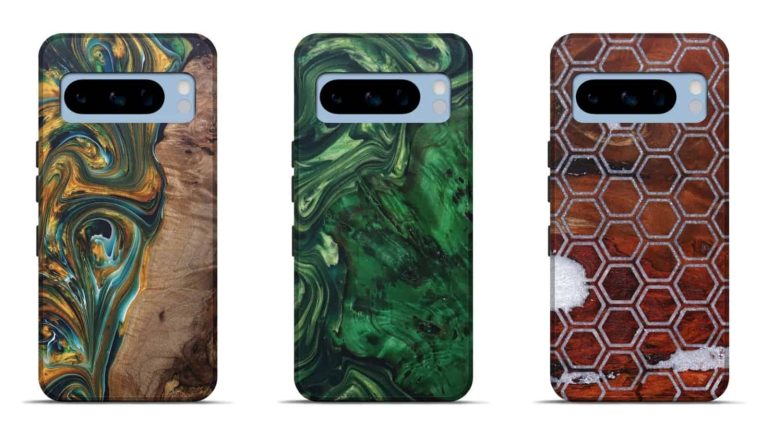
With Android 14, Google brought the ability to create AI-generated wallpapers and themes. Well, the company is now bringing this to its browser. When this feature drops, you’ll be able to create your own Chrome themes using generative AI. All you have to do is go to the side panel and click on the Change theme button. After that, click the Create with AI button.
From there on, it’s as simple as typing what you want your thing to be. When you do that, Google will generate a background and a color scheme for you. Maybe you want a desert theme; you can expect Chrome to generate images of large sand dunes. If you want a winter wonderland, Chrome will generate one for you.
This is all in addition to uploading your own photos to use as the theme and using pre-made themes in the Chrome Store.
Help me write for General text boxes
This feature will be released in next month’s update for Chrome. We’re used to using the Help me write feature in Google Docs and Gmail. Well, Google wants to bring this functionality to more places in Chrome. After the update, all you have to do is right-click on a text field and click the Help me write option. After that, type a few words, and the AI will start helping you out with what you want to write.
This is great for most situations where you want to properly articulate what you want to write. This could be for a social media post, emails, reviews, forum posts, Etc.
At the moment, these features are mostly for personal use. So Enterprise and educational accounts when I have access to these features just yet.
In a spy-vs-spy type of scenario, Microsoft has acknowledged that a group called Midnight Blizzard (also known as APT29 or Cozy Bear), gained access to a Microsoft legacy non-production test tenant account.
According to Microsoft, the group managed to access the account in November after subjecting it to a password spray attack, a type of brute force attack where the attacker tries a large amount of logins until they succeed. The group used this foothold to access some of Microsoft’s corporate email accounts and steal some emails and attached documents.
Cozy Bear, who is generally linked to the Russian Foreign Intelligence Service, also known as the SVR, appears to have been curious to find out what information Microsoft had gathered about it. Cozy Bear is generally believed to be behind the SolarWinds attack and attacks on several US institutions, including the State Department, the White House, and the DNC. On all these occasions, the Dutch alerted the US intelligence services.
Microsoft’s investigation about the attack showed that the group was not after customer data or corporate information, but instead something closer to home:
“The investigation indicates they were initially targeting email accounts for information related to Midnight Blizzard itself.”
To date, there is no evidence that the threat actor had any access to customer environments, production systems, source code, or AI systems, but the investigation is still ongoing. Microsoft has promised to provide additional details as appropriate.
Generally speaking, the larger an organization is, the larger the attack surface, but with companies like Microsoft people expect a tighter security. It is, after all, a security software vendor as well. So, the fact that Cozy Bear was able to stay undetected for months comes as a surprise to many.
Apparently, the attack scared Microsoft itself as well: It says that it feels the need to speed up its cyberprotection advancement project, the Secure Future Initiative, given how well-funded and resourced the attackers are.
“We will act immediately to apply our current security standards to Microsoft-owned legacy systems and internal business processes, even when these changes might cause disruption to existing business processes.”
This attack can generally be seen as a warning to every other organization that has information which might be of interest to foreign governments.
The more an organization has grown, the larger the chance that legacy accounts exist and may even be neglected. Compare the organization to an office building: The more doors and windows (pun intended) exist, the larger the chance that one is left open. And if there are offices that are no longer in use, the chance of an opening grows exponentially.
Our business solutions remove all remnants of ransomware and prevent you from getting reinfected. Want to learn more about how we can help protect your business? Get a free trial below.
Motorola has shared the official list of phones eligible for the Android 14-based My UX update. It comes days after the company announced its plans to become the world’s third-best-selling smartphone brand. Now, it’s updating many devices to the latest Android version. Android 14 brings some cool features. These include customizable lock screens, better Monochrome theme support, improved battery life, new emojis, and accessibility tools.
List of Motorola phones getting the Android 14 update
Several Motorola phone models will receive Android 14 update. This includes the latest Edge series, such as the Edge 40 and Edge 40 Neo, as well as the Razr lineup, which comprises the Motorola Razr 40 and Razr 40 Ultra. Additionally, older devices like the 2022 Motorola Edge, Motorola Edge+, and Edge 30 Fusion will also receive the latest update.
Specifically, the Motorola Razr phone lineup eligible for Android 14 includes the Motorola Razr 40 Ultra, Motorola Razr 40, Motorola Razr+ 2023, Motorola Razr 2023, and Motorola Razr 2022.
For the Motorola Edge series, the Android 14 update will roll out on Motorola Edge+ 2023, Motorola Edge 2023, Motorola Edge+ 2022, Motorola Edge 2022, Motorola Edge+ 5G UW 2022, Motorola Edge 40 Pro, Motorola Edge 40 Neo, Motorola Edge 40, Motorola Edge 30 Ultra, Motorola Edge 30 Pro, Motorola Edge 30 Neo, Motorola Edge 30 Fusion, and Motorola Edge 30.
The Motorola G series is also not left behind. Android 14 update is coming to the Moto G 5G 2023, Moto G Stylus 5G 2023, Moto G Stylus 2023, Moto G Power 5G 2023, Moto G84 5G, Moto G54, Moto G73 5G, Moto G53 5G, Moto G23, and Moto G14. Additionally, Motorola may add the upcoming phones, the Moto G53 and G73, to this list.
When will the Android 14 update roll out?
Motorola is releasing Android 14-based My UX updates in groups for eligible phones. It might take some time to reach all users. Hence, throughout 2024, users could expect updates. The support page lacks specific launch timelines. However, Motorola users can rest assured that Android 14 updates are on the way.
I’ve been reviewing OnePlus smartphones for years, and generally, there’s always something wrong with them. Keeping them from being a nearly perfect phone. Usually, it has to do with the camera, and after a few updates, it would be way better and almost a totally different phone. But that changed last year with the OnePlus 11 and especially the OnePlus Open. I was utterly blown away by the OnePlus Open, in fact it’s the only foldable that I still use to this day.
So, heading into the OnePlus 12 briefing and review, I wondered how or if OnePlus could keep up that momentum. And I’m here to tell you that the OnePlus 12 is an early contender for smartphone of the year, even after using (briefly) the successor to last year’s smartphone of the year – Galaxy S24 Ultra. Let’s talk about it.
OnePlus 12 Review: Hardware and Build Quality
The hardware on the OnePlus 12 has not changed a whole lot compared to the OnePlus 11. It looks pretty similar and even has the same camera module. However, it does feel a bit thicker, which I don’t actually mind. I’d mind it even less if it were not a curved display phone. But more on that later on. OnePlus has kept the power and volume rocker on the left side, with the Alert Slider on the right. It’s still one of my favorite features on any phone. It just makes it so easy to put my phone on silent or vibrate.
The top and bottom of the OnePlus 12 are flat, while the sides are curved. This is done so that it makes it easier to hold. On the bottom, you’ll find a speaker grille, a USB-C port, and a SIM tray. Thank goodness OnePlus is not following the fruit company and going eSIM only – even though I am using an eSIM on this phone. On the top, you’ll find the microphone hole as well as the IR blaster. Boy, isn’t that a blast from the past? A few years ago, really almost a decade ago, IR blasters were the next big thing. Being added to every phone imaginable to control your TVs and other things. Today, most phones have done away with them, but not OnePlus. It does make for a cool party trick. I’m currently writing this review in an airport. I used the IR blaster to turn off one of the flight monitors and then back on.
OnePlus 12 has a stunning front, which is basically all-screen. It’s a curved 6.82-inch display that looks amazing. There is a hole punch camera on the front, and that’s really about it.
It does feel really great to hold in the hand, although a bit slippery. I really wish OnePlus sent over a case with their reviewers kit, like they have done in the past because I’ve almost dropped this phone many times. So, if you do buy one, make sure to get a case as well. OnePlus will have plenty available.
There is a fairly sizeable camera bump on the back of the OnePlus 12, but honestly, after carrying the OnePlus Open for many months, it’s really not that bad. And the trade-off here is that some pretty amazing pictures are coming out of this camera system. So it’s a fair trade-off, I’d say.
It’s solid hardware and either a design you love or hate. There’s really no in-between.
OnePlus 12 Review: Display
OnePlus is no stranger to great displays. And with the Open last year, they really seemed to have started the trend of incredibly bright displays. The OnePlus Open was able to go up to 2800 nits of peak brightness. Then the Google Pixel 8 series followed along at 2000 and 2,400 nits, respectively. Now, OnePlus is telling everyone to hold their beer; the new OnePlus 12 can go all the way up to 4,500 nits of peak brightness. That’s just bonkers. But it is also very useful.
I recently traveled to San Jose for Samsung’s Unpacked event and took the OnePlus 12 with me for the ride. The weather wasn’t perfect, a bit cloudy for part of the trip, but even in bright environments, the OnePlus 12 was very easy to see. And the kicker? It was not even at full brightness. Some will say that this much brightness is overkill. And it might be. But I’d definitely rather have it and not need it then need it and not have it.
While it might not go to a true 4500 nits of peak brightness, and even then, it’s only a portion of the screen, what I really appreciated is that it is easy to see outdoors, especially when it’s very bright. Just as another example here, there are a few inches of snow on the ground, and the skies are clear with the sun shining, making it super bright. Because the sun is reflecting off of the white snow, so it’s brighter than usual. And I could still see the OnePlus 12 outdoors without any issues. That is rather impressive and not something that most phones can achieve.
Additionally, the OnePlus 12 is brighter, clearly brighter than the new Galaxy S24 Ultra. Of course, it should be since the OnePlus 12 does have a much higher peak brightness. But you can see in the picture below that it is brighter, with basically the same home screen.
OnePlus 12 vs Galaxy S24 Ultra: Max Brightness
Like most of OnePlus’ other smartphones, this is also an LTPO display, so it can dynamically change the refresh rate from 10Hz to 120Hz. This helps to conserve battery, especially in apps where you really don’t need a 120Hz refresh rate since it is not always needed.
I’ve watched quite a few videos on this phone, and each time, I’m amazed at how good it looks. Watched quite a few YouTube videos on the OnePlus 12 while flying from San Jose back to Detroit, and the colors look incredible. It’s an OLED panel, so obviously, the blacks are nice and inky, too. Added in with the brightness, and even with the window shade open, I had no problem watching YouTube. That’s just another example of the brightness coming in handy here. Not to mention, the curved display allows for the content to “melt” over the sides. It looks incredible, but I’m still not a fan of curved displays.
Recently, we’ve seen quite a few phones ditching curved displays – Google’s Pixel 8, more recently, Samsung’s Galaxy S24 Ultra – and I have a feeling the OnePlus 13 might not have one. Curved displays seem to be a love or hate thing with smartphones. Some love how they look, especially when watching videos. But others despise them because they are uncomfortable to hold, get scratched easily, cause accidental touches and screen protectors really don’t work with cases. This is why I don’t like curved displays, but I have to say, so far, I have not had any of these issues – well, I don’t have a case or screen protector yet, but the other issues I have not experienced.
This might be one of the best displays I’ve ever seen on a smartphone, which is saying something since I’ve reviewed almost every phone on the market today.
OnePlus 12 Review: Performance
The OnePlus 12 is my first experience with the new Qualcomm Snapdragon 8 Gen 3 processor, and I have to say, it’s quite good. I’m going to compare this to the OnePlus Open and the Galaxy S24 Ultra quite a bit, which use the Snapdragon 8 Gen 2 and Gen 3, respectively. Moving around the OS on the OnePlus 12 is really fluid. Even more so than the Galaxy S24 Ultra, which is impressive since its version of the Snapdragon 8 Gen 3 is overclocked a bit.
OnePlus also added in a much larger vapor chamber on the OnePlus 12, which did help it stay cool for quite some time. I played a few games on here for a bit, as well as running a ton of benchmarks, and the phone got warm – but not hot. That was, honestly, quite impressive to me. Most phones will get pretty warm, almost too warm to touch, when running Geekbench 6, 3D Mark, and PC Mark back-to-back-to-back. But not the OnePlus 12.
Let’s talk about those benchmarks. So, on the OnePlus 12 and every other phone we’ve reviewed recently, we run a handful of benchmarks. This includes Geekbench 6, which tests the raw performance of both the CPU and GPU. Then there’s the 3D Mark WildLife Extreme Stress Test. This particular test does a one-minute loop for 20 minutes. The point here is to see if the OnePlus 12 can sustain high performance and how well it can do it. Finally, we have PC Mark Work 3.0. This is a productivity test to see how well the OnePlus 12 can perform tasks like spreadsheets, emails, etc., you know, being productive on your phone.
The first test here is Geekbench 6. Single-core scores are in blue, multi-core scores are in red, and the GPU scores are in yellow. Here, we compared it to the OnePlus Open (Snapdragon 8 Gen 2), the Pixel 8 Pro (Tensor G3), and the iPhone 15 Pro Max (A17 Pro). It outperformed everything except for the iPhone 15 Pro Max, which to this day still has an incredibly wild GPU score. But it’s important to remember, especially for the GPU scores, that Geekbench 6 runs on different platforms for iPhone (Metal) versus Android (Vulkan).
This next test is the 3D Mark Wildlife Extreme Stress Test. It had some of the highest scores on phones we’ve tested, but the stability wasn’t all that high, stability was around 58.9%, generally it’s over 70% for most other phones. We’ll chop this up to the software not being final just yet and will retest this in a month or so to see if it changes.
Then we have PC Mark Work 3.0, as mentioned before, this is a productivity benchmark, meant to help determine how good this phone is able to deal with productivity tasks. Here, we compared it to the OnePlus Open and Pixel 8 Pro only since the app is not compatible with the iPhone, unfortunately. It beat both phones and beat the OnePlus Open by 23%. That’s a pretty sizeable increase year-over-year.
Finally, we have one more benchmark we run, which is a customized one that we decided to put together here at AndroidHeadlines. Since phone makers do like to “cheat” on benchmarks, this is one that they can’t really cheat at. It’s called the CapCut test. We use the popular CapCut video editing app to edit and export a one-minute video. It’s the same one-minute video with the same edits for each phone we test to keep it on a level playing field. The OnePlus 12 has set a new record in this test of under 10 seconds. Prior to that, the iPhone 15 Pro Max had a record at 13.5 seconds. This shows that the GPU on the OnePlus 12 is really impressive.
Overall, we’ve found the performance to be among the best of any phone we’ve reviewed so far. Now, that might change as more Snapdragon 8 Gen 3 phones come across our desk, but so far, it’s impressive.
OnePlus 12 Review: Battery life and Charging
These are two things that OnePlus has been known for in the last few years, especially the charging aspect. When I sat down with OnePlus in Las Vegas for a briefing on the OnePlus 12, I was told that this was a two-day phone. In my head, I thought, “Yeah, we’ve heard that before; I’ll believe it when I see it.” But it is truly a two-day phone. It takes about a day and a half to truly empty this battery, using it non-stop. So, if I were using it normally, it would definitely last two full days. That’s not something we see all that often with smartphones these days. So, it’s definitely a great thing to see here.
As I mentioned on Twitter last week, I took this with me to San Jose for Galaxy Unpacked. That means a couple of very heavy travel days to travel across the country. Typically, phones would have their battery destroyed by the end of the day. But not the OnePlus 12. I had about five hours of screen time, with around 57% battery left. Yes, fifty-seven percent. That’s pretty much the same as if I were at home using it on WiFi all day. Of course, putting it in airplane mode for a number of hours and using WiFi on the plane definitely helped, but remember, brightness was also up pretty high here.
Because of this, the OnePlus 12 has likely earned a spot in my bag for Mobile World Congress next month. Not only for the battery life but also for the charging and performance, as well as the camera. We’ll talk about some of these a bit later. But let’s move on to the scientific tests for battery life.
As we’ve been doing for the last few months with new phones, we run a YouTube video at full brightness and in full screen on the phone from 100% to 1%. It’s a 24-hour video, and no phone has lasted longer than the video so far, but this makes it easy to see how long it lasted. The OnePlus 12 lasted the third longest out of the phones we’ve tested. It lasted just over 19 hours. While the iPhone 15 Pro Max lasted about 21.5 hours, the top of the list right now is the iQOO 12, which lasted 21:52. These are all spectacular numbers. Especially since the OnePlus 12 was at full brightness at that time.
Another anecdote from this test is that despite being at full brightness for 19 hours, the OnePlus 12 did not overheat. It did get warm, but not uncomfortably hot. That was honestly very surprising to me, considering how bright this display can get and the fact that other phones have gotten quite hot in this test.
Charging the OnePlus 12 is magical
Here in the US, we don’t get a lot of very fast-charging smartphones. Samsung tops out at 45W (really, it’s 25W), Google and Apple don’t really go past 30W, but OnePlus continues to bring 80W charging to the US on its phones. So when I get to use a OnePlus phone, it really does become a treat.
While OnePlus does include a 100W charger in the box, it’ll only do 80W in the US due to our electrical grid; it can only do 80W on that charger. So if I plug it into my USB-C charger that I travel with, I’ll only get 60W. Which is still faster than most other smartphones that arrive in the US, so it’s really hard to complain about that. It is how I charged the OnePlus 12 most of the time, however.
But for our benchmarking, I did use the included OnePlus 100W SuperVOOC charger. It was able to recharge the 5400mAh capacity battery in 32 minutes and 13 seconds.
Now, OnePlus says you can fully charge in 30 minutes, but keep in mind that it is in a lab in perfect condition, not in a home where other things are drawing power and such. So this is still very close to OnePlus’ claim, and honestly, a full charge in just over 30 minutes is still very respectable. Considering every other non-OnePlus device we’ve tested that is available in the US has charging times of well over an hour.
OnePlus 12 Review: Software
With the OnePlus 12, the company has Android 14 and OxygenOS 14 on board. This is actually my first time using OxygenOS 14 since my OnePlus Open still hasn’t gotten the update. Honestly, there are a few changes compared to OxygenOS 13, but not that many. That’s pretty common with Android phones these days; we’re not seeing a lot of major changes with new updates, but instead, a handful of new features that you may or may not use.
Since OnePlus ditched Cyanogen OS many years ago and decided to create OxygenOS, I haven’t really been a huge fan of the operating system. I’ve always preferred a more stock Android approach, and really like the Pixel Experience that Google has built. But I have to say, after using the OnePlus Open and now the 12 extensively, I really am starting to like OxygenOS. It’s really starting to grow on me.
Here are a few things that I really like about OxygenOS compared to Pixel Experience; one of those is the Settings icon in the top corner of the Quick Settings. Google wants you to pull down the Quick Settings completely to get to the Settings – and then it’s at the bottom of the screen. Again, this is a small thing, but very useful for someone like me who is constantly checking battery life and other settings inside the Settings app.
I also really like the Quick Settings here. Google gives you huge toggles for everything, while OnePlus does this for WiFi and Bluetooth only. This is great because you can see what WiFi network you’re connected to, as well as whatever Bluetooth devices you have connected. Everything else is a smaller toggle, like mobile data, flashlight, location, airplane mode, etc, with a brightness toggle at the bottom. These are just so much easier to use compared to what Google offers on the Pixel. And I really like it.
The last big thing that I like about OxygenOS is arguably the only thing reviewers care about, and that’s the battery life screen. It’s not perfect, but it is one of the best options out right now. Now, when you go into the battery section in Settings, it tells you how long it’s been since the phone was unplugged, as well as whether your screen is on time, with a 24-hour graph above. Below that, there are a few apps that are using the most battery. It’s just so easy to follow, and I love it.
Speaking about the battery, OnePlus also has a few settings for Battery Health, like showing you the Maximum Capacity, as well as the ability to stop charging at 80%. This is a feature we saw get added to the iPhone 15 last year, and it’s great to see Android OEMs are quickly adding this as a setting now.
Finally, let’s talk about how fluid the software has been on this new hardware. OxygenOS has always been rather lightweight, and I have to say, it just flies on the Snapdragon 8 Gen 3. As mentioned before, this is the 16GB of RAM and 512GB of storage model, so there’s plenty of power in this phone. I’ve never experienced a slowdown on the OnePlus 12 running OxygenOS 14, and I really don’t expect to.
OnePlus is promising four years of OS upgrades and five years of security updates. So, it is not quite the seven years that Samsung and Google are promising these days, but hopefully, that will change with Open 2 or OnePlus 13.
OnePlus 12 Review: Camera
I’ve been raving about the camera on the OnePlus Open pretty much since I was able to talk about it last October. Why? Because it has some of the best hardware and produces some of the best pictures out there. It is also a stark contrast to OnePlus devices from a few years ago where the camera was not great at launch, and after a few updates, it was a much better camera. It’s great that OnePlus has figured things out before launch, especially since the first impression is everything.
With the OnePlus 12, we’re looking at a camera setup similar to the Open. This includes a 50-megapixel main sensor, a 64-megapixel periscope telephoto sensor, and a 48-megapixel ultrawide sensor. And OnePlus has kept the option for automatically shooting at 1.5x or 35mm. That’s the best focal length, in my opinion, because you get a really nice depth of field, providing a creamy bokeh effect. Which you can see in a few pictures below.
I took the OnePlus 12 with me to San Jose for Unpacked and got some pretty sweet pictures on the way there, including a few from the plane. Shooting at 6x zoom and flying at over 500 miles per hour, you can still get some really crisp images, as you can see down below. These absolutely look amazing, and I’m still shocked I was able to take them.
The ultimate test for me with a smartphone camera is taking a photo of my dog. I have a rescue from Aruba, and her DNA test shows that she is an American Staffordshire Terrier, a Rat Terrier, and a Belgian Malinois mix. I tell you all this to say that she’s black and brown with some white fur and doesn’t sit still (that’s the Belgian Malinois part). So for a camera to be able to take a photo of her and be sharp is pretty rare. But it’s starting to be a bit less rare these days. Here are a few pictures I took of her while reviewing the OnePlus 12. It did struggle a little bit in portrait mode, but it still did better than a lot of other phones, so definitely impressed on that front.
OnePlus has really started to take the camera super seriously on its last few phones, and of course, the Hasselblad partnership has definitely helped. That partnership is due to expire pretty soon, and I really hope OnePlus is able to renew because the Open and 12 have become some of my favorite cameras in smartphones, and I really can’t wait to see what they do in future phones.
Now let’s talk about our testing for the camera. What we have started doing very recently is taking a rubiks cube and putting it into a photography tent. Turning the light all the way up, and taking a photo. This gives us the same lighting for each phone, as well as a subject that is very colorful. Allowing us to test out the color reproduction on each phone. In the example below, we have the Galaxy S24 Ultra, iPhone 15 Pro and the OnePlus 12 on display.
Now if you look at the comparison above, the Galaxy S24 Ultra definitely looks like it’s the brighter and better picture, but actually it’s the OnePlus 12. The OnePlus 12 actually looks more like real life compared to the other two. Samsung is artificially brightening the picture in post-production using AI. I’ve seen that happen in a lot of photos with that camera, actually. Then the iPhone 15 Pro is actually a bit on the warm side here. While OnePlus 12 does look more true to life, which is what you want in a picture here. This Rubiks cube is more of a metallic finish Rubiks cube, so it does look darker than a regular Rubiks cube.
Should you buy the OnePlus 12?
So now, the big question is, should you buy the OnePlus 12? I would say definitely. And this is a bit weird for me because this time around, there’s no “you should only buy it if…” to this sentence. If you need a new phone, the OnePlus 12 is the way to go. And here’s why: pricing on the 12 starts at $799, or you can jump up to 512GB of storage for just $899. That’s cheaper than just about every other comparable phone on the market today. OnePlus also nailed just about everything this year, from the camera to performance, to battery life, to the display, and everything in between. The only complaint I have is that it is a curved display; I’d much rather have a flat display on the OnePlus 12.
You should buy the OnePlus 12 if:
You want a spectacular camera setup.
You want the best battery life on a smartphone in 2024.
You want incredibly fast charging.
You want a bright display that you can use outdoors without a problem.
A PyPI malware author identified as “WS” was discovered by researchers to be covertly uploading malicious packages to PyPI that were impacting both Windows and Linux devices.
Over time, the malware author distributes multiple information-stealing packages into the PyPI library, each with unique payload complexities. From the detected packages alone, it is predicted that there may be over 2000 victims of “WS.”
Over several months, the instance of this specific malware author has come to light, demonstrating the significant amount of destruction that has occurred.
The Python community has created the Python Package Index (PyPI), an open repository of software packages to aid in the rapid development or updating of applications.
Although most packages uploaded to PyPI are uploaded by dedicated people seeking to promote the Python community, malicious packages are also frequently provided by threat actors.
DocumentFree Webinar
Compounding the problem are zero-day vulnerabilities like the MOVEit SQLi, Zimbra XSS, and 300+ such vulnerabilities that get discovered each month. Delays in fixing these vulnerabilities lead to compliance issues, these delay can be minimized with a unique feature on AppTrana that helps you to get “Zero vulnerability report” within 72 hours.
Info Stealing Packages Hidden in PyPI
According to Fortinet, the identified packages published by the author “WS” are as follows:
nigpal
figflix
telerer
seGMM
fbdebug
sGMM
myGens
NewGends
TestLibs111
These demonstrate attack techniques similar to those described in a blog post by Checkmarx that was published four months prior.
The resemblance raises the possibility of a link to an early 2023 harmful effort. The setup.py files in these packages contain base64-encoded source code for PE or other Python scripts.
The final malicious payload is dropped and executed when these Python packages are installed, depending on the operating system of the victim devices.
Malicious PyPI packages published by the author “WS”
Packages released before December 2023 can particularly transmit a Python script intended to steal data from Linux systems or, in the case of a Windows victim, deploy the malware known as Whitesnake PE.
“A subtle distinction lies in the new method now being used by the Python script to transmit stolen data. Instead of relying on a single fixed URL, these new malware variants use a range of IP addresses as the destination, likely to ensure successful data transmission even if one server fails”, Fortinet shared with Cyber Security News.
The PE Payload of the myGens & NewGends Packages is analyzed. It attempts to gather user data, including the host credentials and IP address of the user.
Collects User information
This latest set of packages primarily targets Windows users, in contrast to previous attacks that were directed at both Linux and Windows users. Even though each package has a slightly different executable payload, they all attempt to steal confidential data from victims.
Recommendation
When utilizing open-source packages, users are advised to proceed with extreme caution, making sure that no harmful content or payloads are present that could leave their targeted devices vulnerable to information theft.
In today’s evolving trends, businesses are constantly searching for ways to streamline their operations and enhance efficiency. One area where this becomes particularly important is in asset tracking systems.
Whether it’s keeping track of inventory in a store, monitoring equipment in a hospital, or managing assets in a warehouse, accurate and efficient asset tracking is crucial for businesses of all sizes and industries. In the pursuit of improving accuracy within asset tracking systems, barcode scanning solutions have emerged as a game changer.
What Are Barcode Scanning Solutions?
Barcode scanning solutions are hardware and software that enable the precise reading of barcodes. These barcodes consist of lines or patterns that represent information, such as product details or unique identifiers. Asset tags with barcodes are widely used in many industries due to the various benefits they provide.
Benefits of Barcode Scanning Solutions
Accuracy
Barcode scanning solutions offer precision when it comes to asset tracking systems. By eliminating errors associated with data entry, businesses can significantly reduce discrepancies in inventory counts and enhance overall operational efficiency.
Speed
With barcode scanning solutions, the time-consuming task of inputting each item’s information is eliminated. Instead, employees can simply scan items using devices or integrated scanners, significantly expediting the process.
Real-time Updates
Barcode scanning solutions offer the advantage of providing updates by transferring data to integrated software systems. This ensures that vital information regarding inventory levels, locations, maintenance schedules, and other crucial data is constantly updated and easily accessible.
Improved Inventory Management
Efficient and accurate inventory management is essential for businesses aiming to optimize their operations. Barcode asset tags and scanning solutions simplify this process by allowing businesses to monitor stock levels across locations precisely, automatically generating reorder requests when necessary.
Types of Barcode Scanning Solutions
Handheld Scanners
Handheld scanners are devices commonly used by employees for direct barcode scanning. These scanners can be wired or wireless and are known for their ease of use and reliability. With advancements, many handheld devices now include integrated touch screens and user-friendly interfaces for efficiency.
Mobile Devices with Integrated Scanning
In recent years, there has been a growing popularity in using mobile devices such as smartphones and tablets equipped with built-in barcode scanning capabilities. This approach allows businesses to leverage their existing hardware, reducing costs while maximizing convenience.
Stationary Scanners
Designed for large-volume scanning environments, stationary scanners are fixed machines that capture multiple barcodes simultaneously. Such barcode scanners are commonly used in warehouse settings or at store checkout counters. These scanners provide identification of multiple items at once.
Integration with Asset Tracking Software
Seamless Integration
The best barcode scanning solutions smoothly integrate with asset tracking software systems, making it easier to handle data. This ensures that there are no errors when transmitting and synchronizing data between the scanner and software, ultimately boosting accuracy and productivity.
Tracking Capabilities
By integrating barcode scanning solutions with asset tracking software, businesses can effectively monitor aspects of their assets’ lifecycles. From acquisition to disposal, companies can easily track the location of items, their maintenance history, warranty information, and more through a system.
Customization Options
Each industry has its tracking requirements. Barcode scanning solutions that offer customization options allow businesses to tailor their asset tracking systems to meet needs. Whether adding custom fields or developing features within the software interface, customization empowers users to maximize their system’s capabilities.
Conclusion
Barcode scanning solutions have improved accuracy in asset tracking systems by enhancing efficiency and reducing errors associated with data entry. Whether you’re using scanners or incorporating devices with scanning capabilities, implementing these solutions brings about advantages like precise inventory management and instant updates.
By integrating these solutions with software systems for tracking assets, businesses can optimize their operations further by monitoring multiple aspects of an asset’s lifecycle and tailoring the system to meet specific requirements.
Choosing to embrace barcode scanning solutions is a choice for any business aiming to boost accuracy in their asset tracking systems, streamline operations, and ultimately enhance their performance.
OnePlus has finally brought its latest flagship, the OnePlus 12, to global markets. As a reminder, the phone launched in China in early December. It took OnePlus almost two months to make it official outside of its homeland.
The company did that on purpose, as the same happened with the OnePlus 11 last year. Having said that, the global model is now official, as it will be available in the US, Canada, Europe, and more regions.
The global variant of the OnePlus 12 is finally official
In regards to the differences between the Chinese variant and the global one. Well, the global model doesn’t come with up to 24GB of RAM, it caps out at 16GB. It also includes Google Play Services out of the box, of course, and a global version of OnePlus’ software. Everything else is the same.
This smartphone does look very similar to its predecessor. It’s made out of metal and glass, and it has a curved display on the front. A centered display camera hole sits at the very top of the display. The bezels around the display are extremely thin.
The alert slider is now moved to the left-hand side, while all the physical buttons sit on the left. The camera oreo on the back does look similar to last year’s, but it’s larger now, due to the company’s new camera hardware.
The Snapdragon 8 Gen 3 fuels the phone, while you’re getting up to 16GB of RAM
The Snapdragon 8 Gen 3 fuels the OnePlus 12, Qualcomm’s new processor. It offers a 30% improvement in CPU performance and a 25% enhancement in GPU performance. Those are Qualcomm’s claims, and OnePlus only relayed them. OnePlus also made sure to keep the phone cool at all times by including a Dual Cryo-velocity VC Cooling System. OnePlus actually has some big claims when it comes to gaming with this phone.
The OnePlus 12 comes with 12GB or 16GB of LPDDR5X RAM, depending on the model you choose. Those two RAM variants include 256GB and 512GB of UFS 4.0 flash storage, respectively.
On the front, you’ll find a 6.82-inch QHD+ display, and this an LTPO AMOLED display. In other words, you’re getting an adaptive refresh rate here, as it can jump between 1Hz and 120Hz. Its theoretical max brightness is 4,500, and this display got an A+ rating from DisplayMate.
OnePlus included a noticeably bigger battery pack than last year
The phone’s battery is also bigger than last year. It includes a 5,400mAh battery pack and supports 80W SuperVOOC wired charging in the US. It goes up to 100W in Europe. 50W AirVOOC wireless charging is also on board. Do note that the charger is on board too.
There are also a total of 16 antennas included in the phone. OnePlus says that this will enable “the full potential of high-speed connectivity”, and also enable stability when it comes to those connections.
There are three cameras included on the back. The main one is a 50-megapixel LYT-808 unit from Sony. It has a large f/1.6 aperture, and this is a 1/1.4-inch sensor. The second camera on the back is a 64-megapixel periscope telephoto unit from OmniVision. It’s the OV64B unit with 3x zoom capability, and 6x “in-sensor zoom”. This phone can zoom up to 120x, and OIS is supported, as is in the main camera. The third camera on the back is a 48-megapixel ultrawide unit. That camera offers a wide field of view of 114 degrees.
Android 14 comes pre-installed, along with OnePlus’ OxygenOS 14
Android 14 comes pre-installed on the global OnePlus 12 variant, along with OxgygenOS 14. OnePlus announced two colors for the phone, Flowy Emerald and Silky Black.
The OnePlus 12 with 12GB of RAM and 256GB of storage is priced at $799.99/CAD$1,069. The variant with 16GB of RAM and 512GB of storage will set you back $899.99/CAD$1,199.99. Do note that you can offer ANY phone in ANY condition in order to get a $100 discount over at OnePlus.com.
In addition to OnePlus.com, the OnePlus 12 will also sell through Amazon and Best Buy in the US and Canada. It will go on sale starting on February 6. The pre-orders are kicking off today, though.
Viber announced a rather unique service that allows users to make free international calls to landline numbers directly through its app, Business Calls. The new tool makes it easier for Viber users to track their orders, get support in the retail and delivery sectors or simply assisting them with product inquiries.Specifically designed for businesses, the new service allows early adopters to create searchable business accounts with an embedded Viber Business Call button or add the tool to their existing accounts in the app.
“Rakuten Viber was the first messaging app to offer business messaging nine years ago, revolutionizing the way businesses communicate with their customers. Since then, we have developed a robust business messaging ecosystem and are now taking a significant step forward by introducing in-app Business Calls, a distinctive offering in the market,” says Cristina Constandache, Chief Revenue Officer at Rakuten Viber
Additionally, users can initiate a call directly from a chat with a business. At the same time, brands will be able to include a Viber call link on their websites to make it easier for customers to get in touch with them.
More importantly, all business calls will be free for customers, regardless of where they’re calling from. It’s also important to add that businesses can either designate a specific number for Viber or continue to use their regular call center number.
According to Viber, the new Business Calls service is now available globally. If you’re a business, you’re advised to contact the Viber team to learn how to get started.
Hackers target cybersecurity professionals as successfully compromising their systems or gaining access to their credentials provides a gateway to valuable information and tools.
Besides this, gaining control over cybersecurity professionals’ systems could be a strategic move to disrupt or evade detection during significant attacks.
Cybersecurity researchers at SentinelOne discovered that North Korean hackers are actively targeting cybersecurity professionals to steal threat research reports.
DocumentFree Webinar
Compounding the problem are zero-day vulnerabilities like the MOVEit SQLi, Zimbra XSS, and 300+ such vulnerabilities that get discovered each month. Delays in fixing these vulnerabilities lead to compliance issues, these delay can be minimized with a unique feature on AppTrana that helps you to get “Zero vulnerability report” within 72 hours.
North Korean Hackers Attacking Cybersecurity Professionals
SentinelLabs tracked “ScarCruft” targeting South Korean experts on North Korea. Persistent attacks on individuals lasted two months, and ScarCruft (aka APT37) is a tested malware that is linked to Kimsuky.
Decoy documents mimic threat reports that target cyber experts. ScarCruft uses oversized LNK files for RokRAT delivery, a potent backdoor.
Tactics that the threat actors use resemble earlier 2023 campaigns. Focus on experts aids in gathering strategic intel for North Korea.
However, targeting cybersecurity professionals suggests interest in defense strategies.
On Dec 13, 2023, a phishing email from kirnchi122[@]hanmail.net, posing as a North Korea Research Institute member, targeted a North Korean affairs expert.
The email appears current, and it references a fake event on the same date that claims to offer presentation materials in a December 13th announcement.zip archive.
Phishing email (Source – SentinelOne)
Of nine files, seven are harmless Hangul Word Processor (HWP) and PowerPoint docs, while two are harmful LNK files.
The LNK files that are popular for malware exploit Microsoft’s default macro security. To blend in, all the files that are named after North Korean human rights start with a number.
Here, by using the Hangul Word Processor icon, the LNK files masquerade as Hanword docs.
Infection chain (Source – SentinelOne)
In December 2023, ScarCruft targeted individuals previously attacked on November 16, 2023, revealing the adversary’s persistence.
The earlier campaign involved a news organization, with a phishing email from c039911[@]daum.net attaching two malicious HWP files impersonating North Korean market price analysis.
Documents with OLE objects in HWP format reveal C2 URLs upon activation. Metadata links accounts, like Daily NK’s, hinting at North Korean targeting strategies. Similarities to Kimsuky campaigns raise questions about the Daily NK-related malware.
ScarCruft’s overlap with a Russian missile organization further underscores its tactics. Investigation of C2 URLs and user parameters is ongoing. The infrastructure details uncover Cherry Servers’ use and Namecheap domain registration tactics.
The actor’s domain rotation aims to evade detection, as seen in instances like instantreceive[.]org mimicking GitHub. This pattern aligns with North Korea-associated threat actors.
For successful protection, targets must be more aware of and comprehend the attacks and infection strategies by the threat actors.
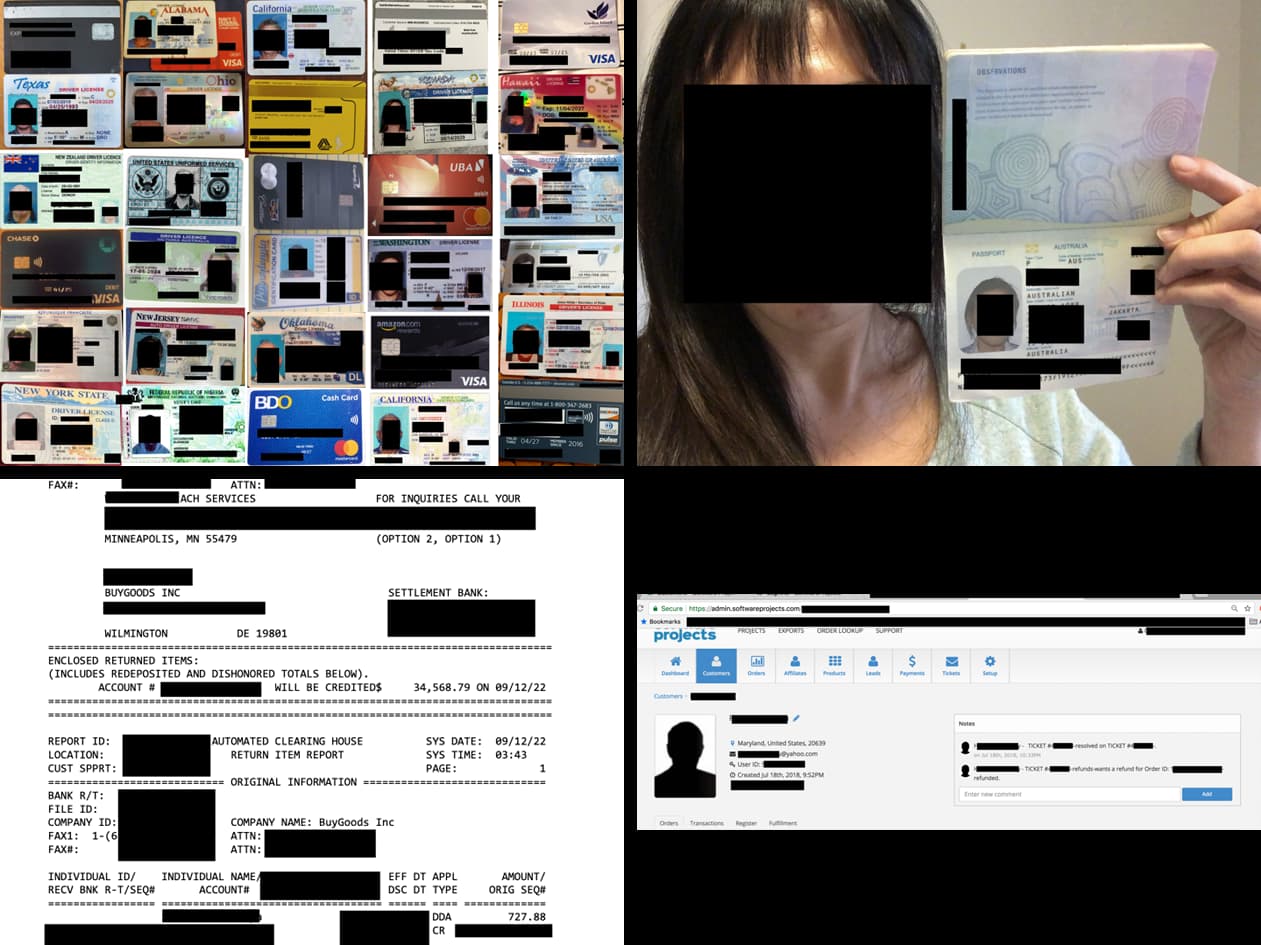
Security researchers have discovered billions of exposed records online, calling it the “mother of all breaches”.
However, the dataset doesn’t seem to be from one single data breach, but more a compilation of multiple breaches. These sets are often created by data enrichment companies. Data enrichment is the process of combining first party data from internal sources with disparate data from other internal systems or third party data from external sources. Enriched data is a valuable asset for any organization because it becomes more useful and insightful.
The researchers stated:
“While the team identified over 26 billion records, duplicates are also highly likely. However, the leaked data contains far more information than just credentials – most of the exposed data is sensitive and, therefore, valuable for malicious actors.”
In other news about leaked personal data, a cybercriminal going by the name of “emo” claims they have 15 million unique records of project management tool Trello accounts for sale.
Trello is used by many organizations, so it understandably raised some concerns.
Atlassian, the company that runs Trello, however denies there has been a breach. It seems as if someone has used a large collection of email addresses and tested it against Trello.
This brings us to the question: when do you call a giant leak of personal information a breach, and when don’t you?
A definition of a breach that makes sense to me is this one:
“A breach is an incident where data is inadvertently exposed in a vulnerable system, usually due to insufficient access controls or security weaknesses in the software.”
So you might say that exposing of billions of records was a breach because it is unlikely the instance was left open on purpose. After all, that amount of data can be sold for a pretty penny.
And Atlassian can safely say it was not breached, since the criminals used an existing feature. Maybe in larger numbers than intended, but why admit you shouldn’t have allowed it?
Some people will say that a data breach can only be the result of a hack and everything else is a leak. If you look at it that way, neither one of the datasets came from a breach. One set was stumbled upon and the other was created by using a legitimate API.
But to those affected the end result is pretty much the same whether your data was leaked in a breach, accumulated by scraping, or gathered by a data enrichment company. Your information is out there in the open for every cybercriminal to use at their perusal.
If you want to find out if your data is exposed online, you can try our free Digital Footprint scan. Fill in the email address you’re curious about (it’s best to submit the one you most frequently use) and we’ll send you a report.
You might be surprised. Remember though that it’s not embarrassing to you if your email address was found in a breach, but it is good to know if it was and where a password may have been included.
If the passwords it throws up at you look familiar, it would be a good idea to change the password where you’ve used it, enable 2FA, and check if it’s been re-used for other accounts.
Scammers are very good at using information found in breaches in social engineering attacks. Even the fact that your data may have been leaked in a breach is something scammers will readily use to launch a phishing attack and see what more they can find out from you.
Last year, over 2,000 companies and government entities reported data breaches impacting over 400 million personal accounts. Set up Identity Monitoring to get alerts whenever your data is exposed in a new breach.
We don’t just report on threats – we help safeguard your entire digital identity
Cybersecurity risks should never spread beyond a headline. Protect your—and your family’s—personal information by using Malwarebytes Identity Theft Protection.