How to leave an Instagram Broadcast Channel

0
[ad_1]

So, you bit off more than you can chew; you joined an Instagram Broadcast channel, and you’re regretting it. The account decides to post literally every 20 minutes, and you can’t take it anymore. It’s about time to move on from that channel for the sake of your sanity. That’s just what this piece is about. Here’s how to leave that annoying Instagram Broadcast channel.

Before we get started, if you’re looking to get more out of Instagram, then you might want to consider Meta Verified. This is a subscription plan starting at $8/month, and it encompasses both Facebook and Instagram. At the time of writing this, the company is still working on bringing WhatsApp into the service.

There are several perks to getting Meta Verified like an algorithmic boost, a verification badge, better customer service, proactive account monitoring, and more. Here’s Everything you need to know about Meta Verified in case you have some questions. It might be the thing to help you get your account off of the ground.

How to leave an Instagram Broadcast channel

Leaving that annoying channel is really simple to do. First, navigate to your messages. You’ll see all of the channels you follow along with your DMs. Channels will look like other chat conversations, but they’ll all be at the top of the feed.

Hold your finger down on the channel that you want to leave. You’ll see a little panel pop up from the bottom of the screen. Tap on the Leave option at the bottom. When you do that, you’ll see a popup appear on the screen asking you if you’re sure you want to leave. If you’re serious about leaving that group, tap on the Delete option.

Once you leave the channel, you won’t see any more messages. Also, you won’t see the channel in your chat feed. You’ll be completely cut off from that channel. So, do a sigh of relief.

How to rejoin a channel

If you have a change of heart, and you want to return to that channel, the process is also pretty simple. First, you’ll need to find the account that hosts the channel. You’ll be able to find it by looking through your Following list or by searching for it. Go to that account’s profile.

Right under the account’s profile bio, you will see a little chat bubble icon with the name of the channel next to it. Tap on the name of the channel and confirm that you want to rejoin it.

You might want to consider just muting a channel

If, instead, you just need a little break from the channel in question, then you may just want to mute it. This will block the channel from sending messages to you for a temporary period of time. To do this, you will need to go back to your messages and find the channel.

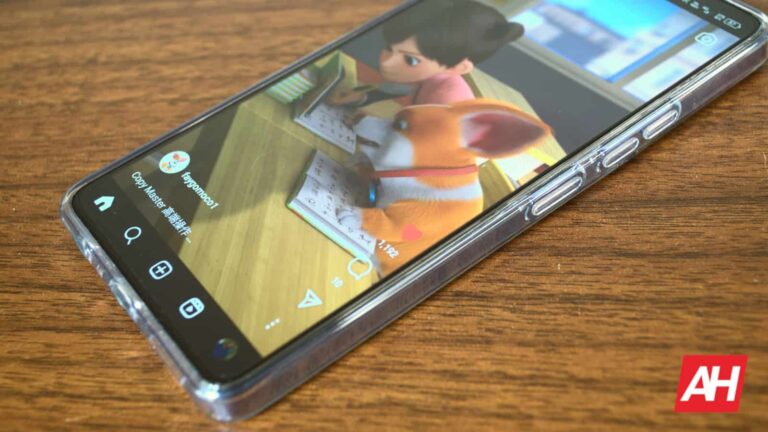
Remove Broadcast Channel 1

Hold your finger down until the panel pops up. Then, tap on the Mute button. When you do that, the app will give you four options. You can mute the messages for 1, 8, and 24 hours. There’s also the option to mute them indefinitely. Just tap on the Until I change it option.

How to create your own Broadcast channel

So, you’re tired of seeing other people’s channels, and you want a piece of the action. Well, you have the ability to make your own Broadcast channel. The process is easy, though it’s not quite as intuitive as you may think.

Firstly, you’ll need to go to your messages. Tap on the Compose message button at the top of your screen. On the resulting page, look for the option to create your channel. Once you do, you’ll have the options needed to customize your channel. Choose a profile picture for the channel, then choose a name for it. You’ll want to make sure that people know what your channel is about with the name and picture.

You have the option of making your channel open to everyone or exclusive to subscribers. Next, choose whether you want your channel to be visible on your profile. If you don’t make it visible on your profile, then people might not be able to rejoin after leaving.

If you want to keep an eye on who joins your channel, you can hold all new members for review. Before they can join your channel, you’ll need to approve their request.

Invites

After you’ve created your shiny new channel, you’ll want to gather some people to populate it. This is where sending out invites comes in. You’re able to send a mass invite to other users across Instagram to possibly join your channel. When you invite a person, they’ll get a one-time message in their inbox with a link to your channel. Once they tap on the Join button, they’ll be in your channel.

What you can post

If you’re curious about what kind of content you can post, the sky’s the limit. This is basically a one-way chat between you and the audience, so you can post anything that you’d post in a DM. Feel free to post text-based messages to the group. You can also post pictures and videos. If you want to know your audience’s opinion on something, then why not post a poll?

Why make a channel?

Broadcast Channels are for what their name implies; they’re for you to broadcast to your audience. They’re a way for you to share your work with your fans. Along with sharing your work, you can also use your channel to keep your fans in the loop about what’s going on. If you’re a musician, then you can use the channels to update your audience about future tour dates or releases. That’s only one example of what you can do.


[ad_2]
Source link

All of the AI announcements from Samsung Galaxy Unpacked

0
[ad_1]

“AI AI AI!” This has been on the tips of everyone’s tongues for the past year, and many tech companies are pivoting hard towards the technology. During today’s Galaxy Unpacked event, Samsung unveiled a slew of new AI features that are coming to its new Galaxy S24 phones. The company really leaned hard on AI technology this year, and it brought forth some interesting features.

There was a lot announced today, so it’s very easy to miss some of what the company introduced. However, fear not! Here’s a rundown of all of the AI features that were announced during the Samsung Unpacked event.

Before digging in, if you want to know more about the Galaxy S24 series phones, be sure to check out our coverage of the Galaxy S24 Ultra. It has all the information you need to know about this phone including its specs, price, and more information. We also have information on the Galaxy S24 and Galaxy S24+.

Pre-order the Galaxy S24 Ultra

Pre-order the Galaxy S24/S24+

Here are all of the AI features that Samsung announced during Galaxy Unpacked

What’s neat about these features is that most of them will not be confined to the Ultra model. The majority of the features will be available across all three phones. So, there’s no forced exclusivity like we’re seeing with the Pixel 8 Pro.

Translation

Starting off, Samsung phones now have an on-device way of breaking down language barriers. There are now different ways for you to translate text and voices. For starters, if you’re having a text message conversation with someone, and you want to send text in a different language, you simply have to type your message, and then press the Galaxy AI button on the top of the keyboard. When you do that, you will see the Chat Translation button pop up. This will give you the option to instantly translate the text you’ve written into a selection of different languages.

You’ll also be able to Live Translate phone calls. So, when you are on a call with a person, you will hear a translated version of their voice in real time. In order to use this feature, you will need to use the Samsung Dialer app and be signed into your Samsung account.

If you’re having a face-to-face conversation with a person who speaks another language, Samsung has a neat AI tool for you. With Interpreter, you’ll be able to easily have a two-way conversation with another person from a different language. The app will open in a split-screen view with two microphone icons. One person will tap on the microphone icon and say what they want to say in their language. The tool will then translate what they say, and you will hear a virtual voice say it in the translated language. This way, you can have a back-and-forth conversation with another person.

Chat Assist

If you need help with perfecting your next text message, then Chat Assist is here for you. All you have to do is type your message and tap on the Galaxy AI button. After choosing the Writing Style option, the keyboard will analyze the message you just typed. Then, using generative AI, the phone will offer you some AI-generated versions of that message that all have different tones.

If you want your message to have a more casual tone, you can select that option. The same goes for if you want your message to have a more formal tone. Also, if you want to turn your message into a social media post, the phone will actually give you an example complete with hashtags and emojis.

Android Auto

When you’re driving, the last thing you want (or NEED) to do is stare at your phone to read a text message. Simply waiting until you get home before reading your text messages is the best option. However, if you really must read your text messages, then you should let Samsung do it for you.

A new feature will allow Android Auto to summarize incoming text messages for you. So, you’ll be able to have an idea of what the person is talking about without you having to take your eyes off of the road. Along with this, the feature will suggest replies for you to send. All of this is done through voice, so you won’t have to worry about distracting yourself to reply.

This is a much safer option than driving one-handed or taking your eyes off of the road.

Note Assist

If you’re a person who uses Samsung Notes, then you will definitely love this feature. Note Assist will use generative AI to organize your notes, summarize them, create note templates, and automatically create covers for them. This AI tool makes it much easier to keep your notes all organized and easy to manage.

If you’re taking voice notes in the app, then you will love the Transcript Assist feature. This will use AI speech-to-text technology to transcribe, summarize, and even translate recordings. Also, the AI technology will be able to differentiate between different speakers.

Circle To Search

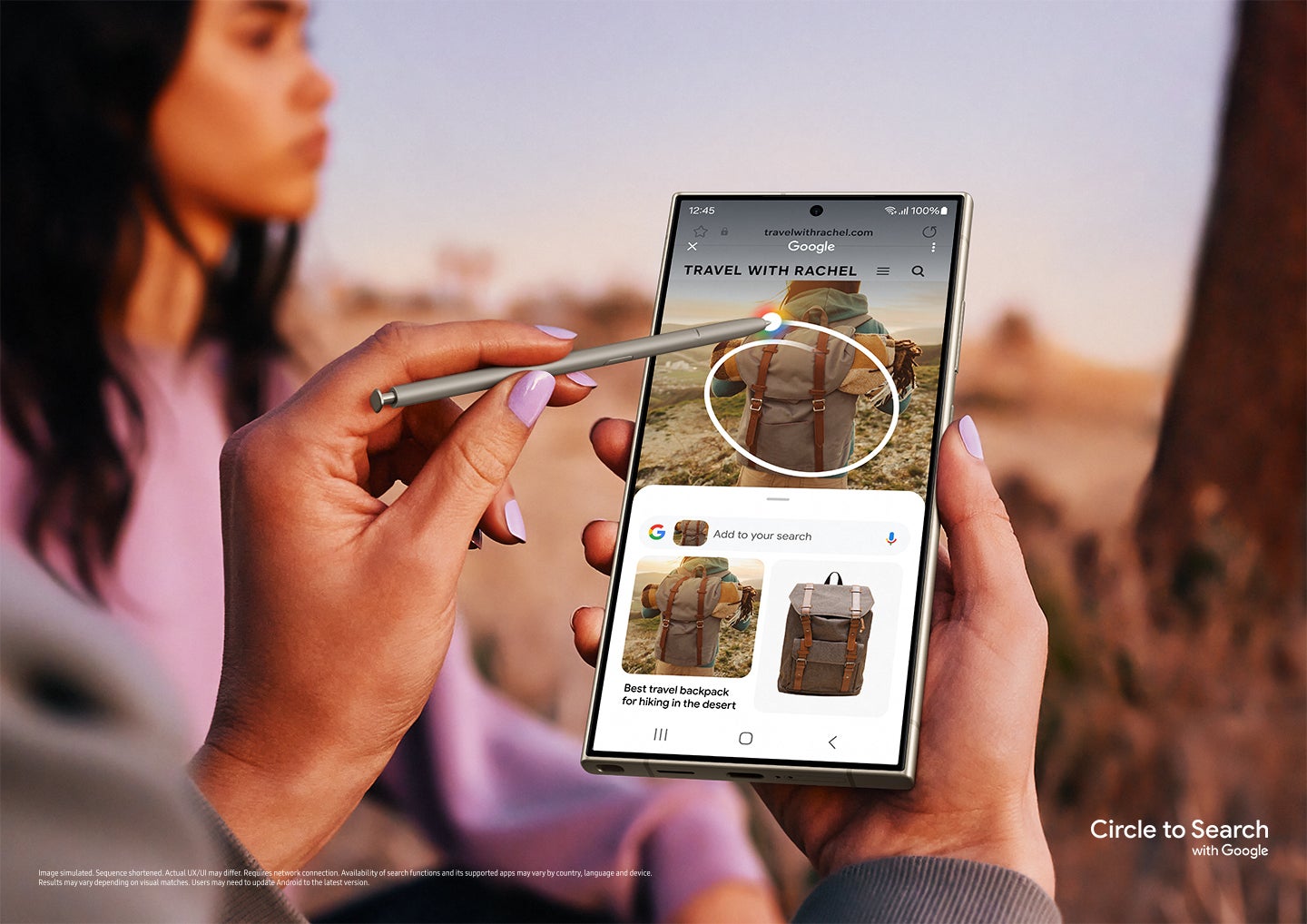
This is one of the AI features that actually don’t use on-device AI. Rather, Samsung and Google are working in tandem to bring this feature to life. Called Circle To Search, this allows you to quickly do a Google Lens search on a particular item in a picture by simply circling it.

If you’re viewing the picture, summon the Google Assistant. Then, simply draw a circle around the item in the picture that you want to search. Google will work its magic and identify what’s in the image. From that point, it will give you search results based on what you circled.

This feature is not only useful, but it is also very fast. Depending on what items you circle, you will get your results within a fraction of a second.

AI camera features

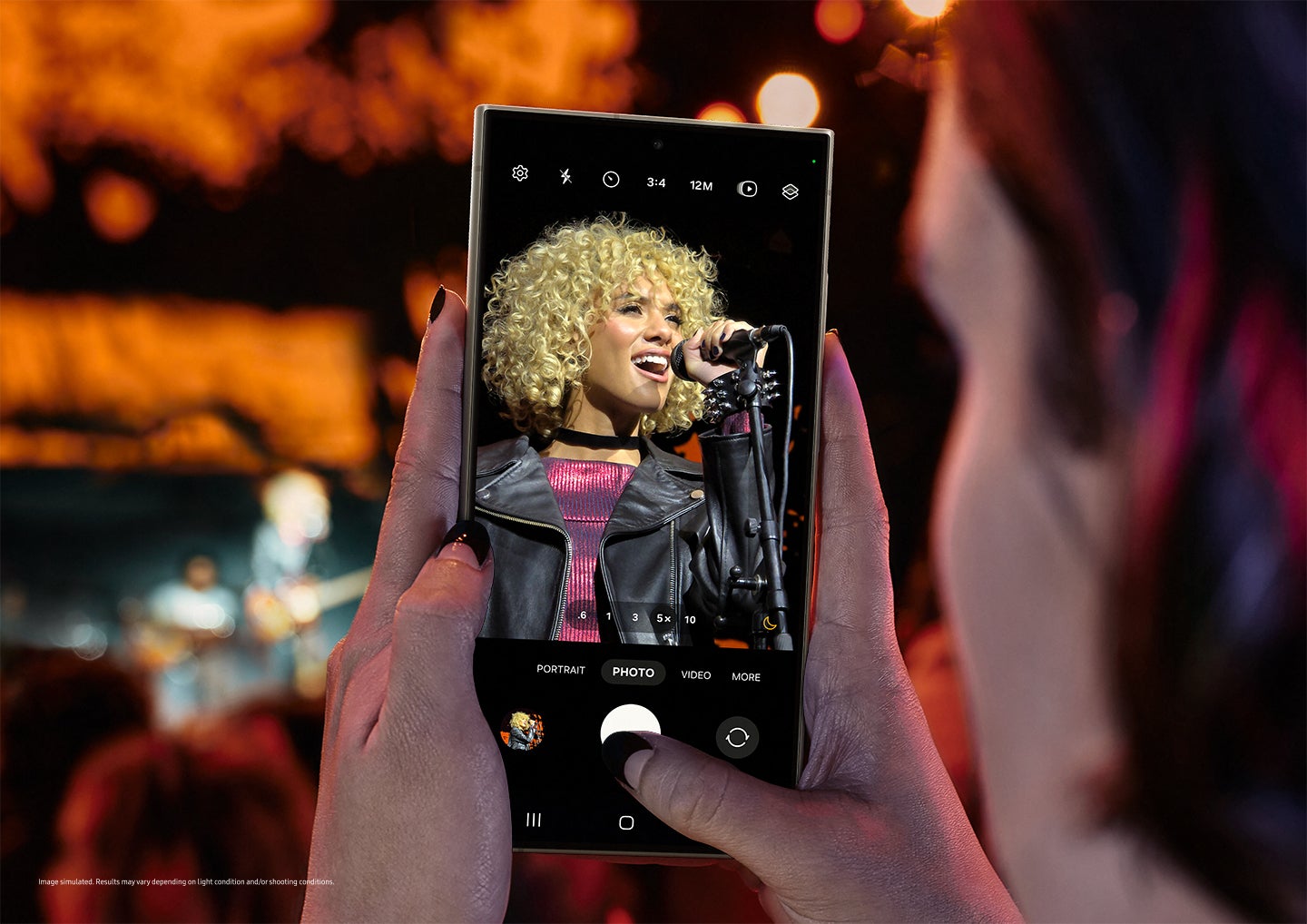
Samsung always brings some amazing camera improvements with its new phones, and this year is no different. This year, the company introduced the ProVisual Engine. This is a suite of AI power tools that transform the camera’s image-capturing abilities.

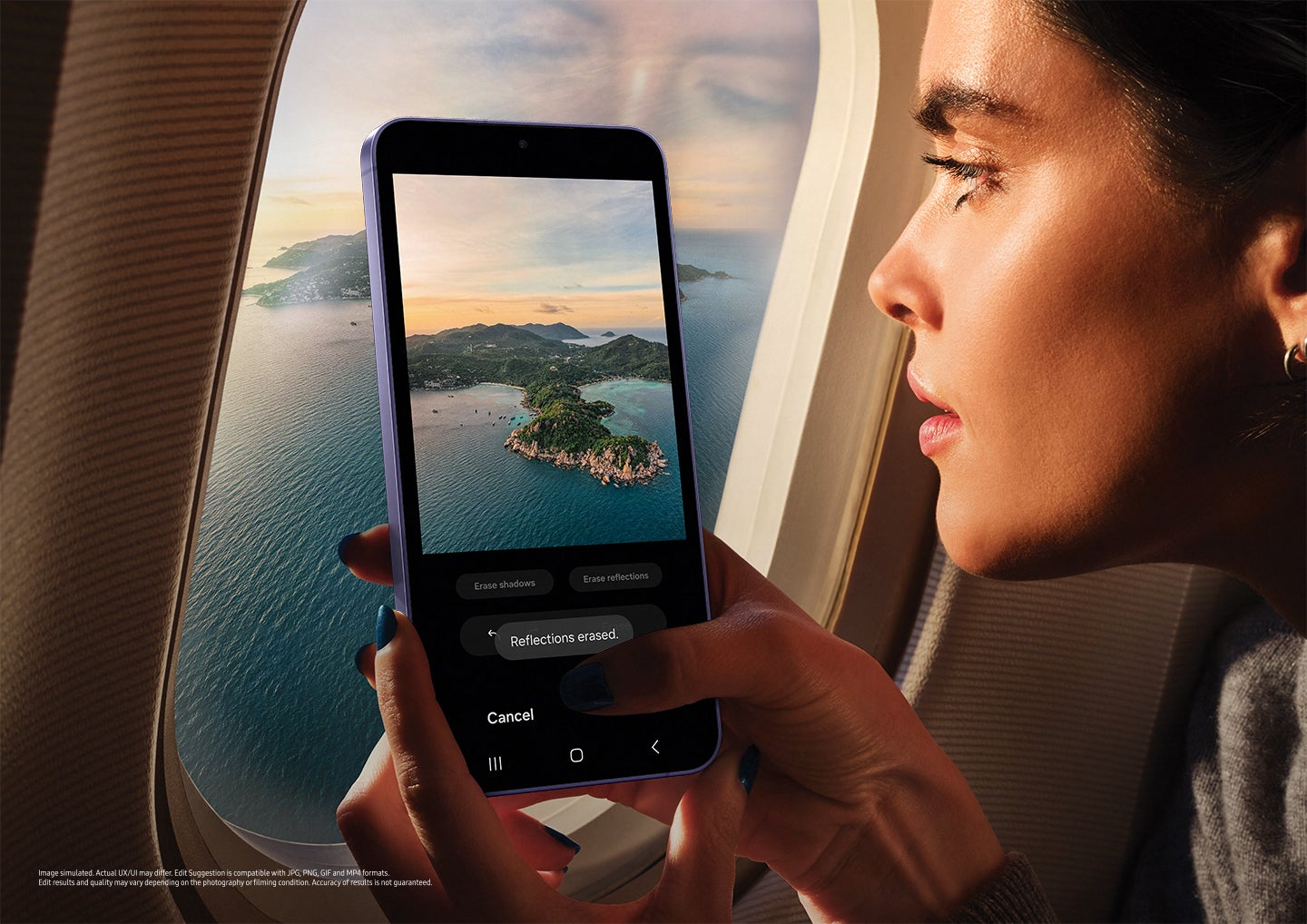
After you’ve captured your image, Samsung has a set of tools such as Galaxy AI Editing, Edit Suggestion, and Generative Edit. These are all tools that use generative AI to help you edit your shots to make them the best that they can possibly be. They will tweak and do deep edits to your images which would usually require multi-hundred-dollar photo editing software.

One thing to note is that these AI camera features are exclusive to the Ultra model of the Galaxy S24. All of the other features, however, will be available on the Galaxy S24 and Galaxy S24+.

Check out the Samsung Galaxy Unpacked event below to view these new AI features:


[ad_2]
Source link

Casetify launches several protective cases for Galaxy S24 series

0
[ad_1]

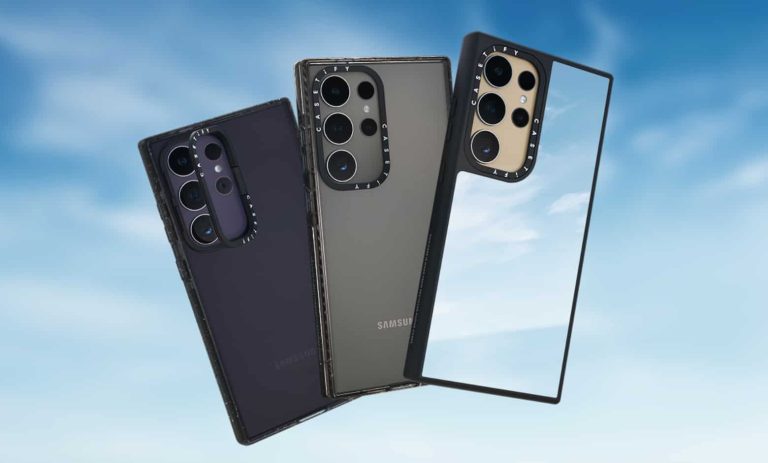
With Samsung‘s Galaxy S24 series now official, accessory maker Casetify is here with an extensive collection of protective cases for the new phones. The firm has launched four covers and a magnetic ring for the lineup. The accessories are available on its official website as well as on Amazon.

Casetify launches protective cases for the Galaxy S24 series

Casetify’s offerings for the Galaxy S24, Galaxy S24+, and Galaxy S24 Ultra are headed by the Impact Ring Stand Case. It is a sturdy cover with a 3x MIL-STD-810G military-grade durability standard. The case features a raised camera ring that doubles up as a kickstand for the phones. The stand rotates up to 150 degrees, allowing you to prop up the device horizontally at various angles.

Casetify Galaxy S24 cases 2

The cover has multiple layers of Casetify’s proprietary EcoShock shock-absorbing technology, making it strong enough to withstand single drops of 2 meters or 6.6 feet. It is compatible with a magnetic ring and wireless charging. The Impact Ring Stand Case will cost you $80.

The regular Impact Case, which lacks a kickstand, lowers the price to $70 while upgrading the durability to the 4x MIL-STD-810G standard. It has raised bezels for screen protection and is drop-resistant up to 2.4 meters or 8.2 feet. Despite the toughness, the case doesn’t block the wireless charging capabilities of the Galaxy S24, Galaxy S24+, or Galaxy S24 Ultra. It is available in Clear/Black, Matte Black, and Deep Purple colors.

Next up, we have a $75 priced Clear Case from Casetify. It boasts shock-absorption technology and 1x MIL-STD-810G standard for 2m/6.6ft drop protection. Thanks to UV Defender technology, the case doesn’t discolor quickly and remains crystal clear for a long time. It is also scratch-resistant and supports magnetic accessories and wireless
charging.

Casetify Galaxy S24 cases 3

Casetify’s Mirror Case for the Galaxy S24 lineup has the specialty its name suggests. Its rear surface doubles up as a mirror. The case also gives you 1.5m/4.9ft drop protection, raised bezels, and a strap hole to attach phone charms. This electroplate-coated polycarbonate dual-purpose accessory is compatible with wireless charging and magnetic accessories and can be yours at $70.

Casetify’s magnetic ring adds support for magnetic accessories

Along with the four covers, Casetify made a magnetic ring for the Galaxy S24 series. It adds magnetic capabilities to non-magnetic cases, allowing you to attach magnetic accessories. Priced at $15, the ring measures just 1.2mm in thickness and offers a strong magnetic attachment. The firm gives you an easy-to-use two-step applicator so the ring sits perfectly on the back of the phone.


[ad_2]
Source link

Bixby is not going anywhere, says Samsung

0
[ad_1]

Back in April 2017, Google Assistant, Siri, and Amazon Alexa got a new friend named Samsung Bixby. This is the voice assistant that’s exclusive to Samsung’s Galaxy devices. It had a pretty rocky start, but it’s up and running now. With all the buzz around generative AI, we’ve all wondered what plans Samsung has for its voice Assistant. However, the company stated that Bixby is sticking around.

Samsung didn’t really hint that Bixby was going away, in all honesty. But, the introduction of generative AI really took the tech world by storm, and it’s causing some companies to rethink their entire business strategies. New AI products are coming out with new names, and we’re wondering what’s going to happen with the voice assistance of the past.

For example, Google introduced Bard last year. Bard is the company’s AI-powered chatbot, and this made us wonder about the fate of Google Assistant. Is Google going to have two concurrent AI-powered assistants, or will Bard cannibalize Assistant? That remains to be seen, but it’s a valid concern.

Pre-order the Galaxy S24 Ultra

Pre-order the Galaxy S24/S24+

But, don’t worry. Bixby is sticking around

Samsung just announced the Galaxy S24 series of phones today, and the prime focus was on AI. Sure, these phones are going to come with updated processors, but most of the changes will have to do with the brains of the phone. Since AI has been the driving force of the tech world since November 2022, companies are making a hard pivot to AI technology.

In the case of Samsung, the company touted a myriad of on-device AI tools. With so many on-device tools, having an internet-connected voice assistant might seem a bit extraneous. So, it puts into question just what the company is going to do with Bixby. Thankfully, for fans of the voice assistant, Bixby is sticking around. Samsung is not going to do away with its child only 6 years after its introduction.

Rather, the company plans on adding new changes and features to Bixby in order to boost the experience. So, what exciting goodies does Samsung have in store for Bixby? That remains to be seen.


[ad_2]
Source link

These Galaxy S24 AI features are all performed on-device

0
[ad_1]

Samsung just pulled the wraps off of the Galaxy S24, Galaxy S24+ and, Galaxy S24 Ultra and we got a peek at what AI features these phones will offer. While AI features usually require a connection to the cloud, the S24 phones will take a different path. Many of the Galaxy S24’s AI features will use on-device AI.

Just today, Samsung announced that Galaxy AI is powered by Google’s Gemini Nano. This is a powerful AI model that can exist on a smartphone chip. That means that a device will be able to perform powerful AI tasks without needing to connect to the internet. This also opens the door for phones to better integrate AI with core system functions.

These Galaxy AI functions are performed on-device

Samsung announced quite a handful of new AI features during the event, and most of them are done on-device.

Firstly, the company announced a collection of features that all center around translating speech and text for people. While you’re texting someone, you’re able to easily translate what you’re typing using the Galaxy AI button on the Samsung Keyboard. Just type the message, and tap on the Chat Translation button. this will let you translate your message into one of several languages.

The Interpret tool will translate a face-to-face conversation between you and another person. The app will open in a split-screen view with a microphone icon on each side. This will allow both people to speak into the phone and translate everything they’re saying for the other person.

If you want to have a live conversation with a person who speaks another language, you’ll be able to do that over the phone. Galaxy AI will be able to translate phone conversations between people in real-time.

Other AI features

Samsung Notes also received a boost with on-device AI. The app will use AI to organize, summarize, and create templates for your notes. Also, it will create AI-generated covers for your notes so that you can identify them more easily.

Here’s another useful feature to help you with your messaging. Chat Assist will use generative AI to give your messages a different tone. After you type a message, Chat Assist will analyze what you wrote and offer alternatives. If you want it to sound more formal, you can choose the formal tone. If you want it to sound more casual, you can choose that option.

Place your order!

If you’re looking forward to getting your hands on one of these phones, you should put in your pre-order. Using the links below will get you a $50 discount.

Pre-order the Galaxy S24 Ultra

Pre-order the Galaxy S24/S24+


[ad_2]
Source link

Samsung doesn’t think that Qi2 is necessary

0
[ad_1]

Samsung just announced this new Galaxy S24 phones, and they bring a slew of AI-centric upgrades over the previous iteration. Along with these, we also got the typical hardware upgrades like a new processor. However, one bit of new hardware seems to be missing, as Samsung, apparently, does not think that Qi2 wireless charging is necessary.

Right now, we’re at the cusp of the new standard in wireless charging technology. Qi2 wireless charging brings improvement over standard Qi wireless charging standard. We’ve seen a few Qi2-enabled devices showcased during CES 2024. Notably, the iPhone 15 is compatible with Qi2 wireless charging. With upgrades to charging speeds and efficiency, most new products should come out with this enabled.

Pre-order the Galaxy S24 Ultra

Pre-order the Galaxy S24/S24+

However, it seems that Samsung does not consider Qi2 wireless charging necessary

Samsung is a leader in the tech industry. However, when it comes to charging technology, the Korean tech giant sometimes stays behind the curve. We saw this when the Galaxy S7 used a micro USB port when most of the tech world had already transitioned to USB-C. Also, Samsung isn’t a leader when it comes to charging speeds for its phones. So, it definitely tracks that Samsung is behind the times with Qi2 wireless charging.

When asked about whether it implemented Qi2, into its Galaxy S24 phones, the company said that people aren’t asking for it. So, it appears that Samsung simply skipped it this year. Instead, the company wants to focus on just offering faster charging without upgrading to a newer standard.

While this would be disappointing to some people, we don’t fear that there will be a large public outcry regarding is news. The people using Samsung’s phones aren’t really used to extremely fast charging anyway, so this doesn’t seem like much of a big deal.

In any case, the Galaxy S24 phones are now official. Be sure to check out Android Headlines for more coverage on these devices and to see if these are the phones for you.


[ad_2]
Source link

Galaxy S24: special AI features and what they mean for you

0
[ad_1]
Samsung’s latest series of Galaxy S24 phones is finally official and — surprise, surprise! — so is Galaxy AI: a slew of AI-fueled features that have made the flagships their home.

I think it’s safe to say that the trendiest thing of 2023 was AI. The way in which the technology — which wasn’t in any way new in concept, really — blew up just because of a few apps that would recreate you in different styles of art was kind of new-age, yet expected.

But, oh boy, if you thought that AI was just a trend of yesteryear, have I got news for you. The technology is about to become a central part of the best phones of 2024. Samsung seems to be the first to that party thus far, with Galaxy AI being a huge focus for the Korean giant’s marketing strategy.

But what is this all about? Has Samsung made just another ChatGPT clone or could these features actually be useful for a Galaxy fan’s daily routine, should they decide to upgrade to a phone from the Galaxy S24 series?

What is Galaxy AI on the Galaxy S24?

Samsung introduced Galaxy AI alongside with the official reveal of its Galaxy S24 series of phones. The term is used to describe a series of AI-enabled features — a mix of ones you’ve seen before and cool new tricks — found on these latest flagship phones.

Sammy has tried to approach the subject matter of AI in a rational way: no single function is so crazy that people would have a hard time understanding (or using) it. And while tech aficionados may be disappointed by this approach, since the selection isn’t anything groundbreaking, the idea makes total sense: AI is becoming mainstream, but isn’t quite there yet, so this is a great way to get more people on board to try it.

At the same time, the clever choice to mix on-device and cloud-based AI computing was made so that Samsung could minimize any concerns regarding user data. The mix allows most of the data involved in Galaxy AI processes to stay on your phone, which some users will certainly appreciate.

The Galaxy AI suite doesn’t seem to be centralized either. Meaning, you won’t go to a dedicated Galaxy AI app in order to get things going. Instead, the features are seamlessly sprinkled throughout OneUI itself and are one tap or gesture away from being put to use: some hiding on the Galaxy S24’s keyboard, others in the camera app, etc.

What features does Galaxy AI on Galaxy S24 bring?

Circle to Search

This is Samsung’s fun new way to search for things in a more seamless manner on your Galaxy S24 phone. The title explains it all: if you’re, say, watching a video about plants on YouTube and you see one that you’re not familiar with, you can:

  1. Tap and hold on the Home button
  2. Circle (or tap) on the plant
  3. Get results about what that plant is, without ever leaving YouTube

But that isn’t all. Because while “circle to search” sounds really catchy, the reality is that you can also scribble over items or tap on them. And this only make sense, right? This sounds like a feature focused on the user-experience and that’s a must if the company wants it to catch on with users.  

Live Translate

Don’t get this one mixed-up with the one from Google. The Big G’s variant is capable of translating texts or even transcribing audio from vids pretty quickly, but Samsung’s take means things literally: a real time translation during a live phone call.

Well, almost real time. I mean, even translators can’t translate in real time, since they’d have to hear what is being said first. Same goes for the AI: it hears what the speaker is saying and after a short time, translates that into a language you can understand.

For the time being, 13 languages are supported, but Samsung may introduce more with time, depending on the popularity of Live Translate. Oh, and by the way: this is one of the features that happens entirely on your device, so your data is safe. As in: business owners are nudged to pick up on this one.

Interpreter

What about if you’re not on a call, though? Well, Samsung has considered that too and hence: this feature. It turns your Galaxy S24 into a split-screen experience, allowing you to break the language barrier. People on both sides get a transcription of what the other one is saying in a language that they can understand.

Chat Assist

You’ve seen this one before: you get a text in a foreign language and the Galaxy S24 will be able to translate that for you. Neat.

What is new here, however, is Tone Tweak. This is an AI feature that aims to simplify the brainstorming process during texting for you. Say you want to say “Thanks a lot”, but in a professional manner, but the words just aren’t coming for whatever reason.

Well, with the push of a button, Galaxy AI can bring up several variants for you, which you can pick from.

Hands-free communication assistant on the road

This one seamlessly integrates with Android Auto, even bringing a touch of OneUI’s design magic to your car. But we’re here to talk about Galaxy AI, so how does that play into things?

Well, basically, the assistant is capable of going through your texts and summarizing them for you out loud, so that you don’t have to look at your phone or look at your car’s screen.

Not only that, but it can offer you suggested actions. You’ll be able to pick one from the list and then the AI will do the texting while you focus on the road. Sweet.

Transcript Assist

We’ve seen this one on Google’s Pixel line of phones before, but it’s nice to see it becoming more mainstream: live transcriptions. Basically, you can let the voice recorder on your Galaxy S24 run and it will transcribe the recording as it happens.

Will the feature become more advanced, introducing things like speaker labels in the future? We hope so.

Note Assist in Samsung Notes

Galaxy AI can help you set up notes from pre-existing templates, which seem to be based on your reoccurring needs. This means that the AI will monitor to check if you’re making, for example, grocery lists often and if you are, it may start offering you premade templates to save you some time.

What’s really cool about this one is that the templates get these little custom covers with summaries and icons. A really neat personal touch!

Oh, and for those of you who are eager to get their hands on a Galaxy S24 Ultra: the Samsung Notes app will now utilize AI to read your handwriting better. What’s more, it will be able to straighten out handwriting via the S Pen too, so that it looks better. Neat.

Another cool trick that Samsung showed off during it’s Galaxy AI presentation was especially designed for note takers (just like me!). With Samsung Notes, you don’t need to add bullets: you can just jot everything down as it comes and, with a tap of a button, Galaxy AI can reorder and rephrase your notes in a more presentable and understandable manner.  

Galaxy AI and photography on the Galaxy S24:

AI Photo Editing:

  • Edit Suggestion: AI will be able to scan your shot and suggest ways to improve it automatically.

  • AI-powered editing: users will be able to remove blurring, reflections or to make their photos more crisp manually, if they don’t like the automated suggestions.

  • Generative editing: Want to straighten out your shot without cropping it? This one can fill in the empty spaces created in the process. It will also allow you to delete objects from a photo, without leaving an ugly blemish behind. Oh, and it can also let you move things around entirely, if that’s your preferred way of doing things

AI Zoom

Digital zoom? Not enough! The Galaxy S24 series is rocking AI Zoom too, which basically means that it’s using some AI magic to fill in the blanks between digital zoom distances. Sure: digital zoom already isn’t winning the populace’s favor, but having another option on board can’t hurt, right?

Instant Slow-Mo:

Have you ever wanted to slow down a video, only to find that it becomes choppy and unpleasant to view? Well, this one takes care of that issue via AI. Essentially, what is happening is that the AI is making up new frames between the existing frames, allowing you to enjoy a slow motion video even with clips captured outside of a dedicated slow-mo mode.

What else do you need to know about Galaxy AI?

There are two facts that must be noted when talking about features, related to Galaxy AI:

  • Some features will need you to have an active internet connection in order for them to work, and others will require a Samsung account too.
  • Some AI-fueled features, related to images, won’t be supported by all social media platforms (likely, instant messaging apps too), so what you see on a Galaxy S24 phone won’t always be what other people are seeing.
  • Any photos or videos, which have been produced with the help of Galaxy AI, will contain special metadata traces, so that bad actors won’t be able to fool anyone.

For a quick refresh: metadata is basically hidden info about files. For photos, it could contain the device they were captured with or for videos: the date when they were taken. Metadata isn’t hard-coded into files, though and can be altered with a bit of effort, so keep that in mind. And that’s about all of the Galaxy AI features that we know about for the time being. A lot of them sound pretty familiar, right? Most of those: from Google’s Pixel line of phones. While it is nice to see those leave the mothership so that other Android fans can enjoy them too, it will be interesting to see if Samsung brings even more to Galaxy AI in the future.

In the meantime, if this was enough to tip the scales and make you crave a Galaxy S24 series phone, you should know that pre-orders are already live and will last through to the end of January.


[ad_2]
Source link

Kaspersky’s iShutdown Tool Detects Pegasus Spyware on iOS Devices

0
[ad_1]

The iShutdown tool has been launched a few weeks after Kaspersky cybersecurity researchers revealed significant insights into Operation Triangulation. This investigation delves into how spyware threats compromise iPhones.

Kaspersky’s Global Research and Analysis Team (GReAT) has introduced a new tool that lets users detect Pegasus, a popular iOS spyware known for targeting journalists and activists. This lightweight method called iShutdown will identify signs of spyware on Apple iOS devices, including three prominent spyware families Pegasus, QuaDream’s Reign, and Intellexa’s Predator.

The iShutdown tool is now available to the public, seven months after Kaspersky Labs initially reported the hacking of its employees’ iPhones, referred to as Operation Triangulation. In December 2023, the company released an update disclosing that hackers likely exploited an obscure hardware feature during spyware attacks against iPhone users.

The method was tested on a set of Pegasus-compromised iPhones. However, it must be noted that this method/tool is different from the iShutdown iOS application that allows Mac devices to shut down/sleep/restart/log out.

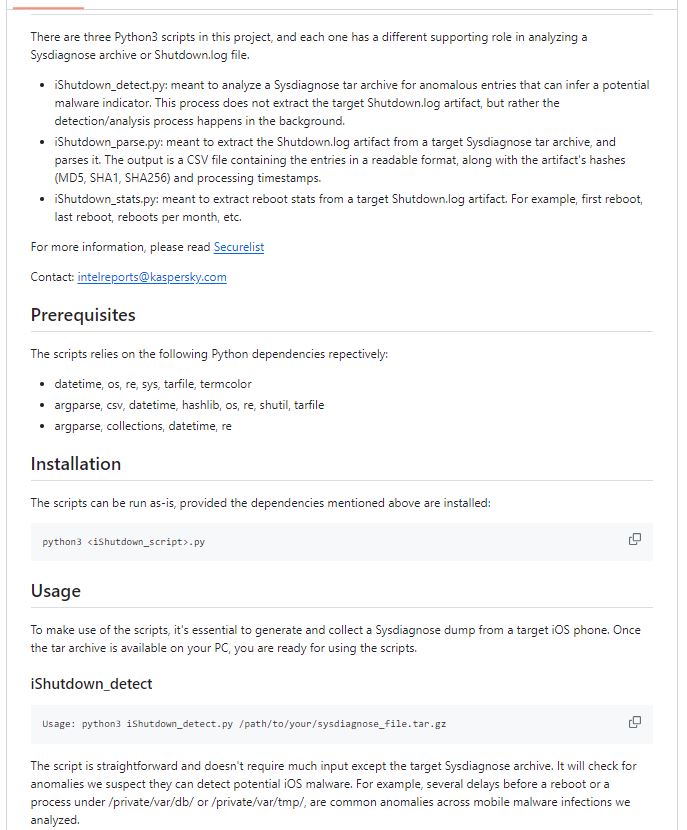
According to the cybersecurity firm, traces of Pegasus-related processes were discovered in a text-based system log file called “Shutdown.log” on iPhones compromised with the spyware. 

The log file is stored within the sysdiagnose archive of iOS devices. It records every reboot event with its environmental characteristics and is a generally overlooked forensic artefact. It can have entries dating back several years, providing valuable information. When a user initiates a reboot, the operating system terminates running processes, flushing memory buffers, and waiting for a normal reboot.

Its analysis revealed “sticky” processes that hinder reboots. Pegasus-related processes were found in over four reboot delay notices. These anomalies during reboot procedures allowed the tool to flag potential infections with high accuracy. Further analysis revealed a similar filesystem path used by all three spyware families, “/private/var/db/” for Pegasus and Reign, and “/private/var/tmp/” for Predator, as an indicator of compromise.

Kaspersky GReAT’s lead security researcher, Maher Yamout, has confirmed the log’s consistency with other Pegasus infections, making it a reliable forensic artefact for infection analysis. The tool offers enhanced protection to a broader user base.

“Compared to more time-consuming acquisition methods such as forensic device imaging or a full iOS backup, Shutdown.log file recovery is pretty simple,” explained Yamout.

Kaspersky has developed a Python3 utility on GitHub for macOS, Windows, and Linux users to detect spyware. The tool extracts, analyzes, and parses Shutdown.log artifacts. It simplifies detection and raises awareness, empowering users to take control of their digital security.

Kaspersky's iShutdown Tool Detects Pegasus Spyware on iOS Devices

However, Kaspersky suggests users adopt a holistic approach towards data and device security. The company recommends users perform daily reboots, use lockdown mode, disable iMessage and FaceTime, timely iOS updates, and regular check backups.

The announcement comes after SentinelOne’s report revealing that information stealers targeting macOS like KeySteal, Atomic, and JaskaGo are quickly adapting to circumvent Apple’s built-in antivirus technology called XProtect.

  1. QuaDream, Israeli iPhone hacking spyware firm, to shut down
  2. European Spyware Vendor Offering Android, iOS Device Exploits
  3. iPhone Spyware Exploits Obscure Chip Feature, Targets Researchers
  4. Apple’s iPhone Hack Attack Warnings Spark Political Firestorm in India
  5. NSO zero-click iMessage exploit hacks iPhone without need to click links

[ad_2]
Source link

How to pre-order the Samsung Galaxy S24 series phones

0
[ad_1]

If you’re thinking about upgrading to the Galaxy S24 or either of its more feature-rich counterparts, you’ll likely want to pre-order. There’s a good reason for that, too. Most places offering pre-orders will have some sort of promotion. Where if you pre-order the device before it officially launches, you’ll get a bonus of some kind.

This year, the main promotion is if you pre-order by a certain date, you’ll be able to double your storage on the device. So, for example, if you were to pre-order the Galaxy S24 128GB model, you’ll be able to get bumped to the 256GB model for the same price. This promotion will only last until January 30, however. So you will only have a little under two weeks to take advantage of it. The Galaxy S24 series officially launches on January 31. And at that time, pre-order pricing and promotions will be over. That being said, if you’re looking to pre-order any of the three devices, here’s how to do that.

How to pre-order the Galaxy S24, Galaxy S24+, and Galaxy S24 Ultra

How you pre-order is really up to you, but you should be able to do it in a couple of different ways. If you’re getting the phone from a carrier, like Verizon or AT&T, then you should be able to pre-order any of these three new phones in-store. You’ll also be able to place your pre-order online at their respective websites.

Samsung and its retail partners will also be offering pre-orders online through their official stores. Pre-ordering online will certainly be the most efficient method. As you can do it from anywhere. But if you’re already out and about and close to a store, you could pop in and do it that way too.

Where to pre-order

Not everyone shops at the same stores. As such, most brands want to put their products in as many stores as they can. With the Galaxy S24, you’ll be able to pre-order from your usual retailers. This includes carriers and Samsung’s own website among others.

Samsung

Samsung will of course be one of the main places people go to pre-order the device. You’ll be able to pre-order starting today directly on Samsung’s website. And doing so before January 31 will get you the best possible price and deal on these devices. You also get an additional $50 off your phone purchase if you buy through the two direct links below that lead to Samsung’s website.

– Galaxy S24/Galaxy S24+

– Galaxy S24 Ultra

Verizon

Verizon will begin pre-orders for the Galaxy S24 series on January 17 and you can finalize a pre-order through January 30. As mentioned above, the promotions will end once January 31 rolls around. Verizon will have all three phones with their respective colorways available. The Galaxy S24 will be available in Onyx Black, Marble Gray, Cobalt Violet, and Amber Yellow. It’ll start at $799.99 or you can split it up into payments over 36 months at $22.22 a month on the device payment plan.

If you’re looking to go for the Galaxy S24+, you can pre-order it in Icy Blue, Phantom Black, or Cream colorways. It’ll start at $999.99 or payments can be split up to $27.77 a month for 36 months. Those looking for the biggest and baddest device will want to go with the Galaxy S24 Ultra. This will start at $1,299.99 a month, or you can split it up into payments of $36.11 a month for 36 months. As for colors, Verizon will offer the phone in Titanium Black, Titanium Gray, Titanium Violet, and Titanium Yellow.

– Galaxy S24

– Galaxy S24+

– Galaxy S24 Ultra

AT&T

AT&T has also confirmed that you’ll be able to pre-order the Galaxy S24 series devices and pre-orders will be available for new and existing customers. Online pre-orders will start on January 17 and be available through January 30 with the choice of Unlimited Your Way plans. Pre-orders will also be available in-store.

AT&T will also be offering all colorways of each device, and full retail prices will be the same. However, AT&T is doing something a little differently for its trade-in. If you trade in an older Galaxy phone, any year and in any condition, you’ll get a Galaxy S24 or Galaxy S24+ on AT&T. Basically AT&T is saying you will get the phone free of charge by trading in your older Galaxy device. This is also guaranteed by the carrier, but you’ll need to be on the compatible Unlimited Your Way plan.

The Galaxy S24 Ultra won’t be free, but you can get $1,000 off the cost. And that’s a pretty nice discount when you factor in the double storage promo as well.

– Galaxy S24

– Galax S24+

– Galaxy S24 Ultra

T-Mobile

T-Mobile just like the other carriers will offer all three phones in all of its colorways. You can pick up the phone with its double storage promotional discount if you pre-order anytime between January 17 and January 30. You can also pay for the phone outright or pay for it in installments over your monthly bill. Additionally, you can save even more if you trade in your old device.

– Galaxy S24

– Galaxy S24+

– Galaxy S24 Ultra

Xfinity Mobile

Xfinity Mobile customers won’t be left out. The Galaxy S24 series will be available for pre-order through the carrier. Xfinity Mobile will also be offering trade-in promotions. Customers who trade in their old Galaxy phone can get up to $800 off the new Galaxy S24 series devices. And those who pre-order can also get double the storage. The same promotion that Samsung, Verizon, and AT&T are running.

If you don’t have a phone to trade in, Xfinity will still offer up to $500 off for Galaxy S24 series pre-orders, and double the storage should be available as well. As with the other retailers, these promotions only run through January 30 since the phone launches on January 31.

– Galaxy S24

– Galaxy S24+

– Galaxy S24 Ultra

Best Buy

Best Buy is one of the cornerstones of consumer electronics retail in the US, and as such you can expect the Galaxy S24 series to be available for pre-order here as well. The same pricing applies to all three devices as long as stock is available. And if you pre-order you get the storage bump for your chosen device.

– Galaxy S24

– Galaxy S24+

– Galaxy S24 Ultra

Amazon

Amazon, naturally, will have these for pre-order as well as the largest online retailer globally. Customers can expect to get any of the three devices in whatever storage option they choose, along with double the storage promos that offer the phones at their respective pricing. That being said, Amazon isn’t going to be offering any other sorts of promotions. Such as trade-in discounts. If you’re looking to save more money, you might want to consider pre-ordering at places like Best Buy, Samsung, or your carrier if you want the trade-in specials.

– Galaxy S24

– Galaxy S24+

– Galaxy S24 Ultra


[ad_2]
Source link

The Galaxy S24 uses Google’s Gemini model to power its AI

0
[ad_1]

Samsung just announced the new Galaxy S24, and the company really dug into the AI features coming with these phones. These features use some advanced AI prowess, and most of them are all done on-device. Where are these AI smarts coming from? Well, Samsung announced that Galaxy AI is powered by Google’s Gemini.

Last year, Google announced Gemini. This is the next generation of the company’s AI models. The company announced three versions of the model, and the smallest one is called Gemini Nano. Able to fit on a phone, Gemini Nano can power a ton of on-device AI tasks.

Samsung announced that Galaxy AI is powered by Google Gemini

Developing advanced generative AI is a time-consuming endeavor. It requires a ton of R&D, millions of dollars, and a bunch of time. Samsung, being mostly a hardware company, didn’t really put a ton of energy into AI development. So, it seemed a bit odd that the company was able to develop Galaxy AI so quickly. It brings some powerful generative AI to the Galaxy S24 phones.

Well, don’t scratch your head over this too much. During the Unpacked event, Samsung just announced that its Galaxy AI is powered by Google’s Gemini. This should come as no surprise, as Google and Samsung have a very close partnership. So, with this news, we now know of three chips that have Gemini Nano implemented onto them: Tensor G3, Snapdragon 8 Gen 3, and Exynos 2400.

What AI features did Samsung announce?

For a full list, check out our rundown of all the AI features Samsung announced at Galaxy Unpacked. Some of the notable features that Samsung announced include smart translation features. Interpret is a tool that lets you translate a one-on-one conversation between people in real time. It will actively translate everything being said.

Also, if you’re using the Samsung Dialer app, you’ll be able to translate your conversations in real time. These are just a few of the amazing features that are coming to the Galaxy S24 series phones. Below, you’ll see the links to pre-order these phones. using these links will get you $50 off of your price!

Pre-order the Galaxy S24 Ultra

Pre-order the Galaxy S24/S24+


[ad_2]
Source link