Gboard is probably one of the most used keyboards on Android phones, and that’s for good reason. It comes with a ton of amazing features that make typing on Android a treat. However, you’d be missing all these features if you use a physical keyboard. The company is looking to change this, as Gboard now has a useful toolbar for people using a physical keyboard.
When you use the full Gboard keyboard you see a toolbar at the very top. This toolbar gives you access to word suggestions, emojis, stickers, gifts, settings, and your clipboard. You just don’t have access to these when you connect a physical keyboard.
Thankfully, Gboard is coming out with a toolbar to use when you add a physical keyboard
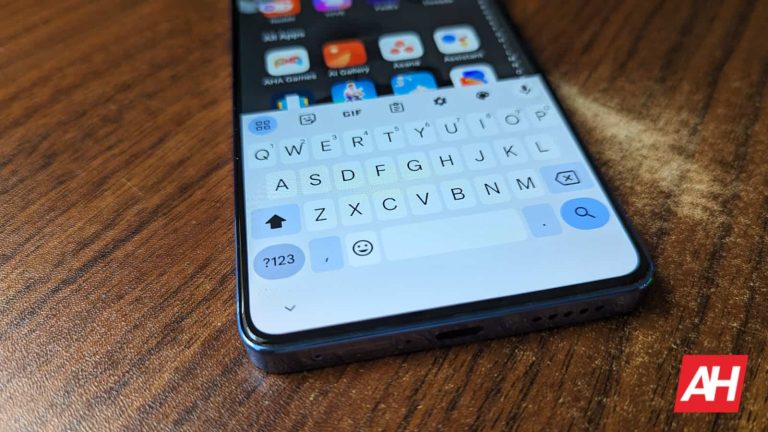
This feature is still rolling out, so there might be a chance that you won’t see it just yet. In any case, it should be widely available soon. When you connect a physical keyboard to your phone/tablet, you’ll see a small toolbar occupying the bottom of the screen. It occupies as much less space than the full keyboard, and it gives you access to many of the tools you use on the digital keyboard.
Looking at the screenshot, we see that it only occupies a small sliver of the bottom of the screen. We see the text recommendations in the middle. The suggestions are flanked by the emoji button on the left and the collapse button on the right. Depending on the device you’re using, you may also see a microphone button next to the collapse button. This will allow you to hop into voice typing. Tapping on the collapse button will shrink the toolbar even more and pin it to the side of your screen.
On the other side of the emoji button, you’ll see a hamburger-style menu button. The menu has options that will take you to your settings, show the on-screen keyboard, show the keyboard shortcuts, show your clipboard, and show translations.
In a bid to support the Right to Repair movement, Google concluded 2023 with the launch of a Diagnostic App and repair manuals for its Pixel devices. The tech giant has now taken a further step by endorsing a proposed Right to Repair bill in Oregon and publishing a white paper elucidating its stance, utilizing the Pixel as a prime example. The “Google & Repairability” white paper not only outlines core principles but also provides insights into the company’s approach to repair, emphasizing user safety as a top priority.
Google’s proposed guidelines for legislation regarding Right to Repair stress the importance of user safety, accepting the potential dangers of improper repairs, especially when individuals use faulty parts or lack familiarity with safety-critical components like lithium-ion batteries. The company suggests a nuanced approach by advocating for “parts assemblies” rather than “individual components” to reduce the risk of injury. For instance, the Google Pixel 8 Pro offers a “rear-facing camera assembly” and a “rear case assembly” through iFixit, combining several parts for a more straightforward installation process, albeit at a slightly higher cost.
Google stands against anti-repair practices such as software locking components preventing a replacement
The tech giant opposes what it terms “unfair anti-repair practices,” specifically parts pairing, which uses software barriers to obstruct consumers and independent repair shops from replacing components. Google is committed to discouraging such practices and has already introduced a fingerprint calibration tool as part of its repair-friendly initiatives.
Moreover, Google is against compelling users to provide passwords, security codes, or materials to override security features on devices. The company points to its Repair Mode as a solution, maintaining user privacy and device security during repair processes.
While endorsing the proposed Right to Repair bill in Oregon, Google views it as a compelling model for other states to adopt, accepting a standardized regulatory framework at the national level. The company believes that the ability to repair devices not only empowers users by saving money but also contributes to reducing electronic waste, aligning with broader environmental sustainability goals.
As Google takes a proactive stance in supporting the Right to Repair, its proposed principles offer a comprehensive guide for lawmakers, emphasizing the need for regulations that prioritize user safety, discourage unfair practices, and maintain a balance between repair accessibility and device security.
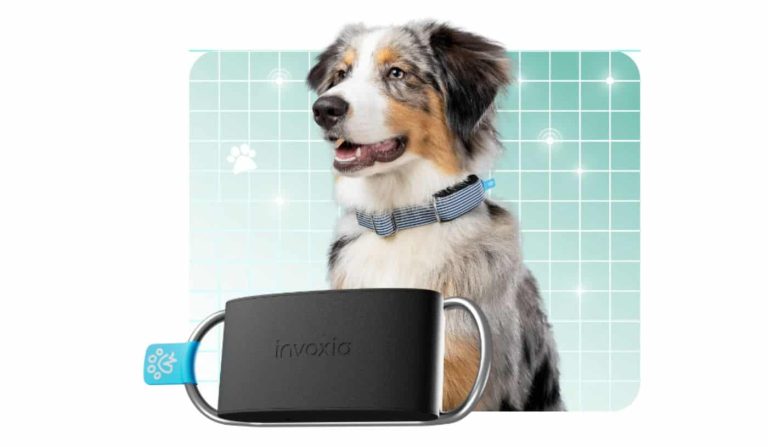
At CES 2024, Invoxia, a specialist in GPS tracking technology, introduced a cutting-edge smart pet collar named Invoxia Minitailz. Building upon the success of its previous Smart Dog Collar, Invoxia claims the Minitailz is an upgraded version designed to cater to both cats and dogs. The standout feature of this device is its ability to not only track the location of pets in almost real-time but also monitor their biometrics, including heart rate and, notably, detect atrial fibrillation (AFib).
Unlike its predecessor, the Minitailz weighs a mere 36 grams, making it lightweight and suitable for both cats and dogs. You can easily attach this device to existing pet collars through an adjustable ring. The built-in SIM and GPS technology enable precise location tracking, capturing various activities such as walks, runs, and even the playful “zoomies” that pets often engage in.
The pet tracker, Minitailz, can also measure and detect atrial fibrillation (AFib)
Minitailz‘s advanced biometric sensors, in combination with AI technologies, boast an impressive accuracy rate of 97% to 99% when tracking respiratory and heart vitals. Notably, it can detect AFib, alerting pet owners to potential irregular heartbeat issues. In the event of any anomaly, the device sends an alert to the pet owner. It ensures timely attention to your pet’s health.
The companion app for Minitailz incorporates a conversational generative AI agent, adding a futuristic touch to the user experience. The AI element creates personalized pet reports, answering queries about the pet’s health and activities. The app’s interface provides easy-to-read reports generated from the collected data.
The Minitailz has hit the market for dogs, available for purchase at $99. It offers a subscription for SIM services starting at $8.30/month. The cat version is expected to be released in March 2024, also priced at $99. In summary, Invoxia is offering pet owners a comprehensive solution to keep track of their furry companions’ well-being in real-time.
Driving inside a tunnel is often an issue for those using a GPS app to help them navigate because of the inability of the signals to penetrate the tunnel. You might think that this doesn’t really matter with a tunnel since there isn’t much to do inside one except follow the road. But there are other reasons as Google points out in a support page. For example, staying connected in a tunnel allows location services to work, increases driver safety, and gives the driver better visibility into what’s happening inside the tunnel in real time.
Google-owned Waze connects with Bluetooth beacons inside tunnels in certain cities such as “New York City, Chicago, Paris, Rio, Brussels, Oslo, Sydney, Boston, Mexico City, and more.” Google says, “The Waze Beacons program provides seamless navigation to drivers underground where GPS signals don’t reach.” And now Google Maps will also support Bluetooth beacons according to SmartDroid (via 9to5 Google).
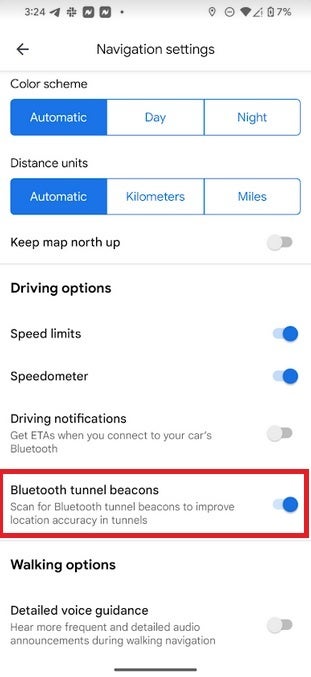
The feature is disabled by default, but we’re going to tell you how to enable it right now. First, to be clear, this feature is available on Android phones only and cannot be used with Google Maps for iOS. So from your Android phone open Google Maps. Tap the round profile icon on the right of the search bar on the top of the phone. That opens a menu and you should then tap on Settings > Navigation settings and scroll down to the Driving options heading and look for Bluetooth tunnel beacons and toggle it on.
To use the tunnel Bluetooth beacons on Google Maps for Android, you must enable the feature
The listing says, “Scan for Bluetooth tunnel beacons to improve location accuracy in tunnels.” Once you enable the feature, you will have to allow Google Maps to “find, connect to, and determine the relative position of nearby devices.” It appears that this feature has been available for some Android users since last October but has recently been found on more Android devices.
Follow the directions in the previous paragraph to enable the feature and if you see the listing titled “Bluetooth tunnel beacons,” it means that you do have the feature available for Google Maps. It does show up on my Pixel 6 Pro running Android 14 QPR2 Beta 3.
If you do drive through tunnels often and use an Android phone, you might want to take a second to enable this feature.
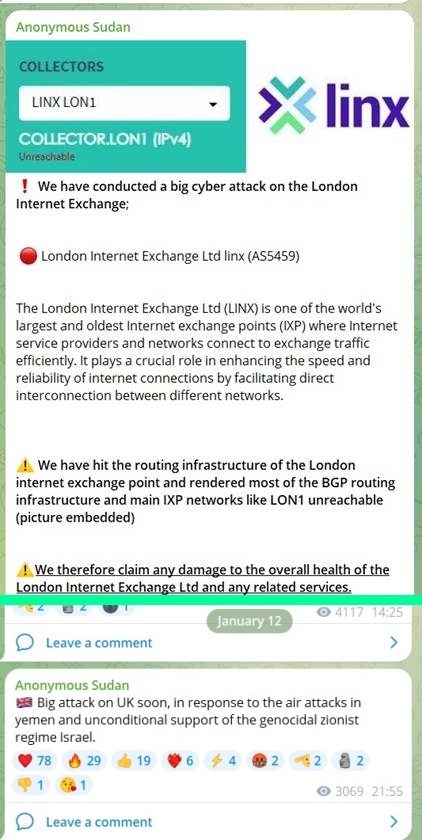
Anonymous Sudan claimed responsibility for the cyber attacks on the London Internet Exchange (LINX) on Telegram.
Anonymous Sudan, a Russia-affiliated hacktivist group comprising members from various backgrounds, has claimed responsibility for a cyberattack on the London Internet Exchange (LINX). It is one of the world’s largest exchange points.
The London Internet Exchange (LINX) is a mutually governed Internet exchange point (IXP) based in London, UK. It provides peering services and public policy representation to network operators within the UK and beyond.
The group claims its cyber attack to be a response to Britain’s support to Israel and the launching of air attacks on Yemen. Anonymous Sudan has also threatened to cause a major setback to the UK with a big cyberattack in the coming days.
On January 12, 2023, on its Telegram channel, the group posted about the attack on LINX, but this claim is yet to be confirmed. However, according to a tweet from OSINT specialists at CyberKnown, LINX’s website remained online amid the group’s claims, leaving questions about the authenticity of the claims or if they are merely speculation.
Screenshot: Sergey Shykevich, cyber threat intelligence manager at Check Point
For your information, the UK and the USA launched air strikes against Houthi military targets in Yemen. The UK targeted 30 Houthi military sites using 150 precision-guided munitions, killing five militants. UK Prime Minister Rishi Sunak approved the military action.
Britain’s move was a response to Houthi attacks on international maritime vessels in the Red Sea. US officials reportedly fired over 80 Tomahawk cruise missiles from three destroyers and a submarine. The action also involved 22 jets from the USS Eisenhower aircraft carrier.
Anonymous Sudan is known for using massive DDoS attacks, targeting both anti-Russian and anti-Muslim groups/entities. Lately, they have been launching attacks almost weekly, targeting airlines, governments, banks, large enterprises, airports, and telcos.
In November 2023, the same group also claimed responsibility for DDoS attacks on ChatGPT and caused service disruptions. They were previously involved in cyber attacks on Microsoft’s flagship office suite, including popular applications like Outlook and OneDrive, as well as its Azure cloud computing platform back in June 2023.
Since its inception, Anonymous Sudan has been active on Telegram, warning about potential attacks and updating them live. Its key targets include Israeli Prime Minister Benjamin Netanyahu’s websites, Mossad, and also collaborated with Killnet.
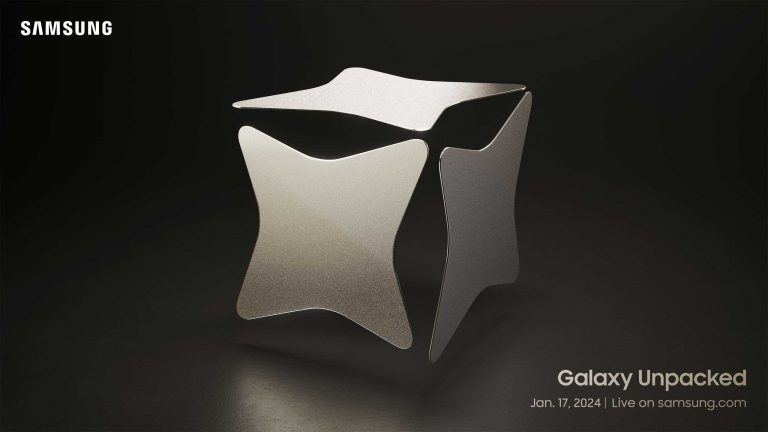
Samsung will be debuting the new Galaxy S24 series at its Unpacked event in San Jose, California on Wednesday. The event will start at 10 AM PT or 1 PM ET. If you’re not able to make it, there’s some good news, however. You’ll be able to livestream the event on YouTube, as usual. And we have included the live stream right here on this page. So you can watch along with us.
This is the first time that Samsung is holding Unpacked in Silicon Valley, which is a bit of an interesting choice for Samsung. Typically, the Galaxy S event is in San Francisco, with the Galaxy Fold/Note event happening in August in New York City. But last year, Samsung decided to hold it in South Korea, and now in San Jose for the Galaxy S24. We’re expecting the live stream to last about an hour, maybe a little bit longer, depending on what Samsung decides to announce.
What to expect at Unpacked?
Obviously, we are expecting to see some new hardware at Galaxy Unpacked. Likely the Galaxy S24, Galaxy S24 Plus and Galaxy S24 Ultra. We will also see the debut of Galaxy AI, which Samsung has been touting in different teasers over the past few weeks. And we also expect to see One UI 6.1, the first big upgrade to One UI 6 since Android 14 started rolling out last year. It’s pretty common for the Galaxy S phones to launch with a dot-one update to One UI.
With the Galaxy S24 series, we’re expecting to see the Galaxy S24 Ultra launch with a titanium frame, just like the iPhone 15 Pro series from last fall. But given the fact that Samsung used Armor Aluminum instead of Stainless Steel on its older phones, we don’t expect to see a huge weight difference, at least on the spec sheet. We’re also expecting to see some camera upgrades across the board. There are rumors of the Galaxy S24 Ultra ditching the 10x optical zoom lens this year, which we really hope is not true.
And there could be a few other surprises on tap this time around. Some rumors are pointing to pricing for the Galaxy Book 4 that was announced in December. And we could also get the Galaxy Fit 3, which we’ve been seeing make the rounds from many different leaks lately. Either way, we’re excited to see what Samsung has in store for us in a few days.
Google is currently facing a trial in Boston over allegations of patent infringement related to the processors powering its artificial intelligence (AI) technology. The case, brought by Singular Computing, accuses Google of copying computer scientist Joseph Bates’ technology. The Mountainview-based giant reportedly used it to enhance AI features in popular services like Google Search, Gmail, and Google Translate.
Singular Computing, initially sought up to $7 billion in damages, claiming that Google unlawfully used its patented AI technology to develop Tensor Processing Units (TPUs), which are crucial for Google’s AI capabilities. Notably, Timbers suggested Google must pay $1.67 billion during the trial for the alleged AI-related patent infringement.
Google denied the patent infringement, dismissing Singular’s AI patents as “dubious”
Singular’s lawsuit, filed in 2019, asserts that Bates shared his computer-processing innovations with Google between 2010 and 2014. The complaint alleges that Google’s TPUs infringe on two of Singular’s patents and utilize an improved architecture discovered by Bates. Google, however, denies the allegations, dismissing Singular’s patents as “dubious”.
The Mountainview-based giant asserted that it developed the Tensor processing unit (TPU) independently over many years. Google added that its TPU functions differently from Singular’s patented technology.
In its court filing, Google stated that its engineers had mixed feelings about the technology and ultimately rejected it. The company claims that the tech in question was not suitable for the type of applications they were developing.
A separate case involves the validity of Singular’s AI patents
Apart from the ongoing trial, the US appeals court in Washington is hearing a separate case involving the validity of Singular’s patents. Google has appealed to invalidate Singular’s patents at the U.S. Patent and Trademark Office. The outcome of these legal proceedings may have significant implications for the tech giant and the broader AI landscape.
Google, along with Meta, has held the highest percentage of AI research papers cited since 2020, according to the “State of AI Report 2023” by venture capital firm Air Street Capital.
Google Assistant will lose 17 features this month. According to the search giant, the underutilized Assistant functionalities will be going away and join Google Graveyard. This comes after Google laid off a thousand employees across various departments. The Google Assistant is now seven years old. Google aims to prioritize experiences and make it easier to use Assistant across devices.
Google is removing 17 Google Assistant features
In a blog post, Google says that users who try to access any of the 17 discontinued features from January 26 will be notified that they are no longer available. Most of them pertain to voice commands and will be removed completely by February 26 as per 9to5Google.
While using one of the deprecated features, a prompt will indicate the feature’s expiration date. The features will be taken away from smartphones and smart speaker/display devices. The search giant is working on fusing Google Assistant with Bard which is set to arrive sometime this year.
List of Google Assistant features going away and alternatives
Google has published a full list of features on the Google Assistant that are going away along with alternatives. Check the full list below:
As time goes on, we’re going to start seeing more changes and updates to Bard. It’s clear that Google is going to prioritize its generative AI chatbot while keeping production on Assistant rather tame. In any case, we don’t see the Google Assistant going away anytime soon.
Changes to the microphone icon on Google App and Pixel Launcher search bar
Apart from the list of removed features, Google is also making changes to its Google app. The microphone icon will now trigger search responses instead of using the search bar microphone to complete actions like controlling smart home devices. The Pixel Search Bar will also open the Voice Search instead of Assistant on Pixel devices.
YouTube is once again grappling with the rising issue involving users who rely on ad blockers to watch content on the platform. As pre-roll ads have become a crucial part of the platform’s monetization strategy, their widespread use has led to the rise in popularity of ad-blocking tools.
In response to this issue, YouTube has been continually taking action by implementing what some might consider extreme measures to address it. Some of these have included a slowing down of the site, limiting content, or at times completely blocking content for users who have ad blockers installed. Unfortunately, as reported by 9to5Google based on user reports on Reddit, it looks like these efforts are once again ramping up with noticeable slowdowns when an ad-blocker is detected.At the core of this ongoing battle lies a heated debate surrounding user experience and revenue generation. YouTube has repeatedly taken a firm stance against ad blockers, claiming that these tools not only go against their terms of service but also have a negative impact on the earnings of content creators, a stance that content creators themselves agree with.
However, non-paying viewers often have to deal with annoying ads that can interrupt their viewing experience, and are now confronted with a difficult decision: either disable their ad blockers and tolerate potentially disruptive ads, or opt for YouTube Premium to enjoy an ad-free experience.YouTube has faced backlash for its recent tactics, which have been deemed aggressive. Some consider that by prioritizing its revenue stream, the platform inadvertently undermines user experience and risks creating a sense of resentment among its users.
It is everyone’s guess at this point where this battle against ad-blockers will lead, or if it will have the intended effect among the user base. Slowdown tactics are seen as distasteful among the community, thus YouTube is at a position here where it can choose to either continue down this path or create alternative ways of accessing the site that can benefit creators and viewers alike.
The vulnerability was patched on November 14, 2023, but the Cybersecurity and Infrastructure Security Agency (CISA) added it to the Known Exploited Vulnerabilities (KEV) list due to evidence of in-the-wild exploitation.
The vulnerability was patched on November 14, 2023, but the Cybersecurity and Infrastructure Security Agency (CISA) added it to the Known Exploited Vulnerabilities (KEV) list due to evidence of in-the-wild exploitation. Since its discovery, numerous malware campaigns, including the Phemedrone Stealer payload, have exploited it in their attack chains.
Cybersecurity researchers at Trend Micro have discovered that a vulnerability affecting Microsoft Windows Defender SmartScreen, tracked as CVE-2023-36025, is being exploited to infect users with Phemedrone Stealer.
For your information, Windows Defender SmartScreen is a built-in security feature in Microsoft Windows 8 and later that helps protect users from malicious websites, downloads, and applications. It acts as a first line of defence against a variety of threats, including phishing websites, malicious downloads and untrusted applications.
This open-source malware strain targets web browsers, cryptocurrency wallets, and messaging apps like Telegram, Steam, and Discord. Its additional capabilities allow the malware to take screenshots gather system information such as hardware details and location data and send stolen data to attackers via Telegram or their C2 server. Phemedrone Stealer is maintained on GitHub and Telegram.
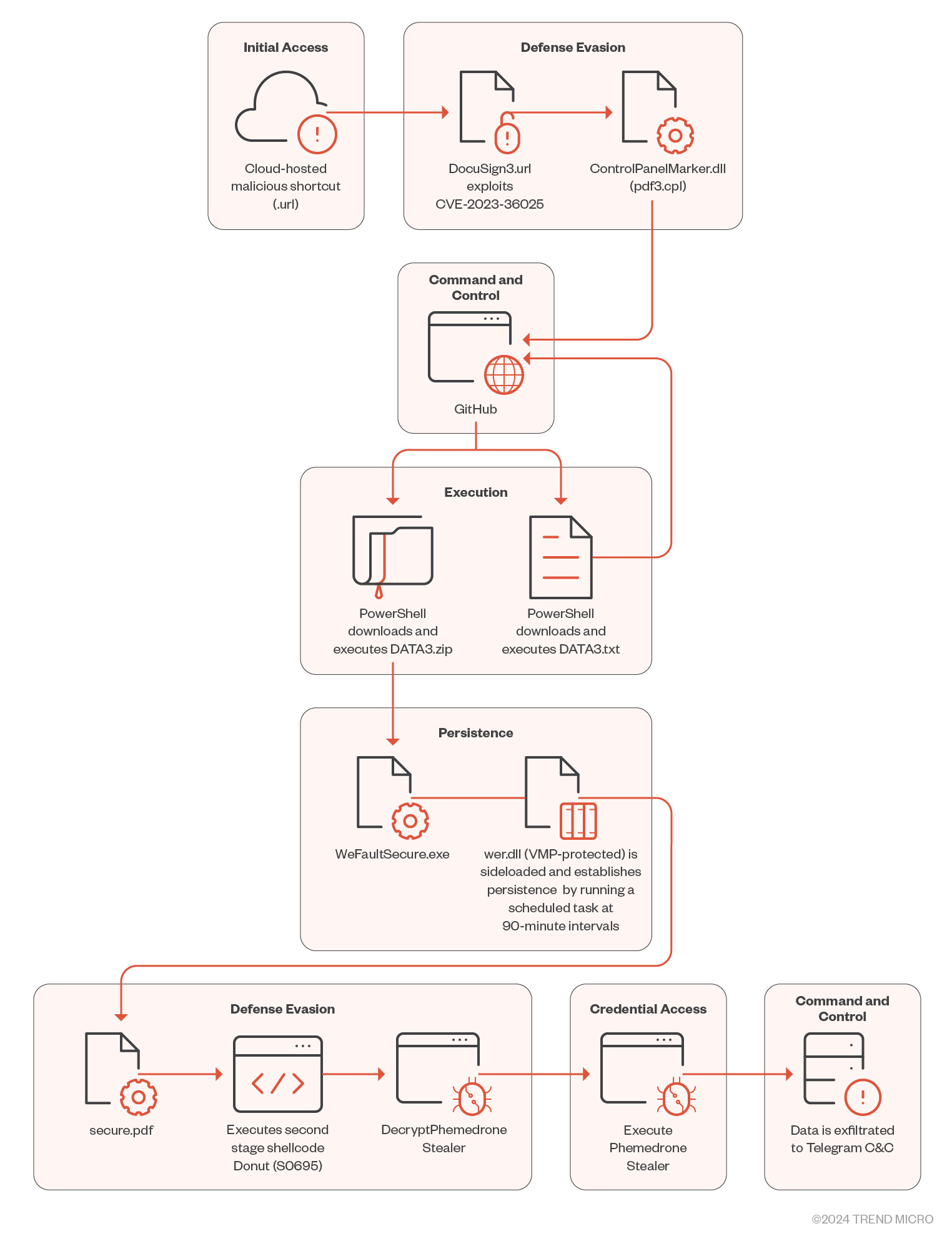
Reportedly, hackers use social media to spread URL files that appear as harmless link shortcuts, which are then downloaded and run by clicking on them. The infection process begins with an attacker hosting malicious Internet Shortcut files on cloud services like Discord or FileTransfer.io, disguised using URL shorteners like shorturl.at. An unsuspecting user may be tricked into opening a maliciously crafted.url file that exploits CVE-2023-36025.
The attackers craft a Windows shortcut (.url) file to evade the SmartScreen protection prompt by employing a .cpl file as part of a malicious payload delivery mechanism. The.cpl file is executed through the Windows Control Panel process binary, calling rundll32.exe to execute a malicious DLL.
The malware, hosted on GitHub, downloads a ZIP file containing three files: WerFaultSecure.exe, Wer.dll, and Secure.pdf. The wer.dll file is crucial for the loader’s functionality. The attacker executes the loader using DLL sideloading, spoofing a malicious DLL file in the application’s directory.
The DATA3.txt file masks its contents, making deciphering its purpose difficult. The malware collects system information, compresses it into a ZIP file, and sends the compressed data to the attacker via SendMessage and SendZip methods. Through techniques like API hashing and string encryption, the malware evades detection and complicates reverse engineering.
CVE-2023-36025, having a CVSS score of 8.8, affects Microsoft Windows Defender SmartScreen because of its lack of checks on Internet Shortcut files, allowing attackers to create.url files and execute malicious scripts.
The vulnerability was patched on November 14, 2023, but the Cybersecurity and Infrastructure Security Agency (CISA) added it to the Known Exploited Vulnerabilities (KEV) list due to evidence of in-the-wild exploitation. Since its discovery, numerous malware campaigns, including the Phemedrone Stealer payload, have exploited it in their attack chains.
To stay protected, developers should regularly update their operating systems, apps, and security solutions, be cautious with Internet Shortcut files, and implement advanced solutions like real-time monitoring and threat detection capabilities.