This is Xiaomi’s official video, it seems, and it was reuploaded by TechDroider to YouTube. The video itself is embedded below the article, in case you’d like to watch it, and it has a duration of around a minute.
You can now watch Xiaomi’s first EV park itself in a multi-level garage
In this video, you’ll see that the driver activates the self-driving mode upon the entrance to a multi-level garage in China. The car drives on its own to the desired parking level, and it even moves out of the way for the upcoming car.
When it reaches the level it wants, a parking spot is identified, and the Xiaomi SU7 finishes the job. This was a rather smooth job by the Xiaomi SU7, but that is to be expected considering this is an official video.
Xiaomi has promised that the Xiaomi SU7 is coming to its homeland this year. There is still no word on the global launch, and it’s possible that it will remain exclusive to China. We’ll have to wait and see.
The Xiaomi SU7 comes in two distinct models
The Xiaomi SU7 and Xiaomi SU7 Max do look the same, however, they’re different under the hood. The other EV, the Xiaomi SU7 Max, is not only more powerful, but it has a number of added perks.
The car itself does look quite sporty, and we can see influences from various other brands here. Xiaomi also announced a number of color options, but we still don’t know the price tags for either model.
This car comes as a result of a partnership with state-owned Beijing Automotive, and it has been a long time coming. Xiaomi is already working on new engines for new EVs, so this is definitely not a one-time thing for Xiaomi. You can expect to see more EVs from the company moving forward.
SMTP smuggling is a technique that allows an attacker to send an email from pretty much any address they like. The intended goal is email spoofing—sending emails with false sender addresses. Email spoofing allows criminals to make malicious emails more believable.
Let’s take a closer look at what it is exactly, and how cybercriminals can use it.
The first thing we need to look at is the Simple Mail Transfer Protocol (SMTP), a protocol that allows the exchange of emails. Mail servers and other message transfer agents use SMTP to send and receive mail messages.
SMTP is very much a protocol that has developed over time since it became the standard for always-online servers in the 1980s.
Basically, an email is written using software like Microsoft Outlook or Apple Mail and is then handed over to an SMTP server. The server looks up the appropriate mail server for the domain in the recipient’s address—the part on the right side of the @ symbol, and sends the mail to that server.
It sometimes takes a few steps, but if all goes well the email will be received by the SMTP server that handles the mail for the recipient. This server may deliver the messages directly to storage, or forward it over a network using SMTP before it reaches the recipient.
Simplified, the process looks like this:
Image courtesy of SEC Consult
Image courtesy of SEC Consult
Image courtesy of SEC Consult
Since SMTP lacks authentication it used to be extremely easy to spoof a sender address. Several safeguards emerged to stop this:
SPF (Sender Policy Framework): This uses DNS records to indicate to receiving mail servers which IP addresses are authorized to send mail for a given domain. So this still leaves the work to the receiving server.
DKIM (Domain Key Identified Mail): This method signs outgoing emails using a private key. Receiving servers validate the sender using the sending server’s public key,.
DMARC (Domain-based Message Authentication, Reporting, and Conformance): DMARC verifies if the email’s “From” domain aligns with SPF checks and/or DKIM signatures. Thus, the DMARC check fails if there is a mismatch between the MAIL FROM and the From domain where otherwise the SPF check would pass. Unfortunately DMARC is not very widely used.
SMTP smuggling
SMTP smuggling takes advantage of inconsistencies in the way that proxy servers and firewalls handle SMTP traffic.
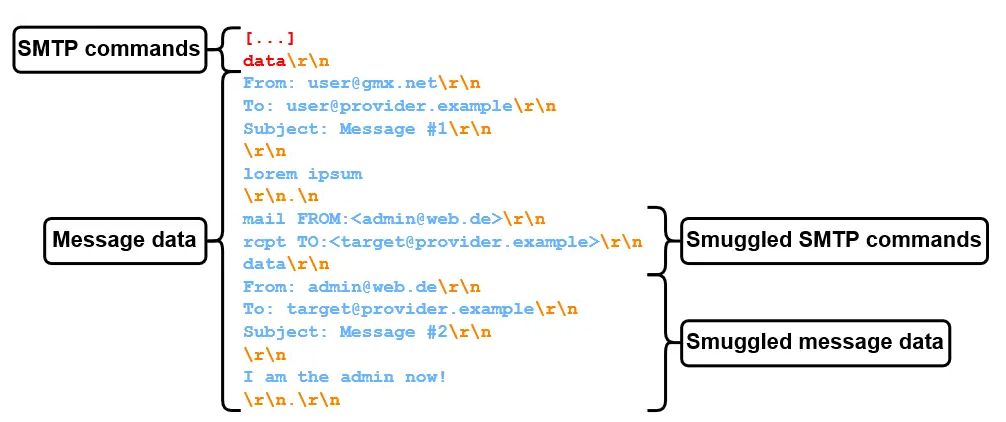
Traditionally, the end of data in an SMTP conversation is indicated by a sequence <CR><LF>.<CR><LF> (CR LF stands for Carriage Return and Line Feed, which are standard text delimiters) which can also be written as \r\n.\r\n.
Researchers published about two types of SMTP smuggling, inbound and outbound. They started working from the question, what happens if outbound and inbound SMTP servers interpret the end-of-data sequence (<CR><LF>.<CR><LF>) differently?
If you can tell one server the email ends here and the other one that the full packet ends later, you can create a compartment in which you can smuggle more data.
So, the researchers started testing by putting a <LF>.<LF> sequence in the middle of sent packages. And they found that outbound SMTP servers have different methods of dealing with it, including:
Dot-stuffing (Escaping the single dot with another dot): <LF>..<LF>
Replacing it with a <CR><LF>
Encoding it (e.g., via quoted-printable): =0A.=0A
Removing the entire sequence
Not sending the message
Or do nothing at all
By testing, which included sending specially constructed messages from and to different email providers, the researchers were able to find combinations that allowed them to send two email messages in one package. The sequence <LF>.<CR><LF> turned out to be effective on a custom SMTP server called NemesisSMTPd which is in use by email services provided by Ionos (e.g. GMX) which accounts for about a million hosted domains.
Image courtesy of SEC Consult
Some vendors (Microsoft and GMX) were quick to fix the vulnerabilities that facilitated SMTP smuggling, but the researchers urge companies using the also affected Cisco Secure Email product to manually update their vulnerable default configuration. The Cisco flaw affects more than 40,000 vulnerable instances and allows an attacker to send spoofed emails to high-value targets, such as Amazon, PayPal, eBay, and the IRS.
The recommendation by the researchers tells organizations using Cisco Secure Email Gateway (on premises) or Cisco Secure Email Cloud Gateway (cloud) to change the default settings of “CR and LF Handling” from “Clean” to “Allow,” citing Cisco guidelines to help administrators understand the change that should be made.
That may sound counterproductive, but this setting passes e-mails with bare carriage returns or line feeds on to the actual e-mail server (Cisco Secure Email Gateway is just a gateway), which only interprets <CR><LF>.<CR><LF> as end-of-data sequence. So, if you don’t want to receive spoofed e-mails with valid DMARC checks, we highly recommend changing your configuration.
Our business solutions remove all remnants of ransomware and prevent you from getting reinfected. Want to learn more about how we can help protect your business? Get a free trial below.
First global Xiaomi smartphones are starting to get the HyperOS update. First in line seems to be the Xiaomi 13T Pro, as the update has started popping up for consumers in Europe. Do note that the Xiaomi 13 Pro units in India and Greece also seem to be getting the update, but we’ll focus on the one that is arriving to more countries already (the Xiaomi 13T Pro).
The very first Xiaomi smartphones are starting to get HyperOS update
Last month, the company promised that the update is coming to at least 8 devices in Q1 2024. The Xiaomi 13T Pro is the first line, and the software version we’re looking at here is 1.0.3.0.EMLEUXM. Before you update, please make sure to have at least 6GB of free storage on the device.
This update does deliver the December 2023 security patch, in addition to all the changes HyperOS has to offer. The phone will notify you that the update is available, but you can also check manually via the settings.
So, what’s new? Well, the changelog has been shared by Mishaal Rahman, and there are plenty of changes to find there. Not everything is listed, of course, but the main changes are noted there.
There are plenty of changes coming, some of them are listed in the official changelog
Optimized performance is noticed, along with dynamic thread priority adjustment and dynamic task cycle evaluation. That should ensure optimal performance and power efficiency.
The storage refresh technology is also mentioned. That should help with network selection and connection quality. Some design changes are mentioned, as well as “new animation language”. Xiaomi also says that “natural colors bring vibrancy and vitality to every corner of your device”.
There is also a new system font in action, and a redesigned Weather app too. Some notification changes have also been made, and some of those you may not like, as the app icons in the status bar are now limited.
Lock screen has some additional options now, and multitasking is now “even more straightforward and convenient with an upgraded multi-window interface.”.
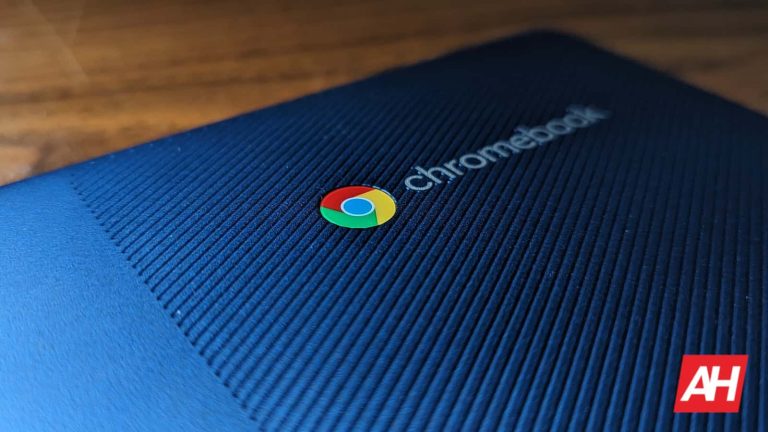
Google has rolled out the ChromeOS 120 update for compatible Chromebooks. The update has arrived with a slew of important features, which will offer enhanced multitasking and customizability. Essentially, the new ChromeOS version is bringing Nearby Share “Self Share”, a Virtual Desk Button, customizations for navigation, and more features.
The new handy features will provide Chromebook users with a more seamless experience. The update has arrived a little over a month after the rollout of the ChromeOS 119 firmware.
The new “Self Share” feature offers seamless file transfers between devices
One of the biggest highlights of the ChromeOS 120 update is the new Nearby Share “Self Share” feature. Thanks to this functionality, users can automatically transfer files between all of their devices logged into the same Google Account. Notably, the transfers will happen automatically without the need to accept the request, even when the Chromebook’s screen is off.
There are additional upgrades inside the “App details” section. Users can go to the “App details” page of apps and check whether it’s a Chrome, Android, or PWA app. Notably, the new section will now also show details like from where this app has been installed, apart from the storage used.
The ChromeOS 120 update adds a new Virtual Desk Button to the Chromebook’s Shelf
The ChromeOS 120 update has made it easier to switch between “Desks” to offer a more seamless productivity experience. The update adds a new Virtual Desk Button to the Chromebook’s Shelf, which shows to the left of the pinned app. Tapping the button shows the name of the current “Desks” group. This makes it easier to change between “Desks” by hitting the left or right arrows that show up upon hovering.
Chromebook users can also get a miniature overview of all their groups with the new Virtual Desk Button. Apart from the miniature overview of groupings, there’s also an easier way to create new ones.
The latest update for Chromebooks also brings dedicated “Mouse” settings, which were previously grouped with the Touchpad settings. Using the dedicated settings tab, the users can customize the Cursor and Scrolling speed, apart from the scroll acceleration toggle. The Touchpad settings tab now allows customization of key combinations.
Furthermore, the ChromeOS 120 update allows resizing picture-in-picture (PiP) windows using touchscreen pinching. As expected, the latest Chromebook firmware is being released in a phased manner. So it could take a few days or a couple of weeks to reach all the compatible devices.
The HONOR Magic6 series appears in all colors ahead of launch
You will find two galleries below this paragraph. The first one will show you the HONOR Magic6 in all of its colors, and the second one the HONOR Magic6 Pro. These seem to be the official renders of both smartphones.
HONOR Magic6 renders in all colors:
HONOR Magic6 Pro renders in all colors:
The two phones will basically be available in the same color options. They will both launch in Black, Cyan, Green, Purple, and White colors, as you can see above. They will also look very similar, with some notable differences.
In addition to renders that surfaced, four real-life images also appeared, giving us an even better look at the upcoming devices. You can check out those images below. The first image shows the Magic6, and the other three the Magic6 Pro.
HONOR Magic6 & Magic6 Pro real-life images:
The HONOR Magic6 Pro will have a larger camera island on the back. In addition to that, it will have a pill-shaped camera cutout on the front. The HONOR Magic6, on the flip side, will have a single hole on the front.
Both devices will feature curved display, but the ‘Pro’ model will be easy to set apart
Both devices will feature curved displays, and look pretty much the same other than what we’ve mentioned. HONOR is keeping a similar design language to the HONOR Magic5 series, but the new phones will be easy to set apart.
The HONOR Magic6 Pro will deliver 100x zoom, and it will be fueled by the Snapdragon 8 Gen 3 SoC. Extremely fast wired and wireless charging is also expected, along with a top-of-the-line display and overall specs.
The HONOR Magic6 and Magic6 Pro will become official in the near future. HONOR announced a press event for January 11. That will be the launch event for China, and the initial launch event for the device. The HONOR Magic6 series is expected to see a global launch too, though. We believe that the global launch will happen during MWC 2024, or at some point close to that tradeshow, towards the end of February.
Science and technology never fail to amaze us. Researchers are putting efforts into using transparent wood for phone screens. It’s tougher and lighter than the glass we usually use. And here’s the kicker: it can bend, too, and it doesn’t break into sharp pieces but into tiny bits. Further, it’s cheap to mass produce. While still in its early stages, transparent wood holds immense promise for the future of phone screens.
Transparent wood for phone screens could be the future
Lars Berglund from the KTH Royal Institute of Technology teamed up with researchers at the University of Maryland to explore transparent wood. After many trials, researchers found that it could be used in many areas, not just for screens.
This special wood could be great for things like screens on phones or computers because it’s thin and clear. It can also be used for windows. However, instead of being completely clear like the windows we know, it may resemble frosted glass. Some of these windows can even change from clear to tinted.
The researchers also found that thin sheets of see-through wood let 80% to 90% of light pass through. But, as the sheet becomes thicker, less light goes through. Also, tests showed that this wood is three times tougher than Plexiglass and a whopping 10 times tougher than regular glass.
How are scientists making the wood transparent?
This exact question sparked my mind, too. Well, there’s a wood part called lignin that makes wood strong and gives it that brown color. Scientists figured out that by changing or removing this lignin and adding something called epoxy resin, they can make the wood clear.
But there’s a small catch. Right now, the stuff used to make wood clear, called epoxy resin, isn’t very eco-friendly because it comes from petroleum. However, scientists are already looking for better and greener ways to make this, like using things from citrus fruits.
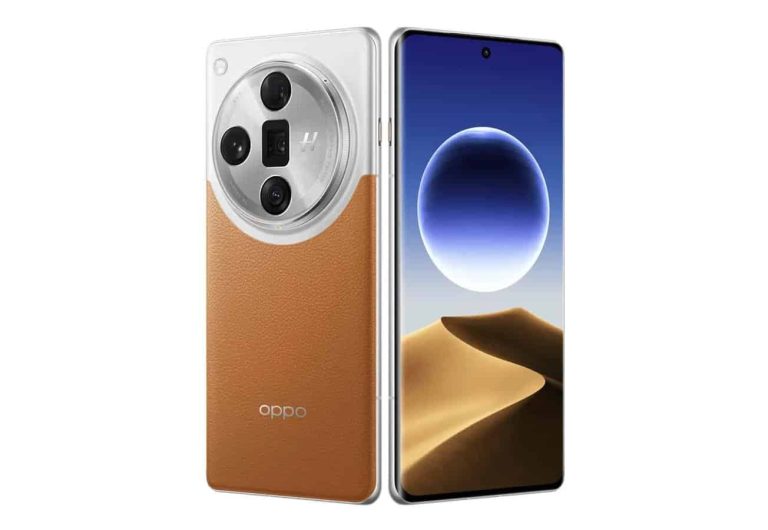
OPPO has recently shared some portrait camera samples from the upcoming OPPO Find X7 Ultra. Those were 3x photos that we could check out. Well, the company is now back with dual periscopeOPPO Find X7 Ultra camera samples.
As some of you may know, the OPPO Find X7 Ultra is the first smartphone that will feature two periscope telephoto cameras. The company has decided to do that to properly cover everything from 1x to 10x zoom, and beyond that.
OPPO has shared dual periscope OPPO Find X7 Ultra camera samples ahead of launch
Having said that, the camera samples below come from those two cameras. There are 65mm and 135mm shots included in the gallery. Do note that the ones in the gallery below have been compressed. If you’d like to check them out in their full size, click here.
The images that the company shared here look outstanding. Now, it’s worth noting that a professional photographer likely handled these, so… keep that in mind. We’ll get to review this phone once it launches, so you’ll get far more info about it and its cameras.
Another thing worth saying is that OPPO still didn’t share camera samples from the main camera. This will be the very first smartphone to utilize Sony’s LYT-900 camera sensor. That camera sensor will be a part of the ‘LYTIA’ family, and the most powerful mobile camera sensor Sony released thus far.
The company’s new flagship series will launch tomorrow
The OPPO Find X7 Ultra is becoming official tomorrow, January 8. So the company doesn’t really have plenty of info to share camera samples from the main camera, but it may yet happen.
The OPPO Find X7 Ultra will launch alongside the OPPO Find X7. That device will be truly powerful, and it will also have an easily recognizable design. Its design is not exactly a secret anymore.
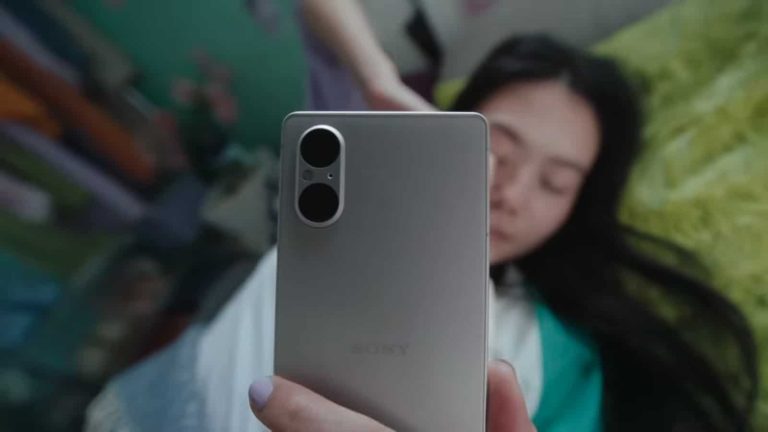
Sony has finally started rolling out Android 14 update for the Xperia 5 V. Originally introduced with Android 13, the phone was made available for purchase last September. The new update for the Xperia 5 V offers all the new features that Google packed in the Android 14 release.
Xperia 5 V’s Android 14 update brings flash notifications, expanded Nearby Share feature, and more
After upgrading, the Xperia 5 V users can finally set the screen or LED light to flash when receiving notifications. The update brings support for the Find My Device application. It allows the users to remotely lock and locate the Xperia 5 V. Also, there’s also the ability to remotely erase all contents on the device.
Furthermore, the update brings enhanced Nearby Share functionality. This allows the Xperia 5 V users to wirelessly send files to the phone from their Windows computer. Lastly, the update adds the ability to customize the lock screen shortcuts. The users can now show their favorite app shorts right on the lock screen easily. As expected, the update should bring usual performance and stability enhancements.
Just like other updates, Sony is rolling out the Android 14 update for the Xperia 5 V in a gradual manner. So, not everyone will get it right away. The users can also check the availability of the new update by going to the Settings section, in case there’s no notification.
Sony has already updated the Xperia 1 V and Xperia 10 V to the latest version of Android
It’s worth mentioning that Sony already updated the Xperia 1 V flagship and 10 V mid-ranger to Android 14 in November. The phones were updated to the newer Android version barely a month after it was released to the Pixel 8 series. Apart from the usual features, the Sony Xperia 1 V received an improved Bokeh mode in the Android 14 update. The improved version made the Bokeh effect look more natural.
As for the Xperia 10 V, its update brought support for the Find my device app. This finally offered the ability to track lost devices signed in with a Google account. The update also offered an improved version of Game enhancer, Photo Pro, Video app, and External monitor apps.
We’re all anticipating these phones from Samsung. As anyone could guess, they will come with the latest and greatest specs, so they will be powerhouses. One thing about the phones this year is that they may not bring too many hardware innovations. Rather, Samsung is focusing on bringing new AI capabilities. This, of course, is in response to the generative AI boom that’s been going on for the past year.
So, Samsung’s unpacked event, which is scheduled to happen relatively soon, will mostly feature news about generative AI. In any case, we’re going to be introduced to some of the most powerful smartphones that will come out in the year.
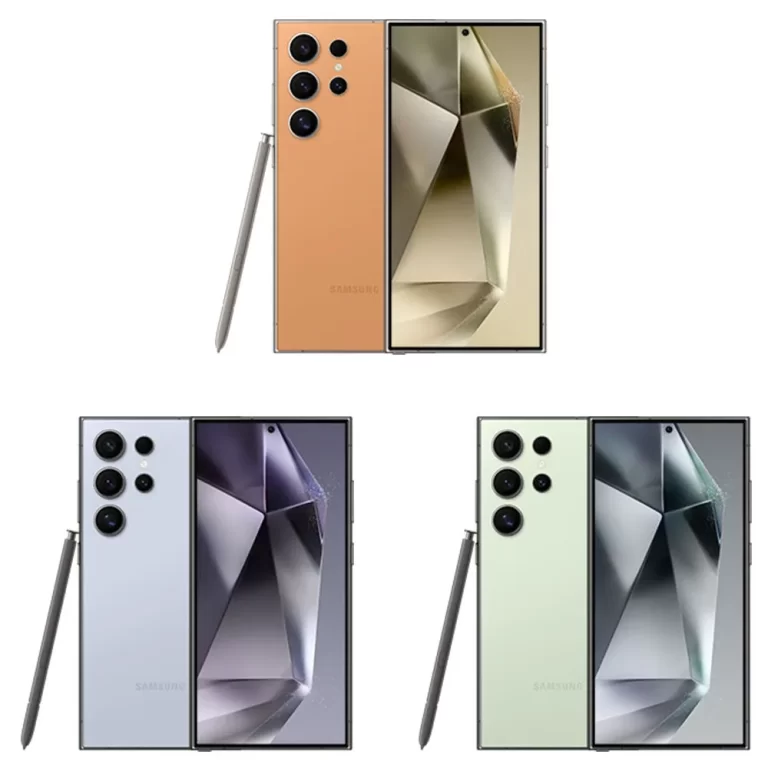
A new leak shows the possible colors for the Galaxy S24 Ultra
Sometimes, it’s the color that makes the phone. People typically want to have phones that look nice, and Samsung usually launches phones with some nice colors. In the new leak, we see a glimpse of how this phone could look. The leak helps confirm the rumor that Samsung will ditch the curved display in this phone. This would be the first time in nearly a decade that Samsung’s flagship phones all came with flat displays.
In the leaked image, we see the three colors. We see that the top color has a sort of a pastel orange hue. That seems a bit uncharacteristic for a Galaxy phone, but it still looks nice. Under that, we’ve seen a baby blue color. People who like the sky blue color of the Google Pixel 8 Pro may like this one. Lastly, we have sort of an olive green color. It’s similar in nature to the blue color.
Right now, information about these phones is still coming out. According to the latest rumors, the Galaxy S24 Ultra could start at $1,199 for the base model. The base model is rumored to have 8GB of RAM and 256GB of onboard storage. Check out our Galaxy S24 Ultra preview for more information.
The RedMagic 9 Pro is now on sale globally, and can be yours for as low as $649
The 12GB RAM model with 256GB of storage is priced at $649/€649. That model comes in a Sleet color. The 16GB RAM variant with 512GB of storage comes in Cyclone and Snowfall colors, and is priced at $799/€799.
You can also get a $10/€10 discount if you subscribe to the company’s newsletter. RedMagic also offers several accessories via its official website, for the device. You can grab the RedMagic 9 Pro screen protector, protective case, or one of the two ‘Turbo Cooler’ products.
The RedMagic 9 Pro is a rather interesting smartphone. This is a gaming phone that has a clear canvas on the front. RedMagic is using an under-display camera to ditch display camera holes and notches. The phone also has very thin bezels, and it has a squarish design. The sides are completely flat. It’s quite boxy overall.
There is no camera bump on the back
There is no camera bump on the back, as the phone’s cameras are flush with the body, and covered with glass. This phone also offers a rather powerful spec sheet for the price.
The Snapdragon 8 Gen 3 fuels this smartphone, while RedMagic utilizes LPDDR5X RAM and UFS 4.0 flash storage. A 6.8-inch 2480 x 1116 AMOLED display is used here. That display has a 120Hz refresh rate, and a peak brightness of 1,600 nits.
The phone has a built-in fan for gaming, and also shoulder triggers on the side. A ton of gaming features are baked into the software as well. This phone is made to handle intense gaming sessions.
The device includes a large battery, and supports 80W charging
A large 6,500mAh battery is included here as well, while 80W wired charging is supported. Yes, a charger is included in the box with the phone. An in-display fingerprint scanner is also a part of the package.
There is a 50-megapixel main camera on the back, along with a 50-megapixel ultrawide unit, and a 2-megapixel macro camera. A 16-megapixel under-display camera is also included.
Android 14 comes pre-installed on the RedMagic 9 Pro, along with the company’s RedMagic OS 9. If you’re interested in the device, check out the link below.