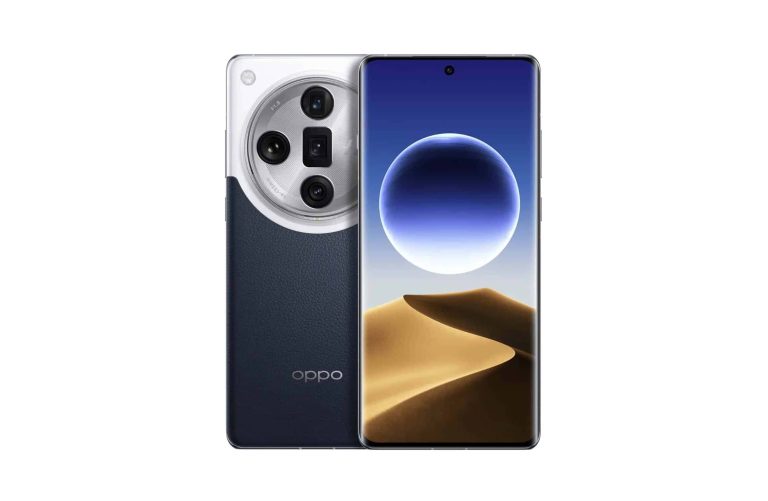
If you check out the two images below, you’ll see the two wallpapers in question. Both have a sand mountain placed under the moon, but the colors are quite interesting. Neither is a realistic representation of the scene, but in the second image, at least the sand’s color is somewhat accurate.
Don’t get me wrong, these images are not supposed to represent what your eyes can see, not at all. They’re supposed to be unique, nice-looking, and attention-grabbing… and that’s exactly what they are.
The first has mostly purple tones, mixed with a bit of gray, blue, and white. The second wallpaper has yellow sand, which is combined with blue and white shades for the moon and the sky.
Both wallpapers come in the OPPO Find X7 Ultra’s resolution
Do note that the wallpapers in the gallery above have been compressed. They’re there so that you can see what you’ll be dealing with. If you like them, you can grab these wallpapers via the link below the article… in full resolution. Both wallpapers come in a resolution of 3168 x 1440.
As a reminder, that will be the resolution of the OPPO Find X7 Ultra’s display. The OPPO Find X7 is expected to utilize a 2780 x 1264 display. The Ultra’s panel will also be slightly larger, but both will be plenty large.
They’re launching in a couple of days
Do note that the OPPO Find X7 Pro will not launch at all, it seems. The ‘Ultra’ is taking over, as two models are coming our way. They will launch in China on January 8, and it remains to be seen if they’ll make it to global markets.
Samsung may soon launch two new fast chargers for Galaxy devices. The company is readying an updated 45W power adapter and a 50W dual-charger. Neither of these charging solutions will ship bundled with the Galaxy S24 series, though. The Korean firm stopped providing chargers in the retail box long back. They might be available as a separate purchase alongside the new flagships, which debut on January 17.
Samsung could release two new fast charges alongside the Galaxy S24
According to reliable X tipster Roldan Quandt, Samsung’s upcoming 50W dual-charger has the model number EP-T5020. Aptly called the Charger Duo, it can simultaneously fast charge two Galaxy devices via USB-C at up to 50W speed. Unfortunately, the company’s smartphones don’t go beyond 45W charging speed. The Galaxy S24 flagships top out at 45W too, with the base model limited to just 25W charging.
If you plan to grab the Galaxy S24+ or Galaxy S24 Ultra and don’t already have a 45W charger at home, Samsung reportedly has a new 45W power brick in the pipeline. It bears the model number EP-T4511 and appears to be an updated version of the existing solution (EP-T4510). It is unclear how the new charger will differ from the current one. Whether Samsung has upgraded the internals, we’ll know once it arrives on the market.
Considering the imminent developments in the coming weeks, the Korean behemoth could start selling the new chargers alongside the Galaxy S24 lineup. We don’t have confirmation but that would be a logical move. However, as said earlier, you won’t get either of them in the box. The retail box will contain the phone, a USB-C cable, a SIM ejector pin, and some paperwork. That’s about it.
While Samsung hasn’t announced the release date for the Galaxy S24 trio, rumors say the new flagships will go on sale on January 30. Pre-orders will begin in most markets, including the US, on the launch day itself. The grand unveiling of the trio will take place in San Jose on January 17 at 10 AM PT/6 PM GMT. Due to the time difference, the event falls in the early hours of January 18 in some eastern countries, including Samsung’s homeland South Korea.
You can watch the launch event live
Depending on where you live, the kick-off time of the Galaxy S24 launch event will vary. However, the event will be streamed live globally on Samsung’s official YouTube channel and website. The company is offering a $50 credit if you reserve the new phones ahead of launch. The credit will be redeemable while purchasing accessories once you pre-order a Galaxy S24, Galaxy S24+, or Galaxy S24 Ultra. You can make your reservation from here.
Remcos RAT (Remote Control and Surveillance) is a type of Remote Access Trojan used for unauthorized access and control of a computer system.
It allows threat actors to perform various malicious activities like:-
Spying
Data theft
Remote control of the infected system
Cybersecurity researchers at Uptycs recently discovered that the threat group UAC-0050 had been actively using the Remcos RAT pipe method for evasion to target Ukraine.
The threat actors have implemented this pipe method for interprocess communication.
UAC-0050 using RemcosRAT
Uptycs flagged a suspicious .lnk file on December 21, 2023, prompting cybersecurity researchers to investigate.
They found UAC-0050 using RemcosRAT in a focused cyber operation against Ukrainian government agencies.
The attack’s origin (likely phishing or spam emails) remains uncertain, but it posed as an IDF job offer to the Ukrainian military, aiming to infiltrate military networks through a sophisticated guise.
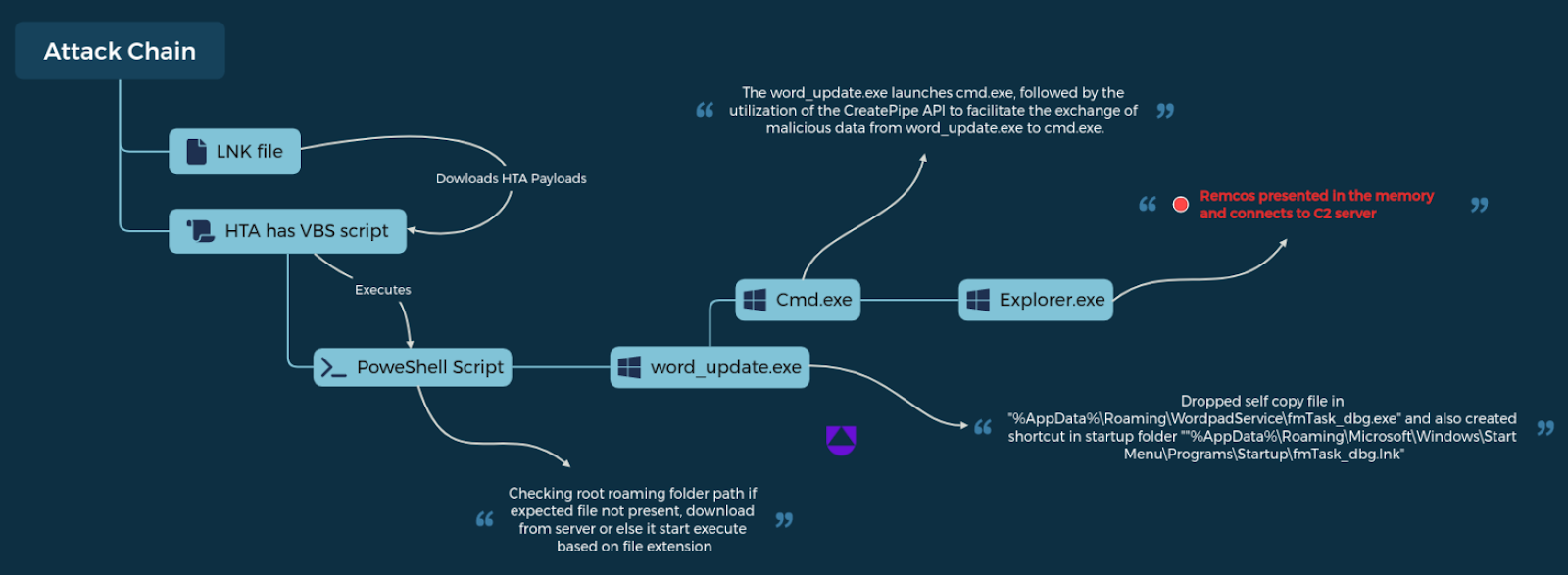
An LNK file initiates HTA download, containing a VBS script that triggers a PowerShell script to download word_update.exe.
Launching word_update.exe executes cmd.exe, which shares the data through a pipe that leads to RemcosRAT in explorer.exe memory.
The .lnk file, a Windows shortcut, is the investigation’s starting point. This case’s .lnk file checks antivirus info, which alters ‘the Windows Defender’ to avoid an ‘exit’ statement, and this ensures script continuity.
Attack chain (Source – Uptycs)
The .lnk file concludes with an obfuscated URL executed via MSHTA after deobfuscation. Researchers analyze the “6.hta” file that reveals a VBScript with fully obfuscated content.
However, besides this, after deobfuscating the VBScript, a PowerShell script is uncovered.
Deobfuscation reveals $hQkGkZK, which leads to another PowerShell script with encoded data. Uptycs flags suspicious PowerShell activities that help in tracking payloads (word_update.exe, ofer.docx) from:-
The files land in “%appdata%,” and “word_update.exe” creates a self-copy with altered names. Meanwhile, the malware ensures persistence via the LNK file in startup, launching fmTask_dbg.exe at boot.
Besides this, the fmTask_dbg.exe undergoes decryption that utilizes pipes to move data to cmd.exe by executing Remcos RAT.
The RemcosRAT is extracted from the cmd.exe memory and then decrypts the RC4-encrypted data in the payload’s Resource section using CyberChef.
Meanwhile, the identified Remcos version 4.9.2 Pro gathers the victim’s info, such as computer name and username.
From the following web browsers, the cookies and login data were removed by the RemcosRAT:-
Internet Explorer
Firefox
Chrome
Recommendations
Here below, we have mentioned all the recommendations provided by the Uptycs researchers:-
Make sure to enable sophisticated email filters for spam detection.
Avoid clicking on links or opening attachments in identified spam emails.
Use network monitoring tools to detect abnormal communication patterns.
Regularly analyze and secure system configurations.
Disable unnecessary services and startup entries.
Closely monitor unnecessary services and startup entries.
Ensure that behavioral analysis tools are employed to identify unusual activities.
Detect and prevent attempts by RATs to establish persistence.
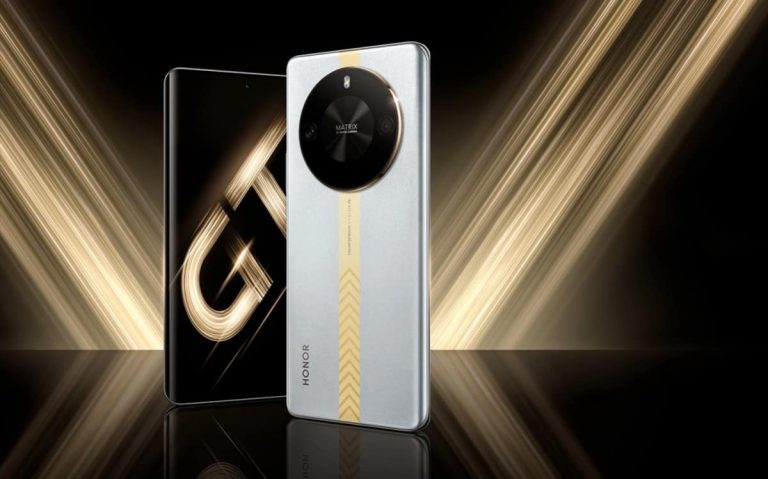
The HONOR X50 GT has been announced with a compelling price tag
The HONOR X50 GT is made out of metal and glass, and it has a curved display. It also includes a centered display camera hole and rather thin bezels. A circular camera island is located on the back, with two cameras.
There is a 6.78-inch 2652 x 1200 OLED display on the front. A 120Hz refresh rate is supported, as is 1,920Hz high-frequency PWM dimming. The peak brightness of this panel is 1,200 nits.
The Snapdragon 8+ Gen 1 SoC fuels this smartphone. HONOR has also included 12GB/16GB of RAM here, while 256GB, 512GB, and 1TB storage options are available. Android 13 comes pre-installed, along with Magic UI 7.2.
A 5,800mAh battery is also a part of the package. The phone supports 35W wired charging and comes with a charger in the box. Wireless charging is not supported, in case you were wondering.
It includes a 108MP main camera, and comes in two colors
A 108-megapixel main camera (Samsung’s HM6 sensor, f/1.75 aperture) is backed by a 2-megapixel depth unit (f/2.4 aperture). On the front, you’ll find an 8-megapixel camera (f/2.0 aperture).
This smartphone does include an in-display fingerprint scanner. It also comes with IP53 certification, which makes it dush and splash-resistant. Bluetooth 5.1 is included in the package, as is 5G support. There are also two nano SIM card slots here.
The HONOR X50 GT measures 163.6 x 75.5 x 7.98mm, while it weighs 192 grams. This smartphone comes in Midnight Black and Silver color options. Its pricing starts from CNY2,199 ($309) for the 12GB + 256GB model. It goes up to CNY2,899 ($407) for the 16GB RAM + 1TB model.
Chances are this smartphone won’t make its way to global markets, though it would be nice to see it, if the price is right. It is truly affordable in China.
Google’s Bard chatbot is set to receive a significant upgrade in the near future. This upgrade will enhance its natural language processing capabilities, enabling it to generate even more realistic and engaging conversations. However, it might not be available at no cost to all users.
The upcoming iteration of the chatbot, Bard Advanced, is set to be fueled by Gemini Ultra, Google’s cutting-edge and highly advanced artificial intelligence model. The highly anticipated launch of Gemini Ultra is just around the corner, promising groundbreaking advancements in the field of natural language understanding and generation.
Based on information discovered hiding in plain sight on the Bard website, it appears that Bard Advanced may not be free to all users. As noted by Android Authority, Bedros Pamboukian, a developer and cybersecurity enthusiast, recently stumbled upon some intriguing lines of code suggesting that Bard Advanced will be offering a generous three-month free trial, with a paid premium tier once the trial period concludes.
Source – Bedros Pamboukian | X
In addition, Pamboukian discovered a broken Google One link (https://one.google.com/explore-plan/bard-advanced) which hints at a potential connection between Bard Advanced and Google One, Google’s subscription service that provides cloud storage, premium support, and various perks. The inclusion of Bard Advanced in Google One plans remains uncertain. It is yet to be determined if it will be offered as a separate subscription or bundled within the existing service.It remains to be seen whether Google will officially confirm these findings, but it appears that the chatbot is currently undergoing internal testing. It seems that the official announcement and release of Bard Advanced to the public may be just around the corner.
In December, Google unveiled Bard Advanced alongside the introduction of its Gemini AI model — a versatile collection of AI models that excel at a wide range of natural language tasks. The upcoming Bard Advanced is set to introduce a range of exciting new features, including voice input and output, multi-language support, and the ability to engage in personalized conversations. In addition, it will have the capability to cover a wide range of intricate and varied subjects, including politics, science, and entertainment.
Bard Advanced has the potential to be an incredibly impressive and groundbreaking chatbot, but there could be some drawbacks to consider. It is yet to be determined if users will be willing to pay for it.
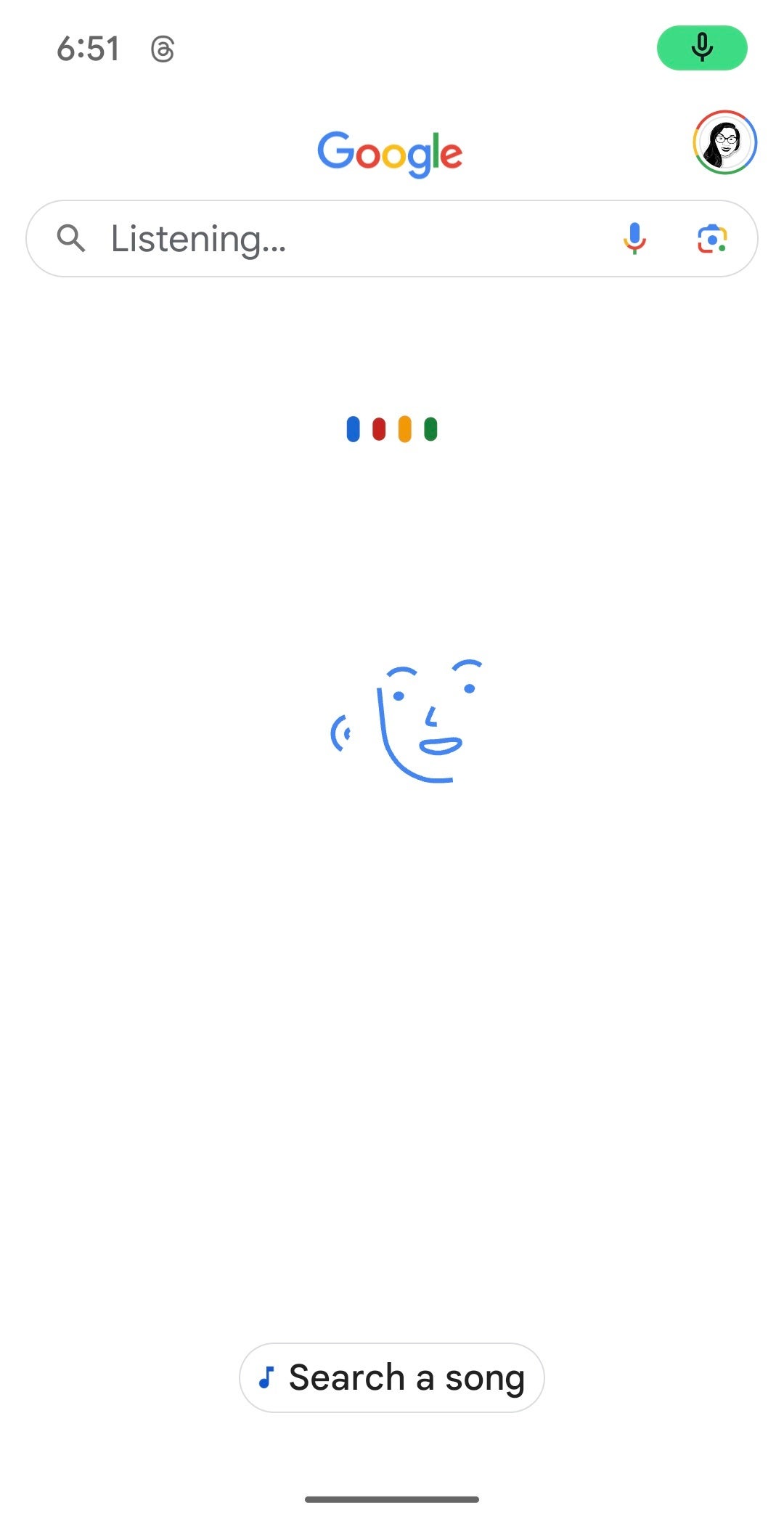
Google has addressed an issue that impacted certain users of Google Pixel devices using the native Pixel Launcher. The problem involved the inability to launch Google Assistant by tapping the microphone icon in the search bar. Thankfully, Google has now implemented a server-side fix to resolve this issue.
Prior to the fix being rolled out, tapping the microphone icon would activate the older voice search feature, which is a part of Google Search and has been around since the pre-Assistant Google Now era. Reports of this issue surfaced and were reported by 9to5Google around the beginning of the week. According to the reports, this issue was impacting devices running the beta version of Google app 15.0 and certain Android 14 QPR2 Beta 2 devices that hadn’t updated to the latest version of the Google app.
At the time, it was uncertain whether this was a bug or a deliberate test by Google, but it definitely disrupted the expected functionality for numerous users who depended on the Pixel Launcher shortcut to access Assistant. Google has since then acknowledged the issue by rolling out a server-side fix to the Google app.
Microphone on Pixel Launcher search bar invoking the old Google Voice Search feature
If you’re still facing the issue, try restarting your Android device and see if the microphone button now launches Assistant as it should. However, should you still be experiencing this problem, you can always use a workaround and launch Assistant through alternative methods, such as touching and holding the Home button or by simply saying “Hey Google.”
The Google Assistant is a robust and flexible tool that empowers users to access information, complete tasks, manage smart home devices, and much more, all through the power of their voice. It can be accessed in multiple languages and on a wide range of devices, such as phones, tablets, smart speakers, smart displays, and wearables. Considering its helpfulness, it’s great news to see that Google has addressed this pesky bug and has restored its functionality using the mic on the Pixel Launcher search bar.
Google’s Pixel phones are renowned for their unique features that elevate the user experience and offer valuable information at a glance. In particular, the “At a Glance” widget, which conveniently displays important information like weather updates, calendar events, reminders, and more right on your home screen, lock screen, or Always-On Display (AOD).Until recently, it was not very intuitive to customize At a Glance, as the settings were scattered across different menus in the Android System Intelligence and the Google app. Because of this, users faced challenges in locating and customizing their desired options.
Fortunately, as reported by Android Police (via 9to5Google), Google has taken steps to resolve this problem by bringing together all the At a Glance settings into a single location. Users of Pixel devices can now easily access the unified settings page through a simple long-press on the At a Glance widget and selecting Customize. Alternatively, they can navigate to the Assistant settings section within the Google app.
Old Google Pixel “At a Glance” settings vs redesign | Image Credit: Android Police
Users now have the option to effortlessly enable or disable the At a Glance feature, as well as customize which elements they prefer to have displayed on their screens. Users also have the ability to customize their preferences for how At a Glance utilizes their Google account data, integrates with other services, and displays location-based content.
The rollout of the new simplified At a Glance settings ensures that Pixel users can now easily access the information they need without the hassle of searching for the right toggle. When you catch a glimpse of your Pixel screen and spot a well-timed package delivery alert, it’s worth noting that it’s not just a stroke of luck. Behind the scenes, a unified settings page is working its magic to make it happen.
Samsung is all set to take wraps off the Galaxy S24 series on January 17. While leaks have already revealed key specs and AI features, we don’t yet have much information about the prices of the new flagships. There have been some hints at a price cut but we are still awaiting confirmation. A new report suggests the prices may increase in some markets but not uniformly. Base storage variants of the Galaxy S24 and Galaxy S24+ may see no price change.
Samsung might increase the prices of some Galaxy S24 variants
About three weeks back, the Korean media reported that Samsung doesn’t plan to increase the Galaxy S24 prices over the Galaxy S23. The idea was to make the new flagships more appealing and potentially boost sales. The company is betting big on on-device AI, while there are also a few hardware upgrades on the cards. The Plus model, for example, is getting a RAM upgrade from 8GB to 12GB across the board. The Ultra is getting a titanium frame.
A new report followed two weeks later, hinting at a price drop for the smaller two models in Europe. The Galaxy S24 and Galaxy S24+ were said to see a €50 cut across the board. The Galaxy S24 Ultra, on the other hand, would cost more than its predecessor—specifically the 256GB variant, which goes from 8GB to 12GB RAM. The 512GB variant, which sees no change in the RAM amount, would cost the same as the Galaxy S23 Ultra.
Now, a fresh report coming from Korea says something else. It gives us detailed pricing for each storage variant of the three Samsung flagships. According to the report, the 256GB Galaxy S24 and Galaxy S24+ will cost KRW 1,155,000 and KRW 1,353,000, respectively—unchanged from the 2023 models. However, their 512GB variants will see a price increase of KRW 22,000 (roughly $17), costing KRW 1,298,000 and KRW 1,496,000, respectively.
The Galaxy S24 Ultra, meanwhile, might see a bigger price increase in Samsung’s homeland. The 256GB variant is said to cost KRW 1,698,400 in South Korea, KRW 99,000 (~$75) more than the 256GB Galaxy S23 Ultra. For 512GB of storage, you’ll have to pay KRW 1,841,400, which is KRW 121,000 (~$92) more than the corresponding storage variant of the 2023 Ultra model. There’s no word on the pricing of the 1TB variant.
AI features will be the highlight of the new Samsung flagships
While we wait for the official announcement of the Galaxy S24 series, we already know that Samsung will introduce groundbreaking AI features with its new flagships. It has baked AI tools into the system, offering several on-device AI functionalities. From cameras and the gallery to Samsung Notes and the system call app, you will find AI features everywhere. It remains to be seen whether Samsung’s bet on AI pays off and helps improve its flagship sales.
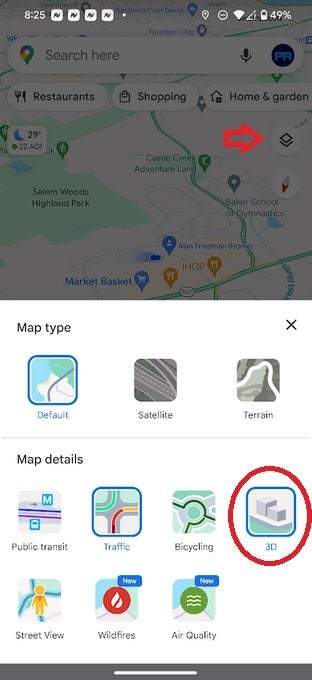
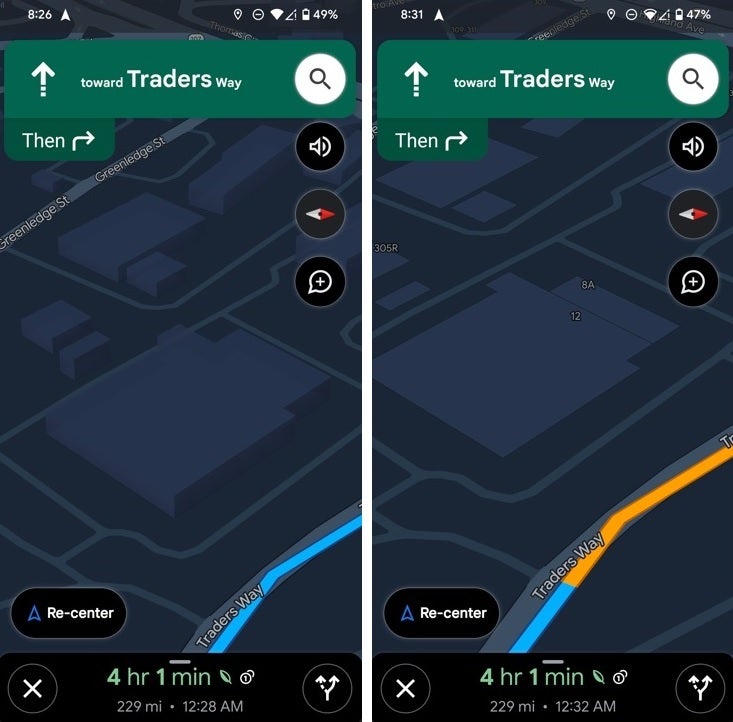
While you have had the ability to see buildings in 3D on Google Maps for ages, Google will now allow you to see 3D buildings while navigating from point “A” to point “B” using the mobile app on iOS and Android and also when using Android Auto. But this doesn’t work automatically. To turn on 3D buildings while navigating, hit the layer button before you start navigating. Under Map details, press the 3D button. Start navigating and zoom in a little bit for the buildings to appear in 3D.
Before navigating, press the Layer icon and tap on 3D to see 3D buildings
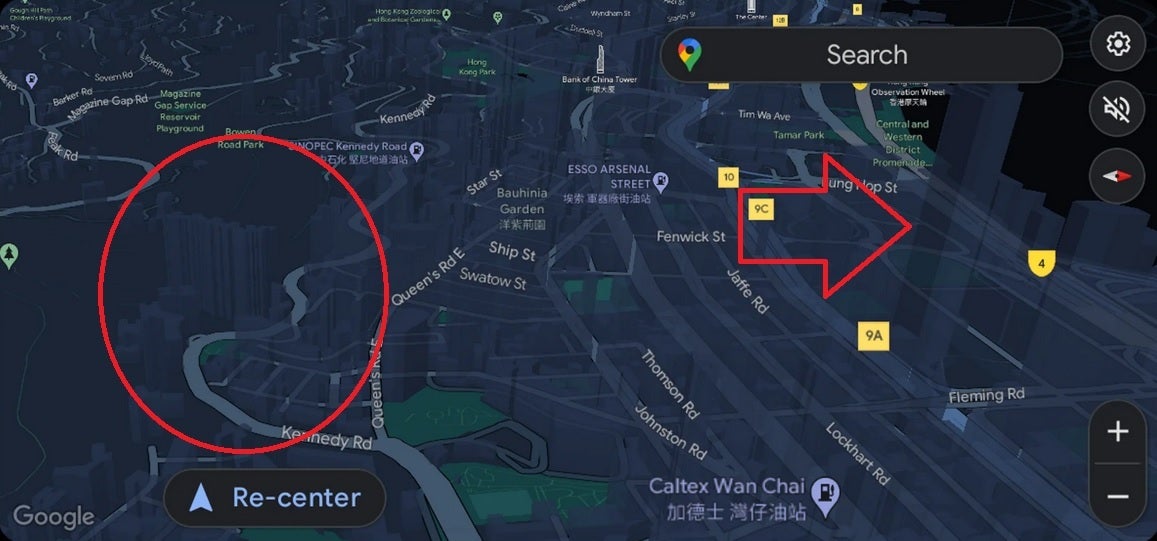
The feature has surfaced on my Pixel 6 Pro running the latest Android 14 QPR2 beta. According to one Reddit user, if the 3D view of a building gets in the way of the route, the building will become nearly transparent so you’ll be able to see through it. The same Redditor who posted the image of what he calls the “semi-opaque” 3D buildings was using Google Maps on Android Auto.
With the user name “seemebreakthis” on Reddit, this BMW i4 450 owner (who lives in Hong Kong) wrote, “I started to notice this nice 3D view on my AA [Android Auto] Google Maps for maybe a week or so. I don’t recall making any changes in Google Map or AA settings during this time, so I believe it just activated on its own. Looks really nice to me. The buildings are semi-opaque so they don’t really get in the way even for a city like the one I live in with an insane number of tall buildings everywhere.”
3D building enabled on left, disabled on right
Per 9to5Google, it should be pointed out that not all iOS and Android phones have received this feature yet and even rarer still are Android Auto users who have seen the 3D buildings while navigating. And that means that Google could be testing this using one of its infamous A/B tests. Let us know in the comments section if you have been seeing the 3D buildings while navigating. Remember that it is not on by default and that you must set it up prior to starting your journey.
Circle and arrow show semi-opaque 3D buildings on Google Maps while navigating in Hong Kong
So what is the advantage of seeing buildings in 3D while you are driving? Since these are done to scale, it acts as a landmark for drivers who are traveling in an area that is unfamiliar to them.
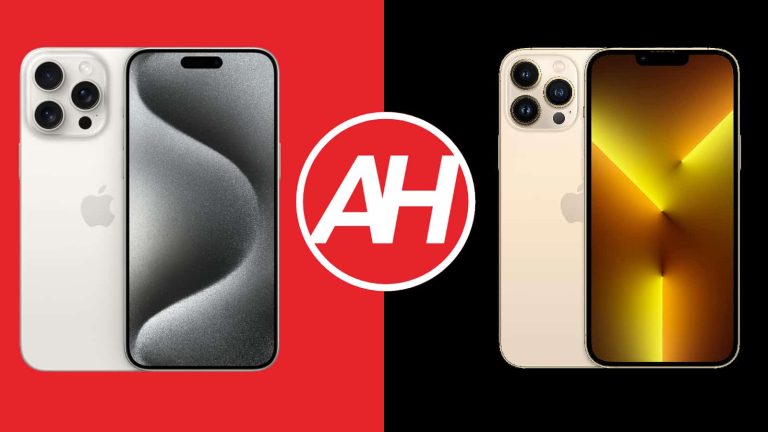
The iPhone 15 series arrived back in September. We’ve compared Apple’s most powerful handset with quite a few phones thus far, but not its predecessor from the iPhone 13 series. In this article, we’ll compare the Apple iPhone 15 Pro Max vs Apple iPhone 13 Pro Max. Many of you upgrade your devices after two years, so this could be the comparison that can help you make a decision.
In some ways, these two phones are similar, but there are quite a few differences too. We’ll first list their specifications, as per usual. Following that, we’ll compare the two phones across a number of categories. We’ll compare their designs, displays, performance, battery life, cameras, and audio output. That being said, let’s get this party started, shall we?
Specs
Apple iPhone 15 Pro Max vs Apple iPhone 13 Pro Max, respectively
– Screen size: 6.7-inch Super Retina XDR display with ProMotion (flat, 120Hz, HDR10, 2,000 nits) 6.7-inch Super Retina XDR display with ProMotion (flat, 120Hz, HDR10, 1,200 nits) – Display resolution: 2796 x 1290 2778 x 1284 – SoC: Apple A17 Pro Apple A15 Bionic – RAM: 8GB 6GB – Storage: 256GB/512GB/1TB (NVMe) 128GB/256GB/512GB/1TB – Rear cameras: 48MP (f/1.78 aperture, second-gen sensor-shift OIS), 12MP (ultrawide, f/2.2 aperture, 120-degree FoV, macro photography), 12MP (telephoto, f/2.8 aperture, 5x optical zoom) 12MP (f/1.5 aperture, sensor-shift OIS), 12MP (ultrawide, f/1.8 aperture, 120-degree FoV), 12MP (telephoto, f/2.8 aperture, 3x optical zoom) – Front cameras: 12MP (f/1.9 aperture) + TrueDepth 12MP (f/2.2 aperture) + TrueDepth – Battery: 4,422mAh 4,352mAh – Charging: 20W wired, 15W wireless (MagSafe & Qi2), 7.5W wireless (Qi), reverse wired charging (charger not included) 20W wired, 15W wireless (MagSafe & Qi2), 7.5W wireless (Qi) (charger not included) – Dimensions: 159.9 x 76.7 x 8.25mm 160.8 x 78.1 x 7.7mm – Weight: 221 grams 240 grams – Connectivity: 5G, LTE, NFC, Wi-Fi, USB Type-C, Bluetooth 5.3 5G, LTE, NFC, Wi-Fi, Lightning, Bluetooth 5.0 – Security: Advanced facial scanning – OS: iOS 17 iOS 15 (upgradable) – Price: $1,199 No longer officially available – Buy: Apple
Apple iPhone 15 Pro Max vs Apple iPhone 13 Pro Max: Design
When they sit side-by-side, these two devices do look very similar. They have the same shape, and even their rear camera islands look very similar. The main difference, that you can immediately notice, is on the front. The iPhone 15 Pro Max has a pill-shaped cutout aka Dynamic Island, while the iPhone 13 Pro Max has a display notch. The bezels on the iPhone 15 Pro Max are also noticeably thinner, but they’re uniform on both devices.
The rear camera setups on the two smartphones do look similar, down to the camera placement and LED positioning. However, the setup on the iPhone 15 Pro Max is larger, which is to be expected. You’ll notice how different these two devices are once you hold them. The iPhone 15 Pro Max is a more pleasant device to hold and use. Why? Well, not only is it considerably lighter, its flat sides are curved towards the edges, unlike the flat sides on the iPhone 13 Pro Max. That makes the phone easier and more pleasant to hold. The iPhone 13 Pro Max has a tendency to cut into your finger, and you can develop hand fatigue after a while.
The two phones have the same display sizes, but the iPhone 15 Pro Max is slightly more compact. That is mostly due to its bezels that are thinner. It is slightly shorter, slightly narrower, and a bit thicker. As I already mentioned, it’s also lighter. It’s lighter by 19 grams at 221 grams compared to 240 grams. Both smartphones do offer an IP68 certification for water and dust resistance. They both feel like premium pieces of tech. It’s also worth noting that the iPhone 15 Pro Max’s frame is made out of titanium, while the iPhone 13 Pro Max uses stainless steel. That’s the main reason for the added heft.
Apple iPhone 15 Pro Max vs Apple iPhone 13 Pro Max: Display
The two devices do have the same display sizes, but those displays are not identical. They are both flat, by the way. The iPhone 15 Pro Max features an LTPO Super Retina XDR OLED display with a 120Hz refresh rate. It has a resolution of 2796 x 1290. That panel does support HDR10 content, and also has Dolby Vision support. It goes up to 2,000 nits in brightness. The display aspect ratio here is 19.5:9, while the panel is protected by the Ceramic Shield glass.
The iPhone 13 Pro Max, on the flip side, has a 6.7-inch Super Retina XDR OLED panel too, and this panel also has a 120Hz refresh rate. It supports HDR10 and Dolby Vision too, but it’s less bright than the iPhone 15 Pro Max’s display. It peaks at 1,200 nits. This display has a resolution of 2778 x 1284, and a 19.5:9 aspect ratio. The Ceramic Shield glass is used on top of it to protect it.
Both of these panels are very good, but the iPhone 15 Pro Max does have the edge. It is slightly sharper, which is not something you’ll notice, but you’ll notice that it’s brighter when you’re outdoors, especially in direct sunlight. Both displays offer a very good touch response and are quite vivid. They also offer deep blacks, as you’d expect out of AMOLED displays.
Apple iPhone 15 Pro Max vs Apple iPhone 13 Pro Max: Performance
The Apple A17 Pro SoC fuels the iPhone 15 Pro Max. That is Apple’s most powerful processor to date, it’s a 3nm processor, by the way. Apple also included 8GB of RAM here, along with NVMe flash storage. The iPhone 13 Pro Max, on the other hand, comes with the Apple A15 Bionic chip. That is a 5nm processor. This phone packs in 6GB of RAM, and NVMe flash storage.
In case you’re wondering, yes, the iPhone 13 Pro Max still has great performance. From that standpoint, there’s really no need to upgrade to the iPhone 15 Pro Max. Apple’s new flagship, however, is considerably more powerful, there’s no denying that. The Apple A17 Pro is so powerful, it can play some console-quality games. The thing is, that makes the phone get quite toasty fast, so keep that in mind.
Both smartphones do a great job when regular, everyday usage is concerned. Sure, the iPhone 15 Pro Max may open apps a bit faster, but there’s really not a huge difference in regards to fluidity and general performance. The iPhone 13 Pro Max can still keep up with gaming as well, for the most part.
Apple iPhone 15 Pro Max vs Apple iPhone 13 Pro Max: Battery
The iPhone 15 Pro Max is equipped with a 4,441mAh battery, while the iPhone 13 Pro Max has a 4,352mAh battery. The iPhone 13 Pro Max was one of the best battery life flagships of its time. If the battery health on the phone is good, the phone likely provides great battery life. We were able to get over 8 hours of screen-on-time on that phone, easy, even over 9 hours when needed.
The iPhone 15 Pro Max battery life is not bad at all, but it cannot measure up to the iPhone 13 Pro Max, unfortunately. Getting around 7-7.5 hours of screen-on-time is a reality. Do note that gaming is not thrown into the mix, however. When you do that, the difference becomes even more noticeable.
Both smartphones support 20W wired charging, along with 15W MagSafe and Qi2 wireless charging. 7.5W Qi wireless charging is also supported. The iPhone 15 Pro Max also has the ability to charge other devices thanks to its 4.5W reverse wired charging. Neither of the two smartphones comes with a charger in the box, unfortunately.
Apple iPhone 15 Pro Max vs Apple iPhone 13 Pro Max: Cameras
The iPhone 15 Pro Max features a 48-megapixel main camera, in addition to a 12-megapixel ultrawide unit (120-degree FoV), and a 12-megapixel Tetraprism telephoto camera (5x optical zoom). The Apple iPhone 13 Pro Max has a 12-megapixel main camera, a 12-megapixel ultrawide camera (120-degree FoV), and a 12-megapixel telephoto camera (3x optical zoom).
The iPhone 14 Pro series ushered in a major hardware upgrade with the main camera. The iPhone 15 Pro Max pushed things even further in the right direction. Both smartphones do a great job during the day, but the iPhone 15 Pro Max does a much better job in HDR conditions. The iPhone 13 Pro Max still has a tendency to overexose shots in such conditions. A considerable difference is also noticeable in low light, as the iPhone 15 Pro Max easily wins that comparison.
Both ultrawide cameras do a great job. They keep the color science close to the main shooter, which is great. In terms of the telephoto camera, well, the iPhone 13 Pro Max’s shooter is good, but it cannot compare to the iPhone 15 Pro Max’s zoom capability. When it comes to 3x shots, however, things are much closer. The iPhone 15 Pro Max also does a great job in the video department, but the iPhone 13 Pro Max is not far behind, it can still capture very good video.
Audio
There are stereo speakers included on both of these devices. Both speaker setups are good and well-balanced. They are even similar when it comes to the sheer loudness that comes from them.
What you will not find on either phone is the audio jack. The iPhone 15 Pro Max does have a Type-C port at the bottom, while the iPhone 13 Pro Max includes a Lightning port. You can use those to connect your wired headphones. If you prefer wireless connectivity, Bluetooth 5.3 is supported on the new phone, while the iPhone 13 Pro Max comes with Bluetooth 5.0.