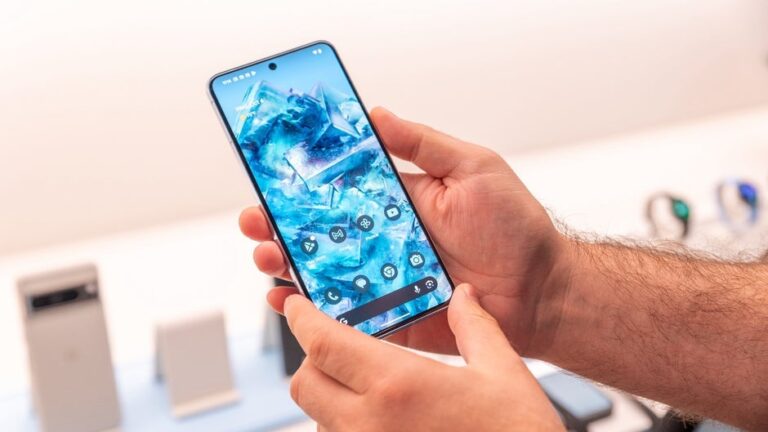
For Pixel phone users, the At a Glance widget has become a reliable sidekick, offering quick glimpses of crucial information like appointments, weather, and flights right from the home screen and lock screen. But one mode of transportation, trains, felt like a glaring omission in some parts of the world — until now.
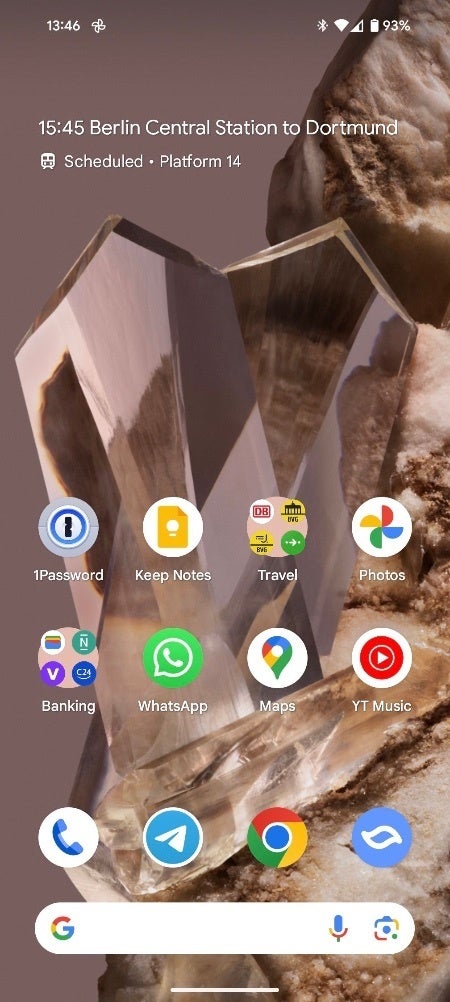
As reported by Android Police, train alerts are starting to show up in the At a Glance widget, suggesting a wider rollout is underway. This was spotted while a user booked a long-distance train trip through Deutsche Bahn, Germany’s national railway operator. While At a Glance settings list trains under the “Travel” toggle, this feature hasn’t always translated to actual on-screen alerts.
However, the tides seem to be turning. The trigger for this change remains a bit of a mystery, since the user first booked through the Deutsche Bahn app, and Gmail picked up the details from the email confirmation, so it is unknown if the widget was picking up the information from the app or from Gmail. Interestingly, Deutsche Bahn recently revamped its email layout, presenting all trip info within the email body instead of the usual PDF attachment. This, along with a redesign of the operator’s confirmation email in Gmail, might have played a role in enabling train alerts.
Image Source – Android Police
Beyond displaying time and details, the new At a Glance widget also shows platform information for both departure and arrival stations, but its availability might depend on your chosen train operator. While Google’s At a Glance support page already mentions trains, hinting at platform, station name, status, and even seat information support, the limited regional rollout was a frustrating reality for many. This global expansion suggests Google has always yearned to offer comprehensive travel info, but individual train operators might have hindered progress.
More exciting developments are in store for the At a Glance widget. Soon, Pixel users will finally be able to move the widget around their home screen or even banish it altogether – a long-awaited feature slated for a future Android 14 QPR2 beta release, and one that yours truly can’t wait to try out.
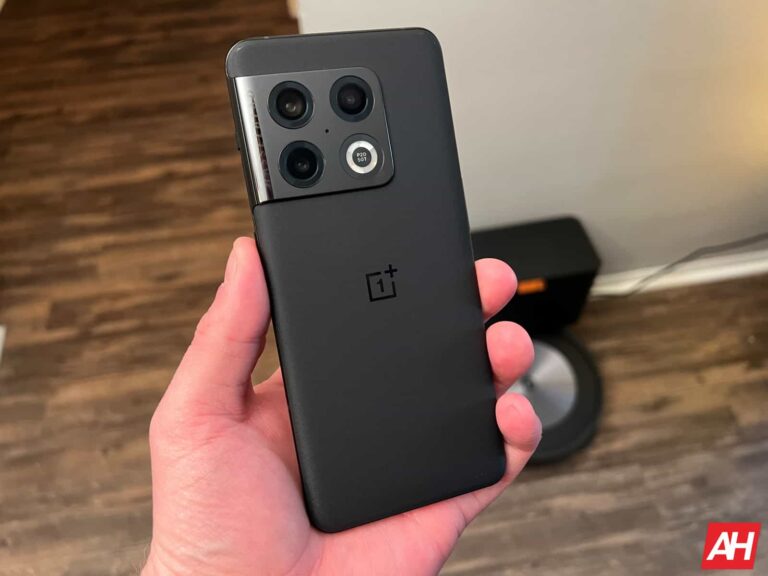
There’s some good news for the OnePlus 10 Pro users based in Europe and North America. The OnePlus 10 Pro is finally receiving the Android 14-based OxygenOS 14 update. The much-anticipated OxygenOS 14 update is finally rolling out to EU and NA, following its initial release in India back in November.
OnePlus 10 Pro receives Android 14-based OxygenOS 14 update
The OnePlus 10 Pro has become the first OnePlus phone to receive the OxygenOS 14 update, based on Android 14, in North America. It weighs about 2.47GB in size, according to a screenshot shared on Reddit. Therefore, OnePlus 10 Pro models, including NE2213, NE2215, and other versions in this area, are receiving the latest update.
If you own any of these models, you likely have received the update notification pop-up. Alternatively, you can download and install the update manually by heading to Settings > System > System Updates on your OnePlus 10 Pro.
What’s new in OxygenOS 14 update?
OnePlus‘ latest OxygenOS 14 update brings several new features but misses some sweet spots. It falls short of offering a full range of customizations. Notably, the lack of lock screen customization, a staple for many, feels like a glaring omission. It is still running the November 2023 security patch. However, there’s a good part too.
It debuts Fluid Cloud, a dynamic information portal that morphs and adapts to display relevant updates at a glance. Moreover, you get a File Dock for drag-and-dropping content between apps and devices. Camera enthusiasts can expect better camera optimization with the new update.
Then, there’s Content Extraction which lets you grab text and images from the screen with a single tap, while Smart Cutout isolates objects in photos for easy sharing or copying. It resembles Apple’s iOS 17 update but with refinement. The shared screenshot briefly discusses the improved Shelf (with more widget recommendations) and updated security and privacy.
The latest data breach has affected EasyPark Group’s customers in Europe, including the United Kingdom, and relevant authorities have been notified.
A data breach has compromised the information of thousands of EasyPark Group customers in Europe. EasyPark Group, Europe’s largest parking app operator, which includes RingGo and ParkMobile, discovered the breach on December 10th, 2023, and promptly informed the affected customers.
The company reported the cyber attack to regulatory authorities, including the EU’s privacy regulator, Sweden’s Information Commissioner’s Office, the UK’s Information Commissioner’s Office, and the Swiss data regulator.
It is worth noting that the ParkMobile app, a free parking app in Atlanta, GA, has been targeted by cyberattacks before. In March 2021, as reported by Hackread.com, a vulnerability in third-party software led to a data breach in which hackers leaked over 21 million customers’ records online, including email addresses, phone numbers, license plate numbers, and hashed passwords.
Some high-profile individuals whose data was leaked in the breach included Hillary Clinton and Donald Trump. Cybersecurity journalist Brian Krebs was also among those affected by the breach.
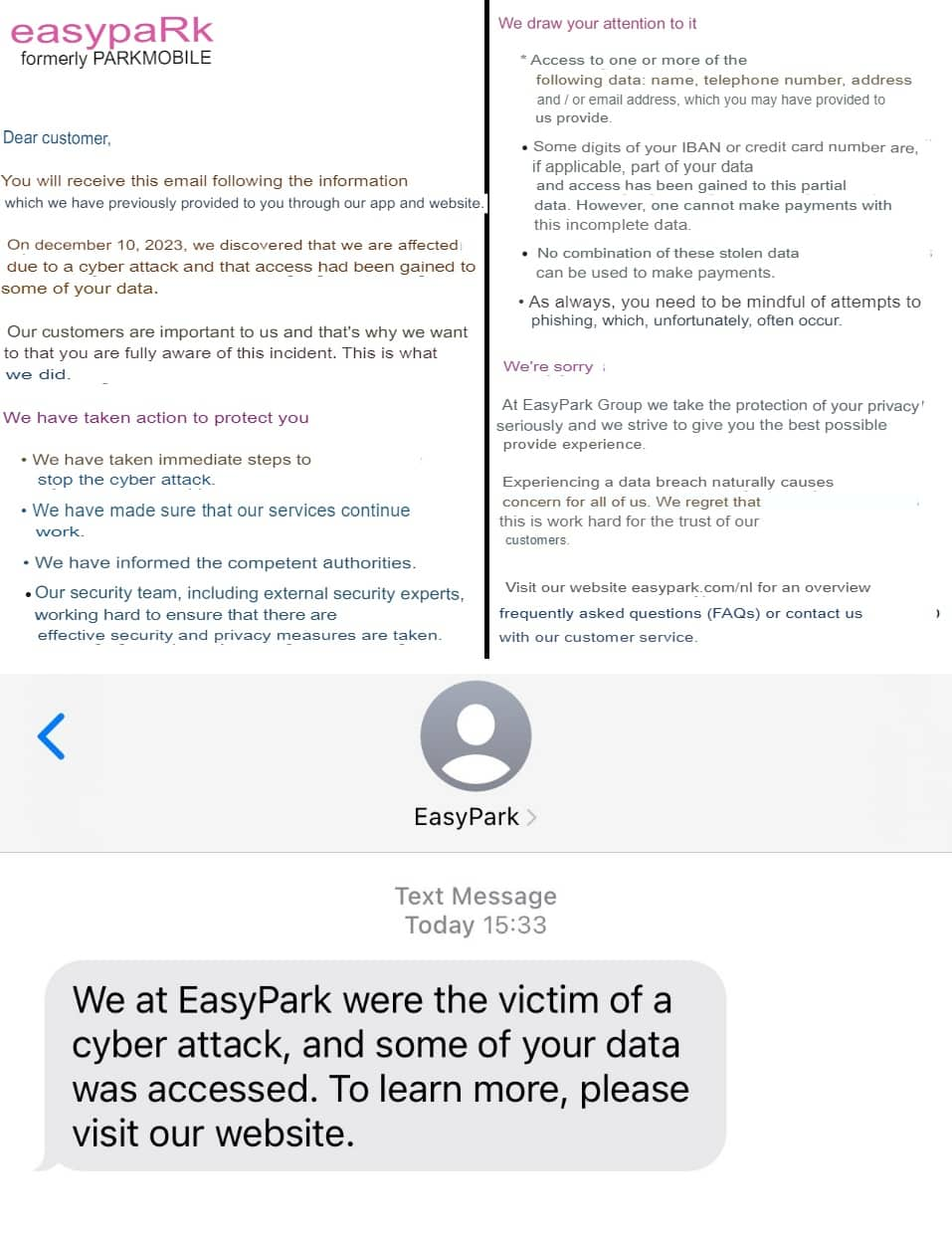
In the latest data breach, the cyber attack reportedly resulted in the theft of customer data, including names, phone numbers, addresses, email addresses, and credit card numbers. The breach involved “a few digits of IBAN or credit card numbers,” but no combination could be used for payments, the company noted while suggesting users be cautious of phishing scams.
EasyPark Group notedthat its ParkMobile app, boasting 50 million users in the US, is unaffected whereas RingGo app users have been affected since some of its services were linked with the EasyPark technology.
The company did not disclose the number of affected users, but according to its spokesperson, most are located in Europe whereas 950 RingGo app users in the UK could be affected. So far, hackers haven’t made ransom demands and there’s no evidence of the hacked data being exploited or leaked.
Emails and text messages have been sent to affected customers. Note: The email has been translated from Dutch to English using an AI translator. (Screenshot credit: Hackread.com)
The latest EasyPark data breach highlights the increasing data security threat to parking services and customers worldwide. The fact that users have no option but to link their personal details and financial data with these platforms constantly puts their privacy and security at risk of being compromised.
Team Hackread.com is monitoring prominent cybercrime and hacker forums for potential data leaks. If EasyPark Group’s data surfaces on any of these forums, we will update this article. Stay tuned.
Google, as well as Apple, has come under fire in the past few years over the Play Store (and App Store) “tax.” Basically, Google and Apple take around 30% of every transaction made on Android and iOS through the Play Store and App Store. On the one hand, this seems fair since Google and Apple built these platforms, and without them, developers wouldn’t be able to sell their apps to literally millions of people. But 30% on literally every single in-app purchase is a bit insane.
Epic Games took great offense to this and has offered ways to get cheaper in-app purchases for Fortnite. Before ultimately being kicked off of the Play Store and then the App Store. Epic then took both companies to court to sue over this and how it’s monopolistic of Google to charge 30%. Google recently lost that lawsuit (Apple beat Epic, however), and it’s a pretty big deal.
However, now we are hearing from Bloomberg that Google has explored lowering the cut of in-app revenue it would take from developers. So instead of taking 30% (or 15% from newer and smaller developers), the percentage would have been lower, however the report doesn’t give a concrete percentage.
Google started ‘Project Everest’ because it was afraid of regulatory scrutiny
This idea of exploring lowering the cut that Google takes was called ‘Project Everest,’ and the whole reason behind it was regulatory scrutiny. Google was worried that it could be done by regulatory overreach.
During an in-house presentation, Google ultimately decided not to go this route. Stating that “we can defend the status quo for a few months. Making proposed changes sooner may help support reasonable legislation, position Google as a leader, and prevent more draconian legislation.”
The bottom line though? Google was worried about losing out on billions per year in revenue. It was estimated that this change would cost Google about $1 billion to $2 billion per year from apps and between $6 billion and $9 billion per year in revenue from games. That’s not chump change; however, for Google, it is. In 2022, Google raked in $279.8 billion in revenue for the entire year.
Google did have another option, and that would be to allow app developers to handle in-app payment processing themselves and provide them with a lower percentage. Google calculated that this option would reduce annual Play Store revenue by only $250 million to $1.3 billion. A much easier pill to swallow versus the almost $11 billion.
However, with the verdict in the Epic v Google case, the search giant may be forced to make some major changes to the Play Store. With one possible change allowing customers to decide to have their in-app payments processed by Google or a third-party firm, that the app developer has listed.
The OnePlus 12R design and color variants have been revealed just a few weeks ahead of the launch. The company had already confirmed that it will be launching the OnePlus 12R at a global event on January 23. Now, the brand has released a teaser video of the OnePlus Ace 3 on Weibo, which has revealed its design. Notably, the OnePlus Ace 3 will be launching globally as the 12R.
The OnePlus 12R will resemble the OnePlus 12 in terms of design
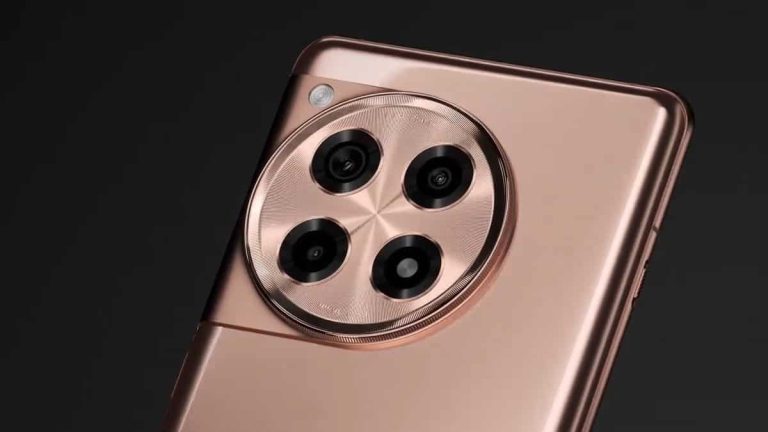
As seen in the teaser video, the OnePlus Ace 3 aka 12R will resemble its flagship sibling in terms of design. The toned-down offering will be featuring a similar looking large circular camera module at the rear, just like the OnePlus 12. However, the phone will be ditching the Hasselblad branding as well as the Periscope telephoto lens to keep the cost down.
According to earlier reports, the OnePlus 12R will be offering a 50MP Sony IMX890 primary camera at the rear. The main sensor will be accompanied by an 8MP ultra-wide angle lens as well as a 2MP shooter. Earlier leaks indicated that the third 12R camera will have a 32MP sensor. However, it was reportedly ditched for a smaller macro lens. For selfies and video calling, the 12R is said to offer a 16MP snapper. It will be placed inside a hole towards the top of the screen.
The OnePlus 12R could be arriving in Black, Blue, and Gold color options
The teaser for the Ace 3 or 12R indicates that it will be available in an attractive Gold hue. In addition, the reliable gadget tipster Ishaan Agarwal has posted two more color variants of the device on X.com. The leak contains a promotional poster for the launch date of the 12R. It has revealed that the additional color options will be Black and shiny Blue. There’s a possibility that the Gold color options will be exclusive to the China-only Ace 3 model of the 12R.
The 12R is said to feature a ProXDR LTPO display and the Snapdragon 8 Gen 2 SoC
The upcoming OnePlus 12R smartphone’s alleged specifications leaked on the interwebs quite recently. The handset is said to offer a 6.78-inch ProXDR LTPO display, which will have a refresh rate of 120Hz. At the helm, the phone will feature a Snapdragon 8 Gen 2 processor. The chipset will be aided by up to 16GB of LPDDRX5 RAM and up to 256GB of UFS4.0 storage.
Furthermore, the rumor mill indicates that the OnePlus 12R will flaunt a 5,500mAh battery. Notably, the OnePlus 12 flagship has a slightly smaller 5,400mAh power cell. The 12R will also boast 100W fast charging capabilities to quickly top up the battery.
OnePlus will initially introduce the OnePlus 12R as the Ace 3 in China on January 4. It will be globally launched a couple of weeks later in markets like India, Europe, and North America.
Roku is a hugely popular streaming TV platform that competes with Fire TV for the top spot. Despite the constant shifts in popularity, Roku remains a favorite of many due to its simplicity and ease of use. In fact, its interface has remained largely unchanged for over a decade, even as streaming TV has evolved significantly. However, there’s much more to Roku than just streaming Netflix, YouTube, or Sling. If you want to learn everything there is to know about the Roku platform, we’ve got you covered.
What is Roku?
Roku makes streaming devices that allow you to cut the cord from cable. It was one of the first to really jump into the streaming hardware game, and believe it or not, it was founded in 2002. Way before any of us thought about streaming Netflix. The beginnings of Roku are pretty interesting and include being part of Netflix. Reed Hastings, still the current CEO of Netflix, decided to nix the project, as it would hamper their ability to get onto competing products. Which back then, really only included smart TVs and their own operating systems.
Interestingly, Roku is the term used for “six” in Japanese, which represents the sixth company that Anthony Wood founded.
Unlike some of the competitors in the space, like Apple TV, Android TV, and Amazon’s Fire TV, Roku has always focused on keeping its hardware super simple. That also allowed Roku to keep its prices pretty low and sell millions of units. It’s what also makes Roku appeal to those who are slightly tech-illiterate. Your grandma could use a Roku with almost no problems.
Fast-forward to 2021, Roku is now a publicly traded company with a market cap of around $45 billion.
Is Roku a hardware or software?
Technically, Roku is both hardware and software.
Roku sells streaming players like the Roku Premiere, or the Streaming Stick+ at about the price it costs to make them. Roku makes its money with the ads that it is able to sell on the apps on its platform. And from The Roku Channel, which we’ll talk about a bit more later.
Which means that the Roku OS is actually really important. And as mentioned before, Roku has kept the operating system super simple for years. In fact, it hasn’t really changed much since the first streaming player came out in the 2000s. And that’s because it didn’t really need to.
Roku also licenses out its operating system to partners like Hisense, TCL, and Walmart (via its Onn brand) to use in their products. TCL has actually made a name for itself and become the fourth largest TV maker by going all-in with Roku on its TVs.
Is it free?
After you pay for the hardware, Roku is free. But you can pay for different things like HBO MAX, or Showtime through Roku. It is a bit like Amazon’s Prime Video Channels work. But there’s no subscription fee for Roku, thankfully. We have seen some scams going around trying to get people to pay for “customer support” from Roku. That is not real, and if you get that scam, make sure to report it and don’t fall for it.
Basically, you’ll pay for some of the apps and services on Roku, but you aren’t paying Roku itself. Roku makes its money from its partners.
Roku OS 11.5
Roku announced OS 11.5 on September 12, 2022. It’s a relatively small update to the operating system, but still brings in some nice new features for the platform.
Roku OS 11.5 makes it easier to use and better content discovery, which is now at the forefront of the streaming experience. It also brings a platform-wide Save List and Continue Watching. This is found in the What to Watch section. Roku has also added enhanced search results with the introduction of Visual Search Results, and that’s just some of what’s new here.
Roku OS 11
On Tuesday, March 22, 2022, Roku announced its next big software update to the platform. That’s Roku OS 11. This update brings a number of new features to the platform, though the biggest is the new “What to Watch” home screen. This home screen will give you recommendations on what to watch from a number of different providers. It also includes support for YouTube TV, Hulu + Live TV, and Sling TV.
In addition to that, there is now a new photo screensaver coming to Roku. So you can show your own photos on your Roku device when you’re not using it. Roku has also added a new voice-enabled keyboard that works on passwords too. There’s a new “Automatic Speech Clarity” mode and new Standard, Dialogue, Movie, Music, and Night sound modes for Roku Streambar and its other sound products.
Roku OS 10.5
Roku announced OS 10.5 on Monday, September 20, 2021, among a few other Roku products. As noted by the .5 increase in the version, this is not a huge update, but it does bring in some nice new features to Roku.
This includes making it easier to find content to watch with the new Live TV Channel Guide for Roku Streaming Players. This is mostly for the Roku Channel, which has over 200 channels that you can watch for free. There’s also a new Roku Search Music and Podcast Row.
Roku is also making it easier to set up a new Roku stick or set-top box with enhancements to voice entry for email, password and PIN for on-screen keyboards. There are also new sound settings in the Roku mobile app (US only).
These are just some of what Roku has added in Roku OS 10.5. You can learn more about it here.
How does Roku work?
No matter what Roku device you buy, the experience is mostly the same. Whether that’s a TV with Roku built-in, a Soundbar with it, or a set-top box, they all have an Ethernet jack, so you can go wired if your internet is not quite as powerful as you may need for 4K video. But there is also WiFi available with Roku’s devices.
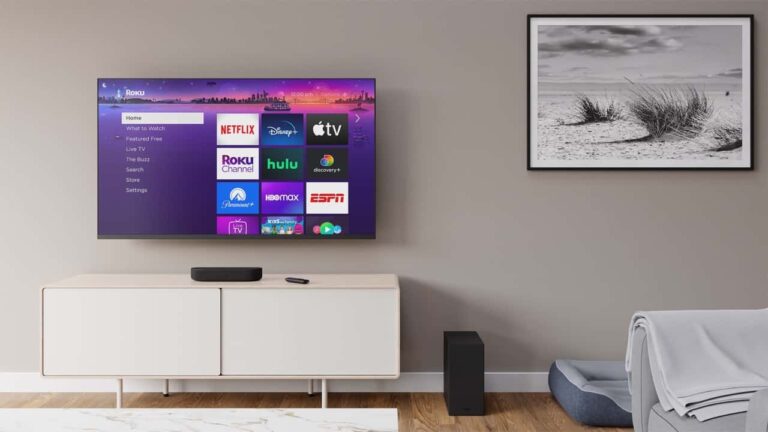
The home screen uses a pretty easy-to-read grid, so you can go left to right or up and down to find your favorite apps. You can also long-press on the apps to re-arrange them to your liking. For example, if your four most-used services are YouTube, HBO MAX, Netflix, and Peacock, you can move those all to the top row. Making them easier to jump into.
On the left side, you’ll see different options for getting into the store, finding stuff to watch on The Roku Channel, jumping into settings, and so forth. It’s all right there, making it super easy to use.
Adding Channels
On Roku, it calls “Apps” “Channels,” likely to make it feel more like a traditional TV instead of just a bunch of apps on your TV. It’s very simple to add channels to your device, too. Just head into the Channel Store.
From there, you can search for your favorite channels. Like any app store, it also has different categories, which you’ll find on the left. And that includes games, too.
Once you find a channel to add, just click on it, then click “add”. It will then be added to your Roku account, and it’ll appear on any Roku device you might have in your home. That’s particularly useful for those who might have a few Roku’s in their home, with each TV.
You can also search the Roku Channel Store on the web and add channels to your device that way.
Finding something to watch
Roku has more channels than all of its competitors, at nearly 3,000 right now. So there’s a ton of content to watch on Roku, but it can also be a bit difficult to find something to watch on Roku, because of that.
But Roku does have a pretty impressive universal search feature that will search for a title across all of the channels that are on your Roku device. Not only can you search for titles, but also actors/actresses, and even lines from a movie or TV show.
Matches for your search are then sorted by the price, and there will be icons beside the titles that indicate what it is. A channel, movie or TV show. You’ll also be able to click on it to learn more about the title.
Unlike Google TV, Roku does not yet have a stream of content available on your home screen with content it thinks you might want to watch, or live content if you have Sling TV or Fubo TV. The home screen is still limited to just showing your channels.
Update: On December 8, 2021, Google and Roku came to an agreement for YouTube TV. Just a day before YouTube was set to be removed. YouTube TV should be available again in the coming days.
This is one area where the simplicity of Roku actually counts against it. Because if you’re just browsing for something to watch, you need to open different apps to actually find something, instead of just scrolling down the home screen.
Using your voice (via Google Assistant and Amazon Alexa)
While Roku is not a huge tech company like Apple, Amazon, or Google, it has done a great job of working with all of their products. Instead of building competitors, Roku wanted to make sure it supported everything. So newer devices support Google Assistant, Amazon Alexa, Google Cast, and Apple AirPlay 2. Siri is not supported since it’s not really on third-party devices.
This means that you can use your voice to control your Roku device. Whether that is Amazon Alexa or Google Assistant, both will work with Roku.
You will need to give Roku access to your Google or Amazon account to use either of these voice assistants. Which can be done in the settings on your TV, or within the Roku app. This is needed because then your Google Assistant or Amazon Alexa won’t know who you are, or have access to your account. As you can do non-TV things on Roku too. Like asking about the Weather, or turning off the lights, etc.
It’s really smart of Roku to support both of the major voice assistants so that people can use whichever one they want and still use this set-top box.
Casting and AirPlay 2
As mentioned, Roku does also support Google Cast and Apple AirPlay 2. So depending on whether you are an iPhone user or an Android user, you can still mirror content on your Roku device. This means that you can easily throw a YouTube video from your phone onto the TV.
The only caveat here is that not all apps support this feature. For example, before HBO MAX made its way onto Roku officially, it did not support casting to your Roku device. That has since changed. As HBO MAX is now available on Roku.
There’s free content too
Almost all of the TV Everywhere apps are available on Roku. And those for the OTA channels that you’d get in your area too. Which are free. That includes ABC, NBC, The CW, as well as Pluto TV and Crackle. The Roku Channel is also available, which we’ll talk more about a bit later. These are all free, and supported by ads. So while you’re not paying you will need to sit through some ads.
The Roku Channel
One of the ways that Roku has decided to try and make some money lately, is through The Roku Channel. It houses free content, so you don’t need to pay for it, and it’s available on all of the Roku devices by default.
This channel will give you free content that is ad-supported. Though, usually the majority of this content is older. We’re talking at least a decade old. So you may not find a whole lot of content you want to watch right away on it. But hey, it’s free.
And Roku is continuing to add more content to this channel as well. So the content will continue to grow here. There is also 100 free live TV streaming channels available here. From news providers like ABC News Live, NowThis, Reuters, and USA Today.
Roku now has over 200 live TV channels available for you to choose from. On August 17, 2021, they added an additional 17. Providing plenty of free content for you to watch.
Roku Live TV Zone
In January 2022, Roku launched the Live TV Zone. Which is basically a way for you to see what’s available in live programming right now. It will work with the Roku Channel, as well as some other live TV streaming services like YouTube TV, Sling TV, and Hulu with Live TV.
Roku does a good job of combining all services that have live TV together and show you which app it is on. Whether that’s the Roku Channel, Tubi or something else.
The Roku app
The app isn’t a must-have, in our opinion. But it is still nice to have.
With the Roku app, you are able to find channels to install and add to your Roku device. You can also move your channels around and it’ll be reflected on your Roku device.
There is a dedicated tab for the Roku Channel as well. So you can see what’s playing, and of course have it start playing on your TV.
Perhaps the best feature of the app is that it can be used as a remote. So if you lost your physical remote, you can use the app to control your TV. It can also make it a whole lot easier to search for something to watch, as you have a touchscreen keyboard, instead of moving the cursor left to right to pick each letter on the TV.
Finally, you can enable private listening by pairing a pair of headphones to the app, and still play it on the TV. Which is pretty neat. And surprisingly, there’s no lag there either.
What Roku devices are available to buy?
Roku devices range from around $20 all the way up to $100. Each offering different features. For example, the cheapest ones do not offer up 4K HDR support, while the more expensive ones do. And the most expensive one also has Dolby Atmos support. You can check out the latest sales on Roku devices here.
Roku Express
This is the cheapest option currently available. It supports HD streaming, up to 1080p. Which is fine, since most of the streaming services cap at 1080p and the studios are still filming at 720p and if you’re lucky, 1080p. It’s very small, but definitely mighty. At just $30, it’s worth buying for a secondary TV in your home.
Roku announced the Streaming Stick 4K and 4K+ on September 20, 2021, and it’ll begin shipping in October.
This new streaming stick replaces the Streaming Stick+. It offers better 4K support, as well as improved speed and WiFi. The Streaming Stick 4K comes with Dolby Vision, and Dolby Atmos is available via pass-through.
The main difference between the Streaming Stick 4K and 4K+ is that the 4K+ comes with the Roku Voice Remote Pro.
Roku Ultra
This is the highest-end Roku available, coming in just a penny shy of $100. The Ultra is able to stream at up to 4K HDR quality, and also supports Dolby Atmos and Dolby Vision, and Bluetooth streaming. It also includes a pair of headphones for private listening. Amazing how the remote has a headphone jack, yet your smartphone does not.
Roku is worth it for the sheer amount of channels that it offers. At 3,000 channels, it’s more than any of its competitors. A big reason for this is how popular it is and the fact that it has a lot of international channels. So you can watch foreign films and TV shows on your Roku device right there, without leaving the country.
Where Roku devices cost as little as $20, and sometimes cheaper during the holidays, it’s a no-brainer to pick one up. Or even get a TV with Roku built-in.
A trend that we expect to see continuing into 2024 is streaming consolidation. We’ve seen this already happen quite a bit in 2023 (and, to an extent, in 2022). In 2022, WarnerMedia and Discovery announced their merger, which was finalized in 2023, and the combined company is now Warner Bros Discovery, with the relaunched “Max” app to go along with it.
In 2023, we also saw Disney purchase the remaining portion of Hulu from Comcast. Disney paid $8.6 billion for Comcast’s 33% stake in Hulu, however they will likely be paying more in the future, after an appraisal is done. While this isn’t really a consolidation, it does mean that Disney can push Disney+ into Hulu and vice-versa.
At the end of 2023, we’ve started to hear rumors of Warner Bros Discovery and Paramount in talks to merge. That would make the company about as large as NBCUniversal and Disney, as well as Netflix, from a streaming perspective.
So why are we seeing all of this consolidation? It’s simple. Most of these streaming services are not making money. This is because there are so many streaming services that most people aren’t subscribing to more than two or three, with a few subscribing to around five streaming services. This is forcing streaming services to look again at their strategy.
Additionally, studios are finding that it is more lucrative to license their content to other streaming services versus putting it on their own streaming service. A big reason for this is that most streaming services offer an ad-supported tier now. And in the contracts for those ad-supported tiers, the studio gets a cut of the ads played alongside their content. That is making it more lucrative for, say, Warner Bros to license the Harry Potter franchise to Peacock.
Streaming consolidation isn’t just about mergers
While we are seeing more and more companies looking at mergers to compete with the bigger streamers, that’s not all that’s going to happen within the consolidation phase. Bundles are going to be a big part of consolidation, which we have already started to see happen.
There have been rumors lately that Apple and Paramount were in talks to offer a bundle that would see users getting both Paramount Plus and Apple TV Plus for a low price. No price was mentioned other than saying it would be cheaper than subscribing to both services separately.
Verizon has also been a big player in this space its +play service, which allows you to subscribe to different services, all through your Verizon account. But you can also get credit for +play every month, which saves you a few bucks. Verizon has also recently launched a Netflix and Max bundle for $10 per month, which is an incredible discount.
These streamers are ultimately looking to target Netflix, which is currently the big dog in the streaming world. A big part of that is Netflix’s early start in streaming. Netflix began its streaming counterpart in 2007, so they’ve been doing this for quite some time. Started out with licensing content from a number of studios and is now doing a hybrid of licensing and creating its own original content. For quite some time, Netflix was spending so much on original content that it was not making money. However, that has changed now. Netflix is pretty quick to pull the plug on content that isn’t doing as well as they had hoped, which has been a huge negative for the service as of late.
What’s the future of streaming?
Here are a couple of things to remember about streaming as we move into 2024. The first thing is interest rates. It’s currently more expensive to borrow money than it was a couple of years ago. That means a lot of streaming companies and studios are spending less on content. And that, in turn, is going to cause more churn of customers, which will result in less revenue coming in.
Additionally, we’re in the middle of a recession right now, where consumers are going to be tightening their belts a bit. Obviously, one of the first things that consumers will cut is indeed streaming services. They are easy to cancel, and it’s not necessarily a need for a lot of people.
While this won’t necessarily happen in 2024, I could see a lot of these smaller streaming services going away. Now whether that means merging or simply going bankrupt and pulling the plug is another story. But I do believe we’ll be left with no more than five main streaming services. That would be Netflix, Hulu, Max (if the Warner Bros Discovery and Paramount merger happens), Amazon Prime Video, and Apple TV Plus. I believe that Amazon Prime Video and Apple TV Plus will stick around because these are not the main businesses for Amazon and Apple. In fact, they are loss leaders. So they can stick around and continue losing money for these companies, as long as they bring in more customers for their other businesses.
But as for the main three – Netflix, Hulu, and Max – I think that would be a really great group of streaming services. Unfortunately, I can see prices continuing to rise. And for everyone saying, “It’s just as expensive as cable,” first off, it is not. Secondly, you can cancel any of these services at any time; that’s something you can’t do with cable – it’s either all or nothing.
2024 and beyond is going to be rather interesting for streaming. It’s going to be very interesting to see which streaming services fold, which ones merge with others, and which are still around this time next year.
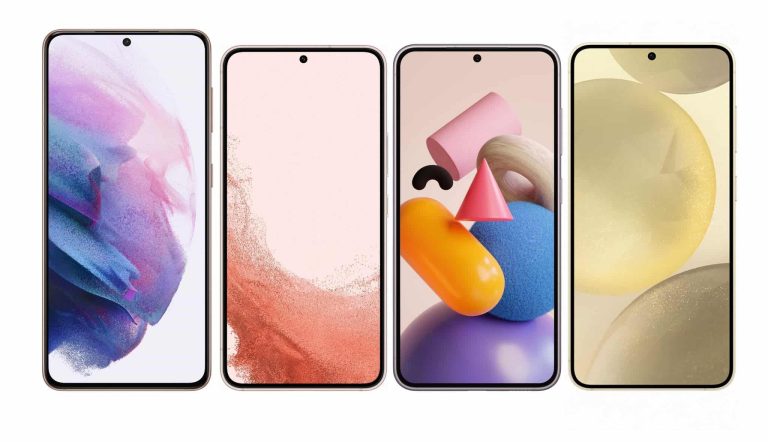
Samsung is just weeks away from unveiling the Galaxy S24 series. Well, there is hardly anything that leaks haven’t already revealed, but an official announcement is pending. It is expected on January 17, 2024. Ahead of that, tipster Ice Universe has highlighted a key design change that makes the new phones look more premium than their predecessors. The tipster compared the Galaxy S24 with the Galaxy S23, Galaxy S22, and Galaxy S21.
Galaxy S24 has slimmer display bezels than previous Samsung flagships
A post on X (formerly Twitter) shows the Galaxy S24 next to the last three generations of S-series Samsung flagships. The 2021 model, i.e. the Galaxy S21, is the tallest of the lot. It is 151.7mm tall, while all subsequent models, including the Galaxy S24, measure between 146 and 147mm in height. With a width of 70.6mm, the upcoming device is narrower too. The Galaxy S21 has a width of 71.2mm.
However, despite the notable size difference, the Galaxy S24 features a 6.2-inch display, the same as the 2021 (the 2022 and 2023 models have 6.1-inch screens). Samsung pulled this off by making the bezels slimmer. As you can see in the photo below, the new phone (at the right end) has the thinnest bezels of the four devices. It makes the handset look more premium. Samsung has also moved the power and volume buttons a little higher.
The tipster also made a direct comparison between the Galaxy S24 and Galaxy S22 with a close-up of corners and edges. The improvements or changes in bezel width are noticeable to the naked eye. It is a design evolution in the right direction. With major design changes rumored for the Galaxy S25 series, Samsung may have begun setting up the foundation. More leaks about the Galaxy S24 lineup are expected in the coming weeks.
The 2024 Samsung flagships will go on sale in late January
Samsung may not have officially announced the launch date for the Galaxy S24 series but leaks have confirmed that the 2024 flagship lineup will debut on January 17. The launch event, which will reportedly take place in San Jose, USA, falls on January 18 in some countries—including South Korea—due to the time difference.
Like before, the Korean behemoth will open pre-orders for the Galaxy S24, Galaxy S24+, and Galaxy S24 Ultra immediately after the Galaxy Unpacked event, at least in most major markets. General sales may begin on January 30. Samsung estimates the new flagships to outsell the 2023 lineup by more than ten percent. Whether it achieves the goal, time will tell.
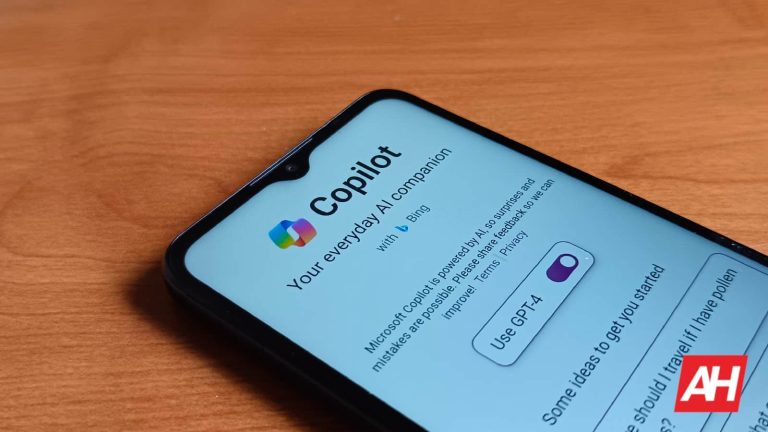
If you use Windows, then you definitely know about Microsoft Copilot. Either it’s from the news coverage or the fact that Microsoft has been shoving this AI tool down every Windows user’s throat. The company has a lot of faith in this AI tool, and it’s expanding it to more corners of the tech industry. Microsoft has just launched a Copilot app on Android.
This was a pretty silent launch that the company did for some reason. With as much fanfare the company made about Copilot, you’d expect it to make a grand announcement. However, it could be because the company wants people to use it, primarily, on Windows systems. In any case, the app is free to use and open to download now on your Android phone.
As you can expect, this brings all of the power you’d expect from Copilot in the browser to your phone. So, if you need to ask a question about the world, generate an image, or just show off to your friends at a party, it’s as easy as accessing the app.
The interface isn’t all that different from the other GPT apps on the market. When you first start the app, you’ll be prompted to give the app access to your location, but you can reject it if you want. You’ll need to if you need to ask queries that relate to local areas. After you put in your first query, you’ll then be prompted to agree to Microsoft’s terms of service. Read them if you want to know more about how your data is being used by the app.
When you get into the interface, you’ll see a toggle at the top of the screen allowing you to access the GPT-4 model. If you want to use the more powerful model, you can do so without any hassle. You won’t be prompted to pay or sign in to use it. It will just tell you that responses might take a little more time to process.
Using the app might be a little confusing at first. When you first scroll to the bottom, you won’t see a classic text field to enter your query. You’ll see some suggested queries inside a horizontal carousel of chips. Below that, you’ll see the microphone icon to let you speak into your phone. It’s clear that Microsoft wants that to be the primary way you interact with this app. When you use your voice, you’ll get an audible response as well as a text-based one.
Next to the microphone icon, you’ll see much smaller and less accented camera and keyboard icons. Tap on them to interact with the app in that way. So, if you want a classic text field, tap on the keyboard icon. If you want to upload a picture, tap on the camera icon.
Limitations
Using this app is just like using the browser version, so you’re subject to the same limitations. You still have access to up to 2,000 characters per query. Also, the tool will be less useful if you’re not signed in. So, if you want longer conversations and queries, you’ll need to sign in. Also, you’ll need to sign in if you want to generate images.
Once you switch the program to GPT-4, there doesn’t seem to be a direct way to switch it to the older model. If you want to switch it back to GPT-3.5, you’ll need to manually clear the app’s local storage in the Android App Info screen. Once you do that, re-open the app, and don’t flip the toggle.
Android malware infects devices to take full control for various illicit purposes like:-
Stealing sensitive information
Generating unauthorized financial transactions
Enabling remote attacks
By gaining complete control, threat actors can exploit the device for their illicit activities, posing significant threats to:-
User privacy
User security
Cybersecurity analysts at McAfee Mobile Research recently found an Android backdoor, “Android/Xamalicious,” using the Xamarin framework to infect devices and take full control.
Android MalwareGain Device Control
It employs social engineering for accessibility privileges and communicates with the C2 server. Second-stage payload dynamically injected as assembly DLL, which takes full control for:-
Ad fraud
App installs
Financially motivated actions
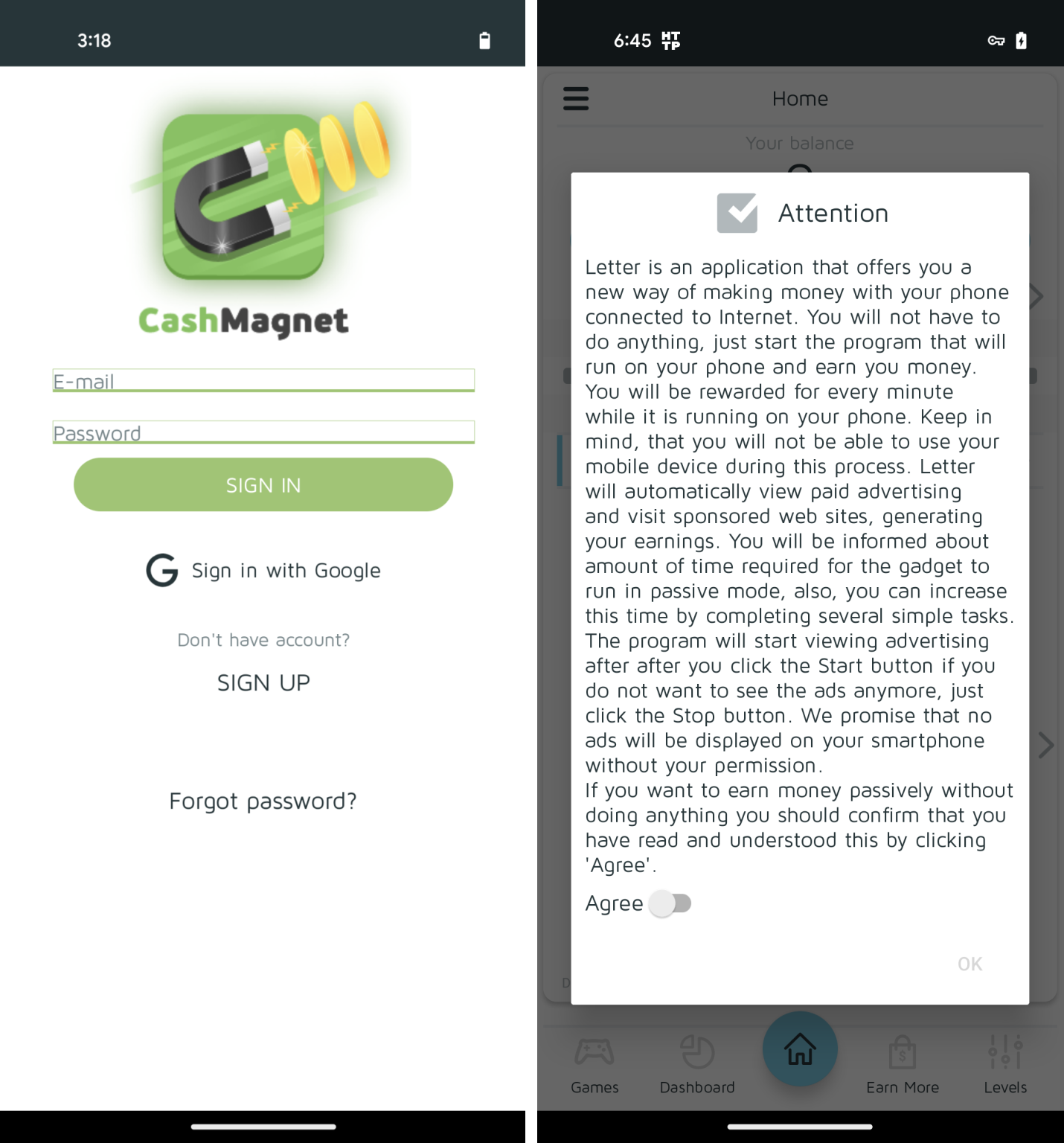
Researchers identified the link to the ad-fraud app “Cash Magnet,” revealing financial motivation. Xamarin usage allows long-term activity, hiding malicious code in the APK build process.
Cash Magnet (Source – McAfee)
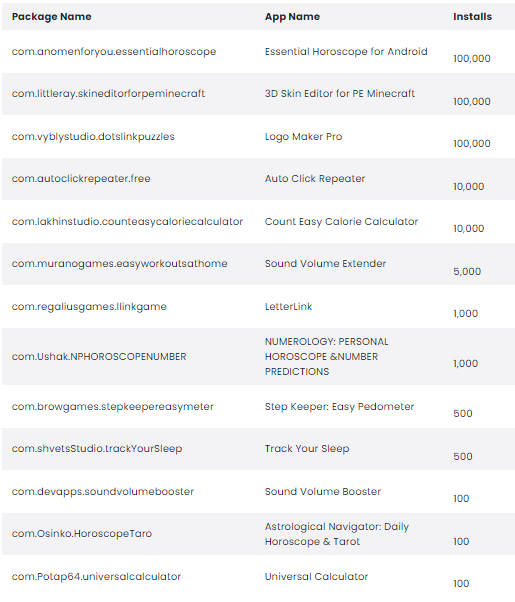
The custom encryption and the obfuscation techniques were used for communication and data exfiltration. Around 25 malicious apps carry the threat, some on Google Play since mid-2020.
McAfee’s proactive measures and Google Play Protect aim to mitigate Potentially Harmful Applications. Android/Xamalicious detected on at least 327,000 devices, remains highly active.
Android/Xamalicious trojans disguise as apps from the following categories that are available in third-party markets:-
Health
Game
Horoscope
Productivity
Unlike previous Xamarin-based malware, Xamalicious is distinct in its implementation. Xamarin architecture allows .NET code interpretation on Android via Mono.
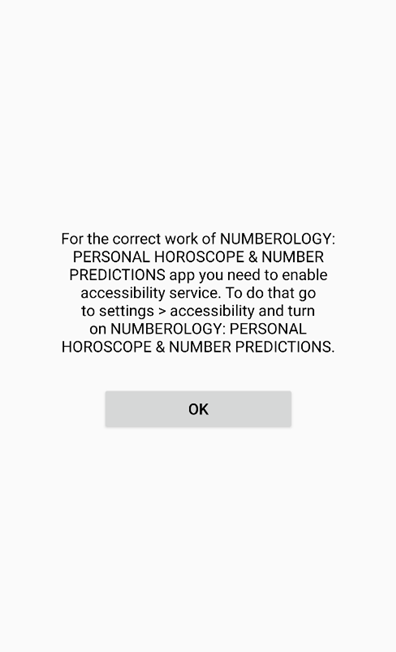
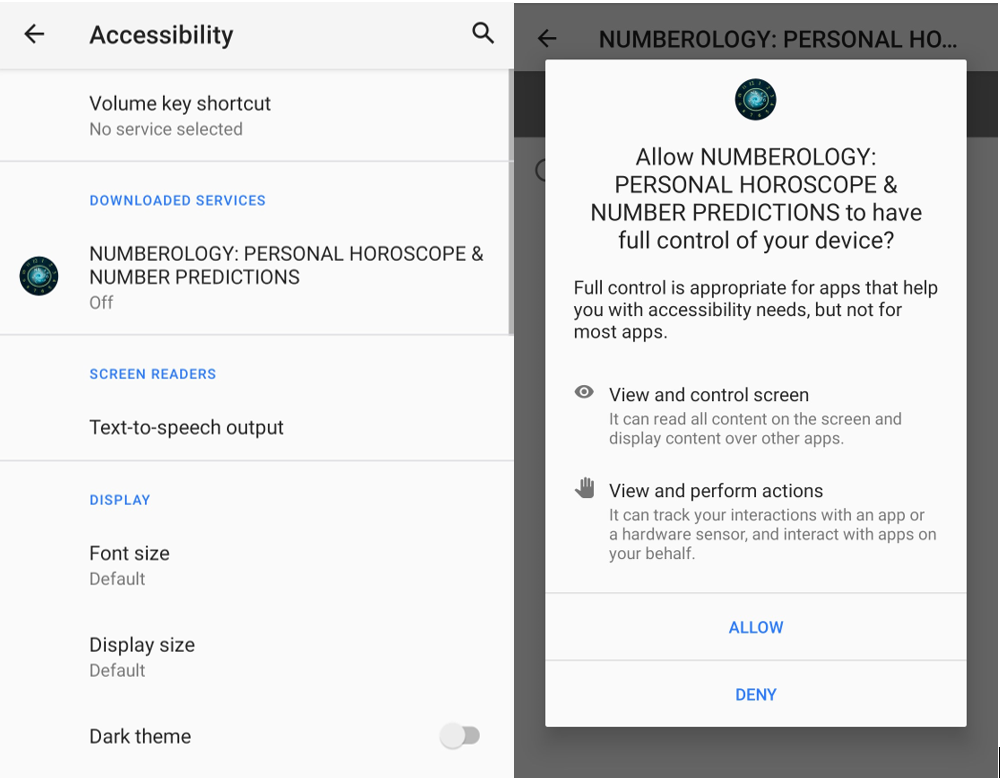
An example app, “Numerology” prompts victims to enable accessibility services for deceptive functionality.
Tricking users into permitting accessibility services (Source – McAfee)
All the accessibility services need to be activated manually after several OS warnings.
Malware varies from traditional Java or ELF Android code and the original .NET, compiled into DLL, LZ4 compressed, and embedded in BLOB or /assemblies directory.
Besides this, it is loaded by ELF or DEX at runtime, reversing varies in complexity, and the code is commonly available in the following assemblies:-
core.dll
<package-specific>.dll
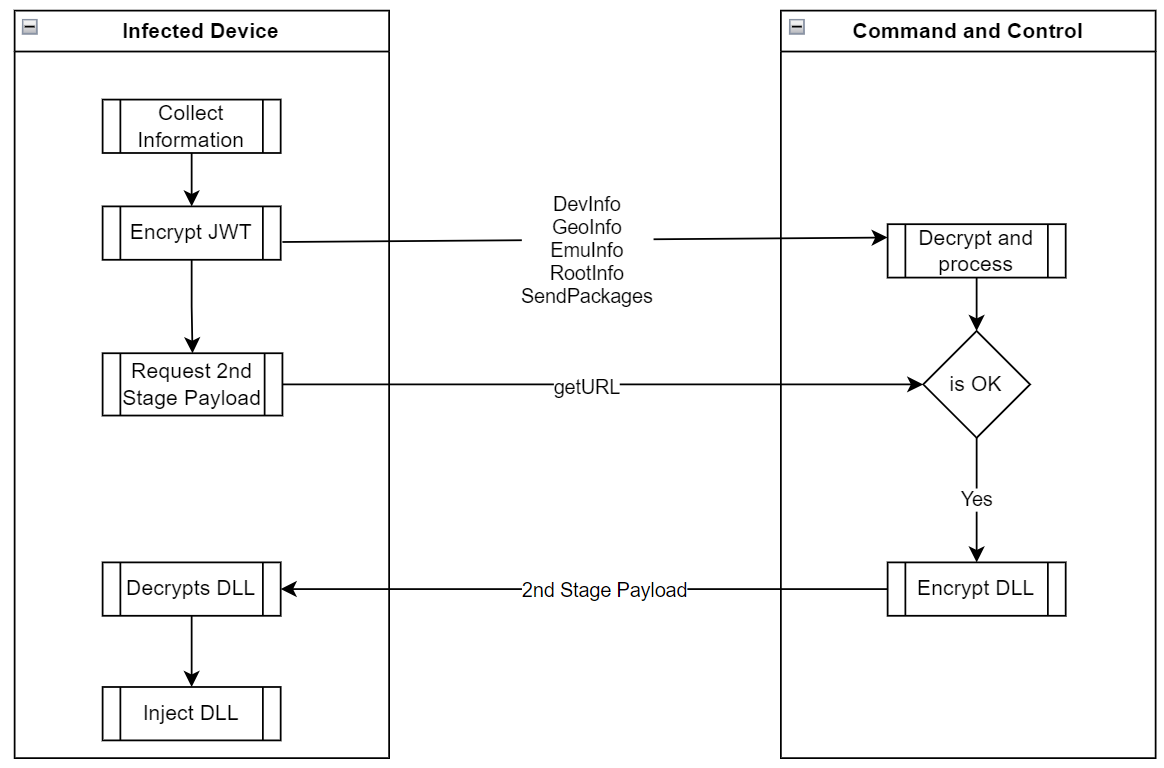
Some variants obfuscate DLLs, while others retain the original code. After acquiring accessibility permissions, the malware contacts the server for the second-stage payload.
App execution and communication with the malicious server (Source – McAfee)
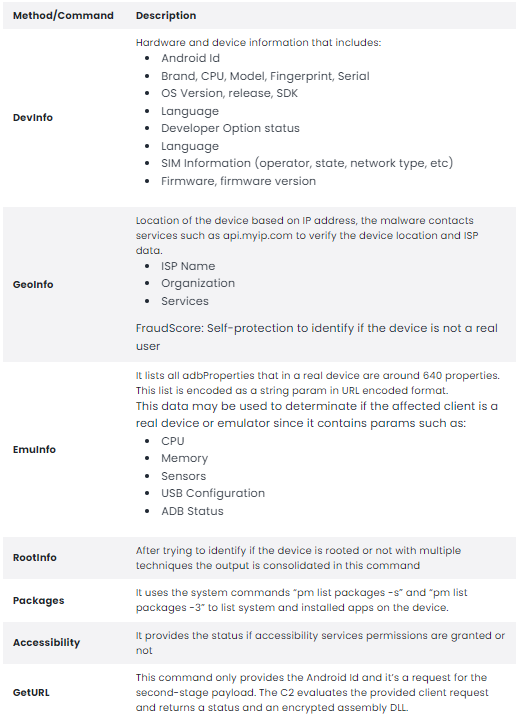
Xamalicious malware checks the victim’s device info, like apps and rooting status, via system commands. If rooted or connected via ADB, it skips the second-stage payload download.
Here below, we have mentioned the types of information that are collected by the malware:-
Data collected (Source – McAfee)
With the help of RSA-OAEP and HTTPS, the Xamalicious encrypts all the data to evade detection. However, if the C2 infrastructure is available, then the hardcoded RSA keys in the DLL enable decryption.
The Send() function encrypts data with a JWT and sends it to “/Updater” via HTTP POST. The decrypt() function uses a hardcoded RSA private key for C2 responses, possibly containing a second-stage payload.
Data sent to the C&C server that decides second-stage payload delivery and malware’s self-protection includes:-
The C&C encrypts DLL with AES and device-specific key, the device decrypts the token, and then the ‘URL,’ parameter with a custom AES key unique to device details.
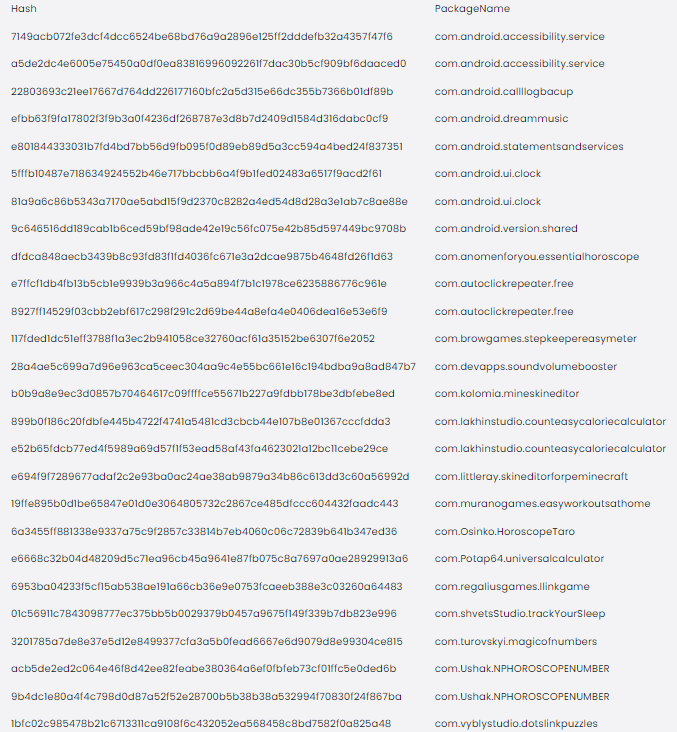
Malicious apps Detected
Here below, we have mentioned all the malicious apps detected:-
Malicious apps (Source – McAfee)
Countries from where users were affected
Here below, we have mentioned all the countries from where most of the users are affected:-