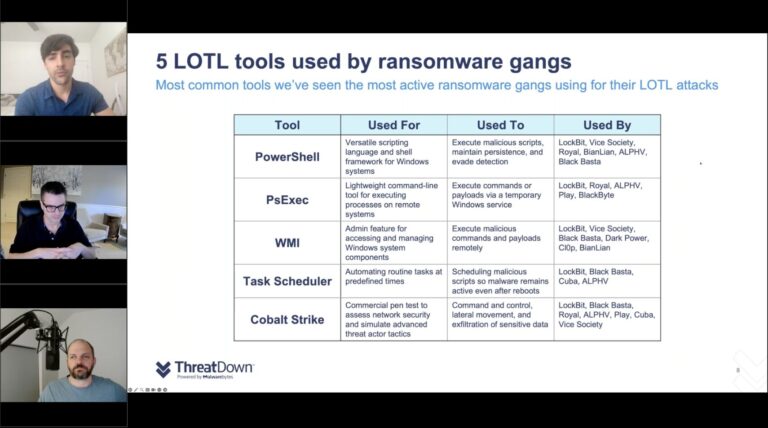
Discover the intersection of Ransomware-as-a-Service (RaaS) gangs and Living Off The Land (LOTL)attacks in our latest webinar, now available on-demand, led by cybersecurity experts Ian Thomas, Mark Stockley, and Bill Cozens.
The webinar revealed how RaaS gangs use LOTL tactics, leveraging legitimate IT tools like Powershell and WMI to blend malicious activities within normal network operations, significantly challenging detection efforts.
Attendees gained an in-depth understanding of LOTL attacks, tools exploited by RaaS gangs, and strategies for IT teams to identify and block these advanced threats.
Some highlights from the webinar include:
Expert analysis: Insights from seasoned cybersecurity professionals on the critical need for multi-layered defense strategies.
Practical advice: Real-world, actionable tips for IT teams to detect and counter covert LOTL operations.
Case studies: Detailed scenarios demonstrating the impact and complexity of LOTL attacks.
Understanding the relationship between LOTL and RaaS is vital for evolving cybersecurity strategies. The webinar emphasizes the importance of blending technology and human expertise to detect and combat these sophisticated threats effectively.
Enhance your ransomware knowledge and preparedness by watching this essential webinar on-demand. Alternatively, download the report that the webinar is based on here.
Pharmacy chain Rite Aid has been denied the right to run facial recognition systems in its stores for five years, by a Federal Trade Commission (FTC) ruling. The regulator found so many flaws in the retailer’s surveillance program that it concluded Rite Aid had failed to implement reasonable procedures and prevent harm to consumers in its use of facial recognition technology in hundreds of stores.
In May 2023, the FTC issued a warning that the increasing use of consumers’ biometric information and related technologies, including those powered by machine learning, raises significant consumer privacy and data security concerns, and the potential for bias and discrimination.
“The agency is committed to combatting unfair or deceptive acts and practices related to the collection and use of consumers’ biometric information and the marketing and use of biometric information technologies.”
According to the FTC, Rite Aid deployed artificial intelligence-based facial recognition technology from 2012 to 2020, in order to identify customers who may have engaged in shoplifting or other problematic behavior.
The FTC found that Rite Aid deployed a massive, error-riddled surveillance program, provided by vendors that could not properly safeguard the personal data the chain hoarded. The company also failed to inform consumers that it was using the technology in its stores.
According to the complaint, Rite Aid contracted with two companies to help create a database of images of individuals considered persons of interest for engaging in or attempting to engage in criminal activity at one of its retail locations. The images were derived from CCTV camera’s in the stores and smartphone pictures taken by employees. These were stored in a database along with their names and other information, such as any criminal background data.
Despite the fact that the system relied on low-quality images to identify these so-called persons of interest, the chain instructed staff to ask these customers to leave its stores. The employees, acting on false positive alerts caused by the flawed system, followed consumers around the stores, searched them, ordered them to leave, called the police to confront or remove consumers, and publicly accused them of shoplifting or other wrongdoing.
According to the complaint, Rite Aid’s system falsely flagged numerous customers, including an 11 year-old girl whom employees searched based on a false-positive result. The FTC says that Rite Aid did nothing to prevent their customers from being falsely accused. In addition, the FTC says Rite Aid’s actions disproportionately impacted people of color.
But even if the system had been completely accurate, there were enough problems in the way the system was deployed:
Without consent or warning, the system scanned everyone who came into certain stores and matched them against an internal list. Store patrons located in plurality-Black, plurality-Asian, and plurality-Latino areas were more likely to be subjected to and surveilled by Rite Aid’s facial recognition technology.
Rite Aid failed to test, assess, measure, document, or inquire about the accuracy of its facial recognition technology before deploying it.
The use of low-quality images in connection with its facial recognition technology increased the likelihood of false-positive match alerts.
It failed to monitor or test the accuracy of the technology after deployment.
Employees were not trained to understand the possibility of false positives nor did they take action so employees would report false positives.
This is not the first time Rite Aid and the FTC have clashed. In 2010, Rite Aid agreed to FTC charges that it failed to protect the sensitive financial and medical information of its customers and employees, in violation of federal law.
Rite Aid violated the 2010 data security order, and in addition to the ban and required safeguards for automated biometric security or surveillance systems the FTC requires the company to:
Delete, and direct third parties to delete, any images or photos they collected.
Notify consumers when their biometric information is used.
Investigate and respond in writing to consumer complaints about actions taken against consumers related to an automated biometric security or surveillance system.
Provide clear and conspicuous notice to consumers about the use of facial recognition or other biometric surveillance technology in its stores.
Delete any biometric information it collects within five years.
Implement a data security program to protect and secure personal information.
Obtain independent third-party assessments of its information security program.
Provide the Commission with an annual certification from its CEO documenting Rite Aid’s adherence to the order’s provisions.
While the FTC ruling highlights Rite Aid’s wrongdoings, it also acknowledges the fact that there are many problems with facial recognition. Because of the privacy implications some tech giants have backed away from the technology, or halted development.
People should at least be informed about when and why facial recognition technology is used, so they can decide for themselves whether they want to participate.
We don’t just report on threats—we remove them
Cybersecurity risks should never spread beyond a headline. Keep threats off your devices by downloading Malwarebytes today.
Google has released an emergency security update for Chrome that brings the browser’s Stable channel to version 120.0.6099.129 for Mac, Linux and to 120.0.6099.129/130 for Windows. This update includes one security fix for a vulnerability that was subject to an existing exploit.
The easiest way to update Chrome is to allow it to update automatically, which basically uses the same method as outlined below but does not require your attention. But you can end up lagging behind if you never close the browser or if something goes wrong—such as an extension stopping you from updating the browser.
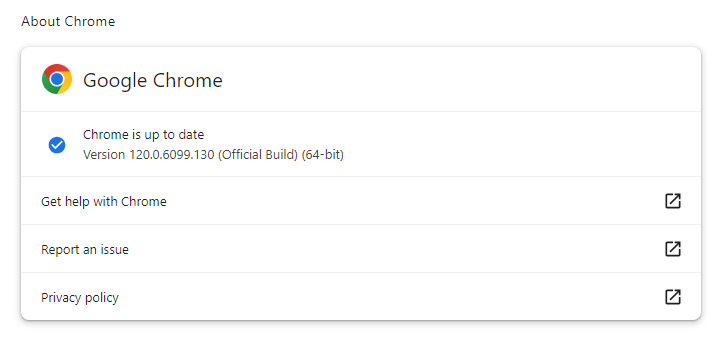
So, it doesn’t hurt to check now and then. And now would be a good time, given the severity of the vulnerability in this patch. My preferred method is to have Chrome open the page chrome://settings/help which you can also find by clicking Settings > About Chrome.
If there is an update available, Chrome will notify you and start downloading it. Then all you have to do is relaunch the browser in order for the update to complete.
After the update, the version should be 120.0.6099.129, or later.
Google never gives out a lot of information about vulnerabilities, for obvious reasons. Access to bug details and links may be kept restricted until a majority of users are updated with a fix. However, from the update page we can learn a few things.
The Common Vulnerabilities and Exposures (CVE) database lists publicly disclosed computer security flaws. The zero-day patched in this update is listed as CVE-2023-7024, a heap buffer overflow in Web Real-Time Communications (WebRTC).
WebRTC on Chrome is the first true in-browser solution to real-time communications (RTC). It supports video, voice, and generic data to be sent between peers, allowing developers to build powerful voice- and video-communication solutions. The technology is available on all modern browsers as well as on native clients for all major platforms.
A WebRTC application will usually go through a common application flow. Access the media devices, open peer connections, discover peers, and start streaming.
A buffer overflow is a type of software vulnerability that exists when an area of memory within a software application reaches its address boundary and writes into an adjacent memory region. In software exploit code, two common areas that are targeted for overflows are the stack and the heap.
The heap is an area of memory made available for use by the program. The program can request blocks of memory for its use within the heap. When it uses memory blocks outside of the reserved area, this can influence other programs. This fact can be abused by an attacker.
The vulnerability was reported by members of Google’s Threat Analysis Group. This group frequently finds vulnerabilities that are used by state-sponsored groups in targeted attacks. This could indicate that Google found this vulnerability while researching an active attack, which matches the fact that an exploit for the vulnerability exists in the wild.
Since WebRTC is a Chromium component, users of other Chromium based browsers like Microsoft Edge will probably see a similar update.
We don’t just report on threats—we remove them
Cybersecurity risks should never spread beyond a headline. Keep threats off your devices by downloading Malwarebytes today.
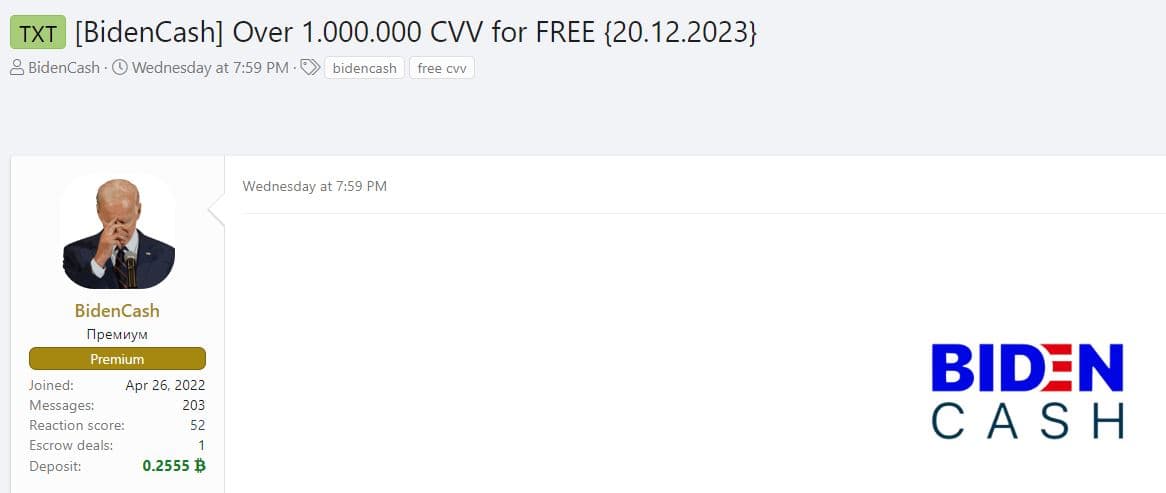
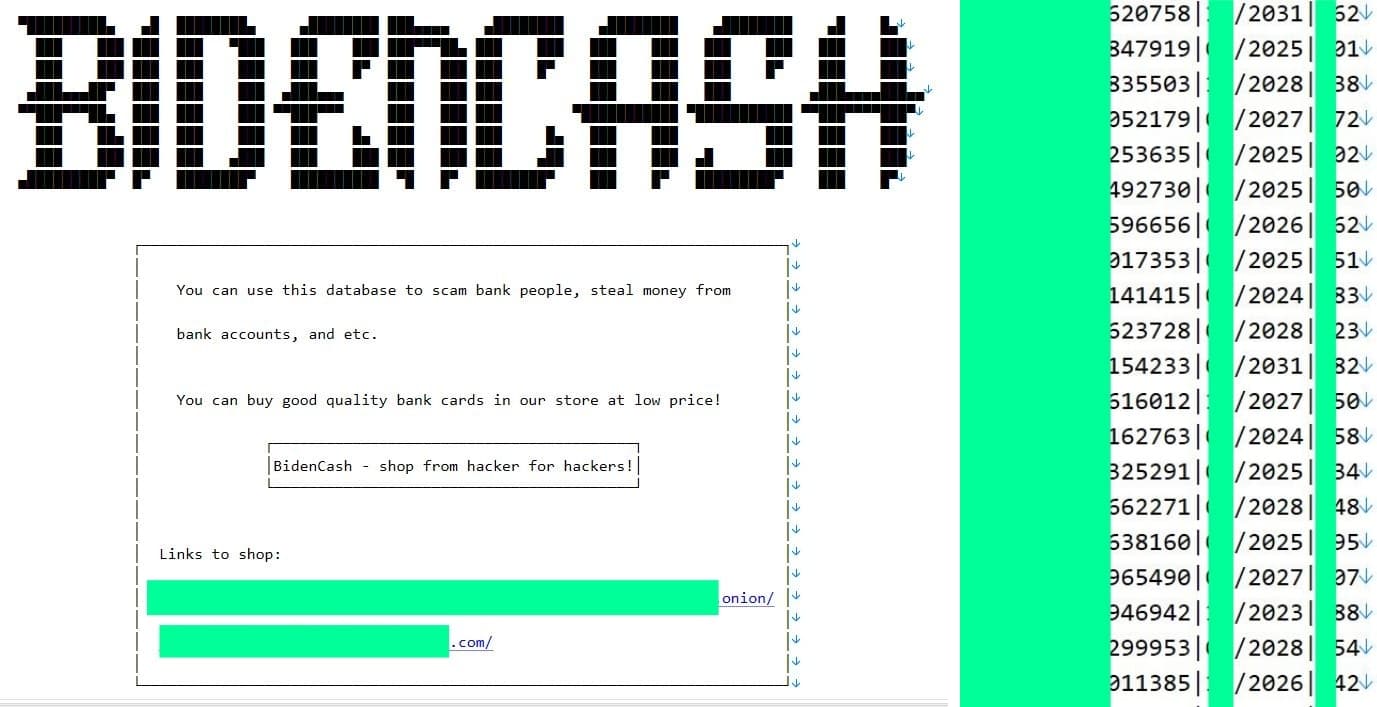
The latest leak from BidenCash includes payment card credentials in plain text, but unlike the site’s previous leaks, it does not include names or emails of cardholders.
BidenCash, a notorious dark web carding marketplace, has leaked over 1.6 million valid payment card data including debit and credit card details on a notorious Russian language cybercrime and hacking forum- The same forum offered the sale of military satellite access for $15,000 in June 2023.
The overall count of leaked card details stands at 1.9 million (1,912,969). Upon deduplication, the precise figure is reduced to 1.6 million cards (1,169,843), Hackread.com can confirm.
Screenshot from the Russian forum (Credit: Hackread.com)
It is worth noting that on March 23, 2023, BidenCash leaked 2 million card data as part of its birthday celebration. The leak included cardholders’ full names, bank details, card numbers, expiration dates, card verification value (CVV) numbers, home addresses, and more than 500,000 email addresses.
This time around, there are no names or email addresses of the card owners involved. Instead, the leaked information consists of the full card number, expiry date, and CVV numbers – All in plain text format.
Screenshot from the leaked dataset (Credit: Hackread.com)
No Names is Good News
The absence of names in the leaked credit card data is good news for cardholders as it adds a layer of ambiguity and potentially mitigates the severity of the incident. While the compromised information includes sensitive details, the lack of associated names limits the extent to which the leaked data can be directly linked to specific individuals.
Without the inclusion of personal names, the potential for identity theft or targeted fraudulent activities may be reduced. However, it is crucial to note that the leaked financial details alone still pose a significant risk, as cybercriminals can exploit this information for unauthorized transactions and financial harm.
The overall impact of the breach, therefore, depends on the extent to which the compromised credit card details can be effectively exploited without the corresponding personal identifiers.
While the countries to which these cards belong remain unclear, BidenCash is notorious for engaging in large-scale selling and leaking of financial details. This includes a substantial amount of payment card data issued in countries such as the following:
India
China
Mexico
Canada
United States
United Kingdom
The specific operational details of BidenCash remain uncertain however, carding sites primarily acquire credit card information through diverse means. These methods include the utilization of information-stealing malware, phishing attacks, skimming, and exploiting vulnerabilities in point-of-sale (PoS) systems.
“Our system automatically and in real-time tracks publicly available cards on Telegram channels, Discord chats, and forums to prevent unscrupulous suppliers from using outdated material. If a card sold by us is found publicly available, we impose a fine on the supplier. If a supplier’s materials regularly appear in public, they are blocked. Our unique system, applied only on our platform, reflects our commitment to our reputation. Over the past month, the system has detected over 1,900,000 cards.”
BidanCash Website
If you own a debit or credit card, it is crucial to take extra precautions to ensure that your card is not being misused and that its credentials are protected from third parties. Caution is essential, particularly in watching out for phishing scams and malware attacks that target your financial information.
If your card issuer experiences a security breach, the responsibility rests on them to address the situation. However, it is vital to regularly monitor your bank statements and notify your bank of any suspicious transactions. Proactive communication with your financial institution is key to addressing potential issues and enhancing the security of your card information.
Maintaining updated systems and applications is a challenge for any IT team—especially considering the sheer volume of vulnerabilities organizations must find and prioritize on a rolling basis.
ThreatDown Vulnerability Assessment (VA), now included for free in every ThreatDown bundle, simplifies the vulnerability-finding process by automatically identifying gaps in your environment and prioritizing the results.
Based on the scans shared by the VA, ThreatDown Patch Management (PM), patches both the operating system and third-party applications installed on endpoints. But how exactly do both solutions work together?
Our journey with how Threat Down Vulnerability Assessment and Patch Management works begins as all great cybersecurity journeys begin: A clunky, on-prem server directly wired up to all your endpoints.
Just kidding. This isn’t the 1970s anymore. Thankfully.
The cornerstone of all ThreatDown security solutions—not just Vulnerability Assessment, but Endpoint Detection and Response (EDR) in general—is a lightweight endpoint agent (EA). The EA is a software tool which collects and sends endpoint security data to a central system for analysis and threat response
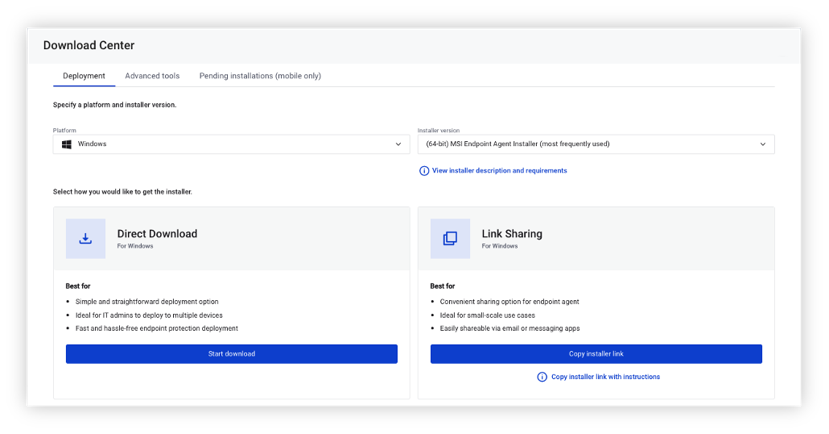
You can distribute the ThreatDown EA to endpoints either manually to each user or automatically via network-wide remote deployment tools.
2. Vulnerability Assessment scans endpoints
When you download the ThreatDown Endpoint Agent on your devices, it can then scan for installed third-party software and find out if there are any known vulnerabilities in them.
To enable a Vulnerability Assessment policy in Nebula, check out this simple step-by-step guide. There are two ways to scan for vulnerabilities: on-demand or scheduled.
3. VA finds vulnerabilities across third-party applications
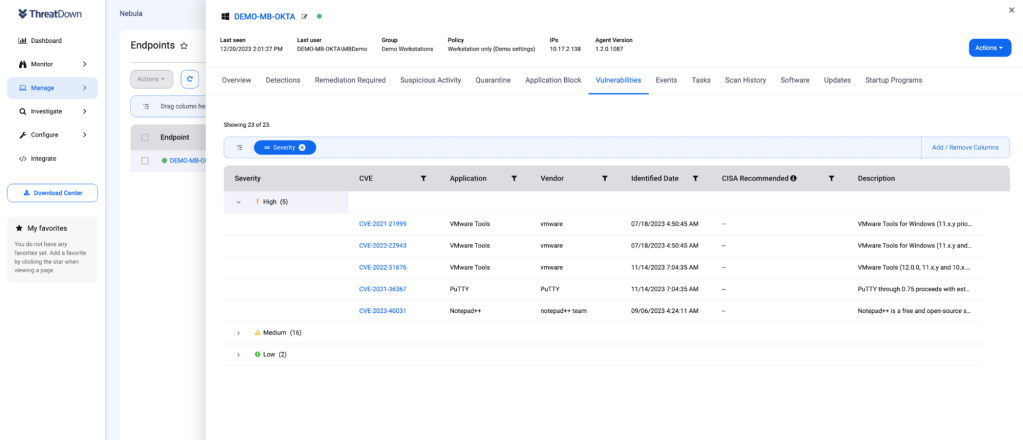
The ThreatDown EA sends the results of the vulnerability scan to Nebula, our cloud-hosted security platform. Vulnerability data is stored and displayed for up to 90 days across all endpoints.
All vulnerabilities found are automatically assigned a severity rating based on the Common Vulnerability Scoring System (CVSS) standard. As well, vulnerabilities are tagged as “CISA recommended” if they are found in the Cybersecurity and Infrastructure Security Agency (CISA) managed catalog of known exploited vulnerabilities.
In Nebula, you have a few options for how you want to view found vulnerabilities:
Vulnerabilities page
On the left navigation menu, go to Monitor > Vulnerabilities to view vulnerabilities across your environment.
Endpoint page
On the Endpoints page, add a new column for a quick glance of the severity of CVEs for each endpoint. Hover over the diagram for a breakdown of vulnerabilities by severity.
Vulnerabilities tab
Navigate to the Vulnerabilities tab from Manage > Endpoints to view the vulnerabilities of a specific endpoint.
4. VA shares these findings with the Patch Management integration
Finding vulnerabilities, of course, is just one half of the battle.
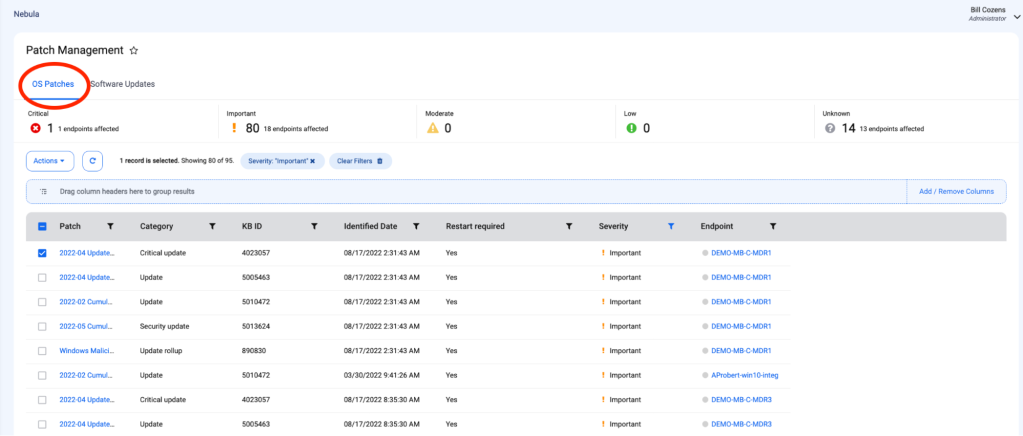
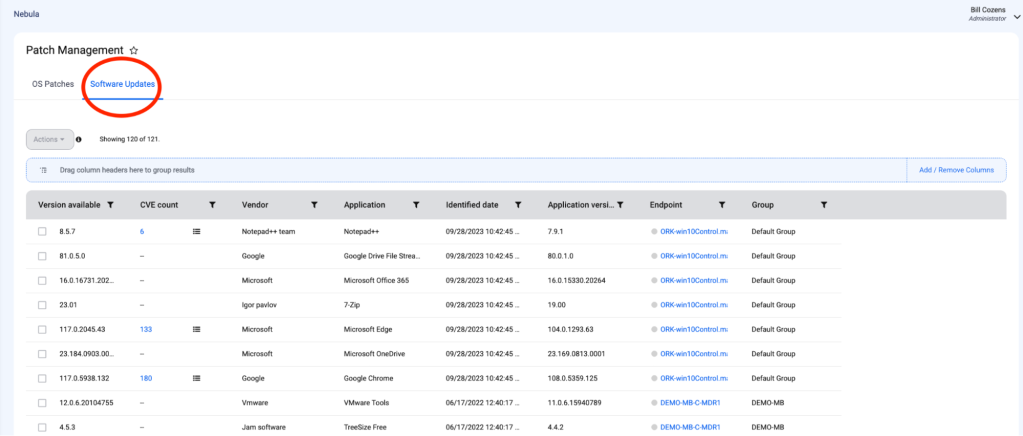
After our free Vulnerability Assessment tool does its discovery work, our Patch Management module automatically imports the scan data and uses it to determine which patches and application updates need to be deployed.
With Patch Management, you can apply two different types of patches: operating system patches and software patches. To view and install both OS and software patches across your environment, navigate to Monitor > Patch Management on the left navigation menu.
5. Patch Management automatically updates OS and third-party applications to the latest versions
To apply patches en masse, check the boxes for the systems or applications on endpoints you wish to update and click Actions > Update Software.
Bam, you’re done.
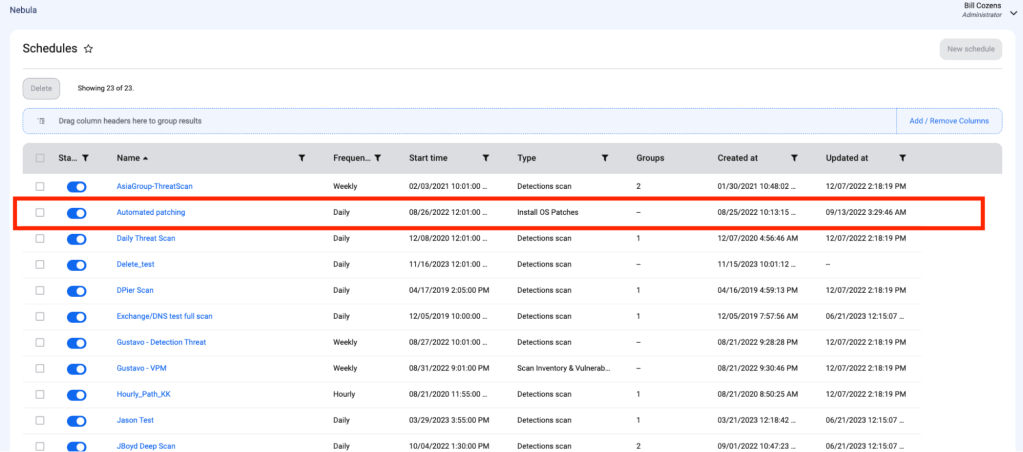
To help automate the patching process, you can create a schedule to install third-party software updates regularly. This schedule installs all system and third-party software updates found when the schedule is run.
Streamlining Vulnerability Response with ThreatDown
Managing vulnerabilities and patches yourself can be a pain. But, as we’ve broken down in this article, ThreatDown takes care of vulnerability management all from one console.
Both Sony and Apple released immensely compelling flagship smartphones this year. Sony’s launched in May and became available in July. Apple’s both launched and went on sale in September. Having said that, we’re here to compare the Sony Xperia 1 V vs Apple iPhone 15 Pro Max. If you’re in the market for a large flagship smartphone, with all the bells and whistles, these two phones are definitely worth checking out.
We’ll first list their specifications, as we usually do in comparisons. Following that, we’ll compare the two phones across several other categories. We’ll compare their designs, displays, performance, battery life and charging, cameras, and audio output as well. With that in mind, let’s get this going.
Specs
Sony Xperia 1 V vs Apple iPhone 15 Pro Max, respectively
Sony Xperia 1 V vs Apple iPhone 15 Pro Max: Design
The Sony Xperia 1 V and Apple iPhone 15 Pro Max are visibly different devices. They both do have a flat frame all around, but that’s basically where the similarities end. The Xperia 1 V has a flat display without a display camera hole or notch. It has slightly thicker bezels at the top and bottom, though. The iPhone 15 Pro Max, on the other hand, includes a flat display too, with thin, uniform bezels. However, it does also have a pill-shaped cutout in that display for the front-facing camera and facial scanning tech.
Both smartphones have three cameras on the back. The Xperia 1 V has three vertically aligned units, which are placed in the top-left corner. The iPhone 15 Pro Max has a recognizable camera setup on the back; the one Apple has been using for several generations. Those cameras also sit in the top-left corner. In addition to the power/lock and volume rocker keys, both smartphones do have an additional button. The Xperia 1 V has a shutter button on the right, while the iPhone 15 Pro Max has an Action Button on the left.
Despite the fact the Xperia 1 V has a smaller display, it is taller due to its aspect ratio. It is also considerably narrower than the iPhone 15 Pro Max, while being the same thickness as Apple’s device. The Xperia 1 V is also considerably lighter at 187 grams. The iPhone 15 Pro Max weighs 221 grams. Both smartphones offer an IP68 certification for water and dust resistance, which is always nice to see. They do feel different in the hand, though, but the premium aspect is easily noticeable on both.
Sony Xperia 1 V vs Apple iPhone 15 Pro Max: Display
There is a 6.5-inch 4K (3840 x 1644) OLED display included on the Sony Xperia 1 V. That display is flat, and it supports a 120Hz refresh rate. In addition to that, HDR content is also supported here. That panel has a 21:9 aspect ratio, and around 84.2-percent screen-to-body ratio. The display is protected by the Gorilla Glass Victus 2 from Corning.
The Apple iPhone 15 Pro Max, on the flip side, has a 6.7-inch 2796 x 1290 panel. That is a flat LTPO Super Retina XDR OLED display. That panel also has a 120Hz refresh rate, while it supports HDR10 content. Dolby Vision support is also a part of the package. This panel has a 19.5:9 aspect ratio, and an almost 90 percent screen-to-body ratio. This display gets up to 2,000 nits when it comes to brightness. It is protected by the Ceramic Shield Glass.
In all honesty, there’s not much to complain about when it comes to either of these two displays. They both offer vivid colors, deep blacks, and great viewing angles. The touch response is also quite good. The iPhone 15 Pro Max’s display does have the advantage of being a bit brighter, but the difference is not that big. The Xperia 1 V has a sharper panel, though you’ll be able to utilize 4K resolution only with 4K content. Not many people will notice the difference on a display of this size.
Sony Xperia 1 V vs Apple iPhone 15 Pro Max: Performance
Sony’s flagship is fueled by the Snapdragon 8 Gen 2 processor. That is Qualcomm’s second most powerful chip at the moment, it was the most powerful one until recently. The phone is also equipped with 12GB of LPDDR5X RAM, and UFS 4.0 flash storage. The iPhone 15 Pro Max, on the flip side, is fueled by the Apple A17 Pro chip. It includes 8GB of RAM, and NVMe flash storage.
Both of these chips are truly powerful, even though the Apple A17 Bionic does have the edge in terms of sheer performance power. The Xperia 1 V does have the edge in the RAM and storage departments, when it comes to sheer performance, that is. How does that reflect on a day-to-day performance, however? Well, both smartphones do a great job in that regard, to say the least.
They’re both perfectly smooth. They can handle anything you throw at them with ease. That goes for regular tasks, and even more complicated ones, such as gaming. No matter what game you dig up or how demanding it is, these two handsets can handle it. That’s not surprising, but it’s worth noting. They both do get quite warm during gaming sessions, but never too warm to handle.
Sony Xperia 1 V vs Apple iPhone 15 Pro Max: Battery
A 5,000mAh battery sits inside the Sony Xperia 1 V, while a 4,441mAh unit can be found inside the iPhone 15 Pro Max. Apple’s iPhones usually have smaller battery packs than their Android counterparts. That’s because they do work differently, and usually require less battery power to provide similar battery life. That being said, is the battery life any good on these two phones? Well, yes, it is, definitely.
From what we’ve seen, the iPhone 15 Pro Max does offer a bit more in that regard, but the difference is not that big. Getting over 8 hours of screen-on-time with the iPhone 15 Pro Max was perfectly doable for us. The phone lasted quite a bit once the initial struggles were over. The Xperia 1 V, on the other hand, can provide up to 7-7.5 hours of screen-on-time, presuming you’re not pushing it hard with gaming and so on. Your mileage could and will vary, of course. Each of us uses our phones differently, so we do get different results. What we can say, however, is that both of these phones offer great battery life, and not many people will have complaints.
When it comes to charging, Sony’s flagship supports 30W wired, 15W wireless, and 5W reverse wireless charging. The iPhone 15 Pro Max, on the other hand, supports 20W wired, 15W wireless (MagSafe and Qi2), and 7.5W Qi charging. 4.5W reverse wired charging is also supported here. Do note that neither phone comes with a charger in the box, though.
Sony Xperia 1 V vs Apple iPhone 15 Pro Max: Cameras
There are three cameras on the back of each of these two phones. The Sony Xperia 1 V includes a 48-megapixel main camera, a 12-megapixel ultrawide unit, and a 12-megapixel telephoto camera (3.5x-5.2x continuous optical zoom). The iPhone 15 Pro Max has a 48-megapixel main camera, a 12-megapixel ultrawide unit (120-degree FoV), and a 12-megapixel periscope telephoto camera (5x optical zoom).
Quite a few flagship smartphones this year were really compelling in the camera department, and these two are definitely close to the top. They both offer great camera performance in both still images and video. The iPhone 15 Pro Max does have the edge in the video department, while the situation with stills is a close battle and more a thing of preference than anything else. We’d say that the iPhone 15 Pro Max is still more consistent, even when it comes to stills, though.
Images from the iPhone 15 Pro Max are almost always spot on, and it’s one of the best point-and-shoot cameras out there (when it comes to phones). The Xperia 1 V is also a very good point-and-shoot camera, but its magic lies in its very capable camera apps. You can really dial in your shot to make it look perfect, if you’re so inclined. The two phones capture plenty of details during the day, while they also do an outstanding job in nighttime conditions too. Their secondary and tertiary cameras do a good job of following the main camera’s color science too.
Audio
Both phones are equipped with a set of stereo speakers, and both of them do a great job. The sound is plenty loud, and also very well-balanced. The iPhone 15 Pro Max technically provides a slightly louder output, but the difference is so minuscule that many of you wouldn’t even notice the difference.
The Xperia 1 V does have one advantage when it comes to wired audio, it includes a 3.5mm headphone jack. You’ll need to utilize the iPhone 15 Pro Max’s USB-C port in order to connect your headphones via a wired. Both smartphones are equipped with Bluetooth 5.3, however.
In a notice for its customers, Xfinity acknowledges it recently fell victim to a data security incident. Xfinity is Comcast’s brand for TV, internet, and home phone services, sometimes referred to as Comcast Cable Communications.
During the data breach the attackers were able to access 35.8 million customers’ usernames and hashed passwords. For some customers, other personal information may have been exposed, such as names, contact information, the last four digits of social security numbers, dates of birth, and secret questions combined with answers.
On October 25, 2023, Xfinity discovered suspicious activity and subsequently determined that between October 16 and 19 unauthorized access to its internal systems occured.
Xfinity says it notified federal law enforcement and started an investigation, which revealed the attackers had used the Citrix Bleed vulnerability. Affiliates of at least two ransomware groups, LockBit and Medusa, have been observed exploiting Citrix Bleed as part of attacks against organizations. Whether one of those affiliates was behind this attack is not known.
On October 10, 2023, Citrix released security updates to address Citrix Bleed, but many organizations struggle to patch in a timely manner. Although you would expect a large company like Comcast to have some type of vulnerability and patch management deployed.
The company is notifying customers through a variety of channels, including through the Xfinity website, email, and news media.
Xfinity has required customers to reset their passwords to protect affected accounts. In addition, Xfinity strongly recommends that customers enable two-factor or multi-factor authentication to secure their Xfinity account.
It is not advisable to use the same password for multiple accounts, but if you did, Xfinity recommends that you change the passwords for any accounts that share your Xfinity password.
Customers with questions can contact Xfinity’s dedicated call center at 888-799-2560 toll-free 24 hours a day, seven days a week. More information is available on the Xfinity website.
Data breach
There are some actions you can take if you are, or suspect you may have been, the victim of a data breach.
Data breach
There are some actions you can take if you are, or suspect you may have been, the victim of a data breach.
Check the vendor’s advice. Every breach is different, so check with the vendor to find out what’s happened, and follow any specific advice they offer.
Change your password. You can make a stolen password useless to thieves by changing it. Choose a strong password that you don’t use for anything else. Better yet, let a password manager choose one for you.
Enable two-factor authentication (2FA). If you can, use a FIDO2-compliant hardware key, laptop or phone as your second factor. Some forms of two-factor authentication (2FA) can be phished just as easily as a password. 2FA that relies on a FIDO2 device can’t be phished.
Watch out for fake vendors. The thieves may contact you posing as the vendor. Check the vendor website to see if they are contacting victims, and verify any contacts using a different communication channel.
Take your time. Phishing attacks often impersonate people or brands you know, and use themes that require urgent attention, such as missed deliveries, account suspensions, and security alerts.
Set up identity monitoring.Identity monitoring alerts you if your personal information is found being traded illegally online, and helps you recover after.
We don’t just report on threats – we help safeguard your entire digital identity
Cybersecurity risks should never spread beyond a headline. Protect your—and your family’s—personal information by using Malwarebytes Identity Theft Protection.
Remember when the internet was turned on its ear by the massive GTA VI leak? Well, this has been an ongoing story, even though it’s been on the back burner for a while. Well, the story continues, as a young leaker involved with the GTA VI leak could spend the rest of his life in a hospital.
To recap, Rockstar Games, the company developing GTA VI, went through a storm of drama last year when 90 clips of the unreleased game were leaked online. Other important information was leaked like the source code for the game. The hacker group, named Lapsus$, demanded a ransom from the company, but it was unpaid.
Soon after, two individuals were arrested, and both of them are under the age of 19. One member is 18-year-old Arion Kurtaj, and the other was identified to be a 17-year-old male. His name was not released because he’s an under-aged minor. Both were arrested for this hack and for hacking other larger companies like Microsoft, Nvidia, and Uber.
One GTA VI leaker could spend life in a hospital
Kurtaj was under the spotlight soon after this news broke. While that’s true, the GTA hack wasn’t his first run-in with the law. He was arrested and released on bail for hacking Nvidia and BT/EE. You’d think that he’d learned his lesson. However, in a hotel, using an Amazon Fire Stick, the hotel’s TV, and his phone, he carried out his attack on Rockstar. This led to another arrest.
After a mental health assessment, it was discovered that Kurtaj suffers from acute autism. The doctors deemed him unable to stand trial because of this. This, undoubtedly, led the trial in a different direction. Adding fuel to the fire was the fact that Kurtaj was revealed to be violent in nature.
As part of the mental assessment, examiners found that he “continued to express the intent to return to cybercrime as soon as possible. He is highly motivated.” This is after being arrested multiple times, so the jury made a pretty heavy decision.
Kurtaj will remain in a hospital indefinitely. It’s essentially a life sentence, but it’s not written in stone. If he’s deemed no longer a danger. We’re going to have to see how this sentence is carried out.
Philo TV is currently the cheapest Live TV Streaming service available. Priced at just $25 per month, it even undercuts Sling TV. Despite its cheap price, Philo is still one of the relative “unknowns” in the streaming world. But it is one that cord-cutters will love. Seeing as $25 is a whole lot less than what cable companies charge for the same channels.
The biggest reason why Philo TV is not as popular as, say, YouTube TV or Hulu with Live TV (besides the fact it isn’t baked by a popular brand in the streaming industry like YouTube or Hulu) is the fact that it does not offer all of the channels of its competitors. It offers around 63 channels – though it is quickly adding more and more to its service. And it also doesn’t have any local or OTA channels included, which helps them keep the cost down.
Philo reported some pretty rapid growth in 2019, and we’re expecting the same in 2020. As more and more people were forced to stay home most of the year. And looking for something to watch, Philo came in as a great option since it was cheap and had plenty of channels to watch content on.
Is Philo a great option for cord-cutters out there? We’ll try to answer that question and tell you everything you need to know.
What is Philo TV?
Philo TV is what many would call a “skinny” Live TV Streaming service. Since it does not offer all of the channels that you’d expect a streaming Live TV service to offer. But it does offer quite a few channels that competitors do not.
Discovery owns Philo TV, and it is actually still fairly new. It was pretty recent that you could only watch Philo on your smartphone. But now it is available on a lot more platforms, and the free trial has been extended to seven days from three.
Philo is able to stay pretty cheap because it does not carry any local channels or sports channels. And those are usually what drives up the cost on streaming Live TV services. Just look at YouTube TV and Hulu with Live TV. As they add more sports, they end up raising prices rather significantly.
Philo TV has channels from A&E, AMC, Discovery, Scripps, and Viacom (distributors of Comedy Central, BET, MTV and others). Which are not usually available on other streaming services. Making it a bit more unique. Though these companies are all part owners of Philo too, so this makes plenty of sense from a competition standpoint.
Update: On May 25, 2021, Philo announced that prices will be increasing to $25 per month for the service. And this starts on June 8. The price is only for new customers, so if you sign up before June 8, you will be locked into the $20 per month price.
Philo TV, much like YouTube TV, aims to keep things simple. Offering a single plan that includes all of its channels. That plan will cost you $20 per month.
Philo TV users do have the ability to add STARZ for $9 per month. EPIX is available for $6 per month. Philo TV routinely offers some great discounts on these add-ons. In fact earlier this year, you could sign up and get either one for half price for the first three months. So keep a look out for some specials on STARZ and EPIX through Philo TV.
At launch, Philo TV was just $16 per month for 45 channels. They also offered a second plan that was $20 for 58 channels. It eliminated the cheaper plan in May 2019. Sticking with just one plan, and continuing to add more channels to that plan.
Philo TV: STARZ & EPIX
Is there a free trial available?
Philo TV does offer a seven-day free trial for its service as well as a seven-day free trial for STARZ and EPIX when you add those to your account.
To get started, you can click here and then enter your phone number or email address. This will get the process started for you. Philo TV’s free trial sign-up process is a bit unique. You initially sign up with your phone number or email. And then a couple of days later, you’ll be asked to add your credit card information. And, of course, you’ll be billed after the seven days are up unless you cancel.
Over the past couple of years, Philo TV has greatly expanded its list of supported devices. It is now available on just about every platform.
Here’s every platform that supports Philo TV as of December 2020:
Web browser (Chrome, Edge, Firefox and Safari)
iPhone and iPad
Android smartphones and tablets
Android TV
Chromecast via Android
Apple TV
Roku
Amazon Fire TV
Currently, the gaming consoles do not support Philo TV. But given how quickly Philo TV is expanding support, that is likely to come very soon.
Philo TV: Supported Devices
Some have mentioned that the video quality on Philo TV is a bit softer than what you might find on other streaming TV services that cost nearly three times more. This could be due to Philo TV really compressing the content to deliver it for less, and keep their prices down. If that’s a big deal for you, then you may want to look elsewhere.
With Philo TV, you can stream on up to three devices concurrently. That’s right on par with the competition. Most other streaming Live TV services also offer up to three screens at once in their base package.
You also have the ability to create up to ten profiles. So everyone in your home can have their own profile for watching Philo TV.
What internet speed is recommended for streaming Philo TV?
There are recommended Internet speeds for Philo TV. You can stream Philo TV on the internet as slow as 3Mbps. And to take full advantage of HD quality, you only need about 13Mbps for reliable streaming. Here’s how Philo lays it out:
13Mbps – Recommended for reliable HD streaming with multiple streams or other devices on the same network
7Mbps – Stream one HD Video
3Mbps – Stream SD quality Video
Lower than 3Mbps – you may notice Philo load slowly and/or rebuffer constantly. Video quality is also reduced.
What channels are available?
As mentioned already, there are 70 channels available on Philo TV, which is also up quite a bit from just a year ago. The following is a list of Philo TV channels available as of December 2023.
A&E
AccuWeather
AMC
American Heroes Channel
Animal Planet
aspireTV
AXS TV
BBC America
BBC World News
BET
BET Her
Catchy Comedy
CLEO TV
CMT
Comedy Central
Cooking Channel
Crime + Investigation
Deck the Hallmark
Destination America
Discovery Channel
Discovery Family
Discovery Life
EarthxTV
FeTV
Food Network
FYI
Game Show Network
getTV
Great American Country
Great American Family
Hallmark Channel
Hallmark Drama
Hallmark Movies & Mysteries
H&I
HGTV
History
IFC
INSP
Investigation Discovery
Law&Crime
Lifetime
LMN
Logo
Magnolia Network
MeTV
MeTV+
Military History
Motor Trend
MTV
MTV Classic
MTV Live
MTV2
Nick Jr.
Nickelodeon
Nicktoons
Oprah Winfrey Network
Paramount Network
PopTV
REVOLT
Science Channel
Smithsonian
Start TV
Story TV
Sundance TV
Tastemade
TeenNick
TLC
Travel Channel
TV Land
TV One
UPtv
VH1
Vice
WE tv
As mentioned before, Philo TV does not include any local channels like ABC, CBS, NBC, or FOX. Nor does it have any sports like ESPN or Fox Sports. You can, of course, get your locals from using an Antenna. And as long as you don’t watch any sports, then Philo TV is a great option.
Unfortunately, none of these channels stream in 4K. However, if you are watching through a device like the NVIDIA SHIELD TV, you can get 4K upscaling on this content. Not quite the same, but it will look better on your 4K TV.
All of these channels will stream in HD, though. This depends largely on your internet connection and speed, though. As mentioned earlier in this post. If you have very slow internet, you’ll be stuck in SD, which is essentially 480p.
Live streaming content is available in 720p, and on-demand content will be available in 1080p.
What features are available?
Most Live TV Streaming services offer some added features to help set their own service apart from the competition. And Philo does as well. Here are all of the features that are included with Philo TV.
DVR
Much like YouTube TV, Philo also offers DVR included in its regular price. Other services offer DVR but as an added fee on top of the monthly fee. Philo is the only other Live TV Streaming Service that offers unlimited DVR storage, too. However, unlike YouTube TV, they are not available for nine months. In fact, it’s a much shorter amount of time. Just 30 days.
Allowing you to record your favorite shows and movies, but you won’t be able to keep them forever. Unless, they air quite often. As Philo will continue to record every episode, even if it is a rerun. So you’ll be able to keep popular favorites like Family Guy, The Simpsons, Two and a Half Men, and The Big Bang Theory in your DVR. Since they do air on multiple channels daily.
You’ll never need to worry about deleting movies and shows on your DVR, as Philo will do that automatically after 30 days. And it’s unlimited storage.
Fast-forward through commercials
Like any other streaming TV service, there are commercials on Philo TV. You’re going to – for the most part – see the same commercials as those watching the same channel on YouTube TV, cable, or Sling TV. Now based on the channel, you may be able to fast-forward through commercials. This mostly depends on whether or not you are recording that show or not. And if you are already at the “Live” part of the show, then you won’t be able to fast-forward, of course.
On-demand content
Philo also offers plenty of on-demand content from the channels it offers. Channels like AMC, BBC America and IFC have classic films as well as new blockbuster movies available to stream on-demand. There are additional on-demand movies available for rental fees. These range from $2.99 to $4.99.
Philo TV also has over 40,000 shows that are available to watch on-demand. Unfortunately, there is not an easy way to browse video-on-demand content. You’ll have to just look for the “VOD” tag on the show profile pages, to see that it is available on demand.
The Philo TV interface is actually quite nice. So, there are three tabs at the top of the interface. These are Home, Guide, and Search. Which are pretty much self-explanatory. Basically, Home is showing you content that Philo thinks you’ll want to watch. The Guide is the typical live guide that most TV services have. Search is where you can search for something to watch. The Home screen also shows you trending content that is currently live, so you can see what everyone is interested in right now.
It’s a very simple-to-use interface, and the guide looks really slick.
Is Philo TV worth the price?
Philo doesn’t have a lot of features, but it does have a lot of channels for not a lot of money. There are definitely some things missing here like local and sports channels. But if you aren’t a big watcher of sports, then $20 per month for 63 channels is not to bad. By keeping their list of features down, they are able to keep the price down, too.
YouTube TV and Hulu with Live TV both offer a lot more features, however, they are also more than three times as much per month, as Philo TV. So the saying “you get what you pay for” is definitely valid here.
Since Philo TV has a lot of channels from ViacomCBS and Discovery, which are not available on a lot of other services, it can also be a good addition to your streaming TV setup. Use Sling TV and Philo TV together. It will get a bit confusing as to which channel is on which service, but doable. And a lot less than Comcast, Verizon, or AT&T would charge for cable TV.
If you’re thinking of checking out Philo TV, you can sign up for a seven-day free trial of the service by clicking here. It’s definitely worth trying, even if you ultimately end up not keeping it.
An Akamai researcher has found two vulnerabilities in Windows that can be combined to achieve a full, zero-click remote code execution (RCE) in Outlook.
Both vulnerabilities were responsibly disclosed to Microsoft and addressed in the August 2023 and October 2023 patch Tuesdays, so the researcher felt it was no problem to disclose their findings.
The first vulnerability, listed as CVE-2023-35384, is a Windows HTML platforms security feature bypass vulnerability. It allows an attacker to craft a malicious file or send a malicious URL that would evade Security Zone tagging, resulting in a loss of integrity and availability of security features utilized by browsers and some custom applications (including Outlook).
This could allow an attacker to cause a user to access a URL in a less restricted Internet Security Zone than intended. Basically the exploit falsely tells the system that the file or URL is local so it has a higher trust factor. For more technical details and the methodology used to find the vulnerability we refer to the researchers post.
The second vulnerability, listed as CVE-2023-36710, is a Windows Media Foundation Core Remote Code Execution vulnerability where the word Remote refers to the location of the attacker. The attack itself is carried out locally.
As part of the process of playing a WAV (Waveform Audio File), the researcher found it was possible to cause two out-of-bounds writes for WAV files with a certain size. An out-of-bounds write or read flaw makes it possible to manipulate parts of the memory which are allocated to more critical functions.
To chain these vulnerabilities together, an attacker would have to send an affected Outlook client an email reminder with a custom notification sound. By using the first vulnerability the client would retrieve the sound file from any SMB server. The Server Message Block protocol (SMB protocol) is a client-server communication protocol used for sharing access to files, printers, serial ports and other resources on a network.
And when the specially crafted sound file is auto-played this can lead to code execution on the victim’s machine without interaction (zero-click).
Is this something to worry about?
Personally, I don’t think so. Although the research was very thorough and interesting, creating a suitable sound file is challenging. The researcher noted that the smallest possible file size with IMA ADP codec is 1 GB and that it might not be possible to achieve in some codecs, like MP3.
Also, patches for the vulnerabilities have been available for months. It does prove however that with some effort it is possible to find these type of vulnerabilities, and there are undoubtedly more out there.
To demonstrate that fact, it is good to know that CVE-2023-35384 is the second patch bypass for CVE-2023-23397, which was discovered by the same researcher and patched by Microsoft as part of its May 2023 security updates.
The researcher criticized Microsoft’s patching methods:
“As a result, the patch added more code that also had vulnerabilities in it. We suggested to remove the abused feature instead of using patches, since the feature does more harm than good.”
So, instead of rooting out the problem, Microsoft added more code and with that, made the attack surface larger. A problem we unfortunately encounter often.
If your organization has been unable to patch these vulnerabilities, you can mitigate the risks by using microsegmentation to block outgoing SMB connections to remote public IP addresses. Microsegmentation refers to an approach to security that involves dividing a network into segments and applying security controls to each segment based on the segment’s requirements.
Or use the ThreatDown DNS filtering module to block suspicious web domains and manage specific site restrictions.
Our business solutions remove all remnants of ransomware and prevent you from getting reinfected. Want to learn more about how we can help protect your business? Get a free trial below.