December’s Patch Tuesday is a relatively quiet one on the Microsoft front. Redmond has patched 34 vulnerabilities with only four rated as critical. One vulnerability, a previously disclosed unpatched vulnerability in AMD central processing units (CPUs), was shifted by AMD to software developers.
The AMD vulnerability sounds like something from back in the eighties:
“A division by zero error on some AMD processors can potentially return speculative data resulting in loss of confidentiality.”
And AMD’s mitigation advice basically boils down to “so don’t divide by zero,” which as many programmers can tell you, is not as easy as it sounds. Then ensure that no privileged data is used in division operations prior to changing privilege boundaries, AMD adds, which is about as hard as it sounds. We’re not sure how Microsoft solved it, but the company noted that the latest builds of Windows enable the mitigation and provide protection against the vulnerability.
The other vulnerability we wanted to highlight is listed as CVE-2023-35628, a Windows MSHTML platform remote code execution (RCE) vulnerability with a CVSS score of 8.1 out of 10 and in severity listed as “Critical.”
MSHTML is a core component of Windows that is used to render browser-based content. This vulnerability can be used in emails. An attacker could exploit this vulnerability by sending a specially crafted email which triggers automatically when it is retrieved and processed by the Outlook client. This could lead to exploitation even before the email is viewed in the Preview Pane. This could result in the attacker executing remote code on the victim’s machine. In other words, they could install or trigger malware on the target’s machine.
Other vendors
Other vendors have synchronized their periodic updates with Microsoft. Here are few major ones that you may find in your environment.
Adobe has released security updates to address multiple vulnerabilities in Adobe software.
Apache released security updates to address a vulnerability (CVE-2023-50164) in Struts 2. A remote attacker could exploit this vulnerability to take control of an affected system.
Appleissued emergency updates including patches for older iOS devices concerning two actively used zero-day vulnerabilities.
These days, most airplanes have seat-back entertainment. The only real exceptions are the smaller planes, like a CRJ-200 or CRJ-700. This means that every flight you take this holiday season likely has a screen on the back of the seat in front of you to watch all sorts of movies and TV shows, as well as listen to music. The only downside is using wired headphones or the headphones that the airline provides, and they are usually crap.
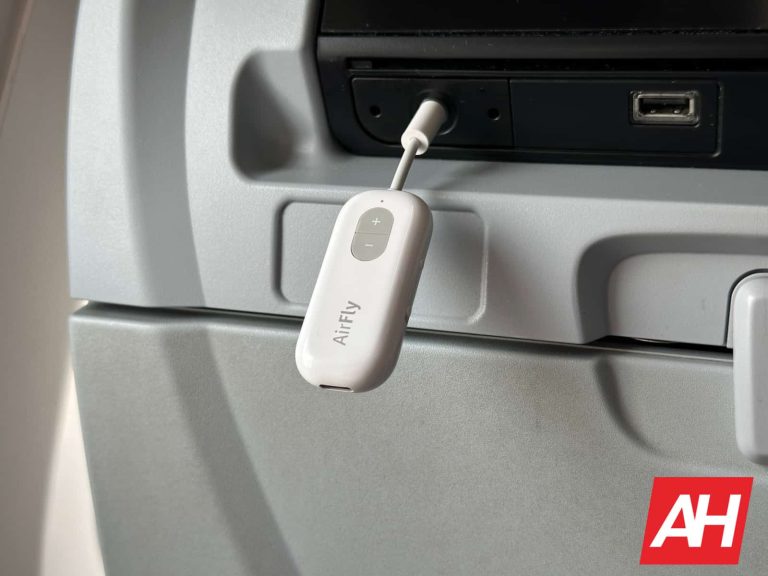
There’s a solution, and it’s a good one. It’s Twelve South’s AirFly SE. This is a $35 dongle that you can travel with that plugs into the headphone jack and gives you Bluetooth. So you can jump on your Delta flight to Los Angeles, plug in this dongle, and watch whatever movie or show you want with your own headphones or earbuds. Whether those are the Galaxy Buds 2 Pro, Google Pixel Buds Pro, or the Apple AirPods Pro 2, they will all work.
Twelve South does sell three different models of the AirFly. There’s the AirFly SE, AirFly Dup, and AirFly Pro. We recommend the AirFly SE for everyone. This is the cheapest option, and the other options really only give you the ability to connect another pair of headphones and a couple of hours longer battery life. And for the price, it’s not really worth it.
I used the AirFly SE for most of 2023, which included flying over 15,000 miles, as well as a long 13-hour flight to Seoul, South Korea. And this dongle has never died mid-flight. It has a 20-hour rated battery life (AirFly Duo is 22 hours, and AirFly Pro is 25 hours). It’s super easy to set up and use. Just flip the switch on, and your headphones should connect. There are volume buttons available on the dongle, and that’s really it.
Unfortunately, I did lose my AirFly SE during my trip home from Google’s Pixel 8 event in October. So I’ve had to buy a new one before I fly to CES in January. That five-hour flight to Las Vegas will be loads better with my AirFly SE intact.
It’s cheap, small and lightweight
Sure, there are other options for a Bluetooth dongle that you could use on a plane, but what sets the Twelve South AirFly SE apart is the price, size, and weight. It weighs almost nothing; in fact, my AirPods Pro 2 weighs considerably more. I can put the AirFly SE into my backpack, in a section that was really made for smaller phones (maybe a flip phone?), and then pull it out when I need it. It stays in my backpack all the time because I only use it when traveling, and oftentimes I forget that it’s even in there because it’s so small and light. So you don’t need to worry about it using up space in your backpack.
While Twelve South typically makes accessories for Apple products, AirFly SE is not limited to just Apple products. I have used it with the Sony WH-1000XM5 and the Google Pixel Buds Pro, in addition to my Apple AirPods Pro 2, and they all worked seamlessly. Essentially, any Bluetooth headphones or earbuds will work with this. Making it super versatile.
So before you take that holiday trip for Christmas and/or New Year’s, splurge and get yourself the Twelve South AirFly SE. Trust me, you won’t regret this $35 purchase. And you’ve spent more on less useful products, I’m sure.
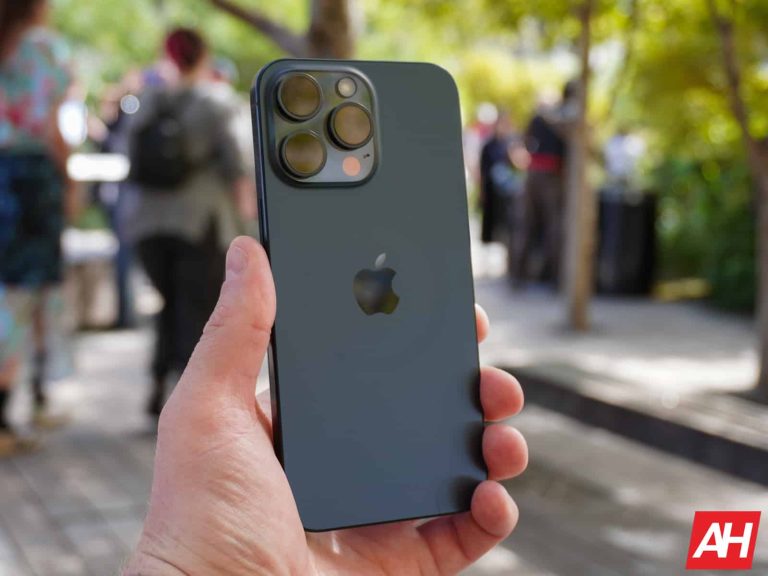
It seems like just yesterday that Tim Cook and Apple announced the iPhone 15. But in all reality, that was back in September, and it is now December 2023. That means iPhone 16 rumors and leaks are running wild already.
Despite keeping a relatively similar design, the iPhone 16 is expected to bring in some pretty significant changes for the iPhone. Some of those changes include new, larger sizes for the iPhone 16. The lineup will also get new 3nm processors and new cameras, at least on the Pro models.
In this article, we will be rounding up all of the latest leaks, pricing, specs, and other features to expect on the new iPhone 16 series when it launches in September 2024. It’s hard to imagine that we are already on iPhone 16.
Quick Links
iPhone 16 Release Date
At this point, it’d be very surprising to see the iPhone 16 launch at any other time than in September. Apple has been releasing the iPhone in the fall every year since the iPhone 4s in 2011. For the iPhone 16, it is expected to remain in September. Apple typically announces the iPhone in the second week of September. So far, 2022 was really the only exception, where it was announced the Wednesday after Labor Day. Most of the time, it is the week after, however.
Typically, Apple will announce the new iPhone on a Tuesday, then pre-orders start on Friday, with the iPhone being available in store the following Friday, basically, ten days after the announcement. Sometimes, Apple makes the announcement on a Wednesday, so it is possible that it could be a Wednesday announcement for iPhone 16.
iPhone 16 Prototypes (Image credit: MacRumors)
Price rumors
In the past few years, there have been many rumors about the price of the iPhone going up, at least in the US. Now the pricing has gone up in other regions, but in the US, it has mostly stayed the same since the iPhone X. The iPhone 15 Pro Max did technically get a price bump, however Apple ditched the 128GB model. So the starting price is higher, but the 256GB Pro Max is the same price as before.
Currently, analysts are in disagreement over the pricing of the iPhone 16 series. Some analysts believe that the iPhone 16 could actually be cheaper than the iPhone 15. That’s due to Apple reportedly planning to switch the process it uses to manufacture iPhone chipsets in 2024, and that would impact iPhone prices for the end consumer. However, it could also be more expensive due to rising production costs and inflation. The iPhone 15 Pro Max actually cost Apple $588 to produce, which is a 12% increase over the iPhone 14 Pro Max.
Pricing on the iPhone 16 Pro and Pro Max (or Ultra) could also go up in 2024, with the two phones getting larger displays and new cameras. It also wouldn’t be that crazy to see the Pro models ditch the 128GB storage variant altogether. At this point, that would only mean the iPhone 16 Pro ditching it, though.
Currently, the pricing for the iPhone 15 series starts at $799. The iPhone 15 Plus is $899, the iPhone 15 Pro is $999, and the iPhone 15 Pro Max is $1,099 in the US. It wouldn’t be too surprising to see each one jump by $100. After all, these prices have not changed much in the past five years. They have also gone up in other regions over the past few years.
iPhone 16 to get larger Displays
The iPhone 16 series is set to finally get some different-size displays. Apple has stuck with these same sizes since around the iPhone 11, with a 6.1-inch and a 6.7-inch model in both the Pro and non-Pro. Of course, we didn’t have a non-Pro 6.7-inch iPhone until 2022 with the iPhone 14 Plus.
But in 2024, it looks fairly certain that the iPhone 16 Pro will jump up to a 6.3-inch display, and the iPhone 16 Pro Max will move to a 6.9-inch display. Display analyst, Ross Young is also reporting that the iPhone 16 Pro models will also get a new taller aspect ratio, 19.6:9. Which is still wider than most Android phones, but it will be narrower than previous iPhones. But not by much. The current iPhone 15 Pro Max has an aspect ratio of 19.5:9.
9to5Mac has created some mock-ups to show us the difference between an iPhone 15 Pro Max with a 6.7-inch display and an iPhone 16 Pro Max with a 6.9-inch display.
iPhone 15 Pro Max vs iPhone 16 Pro Max mock-up (Image credit: 9to5Mac)
The iPhone 16 Pro models are set to get larger displays so more components can fit inside the phones. Both models are expected to see some pretty major camera upgrades. And Apple needs a bit more internal space to make these possible. And it’s rumored that Apple will rely almost solely on Samsung for panels for iPhone 16, as BOE is facing a setback right now.
For the standard iPhone 16 and iPhone 16 Plus, we’re expecting that the displays will stick to the same sizes as previously. That means a 6.12-inch display for iPhone 16 and a 6.69-inch display for the iPhone 16 Plus. Both of these would stick with the same 19.5:9 aspect ratio and also stick with a 60Hz refresh rate. Something that got tech Twitter up in arms during the iPhone 15 launch earlier this year.
New design rumors
The iPhone has kept relatively the same design since the iPhone 11; some might argue the iPhone 12 is when Apple went to the flat side. And that’s perfectly fine. No smartphone company needs to do a complete redesign every year or even every couple of years. And that looks to be the same this year with the iPhone 16. The most significant design change we’re talking about is the camera module on the iPhone 16 and 16 Plus.
Apple is rumored to be moving the cameras again on the non-Pro iPhones next year. So it’ll look more like the iPhone 12, where the cameras were lined up versus horizontally. The reason for this is actually for Spatial Video. A feature Apple added to the iPhone 15 Pro and Pro Max this past year as they gear up for Vision Pro’s release. Spatial Videos are basically 3D videos that you can watch in virtual reality on the Vision Pro. And bringing the feature to all iPhone models is a big deal. Putting the cameras next to each other will result in better Spatial Videos versus the way they are set on the iPhone 15.
Another design rumor, which seems a bit far-fetched right now, is that the Face ID components could be hidden under the display. It would be very similar to the fingerprint sensors that are under-display on most Android phones (not foldables of course). This is supposedly going to be a stop-gap for Apple, whose goal is to create a completely uninterrupted, cut-out-less iPhone display.
This one does seem pretty far-fetched and something I wouldn’t expect to see on the iPhone 16 Pro and Pro Max next year. These rumors come out of Korea, including from Ming-Chi Kuo, who is typically spot on, but sometimes his timelines are wrong since he gets info so early.
The last rumor so far is about a new button being added. Apple could be adding a Capture button to the side of the iPhone, in addition to the Action Button. Apple is also set to include the Action Button across the entire iPhone 16 lineup next year.
iPhone 16 Camera rumors
For the iPhone 15 series, the Pro Max model got the big camera upgrades, including a new tetraprism sensor. But with the iPhone 16 series, that sensor is set to debut on the smaller iPhone 16 Pro. That tetraprism sensor that enables 5x zoom will be available on the smaller iPhone in 2024. At the same time, the iPhone 16 Pro Max is set to get a “super-telephoto” sensor.
The term “super-telephoto” is used to describe lenses that are over 300mm in focal length. These are the types of cameras that you see used at sporting events or when trying to capture wildlife. For comparison, Apple’s current tetraprism lens on the iPhone 15 Pro Max, which is capable of 5x zoom, is only 120mm. At the same time, Samsung’s Galaxy S23 Ultra with 10x zoom is only a focal length of 230mm. So this could likely be a 12x zoom that Apple is looking to add on the iPhone 16 Pro Max.
Both of the Pro models are also expected to see nice upgrades to the ultrawide cameras. It is going from 12 megapixels up to 48 megapixels. This would be a big deal for those macro shots that are using the ultrawide sensor. Giving it more detail that it can pull in, as well as more light.
Meanwhile, the iPhone 16 and iPhone 16 Plus are set to get basically the same cameras as the iPhone 15 and 15 Plus. That includes the 48-megapixel primary sensor, as well as the 12-megapixel ultrawide.
Other iPhone 16 Features
It’s pretty much set in stone that the iPhone 16 Pro and Pro Max/Ultra will be using the A18 Pro chipset. Apple moved to the “Pro” moniker with the iPhone 15 Pro’s A17 Pro chipset. Typically, Apple will change these monikers based on the process that they are using. So moving to 4nm saw the change to Bionic, and now 3nm saw the change to Pro.
So far, we don’t know a ton about this new chipset, but we do believe that it will be built on the N3E 3-nanometer node, which should improve efficiency and performance even more. Other than that, we don’t really know what to expect with this new chipset just yet. That will come in the next few months, however.
Apple is also expected to support WiFi 7 and add a new 5G modem on the iPhone 16 Pro models. WiFi 7 isn’t a big deal, as the standard is only just now getting finalized. This means that WiFi 7 routers are still a few months out, and they will remain at a pretty high price tag for quite some time. But a new 5G modem would help with speeds as well as efficiency.
For battery capacities, we haven’t heard much just yet. But with the larger overall size of the iPhone 16 Pro and Pro Max, we could definitely see larger batteries. Apple was rumored to use a stacked-battery design like what Electric Vehicles use, in the iPhone 15 series. That would be a really great move for the iPhone 16 Pro and Pro Max, though.
So with the iPhone 16 series, we aren’t expecting incredible updates to the lineup, but there are going to be lots of smaller upgrades, which will make for an interesting upgrade, especially for those with an iPhone 13 or older.
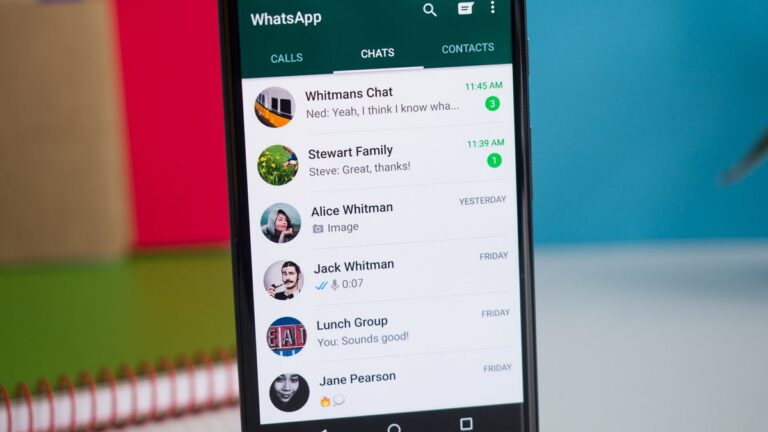
Meta has just announced that pinned messages are making their debut on its WhatsApp messaging app. The new feature is currently rolling out to users, but it will take some time for everyone to see it in their app.
An extensive FAQ related to the new feature is now available for users to peruse in order to learn how pinned messages work. The procedure is quite simple on both iOS and Android platforms.
Android users can tap and hold the message, tap the three-dot icon, choose Pin, and then select the pin duration: 24 hours, 7 days, or 30 days. On the other hand, iPhone users must tap and hold the message, tap More options, then tap Pin and select the pin duration: 24 hours, 7 days, or 30 days.
To unpin a message before the time runs out, simply tap and hold the message, and choose Unpin. iPhone users will find Unpin in the More options tab after tapping and holding the message. For web and desktop users, head to the message that you want to unpin, click the arrow down icon, and choose Unpin.
As far as group chats go, WhatsApp mentions that group admins can choose to allow members to pin messages in group chat. This option is available on Android devices by turning Edit group settings on or off in the Group Settings menu.
On iPhones, the option is available in the Group info / Group Settings / Edit Group Settings / select All members or Only Admins. Keep in mind that when a message is pinned in a group chat, a system message will be shared with everyone on the chat.
San Francisco resident Miklos Daniel Brody, 38, took revenge on his former employer, a bank, by hacking valuable computer code and damaging the bank’s cloud system. And the Cloud Engineer Sentenced.
After stealing information from and purposefully damaging a protected computer, he was sentenced to 24 months in prison for breaking the Computer Fraud and Abuse Act. He was also found guilty of making false statements to a government agency.
Brody worked as a cloud engineer for a San Francisco-based First Republic Bank (FRB) until March 11, 2020, when he was fired for breaking corporate policy.
Brody Accessed the FRB’s Bank Computer Network
In the superseding indictment, it is claimed that Brody accessed the FRB’s computer network without permission and caused significant damage later that evening and early the next morning using his company-issued laptop, which he failed to return after being fired.
That evening, after breaking into FRB’s computer system, BRODY started executing scripts to delete code and harm the software infrastructure.
After using the VPN to get access to the FRB computer system, BRODY established a connection to the “Jumpbox,” the secured host server.
The complaint claims that it allowed him to access the code repositories on “Devbox” and “Github.” Utilizing the “grand.sh” script concealed under a network information folder, he terminated nearly every instance within Amazon Web Services (AWS).
Additionally, he sent himself a proprietary bank code that he had worked on while employed; the code was worth more than $5,000.
The DOJ claims that BRODY deleted the bank’s code repositories, erased logs containing malicious scripts, left taunts for former colleagues in the bank’s code, and initiated sessions under the identities of other bank workers.
Judge Orrick calculated the overall cost of the system damage to the bank to be at least $220,621.22 during the sentencing hearing.
The superseding indictment also claims that Brody committed several evasive and dishonest acts in the days and weeks that followed his termination, such as submitting a police report in which he lied to the San Francisco Police Department that his company-issued laptop had been stolen from his car while he was exercising at the gym.
Brody doubled down on that false allegation in statements he made to USSS agents during an interview following his arrest in March 2021.
Brody acknowledged making a false claim regarding the company-issued laptop in his guilty plea application, and he acknowledged that he was aware of the dishonesty of the claim at the time.
The Sentencing
Miklos Daniel Brody was given a 24-month prison term today for both hacking into a network and lying to a government organization.
Judge Orrick not only sentenced Brody to jail but also mandated that he pay $529,266.37 in restitution and serve three years of supervised release following his prison term.
Organizations must prioritize employee engagement to thrive and achieve growth. A strong workforce enhances productivity and performance. It also fosters a positive work environment where individuals can flourish.
One vital factor that significantly influences employee engagement is the dynamics within teams. This article will delve into the underlying psychology of team dynamics and how they contribute to employee engagement.
Understanding Team Dynamics
Team dynamics encompass the patterns and interactions among a group of individuals working together towards a goal. It includes communication, collaboration, conflict resolution, and decision-making. Successful team dynamics promote trust, cohesion, and mutual respect among team members, creating an environment that boosts morale and job satisfaction.
Building Trust Through Communication
Establishing communication forms the foundation of team dynamics. When team members feel heard and valued, they are more likely to participate in discussions and freely share their ideas. Teams prioritizing communication can foster trust, encourage perspectives, handle conflicts constructively, and generate solutions.
To enhance team communication, managers should encourage check-ins where each member can express their thoughts or concerns. Additionally, incorporating technology tools like mobile apps for employee engagement, messaging platforms, or project management software can support collaboration efforts by breaking down barriers between teams.
Fostering Collaboration for Teamwork
Teams can work together as a unified force by leveraging their strengths to achieve shared goals. Collaboration promotes knowledge sharing and skill development while fostering innovation and minimizing project delays or errors caused by limitations.
Creating an environment that encourages collaboration beyond task-related activities is crucial. It can be accomplished through organizing meetings or providing learning opportunities, such as workshops or training sessions. By prioritizing collaboration over competition within teams, organizations cultivate a culture that values perspectives and enhances employee job satisfaction.
Resolving Conflicts in a Positive Manner
Conflicts are inevitable when individuals with different perspectives join forces to accomplish objectives. However, conflicts within teams can be constructive if they are effectively managed. Successful teams view conflicts as opportunities for growth and employ conflict resolution strategies to find solutions that benefit all parties involved.
Managers should establish an environment where team members feel comfortable openly expressing their opinions and resolving conflicts. Conducting conflict resolution workshops or training programs equips team members with the skills needed to handle disagreements in a manner that preserves relationships while strengthening team dynamics.
Encouraging Empowerment in Decision Making
In the context of workplace teams, autonomy and empowerment play vital roles in driving engagement levels. When employees have a sense of ownership and the freedom to make decisions, they become more committed to their roles, creating an environment of accountability. It boosts job satisfaction and ultimately leads individuals to contribute to the success of their teams.
To encourage employee empowerment in decision-making, managers should delegate responsibilities, provide autonomy within boundaries, and offer opportunities for growth through training and development programs. These measures enhance employee engagement. Also, they increase motivation levels among team members.
Applying the Psychology of Team Dynamics
Applying insights to understand team dynamics allows organizations to create an environment promoting employee engagement. By prioritizing trust-building through communication, encouraging collaboration, facilitating conflict resolution, and empowering decision-making, organizations can enjoy the benefits of engaged teams.
The impact of team dynamics on employee engagement is significant. Effective team dynamics directly lead to increased job satisfaction and improved organizational outcomes. When employees feel connected to their teams and have a sense of belonging, they are likelier to be engaged in their work.
Here are some ways in which team dynamics influence employee engagement;
1. Promoting a Sense of Belonging
Positive team dynamics foster a sense of belonging among its members.
When team members feel valued, supported, and included, they develop a connection to their work and the organization as a whole. This sense leads to higher levels of employee engagement and commitment to achieving shared goals.
2. Motivation and Collaboration
Effective teamwork motivates employees by providing opportunities for growth and skill development. Collaborative environments encourage communication, sharing of knowledge, and generating ideas, which boosts creativity and innovation within the team. The motivation that comes from being part of a team drives individuals to exceed expectations in their roles, resulting in levels of engagement.
Conclusion
The dynamics within a team have an impact on employee engagement. Effective team dynamics involve communication channels, collaborative efforts, constructive conflict resolution strategies, and autonomous decision-making – all crucial elements for fostering employee engagement and cultivating a work environment.
By investing in building team dynamics based on psychological principles, organizations can tap into the potential among employees, leading to increased productivity and overall improved performance.
Samsung‘s Galaxy S24 series will feature satellite connectivity, a new leak has confirmed. It will allow you to send emergency texts when you are out of range or not connected to a mobile network. The feature seemingly doesn’t offer two-way communication.
Samsung brings satellite connectivity to the Galaxy S24 flagships
A screenshot shared by SamMobile shows what appears to be the settings page from a Galaxy device running One UI 6.1, which will debut with the Galaxy S24 lineup. The page lists the features that can be helpful during an emergency. It teaches you how to quickly initiate an emergency call (by repeatedly pressing the power button five times) and has spaces to record your emergency contacts and medical info.
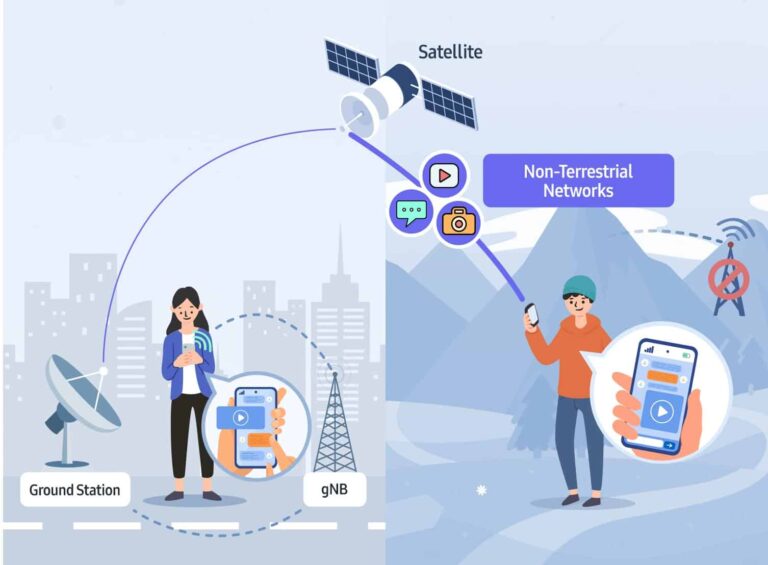
However, there is a new feature here. Called “Emergency texts via satellite,” it lets you reach out to emergency services through text message even if your phone isn’t connected to a mobile network. The message is sent via satellite. The device comes with the necessary hardware equipment to facilitate a satellite connection for sending messages when there is no mobile network available.
A similar feature is already available on the latest iPhones and Huawei’s flagship models. So this isn’t a groundbreaking innovation from Samsung. However, it is an important feature to have on smartphones today. There are already several reports of satellite SOS saving the lives of people stranded in the wild. The emergency messages include your GPS location so response teams can track you down and rescue you.
Samsung has already developed a two-way satellite communication system
Samsung has been working on satellite connectivity for Galaxy smartphones since at least last year. The Galaxy S23 series was expected to debut the technology but not to be. The company’s mobile chief said it wants to develop a more robust solution that can transmit text messages, high-resolution photos, and videos over satellite in both directions, i.e. send and receive.
Shortly after the Galaxy S23 launch in February this year, Samsung announced its 5G NTN (non-terrestrial networks) modem technology that offers a two-way satellite communication system. Along with text messages, it also facilitates the sending and receiving of photos and videos between two compatible devices via satellite. It is unclear whether Galaxy S24 phones boast this solution.
The leaked screenshot suggests satellite connectivity is limited to emergency rescue requests, though there could be more to the story. Thankfully, it won’t be a long wait now. Samsung plans to unveil the Galaxy S24 series in mid-January, 2024, possibly on January 17. It should talk about the satellite connectivity features of the phones during the launch event, so stay tuned.
After Microsoft seized the opportunity to invest $13 billion into the ChatGPT parent company OpenAI, alarm bells rang for Google and other tech firms. It was first believed that Microsoft’s ownership of OpenAI could give the Redmond firm a substantial competitive advantage over competitors. Now that the initial excitement around ChatGPT has settled, regulators are prompted to investigate Microsoft’s investment in OpenAI.
As Engadget (via Bloomberg) reports, the Federal Trade Commission (FTC) is investigating Microsoft’s $13 billion in OpenAI. The FTC wants to see if the deal has violated US antitrust laws. The agency is worried that Microsoft might use OpenAI’s tech to expand its dominance in the market and abuse competition.
While the FTC hasn’t yet launched an official probe into the deal, the FTC Chair Lina Khan and Microsoft are reportedly analyzing the situation and evaluating the available options. The FTC investigation is complicated because OpenAI is registered as a non-profit entity. And the law doesn’t require transactions made by such entities to be reported.
Another obstacle in the FTC probe is that according to the laws, Microsoft is not fully in charge of OpenAI, despite its $13 billion investment in the AI startup. However, the recent OpenAI controversy that resulted in the ousting of Sam Altman as CEO and then Microsoft’s interference in bringing Altman back to his position might be a trump card for FTC to trap Microsoft.
UK regulator is also investigating the Microsoft-OpenAI deal
According to Reuters, the Microsoft and OpenAI deal also caught the eyes of the UK’s Competition and Markets Authority (CMA). The agency announced on Friday that it’s looking into the deal to check whether it harms competition. “There have recently been a number of developments in the governance of OpenAI, some of which involved Microsoft,” CMA noted.
Following OpenAI’s internal battle, Microsoft was given a non-voting observer position. This means Microsoft representatives can attend to OpenAI deals and access information. However, they can’t vote on the company’s matters. While Microsoft’s role in OpenAI seems undeniable, a company’s spokesperson said they do not “own any portion” of OpenAI and just benefit from the profits.
Microsoft already had a face-off with the FTC and the UK’s CMA over the $69 billion acquisition of Activision Blizzard. The three parties finally reached an agreement, and Microsoft completed acquiring the game maker. It remains to be seen how the new encounter will end.
Phishing, a persistent cyberthreat, has evolved with the times. Once a symbol of convenience, QR codes are now being weaponized by attackers through Quishing.
This alarming trend demands attention, as it exposes both individuals and organizations to significant risks.
Interpol’s takedown of 16 shops, a notorious phishing platform, marked a significant victory. However, the availability of “phishing-as-a-service” platforms makes launching attacks easier than ever.
This, combined with the increasing popularity of QR codes, creates a perfect storm for widespread phishing attacks.
Trellix has conducted research that provides valuable insights into the magnitude of the threat in question.
They detected over 60,000 quishing samples in just one quarter, targeting users through various tactics like postal phishing, spear phishing, and malware delivery.
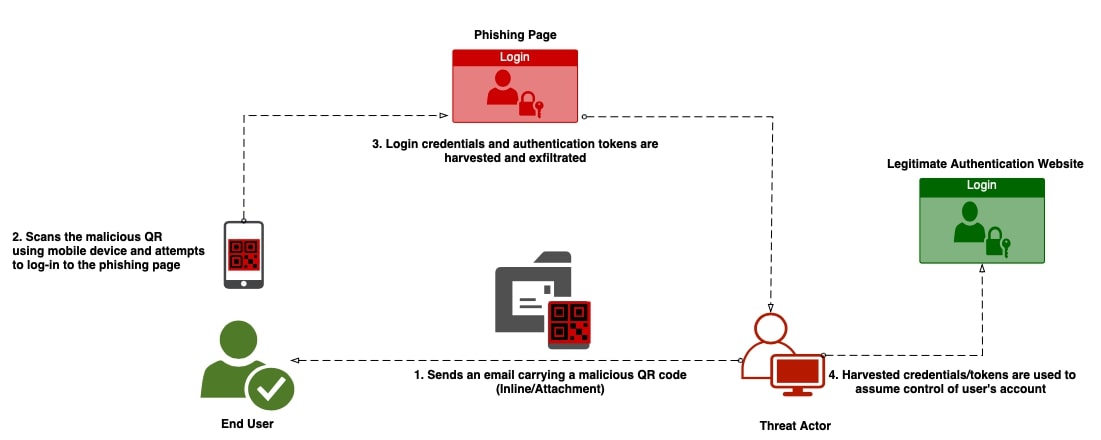
To understand how quishing works, let’s delve into the “Quishing Kill Chain”:
Attackers distribute malicious QR codes: These codes can be found in emails, websites, flyers, or even physical locations.
Unsuspecting victims scan the codes: This action redirects them to malicious websites designed to steal credentials, install malware, or infiltrate devices.
Attackers achieve their malicious goals: This could involve stealing sensitive data, compromising systems, or launching further attacks.
The resurgence of QR codes has paved the way for quishing to flourish.
Attackers exploit the trust we have in these codes and our inherent tendency to act quickly when faced with urgency.
This makes individuals and organizations alike vulnerable to sophisticated phishing tactics.
Trellix’s research reveals insightful details about recent quishing campaigns:
Postal quishing: Emails impersonating FedEx and DHL lure users with delivery concerns, directing them to fake login pages.
Spear quishing: HR, payroll, and IT impersonation are used to trick employees into revealing sensitive information.
File-share quishing: SharePoint, DocuSign, and OneDrive deliver phishing URLs or malware disguised as legitimate documents.
Crypto wallet quishing: Coinbase and Binance are impersonated to steal crypto wallet phrases and private keys.
To prevent falling victim to quishing, here are some essential tips:
Be wary of unexpected QR codes: Don’t scan any code you come across without verifying its legitimacy.
Analyze the source: Is the QR code included in a legitimate email, website, or location?
Never enter sensitive information: Don’t log in to accounts or provide personal details after scanning a QR code.
Use security solutions: Invest in reliable email security and anti-malware software to protect your devices.
Stay informed: Keep yourself updated about the latest phishing tactics and educate others about quishing.
“Attention everyone! There’s going to be a pizza party in the lounge!” That’s the kind of message you don’t want to get swept away in a busy chat group. People often discuss important matters or send large files through WhatsApp. Some messages are just too important to be swept away. Because of this, WhatsApp is bringing pinned messages to the platform.
Right now, this feature is rolling out to the masses, so there’s a chance that you won’t see it right away. One thing you want to do is make sure that your app is fully updated. Go to your respective app store and see if there’s an update available. You can also check the “last updated” date. If you don’t have the feature, then you might want to wait a day or two.
WhatsApp adds pinned messages
Again, you DO NOT want to miss a message about a pizza party… or other important business matters. In all honesty, there are those crucial announcements that executives need to communicate to their workers. It’s frustrating when people don’t read those messages because they’re washed away by the chat.
This is why it’s great that WhatsApp brought pinned messages. With this feature, you’ll be able to take a message and paste it to the top of a group chat. It will remain visible no matter what other messages flood in.
The feature is rather convenient, and it’s customizable to a degree. First off, you can pin any kind of message. So, it doesn’t matter if it’s a bit of media, a poll, or a regular message. One thing to note is that there’s no option to keep the messages pinned indefinitely. The longest that a message can be pinned is 30 days. There are also options for 24 hours and 7 days.
Another neat thing about this feature is that admins can pin messages that are only visible to other admins. This is useful if the admins need to discuss sensitive matters or if their priorities are separate from the other members’.
The way to pin a message will differ depending on the operating system you’re using. If you’re using Android, hold your finger down on the message you want to pin. After that, tap on the thumb tack icon. If you’re on iOS, simply swipe right on the message and tap on the Pin button.