Samsung has just announced a couple of new mid-range Android smartphones—Galaxy A15 and Galaxy A25 5G. The former is available in 4G and 5G flavors while the latter is 5G-only. Both devices will go on sale in select markets this week, with a wider availability expected later.
Galaxy A15 and Galaxy A25 5G have a lot in common
The Galaxy A15 and Galaxy A25 5G introduce a new design element to Samsung smartphones. The new devices have their frame slightly raised around the power and volume buttons on the right. The company calls it the “Key Island” design. This is just one of the many similarities between the two phones.
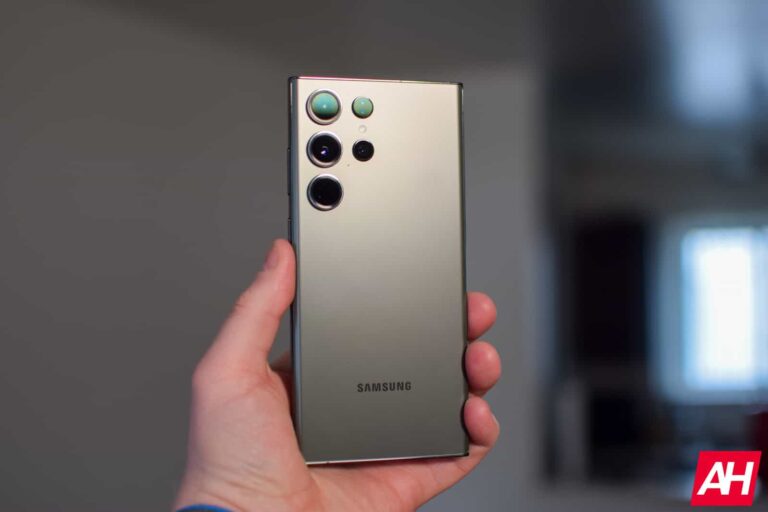
For starters, both handsets have flat front and back panels with a vertical rear camera array. We are looking at a 50MP primary rear shooter combined with a 2MP macro camera, though only the latter has OIS (Optical Image Stabilization). The ultrawide lens is a 5MP sensor on the former and 8MP on the latter. The devices feature the same 13MP selfie camera.
The 6.5-inch Super AMOLED display has a U-shaped notch and an FHD+ (1080×2340 pixels) resolution. The Galaxy A15’s panel boasts a 90Hz refresh rate and 800 nits of peak brightness. The Galaxy A25 5G, on the other hand, upgrades to a 120Hz refresh rate and 1,000 nits of peak brightness. Both devices should feature Vision Booster for improved screen visibility and color accuracy under sunlight.
Samsung has equipped these devices with a 5,000mAh battery that supports 25W fast wired charging via a USB Type-C port. They also feature a side-mounted capacitive fingerprint scanner (embedded into the power button), and Knox security. The phones run Android 14-based One UI 6.0 out of the box. The company has promised four generations of Android OS upgrades (up to Android 18) and five years of security updates.
A key differentiator between the two phones is the chipset. The Galaxy A15 is powered by MediaTek’s 6nm Helio G99 SoC operating at up to 2.2GHz (the 5G version has the Dimensity 6100+, which is the same SoC with an integrated 5G modem). The Galaxy A25 5G gets a more powerful Samsung Exynos 1280 5nm chip with a peak speed of 2.4GHz. The phones come with 6GB/8GB RAM and 128GB//256GB storage, with Micro SD card support.
Price and availability
As of this writing, Samsung has announced the availability of the Galaxy A15 in Vietnam only. The 8GB+128GB 4G version costs VND 4,990,000 (roughly $205) while the 8GB+256GB 5G version starts at VND 6,290,000 (roughly $259). The device will be available for purchase in the country starting this Saturday, December 16.
The Galaxy A25 5G will also be available in Vietnam on the same day with a price tag of VND 6,590,000 (roughly $271) for the 6GB+128GB variant. Additionally, Samsung has confirmed that the device will arrive in France this week. However, it hasn’t announced the pricing in this part of the world. The two new mid-range Galaxy devices are expected to arrive in the US shortly.
After much hype, Meta has finally rolled out end-to-end encryption for its Facebook Messenger app. Previously available as an optional feature, users will now find this e2e encryption enabled by default for their chats.
Facebook Messenger To Offer End-to-End Encryption By Default
According to a recent post, Meta – formerly Facebook – now offers end-to-end encryption to its Messenger and Facebook users.
As elaborated, Meta’s default encryption is based on the trusted Signal protocol and Meta’s own Labyrinth protocol. With end-to-end (e2e) encryption enabled by default, users can trust their text messages, images, calls, and other data to remain secure from third parties, including Meta.
Besides encrypting chats, Meta also improvised the features by launching edit messages, disappearing messages, and high media quality functionalities.
The new encryption and feature upgrades have been released for all users immediately. Yet, Meta clarified that given the huge user base, it might take a few months for all users to receive these features. Nonetheless, as the feature becomes available, users will receive the prompts to set up recovery methods for their data.
Facebook Messenger’s encryption isn’t entirely a new feature. It was already accessible as an optional security feature that users could enable as they wanted. However, despite being around since 2016, it wasn’t popular among Messenger users, particularly non-technical individuals. This lack of default encryption availability contributed to the continued popularity of Meta’s WhatsApp, which boasts the Signal encryption protocol to secure chats.
Eventually, considering the rising popularity of end-to-end encryption, Meta decided to launch the same for its Instagram, Facebook, and Messenger apps as the default configuration. However, as elaborated a couple of years ago, Meta planned this move for the end of 2023.
And now, Facebook and Messenger users can enjoy protected communications over these platforms with the default end-to-end encryption.
Job seekers and recruiters should be vigilant for malicious emails and messages on LinkedIn, where TA4557 threat actors feign interest in a job, but their actual intent is to deliver a backdoor.
TA4557, a skilled yet mysterious cybercriminal group, has been targeting recruiters with malware since October 2023, as revealed in the latest report from Proofpoint published on 12 December 2023.
According to Proofpoint’s research, TA4577 sends direct emails to recruiters to deliver malware. These emails appear benign, expressing interest in an open job. When the recipient replies, that’s when the attack chain begins.
TA4557 is a financially motivated threat actor known to distribute the More_Eggs backdoor against recruiters on LinkedIn. For most of 2022 and 2023, the threat actor applied to existing open job listings and embedded malicious URLs in the application.
However, they have changed tactics in the latest campaign where they utilize both the new method of sending direct emails and the older technique of applying to jobs posted on public job boards, but the intention remains the same.
In early November 2023, security vendor Proofpoint observed campaigns where TA4557 directed recipients to refer to the domain name of their email address to access their portfolio instead of sending the resume website URL directly. The actor then directed victims to a personal website mimicking a candidate’s resume or job site that used filtering to redirect users to the next stage of the attack chain.
Conversation between threat actors and an unsuspecting recruiter, along with the fake resume of the threat actor (Screenshots: Flashpoint).
Once the victim passes filtering checks, they are taken to a resume in plain text or a candidate website, which uses a CAPTCHA to initiate the downloading of a shortcut file (.LNK) that abuses legitimate software functions to download/execute a scriptlet called Living Off The Land (LOTL).
This script decrypts and drops a DLL to create a new regsrv32 process using WMI (Windows Management Instrumentation) and uses multiple checks to determine whether the DLL is being debugged. This DLL also drops the More_Eggs backdoor and initiates the creation of the MSXSL process using the WMI service.
As per Proofpoint’s report, TA4557 is unique due to its unique tool/malware usage, campaign targeting, job candidate-themed lures, sophisticated evasive measures, distinct attack chains, and actor-controlled infrastructure. this group’s activity has historically overlapped with cybercrime group FIN6 activities and the malware suite used by cybercrime groups Cobalt Group and Evilnum.
TA4557 demonstrates sophisticated social engineering, designs its lures to legitimate job opportunities posted online, uses benign messages to build trust and engages with targets before sending malicious content.
The group regularly changes its sender emails, fake resume domains, and infrastructure, which makes it difficult for defenders and automated security tools to detect the content as malicious.
Therefore, organizations using third-party job posting websites should be aware of TA4557’s tactics and educate employees regarding this threat, especially in recruiting and hiring functions.
Samsung‘s Android 14-based One UI 6.0 update is rolling out to the Galaxy A53 in the US. The big update is also widely available for the Galaxy A54 and Galaxy F34. The company has already updated the latest foldables and flagships to the new One UI version.
Galaxy A53 users can now download Android 14 in the US
Samsung started pushing Android 14 and One UI 6.0 to the Galaxy A53 at the end of November. The rollout began in Europe and gradually expanded to other regions such as Asia. It recently hit the US shores. As of this writing, the big update is available for carrier-locked units with the firmware build number A536USQU8DWK7. Unlocked units should join the party soon.
This update brings a ton of new features and improvements to the Galaxy A53. Samsung has revamped the UI in some areas for a more intuitive and seamless user experience. The Quick Settings layout has been redesigned while the notification panel gets improvements. The company has also improved first-party apps such as Samsung Health, Keyboard, and Samsung Internet. The phone is picking up new camera features and editing tools too.
In addition to these goodies, the latest update for the Galaxy A53 brings the November 2023 Android security patch. It contains fixes for more than 60 vulnerabilities, at least five of which are critical security issues. Samsung has already released the December patch but it is currently only available for a handful of Galaxy devices, including the Galaxy S23 series. It will reach more devices in the coming days.
One UI 6.0 is widely rolling out to the Galaxy A54 in the US
Samsung’s Android 14 update is also widely rolling out to the Galaxy A54 in the US. The phone started picking up the update about three weeks back. The carrier-locked units on AT&T and Cricket Wireless were the first to receive it. The update is now available for both locked and unlocked units across all wireless networks. The new build numbers are A546USQU5BWK4 and A546U1UEU5BWK6, respectively.
The Galaxy F34 is another Samsung phone that recently made the jump to Android 14. This phone is only available in India. It is receiving the update with the build number E346BXXU2BWL1. Like the Galaxy A53, the Galaxy A54 and Galaxy F34 are also gaining the November security patch with the Android 14 update. If you are using any of these phones and haven’t received the update yet, you should soon. As usual, you can manually check for updates from the Settings app.
Gemini is Google’s flagship AI model, and we can expect it to be used in several of the company’s new projects coming out. The company’s working on a project that will give you a deep insight into, well YOU. It’s called Project Ellmann, and it’s powered by Gemini, and it might just give you the creeps.
In case you don’t know what Google Gemini is, it’s the latest and greatest AI model launched by Google. It’s the model currently powering Google Bard, and it’s also been implemented into the Pixel 8 Pro’s Tensor G3 chip. At this point, there are only three versions of the model available, which are Gemini Pro (powering Bard) and Gemini Nano (powering the Pixel 8 Pro). These are the two smaller versions of the model. So, if you’re wondering how to use Gemini, there are two ways.
The largest version is called Gemini Ultra, and that’s not coming out until early next year.
Project Ellmann is powered by Gemini, and it’s a bit creepy
At this point, it’s obvious that companies like Google and Meta know more about us than we do. The data that they collect on us can tip the scales, and cause us to be a bit uneasy. We’ve seen Google use its massive amounts of data on us in different useful ways, but Project Ellmanm will take this to a new level.
“Imagine opening ChatGPT but it already knows everything about your life.” That’s a quote from Google, and it pretty much sums up what this project is all about. Project Ellmann will use the data that Google has on you (including picture data, search history, etc.) in order to answer questions that you ask. The company gave examples such as “When was the last time I saw my sibling?” and “Do I have a pet?”.
Ellmann will be able to pull from the information collected from you to answer these questions. It goes pretty deep, as it’s touted to be able to know your eating habits, which isn’t something that’s easy to discern from internet data. It might go by images of food that you take and food-related Google searches. Heck, it could even tell when a person was born, find information on their parents, and more stuff like that.
Uhh, creepy much?
So, any person reading this would, understandably, be concerned. However, this isn’t a user-facing project, and we don’t know if Google’s even going to launch it. The company stated that “This was an early internal exploration,” so it’s probably just a prototype at this point. “should we decide to roll out new features, we would take the time needed to ensure they were helpful to people, and designed to protect users’ privacy and safety as our top priority.”
Judging by what Google’s saying, it doesn’t look like the company even has any solid plans to release Project Ellmann. That’s a relief, as this seems like the kind of project that walks the line between innovative and invasive. Not many people want to know that an AI model has so much in-depth information on them. It’s to the point where you can expect some massive lawsuits against the company.
Instagram plans to introduce a new privacy feature that will allow users to select who can see their likes on posts and reels. The ability to control who gets to see your likes is meant to boost privacy and, hopefully, improve engagement.
A couple of screenshots captured from a beta version of Instagram confirm the new feature will offer four different options that users can choose from. Judging from the screenshots, you will only be able to choose one option from the four presented, unless Instagram decides to change things by the time the new feature goes live for everyone.
However, the four options below offer enough variation to allow users to customize their privacy settings as they see fit:
Allow everyone to see likes
Allow people that you follow to see likes
Allow close friends to see likes
Don’t allow anyone to see likes
Instagram is testing new features all the time. Some never see the light of day, while others go through many iterations that, in some cases, change the way they originally worked.Obviously, it’s difficult to say when exactly the ability to control who is going to see your likes on posts and reels will come out, but at least we know Instagram is working on a feature that will actually be helpful to many of its users.
I’ve been reviewing earbuds for a long time, and have checked out a number of them from Huawei over the years. Huawei did have some odd units over time, like the Huawei FreeBuds 5, which turned out to be really good despite a somewhat odd design. Those earbuds were a bit odd, but nothing compared to the ones we’re here to talk about. The Huawei FreeClip are the company’s new earphones, and this is our review of that product. I was quite surprised the first time I saw these earbuds, mainly because I wasn’t expecting a new audio launch from the company this year, let alone something like this.
So, what makes these earbuds so different? Well, first and foremost, these are truly wireless (TWS) earbuds. Second, the entire usage of FreeClip is different from the earbuds you’re used to. There are open-ear type earbuds, closed-type ones. Earbuds that come with earwings and ear tips, ones that come without, and so on. I’ve even used truly wireless earphones that go around your ear in a half-moon shape, and are meant for running. Well, think of Huawei FreeClip earbuds as something between those, and regular truly wireless earbuds. With that in mind, let’s talk about their design, shall we?
Table of contents
Huawei FreeClip Review: Hardware / Design
As already mentioned, the Huawei FreeClip earbuds are different. Instead of going in your ear directly, you attach these to the outer side of your ears, on the side. Half of them sit behind your ear, and the other half goes towards the inner side of your ear, but not inside it. The whole idea is for the sound to shoot to the inside of your ear without the earbuds technically being inside of it. Why? Well, mainly due to cleanliness. Huawei wanted to try out something new, and this is what the company came up with. Ear infections are not that rare when it comes to earbuds, and this basically prevents that from happening.
‘Acoustic Ball’ & ‘Comfort Bean’
Now, Huawei actually has names for different parts of these earbuds. The part which sits on the entrance to your ear cavity is called ‘Acoustic Ball’, while the part that goes behind your ear is referred to as ‘Comfort Bean’. Those two parts are connected by a rubberized bridge that stretches out when you place it on, and then holds the two pieces firmly on your ear. The whole contraption may seem unstable based on what you see in pictures, but I assure you, it sits in place very nicely once you place it on your ear.
They fit different ear types
In fact, I gave these earbuds to about 5 people to try out, just to make sure they’ll fit different ear types. Out of those 5 people, there were two females, and three males, plus me, of course. The earbuds fit everyone perfectly fine, though they needed to be placed under a slightly different angle, of course. I asked them all to shake their head as much as they can also, and the FreeClip earbuds didn’t budge. The same goes for my experience. This makes me think these earbuds are great for sports activities, actually. I ran with them sitting on my ears, and I rode my bike. They didn’t budget and I actually preferred these to in-ear earbuds in that sense. I actually think that’s the perfect use case for them, if I’m being honest.
The Huawei FreeClip earbuds are great for extended usage
The Huawei FreeClip earbuds were also quite comfortable to wear. I wore them for hours at a time, and didn’t feel discomfort, not at all. To be quite honest, I was surprised by how much this design worked for me, I was very, very skeptical when I first saw it. Each earbud weighs 5.6 grams, while the charging case weighs 44.5 grams. They’re both quite light.
The earbuds themselves are made out of plastic, shiny plastic, unfortunately. They come in two colors, white, and I used the gray model. They ship with a charging/carrying case, which is quite compact, and made out of matte plastic. It doesn’t attract fingerprints at all (at least the color that I used), which is something I very much appreciate. The earbuds are very easy to take out and place in the case, as the bridge that connects the two parts is sticking out when you open the case. So, all you need to do is grab it and pull them out. The earbuds automatically recognize in which ear they’re placed in, so you don’t have to think about placement, simply put them in whichever charging slot you want.
The entire surface of the earbuds acts as one huge touch sensor
Many of you are probably wondering do these have touch sensors, or something of the sort. Yes. In fact, the entire earbuds are one big touch sensor, essentially. You can trigger touch commands by tapping on the Acoustic Ball, Comfort Bean or the bridge that connects them, it’s up to you. Touch controls work beautifully, as I’ve come to expect from Huawei’s earbuds. I actually used that rubberized bridge the most for activating touch commands. You can choose between double and trip tap actions. More on that later.
Huawei FreeClip Review: Sound & Call quality
Considering how different this design is, I wouldn’t blame you if you wondered if the sound quality was any good. Well, yes, but there’s a caveat. Considering that these earbuds are not placed on the inside of your ear, you won’t have as great of an experience as you would have with the FreeBuds 5 and FreeBuds Pro 3, for example. That is especially true if you’re in a noisy area, actually.
They’re not great for loud environments
Considering the design of these earbuds, the noise does bleed into your ear easily. Outside noise, of course. I’ve tried wearing these inside a crowded bar, and next to a really busy street, and I really did notice the lack of soundproofing. I’m so used to ANC (Active Noise Cancelling) at this point, that this really is noticeable. That is the main negative when it comes to the product as a whole, actually. With that in mind, these earbuds have been made that way on purpose. You cannot really make something like this and offer soundproofing too, as the design basically prevents that.
The sound is good enough if it’s not loud around you
The sound was more than good enough in every other scenario, though, even though not as punchy as I’m used to… once again, that’s due to the design itself. When I sat down in a coffee shop to do some sort, there were not many people around, and I had a great time with these. The same goes for when I went for a run, biked my way around the neighborhood, and watched a bunch of Yellowstone episodes on the TV at home. Dual drivers are in play here, and you do notice the quality. The sound output was more than pleasing, and you also have some control over that via the AI Life app. More on that soon.
Another thing worth noting here is that the sound did not leak to people around me. I expected that would happen, despite Huawei’s claims, but it did not. I asked a number of people whether they heard anything while I was listening to music, and they said they did not, even when they came closer (into my personal space, basically). So that’s great to hear. There is, of course, a point when the sound is noticeable, but nobody will come that close to you, at least not when you’re out and about.
These are great for voice calls
What about voice calls? Well, the other end of the line said that I sound just fine. They didn’t really have any complaints, so they’re on the same playing field as most other Huawei earbuds I’ve used this year. When it comes to the incoming call sound, well, it was more than good enough, unless I tried to conduct a call in a very noisy environment. That was to be expected, though.
Let me touch on the connectivity for a bit. I didn’t have any issues with the earbuds being connected. I had one random disconnect, but that’s about it. Even when I walked out of the range, they connected instantly when I got back in range, and didn’t even bother notifying me of anything at that point. These earbuds also have a dual connectivity option, meaning they can be connected to two devices at the same time, and jump between them as needed.
Huawei FreeClip Review: Battery
Huawei has big battery life claims for the Huawei FreeClip. The company said you can expect 8 hours of music playback here, 5 hours of talk time, and up to 36 hours of battery including the charging case. Is that accurate? Well, it’s possible, though we were not able to test that specifically, as I did not wear them for 8 hours straight to see if they’ll die, nor did I conduct a 5-hour voice call. What I can say is that I used them for around 4 hours straight while listening to music and podcasts, and watching a TV show. I did drain more than half of the tank at that point, but only barely. So the numbers that Huawei shared could be accurate.
They do charge really fast, while wireless charging is an option
The earbuds themselves do charge really fast, it’ll take them around 40 minutes to fully charge. How about the case, though? Well, you’ll need around 60 minutes to get it to 100%, it took me 62 minutes. That goes for wired charging. If you opt for wireless charging, which is an option here, it’ll definitely take considerably more time, as it’ll change 3 times slower, approximately. Either way, there are plenty of options here, and once you get the charging case charged up, you’ll be able to stay away from the charger for quite some time.
Huawei FreeClip Review: AI Life app
In order to take full advantage of the Huawei FreeClip earbuds, you’ll need the company’s app. The app’s name is ‘AI Life’, and you can either grab it directly from Huawei’s website, or from the company’s AppGallery app (Huawei’s app store). It is not available in the Google Play Store, at least not the version you’ll need. That being said, the AI Life app is very simple, and it is useful. It allows you to not only see the battery level of both the earbuds and the charging case, but also do some customizations too.
You can customize gesture navigation via an app
You can change up the gesture navigation inside of this app. The app does give you access to double-tap and triple-tap functions for these earbuds. Unfortunately, swipe up and down action is not available. That is used to control the volume on other earbuds from the company, but it’s not on offer here, as these earbuds have a different orientation. The gestures themselves do work really well. I managed to activate both double-tap and triple-tap actions basically every time. Also, you don’t have to tap in a specific place, the entire surface of the earbuds are touch panels, including the bridge that connects them.
Inside the app, you can even control the sound output to a degree. You can use the ‘Default’ setup, or opt for one of the other three: Elevate, Treble boost, and Voices. You’ll also be updating the Huawei FreeClip without this app. It’s impossible to update them without AI Life, so keep that in mind.
Huawei FreeClip: Should you buy these earbuds?
Are the Huawei FreeClip the right pair of earbuds for you? Well, that’ll depend on a number of factors. The main one is… whether you need good noise cancelling or not. The Huawei FreeClip earbuds do not offer good noise isolation, and that’s their main drawback. Considering the design here, that is not surprising at all. These earbuds do not exactly go into your ears. On the flip side, they’re outstanding for sports activities, and they’re very, very comfortable to use for longer periods of time. So, it all depends on what you’re looking for in a pair of earbuds. Different people have different priorities. Maybe the list of pros and cons below will help you make your decision.
You should buy the Huawei FreeClip if you:
…are a sporty person, and want your earbuds to sit firmly in place …need comfortable earbuds for longer usage …are worried about ear infections …want to be different than the rest …need very good battery life …find most charging cases for TWS earbuds to be too big
You shouldn’t buy the Huawei FreeClip if you:
…are often in noisy environments, and you need noise-cancelling …need volume control on your earbuds …find regular-looking earbuds to be a good fit for you
Huawei has announced its new flagship tablet, the MatePad Pro 13.2, in addition to the Huawei FreeClips earbuds. This is a truly large tablet, as its display measures 13.2 inches. So the display itself is almost as large as the panels on average laptops these days.
The Huawei MatePad Pro 13.2 is the company’s new flagship tablet
As you can see, in the provided images, the MatePad Pro 13.2 does have a display notch, and very, very thin bezels around the display. These could even be the thinnest bezels on any tablet to date. The tablet has a 94% screen-to-body ratio, which is outstanding.
The Huawei MatePad Pro 13.2 is only 5.5mm thick, and it weighs 580 grams. Needless to say, that’s great for such a gigantic tablet. It also has a 16:10 display aspect ratio. The device comes in Golden Black and Green colors.
Huawei is using the ‘X-True’ display technology here
The company is using the Huawei X-True display tech here. The display is big, bright, sharp, and seemingly color-accurate. It achieves professional color accuracy within the sRGB and P3 color gamut. It has a refresh rate of 144Hz, and a touch sampling rate of 360Hz. This is an OLED display, by the way, and it has a resolution of 1920 x 2880.
We’re not sure what SoC Huawei used here, but we’ll take a wild guess it’s the Kirin 9000s. The tablet comes with 12GB of RAM and either 256GB or 512GB of internal storage.
Two cameras are placed on the back, while advanced facial scanning is also supported
A 13-megapixel main camera (f/1.8 aperture, AF), is backed by an 8-megapixel camera (f/2.2 aperture, fixed focus) on the back. A 16-megapixel selfie camera (f/2.2 aperture), sits next to a dTOF sensor. This tablet does support advanced facial scanning.
A 10,100mAh battery is included in the package, and the Huawei SuperCharge (88W charging) is supported. Yes, the charger is also included in the package. Bluetooth 5.2 is also on board, as is USB 3.1 Gen1.
The Huawei MatePad Pro 13.2 has 6 speakers, and 4 microphones
This tablet has 6 speakers, and 4 microphones. It also supports the Huawei M-Pencil, the third-gen model is available separately. The same goes for a case/keyboard for the device. Both of those accessories magnetize to the Huawei MatePad Pro 13.2. Both are sold separately.
This tablet joins the Huawei MatePad 11.5-inch and Huawei MatePad 11.5-inch PaperMatte Edition devices. Those two devices are mid-range offerings, while the MatePad Pro 13.2 is Huawei’s flagship-grade tablet.
The price tag of the Huawei MatePad Pro 13.2 with 256GB of storage is priced at €999. The 512GB storage options costs €1,199, and it includes the Smart Magnetic Keyboard case. The Smart Magnetic Keyboard on its own costs €199, while the third-gen Huawei M-Pencil is priced at €99.
Zyxel NAS users must rush to update their devices at the earliest as the vendors have patched numerous security flaws. Exploiting these vulnerabilities could allow severe threats from unauthorized users.
Zyxel NAS Devices Exhibited Numerous Security Flaws
According to a recent advisory, Zyxel disclosed patching multiple security flaws affecting its NAS devices. Specifically, the vendor addressed six different vulnerabilities, including three critical-severity issues that could risk the devices’ security. These include,
CVE-2023-35137: An improper authentication vulnerability in the authentication module allowed an unauthenticated adversary to access system information. Exploiting the flaw required the attacker to send a maliciously crafted URL to the target device.
CVE-2023-35138: A command injection vulnerability in the show_zysync_server_contents function. An unauthenticated adversary could execute operating system (OS) commands on the target device by sending a maliciously crafted HTTP POST request.
CVE-2023-37927: This vulnerability could allow OS command execution to an authenticated attacker. The flaw existed due to improper neutralization of special elements in the CGI program in NAS devices.
CVE-2023-37928: A command injection vulnerability in the WSGI server allowing OS command execution attacks from an authenticated adversary.
CVE-2023-4473: A command injection vulnerability in the Zyxel NAS web server allowing OS command execution from an unauthenticated attacker.
CVE-2023-4474: The improper neutralization of special elements in the Zyxel NAS WSGI server could allow OS command execution from an unauthenticated attacker.
Zyxel acknowledged the researchers Maxim Suslov, Gábor Selján from BugProve, and Drew Balfour from IBM X-Force for separately discovering and reporting these vulnerabilities.
Regarding the vulnerable devices, these vulnerabilities affected the Zyxel NAS326 V5.21(AAZF.14)C0 and earlier, and NAS542 V5.21(ABAG.11)C0 and earlier. Following the bug reports, the vendor patched the vulnerabilities with Zyxel NAS326 V5.21(AAZF.15)C0 and NAS542 V5.21(ABAG.12)C0. Hence, to avoid potential risks, users must update their vulnerable NAS devices to the latest firmware releases to receive the patches.
Best Buy currently has the Apple Watch SE down to just $199. This is not the cheapest that we have seen the Apple Watch SE (2nd Gen), it was a bit cheaper during Black Friday. However, we likely won’t see that price again. So if you missed that deal, now is the time to grab a new Apple Watch SE.
Why should you buy Apple’s Watch SE (2nd Gen)
Currently, the Apple Watch SE (2nd Gen) is the cheapest Apple Watch that the company sells. It is a little over a year old at this point, but that is perfectly fine. Apple only just stopped support for the Series 3 and 4, while the SE (2nd Gen) came out with the Series 8. So it’ll continue to be supported for quite some time.
The Apple Watch SE is one of my favorite Apple Watches actually. I did use it for a few months, before ultimately deciding to upgrade to the Apple Watch Ultra – huge upgrade, I know. The Apple Watch SE does a lot of great things, at a pretty low price. Not only can it deliver notifications to your wrist, but you’ll also get Apple Pay and all kinds of health metrics.
Apple’s health measurements are pretty much the industry standard these days. The Watch SE is able to measure your heart rate from your wrist and is actually very accurate. This is surprising since measuring your heart rate that far from your heart is usually very inaccurate. But scientific tests by companies not paid by Apple, have shown it to be super accurate. Apple also included crash detection here, so when it detects that you might have been in a crash, you can quickly call for help. There’s sleep tracking too, which to be honest, leaves a bit to be desired. It really only works if you set a sleep schedule, unlike most of its competitors.
Now, on the flip side, there are some things here that are missing from something like the Apple Watch Series 9 (also on sale). Like the ability to take an ECG. There’s also no always-on display here, and the bottom of the watch is made of plastic versus glass. There’s just glass around the sensors. This does help to make it lighter, though the 40mm was already pretty light.
If you want to get into the Apple Watch world without spending a ton of cash, this is an excellent way to do just that.