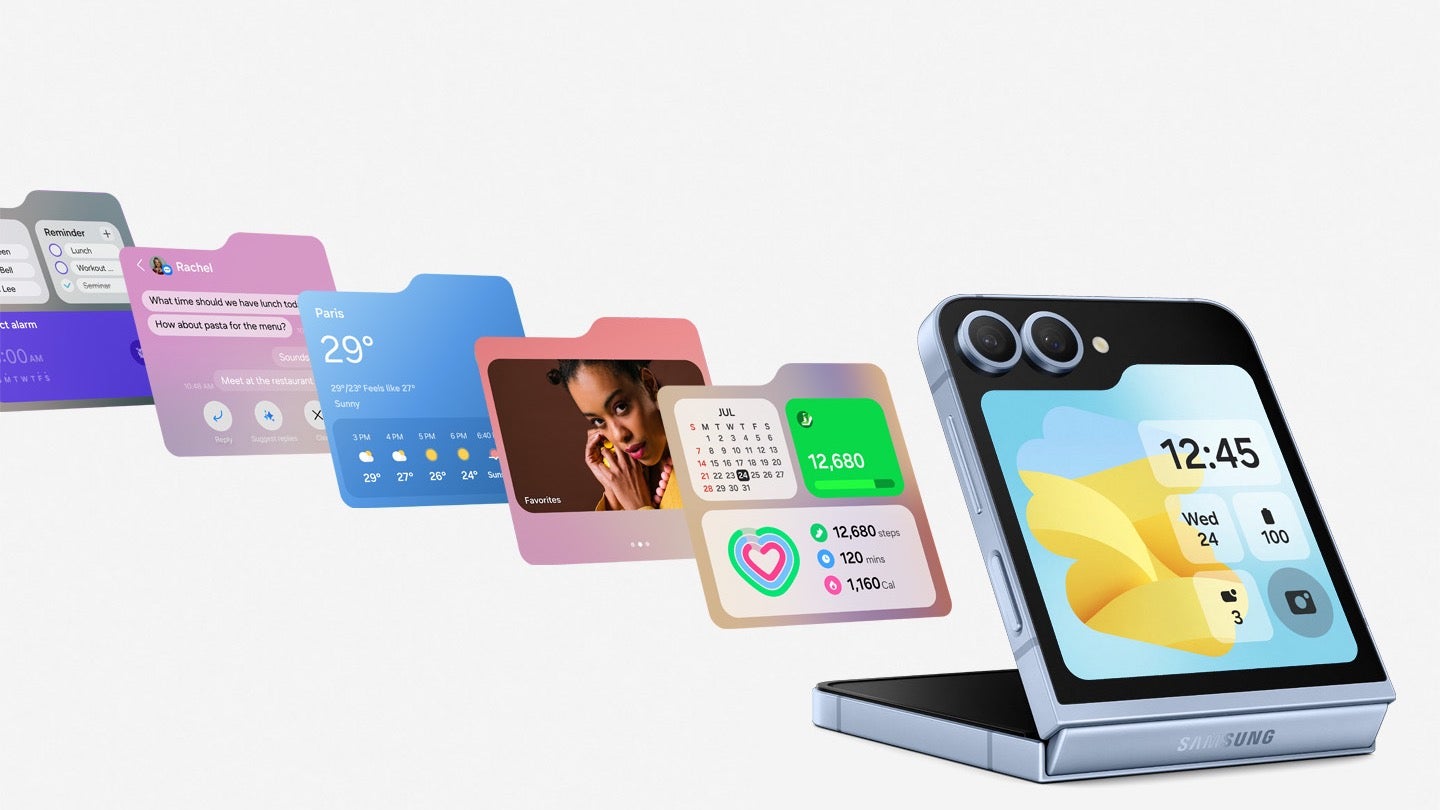
The Samsung Galaxy Z Flip 5 and Z Flip 6now support Google Wallet on their cover screens, thanks to the MultiStar widget from Samsung’s Good Lock customization suite. Previously, Z Flip users could only make payments using the default card in Google Wallet without opening their phones. However, they had to open their devices to switch cards or access loyalty cards.This new functionality, likely enabled by a recent update to either MultiStar, Google Wallet, or Samsung’s One UI 6.1, allows users to add Google Wallet to their cover screen. To do this, they need to download Good Lock, a customization suite for Galaxy phones, and then use the MultiStar module to add the Google Wallet widget to the cover screen.
It’s important to note that this feature is only available on Z Flip 5 and Z Flip 6 devices running One UI 6.1 or later. For those who have these devices, the addition of Google Wallet to the cover screen is a welcome change, as it makes mobile payments even more convenient and streamlines the user experience.
Samsung’s Good Lock MultiStar module now supports Google Wallet on the Z Flip 5 and Z Flip 6 | Image credit — Android Police
The Z Flip series has always been popular for its unique foldable design and compact form factor. However, the limited functionality of the cover screen has been a common complaint among users. Samsung has been gradually improving this with each new model, and the addition of Google Wallet support is a significant step forward.
It’s unclear exactly when this support was added, but users have recently reported being able to use Google Wallet on their cover screens. This suggests that the feature may have been quietly rolled out in a recent update.
For those who rely on Google Wallet for their mobile payments, this new feature is a game changer. It eliminates the need to constantly open and close their phones to make payments, switch cards, or access loyalty cards. Everything can now be done directly from the cover screen.
WordPress admins must update their websites with the latest ProfileGrid plugin release. A severe privilege escalation vulnerability in ProfileGrid plugin could allow admin access to target WordPress sites.
In a recent post, team Wordfence shared details about a serious privilege escalation vulnerability in the ProfileGrid plugin that threatened thousands of WordPress sites.
ProfileGrid—User Profiles, Groups, and Communities is a dedicated plugin for WordPress sites that allows users to set up user profiles, communities, directories, groups, and other interactive interfaces. The plugin currently boasts over 7,000 active installations, hinting at the huge number of websites potentially at risk due to the underlying plugin flaw.
As explained, the vulnerability affected the plugin’s pm_upload_image AJAX action due to a lack of validation. An authenticated adversary could exploit the flaw to gain elevated privileges, even gaining admin access to the target sites from subscriber-level access.
The vulnerability received the CVE ID CVE-2024-6411, achieving a high severity rating and a CVSS score 8.8. It first caught the attention of security researcher Tieu Pham Trong Nhan from TechlabCorp, who reported the matter via Wordfence’s bug bounty program, and won $488 bounty.
This vulnerability affected all plugin versions until version 5.8.9. Following this bug report, Wordfence coordinated with the plugin developers for a patch, which the developers then rolled out with ProfileGrid version 5.9.0 released earlier this month.
Although there appear no exploitation attempts of this flaw in the wild, the plugin’s official WordPress page currently shows only 36.7% running the latest release, whereas the rest of the users continue to run the older, vulnerable plugin versions. Hence, given the threat, it’s crucial for all WordPress users to update their sites with the latest plugin release as soon as possible.
Moreover, it’s also important to check all plugins running on their websites for possible security fixes in order to avoid potential threats.
Full-time software engineer and part-time Twitch streamer Ali Diamond is used to seeing herself on screen, probably because she’s the one who turns the camera on.
But when Diamond received a Direct Message (DM) on Twitter earlier this year, she learned that her likeness had been recreated across a sample of AI-generated images, entirely without her consent.
On the AI art sharing platform Civitai, Diamond discovered that a stranger had created an “AI image model” that was fashioned after her. The model was available for download so that, conceivably, other members of the community could generate their own images of Diamond—or, at least, the AI version of her. To show just what the AI model was capable of, its creator shared a few examples of what he’d made: There was AI Diamond standing what looked at a music festival, AI Diamond with her head tilted up and smiling, and AI Diamond wearing, what the real Diamond would later describe, as an “ugly ass ****ing hat.”
AI image generation is seemingly lawless right now.
Popular AI image generators, like Stable Diffusion, Dall-E, and Midjourney, have faced valid criticisms from human artists that these generators are copying their labor to output derivative works, a sort of AI plagiarism. AI image moderation, on the other hand, has posed a problem not only for AI art communities, but for major social media networks, too, as anyone can seemingly create AI-generated images of someone else—without that person’s consent—and distribute those images online. It happened earlier this year when AI-generated, sexually explicit images of Taylor Swift were seen by millions of people on Twitter before the company took those images down.
In that instance, Swift had the support of countless fans who reported each post they found on Twitter that shared the images.
But what happens when someone has to defend themselves against an AI model made of their likeness, without their consent?
Today, on the Lock and Code podcast with host David Ruiz, we speak with Ali Diamond about finding an AI model of herself, what the creator had to say about making the model, and what the privacy and security implications are for everyday people whose likenesses have been stolen against their will.
For Diamond, the experience was unwelcome and new, as she’d never experimented using AI image generation on herself.
“I’ve never put my face into any of those AI services. As someone who has a love of cybersecurity and an interest in it… you’re collecting faces to do what?”
At its I/O 2024 developers’ conference in May, Google announced plans to support Ultra HDR image capture across all third-party apps with built-in camera functionality. It appears the company has made some progress towards this. It has updated the CameraX library with initial support for Ultra HDR capture, laying the groundwork for a public rollout.
Google prepares to bring Ultra HDR image capture to all camera apps
HDR or high dynamic range is an advanced camera technology that uses computational photography and image stacking to produce vibrant images with excellent contrast. Ultra HDR is a JPEG-based HDR image format created by Google. The company offers an API for Android 14 and higher that app developers can implement to capture HDR images on supported devices. These JPEG image files have an HDR gain map embedded in their metadata.
The benefit is that these pictures can be viewed on any device, even those without an HDR display. When not supported, users will see standard (SDR) JPEG images. But when supported, the HDR gain map is applied over the SDR version of the image to enhance the vibrancy and contrast of colors. Any camera app can capture these JPEG-based HDR images using Google’s Ultra HDR format as long as the device has the necessary hardware capabilities.
However, Google’s API system has limited its adoption, particularly on apps where photography isn’t a primary function, such as social media apps. The API that enables Ultra HDR for camera apps in Android 14 is part of Camera2, not CameraX. The former comes with the Android OS framework and offers advanced camera functionality. “Think full-fledged third-party camera apps with pro-level controls over multiple lenses,” Android expert Mishaal Rahman explains.
On the other hand, CameraX is bundled with the Jetpack support library and is better suited for social media apps and other apps that offer built-in camera functionality for adjacent features. While developers are free to select either API, CameraX’s simplicity means apps that aren’t necessarily camera apps usually forego Camera2. As such, they miss out on the latest or advanced features or get them later than regular camera apps. The same is happening with Ultra HDR.
Google has already made some progress
While the Ultra HDR API has been available on Camera2 since the beginning, Google is finally bringing it to CameraX. The company updated the CameraX library in April to support Ultra HDR image capture on all Android camera apps. Spotted by Rahman, the updated version (v1.4.0) isn’t available publicly yet. Maybe Google still has some work to do. He explained the technical tidbits of the feature in a lengthy post on Android Authority.
The gist is that your social images might soon be more vibrant. According to the report, Google Chrome is currently the only app that “fully” supports Ultra HDR images across Android and desktop. Hopefully, developers of other third-party apps will quickly adopt the updated version of the Jetpack CameraX library as soon as Google releases it. All high-end Android phones and some newer Windows PCs can display Ultra HDR images.
Airlines often become the target of hackers as they contain sensitive personal and financial details of passengers as well as travel schedules and loyalty programs.
Since airlines are attractive to threat actors, disrupting their operations can be quite damaging to their economic and reputational statuses.
Cybersecurity researchers at BlackBerry discovered that in Latin America, an Akira ransomware attack targeted an airline in June 2024 by using SSH to gain initial access reconnaissance and persistence through legitimate tools and LOLBAS.
Akira Ransomware Attacking Airline
Before employing the ransomware, the Linux-based attacker had exfiltrated critical data.
AKIRA is also known as Storm-1567 RaaS group (aka Punk Spider and GOLD SAHARA), which embraces the double-extortion method and often abuses legitimate software.
This group began its activities in March 2023 and has already received over $42 million in ransoms from more than 250 organizations worldwide, operating across different sectors of the economy.
Akira not only focuses on Windows systems but also has Linux variants, such as one for VMware ESXi virtual machines, which shows how versatile it can be for any IT environment.
Attack chain (Source – BlackBerry)
The attack on Latin American airlines by Akira ransomware was executed by exploiting an unpatched Veeam backup server via CVE-2023-27532.
Previously, the operators of Akira gained access by utilizing CVE-2020-3259 and CVE-2023-20269.
SSH was used to gain entry into the system by attackers who created an admin user and employed legitimate tools such as Advanced IP Scanner for their recon. In 133 minutes, they were able to exfiltrate some data through WinSCP.
Antivirus protection was turned off the following day, and the network was infected with Akira ransomware (w.exe). Shadow copies were deleted to restrict recovery.
This attack used different sound programs and LOLBAS methodologies like smbexec from Impacket, NetScan, and AnyDesk for persistence.
This incident involved sophisticated tactics aimed at making maximum impacts both in terms of consequential damages and ransom amounts that could be paid to secure the release of affected files, BlackBerry researchers said.
This Latin American airline was hit by Akira ransomware using the endpoint logs, which showed that Remmina was used, and this suggests that the attackers were likely Linux-based.
Data exfiltration occurred via IP 77.247.126.158. Within UTC working hours for two days, the attack indicates actors may be from a timezone close to or in UTC, possibly Western Europe.
Akira is a Ransomware-as-a-Service operation that normally targets small and medium-sized businesses but has also attacked some large companies in North America and Europe.
The occurrence underlines the critical nature of immediate patching and software updates within corporate networks in order to block such sophisticated cyber threats and highlight the expansion of this group into Latin America, among other things.
“Is Your System Under Attack? Try Cynet XDR: Automated Detection & Response for Endpoints, Networks, & Users!”- Free Demo
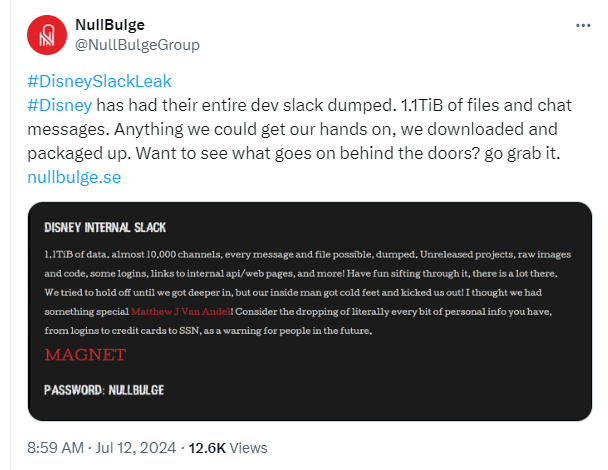
A group of cybercriminals going by the handle NullBulge claims to have downloaded the Slack channels used by Disney’s developers.
“#DisneySlackLeak
#Disney has had their entire dev slack dumped. 1.1TiB of files and chat messages. Anything we could get our hands on, we downloaded and packaged up. Want to see what goes on behind the doors? go grab it.”
The group says it got a hold of a huge amount of data, including unreleased projects and login info:
“1.2 TB of data, almost10,000 channels, every message and file possible, dumped. Unreleased projects, raw images and code, some logins, links to internal api/web pages, and more! Have fun sifting through it, there is a lot there. We tried to hold off until we got deeper in, but our inside man got cold feet and kicked us out! I thought we had something special {name}! Consider the dropping of literally every bit of personal info you have, from logins to credit cards to SSN, as a warning for people in the future.”
This seems to indicate that the group was helped by an insider, and that it might have obtained even more had that person not backed out of assisting. It’s unlikely that NullBulge had access to customer data through these Slack channels, but it does look as if the group accessed a lot of material that Disney was working on.
Calling itself a hacktivist group that aims for better compensation and protection of artists’ rights, the group then announced the breach on infamous data leak site BreachForums and provided screenshots of its findings.
Post by NullBulge on BreachForums
“Hi there folks, it is us again.
Yesterday we leaked some small DB, now we leak the big guns.
1.1TiB of data. almost 10,000 channels, every message and file possible, dumped. Unreleased projects, raw images and code, some logins, links to internal api/web pages, and more! Have fun sifting through it, there is a lot there.
Perfect for gathering intelligence and more.”
The earlier post NullBulge is referring to is a WordPress database dump of the howwelove[.]com domain. We have no idea what the group’s beef with this relationships-focused website is.
Disney is yet to make a comment. We’ll keep this post updated with the latest developments
We don’t just report on threats – we help safeguard your entire digital identity
Cybersecurity risks should never spread beyond a headline. Protect your—and your family’s—personal information by using identity protection.
I’ve been an Android user since 2009 when I purchased the Motorola Droid from Verizon. I started working here at AndroidHeadlines in 2012, and since then, I’ve reviewed almost every smartphone and most smartwatches ever since. In 2020, I got bored of the same old and bought an iPhone 12 Pro. Shortly after that, I traded in my Fitbit for an Apple Watch Series 5. I quickly fell in love. The main reason why I ditched my Fitbit was because it decided it was “too far” away from my phone to sync, even though it was literally touching it.
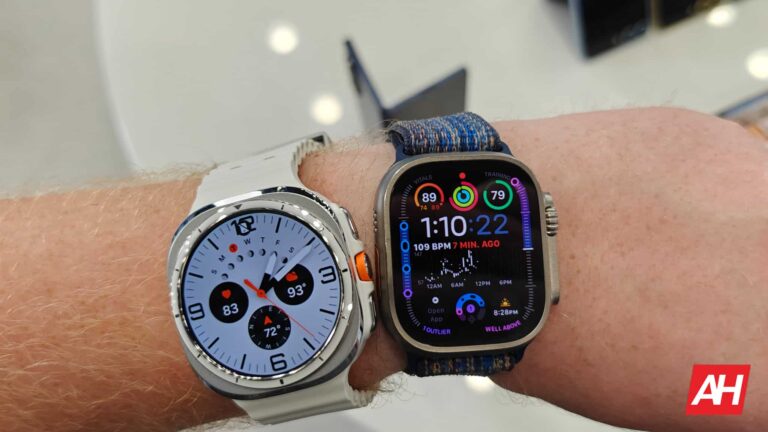
After a couple of years, I upgraded to the Apple Watch Ultra and never looked back. Since switching to the iPhone and Apple Watch, I’ve reviewed a fair number of Wear OS watches, including the first Google Pixel Watch, the OnePlus Watch 2, and the Galaxy Watch 6 Classic, and I even bought the Galaxy Watch 5 only to return it. But the Galaxy Watch Ultra is the watch that is making me ditch the Apple Watch for good.
When the leaks of the Galaxy Watch Ultra started to come out, I was intrigued. Not so much because it would look a lot like Apple’s option, but because it’s a big watch. I never used to like big watches, but the Apple Watch Ultra changed that for me. When I saw the Galaxy Watch Ultra in person last week ahead of Unpacked, I was sold.
After Unpacked, I picked up my review devices, and if it weren’t for the fact I needed a phone to connect my Galaxy Watch Ultra too, it would have been the first thing I unboxed. And so far, I’m loving this watch.
What Samsung did right
With the Galaxy Watch Ultra, Samsung did a lot right, but there are still some complaints here. It’s a big watch, with “cushions” on the corners to help keep it from getting destroyed. That’s because this watch is made for hikers, bikers, and more. However, I wish that Samsung had added more battery inside this watch since it is larger. Instead, it has the same battery size as the Galaxy Watch 6 Classic 47mm. It’s okay since the watch lasts multiple days on a charge, but a bigger battery would definitely be welcome.
Speaking of battery life, it’s pretty decent. So far, I’ve found that with AOD on, I’d get right around 48 hours or two full days. With it off, it’s a little over three days. That’s still more than the Apple Watch Ultra.
The new processor inside the Galaxy Watch Ultra is also very snappy, the Exynos W1000. While some thought it was laggy from the hands-on demos, that’s not entirely true. It was laggy due to the demo software being loaded onto the device. Without that software, it’s as smooth as butter.
What Samsung’s missing
The biggest thing missing from the Galaxy Watch Ultra is the rotating bezel. It’s a feature that Samsung introduced quite some time ago with the Samsung Gear S2 back in 2015. It’s a fan favorite and an incredible way to navigate through Wear OS on your wrist. It’s a bit strange that it was not included on the Galaxy Watch Ultra, even on the Quick Button, which actually rotates but does nothing.
There are some things that Apple has in its watchOS that are still missing from Wear OS. Like a super easy way to open up Google Wallet. You can open Apple Pay by double-tapping the second button on the watch; that doesn’t work on the Galaxy Watch Ultra. And besides tracking my activity, that’s the second thing I do with my watch most often. I will say that the Tiles are better than Apple’s widgets on the watch, but things like the Google Home Tile are still a bit cumbersome compared to using Apple’s Homekit on its watches.
The last thing that Samsung is missing is a more robust health app. Samsung Health is pretty good, and does have better challenges than Apple has. But Apple’s Health app has so many different things that it can track for you, it really leaves Samsung in the dust. I’m someone who has a Vitamin D deficiency, so I try to spend more time outside in the sun. The Apple Watch can track that for me, I found that at Google I/O I spent about 10 hours outside which was crazy. But the Galaxy Watch Ultra does not do that. That’s just one example of what the Apple Health app can record, but I really hope Samsung does add more of those features to its health app.
Why Samsung got me to ditch the Apple Watch?
Most of this year, I’ve been wanting to ditch my Apple Watch. But there are a few things that really kept me on the Apple Watch. One, was how easy Apple Pay is to use on it. Another specific app that is not available on Android is Flighty. It’s a really good app to use for someone that travels a lot like me. It gives me updates on my flight, oftentimes before the Airline does. And having that on my wrist is really useful.
The Galaxy Watch Ultra has gotten me to stick around, even though I have not written the review yet, I do plan to stick with it until at least the Pixel Watch 3 launches next month. The more and more I look at the Galaxy Watch Ultra, the more I like this polarizing design.
A lucrative opportunity to win hefty bounties has arrived for security researchers. Google has increased the bug bounty payouts for its Vulnerability Reward Program by fivefold, rewarding up to $151,000.
Google Increased Bug Bounty Rewards To Lure Researchers
According to the recent updates Google shared for bug hunters, the tech giant has announced a five-fold increase in its bug bounty program rewards.
Google Vulnerability Rewards Program (VRP) has long been an attractive money-making opportunity for security researchers to earn well-deserved bounties for their security findings. However, as Google stated, the subsequent security upgrades in Google products have made finding bugs challenging for the security community. Hence, the firm decided to remunerate the researchers for the time and effort involved in this task.
As per the revised reward limits, researchers can earn a maximum reward of $101,010 for a high-severity remote code execution vulnerability report. Plus, for an exceptional vulnerability report, Google applies a 1.5x modifier to jazz up the rewards, thus making $151,515 the maximum reward amount.
This 1.5x modifier doesn’t only apply to the RCE reports. Instead, Google has introduced this reward-enhancing formula for all bug reports. That means in addition to a five-times increase, researchers may also earn even higher payouts for exceptional reports. Some examples that Google listed are shared below.
Example Vulnerability
New Reward
Old Reward
A logic flaw leading to an accounts.google.com @gmail.com account takeover
($50,000 * 1.5) = $75,000
$13,337
XSS on idx.google.com
($10,000 * 1.5) = $15,000
$3,133.70
A logic flaw disclosing PII on home.nest.com (a tier 1 acquisition domain)
($2,500 * 1.5) = $3,750
$500
While the 1.5x modifier applies to exceptional-quality reports only, Google also decided to reward good-quality and low-quality reports with a 1x and 0.5x increase, respectively.
Besides, Google has also modified the application tiers for its bug bounty program, making it more transparent for the researchers. Interested researchers may find the details here to apply accordingly.
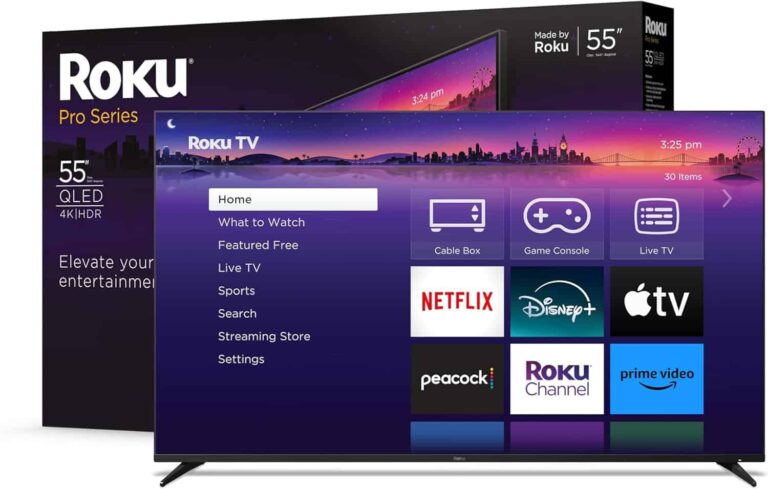
Roku announced its first set of TVs last year, which included the Select and Pro models. The Pro model is a more high-end TV set with a QLED panel, and today it is on sale ahead of Prime Day. You can save $200 on this 55-inch Roku Pro series TV, which is now just $699.
That is actually a really incredible price for this TV, seeing as most other QLED 4K TVs are much closer to $1,000. And this one does have Roku built-in.
Roku built-in is not new for TVs; it’s what has made companies like TCL and Hisense so popular here in the US. But now we’re getting TVs straight from Roku, which means that their software is going to be even more integrated. With Roku, you can, of course, watch live TV and even use your cable box. So whether you want to cut the cord or not, Roku has you covered here.
Of course, Roku also has a slew of great apps available, including Netflix, Apple TV+, Peacock, Hulu, The Roku Channel and many more. Popular FAST channels like Tubi and Pluto TV are also available.
Roku has included a QLED panel on this TV, which provides you with some incredible color accuracy here and is pretty bright. This panel is also a 120Hz panel, making it great for gaming. Dolby Vision IQ is included, as well as the new Roku Voice Remote Pro.
If you’re in the market for a new TV, this is definitely a good one to pick up, and at the lowest price ever.
ViperSoftX is an advanced malware that has become more complicated since its recognition in 2020, to the extent that eBooks are used on Torrent sites to spread across systems.
Unlike other kinds of malware developers who mainly focus on developing new code instead of improving evasion techniques, ViperSoftX’s creators make use of various components from offensive security scripts.
Due to this, ViperSoftX is a major threat to users who want to have effective countermeasures.
It needs a significant comprehension of its infection chain, payload execution as well and stealth techniques for the development of strong preventive measures.
Cybersecurity researchers at Trellix recently discovered that the newest variant of the malware uses CLR (Common Language Runtime) to load PowerShell commands into AutoIt dynamically and, in turn, improves its own evasive abilities and for stealthy PowerShell execution.
ViperSoftX Weaponizing AutoIt & CLR
It all begins when victims download what looks to be a legitimate book from a rogue torrent.
This RAR archive contains hidden threats such as a folder, deceptive shortcut files, and scripts that pretend to be pictures.
Infection flow (Source – Trellix)
When the shortcut is run, it triggers a series of commands that uncover the hidden folder, name the sizes for the disk in a specific manner, create enduring Windows tasks, and drop hidden AutoIt scripts into the operating system.
Rar folder content (Source – Trellix)
This complex multi-stage attack leverages file obfuscation and automation to deploy malware while evading detection.
eBook torrent link (Source – Trellix)
Researchers said it leverages AutoIt’s ability to interact with the .NET CLR framework, enabling PowerShell command execution.
The malware employs advanced mechanisms to evade AMSI, decrypt multi-layered payloads, and collect information from the system to target cryptocurrency wallets.
Afterward, the data, including highly detailed user system information, is sent to its C2 server through false hostnames and Base64-encoded user agents.
Through this layered evasion technique and legitimate traffic blending, ViperSoftX can successfully penetrate targeted systems without detecting or stealing cryptocurrencies.
To send collected data to a remote server, the pOPSKX function establishes a web client, sets up headers, and sends an abnormal POST request with a content length of 0 for avoidance.
It then checks the “worker” header of the server to determine if there is a need for more work and whether the global worker variable should be true or false.
There are also Cloudflare services that obfuscate where the traffic comes from, making it impossible to trace.
The viperSoftx malware itself finds relevant information, takes note of it, and shares this data with command and control (C2) servers.
Then, it performs screen captures on screenshots in the Windows systems clipboard, looks for other payloads on the internet, runs reconnaissance tools or utilities against targets, and uses a self-destruction mechanism where necessary.
With CLR, PowerShell can be run in AutoIt to evade detection and patching Antimalware Scan Interface (AMSI).
Understanding ViperSoftX’s tactics and developing comprehensive defenses can mitigate its threat.
“Is Your System Under Attack? Try Cynet XDR: Automated Detection & Response for Endpoints, Networks, & Users!”- Free Demo

.webp)




.webp)
.webp)
.webp)