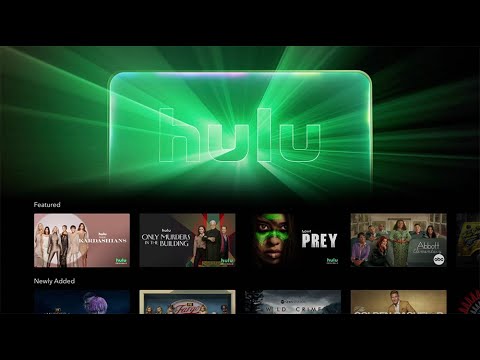
Upon opening the Disney+ app, subscribers to both services will now see a dedicated Hulu tile. Clicking on it opens a Hulu Hub, granting access to the thousands of movies and series from Hulu’s extensive library, seamlessly integrated within the Disney+ interface. This eliminates the need to switch between apps, offering a more fluid and user-friendly experience.
While today’s launch marks a major milestone, it’s important to remember this is a beta phase, with the official launch scheduled for March 2024. This limited release allows Disney to gauge user feedback and refine the experience before the full-scale rollout. Additionally, parents have ample time to adjust parental controls and ensure their children only access appropriate content.Some may wonder if integrating Hulu’s more adult-oriented content conflicts with Disney+’s family-friendly image. However, Disney assures that ensuring a safe and secure environment for families remains a top priority. The two-step launch strategy allows for a smooth transition, providing parents time to adjust settings and create individual profiles for each family member.
Disney believes that Hulu on Disney+ will enhance subscriber engagement and value. By bringing diverse content under one roof, users can discover new titles they may have missed. Joe Earley, President of Direct-to-Consumer at Disney Entertainment, emphasizes the benefit of the Bundle, highlighting its competitive price point and the vast library of content it unlocks.
It’s an exciting next step for Direct-to-Consumer, but it’s important that people have managed expectations about what the experience is going to be – Joe Early, President of DTC, Disney
As exciting as this unified experience sounds, this may not be your cup of tea. If that’s the case, and you prefer your apps to remain separate, this will still be an option for you. This integration is not meant to replace either platform, thus Hulu + Live TV and Premium add-ons will still be accessible within the dedicated Hulu app.Disney encourages users to explore the beta version and discover the value that bundling both services offers, and believes access to Disney’s original content, blockbuster films, and Hulu’s rich library will entice standalone subscribers to upgrade and unlock the full potential of the platforms.
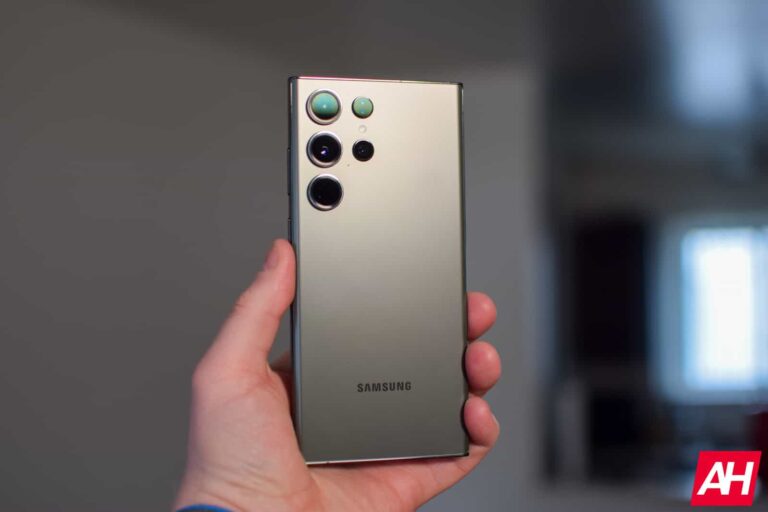
In December 2022, Samsung roped in Hubert H. Lee, a former Chief Design Officer for Mercedes, to lead its smartphone design team. It appears Lee and the team are planning a major design overhaul for the Galaxy devices. A new rumor says the Galaxy S25 series will look significantly different from the Galaxy S24.
Samsung’s Galaxy S25 may bring major design changes
Having worked at Mercedes for over two decades in multiple design-related roles, Lee brought a wealth of experience in the field of product design to Samsung. The Korean behemoth said it hopes the design expert to help shape the look and feel of its Galaxy devices through his unique and visionary perspective. Lee echoed the company, saying that his team will work on creating new mobile experiences through the art of design.
However, Samsung’s smartphones saw no design evolution this year. One thing it did was create a unique brand identity with the same rear design for all models—budget and flagship. Based on leaks, the story will remain unchanged next year. It is keeping the same design, with low-cost models adding a minor differentiation—the frame is slightly bulged around the power and volume buttons. Flagships have a completely flat frame.
It appears the Korean firm’s design team has been working on a major overhaul behind the scenes. While we don’t have visuals to tell you precisely how different the Galaxy S25 will look from the Galaxy S24, noted industry insider Revegnus (X/Twiter username) says the 2025 flagships are expected to bring “significant design changes.” They say Samsung has tasked Lee with “redefining the Galaxy brand’s past image to provide a fresh feel.”
Unfortunately, no other details are available. But the way the tipster presented the information, it looks like Samsung is gearing up for a complete design overhaul. Everything from the rear camera array to the overall shape may see a redesign. We might get to know more about these planned design changes once the Korean behemoth brings the Galaxy S24 series to the market.
The 2024 flagships will debut in January
There isn’t a lot of time to go before the Galaxy S24 launch now. Samsung reportedly plans to unveil its 2024 flagships on January 17, which is six weeks away. The devices may hit the stores on January 30. If history is any indication, more detailed rumors about the Galaxy S25 series will start coming in a few weeks after the Galaxy S24 goes on sale, so stay tuned.
Attention Kali Linux enthusiasts! Your holiday treat has arrived with the release of Kali Linux 2023.4, packed with a plethora of new features. Download now and elevate your Kali experience!
As 2023 draws to a close, Kali Linux enthusiasts are in for a treat with the latest release, Kali Linux 2023.4. Packed with innovative features and improvements, this update focuses on expanding platform support and refining existing capabilities.
Cloud ARM64 Marketplaces Integration
One standout feature is the addition of ARM64 support on Amazon AWS and Microsoft Azure marketplaces. This enhancement not only provides users with more flexibility in instance options but also promises an improved price-to-performance ratio. While Kali Linux has consistently prioritized ARM architecture, the team acknowledges ongoing efforts to ensure broader compatibility.
Vagrant Hyper-V Support for Seamless Virtualization
Kali Linux’s Vagrant offering receives a significant upgrade with added support for Hyper-V environments. Targeted at users familiar with Vagrant’s command-line interface, this feature allows for seamless management of virtual machines.
Users can customize their Kali environments by defining various parameters such as operating system, CPU, RAM, storage, networking, and additional scripts or commands for installation and configuration.
Raspberry Pi 5 Compatibility
Exciting news for Raspberry Pi enthusiasts as Kali Linux introduces dedicated support for the latest Raspberry Pi 5. Users can either download the pre-built image directly or automate the process using Raspberry Pi Imager. While the image is currently in a BETA state and limited to ARM64 architecture, the Kali team expresses optimism about additional flavours in the future.
Embracing GNOME 45 for Enhanced User Experience
Kali Linux now integrates with the latest GNOME 45, bringing aesthetic improvements and functionality enhancements. Users opting for GNOME as their desktop environment can enjoy features like full-height sidebars, faster search in the Nautilus file manager, and updated themes for various components. Despite some pending updates for Nautilus, the overall user experience is expected to be more refined.
Revamped Internal Infrastructure with Mirrorbits
Undergoing significant infrastructure changes, Kali Linux bids farewell to MirrorBrain and welcomes Mirrorbits as the new “mirror redirector.” This essential service, responsible for directing requests to the nearest mirror, has undergone a successful migration.
Leveraging modern technologies like Go and Redis, Mirrorbits proves to be a robust solution, initially developed by Ludovic Fauvet for the VLC media player. The transition, though not without challenges, reflects Kali’s commitment to improving user-facing services.
Introduction of New Tools and Packages
True to Kali tradition, the 2023.4 release introduces a host of new tools and updates to existing ones. Notable additions include:
cabby: TAXII client implementation
h8mail: Email OSINT and Password breach hunting tool
ReconSpider: Most Advanced Open Source Intelligence (OSINT) Framework
SPIRE: SPIFFE Runtime Environment for establishing trust between software systems
Additionally, various packages have been updated, and the Kali kernel has been bumped to version 6.5.0.
Continued Kali NetHunter and ARM Updates
The Kali NetHunter community remains active, showcasing impressive feats such as Doom running on Kali NetHunter TicWatch Pro 3 and speedy installations on Android 14. While ARM updates are relatively minimal, the inclusion of Raspberry Pi 5 support stands out as a significant addition.
As Kali Linux enthusiasts eagerly await the new release, the team encourages users to explore fresh images or update existing installations using the provided instructions. The live voice chat session with the Kali team on Discord offers an opportunity for direct interaction and Q&A.
To update your existing Kali Linux to Kali Linux 2023.4, use the following commands:
Whether you’re a seasoned Kali user or exploring it for the first time, the 2023.4 release promises an enhanced experience with its diverse features and community-driven ethos.
To stay updated on the latest developments, bug fixes, and announcements, users are encouraged to engage with the Kali Linux community and actively contribute to its growth. For more information and to download Kali Linux 2023.4, visit the official Kali Linux website.
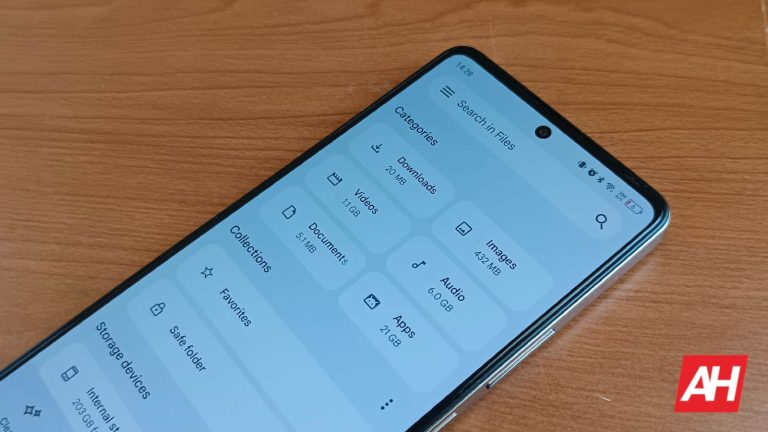
Google’s file manager app for Android, called Files by Google, is getting a powerful search tool. The Smart Search feature makes finding files easy even if you don’t know the file name. It lets you use text from an image or document to search for the file. You can also find audio and video files using the artist or album name.
Google adds a Smart Search tool to its Files app
Files by Google received an update to version 1.1421.575590873.0 on Tuesday. The official release notes published on the Play Store say the update introduces advanced search capabilities that make finding files easy. Aptly called Smart Search, the new tool scans the content of a file to give you relevant results for your search query. You don’t need to enter the file name.
For example, if you need to find your flight e-ticket but don’t remember the file name, you can enter any text found in it. This can be your name, airline name, place of origin, place of destination, or even the travel date. Files by Google will work its magic to pull up the file that contains the text provided by you. It will work for any file whose title isn’t known. All you need is a text present in the file.
Google doesn’t limit the tool to documents. It can find text in images too. Better yet, Smart Search can find the image if you provide its location info or name an object present in it. Finding all cat images in Files by Google has never been easier. On supported phones, you can view images in Ultra HDR. Music buffs can pull up audio and video files using the name of the artist, album, or title.
The latest update for Files by Google isn’t available widely yet. The folks over at Android Central received the update on one of their phones and could use Smart Search. Searching for the text “you” returned a bunch of screenshots with numerical file names. All of those screenshots contained the word “you” somewhere in them. Likewise, searching for “phone” brought up photos containing a phone as an object.
Google is still working on the tool
Google says it is currently testing the Smart Search feature for Files. It may not always work perfectly. For example, the tool couldn’t find the location in images for some users. Moreover, the app doesn’t seem to proactively run this on-device scan all the time. So newly added files may not show up in search results. It might take a few days until the tool is fully functional after turning it on.
Smart Search appears to be enabled by default once you install the latest update for Files by Google. You can check for it from Files settings under the left hamburger menu. “If you downloaded the latest version of Files by Google and waited for a few days, but still can’t find files based on their content, Smart Search isn’t available for your device yet,” Google explains. You can click here to download the latest version of Files by Google.
Last year, Apple released the iPhone 14 series but it kept the much-anticipated Dynamic Island exclusive to Pro models. However, things have changed with the iPhone 15 line and changed for the better. All four iPhones come with Dynamic Island. That’s when Apple’s second biggest display supplier BOE decided to join the league and produce OLED displays for the iPhone 15 line. However, despite major investments in panel research and development, it consistently grappled with challenges. A new DigiTimes report (via Wccftech) claims that Apple supplier BOE has difficulty expanding the OLED supply for the iPhone 15 models due to light leakage issues.
Apple display supplier BOE faced a setback
BOE needs help making enough OLED panels for the basic iPhone 15. Apple permitted BOE to start making OLED panels in March 2023, but this permission was taken away in September. As a result, Apple canceled its order for these panels.
Initially, BOE was set to supply OLED displays for the standard iPhone 15 and the larger iPhone 15 Plus. However, the manufacturer faced complications when it encountered issues related to light leakage around the specific area of the OLED display, which is crucial for accommodating the TrueDepth camera, Face ID, and the location of the Dynamic Island, where the pill and hole cutouts are positioned.
GSMArena’s previous report accurately supports the current situation, highlighting that BOE had been “behind schedule.” Insiders mentioned that the Chinese display manufacturer would be excluded from the contract if things don’t improve soon.
Apple may continue sticking with Samsung for display
Samsung Display continues to dominate the OLED panel supply for the iPhone 15 series. It boasted a commanding 91% market share between June and August 2023. Meanwhile, BOE has faced production challenges. All of this leaves Samsung as the sole provider for the majority of iPhone 15 models. If BOE cannot address its supply issues, Samsung’s position as the primary supplier is likely to remain unchallenged.
Waze is back this month with not one, but two new driving experiences designed around the holiday season. They are suggestively named Gingerbread Man and Santa Claus, which makes a comeback after being extremely popular among Waze users in previous years.
The spicy Gingerbread Man driving experience is voices by Peloton instructor, Matty Maggiacomo. It includes moods like Snappy and drive icons like Slay Ride, which you can choose to customize your driving experience.
If you haven’t used Waze’s Santa Claus driving experience until now, know that the voice navigation can be paired his signature Sleigh and the mandatory Mood for Santa if you want to get the full festive experience.
Both new driving experience are available in English on iOS and Android for free, but only for a limited time. Keep in mind that while the Santa Claus driving experience might return next year, this could be your only chance to get spicy Gingerbread Man theme.
When Google announced the Pixel 8 Pro, it touted some advanced on-device AI. This makes it one of the smartest smartphones on the planet right now. The company actually implemented foundation models into the Tensor G3 chip. AI is the area where this chip’s strength lies, so it’s no shock that the company is going all out with it.
Google is adding Gemini to the Pixel 8 Pro
Bear in mind that we’re talking about the Pro variant of the Pixel 8 and not the regular one. If you want to purchase a Pixel 8 Pro, you won’t be sorry. It’s a fantastic phone to use, and it’s about to get better. In fact, you can read our Pixel 8 Review.
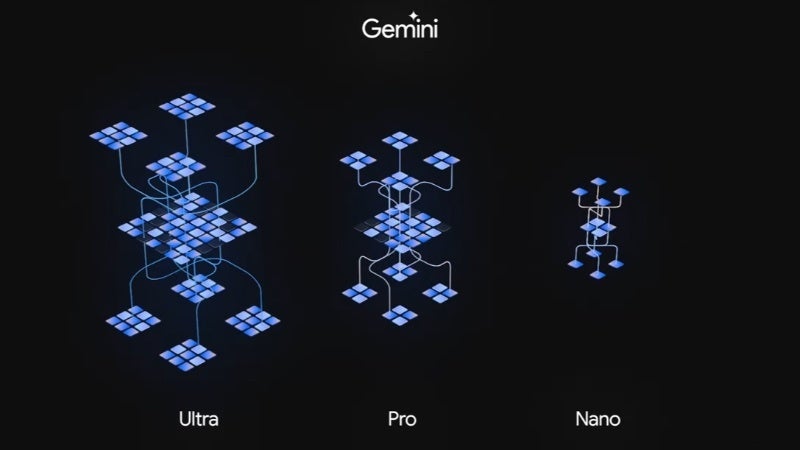
Gemini has three sizes: Gemini Ultra, Gemini Pro, and Gemini Nano. As you can tell, Gemini Nano is the smallest one, and that’s the one coming to the Pixel 8 Pro. It makes sense, as AI models are absolutely gargantuan in size. They’re much larger than what can physically fit on a small smartphone chip.
However, Nano is optimized to live on a smartphone chip, and its first home is the Pixel 8 Pro’s Tensor G3. With it onboard, the phone will get two new AI-driven features right off the bat.
The first feature is Summarize in Recorder. This will use AI speech recognition to scan through an audio recording. It will then use generative AI to write a short and sweet summary of said recording. It will be able to digest “loooooong” recordings as well. When you get your summary, you’ll see a succinct list of bullet points.
The next feature is Smart Reply for Gboard. This feature might not sound like something all too new and exciting, but the technology behind is new and exciting. As you can tell by the name, this feature lives in Google Gboard.
When you’re in a messaging app, Gboard will give you suggestions of what to type for your next message. We’ve had features like this before, but Smart Replies uses conversational awareness. It will be able to understand what the conversation is about, so it will be able to better provide appropriate replies. This is only for people using US English for Gboard on their phones.
This feature is dropping with the Feature Drop
Today, Google is pushing its latest quarterly Feature Drop for Pixel phones. Gemini Nano is hitting the Pixel 8 Pro in the Feature Drop. So, if you’re a Pixel 8 Pro owner, just expect your download size to be bigger than other Pixel owners’.
Google announced today the highly anticipated launch of Gemini, their next-generation and most powerful artificial intelligence (AI) model yet. Not only will it be part of their newest Pixel devices as part of the December Feature Drop, but will also be powering Bard.
Gemini is Google’s latest AI project, which was announced back at the I/O 2023 conference, and rumored to have been postponed until January. Fortunately, this didn’t actually happen and Google came through with the announcement today.
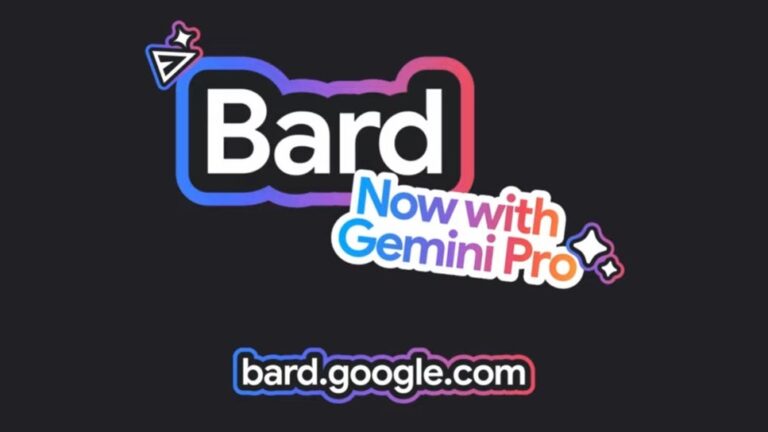
Bard now utilizes a specially-tuned version of Gemini Pro for improved English language operations, available initially in more than 170 countries and territories. This will enable Bard to have more advanced reasoning, planning capabilities, and understanding of tasks. It will also be able to quickly understand and act on different types of input, such as text, images, audio, video, and code. This marks the first step in Gemini’s integration with Bard, with further enhancements planned for early next year.
Early next year, Google will launch Bard Advanced, which will give users access to its most powerful models and capabilities, including Gemini Ultra. This advanced version of Bard will be able to handle even the most challenging tasks, and will be the last of the three flavors that Gemini 1.0 will be available in: Ultra for highly complex tasks, Pro for scaling across a wide range of tasks, and Nano for on-device tasks.
Source – Google
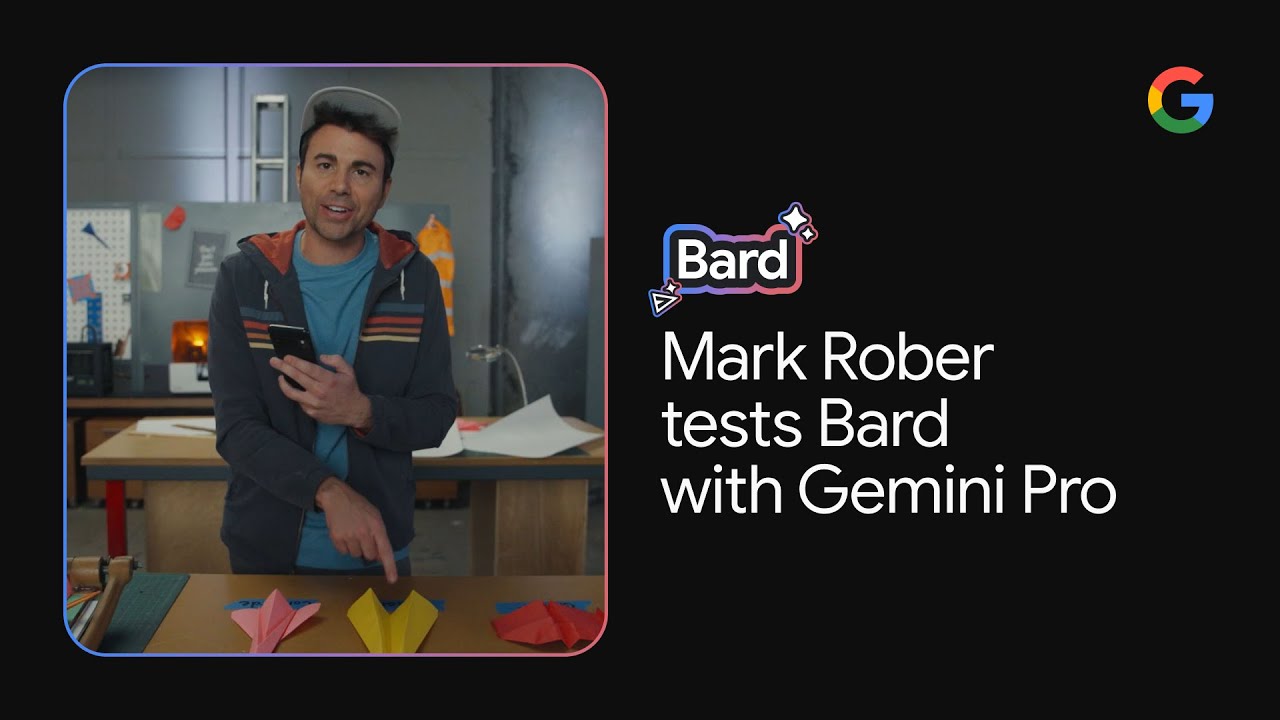
As far as performance, Google states that Gemini Pro outperformed leading AI models in various benchmarks, demonstrating its exceptional capabilities. Bard, empowered by Gemini Pro, received positive feedback, solidifying its position as a top free chatbot. To demonstrate, Google published the below video in collaboration with YouTuber Mark Rober, in which he uses Bard with Gemini Pro to design the most accurate paper plane and showcasing the tool’s potential to elevate the creative process.
As part of Google’s commitment to developing AI responsibly, the company says that it has built safety features into Bard, such as the “Google it” button, which allows users to verify information. The company is also working with researchers and developers to ensure that AI is not used maliciously.
With the addition of Gemini, Bard is poised to become the premier AI collaborator in the world, competing with current leaders such as ChatGPT. Users can try Bard with Gemini Pro today and experience its powerful capabilities for themselves.
Beneath the surface of the cyber realm, a silent menace emerges—crafted with the precision of the .NET framework, the Serpent Stealer slithers undetected through security measures, leaving traces of its intrusion.
Researchers at K7 Labs have analyzed the malware called “serpent.” This malware can bypass several security measures implemented in Windows, such as User Access Control (UAC), debuggers, and virtual machines.
It can also steal sensitive data, including browser data and passwords, and exfiltrate it using Webhooks and Discord abuse.
This information is significant for individuals and organizations looking to protect their systems from potential cyber threats.
Dive into the realm of a 64-bit portable executable, discreetly infiltrating systems with unparalleled stealth.
Serpent Stealer is on sale
Serpent Stealer is a stealer that has 24/7 support, FUD, very hard to decompile, steals cookies, FTP logins, SSH keys, passwords, system info and much more.#DarkWebpic.twitter.com/iNcvm89b9u
Witness the Serpent Stealer’s insidious data harvesting prowess.
Like a digital plunderer, it raids Google Chrome’s autofill data, extracting personal details for potential identity theft.
Delving further, it uncovers the user’s online history, a treasure trove revealing vulnerabilities and patterns ripe for exploitation.
The Webhook Courier of Stolen Secrets
Embark on a journey through the Serpent Stealer’s clandestine transmission route.
Utilizing Discord webhooks, this digital courier discreetly ferries stolen data to the attacker’s command-and-control server, ensuring a seamless exchange of pilfered secrets, reads the report.
Explore the Serpent Stealer’s insatiable appetite for passwords.
Beyond browsers, it infiltrates crypto wallets and gaming platforms, seeking to unearth login credentials that unlock doors to valuable assets, perpetuating its unrelenting data heist.
UAC Ballet
Uncover the sophisticated dance of evasion orchestrated by the Serpent Stealer. With a UAC bypass mechanism, it sidesteps Windows’ User Account Control safeguards, operating with elevated privileges and rendering security barriers powerless in its quest for sensitive data.
Peer into the Serpent Stealer’s utilization of Fodhelper.exe, a legitimate Windows component.
Exploiting this trusted tool, the malware executes commands with administrative privileges, effectively disabling security barriers and perpetuating its stealthy presence.
Google Chrome, Adobe Acrobat Reader, TeamViewer, you name it—there’s no shortage of third-party apps that IT teams need to constantly check for vulnerabilities. But to get a better picture of the problem, let’s bust out some napkin math.
If you’re not using a comprehensive tool like ThreatDown Vulnerability Assessment (free for all ThreatDown users), it’s going to take a solid combo of resourcefulness and patience to do that much vulnerability assessment on your own.
With that in mind, we’ve compiled this list of the five things IT teams need to do in order to find vulnerabilities in their environment.
Vulnerability Assessment: A Step-by-Step Guide
1. Cataloging Applications
The crucial first step involves cataloging every application within the IT environment. This foundational task, akin to a thorough inventory check, is essential for identifying potential security issues.
2. Software Version Analysis
It’s not just about identifying the applications but also understanding their versions.
Why? Because you’re not just looking for vulnerabilities in one version of 7-Zip; to see if you’re truly affected, you’ll need to match your list of applications against vulnerabilities across different versions, such as 3.5 or 3.7.4. Not to mention that if your organization’s workforce doesn’t require regular updates of important software, then you might find countless versions of the same app dating back to the longest-term employees.
3. Correlating with CVE Databases
Matching the cataloged applications and their versions against entries in Common Vulnerabilities and Exposures (CVE) databases is the next critical step. This process helps in pinpointing specific vulnerabilities applicable to the software in use.
Here’s the play-by-play:
Go to https://cve.mitre.org/cve/search_cve_list.html
Type in the application you want vulnerability info on in the search bar.
Pinpoint whether the vulnerability impacts the specific version of the software that’s present throughout your network.
Rinse and repeat.
4. Prioritizing Threats
This type of repetitive, sometimes monotonous work isn’t just about identifying a CVE—it’s also about determining its severity. After identifying potential vulnerabilities, the next challenge is to prioritize them by CVSS and by asking questions that should inform you and your team about the best response. This includes questions like:
Is the vulnerability being actively exploited in the wild?
Is the CVE impacting critical tools or areas?
How important is the affected asset in maintaining operational continuity?
5. Routine Vulnerability Assessment
Remember, this is not a one-time task. You don’t just run vulnerability assessment once a year, or even once a month; you should be doing this on a daily basis. Why? Because every day counts. New CVEs are constantly popping into existence left and right, and if you’re not on top of them, you could be the target of an attack.
For teams seeking a more streamlined approach, the ThreatDown Vulnerability Assessment tool offers a solution.
Single, Lightweight Agent
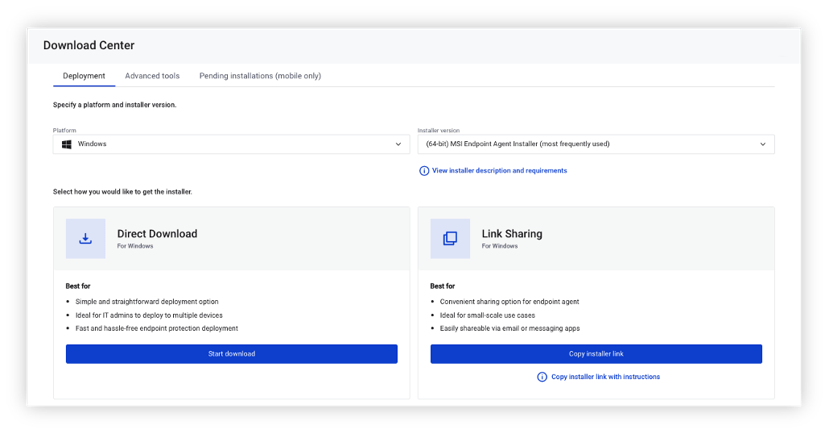
To simplify security and reduce costs, Vulnerability Assessment deploys easily in minutes without a reboot, using the same agent and cloud-based console that powers all ThreatDown endpoint security technologies.
Quick Vulnerability Scans
Identifies vulnerabilities in modern and legacy applications in less than a minute.
Accurate severity ratings
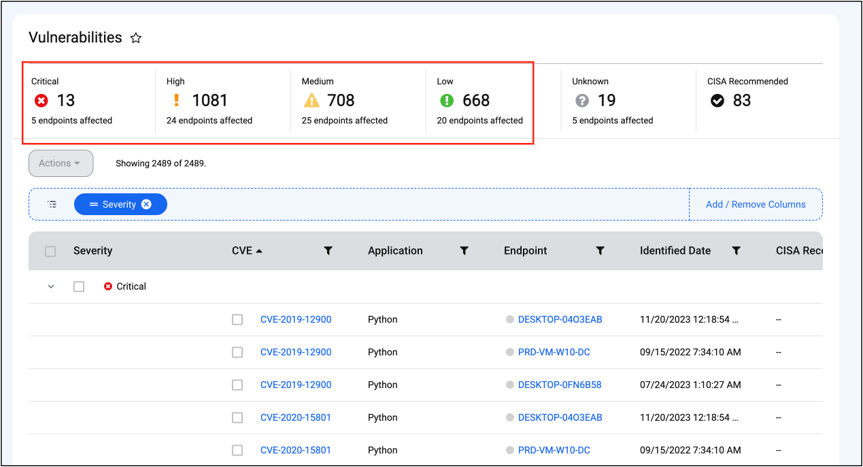
Utilizes the Common Vulnerability Scoring System (CVSS) and Cybersecurity and Infrastructure Security Agency (CISA) recommendations to evaluate and rank vulnerabilities for proper prioritization.
Security Advisor Integration
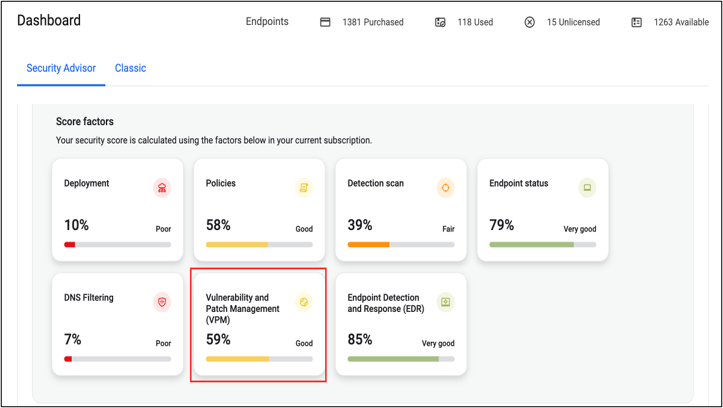
Our Security Advisor tool to analyzes an organization’s cybersecurity health—such as by assessment of current inventory and which assets are vulnerable—and generates a score based off what it finds. To improve the endpoint security health score, Security Advisor delivers recommendations to address discovered vulnerabilities: patching, updates, or policy changes.
Vulnerability Assessment Doesn’t Have To Be Hard
While manually identifying vulnerabilities in third-party applications is a demanding task, following these structured steps can make the process more manageable. However, for ThreatDown customers, the ThreatDown Vulnerability Assessment tool is a valuable alternative.
The ThreatDown Vulnerability Assessment tool simplifies the process with features like a lightweight agent, quick vulnerability scans, accurate severity ratings based on CVSS and CISA guidelines, and integration with Security Advisor for tailored recommendations.