Earlier this month, the second trial of Epic v. Google kicked off. Epic Games, the brains behind Fortnite, is suing Google, claiming that the tech giant is offering substantial sums to big developers to persuade them to keep their apps on the Play Store. As the trial unfolds, it has come to light that Google proposed $147 million to Epic Games for the launch of Fortnite on the Play Store, and now, more intriguing details are emerging in the courtroom.According to The Verge, recent testimony in the Epic v. Google trial reveals a unique and exceptionally generous deal between music streaming service Spotify and Google for Android-based payments.
During the trial, Don Harrison, Google’s head of global partnerships, confirmed that Spotify paid a 0 percent commission when users opted to purchase subscriptions through Spotify’s own system. If users chose Google as their payment processor, Spotify handed over 4 percent, a significant deviation from the standard 15 percent fee.
Google’s User Choice Billing program, initiated in 2022, reduces the Play Store commission by about 4 percent for developers using their payment system. This brings Google’s 15 percent subscription service fee to around 11 percent. However, the actual cost savings for developers are often minimal, as they bear the payment processing expenses.
Google fought to keep Spotify’s numbers private during its antitrust battle with Epic, arguing that disclosing such details could impact negotiations with other app developers seeking more favorable rates.
Harrison justified the unique deal with Spotify, citing the music streaming service’s “unprecedented” popularity as the reason to strike a “bespoke” deal. He testified, “If we don’t have Spotify working seamlessly across Play services and core services, people will not buy Android phones.”
In response to The Verge, Google acknowledged Harrison’s testimony in a statement. Spokesperson Dan Jackson explained, “A small number of developers that invest more directly in Android and Play may have different service fees as part of a broader partnership that includes substantial financial investments and product integrations across different form factors.”
Google, however, did not disclose the names of other developers benefiting from more favorable rates. During the trial, it was revealed that Google offered Netflix a discounted rate of 10 percent, which the streaming giant declined.
In the past, Spotify has been vocal about its grievances with in-app purchase fees. For example, the Swedish company recently reiterated its opposition to Apple’s App Store policies, accusing the Cupertino-based company of unfair practices.
In a pivotal decision on November 15, 2023, the Federal Communications Commission (FCC) orchestrated a formidable defensive strategy against insidious scams targeting consumers’ cell phone accounts.
This comprehensive report delves into the intricacies of the newly adopted rules, designed to thwart the increasingly prevalent threats of SIM swapping and port-out fraud.
The heart of the matter lies in the FCC’s meticulous revisions to the Customer Proprietary Network Information (CPNI) and Local Number Portability rules.
These revisions necessitate wireless providers to implement robust authentication methods before redirecting a customer’s phone number to an alternative device or carrier.
The article navigates through the specifics of these groundbreaking rules, which empower consumers while maintaining their freedom to choose devices and providers.
DocumentFree Webinar
In the upcoming webinar, Karthik Krishnamoorthy, CTO and Vivek Gopalan, VP of Products at Indusface demonstrate how APIs could be hacked. The session will cover: an exploit of OWASP API Top 10 vulnerability, a brute force account take-over (ATO) attack on API, a DDoS attack on an API, how a WAAP could bolster security over an API gateway
Real-Time Alerts and Proactive Measures – A Paradigm Shift
The FCC’s proactive stance comes to the forefront as the rules mandate wireless providers to instantly notify consumers of any SIM card changes or port-out requests.
This paradigm shift in communication ensures that consumers are promptly informed, enabling them to take decisive actions against potential fraudulent activities.
The article delves into the significance of real-time alerts in fortifying consumers against SIM swapping and port-out fraud.
Balancing uniformity and flexibility, the FCC establishes baseline requirements that provide a consistent framework across the mobile wireless industry.
Simultaneously, it allows wireless providers to employ cutting-edge fraud protection measures tailored to their unique landscapes.
This section explores how the FCC’s approach combines standardization with adaptability for optimal consumer protection.
Towards Harmonization and Future Considerations
In a forward-thinking move, the FCC introduces a Further Notice of Proposed Rulemaking to encourage discourse on harmonizing the new rules with existing CPNI regulations.
The article invites readers to contemplate additional steps the Commission could take to align governmental efforts effectively in combating SIM swap and port-out fraud.
Delving into the FCC’s dedicated Privacy and Data Protection Task Force, the article sheds light on its role in orchestrating efforts to shield consumers from privacy threats.
With a focus on data breaches, the task force’s coordination across rulemaking, enforcement, and public awareness initiatives takes center stage in safeguarding consumer information.
Decoding SIM Swapping and Port-Out Fraud
This informative section decodes the intricacies of SIM swapping and port-out fraud, providing consumers with insights into the deceptive tactics employed by bad actors.
With additional resources and consumer guides, the article empowers readers to stay vigilant against these evolving threats.
In conclusion, the FCC’s resolute actions on November 15, 2023, mark a significant stride in consumer protection.
By fortifying defenses against SIM swapping and port-out fraud, the Commission reaffirms its commitment to securing consumers’ cell phone accounts in an ever-evolving digital landscape.
Stay informed, stay protected.
Experience how StorageGuard eliminates the security blind spots in your storage systems by trying a 14-day free trial.
OpenAI, one of the biggest companies on the AI scene, is going through a turbulent storm of drama, firings, hirings, a possible employee exodus, and a management shake-up. This whole situation is changing by the hour, it seems, and it can be hard to keep up with what’s going on. So, let’s start from the beginning; here’s a timeline of the whole OpenAI situation.
A timeline of the OpenAI situation
We’ll go through everything that’s happening with the company from the start of the drama. Also, this article will be updated with new information as more developments arise. So, be sure to check back for new updates.
Friday, Nov. 17th: Sam Altman gets fired
This whole situation kicked off (publically, at least) when OpenAI fired the CEO Sam Altman. He’s not only been the leader of the company but he has also been the face of it. We weren’t given a clear reason as to why the company fired him. A statement from the resulting blog post on OpenAI.com read that Sam Altman “was not consistently candid in his communications with the board, hindering its ability to exercise its responsibilities.”
The board the quote refers to is the non-profit board that oversees the company. On the board, we have OpenAI Chief scientist Ilya Sutskever, Quora CEO Adam D’Angelo, director of strategy at Georgetown’s Center for Security and Emerging Technology Helen Toner, and Former GeoSim System CEO Tasha McMauley.
We don’t know what he was being candid about; however, it was severe enough to kick Altman out of the company.
Hours after Altman was fired, the president and co-founder of the company, Greg Brockman, resigned from his position. Soon after this happened, he and Sam, reportedly, were in the process of contacting investors and friends to start a new company.
The exodus begins
Shortly after Altman’s firing, several senior researchers left their posts as well. Along with them, several other employees threatened to leave the company if Altman was not rehired. The number grew to more than 650 out of the company’s 770-strong workforce over the next couple of days. These numbers are thanks to Lillian Weng via an X Post.
Mira Murati gets a promotion
Without a CEO, there was a large vacuum to fill, so the company got to work hunting down a new CEO. In the meantime, while the company was looking for a suitable permanent CEO, it appointed its chief technology officer, Mira Murati, as the interim CEO. This will be short-lived, as the drama was only beginning at this point.
Saturday, Nov 18th: Negotiations and new positions
Soon after Sam Altman was fired (literally one day), the board tapped him to return to the company. However, Altman had demands. He wanted “governance changes” upon his return, and that meant scrubbing the board from existence. “It’s you or me”, he basically said, as he set a 5PM EST deadline for all four members of the board to retire. If they leave the company, he and Brockman would return.
However, while Altman said that the board agreed “in principle” to resign, they didn’t. There was a subsequent deadline for the board to resign, and it missed that one too. Because of this, no agreement was met, and both Altman and OpenAI went their separate ways,
New boss
Before Mari Murata could settle into her new role, the company tapped someone else to take on the role of CEO. It contacted the co-founder and ex-CEO of Twitch Emmit Shear. He made a lengthy post on X (formerly Twitter) that explained a few things. Firstly, it revealed that he took the position just a few hours after getting the job offer. Secondly, it listed a few things that he planned on doing over the next 30 days.
The first thing he wants to do is hire an independent investigator to dig into the company’s affairs and create a full report. that’s pretty vague, but it seems that the investigator is the mechanic, and OpenAI is the car leaking fluid. He wants to find out what’s causing the company to struggle and fix it.
Secondly, he wants to talk to as many of the remaining employees, partners, investors, and customers. He’ll “take good notes and share the key takeaways.”
Lastly, he’s going to reform the management and leadership structure of the company. OpenAI has not been doing great lately with the threat of bankruptcy looming overhead, so this could be a way to help turn its fortunes around. We don’t yet have any more details of his plans, as things are still developing with this situation.
Monday, November 20th: Microsoft steps in as OpenAI employees step out
The winds of drama were still blowing, even at the dawn of a new work week. The situation at OpenAI took a turn, as we got the news that Microsoft, OpenAI’s biggest investor, had hired Sam Altman, Greg Brockman, and several colleagues of the two. They were to develop a new advanced AI team over at Microsoft. That’s an ironic twist right out of a work of literature.
Microsoft’s CEO, Satya Nadella, posted to X stating that Microsoft “remain[s] committed to [its] partnership with OpenAI and have confidence in [their] product roadmap”. The post also mentioned that the company is excited to see what Emmet Shear has in store for the company.
As if hiring OpenAI’s ex-CEO didn’t stir the pot enough, reports claim that Microsoft said that any employees who OpenAI will have a home at Microsoft. So, the company isn’t shy about hiring people who ditch OpenAI. We’re not sure how many people have migrated from OpenAI to Microsoft.
Bear in mind that Microsoft is OpenAI’s biggest benefactor; it’s invested about $13 billion into the company already. Microsoft’s AI tools (well, about 80% of the AI tools on the market, let’s be realistic) are powered by OpenAI’s LLMs. If that ship sinks, we’re not sure what the company is going to do. However, we can’t expect Microsoft to keep investing billions of dollars into OpenAI if it’s going through such a rough patch.
Emmet Shear is to OpenAI as Linda Yacarrino is to X, it seems. He was brought on, not to lead the company, but to steer it away from oblivion.
Microsoft is still remaining neutral in the matter
So, Microsoft hired Altman, but it doesn’t seem like the company is looking to choose sides. It’s still heavily invested in OpenAI, both financially and emotionally, and it’s not planning on watching it give up the ghost.
Satya Nadella spoke to CNBC and Bloomberg TV on Monday. When asked by CNBC, “How clear is it to you whether Sam is going back to OpenAI and whether the 700 employees there, who seem to be loyal to him, are staying at OpenAI or coming to Microsoft?”, he responded “that is for OpenAI, [the] board and management and the employees to choose… I care about just making sure that we can innovate.”
It seems that Microsoft is mostly focusing on pushing AI innovation forward regardless of which company is doing so. During his interview with CNBC, Nadella did say something that doesn’t quite bode well for OpenAI. He basically said that whether the people pushing AI forward for the company choose to stay at Open AI or migrate to Microsoft, he’s open to both options.
This means that Microsoft is very much taking a hands-off approach to the matter.
Ilya Sutskever shows remorse
Chief scientist at OpenAI and the main board member who led to Altman’s firing posted on X about his feelings over the whole situation. “I deeply regret my participation in the board’s actions. I never intended to harm OpenAI. I love everything we’ve built together and I will do everything I can to reunite the company.”
Sutskever not only lamented online about his role in the OpenAI situation, but he also resigned from his post on the board. Later, his name was on a letter directed at the rest of the board members calling for them to resign.
Sam Altman shows signs of wanting to return to OpenAI
After refusing to return to the company over the weekend and cozying up with a new position at Microsoft, you’d think that Sam Altman would have washed his hands of the company. However, it seems that he’s not willing to leave. Reports state that both Altman and Greg Brockman are willing to return to OpenAI. However, the conditions are still set in stone; the board members must go.
With Ilya Sutskever gone, there are only three board members in their seats. They can either resign and let the two back or take their chances with a new CEO.
As recently as 2020, Optomizing’s James Richardson joked that every household in Australia seemed to be automatically issued with at least one iPhone. Even then, though, times were changing. While Apple iPhones remained the most popular brand, Android was drawing alongside iOS as the most popular operating system overall.
Over the subsequent three years, the trend has continued and today, more than 50 percent of the 22 million or so mobile phones in regular use Down Under use Android.
Changing user demographics
Back in 2015, Australian smartphone users were in the grip of iPhone fever. But the key difference has less to do with users changing their habits than with the user demographics themselves changing so profoundly.
The fact is that the Gen-Z fascination with iPhones shows no sign of abating. As one reviewer put it, three out of four young Australians are still crushing on the iPhone. Explaining why is a different matter, but put simply, it’s a triumph of branding on Apple’s part. An iPhone is like a BMW or a designer jacket. Even the user, driver, or wearer is aware that he or she is paying for a brand as opposed to any real superiority in performance. But that is a fact that fashion-conscious and crowd-following Gen Z-ers seem willing to accept for the most part.
The difference is that while these fashion conscious and crowd-following Gen Z-ers are still a significant sector of the smart phone buying market, they no longer dominate or shape it. Put simply, practically everyone in Australia is a mobile phone user in 2023, and those born in the 1980s and earlier have less interest in what is cool and fashionable as long as it gets the job done.
Simpler online gaming habits in the casino heartland
We have mentioned that there are few material differences performance-wise between Android and iOS. Dedicated gamers will know that there are some differences, in as much as some games are released on iOS first and Android later.
But when it comes to Australians aged 35 and above, this is a moot point. The most popular gaming categories encompass casual games like Wordle, which are available across either operating system and games that involve online gambling for real money such as pokies and blackjack. Australian mobile casino players almost always use browser apps, so the question of iOS or Android becomes a moot point.
Apple losing its shine
There is a third factor that is contributing to this shift from iOS to Android. Yes, Apple was the first to market, and the iPhone was the original smartphone. But that was more than 15 years ago. MySpace was the first social media platform, but within a decade others had studied what it did and came up with ways to do it better.
In short, Apple is facing ever-increasing competition from diverse directions. It’s not just Samsung, as a like for like premium product, on the competing operating system. There are also competing brands from China and South Korea that are much cheaper but are at least close enough to the big brands to make little difference. Again, it is a situation that is familiar to anyone who has observed the new car market, where brands like Genesis are challenging the established premium players like BMW and Lexus.
That’s not to say that Apple will be breaking into too much of a panic, at least not yet. The brand has by far the highest loyalty rating of any phone manufacturer. This mirrors the laptop market, where Apple users tend to stick with MacBooks once they are accustomed to them, but users of other brands like HP, Dell or Lenovo are likely to switch between those brands.
The real question is whether those Gen-Z buyers will remain loyal into their 30s and beyond. Whatever happens, it’s likely to happen in Australia first, so keep watching this space.
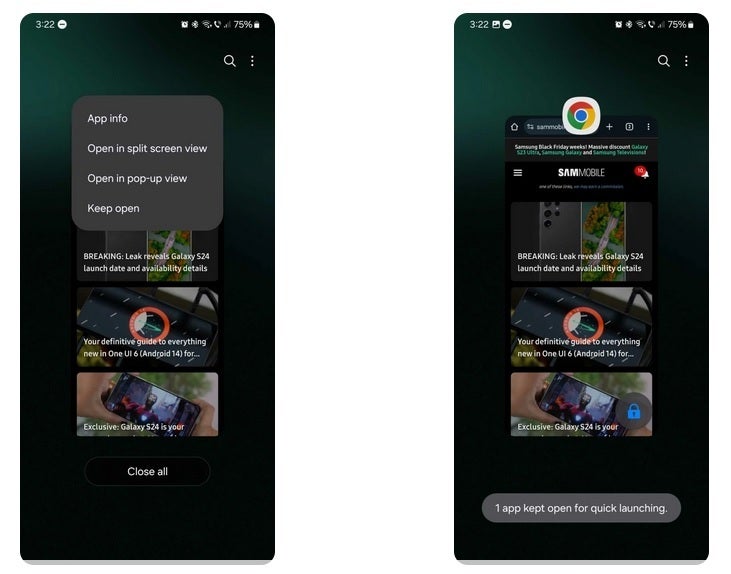
Hey Android users, has this ever happened to you? You’re swiping through your open apps on the screen and when you get to the “Close all” button at the end, you tap without even thinking twice. But then it occurs to you that you’ve accidentally closed an app that you didn’t want to close. Now there is a way to prevent this infuriating event from taking place so that even if you tap on “Close all,” certain apps will remain open. This feature is available on the One UI interface used on many Samsung Galaxy phones.
Here’s how this works. Open the Recent Apps screen and tap on the app icon above the app you want to keep open and from the list of options select “Keep open.” Once you press that button, a message will appear on the bottom of the display that says, “app kept open for quick launching.” A lock app will also appear on the lower-right corner of the app in Recent Apps.
By using this handy dandy feature, the app you’ve selected to lock can be accessed quickly and easily and won’t be shut even if you press on the “Close all” button. You can unlock the app by pressing on the lock icon that appears with the app in the multitasking screen. It’s a brilliant feature because every Android user has closed an app accidentally by tapping the “Close all” button.
On some Galaxy phones with One UI, you can lock an open app so that it isn’t accidentally shut
If you’ve ever wondered why iOS does not have a “Close all” button to clear open apps, here’s an interesting post from Apple’s own community support page that goes against the thoughts of obsessive phone users who always want to close their recently used apps. The post says closing apps does not improve performance or improve battery life. It also notes that Recent Apps are not running in the background. They are suspended
Closing Recent Apps won’t improve battery life and the post on Apple’s support page says that “it actually worsens battery life, because it takes more energy to load an app than to restart it from the “multitasking” screen.” Closing the Recent Apps and swiping them off the screen also makes your iPhone slower because it takes longer to reopen an app from storage than to have it restart from a suspended state.
Apple suggests that unless an app is “misbehaving” and not working right, or if it is consuming too much battery power, there is no reason to close it. And this is true for Android phones as well. So even if you have an obsession that forces you to close all of your open apps immediately, it is not as necessary as you might think.
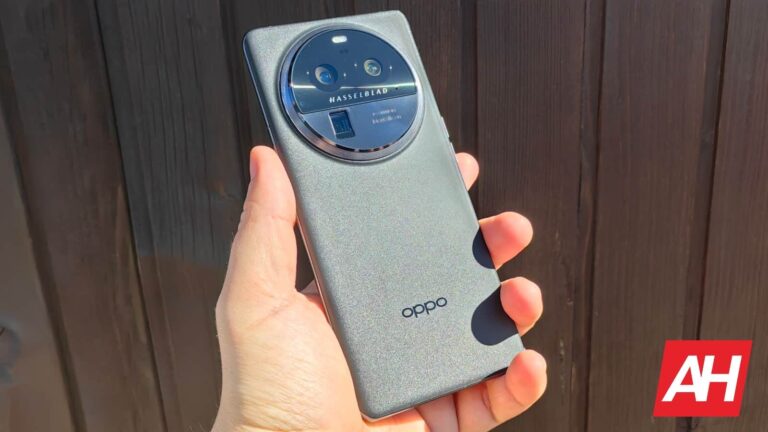
All four OPPO Find X7 Pro camera sensors have just been revealed. Now, when we say all four, we mean all four rear-facing ones, as the front-facing camera is still a mystery. Most people are interested in the rear ones, though.
This information comes from Digital Chat Station, one of the most prominent Chinese tipsters. He went to Weibo in order to reveal the information, and you won’t be disappointed.
The OPPO Find X6 Pro offered an outstanding camera setup. Many people hailed OPPO for that, as it was not only immensely powerful as a whole, but very well-balanced.
The OPPO Find X7 Pro camera sensors get detailed
The OPPO Find X7 Pro will have a 50-megapixel main camera. It will utilize the Sony LYT-900 camera sensor. That is the most powerful camera sensor from Sony’s new LYTIA lineup. The OnePlus 12 will, for example, utilize the Sony LYT-808 sensor.
In addition to that, a 50-megapixel ultrawide camera will be utilized, Sony’s IMX890 sensor. That is actually the same camera sensor that OPPO used for the ultrawide camera on the OPPO Find X6 Pro.
Two 50-megapixel telephoto cameras will also be in use, one of them will be a periscope telephoto unit. One will utilize Sony’s IMX890 sensor, and that one will offer a 2.7x optical zoom. The other will use the Sony IMX858 sensor, and that one will offer 6x optical zoom.
So, on paper, the OPPO Find X7 Pro cameras look outstanding. Let’s hope that the phone will be able to provide great camera performance too, like its predecessor.
The expectations are high for the Sony LYT-900, and the OPPO Find X7 Pro
We’ve seen the Sony LYT-T808 in action. That is a version of the Sony LYT-808 for foldable smartphones. It proved to be quite a compelling camera sensor, and the Sony LYT-900 is supposed to be even better. So… the expectations are high, to say the least.
Let’s just hope that OPPO will launch its flagship globally this time around. The OPPO Find X6 Pro was available only in China, unfortunately.
A beta version of Google Messages now includes the ability to cancel out background noise in voice notes. And this is not the only feature Google is working on to implement in Google Messages. Other than the quest to make the voice note feature on Messages appealing to you, Google is also working on features like markdown text formatting, color and wallpaper options, profile sharing, and more.
The goal is to stay competitive in the realm of third-party messaging services like WhatsApp with tons of features and customization options.
In the context of voice messaging, Google Messages will soon help you tackle the background noise. As observed by TheSpAndroid, the beta version now includes a “Noise Cancellation” button. Users can tap on this button to minimize background noise during voice recordings. This ensures clearer and more effective communication for Google Messages.
Now you can be confident with your voice notes even in a not-so-quiet place
Impressively, you will be able to this feature at any point during a recording. Although currently this feature is only available in the beta version and requires flag activation, you can expect this noise cancellation feature to see in a wider rollout in near future.
As mentioned above, Google Messages is set to embrace some other useful features, one of which is the markdown text formatting. Markdowns enable users to format text using symbols like asterisks, allowing for richer and more expressive messaging.
While only a limited set of markdowns are currently operational in the beta version of Google Messages, this is expected to expand in the future. Google appears committed to refining the user experience in Messages, with recent additions like color and wallpaper options. These features will provide users with a more personalized touch. Moreover, Google is experimenting with profile options for Messages, offering users the ability to create shareable profiles with personal details.
Additionally, through a discoverability option, users could potentially enhance their visibility on the platform. It’s worth noting that these features are currently in the testing phase, and their integration into the stable version of Messages is yet to be confirmed by Google.
Qualcomm’s latest Snapdragon 8 Gen 3 chipset provides the best performance of any Android system-on-a-chip (SoC), but continues an alarming efficiency trend. That’s according to @Golden_Reviewer on X (formerly Twitter), who tested the new chip on the Xiaomi 14 Pro. Xiaomi is the first company to include the Snapdragon 8 Gen 3 chipset in a smartphone. The brand unveiled its Xiaomi 14 series late last month, and now that the smartphones are in the hands of reviewers, we’re starting to see how Qualcomm’s new chip performs.
The Snapdragon 8 Gen 3 chips represents a new architecture for Qualcomm. The platform consists of a chip with one prime core, five performance cores, and two efficiency cores. This latest test from Golden Reviewer is based on a standardized benchmark from the Standard Performance Evaluation Corporation (SPEC). It showed that the big core in Snapdragon 8 Gen 3 brings massive performance gains at the expense of efficiency.
Qualcomm’s last chip, the Snapdragon 8 Gen 2 Plus platform, recorded an average power-consumption-per-watt of 4.9 in the SPEC benchmark. The company’s newer chip, the Snapdragon 8 Gen 3, had a 6.27 by the same metric. That’s a 28 percent year-over-year increase, which doesn’t mode well for efficiency. By that metric, Qualcomm’s new chip recorded a performance-per-watt of 11.05, which is down 11 percent. For those who might not be as well-versed in these kinds of benchmarks, you want a lower power-consumption-per-watt and a higher performance-per-watt score.
That means while the Snapdragon 8 Gen 3 platform is trending up in performance, it’s trending downward in efficiency. Critics have pointed out that different Android OEMs optimize Qualcomm’s SoCs differently, so other smartphones might be more efficient than the Xiaomi 14 Pro. However, if these numbers are accurate across the board, it would mean that Snapdragon 8 Gen 3 would have to rely on cores with a lower power draw whenever possible.
Looking ahead to Snapdragon 8 Gen 4
Although this year’s suite of phones are set to use the Snapdragon 8 Gen 3 platform, we’re already looking ahead to next year. That’s because Qualcomm is set to give its smartphone chips a big boost. The company unveiled its Snapdragon X Elite platform recently, and it features laptop-class chips with great performance and efficiency. It’s the first chip to feature custom Oryon cores as well. Previously, Qualcomm and other Android chipmakers licensed core designs from Arm. Now, Qualcomm is coming up with its own designs in-house, which will appear in Snapdragon 8 Gen 4.
So, while Snapdragon 8 Gen 3 might be a down year for Qualcomm and Android phones, there’s reason to be excited. The alarming power consumption and efficiency trends should be changing tune next year, even if there’s a bit of a lull before then.
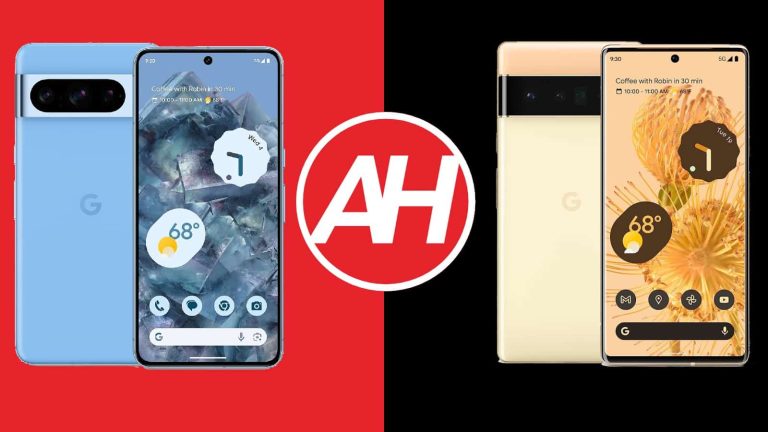
The Google Pixel 8 Pro is the latest and greatest smartphone Google has to offer. There are quite a few of you who are probably trying to decide whether to upgrade to it or not. Well, if you own the Pixel 6 Pro, you’re in the right place. In this article, we’ll compare the Google Pixel 8 Pro vs Google Pixel 6 Pro, in order to try and help you. We’ll try to highlight the differences between the two phones.
The Google Pixel 8 Pro is an improvement in a number of ways, but the Pixel 6 Pro is only two years old at this point, and it’s still a good smartphone. That being said, we’ll first list their specifications, as per usual, and will then move to compare the two phones across a number of categories. We’ll compare their designs, displays, performance, battery life, cameras, and audio performance.
Specs
Google Pixel 8 Pro vs Google Pixel 6 Pro, respectively
The Google Pixel 8 Pro and Pixel 6 Pro are not that different design-wise. The Pixel 6 Pro ushered in a new design language that Google is using to this day. You will find a camera visor on the back of both phones, but the one on the Pixel 8 Pro is covered by aluminum, not (just) glass. Both of those camera visors do protrude on the back quite a bit, and are a good anchor for your index finger.
If you prefer flat displays, you’ll like the Pixel 8 Pro more, while that phone also has uniform bezels, unlike the Pixel 6 Pro. Both smartphones do utilize a display camera hole, which is centered, while their physical buttons are also in the same spot. If you prefer flat displays, you’ll like the Pixel 8 Pro more, as the Pixel 6 Pro is properly curved. Both smartphones do offer an IP68 certification for water and dust resistance, in case you were wondering.
Now, both phones are quite large. The Pixel 8 Pro is slightly shorter, and slightly wider, while they’re about the same thickness. The Pixel 8 Pro does have a taller display aspect ratio, though. Google’s new flagship weighs 213 grams, while the Pixel 6 Pro weighs 210. So, the Pixel 8 Pro is slightly heavier, but that’s not something you’ll feel in the hand, the difference is barely there.
Both devices do feel good in the hand, and they feel like premium products. We did prefer the feel of the Pixel 8 Pro, though, mainly due to its slightly rounded corners. Also, matte black models (Obsidian and Bay Blue) look much better, and have a nicer feel to them. On top of that, they’re not magnets for fingerprints like the Pixel 6 Pro (all variants).
Google Pixel 8 Pro vs Google Pixel 6 Pro: Display
The Google Pixel 8 Pro has a 6.7-inch 2992 x 1344 LTPO OLED panel. That display is flat, and it has a 120Hz refresh rate (adaptive 1-120Hz). It supports HDR10+ content, and the brightness goes up to 2,400 nits. This panel has a 20:9 aspect ratio, and it’s protected by the Gorilla Glass Victus 2 from Corning.
Google Pixel 6 Pro
The Pixel 6 Pro, on the other hand, includes a 6.7-inch QHD+ (3120 x 1440) panel as well. It’s a bit different, though. This is also an LTPO AMOLED panel with a 120Hz refresh rate, and it also supports HDR10+ content. This display is curved, however, and it has a 19.5:9 aspect ratio. We’re looking at a resolution of 3120 x 1440 here, this display is protected by the Gorilla Glass Victus, and its max brightness is at around 1,000 nits.
Both of these displays are really good, but the Pixel 8 Pro has the upper hand. The colors do look better on it, and it’s also more color-accurate than the Pixel 6 Pro’s panel. On top of that, the Pixel 8 Pro’s panel does get a lot brighter in comparison. You will notice that when using the phone outdoors, especially if you’re doing so in direct sunlight. On top of that, the Pixel 8 Pro’s panel also comes with better display protection.
Google Pixel 8 Pro vs Google Pixel 6 Pro: Performance
Google’s Tensor G3 processor fuels the Pixel 8 Pro. That is the company’s 4nm processor. The Pixel 6 Pro, on the other hand, is fueled by the original Google Tensor, a 5nm processor. The difference between them is considerable, even though the Tensor G3 is not exactly the most modern processor. Also, if you’re one of the people who had issues with signal reception on the Pixel 6 Pro, that should not be the case with the Pixel 8 Pro.
Now, during regular, everyday performance, both phones do a good job. Both of them feel quite smooth during browsing, multitasking, multimedia consumption, messaging, and anything else you can think of, basically. The Pixel 8 Pro will be more future-proof thanks to its components, however. It has a more powerful CPU, and faster RAM (LPDDR5X vs LPDDR5). It’s 12GB RAM in both cases. Both smartphones utilize UFS 3.1 flash storage, however.
When it comes to gaming, the Pixel 8 Pro does offer better performance, but it’s not a huge difference, in all honesty. If you’re playing the most demanding games the Pixel 8 Pro will be the better choice, but not the best choice on the market, not even close.
Google Pixel 8 Pro vs Google Pixel 6 Pro: Battery
A 5,050mAh battery sits inside the Pixel 8 Pro, while the Pixel 6 Pro includes a 5,003mAh battery pack. The difference in sheer battery size is not that big, but will you feel the difference in usage? Well, yes, at least we did. The Pixel 6 Pro had good battery at first for us, but with time, it got worse, way worse. To be quite honest, a few months ago, we had problems getting to 5 hours of screen-on-time with the device, especially on mobile data.
What about the Pixel 8 Pro? Well, the battery life on that device wasn’t the most consistent either, but it was consistently better than what we were getting on the Pixel 6 Pro. The battery life jumped between 6 and 7.5 hours of screen-on-time for us, though it was mostly around 7-7.5 hours. On one or two occasions we were able to pull out over 8 hours of screen-on-time from the device. Do note that gaming is not included in this, however, although pretty much everything else is.
When it comes to charging, the Pixel 8 Pro does have a slight advantage. It supports 30W wired, 23W wireless, and reverse wireless charging too. The Pixel 6 Pro supports 23W wired, 23W wireless, and reverse wireless charging. Now, technically, the Pixel 8 Pro has slightly faster charging, but both smartphones will take a similar time to charge, so… they’re on the same level. A charger is not included with either phone, by the way. You’ll have to get it yourself, if you don’t have one already.
Google Pixel 8 Pro vs Google Pixel 6 Pro: Cameras
The Pixel 8 Pro features a 50-megapixel main camera, a 48-megapixel ultrawide unit (126-degree FoV), and a 48-megapixel telephoto camera (5x optical zoom). The Pixel 6 Pro, on the other hand, has a 50-megapixel main camera, a 12-megapixel ultrawide unit (114-degree FoV), and a 48-megapixel telephoto camera (4x optical zoom). The Pixel 8 Pro does have the advantage of course, but how do they perform?
Google Pixel 8 Pro
First and foremost, the performance from the main camera is still excellent on the Pixel 6 Pro. The Pixel 8 Pro does provide better results in comparison, sure, but the Pixel 6 Pro is not far behind. Both smartphones handle HDR conditions like champs, and provide plenty of details in images. That goes for both day and night photos. The Pixel 8 Pro’s advantage is more noticeable in nighttime shots, though.
Now, you’ll notice more of a difference when you use the ultrawide camera. The Pixel 8 Pro’s shooter not only offers a noticeably wider field-of-view, but it also provides more detailed pictures. The phone’s telephoto camera is also more useful as it can keep great details at longer zoom ranges. It’s superior to what the Pixel 6 Pro has to offer. The video recording has also been noticeably improved. The Pixel 8 Pro is the better camera smartphone through and through.
Audio
Both devices do have stereo speakers. The loudness is very good at both, and the sound coming out of them too. The Pixel 8 Pro does have slightly better sound output, as the mids on the Pixel 6 Pro can sound a bit tinny.
There is no audio jack on either phone, but you can always utilize their Type-C ports for wired audio. If you prefer to go wireless, the Pixel 8 Pro supports Bluetooth 5.3, while the Pixel 6 Pro comes with Bluetooth 5.2.
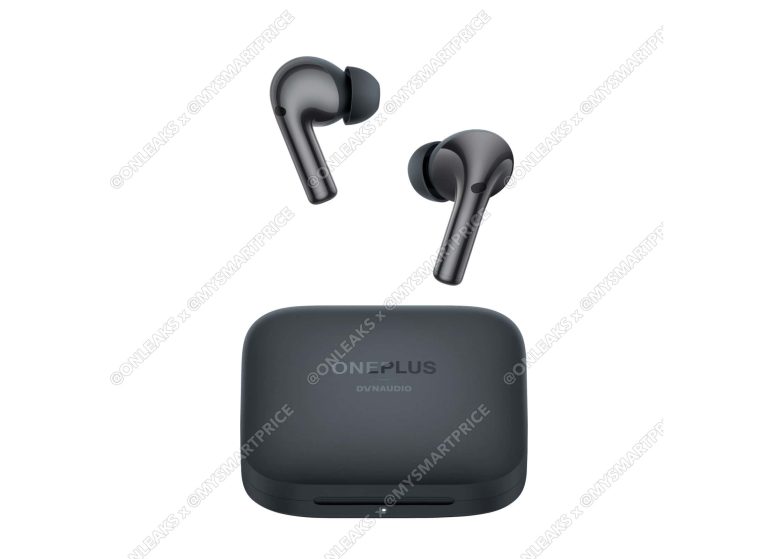
OnePlus is preparing to launch its new Buds 3 product as it has passed FCC certification. This certification gives off the earbud’s design along with that of its charging case. From the FCC certification, it becomes clear that the design of this coming pair of earbuds is quite similar to that of its predecessors.
The Buds 3 will succeed the already existing Buds 2 Pro that are available for purchase across all OnePlus official retail stores. Aside from the design of this coming product, the FCC certification also gives details on the charging case. Part of these details include the battery capacity that the charging case will pack, as well as the battery capacity of each earbud.
Also, some charging information on this product is available on the FCC certifications. These details along with the available specifications of this coming product prove that it’ll bring some upgrades in comparison with its predecessor. Here are the available specifications for this coming pair of wireless earbuds from OnePlus.
Specifications of the coming OnePlus Buds 3 wireless earbuds
While this coming pair of wireless earbuds will bring some upgrades in comparison with its predecessor, it also has some similarities. For example, both the Buds 3 and the Buds Pro 2 will launch with 48dB Active Noise Cancellation (ANC). The coming Buds 3 will also feature a 10.4mm woofer and a 6mm tweeter for improvement to sound quality and delivery.
For protection, the coming earbuds will perform similarly to their predecessor. OnePlus will fortify the coming buds with IPX4 and IP55 ratings for the charging case and the earbuds respectively. This will make the Buds 3 suitable for usage in the gym or while commuting in the rain.
When it comes to connectivity, the Buds 3 will feature Bluetooth v5.3 technology. Joining this will be Google Fast Pair and dual connections, letting users connect to their smartphone and laptop at the same time. At this point, it might seem like there are no upgrades from the already existing Buds Pro 2.
Well, the upgrade is in the battery capacity of the Buds 3, which is a 525mAh cell. Each earbud will feature a 58mAh battery capacity which can last for 9 hours without ANC. The total capacity of the charging case is a slight upgrade from the Buds Pro 2’s charging case.
Netizens might expect the coming Buds 3 to launch alongside the OnePlus 12 flagship device. This might be possible, but there is no official statement pointing to that. But if this is the case, then netizens can expect to see this new pair of earbuds hit the launch stage in a few weeks.