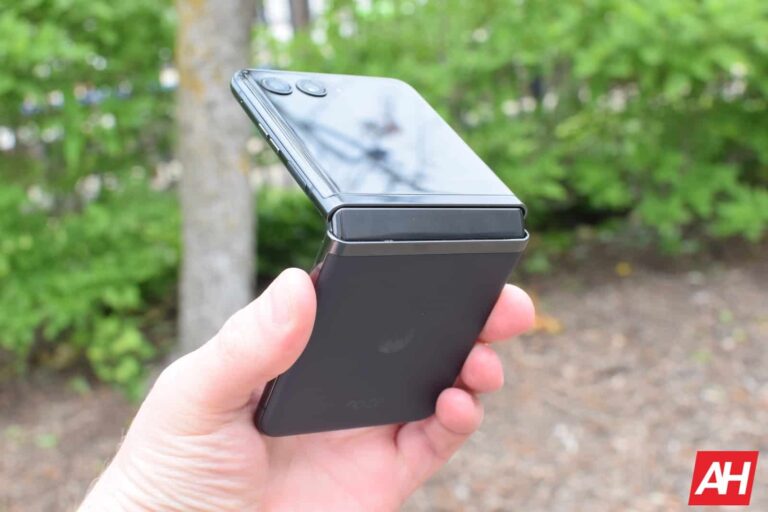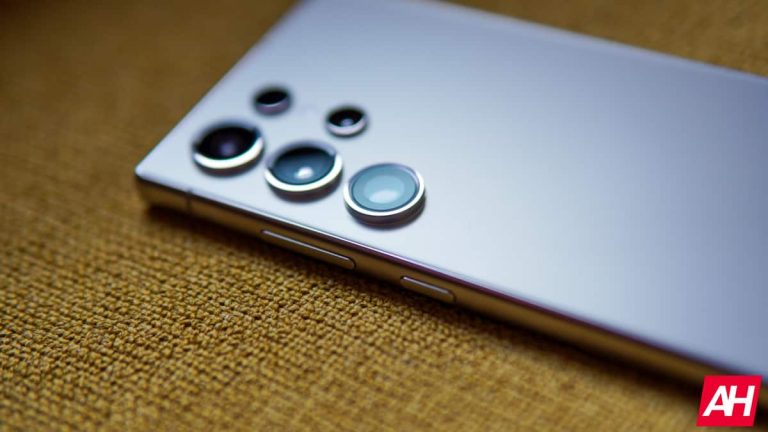
Now that Samsung has officially unveiled the Galaxy Z Fold 6 and Galaxy Z Flip 6, third-party accessory makers are rushing to launch their offerings for the new foldables. After Caseology, UAG, and a few others, OtterBox is here with its collection of protective cases for the duo. The two foldables are now available for pre-order.
OtterBox launches protective cases for the Galaxy Z Fold 6 and Flip 6
OtterBox’s case lineup for the new Samsung foldables includes the Thin Flex Series in four colors and Defender Series XT in three colors. As the name implies, the former is an ultra-slim case tailored to foldable phones. Since foldables are already quite bulky, this cover adds extra protection without making the devices bulkier.
The Thin Flex Series cases for the Galaxy Z Fold 6 and Galaxy Z Flip 6 have a tough body with soft grip edges. OtterBox has added extra layering around the edges for a secure fit and tougher protection against everyday drops and bumps. The cases also have raised edges to protect the camera and screen and support wireless charging.
The company claims it used 50% recycled plastic to make each Thin Flex Series case for the foldable duo. Priced at $59.95, the cover is available in Black, Clear, and Ballet Shoes (Pink) colorways for the Galaxy Z Fold 6. The Flip 6’s case comes in Black, Color, Denver Dusk Purple, and Berry Bliss (Pink) shades and costs $49.95. Only the Black variant is on sale currently, though. OtterBox says the remaining color options will be available soon.
Otterbox also has a rugged option
If you want something more robust and rugged, OtterBox has the Defender Series XT cases for both Samsung foldables. These cases feature a rugged hinge cover and port covers to guard vulnerable areas against dust and dirt. The firm claims grippy edges for a confident handhold, while a built-in lanyard attachment provides versatility. The hinge also provides a grip space when the device is in an unfolded state, while you get an optional holster too.
Despite a rugged build, OtterBox’s Defender Series XT cases for the Galaxy Z Fold 6 and Galaxy Z Flip 6 support wireless and reverse-wireless charging. For the Fold, the cases are available in Black and Baby Blue Jeans (Blue) colors, priced at $89.95. The Flip’s cases come in Black, Denver Dusk Purple, and Red Clay (Red) colorways and cost $79.95. All of these cases are now on sale via OtterBox’s website. The firm offers a 10% discount on when you purchase a screen protector.
Active Directory Management Tools are essential for IT administrators to manage and secure Active Directory (AD) environments efficiently.
These tools streamline tasks such as user and group management, permissions assignment, and policy enforcement, ensuring the AD infrastructure remains organized and compliant.
They provide features like automated provisioning, real-time monitoring, and detailed reporting, which help identify and resolve issues promptly.
Additionally, these tools enhance security by supporting multi-factor authentication, auditing, and access control.
These tools simplify the administration of AD, enabling organizations to maintain robust security postures and optimize their IT operations.
Active Directory management tools are essential for:
User and Group Management: Simplify administration of directory objects.
Security and Compliance: Enforce security protocols and meet compliance requirements.
Automation: Automate routine tasks to save time and reduce errors.
Hybrid Management: Manage both on-premises and cloud environments efficiently.
Health Monitoring and Recovery: Ensure directory health and quick recovery from failures.
These tools enhance efficiency, security, and reliability in IT infrastructure management.
Microsoft Active Directory Explorer: Enables advanced AD object management with detailed property viewing, modification capabilities, and a user-friendly interface.
ManageEngine ADManager: Provides comprehensive AD management with automated provisioning, reporting, workflow management, and delegation capabilities.
Netwrix Account Lockout Examiner: Diagnoses and resolves account lockout issues quickly by identifying root causes and providing detailed troubleshooting steps.
SolarWinds Access Rights Manager: Enhances security by managing and auditing user permissions across AD and file servers with detailed reporting.
Centrify: Offers centralized identity management and multi-factor authentication, enhancing security and compliance across hybrid IT environments.
Dameware Remote Everywhere (DRE): Provides remote support and administration for AD, enabling IT to troubleshoot and resolve issues from anywhere.
Quest Recovery Manager for Active Directory: Facilitates quick AD recovery with granular restore capabilities to minimize downtime and ensure business continuity.
SolarWinds Permissions Analyzer for Active Directory: Visualizes and simplifies the analysis of user permissions and access rights within AD environments.
Adaxes Unified Management for AD: Streamlines AD management with automation, delegation, and reporting, improving efficiency and compliance.
LDAP Administrator: This program manages LDAP directories with a powerful interface for efficiently browsing, editing, and searching directory contents.
Detailed AD data exploration and editing Real-time data viewing and comparison Intuitive interface for easier navigation Supports object and attribute editing Fast searching across the directory
Comprehensive AD management and reporting Automated user provisioning and de-provisioning Role-based access control capabilities Customizable workflows and approval processes Detailed compliance and audit reports
Diagnoses account lockouts quickly Identifies root causes of lockouts Real-time alerting on lockout events User-friendly interface for ease of use Detailed reports for analysis
Troubleshoot and resolve account lockouts efficiently.
Unified identity and access management Multi-factor authentication support Secure single sign-on (SSO) capabilities Detailed access control policies Comprehensive reporting and analytics
Fast and secure remote access Comprehensive device management capabilities Real-time remote support and troubleshooting Cross-platform support, including mobile Detailed session auditing and reporting
Granular AD recovery capabilities Automated backup and recovery processes Real-time change tracking and alerts User-friendly interface for ease of use Detailed reporting and compliance features
Comprehensive AD management and automation Role-based access control features Customizable workflows and approval processes Detailed compliance and audit reports User-friendly interface for administrators
Centralized AD, Exchange, and Office 365 management.
Advanced LDAP directory management Detailed schema and object editing Fast searching and filtering capabilities User-friendly interface for easy navigation Comprehensive support for LDAP directories
Powerful LDAP directory management and analysis tool.
Free trial available
No
1. Microsoft Active Directory Explorer
Microsoft Active Directory Explorer is a powerful tool for IT administrators to manage and explore Active Directory (AD) environments. It provides a detailed and comprehensive view of AD objects, including users, groups, and organizational units.
The tool allows administrators to efficiently browse, search, and edit Active Directory data. Its advanced search capabilities allow administrators to locate specific objects and attributes quickly.
Comparison of Active Directory snapshots helps spot changes and troubleshoot issues. The tool’s user-friendly interface simplifies complex AD structure maintenance, making it necessary for a safe and structured Active Directory environment.
Pros
Powerful search functionality
Managing users and groups
Powerful filtering capabilities
Extensive reporting
Connect to AD even without admin rights.
Supports scripting
Manage permissions and replications.
Cons
It can be complex and overwhelming for rookies.
Compatibility only with Microsoft AD
Requires purchasing license.
It takes time for new updates to launch.
2. ManageEngine ADManager
ManageEngine ADManager is an Active Directory Management Tools designed to simplify and automate various AD tasks.
It provides a user-friendly interface for managing users, groups, and computers, streamlining operations such as user provisioning, password resets, and access management.
ADManager offers extensive reporting capabilities. It allows administrators to generate detailed reports on AD objects and activities, ensuring compliance and security.
The tool also supports the automation of routine tasks through customizable workflows and policies, reducing administrative overhead.
Integration with Office 365 and Exchange further enhances its functionality, making it a valuable asset for IT teams managing complex AD environments.
Licensing fees can be high for smaller organizations.
Lacking software support.
Office 365 integration is not up to par.
3. Netwrix Account Lockout Examiner
Netwrix Account Lockout Examiner is a specialized Active Directory management tool designed to streamline the investigation and resolution of account lockouts.
It provides IT administrators with detailed insights into the root causes of account lockouts, helping them quickly identify problematic applications or misconfigurations.
The tool offers real-time alerts and comprehensive reports, allowing for swift response and minimizing downtime. Netwrix Account Lockout Examiner enhances security and improves user productivity by automating the detection and troubleshooting process.
Its intuitive interface and robust features make it an essential tool for maintaining the health and security of Active Directory environments.
Pros
Lockout reports
Minimize troubleshooting time.
Identifies lockout tends.
Lockout investigation
Customizable alerts
Automated resolution
Reduces downtime.
Improves user functionality
Cons
Requires Netwrix Auditor to function, which is a paid tool
It does not automatically block IP addresses or hosts.
Does not directly support non-AD directories.
Lacks some advanced features like user behavior analytics.
4. Solarwinds Access Rights Manager
SolarWinds Access Rights Manager (ARM) is a robust Active Directory management tools designed to enhance security and simplify user permissions management.
ARM provides comprehensive visibility into user activities and access rights across the network, helping administrators monitor and control access to critical resources.
It features automated workflows for user provisioning, de-provisioning, and access rights auditing, ensuring compliance with industry standards and regulations.
The user-friendly dashboard and detailed data make security risk identification and mitigation straightforward. ARM simplifies and decreases Active Directory administration risk by reducing access control and boosting accountability.
Pros
Delegate access rights management.
Centralized platform
Real-time monitoring
Automated compliance reporting
Self-service portal
Simplified AD provisioning
Multi-platform support
Role-based access control
Cons
Limited automation and scalability
ARM may not integrate seamlessly
The tool is expensive
Resource intensive
5. Centrify
Centrify is one of the best robust Active Directory management tools that secures enterprise identities against cyber threats.
It provides comprehensive solutions for managing and controlling access to hybrid environments, ensuring the protection of both on-premises and cloud-based resources.
Centrify integrates seamlessly with Active Directory, enabling centralized user permissions and policies management. To enhance security, it offers features such as multi-factor authentication (MFA), single sign-on (SSO), and privileged access management (PAM).
With its advanced capabilities, Centrify helps organizations mitigate risks, enforce compliance, and streamline identity management across diverse IT landscapes. Its user-friendly interface and extensive support make it a preferred choice for managing complex Active Directory environments.
Pros:
Comprehensive identity and access management
Seamless integration with hybrid environments
Advanced multi-factor authentication (MFA) support
Centralized user permissions and policies
Robust privileged access management (PAM)
Cons:
Complex setup and configuration process
Higher cost for premium features
Steeper learning curve for new users
Limited customization options
Potential performance impact on large environments
6. Dameware Remote Everywhere (DRE)
Dameware Remote Everywhere (DRE) is a powerful Active Directory management tool that provides comprehensive remote support and IT administration capabilities.
DRE’s cloud-based technology allows IT pros to access and troubleshoot computers and servers remotely. It is an all-in-one IT management solution that offers remote control, system information, file sharing, and chat.
Its intuitive interface and robust security protocols ensure efficient and secure remote management. DRE also integrates seamlessly with Active Directory, allowing administrators to manage user accounts, reset passwords, and perform other critical AD tasks remotely.
This tool is ideal for IT teams looking to enhance their remote support capabilities and streamline their Active Directory management processes.
Pros
Centralized management
Remote control access
Automation
Multi-monitor support
High and fast issue resolution support
Quick remote access
Efficient reporting engine
Thorough system information
Cons
Non-AD environments are not supported.
It requires additional licensing costs.
Weak auditing capabilities
Less suited for huge environments
7. Quest Recovery Manager for Active Directory
Quest Recovery Manager for Active Directory is a robust tool designed to simplify and accelerate the recovery of Active Directory (AD) environments.
It provides comprehensive backup and restore capabilities, allowing administrators to quickly recover individual objects, attributes, or entire AD environments in case of accidental deletions, changes, or corruption.
The tool features granular recovery options, enabling precise restoration of specific data without affecting the entire AD. It also supports automated, scheduled backups to ensure data integrity and availability.
With its user-friendly interface and powerful features, Quest Recovery Manager helps minimize downtime, ensure business continuity, and maintain the overall health of AD infrastructures.
Pros
Accelerated recovery
Recovery roadmap
Object-level restore
Granual and Offline restore
Forest recovery
Integration with IT Security Search
Comparison reporting
Reduce downtime and recovery time.
Cons
It can be complex to deploy and configure in a large environment.
Performance impact on large AD backups.
Reliant on backup storage
Limited visibility
8. SolarWinds Permissions Analyzer for Active Directory
SolarWinds Permissions Analyzer is one of the best Active Directory Management Tools, and this tool is designed to help IT administrators manage and troubleshoot permissions within Active Directory.
It provides a clear and comprehensive view of user and group permissions, allowing administrators to identify and resolve access issues quickly.
The tool offers an intuitive interface that displays effective permissions, helping to ensure that security policies are enforced accurately. By simplifying the process of auditing and managing permissions, SolarWinds Permissions Analyzer enhances security and compliance.
It is a valuable resource for maintaining the integrity of Active Directory environments and ensuring that users have the appropriate level of access to resources.
Pros
User access reviews
Permission analysis
Duplicate permission detection
Group membership visualization
Access review manager
Mitigate insider threats.
AD auditing
Detects unused permission.
Cons
It requires an additional licensing fee to purchase for advanced uses.
It only analyzes Windows file system permissions granted through AD.
Difficult to scale
It cannot gather data from member servers or workstations.
9. Adaxes Unified Management for AD
Adaxes Unified Management for Active Directory is a comprehensive solution designed to streamline and enhance the management of Active Directory (AD).
It offers powerful automation and delegation capabilities, allowing administrators to automate routine tasks and workflows, reducing administrative burden. With Adaxes, you can enforce security policies, manage user accounts, and control access rights more efficiently.
The Adaxes Active Directory Management Tool provides advanced reporting features and a web-based interface for easy access and management. Adaxes supports integration with other IT systems and offers customizable workflows, making it a versatile and scalable solution for organizations of all sizes.
Pros
Automated user provisioning
Cross-domain integration
Role-based delegation
Rule-based automation
Computer, Group, and Permission management
Over 100 ready-to-use reports
Self-service portals
Multi-domain management
AD cleanup
Cons
Steep learning curve
It relies on other Microsoft technologies, such as PowerShell, for automation.
Limited scalability
Performance impact on bulk operations.
10. LDAP Administrator
LDAP Administrator is a powerful and versatile tool for managing and browsing LDAP directories. Its user-friendly interface simplifies complex LDAP management tasks, making it easier for administrators to maintain and configure their directories.
With advanced search capabilities, schema management, and bulk operations, LDAP Administrator enhances efficiency and productivity. It supports various LDAP servers, ensuring compatibility and flexibility across different environments.
The tool also offers robust security features, including encrypted connections and access control management, to protect sensitive directory data. Overall, LDAP Administrator is an essential tool for effective LDAP directory administration.
HONOR decided to poke fun at Samsung over the Galaxy Z Fold 6’s thinner design
HONOR shared an image you can see below via its official X account. You can see the Galaxy Z Fold 6 posing next to the HONOR Magic V2. The caption reads “thinner design, but not the thinnest”.
HONOR also says “Fold, but don’t settle”, while adding that the HONOR Magic V2 is “still light-years ahead in the galaxy of foldables”. What’s interesting is that HONOR’s next-gen foldables, the HONOR Magic V3, is coming today, and it will be even thinner than the Magic V2.
For comparison’s sake, the HONOR Magic V2 is only 4.8mm thick when unfolded, and 9.9mm thick when folded. The Samsung Galaxy Z Fold 6 measures 5.6mm when unfolded, and 12.1mm when folded.
That thickness in the folded state is quite noticeable, both when compared via an image, and when you’re actually holding the devices. HONOR spotted an opportunity to promote its product, and this is the result of that.
The HONOR Magic V3 is coming today
The HONOR Magic V3 will become official today. It’s possible it already did by the time you’re reading this. It will be both thinner and lighter than its predecessor, pushing the ante even further up.
Vivo also launched some foldables that are thinner than what Samsung has to offer. The Vivo X Fold 3 measures 4.7mm when unfolded, and 10.2mm when folded. The Vivo X Fold 3 Pro, on the flip side, is 5.2mm thick when unfolded, and 11.2mm when folded.
Xiaomi will announce the Xiaomi MIX Fold 4 later this month. That device is also rumored to be quite thin, though we don’t know how thin exactly. It will almost certainly be considerably thinner than the Galaxy Z Fold 6, though, based on what the MIX Fold 3 delivered.
The Japan Aerospace Exploration Agency (JAXA) has revealed details of a cybersecurity incident that occurred last year, involving unauthorized access to its internal servers.
The breach, detected in October 2023, has prompted JAXA to implement robust countermeasures to prevent future occurrences.
In October 2023, JAXA was alerted to unauthorized access to its internal servers by an external organization.
The agency swiftly took initial measures to block all malicious communications and disconnect compromised servers and computers from its network.
JAXA engaged with expert organizations and security vendors to investigate the incident comprehensively.
The investigation revealed that the attackers had exploited a vulnerability in a VPN device to gain initial access to JAXA’s internal servers and computers.
This previously announced vulnerability allowed the attackers to expand their unauthorized access and compromise user account information.
The attackers then used this information to access JAXA’s Microsoft 365 (MS365) services illegally.
Scope of the Compromise
The compromised information included the personal data of JAXA employees and information related to activities with external organizations.
However, JAXA confirmed that sensitive information about launch vehicles and satellite operations was unaffected.
The agency has notified and apologized to the affected individuals and partners.
JAXA’s investigation, conducted in collaboration with a specialized team from Microsoft, confirmed that no further breaches had occurred.
The attackers had used multiple unknown malware strains, making detection challenging.
Despite the complexity, JAXA’s swift actions and collaboration with external experts helped mitigate the potential risks.
JAXA has implemented short-term and permanent security measures in response to the incident.
The short-term measures included establishing a system to respond to vulnerabilities promptly and enhancing the monitoring of internal communications.
The agency has also developed permanent measures to enhance security, such as further
Enhancing monitoring of the entire network and endpoints.
Improving remote access methods.
Increasing the efficiency and visibility of operational management.
Enhancing anti-spoofing measures.
These measures are currently being materialized, and JAXA is committed to continuously strengthening its information security in the future.
Future Efforts and Collaboration
JAXA recognizes the increasing sophistication of cyber-attacks and the need for prompt and appropriate security responses.
The agency plans to steadily implement short-term and permanent measures in response to this incident.
JAXA will further strengthen its information security in cooperation with related organizations, including expert organizations such as the JPCERT Coordination Center and the Information-technology Promotion Agency (IPA).
Despite a few instances of unauthorized access in 2024, JAXA confirmed that no information was compromised.
These incidents, including zero-day attacks, were promptly detected and addressed, demonstrating the effectiveness of the newly implemented security measures.
The cybersecurity incident at JAXA underscores the critical importance of robust security measures in protecting sensitive information.
JAXA’s swift response and collaboration with expert organizations highlight the agency’s commitment to maintaining the integrity of its operations and its partners’ trust.
As cyber threats evolve, JAXA’s proactive approach to enhancing its security infrastructure will serve as a model for other organizations facing similar challenges.
The agency’s efforts to strengthen its information security will ensure the continued success of its missions and the safety of its data.
"Is Your System Under Attack? Try Cynet XDR: Automated Detection & Response for Endpoints, Networks, & Users!"- Free Demo
Ulefone has just announced a new smartphone, the Ulefone Armor 25T. This smartphone comes with both thermal imaging and IR night vision, while it won’t break the bank. This is basically a 4G variant of the Ulefone Armor 25T Pro.
The Ulefone Armor 25T is a new rugged phone with thermal imaging
This phone looks basically the same as its ‘Pro’ sibling, and they also share a number of the specs too. The Ulefone Armor 25T is fueled by the MediaTek Helio G99 processor. Ulefone also included up to 12GB of RAM and 256GB of storage. Do note that the storage is expandable, though, up to 2TB.
There is a 6.78-inch fullHD+ display included here. That display offers a 120Hz refresh rate. A 6,500mAh battery is also included in the package. The Ulefone Armor 25T supports 33W wired, and 30W wireless charging. A charger does come in the box. Android 14 comes pre-installed on the device too, and this is a rugged phone.
This phone has a “cutting-edge thermal imaging sensor”. It can take 160 x 120 thermal images, and get up to 25Hz frame rate for lag-free thermal video recording. On top of that, an infrared night vision camera is included too. OmniVision’s OV64B 64-megapixel sensor is used, and Ulefone’s NightElft Ultra 3.0 algorithm is in use.
The company also released a promo video for the device
Ulefone did launch a promo video for this smartphone too. It’s now available on the company’s YouTube channel, and embedded below this article, in case you’re interested. It provides a good look at the phone and its features.
The company announced that the Armor 25T will become available on AliExpress on July 14. It will be available at a discount for just $259.99. The purchase link is included below, and so is a link that will provide you with more information about the phone itself.
More than a year after launching voice message transcription on iOS, WhatsApp is finally bringing this feature to Android as well.
Android beta users already have WhatsApp’s voice message transcripts feature
The feature is now live for some users on WhatsApp beta version 2.24.15.5. If you are part of the beta program and see the feature, just head to the Chats option in the app settings to turn it on.
Voice message transcriptions are now active for some beta testers.
As shown in the attached screenshot, some beta testers can already turn on the transcription feature for both incoming and outgoing voice messages. To use it, you will need to download an extra data package to ensure your privacy.
Actually, these voice transcripts are generated right on your device, so no one else can hear your voice notes or read the transcripts. Right now, you can choose from language data packages like English, Spanish, Portuguese (Brazil), Russian, and Hindi.
The iOS version already supports more languages, so additional languages will likely be added to the Android version in the future, too. WhatsApp hasn’t shared any rollout details yet, but we expect the feature to hit the stable channel in the coming weeks.
I find the voice message transcription feature on WhatsApp quite useful, and it is encouraging to see it becoming more widely accessible. This addition not only enhances the app’s usability for users with hearing problems but also proves handy in noisy or work settings where listening to voice messages may not be possible.
In addition to those two foldables, the Galaxy Ring is also coming, Samsung’s very first smart ring. The Galaxy Watch 7 and Galaxy Watch Ultra smartwatches will also launch, as will the Galaxy Buds 3 and Galaxy Buds 3 Pro.
Samsung will allow you to watch its Galaxy Z Fold 6 & Flip 6 launch event, live
If you’d like to watch the event, you’ll find the link embedded below the article. It leads to Samsung’s YouTube channel. The event itself will kick off at 3 PM CET (local time), as the event is taking place in Paris, France.
That event time translates to 9 AM EST, 6 AM PST, 2 PM BST, 6:30 PM India time, and 10 PM China and Korea time. Yes, this is a global launch event, as is usually the case with Samsung’s unpacked events.
Some of you may be wondering why is the Galaxy Tab S10 series not launching. Samsung has an odd schedule when it comes to its tablets. It’s not exactly a yearly upgrade for Samsung, their cycle is a bit longer than for other products.
The company’s new tablets will not launch today
Samsung will likely launch its new tablet series in January, alongside the Galaxy S25 series. Nothing is official yet, so we’re only guessing, but based on everything we’ve seen, the Galaxy Tab S10 will not arrive today, that’s for sure.
The Galaxy Z Fold 6 and Galaxy Z Flip 6 are prime devices from today’s launch, though the Galaxy Ring may be able to steal their spotlight, at least a little bit. Samsung seemingly didn’t change its upcoming foldables all that much, while the Galaxy Ring is the first of its kind.
Either way, there’s plenty to look forward to from today’s event. There’s something for everyone, basically.
Google Photos appears to be working on a nice feature similar to what you have on your Instagram account. The app already boasts quite a lot of advanced AI features, like Magic Editor, Eraser, Photo Unblur, and others. You can also lock sensitive media and use a search option.
Google Photos also allows you to share photos with friends and family with shareable albums, where people can also collaborate.
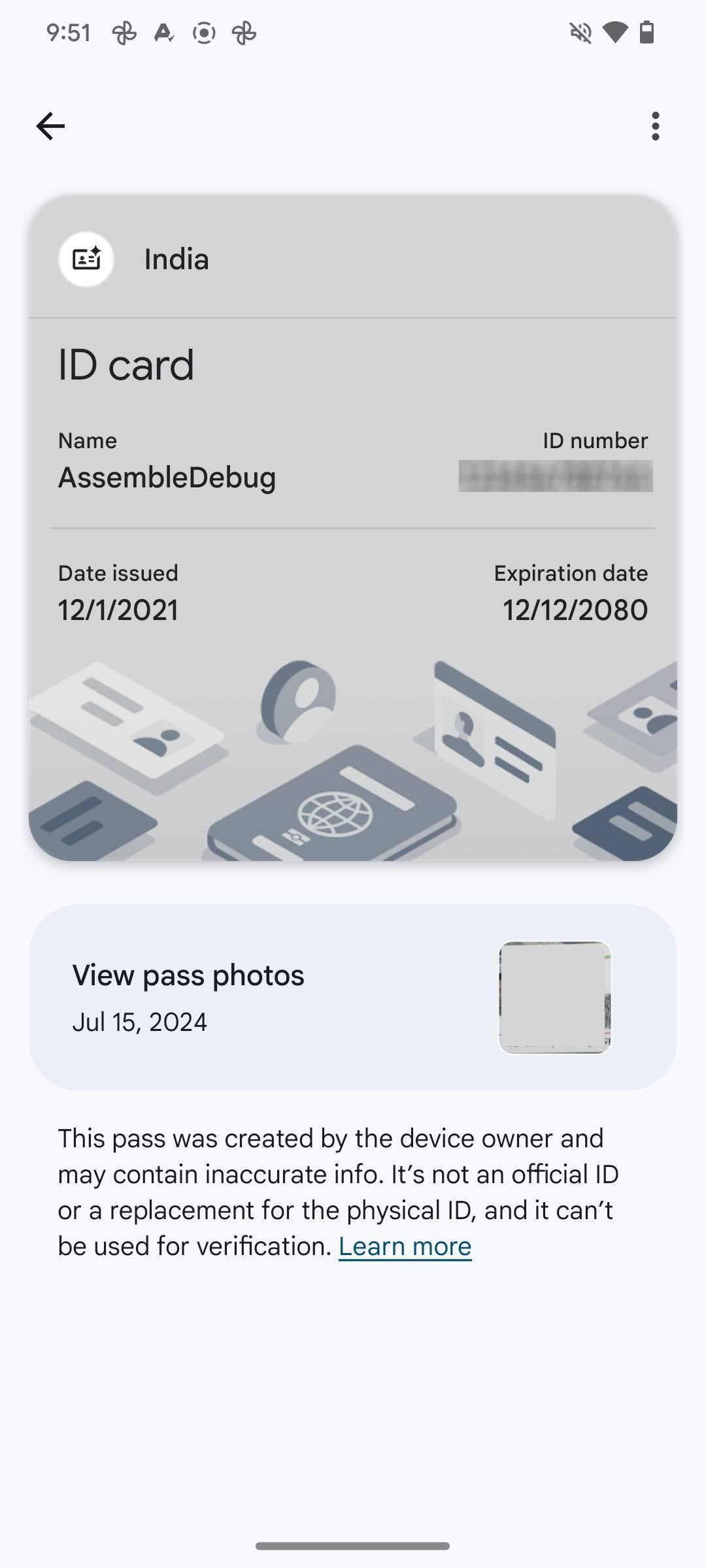
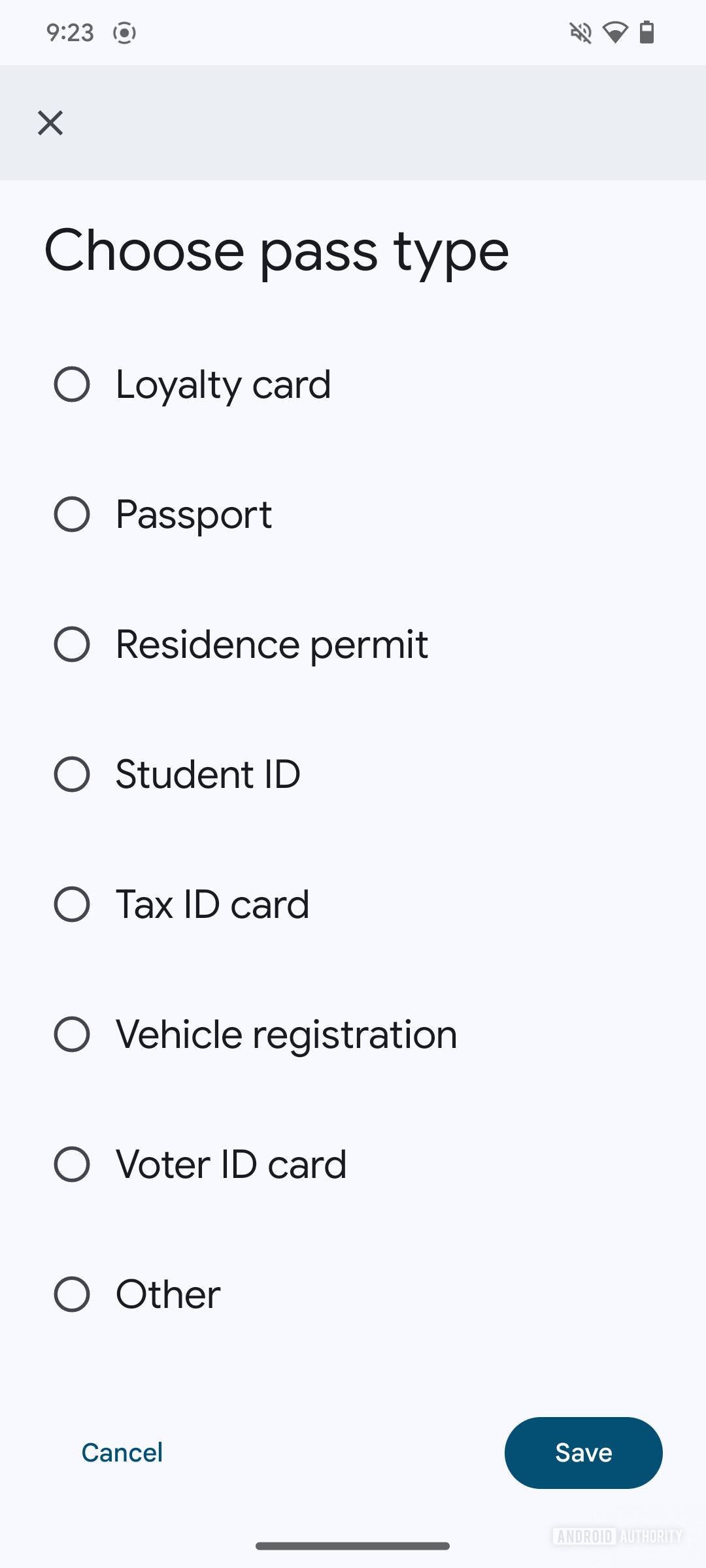
And now, a feature called My Week is surfacing. First off, references to it were discovered in the code of the app, and at first, it was considered to be related to Google Photos’ memories feature. But it seems like it works more similarly to a story on social media, with fewer followers that is.
Reverse engineer and tipster AssembleDebug together with Android Authority was able to enable the My Week feature and it’s now partially functional if enabled in this way.
When My Week goes live (which we don’t know when it will be), it will show up on the Google Photos app as a tile on the top left, with your avatar and a “+” button. When you tap on it, you’ll be prompted to set it up and pick out photos that bring your last couple of weeks to life. Once you set it up, you’ll be able to invite other Google Photos users to view it. It will be available in a vertical format similar to how Instagram Stories work. Users will be able to like it and leave comments.
It’s a nice little addition to Google Photos, especially for people who like to share with friends and family from the app. We don’t know when Google will launch it officially, but it does manage to sound pretty cool in advance.
Izzy, a tech enthusiast and a key part of the PhoneArena team, specializes in delivering the latest mobile tech news and finding the best tech deals. Her interests extend to cybersecurity, phone design innovations, and camera capabilities. Outside her professional life, Izzy, a literature master’s degree holder, enjoys reading, painting, and learning languages. She’s also a personal growth advocate, believing in the power of experience and gratitude. Whether it’s walking her Chihuahua or singing her heart out, Izzy embraces life with passion and curiosity.
Another Samsung phone has been spotted online running Android 15. The Galaxy S22 recently surfaced on Geekbench with the new Android version. We previously spotted Samsung’s Galaxy S24+ and Galaxy S23 Ultra with Android 15 on the same benchmarking platform, hinting at ongoing internal testing.
Samsung is readying Android 15 for the Galaxy S22 series
Google is expected to release the stable build of Android 15 for other vendors in August. Companies like Samsung, OnePlus, and Xiaomi will then roll out the new Android version to their devices. They are already developing the big update with add-ons and tweaks over Google’s version. These initial development builds are based on developer previews and beta builds Google has released over the past few months.
It appears Samsung’s Android 15 update, which will bring One UI 7.0 to Galaxy devices, has reached a significant milestone in the development process. Over the past few days, we have seen all of the company’s recent flagship lineups in Geekbench benchmarking runs with Android 15. This indicates the Korean firm is internally testing the big update. It might open up public beta programs once it reaches decent stability.
Last year, Samsung started One UI 6.0 and Android 14 beta in mid-August. With the current development pace, its Android 15-based One UI 7.0 update should have also hit the beta stage around the same time this year. However, rumors say the upcoming big update will be delayed a little. The company allegedly plans to complete the One UI 6.1.1 rollout before shifting focus to the One UI 7.0 beta.
Based on Android 14, One UI 6.1.1 is a tablet and foldable specific build that debuted with the Galaxy Z Fold 6 and Flip 6 today. Samsung will push the update to older eligible models. Additionally, it will extract the new AI features from One UI 6.1.1 and roll them out to S series flagships. The Galaxy S24 series will also get some camera improvements as part of this update. All of this will take time, delaying One UI 7.0.
Samsung has yet to confirm anything about One UI 7.0
All this said, Samsung has yet to say a word on its Android 15 and One UI 7.0 rollout. It could still begin public beta testing in the second or third week of August. Even if the beta release is delayed, the stable update may arrive on time, possibly by the end of October. The Galaxy S24 series should get the update first, followed by other flagships and foldables. Stay tuned for the company’s official announcement.
Samsung‘s Galaxy Unpacked event is in full swing and that means the company has now officially announced the Galaxy Watch 7 and the Galaxy Watch Ultra. The company’s latest smartwatches come with all of the features you’ve come to expect, like the newest version of Wear OS and multiple sensors for tracking everything from heart rate to sleep. There are, of course, some new additions too.
We all know that with mobile devices it’s the age of AI. Samsung introduced this with the Galaxy S24 series. With that being said, the Galaxy Watch 7 and Galaxy Watch Ultra are Samsung’s first smartwatches to come with Galaxy AI features. The Galaxy Watch Ultra is also a new device category for Samsung. Similar in part to the Galaxy Watch 5 Pro from a couple of years ago, the Ultra is meant to be Samsung’s more rugged, outdoorsy smartwatch.
It’s also a direct competitor to Apple’s Watch Ultra, hence the new squircle shape and the ability to withstand harsh outdoor conditions.
The Galaxy Watch Ultra is Samsung’s toughest smartwatch ever
While the Galaxy Watch 7 is the familiar design fans know and love, the Galaxy Watch Ultra is undoubtedly the more exciting release this year. It’s Samsung’s “toughest smartwatch ever” sporting Aerospace grade 4 titanium. It also comes with a new Quick Button, as well as night vision watch faces and what appears to be Samsung’s longest-lasting smartwatch battery yet.
So far, this title has been held by the Galaxy Watch 5 Pro, lasting around 40-50 hours in most cases for us. The Galaxy Watch Ultra far exceeds this number on average. The company boasts that in daily use it can last up to 100 hours on a single charge. That should help promote users taking this on long treks or camping trips. Or any outdoor activity where they might not be able to charge the watch as often as they normally could. It’ll also last for up to 48 hours during the most strenuous workout modes.
As for the new Quick Button, Samsung says this is a tactile option for triggering your activities or workouts on the fly. You can also use it to pause those activities if you need to. Samsung has boosted other parts of the watch too. For example, the Galaxy Watch Ultra features a dual GPS system for better performance during workouts. Plus, it has up to 3x as many LED sensors as the Galaxy Watch 6 series. Allowing for improved accuracy in tracking heart rate and other things.
Yet another new feature is the ability to monitor for sleep apnea. This was approved by the FDA back in February, but now it’s actually here. Sleep apnea can be a tough thing to deal with and makes it harder to breathe while sleeping. It can also sometimes go undetected by people that have it. So this should prove fairly useful. It’ll be available in one size, which is 47mm. It comes in three colors as well, which are Titanium Gray, Titanium White, and Titanium Silver.
The Galaxy Watch 7 is the same watch you know and love
If it isn’t broken, don’t fix it. Samsung has taken this to heart with the design of its main Galaxy Watch model every year. The Galaxy Watch 7 doesn’t stray from this ideal and comes with more or less the same design as last year’s Galaxy Watch 6. It has the familiar round watch face and the same two side buttons. It does however come with the new Galaxy AI tech. As well as double the storage for apps and the new Energy Score feature and wellness tips.
Storage has never been a huge problem for past Galaxy Watch models. But Samsung has doubled it anyway as the Galaxy Watch 7 comes with 32GB in total. Just like with previous models, Samsung will offer this year’s watch in two sizes – large and small. The Large comes in at 44mm in Green and Silver colors. Meanwhile, the small is 40mm and comes in Green and Cream.
In terms of cost, the Galaxy Watch 7 is starting at a pretty reasonable price point of $299. The Galaxy Watch Ultra, however, will retail for $649. Making it Samsung’s most expensive smartwatch to date. Both watches also