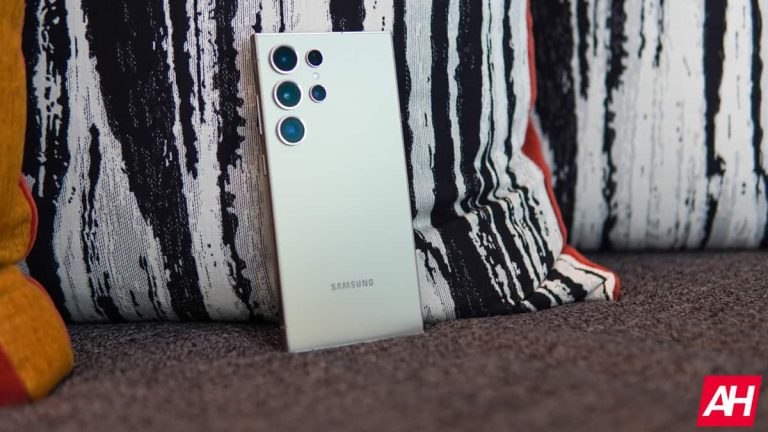
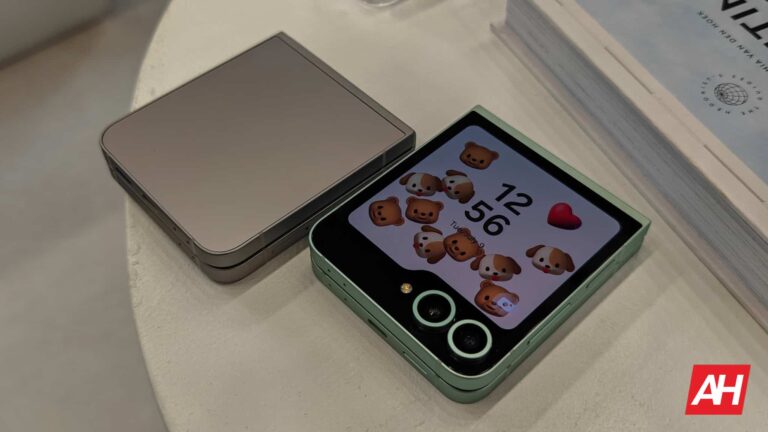
Another Samsung phone has been spotted online running Android 15. The Galaxy S22 recently surfaced on Geekbench with the new Android version. We previously spotted Samsung’s Galaxy S24+ and Galaxy S23 Ultra with Android 15 on the same benchmarking platform, hinting at ongoing internal testing.
Samsung is readying Android 15 for the Galaxy S22 series
Google is expected to release the stable build of Android 15 for other vendors in August. Companies like Samsung, OnePlus, and Xiaomi will then roll out the new Android version to their devices. They are already developing the big update with add-ons and tweaks over Google’s version. These initial development builds are based on developer previews and beta builds Google has released over the past few months.
It appears Samsung’s Android 15 update, which will bring One UI 7.0 to Galaxy devices, has reached a significant milestone in the development process. Over the past few days, we have seen all of the company’s recent flagship lineups in Geekbench benchmarking runs with Android 15. This indicates the Korean firm is internally testing the big update. It might open up public beta programs once it reaches decent stability.
Last year, Samsung started One UI 6.0 and Android 14 beta in mid-August. With the current development pace, its Android 15-based One UI 7.0 update should have also hit the beta stage around the same time this year. However, rumors say the upcoming big update will be delayed a little. The company allegedly plans to complete the One UI 6.1.1 rollout before shifting focus to the One UI 7.0 beta.
Based on Android 14, One UI 6.1.1 is a tablet and foldable specific build that debuted with the Galaxy Z Fold 6 and Flip 6 today. Samsung will push the update to older eligible models. Additionally, it will extract the new AI features from One UI 6.1.1 and roll them out to S series flagships. The Galaxy S24 series will also get some camera improvements as part of this update. All of this will take time, delaying One UI 7.0.
Samsung has yet to confirm anything about One UI 7.0
All this said, Samsung has yet to say a word on its Android 15 and One UI 7.0 rollout. It could still begin public beta testing in the second or third week of August. Even if the beta release is delayed, the stable update may arrive on time, possibly by the end of October. The Galaxy S24 series should get the update first, followed by other flagships and foldables. Stay tuned for the company’s official announcement.
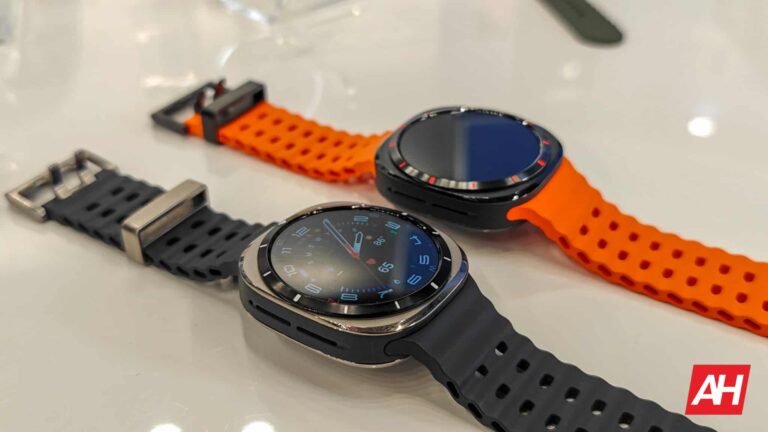
Samsung‘s Galaxy Unpacked event is in full swing and that means the company has now officially announced the Galaxy Watch 7 and the Galaxy Watch Ultra. The company’s latest smartwatches come with all of the features you’ve come to expect, like the newest version of Wear OS and multiple sensors for tracking everything from heart rate to sleep. There are, of course, some new additions too.
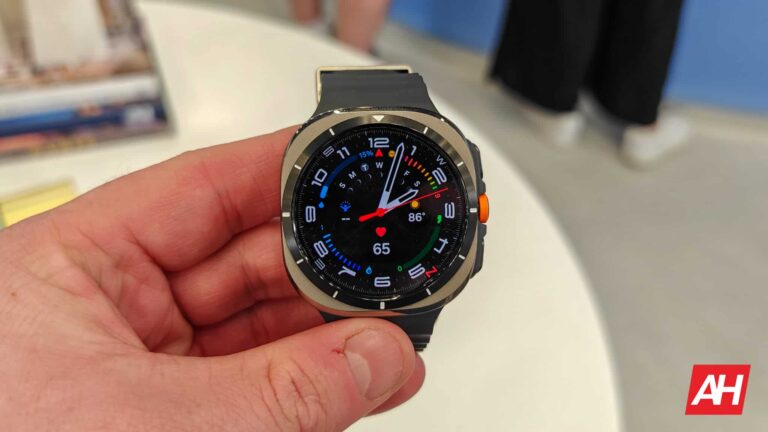
We all know that with mobile devices it’s the age of AI. Samsung introduced this with the Galaxy S24 series. With that being said, the Galaxy Watch 7 and Galaxy Watch Ultra are Samsung’s first smartwatches to come with Galaxy AI features. The Galaxy Watch Ultra is also a new device category for Samsung. Similar in part to the Galaxy Watch 5 Pro from a couple of years ago, the Ultra is meant to be Samsung’s more rugged, outdoorsy smartwatch.
It’s also a direct competitor to Apple’s Watch Ultra, hence the new squircle shape and the ability to withstand harsh outdoor conditions.
The Galaxy Watch Ultra is Samsung’s toughest smartwatch ever
While the Galaxy Watch 7 is the familiar design fans know and love, the Galaxy Watch Ultra is undoubtedly the more exciting release this year. It’s Samsung’s “toughest smartwatch ever” sporting Aerospace grade 4 titanium. It also comes with a new Quick Button, as well as night vision watch faces and what appears to be Samsung’s longest-lasting smartwatch battery yet.
So far, this title has been held by the Galaxy Watch 5 Pro, lasting around 40-50 hours in most cases for us. The Galaxy Watch Ultra far exceeds this number on average. The company boasts that in daily use it can last up to 100 hours on a single charge. That should help promote users taking this on long treks or camping trips. Or any outdoor activity where they might not be able to charge the watch as often as they normally could. It’ll also last for up to 48 hours during the most strenuous workout modes.
As for the new Quick Button, Samsung says this is a tactile option for triggering your activities or workouts on the fly. You can also use it to pause those activities if you need to. Samsung has boosted other parts of the watch too. For example, the Galaxy Watch Ultra features a dual GPS system for better performance during workouts. Plus, it has up to 3x as many LED sensors as the Galaxy Watch 6 series. Allowing for improved accuracy in tracking heart rate and other things.
Yet another new feature is the ability to monitor for sleep apnea. This was approved by the FDA back in February, but now it’s actually here. Sleep apnea can be a tough thing to deal with and makes it harder to breathe while sleeping. It can also sometimes go undetected by people that have it. So this should prove fairly useful. It’ll be available in one size, which is 47mm. It comes in three colors as well, which are Titanium Gray, Titanium White, and Titanium Silver.
The Galaxy Watch 7 is the same watch you know and love
If it isn’t broken, don’t fix it. Samsung has taken this to heart with the design of its main Galaxy Watch model every year. The Galaxy Watch 7 doesn’t stray from this ideal and comes with more or less the same design as last year’s Galaxy Watch 6. It has the familiar round watch face and the same two side buttons. It does however come with the new Galaxy AI tech. As well as double the storage for apps and the new Energy Score feature and wellness tips.
Storage has never been a huge problem for past Galaxy Watch models. But Samsung has doubled it anyway as the Galaxy Watch 7 comes with 32GB in total. Just like with previous models, Samsung will offer this year’s watch in two sizes – large and small. The Large comes in at 44mm in Green and Silver colors. Meanwhile, the small is 40mm and comes in Green and Cream.
In terms of cost, the Galaxy Watch 7 is starting at a pretty reasonable price point of $299. The Galaxy Watch Ultra, however, will retail for $649. Making it Samsung’s most expensive smartwatch to date. Both watches also
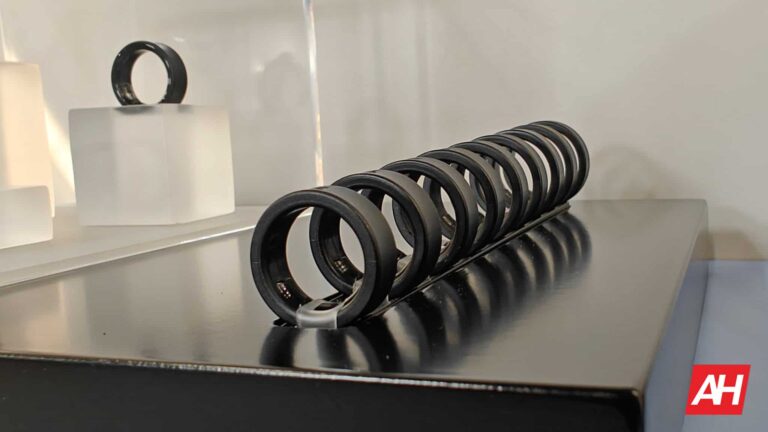
When it comes to wearables, the newly announced Samsung Galaxy Ring is poised to be the most comfortable wearable device you might ever encounter. Samsung has officially announced the new device at Galaxy Unpacked, and the company says it offers “unmatched comfort.” This is a statement that is quite obviously comparing the Galaxy Ring to other already available smart rings on the market. We had a chance to try it on and see how comfortable it really is, and we can confirm that it is indeed very comfortable.
That comfort is no doubt going to go a long way in convincing people to keep this thing on for long periods of time. And with the comfort level where it’s at, it should be easy to wear to sleep without the same issues that can plague smartwatches or wrist-worn fitness trackers. The bulky weight. As watches just don’t feel all that good to wear while you sleep.
This is, of course, a little subjective. Some users don’t mind wearing their smartwatches to sleep. However, smart rings are most certainly more comfortable to wear as they’re less obtrusive. Aside from the unmatched comfort, the Galaxy Ring brings a lot of new features to the table for fitness trackers. Most notably, the Galaxy AI. This new tech inside the ring will power recommendations to users on how to improve different metrics.
The newly announced Samsung Galaxy Ring is designed to be worn 24/7
One thing that smartwatches aren’t capable of in most cases, is constant wear. We’re not talking about wearing them most of the day. But more the ability to wear them 24 hours a day and 7 days a week. Quite simply because most of them just don’t have the battery life to support this. Not to mention, most people probably don’t want to wear a watch 24/7. With the Galaxy Ring, that’s likely to change. Samsung designed it to be worn 24/7 and both its comfort and its battery life are going to make that possible to do.
While the ring certainly is comfortable and that will help the 24/7 wearability, it also has a battery life of up to a week. So you won’t have to charge it until the week is over. Granted, your battery life mileage may vary depending on the features you use. But the promise of an entire 7 days of battery life on a single charge is definitely going to pique people’s interest.
Health and AI are at the heart of this device
Health is a big part of Samsung’s devices these days, and that doesn’t stop with the Galaxy Ring. Samsung says it delivers a “holistic look at your health,” but even if you don’t think of it that way, it still appears to deliver plenty of health insights. This is in part helped by the addition of Galaxy AI. Not only does the Galaxy AI give you personalized recommendations on how to improve different health metrics, but it’s also baked into the sleep tracking.
Samsung says it powers the new sleep algorithm and can give you useful information like how long it takes to fall asleep. If that’s information you might want to know, the Galaxy Ring will be able to tell you. The new sleep algorithm can also give you tips on staying asleep so you wake up well-rested. Additionally, it gives insights into different sleep stages you might have gone through while you were asleep. Naturally, without a display all of this information will be viewable in the Samsung Health app on your Galaxy smartphone.
In terms of other features, the ring is made of titanium and it has a water-resistance rating of up to 100 meters. It can also monitor for high and low heart rates and deliver cycle-tracking data. It even has baked-in gestures for controlling your phone’s camera and snoozing alarms. The Galaxy Ring will come in three colors and nine sizes. The colors are Titanium Black, Titanium Silver, and Titanium Gold. Pricing starts at $399.
The Samsung Galaxy Z Fold 6 is now official, and that dreaded price increase is also official. This year, Samsung is bumping the price up by $100 across the board for all three storage variants. So the 256GB model is going to be priced at $1,899, 512GB is going to be $2,019, and 1TB is going to be $2,259.
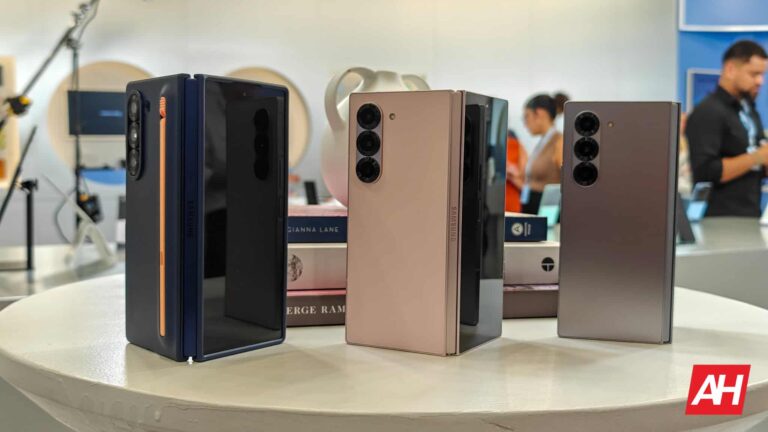
Samsung is going to offer the Galaxy Z Fold 6 in three colors: Pink, Navy, and Silver Shadow. As usual, Samsung is also offering a couple of exclusive colors for Samsung.com, which includes Crafted Black and White. The Crafted Black color is going to look more like a carbon fiber finish, making for a very interesting and unique color for the Galaxy Z Fold 6.
Verizon, AT&T and T-Mobile will be selling the Galaxy Z Fold 6 as well. However, so far only Verizon has given us details on pricing and promos. Verizon will be offering the Galaxy Z Fold 6 starting at $52.66 per month for 36 months. It will also offer some epic trade-ins where you can trade in any Samsung smartphone in any condition to get $800 towards a new Galaxy Z Fold 6 or Flip 6. You will also get a free storage upgrade. So you can get 512GB for the price of 256GB or 1TB for the price of 512GB.
If you pre-order your Galaxy Z Fold 6 in the first 72 hours after pre-orders open, you can get an additional $150 off using our exclusive link. That’s $100 in Samsung credit, plus $50 in additional credit if this is your first purchase through the Samsung Shop App. You can pre-order the unlocked or carrier versions from Samsung too.
Samsung’s Galaxy Z Fold 6 is a modest, yet durable upgrade
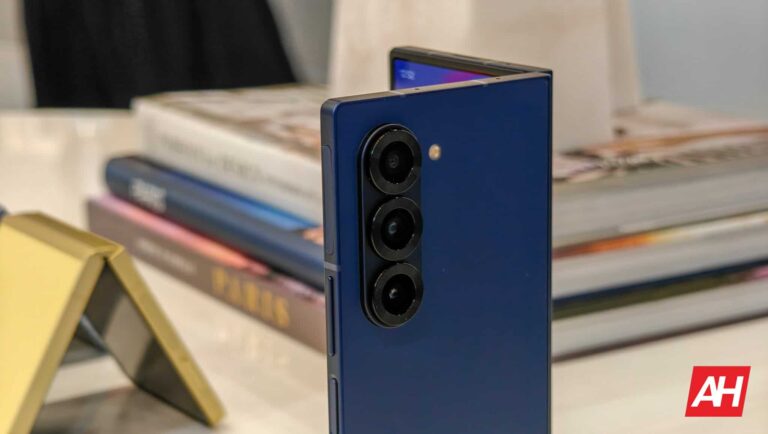
The Galaxy Z Fold 6 is not a huge upgrade compared to the Galaxy Z Fold 5, but it is a big upgrade in durability. A big reason for this is because of the new Dual Rail Hinge on the Fold 6, which does make a huge difference, in the short time I spent with the phone ahead of Unpacked today. Additionally, it is slightly wider and a bit shorter than the previous model, making it a bit easier to use. It’s also more flat and squared off, giving you Galaxy Note vibes.
Samsung is equipping the Galaxy Z Fold 6 with a Snapdragon 8 Gen 3 for Galaxy, 12GB of RAM, 256GB (up to 1TB) of Storage, and a 4,400mAh capacity battery. Samsung is also sticking with the same camera setup as last year, with a 50-megapixel primary camera, 12-megapixel ultrawide, 10-megapixel telephoto, 12-megapixel cover screen selfie camera, and a 4-megapixel under-screen camera.
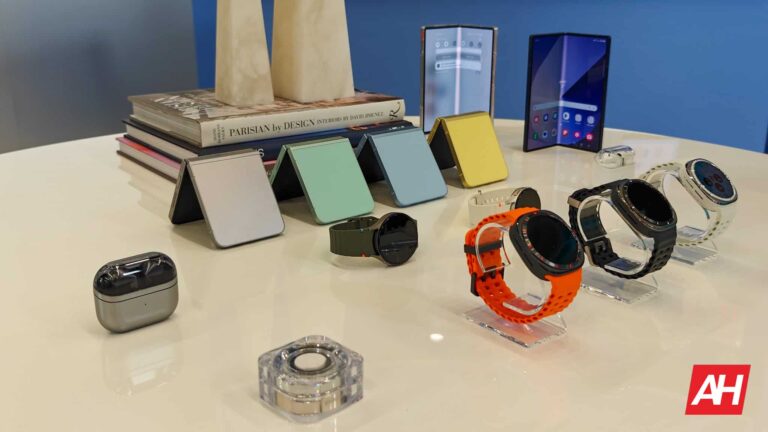
Samsung just held and wrapped up its Summer Galaxy Unpacked event for 2024, and there were quite a few new devices announced, all of which were expected thanks to months of mounting leaks. In total, Samsung announced some new phones, some new watches, a couple of pairs of new earbuds, and perhaps the most intriguing new wearable, a smart ring.
In this post, we’ll be rounding up everything that Samsung announced at this event. So sit back, grab some snacks, and have a look at all the shiny new tech if you happened to miss the live stream event from this morning. This is certainly likely for those on the West Coast given that Samsung held the event at 6am PST.
Again, none of the announcements made today were a surprise for anyone who’s been following Samsung’s upcoming products for the last few months. Nevertheless, let’s get into it and go over all the new devices that Samsung announced at its Summer Galaxy Unpacked 2024 event.
Samsung Galaxy Z Fold 6 and Galaxy Z Flip 6
Samsung’s latest iteration of foldable smartphones comes once again in two flavors. The Galaxy Z Fold 6 and the Galaxy Z Flip 6. One is designed for people who want a larger phone with more screen real estate, and the other is for those who desire something more compact that easily fits in their pocket, purse, or bag. We’re certain you can guess which one is which.
Both devices come with a slew of notable improvements and feature upgrades compared to last year. One of those is the inclusion of the new Galaxy AI software that Samsung introduced with the Galaxy S24 series earlier this year. These smart features give both new foldable phones plenty of additional functionality from searching for stuff online to jazzing up photos with special effects.
Another set of big improvements are the updated hinges and the stronger, flatter foldable screens. The display on the Galaxy Z Fold 6 in particular is now wider than it was last year. Boasting more screen real estate thanks to the additional width and slimmer bezels. Both phones also come with the Qualcomm Snapdragon 8 Gen 3 mobile platform inside. Making them perfect for everyday performance, media, and even gaming.
The newest smartwatches from Samsung come with both familiar favorites and new and improved tricks when it comes to features. And of course, the Galaxy Watch Ultra in general is more or less a new smartwatch category for Samsung. Technically. The Galaxy Watch 5 Pro was the closest Samsung has ever been to releasing a more adventure-friendly outdoor smartwatch. The Galaxy Watch Ultra takes things to a whole other level to compete with Apple’s Watch Ultra.
Making it more of a suitable device for outdoor activities. Both watches come with Samsung’s new Exynos W1000 chipset and they both run on Wear OS 5. Making these the first smartwatches on the market to run on this new version of Wear OS. Samsung also doubled the storage on the Galaxy Watch 7 and Watch Ultra from last year’s Galaxy Watch 6 series. Each new watch now has 32GB of storage compared to 16GB. Each watch also has a longer-lasting battery life, along with the inclusion of Galaxy AI.
You can pre-order the Galaxy Watch 7 and the Galaxy Watch Ultra from July 10 with both devices launching on July 24. The Galaxy Watch 7 will start at $299 while the Galaxy Watch Ultra will retail for $649.
Samsung Galaxy Ring
Samsung’s Galaxy Ring might just be the most exciting new device announced. If for no other reason than it being a brand new device type for Samsung. Smart rings themselves are not new but this is the first time Samsung has dipped a toe in these waters. And the ring will likely be the perfect complement to the new smartwatches. Of course, if you just want simple health and sleep tracking, the Galaxy Ring is suitable as your only wearable. But it will no doubt be better as a companion to the watch. With the ring being used for sleep tracking and the watch for everything else.
It comes in three colors and nine different sizes ranging from 5 all the way up to 13. So there should be a size that fits just about everyone. As for the colors, it’s available in Titanium Black, Titanium Silver, and Titanium Gold.
What’s really cool is that the Galaxy Ring has a battery life that can last for up to 7 days. So you can easily wear it all week without worrying about charging it. This includes wearing it to sleep since sleep tracking is its main function. You can pre-order the Galaxy Ring from July 10 with pricing starting at $399.
Samsung Galaxy Buds 3 and Galaxy Buds 3 Pro
It’s been a while since Samsung released a new pair of true wireless earbuds. The time has finally come, however. The Galaxy Buds 3 and Galaxy Buds 3 Pro usher in a new era for Samsung with true wireless earbuds design. While Samsung has never been one to shy away from changing up the look of its true wireless earbuds, these are quite different from any other pair the company has ever launched. At least in terms of design.
They feature a new stemmed look that’s reminiscent of the AirPods and AirPods Pro. Like all the other new devices today, they feature Galaxy AI software to make them even smarter and more useful to you in your day-to-day life. One of the big features this year is the Interpreter integration. This works similarly to how Google’s Pixel Buds Pro earbuds connect with Google Translate on your Pixel phone.
With the Galaxy Buds 3 and Galaxy Buds 3 Pro, you can bring up the Interpreter app on your Galaxy smartphone and speak into it to have it translate what you’re trying to say. Then the person you’re speaking to can speak into the phone in their own language, and that gets translated and played back to you in the earbuds. It’s a pretty neat feature and should be useful for travelers. Or just anyone who lives in an area where there are lots of different languages being spoken on a daily basis.
Naturally, these new earbuds also have an array of voice commands for different functions. Plus, they have better noise cancellation and improved battery life. The Galaxy Buds 3 and Galaxy Buds 3 Pro are available for pre-order from July 10 and they officially launch on July 24. The Galaxy Buds 3 will retail for $179, and the Galaxy Buds 3 Pro will retail for $249.
The tech world has its eyes on Samsung‘s Galaxy Unpacked event in Paris, France today. The company is unveiling the Galaxy Z Fold 6 and Galaxy Z Flip 6 foldables, plus a bunch of other products at the event. In the meantime, the Galaxy S25 series is slowly crawling through certification processes. Samsung recently obtained battery certifications for its 2025 flagships.
Galaxy S25 and Ultra get the BIS battery certification
A few days ago, the Indian regulatory body BIS (Bureau of Indian Standards) certified the Galaxy S25 Ultra battery with the model numbers EB-BS938ABE and EB-BS938ABY (the device has the model number SM-S938). The base Galaxy S25 (SM-S931) has now picked up the BIS battery certification. Its batteries have the model numbers EB-BS931ABE and EB-BS931ABY.
Spotted by 91Mobiles, these certification listings don’t reveal anything else, not even the battery capacity. A report last month said the Galaxy S25 will feature a 4,000mAh battery, unchanged from the 2024 model. There is no word yet on the battery capacity of the Galaxy S25 Ultra. Samsung’s Ultra flagships have had a 5,000mAh battery for a few years now.
Even if the 2025 model doesn’t bring a bigger battery, we might get a better battery life. The Galaxy S25’s Exynos 2500 and Snapdragon 8 Gen 4 chips are expected to be more power efficient than their predecessors. Samsung is also working on an AI tool allegedly capable of extending the battery life by 5-10%, potentially giving you up to an hour of additional playtime.
There have been rumors about Samsung using MediaTek’s flagship chipset if it fails to improve the yield rate of its 3nm Exynos 2500 on time. Depending on how things pan out over the next few months, the upcoming flagships could ship globally with the Snapdragon 8 Gen 4, get two chip versions with Exynos 2500 in some markets, or three chip versions with MediaTek’s Dimensity in the mix. Expect more detailed leaks in the coming months.
The Plus model may start showing up on certification listings soon
As of this writing, the Galaxy S25+ hasn’t received a battery certification from BIS or any other regulatory body, or at least none have publicly listed the device on their websites. However, we expect it to start showing up on certification listings in the coming days or weeks. Samsung has all three models in development, so it is only a matter of time. The Plus bears the model number SM-S936. The Galaxy S25 series will arrive in early 2025.
Wear OS 5, the latest version of Google’s operating system for smartwatches, will include new requirements for watch face developers. Now, only those developed in WFF (Watch Face Format) will be compatible with Wear OS 5 wearables. The new Galaxy Watch 7 and Watch Ultra are the first devices running this version out of the box.
You can only use WFF watch faces on Wear OS 5 wearables
Wear OS 5 arrived as an update with important improvements in battery life. Google promises up to 20% less power consumption compared to the previous version. To achieve this, the company implemented some important changes, and it seems that support for watch faces is one of the affected sections. From now on, developers will have to adapt their watch faces to the WFF format if they want them to be compatible with the latest Wear OS version. Google launched the WFF format with Wear OS 4, but its implementation was not yet mandatory.
That said, the change will be positive for both users and developers. For the latter, developing watch faces in WFF will be much simpler since there will be no code embedded in the watch face APK. This is because the logical part necessary to run watch faces will now be the full responsibility of the OS. So, developers can focus on the creative and functional sections. That is, they will no longer have to worry about code optimization. On the other hand, Wear OS 5 users will benefit from better battery life thanks to the latest Watch Face Format.
Not all watch faces have been adapted yet
As a drawback, it is possible that some of your favorite watch faces are not yet adapted to WFF. So, they won’t be available on your device running Wear OS 5. However, it seems like things are moving fast. In May, Google revealed that 30% of watch faces available in the Play Store had already been adapted to WFF. A couple of months have passed since then, so it is possible that the percentage is higher now.
Additionally, Wear OS 5 will still take some months to reach most eligible wearables, so you may already be able to set all your favorite watch faces when you receive the update. Currently, all watch faces are compatible with “watches running Wear OS 2 or later.” So, you shouldn’t have any problem using your favorites. Lastly, Google expects all watch faces available in the Play Store to use the WFF format “in early 2025.”
Despite reports suggesting otherwise, Samsung says its 3nm chip process has no yield or performance issues. The company claims its second-gen 3nm process development is proceeding as planned. Its Exynos 2500 chipset for the Galaxy S25 series is expected to use the advanced process node.
Samsung claims its 3nm process has no yield or performance issues
Samsung started 3nm mass production in mid-2022, a few months before TSMC. However, the latter has had more success with its advanced process node. It stuck with the tried and tested FinFET transistor architecture and has achieved better yield than Samsung, which upgraded to the more advanced GAA architecture.
TSMC has already made 3nm mobile chips for Apple and is rumored to have bagged major 3nm manufacturing contracts from Google, MediaTek, Nvidia, Qualcomm, and other chipmakers. Samsung, on the other hand, didn’t produce mobile chips on its first-gen 3nm process node. Its first 3nm chip is the Exynos W1000 powering the Galaxy Watch 7 and Galaxy Watch Ultra launched earlier today.
Multiple sources recently said that the Korean firm is struggling with its 3nm yield, the percentage of usable chips produced out of the total manufactured. The yield rate of the Exynos 2500 was reportedly in single digits in the first quarter of 2024. It improved to around 20% in the second quarter, but that is still substantially less than TSMC. The yield rate must be at least 60% for mass production.
This led to rumors that Samsung might not use its Exynos flagship in the Galaxy S25 series. However, the company refutes the reports. At the Korean edition of its annual Samsung Foundry Forum (SFF), the firm said its 3nm development is on track. The production of chips using its second-gen 3nm process is proceeding as planned “based on stable performance and yield,” Samsung said in a press release.
Hopefully, this is true. According to reports, the Exynos 2500 yield must reach 60% by October for a timely mass production for the Galaxy S25 series, which will arrive in early 2025. Samsung still has a few months of buffer. It might be enough for the trench titan to turn the tide. The Korean firm may still use Qualcomm’s 3nm Snapdragon 8 Gen 4 in its next-gen flagships in some markets.
Samsung plans to launch 2nm chips in 2025
At the US edition of SFF 2024 last month, Samsung announced plans to launch AI-focused 2nm chips in 2025. The company has now revealed that it has won a 2nm production contract from Japanese AI startup and IoT Preferred Networks (PFN). TSMC also aims to begin 2nm mass production next year. The Taiwanese firm certainly won the 3nm battle. It remains to be seen if Samsung can fight back in the 2nm era.
The Samsung Galaxy Z Fold 6 launched today, Samsung’s new flagship book-style foldable. We’ve already talked about the device in our official announcement. We are here now to take a closer look at the Galaxy Z Fold 6 specifications.
The Galaxy Z Fold 6 has powerful specifications, though similar to last year’s model
Needless to say, this is a powerful handset. It’s fueled by the Snapdragon 8 Gen 3 for Galaxy processor. That is an overclocked version of the Snapdragon 8 Gen 3, basically. The phone also includes 12GB of LPDDR5X RAM and 256GB, 512GB or 1TB of UFS 4.0 flash storage (non-expandable).
The device has a 7.6-inch 2160 x 1856 Dynamicm AMOLED 2X display. That panel has a 120Hz refresh rate and supports HDR10+ content. The display on the outside measures 6.3 inches and it’s a fullHD+ (2376 x 968) panel. That is also a Dynamic AMOLED 2X panel and it supports a 120Hz refresh rate.
The battery capacity & charging remains unchanged
A 4,400mAh battery sits on the inside, while the phone supports 25W wired charging. 15W wireless charging is also supported, as is 4.5W reverse wireless charging. In the battery and charging departments everything remained the same. Samsung also doesn’t include a charger in the box.
Samsung also didn’t really upgrade the camera hardware either. We’re still looking at the same setup as last year. A 50-megapixel main camera with a wide FoV and an f/1.8 aperture is included. A 12-megapixel ultrawide unit with an f/2.2 aperture and 123-degree FoV sits on the back too. The last camera is a 10-megapixel telephoto unit with a 3x optical zoom. Digital zoom goes up to 30x.
Both displays include their own cameras
There is also a camera on both main and cover displays. The same camera is used, a 10-megapixel selfie camera with an f/2.2 aperture lens. The same camera is featured on both displays.
The phone has a dual SIM setup, and that will depend on the market. Somewhere you’ll find two nano SIM card slots, while in other places a nano SIM card is combined with an eSIM support. Bluetooth 5.3 is supported, as is USB Type-C Gen 3.2. There is no audio jack here. A side-facing fingerprint scanner is used here, it’s built into the power/lock key. Android 14 comes pre-installed with One UI 6.1.1 on top of it. The device is IP48 certified for water and dust resistance.
The Samsung Galaxy Z Fold 6 measures 153.5 x 132.6 x 5.6 when unfolded. When folded, it measures 153.5 x 68.1 x 12.1mm. The device weighs 239 grams.
The Samsung Galaxy Z Flip 6 arrived today, alongside the Galaxy Z Fold 6. Samsung announced them during an event in Paris, and we’ve already talked about them in our original announcement. We will now talk about the Galaxy Z Flip 6 specifications in specific, as the Galaxy Z Fold 6 specs have been covered already.
The Galaxy Z Flip 6 specifications are not that different form what the Galaxy Z Flip 5 offers
Much like the Galaxy Z Fold 6, the Galaxy Z Flip 6 doesn’t really bring all that much novelty in the spec department. Let’s see what’s the same, and what’s different, shall we?
The Snapdragon 8 Gen 3 for Galaxy SoC fuels this smartphone. That is an overclocked version of Qualcomm’s flagship processor. Samsung also included 12GB of LPDDR5X RAM here and 256GB or 512GB of UFS 4.0 flash storage.
The main display on the phone measures 6.7 inches. It’s a Dynamic AMOLED panel with a maximum refresh rate of 120Hz. The resolution of this panel is 2640 x 1080 (fullHD+), while the panel does support HDR10+ content.
The outer display still has a 60Hz refresh rate
The outer panel is a 3.4-inch unit, and it’s a Super AMOLED display. That outer display has a 60Hz refresh rate and a resolution of 720 x 748. We were expecting a higher refresh rate this time around, but that didn’t happen.
A 4,000mAh battery is included inside the Galaxy Z Flip 6, the same as in the Flip 5. The phone supports 25W wired, 15W wireless, and 4.5W reverse wireless charging. That also remains unchanged compared to its predecessor. Do note that the charger is not included in the box.
The camera hardware did not get an upgrade
The camera hardware remained the same too. A 50-megapixel main camera (f/1.8 aperture, wide-angle) is backed by a 12-megapixel ultrawide unit (f/2.2 aperture, 123-degree FoV). There is also a 10-megapixel unit on the main display with an f/2.2 aperture lens. That one is the same as on the previous model too.
There are two SIM card slots included in the Samsung Galaxy Z Flip 6, and yes, eSIM support is included. There is no audio jack, but you can connect your headphones via the Type-C USB (v3.2) port. Bluetooth 5.3 is also supported here. Android 14 comes pre-installed with Samsung’s One UI 6.1.1 skin. The phone is also IP48 certified for water and dust resistance.
The phone measures 165.1 x 71.9 x 6.9mm when unfolded, and 85.1 x 71.9 x 14.9mm when folded. It weighs 187 grams.