Gmail is working on a nice update with a touch of modernization in a new test, reports Android Police. The email service is currently testing a quick reply UI, more similar to a chat service.
Gmail working on a Quick reply UI for a more modern feature set
Usually, replying to emails is quite the serious-looking process. You need to tap the Reply or Reply All button, enter a subject line, type out a response and include a signature and a salutation. Now, Gmail is working on making exchanging emails more like threads (back-and-forth conversations), if you wish to do so.
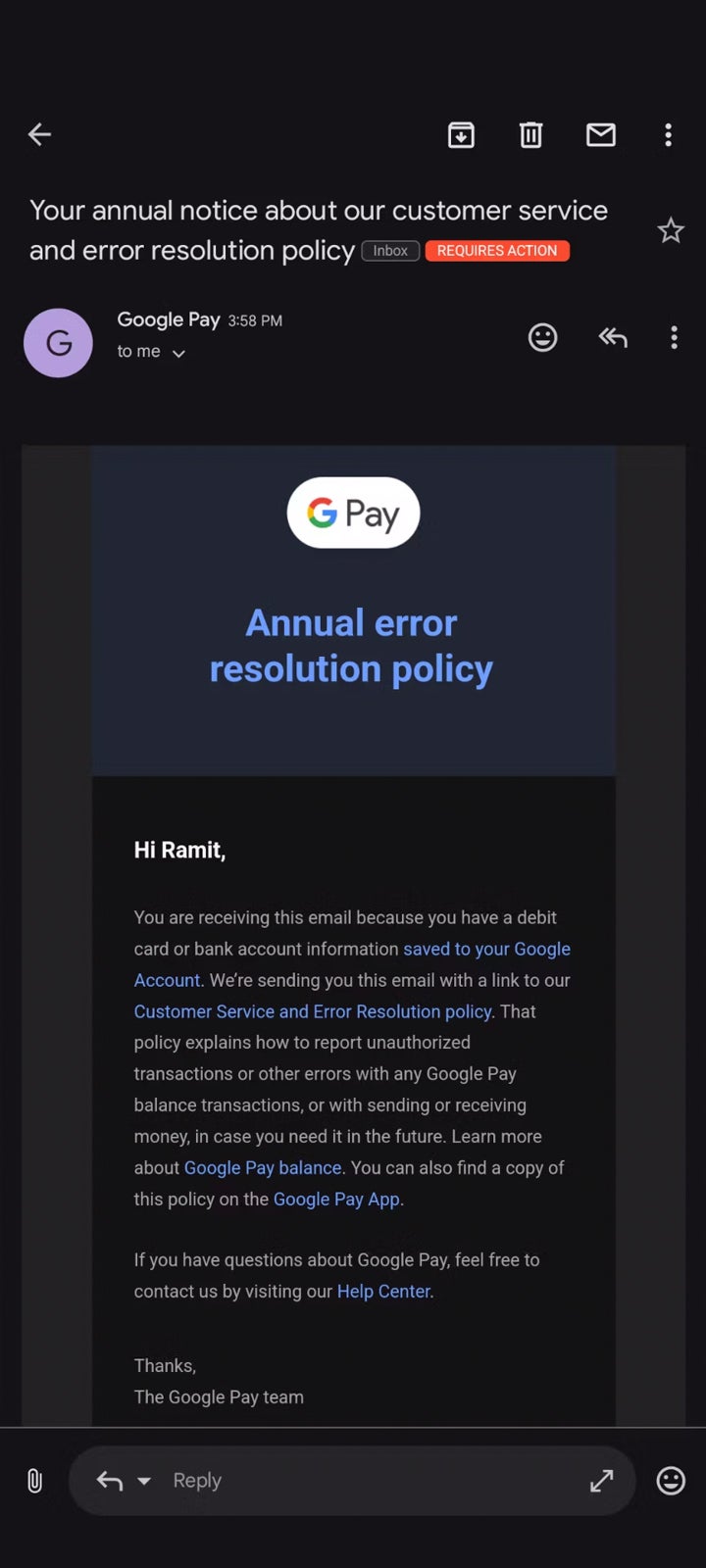
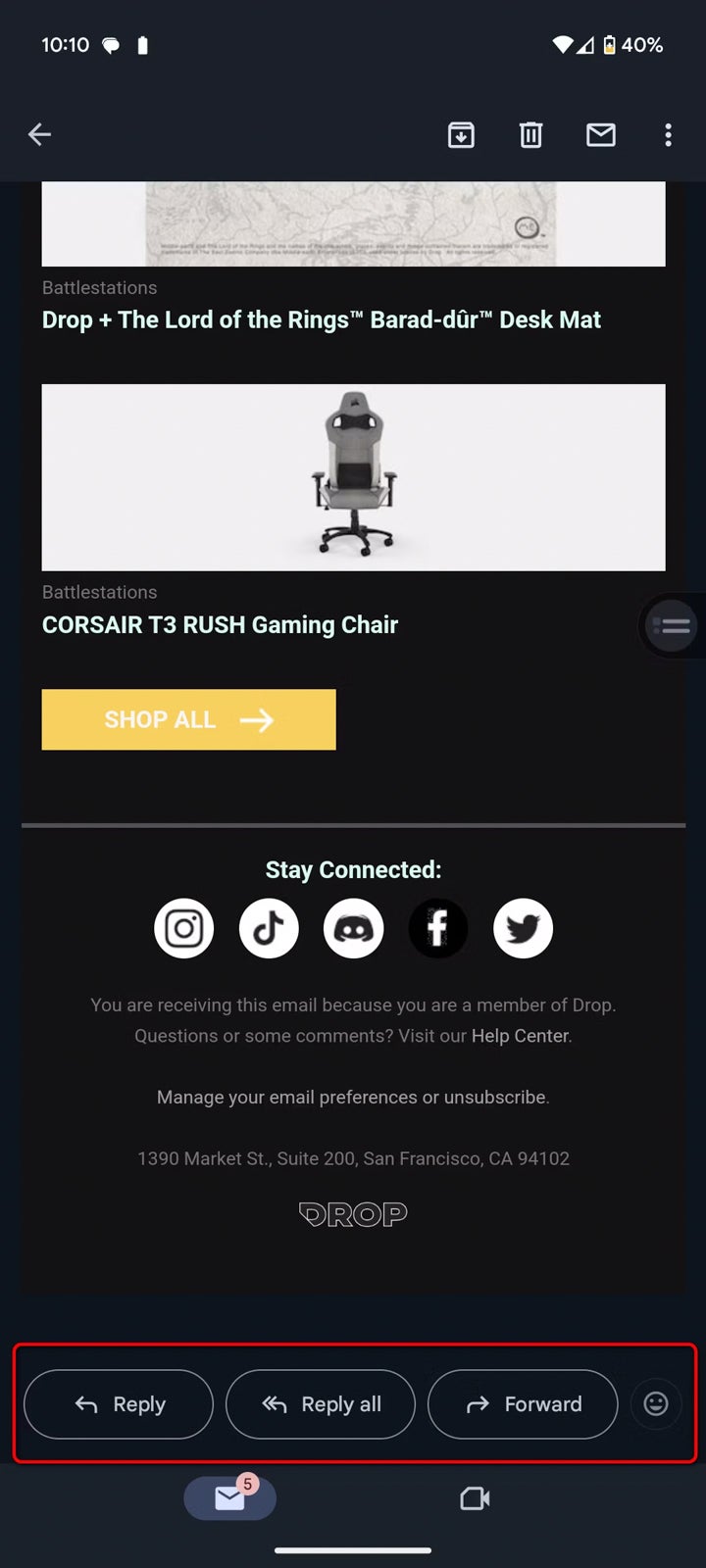
There’s a new test for Gmail on Android that is working on replacing the three large buttons for Reply, Reply All, and Forward, with a message box that looks more like a field in Telegram or WhatsApp, or any other chat app for that matter. You have a paperclip icon on the left for file attachments, and a more simple way to reply to the email.
The new UI in testing
You can, of course, still choose to change to “Reply All” or edit the list of recipients, but the default is “Reply”. You can also expand this field to get a full-screen email composition window to create a more sophisticated email response. The emoji button is on the right, outside the text field.
When you start typing, you get the keyboard and the text field moves close to the middle of your screen, just like a regular chat app. You don’t lose visibility of the email you’re replying to as well.
The current UI
This seems to be a server-side test from Google, and not all users will be able to see it just yet.
Huawei has two lineups of flagship truly wireless earbuds. Both are a part of the ‘FreeBuds’ series, but one lineup comes with open-fit design, and the other features closed-fit design. In other words, one come without a silicone seal, while the others have it. Earlier this year, I checked out the Huawei FreeBuds 5. That are the company’s open-fit design, and they performed great. Now, for people who want smaller earbuds, and one with closed-fit design, well, Huawei has you covered. The company launched the Huawei FreeBuds Pro 3 truly wireless earbuds quite recently, and I’ve been using them for a while now, which is why this review is in place.
The Huawei FreeBuds 5 do come with some silicone seals, even though they’re open-fit earbuds, but the FreeBuds Pro 3 will appeal to more people, as they’re closed-fit by default. They’re much smaller than the FreeBuds 5, and offer much better active noise cancelling (ANC). The improvement here, even compared to the Huawei FreeBuds Pro 2 that I checked out last year, is quite significant. Not a single product is perfect, of course, but as you can probably tell already, I’m left impressed by the Huawei FreeBuds Pro 3. In this article, you’ll be able to find out why, and get a pair yourself, if it fits your style and budget. So let’s get cracking, shall we?
Table of contents
Huawei FreeBuds Pro 3 Review: Hardware / Design
The Huawei FreeBuds Pro 3 are made out of plastic, and the same goes for their charging/carrying case. That is a given these days, pretty much. Now, the thing is, the Ceramic White model is the only one that feature shiny plastic. The Green and Silver Frost models both have matte plastic, and I’m glass I got to review one of those two models. As you can see in the provided images, I got a chance to use the Green model. It looks really nice in real life, and it actually looks like a combo between green and gray colors. Both the charging case and the earbuds feel really nice in the hand, the build quality is top-notch, which is what we’re used to seeing from Huawei. That is especially true for the company’s higher-end products, of course, which these earbuds definitely are. They’re basically the top-end truly wireless earbuds the company has to offer.
Matte plastic > glossy plastic
The matte plastic didn’t start feeling greasy at any point during my usage, which is not something I can say for the shiny finish. It can get quite greasy, and packed with fingerprints. That’s not an issue at all here, so I definitely do recommend getting either the Green or Silver Frost models. Products with shiny plastic definitely need to go away. In any case, the charging case has a Type-C port at the bottom (though wireless charging is also supported, more on that later), where you’ll also see three holes for a loudspeaker. Yes, the charging case does have a speaker for audio cues. The pairing button is located on the side of the case. There’s one LED light on the outside of the case, and one on the inside. The outer one signals the battery level of the case itself, while the inner one indicates the battery life of the earbuds. The outer one also shows you the pairing status, as it will start blinking white when it’s in pairing mode (you need to hold the physical button in order to enter the pairing mode).
The lid on the charging case feels really sturdy
You need to hold the charging case in horizontal orientation in order to open them, which is the opposite of what the FreeBuds 5 offered. The lid feels very sturdy, it’s a far cray from cheap truly wireless earbuds you’ll find out there. That’s nothing new, though, Huawei has been doing it for years now. The charging case is not particularly grippy, it’s exactly what you’d expect out of matte plastic. Now, the earbuds themselves, on the other hand, are not made out of matte plastic, unfortunately.
The earbuds themselves have shinny plastic finish on them, and they do get rather messy fast. They end up being filled with fingerprints, which is not surprising. Considering they’re quite small, not many people will have a problem with that, but it’s worth noting. The earbuds are quite body, which is good for grip when you’re removing them from the charging case. They magnetize in the case when they’re charging, and you’ll find connectors on the bottom of the earbuds themselves, which is how they’re charging.
They support both swipe gestures & press-to-trigger gestures
Each earbud has a touch-sensitive pad on them. Now, those tiny pads are not located on the part of the earbuds that is facing opposite of your head. They are located on the outer part, but the part that is looking forward/up. They react both on swipe and touches (physical ones), depending on what you’ve set up in the AI Life app. More on that later. It’s also worth noting that even though the surface area of the touch pads is small, they do work really. I didn’t have any issues whatsoever, even though I’d still prefer them to be on the outer part of the earbud. Do note that the earbuds are IP54 certified for water and dust resistance, but not the charging case.
What else sits in the box?
Now, do note that if the pre-installed eartips don’t work for you, there are different ones included in the package. You have XS (Extra Small), S (Small), and L (Large) sizes included, while the M (medium) are pre-installed. In addition to that, and some paperwork, you’re also getting a Type-A to Type-C cable, in case you need it for charging.
Huawei FreeBuds Pro 3 Review: Sound & Call quality
The Huawei FreeBuds Pro 3 are the best-sounding earbuds I’ve ever used, period. I cannot emphasize how great these sound, especially considering the size, not to mention that ANC (Active Noise Cancellation) got improved as well. Even if you don’t mess with the equalizer (which is available, a 10-band EQ, actually), you’ll get great sound out of these earbuds. The sound is not too sharp, while it’s also nowhere near being muffled. It’s really well-balanced across the spectrum. I’ve listened to mostly rock and pop songs during my usage, but I also tested some R&B, songs heavy on bass, and plenty of power ballads, amongst others. Everything sounded great, pretty much. Other earbuds I’ve had contact with don’t even come close in terms of sound quality.
The call quality is excellent
What about call quality? Well, that has been improved, and it’s also quite noticeable. People on the other end of the line said that I sounded great, even though I was in a rather busy part of town when I tested call quality, and I was constantly moving too, not to mention that I was riding in a tram too. In fact, several people told me that I sounded great, that they wouldn’t even notice that I was speaking via earphones if I didn’t emphasize that. Now, Huawei is utilizing something called ‘PireVoice 2.0’ in order to make this happen. The company says that the system is able to pick up voices a lot better thanks to this feature, 2.5x better, to be exact. This is done through neural network algorithms, while the extra mics don’t hurt either. All in all, the sound quality is top-notch.
ANC is much-improved compared to FreeBuds Pro 2, and it’s noticeable
Huawei actually claims that it improved background noise cancellation by 5 dB in comparison to the FreeBuds Pro 2. Wind noise cancellation has been improved by 80%, and noise cancellation in general by 50%, according to Huawei. Usually, when testing next-gen earbuds, I either can’t tell the difference in ANC, or the different is not that noticeable. With the FreeBuds Pro 3, however, the difference is easily noticeable. ANC is obviously better, as far as background noise cancellation is concerned. It’s outstanding for TWS earbuds, to be quite honest. It still doesn’t tune out everything, but that’ll never happen with earphones. I didn’t get much wind during my testing here, but wind wasn’t an issue. In fact, it wasn’t really an issue with FreeBuds Pro 2, so if that aspect is improved here, that’s great! Another thing to note is that LDAC support is included too.
There are several ANC modes you can choose from
Now, in regards to ANC, you do have several modes to choose from. Dynamic, Cozy, General, and Ultra modes are at your disposal. The ‘Ultra’ mode is for extremely noisy places, ‘General’ is for generally noisy places, ‘Cozy’ is for places with little noise, and the ‘Dynamic’ mode will allow the earbuds to decide on their own.
Huawei FreeBuds Pro 3 Review: Battery
The battery life varies considerably between different pairs of truly wireless earbuds. The Huawei FreeBuds Pro 3 don’t exactly excel in that regard, but I’ve seen much worse numbers, so… I can’t really complain all that much. Now, Huawei claims that you can get around 6.5 hours of battery life without ANC, and I see that happening. I didn’t really use them exclusively without ANC for that long to find out, but based on what I’ve seen, yes, it’s possible. With ANC on, you can count for around 4.5 hours, so two hours less than with ANC on. That’s not bad, actually, though as I said, I’ve seen earbuds with better battery life. Do note that the charging case boosts those 6.5 hours to around 25-26 hours. Huawei claims it will push the battery life to around 31 hours, but that didn’t pan out for us.
Wireless charging is also supported
You can charge these earbuds both via a wire (Type-C port), or wirelessly (Qi charging). The charging case can charge up the earbuds in around an hour, and it packs in enough punch to fully recharge them four times.
Huawei FreeBuds Pro 3 Review: AI Life app
The AI Life is Huawei’s application that you’ll need in order to customize your Huawei FreeBuds Pro 3 experience. Do note that it’s not necessary for general usage. However, if you’d like to tweak the touch gestures, ANC, or the equalizer, having this app is a must. The same goes for jumping between devices in terms of compatibility, and so on. You can get the Huawei AI Life app directly from the company’s website, or via the AppGallery app store you can install on your phone. The app is not available in the Google Play Store due to the US ban and everything connected to that.
The AI Life app comes with quite a few options, including a 10-band EQ
In the app, you can also choose from several EQ presets if you want (Bass boost, Treble boost, Voices, and Symphony). Alternatively, you can manually set the equalizer to your liking. As mentioned earlier, there’s a 10-band EQ included here for you to use. Customizing touch gestures is also possible, to a degree, and so on. Do note that you’ll get a click sound in your ears when you interact with touch gestures, regardless whether you’re swiping to increase or decrease volume, or if you’re pinching the touchpad for pausing/playing music. These are just some examples, of course.
You can easily re-assign gestures
In regards to default gestures, let’s just go over them real quick. If you pinch the stem where the touch pad is, you’ll be able to play or pause music, or answer/end call. Pinching it twice will reject the call or throw you to the next song, depending of whether you have an incoming call or not. Pinching three times calls up the previous song, while pinching and holding will let you switch between awareness mode, normal mode, and ANC. If you swipe up and down you’ll be able to control the volume. That’s it. The gestures worked really well for me.
Huawei FreeBuds Pro 3: Should you buy it?
So, should you buy Huawei’s flagship truly wireless earbuds? Well, if you’re looking for a great pair of truly wireless earbuds, love the closed-fit design, and have the money to make it happen… then yes, we’d definitely recommend these. You’ll hardly find a better pair of truly wireless earbuds for this price, to be quite honest. Not only are these earbuds very compact, and offer outstanding sound quality, but they also come with great ANC, and a 10-band EQ that you can utilize. You can fine-tune these earbuds to provide the sound exactly as you like/need, and have a useful tool to tune out when in a busy environment. Truth be said, the Huawei FreeBuds Pro 3 are easy to recommend, as they stand out in many ways, and the price tag is just right.
You should buy the Huawei FreeBuds Pro 3 if you:
…want great sound output in a tiny package …need capable ANC, but don’t want to lug around large headphones …like to fine-tune your listening experience via a capable equalizer …need a good app to support your earbuds …connect your earbuds to more than one device …make a lot of phone calls using earbuds …need LDAC support
You shouldn’t buy the Huawei FreeBuds Pro 3 if you:
The FBI is investigating a data breach where cybercriminals were able to steal patients’ records from a Las Vegas plastic surgeon’s office, and then post the details online which included nude photos.
In February, cybercriminals gained access to Hankins & Sohn’s network, which has offices in both Henderson and Las Vegas. From there, the cybercriminals were able to download patient information.
The practice sent a letter to patients in March and April notifying them of the breach.
“On or about February 23, 2023, Hankins & Sohn became aware of suspicious activity relating allegations by an unknown actor that data was stolen from our network. We quickly took steps to investigate the validity of the claims and to assess the nature and scope of the activity and what information may have been affected. We are also working with law enforcement to investigate the activity. We learned that files were taken by the unknown actor prior to this date.”
Apparently, the cybercriminals didn’t get what they wanted from Hankins & Sohn and started posting the information online. Several patients and court documents say that the stolen data included sensitive personal information, such as names and Social Security numbers, but also nude photos of patients taken before and after surgery.
They cybercriminals didn’t stop at that. They sent the data, along with the nude photos, to family and friends through patients’ email accounts.
According to 8NewsNow, about a dozen women have since filed a lawsuit against the firm, claiming they did not do enough to protect their private and personal information. None of the documents posted online were encrypted. It was unclear Monday if Hankins & Sohn was storing its data per HIPAA rules. A spokesperson for the office that oversees HIPAA-related investigations declined to comment.
HIPAA is short for Health Insurance Portability and Accountability Act. HIPAA is a federal law that required the creation of national standards to protect sensitive patient health information from being disclosed without the patient’s consent or knowledge.
The victims claim that the Hankins and Sohn failed to implement adequate and reasonable cybersecurity procedures and protocols to protect their Personally Identifiable Information (PII) and Protected health information (PHI).
Data breach
There are some actions you can take if you are, or suspect you may have been, the victim of a data breach.
Check the vendor’s advice. Every breach is different, so check with the vendor to find out what’s happened, and follow any specific advice they offer.
Change your password. You can make a stolen password useless to thieves by changing it. Choose a strong password that you don’t use for anything else. Better yet, let a password manager choose one for you.
Enable two-factor authentication. Where possible, use a FIDO2 2FA device. Some forms of two-factor authentication (2FA) can be phished just as easily as a password. 2FA that relies on a FIDO2 device can’t be phished.
Watch out for fake vendors. The thieves may contact you posing as the vendor. Check the vendor website to see if they are contacting victims, and verify any contacts using a different communication channel.
Take your time. Phishing attacks often impersonate people or brands you know, and use themes that require urgent attention, such as missed deliveries, account suspensions, and security alerts.
We don’t just report on threats – we help safeguard your entire digital identity
Cybersecurity risks should never spread beyond a headline. Protect your and your family’s personal information by using Malwarebytes Identity Theft Protection.
If you’re missing Windows Phone, you’ll likely love the app we’re here to talk about. The app’s name is BIG Icons, and it has been released by Rushikesh Kamewar, a well-known Android developer.
This developer stands behind apps such as Shortcut Maker, Pixel Search, AppBar, and Notification Shortcuts. Now, one thing to note before we get started is that this app is currently in beta. You can buy it from the Google Play Store, but it’s in beta, so be warned.
Get a Windows Phone feeling on your Android device with BIG Icons app
This app’s goal is to populate your home screen with tiles, similar to the ones Windows Phone devices rocked. Of course, the integration is not as severe, but this implementation is interesting nonetheless.
With the BIG Icons app, you can place icons/tiles of various sizes on your homescreen(s). That’s not where the story ends, though. These are not just big app icons that you can tap, no, not at all.
In fact, the developer allows you to receive notifications right on those tiles, as you did on Windows Phone. You can choose for which apps you’d like to do that, from the settings.
Also, you can customize backgrounds for each of the tiles you place on the home screen. You have the ability to choose between clear adaptive icon backgrounds, custom colors, or your images, it’s up to you.
Icon pack support is also included
BIG Icons also has icon pack support, so that you can take customization to a whole new level. That’s quite interesting considering that this is still in beta. Icon pack support usually gets added later on.
This app also allows you to tweak the transparency of the icons/tiles, hide the names of apps they’re tied to, alter text size, and more. More options are coming.
If you’d like to check out this app, you’ll have to pay $1.99 in order to get it. It is still in beta, but it’s a paid app nonetheless. Check out the screenshots below, and if you’re interested in the app, you can get it from the provided link.
ChatGPT has been going through some issues lately with periodic outages. After issuing a fix for its AI chatbot, OpenAI confirmed that it’s down again, and the reason might be a bit shocking. According to a new report, ChatGPT is down again, and it might be because of a DDoS attack.
On Wednesday, OpenAI was experiencing periodic outages in its service, which it addressed. The cause of that attack wasn’t discovered by the company; however, a Telegram post by a user named “Anonymous Sudan” admitted to that attack. It was a targeted attack on OpenAI for its alleged support of Israel during the current conflict. The post also said that Anonymous Sudan is also attacking any American company.
ChatGPT is down again, but we’re not sure if it’s because of the same reason.
ChatGPT is down again, and OpenAI says it could be a DDoS attack
The company came out and confirmed that ChatGPT is suffering from outages with both the chatbot and the API. It’s working on solving the issue, as we speak, but the company stated that this could be because of a DDoS (Distributed denial-of-service) attack. It hasn’t been confirmed if the attack was linked to the previous attack. A possible link between these attacks could exist, however.
When you try to log on to ChatGPT, you’ll just get a screen saying “Our systems are a bit busy at the moment, please take a break and try again soon.” So, it’s still down at the moment.
While ChatGPT may be down, not all of the services powered by the chatbot are. If you’re a person who uses Bing AI, you can still use it, and that heavily utilizes ChatGPT. So, if you’re waiting for ChatGPT to come back online, you might need to track down some alternatives to help fill the void.
Disney has recently secured a deal to acquire the remaining 33 percent stake in Hulu from Comcast, solidifying its complete control over the streaming platform. This move led to Disney preparing to unveil a unified streaming app that merges Disney Plus and Hulu.
In its fourth-quarter earnings results (via The Verge), Disney has announced plans to launch the new app in beta for bundle subscribers in December, with the official release set for early spring 2024. This integrated app aims to provide a seamless experience for subscribers of both streaming services.
During the earnings call, Disney CEO Bob Iger emphasized the goal of creating a more cohesive one-app experience domestically. He stated, “We expect that Hulu and Disney Plus will result in increased engagement, greater advertising opportunities, lower churn, and reduced customer acquisition costs.”
The merger of Disney+ and Hulu into a single app opens the door for Disney to potentially launch the Hulu brand globally. Currently, the Disney-operated Hulu service is restricted to the US. Hulu is also available in Japan, but the streaming platform in Japan is owned by Nippon TV, not Disney.
Earlier this year, Disney increased prices for its ad-free streaming services. Despite this, nearly 7 million core subscribers joined the streaming service, propelling Disney Plus to surpass 150 million global subscribers this quarter. However, it still falls short of the subscriber count from the previous year.
In Q4, Disney’s streaming business reported a loss of $387 million, marking a significant year-over-year improvement of 74% from a loss of $1.4 billion in the same quarter of 2022. Iger announced that Disney’s streaming business is on track to achieve profitability by the fourth quarter of fiscal 2024.
It’s worth noting that Disney hasn’t abandoned its planned crackdown on password-sharing. Although the timing remains unclear, Iger mentioned that the “planned rollout” is not expected to have a “meaningful impact” on the streaming business until 2025.
The Redmond giant has recently announced introducing a new privacy feature to its authenticator app. With this feature, Microsoft Authenticator app now blocks suspicious multi-factor authentication notifications to prevent potential abuse.
Microsoft Authenticator App Blocks Suspicious Push Notifications
In a recent post, Alex Weinert, VP Director of Identity Security at Microsoft, announced the roll-out of a new security feature in the Microsoft Authenticator. Specifically, the new feature in the Authenticator app blocks suspicious multi-factor authentication alerts to prevent malicious logins to Microsoft accounts.
As explained, despite securing the MFA alerts feature in Microsoft Authenticator, it remained possible for an adversary to abuse these notifications for phishing attacks. Therefore, to prevent this abuse, the tech giant has improvised the feature by segregating safe login alerts and suspicious notifications.
Specifically, when the Authenticator app detects a safe authentication alert, it appears on the screen as a timed push notification. However, suspicious logins do not appear on screen; rather, the app requires the user to check the Authenticator to review the request. As stated in the post,
In the event of a login request that looks risky to us, the standard notification will not be sent to the user. Instead, they’ll be given the following instructions: “Open your Authenticator app and enter the number shown to sign in,” with no corresponding notification displayed on the user’s phone. When the user opens their Authenticator app, it will present the request, allowing the user to take appropriate action.
If the user approves the request, only then the app allows the account login, ensuring that no malicious requests inadvertently pass through.
Microsoft already rolled out this feature with the Authenticator app in late September 2023. Since then, the feature has detected and blocked over 6 million passwordless and MFA notifications. According to Weinert, most of these included malicious, hacker-generated alerts, from which Microsoft Authenticator saved the users.
Microsoft Authenticator is a robust authenticator app empowering users with a safe account login experience preventing password breaches. The app boasts a huge customer base, attracting home and professional users alike. And now, given this successful rollout of the new feature, Microsoft believes it will further streamline the user experience, enhancing security.
Cybersecurity researchers are confident that the targeted organizations are “still compromised” by “two prominent Chinese APT” groups.
Palo Alto Networks’ Unit 42 cybersecurity researchers have discovered that Chinese APT groups could be involved in a long-term espionage campaign against Cambodian government organizations using infrastructure masqueraded as cloud backup services.
According to the Unit 42 report, researchers noted network connections—specifically inbound connections—primarily originating from 24 Cambodian government organizations.
The researchers also believe that these organizations are ‘still compromised’ by ‘two prominent Chinese APT’ actors due to the infrastructure’s characteristics and the enduring persistence of these connections over several months.
It is worth noting that the certainty about the involvement of two Chinese APT groups stemmed from monitoring telemetry data, which established a clear link with these groups.
“We assess that these organizations are likely the targets of long-term cyberespionage activities that have leveraged this infrastructure for persistent access to government networks of interest,” said the Santa Clara, California-based cybersecurity giant.
These organizations were communicating regularly with the infrastructure between September and October 2023. Many of these organizations provided critical services to the following industries.
Politics
Commerce
Human rights
National defense
Election oversight
Natural resources
Telecommunications
National treasury and finance
The research emerged just days after Canada banned the Chinese WeChat app from all government devices due to spying concerns, prompting employees to promptly uninstall the application.
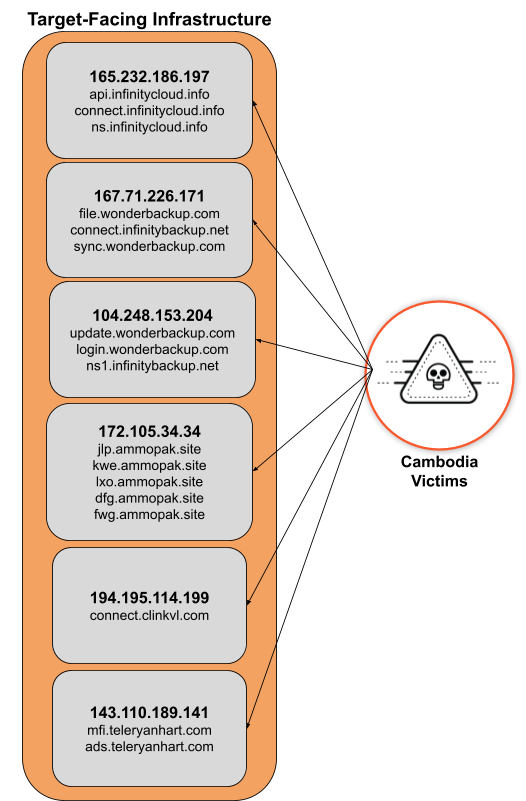
Researchers noted that organizations in these sectors could be targets of interest because of storing vast amounts of sensitive information, including financial data, classified government data, and PII (personally identifiable information) of citizens. They discovered at least six target-facing IP addresses used in the campaign, each hosting numerous subdomains.
These domains were masqueraded as cloud storage services, which is the perfect alibi to create a sense of legitimacy to the unusually high traffic the server may observe during “high activity levels from the actor, such as data exfiltration from the victim network,” researchers wrote in their blog post.
Moreover, they had “high confidence” that these IP addresses served as the C2 infrastructure for the actor, and running the Cowrie honeypot on port 2222. Most likely, this honeypot was a cover to trick network defenders and security researchers investigating the “anomalous activity.”
In addition, they observed IP filtering on this infrastructure. It was used for blocking connections from IP ranges from known Palo Alto Networks several Big Tech and cybersecurity firms, and a number of VPS and cloud hosting providers.
These C2 ports open only when the actor is active (between 08:30 and 17:30 UTC +08:00 (China Standard Time) on weekdays (Monday to Friday)) and remain closed otherwise. This means the actor is filtering connections to the malicious infrastructure to reduce the risk of C2 profiling by IP scanners or to evade detection.
Infrastructure overview of the Chinese APT groups (Unit42)
“This pattern might indicate the actor is attempting to avoid detection by blending into regular Cambodian business hours which are UTC +07:00.”
However, between September 29-October 8 2023, during China’s Golden Week and Special Working Days, the APT actors ceased their activity. This suggests that the attackers are based in China and following the country’s regular working hours, thus, validating Unit 42’s assessment regarding the attackers.
It is worth noting that Cambodia is amongthe signatories of the Chinese Belt and Road Initiative. The countries share strong economic and diplomatic relations. China has made significantly high investments to modernizeCambodia’s Ream Naval Base, despite that the project sparked concernswithin the West. After completion, this base will become China’s first overseas outpost in Southeast Asia. This indicates that Cambodia is an important ally of China.
Nothing is preparing to launch a new product, and it seems to be coming in January next year. What is that? Well, chances are we’re looking at the Nothing Ear (3) earbuds here, at least based on the info provided by Mashable India.
Nothing is preparing to launch a new product early next year
This information is allegedly coming from “trusted internal sources”, though we have no details on the new product. All we know at this point is that the mysterious product is supposed to be the Nothing Ear (3).
So, we’re about to get a new pair of truly wireless earbuds from Nothing. The Nothing Ear (1) didn’t really live up to the hype, while the Ear (2) presented a notable improvement. Can the Nothing Ear (3) raise up the ante considerably? Well, we’ll see.
The Nothing Ear (1) launched back in the summer of 2021. The Nothing Ear (2) earbuds arrived in March 2023. We did not expect the Nothing Ear (3) until the end of Q3 2024, at the earliest, but it seems like they’re coming in January.
The Nothing Ear (2) earbuds looked very similar to the first-gen model. There were some slight changes to size and some detail on the earbuds, but many people wouldn’t be able to tell the difference.
The Nothing Ear (3) likely won’t represent a huge design change
Chances are that Nothing will stick with its design language with the third-gen model too. We have no idea what the product will look like, but if we had to guess, we’d say similar to the first two generations.
We’re expecting more improvements under the hood, though. The Nothing Ear (2) offered decent battery life, and fast charging, along with Bluetooth 5.3 support, and AAC, SBC, and LHDC 5.0 codecs. They were also Hi-Res audio certified.
The Ear (2) included plenty of features, so Nothing will have to do something noteworthy in order to up its game. There’s always room for improvement, of course, and both sound and ANC are the main fields we’re expecting to see them.
Nearly a month after announcing its foray into the audiobook space, Spotify is finally rolling out its audiobook service to Premium subscribers in the United States. And although the platform claims to provide free access to over 70% of bestselling titles for users to enjoy, there is a catch.
How does the system work?
According to Spotify, the process of getting your favourite audiobook is pretty simple. Users can search for titles or navigate through the audiobook hub, add the desired books to their library, and begin listening. Additionally, to simplify the process further, out of the 200,000 audiobooks available for free to Premium users, the company will clearly mark audiobooks accessible for streaming with an “Included in Premium” tag.
Although Spotify claims to cover a wide range of books, from celebrity memoirs like Britney Spears’ “The Woman in Me” to works such as Jesmyn Ward’s “Let Us Descend,” not all audiobooks are free for streaming, thus requiring a direct purchase from the user.
A slew of restrictions
Unlike Audible, which offers unrestricted access, Spotify’s audiobook service imposes a limit of 15 hours of listening per month. Once a user reaches the limit, they must wait until the following month to continue listening or pay $12.99 for an additional 10 hours. Additionally, it is important to note that listening to past audiobooks also counts toward the allocated time, and users can neither carry over unused hours to the next month nor adjust the playback speed of a free audiobook.
Furthermore, the 15-hour listening limit applies to only one member of the Duo and Family plans, leaving the rest to rely on the costly $12.99 option.
“We’ll be working on more ways to unlock access to Premium audiobooks in the future, but for now, primary account holders on Family and Duo plans will receive the monthly audiobooks allocation,” reads Spotify’s blog post.
How does this system compare to other streaming apps?
When comparing Audible and Spotify, both have chosen a different path to audiobooks. This is because Audible offers a premium subscription at $15 a month, granting users access to popular bestsellers and the ability to permanently own these books. However, unlike Spotify, Audible users are limited to one book credit per month, thus requiring additional purchases for more titles.