A federal judge has refused to bring back a class action lawsuit that alleged four car manufacturers had violated Washington state’s privacy laws by using vehicles’ on-board infotainment systems to record customers’ text messages and mobile phone call logs.
The judge ruled that the practice doesn’t meet the threshold for an illegal privacy violation under state law. The plaintiffs had appealed a prior judge’s dismissal.
Car manufacturers Honda, Toyota, Volkswagen, and General Motors were facing five related privacy class action suits. One of those cases, against Ford, had been dismissed on appeal previously.
Infotainment systems in the company’s vehicles began downloading and storing a copy of all text messages on smartphones when they were connected to the system. Once messages have been downloaded, the software makes it impossible for vehicle owners to access their communications and call logs but does provide law enforcement with access, the lawsuit said.
The Seattle-based appellate judge ruled that the interception and recording of mobile phone activity did not meet the Washington Privacy Act’s (WPA) standard that a plaintiff must prove that “his or her business, his or her person, or his or her reputation” has been threatened.
In a recent Lock and Code podcast, we heard from Mozilla researchers that the data points that car companies say they can collect on you include social security number, information about your religion, your marital status, genetic information, disability status, immigration status, and race. And they can sell that data to marketers.
This is alarming. Given the increasing number of sensors being placed in cars every year, this is becoming an increasingly grave problem.
In the same podcast, we also explored the booming revenue stream that car manufacturers are tapping into by not only collecting people’s data, but also packaging it together for targeted advertising.
According to the Mozilla research, popular global brands including BMW, Ford, Toyota, Tesla, Kia, and Subaru:
“Can collect deeply personal data such as sexual activity, immigration status, race, facial expressions, weight, health and genetic information, and where you drive. Researchers found data is being gathered by sensors, microphones, cameras, and the phones and devices drivers connect to their cars, as well as by car apps, company websites, dealerships, and vehicle telematics.”
In fact, the seasoned Mozilla team said “cars are the worst product category we have ever reviewed for privacy” after finding that all 25 car brands they researched earned the “Privacy Not Included” warning label.
Since that doesn’t give us much of a choice to go for a brand that respects our privacy, I suggest we turn of our phones before we start the car. It’s both safer and better for your privacy.
We don’t just report on threats – we help safeguard your entire digital identity
Cybersecurity risks should never spread beyond a headline. Protect your and your family’s personal information by using Malwarebytes Identity Theft Protection.
Google has been adding new features to Google Messages over the past several months, and we just got a glimpse of one that might be on the way. According to a new report, Google Messages might let you view people’s profiles when using it.
This news was discovered through an APK deep-dive. This means that you’ll want to take this information with a grain of salt. There’s code hidden within Android, and it points to this feature being in production. However, this was not officially announced by Google. This means that the company could make changes to the feature or pull it altogether. stay tuned for more updates on this story.
Google Messages might let you see users’ profiles
Google isn’t a social media company, but you still have a profile with it that shows a profile picture and some information about you. You see your profile when you’re using services like Gmail, Google Maps, Chrome, and other products.
You’re also able to see it when you’re using Google Messages. You just need to tap on your profile picture in the top right corner of the screen to access it.
However, if you tap on one of your contacts, it won’t show you their profile. Instead, it will take you to your Contacts app. Well, according to the code hidden within Android, it looks like Google Messages is looking to make the messaging experience more personal.
In the APK deep-dive, there were some strings found pointing to you being able to see other people’s profiles:
<string name=”profile_settings_title”>Profile</string> <string name=”profile_sharing_title”>Profile sharing</string> <string name=”profile_onboarding_banner_title”>Choose your profile name & picture so people can recognize you</string> <string name=”profile_onboarding_banner_snackbar_success_text”>Preferences saved</string> <string name=”profile_onboarding_banner_snackbar_save_error_text”>Failed to save name & picture. Please try again later.</string>
These strings point to the settings screen that will let you customize the profile settings. It looks like you’ll be able to customize how your profile will appear on Google Messages.
Right now, when you use Google Messages, other people appear as color circles with the first letter of their name. If you want to see a picture of the person, you’ll have to manually set it. However, if Google Messages enables profiles, then you should be able to see your contacts’ profile pictures show up automatically.
Google has turned the AI dial up to 11, as it’s been implementing generative AI into many of its services. Many of its AI tools are tested and debuted in the US, but the company doesn’t want to be stingy with it. In a new blog post, Google announced that SGE (Search Generative Experience) is now expanding to more than 120 countries.
If you don’t know what SGE is, well it’s Google Search upgraded with AI. After joining the experiment, you’ll see AI-generated summaries of what you’re searching for.
If you type something in Google Search, say “best ways to remove nail polish”, you’d previously see the list of top pages that inform you how to do so. However, SGE will generate a direct answer to your question above the results. This eliminates the need to travel to different pages.
As you can imagine, this tool is not without its controversy. Since you’re not going to the actual websites, those sites aren’t getting your traffic. This greatly reduces the site’s ad revenue and their business.
Google SGE is expanding to 120 more countries
As with most of Google’s AI tools, SGE has gone through a lengthy testing phase before making its way to the public. It was in testing for several months.
Now, Google is expanding SGE to 120 more countries around the world including Mexico, Brazil, South Korea, Indonesia, Nigeria, Kenya, and South Africa. A drawback to this is that it’s arriving in only a handful of languages, but Google is working on expanding that. The languages available are Spanish, Portuguese, Korean and Indonesian.
Google is also bringing Search Labs to these countries. Search Labs is the greater testing platform where users can test out new AI features coming to Google. It lets you be some of the first people to try out new AI features coming to Google.
If you are looking forward to trying out these new features, you can sign up for Search Labs and start using them.
Users of SysAid on-premises should take action to deal with a vulnerability. SysAid is a widely used IT service management solution that allows IT teams to manage tasks.
Microsoft discovered an ongoing exploitation of a zero-day vulnerability in the SysAid IT support software in limited attacks by Lace Tempest. Lace Tempest is an initial access broker (IAB) usually associated with the Cl0p ransomware.
Once SysAid were notified by Microsoft on November 2, 2023, they started an investigation which confirmed that it was indeed a zero-day vulnerability. By definition, a zero-day vulnerability is any software vulnerability exploitable by hackers that doesn’t have a patch yet.
The investigation identified a previously unknown path traversal vulnerability leading to code execution within the SysAid on-prem software. Path traversal vulnerabilities allow attackers to read, and possibly write to, restricted files by inputting path traversal sequences like ../ into file or directory paths.
The attackers used the vulnerability to upload a web shell and other payloads into the web root of the SysAid Tomcat web service. Tomcat is an open-source web server and servlet developed by the Apache Software Foundation. A web shell is a malicious script used by an attacker with the intent to escalate and maintain persistent access on an already compromised web application.
The web shell provided the attacker with unauthorized access and control over the affected system. The attackers then used two PowerShell scripts to expand their hold. One to launch the Gracewire malware loader and the other to erase other evidence of the intrusion.
The Common Vulnerabilities and Exposures (CVE) database lists publicly disclosed computer security flaws. The CVE assigned to this vulnerability is:
CVE-2023-47246: a path traversal vulnerability that affects all SysAid On-Premises installations running versions before 23.3.36. SysAid Cloud customers are not affected by this vulnerability.
If you are a SysAid customer using a SysAid On-Prem server, you are under advise you to ensure that your SysAid systems are updated to version 23.3.36 or later, which includes the patches for the identified vulnerability.
Organizations using SysAid should apply the patch as soon as possible and look for any signs of exploitation prior to patching (see Indicators of Compromise below). The Lace Tempest group exploited the vulnerability in the SysAid software to deliver a malware loader for the Gracewire malware. Once this foothold is established, it’s usually followed by human-operated activity, including lateral movement, data theft, and ransomware deployment.
You should also review any credentials or other information that would have been available to someone with full access to your SysAid server and check any relevant activity logs for suspicious behavior.
Prevent intrusions. Stop threats early before they can even infiltrate or infect your endpoints. Use endpoint security software that can prevent exploits and malware used to deliver ransomware.
Detect intrusions. Make it harder for intruders to operate inside your organization by segmenting networks and assigning access rights prudently. Use EDR or MDR to detect unusual activity before an attack occurs.
Stop malicious encryption. Deploy Endpoint Detection and Response software like Malwarebytes EDR that uses multiple different detection techniques to identify ransomware, and ransomware rollback to restore damaged system files.
Create offsite, offline backups. Keep backups offsite and offline, beyond the reach of attackers. Test them regularly to make sure you can restore essential business functions swiftly.
Don’t get attacked twice. Once you’ve isolated the outbreak and stopped the first attack, you must remove every trace of the attackers, their malware, their tools, and their methods of entry, to avoid being attacked again.
Our business solutions remove all remnants of ransomware and prevent you from getting reinfected. Want to learn more about how we can help protect your business? Get a free trial below.
Samsung is pushing a new update to its 2023 and 2022 foldable smartphones in the US. While Android 14 isn’t here just yet, the Galaxy Z Fold 5, Galaxy Z Flip 5, Galaxy Z Fold 4, and Galaxy Z Flip 4 are getting the latest security patch. All four foldables are picking up the November SMR (Security Maintenance Release) stateside ahead of other markets.
The November update is available for Samsung foldables in the US
Yesterday, Samsung released the November security patch for the carrier-locked variant of the Galaxy Z Flip 5 stateside. The update came with the firmware build number F731USQS1AWJ7 and didn’t bring anything more than the latest security fixes. That was expected as the company is gearing up to push the Android 14-based One UI 6.0 to the phone, adding tons of new features and improvements.
While we wait for the big update, Samsung has now released the November SMR for the unlocked Galaxy Z Flip 5 and expanded the coverage to all of its recent foldables. Users with an unlocked 2023 clamshell foldable are getting the new security patch with the build number F731U1UES1AWJ7. Once again, the changelog is bland with no additional goodies in tow.
For the Galaxy Z Fold 5, the update is available for both carrier-locked and unlocked units with firmware versions F946USQS1AWJ7 and F946U1UES1AWJ7, respectively. Likewise, the Galaxy Z Fold 4 is getting the latest security patch with build numbers F936USQS3DWJ4 and F936U1UES3DWJ1. The update for the carrier-locked Galaxy Z Flip 4 bears the build number F721USQS3DWJ4.
As of this writing, the unlocked variant of the 2022 Flip model doesn’t seem to have received Samsung’s November update. However, it should be just a matter of time before the company covers those units. A global rollout of the latest security patch for these devices should follow in the coming days. Don’t expect anything major here, though. One UI 6.0 will arrive soon with new features and improvements.
This month’s security update patches more than 60 vulnerabilities
Samsung’s November SMR for Galaxy devices contains patches for 65 security issues, including five critical and more than 40 high-severity Android OS vulnerabilities. The remaining issues are Galaxy-specific, meaning that they don’t exist on Android products from other brands. Every Galaxy phone and tablet is affected by at least one of these vulnerabilities.
If you’re using any of Samsung’s recent foldables in the US, you will soon receive an update that safeguards your phone from these security issues. The Korean firm has also released the November security patch for the Galaxy S21 series in international markets. A US rollout should be in the pipeline too. You can always check for new updates manually from the Settings app.
Throughout the year, we’ve seen some bits of information about yet another device vying to put the smartphone out of business; AR glasses being the other. Called the AI Pin, this is Humane’s first device, and it’s quite an interesting device. The company is set to do an official announcement today; however, The Verge obtained a ton of details about the AI Pin. Good news, it’s not going to cost you a grand.
Details on the Humane AI Pin
We’re used to seeing devices like these, only, the people wearing them were usually fighting giant robots, speeding across space at light speed, or deflecting laser beams with their laser swords. Devices like the AI Pin have long been science fiction. However, Humane has been working on bringing this device into the real world for some time.
Earlier this year, Humane co-founder Imran Chaudhri showed off the device at a Ted Talk, and we got a glimpse of what this device could do. Since then, we’ve gotten reports stating that this device is going to cost $1,000. Well, thanks to the information obtained by the Verge, that’s not the case.
Price
The document states that the Humane AI Pin will cost a much more palatable $699. This makes the device just a bit more accessible to the common user. However, that’s not the only time you’ll have to take out your wallet for this device.
Reports about a subscription service were true, as you’ll be paying a $24/month fee to use the AI tools. Shockingly, this small device can’t contain an entire AI model, so it will need to connect to the chatbot through the internet. You’ll receive your internet service through T-Mobile, and it also grants you a phone number.
This subscription will also get you a certain amount of cloud storage and the ability to make unlimited queries.
Usage
So, how will you use this device? Well, the AI Pin has a camera, microphone, speaker, and tiny projector. It will use the camera to scan its environment, a functionality it showed off during the Ted Talk. You’ll use it to scan objects and ask it questions about what it scanned. You could probably scan a sea shell and ask it what type of shell it is.
Since it doesn’t have a screen, it will use an AI-generated voice to tell you through the speaker. That could be rather inconvenient in situations when you need to be quiet or when your environment is too loud. However, the company has two solutions for this. Firstly, there’s a little projector on the device that will show you information on a nearby surface (most likely, your hand). Secondly, the AI Pin can connect to Bluetooth headphones.
In order to use the device, you’ll need to activate it, but we don’t know how that works yet. This is good as many people would be concerned about the fact that it comes with several sensors onboard. People worried about their privacy would be happy to know that the device is not always listening. In fact, the device has a trust light that shines when the sensors are in use.
Interacting with the AI Pin
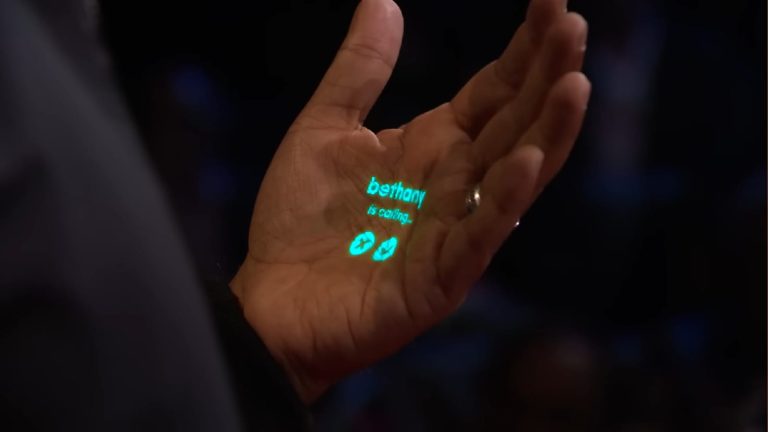
The Pin has a little projector, and we saw that it projected some buttons onto Imran Chaudhri’s hand. The incoming call screen and the active call screen all had buttons on them that make it look like you’re able to tap on the area on your hand with those buttons to interact with the device. That’s a neat functionality, but we don’t know if that’s how it will work.
However, we know that the pin will have a capacitive touch screen that you can interact with. We’re not sure if the device will employ one or both.
Charging
The Pin will attach to your clothes through a magnetic clip. The clip will also act as a battery backup (called a “Battery Booster”) to keep the device charged. So, if need be, you could swap out batteries on the fly.
The document makes it seem like you’re getting two batteries in the box with your purchase. Hopefully, the company will allow users to purchase battery packs in case people want more.
AI
Rumors pointed to the AI Pin using OpenAI’s GPT-4 language model, however, we’re not 100% sure about that. The Pin uses humane’s proprietary operating system called Cosmos, and it seems like it will be able to summon different AIs for different purposes. According to the report, this is reminiscent of GPT-4’s functionality. That’s something we’ll need to wait for the official announcement to know.
The AI Pin is something that might change the way we view AI. We’ll have to wait to see if it is truly the next stage in mobile technology.
WhatsApp is once again reassuring users won’t see ads in the super popular messaging app, but this time, there’s a fine print.
In an interview for a Brazilian news media, WhatsApp boss Will Cathcart elaborated on the app’s future and how Meta, which acquired WhatsApp, makes money with the free WhatsApp (via 9to5Mac).
A word from the boss
When asked about displaying ads in the app, Cathcart emphasized that the company “will not place ads in the inbox or chats” – that’s not at all the same as “No ads in WhatsApp”.“We don’t think that’s the right model. People, when they open their inbox, don’t want to see advertising,” he said. However, the executive doesn’t rule out the idea of WhatsApp showing ads in other parts of the app.
Per Cathcart, one possibility is for advertisements to be shown in the Public Channels and Status sections. WhatsApp’s boss suggested other ways to monetize the app, such as charging people to join a channel – like Telegram does with its users.
The Meta executive also said in the interview that the countries where WhatsApp is most popular are India, Indonesia, and Brazil; with Brazil being a champion on the largest number of audio messages sent on WhatsApp, as well as the largest number of messages that disappear.
One of WhatsApp’s biggest sources of revenue is the WhatsApp Business API, offering special tools for the business. It’s a $10 billion-a-year business, according to Cathcart. WhatsApp could increase its revenue without relying on ads by offering other paid services and taking a commission.
Is your ChatGPT down? Are you experiencing issues with ChatGPT, such as connectivity problems or encountering a ‘Network error on long responses’? – ChatGPT has been under a series of DDoS attacks, apparently orchestrated by Anonymous Sudan.
OpenAI’s ChatGPT, a popular AI-powered chatbot, has been experiencing outages for the past 24 hours due to distributed denial-of-service (DDoS) attacks. The company confirmed the attacks in a statement on its status website, saying that it is working to mitigate the attacks and restore full service.
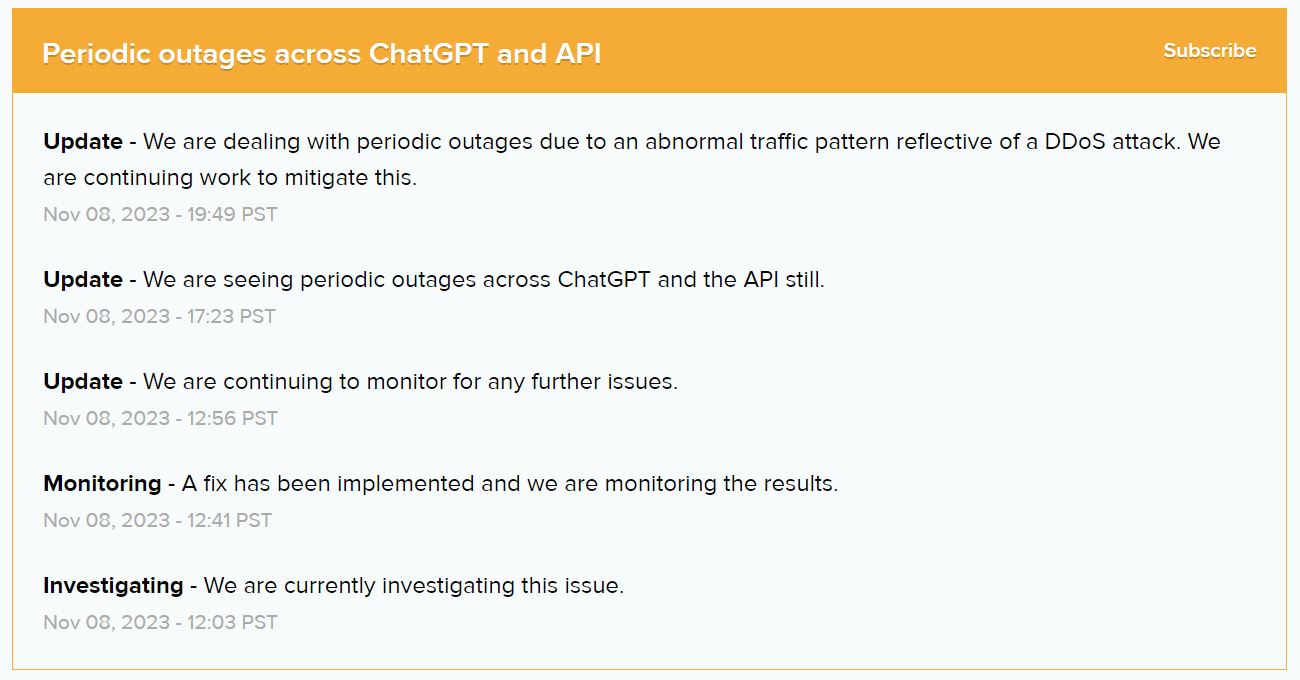
“We are dealing with periodic outages due to an abnormal traffic pattern reflective of a DDoS attack. We are continuing to work to mitigate this.“
OpenAI on Nov 08, 2023 – 19:49 PST
According to OpenAI CEO Sam Altman, as of this week, ChatGPT now boasts 100 million weekly active users. While this places ChatGPT as the most popular platform on the internet, it also renders it a lucrative target for cybercriminals and hacktivists.
OpenAI has not yet said when it expects the ChatGPT outages to be fully resolved. However, the company has assured users that it is working to resolve the issue as quickly as possible.
ChatGPT’s status page as of Nov 09, 2023
The ChatGPT outages have had a significant impact on users of the service. Many users have been unable to access ChatGPT at all, while others have experienced intermittent outages.
DDoS attacks are a type of cyberattack in which an attacker sends a large number of requests to a website or server in order to overwhelm it and make it unavailable to legitimate users. In the case of ChatGPT, the attackers are flooding the service with more requests than it can handle, causing it to go down.
Anonymous Sudan Claims Responsibility
Hackread.com can confirm that the responsibility for the attacks on OpenAI’s infrastructure has been claimed by Anonymous Sudan. The group shared various screenshots on its Telegram channel, depicting examples where OpenAI’s website and ChatGPT’s dashboard experienced downtime or displayed various errors and connectivity issues.
The group further elaborated on their motives for targeting OpenAI and ChatGPT, highlighting the reasons behind their DDoS attacks on one of the most popular platforms globally. In a Telegram post, they stated that as they are specifically targeting American companies, OpenAI, being an American company, is naturally among their prime targets.
The group additionally cited another major reason for targeting OpenAI, pointing to its association with the state of Israel, its investment plans in Israel, and the recent meeting between OpenAI’s CEO, Sam Altman, and the Israeli Prime Minister, Benjamin Netanyahu. Emphasizing their support for the Palestinians, the group mentioned this as a significant rationale behind targeting OpenAI and ChatGPT.
For your information, Anonymous Sudan is a group of hacktivists who claim to be affiliated with the Anonymous collective. However, cybersecurity experts have cast doubt on these claims, suggesting that Anonymous Sudan may be a front for other Russian hacktivist groups.
Anonymous Sudan first emerged in January 2023, when they launched a series of DDoS attacks against Swedish and Danish organizations in response to the far-right activist Rasmus Paludan. In February 2023, Anonymous Sudan also DDoSed Swedish SAS Airlines.
The group has since claimed responsibility for a number of other DDoS attacks, including attacks against X (formerly Twitter), Microsoft, and other Western targets.
If you are a user of ChatGPT, there is not much you can do to prevent DDoS attacks. However, you can check the OpenAI status page for updates on the situation and to see if the service is available. You can also try accessing ChatGPT at different times of day, as the attacks may not be continuous.
The holidays are coming, and if you’re looking to jump on the gift-buying tour early, we’ve got you covered. We have a series of gift guide articles running, and in this particular one, we’ll focus on somewhat pricey gifts. This article contains some of the best gifts under $1,000 that we’ve been able to track down. Of course, the selection is enormous, so these are only some of our picks, along with a bunch of information for each product. We’re also focusing on gifts above $500 and below $1,000 here, as we have separate gift guides for deals under $500. You’ll find five products below, that we’re focusing on, along with some honorable mentions at the very end. If you’re looking to spare no expense for someone, you may like some of these offerings. Let’s get to it!
Best gift for a movie aficionado: Samsung Freestyle smart projector
Enjoy multimedia content on a huge canvas
Do you know someone who wants to get a projector? Well, if you’re willing to splash out a bit more cash, you can get a good projector as a gift. Projectors are nowhere near as expensive as they used to be, and they’re actually quite good. A projector can not only be a replacement for a TV, but it can be a way for you to watch your favorite content outdoors, it can be a TV that you can carry with you. That is especially true if you get one of these “portable” projectors that have been heavily advertised for years now.
The Samsung Freestyle is one such product. This projector is quite compact, and it has a rather nice design. It is a fullHD HDR projector that comes with Amazon Alexa built-in. It also has rather powerful speakers built in, which is not something you’ll see on every similar product. HDR10 is supported here, and so is Dolby Digital Plus. The Samsung Freestyle also comes with a contrast enhancer, for super vivid content, and you can easily connect it with a device you’ll project from via an HDMI cable.
Bluetooth is also a part of the package, and the device runs Samsung’s Tizen OS. The Samsung Freestyle can also automatically adjust the picture for you, which includes both leveling and focus. You can even get an external battery pack if you plan on taking this device with you somewhere where you won’t have access to an AC outlet. And last, but not least, the image size. This thing can project a screen in a range between 30 and 100 inches. So it’ll basically suit every use case, it all depends on what you want/need, and how large your canvas is. The Samsung Freestyle project is priced at $314.99 on Amazon.
A flagship-grade phone with a great camera & AI smarts
Having a smartphone in the US these days is a given. Everyone has one, and it’s not always easy to decide what to get, unless you’re locked into Apple’s ecosystem, of course. If you’re not, and you prefer Android devices, or a person you’re trying to find a gift for prefers them, well, we have a great recommendation. The Google Pixel 8 is not only brand new, but it’s one of the best phones you can buy at its price range. This handset is priced at $699 on Amazon, and it is a lot to splash out for a gift, but we’re in that $500-$1,000 price bracket here.
So, what’s so great about the Pixel 8? Well, other than the price tag, this smartphone also comes with software directly from Google. Not only does it bring a really clean UI, but the phone will continue getting OS and security updates for 7 years. Yes, you read that right, Google trumped even Apple with that one. The phone is also quite compact, it has a 6.2-inch display, which is not only great in terms of size for a phone, but it’s a very bright display that offers a 120Hz refresh rate.
Google’s Pixel phones are well-known for having great cameras, and this one is no exception. It includes a great main camera, and a very capable ultrawide shooter, which are only boosted by Google’s camera AI prowess. This phone allows users to make major changes to their photos thanks to AI. The battery life is not the phone’s strongest point, but it’s not bad either. Wireless charging is also included in the package, and the Pixel 8 is also water and dust-resistant. All in all, the Pixel 8 is a great value at $699, and very few people would disagree with that, especially given the smartphone price tags these days.
Best gift for a gamer in you: LG UltraGear QHD 34-Inch Curved Gaming Monitor
A monitor every gamer will appreciate
Monitors come in all shapes and sizes these days. Big, small, wide, ultrawide, vertical… you name it. There are plenty of choices, so we couldn’t exactly go wild and place a ton on this list. After some consideration, we landed on the LG UltraGear 34GP83A-B monitor. This name may not seem exciting, mainly due to the model number, but it sure is a great monitor. This is an ultrawide monitor, and it measures 34 inches in diagonal. It is also a QHD (3440 x 1440) monitor, so it’s plenty sharp.
We’re looking at an IPS panel here, and a 21:9 aspect ratio. Ultrawide monitors are outstanding for productivity, as they allow you to stack several windows one next to each other, depending on what you’re doing. I love them, and I know many other people who do, especially people from the industry. They can also be great for gaming, and this particular one actually aims to please gamers. It aims to immerse gamers into action, with a 178-degree viewing angle. It also comes with an “overclocked” refresh rate of 160Hz, and 1-millisecond Motion Blur Reduction (MBR).
It has VESA DisplayHDR 400 high dynamic range compatibility, and with compatible video cards (NVIDIA G-SYNC and AMD FreeSync Premium) it can basically eliminate screen tearing and minimize shutter in high-resolution games. The bezel around the display is also quite minimal, which immerses gamers completely. This monitor also comes with a stand, which does look quite nice, but you can, of course, mount it too, if that’s what you prefer. This can be a great gift to buy yourself, but for others as well, it’s an outstanding monitor. Its current price tag is $639.62 (down from $749.99).
Best way to ditch manual vacuuming: roborock Q5 Robot Vacuum Cleaner
Save time, and let a robot do the vacuuming for you
Vacuuming is not really a chore that many people love. That’s probably why robot vacuums managed to become very popular lately. There are all sorts of different robot vacuums on offer out there, and they can be a great tool to help you keep your house clean. These robots can be set to clean your floors whenever you want, you can even set everything up so that they clean when you’re not around. Some of them are better than others, though, of course. We’ll talk about a rather great robot vacuum here, the Roborock Q5.
The Roborock Q5 is a robot vacuum cleaner that offers very strong 2700Pa suction. On top of that, it has LiDAR navigation, and multi-level mapping. As if that’s not enough, the battery life on this thing is really great. There are also a number of advanced functions included, such as the ability to set no-go zones for the device. The Roborock Q5 is also quite often a part of the conversation when it comes to people who have pets at home. This robot vacuum is really good at removing dog and cat hair from carpets. We can’t really say the same for many other robot vacuums.
What else is there? Well, plenty, actually. This robot vacuum is also compatible with Amazon Alexa, in case you’re a part of that ecosystem. The company’s app will provide you with plenty of customization for the product, and the device can clean for around 180 minutes before it needs a charge. It also has a large dustbin (470ml), so you won’t have to clean it out as often as you think. The Roborock Q5 is priced at $699.99 on Amazon, and it’s one of the best robot vacuums the company has to offer.
Drones were not really all that great at first. They were also obscenely expensive. Today, they come in all shapes and sizes, and also price tags. You can get one on the cheap, but if you want to get a truly compelling drone, you’ll have to splash out a bit more cash. Still, even the most expensive drones are cheaper than before. Having said that, if you’re looking for a great drone for yourself, or to give to someone, DJI is the company that comes to mind first. The DJI Mini 3 Pro is actually a great example of an immensely capable drone, and a truly compact one at the same time.
Needless to say, it’s important for drones to be somewhat compact, as chances are the user will be carrying it around. You want to capture that beautiful scenery when you go on a holiday, and so on. The DJI Mini 3 Pro is a compact drone that can shoot 4K video, and take 48-megapixel photos as well. This thing weighs less than 249 grams, so it’s actually lighter than some smartphones out there, which is great. It also has a rather good battery life, as it can provide the user with over half an hour of flight time.
That’s not all, however, not even close. The DJI Mini 3 Pro comes with a capable remote controller, and tri-directional obstacle sensing. Piloting this drone should be fairly easy thanks to that. This drone can also return home on its own, and do it safely, thanks to all the tech baked inside. A ton of smart features are built into this drone, such as FocusTrack, True Vertical Shooting, MasterShots, Timelapse, QuickTransfer, and so on. We’re only scratching the surface here, as there’s plenty more that this drone offers. The DJI Mini 3 Pro is priced at $759 on Amazon as we speak.
Here are a couple of more products in this price bracket that you may like…
Samsung 49-inch Odyssey monitor
If you’re looking for an ultra-premium monitor for yourself or someone else, Samsung’s 49-inch Odyssey monitor definitely belongs in that category. This is a curved gaming monitor, with a 120Hz refresh rate. It supports HDR10 content, and features an adjustable stand, but you can also mount it, if that’s what’s preferred. This is a dual QHD monitor, you’re getting 5120 x 1440 resolution here, and the bezels are also quite thin. This thing is optimized for gaming, but it can be great for general productivity too. This monitor is priced at $949 on Amazon.
Smart mirrors are a thing, and you may have seen one already. Needless to say, this can be a really cool gift and tech accessory in general. Having all those controls on a rather large mirror in the room of your preference can be great. This is the largest mirror offered by the company, and it’s extremely thin. It’s both Wi-Fi and Bluetooth enabled, and compatible with both Android and iOS. There are four speakers included here, and you can easily mount it to a wall. The whole point is that you can cast from your phone to this piece of tech. You can get this mirror for $999.
I, personally, would love to have something like this. The LaserPecker 2 is a laser engraver that enables you to engrave things… via lasers. It sounds expensive, and it is, at $959.99 (and this is a discounted price tag). By using this engraver, it’s possible to engrave paper, cardboard, wood, leather, aluminum, stainless steel, and more. It’s basically a plug and play machine. You should definitely read the instructions before use, though, as this thing is much more advanced than a printer.
The Smart Home continues to be a pretty popular product category, even going into the holiday shopping season in 2023. Just about everyone is coming up with their own smart home products to put on sale, from doorbells, to smart lights, to thermostats, and everything in between. And a smart home product like one of those mentioned might be a really good option for some, this holiday season.
Best Doorbell: Ring Video Doorbell
A cheap, but good way to keep an eye on your packages and who’s coming to your home
The Ring Video Doorbell is actually one of the cheapest doorbells you can buy. Ring also makes it super easy to install. I have this same doorbell at my home, and it took just a few minutes to add it to my home. What makes this doorbell so great is the quick release battery. With some other doorbells, you need to remove the entire doorbell to replace the battery or charge it. That’s not the case with the Ring Video Doorbell. Instead, you just lift up the quick release plate, and then press a button on the battery. It’s super simple, and you can get extra batteries for pretty cheap, from Amazon. Which is a life-saver when your doorbell battery starts to run low.
Of course, one of the great things about the Ring Video Doorbell is that it can tell you when someone is at your door. It will also tell you when anything is near your front-door. Including people that don’t ring the doorbell – like package thieves. I had a package stolen from my porch, and because of the Ring Video Doorbell, I was able to see exactly who it was, and take action. Without this doorbell, that would not have been possible.
Ring does include night vision on this doorbell, it’s black and white unlike its newer doorbells. But it’s still good enough to see what’s going on at night. Ring also includes two-way voice, so you can talk with whoever is at your door. Say, UPS is there and needs a signature, you can come on and tell them to wait a minute for you to get to the door, instead of just leaving with your package. I’ve actually done this, because we all know how quickly UPS and FedEx will leave that “Sorry we missed you” notice on your door.
Finally, the Ring Video Doorbell also allows you to share your doorbell with other people. So you can share it with others that live in your home, so they can also get notified when packages are delivered – there is a specific notification for packages being recognized. This is actually a really useful feature, even if you are only living with your significant other. It makes it much easier to see what’s happening outside your home and have that peace of mind.
The Google Nest Doorbell is available in two versions – battery and wired. The battery version is great for those that don’t have existing doorbell wiring, or simply don’t want to mess with the wiring. While the wired version is great for those that do have existing doorbell wiring, and a big advantage it has is that it is slightly smaller and never needs to be charged.
I’ve used the Google Nest Doorbell, and do really like this doorbell. But it’s not perfect, and the reason why it’s an honorable mention instead of the best, is because of the battery charging. You see, to charge this doorbell, you need to pop off the entire doorbell off of the wall. And then plug it into a USB-C cable to charge. It can take a couple hours to charge, since this is not a fast-charging doorbell. This can be and is very inconvenient. Luckily, you only need to do this every six months or so, depending on your settings.
Google’s doorbell gives you some great quality video, both live and recorded and it is available in the Google Home app. It does also work with other Nest and Google products, making it easy to work together.
Put away that vacuum and mop, and let the iRobot Roomba Combo j9+ do it for you
This is the latest “Roomba Combo” from iRobot, which brings in some really nice upgrades over the Roomba Combo j7+. The new Roomba Combo j9+ has a great looking base, with a wooden-top, which makes it really great for blending into your living room, dining room, or wherever you have it placed.
The Roomba Combo is a pretty unique concept from iRobot. Basically, what it does is it completely lifts the mop up and over the vacuum. So it’s not going to get your carpet wet. We haven’t had a chance to test out the J9 yet, but the J7 performed beautifully, and we expect that the J9 is even better. Since this is a “plus” model, it does also have the ability to empty its dustbin while docked, and auto-fill the water reservoir inside the vacuum. Which is going to make your life a whole lot easier here.
There’s a few more upgrades that iRobot made here with the Roomba Combo j9+, which includes SmartScrub. This will allow the robot to identify where there’s a bigger mess that needs more attention and can run over that area up to two times in a deep scrubbing manner. It does a really good job at both identifying and cleaning these messes too.
To go along with SmartScrub, Roomba has also added Dirt Detective. This new feature is able to automatically prioritize the dirtiest rooms. It’s able to do this thanks to the camera and LED light on the front, which also help it to identify objects to avoid – like pet waste. Not to mention the Roomba Combo j9+ has about double the suction power as its previous robot vacuums. So dirt doesn’t stand a chance with this new robot vacuum.
The Roborock S8 Pro Ultra is one of my favorite robot vacuums, and I’ve actually used it the majority of the year. It has a lot going for it, like the increased suction which is now rated at 6,000Pa. It also has the Ultra dock, which can empty the dustbin, refill the water reservoir and also clean the mopping pad on the actual robot vacuum. Making it a really awesome experience, because you can have your home nice and clean, with a hands-off approach.
Roborock has also included its Reactive 3D feature here, which uses the front-camera to look for objects to avoid, and go around. Roborock has always done a good job at avoiding objects with the Reactive 3D feature, and now it’s even better. This is thanks to Roborock using AI and machine learning to make it better over the past three years.
Save money on your energy bill with the inexpensive Amazon Smart Thermostat
What’s the main purpose of a smart thermostat? To save you money, right? That’s exactly what Amazon’s Smart Thermostat does, and why we have it listed as the best smart thermostat. It’s because it does not add in a bunch of bells and whistles to make it more expensive, it just does what you need it to do.
This smart thermostat has been ENERGY STAR certified, and will save you money on your gas and power bill this winter, and truly all-year round. That is because it can intelligently change the temperature of your furnace or AC, to keep your home nice and cool or warm (depending on the season), while using less energy.
Honeywell Home worked with Amazon on this thermostat, so you know you’re in good hands here. My parents actually have this smart thermostat and it has worked really well for them over the past two years, and saved them a good amount on their gas bill, especially in the winter.
Since this is an Amazon Smart Thermostat, you can of course connect it to Alexa and control it with your voice. Alexa can also show you how much energy you’ve been using from all of your devices, including your HVAC system. So if you’re really looking to save money on your electric and gas bill, this is a great way to do just that. While also adding the convenience of saying “Alexa, set the heat to 70 degrees”.
Amazon has also made this really easy to install in your home. Now you will need to make sure you get the C-Wire adapter if you have not already had a smart thermostat installed in your home. This adapter is needed because the smart thermostat actually needs power from the HVAC system, unlike regular non-smart thermostats that use a couple of AA batteries. It’s easy to install, I’ve done it myself, but you do need to make sure you get the adapter, which is included in this version of the Amazon Smart Thermostat.
The ecobee Smart Thermostat is a really great smart thermostat too, in fact it is one that I have in my own home. It does quite a few things, but the main reason why it is not our pick for the best smart thermostat, is the price and features, compared to Amazon’s Smart Thermostat. If you’re looking for something that does a bit more, this is your best option.
Ecobee’s Smart Thermostat does work with HomeKit, Google Home and of course Alexa, so you can use your voice with this, no matter what platform you’re using. Ecobee can also automatically learn your usage pattern, and change the temperature of your home when you’re away, so that you save more money. Your home doesn’t need to stay at 70 degrees all winter while you’re at work for 8 hours. Ecobee saves customers on average, about 26% on the heating and cooling bill.
The new Echo Show 8 brings huge upgrades across the board for your smart home
The Amazon Echo Show 8 was actually just reviewed by your truly in October. This is the latest smart display from Amazon, and does quite a few things right. Amazon has improved the design on the Echo Show 8, making it edge-to-edge glass and a centered camera this time around. Giving it a more updated look than the previous model, but to be honest, you probably won’t notice nor care. I can’t say I’ve really noticed the difference, and it sits on my desk playing YouTube Music all-day long.
Amazon has also improved the processor here, which you will notice. Navigating around the OS is a whole lot smoother now compared to the previous version. And it even has Adaptive Content, which I thought would be a pretty gimmicky feature, but it’s not. Basically, the camera is used to know if you’re near the display or far away, and if you are far away, then everything on the display is larger. Once you move closer, it gets smaller and fits more info on the screen. Take the weather for example, it’ll move from just showing you today’s conditions, to showing you the conditions, temperature and weather for the next few hours.
One of the great features of the Amazon Echo Show 8 is the camera that’s built-in. Allowing you to call your loved ones and see them, like you’re there with them. And if you know someone that isn’t going to be able to make it to the holidays this year, then this is going to be a great option as a gift. As they can call in and still see everyone, thanks to that 13-megapixel camera.
Finally, it’s a smart display, and it has a speaker. So it is also great for streaming music. All of your favorite streaming music services work here, I’ve been using it with YouTube Music, and it sounds great. It does, surprisingly, have Cast enabled, despite that being a Google technology. Making it easier to start playing music from my computer or phone, onto the Echo Show 8.
The Nest Hub is a couple of years old at this point, but it’s still one of our favorite smart displays. It’s a small one, coming in at 7-inches, and there’s also no camera built-in. The big reason for this is so that you can put it in your bedroom. Which is awesome, because it does measure your snoring while you sleep. It’s cool and all, but I would take that data with a grain of salt, as it has routinely counted my dog’s snoring as my own, which is obviously not accurate. But there’s only so much accuracy it can get without a camera.
Google has made this a really great smart home display, allowing you to easily change up the temperature on your smart thermostat, turn off your lights and much more. It also has all of your favorite streaming music apps included, like Spotify, YouTube Music and Amazon Music.
Best Smart Lights: Philips Hue 60W White and Color Ambiance Starter Kit
Add some color to your home with the new Philips Hue smart bulbs
When it comes to smart lights, it’s hard to go wrong with Philips Hue. I actually have their lights all over my home, and absolutely love them. With Philips Hue, you really never need to worry about them disconnecting from your WiFi network, or having to change their settings if you change ISPs or get a new router. This is because it uses the Philips Hue Bridge, which plugs directly into the router. Now you can use these over Bluetooth as well, but the Bridge just makes things so much easier.
This is a starter pack from Philips Hue, which includes two white and color ambiance light bulbs, along with the bridge, for under $130. That might sound expensive, but smart lights generally are pretty pricey. These are color ambiance bulbs, which means there are millions, if not billions of colors that you can choose from. Allowing you to make your home more moody if you wish.
Philips Hue works with all of the big smart home platforms. These include Amazon Alexa, Google Assistant, Apple Homekit/Siri and even Samsung SmartThings. So no matter what platform you’re using, you’re all set here. Hue also integrates with a lot of third-party automations, including IFTTT and even works with Razer’s RGB software. So you can really have some fun in your gaming room with these lights.
The biggest reason why Philips Hue is so popular these days, is because of the ecosystem. While we’re listing bulbs here, Philips Hue also has a ton of other lights in its ecosystem. From other size bulbs, including E12 bulbs, and floodlights, it also has LED strips for the back of your TV, or LED strips to use outside, and so much more. There’s plenty of great lamps from philips Hue too.
The ecosystem is pretty rich, so if you’re looking to get into the smart lighting game, Philips Hue is a great place to start.
GE, yes that same GE that’s been around for over a hundred years, has it’s own smart bulb brand. It’s called CYNC and it produces some pretty good smart bulbs for a pretty cheap price. This is their Full Color and Color Changing bulbs, which use Bluetooth and WiFi for connecting to your devices or network. That’s one of the big differentiators from Philips Hue, and it could disconnect, which would be a real hassle.
GE CYNC also has a pretty good ecosystem of lighting products that you can pick up for your home. And it also works with Google Assistant, Amazon Alexa and even Apple’s HomeKit and Siri.