Google Maps on Android Auto is receiving a redesign update, which includes refinement to the navigation button layouts. The changes are currently available in Google Maps v11.104.0100 and Android Auto v10.8 through the Play Store.
The redesigned navigation section in Google Maps brings several key changes to the forefront. One noticeable adjustment is the relocation of the estimated travel time, now boldly displayed at the top of the screen. Below, users can find information on distance and the estimated time of arrival (ETA), allowing for quick reference while driving.
Furthermore, the update includes redesigned buttons, providing a cleaner and less cluttered appearance. These buttons offer essential functions, such as stopping navigation, exploring alternate routes,
searching for additional locations, viewing stops along the route, and accessing an overflow menu with additional options. Notably, the divider line that previously separated sections in the layout has been removed, creating a more streamlined look.
Google Maps on Android Auto gets more functional with the refined design
The changes not only enhance the aesthetic appeal but also improve the functionality of Google Maps on Android Auto. This redesign aligns well with the recent introduction of a new sidebar on Android Auto, creating a cohesive and more efficient user experience.
While the update is rolling out with Google Maps version 11.104.0100 and Android Auto version 10.8, it’s important to note that this may be a server-side change, reports Android Police. What it means is that it might not be available to all users immediately. However, Google’s commitment to refining Android Auto and Google Maps shows that the company is actively working to make the platform more responsive and user-friendly.
Additionally, Google resolved an issue in June 2023 that prevented users from accessing Maps on their phones when using Android Auto in their vehicles.
This attention to improvements in Android Auto reflects Google’s aim to enhance the driving experience for users.
Being a content creator on social media is a new profession, with stats showing that about 200 million people consider themselves creators. A big part of them prefer Instagram as the platform to share content and earn money. Instagram’s monetization program, Instagram Subscriptions, allows creators to make money by sharing exclusive content with their followers.In a recent blog post, Meta revealed that since broadening access to more creators earlier this year, there are now over 1 million active subscriptions through Instagram Subscriptions. Most recently, subscriptions were introduced for creators in an additional 35 countries.
However, 1 million is not such a huge number, considering Instagram has more than 1.2 billion users, which probably is why Meta is introducing new ways for creators to attract subscribers and earn more money.
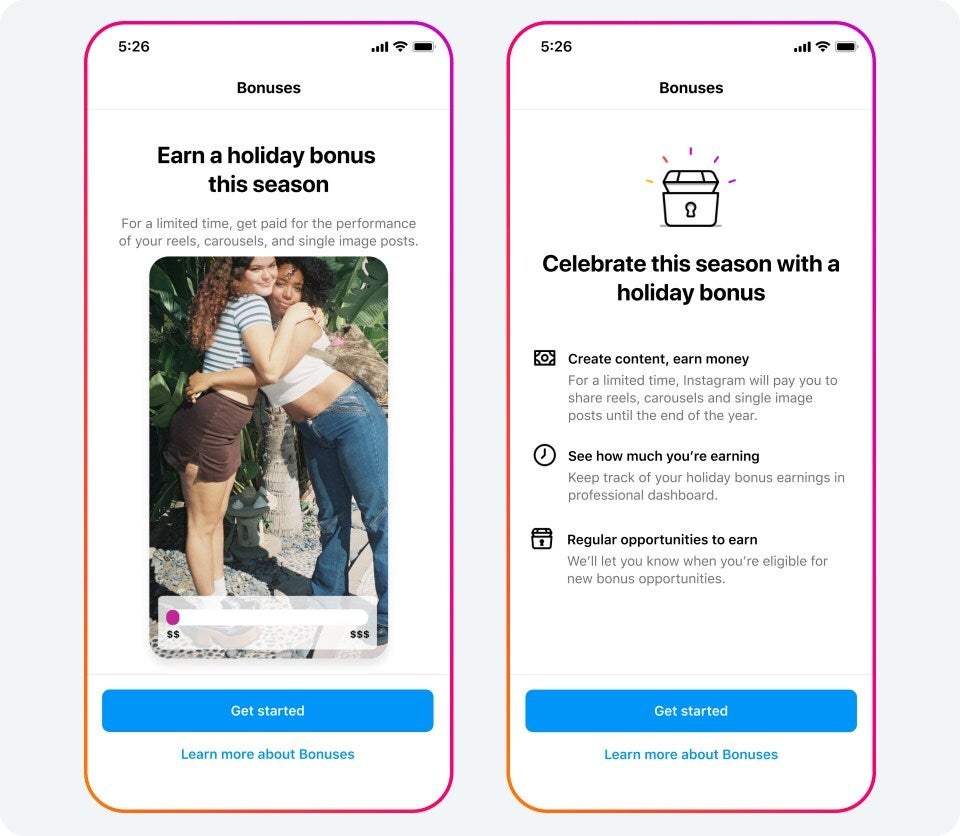
The tech giant is currently testing an exclusive holiday bonus on Instagram, available by invitation only for creators in the United States, South Korea, and Japan. This holiday bonus goal is to reward creators for showcasing their creativity through reels and photos.
Image Credit–Meta
A select group of creators will receive invitations to test this new bonus until the end of the year. Those who receive an invitation can activate the holiday bonus to initiate monetization. Earnings for creators will be determined based on the number of plays for reels and views for photos during the bonus period.
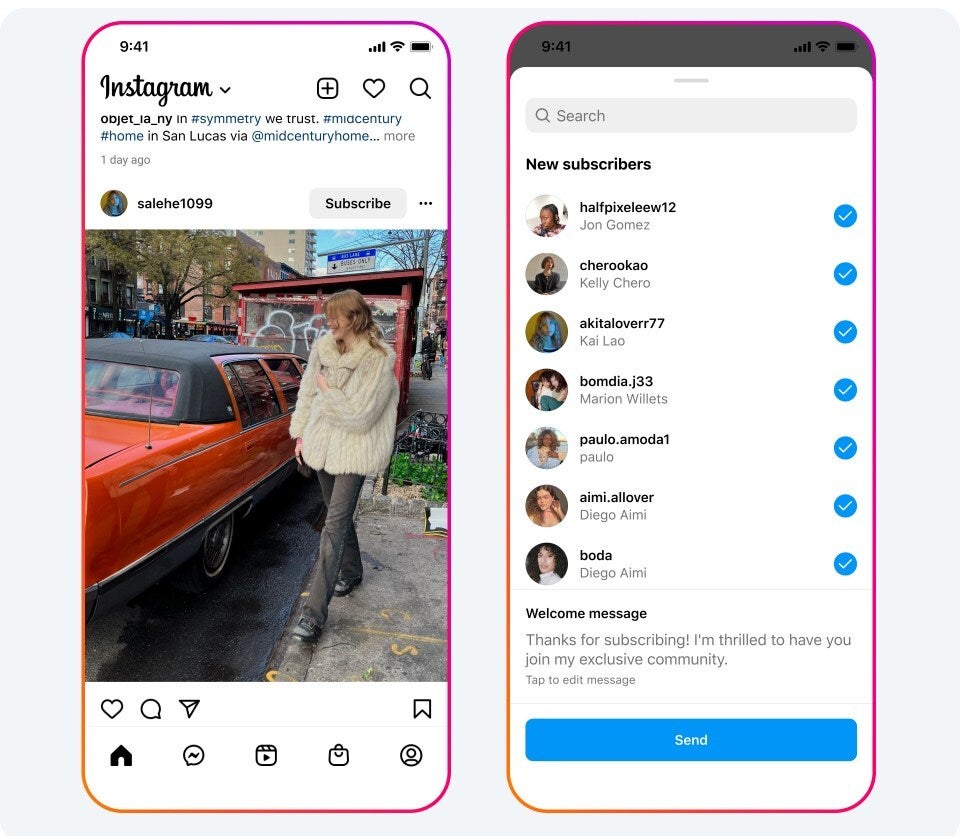
To help creators expand their subscriber communities even more, Meta has introduced new promotional tools like featuring the Subscribe button when followers see content in the Feed. To prove that subscriptions work, the company gives an example with creator Kimberley Haberly, who says her subscription is generating approximately AUD 31,000 per month, thanks to her 3,000+ subscribers (not too shabby, if you ask me).
Image Credit–Meta
Right now, Meta is giving creators a break by waiving subscription fees for both Instagram and Facebook, and it promises to send creators a heads-up with a six-month notice before making any changes to this approach.
Subscriptions aren’t just an Instagram thing; you can find them on Facebook too. Meta’s on a roll, expanding access to millions more creators in the upcoming months. It is adding more ways for followers to subscribe, like through Reels and Stories on Facebook. Plus, creators can now offer free 30-day subscription trials to their fans.
The company is also rolling out more control over pricing so creators can change the price of their subscriptions over time. It is also making it easier for creators to participate in ads by showing additional ad eligibility information when creating Instagram Stories.
Since I started Malwarebytes 15 years ago the threat landscape has changed. Our offerings have evolved. And now the next chapter of our journey begins today.
How did we get here?
My first cyber “combatant” was an early form of adware running amok on my family’s computer. Removing it was a team effort, and it led to the creation of the first iteration of Malwarebytes, a free tool built to help everyday people find and remove malware from their computers, without needing to scour forums, write code, or run scripts like I had.
Malwarebytes turned out to be extremely popular. It did what no other product could, find malware and remove every trace. Although designed as a free tool for individuals, IT professionals downloaded it in droves. The vast amount of malware infections that common AV tools missed proved that organizations needed better detection as well as our remediation.
Malwarebytes for Business was born.
Organizations today must protect against more than malware. There are ransomware gangs, crypto-scammers, Advanced Persistent Threat groups, data exfiltration and extortion schemes, big-money exploits, disastrous zero-days, brute force attacks, Living-Off-the-Land techniques—that anti-virus detection doesn’t find—and fast evolving social engineering tactics that will only advance with the broad availability of generative AI.
But with the rapid increase of attack surfaces, security products have multiplied and become increasingly complex to deploy and manage. Many IT organizations are struggling with the number of consoles and increasing costs. Most don’t have enough cybersecurity staff or budget to take down threat levels.
For more than a decade, Malwarebytes has provided resource constrained IT organizations with the necessary tools to stop cybercriminals across the entire threat spectrum—from attack surface reduction; through prevention, detection, and response; to remediation. Time and time again our products are tested, proven, and recognized, year after year, quarter after quarter. Importantly, we’ve also made security simpler. Delivered in one lightweight agent, using one console, IT organizations can manage thousands of endpoints and vast security capabilities at once.
Today, we launch a name that reflects the full scope of our business product line, the serious daily battle with adversaries on behalf of organizations, and embodies our mission – security that overpowers threats, not IT.
I want to personally introduce you to “ThreatDown, powered by Malwarebytes.” The ThreatDown platform is focused on the problem we heard about most from our corporate customers, institutions and partners. No, not securing the software supply chain, cracking down on zero-day vulnerabilities, or stopping the growing spate of ransomware attacks (though all of those also rank high in importance).
The biggest problem, simply enough, is complexity.
For too long, even the most well-intentioned cybersecurity vendors and researchers have issued security recommendations in a vacuum, assuming every business has the same budget, staff size, and IT resources. Under this guise, the products our industry has sold are hardly “solutions”—they are proposals.
We know this isn’t working for most organizations.
According to IDC, 60 percent of mid-market companies only have 1 – 4 full time IT people, making complex integrations, installations, or management of tech tools formidable. Similar research also shows that a simple configuration change could take IT teams a few hours, while more complex changes can take several days or even weeks, and that companies deploy an average of 55 different cybersecurity tools—each with their own cloud-based console, agent, and management requirements.
ThreatDown understands that meaningful cybersecurity “solutions” must consider an organization’s ability to implement and embrace a security product and its toolset. This is why the ThreatDown portfolio isn’t a list of individual products for organizations to figure out.
Today we’re also launching four ThreatDown Bundles that combine award-winning layers of protection, threat intelligence, and human expertise for IT-constrained organizations of all sizes and skill levels. These new bundles help organizations take down threats, while also taking down complexity and cost. Every bundle includes our Security Advisor, which provides a security score to illustrate a company’s current level of protection, offers guidance on how to make improvements and enables IT to take immediate action.
This is just the beginning.
Fifteen years ago, with enormous help from around the world, we started something special with Malwarebytes. Today, we are doing that again.
Join me as we overpower threats and empower IT together.
The Google Pixel 8 and Pixel 8 Pro are getting their first post-launch update. Android 14 with the November security patch is hitting the two devices, and some fixes are included in it too.
The Google Pixel & Pixel 8 Pro are getting their first post-launch update
Do note that this update will fix the storage access issue you may have experienced. It does the same for the Pixel 6, Pixel Fold, and the Pixel Tablet. Furthermore, it also fixes the green flashes on the Pixel 7 Pro’s display.
Even the Pixel 8 series is getting a specific display fix. If you’ve experienced “screen jerkiness when touch registration becomes imprecise”, well, Google has fixed that too with this update.
What else? Well, a fix for NFC-related problems has also been released. NFC tended to occasionally cause-related services to have instability in some conditions.
You will no longer experience issues if apps request apps that are no longer installed. That bug has been squashed. Disappearing desktop icons are a thing of the past too. That tended to happen for some, when unlocking the device. The wallpaper won’t misalign anymore either.
A bunch of other Pixel phones are getting the November 2023 update
Everything we’ve listed above includes the Pixel 8 and Pixel 8 Pro. Those are all the fixes that Google mentioned in its changelog. This update is also rolling out to other Pixels as we speak. It’s rolling out to the Pixel 4a 5G, Pixel 5, Pixel 5a 5G, Pixel 6, Pixel 6 Pro, Pixel 6a, Pixel 7, Pixel 7 Pro, Pixel 7a, Pixel Tablet, Pixel Fold, Pixel 8, and the Pixel 8 Pro.
At the time of writing this article, just the global builds of this update were available, so keep that in mind. Your phone will notify you once the update is available. You can always manually check too, via the Settings.
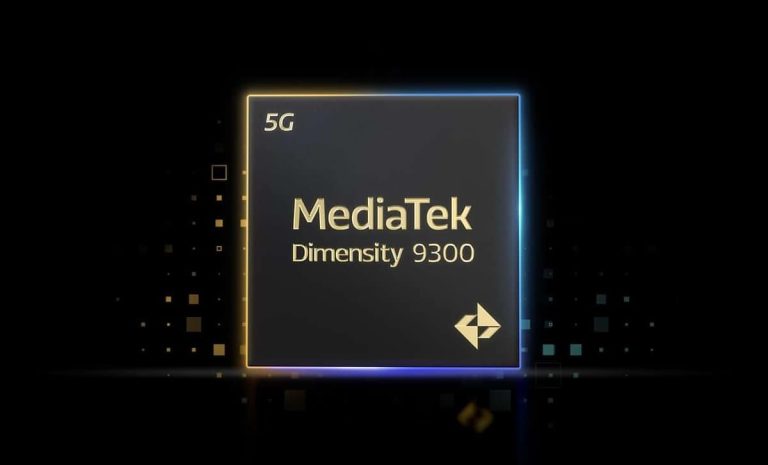
Yesterday, MediaTek launched the Dimensity 9300 to take on Qualcomm’s Snapdragon 8 Gen 3. On paper, the two chips look incredibly powerful and efficient. Both solutions are built on TSMC’s 4nm fabrication process and feature the latest ARM CPU technology. However, the former has no efficiency cores while the latter has a couple. Despite that, the new Dimensity processor appears to have a superior power efficiency than the Snapdragon.
Dimensity 9300 is more efficient than Snapdragon 8 Gen 3
The Dimensity 9300 features one ARM Cortex-X4 prime CPU core clocked at 3.25GHz, three more Cortex-X4 cores at 2.85GHz, and four Cortex-A720 mid cores at 2.0GHz. On the other hand, the Snapdragon 8 Gen 3 has one Cortex-X4 core clocked at 3.30GHz, three Cortex-A720 cores at 3.15GHz, two more Cortex-A720 cores at 2.96GHz, and two Cortex-A520 efficiency cores at 2.26GHz.
In a benchmark test, the MediaTek chip delivered better power efficiency than Qualcomm’s. It reached the same performance level with almost 33 percent less power. At constant power, the performance was up by about ten percent. Both CPU and GPU tests showed a similar trend, with the Dimensity 9300 offering better efficiency than the Snapdragon 8 Gen 3. The former’s power consumption at peak performance is substantially less than the latter.
Performance-wise, MediaTek’s latest flagship SoC appears to be giving a tough fight to Apple’s A17 Pro, which powers the iPhone 15 Pro and iPhone 15 Pro Max. As expected, its multi-core performance is unmatched by rivals. That’s the benefit of the so-called “All Big Core” design. However, with no efficiency cores, its idle power consumption appears to be significantly high.
The Dimensity 9300 may also be overkill for less taxing tasks, leading to an abnormal power drain. These benchmark tests were likely conducted in a controlled environment using pre-production devices. There’s no telling if the test setup had thermal limits in place. If not, the chip could flex its muscles and perform at its peak capacity with no restrictions. The real-life performance may not be the same as we saw in these results.
There are concerns about heating issues
Months before MediaTek unveiled the Dimensity 9300, there were reports that the chip gets abnormally hot when running at full capacity. It’s unclear if the company has worked on this. It may be able to keep the temperature in check by throttling the performance. However, that means the chip won’t deliver the same performance it’s expected to deliver. Time will tell whether MediaTek’s “All Big Core” design is a game changer or if the decision backfires. The Dimensity 9300 will start shipping inside Android flagships later this month.
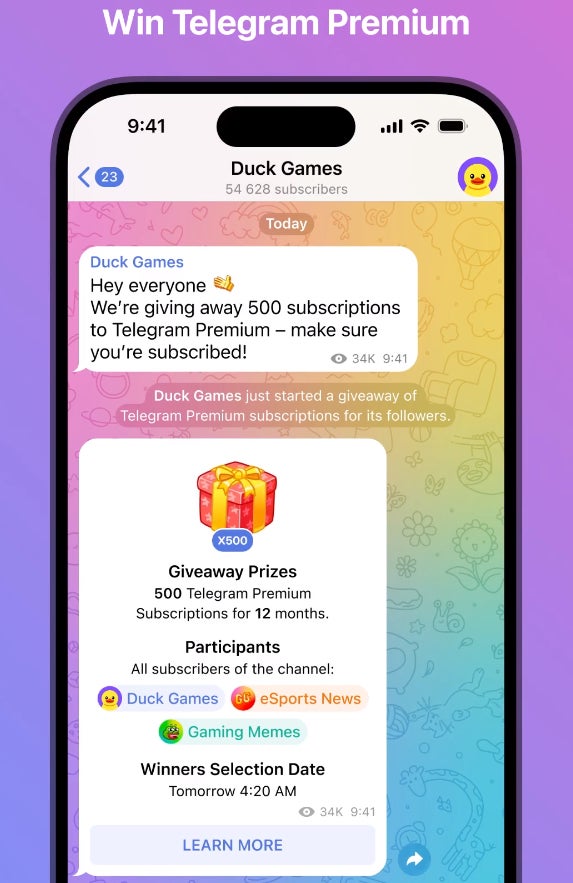
Telegram announced earlier today that channel owners can now host giveaways to randomly offer their followers various prizes. Moreover, the messaging app said that it will randomly select winners in select channels who will receive free subscriptions to Telegram Premium.
These free subscriptions will be offered in addition to what other prizes the organizers are distributing. One of the channels that has been confirmed to offer the chance to win free Telegram Premium subscriptions is that belonging to Telegram’s CEO, Pavel Durov.
Even if you’re a Premium user, you can still enter to win a free subscription, which you can pass to a friend. To have a chance to win a free Telegram Premium subscription, those interested must join November 13.
Channel owners who want to create giveaways can specify whether all subscribers or only new ones are eligible. They can also select certain countries or require that participants subscribe to other channels. Those who want to offer Premium subscriptions via giveaways on their channel must purchase them in advance.
Finally, starting today, Telegram announced that each Premium account will receive more boosts as part of its subscription. Basically, instead of just one boost, Premium users will be getting 4 boosts to spread among their channels or give one channel multiple boosts.
Also, those who gift Premium to someone will receive 3 boosts for their account, while the person receiving the subscription will get 1 boost.
The original Gootloader malware was used by numerous threat groups, including ransomware affiliates and in additional payloads like SystemBC and IcedID.
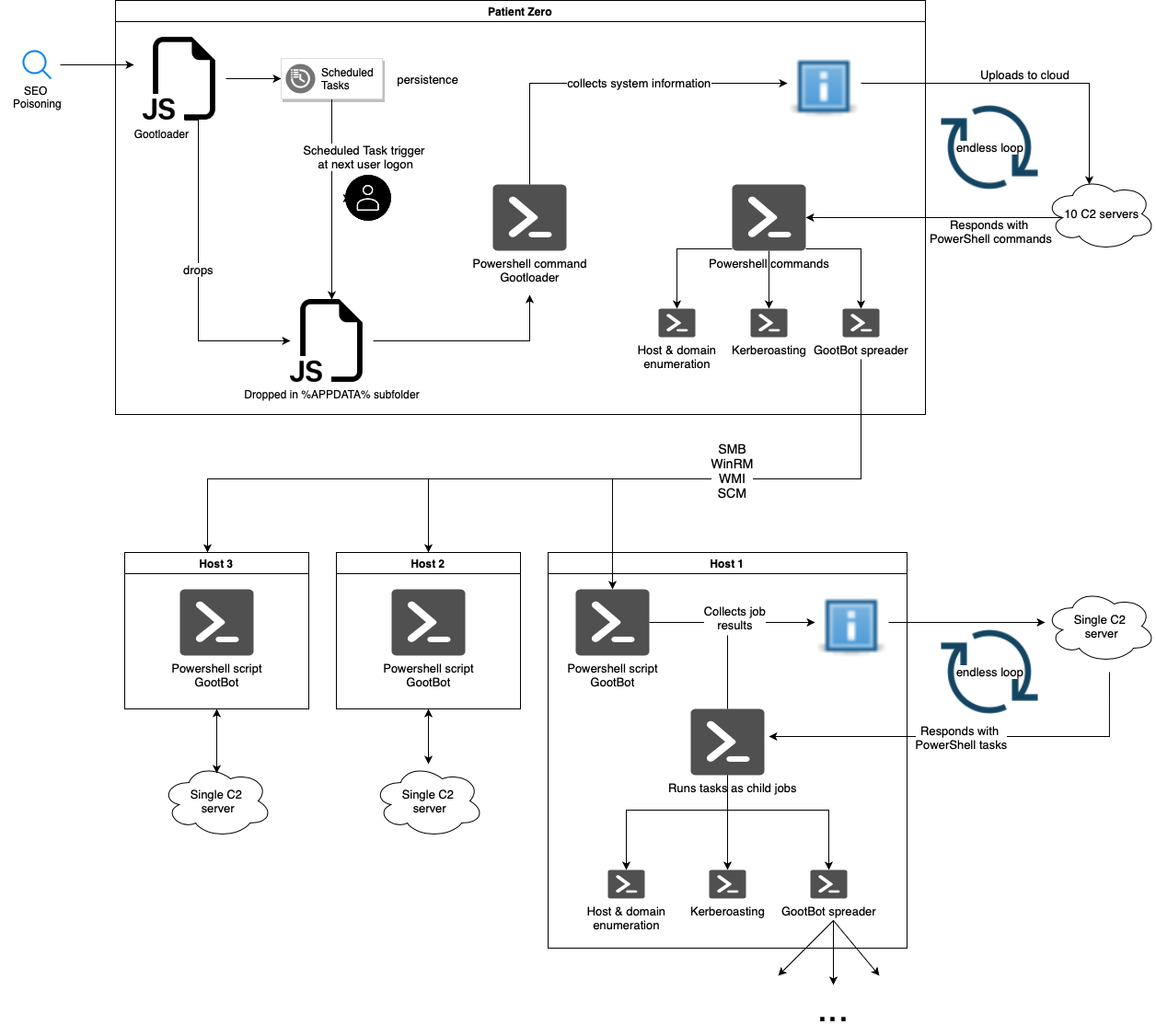
IBM X-Force has discovered a new variant of the notorious Gootloader malware, dubbed GootBot. This malware performs stealthy lateral movement, which complicates the detection or blocking of the campaign within enterprise networks.
According to the blog post authored by Golo Mühr and Ole Villadsen, the Gootloader group implements their custom bot in the latter stages of this attack chain to evade detection, using off-the-shelf tools for establishing C2 communication, such as RDP or CobaltStrike.
Gootloader malware was initially used only as an initial access tool and evolved considerably over time to include GootBot, a lightweight obfuscated PS script. It is downloaded after the Gootloader infection and receives commands via C2 through encrypted PowerShell scripts.
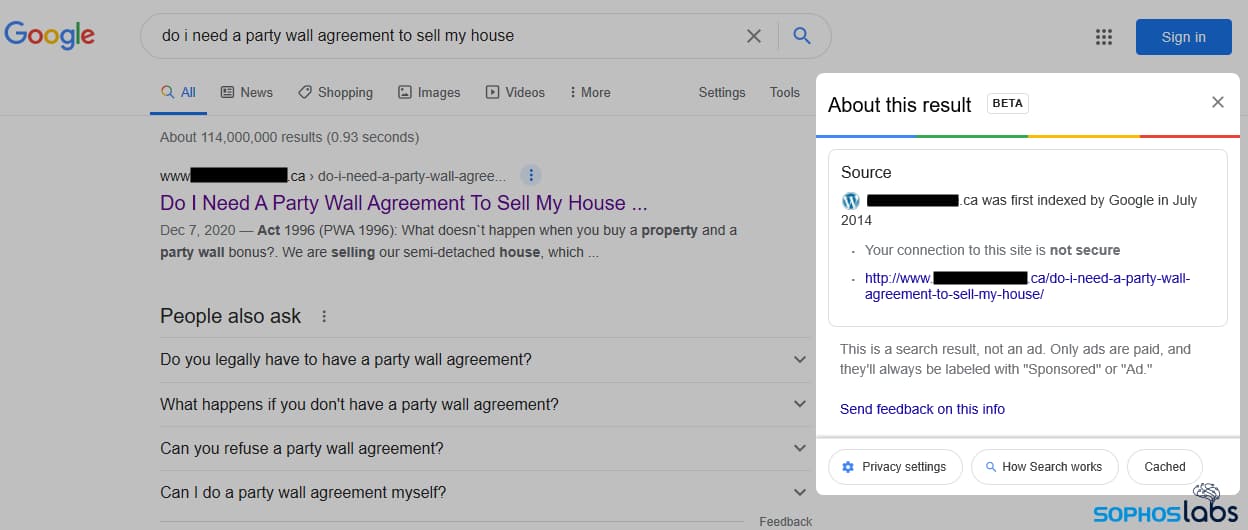
For your information, the Gootloader group (aka UNC2565 or Hive0127) first surfaced in 2014 and focused more on SEO poisoning techniques and compromised WordPress websites to distribute the Gootkit-based Gootloader malware. Tanium’s director of endpoint security research, Melissa Bischoping, explained how SEO poisoning works.
One of the hacked websites used in delivered Gootloader malware (Image: Sophos)
“SEO poisoning drives users to malicious payloads by manipulating the search results for key terms. Most security awareness training focuses heavily on phishing and other methods where an attacker sends something to the user. There’s a false sense of security that people place in search result top rankings and an outdated mindset that the lock on the address bar means a site is safe.”
Hackread.com has been following the Gootloader group’s activities since its emergence. The group frequently targets business-related online searchers like queries about legal contracts, creating legit-looking websites, and positioning them on the first page of search results. Once the user visits the page, they entice them into downloading archive files, which appear harmless and relevant to their queries but actually contain Gootloader malware.
In March 2021, Sophos cybersecurity firm confirmedthat Gootloader has evolved into a sophisticated loader framework from serving as an initial access point, revealing that its delivery method had expanded beyond the Gootkit malware family. As an initial access point, Gootloader malware was used by numerous threat groups, including ransomware affiliates and in additional payloads like SystemBC and IcedID.
GootBot is a novel Gootloader variant. It is a PowerShell payload encapsulating a single C2 server address. Its strings use a replacement key to conduct mild obfuscation. The malware, just like Gootloader, sends a GET request to the C2 server, requesting PowerShell tasks, and gets a string comprising a Base64-encoded payload.
The last 8 digits of the code are the task’s name. It then decodes the payload and injects it into the script block before executing it. The payload runs asynchronously, maintaining a default beaconing interval of 60 seconds. When it receives a C2 task, the next loop iteration starts, and for completed jobs, the results are returned.
GootBot is designed for lateral movement within the network, noted X-Force researchers. Its C2 infrastructure can quickly generate numerous GootBot payloads for distribution, each having a unique C2 address, and can cause multiple infections of the same host. It also runs a reconnaissance script and contains a unique GootBot ID for the host.
This effective malware lets attackers swiftly propagate across the compromised network to deploy additional malicious software. Unlike Gootloader, GootBot spreads through infected domains to reach the domain controller. This indicates a shift in attack tactics from Gootloader operators and enhances the success rate of post-exploitation stages, including Gootloader-based ransomware affiliate activity.
The malware is capable of extracting domain user name, and OS details from the registry key, checks for x86 dir and int ptr size if 64bit architecture is detected, and obtains information about domain controllers from registry and ENV var, SID, local IP address, hostname, and running processes. The data gets formatted with the specified ID.
The emergence of the GootBot variant highlights that attackers are employing sophisticated methods to stay undetected and spread laterally across the network. Lateral-movement scripts are possible through various techniques, such as WinRM, SMB, and WinAPI calls, to spread the payload to other hosts.
Infection diagram
Organizations must implement advanced security mechanisms, including endpoint detection and response (EDR) solutions and regularly updating software to prevent the threat. Bugcrowd cybersecurity firm’s founder and chief strategy officer, Casey Ellis, shared the following statement with Hackread.com regarding the current Gootloader campaign.
“This all strikes me as a very organized and thoughtful initial access broker (IAB). Their watering-hole style deployment of malicious SEO isn’t particularly targeted, however, it suits the opportunistic attack model of an IAB quite well. For defenders, it’s important to remember that organized cybercrime is continuing to evolve, stratify, and mature and that the threat actor behaviours now include this type of long, wide game.”
Keeper Security’s CEO and co-founder, Darren Guccione, in an exclusive statement shared with Hackread.com, noted that it is hard for innocent users to distinguish between authentic and fabricated search results, which makes SEO poisoning so successful.
“Innocent people who are not trained on SEO (Search Engine Optimization) and SEO-related attack vectors, including SEO poisoning, generally focus on the aesthetics of the search results page they are familiar with such as the domain name and the logos displayed. Often, threat actors will use language like “Official Website” to lure people into clicking a dangerous link or visiting a spoofed site that can download Gootloader or other malware onto their device.”
However, some scrutiny can prove beneficial in detecting malicious websites, said Guccione. “Phony or spoofed websites will usually have a different website address than the official company name and can also use different domain extensions than the one for the legitimate website. The majority of popular websites use the domain extension .com,” explained Guccione.
“If you visit a site, pay special attention to the domain itself and if it appears to be abnormally long or unrecognizable based on your normal search activity, it’s best to ignore it – and not click on any link. Online tools such as a Google Transparency Report can also be used to determine whether a site is safe.”
If you are tired of having a cluttered collection of images on Google Photos, then the Stack feature will interest you. This feature is currently in the pipeline and might roll out in the coming weeks via an app update. With this coming feature, Google hopes to help declutter your Photos app by grouping similar photos into one stack.
By doing this, users won’t have to deal with seeing a ton of similar photos lying around the app’s interface. While the roll-out of this feature is still a while away, netizens are already getting a glimpse of what the feature will look like. This is in terms of the design for the Photo Stack feature and how it will look on the Google Photos app.
Once available, users will need to activate this feature from their settings page. Currently, only beta testers of the Google Photos app have access to this feature at this time. Here’s what to expect from this feature, as well as its usage once it is available via an update.
Google’s Photo Stack feature is expected in the coming weeks
This coming Google Photo Stack feature aims to help users to manage the photos on their app. Already, the Google Photos app helps users to better organize their photos for easy access. Well, there is still the challenge of wading through lots of similar photos that were taken in the same period.
Lots of users will view this as being stressful, especially when these similar photos come in the way of their search for other photos. To solve this issue and declutter the Google Photos app, the feature in consideration in this article is preparing to roll out. Once this feature rolls out, it’ll group all similar photos taken within the same period into one big stack.
From this stack, users will be able to access other images that are similar to the stack’s header image. Each photo of stacks will have a header image that will be on display on the Google Photos app interface. This will help users identify each Photo Stack for easy access to the photos within the stack.
To help users identify a stack, Google will employ the use of a sign similar to a minimize button (a little square overlapping another). Tapping on photos with this sign at their top right-hand corner will pull up other photos within the stack. Users can then access each photo within the stack instead of seeing all of them on the Google Photos app interface.
Once this feature is available, users might need to activate it from the Google Photos app setting. From the settings page, they need to access preferences and then activate the Stack similar photos option. There might be some major improvements from the beta testing version of this feature once it rolls out for public usage.
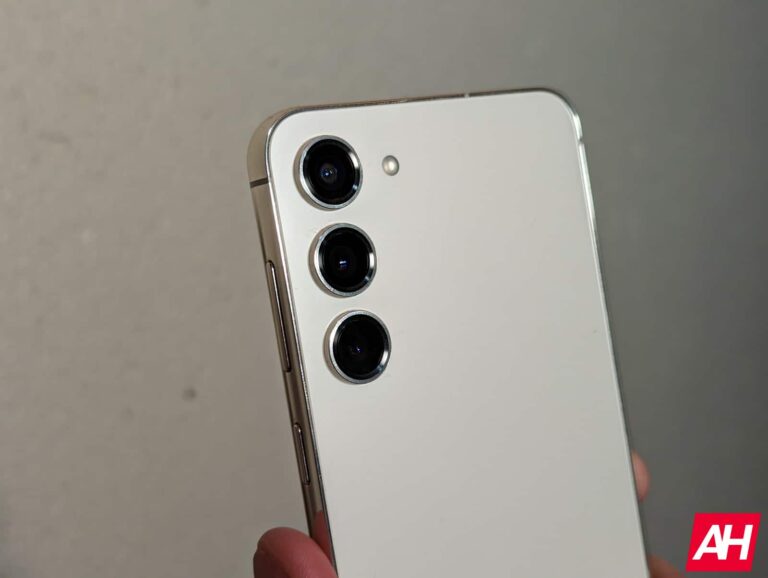
Samsung has unveiled a new 50MP flagship camera, called the ISOCELL GNK. It is the successor to the company’s ISOCELL GN1 50MP sensor launched more than three years ago. The camera brings several improvements over its predecessor. The Google Pixel 8 Pro features the new Samsung camera.
Samsung unveils the ISOCELL GNK 50MP camera
The ISOCELL GNK has an optical format size of 1/1.3-inch and features 1.2μm pixels. The 50MP camera boasts a maximum image resolution of 8,160 x 6,144 pixels. It supports 4-in-1 pixel binning (merges four neighboring pixels into one) for an effective pixel size of 2.4μm during low-light conditions. This helps absorb more light for brighter images. You get 12.5MP outputs when using pixel binning.
The new 50MP camera from Samsung can record 8K videos at 30fps (frames per second). It also supports autofocus and HDR video in FHD resolution with frame rates up to 240fps. 4K videos are limited to 120fps. The normal frame rate for images is 24fps at 50MP resolution and 90fps at 12.5MP resolution. The camera supports electronic rolling shutter and RAW output formats.
The ISOCELL GNK also boasts staggered HDR technology and offers three different ISO modes. This helps improve the HDR performance by producing images with a dynamic range of up to 102 dB. The single frame-based Smart-ISO Pro minimizes motion artifacts and noise for a more effective dynamic range. The camera is capable of creating images with up to 14-bit color depth.
Samsung has packed each of the 50 million pixels in this sensor with two photodiodes. The Dual Pixel Pro technology ensures ultra-fast autofocus by comparing the phase difference in both the top and bottom and the left and right directions. It helps quickly focus on moving objects in the frame. As the company puts it, the ISOCELL GNK is “built to express highly dynamic scenes to the fullest.” It brings “a new era of smartphone camera experience with Dual Pixel Pro and advanced HDR technology.”
We should see this camera on more phones
Samsung’s ISOCELL GNK has already made its market debut with the Pixel 8 Pro. It should feature on more phones in the coming months. Google’s Pixel 9 series may get the same camera. Samsung should also use it on some Galaxy devices next year. The Galaxy S24 and Galaxy S24+, which feature a 50MP main camera, use the ISOCELL GN3 sensor. The 2024 Galaxy flagships are expected to go official on January 17.
Okta has revealed details about a recent breach which exposed files belonging to customers.
As we explained in our article about 1Password being a victim of this breach, it’s normal for Okta support to ask customers to upload a file known as an HTTP Archive (HAR) file. Having this file allows the team to troubleshoot issues by replicating what’s going on in the browser. As such, a HAR file can contain sensitive data, including cookies and session tokens, that cybercriminals can use to impersonate valid users.
After 1Password, BeyondTrust, and Cloudflare detected unauthorized log-in attempts to their in-house Okta administrator accounts, they reported the incidents to Okta who started an investigation.
Okta says it found that from September 28 to October 17, 2023 an attacker had unauthorized access to files inside Okta’s customer support system associated with 134 Okta customers.
The attacker gained access using stolen credentials of a service account stored in the system itself, which had permissions to view and update customer support cases.
To gain access to that service account, the attacker compromised an Okta employee. The employee logged into the service account while they were signed in to their personal Google profile in Chrome on their Okta-managed laptop. That meant that the credentials of the service account were stored in the employee’s personal Google account.
How they got from that account into the attacker’s hands is unknown, but likely the attacker compromised that personal account or one of the employee’s devices fell into the attacker’s hands, from where they could accessed the Google account and harvested the credentials.
Once in, the attacker was able to use session tokens in the HAR files to impersonate staff and hijack the legitimate Okta sessions of five customers, including 1Password, BeyondTrust, and Cloudflare.
Okta says it has now locked down personal Google access on company-managed computers:
“Okta has implemented a specific configuration option within Chrome Enterprise that prevents sign-in to Chrome on their Okta-managed laptop using a personal Google profile.”
In general, it’s hard to strictly separate the use of devices for work purposes— in a 2020 survey by Malwarebytes, we found that the majority of people do use work devices for personal use. When a device gets assigned to an employee, they consider it more or less as “theirs” and there’s a tendency to start using it for personal matters. Okta could have anticipated this behavior and added additional security measures for such an important account.
A remediation task that is important to note for Okta customers is:
“Okta has released session token binding based on network location as a product enhancement to combat the threat of session token theft against Okta administrators. Okta administrators are now forced to re-authenticate if we detect a network change. This feature can be enabled by customers in the early access section of the Okta admin portal.”
Data breach
There are some actions you can take if you are, or suspect you may have been, the victim of a data breach.
Check the vendor’s advice. Every breach is different, so check with the vendor to find out what’s happened, and follow any specific advice they offer.
Change your password. You can make a stolen password useless to thieves by changing it. Choose a strong password that you don’t use for anything else. Better yet, let a password manager choose one for you.
Enable two-factor authentication (2FA). If you can, use a FIDO2-compliant hardware key, laptop or phone as your second factor. Some forms of two-factor authentication (2FA) can be phished just as easily as a password. 2FA that relies on a FIDO2 device can’t be phished.
Watch out for fake vendors. The thieves may contact you posing as the vendor. Check the vendor website to see if they are contacting victims, and verify any contacts using a different communication channel.
Take your time. Phishing attacks often impersonate people or brands you know, and use themes that require urgent attention, such as missed deliveries, account suspensions, and security alerts.