In April 2023, Austen Peppers from Lawton, Oklahoma, pleaded guilty to advertising and distributing child sexual abuse material (CSAM) on the dark web.
Austen Peppers, a 36-year-old resident of Lawton, Oklahoma, faced the gavel and received a sentencing of 21 years and 10 months in prison, followed by 15 years of supervised release. This judgment came after Peppers was found guilty in April 2023, of the advertising and distribution of child sexual abuse material (CSAM) on the dark web, as announced by U.S. Attorney Phillip A. Talbert.
The distribution of CSAM has emerged as a significant challenge for law enforcement, exacerbated by AI services capable of generating harmful images. Recently, the Internet Watch Foundation, a UK-based internet watchdog, revealed that cybercriminals are turning to generative AI platforms to create child sexual abuse material (CSAM).
The court documents unveiled a disturbing timeline spanning from March 2018 to August 2019, during which Peppers was involved in the sale and solicitation of images portraying minors subjected to sexual abuse. His transactions were executed in the shadows of the dark web, employing cryptocurrency, and utilizing platforms that he believed shielded him from law enforcement scrutiny.
Peppers also engaged in explicit conversations with individuals he believed were minors, persuading them to create sexually explicit self-images. Shockingly, Peppers accumulated an extensive library of thousands of images and videos depicting children suffering sexual abuse.
According to a press release from the US Department of Justice (DoJ),, Austen Peppers has been in confinement since his initial appearance in court on November 14, 2019. As part of the sentencing, Peppers was also directed to pay restitution of $57,000 to 19 victims who suffered due to his vile actions.
This case highlights the dangers posed by individuals utilizing the anonymity of the dark web for criminal activities, especially those exploiting and abusing minors. Engaging in illegal activities, particularly heinous crimes such as the distribution of CSAM, on the dark web is a serious offence that should be strictly avoided.
Hackread.com has consistently cautioned users about the dangerous nature of the illicit sections of the dark web, emphasizing the importance of refraining from engaging in unlawful actions while navigating its depths. To gain a deeper understanding of the potential risks and the activities that should be avoided on the dark web, you can explore further details here.
November marks a significant shift in our legacy. After 15 years as Malwarebytes, we are proud to introduce our rebranded identity, ThreatDown powered by Malwarebytes.
Building off Malwarebytes’ initial recognition for removing every trace of viruses that others missed, ThreatDown powered by Malwarebytes combines award-winning technologies that cover all stages of an attack, with managed services for teams with limited resources.
To say it’s been quite a journey to this point would be an understatement. From our beginnings as a remediation consumer tool to becoming a titan in business cyber protection, let’s walk through where we’ve come and where we’re headed.
Anti-Malware Small Business Edition (2008 – 2012)
Malwarebytes for Business began its journey in the late 2000s, offering corporate licensing for its consumer anti-malware product. By 2012, our focus intensified as we launched the Anti-Malware Small Business Edition, introducing advanced features to meet the specific demands of businesses.
The introduction of Malwarebytes Enterprise Edition (MEE) in late 2012 solidified our position in the enterprise market. Tailored for businesses, governments, and educational institutions, MEE provided comprehensive threat protection and malware remediation. As the demand for our expertise grew, esteemed institutions such as The University of Alabama and NextGen Healthcare became part of our clientele.
Malwarebytes Endpoint Security (June 2014 – 2016)
2014 saw the birth of the Anti-Malware Remediation Tool, a streamlined malware solution for businesses. Shortly after, Malwarebytes Endpoint Security was launched, merging multiple essential tools into one comprehensive package.
Nebula (2017 – 2018)
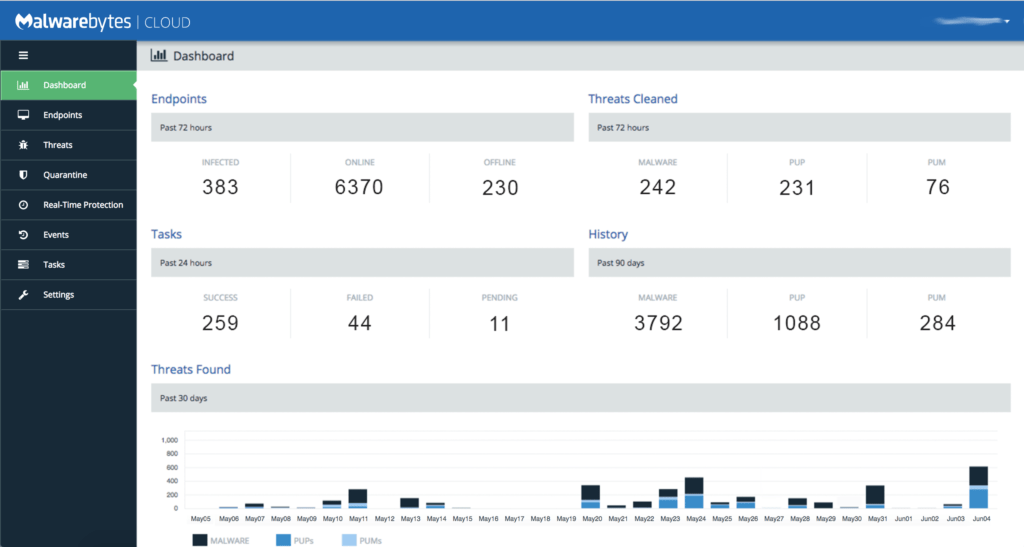
Transitioning into cloud security management, 2017 introduced Nebula 1.0, our cloud-based console. This platform brought together our machine learning-backed Malwarebytes Incident Response and Endpoint Protection products.
OneView (2019)
2019 heralded the debut of OneView, a multi-tenant console tailored for Managed Service Providers (MSPs). With OneView, MSPs could efficiently manage multiple clients’ security needs from a unified platform.
Comprehensive Endpoint Detection and Response Offerings (2020 – 2021)
Throughout 2020 and 2021, we fortified our EDR capabilities, including extensions to support Windows servers. With features such as Flight Recorder Search, Threat Hunting Alerts, and Brute Force Protection, we further strengthened our protective measures against cyber threats.
Managed Detection and Response (2022)
Last year, we delved into a multitude of new services and tools, including Device Control, Vulnerability Assessment, Patch Management Modules, and many more. Our crowning achievement was the introduction of Malwarebytes Managed Detection and Response (MDR) service, providing 24×7 monitoring and investigations for resource constrained IT teams.
Securing The Against the Next Generation of Threats (2023 and beyond)
2023 marked our foray into Mobile Protection for iOS, Android, and Chromebook platforms, helping organizations crush mobile threats on iOS, Android, and ChromeOS. The introduction of an Application Blocking Module gave administrators even greater control over app installations on devices.
Further, with the release of Malwarebytes Security Advisor, we transformed the Nebula customer experience to enable organizations to visualize and improve their security posture in just a few minutes. We also released Malwarebytes Managed Threat Hunting (MTH), a 24/7 service that proactively identifies and then alerts EDR customers to potential threats before an active attack begins.
Into The Future With ThreatDown powered by Malwarebytes
Originating from Malwarebytes’ 15-year legacy in combating daily malware threats, ThreatDown powered by Malwarebytes has evolved in tandem with the ever-changing threat landscape.
ThreatDown’s mission for businesses is straightforward: neutralize threats promptly and efficiently, without the need for extensive IT teams, prolonged setup times, or substantial budgets. We combine the technologies and services that resource constrained IT teams need into four streamlined, cost-effective bundles that take down threats, take down complexity and take down costs:
ThreatDown Core Bundle: Basic malware protection and threat surface reduction. A simple yet superior solution integrating award-winning endpoint protection technologies.
ThreatDown Advanced Bundle: Everything included in core plus Automated Threat Hunting and Ransomware Rollback. Tailored for smaller security teams with limited resources.
ThreatDown Elite Bundle: Everything in Advanced plus 24/7 expert monitoring and response by Malwarebytes MDR analysts. Purpose-built for organizations with small (to non-existent) security teams that lack the resources to address all security alerts.
ThreatDown Ultimate Bundle: Everything in Elite plus protection from categories of malicious websites. Perfect for teams looking for a SOC-in-a-box, a one-and-done shortcut to cybersecurity done right.
In short, with ThreatDown, the mission is clear: To take down threats to businesses and reduce attack surfaces immediately, without the need for an IT army or big budgets. Together, we can overpower threats—and empower IT.
Black Friday is the biggest sales day of the year. Retailers normally discount products by 50% or more. Making it the one day of the year that retailers are able to go from the red to the black, hence the name Black Friday.
So when is Black Friday this year? Well, it is always the day after Thanksgiving which would make it November 24, 2023.
Many stores used to open on Thanksgiving, from around 5PM til Midnight. But since the Pandemic, many stores have opted to remain closed on Thanksgiving, allowing their employees to be with their families, instead of at work with a bunch of crazy people trying to get those doorbuster deals.
Black Friday deals start well before Black Friday
Now while Black Friday does officially start on November 24, 2023, that’s not when the deals will start. Typically, we will start to see deals starting on the Tuesday before, which would be November 21, 2023. And in the past, we’ve seen retailers hold big sales ahead of Black Friday, with a “Black Friday Price Guarantee”. Allowing you to start shopping earlier, without worrying about paying more for the products.
As always, you can keep it locked here to AndroidHeadlines as we will be rounding up all of the best Black Friday Deals throughout the next month, to help you spend your money wisely. And make sure to subscribe to our newsletter too, for the latest deals for Black Friday and more this holiday season.
Don’t forget that Black Friday runs into Cyber Monday which will take place on November 27, 2023. Typically, Black Friday deals run through Cyber Monday, but there are usually a good amount of deals that go live specifically for Cyber Monday. So there will be plenty of great deals that you can take advantage of.
Despite the recession, analysts are still expecting consumers to spend more this year than any other year before. Which has been the case for the last few decades, actually.
AI is good at many things. Ao it should come as no surprise that it will be able to help you design your phone case. That’s right; popular phone accessory brand PopSockets just introduced its AI Customizer. This is a service that will use generative AI to craft your next phone case.
The PopSockets AI Customizer could design your next phone case
So, we’ve all been through the pain of scrolling through case designs and not being able to find the design we like. Well, PopSockets has a solution to this problem. According to the report, the company will let you generate your own designs using generative AI and slap it on a case.
Popsockets didn’t design its own image model or anything like that; however, it enlisted the help of one of the best models out there. The company generates its images through stable diffusion. When you use the tool, you’ll enter the prompts that you want it to generate. In generative AI fashion, the service will produce several designs per prompt. You’ll choose which one you like the best and put that on a case
$100,00 contest
Right now, you can use this tool in the US. You can go in now and start making your new case. Making a cool design will grant you a cool new case, but it could also award $100,000. The company is now offering a contest to see who can come up with the best design. That’s a major incentive to try out this new service.
Right now, we don’t know much information on this contest, but it’s still interesting. It could help raise attention about AI tools that the company might be working on. With so many companies using generative AI to deliver more experiences, who knows what other companies will have an idea like this one?
Last year, Samsung released the industry’s first mobile GPU with hardware-accelerated ray tracing capability. The company teamed up with AMD to develop the Xclipse 920 GPU for its Exynos 2200 chipset, which powered the Galaxy S22 series. The two firms have continued their partnership for mobile GPUs based on AMD’s Radeon graphics technology. Meanwhile, Samsung seems to be working on a more advanced ray tracing technology on its own.
Samsung is developing ray tracing tech for Exynos chips
Ray tracing is a graphics technology that simulates the physical behavior of light. It creates realistic lighting effects and reflections on the on-screen objects while gaming. This enables a more immersive gaming experience with graphics akin to the real world. The technology was previously only available on PC graphics but is slowly making its way into mobile GPUs. It isn’t perfect but each new generation has come with improvements.
According to the Korean media, Samsung’s R&D unit SAIT (aka Advanced Institute of Technology) is developing a couple of advanced technologies to improve the ray tracing capability of its next-gen mobile GPUs: Neural Ray Reconstruction and Neural Super Sampling. The former helps fill in the light rays that are lacking in an image. This ensures a more realistic ray tracing in games and videos.
The latter tech lowers the burden on the system by speeding up image processing with upsampling. It converts low-quality images to high-quality while preserving all the details. Thanks to the anti-aliasing technology, edge lines in games and videos appear smooth for a more realistic effect. All of this works in tandem to enable more advanced ray tracing without increasing the burden on your phone’s graphics resources.
Samsung’s “dream chip” may boast this tech
SAIT is currently working on this project. The plan is to achieve better results than NVIDIA and AMD’s ray tracing tech. Unsurprisingly, it will take time. The company doesn’t expect the solution to be ready before 2025. That is when the Korean firm is expected to debut its first “dream chip” for Galaxy flagships. The 3nm SoC will be custom-built by Samsung’s smartphone division for the Galaxy S25 series.
To achieve the desired results, the SoC must feature a powerful network processing unit (NPU) too. So Samsung has a lot of work to do before realizing its dream chip. Preparations have already begun, with next year’s Galaxy S24 series touted to offer unmatched on-device AI capabilities. It remains to be seen whether the Korean behemoth will be able to fully develop its next-gen ray tracing technology by 2025.
It’s official, the NBA will be remaining on Bally Sports’ regional sports networks for the rest of the 2023-24 season. A deal was reached between the two sides, and the details were partly unveiled as Bally Sports’ owned, Diamond Sports Group is currently going through its bankruptcy proceedings.
As part of this new deal, the rights revert back to the NBA for the 2024-25 season. Under the previous deal, those rights couldn’t revert until after the 2024-25 season. Basically the NBA can do what it wants with its rights a bit sooner. It’s also expected that the NHL will agree to a similar deal in the next few weeks.
What this deal means is that the NBA will get to decide at the end of this season if it wants to do another deal with Diamond Sports Group before the start of next year, or sell the local rights to those teams to another outlet. Previously, we’ve heard that Disney, Amazon, Apple and Google were all interested in picking up these rights. On top of all of this, the NBA’s national broadcasting contract with ESPN and TNT does expire at the end of the 2024-25 season. The NBA is expected to pursue and get more than the $24 billion it currently makes.
Does this help out Bally Sports’ on-going bankruptcy?
As part of Bally Sports’ declaring bankruptcy, it was forced to renegotiate a number of its contracts, so that it could actually pay them. Diamond Sports Group had suggested that the NBA take a 20% pay cut for its rights fee payments. Now it’s unclear if that happened or not, but it does sound very likely.
This is only one part of the bankruptcy though, for DSG. As the company also needs to agree with the NHL and MLB for rights fees. Bally Sports did give up the rights to a number of MLB teams over the summer. These included the Arizona Diamondbacks and San Diego Padres. But for now, with this NBA agreement, all 15 teams that Bally Sports already had on its networks, will remain.
Modern security tools continue to improve in their ability to defend organizations’ networks and endpoints against cybercriminals. But the bad actors still occasionally find a way in.
Security teams must be able to stop threats and restore normal operations as quickly as possible. That’s why it’s essential that these teams not only have the right tools but also understand how to respond to an incident effectively.
Resources like an incident response templatecan be customized to define a plan with roles and responsibilities, processes, and an action item checklist.
But preparations can’t stop there. Teams must continuously train to adapt as threats rapidly evolve. Every security incident must be harnessed as an educational opportunity to help the organization better prepare for—or even prevent—future incidents.
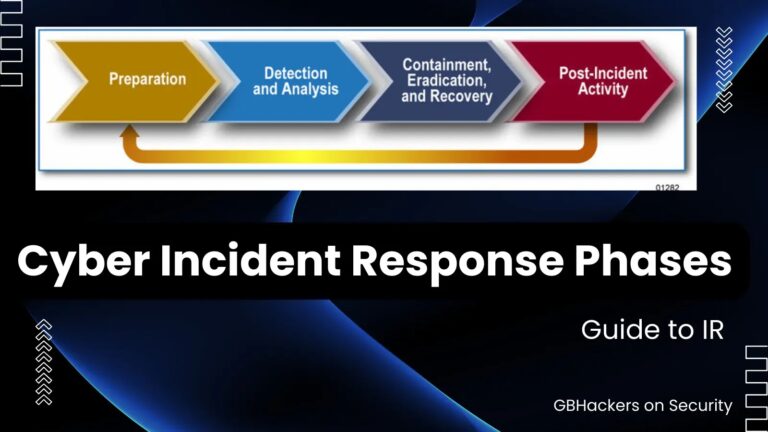
SANS Institute defines a framework with six steps to a successful IR.
Preparation
Identification
Containment
Eradication
Recovery
Lessons learned
While these phases follow a logical flow, you may need to return to a previous phase in the process to repeat specific steps that were done incorrectly or incompletely the first time.
Yes, this slows down the IR. But it’s more important to complete each phase thoroughly than to try to save time by expediting steps.
1: Preparation
Goal: Get your team ready to handle events efficiently and effectively.
Everybody with access to your systems needs to be prepared for an incident—not just the incident response team. Human error is to blame for most cybersecurity breaches.So the first and most important step in IR is to educate personnel about what to look for.
Leveraging a templated incident response plan to establish roles and responsibilities for all participants—security leaders, operations managers, help desk teams, identity and access managers, as well as audit, compliance, communications, and executives—can ensure efficient coordination.
Attackers will continue to evolve their social engineering and spear phishing techniques to try to stay one step ahead of training and awareness campaigns. While most everybody now knows to ignore a poorly written email that promises a reward in return for a small up-front payment, some targets will fall victim to an off-hours text message pretending to be their boss asking for help with a time-sensitive task.
To account for these adaptations, your internal training must regularly reflect the latest trends and techniques.
Your incident responders—or security operations center (SOC), if you have one—will also require regular training, ideally based on simulations of actual incidents. An intensive tabletop exercise can raise adrenaline levels and give your team a sense of what it’s like to experience a real-world incident. You might find that some team members shine when the heat is on, while others require additional training and guidance.
Another part of your preparation is outlining a specific response strategy. The most common approach is to contain and eradicate the incident. The other option is to watch an incident in progress so you can assess the attacker’s behavior and identify their goals, assuming this does not cause irreparable harm.
Beyond training and strategy, technology plays a huge role in incident response. Logs are a critical component. Simply put, the more you log, the easier and more efficient it will be for the IR team to investigate an incident.
You can also quickly protect yourself by isolating machines, cutting them off from the network, and running counteracting commands at scale if you use an endpoint detection and response (EDR) platform or an extended detection and response (XDR) tool with centralized control.
Other technology needed for IR includes a virtual environment where logs, files, and other data can be analyzed, along with ample storage to house this information. You don’t want to waste time during an incident setting up virtual machines and allocating storage space.
Finally, you’ll need a system for documenting your findings from an incident, whether that’s using spreadsheets or a dedicated IR documentation tool. Your documentation should cover the incident’s timeline, what systems and users were impacted, and what malicious files and indicators of compromise (IOC) you discovered (both in the moment and retrospectively).
2: Identification
Goal: Detect whether you have been breached and collect IOCs.
There are a few ways to identify that an incident has occurred or is currently in progress.
Internal detection
The worst-case scenario is to learn that an incident has occurred only after discovering that data has been exfiltrated from your environment and posted to the internet or darknet sites. The implications are even worse if such data includes sensitive customer information and the news leaks to the press before you have time to prepare a coordinated public response.
External detection
An incident can be discovered by your in-house monitoring team or by another member of your org (thanks to your security awareness efforts), via alerts from one or more of your security products, or during a proactive threat-hunting exercise.
Exfiltrated data disclosed
The worst-case scenario is to learn that an incident has occurred only after discovering that data has been exfiltrated from your environment and posted to internet or darknet sites. The implications are even worse if such data includes sensitive customer information and the news leaks to the press before you have time to prepare a coordinated public response.
No discussion about identification would be complete without bringing up alert fatigue.
If the detection settings for your security products are dialed too high, you will receive too many alerts about unimportant activities on your endpoints and network. That is a great way to overwhelm your team and can result in many ignored alerts.
The reverse scenario, where your settings are dialed too low, is equally problematic because you might miss critical events. A balanced security posture will provide just the right number of alerts to identify incidents worthy of further investigation without suffering alert fatigue.
Your security vendors can help you find the right balance and, ideally, automatically filter alerts so your team can focus on what matters.
During the identification phase, you will document all indicators of compromise (IOCs) gathered from alerts, such as compromised hosts and users, malicious files and process, new registry keys, and more.
Once you have documented all IOCs, you will move to the containment phase.
3: Containment
Goal: Minimize the damage.
Containment is as much a strategy as it is a distinct step in IR.
You will want to establish an approach fit for your organization, keeping security and business implications in mind. Although isolating devices or disconnecting them from the network may prevent an attack from spreading across the organization, it could also result in significant financial damage or other business impact. These decisions should be made beforehand and clearly articulated in your IR strategy.
Containment can be broken down into short- and long-term steps, with unique implications for each.
Short-term
This includes steps you might take in the moment, like shutting down systems, disconnecting devices from the network, and actively observing the threat actor’s activities. There are pros and cons to each of these steps.
Long-term
The best-case scenario is to keep infected system offline so you can safely move to the eradication phase. This isn’t always possible, however, so you may need to take measures like patching, changing passwords, killing specific services, and more.
During the containment phase you will want to prioritize your critical devices, like domain controllers, file servers, and backup servers to ensure they haven’t been compromised.
Additional steps in this phase include documenting which assets and threats were contained during the incident, as well as grouping devices based on whether they were compromised or not.If you are unsure, assume the worst. Once all devices have been categorized and meet your definition of containment, this phase is over.
Bonus step: Investigation
Goal:Determine who, what, when, where, why, how.
At this stage, it is worth noting another important aspect of IR: investigation.
An investigation takes place throughout the IR process. While not a phase of its own,it should be kept in mind as each step is performed. An investigation aims to answer questions about which systems were accessed and the origins of a breach.
When the incident has been contained, teams can facilitate a thorough investigation by capturing as much relevant data as possible from sources like disk and memory images and logs.
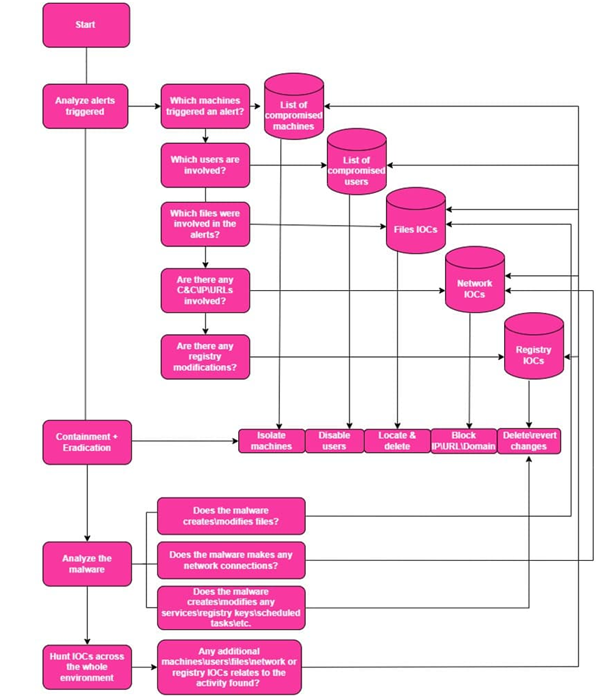
This flowchart visualizes the overall process:
You may be familiar with the term digital forensics and incident response (DFIR), but it’s worth noting that the goals of IR forensics differ from those of traditional forensics. In IR, the primary goal of forensics is to help progress from one phase to the next as efficiently as possible to resume normal business operations.
Digital forensics techniques are designed to extract as much useful information as possible from any evidence captured and turn it into useful intelligence that can help build a more complete picture of the incident or even to aid in prosecuting a bad actor.
Data points that add context to discovered artifacts might include how the attacker entered the network or moved around, which files were accessed or created, what processes were executed, and more. Of course, this can be a time-consuming process that might conflict with IR.
Notably, DFIR has evolved since the term was first coined. Organizations today have hundreds or thousands of machines, each with hundreds of gigabytes or even multiple terabytes of storage, so the traditional approach of capturing and analyzing full disk images from all compromised machines is no longer practical.
Current conditions require a more surgical approach, where specific information from each compromised machine is captured and analyzed.
4: Eradication
Goal: Make sure the threat is completely removed.
With the containment phase complete, you can move to eradication, which can be handled through either disk cleaning, restoring to a clean backup, or full disk reimaging. Cleaning entails deleting malicious files and deleting or modifying registry keys. Reimaging means reinstalling the operating system.
Before taking any action, the IR team will want to refer to any organizational policies that, for example, call for specific machines to be reimaged in the event of a malware attack.
As with earlier steps, documentation plays a role in eradication. The IR team should carefully document the actions taken on each machine to ensure that nothing is missed. As an additional check, you can perform active scans of your systems for any evidence of the threat after the complete eradication process.
5: Recovery
Goal: Get back to normal operations.
All your efforts have been leading here! The recovery phase is when you can resume business as usual. Determining when to restore operations is the key decision at this point. Ideally, this can happen without delay, but it may be necessary to wait for your organization’s off-hours or other quiet periods.
One more check to verify that there aren’t any IOCs left on the restored systems. You must also determine if the root cause still exists and implement the appropriate fixes.
Now that you have learned about this type of incident, you can monitor for it in the future and establish protective controls.
6: Lessons learned
Goal: Document what happened and improve your capabilities.
Now that the incident is comfortably behind you, it’s time to reflect on each major IR step and answer key questions; there are plenty of questions and aspects that should be asked and reviewed; below are a few examples:
Identification: How long did it take to detect the incident after the initial compromise occurred?
Containment: How long did it take to contain the incident?
Eradication: After eradication, did you still find any signs of malware or compromise?
Probing these will help you step back and reconsider fundamental questions like: Do we have the right tools? Is our staff appropriately trained to respond to incidents?
Then the cycle returns to preparation, where you can make necessary improvements like updating your incident response plan template, technology, and processes and providing your people with better training.
4 Pro Tips to Stay Secure
Let’s conclude with four final suggestions to bear in mind:
The more you log in, the easier the investigation will be. Log in as much as possible to save money and time.
Stay prepared by simulating attacks against your network. This will reveal how your SOC team analyzes alerts and their communication ability—critical during a real incident.
People are integral to your organization’s security posture. Did you know human error is responsible for 95% of cyber breaches? That’s why it’s important to perform periodic training for two groups: end users and your security team.
Consider having a specialized 3rd party IR Team on call that can immediately help with more difficult incidents beyond your team’s ability to resolve. These teams, which may have resolved hundreds of incidents, will have the IR experience and Incident response tools to hit the ground running and accelerate your IR.
You can download a free incident response template here.
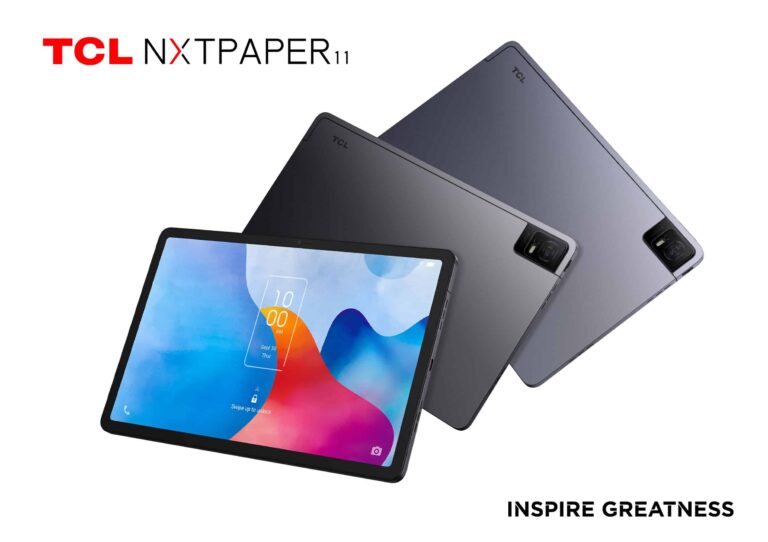
Well, it’s about time! TCL announced its latest paper-like tablet, the TCL NXTPAPER 11, earlier this year. We were waiting for it to become available to purchase it stateside, but it remained unattainable. However, the TCL NXTPAPER 11 is finally launching to the US market, according to a new report.
What’s the deal with this tablet? Well, it’s all about the display. It uses the tablet’s proprietary NXTPAPER technology. This is meant to give you the most paper-like experience of any tablet. The warm light that the screen emits contains up to 60% less blue light than other displays. Studies show that using this display before can help you sleep more easily than if you used a regular display.
If you take that with the unique texture of the display, you’ll feel like you’re using a sheet of paper rather than a tablet display. That’s a rare quality for most modern displays.
When it comes to the rest of the tablet, you’re getting a pretty standard experience. For a tablet like this, you’ll most likely use it to watch movies and TV shows. Whether you’re vegging out on the couch, or relaxing on your patio, the screen is plenty bright to suit your needs.
It comes with Android installed, so you can use it for both play and work if you need. It’s got enough power to handle most light tasks you throw at it.
The TCL NXTPAPER 11 is now available in the US
So, this tablet seems really nice, but folks in the US couldn’t get their hands on it. Well, that’s finally changed. You can pick this tablet up for just $230.
This is a nice tablet if you love consuming content from your favorite streaming services. 11 inches is the perfect size, and it gets bright enough to view outside. So, feel free to watch movies and shows on the patio. You can enjoy them for hours because of the large battery inside.
The TCL NXTPAPER 11 is a great device to buy for yourself or purchase as a gift for a friend or loved one. Be sure to check it out if you’re looking for a new tablet this holiday season.
Samsung has brought the S Pen Creator Edition to the US. Launched alongside the Galaxy Tab S9 series in July, the special edition stylus pen was first released in South Korea last month. It is a more premium solution that is more comfortable to use, allowing for effortless writing and drawing.
S Pen Creator Edition arrives in the US
Samsung has specifically designed the S Pen Creator Edition for people who frequently use the stylus accessory on their Galaxy devices. It works with all S Pen-compatible models in the Galaxy Book, Galaxy Note, Galaxy S, and Galaxy Tab lineups, including the FE series (doesn’t work with Fold series foldables). However, the special edition accessory is bigger than the standard version, so it doesn’t fit in the built-in silo of Galaxy phones.
This is essentially why the device is a separate purchase. Those who don’t find the in-box S Pen comfortable for prolonged use will like the Creator Edition’s ergonomic design. It is lightweight (10.6 grams) and has a grippy surface that is more comfortable to hold. Like the regular S Pen, it supports pressure sensitivity and tilt sensitivity. However, there’s no Bluetooth or a built-in battery here, so Air Commands don’t work.
Samsung ships it with two additional replacement tips. The device has an IPX4 water resistance, which isn’t as strong as the regular S Pen’s IPX8 rating. It also misses out on some other smart features. However, if you have a compatible tablet, the stylus pen magnetically attaches to the back of the device. Additionally, its dedicated button lets you quickly pull up a software trick, like changing the pen style when drawing.
Price and availability
Samsung’s S Pen Creator Edition is now available in the US through the company’s official website as well as some third-party retailers, including Amazon and Best Buy. The accessory costs $99.99, which makes it notably more expensive than the regular S Pen ($60) or the S Pen Foldable Edition ($55). It only comes in white.
The Korean firm has also launched the accessory in a few other markets, including China, New Zealand, and the UK. If you’re interested in it, check Samsung’s official website for your region. You may also find the stylus pen on other retail platforms. The company doesn’t seem to be offering it bundled with supported products, though. It appears to have stopped selling the S Pen Pro, which works with foldables too, through its website.
Veeam, a Global Leader in Data Protection issued hotfixes to address four vulnerabilities affecting the Veeam ONE IT infrastructure monitoring and analytics platform.
Two of the four vulnerabilities are classified as ‘critical’, while the other two are classified as ‘medium severity’ flaws.
The critical flaws allow remote code execution and steal NTLM Hashes, and the medium-severity issues involve user interaction and have a lesser impact.
Critical Flaws Addressed
A critical vulnerability tracked as CVE-2023-38547 in Veeam ONE with a CVSS base score of 9.9 allows an unauthenticated user to obtain information about the SQL server connection used by Veeam ONE to access its configuration database, an advisory published today stated.
“This may lead to remote code execution on the SQL server hosting the Veeam ONE configuration database,” the company said in its advisory.
CVE-2023-38547affected Veeam ONE Versions 11, 11a, 12
Because of a flaw in Veeam ONE identified as CVE-2023-38548 with a CVSS base score of 9.8, anyone with access to the Veeam ONE Web Client can get the NTLM hash of the account used by the Veeam ONE Reporting Service.
CVE-2023-38548 Affected Veeam versions ONE 12.
Medium Severity Flaws Addressed
A flaw classified as CVE-2023-38549 with a CVSS base score of 4.5 in Veeam ONE permits a user with the Veeam ONE Power user role to gain the access token of a user with the Veeam ONE Administrator role using XSS.
“The criticality of this vulnerability is reduced as it requires interaction by a user with the Veeam ONE Administrator role”, the company said.
Affected versions are Veeam ONE 11, 11a, 12.
In Veeam ONE, a vulnerability classified as CVE-2023-41723 and a CVSS base score of 4.3 permits the Dashboard Schedule to be viewed by a user with the Veeam ONE Read-Only User role.
“The criticality of this vulnerability is reduced because the user with the Read-Only role is only able to view the schedule and cannot make changes”, the company said.
Affected versions are Veeam ONE 11, 11a, 12.
DocumentFREE Webinar
Ensure your Cyber Resiliance with the recent wave of cyber-attacks targeting the financial services sector. Almost 60% respondents not confident to recover fully from a cyber attack.
Patches Released
For the following versions, there is a patch available that fixes these vulnerabilities:
Veeam ONE 12 P20230314 (12.0.1.2591)
Veeam ONE 11a (11.0.1.1880)
Veeam ONE 11 (11.0.0.1379)
The hotfix installation instructions provided by Veeam require administrators to stop monitoring and reporting services, replace files, and restart services.
Patch Manager Plus: Patch over 850 third-party applications quickly. Try a free trial to ensure 100% security.