Samsung‘s Galaxy S24 series may be getting all the attention but the company also has a bunch of A-series models in the pipeline. The Galaxy A25 5G is expected to go official sometime in the first half of 2024. Months ahead of its launch, we bring you exclusive official renders of the phone. The renders, shared with us by a trusted, confidential source, give you an early look at the device’s design and color options.
Galaxy A25 5G exclusive official renders
The Galaxy A25 5G will succeed Samsung’s Galaxy A24, which came with 4G connectivity in April this year. We saw the 2024 model in unofficial CAD renders in black a few months back. Today, we give you the first official look at the phone in all of its color variants. The Korean firm currently has four colors planned for the Galaxy A25 5G: black, blue-grey, lime green, and light blue.
As usual, Samsung may use some fancy names for these colors in its marketing materials. However, the color scheme for the Galaxy A25 5G mostly matches with its predecessor. The hues aren’t vibrant but not too bland either. Overall, it’s a fairly standard Galaxy design with an expected mid-range look. The phone is expected to measure 162 x 77.5 x 8.3mm in dimension, with the right side slightly raised to accommodate the power and volume buttons.
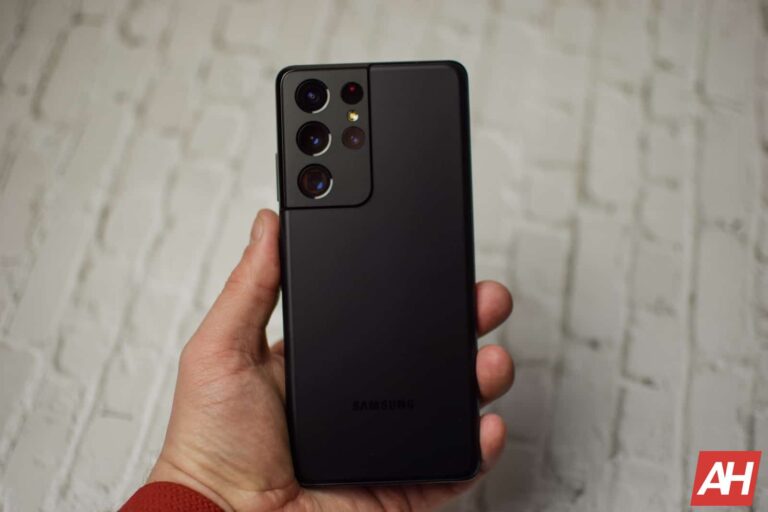
The power button will incorporate a capacitive fingerprint scanner. The display, rumored to measure 6.44 inches diagonally, has a U-shaped notch and notable bezels around it, particularly the chin. The notch may house a 13MP selfie camera, unchanged from the Galaxy A24. On the back, Samsung is keeping the same camera design it has employed on all Galaxy phones this year.
The Galaxy A25 5G has three cameras aligned vertically. There’s no camera bumper here, with the LED flash sitting next to the three sensors. Rumors have hinted at an unchanged 50MP primary shooter for the phone. The specs of the other two rear cameras are not known. The Galaxy A24 has a 5MP ultrawide lens and a 2MP macro camera. Samsung may be focusing on improving the camera software rather than a hardware upgrade.
Samsung’s Exynos 1280 will power this phone
The Galaxy A25 5G has already shown up on a few benchmark listings. The listings have revealed the Samsung Exynos 1280 processor for the phone. It’s a 5nm chip featuring two ARM Cortex-A78 CPU cores clocked at 2.4GHz and six Cortex-A55 cores at 2.0GHz. The chipset features ARM’s Mali-G68 GPU. Samsung will offer the phone with up to 8GB of RAM.
Other rumored specs of the upcoming mid-range Galaxy smartphone include a 5,000mAh battery, 25W fast charging, and Android 14 with One UI 6.0 or One UI 6.1. The device should be eligible for four major Android OS updates, i.e. up to Android 18. Stay tuned for more leaks and rumors about the Galaxy A25 5G as Samsung continues its work on the device behind the scenes.
LG has announced two new gaming monitors being added to its UltraGear lineup – the GR65DC and GR75DC – and both offer 45-inch ultra-wide displays with a 200Hz refresh rate. LG’s UltraGear line tends to be a favorite among gamers compared to other monitors, and the newest monitors aren’t expected to be any different in that regard.
Of course, there are some new key features that differentiate these from past models in the UltraGear line. The LG UltraGear GR75DC and GR65DC both have a built-in picture-in-picture and picture-by-picture features to increase multi-tasking capabilities. With either of these enabled you can do two things at once. Say you want to play a game but also want to have something to watch at the same time. Turn on the PBP and you can watch something on your favorite streaming service while you game.
This is great for playing casual games that don’t require too much extra attention. I use it a lot when gathering materials for my crafting classes in Final Fantasy XIV for example. Plus it works out great for those that like to stream their gameplay. As they can have a discord chat on one side and the game on the other.
The LG UltraGear GR75DC is only available for pre-order
Both monitors are technically launching today but only one is available right away – the GR65DC. If you want the GR75DC you can still pre-order it starting today. But it isn’t planned to ship until the week of November 20. Luckily that’s only a little over a week away.
LG is also adding a little extra incentive for those that pre-order early. If you pre-order between now and November 19 (LG’s website only) you’ll get a free UltraGear GP9 gaming speaker. If you’re asking yourself which monitor you should go with, know that the GR75DC and GR65DC are pretty similar. Albeit the GR75DC comes with USB-C compatibility for data transmission and power delivery for connected devices whereas the GR65DC does not.
Sometimes, there’s that one important message you sent a few weeks ago that you need to retrieve. You know when you sent it, but you don’t want to scroll all the way to that message. Well, WhatsApp is testing a feature that will let you search your messages by date, according to a new report.
This feature is currently in testing for the web client. Since it’s in testing, you’ll want to take this news with a grain of salt. WhatsApp can change it or take it away at any moment. If there are any changes to this feature, then there’s a chance that the company will do it silently.
WhatsApp could let you search for your messages by date
While this feature is in testing, it’s currently rolling out to more beta testers over the next couple of days. We’re not sure when it’s going to make it to the stable channel. The feature was spotted in the WhatsApp web version 2.2348.50.
When you’re in a conversation, you can search for messages you’ve sent in it. With this feature, you’ll see a little calendar pop-up when you’re searching for a message. When you tap on the date that you want to see, you’ll see the feed of messages change to show you all of the messages you sent on that day.
This way, you won’t have to scroll through all of your messages just to find a specific date. If you don’t use WhatsApp all that much, then it won’t be an issue. However, if you use the app often, then finding a specific message can be a nightmare.
The company is testing this feature on the web, but we’re sure that we will see it make its way to mobile devices. It seems to be in a stable state as is, so there might not be too much time to wait for it to become public.
Just as Instagram hits one million paid subscriptions and rolls out new features for content creators, the popular platform isn’t just sitting around when it comes to delivering for its daily users. In the latest update, the company shared that it is making one small tweak that can come a long way when it comes to privacy — invisible read receipts.
Mark Zuckerberg and Adam Mosseri, the dynamic duo that head up Meta and Instagram respectively, shared in their Instagram broadcast channels today that testing has begun on a feature that lets people turn read receipts off in direct messages. This is an important addition for those concerned with privacy and safety.
New test alert:
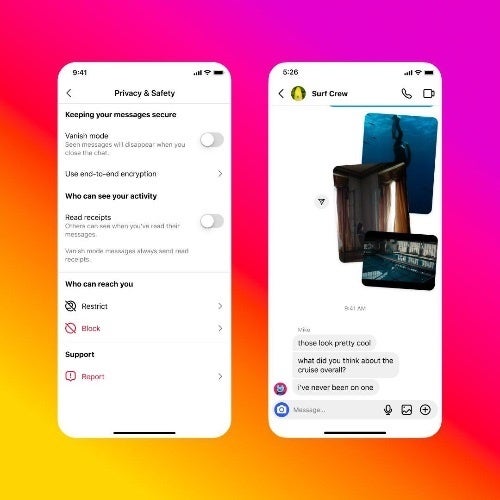
You asked, we listened. We heard your feedback and have started testing a new feature that lets you turn read receipts off in your DMs. Soon, people will be able to choose when to let others see when they’re read their messages.
– Adam Mosseri
Instagram DMs showing no read receipts | Source – Adam Mosseri (IG Updates Channel)
To that, Zuckerberg added “If you’re someone who leaves people on read: your day has come. We’re testing the ability to turn off read receipts on Instagram DMs.” Once available, the feature can be turned on from Instagram’s privacy settings, although the menus of the app in its current status do not match what is on the screenshot shared by Mosseri, indicating that a menu restructuring may also be underway.
Of course, privacy is important on all social media platforms, but it is especially important on Instagram, where users share a lot of personal information, such as photos and videos of themselves, their families and friends, and their daily lives. Therefore, it is definitely a positive trend to see Instagram continue rolling out more privacy controls so that its users can protect themselves accordingly and enjoy the platform safely.
Samsung has begun rolling out the November security patch to eligible Galaxy devices. Well, it has been pushing the latest security fixes as part of One UI 6.0 beta updates for some time, but devices running stable software (Android 13 or older) are now getting the update too. The Galaxy S21 series has had the privilege to kick things off this time.
Samsung pushes its November security update to the Galaxy S21
As of this writing, Samsung’s November SMR (Security Maintenance Release) is available for the Galaxy S21, Galaxy S21+, and Galaxy S21 Ultra in Europe. The update is rolling out with the firmware build number G991BXXS9EWJO. The official changelog supplied by the company reveals that the package doesn’t contain anything more than this month’s security fixes. The OTA (over-the-air) download size comes in at 265MB for the Ultra mode (via SamMobile).
Samsung has already revealed that the November security update for Galaxy devices patches 65 vulnerabilities. These include five critical and over 40 high-severity Android OS issues, two high-severity Samsung Semiconductor patches, and 15 Samsung Vulnerabilities and Exposures (SVE) items. SVEs are security flaws that only affect the Korean firm’s Galaxy devices. These issues don’t exist on Android products from other brands.
According to Samsung, most of the SVEs patched this month are high-severity vulnerabilities. The company has fixed security issues with the USB Gadget Interface, FotaAgentm, SmsController, SecSettings, ChooserActivity, and other system apps, components, and services. Note that all 65 vulnerabilities patched with the November SMR don’t exist on every Galax device. However, every model is affected by at least one of these issues.
Samsung will gradually push these security fixes to more Galaxy devices, while simultaneously expanding the rollout for the Galaxy S21 series to other countries, including the US. If you’re using a Galaxy phone, you can check for new updates from the Software update menu in the Settings app. You may also get a notification when the OTA rollout hits your device.
A few A-series phones are also getting this update
Along with the Galaxy S21 series, Samsung has also released the November update for a few low-cost models. The Galaxy A03s, Galaxy A21s, and Galaxy M01 are getting the latest security fixes. The rollouts for these devices are scattered across various regions. The Korean firm should cover them globally with the November SMR over the next few weeks. Watch this space for more updates on Samsung’s November security patch.
Considering that the holidays are coming, chances are many of you are already looking for gifts, or are planning to do so soon. If you don’t have any ideas, well, we’re here to help. We have a bunch of articles in the gift guide series, articles that focus on different product groups and different price points. This particular article is focused on some of the best gifts under $250, well, some of the best ones we’ve stumbled upon. Do note that we’ve tried to stick to the $100-$250 price tags here, as we have a separate article for the under $100 level.These are only suggestions on our part, of course, and they’re mostly tech based. We’ll focus on five products below, and you’ll also find some honorable mentions below them. Let’s get to it, shall we?
Best way to organize desk accessories: MOFT Multifunctional Desk Mat
MOFT’s desk mat is way more than just a regular mat
There are plenty of ways to tidy up your desk, and if you know someone whose desk is a complete mess, a proper desk mat can help with that. Well, a proper desk mat that has more than one purpose, like the one we’ll talk about here. The product in question is called MOFT Multifunctional Desk Mat, and it’s rather interesting. This desk mat is made out of PU leather, which basically means it’s not real leather, but feels like one, to a degree.
Now, why is this a multifunctional product? Well, because it serves not only as your regular desk mat, but also as a stand, and an organizer. You can prop up this mat under specific angles and use it as a laptop stand, or a tablet stand, if you need something like that. It can also serve as a fancy smartphone stand, if you need it to. It’s easy to clean if you spill something on it too, which is always a plus.
This desk mat also has built-in NFC functionality, there are two NFC hotspots embedded. You can basically set up one of those to activate your concentration app, or something of the sort, so that you can fully focus on work. On top of all that, MOFT’s desk mat is also magnetic, which also helps with organization. The link below will lead you to a ‘full kit’ set, which means you’ll get some magnetic clips, a magnetic wireless charging pad, and more goodies included in the package. It is priced at $187, but you can save up some money if you get the basic version, or some other option listed on Amazon.
Best ambient lighting: Nanoleaf Shapes smart wall lights
Add some flavor to your work or living space
There are a lot of ways you can spice up your office, or even living space in general. Including ambient lighting is one of them, and that’s where Nanoleaf lights come in. The company has a ton of different setups on offer, but here we’ll focus on the Nanoleaf Shapes setup. These hexagon light panels can easily be installed wherever you want, but they’re meant to sit on a wall.
Needless to say, this can be a great gift for someone, as they’re fully customizable. You can set up these hexagons in any shape you want, to fit your space. On top of that, you can set them up to show any color you want, so they can be combined with the colors of the space around them. These smart lights can project over 16 million shades of colors, basically, and they’re dimmable too. Nanoleaf gives you plenty of control when it comes to these lights, and the options are constantly expanding.
They come with adhesive pre-applied, so the setup could not be simpler. There’s no drilling included. You can simply install an app on your phone, and setup the lights any way you want. They can even mirror your screen, if you don’t want to think about it. On top of that, they can also dance to your favorite music, if you choose to do so. There are a ton of possibilities here. There are seven hexagons included in this package, but you can expand upon that. You can actually connect up to 500 panels in a single unit if you want. There are expansion packs available. This particular package costs $199.99, but you’ll find other options on Amazon. Simply follow the purchase link below.
Best gift for coffee lovers: Ember Temperature Control Smart Mug 2
Keep your coffee (or tea?) warm at all times
Do you know someone who simply loves to drink coffee? Well, we have a perfect gift for them. The Ember Temperature Control Smart Mug 2. That’s a mouthful, but this product is actually really interesting, and has been rather popular over the years. This is the second edition of the Ember Smart Mug, which is a shorter name for it. It is basically a mug that keeps your drink warm. It charges on a stand/cup holder. This mug will keep your coffee warm while you work, or whatever else you’re doing. It’s an ideal gift for someone who simply hates drinking cold(er) coffee. Its usage is, of course, not limited to coffee specifically, it can also be used for hot chocolate, tea, whatever else you can think of.
The capacity of the product is 14oz, which translates to 0.4l. Many would say that’s the perfect amount for a good cup of coffee to get you started in the morning. The variant of 10oz (0.3l) is also available, and it’s even a bit cheaper. More on that later. In any case, the cup is made out of stainless steel, as is the cup holder. It weighs 2.6 pounds, and it can keep your drink on a temperature between 120F and 145F for up to 80 minutes on a full charge, or a full day on the charging coaster.
You can download an app for it, to get more control, but that step is not necessary. Do note that the default temperature is set to 135F, though, so if you want to change that, you’ll need to grab the app. The Ember Smart Mug 2 also has an auto sleep function. One thing to note is that the Ember Mug 2 is IPX7-rated, but it’s not meant to be washed in a washing machine, which is important to remember. You’re supposed to wash it by hand only. This smart mug costs $129 at the moment, down from $149.95. It comes in eight different colors, so there’s plenty to choose from.
Best way to tune out the noise: Bose QuietComfort 45
Eliminate outside noise, and focus on what matters
For many people, having a great pair of noise-cancelling headphones is a must. The best noise cancelling you can achieve is with over-ear headphones, and there are plenty of choices on the market. Considering that we’re focusing on the under $250 bracket here, the Bose QuietComfort 45 headphones fit in perfectly. These are some of the most popular headphones on the market, in general, and for a good reason. They offer that minimalistic look that many people prefer, to stay out of the way basically. They’re also very comfortable, and offer great build quality at the same time.
If you know someone who loves headphones, and needs a pair, this is a great pick. They come in both black and white colors, and offer personalized noise canceling. They use tiny microphones to measure, compare, and react to outside noise. They also have a Bluetooth range of 9m (30 feet). On top of that, high-fidelity audio is also a part of the offering. Bose uses a “TriPort acoustic architecture” to make that happen. Active EQ maintains the much-needed sound balance, and tries to keep the bass optical at all times as well.
These headphones offer both Quiet and Aware modes. If you’re walking down the street, having some sort of awareness mode is a much, especially for over-ear headphones. If you’re worried about battery life, considering everything these headphones offer, don’t be. The Bose QuietComfort 45 headphones offer up to 22 hours of battery life on a single charge. A quick 15-minute charge can provide up to 3 hours of playtime. So, they’re basically a full package. A very nice hard shell carrying case is also included in the package. The Bose QuietComfort 45 headphones are priced at $229.99.
Best way to keep your files protected: SAMSUNG T7 Shield 4TB, Portable SSD
Store every file you need, and don’t worry about babying this hard drive
If you know someone who edits videos on the fly, or does something else that requires a good SSD, we may have a perfect gift to suggest. The Samsung T7 Shield is an outstanding portable SSD. The variant that we’ve highlighted today comes with 4TB of storage, though both 1TB and 2TB models are also available. This particular unit is priced at $229.99 (down from $242.99), so it fits perfectly in this price tier. 4TB is a lot of storage space, though when you start editing high-res content, it can get crowded rather easily. For many people, 1TB and 2TB options are just not enough.
In any case, you’ll notice that this hard drive also has a rather interesting design. It doesn’t have flat sides, but a specific pattern instead. It has deep ridges that go along its sides, which makes for an interesting look, and also in-hand feel. The Samsung T7 Shield is also a rugged product. It comes with an IP65 rating, which makes it both water and dust-resistant. It’s an ideal gift for someone who shoots content outdoors or something like that. Rain can’t really hurt this hard drive.
Many of you are probably wondering about transfer speeds. Well, this thing peaks at 1,050MB/s, and comes with AES 256-bit hardware encryption for security purposes. A single Type-C USB port is included on the device. That is Type-C USB 3.2, in case you were wondering, so that data can flow uninterrupted. It is worth noting that this drive is also excellent for gaming, and that it comes in black, white, and purple colors. The Samsung T7 Shield is compatible with a wide range of devices, pretty much the same as its competitors. You can use it with Android phones, your Mac, PC, and so on.
Here are a couple of more products in this price bracket that you may like…
Insta360 Flow Gimbal
For anyone who’s shooting plenty of video content, especially outdoors and with a smartphone, having a good gimbal is a priority. The Insta360 flow gimbal stabilizer is a great option for smartphones. It’s packed with features, and it’s also quite compact. It’s compatible with both Android phones, and iPhones, and has AI-powered tracking. It can keep a subject in focus on its own, and offer 3-axis stabilization on top of that. It serves as a selfie stick too, and a tripod. Add various interesting features and great battery life to the package, and you’re good to go. The Insta360 Flow gimbal is priced at $146 (down from $159).
Having a good keyboard is very important for some people. Well, for people who type a lot during their work hours. If that keyboard is also ergonomic at the same time, that’s even better. The Logitech ERGO K860 is a wireless keyboard that happens to be ergonomic too. It comes with both Bluetooth and a Wi-Fi dongle, and includes a “pillowed wrist rest”. It has a split keyframe, and it’s curved for ergonomic purposes. The palm lift is adjustable, and the battery life is also really good. It comes in a single color only, though, black. This ergonomic keyboard will set you back $119.99.
The BenQ ScreenBar is a monitor light that not only saves space, but your eyesight as well. If you, or someone you’re buying this gift for, work until dark or in low light in general, this is a great option. It replaces a regular desk lamp, and saves space by being attached to a monitor. It relaxes your eyes, and it is quite adjustable too. You won’t experience screen glare if you set it properly, and it can get quite bright if needed. It also has an auto-dimming option, while you can choose between warm and cool light, depending on what you need. You’ll need to splash out $109 in order to get this monitor light.
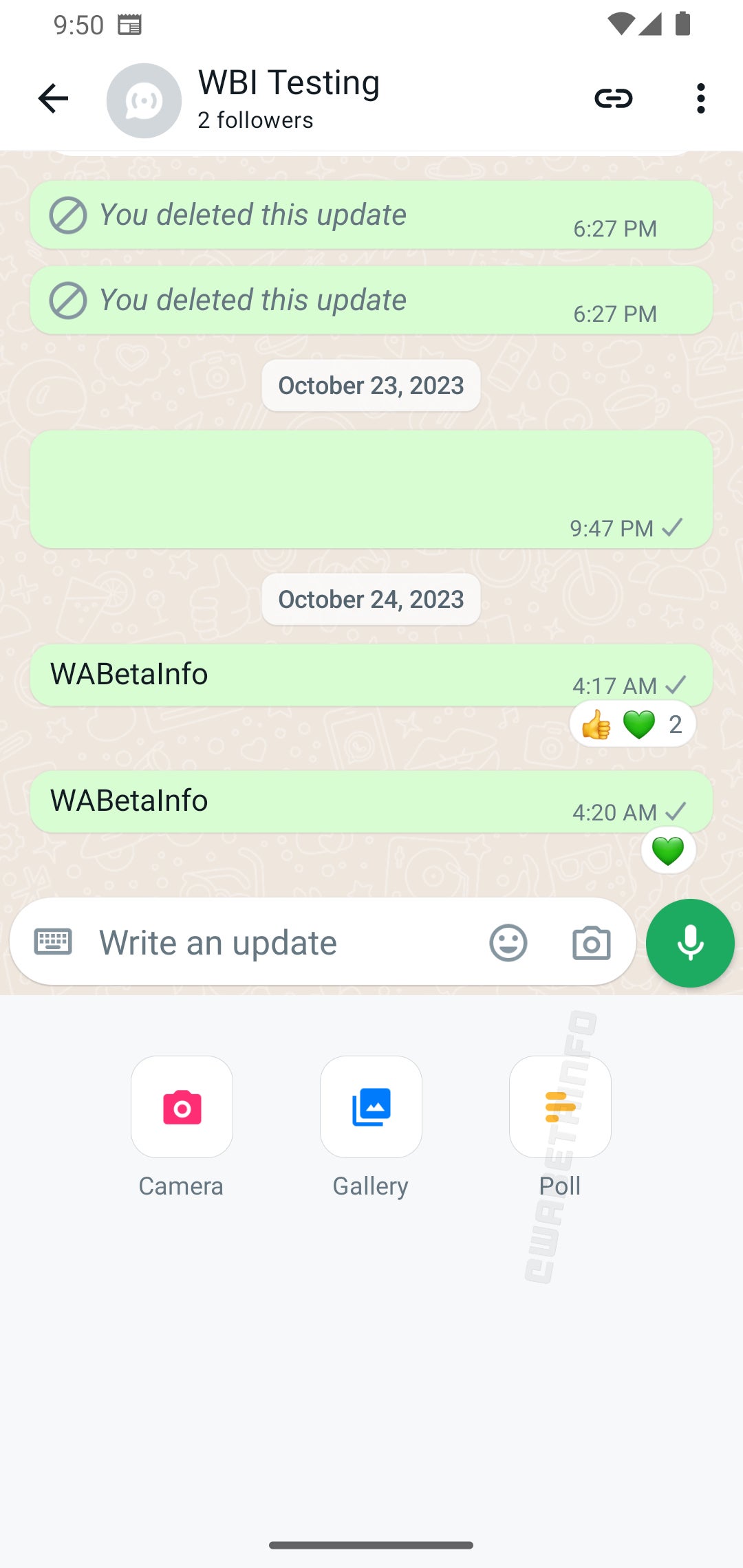
WhatsApp, one of the world’s most popular instant messaging apps, is constantly rolling out new features and updates in an effort to improve the user experience. In the past week alone, the app’s developers have released two new beta updates on Android that introduce a couple of interesting features, including the return of Muted updates and the ability to create and share polls within Channels.
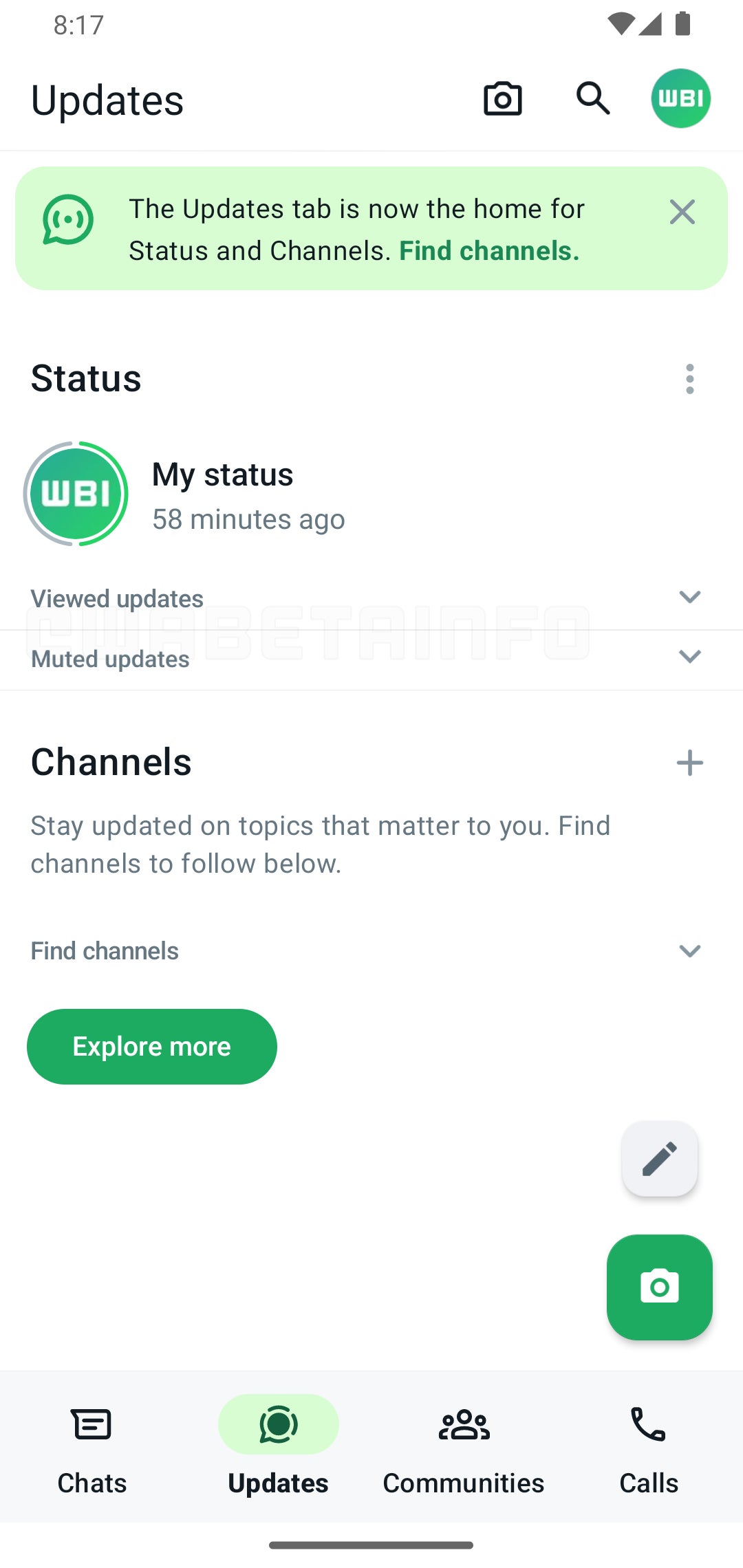
As reported by WaBetaInfo, WhatsApp brought back Muted updates in version v2.23.24.11 of the Android beta app, which had disappeared from the main Updates tab following the arrival of Channels. Previously, users could still access Muted updates by tapping the three-dot menu in the Updates tab, but this was not as convenient as having them directly displayed in the main tab.
Shortly after, v2.23.24.12 was released, which introduces the ability to create and share polls within Channels. This feature is similar to the polls feature that is already available in one-on-one and group chats, but with a few key differences.
Source – WaBetaInfo
In order to prevent spamming and ensure that poll results are accurate, the feature within Channels are limited to one choice per user. Additionally, in order to protect privacy, Channel polls are also anonymous — meaning that no one can see who voted for what.The ability to create and share polls within Channels is a useful new feature that can be used for a variety of purposes, such as gathering feedback from community members or running contests and giveaways. Similarly, the return of Muted updates is a welcome change for users who prefer to keep their status updates muted. With this feature, users can easily view all of their muted status updates in one place without having to navigate through multiple menus.
Unfortunately, as both of these features are currently only showing up for a limited amount of users using the beta app, and the WhatsApp beta program is currently — and almost always — full to capacity, it might be a bit until we see then both show up on the stable public app.
In the ever-evolving digital world, organizations must safeguard their networks and sensitive data against sophisticated cyber threats. Have you ever heard NDR in relation to cybersecurity? Whether you have or not, do you know what is network detection and response?.
Network Detection and Response (NDR) is a cutting-edge technology that lets you see threats in real-time, investigate and resolve incidents more quickly, find threats more easily, and make sure you are following all the rules.
This article explores the five major advantages of NDR and demonstrates how its implementation bolsters an organization’s cyber security stance. NDR empowers you to stay ahead in the ongoing battle against cyber threats, providing cutting-edge technology to safeguard your organization.
With NDR, you can proactively protect your organization and maintain an advantage against evolving cyber threats.
Understanding the Importance of NDR in Modern Cybersecurity
In today’s interconnected digital world, organizations must prioritize robust cybersecurity measures. Traditional solutions like firewalls and antivirus software fall short against sophisticated cyber threats. As reliance on digital infrastructure grows, the need for stronger security measures becomes even more crucial.
By analyzing network traffic, NDR identifies malicious activities and empowers organizations to respond swiftly. With NDR, organizations can outmaneuver cybercriminals and protect their critical assets.
In this ever-evolving battle, investing in NDR is crucial for staying ahead and safeguarding your organization’s digital infrastructure. Don’t leave your security to chance – choose NDR for peace of mind.
The Five Key Benefits of Network Detection and Response
Enhanced Visibility into Network Activities
Another significant benefit of NDR is its ability to provide enhanced visibility into network activities. NDR solutions monitor network traffic at a granular level, capturing and analyzing data packets to gain insights into user behavior and network patterns.
This increased visibility allows organizations to identify and investigate suspicious activities, such as unauthorized access attempts or data exfiltration. With comprehensive visibility, organizations can proactively address potential security gaps and ensure the integrity of their network infrastructure.
Rapid Incident Investigation and Resolution
When it comes to security incidents, speed is crucial. NDR ensures swift incident investigation and resolution through actionable insights and contextual information.
By capturing and storing network traffic data, NDR empowers security teams to reconstruct the events leading to an incident, pinpoint the underlying cause, and take necessary remedial actions.
This expedited incident response time reduces the impact of security breaches but also aids organizations in mitigating potential financial and reputational harm.
By leveraging the capabilities of NDR, organizations can swiftly identify and respond to security incidents, preventing further damage.
Real-time Threat Detection and Response
Network Detection and Response (NDR) stands out with its real-time threat detection and response capabilities, providing a substantial advantage over traditional security solutions. Unlike easily bypassed signature-based detection, NDR employs behavior-based analytics and machine learning algorithms.
By analyzing network behavior and leveraging machine learning, NDR can swiftly identify anomalous activities and potential threats before they can cause significant harm.
This proactive and dynamic approach ensures that organizations can stay one step ahead of cybercriminals and effectively protect their valuable assets.
Advanced Threat Hunting Capabilities
Beyond real-time threat detection, NDR also empowers organizations with advanced threat-hunting capabilities. NDR solutions leverage machine learning algorithms and behavioral analytics to proactively search for indicators of compromise and potential threats within the network.
Compliance and Regulatory Adherence
Compliance with industry regulations and data protection laws is a critical aspect of cyber security. NDR solutions help organizations maintain compliance and regulatory adherence by providing comprehensive visibility into network activities and facilitating the detection of any non-compliant behavior.
By continuously monitoring network traffic and analyzing data, NDR enables organizations to identify potential compliance violations and take corrective actions promptly. This proactive approach ensures that organizations meet regulatory requirements and avoid potential legal and financial consequences.
Common Challenges in Network Detection and Response
While NDR offers numerous benefits, organizations often face challenges when implementing and managing these solutions. One common challenge is the sheer volume of network traffic data.
As network traffic grows exponentially, the ability to effectively analyze and interpret this data becomes increasingly complex.
Additionally, organizations may encounter difficulties distinguishing between legitimate network traffic and potential threats. This problem is especially important in places with a lot of encrypted traffic, because normal inspection methods might not be able to find malicious activity in encrypted packets.
Overcoming these challenges requires organizations to invest in robust NDR solutions and develop the necessary expertise to interpret the findings accurately.
Choosing the Right NDR Solution for Your Needs
When choosing an NDR solution, there are several factors to consider:
Compatibility
Evaluate how well the solution integrates with your existing security infrastructure.
Support
Please take into account the cost of the NDR solution and ensure it aligns with your organization’s budget.
Reporting capabilities
Look for a solution that offers comprehensive reporting to track and analyze network activity.
Budget
Take into account the cost of the NDR solution and ensure it aligns with your organization’s budget.
Ease of use
Consider the user-friendliness of the solution for your security team.
Scalability
Ensure that the solution can handle the size and growth of your organization’s network traffic.
Data protection
Assess if the solution offers encryption and other data-security features to protect sensitive information.
By carefully considering these aspects, you can confidently select an NDR solution to enhance your organization’s cyber security defenses.
Conclusion
Network Detection and Response (NDR) offers a range of compelling advantages. NDR provides real-time threat detection and response, granting you enhanced visibility into network activities. It also enables swift incident investigation and resolution, along with advanced threat-hunting capabilities. Moreover, NDR ensures compliance with regulatory requirements, offering a proactive approach to cyber security.
By implementing NDR, your organization can effectively stay ahead of evolving cyber threats, safeguarding critical assets while maintaining regulatory compliance. It is crucial to take the necessary time to carefully evaluate your organization’s specific needs, select the most suitable NDR solution, and fully harness the power of NDR to protect your network and valuable data. With NDR as your ally, you can confidently shield your organization from potential cyber threats.
Worrying about Patching Vulnerabilities ? Try Patch Manager Plus to Patch over 850 third-party Apps – Try Free Trial.
A soundbar is a great purchase to go with your TV. Why? Because the speakers that are built into TVs are generally not that great. On some of the more expensive TVs, they are at least passable, but the good news is you can spend only a couple hundred of bucks to get a great soundbar for your TV. Whether it’s new or old.
When picking out a new soundbar, there are a few things you want to look for. Firstly is Dolby Atmos and eARC. Dolby Atmos is really important because it is going to give you a huge upgrade in the sound department. It’ll make your living room feel more like a movie theater. And with eARC, you’ll be able to control the sound of the soundbar, using your TVs remote. Making things a whole lot easier.
Here’s our list of the best soundbars you can buy this holiday season.
Best overall: Sony HT-A7000
With the Sony HT-A7000 you can get a cinema-like experience in your living room
The Sony HT-A7000 is our pick as the best overall soundbar right now for a few reasons. But the deciding factor was the price. This is a $999 soundbar that does also offer Dolby Atmos, and the ability to fill a whole room with sound, from a single soundbar. Instead of needing a wireless sub somewhere in the room. That’s a big deal, and not many soundbars can do that, at this price.
Sony’s HT-A7000 does feature 7.1.2 channels of sound, along with Dolby Atmos, and it sounds incredible. If I wasn’t so invested in the Sonos ecosystem, this would definitely be the soundbar I use on my TV in the living room. How does Sony get such great sound out of such a small package? Well, it’s a combination of driver placement and psychoacoustic techniques. This allows the HT-A7000 to offer a broad and high soundstage. So whether you’re watching a movie and want to be immersed, or just watching the news and have it on the background, it’s going to sound great.
What makes the Sony HT-A7000 unique is perhaps the array of HDMI ports available. It does have HDMI eARC for connecting to your TV. There’s also two more HDMI 2.1 ports that are capable of pass-through. These can handle 8K60 and 4K120, in addition to Dolby Vision HDR. Sony hasn’t forgotten those with older audio inputs, as there is optical available here and a USB-A port. Sony really didn’t forget anything with this soundbar, and it’s quite impressive.
These days, we all use our soundbar for far more than just sound from the TV. And Sony has included loads of smarts in this soundbar. That includes adding in Spotify Connect, Apple AirPlay 2 and Google Chromecast. Being able to go into your Spotify app on any platform and start playing on Sony’s HT-A7000 is chef’s kiss. Not many soundbars support both Apple AirPlay 2 and Google Chromecast, so this is a huge win, no matter which mobile platform you use.
One could argue that the Samsung Q990C is a better soundbar than the Sony HT-A7000, and we can’t dispute that. It is the better soundbar, but what gave the Sony HT-A7000 the best overall moniker is the price. This Samsung Q990C soundbar comes with a subwoofer and two rear speakers, with a regular price of $1,897 (we’ve seen it on sale for $1,397 quite often though).
Samsung’s Q990C is a 11.1.4 channel soundbar with Dolby Atmos included. It’s one of the best sounding soundbars that we’ve listened to. Which is saying a lot, since there are some really great soundbars out there right now. Samsung has included Google Assistant and Amazon Alexa with the Q990C, in addition to Bixby. So you can quickly ask your favorite assistant to play music on YouTube Music.
Best Dolby Atmos soundbar: Bose Smart Ultra Soundbar
With the new Bose Smart Ultra Soundbar, you can get that Dolby Atmos goodness, in your own home
Dolby Atmos is a fantastic sound standard, and it’s one that I absolutely swear by. I won’t buy any speaker or soundbar that doesn’t have Dolby Atmos included. The Bose Smart Ultra Soundbar is not only a Dolby Atmos soundbar, but it’s also one of the best sounding soundbars for the money. With an MSRP of $899, the Bose Smart Ultra soundbar has a lot going for it, including the design.
This is a pretty understated soundbar, which is what you want. Whether you’re putting this on the console in front of the TV or on the wall below the TV, you really don’t want something standing out. And that’s the Bose Smart Ultra Soundbar. It’s a dark gray and black colored soundbar, using metal and a glass top.
Dolby Atmos sounds great and all, and that’s awesome. But Bose has also included ADAPTiQ, which is a way to calibrate your room to get the best sound from this soundbar. And honestly, this does work incredibly well, normally these room calibration features are just gimmicks but that’s not the case with Bose. It works incredibly well, and is something you should definitely do when you first pick up your new soundbar.
However, Dolby Atmos isn’t all that this soundbar has going for it. It’s also a well-connected soundbar. Not only does it have WiFi and Bluetooth like basically every other soundbar, but it also has support for Apple AirPlay 2 and Spotify Connect. Unfortunately, there’s no support for Google Cast here, and that likely comes down to licensing with Google. However, there are other ways to play music from your Android device onto the Bose Smart Ultra Soundbar, including using your TV if it has Google Cast. Bose makes it easy to play music right from your phone onto this soundbar, it’s as easy as tapping a single button on Spotify.
Bose does give users a way to expand their sound system, if this single soundbar isn’t enough for you. There are options for a wireless subwoofer and rear speakers. But they aren’t required for the Smart Ultra Soundbar.
Sony’s HT-A3000 is a fantastic soundbar with Dolby Atmos, hence why it is here as our honorable mention. It’s a 3.1-channel soundbar, so it’s not quite as good sounding as some of the other soundbars out there. It’s also worth mentioning that the subwoofer and satellites are sold separately. So here at this MSRP of $699 you’re getting just the soundbar.
Sony has included all of the connectivity features you could want. This includes WiFi, Bluetooth, Apple AirPlay 2, and Chromecast. So no matter what platform you’re using, you can connect to the HT-A3000 and play audio. And it’s great that Sony makes it so easy to connect.
Sonos’ Arc is a fantastic Dolby Atmos soundbar, that works well with its multi-room audio features
The Sonos Arc is one of my favorite soundbars. It’s a pretty cool looking soundbar, and if you are already invested in the Sonos ecosystem, then this is a no-brainer purchase. That’s because the Arc is going to work with your other Sonos speakers, and work with multi-room audio. For example, I have it paired with the Sub Mini, and a couple of Era 300 speakers which makes for an insanely powerful surround sound setup.
Arc was the first soundbar from Sonos to feature Dolby Atmos, and it’s a pretty special one. The Dolby Atmos sound out of this speaker sounds better than a lot of other Dolby Atmos soundbars at this price. It sounds more like a Dolby Atmos soundbar that is priced at over $1,000. You will have no complaints about this soundbar’s audio quality, at all.
The only downside with this soundbar is that there’s no Bluetooth or DTS:X support. Honestly, you likely won’t even notice. I never thought that my Sonos Arc needed Bluetooth, because Sonos already connects to everything over WiFi, which allows you to get more bandwidth for streaming music. Sonos does also support Apple AirPlay 2, making it super simple to connect to your phone to play music. There’s also an ethernet port available in case your WiFi is slower. Sonos also has support for both Google Assistant and Amazon Alexa. If you’re not a fan of digital assistants, there is a physical microphone button you can use to turn it off.
Inside the Arc, Sonos has included 11 drivers which are used to create your soundfield. And many of them are upfiring and angled into your room. This is to allow the sound to bounce off the walls and ceiling. This adds to the Dolby Atmos experience making it feel very immersive, in just a single soundbar, no sub needed. But if you pick up the Sonos Sub or Sub Mini, it can make a big difference.
If you’re not invested in the Sonos ecosystem, then the Samsung HW-Q700C is a great mid-range Dolby Atmos soundbar that you can grab. And it has an MSRP of $699, making it a tad cheaper than the Sonos Arc too.
Samsung’s HW-Q700C is very impressive for its price. When we tried it out, we really liked how dynamic the audio performance is with this soundbar. It really makes it feel like you’re in a theater, but you’re just in your living room. Samsung does have support for Dolby Atmos and DTS:X (basically the open source version of Dolby Atmos).
Best entry-level Dolby Atmos soundbar: Sonos Beam Gen 2
The perfect soundbar for smaller TVs
The Sonos Beam Gen 2 is a rather impressive speaker for the price. It has an MSRP of $499, which makes it Sonos’ cheapest soundbar. But don’t let that make you think it is a bad soundbar – because it is anything but. In fact, this is the soundbar I’ve been using with my Amazon Omni QLED TV for the past year, and I absolutely love it. It’s small but mighty.
The Sonos Beam does come in two colors: white or black. That’s the same as the rest of Sonos’ portfolio, that way you can color-match them throughout your home, and so they don’t stick out. What’s really great about the Sonos Beam Gen 2 is that it uses soft-touch plastic on the outside, with a metal grille. This is great because it’s easier to clean and doesn’t attract as much dust, compared to some others on this list. It also looks rather unique.
Sonos includes a few buttons on the top, like play/pause, and volume buttons on either side. There’s also a microphone button and LED light behind those buttons. Since this soundbar does include Google Assistant and Amazon Alexa, there are microphones inside. But you can turn them off fairly easily. I have the microphone turned off on mine – and neither assistant is set up anymore – because there were a lot of false-positives. Have a commercial from Amazon come on, and the Beam Gen 2 thinks I said “Alexa” which was not the case. And since my TV already has Alexa built-in, it wasn’t worth the hassle.
Sonos Beam was built for smaller TVs, around 40- to 55-inches. But you can easily use this with a larger TV, I am personally using it with a 65-inch TV and paired with a Sub Mini, and it still sounds incredible.
The JBL Bar 500 is a good entry-level Dolby Atmos soundbar, which also comes with a wireless subwoofer for only $599. Sure it’s more expensive than the Sonos Beam Gen 2, but it doesn’t sound as great, even with the wireless subwoofer. It sounds good, but Sonos still takes the crown here.
In our experience with the JBL Bar 500, we found that it was able to provide cinematic sound, in a pretty slim profile. JBL also has a slew of smart features included, like Bluetooth and WiFi for connecting to your TV and wireless devices. As well as Apple AirPlay 2 and Google Chromecast. That’s actually pretty rare to have both at this price point.
Best entry-level soundbar: VIZIO V-series Soundbar w/ Wireless Sub
While the VIZIO V-Series is inexpensive, it’s also a really good sounding soundbar and wireless sub that’s a sure upgrade over your TV’s speakers
The VIZIO V-series is an excellent option for those that want a soundbar, but aren’t quite sure it’s worth buying just yet. It’s a cheap soundbar, coming in at under $200, and it even includes a wireless sub. This does not include Dolby Atmos, but does surprisingly have DTS:X, so you’re still getting great sound, just not the best sound.
When we tried out the VIZIO V-series we found it to be quite adequate for smaller rooms, like a dorm, or a small apartment. It won’t give you that home theater experience that some of you might be looking for. But with that included wireless sub, you do get a good amount of bass. And that is always great to see.
There’s HDMI eARC support here, which lets you plug this directly into your TV and then control your soundbar with the TV remote. Now the other downside here is that there’s no Apple AirPlay 2 or Google Chromecast, but you can still connect with your phone via Bluetooth.
The Sony S100F is one of those soundbars that we’ve had on our gift guides for quite a few years. It’s an older soundbar, but still rock solid. It now has an MSRP of just $99. So if you want a soundbar for your TV, but don’t want to spend a lot of money, this honorable mention is a great option.
It’s a 2-channel speaker, so it’ll fill the room with sound, but it’s not going to win any awards here. It does also have HDMI eARC available, allowing for you to use one cable to plug this into your TV. And also use your TV remote to control the volume. There’s Bluetooth support here, for streaming. Unfortunately, no Apple AirPlay 2 or Google Cast, but given the price here, that would be a surprise for it to be included. It’s not the end of the world, it just means you’ll need to do a bit more to stream your music.
In recent reports, netizens learned that Eric Schmidt is taking a bet on AI with Future House with an impressive project on hand. The Google Billionaire is investing in a non-profit start-up that has a unique vision. Over the next ten years, Eric’s investment alongside that of others will help the start-up to build a semi-autonomous AI scientist.
Now, that’s a big bet if you ask anyone who works in the science field or knows a thing or two about AI technology. The magnitude of this work might be why the start-up company will need over 10 years to perfect its idea. Once the 10-year time frame is over, this AI scientist might become available for usage in various science industries around the world.
With this type of technology on hand, the job of scientists around the world will become a bit easier. The rate at which these scientists work will see some significant improvements once this technology is put in place. However, some might fear the possible dangers that this level of AI technology will pose to its users and the public.
Eric Schmidt’s investment in Future House will bring AI technology into the field of science
The worlds of science and technology work hand in hand, with each complementing the other. Scientific and technological advancements in the world are driving development in certain areas of the world. But there’s a lot of work that goes into the achievement of these advancements, and mostly it’s as a result of human efforts.
This work is at times stressful on humans, as there is a lot of trial and error to get things right. With humans performing these trials and errors known as hypotheses, the workload is often enormous. Future House aims to train an AI model to perform these hypotheses, hence leaving humans to perform more daunting tasks during experiments.
Future House argues that humans are holding back the rate of development of scientific innovations. Having AI technology taking over some aspects of the scientific process that is a bit tiring will help boost innovations. With tens of thousands of individual hypotheses for each research, humans are falling behind schedule.
But with the help of Future House’s AI lab assistant, the company hopes to quicken things. Eric Schmidt and other investors are betting on this non-profit start-up company and its dreams. While the goals and aspirations of Future House are impressive, they might raise some concerns among netizens and those working in the science industry.