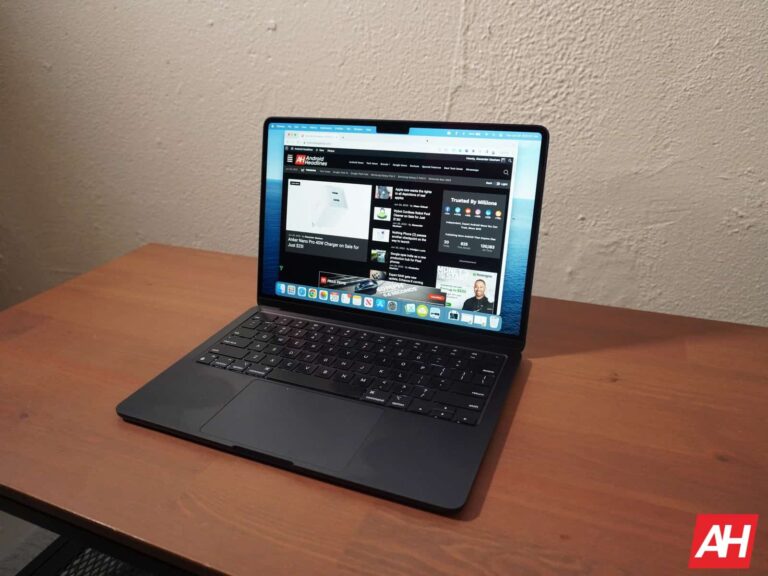
Apple released a slew of new Mac computers last week, and they bring a hidden new feature: the ability to detect liquids in their USB-C ports. The capabilities were first spotted by 9to5 Mac, who earlier reported that macOS Sonoma now includes a system daemon called “liquiddetectiond.” The daemon identifies when a Mac has been exposed to liquids through sensors within the computer. However, this identifier can now detect liquid in the USB-C ports of a Mac as well. This change might be limited to newer M3 Macs, as there could be some hardware requirement that enables liquid detection in a Mac’s USB-C ports.
These sensors could be used for a consumer-facing feature that lets users know when their USB-C ports are wet. Water in electronics is never good, but water paired with an electrical current does a lot more damage. As such, if a user’s Mac can let them know when their USB-C ports are wet, it can prevent them from plugging things in and causing more problems. The tool isn’t being used this way for now, though. Instead, the liquid detection on Mac USB-C ports will be used as a diagnostic tool. This could end up actually being bad news for consumers.
Liquid detection has been used by Apple for years as a way to deny repairs under warranty. “Damage to Mac computers and accessories due to liquid exposure is not covered by the Apple One (1) Year Limited Warranty or the AppleCare Protection Plan,” an Apple Support document notes. Apple is using liquid contact indicators to figure out whether a Mac has been exposed to water. These are essentially stickers that change color when they come in contact with liquids. This is notably different than liquid detection on Mac USB-C ports, which use electronic sensors.
Apple has used liquid detection features before
Though the feature is not available to users yet, the functionality resembles an iOS and iPadOS feature. Both iPhones and iPads not only detect liquids in their charging ports, but also inform users. These devices throw up warnings when liquid is detected so users can unplug their chargers. This implementation is far more useful than the one on the Mac, which is just for diagnostics.
The new feature means that users should be more careful with liquids around their Macs than ever. Apple now has a new way to determine whether a Mac has been exposed to liquid. That means if someone brings a liquid-damaged Mac in for repair, it’s likely they will have to pay a big out-of-warranty repair fee.
There are plenty of ways for people to make money on the internet, and Instagram is one of them. The company has its Creator program that offers a way for Instagram users to monetize their content. According to a new report, the Instagram Creator program just reached 1 million paid subscriptions.
This program is now about a year old, it’s helped IG creators earn a living on the app. Instagram creators have historically earned money by promoting products via sponsored posts. However, the Creator program allows the followers to directly contribute to the creator.
The Instagram Creator program just reached 1 million paid subscriptions
Instagram is home to a myriad of different celebrities, creators, and influencers. These people have millions and tens of millions of followers, many of whom would gladly pay money to see exclusive content.
Well, after nearly a year of being on the market, the Instagram Creator program now boasts 1 million paid subscriptions. It’s a small number compared to the total monthly users, but we’re talking about spending money every month to view Instagram posts. With the way that prices are, nowadays, it’s hard getting people to part with money for anything other than the absolute essentials.
When you’re a part of the program, you can charge your users a set amount of money every month to view exclusive content. There are several creator tools that you can use to help you create content to keep your audience engaged (and spending money). If you want to know more about this program, you can view the Instagram Creator Page.
In other Instagram news
If you don’t like viewing ads on Instagram, then Meta has something for you. Well, it does if you live in Europe. The EU passed regulations banning personalized ads on social media platforms.
Because of this, Meta can’t serve algorithmically curated ads on Facebook or Instagram. Thus, Meta will deliver a subscription service that will get rid of ads across Facebook and Instagram. The service will cost €9.99/month, and it will roll out this month.
Just as the sun comes up, so does the prices of streaming services. This time around, it’s DIRECTV Stream’s turn to raise their prices. Prices are going up on all of their plans, by at least $5 per month. It’s cheapest plan now starts at $79.99 per month, which makes it the most expensive starting plan among the streaming Live TV services.
Here’s how the pricing breaks down: Entertainment plan is now $79.99 (was $74.99), Choice plan is now $108.99 (was $99.99), the Ultimate plan is now $119.99 (was $109.99), and finally the Premier plan is $164.99 (was $154.99).
This is actually the second price increase this year for DIRECTV Stream, after having gone up in January of this year by $10 across the board. When DIRECTV first launched its streaming Live TV service back in 2016, it cost only $35 per month. Since then, AT&T has changed its name a few times, going from DIRECTV Now to AT&T Now to AT&T TV and back to DIRECTV Stream. And in that time, prices have more than doubled. Of course, DIRECTV Stream is not alone there.
Why are DIRECTV Stream prices going up?
DIRECTV Stream explained to The Streamable in October, prices are going up for all of its plans due to the “higher cost networks are charging”. And also mentioned that “like other distributors, we’re adjusting our pricing because of the higher cost networks charge to distribute national and local programming. We remain focused on delivering the best value.”
Prices have been going up across the board for streaming TV services. When it comes to live TV services, YouTube TV now costs $72.99 per month, Sling TV is now $40 per month for Sling Orange or Sling Blue and Fubo now starts at $74.99. So DIRECTV Stream is not alone here, but it does cost the most, to start. However, DIRECTV Stream is offering $25 off the “Entertainment”, “Choice” and “Ultimate” plans with the Sports pack for the first month (two months for the Entertainment plan). Which is great, but will that tempt people to switch is the real question.
Surprisingly, this is still cheaper than cable. I have compared this price increase to a comparable cable package from Comcast in my area. It would cost me $90, and that’s before taxes and fees. And that’s also for just one TV. Since you need a cable box for each TV, but with DIRECTV Stream, you can stream on virtually anything. So that “it’s more expensive than cable” argument is mute right now. Seeing as you can get more from DIRECTV Stream for $80 per month, for now at least.
The new feature is the latest in line with increasing security and precautionary measures by Google to keep malicious Android apps away from its Play Store.
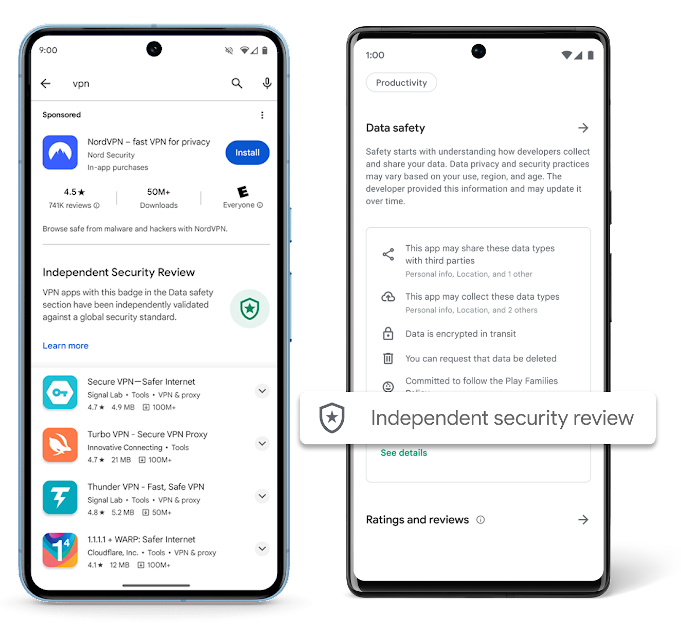
Google Play has introduced a new feature to inform users looking for reliable VPN (virtual private network) apps if the apps have undergone an independent security review. The new feature will add an Independent Security Review badge at the top of the Google Play search results page when users search for VPN apps.
This badge will ensure the app has been scanned through an independent security review. That’s not all! The banner will provide additional information under the Learn More option, which will redirect them to the App Validation Directory, providing technical assessment details so that users can make informed decisions when downloading VPNs.
Screenshot: Google
The certification can be checked in the app’s Data Safety section on Google Play Store. Its presence means the application has been tested against pre-determined security criteria, which Google has developed with several cybersecurity partners.
The badge will inform users that the app has been verified and validated by an independent third party and meets the minimum best practices standards of the industry’s mobile security and privacy guidelines. It will also indicate that the app’s developers will identify/mitigate vulnerabilities promptly.
For your information, in 2022, the App Defense Alliance (ADA) launched the Mobile App Security Assessment (MASA) to let developers evaluate their apps independently against a strict global security standard.
This serves as an assurance for users that app developers are following best practices for privacy and security. Successful validation will allow the developers to display the badge in their app’s Data Safety section. This addition will make it more challenging for cybercriminals to access users’ devices through compromised apps and improve the app’s quality.
Although adhering to “baseline security standards” won’t guarantee that the app will be vulnerability-free, the badge will serve as a “visual cue” for users that it has been scanned and validated.
The new feature has been rolled out for VPN apps and selected app categories as the company wants to secure sensitive apps initially. VPNs hold a substantial volume of data as they are primarily used for searching and accessing websites. In a blog post, Nataliya Stanetsky, Android Security and Privacy Team wrote that:
“VPN providers such as NordVPN, Google One, ExpressVPN, and others have already undergone independent security testing and publicly declared the badge showing their good standing with the MASA program. We encourage and anticipate additional VPN app developers to undergo independent security testing, bringing even more transparency to users.”
Google
This is a proactive move to enhance app security and protect user data, underscoring the company’s commitment to improving cybersecurity in the digital space. Users are generally unaware of the risks associated with VPN apps. Many of these apps can be designed to collect sensitive device or user data and may even inject malware onto their devices.
Samsung’s tablets are all well-built (as you can see in our Galaxy Tab S9 FE review), but the company makes a line of rugged tablets that are meant to survive the worst you can throw at them. The Galaxy Tab Active series saw its fourth entry last year with the Galaxy Tab Active4. Well, it looks like the Galaxy Tab Active5 might be around the corner.
You’ll want to take this news with a grain of salt. We’re talking about a leak of a future product. There’s no guarantee that the device is on its way. We’ll keep you updated on any future developments.
The Galaxy Tab Active5 might have gotten FCC certification
There are those tablets that are meant to stay inside for gaming and movie-watching. However, there are those devices that are meant to be taken on the job. These are tablets with heavy-duty chassis, crack-resistant screens, and resistance certifications. Tablets like these are found on the factory floor or on construction sites. They’re meant to take a ton of abuse without breaking, and the Galaxy Tab Active series is no different.
Thanks to a report from Galaxyclub (via Phone Arena), it looks like the next rugged Galaxy Tab is on its way. Firstly, the FCC posting was spotted on the tablet. The posting didn’t give the name of the device in question, however.
Samsung already launched its premium Galaxy Tab S9, mid-ranged Galaxy Tab S9 FE, and Galaxy Tab A9 tablets. So, we know that it’s not one of those tablets. The best guess is the Galaxy Tab Active5. Another thing hinting at this tablet is the image of a battery with the FCC listing. This Galaxy Tab Active series is the only line of Samsung tablets with removable batteries. The battery is pictured below.
If this is indeed the next Galaxy Tab Active, then it will be a breath of fresh air. The last iteration launched last year. As for when to expect this device, we’re unsure. The source points to this device coming sometime in January.
According to IDC, the downfall of the tablets and Chromebook market continued in Q3 2023. Also, it does not seem that the upcoming holiday season can make a drastic change in the market. Experts are now worried that the decline could expand into 2024.
The tablet and Chromebook market surged in 2020 and 2021, and the reason is quite apparent. As people were locked in their houses, they needed devices for work, play, and school. However, the end of the pandemic and the opening of schools and workplaces turned the tablet and Chromebook market upside down. In 2022, the tablet segment experienced a decline of 3.3% year over year, and Chromebook shipments also declined by 24.3%.
For the third quarter of 2023, IDC reports that the tablet market saw a decline of 14.2% year over year, with a total shipment of 33.2 million units. IDF further added the market experienced an upsurge of 18% over the previous quarter due to seasonality.
Shipment of tablets and Chromebooks continue to fall in 2023
The Chromebook market is also declining. As per the report, 3.5 million Chromebook shipments in Q3 2023 represented a 20.8% decrease in shipments year over year. Chromebook producers hope that government plans for education and leftover budgets could increase demand for the product.
Apple, Samsung, and Lenovo are the top three rivals in the tablet market. Despite declining 15.1% year over year, Apple led the tablet market with shipments of 12.5 million units. In contrast to previous years, Apple has opted not to release new models in the third quarter, which usually leads to a boost in the second half of the year. Samsung also placed second in the quarter with 6 million devices shipped. The third and fourth positions belong to Lenovo and Huawei, with 2.6 million and 2.3 million units shipped, respectively.
Anuroopa Nataraj, senior research analyst with IDC, said, “The first three quarters of 2023 recorded some of the largest contractions in the tablet market. He added the downfall is expected to continue into 2024 due to no dramatic improvements in macroeconomic conditions.
To stoke more interest in the Chromebooks, Google and other manufacturers have launched the Chromebook Plus lineup with upgraded hardware and enhanced software experience. It remains to be seen if this new tier could save the Chromebook market. Acer, HP, Dell, Lenovo, and Asus are the top five Chromebook companies globally. Samsung might soon join the list with a budget Chromebook.
The Ring Stick Up Cam is one of the company’s most popular security cameras that it sells. And it’s finally been upgraded with a more high-end version, with plenty more features. Which also means the price has gone up, and it’s now a “Pro” model. The Ring Stick Up Cam Pro is not cheap, with a starting price of $179. However, the cool thing here is that the wired and battery versions are both the same price. Typically, the battery version would be more expensive. So this is really good to see from Ring.
Ring does also sell a solar version which comes with a solar panel for $209. Which is also not bad for adding solar to your camera. And now you’ll never need to change out the batteries.
With that out of the way, the real question is whether or not the Ring Stick Up Cam Pro is worth buying? Well, spoiler alert, since you’ve already seen that we gave it five stars, it is. But let’s go over the full review.
Ring Stick Up Cam Pro Review: Design and Hardware
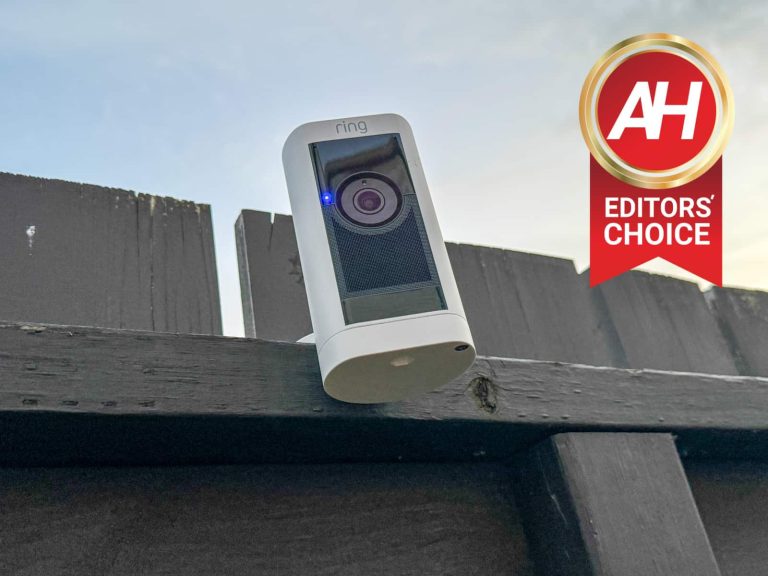
Somewhat surprisingly, the Ring Stick Up Cam Pro is actually pretty bulky. It’s a lot thicker than the regular Ring Stick Up Cam. And that is likely due to the added hardware in this model. Like the radar sensor that’s used for Birds-Eye View. It does still look a lot like the regular Ring Stick Up Cam, but you can definitely tell that this is the Pro model.
It also stands out from the competition, since the front of the camera is flat. Whereas a lot of the competition is using a cylinder look. On the front of the camera, there’s the camera front-and-center, with a grille below it for the speaker. You can also see the radar right above the camera. Ring does offer this in black and white, we have the white version here, which looks pretty nice, but the camera would likely blend in better with the black version.
On the bottom of the camera is the base that you can twist off to get to the battery on the battery model. On the plug-in model, it does still twist off. So that you can choose to use the stand on the bottom or the back of the camera. With Ring’s new quick release batteries, it’s so much easier to swap out the batteries. Compared to some of the competition where you need a screwdriver just to charge the battery. Ring also allows you to buy additional batteries. Right now, I have a couple extra, so I’m able to quickly pop out the batteries on my doorbell and cameras and put in new, charged batteries with ease.
Set-up is quite easy
As you’d expect from Ring, the setup process here is actually really simple. Now, I did have a bit of trouble at first. As the app was not recognizing my camera. I’m going to chop that up to Amazon sending this camera out before it was actually available. A quick email to Amazon and everything was fixed. Then I could scan the QR code on the back and add it to my home. It took just a couple of minutes to set up. It actually took longer to decide where I wanted to put.
I decided to put it on my patio. So it’s facing my front-door, allowing me to see when packages are delivered. Since my Ring Video Doorbell doesn’t quite show me the ground in front of the door. So, I screwed the base into the fence and we were off and running. It’s pretty simple to install. And of course, if you are placing it indoors, you can just place it anywhere, and move it whenever you want.
Amazon says that the Ring Stick Up Cam Pro is actually waterproof and weatherproof. It’s now November in Michigan and we’re expecting our first snow in the next week or so. And that will give us a good indication of how weatherproof this camera really is.
Inside the box, Ring includes the Ring Stick Up Cam Pro of course. Along with a battery in our particular model since we have the battery version. If you picked up the plug-in model, it’ll have a cable for power, or a solar panel if you grabbed the solar version. It also includes a few screws and drywall anchors. Basically giving you everything you need to install the camera, except for the screwdriver.
Ring Stick Up Cam Pro Review: Software and Features
With the Ring Stick Up Cam Pro you’re getting some of the most advanced camera features on the market. This includes Audio+ echo cancelation, it also gives you high-quality two-way audio. So that you can speak to whoever is in or outside of your home and they will no issues hearing you, and vice-versa.
Ring has also included 5GHz dual-band WiFi connectivity, which is often times not included in these smart home products. A big reason for this is because these products need the range of 2.4GHz over the speed of 5GHz. But it is great to see it available here, especially with the better quality video you’re getting on the Ring Stick Up Cam Pro. As I mentioned earlier in this review, I have this camera set up on my patio, and I have not had any issues with the connection at all. It has worked as expected, and it’s even quicker to get into the live video feature, compared to the other cameras that I have around my home.
The Ring Stick Up Cam Pro is not only a huge upgrade on the audio and connectivity front, but also in the video department. Which we’ll talk more about in a minute. But the company also makes it super simple to share your cameras with other people. If there’s multiple people in your home, you can share your cameras and doorbells with them pretty easily. Ring even lets you share individual cameras and doorbells, instead of just a blanket share across all of the products in your home. Which puts Ring above the rest, in my opinion.
Of course, Ring is owned by Amazon, so as expected it does work really well with Alexa. You’ll get notifications on your Echo Show 8 or Fire TV Stick 4K Max when someone is in the sight of the camera. You can also interact with people from these screens. So you don’t always need to use your phone to see who’s doing what. You can also use different commands like “Alexa, show the patio camera” to bring up a live video feed. There’s not as much functionality here as there’d be with a Ring Video Doorbell with Alexa, but it is a nice feature to have available. Unfortunately, because Amazon does own Ring, that means there’s no support for Google Assistant. And it’s the same for the Nest cameras, they also don’t work with Amazon Alexa.
Battery life is decent, but not incredibly long
The battery life on the Ring Stick Up Cam Pro is really going to depend on how you use the camera, how many people or things it sees everyday, and what your settings are. For me, with my settings, it lasted about two and a half weeks before I got the “battery low” notification, which is around 20%. So it would probably last about 3-4 weeks on a charge. Since this is in my patio, it does record quite often with taking my dog out several times a day, getting all sorts of packages during Techtober, etc. Also expect it to be lower on battery during the winter, as batteries don’t like the cold weather and don’t perform as well.
My recommendation for this camera is to either pick up a few extra Ring Quick Release batteries and the charger which will run you about $89.99 (the charger is $29.99 by itself). Or to get the Solar version of the Ring Stick Up Cam Pro. That will cost you another $30 ($209 total) and it’s even better than the extra batteries, since you’ll never really need to worry about charging your batteries again. Remember, this doesn’t use a whole lot of power each day, so even if you are only getting a few hours of light in the winter, it’s still enough to keep it charged up.
Some features are stuck behind a paywall
Ring has a subscription service called Ring Protect. It’s pretty cheap, to be quite honest. For a single camera, it’s $3.99 per month or $39.99 for the whole year. But the real money saver is for the “Plus” plan which gives you unlimited cameras and doorbells for $10/month or $100 for the whole year. And it gives you the ability to save your recordings for up to 180 days. Without Ring Protect, you can only see this in real-time, unfortunately.
Ring also includes person alerts, and rich notifications with the Protect plan. And finally Home and Away modes are included in Protect. These are all pretty basic features, and it sucks that it is behind a paywall, however, if you’re like me and have multiple cameras and doorbells around your home then the $10 per month makes loads of sense.
Ring Stick Up Cam Pro Review: Video quality
With the Ring Stick Up Cam Pro, the company has added quite a few upgrades to the video quality. This includes 1080p HDR video and color night vision. Both of these are huge upgrades compared to the Ring Stick Up Cam I’ve been using outside my backdoor for the past couple of years. The video quality from this camera looks really incredible. Every time I pull up the Ring app and take a look, I’m shocked at how good it actually looks. The color night vision is also quite good. It’s almost like it’s not dark outside, with the quality of this footage.
Ring has also included 3D radar-based motion detection with a feature called Bird’s Eye View. This feature allows the camera to plot someone’s path on a satellite-style view. So you can see where they walked both on video as well as with radar data. This also helps with the false notifications about someone or something being in view of the camera. This is because leaves blowing across your yard won’t trigger the motion alert now. That’s always great to see. Since I do get a lot of false triggers on my old Ring Stick Up Cam.
Should you buy the Ring Stick Up Cam Pro?
Whether you should buy the Ring Stick Up Cam Pro or not really depends on what features you want and/or need from the camera. Are you okay with the black and white night vision from other Ring cameras? If you really want color night vision, then it might be worth upgrading. Do you want the improved audio features and 5GHz connectivity? These aren’t necessarily must-haves, but for some, this might be worth spending $179 for.
It’s a good camera, but it’s also a fairly expensive one, at $179. So you really need to weigh the features here to tell if this is something you should buy or not. If you are going to buy the Ring Stick Up Cam Pro, and put it outside, I’d recommend the Solar version. For just $30 more, you won’t ever need to worry about the battery depleting and needing to be replaced. That sounds like a really good trade off to me.
Samsung‘s Galaxy S23 phones have been selling well since their launch in February. The latest flagships have outsold the 2022 lineup by about 22 percent. The company now expects next year’s Galaxy S24 series to do even better. It is expecting the 2024 flagships to record a ten percent increase in shipments over the Galaxy S23.
Samsung expects the Galaxy S24 to outsell the Galaxy S23
2023 has been a dull year for Samsung’s chip division, which registered its first losses in 14 years. However, the smartphone division has enjoyed success this year, helping the company post some profit. The Galaxy S23 series, which debuted in February, has reportedly shipped 23 million units in the first eight months. The firm is projecting the annual shipments of the phones to cross 31 million.
This is already impressive as neither the Galaxy S22 nor Galaxy S21 shipped more than 30 million units. However, Samsung isn’t content yet. It has reportedly set up a strategy to increase flagship sales next year. The Korean behemoth plans to ship at least 35 million Galaxy S24 phones. “There may be some adjustments depending on the market situation, but the business strategy has been confirmed in the larger framework,” an industry insider said.
Samsung’s strategy likely includes functional improvements with a focus on generative AI. The company also plans to capitalize on the growing demand for premium smartphones. Three-fourths (75 percent) of all Galaxy sales currently come from low-cost models. Its average selling price (ASP) is less than $300, The Korea Daily reports. On the other hand, Apple’s ASP is over three times higher ($988).
Apple leads the premium segment in most markets. Samsung plans to improve its share in this segment with the Galaxy S24 series. It remains to be seen whether the company can do that. If not, Apple may end up snatching Samsung’s crown as the world’s largest smartphone company, which it has held for several years. The 2024 Galaxy flagships are expected to go official on January 17.
It may be a close battle between Apple and Samsung next year
Even if Samsung manages to hold onto its title in 2024, it may be a close battle. According to industry estimates, the Korean firm’s total smartphone shipments may reach 220-230 million units this year, with Apple reaching 200-210 million iPhone shipments, Next year, Samsung expects its shipments to increase to 253 million. Apple, on the other hand, may close 2024 with 240-250 million shipments.
The projected gap between the two companies is the smallest we have seen at the top in years. If Samsung fails to hit its target in 2024, Apple may leapfrog it to the top spot. Along with the Galaxy S24 series, the Korean firm also needs its foldables to see a sustained demand. The Z-series phones have seen a drop in demand after the entry of multiple rivals this year. Time will tell what the smartphone industry has in store next year.
Smart Lights are a really cool way to spice up your home and make that apartment your own. Since there’s not a whole lot you can do with an apartment, when it comes to the smart home. But lights are a great way to change things up. They aren’t cheap, but definitely unique. There’s plenty of smart lights around right now that you can pick up for anyone on your holiday shopping list, and we’ve rounded them all up here.
Best Smart Light: Philips Hue A19 bulbs
Philips Hue are the easiest smart lights to use, with the most robust ecosystem
The Philips Hue A19 bulbs are our pick for the best overall smart light. This is because of how easy it is to set up and use. Philips Hue allows you to use Bluetooth, or you can use the Hue Bridge – which is our preferred way of using Philips Hue. With the Hue Bridge, it makes it so much easier to control your lights, and you never need to worry about changing the WiFi credentials, since it is plugged directly into your router.
Philips Hue is not only easy to use, but it also offers a ton of different bulbs. I have quite a few of their bulbs in my home. These include 60W, 75W and 100W bulbs, which many competing brands only offer 60W. Additionally, Philips Hue offer offers bulbs that are white, tuneable white or white and color ambiance. If you really want to add some accent lighting to your home, that’s how you do it. It’s really cool that Philips Hue offers so many different options for bulbs in your home, that you can use in existing light sockets. In fact, in my home, about 70% of the lights are Philips Hue lights, because they are so easy to use.
Of course, we can’t forget to mention that Philips Hue also work with so many other things, like Google Assistant, Amazon Alexa and Siri/Homekit. On my iPhone, I can quickly pull down the quick settings and turn on or off my smart lights. I can also do this on my Android phones like the OnePlus Open, just as quickly. Which makes it a much easier method of controlling smart lights. Philips Hue also works really well with a number of home automation services like Home Assistant and IFTTT.
The Govee Smart A19 Bulbs are here as an honorable mention because they aren’t quite as feature-rich as Philips Hue, and are also cheaper. These are 75W bulbs, which are colored (RGBWW). Meaning that you can choose from millions, if not billions, of colors for these bulbs to use. Govee does still work with Amazon Alexa and Google Assistant, as you’d expect.
Experience TV shows and movies in 4D like never before
When we think of “smart lights” we often immediately think of the lights that are on the back of a TV, to give a really immersive experience with whatever you are watching on the TV. And Nanoleaf’s 4D does just this. It has a Gradient Lightstrip Kit that you can attach to the back of the TV, and a camera that sits at the top of the TV. This camera is a color camera, basically only looking for the colors on the TV, to put on the lights behind the TV, giving you that immersive effect. Those of you worried about the camera watching you, don’t worry, Nanoleaf does give you a camera privacy color, and it’s also aimed at the TV screen, so it won’t see you.
Setup of the Nanoleaf 4D is super simple. It uses 3M adhesive to attach to the back of the TV, which then plugs into a control box, along with the camera and power. And then you’re all set. The rest of the set up is done in the Nanoleaf app. The company does a really good job of making this super easy for you to set up, and control. Nanoleaf lets you set up the lights in four different settings 1D, 2D, 3D and 4D. And the color variety gets amped up at each setting. In our time using the Nanoleaf 4D, we found that the 3D and 4D settings use a vibrant variety of colors from the TV screen. While 1D and 2D were a bit more one-note and chose a main color to reflect. Basically, the higher you go, the immersive you’ll get.
Nanoleaf does sell this kit in two sizes, one that is able to fit TVs and monitors up to 65-inches which is $99. And another that fits up to 85-inches and that one is $119. All things considered, that is a very good price for what you’re getting here. And once you experience Nanoleaf 4D, you won’t want to go back.
The Philips Hue Play Gradient is arguably the best TV accent lighting you can buy, but it is not cheap. While others use a camera above the TV to get the colors right for an immersive viewing experience, Philips Hue uses an HDMI sync box, which is a few hundred dollars extra. But this HDMI Sync Box means that you are not using a camera in your living room, so for some, it’s worth the extra cost.
The HDMI sync box basically takes the input from your TV, so it knows what is on your TV, and the Play Gradient is able to display the corresponding colors in real time. I absolutely love this LED strip of lighting from Philips Hue, but know it’s not for everyone because of the price. However, this does work with other Philips Hue lights, like the Play which can really make the whole room immersive. Philips Hue Play Gradient comes in three sizes: 55-inch, 65-inch and 75-inch. And it starts at $249.
Spice up your outdoor space with Govee’s brilliant String Lights
It’s time to liven up your patio, and Govee has the right lights for just that occasion. This is the Govee Outdoor String Lights. These are about $70, and feature RGBIC light bulbs which are water proof. These are great to put along your fence, or on a table on your patio, especially if you want to use it during the winter where the sun goes down a lot earlier.
Like the other Govee lights, this also works in the Govee app. Which makes it super easy to change the color, use different modes and even sync the lights to music. So you can really make those nighttime parties a lot more fun. Govee offers 47 different scene modes that you can choose from here. Really making it your own. Of course, these do work with Alexa and Google Assistant, so you can say “Alexa, turn on the patio lights” very quickly.
I have these on my patio and absolutely love them. The only thing that would make them better is if they could be used with a solar panel, since I don’t have an outdoor outlet on my patio, unfortunately. I use these a lot during Christmas and Halloween, to really get into the holiday spirit. And they also don’t use a whole lot of energy.
Govee sells these in two sizes 48-feet and 96-feet. Starting at just $69.99. Compared to the competition, this is a really good price for what you’re getting here. And definitely worth picking up.
Honorable mention: WiZ RGB WiFi LED Color Changing String Lights
WiZ has a pretty cool set of string lights that you can pick up this holiday season too. These are the WiZ RGB WiFi LED Color Changing String Lights, which come in a 48-foot pack and is priced at $119.
While these string lights are water proof, they can still be used inside or outside. A cool use that I’ve come up with these myself is to put the in my basement, putting them up near the top of the walls, giving me more light in my basement office. These work with the WiZ app, so I can very easily change the color to my liking. There’s over 16 million colors available with these lights, in addition to using warm or cool white as the color.
Add some color to any room with Govee’s inexpensive RGBIC Floor Lamp
Smart Lamps can be really cool, and this Govee RGBIC Floor Lamp is one of those cool ones. It’s a tall stick, basically that emits light on one side. Which you can use to bounce light off of the walls. Govee’s lamp here has three different sections, which can use different lights, and really add some nice accent lighting into your room. Or you can stick with warm or cool white to make it work like a regular lamp.
I have this exact lamp in my bedroom, and it works amazingly. It doesn’t take up a lot of space, and of course works with Google Assistant. So I can add it to a routine, that turns off the lights before I go to bed. Another added benefit is the Music Sync feature, which lets it sync with the music and gives you a really cool party vibe.
Surprisingly, for the size of this lamp, it does get pretty bright. We’re looking at 1,000 lumens, which is going to be plenty bright for any room. And replace the existing lamps that you might have. This does also work with other Govee products, like their TV Accent Lighting, so you can sync them together and make your living room a whole lot more immersive when watching movies on Netflix. Honestly, if you’re looking for a lamp, and don’t have any other smart lights in your home, grab this one. It’s easy to set up and easy to use, and doesn’t require any manual labor, making it especially good for those in apartments like myself.
Govee does sell it in both black and silver, for $99. That’s a pretty decent price for a smart floor lamp, we’ve seen many more that are a lot more expensive with fewer features.
The Philips Hue Iris is a rather interesting table lamp from Philips Hue. And honestly, it’s one of my favorites. This lamp costs $109, and makes it super simple to bounce light off of walls. It also has a clear backend, making for a unique look in your home. This is a colored lamp, so you’ve got over 16 million colors that you can choose from.
Like with a lot of other Philips Hue bulbs, this does work with Amazon Alexa and Google Assistant, in fact I use this on my desk, mostly to take photos for different articles. And it’s so great to be able to tell Google to turn on photography lights, and set a nice mood for photos. Giving them a nice purple, blue, green or another color accent.
Best BR30 Floodlight: Philips Hue White Floodlight LED
A well-rounded smart light suitable for your backyard
Floodlights are one of the least thought about lights in your home. Often times it’s not actually in your home. But it’s still an important light. So why would you want to make it a smart light? Well, think about this for a minute. You are in bed, and realize the backyard light is on. Now instead of going downstairs to turn it off, you can just pick up your phone and turn it off. Or better yet, tell Google Assistant or Alexa to turn it off. That makes it so much easier right?
Now with floodlights, you don’t necessarily need 16 million different colors (though Philips Hue does offer a White and Color Ambiance option), instead, you probably want it to be a white light. And that’s what Philips Hue has here with their BR30 bulb. It is a $40 bulb, but since it is an LED, you won’t need to replace it for quite some time.
This is another bulb that I do have in my home, and absolutely love it. It weirdly is used in the foyer of my townhome. So I decided to add a Philips Hue BR30 Floodlight in there and now I can control it with my phone or voice. It has made it a joy to use because, that example I gave earlier, has actually happened to me quite a few times. Weirdly, that is the light I forget to turn off the most often. Probably because I don’t use it as much. But either way, I’m glad I did spend the money on that bulb. And since I already have a ton of other Philips Hue bulbs in my home, it just fits in quite nicely. With Philips Hue giving me a toggle to turn off all the lights at the same time. As a smart person once said “it just works”, and that’s what you really want from a smart light.
Obviously, not everyone wants to spend $40 on a smart bulb, but Sengled is here with a two-pack of BR30 bulbs for just $22. With a BR30 bulb, it’s not so much about the features, as long as it has the basics. You don’t need to be able to dim it in most cases, you also don’t need 16 million colors available. And Sengled does just that. You still get support for Samsung SmartThings, Amazon Alexa, Google Assistant, as well as Apple’s Siri/Homekit here.
These are LED lights, so they use very little energy, and also will last you over 20 years. Which is about all you can ask for a pair of floodlights at this price.
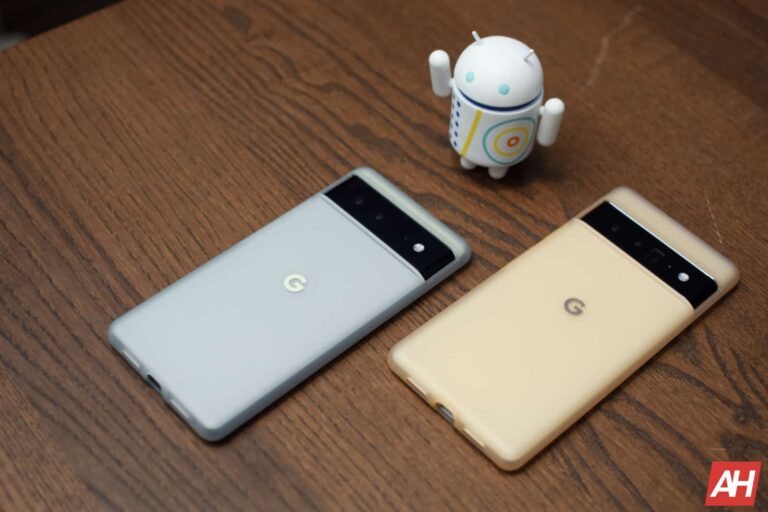
A new solution to the storage issue on the Pixel 6 and later devices has been seen on the horizon in the form of an OTA update. Google is working on rolling out a ‘Test’ update to the said device.
Shortly after the Android 14 update, some users of the Google Pixel 6 or later found their devices plagued by storage-related issues, ranging from random reboots to losing access to media storage. These problems basically rendered a lot of the devices completely unusable. The severity of the bug prompted Google to take notice.
After users reported the issues, Google soon responded informing that a solution to the storage issues was under development and they would soon roll out the update to the affected models.
The proposed solution is a ‘Test’ update
In response to the storage issues, Google initially suggested performing a complete factory data reset as a potential fix. However, this solution is far from ideal, as it’s time-consuming and requires you to back up all the files before going ahead.
Recently, Google revisited the problem and introduced a “possible” solution. Unfortunately, Google labels it as a ‘Test’ update. We can expect it to roll out over the next two weeks through Over-the-Air (OTA) distribution. Importantly, only devices that have opted to receive it will receive the download.
How do you get the update on your Pixel 6 or later device?
To access the OTA ‘Test’ Update and potentially resolve the storage issues, affected users will need to complete a Google Form. You should receive the ‘Test’ update within 24 hours of completing the form. Notably, some devices are stuck in a rebooting loop. In this case, you might need to reset your device using the buttons before you can proceed with the update. Google also suggests contacting Pixel Support for alternative solutions.
It’s worth noting that the storage access problem affects devices with multiple users. It includes guest profiles, restricted profiles, and child profiles. So you should avoid creating or logging into secondary profiles on your device until the storage issue is fixed.
In conclusion, this OTA update is a step toward addressing the problem without having to reset your device, which in itself wasn’t a permanent solution.