MediaTek has announced the Dimensity 9300, its answer to Qualcomm’s Snapdragon 8 Gen 3. The two chips have a lot in common, including TSMC’s 4nm fabrication process, the latest ARM CPU cores, and an extensive focus on AI (Artificial Intelligence) performance. However, they differ massively in one key area—CPU configuration. The new Dimensity processor doesn’t have any efficiency cores.
Dimensity 9300 is official with MediaTek’s “All Big Core” design
The Dimensity 9300 is an octa-core chipset with a 4+4 CPU configuration. It has four ARM Cortex-X4 prime cores clocked at up to 3.25GHz (only one at the maximum speed, with the other three operating at 2.85GHz) and four Cortex-A720 mid cores at 2.0GHz. According to MediaTek, its “groundbreaking All Big Core” design brings a 40 percent uplift in the peak performance over the previous generation.
Additionally, the company claims that power consumption has been reduced by 33 percent at the same performance. The Taiwanese firm has applied its industry-leading expertise to precisely control the CPU performance for superior power efficiency. However, the lack of efficiency cores may make it a power hog when running at its peak capacity. MediaTek may rely on some throttling to keep things in check.
The new Dimensity chip supports LPDDR5T RAM—the world’s fastest smartphone memory— at 9,600Mbps at UFS 4.0 storage with Multi-Circular Queue (MCQ). ARM’s Immortalis-G720 GPU is responsible for graphics duties, with MediaTek claiming a 46 percent improvement in hardware raytracing, 40 percent power savings, and 40 percent memory bandwidth savings.
“By combining the extreme 8-core CPU design with Its 2nd generation hardware raytracing engine, the Dimensity 9300 provides gamers with fast, full raytracing experiences at a smooth 60 FPS and is the world’s first mobile platform to achieve console-level global illumination effects,” MediaTek said. The company claims it to be the most efficient raytracing mobile GPU.
The Dimensity 9300 also boasts MediaTek’s next-gen APU that offers eight times faster transformer-based generative AI. It reduces power consumption by 45 percent, ensuring a fast and efficient on-device AI performance. The chip supports large language models (LLMs) with up to 33 billion parameters. The company has named Meta Llama 2, Baichuan 2, and Baidu AI LLM among the supported LLMs.
Support for 320MP cameras, WQHD displays, Wi-Fi 7, and more
MediaTek’s latest flagship SoC features the Imagiq 990 ISP that can handle up to 320MP cameras with 8K video recording. The company claims 100 percent pixel-level autofocus and dual-lossless zoom for a never-before-seen flagship camera experience. The Dimensity 9300 can also handle WQHD resolution displays at up to 180Hz refresh rate. It boasts dual active display support for foldable phones.
Other highlights include Wi-Fi 7, Sub-6GHz and mmWave 5G connectivity, three-microphone HDR audio recording, and enhanced security. Overall, the Dimensity 9300 appears roughly on par with Qualcomm’s Snapdragon 8 Gen 3, at least on paper. MediaTek says the first batch of phones powered by the chip will hit the market later this month, so it won’t be long before we get an idea of its real-life performance.
Linux Privilege Escalation flaw is one of the highly critical flaws as it can allow an attacker to gain elevated privileges on a system, potentially leading to full control.
Hackers typically exploit these vulnerabilities by crafting malicious code or commands that take advantage of the flaw, then execute them on a target system to gain higher privileges, enabling them to carry out malicious activities, such as;
Installing malware
Stealing data
Compromising the system’s integrity
Aqua Nautilus researchers recently intercepted the Kinsing’s cloud hack, and they found an unusual CVE-2023-4911 exploit, exposing the attacker’s actions.
Kinsing threat actor hijacks servers for crypto profits and extracts CSP credentials to expand their cloud attacks.
DocumentFREE Webinar
Ensure your Cyber Resiliance with the recent wave of cyber-attacks targeting the financial services sector. Almost 60% respondents not confident to recover fully from a cyber attack.
Linux Privilege Escalation Flaw
Kinsing usually automates crypto mining, but recent manual tests signal a shift.
They’re targeting CVE-2023-4911 vulnerabilities, which alarming experts, and that’s why researchers recommended users to watch out for their evolving tactics.
The PHPUnit flaw (CVE-2017-9841) gave Kinsing initial access. It used Perl script bc.pl to create a reverse shell on port 1337. Manual commands were carefully chosen after trial and error.
Looney Tunables (CVE-2023-4911) is a dangerous GNU C Library vulnerability, and Kinsing exploits it for root access. The flaw involves ‘GLIBC_TUNABLES,’ while the Kinsing uses an exploit from @bl4sty’s site, targeting this vulnerability.
The exploit is based on Qualys’ method and works on multiple architectures. Kinsing also deploys a PHP exploit and a de-obfuscated JavaScript for more attacks.
De-obfuscated PHP script (Source – Aquasec)
Apart from this, the Wesobase.js is a base64-encoded script, revealing a PHP-JavaScript mix that forms a web shell backdoor for unauthorized server access.
Here below, we have mentioned all the key features:-
Password Protection
File Management
Command Execution
Network Interactions
Encryption and Decryption
Server Information
User-Agent Handling
Character Set Conversion
Credentials and Data that Could be Exposed
Kinsing aims to gather CSP credentials, potentially exposing sensitive data, like AWS instance identity, which poses risks in cloud environments.
Here below, we have mentioned all the types of credentials and data that could be exposed:-
Temporary Security Credentials
IAM Role Credentials
Instance Identity Tokens
Recommendations
Here below, we have mentioned all the recommendations offered by the security researchers:-
Vulnerability Patching
Monitoring and Detection
Use robust security solutions
Always implement limited accessibility to guest users
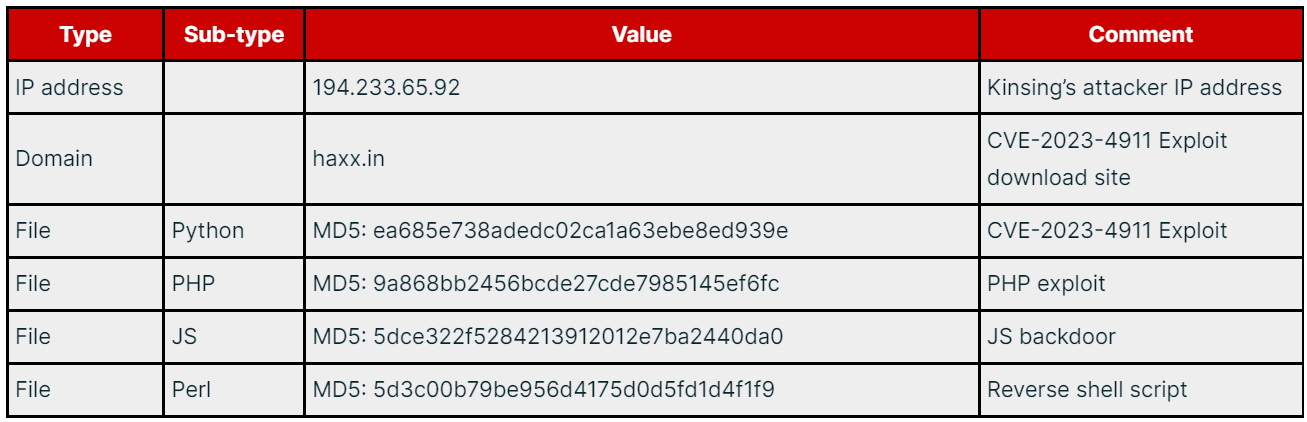
IOCs
IOCs (Source – Aquasec)
Protect yourself from vulnerabilities using Patch Manager Plus to patch over 850 third-party applications quickly. Try a free trial to ensure 100% security.
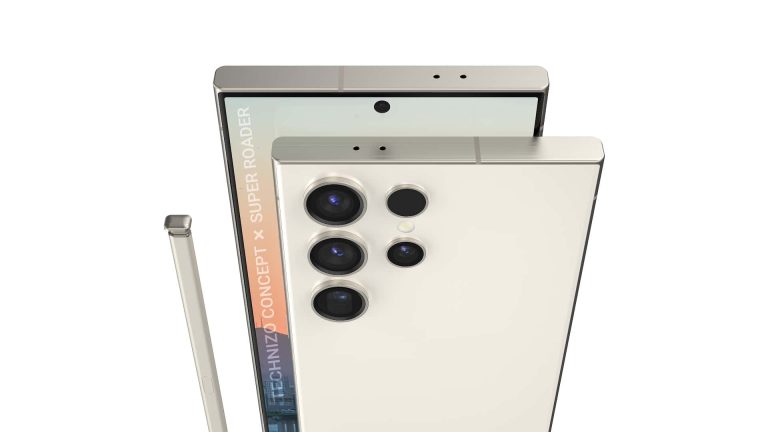
Earlier this year, Apple launched the iPhone 15 Pro and iPhone 15 Pro Max with titanium frames. It appears the move has made Samsung hurry to do the same. The Korean firm is now equipping the Galaxy S24 Ultra with a titanium frame too. The new flagship will arrive in January 2024.
Apple may have affected Samsung’s titanium plans for its flagships
Samsung has been researching the feasibility of incorporating titanium frames into its flagship smartphones for some time now. For at least two years, to be precise. The production complexities and the associated price increase mean the company didn’t hurry to make the change. It was already using aluminum, so a move to titanium wouldn’t have massively reduced the weight of the phones.
However, Apple’s decision to add titanium frames to the latest Pro iPhones seems to have affected Samsung’s plans. It is now all set to do the same with the Galaxy S24 Ultra next year. Noted industry insider Revegnus suggests that the Korean firm feared titanium iPhones would help Apple solidify its “premium image” in the smartphone market. It is following suit to keep up with its arch-rival.
According to the Korean media, Samsung is currently in the final stages of securing the desired yield rate for titanium frames. It is working with several firms in China and South Korea for the processing and production of the material. Since titanium has low heat and current conductivity, it is more difficult to cut and process. This increases the production cost. A low yield rate would further add to the cost.
Reports suggest a low yield of titanium frames for the Galaxy S24 Ultra will increase the frame cost by four to five times as compared to the Galaxy S23 Ultra. The latter features aluminum frames, which reportedly cost Samsung less than $20 each. It remains to be seen if the company passes this added cost to customers and makes the phone expensive or absorbs it to reduce the profit margin.
A titanium frame may not make the Galaxy S24 Ultra lighter
Apple managed to substantially cut the weight of its new iPhones by switching to titanium. The iPhone 15 Pro and iPhone 15 Pro Max are almost 20 grams lighter than their respective predecessors despite packing bigger batteries. However, this may not be the case for the Galaxy S24 Ultra.
This is because Apple switched from stainless steel, which is heavier than titanium. Samsung, on the other hand, is moving from aluminum, which is lighter. A titanium frame may make the Galaxy S24 Ultra stronger but certainly not lighter than its predecessor. That’s unless Samsung manages to cut the weight in other areas. The new Galaxy flagships are rumored to go official on January 17, 2024.
Instagram has long been under the scrutiny of authorities due to its apparent lack of child safety measures. However, this recently resulted in a lawsuit from over 33 states against Meta and Instagram for allegedly prioritizing profits. Now, in light of this lawsuit, another former Facebook employee, Arturo Bejar, has reportedly come forward to testify at a Senate Judiciary Committee hearing, once again highlighting the impact of Instagram on children’s mental health.
During his time as a consultant with Facebook in 2019, Bejar and his team developed a questionnaire named the BEEF (Bad Emotional Experience Feedback) to assess user experiences on Instagram. And although feedback forms are common in such companies, the results of these reports were alarming since over 20% of users under 16 reported feeling worse about themselves after viewing others’ posts, and 13% experienced “unwanted sexual advances” within seven days. Additionally, teenagers from various ethnic backgrounds reported instances of hostility based on race, religion, and identity.
Echoing the allegations of the lawsuit
Bejar’s statements coincide with the ongoing sensitive situation for Meta since the lawsuit also alleges that the company misled people about the potential risks of Instagram on children’s safety. And if Bejar’s statements are accurate, it would mean that Facebook was aware of the risks but chose to disregard them intentionally for financial gain and user engagement.
When talking about the statements, Senators Marsha Blackburn and Richard Blumenthal, members of the judiciary committee, highlighted the need for strict regulations aimed at protecting minors and stated, “From Arturo’s disclosures, we now know that Mark Zuckerberg, Adam Mosseri, and other Meta executives were personally warned that millions of teens face bullying, eating disorder material, illicit drugs, and sexual exploitation, often within minutes of opening the app.”
Meta’s response
In response to these allegations, Meta spokesperson Andy Stone countered the claims, stating, “It’s absurd to suggest we only started user perception surveys in 2019 or that there’s some sort of conflict between that work and prevalence metrics. Prevalence metrics and user perception surveys measure two different things.” Furthermore, he also argued that the BEEF survey was not specific and did not include a definition for unwanted sexual advances.
The holidays are coming, and there’s still plenty of time to plan out your gift giving. The thing is, a perfect gift is not always easy to find, which is why we’ll try to help out. We have a series of gift guide articles on the site listing various different suggestions in different categories and price points. In this article, we’ll list some of the best gifts under $100, well, some of the best ones we’ve been able to track down. All of these products are available via Amazon, and all the required information is included below. You’ll find both tech and non-tech gifts down there, along with plenty of information about each one.
Best tabletop charger: UGREEN 100W GaN charger
Charge all your devices via a single, compact accessory
Many of you probably have plenty of chargers around the house, different versions of them. The thing is, most of them are probably quite slow at this point, and you have new tech gadgets to think about. You need something more robust, and at the same time something that won’t take as much space. The UGREEN 100W GaN charger is an ideal choice. One thing to note, though, this is not your regular charging brick, not at all. This charger is meant to sit on a table, or something of the sort.
You do plug it into an AC outlet, and then plug it on a table. On the front side of this square charging box, there are four ports. Three of them are Type-C ports, while one is a Type-A port. Together, they can provide a max output of 100W. So, you can charge one device at 100W, or four devices at 25W each (max). It all depends on how many devices you’re charging, and how fast they allow you to charge them. This charger will automatically set the ideal charging for each of them, pushing as much as it can.
The UGREEN 100W GaN charger features dynamic temperature sensors, and an intelligent PWM chip that adjusts power outputs to safeguard your devices. It is compatible with a wide range of devices, of course, and it comes in a single color only, it combines gray with black colors. Should you choose to buy it, you’ll need to pay $99.99, which sits right below our $100 limit.
An outstanding, premium keyboard for typing & productivity
There are plenty of great keyboards available on the market, but some do shine brighter than others. The Logitech MX Keys Mini is a well-known offering, and for a good reason. This keyboard is very compact, and yet it screams quality. From its build to the typing experience and the features it offers. I personally own one, and have been using it for quite some time now. After spending around 8 hours a day typing, for months, I can vouch for it without a problem. Just make sure to use the included Wi-Fi dongle. Bluetooth can be quite wonky.
In any case, everyone needs a keyboard, and at $99.99, this one is not exactly the most affordable one out there. Still, it sits under our $100 limit here, and it is basically a high-end keyboard. The keys have a good amount of travel, though this is not a mechanical keyboard, not at all. So if you or the person you’re buying this gift for prefers mechanical keyboards, this one is not for them, that’s for sure. It’s more of a chiclet-style keyboard, but with more key travel than most such offerings.
The Logitech MX Keys Mini is compatible with a wide range of devices, including macOS, Windows, Android, iOS, and Linux. You can pair it up with up to three devices, and switch between them easily, via a press of a button. This keyboard can also be recharged via a Type-C port, and it can go on for up to 5 months with the backlighting turned off. It’ll offer considerably less use if you use the backlight, though, so keep that in mind. It comes in gray, white, and pink colors, and if you grab it from the link provided below, you’ll also get a free Adobe Creative Cloud Subscription. The Logitech MX Keys Mini costs $99.99.
Staying hydrated is very important. That is especially true for warmer regions, but everyone should keep their water intake high during the day. There are a number of proven benefits to doing that. We can often forget about that, however. That’s why it’s always good to have a water bottle nearby. Speaking of which, water bottles are usually made out of plastic, and we all know how that affects the environment. So, either reuse the same water bottle, or get something like the memobottle.
What is memobottle? Well, it’s a fancy flask, basically. It comes from a company called memobottle, and it comes in several different sizes and materials. You can get it in A5, A6, A7, and SLIM sizes. The AX basically represents the size of a piece of paper, so the A6 memobottle is the size of an A6 piece of paper. The model we’ve singled out here is the A6 in size, and it’s made out of stainless steel. It comes in both black and white colors. This particular model is priced at $55, but don’t worry, if you don’t like it, there are more options.
You can get the SLIM version for $60, the A7 size for $50, or the A5 size for $65. The A6 model can hold 17oz/500ml of liquids, the A5 36oz/1,080ml, the A7 8oz/250ml, and the SLIM 20oz/600ml of liquids. You, of course, don’t need to keep water in there, you can keep whatever you want. Just keep in mind that you will need to wash it regularly, as you’ll need to do with other bottles too. Speaking of which, with your purchase, you’ll also get a 6-month supply of cleaning tablets, it seems. Check out the Amazon listing below for more information.
Best power bank for clumsy people: Nitecore NB10000 GEN 2
A power bank that is not only very compact, but also rugged
Some smartphones offer outstanding battery life, others, not so much. The same goes for wireless earphones, and so on. If your devices don’t get you through the day on a single charge, or perhaps you travel a lot and don’t have the time to think about charging… well, having a power bank is not a bad idea at all. There are plenty of options in the market, but some are better than others. The one we’ll talk about here is somewhat special for two reasons, its size and design.
The device in question is called the Nitecore NB10000 Gern 2. In other words, it’s the second-gen product of Nitecore’s 10,000mAh power bank. The company refers to this power bank as “ultra-slim”, which is kind of true considering how much battery capacity you’re getting. First and foremost, this gadget is TSA-approved. You can easily carry it with you on a plane, no worries. It is also around 40% lighter than your typical power banks, says the company. Despite that, however, it’s very rugged thanks to a Carbon Fiber Polymer build. It is also IPX5 rated, so you don’t have to worry about some rain or snow.
You can charge various different devices with this gadget, without a problem. There are two ports on it, a Type-C and a Type-A port. The Type-A port has an output of 18W, while the Type-C port has an output of 20W. That Type-C port also has an input of 18W, as you’ll use it for charging. If you decide to get this, you’ll also get a mini multi-tool for your keychain. That multitool has a built-in carabiner, magnet, and serves as a stand, bottle opener, and has a tripod hole. This entire package will set you back $59.90.
A magnetic box for storing your compact essentials
Some of us simply love having unique gadgets around the office. There are various non-tech products available out there, and the moderco REVOV tray box definitely belongs in that category. What is this exactly? Well, it’s essentially a compact storage box, but with a twist, literally. This box swivels around to open, and then swivels back to close. Everything is regulated via magnets, and from what we’ve seen in video content, it’s quite satisfying to open and close.
The top lid is magnetized, and the magnets are really well deployed here. The tray comes with an aluminum bottom part, and a lower center of gravity due to the swiveling action. It is also slip-resistant when sitting on a table. The top (Tray) is designed with 100% beech wood, and the diameter of the tray is 7.8 x 5.12 x 3.07 inches. What’s this for? Well, you can place all sorts of products here, and there are several different compartments that you can utilize, as shown in the image above.
At the top, on the lid, you have three different compartments. One is ideal for a pair of AirPods, or some other truly wireless earbuds. The one next to that fits something the size of a larger USB stick, while next to that you have plenty of space for a small sticky notepad, card keys, or something of the sort. The bottom section seems to be wide open, and can hold some larger items, such as a smartwatch and a wallet in combination. Those are just some examples. It is an ideal gift for someone’s office, or perhaps bedroom or living room. It costs $69, if you’re interested, and comes in two colors, black and white.
Here are a couple of more products in this price bracket that you may like…
SanDisk 1TB Extreme Portable SSD
If you know someone who’s in need of a portable SSD, SanDisk has some great ones. The one we’ve highlighted here is a 1TB one, and it’s immensely popular, for a good reason. It has a recognizable design eve, and it’s quite fast. It offers up to 1,050MB/s data transmission via its Type-C port. USB 3.2 Gen 2 is used here, by the way, and the drive comes in three different colors you can choose from. It is available in Black, Monterey, and Sky Blue colors. This particular model costs $79.99 (down from $99.99), but you can get 500GB, 2TB and 4TB models too.
If your loved one is spending a lot of time on a computer, and you’ve noticed that they could use a mouse upgrade… well, the Logitech MX Master 3S is a great option. This Logitech product is priced at $89.28, and it’s one of the best mice you can get on the market. It’s ergonomic, has a very capable vertical wheel on the left, and has great build quality. It also has an insanely high DPI, if needed. This mouse is also quite bulky, in a good way. Do note that it may not be suited for small hands, though.
A while back, Sony reintroduced its very first PlayStation, but in a much, much smaller form factor, with pre-installed games. It comes with 20 preloaded games, including Tekken 3, Final Fantasy VII, Jumping Flash, and more. The console itself is around 45% smaller than the original, and two wired controllers are also included in the package. The package also comes with an HDMI cable, and a virtual memory card. The console comes in one color, the original one, gray. The price tag is set at $99.
We’re staying in the gaming sphere with the next product. It’s the Razer Kishi game controller/gamepad. Versions for both Android and iPhone are available, and both are listed below. This is one of the best game controllers for your smartphone that you can get. It has a Type-C charging port, and great build quality on top of that. Razer also says you won’t get input lag here. The Razer Kishi costs $59.95 for Android, and $65 for iPhones.
Qualcomm may have just unveiled the Snapdragon 8 Gen 3 but rumors about the next-gen chip have already started pouring in. Based on early reports, the Snapdragon 8 Gen 4 will bring several notable upgrades. It will jump from the 4nm to 3nm fabrication process and feature the chipmaker’s first custom Oryon CPU cores. This should mean massive improvements in the CPU performance. Its Adreno 830 GPU may deliver an impressive performance too.
Benchmark hints at a massive GPU boost for the Snapdragon 8 Gen 4
According to X tipster Revegnus, Qualcomm’s 2024 flagship smartphone chipset achieved a score of 7,200 points in an early 3DMark Wild Life Extreme benchmark test. The benchmark run pushes devices to their limits to test the efficiency and thermal capabilities of their chipsets during sustained workloads. The tipster added that the Snapdragon 8 Gen 4 performed about ten percent better than the Apple M2’s GPU in the same test.
The source of the information didn’t share a screenshot or any other proof backing their claim. However, the alleged score of the new Qualcomm chip suggests the comparison was made with the Apple M2 featuring an 8-core GPU. The Apple silicon also comes in a 10-core GPU variant, which expectedly offers better GPU performance. Nonetheless, if these results are accurate, things are looking good for the Snapdragon 8 Gen 4’s Adreno 830 GPU.
That said, the chip is still a year away. This is the first notable information about its GPU performance. As Wccftech points out, the benchmark run was likely carried out using engineering samples of the chip in a controlled environment. With no compact mobile enclosure and power limiters, the chip flexed its muscles without any constrain. We will have to wait and see if it delivers the same real-life performance inside Android flagships in 2025.
The chip’s early CPU scores are impressive too
The new report also gives us an idea of the Snapdragon 8 Gen 4’s CPU performance. The chip reportedly achieved a score of more than 2,000 in single-core tests and 8,600 in multi-core tests on Geekbench v5. On Geekbench v6, the scores topped 2,800 and 10,000, respectively. Both results are impressive, to say the least.
However, like with the GPU scores, the CPU scores may not be a true measure of the upcoming Qualcomm processor’s real-life performance. The Snapdragon 8 Gen 4 still has to undergo several rounds of optimizations and developments. Watch out for more reports in the coming months as the company works on improving it in all areas. The first batch of Android phones with the Snapdragon 8 Gen 3 will hit the market soon.
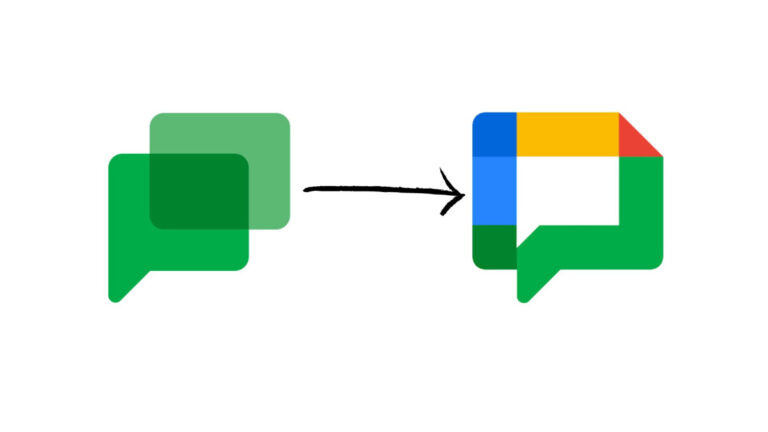
Surprisingly, the Google Chat logo retained its original design despite speculations suggesting it would align with the app’s overall redesign. However, recent developments indicate that the logo is finally poised to join the ranks of other four-color icons representing various Google apps.
In May, Google showcased the new logo design, but a recent patent filing with the US Patent and Trademark Office revealed a slightly modified version (via 9to5Google). Although the patent doesn’t explicitly mention Google Chat, it references “downloadable instant messaging software.”
Describing the logo, Google states in the patent filing that “the mark consists of a hollow multi-colored square “speech bubble” with three rounded corners and a flattened upper right corner. The flattened upper right corner is in red. The left and upper sides are formed by a blue line followed by a dark blue square with a rounded corner at the top right. The right side and bottom are formed by green rounded lines followed by a dark green square at the bottom right. There is a green indentation at the bottom of the square. There is a yellow line at the top of the rectangle.”
The proposed new design aligns with the four-color scheme, seen in icons for Gmail, Drive, Meet, Maps, and others. Currently, Google Chat’s logo features overlapping speech bubbles, reminiscent of its predecessor, Hangouts.
Despite the redesign, introduction of AI features, and the forthcoming logo update, Google Chat struggles to secure a top spot among messaging apps worldwide. Statistics reveal that only 13% of messaging app users in the US opt for Google Chat. WhatsApp remains the global leader with over 2 billion monthly users, followed by the Chinese WeChat and Facebook Messenger.
The fake Ledger Live app on the Microsoft Store deceived users into downloading malware, which stole their Bitcoin and Ethereum funds.
Hackread.com has been actively following the cryptocurrency space as it has lately been a prominent target of scams and cyberattacks. Hackers are eyeing the crypto industry to steal valuable assets and even NFTs.
For this purpose, crooks devise clever tactics to lure unsuspecting users into giving away their funds and tokens. One such scam was recently reported by a pseudonymous on-chain detective and crypto sleuth, ZachXBT.
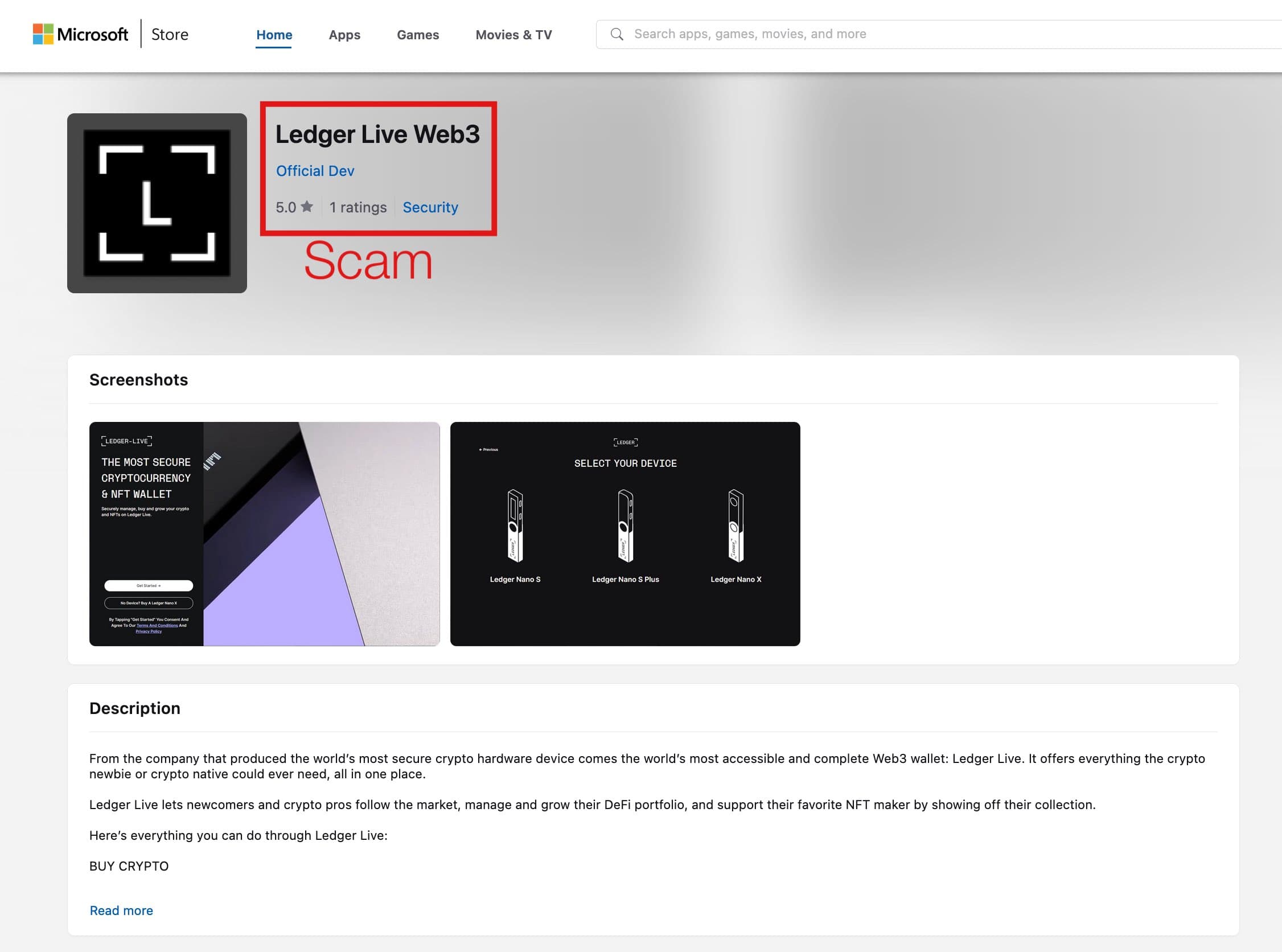
According to ZachXBT, a fake Ledger app was circulating on the Microsoft App Store. This fraudulent app masqueraded as the official Ledger Live app and tricked users into unwittingly downloading and installing malware stealing victims’ crypto funds and data.
Fake Ledger app on Microsoft Store (Screenshot: ZachXBT)
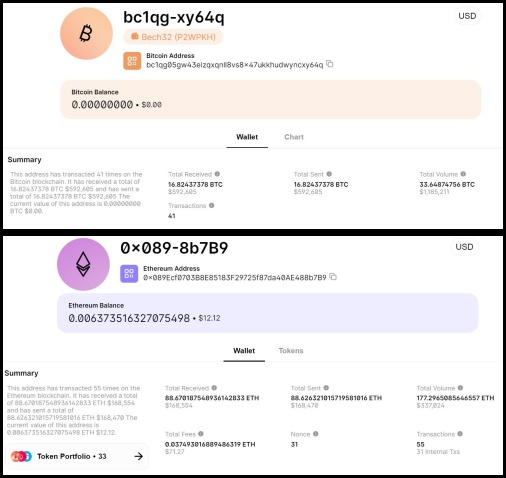
ZachXBT’s analysis stressed the sophisticated nature of this scam, emphasizing the critical need for end-users to stay alert in protecting their cryptocurrency wallets. As of November 4th, scammers successfully collected roughly $588,000 in Bitcoin by hijacking users’ crypto wallets.
In a tweet, ZachXBT cautioned crypto users and investors with the following warning: “Community Alert: There is currently a fake @Ledger Live app on the official @Microsoft App Store which was resulted in 16.8+ BTC ($588K) stolen.”
However, on November 5th, ZachXBT received updated information from a victim, indicating a loss of $180,000 worth of ETH due to the fake Ledger app. This significantly increased the total lost payments to over $768,000.
Stolen funds (Screenshot: Hackread.com)
It is worth noting that in November 2023, a fake Ledger Live app was uploaded to the official Microsoft App Store that looked exactly like the original Ledger Live app. For your information, it is a popular software wallet designed to help users manage their crypto assets.
However, those who downloaded the fake version of this app ended up installing malware capable of stealing cryptocurrency by intercepting users’ recovery phrases. The attackers specifically targeted users who store their cryptocurrency in the Ledger hardware wallets to profit by stealing their assets.
The attackers designed the fake app quite cunningly, replicating the look and features of the authentic app, including identical logos and branding materials. They went as far as creating a fraudulent Ledger device pin verification process. This tricky similarity between the original and fake apps makes it challenging for users to differentiate between them.
Nevertheless, Microsoft promptly detected and removed the fake Ledge Live app from their store. The company is investigating how the fake Ledger app bypassed its app review process, however, the damage to users is already done.
Remember that apps like Ledger, Trezor, or another hardware wallet will never ask users to enter their recovery phrases into their computers or phones. You should always enter the phrase in the hardware wallet to recover it.
Proxy services let users rent IP addresses and provide online anonymity by disguising their traffic as regular IP addresses while hiding the true source or origin.
Bitsight researchers recently found a new malware sample distributed by the following two loaders:-
PrivateLoader
Amadey Loader
It installs a proxy bot called “Socks5Systemz,” on infected systems, turning them into proxies for others.
DocumentFREE Webinar
Ensure your Cyber Resiliance with the recent wave of cyber-attacks targeting the financial services sector. Almost 60% respondents not confident to recover fully from a cyber attack.
Besides this, threat actors often use all these loaders to build botnets, and not only that, it’s been reported that the Socks5Systemz breach has led to a hack of over 10,000 systems globally.
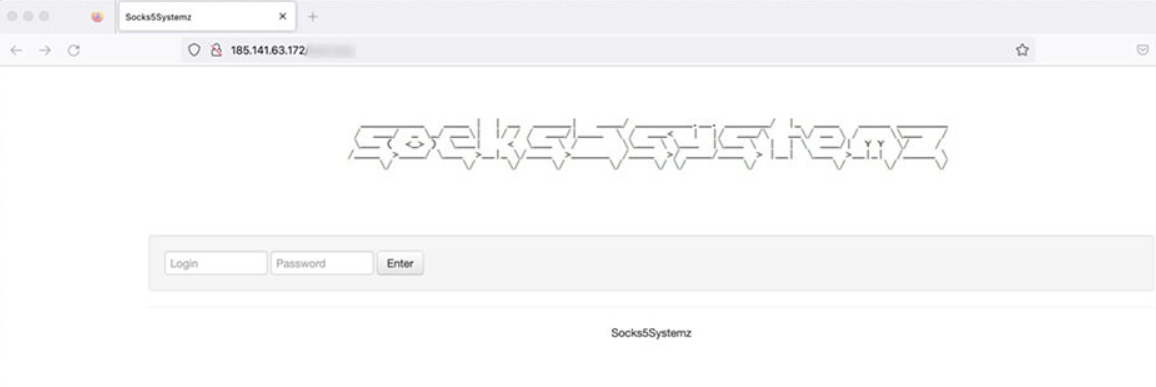
Socks5Systemz Login page (Source – Bitsight)
10,000+ SystemsHacked
Samples from PrivateLoader and Amadey drop and run “previewer.exe” which handles persistence and injects the proxy bot into memory with three command line options, reads the report.
Here below, we have mentioned those three command line options:-
/chk: Creates an empty file named “test” in the current directory and exit
-i: Install loader
-s: Start loader
The “install” option sets up persistence by copying the loader to C:\ProgramData\ContentDWSvc\ContentDWSvc.exe and creating a Windows service named ContentDWSvc.
If this fails, it replaces GoogleUpdate.exe, and the loader then launches the proxy bot by loading and decrypting a DLL file in memory.
The proxy bot payload is a ‘300 KB’ 32-bit DLL, which starts by saving the filename, setting system architecture, and launching the main function in a new thread.
It generates a client ID from the Windows directory creation date and stores the infection time in C:\ProgramData\ts.dat.
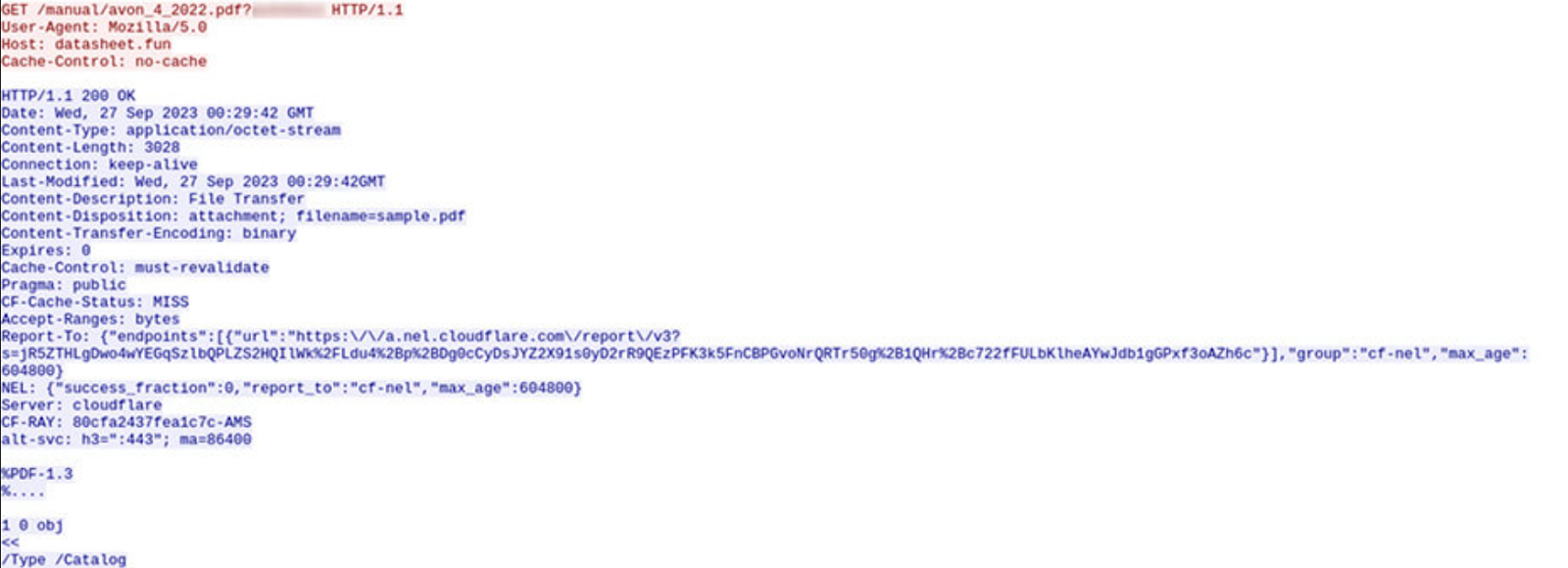
Besides this, from the following address, it downloads a PDF and saves it in the “C:\ProgramData” folder:-
The downloaded PDF seems unremarkable, likely serving as a telemetry tool. The bot then attempts to locate an online C2 server by computing a domain with a generation algorithm and using DNS servers for resolution.
At the moment, the following commands are supported by the bot:-
idle: Do nothing
connect: Connect to a back-connect server
disconnect: Disconnect from the backconnect server
updips: Update IP addresses allowed to send traffic
upduris: This command seems not to be fully implemented
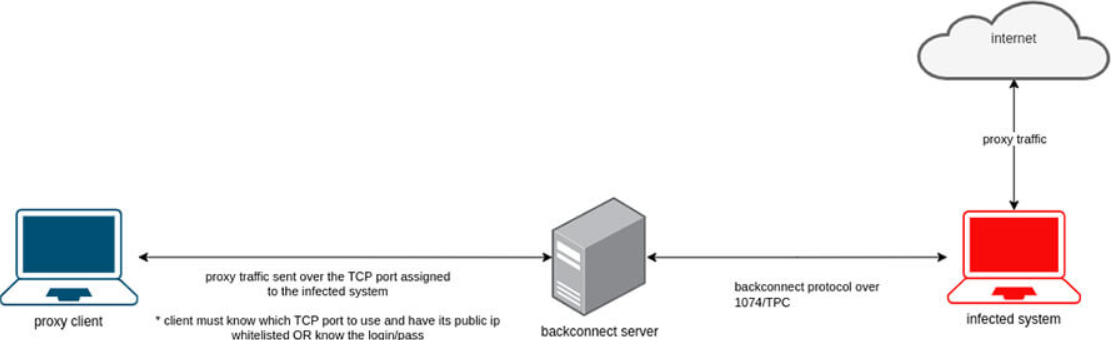
The crucial “connect” command instructs the bot to create a session with a backconnect server on port 1074/TCP. It registers the bot, making it available to forward traffic for clients.
Bot receiving a connect command (Source – Bitsight)
The bot, on port 1074/TCP, gets a unique server port for receiving client traffic. Clients must know the backconnect server’s IP the bot’s assigned TCP port, and have whitelisted IPs or login credentials to use the proxy.
Overview of how the clients can use the proxies (Source – Bitsight)
Infrastructure
Here below, we have mentioned all the servers that made up the infrastructure of this botnet network:-
Proxy bot C2 servers
Backconnect servers
Custom DNS servers (hardcoded in the proxy bot samples)
The server used by the bots to get the online C2 server address
A proxy checker application
Top Affected Countries
Here below, we have mentioned the top affected countries:-
Protect yourself from vulnerabilities using Patch Manager Plus to patch over 850 third-party applications quickly. Try a free trial to ensure 100% security.
The OnePlus 12 charging speed has been confirmed thanks to a Chinese regulator. This information comes from the 3C authority, which confirms that the OnePlus 12 will support 100W wired charging.
The OnePlus 12 charging speed has been confirmed was ahead of launch
That is basically the same charging speed the OnePlus 11 offers. Do note that the OnePlus 11 supports 80W wired charging in the US, but 100W charging elsewhere. Needless to say, 100W charging is immensely fast.
It can fully recharge a phone in 25 minutes, while it reaches the 50% mark in only 10 minutes. Chances are that we’ll get similar numbers with the OnePlus 12, though the phone will have a larger battery based on rumors.
50W wireless charging is also expected
The phone will ship with a charging brick. It will include an 11V/9.1A charger, to be exact, the same as the OnePlus 12. What the 3C authority did not confirm, is wireless charging. However, according to trusted sources, the phone will support 50W wireless charging too.
As a reminder, the OnePlus 11 does not support wireless charging at all. OnePlus phones did support 50W wireless charging in the past, so it seems like OnePlus is bringing it back with the OnePlus 12.
The phone will include a larger battery pack than its predecessor
The device is tipped to utilize a 5,400mAh battery, and a 6.82-inch QHD+ OLED display with a 120Hz refresh rate. The phone will include a Q1 display from BOE, which was announced recently.
Qualcomm’s Snapdragon 8 Gen 3 processor will fuel the phone. You’ll also get LPDDR5X RAM and UFS 4.0 flash storage, plenty of both. Android 14 will come pre-installed on the phone, along with OnePlus’ OxygenOS skin.
It will also be more expensive than the OnePlus 11
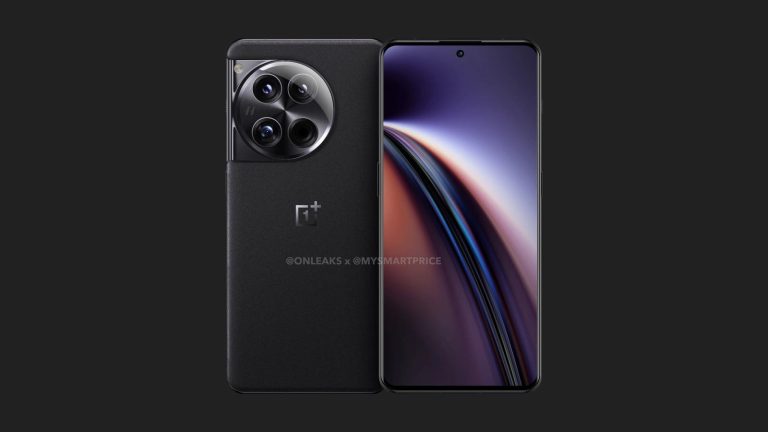
The OnePlus 12 will look rather similar to its predecessor, at least based on CAD-based renders. The price tag is still a mystery, but the phone is expected to cost more than its predecessor.
It will come with an upgraded camera setup, larger battery, improved display, and fast wireless charging, so the price change is not that shocking. Let’s just hope it will be a small price bump only.